A debate about which language is better suited for Datascience, R or Python, can set off diehard fans of these languages into a tizzy. This post tries to look at some of the different similarities and similar differences between these languages. To a large extent the ease or difficulty in learning R or Python is subjective. I have heard that R has a steeper learning curve than Python and also vice versa. This probably depends on the degree of familiarity with the languuge To a large extent both R an Python do the same thing in just slightly different ways and syntaxes. The ease or the difficulty in the R/Python construct’s largely is in the ‘eyes of the beholder’ nay, programmer’ we could say. I include my own experience with the languages below.
Check out my compact and minimal book “Practical Machine Learning with R and Python:Third edition- Machine Learning in stereo” available in Amazon in paperback($12.99) and kindle($8.99) versions. My book includes implementations of key ML algorithms and associated measures and metrics. The book is ideal for anybody who is familiar with the concepts and would like a quick reference to the different ML algorithms that can be applied to problems and how to select the best model. Pick your copy today!!
1. R data types
R has the following data types
- Character
- Integer
- Numeric
- Logical
- Complex
- Raw
Python has several data types
- Int
- float
- Long
- Complex and so on
2. R Vector vs Python List
A common data type in R is the vector. Python has a similar data type, the list
a<-c(4,5,1,3,4,5)
print(a[3])
## [1] 1
print(a[3:4])
## [1] 1 3
print(class(a))
## [1] "numeric"
print(length(a))
## [1] 6
a=[4,5,1,3,4,5]
print(a[2])
print(a[2:5])
print(type(a))
print(len(a))
## 1
## [1, 3, 4]
##
## 6
2a. Other data types – Python
Python also has certain other data types like the tuple, dictionary etc as shown below. R does not have as many of the data types, nevertheless we can do everything that Python does in R
b = (4,5,7,8)
print(b)
c={'name':'Ganesh','age':54,'Work':'Professional'}
print(c)
## (4, 5, 7, 8)
## {'name': 'Ganesh', 'age': 54, 'Work': 'Professional'}
2.Type of Variable
To know the type of the variable in R we use ‘class’, In Python the corresponding command is ‘type’
a<-c(4,5,1,3,4,5)
print(class(a))
## [1] "numeric"
a=[4,5,1,3,4,5]
print(type(a))
b=(4,3,"the",2)
print(type(b))
##
##
3. Length
To know length in R, use length()
a<-c(4,5,1,3,4,5)
print(length(a))
## [1] 6
To know the length of a list,tuple or dict we can use len()
a=[4,5,1,3,4,5]
print(len(a))
b = (4,5,7,8)
print(len(b))
## 6
## 4
4. Accessing help
To access help in R we use the ‘?’ or the ‘help’ function
Help in python on any topic involves
5. Subsetting
The key difference between R and Python with regards to subsetting is that in R the index starts at 1. In Python it starts at 0, much like C,C++ or Java To subset a vector in R we use
a<-c(4,5,1,3,4,8,12,18,1)
print(a[3])
## [1] 1
print(a[3:6])
## [1] 1 3 4 8
Python also uses indices. The difference in Python is that the index starts from 0/
a=[4,5,1,3,4,8,12,18,1]
print(a[3])
print(a[3:6])
## 3
## [3, 4, 8]
6. Operations on vectors in R and operation on lists in Python
In R we can do many operations on vectors for e.g. element by element addition, subtraction, exponentation,product etc. as show
a<- c(5,2,3,1,7)
b<- c(1,5,4,6,8)
print(a+b)
## [1] 6 7 7 7 15
print(a-b)
## [1] 4 -3 -1 -5 -1
print(a*b)
## [1] 5 10 12 6 56
print(a^2)
## [1] 25 4 9 1 49
In Python to do this on lists we need to use the ‘map’ and the ‘lambda’ function as follows
a =[5,2,3,1,7]
b =[1,5,4,6,8]
print(list(map(lambda x,y: x+y,a,b)))
print(list(map(lambda x,y: x-y,a,b)))
print(list(map(lambda x,y: x*y,a,b)))
print(list(map(lambda x: x**2,a)))
## [6, 7, 7, 7, 15]
## [4, -3, -1, -5, -1]
## [5, 10, 12, 6, 56]
## [25, 4, 9, 1, 49]
However if we create ndarrays from lists then we can do the element wise addition,subtraction,product, etc. like R. Numpy is really a powerful module with many, many functions for matrix manipulations
import numpy as np
a =[5,2,3,1,7]
b =[1,5,4,6,8]
a=np.array(a)
b=np.array(b)
print(a+b)
print(a-b)
print(a*b)
print(a**2)
## [ 6  7  7  7 15]
## [ 4 -3 -1 -5 -1]
## [ 5 10 12  6 56]
## [25  4  9  1 49]
7. Getting the index of element
To determine the index of an element which satisifies a specific logical condition in R use ‘which’. In the code below the index of element which is equal to 1 is 4
a<- c(5,2,3,1,7)
print(which(a == 1))
## [1] 4
In Python array we can use np.where to get the same effect. The index will be 3 as the index starts from 0
import numpy as np
a =[5,2,3,1,7]
a=np.array(a)
print(np.where(a==1))
## (array([3], dtype=int64),)
8. Data frames
R, by default comes with a set of in-built datasets. There are some datasets which come with the SkiKit- Learn package
We can use the in-built data sets that come with Scikit package
import sklearn as sklearn
import pandas as pd
from sklearn import datasets
data = datasets.load_iris()
iris = pd.DataFrame(data.data, columns=data.feature_names)
9. Working with dataframes
With R you can work with dataframes directly. For more complex dataframe operations in R there are convenient packages like dplyr, reshape2 etc. For Python we need to use the Pandas package. Pandas is quite comprehensive in the list of things we can do with data frames The most common operations on a dataframe are
- Check the size of the dataframe
- Take a look at the top 5 or bottom 5 rows of dataframe
- Check the content of the dataframe
a.Size
In R use dim()
dim(iris)
## [1] 150 5
For Python use .shape
import sklearn as sklearn
import pandas as pd
from sklearn import datasets
data = datasets.load_iris()
iris = pd.DataFrame(data.data, columns=data.feature_names)
iris.shape
b. Top & bottom 5 rows of dataframe
To know the top and bottom rows of a data frame we use head() & tail as shown below for R and Python
head(iris,5)
##   Sepal.Length Sepal.Width Petal.Length Petal.Width Species
## 1          5.1         3.5          1.4         0.2  setosa
## 2          4.9         3.0          1.4         0.2  setosa
## 3          4.7         3.2          1.3         0.2  setosa
## 4          4.6         3.1          1.5         0.2  setosa
## 5          5.0         3.6          1.4         0.2  setosa
tail(iris,5)
##     Sepal.Length Sepal.Width Petal.Length Petal.Width   Species
## 146          6.7         3.0          5.2         2.3 virginica
## 147          6.3         2.5          5.0         1.9 virginica
## 148          6.5         3.0          5.2         2.0 virginica
## 149          6.2         3.4          5.4         2.3 virginica
## 150          5.9         3.0          5.1         1.8 virginica
import sklearn as sklearn
import pandas as pd
from sklearn import datasets
data = datasets.load_iris()
iris = pd.DataFrame(data.data, columns=data.feature_names)
print(iris.head(5))
print(iris.tail(5))
##    sepal length (cm)  sepal width (cm)  petal length (cm)  petal width (cm)
## 0                5.1               3.5                1.4               0.2
## 1                4.9               3.0                1.4               0.2
## 2                4.7               3.2                1.3               0.2
## 3                4.6               3.1                1.5               0.2
## 4                5.0               3.6                1.4               0.2
##      sepal length (cm)  sepal width (cm)  petal length (cm)  petal width (cm)
## 145                6.7               3.0                5.2               2.3
## 146                6.3               2.5                5.0               1.9
## 147                6.5               3.0                5.2               2.0
## 148                6.2               3.4                5.4               2.3
## 149                5.9               3.0                5.1               1.8
c. Check the content of the dataframe
summary(iris)
##   Sepal.Length    Sepal.Width     Petal.Length    Petal.Width
##  Min.   :4.300   Min.   :2.000   Min.   :1.000   Min.   :0.100
##  1st Qu.:5.100   1st Qu.:2.800   1st Qu.:1.600   1st Qu.:0.300
##  Median :5.800   Median :3.000   Median :4.350   Median :1.300
##  Mean   :5.843   Mean   :3.057   Mean   :3.758   Mean   :1.199
##  3rd Qu.:6.400   3rd Qu.:3.300   3rd Qu.:5.100   3rd Qu.:1.800
##  Max.   :7.900   Max.   :4.400   Max.   :6.900   Max.   :2.500
##        Species
##  setosa    :50
##  versicolor:50
##  virginica :50
##
##
##
str(iris)
## 'data.frame':    150 obs. of  5 variables:
##  $ Sepal.Length: num  5.1 4.9 4.7 4.6 5 5.4 4.6 5 4.4 4.9 ...
##  $ Sepal.Width : num  3.5 3 3.2 3.1 3.6 3.9 3.4 3.4 2.9 3.1 ...
##  $ Petal.Length: num  1.4 1.4 1.3 1.5 1.4 1.7 1.4 1.5 1.4 1.5 ...
##  $ Petal.Width : num  0.2 0.2 0.2 0.2 0.2 0.4 0.3 0.2 0.2 0.1 ...
##  $ Species     : Factor w/ 3 levels "setosa","versicolor",..: 1 1 1 1 1 1 1 1 1 1 ...
import sklearn as sklearn
import pandas as pd
from sklearn import datasets
data = datasets.load_iris()
iris = pd.DataFrame(data.data, columns=data.feature_names)
print(iris.info())
##
## RangeIndex: 150 entries, 0 to 149
## Data columns (total 4 columns):
## sepal length (cm)    150 non-null float64
## sepal width (cm)     150 non-null float64
## petal length (cm)    150 non-null float64
## petal width (cm)     150 non-null float64
## dtypes: float64(4)
## memory usage: 4.8 KB
## None
d. Check column names
names(iris)
## [1] "Sepal.Length" "Sepal.Width"  "Petal.Length" "Petal.Width"
## [5] "Species"
colnames(iris)
## [1] "Sepal.Length" "Sepal.Width"  "Petal.Length" "Petal.Width"
## [5] "Species"
import sklearn as sklearn
import pandas as pd
from sklearn import datasets
data = datasets.load_iris()
iris = pd.DataFrame(data.data, columns=data.feature_names)
print(iris.columns)
## Index(['sepal length (cm)', 'sepal width (cm)', 'petal length (cm)',
##        'petal width (cm)'],
##       dtype='object')
e. Rename columns
In R we can assign a vector to column names
colnames(iris) <- c("lengthOfSepal","widthOfSepal","lengthOfPetal","widthOfPetal","Species")
colnames(iris)
## [1] "lengthOfSepal" "widthOfSepal"  "lengthOfPetal" "widthOfPetal"
## [5] "Species"
In Python we can assign a list to s.columns
import sklearn as sklearn
import pandas as pd
from sklearn import datasets
data = datasets.load_iris()
iris = pd.DataFrame(data.data, columns=data.feature_names)
iris.columns = ["lengthOfSepal","widthOfSepal","lengthOfPetal","widthOfPetal"]
print(iris.columns)
## Index(['lengthOfSepal', 'widthOfSepal', 'lengthOfPetal', 'widthOfPetal'], dtype='object')
f.Details of dataframe
import sklearn as sklearn
import pandas as pd
from sklearn import datasets
data = datasets.load_iris()
iris = pd.DataFrame(data.data, columns=data.feature_names)
print(iris.info())
##
## RangeIndex: 150 entries, 0 to 149
## Data columns (total 4 columns):
## sepal length (cm)    150 non-null float64
## sepal width (cm)     150 non-null float64
## petal length (cm)    150 non-null float64
## petal width (cm)     150 non-null float64
## dtypes: float64(4)
## memory usage: 4.8 KB
## None
g. Subsetting dataframes
iris[3,4]
## [1] 0.2
iris[2:5,1:3]
##   lengthOfSepal widthOfSepal lengthOfPetal
## 2           4.9          3.0           1.4
## 3           4.7          3.2           1.3
## 4           4.6          3.1           1.5
## 5           5.0          3.6           1.4
iris[2:5,]
##   lengthOfSepal widthOfSepal lengthOfPetal widthOfPetal Species
## 2           4.9          3.0           1.4          0.2  setosa
## 3           4.7          3.2           1.3          0.2  setosa
## 4           4.6          3.1           1.5          0.2  setosa
## 5           5.0          3.6           1.4          0.2  setosa
iris$Sepal.Length[2:5]
## NULL
import sklearn as sklearn
import pandas as pd
from sklearn import datasets
data = datasets.load_iris()
iris = pd.DataFrame(data.data, columns=data.feature_names)
print(iris.iloc[3])
print(iris[:5])
print(iris['sepal length (cm)'][2:6])
print(iris[['sepal length (cm)','sepal width (cm)']][4:7])
## sepal length (cm)    4.6
## sepal width (cm)     3.1
## petal length (cm)    1.5
## petal width (cm)     0.2
## Name: 3, dtype: float64
##    sepal length (cm)  sepal width (cm)  petal length (cm)  petal width (cm)
## 0                5.1               3.5                1.4               0.2
## 1                4.9               3.0                1.4               0.2
## 2                4.7               3.2                1.3               0.2
## 3                4.6               3.1                1.5               0.2
## 4                5.0               3.6                1.4               0.2
## 2    4.7
## 3    4.6
## 4    5.0
## 5    5.4
## Name: sepal length (cm), dtype: float64
##    sepal length (cm)  sepal width (cm)
## 4                5.0               3.6
## 5                5.4               3.9
## 6                4.6               3.4
h. Computing Mean, Standard deviation
mean(iris$lengthOfSepal)
## [1] 5.843333
sd(iris$widthOfSepal)
## [1] 0.4358663
import sklearn as sklearn
import pandas as pd
from sklearn import datasets
data = datasets.load_iris()
iris = pd.DataFrame(data.data, columns=data.feature_names)
print(iris['sepal length (cm)'].mean())
print(iris['sepal width (cm)'].std())
## 5.843333333333335
## 0.4335943113621737
i. Boxplot
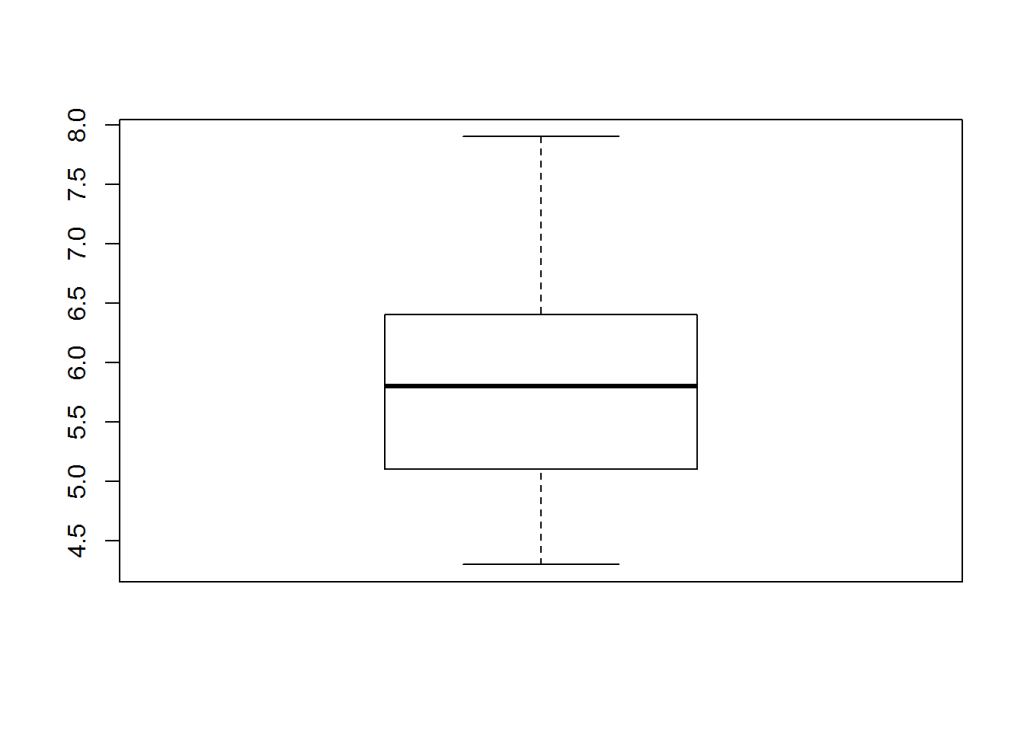
Boxplot can be produced in R using baseplot
boxplot(iris$lengthOfSepal)
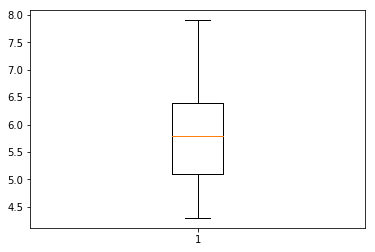
Matplotlib is a popular package in Python for plots
import sklearn as sklearn
import pandas as pd
import matplotlib.pyplot as plt
from sklearn import datasets
data = datasets.load_iris()
iris = pd.DataFrame(data.data, columns=data.feature_names)
img=plt.boxplot(iris['sepal length (cm)'])

k. Read from csv file
tendulkar= read.csv("tendulkar.csv",stringsAsFactors = FALSE,na.strings=c(NA,"-"))
dim(tendulkar)
## [1] 347 13
names(tendulkar)
##  [1] "X"          "Runs"       "Mins"       "BF"         "X4s"
##  [6] "X6s"        "SR"         "Pos"        "Dismissal"  "Inns"
## [11] "Opposition" "Ground"     "Start.Date"
Use pandas.read_csv() for Python
import pandas as pd
tendulkar= pd.read_csv("tendulkar.csv",na_values=["-"])
print(tendulkar.shape)
print(tendulkar.columns)
## (347, 13)
## Index(['Unnamed: 0', 'Runs', 'Mins', 'BF', '4s', '6s', 'SR', 'Pos',
##        'Dismissal', 'Inns', 'Opposition', 'Ground', 'Start Date'],
##       dtype='object')
l. Clean the dataframe in R and Python.
The following steps are done for R and Python
1.Remove rows with ‘DNB’
2.Remove rows with ‘TDNB’
3.Remove rows with absent
4.Remove the “*” indicating not out
5.Remove incomplete rows with NA for R or NaN in Python
6.Do a scatter plot
a <- tendulkar$Runs != "DNB"
tendulkar <- tendulkar[a,]
dim(tendulkar)
## [1] 330 13
b <- tendulkar$Runs != "TDNB"
tendulkar <- tendulkar[b,]
c <- tendulkar$Runs != "absent"
tendulkar <- tendulkar[c,]
dim(tendulkar)
## [1] 329 13
tendulkar$Runs <- as.numeric(gsub("\\*","",tendulkar$Runs))
dim(tendulkar)
## [1] 329 13
c <- complete.cases(tendulkar)
tendulkar <- tendulkar[c,]
dim(tendulkar)
## [1] 327 13
plot(tendulkar$BF,tendulkar$Runs)
![]()

import pandas as pd
import matplotlib.pyplot as plt
tendulkar= pd.read_csv("tendulkar.csv",na_values=["-"])
print(tendulkar.shape)
a=tendulkar.Runs !="DNB"
tendulkar=tendulkar[a]
print(tendulkar.shape)
b=tendulkar.Runs !="TDNB"
tendulkar=tendulkar[b]
print(tendulkar.shape)
c= tendulkar.Runs != "absent"
tendulkar=tendulkar[c]
print(tendulkar.shape)
tendulkar.Runs= tendulkar.Runs.str.replace(r"[*]","")
tendulkar=tendulkar.dropna()
print(tendulkar.shape)
tendulkar.Runs = tendulkar.Runs.astype(int)
tendulkar.BF = tendulkar.BF.astype(int)
plt.scatter(tendulkar.BF,tendulkar.Runs)
## (347, 13)
## (330, 13)
## (329, 13)
## (329, 13)
## (327, 13)

m.Chaining operations on dataframes
To chain a set of operations we need to use an R package like dplyr. Pandas does this The following operations are done on tendulkar data frame by dplyr for R and Pandas for Python below
- Group by ground
- Compute average runs in each ground
- Arrange in descending order
library(dplyr)
tendulkar1 <- tendulkar %>% group_by(Ground) %>% summarise(meanRuns= mean(Runs)) %>%
arrange(desc(meanRuns))
head(tendulkar1,10)
## # A tibble: 10 × 2
##           Ground  meanRuns
##
## 1         Multan 194.00000
## 2          Leeds 193.00000
## 3  Colombo (RPS) 143.00000
## 4        Lucknow 142.00000
## 5          Dhaka 132.75000
## 6     Manchester  93.50000
## 7         Sydney  87.22222
## 8   Bloemfontein  85.00000
## 9     Georgetown  81.00000
## 10 Colombo (SSC)  77.55556
import pandas as pd
tendulkar= pd.read_csv("tendulkar.csv",na_values=["-"])
print(tendulkar.shape)
a=tendulkar.Runs !="DNB"
tendulkar=tendulkar[a]
b=tendulkar.Runs !="TDNB"
tendulkar=tendulkar[b]
c= tendulkar.Runs != "absent"
tendulkar=tendulkar[c]
tendulkar.Runs= tendulkar.Runs.str.replace(r"[*]","")
tendulkar=tendulkar.dropna()
tendulkar.Runs = tendulkar.Runs.astype(int)
tendulkar.BF = tendulkar.BF.astype(int)
tendulkar1= tendulkar.groupby('Ground').mean()['Runs'].sort_values(ascending=False)
print(tendulkar1.head(10))
## (347, 13)
## Ground
## Multan           194.000000
## Leeds            193.000000
## Colombo (RPS)    143.000000
## Lucknow          142.000000
## Dhaka            132.750000
## Manchester        93.500000
## Sydney            87.222222
## Bloemfontein      85.000000
## Georgetown        81.000000
## Colombo (SSC)     77.555556
## Name: Runs, dtype: float64
9. Functions
product <- function(a,b){
  c<- a*b
  c
}
product(5,7)
## [1] 35
def product(a,b):
  c = a*b
  return c

print(product(5,7))
## 35
Conclusion
Personally, I took to R, much like a ‘duck takes to water’. I found the R syntax very simple and mostly intuitive. R packages like dplyr, ggplot2, reshape2, make the language quite irrestible. R is weakly typed and has only numeric and character types as opposed to the full fledged data types in Python.
Python, has too many bells and whistles, which can be a little bewildering to the novice. It is possible that they may be useful as one becomes more experienced with the language. Also I found that installing Python packages sometimes gives errors with Python versions 2.7 or 3.6. This will leave you scrambling to google to find how to fix these problems. These can be quite frustrating. R on the other hand makes installing R packages a breeze.
Anyway, this is my current opinion, and like all opinions, may change in the course of time. Let’s see!
I may write a follow up post with more advanced features of R and Python. So do keep checking! Long live R! Viva la Python!
Note: This post was created using RStudio’s RMarkdown which allows you to embed R and Python code snippets. It works perfectly, except that matplotlib’s pyplot does not display.
Also see
1. My book ‘Deep Learning from first principles:Second Edition’ now on Amazon
2. Dabbling with Wiener filter using OpenCV
3. My book ‘Practical Machine Learning in R and Python: Third edition’ on Amazon
4. Design Principles of Scalable, Distributed Systems
5. Re-introducing cricketr! : An R package to analyze performances of cricketers
6. Natural language processing: What would Shakespeare say?
7. Brewing a potion with Bluemix, PostgreSQL, Node.js in the cloud
8. Simulating an Edge Shape in Android
To see all posts click Index of posts




 Giga thoughts ...