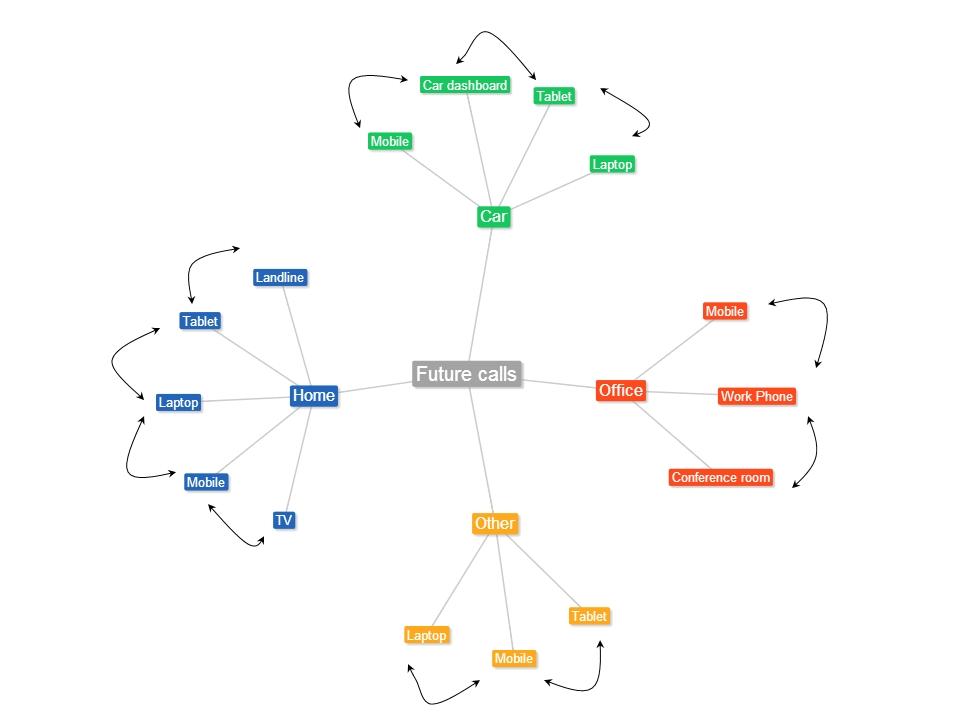
Future calls. Visualizing an IMS based future.

Future calls. In case you didn’t notice there is a word play in the previous sentence. I have used the word “calls” both as a verb and as a noun. Clever, right? 😉

This post takes a closer look at how the future would look like with regard to calls.

Our world is getting more interconnected and more digitized. We view this digitized world through either smartphones, tablets, laptops, smart TV etc. So these days we can browse the web through any of the above devices. Social applications like Facebook. Twitter, LinkedIn or utilities like Evernote and Pocket are equally accessible through any of the devices at any time and at any place.

While we are able to use these devices interchangeably why is that we always receive calls only through phones (mobile or landlines).  Would it be possible to switch calls between these devices?

In fact this is very possible and is included in the vision that IP Multimedia Systems had set for itself. While IMS is yet to take off, it is bound to get traction in the not too distant future.

Assuming that this is going to happen, here is my visualization of how a typical day in the future (possibly 2015/2016) would look like.

Future calls

Here is an imagined scenario

Akash is joined to a conference call at 8.00 am, while at home. When he answers his smartphone he gets a notification “Nearby devices 1) Laptop2) Tablet 3) TV. Choose device to handover to”.  If he chooses the tablet, laptop or TV the call would be seamlessly transferred to this device.  When the call appears on his tablet, laptop or TV there could be another notification “Do you want to add video to the call? Choose Yes or No” the call would automatically be upgraded to a video call if the far end also has this capability. Lets assume that Akash completes this call.

On his way to the office he receives another call on his mobile. When Akash answers his smartphone he is again notified regarding the devices nearby 1) Laptop 2) Car dashboard. Now Akash can just command his smartphone to receive the call on his car dashboard if he is driving his car. If he is being driven he can handover the call to his laptop. When he receives the call in his laptop he could receive a popup, “Do you want to add video and/or data to this call?” If he chooses to add both video and data he can videoconference while also whiteboarding with his colleagues.

He can then continue the call on his smartphone while walking to his cubicle.

The transition between devices will be seamless.

This handover of calls between devices and also the switching back and forth from voice only to voice, video and data (whiteboarding) is bound to happen in the not too distant future.

So keep you ears and eyes wide open.


Find me on Google+

Envisioning a Software Defined IP Multimedia System (SD-IMS)

pot

In my earlier post “Architecting a cloud based IP Multimedia System (IMS)” I had suggested the idea of “cloudifying” the network elements of the IP Multimedia Systems. This would bring multiple benefits to the Service Providers as it would enable quicker deployment of the network elements of the IMS framework, faster ROI and reduction in CAPEX. Besides, the CSPs can take advantage of the elasticity and utility style pricing of the cloud.

This post takes this idea a logical step forward and proposes a Software Defined IP Multimedia System (SD-IMS).

In today’s world of scorching technological pace, static configurations for IT infrastructure, network bandwidth and QOS, and fixed storage volumes will no longer be sufficient.

We are in the age of being able to define requirements dynamically through software. This is the new paradigm in today’s world. Hence we have Software Defined Compute, Software Defined Network, Software Defined Storage and also Software Defined Radio.

This post will demonstrate the need for architecting an IP Multimedia System that uses all the above methodologies to further enable CSPs & Operators to get better returns faster without the headaches of earlier static networks.

IP Multimedia Systems (IMS) is the architectural framework proposed by 3GPP body to establish and maintain multimedia sessions using an all IP network. IMS is a grand vision that is access network agnostic, uses an all IP backbone to begin, manage and release multimedia sessions.

The problem:

Any core network has the problem of dimensioning the various network elements. There is always a fear of either under dimensioning the network and causing failed calls or in over dimensioning resulting in wasted excess capacity.

The IMS was created to handle voice, data and video calls. In addition in the IMS, the SIP User Endpoints can negotiate the media parameters and either move up from voice to video or down from video to voice by adding different encoders.  This requires that the key parameters of the pipe be changed dynamically to handle different QOS, bandwidth requirements dynamically.

The solution

The approach suggested in this post to have a Software Defined IP Multimedia System (SD-IMS) as follows.

In other words the compute instances, network, storage and the frequency need to be managed through software based on the demand.

Software Defined Compute (SDC): The traffic in a Core network can be seasonal, bursty and bandwidth intensive. To be able to handle this changing demands it is necessary that the CSCF instances (P-CSCF, S-CSCF,I-CSCF etc) all scale up or down. This can be done through Software Defined Compute or the process of auto scaling the CSCF instances. The CSCF compute instances will be created or destroyed depending on the traffic traversing the switch.

Software Defined Network (SDN): The IMS envisages the ability to transport voice, data and video besides allowing for media sessions to be negotiated by the SIP user endpoints. Software Defined Networks (SDNs) allow the network resources (routers, switches, hubs) to be virtualized.

SDNs can be made to dynamically route traffic flows based on decisions in real time. The flow of data packets through the network can be controlled in a programmatic manner through the Flow controller using the Openflow protocol. This is very well suited to the IMS architecture. Hence the SDN can allocate flows based on bandwidth, QoS and type of traffic (voice, data or video).

Software Defined Storage (SDS): A key component in the Core Network is the need to be able charge customers. Call Detail Records (CDRs) are generated at various points of the call which are then aggregated and sent to the bill center to generate the customer bill.

Software Defined (SDS) abstracts storage resources and enables pooling, replication, and on-demand provisioning of storage resources. The ability to be able to pool storage resources and allocate based on need is extremely important for the large amounts of data that is generated in Core Networks

Software Defined Radio (SDR): This is another aspect that all Core Networks must adhere to. The advent of mobile broadband has resulted in a mobile data explosion portending a possible spectrum crunch. In order to use the available spectrum efficiently and avoid the spectrum exhaustion Software Define Radio (SDR) has been proposed. SDRs allows the radio stations to hop frequencies enabling the radio stations to use a frequency where this less contention (see We need to think differently about spectrum allocation … now).In the future LTE-Advanced or LTE with CS fallback will have to be designed with SDRs in place.

Conclusion:

A Software Defined IMS makes eminent sense in the light of characteristics of a core network architecture.  Besides ‘cloudifying’ the network elements, the ability to programmatically control the CSCFs, network resources, storage and frequency, will be critical for the IMS. This is a novel idea but well worth a thought!

Find me on Google+

Presentation on Wireless Technologies – Part 2

Here is a continuation of my earlier presentation on Wireless Technologies – Part 1. These presentations trace the evolution of telecom from basic telephony all the way to the advances in LTE.

Find me on Google+

Presentation on Wireless Technologies – Part 1

This presentation traces the evolution of telecom, from the early days of basic of telephony to the current Long Term Evolution(LTE) technology

Find me on Google+

Presentation on “Intelligent Networks, CAMEL protocol, services & applications”

Find me on Google+

Presentation on the “Design principles of scalable, distributed systems”

Also see my blog post on this topic “Design principles of scalable, distributed system

Find me on Google+

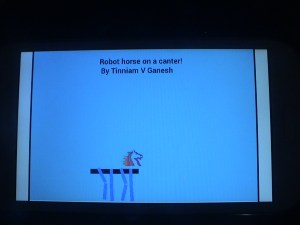
A closer look at “Robot Horse on a Trot” in Android

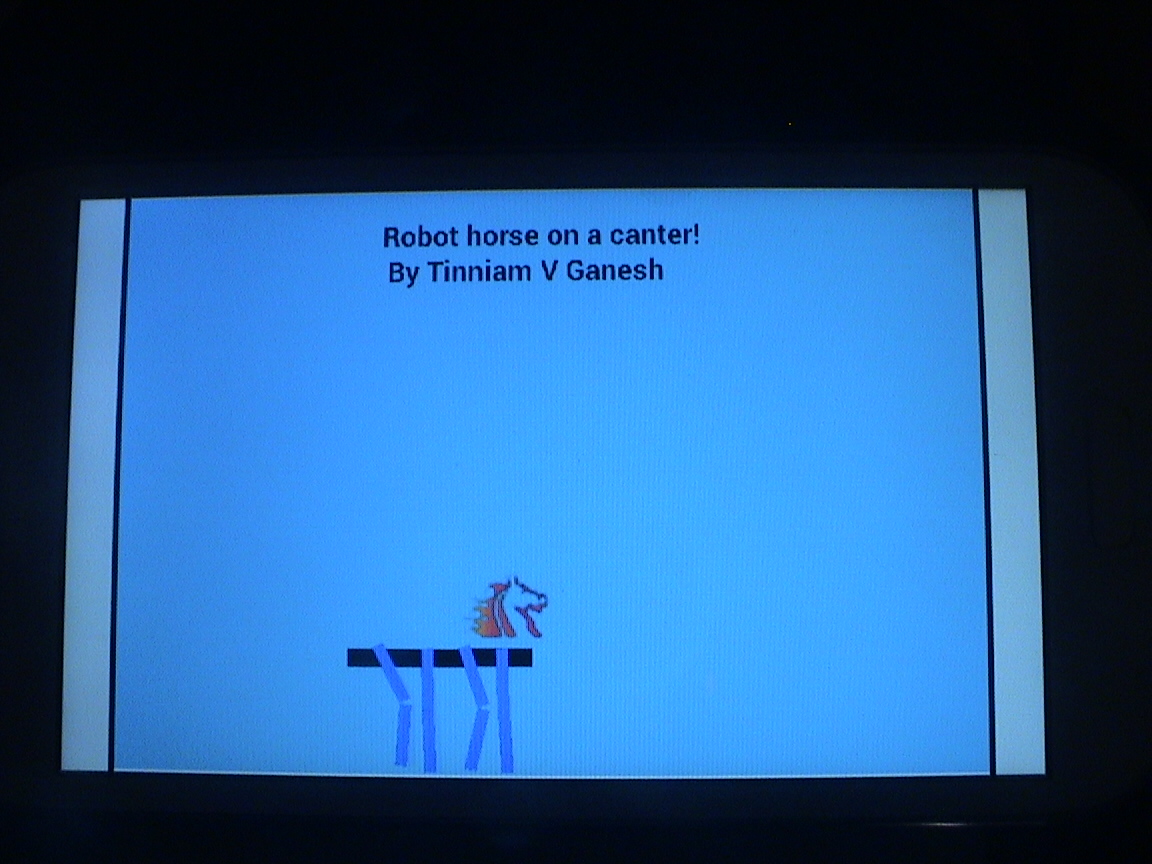
DSC00078This post is result of my dissatisfaction with the awkward and contrived gait of my Robot Walker in my earlier post “Simulating a Robot Walker” in Android. The movements seemed to be a little too contrived for my comfort so I decided to make a robot which has far more natural movements.

You can see the clip at Robot Horse on a canter using Android on Youtube
The complete code can be cloned at GitHub RobotHorse

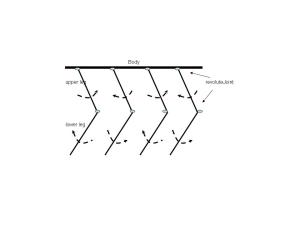
To do this I pondered on what constitutes a walking motion for any living thing. With a little effort it is clear that the following movements occur during walking

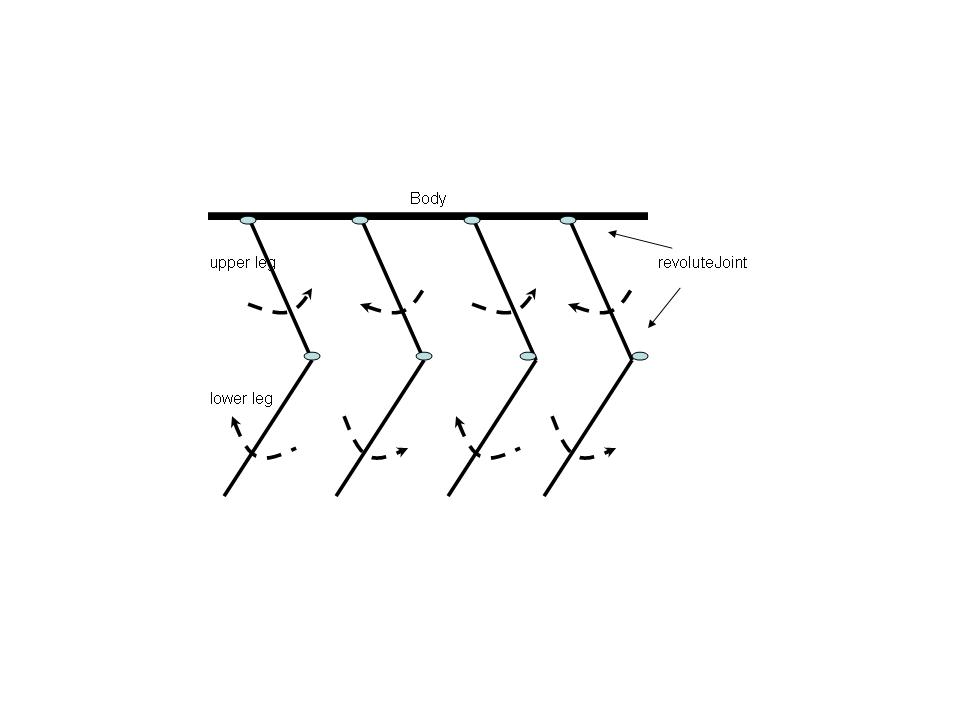
Mechanics of leg movements during walking

  1. The upper part of the leg swings upward and downward pivoted at the hip.
  2. The lower part of the leg, pivoted at the knee, swings in the opposite direction to the upper part of the leg. i.e when the upper part swings upward and counter-clockwise, the lower part of the leg swings downward & clockwise which results in the bend at the knees
  3. When one leg goes up, counterclockwise, the other leg goes down or it swing clockwise and vice versa. See figure below
horse

So with these rules it was easy to make the legs.

Frontal leg (first leg)
The upper part of the leg is connected to the Robot Body through a revoluteJoint with a pivot at the body. The upper leg has a motor and swings between an upper and lower limit
// Create upper leg
upperLeg = new Sprite(x, y, this.mLegTextureRegion, this.getVertexBufferObjectManager());
upperLegBody = PhysicsFactory.createBoxBody(this.mPhysicsWorld, upperLeg, BodyType.DynamicBody, LEG_FIXTURE_DEF);
this.mPhysicsWorld.registerPhysicsConnector(new PhysicsConnector(upperLeg, upperLegBody, true, true));
this.mScene.attachChild(upperLeg);

//Create an anchor/pivot at the body of the robot
Vector2 anchor1 = new Vector2(x/PIXEL_TO_METER_RATIO_DEFAULT,y/PIXEL_TO_METER_RATIO_DEFAULT);
//Attach upper leg to the body using a revolute joint with a motor
final RevoluteJointDef rJointDef = new RevoluteJointDef();
rJointDef.initialize(upperLegBody, robotBody, anchor1);
rJointDef.enableMotor = true;
rJointDef.enableLimit = true;
rJoint = (RevoluteJoint) this.mPhysicsWorld.createJoint(rJointDef);
rJoint.setMotorSpeed(4);
rJoint.setMaxMotorTorque(15);

//Set upper and lower limits for the swing of the leg
rJoint.setLimits((float)(0 * (Math.PI)/180), (float)(30 * (Math.PI)/180));

//Fire a periodic timer
new IntervalTimer(secs,rJoint);

The lower leg pivoted to the bottom of the upper leg through a revoluteJoint swings in the opposite direction of the upper leg between the reverse angle limts. By the way, I had tried every possible joint between the lower & the upper leg (distanceJoint, weldJoint,prismaticJoint) but the revoluteJoint is clearly the best.

// Create lower leg
lowerLeg= new Sprite(x, (y+50), this.mLegTextureRegion, this.getVertexBufferObjectManager());
lowerLegBody = PhysicsFactory.createBoxBody(this.mPhysicsWorld, lowerLeg, BodyType.DynamicBody, LEG_FIXTURE_DEF);
this.mPhysicsWorld.registerPhysicsConnector(new PhysicsConnector(lowerLeg, lowerLegBody, true, true));
this.mScene.attachChild(lowerLeg);
Vector2 anchor2 = new Vector2(x/PIXEL_TO_METER_RATIO_DEFAULT, (y+50)/PIXEL_TO_METER_RATIO_DEFAULT);

//Create a revoluteJoint between upper & lower leg
final RevoluteJointDef rJointDef1 = new RevoluteJointDef();
rJointDef1.initialize(lowerLegBody, upperLegBody, anchor2);

// The lower leg swings in opposite direction to upper leg
rJointDef1.enableMotor = true;
rJointDef1.enableLimit = true;
rJoint1 = (RevoluteJoint) this.mPhysicsWorld.createJoint(rJointDef1);
rJoint1.setMotorSpeed(-4);
rJoint.setMaxMotorTorque(15);

//Set upper and lower limits for the swing of the leg
// Set appropriate limits for lower leg
rJoint1.setLimits((float)(-30 * (Math.PI)/180), (float)(0 * (Math.PI)/180));
new IntervalTimer(secs,rJoint1);
Rear Leg (alternate leg)

Every alternate leg moves in the converse direction as the previous leg

//Create the alternative leg
publicvoid createAltLeg(float x, float y, int secs ){
// Create upper part of leg
upperLeg = new Sprite(x, y, this.mLegTextureRegion, this.getVertexBufferObjectManager());
upperLegBody = PhysicsFactory.createBoxBody(this.mPhysicsWorld, upperLeg, BodyType.DynamicBody, LEG_FIXTURE_DEF);
this.mPhysicsWorld.registerPhysicsConnector(new PhysicsConnector(upperLeg, upperLegBody, true, true));
this.mScene.attachChild(upperLeg);
//Create an anchor/pivot at the body of the robot
Vector2 anchor1 = new Vector2(x/PIXEL_TO_METER_RATIO_DEFAULT,y/PIXEL_TO_METER_RATIO_DEFAULT);
//Attach upper leg to the body using a revolute joint with a motor
final RevoluteJointDef rJointDef = new RevoluteJointDef();
rJointDef.initialize(upperLegBody, robotBody, anchor1);
rJointDef.enableMotor = true;
rJointDef.enableLimit = true;
rJoint = (RevoluteJoint) this.mPhysicsWorld.createJoint(rJointDef);
// This leg swings in the opposite direction of the previous leg
rJoint.setMotorSpeed(-4);
rJoint.setMaxMotorTorque(15);
//Set upper and lower limits for the swing of the leg
rJoint.setLimits((float)(0 * (Math.PI)/180), (float)(30 * (Math.PI)/180));
new IntervalTimer(secs,rJoint);
// Create lower leg
lowerLeg= new Sprite(x, (y+50), this.mLegTextureRegion, this.getVertexBufferObjectManager());
lowerLegBody = PhysicsFactory.createBoxBody(this.mPhysicsWorld, lowerLeg, BodyType.DynamicBody, LEG_FIXTURE_DEF);
this.mPhysicsWorld.registerPhysicsConnector(new PhysicsConnector(lowerLeg, lowerLegBody, true, true));
this.mScene.attachChild(lowerLeg);
Vector2 anchor2 = new Vector2(x/PIXEL_TO_METER_RATIO_DEFAULT, (y+50)/PIXEL_TO_METER_RATIO_DEFAULT);
//Create a revoluteJoint between upper & lower leg
final RevoluteJointDef rJointDef1 = new RevoluteJointDef();
rJointDef1.initialize(lowerLegBody, upperLegBody, anchor2);
rJointDef1.enableMotor = true;
rJointDef1.enableLimit = true;
rJoint1 = (RevoluteJoint) this.mPhysicsWorld.createJoint(rJointDef1);
//The lower part of the leg has the opposite swing to the upper part
rJoint1.setMotorSpeed(4);
rJoint.setMaxMotorTorque(15);
//Set appropriate upper and lower limits for the swing of the leg
rJoint1.setLimits((float)(-30 * (Math.PI)/180), (float)(0 * (Math.PI)/180));
// Fire a periodic timer
new IntervalTimer(secs,rJoint1);
I attached a horse’s head to the body using a WeldJoint
//Create the horse and attach the head using a Weld Joint
horse = new Sprite(140, 320, this.mHorseTextureRegion, this.getVertexBufferObjectManager());
horseBody = PhysicsFactory.createBoxBody(this.mPhysicsWorld, horse, BodyType.DynamicBody, HORSE_FIXTURE_DEF);
this.mPhysicsWorld.registerPhysicsConnector(new PhysicsConnector(horse, horseBody, true, true));
this.mScene.attachChild(horse);
Vector2 anchor = new Vector2(140/PIXEL_TO_METER_RATIO_DEFAULT, 320/PIXEL_TO_METER_RATIO_DEFAULT);
final WeldJointDef weldJointDef = new WeldJointDef();
weldJointDef.initialize(horseBody, robotBody, anchor);
this.mPhysicsWorld.createJoint(weldJointDef);

So now I had a horse that was ready to trot or canter around.

You can see the clip at Robot Horse on a canter using Android
The complete code can be cloned at GitHub RobotHorse

Some issues

Here are some issues with the above code

  • The horse is quite unstable. If I move the phone vertically, the horse tends to tip backwards. The above clip was recorded with the phone lying on a table
  • The motor speeds, torque and the masses of the different objects have to be adjusted very carefully. If the horse’s head or the body is too heavy the legs buckle under the weight
  • Sometimes when I start the simulation the horse seems to bounce off the floor

I have carefully adjusted the mass, friction, motor speeds etc very carefully. Feel free to play around with them.

Comments & suggestions are welcome.

Find me on Google+

“Is it an animal? Is it an insect?” in Android

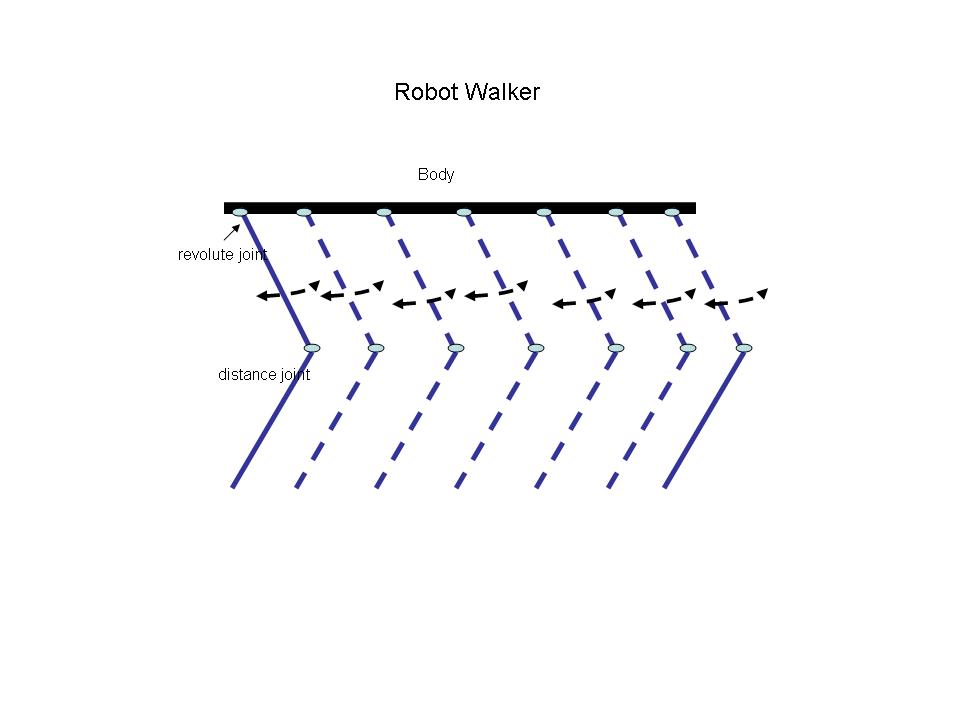
walker“Is it an animal? Is it an insect?”. The answer is neither. In fact it is my version of a ‘robot walker’ in android using Box2D & AndEngine. I got interested in this simulation after I saw the Theo Jansen walker in JBox2D (look under Joints) . I did take a look at the code for this but I found it difficult to follow so I made my own version of a robot walker.

With the above the robot walker is able to walk awkwardly as seen in the video clip on Youtube – Robot Walker in Android
The entire project can be cloned at GitHub at RobotWalker

In this connection I would like to point yot to an excellent and a fascinating TED talk by the creator Theo Jansen himself on “My creations, a new form of life”. His creations are really jaw- dropping.

Anyway getting back to my post I thought about what would make the insect walk? After some thought I realized that I had to create a swinging motion of the upper part of the leg combined with the lower leg motion which does not bend that much.

So I created a robot body which is a flat rectangular shape

Create the robot body
robot = new Sprite(100, 360, this.mRobotTextureRegion, this.getVertexBufferObjectManager());
robotBody = PhysicsFactory.createBoxBody(this.mPhysicsWorld, robot, BodyType.DynamicBody, BODY_FIXTURE_DEF);
this.mPhysicsWorld.registerPhysicsConnector(new PhysicsConnector(robot, robotBody, true, true));
this.mScene.attachChild(robot);
Creating legs
Then I create 6 different legs spaced apart
createLeg(100,360,1);
createLeg(120,360,1);
createLeg(140,360,1);
createLeg(160,360,1);
createLeg(180,360,1);
createLeg(200,360,1);
createLeg(220,360,1);
createLeg(240,360,1);
The createLeg() creates an upper and lower part of the leg. The upper part of the leg is connected to the body of the robot through a revoluteJoint as follows

Upper Leg
// Create upper leg
upperLeg = new Sprite(x, y, this.mLegTextureRegion, this.getVertexBufferObjectManager());
upperLegBody = PhysicsFactory.createBoxBody(this.mPhysicsWorld, upperLeg, BodyType.DynamicBody, LEG_FIXTURE_DEF);
this.mPhysicsWorld.registerPhysicsConnector(new PhysicsConnector(upperLeg, upperLegBody, true, true));
this.mScene.attachChild(upperLeg);
//Create an anchor/pivot at the body of the robot
Vector2 anchor1 = new Vector2(x/PIXEL_TO_METER_RATIO_DEFAULT,y/PIXEL_TO_METER_RATIO_DEFAULT);

//Attach upper leg to the body using a revolute joint with a motor
final RevoluteJointDef rJointDef = new RevoluteJointDef();
rJointDef.initialize(upperLegBody, robotBody, anchor1);
rJointDef.enableMotor = true;
rJointDef.enableLimit = true;
rJoint = (RevoluteJoint) this.mPhysicsWorld.createJoint(rJointDef);

Lower Leg
The lower leg is connected to upper leg through a distance joint
// Create lower leg
lowerLeg= new Sprite(x, (y+50), this.mLegTextureRegion, this.getVertexBufferObjectManager());
lowerLegBody = PhysicsFactory.createBoxBody(this.mPhysicsWorld, lowerLeg, BodyType.DynamicBody, LEG_FIXTURE_DEF);
this.mPhysicsWorld.registerPhysicsConnector(new PhysicsConnector(lowerLeg, lowerLegBody, true, true));
this.mScene.attachChild(lowerLeg);

// Connect the lower and upper leg with distance joint
Vector2 anchor2 = new Vector2(x/PIXEL_TO_METER_RATIO_DEFAULT, (y+50)/PIXEL_TO_METER_RATIO_DEFAULT);
//Create a distanceJoint between upper & lower leg
DistanceJointDef distanceJoint1 = new DistanceJointDef();
distanceJoint1.initialize(upperLegBody,lowerLegBody, anchor2,anchor2);
distanceJoint1.collideConnected = true;
distanceJoint1.dampingRatio = 0.5f;
distanceJoint1.frequencyHz = 10.0f;
this.mPhysicsWorld.createJoint(distanceJoint1);

 mqdefault

Creating a walking movement
To create a walking movement I create a timer task which triggers after a delay of 1 second periodically and makes the upper legs’s revoluteJoint swing between angles within an upper and lower limit.

new IntervalTimer(secs,rJoint);
The timer itself reverses the motor every time it fires
class RemindTask extends TimerTask {
RevoluteJoint rj1;;
RemindTask(RevoluteJoint rj){
rj1 = rj;
}
@Override
publicvoid run() {
reverseMotor();
}

publicvoid reverseMotor(){
rj1.setMotorSpeed(-(rj1.getMotorSpeed()));
rj1.setMaxMotorTorque(10);
}
}
With the above the robot walker is able to walk awkwardly as seen in the video Robot Walker in Android

The entire project can be cloned at GitHub at RobotWalker

I will probably be refining this sometime in the future. One good idea is to create a delay between the swings of different legs. Any thoughts suggestions on making the movement more fluid are more than welcome.

Take a look at some cool simulations using AndEngine & Box2D
1. Simulating the domino effect using Box2D and AndEngine
2. Bull in a china shop – Behind the scenes in android
3. Creating a blob in Android using  Box2D physics Engine & AndEngine
4. Blob with an attitude(stiffness) in Android
and a few more
Find me on Google+

Simulating an oscillating revoluteJoint in Android

DSC00074In this post I simulate an oscillating revoluteJoint in Android using Box2D physics engine & AndEngine. While I was attempting this in the context of something larger I found this fairly challenging so I decided to write a separate post on this.  Creating a revoluteJoint was rather trivial.  This was done as follows

Initially I created a static point to act as pivot.  I then used a rectangular shape joined at the pivot. I wanted this to oscillate about the pivot. So the pivot & the rectangular shape were created as follows
circle = new Sprite(100, 320, this.mBallTextureRegion, this.getVertexBufferObjectManager());

circleBody = PhysicsFactory.createCircleBody(this.mPhysicsWorld, circle, BodyType.StaticBody, FIXTURE_DEF);

this.mScene.attachChild(circle);

// Create leg

leg = new Sprite(110, 325, this.mLegTextureRegion, this.getVertexBufferObjectManager());

legBody = PhysicsFactory.createBoxBody(this.mPhysicsWorld, leg, BodyType.DynamicBody, gameFixtureDef);

this.mPhysicsWorld.registerPhysicsConnector(new PhysicsConnector(leg, legBody, true, true));

this.mScene.attachChild(leg);

Then I created a revoluteJoint between the leg and the circleBody as follows

final RevoluteJointDef rJointDef = new RevoluteJointDef();

rJointDef.initialize(legBody, circleBody, circleBody.getWorldCenter());

rJointDef.enableMotor = true;

rJointDef.enableLimit = true;

rJoint = (RevoluteJoint) this.mPhysicsWorld.createJoint(rJointDef);

rJoint.setMotorSpeed(2);

rJoint.setMaxMotorTorque(100);

rJoint.setLimits((float)(30 * (Math.PI)/180), (float)(270 * (Math.PI)/180));

The revoluteJoint has a lower limit of 30 degrees and an upper limit of 270 degrees.

To make it oscillate I created a Timer task which I fire every second. Every time the timer fires I reverse the motor speed as follows

class IntervalTimer {

Timer timer;

public IntervalTimer(int seconds, RevoluteJoint rj) {

Log.d(“Inside”,“in”);

timer = new Timer(); //At this line a new Thread will be created

timer.scheduleAtFixedRate(new RemindTask(rj), seconds*1000, 1000);

}

class RemindTask extends TimerTask {

RevoluteJoint rj1;;

RemindTask(RevoluteJoint rj){

rj1 = rj;

}

@Override

publicvoid run() {

Log.d(“x”,“x” +“Reversing motor”);

reverseMotor();

}

publicvoid reverseMotor(){

rj1.setMotorSpeed(-(rj1.getMotorSpeed()));

rj1.setMaxMotorTorque(100);

Log.d(“aa”,“speed:”+rj1.getMotorSpeed() + “torque:” + rj1.getMotorTorque());

}

}

}

I then instantiate the timer

new IntervalTimer(5,rJoint);

I now have an oscillating revoluteJoint which can be used in any number of ways.

The video clip is at “Simulating an oscillating revoluteJoint in Android

You can clone the project from GitHub at “oscillatingRevoluteJoint

Find me on Google+