The 3rd paperback & kindle editions of my books on Cricket, now on Amazon

The 3rd  paperback & kindle edition of both my books on cricket is now available on Amazon

a) Cricket analytics with cricketr, Third Edition. The paperback edition is $12.99 and the kindle edition is $4.99/Rs320.  This book is based on my R package ‘cricketr‘, available on CRAN and uses ESPN Cricinfo Statsguru

b) Beaten by sheer pace! Cricket analytics with yorkr, 3rd edition . The paperback is $12.99 and the kindle version is $6.99/Rs448. This is based on my R package ‘yorkr‘ on CRAN and uses data from Cricsheet
Pick up your copies today!!

Note: In the 3rd edition of  the paperback book, the charts will be in black and white. If you would like the charts to be in color, please check out the 2nd edition of these books see More book, more cricket! 2nd edition of my books now on Amazon

You may also like
1. My book ‘Practical Machine Learning with R and Python’ on Amazon
2. A crime map of India in R: Crimes against women
3.  What’s up Watson? Using IBM Watson’s QAAPI with Bluemix, NodeExpress – Part 1
4.  Bend it like Bluemix, MongoDB with autoscaling – Part 2
5. Informed choices through Machine Learning : Analyzing Kohli, Tendulkar and Dravid
6. Thinking Web Scale (TWS-3): Map-Reduce – Bring compute to data

To see all posts see Index of posts

My book ‘Practical Machine Learning with R and Python’ on Amazon

Note: The 3rd edition of this book is now available My book ‘Practical Machine Learning in R and Python: Third edition’ on Amazon

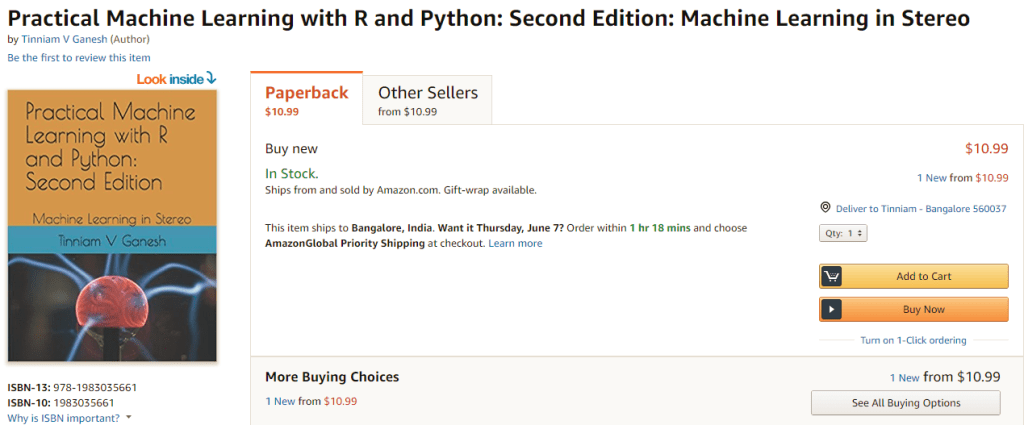
My book ‘Practical Machine Learning with R and Python: Second Edition – Machine Learning in stereo’ is now available in both paperback ($10.99) and kindle ($7.99/Rs449) versions. In this book I implement some of the most common, but important Machine Learning algorithms in R and equivalent Python code. This is almost like listening to parallel channels of music in stereo!
1. Practical machine with R and Python: Third Edition – Machine Learning in Stereo(Paperback-$12.99)
2. Practical machine with R and Python Third Edition – Machine Learning in Stereo(Kindle- $8.99/Rs449)
This book is ideal both for beginners and the experts in R and/or Python. Those starting their journey into datascience and ML will find the first 3 chapters useful, as they touch upon the most important programming constructs in R and Python and also deal with equivalent statements in R and Python. Those who are expert in either of the languages, R or Python, will find the equivalent code ideal for brushing up on the other language. And finally,those who are proficient in both languages, can use the R and Python implementations to internalize the ML algorithms better.

Here is a look at the topics covered

Table of Contents
Essential R …………………………………….. 7
Essential Python for Datascience ………………..   54
R vs Python ……………………………………. 77
Regression of a continuous variable ………………. 96
Classification and Cross Validation ……………….113
Regression techniques and regularization …………. 134
SVMs, Decision Trees and Validation curves …………175
Splines, GAMs, Random Forests and Boosting …………202
PCA, K-Means and Hierarchical Clustering …………. 234

Pick up your copy today!!
Hope you have a great time learning as I did while implementing these algorithms!

Practical Machine Learning with R and Python – Part 6

Introduction

This is the final and concluding part of my series on ‘Practical Machine Learning with R and Python’. In this series I included the implementations of the most common Machine Learning algorithms in R and Python. The algorithms implemented were

1. Practical Machine Learning with R and Python – Part 1 In this initial post, I touch upon regression of a continuous target variable. Specifically I touch upon Univariate, Multivariate, Polynomial regression and KNN regression in both R and Python
2. Practical Machine Learning with R and Python – Part 2 In this post, I discuss Logistic Regression, KNN classification and Cross Validation error for both LOOCV and K-Fold in both R and Python
3. Practical Machine Learning with R and Python – Part 3 This 3rd part included feature selection in Machine Learning. Specifically I touch best fit, forward fit, backward fit, ridge(L2 regularization) & lasso (L1 regularization). The post includes equivalent code in R and Python.
4. Practical Machine Learning with R and Python – Part 4 In this part I discussed SVMs, Decision Trees, Validation, Precision-Recall, AUC and ROC curves
5. Practical Machine Learning with R and Python – Part 5  In this penultimate part, I touch upon B-splines, natural splines, smoothing spline, Generalized Additive Models(GAMs), Decision Trees, Random Forests and Gradient Boosted Treess.

In this last part I cover Unsupervised Learning. Specifically I cover the implementations of Principal Component Analysis (PCA). K-Means and Heirarchical Clustering. You can download this R Markdown file from Github at MachineLearning-RandPython-Part6

Note: Please listen to my video presentations Machine Learning in youtube
1. Machine Learning in plain English-Part 1
2. Machine Learning in plain English-Part 2
3. Machine Learning in plain English-Part 3

Check out my compact and minimal book  “Practical Machine Learning with R and Python:Third edition- Machine Learning in stereo”  available in Amazon in paperback($12.99) and kindle($8.99) versions. My book includes implementations of key ML algorithms and associated measures and metrics. The book is ideal for anybody who is familiar with the concepts and would like a quick reference to the different ML algorithms that can be applied to problems and how to select the best model. Pick your copy today!!
 

1.1a Principal Component Analysis (PCA) – R code

Principal Component Analysis is used to reduce the dimensionality of the input. In the code below 8 x 8 pixel of handwritten digits is reduced into its principal components. Then a scatter plot of the first 2 principal components give a very good visial representation of the data

library(dplyr)
library(ggplot2)
#Note: This example is adapted from an the example in the book Python Datascience handbook by 
# Jake VanderPlas (https://jakevdp.github.io/PythonDataScienceHandbook/05.09-principal-component-analysis.html)

# Read the digits data (From sklearn datasets)
digits= read.csv("digits.csv")
# Create a digits classes target variable
digitClasses <- factor(digits$X0.000000000000000000e.00.29)

#Invoke the Principal Componsent analysis on columns 1-64
digitsPCA=prcomp(digits[,1:64])

# Create a dataframe of PCA
df <- data.frame(digitsPCA$x)
# Bind the digit classes
df1 <- cbind(df,digitClasses)
# Plot only the first 2 Principal components as a scatter plot. This plot uses only the
# first 2 principal components 
ggplot(df1,aes(x=PC1,y=PC2,col=digitClasses)) + geom_point() +
  ggtitle("Top 2 Principal Components")

1.1 b Variance explained vs no principal components – R code

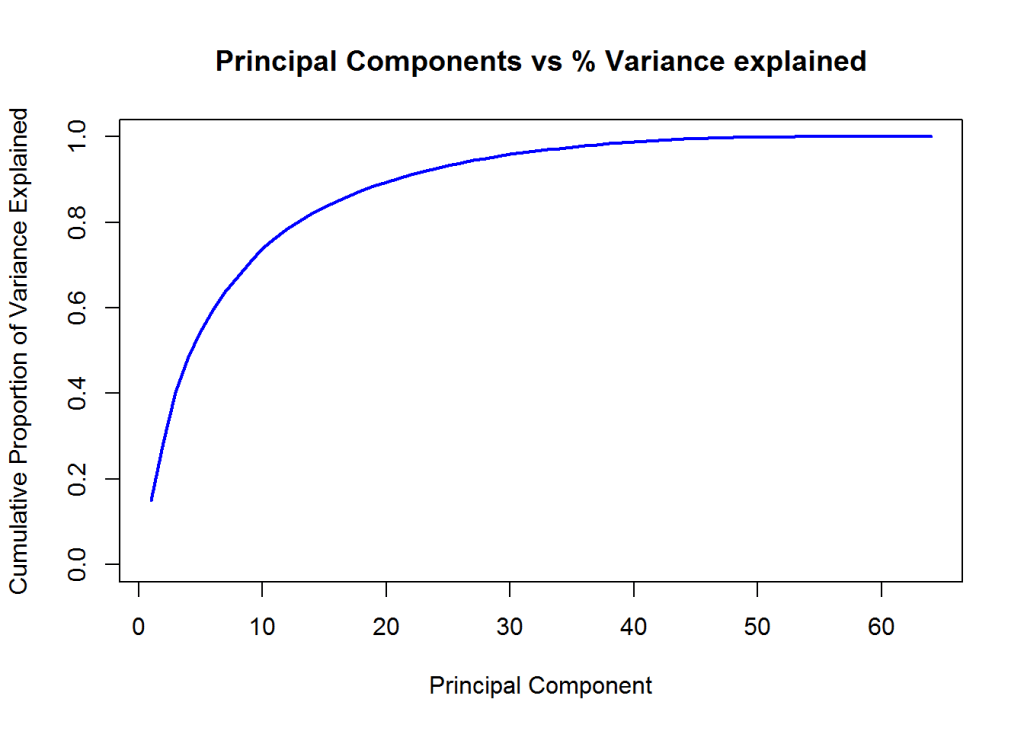
In the code below the variance explained vs the number of principal components is plotted. It can be seen that with 20 Principal components almost 90% of the variance is explained by this reduced dimensional model.

# Read the digits data (from sklearn datasets)
digits= read.csv("digits.csv")
# Digits target
digitClasses <- factor(digits$X0.000000000000000000e.00.29)
digitsPCA=prcomp(digits[,1:64])


# Get the Standard Deviation
sd=digitsPCA$sdev
# Compute the variance
digitsVar=digitsPCA$sdev^2
#Compute the percent variance explained
percentVarExp=digitsVar/sum(digitsVar)

# Plot the percent variance exlained as a function of the  number of principal components
#plot(cumsum(percentVarExp), xlab="Principal Component", 
#     ylab="Cumulative Proportion of Variance Explained", 
#     main="Principal Components vs % Variance explained",ylim=c(0,1),type='l',lwd=2,
#       col="blue")

1.1c Principal Component Analysis (PCA) – Python code

import numpy as np
from sklearn.decomposition import PCA
from sklearn import decomposition
from sklearn import datasets
import matplotlib.pyplot as plt
  
from sklearn.datasets import load_digits
# Load the digits data
digits = load_digits()
# Select only the first 2 principal components
pca = PCA(2)  # project from 64 to 2 dimensions
#Compute the first 2 PCA
projected = pca.fit_transform(digits.data)

# Plot a scatter plot of the first 2 principal components
plt.scatter(projected[:, 0], projected[:, 1],
            c=digits.target, edgecolor='none', alpha=0.5,
            cmap=plt.cm.get_cmap('spectral', 10))
plt.xlabel('PCA 1')
plt.ylabel('PCA 2')
plt.colorbar();
plt.title("Top 2 Principal Components")
plt.savefig('fig1.png', bbox_inches='tight')

1.1 b Variance vs no principal components

– Python code

import numpy as np
from sklearn.decomposition import PCA
from sklearn import decomposition
from sklearn import datasets
import matplotlib.pyplot as plt
  
from sklearn.datasets import load_digits
digits = load_digits()
# Select all 64 principal components
pca = PCA(64)  # project from 64 to 2 dimensions
projected = pca.fit_transform(digits.data)

# Obtain the explained variance for each principal component
varianceExp= pca.explained_variance_ratio_
# Compute the total sum of variance
totVarExp=np.cumsum(np.round(pca.explained_variance_ratio_, decimals=4)*100)

# Plot the variance explained as a function of the number of principal components
plt.plot(totVarExp)
plt.xlabel('No of principal components')
plt.ylabel('% variance explained')
plt.title('No of Principal Components vs Total Variance explained')
plt.savefig('fig2.png', bbox_inches='tight')

1.2a K-Means – R code

In the code first the scatter plot of the first 2 Principal Components of the handwritten digits is plotted as a scatter plot. Over this plot 10 centroids of the 10 different clusters corresponding the 10 diferent digits is plotted over the original scatter plot.

library(ggplot2)
# Read the digits data
digits= read.csv("digits.csv")
# Create digit classes target variable
digitClasses <- factor(digits$X0.000000000000000000e.00.29)

# Compute the Principal COmponents
digitsPCA=prcomp(digits[,1:64])

# Create a data frame of Principal components and the digit classes 
df <- data.frame(digitsPCA$x)
df1 <- cbind(df,digitClasses)

# Pick only the first 2 principal components
a<- df[,1:2]
# Compute K Means of 10 clusters and allow for 1000 iterations
k<-kmeans(a,10,1000)

# Create a dataframe of the centroids of the clusters
df2<-data.frame(k$centers)

#Plot the first 2 principal components with the K Means centroids
ggplot(df1,aes(x=PC1,y=PC2,col=digitClasses)) + geom_point() +
    geom_point(data=df2,aes(x=PC1,y=PC2),col="black",size = 4) + 
    ggtitle("Top 2 Principal Components with KMeans clustering") 

1.2b K-Means – Python code

The centroids of the 10 different handwritten digits is plotted over the scatter plot of the first 2 principal components.

import numpy as np
from sklearn.decomposition import PCA
from sklearn import decomposition
from sklearn import datasets
import matplotlib.pyplot as plt
from sklearn.datasets import load_digits
from sklearn.cluster import KMeans
digits = load_digits()

# Select only the 1st 2 principal components
pca = PCA(2)  # project from 64 to 2 dimensions
projected = pca.fit_transform(digits.data)

# Create 10 different clusters
kmeans = KMeans(n_clusters=10)

# Compute  the clusters
kmeans.fit(projected)
y_kmeans = kmeans.predict(projected)
# Get the cluster centroids
centers = kmeans.cluster_centers_
centers

#Create a scatter plot of the first 2 principal components
plt.scatter(projected[:, 0], projected[:, 1],
            c=digits.target, edgecolor='none', alpha=0.5,
            cmap=plt.cm.get_cmap('spectral', 10))
plt.xlabel('PCA 1')
plt.ylabel('PCA 2')
plt.colorbar();
# Overlay the centroids on the scatter plot
plt.scatter(centers[:, 0], centers[:, 1], c='darkblue', s=100)
plt.savefig('fig3.png', bbox_inches='tight')

1.3a Heirarchical clusters – R code

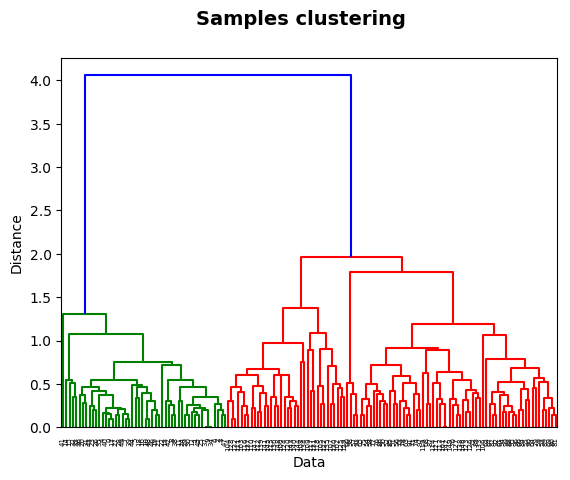
Herirachical clusters is another type of unsupervised learning. It successively joins the closest pair of objects (points or clusters) in succession based on some ‘distance’ metric. In this type of clustering we do not have choose the number of centroids. We can cut the created dendrogram mat an appropriate height to get a desired and reasonable number of clusters These are the following ‘distance’ metrics used while combining successive objects

  • Ward
  • Complete
  • Single
  • Average
  • Centroid
# Read the IRIS dataset
iris <- datasets::iris
iris2 <- iris[,-5]
species <- iris[,5]

#Compute the distance matrix
d_iris <- dist(iris2) 

# Use the 'average' method to for the clsuters
hc_iris <- hclust(d_iris, method = "average")

# Plot the clusters
plot(hc_iris)

# Cut tree into 3 groups
sub_grp <- cutree(hc_iris, k = 3)

# Number of members in each cluster
table(sub_grp)
## sub_grp
##  1  2  3 
## 50 64 36
# Draw rectangles around the clusters
rect.hclust(hc_iris, k = 3, border = 2:5)

1.3a Heirarchical clusters – Python code

from sklearn.datasets import load_iris
import matplotlib.pyplot as plt
from scipy.cluster.hierarchy import dendrogram, linkage
# Load the IRIS data set
iris = load_iris()


# Generate the linkage matrix using the average method
Z = linkage(iris.data, 'average')

#Plot the dendrogram
#dendrogram(Z)
#plt.xlabel('Data')
#plt.ylabel('Distance')
#plt.suptitle('Samples clustering', fontweight='bold', fontsize=14);
#plt.savefig('fig4.png', bbox_inches='tight')

Conclusion

This is the last and concluding part of my series on Practical Machine Learning with R and Python. These parallel implementations of R and Python can be used as a quick reference while working on a large project. A person who is adept in one of the languages R or Python, can quickly absorb code in the other language.

Hope you find this series useful!

More interesting things to come. Watch this space!

References

  1. Statistical Learning, Prof Trevor Hastie & Prof Robert Tibesherani, Online Stanford
  2. Applied Machine Learning in Python Prof Kevyn-Collin Thomson, University Of Michigan, Coursera

Also see
1. The many faces of latency
2. Simulating a Web Join in Android
3. The Anamoly
4. yorkr pads up for the Twenty20s:Part 3:Overall team performance against all oppositions
5. Bend it like Bluemix, MongoDB using Auto-scale – Part 1!

To see all posts see ‘Index of posts

Practical Machine Learning with R and Python – Part 5

This is the 5th and probably penultimate part of my series on ‘Practical Machine Learning with R and Python’. The earlier parts of this series included

1. Practical Machine Learning with R and Python – Part 1 In this initial post, I touch upon univariate, multivariate, polynomial regression and KNN regression in R and Python
2.Practical Machine Learning with R and Python – Part 2 In this post, I discuss Logistic Regression, KNN classification and cross validation error for both LOOCV and K-Fold in both R and Python
3.Practical Machine Learning with R and Python – Part 3 This post covered ‘feature selection’ in Machine Learning. Specifically I touch best fit, forward fit, backward fit, ridge(L2 regularization) & lasso (L1 regularization). The post includes equivalent code in R and Python.
4.Practical Machine Learning with R and Python – Part 4 In this part I discussed SVMs, Decision Trees, validation, precision recall, and roc curves

This post ‘Practical Machine Learning with R and Python – Part 5’ discusses regression with B-splines, natural splines, smoothing splines, generalized additive models (GAMS), bagging, random forest and boosting

As with my previous posts in this series, this post is largely based on the following 2 MOOC courses

1. Statistical Learning, Prof Trevor Hastie & Prof Robert Tibesherani, Online Stanford
2. Applied Machine Learning in Python Prof Kevyn-Collin Thomson, University Of Michigan, Coursera

You can download this R Markdown file and associated data files from Github at MachineLearning-RandPython-Part5

Note: Please listen to my video presentations Machine Learning in youtube
1. Machine Learning in plain English-Part 1
2. Machine Learning in plain English-Part 2
3. Machine Learning in plain English-Part 3

Check out my compact and minimal book  “Practical Machine Learning with R and Python:Third edition- Machine Learning in stereo”  available in Amazon in paperback($12.99) and kindle($8.99) versions. My book includes implementations of key ML algorithms and associated measures and metrics. The book is ideal for anybody who is familiar with the concepts and would like a quick reference to the different ML algorithms that can be applied to problems and how to select the best model. Pick your copy today!!


For this part I have used the data sets from UCI Machine Learning repository(Communities and Crime and Auto MPG)

1. Splines

When performing regression (continuous or logistic) between a target variable and a feature (or a set of features), a single polynomial for the entire range of the data set usually does not perform a good fit.Rather we would need to provide we could fit
regression curves for different section of the data set.

There are several techniques which do this for e.g. piecewise-constant functions, piecewise-linear functions, piecewise-quadratic/cubic/4th order polynomial functions etc. One such set of functions are the cubic splines which fit cubic polynomials to successive sections of the dataset. The points where the cubic splines join, are called ‘knots’.

Since each section has a different cubic spline, there could be discontinuities (or breaks) at these knots. To prevent these discontinuities ‘natural splines’ and ‘smoothing splines’ ensure that the seperate cubic functions have 2nd order continuity at these knots with the adjacent splines. 2nd order continuity implies that the value, 1st order derivative and 2nd order derivative at these knots are equal.

A cubic spline with knots \alpha_{k} , k=1,2,3,..K is a piece-wise cubic polynomial with continuous derivative up to order 2 at each knot. We can write y_{i} = \beta_{0} +\beta_{1}b_{1}(x_{i}) +\beta_{2}b_{2}(x_{i}) + .. + \beta_{K+3}b_{K+3}(x_{i}) + \epsilon_{i}.

For each (x{i},y{i}), b_{i} are called ‘basis’ functions, where  b_{1}(x_{i})=x_{i}b_{2}(x_{i})=x_{i}^2, b_{3}(x_{i})=x_{i}^3, b_{k+3}(x_{i})=(x_{i} -\alpha_{k})^3 where k=1,2,3… K The 1st and 2nd derivatives of cubic splines are continuous at the knots. Hence splines provide a smooth continuous fit to the data by fitting different splines to different sections of the data

1.1a Fit a 4th degree polynomial – R code

In the code below a non-linear function (a 4th order polynomial) is used to fit the data. Usually when we fit a single polynomial to the entire data set the tails of the fit tend to vary a lot particularly if there are fewer points at the ends. Splines help in reducing this variation at the extremities

library(dplyr)
library(ggplot2)
source('RFunctions-1.R')
# Read the data
df=read.csv("auto_mpg.csv",stringsAsFactors = FALSE) # Data from UCI
df1 <- as.data.frame(sapply(df,as.numeric))
#Select specific columns
df2 <- df1 %>% dplyr::select(cylinder,displacement, horsepower,weight, acceleration, year,mpg)
auto <- df2[complete.cases(df2),]
# Fit a 4th degree polynomial
fit=lm(mpg~poly(horsepower,4),data=auto)
#Display a summary of fit
summary(fit)
## 
## Call:
## lm(formula = mpg ~ poly(horsepower, 4), data = auto)
## 
## Residuals:
##      Min       1Q   Median       3Q      Max 
## -14.8820  -2.5802  -0.1682   2.2100  16.1434 
## 
## Coefficients:
##                       Estimate Std. Error t value Pr(>|t|)    
## (Intercept)            23.4459     0.2209 106.161   <2e-16 ***
## poly(horsepower, 4)1 -120.1377     4.3727 -27.475   <2e-16 ***
## poly(horsepower, 4)2   44.0895     4.3727  10.083   <2e-16 ***
## poly(horsepower, 4)3   -3.9488     4.3727  -0.903    0.367    
## poly(horsepower, 4)4   -5.1878     4.3727  -1.186    0.236    
## ---
## Signif. codes:  0 '***' 0.001 '**' 0.01 '*' 0.05 '.' 0.1 ' ' 1
## 
## Residual standard error: 4.373 on 387 degrees of freedom
## Multiple R-squared:  0.6893, Adjusted R-squared:  0.6861 
## F-statistic: 214.7 on 4 and 387 DF,  p-value: < 2.2e-16
#Get the range of horsepower
hp <- range(auto$horsepower)
#Create a sequence to be used for plotting
hpGrid <- seq(hp[1],hp[2],by=10)
#Predict for these values of horsepower. Set Standard error as TRUE
pred=predict(fit,newdata=list(horsepower=hpGrid),se=TRUE)
#Compute bands on either side that is 2xSE
seBands=cbind(pred$fit+2*pred$se.fit,pred$fit-2*pred$se.fit)
#Plot the fit with Standard Error bands
plot(auto$horsepower,auto$mpg,xlim=hp,cex=.5,col="black",xlab="Horsepower",
     ylab="MPG", main="Polynomial of degree 4")
lines(hpGrid,pred$fit,lwd=2,col="blue")
matlines(hpGrid,seBands,lwd=2,col="blue",lty=3)

fig1-1

1.1b Fit a 4th degree polynomial – Python code

import numpy as np
import pandas as pd
import os
import matplotlib.pyplot as plt
from sklearn.model_selection import train_test_split
from sklearn.preprocessing import PolynomialFeatures
from sklearn.linear_model import LinearRegression
#Read the auto data
autoDF =pd.read_csv("auto_mpg.csv",encoding="ISO-8859-1")
# Select columns
autoDF1=autoDF[['mpg','cylinder','displacement','horsepower','weight','acceleration','year']]
# Convert all columns to numeric
autoDF2 = autoDF1.apply(pd.to_numeric, errors='coerce')

#Drop NAs
autoDF3=autoDF2.dropna()
autoDF3.shape
X=autoDF3[['horsepower']]
y=autoDF3['mpg']
#Create a polynomial of degree 4
poly = PolynomialFeatures(degree=4)
X_poly = poly.fit_transform(X)

# Fit a polynomial regression line
linreg = LinearRegression().fit(X_poly, y)
# Create a range of values
hpGrid = np.arange(np.min(X),np.max(X),10)
hp=hpGrid.reshape(-1,1)
# Transform to 4th degree
poly = PolynomialFeatures(degree=4)
hp_poly = poly.fit_transform(hp)

#Create a scatter plot
plt.scatter(X,y)
# Fit the prediction
ypred=linreg.predict(hp_poly)
plt.title("Poylnomial of degree 4")
fig2=plt.xlabel("Horsepower")
fig2=plt.ylabel("MPG")
# Draw the regression curve
plt.plot(hp,ypred,c="red")
plt.savefig('fig1.png', bbox_inches='tight')

fig1

1.1c Fit a B-Spline – R Code

In the code below a B- Spline is fit to data. The B-spline requires the manual selection of knots

#Splines
library(splines)
# Fit a B-spline to the data. Select knots at 60,75,100,150
fit=lm(mpg~bs(horsepower,df=6,knots=c(60,75,100,150)),data=auto)
# Use the fitted regresion to predict
pred=predict(fit,newdata=list(horsepower=hpGrid),se=T)
# Create a scatter plot
plot(auto$horsepower,auto$mpg,xlim=hp,cex=.5,col="black",xlab="Horsepower",
     ylab="MPG", main="B-Spline with 4 knots")
#Draw lines with 2 Standard Errors on either side
lines(hpGrid,pred$fit,lwd=2)
lines(hpGrid,pred$fit+2*pred$se,lty="dashed")
lines(hpGrid,pred$fit-2*pred$se,lty="dashed")
abline(v=c(60,75,100,150),lty=2,col="darkgreen")

fig2-1

1.1d Fit a Natural Spline – R Code

Here a ‘Natural Spline’ is used to fit .The Natural Spline extrapolates beyond the boundary knots and the ends of the function are much more constrained than a regular spline or a global polynomoial where the ends can wag a lot more. Natural splines do not require the explicit selection of knots

# There is no need to select the knots here. There is a smoothing parameter which
# can be specified by the degrees of freedom 'df' parameter. The natural spline

fit2=lm(mpg~ns(horsepower,df=4),data=auto)
pred=predict(fit2,newdata=list(horsepower=hpGrid),se=T)
plot(auto$horsepower,auto$mpg,xlim=hp,cex=.5,col="black",xlab="Horsepower",
     ylab="MPG", main="Natural Splines")
lines(hpGrid,pred$fit,lwd=2)
lines(hpGrid,pred$fit+2*pred$se,lty="dashed")
lines(hpGrid,pred$fit-2*pred$se,lty="dashed")

fig3-1

1.1.e Fit a Smoothing Spline – R code

Here a smoothing spline is used. Smoothing splines also do not require the explicit setting of knots. We can change the ‘degrees of freedom(df)’ paramater to get the best fit

# Smoothing spline has a smoothing parameter, the degrees of freedom
# This is too wiggly
plot(auto$horsepower,auto$mpg,xlim=hp,cex=.5,col="black",xlab="Horsepower",
     ylab="MPG", main="Smoothing Splines")

# Here df is set to 16. This has a lot of variance
fit=smooth.spline(auto$horsepower,auto$mpg,df=16)
lines(fit,col="red",lwd=2)

# We can use Cross Validation to allow the spline to pick the value of this smpopothing paramter. We do not need to set the degrees of freedom 'df'
fit=smooth.spline(auto$horsepower,auto$mpg,cv=TRUE)
lines(fit,col="blue",lwd=2)

fig4-1

1.1e Splines – Python

There isn’t as much treatment of splines in Python and SKLearn. I did find the LSQUnivariate, UnivariateSpline spline. The LSQUnivariate spline requires the explcit setting of knots

import numpy as np
import pandas as pd
import os
import matplotlib.pyplot as plt
from scipy.interpolate import LSQUnivariateSpline
autoDF =pd.read_csv("auto_mpg.csv",encoding="ISO-8859-1")
autoDF.shape
autoDF.columns
autoDF1=autoDF[['mpg','cylinder','displacement','horsepower','weight','acceleration','year']]
autoDF2 = autoDF1.apply(pd.to_numeric, errors='coerce')
auto=autoDF2.dropna()
auto=auto[['horsepower','mpg']].sort_values('horsepower')

# Set the knots manually
knots=[65,75,100,150]
# Create an array for X & y
X=np.array(auto['horsepower'])
y=np.array(auto['mpg'])
# Fit a LSQunivariate spline
s = LSQUnivariateSpline(X,y,knots)

#Plot the spline
xs = np.linspace(40,230,1000)
ys = s(xs)
plt.scatter(X, y)
plt.plot(xs, ys)
plt.savefig('fig2.png', bbox_inches='tight')
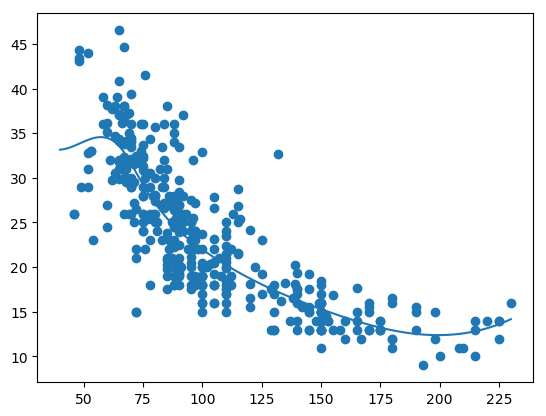
fig2

1.2 Generalized Additiive models (GAMs)

Generalized Additive Models (GAMs) is a really powerful ML tool.

y_{i} = \beta_{0} + f_{1}(x_{i1}) + f_{2}(x_{i2}) + .. +f_{p}(x_{ip}) + \epsilon_{i}

In GAMs we use a different functions for each of the variables. GAMs give a much better fit since we can choose any function for the different sections

1.2a Generalized Additive Models (GAMs) – R Code

The plot below show the smooth spline that is fit for each of the features horsepower, cylinder, displacement, year and acceleration. We can use any function for example loess, 4rd order polynomial etc.

library(gam)
# Fit a smoothing spline for horsepower, cyliner, displacement and acceleration
gam=gam(mpg~s(horsepower,4)+s(cylinder,5)+s(displacement,4)+s(year,4)+s(acceleration,5),data=auto)
# Display the summary of the fit. This give the significance of each of the paramwetr
# Also an ANOVA is given for each combination of the features
summary(gam)
## 
## Call: gam(formula = mpg ~ s(horsepower, 4) + s(cylinder, 5) + s(displacement, 
##     4) + s(year, 4) + s(acceleration, 5), data = auto)
## Deviance Residuals:
##     Min      1Q  Median      3Q     Max 
## -8.3190 -1.4436 -0.0261  1.2279 12.0873 
## 
## (Dispersion Parameter for gaussian family taken to be 6.9943)
## 
##     Null Deviance: 23818.99 on 391 degrees of freedom
## Residual Deviance: 2587.881 on 370 degrees of freedom
## AIC: 1898.282 
## 
## Number of Local Scoring Iterations: 3 
## 
## Anova for Parametric Effects
##                     Df  Sum Sq Mean Sq  F value    Pr(>F)    
## s(horsepower, 4)     1 15632.8 15632.8 2235.085 < 2.2e-16 ***
## s(cylinder, 5)       1   508.2   508.2   72.666 3.958e-16 ***
## s(displacement, 4)   1   374.3   374.3   53.514 1.606e-12 ***
## s(year, 4)           1  2263.2  2263.2  323.583 < 2.2e-16 ***
## s(acceleration, 5)   1   372.4   372.4   53.246 1.809e-12 ***
## Residuals          370  2587.9     7.0                       
## ---
## Signif. codes:  0 '***' 0.001 '**' 0.01 '*' 0.05 '.' 0.1 ' ' 1
## 
## Anova for Nonparametric Effects
##                    Npar Df Npar F     Pr(F)    
## (Intercept)                                    
## s(horsepower, 4)         3 13.825 1.453e-08 ***
## s(cylinder, 5)           3 17.668 9.712e-11 ***
## s(displacement, 4)       3 44.573 < 2.2e-16 ***
## s(year, 4)               3 23.364 7.183e-14 ***
## s(acceleration, 5)       4  3.848  0.004453 ** 
## ---
## Signif. codes:  0 '***' 0.001 '**' 0.01 '*' 0.05 '.' 0.1 ' ' 1
par(mfrow=c(2,3))
plot(gam,se=TRUE)

fig5-1

1.2b Generalized Additive Models (GAMs) – Python Code

I did not find the equivalent of GAMs in SKlearn in Python. There was an early prototype (2012) in Github. Looks like it is still work in progress or has probably been abandoned.

1.3 Tree based Machine Learning Models

Tree based Machine Learning are all based on the ‘bootstrapping’ technique. In bootstrapping given a sample of size N, we create datasets of size N by sampling this original dataset with replacement. Machine Learning models are built on the different bootstrapped samples and then averaged.

Decision Trees as seen above have the tendency to overfit. There are several techniques that help to avoid this namely a) Bagging b) Random Forests c) Boosting

Bagging, Random Forest and Gradient Boosting

Bagging: Bagging, or Bootstrap Aggregation decreases the variance of predictions, by creating separate Decisiion Tree based ML models on the different samples and then averaging these ML models

Random Forests: Bagging is a greedy algorithm and tries to produce splits based on all variables which try to minimize the error. However the different ML models have a high correlation. Random Forests remove this shortcoming, by using a variable and random set of features to split on. Hence the features chosen and the resulting trees are uncorrelated. When these ML models are averaged the performance is much better.

Boosting: Gradient Boosted Decision Trees also use an ensemble of trees but they don’t build Machine Learning models with random set of features at each step. Rather small and simple trees are built. Successive trees try to minimize the error from the earlier trees.

Out of Bag (OOB) Error: In Random Forest and Gradient Boosting for each bootstrap sample taken from the dataset, there will be samples left out. These are known as Out of Bag samples.Classification accuracy carried out on these OOB samples is known as OOB error

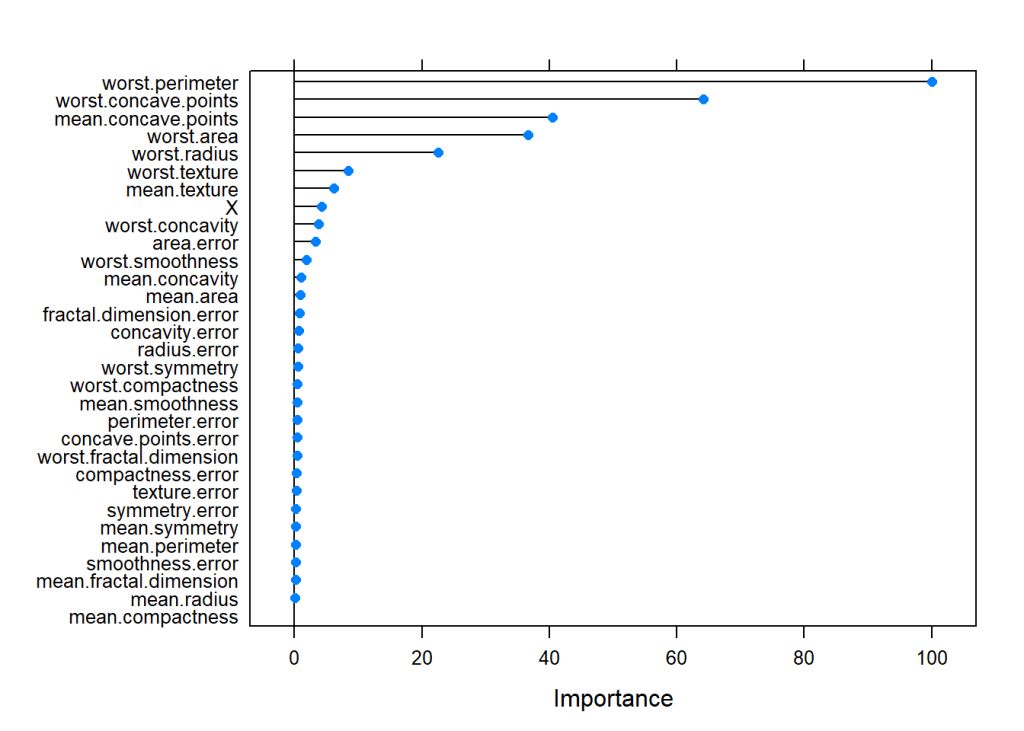
1.31a Decision Trees – R Code

The code below creates a Decision tree with the cancer training data. The summary of the fit is output. Based on the ML model, the predict function is used on test data and a confusion matrix is output.

# Read the cancer data
library(tree)
library(caret)
library(e1071)
cancer <- read.csv("cancer.csv",stringsAsFactors = FALSE)
cancer <- cancer[,2:32]
cancer$target <- as.factor(cancer$target)
train_idx <- trainTestSplit(cancer,trainPercent=75,seed=5)
train <- cancer[train_idx, ]
test <- cancer[-train_idx, ]

# Create Decision Tree
cancerStatus=tree(target~.,train)
summary(cancerStatus)
## 
## Classification tree:
## tree(formula = target ~ ., data = train)
## Variables actually used in tree construction:
## [1] "worst.perimeter"      "worst.concave.points" "area.error"          
## [4] "worst.texture"        "mean.texture"         "mean.concave.points" 
## Number of terminal nodes:  9 
## Residual mean deviance:  0.1218 = 50.8 / 417 
## Misclassification error rate: 0.02347 = 10 / 426
pred <- predict(cancerStatus,newdata=test,type="class")
confusionMatrix(pred,test$target)
## Confusion Matrix and Statistics
## 
##           Reference
## Prediction  0  1
##          0 49  7
##          1  8 78
##                                           
##                Accuracy : 0.8944          
##                  95% CI : (0.8318, 0.9397)
##     No Information Rate : 0.5986          
##     P-Value [Acc > NIR] : 4.641e-15       
##                                           
##                   Kappa : 0.7795          
##  Mcnemar's Test P-Value : 1               
##                                           
##             Sensitivity : 0.8596          
##             Specificity : 0.9176          
##          Pos Pred Value : 0.8750          
##          Neg Pred Value : 0.9070          
##              Prevalence : 0.4014          
##          Detection Rate : 0.3451          
##    Detection Prevalence : 0.3944          
##       Balanced Accuracy : 0.8886          
##                                           
##        'Positive' Class : 0               
## 
# Plot decision tree with labels
plot(cancerStatus)
text(cancerStatus,pretty=0)

fig6-1

1.31b Decision Trees – Cross Validation – R Code

We can also perform a Cross Validation on the data to identify the Decision Tree which will give the minimum deviance.

library(tree)
cancer <- read.csv("cancer.csv",stringsAsFactors = FALSE)
cancer <- cancer[,2:32]
cancer$target <- as.factor(cancer$target)
train_idx <- trainTestSplit(cancer,trainPercent=75,seed=5)
train <- cancer[train_idx, ]
test <- cancer[-train_idx, ]

# Create Decision Tree
cancerStatus=tree(target~.,train)

# Execute 10 fold cross validation
cvCancer=cv.tree(cancerStatus)
plot(cvCancer)

fig7-1

# Plot the 
plot(cvCancer$size,cvCancer$dev,type='b')
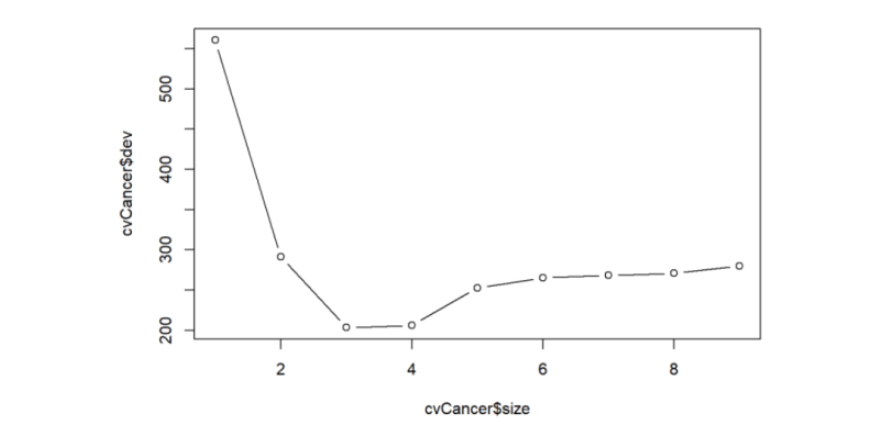
fig1

prunedCancer=prune.tree(cancerStatus,best=4)
plot(prunedCancer)
text(prunedCancer,pretty=0)

fig2

pred <- predict(prunedCancer,newdata=test,type="class")
confusionMatrix(pred,test$target)
## Confusion Matrix and Statistics
## 
##           Reference
## Prediction  0  1
##          0 50  7
##          1  7 78
##                                          
##                Accuracy : 0.9014         
##                  95% CI : (0.8401, 0.945)
##     No Information Rate : 0.5986         
##     P-Value [Acc > NIR] : 7.988e-16      
##                                          
##                   Kappa : 0.7948         
##  Mcnemar's Test P-Value : 1              
##                                          
##             Sensitivity : 0.8772         
##             Specificity : 0.9176         
##          Pos Pred Value : 0.8772         
##          Neg Pred Value : 0.9176         
##              Prevalence : 0.4014         
##          Detection Rate : 0.3521         
##    Detection Prevalence : 0.4014         
##       Balanced Accuracy : 0.8974         
##                                          
##        'Positive' Class : 0              
## 

1.31c Decision Trees – Python Code

Below is the Python code for creating Decision Trees. The accuracy, precision, recall and F1 score is computed on the test data set.

import numpy as np
import pandas as pd
import os
import matplotlib.pyplot as plt
from sklearn.metrics import confusion_matrix
from sklearn import tree
from sklearn.datasets import load_breast_cancer
from sklearn.model_selection import train_test_split
from sklearn.tree import DecisionTreeClassifier
from sklearn.datasets import make_classification, make_blobs
from sklearn.metrics import accuracy_score, precision_score, recall_score, f1_score
import graphviz 

cancer = load_breast_cancer()
(X_cancer, y_cancer) = load_breast_cancer(return_X_y = True)

X_train, X_test, y_train, y_test = train_test_split(X_cancer, y_cancer,
                                                   random_state = 0)
clf = DecisionTreeClassifier().fit(X_train, y_train)

print('Accuracy of Decision Tree classifier on training set: {:.2f}'
     .format(clf.score(X_train, y_train)))
print('Accuracy of Decision Tree classifier on test set: {:.2f}'
     .format(clf.score(X_test, y_test)))

y_predicted=clf.predict(X_test)
confusion = confusion_matrix(y_test, y_predicted)
print('Accuracy: {:.2f}'.format(accuracy_score(y_test, y_predicted)))
print('Precision: {:.2f}'.format(precision_score(y_test, y_predicted)))
print('Recall: {:.2f}'.format(recall_score(y_test, y_predicted)))
print('F1: {:.2f}'.format(f1_score(y_test, y_predicted)))

# Plot the Decision Tree
clf = DecisionTreeClassifier(max_depth=2).fit(X_train, y_train)
dot_data = tree.export_graphviz(clf, out_file=None, 
                         feature_names=cancer.feature_names,  
                         class_names=cancer.target_names,  
                         filled=True, rounded=True,  
                         special_characters=True)  
graph = graphviz.Source(dot_data)  
graph
## Accuracy of Decision Tree classifier on training set: 1.00
## Accuracy of Decision Tree classifier on test set: 0.87
## Accuracy: 0.87
## Precision: 0.97
## Recall: 0.82
## F1: 0.89

tree

1.31d Decision Trees – Cross Validation – Python Code

In the code below 5-fold cross validation is performed for different depths of the tree and the accuracy is computed. The accuracy on the test set seems to plateau when the depth is 8. But it is seen to increase again from 10 to 12. More analysis needs to be done here


import numpy as np
import pandas as pd
import os
import matplotlib.pyplot as plt
from sklearn.datasets import load_breast_cancer
from sklearn.tree import DecisionTreeClassifier
(X_cancer, y_cancer) = load_breast_cancer(return_X_y = True)
from sklearn.cross_validation import train_test_split, KFold
def computeCVAccuracy(X,y,folds):
    accuracy=[]
    foldAcc=[]
    depth=[1,2,3,4,5,6,7,8,9,10,11,12]
    nK=len(X)/float(folds)
    xval_err=0
    for i in depth: 
        kf = KFold(len(X),n_folds=folds)
        for train_index, test_index in kf:
            X_train, X_test = X.iloc[train_index], X.iloc[test_index]
            y_train, y_test = y.iloc[train_index], y.iloc[test_index]  
            clf = DecisionTreeClassifier(max_depth = i).fit(X_train, y_train)
            score=clf.score(X_test, y_test)
            accuracy.append(score)     
            
        foldAcc.append(np.mean(accuracy))  
        
    return(foldAcc)
    
    
cvAccuracy=computeCVAccuracy(pd.DataFrame(X_cancer),pd.DataFrame(y_cancer),folds=10)

df1=pd.DataFrame(cvAccuracy)
df1.columns=['cvAccuracy']
df=df1.reindex([1,2,3,4,5,6,7,8,9,10,11,12])
df.plot()
plt.title("Decision Tree - 10-fold Cross Validation Accuracy vs Depth of tree")
plt.xlabel("Depth of tree")
plt.ylabel("Accuracy")
plt.savefig('fig3.png', bbox_inches='tight')


fig3


1.4a Random Forest – R code

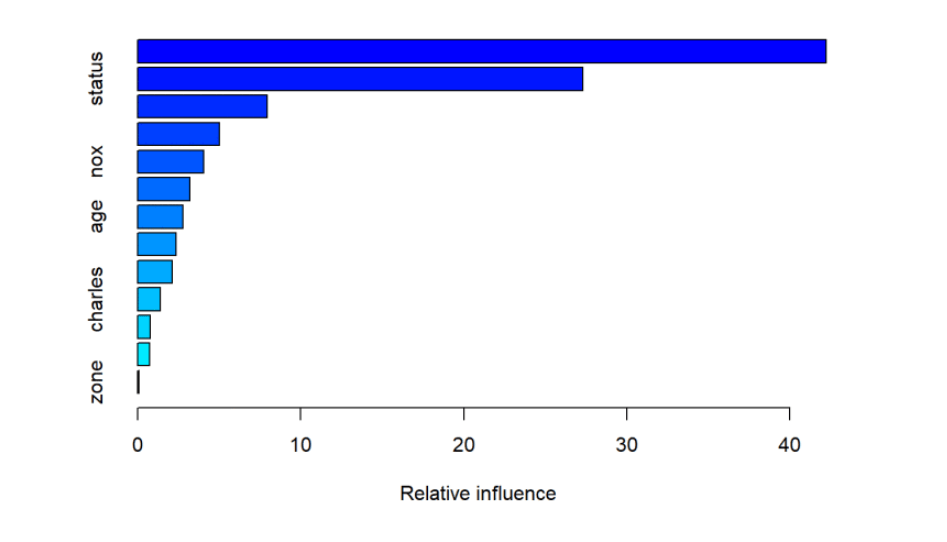
A Random Forest is fit using the Boston data. The summary shows that 4 variables were randomly chosen at each split and the resulting ML model explains 88.72% of the test data. Also the variable importance is plotted. It can be seen that ‘rooms’ and ‘status’ are the most influential features in the model

library(randomForest)
df=read.csv("Boston.csv",stringsAsFactors = FALSE) # Data from MASS - SL

# Select specific columns
Boston <- df %>% dplyr::select("crimeRate","zone","indus","charles","nox","rooms","age",                          "distances","highways","tax","teacherRatio","color",
                               "status","medianValue")

# Fit a Random Forest on the Boston training data
rfBoston=randomForest(medianValue~.,data=Boston)
# Display the summatu of the fit. It can be seen that the MSE is 10.88 
# and the percentage variance explained is 86.14%. About 4 variables were tried at each # #split for a maximum tree of 500.
# The MSE and percent variance is on Out of Bag trees
rfBoston
## 
## Call:
##  randomForest(formula = medianValue ~ ., data = Boston) 
##                Type of random forest: regression
##                      Number of trees: 500
## No. of variables tried at each split: 4
## 
##           Mean of squared residuals: 9.521672
##                     % Var explained: 88.72
#List and plot the variable importances
importance(rfBoston)
##              IncNodePurity
## crimeRate        2602.1550
## zone              258.8057
## indus            2599.6635
## charles           240.2879
## nox              2748.8485
## rooms           12011.6178
## age              1083.3242
## distances        2432.8962
## highways          393.5599
## tax              1348.6987
## teacherRatio     2841.5151
## color             731.4387
## status          12735.4046
varImpPlot(rfBoston)

fig8-1

1.4b Random Forest-OOB and Cross Validation Error – R code

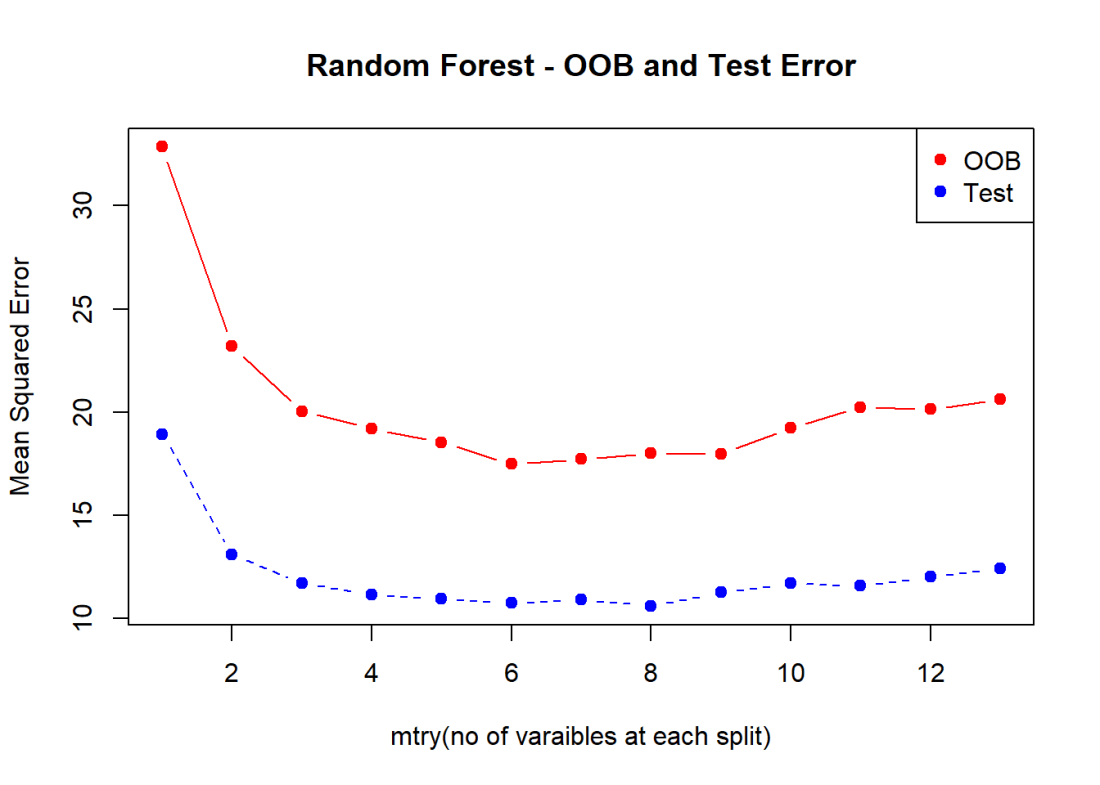
The figure below shows the OOB error and the Cross Validation error vs the ‘mtry’. Here mtry indicates the number of random features that are chosen at each split. The lowest test error occurs when mtry = 8

library(randomForest)
df=read.csv("Boston.csv",stringsAsFactors = FALSE) # Data from MASS - SL

# Select specific columns
Boston <- df %>% dplyr::select("crimeRate","zone","indus","charles","nox","rooms","age",                          "distances","highways","tax","teacherRatio","color",
                               "status","medianValue")
# Split as training and tst sets
train_idx <- trainTestSplit(Boston,trainPercent=75,seed=5)
train <- Boston[train_idx, ]
test <- Boston[-train_idx, ]

#Initialize OOD and testError
oobError <- NULL
testError <- NULL
# In the code below the number of variables to consider at each split is increased
# from 1 - 13(max features) and the OOB error and the MSE is computed
for(i in 1:13){
    fitRF=randomForest(medianValue~.,data=train,mtry=i,ntree=400)
    oobError[i] <-fitRF$mse[400]
    pred <- predict(fitRF,newdata=test)
    testError[i] <- mean((pred-test$medianValue)^2)
}

# We can see the OOB and Test Error. It can be seen that the Random Forest performs
# best with the lowers MSE at mtry=6
matplot(1:13,cbind(testError,oobError),pch=19,col=c("red","blue"),
        type="b",xlab="mtry(no of varaibles at each split)", ylab="Mean Squared Error",
        main="Random Forest - OOB and Test Error")
legend("topright",legend=c("OOB","Test"),pch=19,col=c("red","blue"))

fig9-1

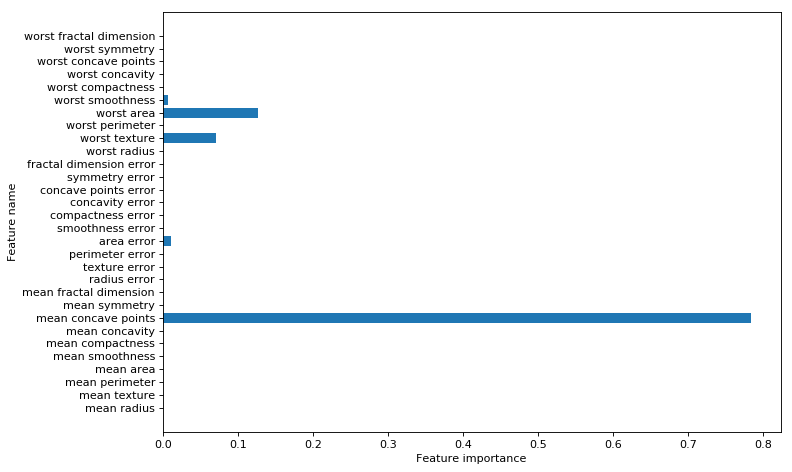
1.4c Random Forest – Python code

The python code for Random Forest Regression is shown below. The training and test score is computed. The variable importance shows that ‘rooms’ and ‘status’ are the most influential of the variables

import numpy as np
import pandas as pd
import os
import matplotlib.pyplot as plt
from sklearn.model_selection import train_test_split
from sklearn.ensemble import RandomForestRegressor
df = pd.read_csv("Boston.csv",encoding = "ISO-8859-1")

X=df[['crimeRate','zone', 'indus','charles','nox','rooms', 'age','distances','highways','tax',
       'teacherRatio','color','status']]
y=df['medianValue']

X_train, X_test, y_train, y_test = train_test_split(X, y, random_state = 0)

regr = RandomForestRegressor(max_depth=4, random_state=0)
regr.fit(X_train, y_train)

print('R-squared score (training): {:.3f}'
     .format(regr.score(X_train, y_train)))
print('R-squared score (test): {:.3f}'
     .format(regr.score(X_test, y_test)))

feature_names=['crimeRate','zone', 'indus','charles','nox','rooms', 'age','distances','highways','tax',
       'teacherRatio','color','status']
print(regr.feature_importances_)
plt.figure(figsize=(10,6),dpi=80)
c_features=X_train.shape[1]
plt.barh(np.arange(c_features),regr.feature_importances_)
plt.xlabel("Feature importance")
plt.ylabel("Feature name")

plt.yticks(np.arange(c_features), feature_names)
plt.tight_layout()

plt.savefig('fig4.png', bbox_inches='tight')
## R-squared score (training): 0.917
## R-squared score (test): 0.734
## [ 0.03437382  0.          0.00580335  0.          0.00731004  0.36461548
##   0.00638577  0.03432173  0.0041244   0.01732328  0.01074148  0.0012638
##   0.51373683]
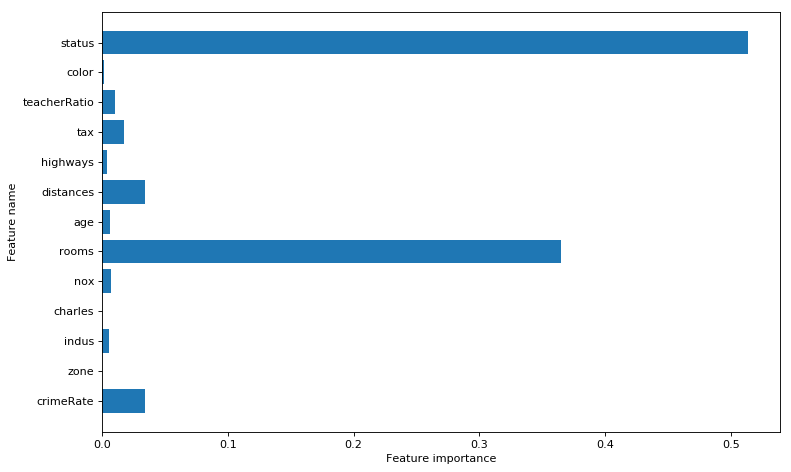
fig4

1.4d Random Forest – Cross Validation and OOB Error – Python code

As with R the ‘max_features’ determines the random number of features the random forest will use at each split. The plot shows that when max_features=8 the MSE is lowest

import numpy as np
import pandas as pd
import os
import matplotlib.pyplot as plt
from sklearn.model_selection import train_test_split
from sklearn.ensemble import RandomForestRegressor
from sklearn.model_selection import cross_val_score
df = pd.read_csv("Boston.csv",encoding = "ISO-8859-1")

X=df[['crimeRate','zone', 'indus','charles','nox','rooms', 'age','distances','highways','tax',
       'teacherRatio','color','status']]
y=df['medianValue']

cvError=[]
oobError=[]
oobMSE=[]
for i in range(1,13):
    regr = RandomForestRegressor(max_depth=4, n_estimators=400,max_features=i,oob_score=True,random_state=0)
    mse= np.mean(cross_val_score(regr, X, y, cv=5,scoring = 'neg_mean_squared_error'))
    # Since this is neg_mean_squared_error I have inverted the sign to get MSE
    cvError.append(-mse)
    # Fit on all data to compute OOB error
    regr.fit(X, y)
    # Record the OOB error for each `max_features=i` setting
    oob = 1 - regr.oob_score_
    oobError.append(oob)
    # Get the Out of Bag prediction
    oobPred=regr.oob_prediction_ 
    # Compute the Mean Squared Error between OOB Prediction and target
    mseOOB=np.mean(np.square(oobPred-y))
    oobMSE.append(mseOOB)

# Plot the CV Error and OOB Error
# Set max_features
maxFeatures=np.arange(1,13) 
cvError=pd.DataFrame(cvError,index=maxFeatures)
oobMSE=pd.DataFrame(oobMSE,index=maxFeatures)
#Plot
fig8=df.plot()
fig8=plt.title('Random forest - CV Error and OOB Error vs max_features')
fig8.figure.savefig('fig8.png', bbox_inches='tight')

#Plot the OOB Error vs max_features
plt.plot(range(1,13),oobError)
fig2=plt.title("Random Forest - OOB Error vs max_features (variable no of features)")
fig2=plt.xlabel("max_features (variable no of features)")
fig2=plt.ylabel("OOB Error")
fig2.figure.savefig('fig7.png', bbox_inches='tight')
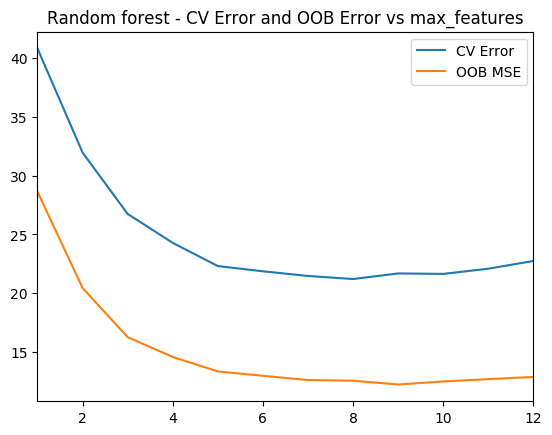
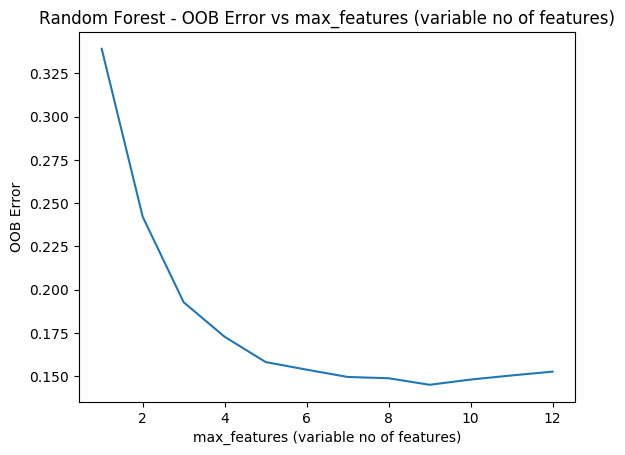
fig8 fig7

1.5a Boosting – R code

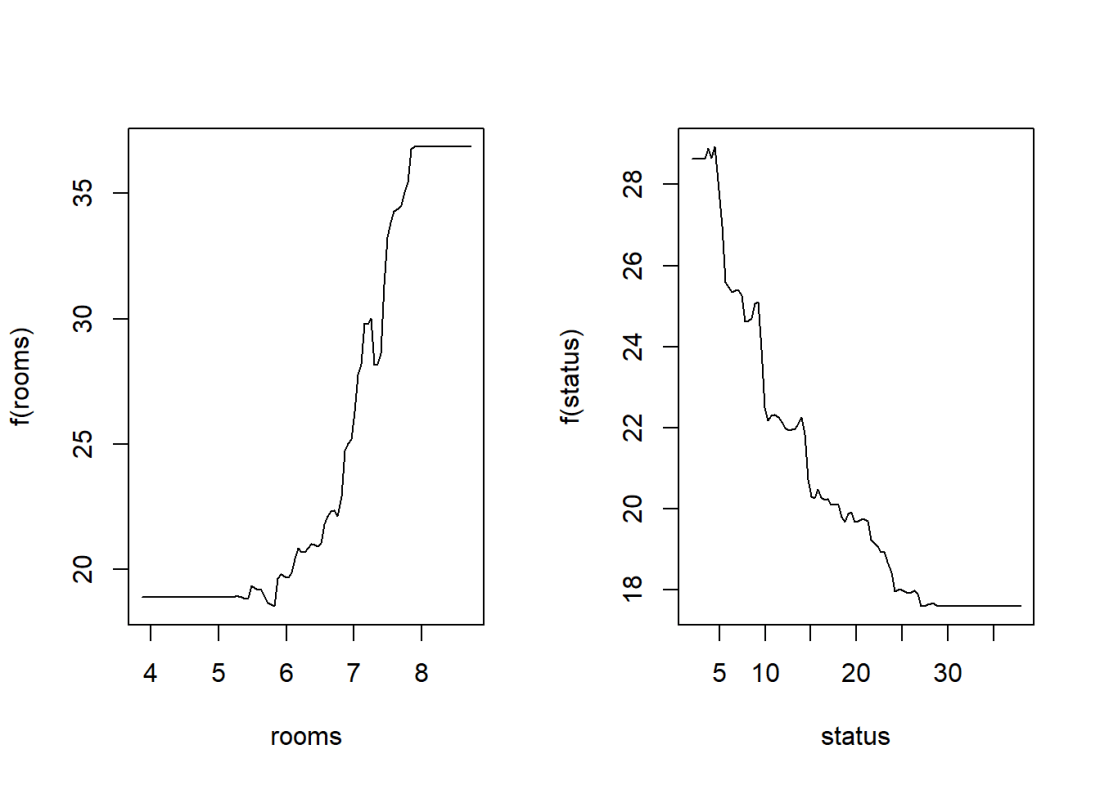
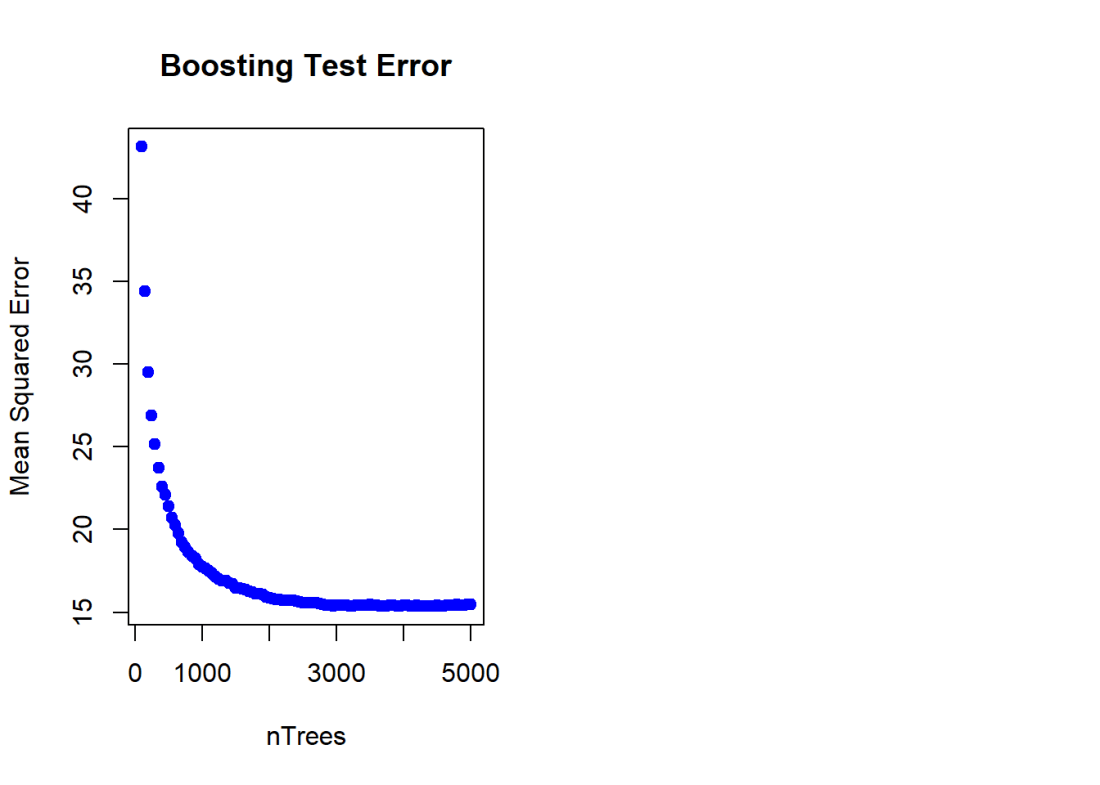
Here a Gradient Boosted ML Model is built with a n.trees=5000, with a learning rate of 0.01 and depth of 4. The feature importance plot also shows that rooms and status are the 2 most important features. The MSE vs the number of trees plateaus around 2000 trees

library(gbm)
# Perform gradient boosting on the Boston data set. The distribution is gaussian since we
# doing MSE. The interaction depth specifies the number of splits
boostBoston=gbm(medianValue~.,data=train,distribution="gaussian",n.trees=5000,
                shrinkage=0.01,interaction.depth=4)
#The summary gives the variable importance. The 2 most significant variables are
# number of rooms and lower status
summary(boostBoston)

##                       var    rel.inf
## rooms               rooms 42.2267200
## status             status 27.3024671
## distances       distances  7.9447972
## crimeRate       crimeRate  5.0238827
## nox                   nox  4.0616548
## teacherRatio teacherRatio  3.1991999
## age                   age  2.7909772
## color               color  2.3436295
## tax                   tax  2.1386213
## charles           charles  1.3799109
## highways         highways  0.7644026
## indus               indus  0.7236082
## zone                 zone  0.1001287
# The plots below show how each variable relates to the median value of the home. As
# the number of roomd increase the median value increases and with increase in lower status
# the median value decreases
par(mfrow=c(1,2))
#Plot the relation between the top 2 features and the target
plot(boostBoston,i="rooms")
plot(boostBoston,i="status")

fig10-2

# Create a sequence of trees between 100-5000 incremented by 50
nTrees=seq(100,5000,by=50)
# Predict the values for the test data
pred <- predict(boostBoston,newdata=test,n.trees=nTrees)
# Compute the mean for each of the MSE for each of the number of trees 
boostError <- apply((pred-test$medianValue)^2,2,mean)
#Plot the MSE vs the number of trees
plot(nTrees,boostError,pch=19,col="blue",ylab="Mean Squared Error",
     main="Boosting Test Error")

fig10-3

1.5b Cross Validation Boosting – R code

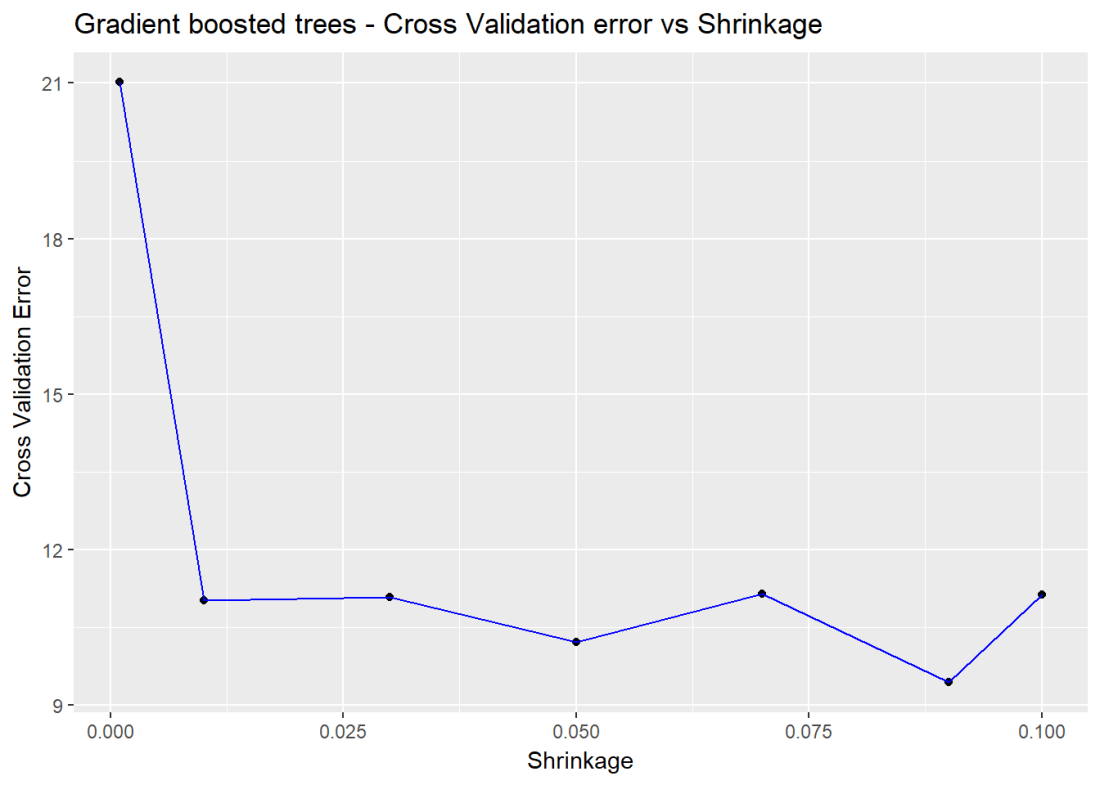
Included below is a cross validation error vs the learning rate. The lowest error is when learning rate = 0.09

cvError <- NULL
s <- c(.001,0.01,0.03,0.05,0.07,0.09,0.1)
for(i in seq_along(s)){
    cvBoost=gbm(medianValue~.,data=train,distribution="gaussian",n.trees=5000,
                shrinkage=s[i],interaction.depth=4,cv.folds=5)
    cvError[i] <- mean(cvBoost$cv.error)
}

# Create a data frame for plotting
a <- rbind(s,cvError)
b <- as.data.frame(t(a))
# It can be seen that a shrinkage parameter of 0,05 gives the lowes CV Error
ggplot(b,aes(s,cvError)) + geom_point() + geom_line(color="blue") + 
    xlab("Shrinkage") + ylab("Cross Validation Error") +
    ggtitle("Gradient boosted trees - Cross Validation error vs Shrinkage")

fig11-1

1.5c Boosting – Python code

A gradient boost ML model in Python is created below. The Rsquared score is computed on the training and test data.

import numpy as np
import pandas as pd
import os
import matplotlib.pyplot as plt
from sklearn.model_selection import train_test_split
from sklearn.ensemble import GradientBoostingRegressor
df = pd.read_csv("Boston.csv",encoding = "ISO-8859-1")

X=df[['crimeRate','zone', 'indus','charles','nox','rooms', 'age','distances','highways','tax',
       'teacherRatio','color','status']]
y=df['medianValue']

X_train, X_test, y_train, y_test = train_test_split(X, y, random_state = 0)

regr = GradientBoostingRegressor()
regr.fit(X_train, y_train)

print('R-squared score (training): {:.3f}'
     .format(regr.score(X_train, y_train)))
print('R-squared score (test): {:.3f}'
     .format(regr.score(X_test, y_test)))
## R-squared score (training): 0.983
## R-squared score (test): 0.821

1.5c Cross Validation Boosting – Python code

the cross validation error is computed as the learning rate is varied. The minimum CV eror occurs when lr = 0.04

import numpy as np
import pandas as pd
import os
import matplotlib.pyplot as plt
from sklearn.model_selection import train_test_split
from sklearn.ensemble import RandomForestRegressor
from sklearn.ensemble import GradientBoostingRegressor
from sklearn.model_selection import cross_val_score
df = pd.read_csv("Boston.csv",encoding = "ISO-8859-1")

X=df[['crimeRate','zone', 'indus','charles','nox','rooms', 'age','distances','highways','tax',
       'teacherRatio','color','status']]
y=df['medianValue']

cvError=[]
learning_rate =[.001,0.01,0.03,0.05,0.07,0.09,0.1]
for lr in learning_rate:
    regr = GradientBoostingRegressor(max_depth=4, n_estimators=400,learning_rate  =lr,random_state=0)
    mse= np.mean(cross_val_score(regr, X, y, cv=10,scoring = 'neg_mean_squared_error'))
    # Since this is neg_mean_squared_error I have inverted the sign to get MSE
    cvError.append(-mse)
learning_rate =[.001,0.01,0.03,0.05,0.07,0.09,0.1]
plt.plot(learning_rate,cvError)
plt.title("Gradient Boosting - 5-fold CV- Mean Squared Error vs max_features (variable no of features)")
plt.xlabel("max_features (variable no of features)")
plt.ylabel("Mean Squared Error")
plt.savefig('fig6.png', bbox_inches='tight')
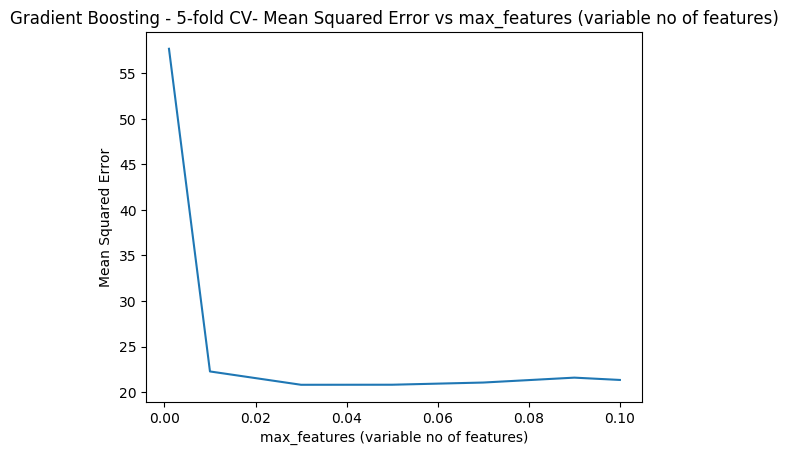
fig6

Conclusion This post covered Splines and Tree based ML models like Bagging, Random Forest and Boosting. Stay tuned for further updates.

You may also like

  1. Re-introducing cricketr! : An R package to analyze performances of cricketer
  2. Designing a Social Web Portal
  3. My travels through the realms of Data Science, Machine Learning, Deep Learning and (AI)
  4. My TEDx talk on the “Internet of Things”
  5. Singularity
  6. A closer look at “Robot Horse on a Trot” in Android

To see all posts see Index of posts

Practical Machine Learning with R and Python – Part 4

This is the 4th installment of my ‘Practical Machine Learning with R and Python’ series. In this part I discuss classification with Support Vector Machines (SVMs), using both a Linear and a Radial basis kernel, and Decision Trees. Further, a closer look is taken at some of the metrics associated with binary classification, namely accuracy vs precision and recall. I also touch upon Validation curves, Precision-Recall, ROC curves and AUC with equivalent code in R and Python

This post is a continuation of my 3 earlier posts on Practical Machine Learning in R and Python
1. Practical Machine Learning with R and Python – Part 1
2. Practical Machine Learning with R and Python – Part 2
3. Practical Machine Learning with R and Python – Part 3

The RMarkdown file with the code and the associated data files can be downloaded from Github at MachineLearning-RandPython-Part4

Note: Please listen to my video presentations Machine Learning in youtube
1. Machine Learning in plain English-Part 1
2. Machine Learning in plain English-Part 2
3. Machine Learning in plain English-Part 3

Check out my compact and minimal book  “Practical Machine Learning with R and Python:Third edition- Machine Learning in stereo”  available in Amazon in paperback($12.99) and kindle($8.99) versions. My book includes implementations of key ML algorithms and associated measures and metrics. The book is ideal for anybody who is familiar with the concepts and would like a quick reference to the different ML algorithms that can be applied to problems and how to select the best model. Pick your copy today!!


Support Vector Machines (SVM) are another useful Machine Learning model that can be used for both regression and classification problems. SVMs used in classification, compute the hyperplane, that separates the 2 classes with the maximum margin. To do this the features may be transformed into a larger multi-dimensional feature space. SVMs can be used with different kernels namely linear, polynomial or radial basis to determine the best fitting model for a given classification problem.

In the 2nd part of this series Practical Machine Learning with R and Python – Part 2, I had mentioned the various metrics that are used in classification ML problems namely Accuracy, Precision, Recall and F1 score. Accuracy gives the fraction of data that were correctly classified as belonging to the +ve or -ve class. However ‘accuracy’ in itself is not a good enough measure because it does not take into account the fraction of the data that were incorrectly classified. This issue becomes even more critical in different domains. For e.g a surgeon who would like to detect cancer, would like to err on the side of caution, and classify even a possibly non-cancerous patient as possibly having cancer, rather than mis-classifying a malignancy as benign. Here we would like to increase recall or sensitivity which is  given by Recall= TP/(TP+FN) or we try reduce mis-classification by either increasing the (true positives) TP or reducing (false negatives) FN

On the other hand, search algorithms would like to increase precision which tries to reduce the number of irrelevant results in the search result. Precision= TP/(TP+FP). In other words we do not want ‘false positives’ or irrelevant results to come in the search results and there is a need to reduce the false positives.

When we try to increase ‘precision’, we do so at the cost of ‘recall’, and vice-versa. I found this diagram and explanation in Wikipedia very useful Source: Wikipedia

“Consider a brain surgeon tasked with removing a cancerous tumor from a patient’s brain. The surgeon needs to remove all of the tumor cells since any remaining cancer cells will regenerate the tumor. Conversely, the surgeon must not remove healthy brain cells since that would leave the patient with impaired brain function. The surgeon may be more liberal in the area of the brain she removes to ensure she has extracted all the cancer cells. This decision increases recall but reduces precision. On the other hand, the surgeon may be more conservative in the brain she removes to ensure she extracts only cancer cells. This decision increases precision but reduces recall. That is to say, greater recall increases the chances of removing healthy cells (negative outcome) and increases the chances of removing all cancer cells (positive outcome). Greater precision decreases the chances of removing healthy cells (positive outcome) but also decreases the chances of removing all cancer cells (negative outcome).”

1.1a. Linear SVM – R code

In R code below I use SVM with linear kernel

source('RFunctions-1.R')
library(dplyr)
library(e1071)
library(caret)
library(reshape2)
library(ggplot2)
# Read data. Data from SKLearn
cancer <- read.csv("cancer.csv")
cancer$target <- as.factor(cancer$target)

# Split into training and test sets
train_idx <- trainTestSplit(cancer,trainPercent=75,seed=5)
train <- cancer[train_idx, ]
test <- cancer[-train_idx, ]

# Fit a linear basis kernel. DO not scale the data
svmfit=svm(target~., data=train, kernel="linear",scale=FALSE)
ypred=predict(svmfit,test)
#Print a confusion matrix
confusionMatrix(ypred,test$target)
## Confusion Matrix and Statistics
## 
##           Reference
## Prediction  0  1
##          0 54  3
##          1  3 82
##                                           
##                Accuracy : 0.9577          
##                  95% CI : (0.9103, 0.9843)
##     No Information Rate : 0.5986          
##     P-Value [Acc > NIR] : <2e-16          
##                                           
##                   Kappa : 0.9121          
##  Mcnemar's Test P-Value : 1               
##                                           
##             Sensitivity : 0.9474          
##             Specificity : 0.9647          
##          Pos Pred Value : 0.9474          
##          Neg Pred Value : 0.9647          
##              Prevalence : 0.4014          
##          Detection Rate : 0.3803          
##    Detection Prevalence : 0.4014          
##       Balanced Accuracy : 0.9560          
##                                           
##        'Positive' Class : 0               
## 

1.1b Linear SVM – Python code

The code below creates a SVM with linear basis in Python and also dumps the corresponding classification metrics

import numpy as np
import pandas as pd
import os
import matplotlib.pyplot as plt
from sklearn.model_selection import train_test_split
from sklearn.svm import LinearSVC

from sklearn.datasets import make_classification, make_blobs

from sklearn.metrics import confusion_matrix
from matplotlib.colors import ListedColormap
from sklearn.datasets import load_breast_cancer
# Load the cancer data
(X_cancer, y_cancer) = load_breast_cancer(return_X_y = True)
X_train, X_test, y_train, y_test = train_test_split(X_cancer, y_cancer,
                                                   random_state = 0)
clf = LinearSVC().fit(X_train, y_train)
print('Breast cancer dataset')
print('Accuracy of Linear SVC classifier on training set: {:.2f}'
     .format(clf.score(X_train, y_train)))
print('Accuracy of Linear SVC classifier on test set: {:.2f}'
     .format(clf.score(X_test, y_test)))
## Breast cancer dataset
## Accuracy of Linear SVC classifier on training set: 0.92
## Accuracy of Linear SVC classifier on test set: 0.94

1.2 Dummy classifier

Often when we perform classification tasks using any ML model namely logistic regression, SVM, neural networks etc. it is very useful to determine how well the ML model performs agains at dummy classifier. A dummy classifier uses some simple computation like frequency of majority class, instead of fitting and ML model. It is essential that our ML model does much better that the dummy classifier. This problem is even more important in imbalanced classes where we have only about 10% of +ve samples. If any ML model we create has a accuracy of about 0.90 then it is evident that our classifier is not doing any better than a dummy classsfier which can just take a majority count of this imbalanced class and also come up with 0.90. We need to be able to do better than that.

In the examples below (1.3a & 1.3b) it can be seen that SVMs with ‘radial basis’ kernel with unnormalized data, for both R and Python, do not perform any better than the dummy classifier.

1.2a Dummy classifier – R code

R does not seem to have an explicit dummy classifier. I created a simple dummy classifier that predicts the majority class. SKlearn in Python also includes other strategies like uniform, stratified etc. but this should be possible to create in R also.

# Create a simple dummy classifier that computes the ratio of the majority class to the totla
DummyClassifierAccuracy <- function(train,test,type="majority"){
  if(type=="majority"){
      count <- sum(train$target==1)/dim(train)[1]
  }
  count
}


cancer <- read.csv("cancer.csv")
cancer$target <- as.factor(cancer$target)

# Create training and test sets
train_idx <- trainTestSplit(cancer,trainPercent=75,seed=5)
train <- cancer[train_idx, ]
test <- cancer[-train_idx, ]

#Dummy classifier majority class
acc=DummyClassifierAccuracy(train,test)
sprintf("Accuracy is %f",acc)
## [1] "Accuracy is 0.638498"

1.2b Dummy classifier – Python code

This dummy classifier uses the majority class.

import numpy as np
import pandas as pd
import os
import matplotlib.pyplot as plt
from sklearn.datasets import load_breast_cancer
from sklearn.model_selection import train_test_split
from sklearn.dummy import DummyClassifier
from sklearn.metrics import confusion_matrix
(X_cancer, y_cancer) = load_breast_cancer(return_X_y = True)
X_train, X_test, y_train, y_test = train_test_split(X_cancer, y_cancer,
                                                   random_state = 0)

# Negative class (0) is most frequent
dummy_majority = DummyClassifier(strategy = 'most_frequent').fit(X_train, y_train)
y_dummy_predictions = dummy_majority.predict(X_test)

print('Dummy classifier accuracy on test set: {:.2f}'
     .format(dummy_majority.score(X_test, y_test)))
## Dummy classifier accuracy on test set: 0.63

1.3a – Radial SVM (un-normalized) – R code

SVMs perform better when the data is normalized or scaled. The 2 examples below show that SVM with radial basis kernel does not perform any better than the dummy classifier

library(dplyr)
library(e1071)
library(caret)
library(reshape2)
library(ggplot2)

# Radial SVM unnormalized
train_idx <- trainTestSplit(cancer,trainPercent=75,seed=5)
train <- cancer[train_idx, ]
test <- cancer[-train_idx, ]
# Unnormalized data
svmfit=svm(target~., data=train, kernel="radial",cost=10,scale=FALSE)
ypred=predict(svmfit,test)
confusionMatrix(ypred,test$target)
## Confusion Matrix and Statistics
## 
##           Reference
## Prediction  0  1
##          0  0  0
##          1 57 85
##                                           
##                Accuracy : 0.5986          
##                  95% CI : (0.5131, 0.6799)
##     No Information Rate : 0.5986          
##     P-Value [Acc > NIR] : 0.5363          
##                                           
##                   Kappa : 0               
##  Mcnemar's Test P-Value : 1.195e-13       
##                                           
##             Sensitivity : 0.0000          
##             Specificity : 1.0000          
##          Pos Pred Value :    NaN          
##          Neg Pred Value : 0.5986          
##              Prevalence : 0.4014          
##          Detection Rate : 0.0000          
##    Detection Prevalence : 0.0000          
##       Balanced Accuracy : 0.5000          
##                                           
##        'Positive' Class : 0               
## 

1.4b – Radial SVM (un-normalized) – Python code

import numpy as np
import pandas as pd
import os
import matplotlib.pyplot as plt
from sklearn.datasets import load_breast_cancer
from sklearn.model_selection import train_test_split
from sklearn.svm import SVC

# Load the cancer data
(X_cancer, y_cancer) = load_breast_cancer(return_X_y = True)
X_train, X_test, y_train, y_test = train_test_split(X_cancer, y_cancer,
                                                   random_state = 0)


clf = SVC(C=10).fit(X_train, y_train)
print('Breast cancer dataset (unnormalized features)')
print('Accuracy of RBF-kernel SVC on training set: {:.2f}'
     .format(clf.score(X_train, y_train)))
print('Accuracy of RBF-kernel SVC on test set: {:.2f}'
     .format(clf.score(X_test, y_test)))
## Breast cancer dataset (unnormalized features)
## Accuracy of RBF-kernel SVC on training set: 1.00
## Accuracy of RBF-kernel SVC on test set: 0.63

1.5a – Radial SVM (Normalized) -R Code

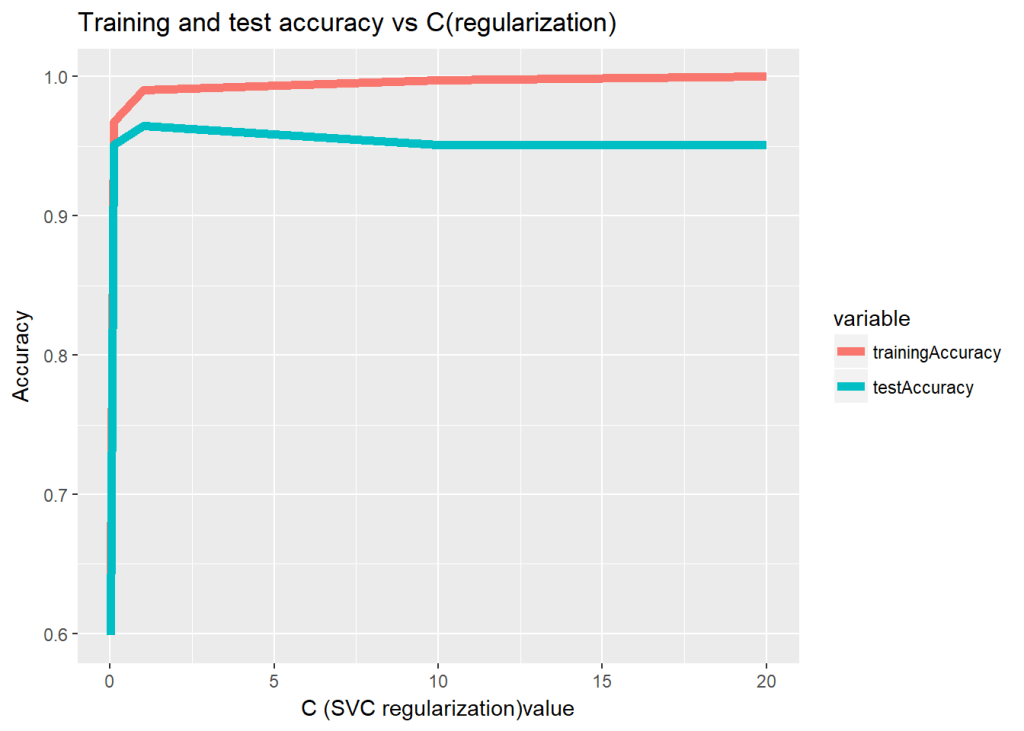
The data is scaled (normalized ) before using the SVM model. The SVM model has 2 paramaters a) C – Large C (less regularization), more regularization b) gamma – Small gamma has larger decision boundary with more misclassfication, and larger gamma has tighter decision boundary

The R code below computes the accuracy as the regularization paramater is changed

trainingAccuracy <- NULL
testAccuracy <- NULL
C1 <- c(.01,.1, 1, 10, 20)
for(i in  C1){
  
    svmfit=svm(target~., data=train, kernel="radial",cost=i,scale=TRUE)
    ypredTrain <-predict(svmfit,train)
    ypredTest=predict(svmfit,test)
    a <-confusionMatrix(ypredTrain,train$target)
    b <-confusionMatrix(ypredTest,test$target)
    trainingAccuracy <-c(trainingAccuracy,a$overall[1])
    testAccuracy <-c(testAccuracy,b$overall[1])
    
}
print(trainingAccuracy)
##  Accuracy  Accuracy  Accuracy  Accuracy  Accuracy 
## 0.6384977 0.9671362 0.9906103 0.9976526 1.0000000
print(testAccuracy)
##  Accuracy  Accuracy  Accuracy  Accuracy  Accuracy 
## 0.5985915 0.9507042 0.9647887 0.9507042 0.9507042
a <-rbind(C1,as.numeric(trainingAccuracy),as.numeric(testAccuracy))
b <- data.frame(t(a))
names(b) <- c("C1","trainingAccuracy","testAccuracy")
df <- melt(b,id="C1")
ggplot(df) + geom_line(aes(x=C1, y=value, colour=variable),size=2) +
    xlab("C (SVC regularization)value") + ylab("Accuracy") +
    ggtitle("Training and test accuracy vs C(regularization)")

1.5b – Radial SVM (normalized) – Python

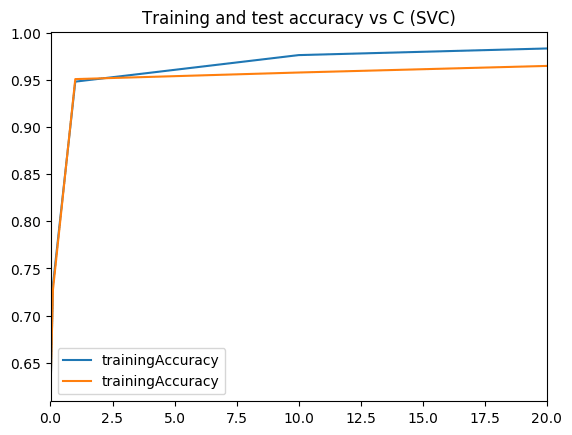
The Radial basis kernel is used on normalized data for a range of ‘C’ values and the result is plotted.

import numpy as np
import pandas as pd
import os
import matplotlib.pyplot as plt
from sklearn.datasets import load_breast_cancer
from sklearn.model_selection import train_test_split
from sklearn.svm import SVC
from sklearn.preprocessing import MinMaxScaler
scaler = MinMaxScaler()

# Load the cancer data
(X_cancer, y_cancer) = load_breast_cancer(return_X_y = True)
X_train, X_test, y_train, y_test = train_test_split(X_cancer, y_cancer,
                                                   random_state = 0)
X_train_scaled = scaler.fit_transform(X_train)
X_test_scaled = scaler.transform(X_test)
   
print('Breast cancer dataset (normalized with MinMax scaling)')
trainingAccuracy=[]
testAccuracy=[]
for C1 in [.01,.1, 1, 10, 20]:
    clf = SVC(C=C1).fit(X_train_scaled, y_train)
    acctrain=clf.score(X_train_scaled, y_train)
    accTest=clf.score(X_test_scaled, y_test)
    trainingAccuracy.append(acctrain)
    testAccuracy.append(accTest)
    
# Create a dataframe
C1=[.01,.1, 1, 10, 20]   
trainingAccuracy=pd.DataFrame(trainingAccuracy,index=C1)
testAccuracy=pd.DataFrame(testAccuracy,index=C1)

# Plot training and test R squared as a function of alpha
df=pd.concat([trainingAccuracy,testAccuracy],axis=1)
df.columns=['trainingAccuracy','trainingAccuracy']

fig1=df.plot()
fig1=plt.title('Training and test accuracy vs C (SVC)')
fig1.figure.savefig('fig1.png', bbox_inches='tight')
## Breast cancer dataset (normalized with MinMax scaling)

Output image: 

1.6a Validation curve – R code

Sklearn includes code creating validation curves by varying paramaters and computing and plotting accuracy as gamma or C or changd. I did not find this R but I think this is a useful function and so I have created the R equivalent of this.

# The R equivalent of np.logspace
seqLogSpace <- function(start,stop,len){
  a=seq(log10(10^start),log10(10^stop),length=len)
  10^a
}

# Read the data. This is taken the SKlearn cancer data
cancer <- read.csv("cancer.csv")
cancer$target <- as.factor(cancer$target)

set.seed(6)

# Create the range of C1 in log space
param_range = seqLogSpace(-3,2,20)
# Initialize the overall training and test accuracy to NULL
overallTrainAccuracy <- NULL
overallTestAccuracy <- NULL

# Loop over the parameter range of Gamma
for(i in param_range){
    # Set no of folds
    noFolds=5
    # Create the rows which fall into different folds from 1..noFolds
    folds = sample(1:noFolds, nrow(cancer), replace=TRUE) 
    # Initialize the training and test accuracy of folds to 0
    trainingAccuracy <- 0
    testAccuracy <- 0
    
    # Loop through the folds
    for(j in 1:noFolds){
        # The training is all rows for which the row is != j (k-1 folds -> training)
        train <- cancer[folds!=j,]
        # The rows which have j as the index become the test set
        test <- cancer[folds==j,]
        # Create a SVM model for this
        svmfit=svm(target~., data=train, kernel="radial",gamma=i,scale=TRUE)
  
        # Add up all the fold accuracy for training and test separately  
        ypredTrain <-predict(svmfit,train)
        ypredTest=predict(svmfit,test)
        
        # Create confusion matrix 
        a <-confusionMatrix(ypredTrain,train$target)
        b <-confusionMatrix(ypredTest,test$target)
        # Get the accuracy
        trainingAccuracy <-trainingAccuracy + a$overall[1]
        testAccuracy <-testAccuracy+b$overall[1]

    }
    # Compute the average of accuracy for K folds for number of features 'i'
    overallTrainAccuracy=c(overallTrainAccuracy,trainingAccuracy/noFolds)
    overallTestAccuracy=c(overallTestAccuracy,testAccuracy/noFolds)
}
#Create a dataframe
a <- rbind(param_range,as.numeric(overallTrainAccuracy),
               as.numeric(overallTestAccuracy))
b <- data.frame(t(a))
names(b) <- c("C1","trainingAccuracy","testAccuracy")
df <- melt(b,id="C1")
#Plot in log axis
ggplot(df) + geom_line(aes(x=C1, y=value, colour=variable),size=2) +
      xlab("C (SVC regularization)value") + ylab("Accuracy") +
      ggtitle("Training and test accuracy vs C(regularization)") + scale_x_log10()

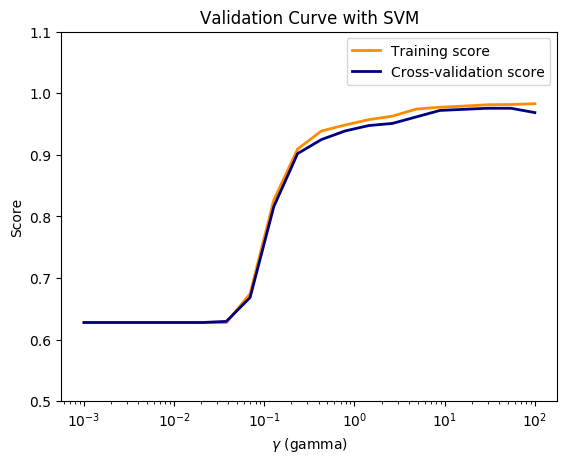
1.6b Validation curve – Python

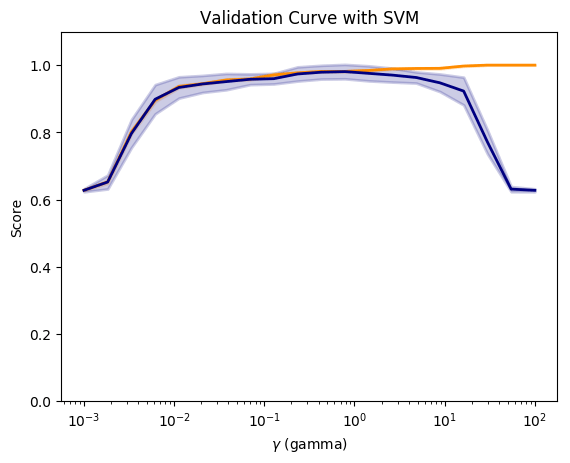
Compute and plot the validation curve as gamma is varied.

import numpy as np
import pandas as pd
import os
import matplotlib.pyplot as plt
from sklearn.datasets import load_breast_cancer
from sklearn.model_selection import train_test_split
from sklearn.preprocessing import MinMaxScaler
from sklearn.svm import SVC
from sklearn.model_selection import validation_curve


# Load the cancer data
(X_cancer, y_cancer) = load_breast_cancer(return_X_y = True)
scaler = MinMaxScaler()
X_scaled = scaler.fit_transform(X_cancer)

# Create a gamma values from 10^-3 to 10^2 with 20 equally spaced intervals
param_range = np.logspace(-3, 2, 20)
# Compute the validation curve
train_scores, test_scores = validation_curve(SVC(), X_scaled, y_cancer,
                                            param_name='gamma',
                                            param_range=param_range, cv=10)
                                            
#Plot the figure                                           
fig2=plt.figure()

#Compute the mean
train_scores_mean = np.mean(train_scores, axis=1)
train_scores_std = np.std(train_scores, axis=1)
test_scores_mean = np.mean(test_scores, axis=1)
test_scores_std = np.std(test_scores, axis=1)

fig2=plt.title('Validation Curve with SVM')
fig2=plt.xlabel('$\gamma$ (gamma)')
fig2=plt.ylabel('Score')
fig2=plt.ylim(0.0, 1.1)
lw = 2

fig2=plt.semilogx(param_range, train_scores_mean, label='Training score',
            color='darkorange', lw=lw)

fig2=plt.fill_between(param_range, train_scores_mean - train_scores_std,
                train_scores_mean + train_scores_std, alpha=0.2,
                color='darkorange', lw=lw)

fig2=plt.semilogx(param_range, test_scores_mean, label='Cross-validation score',
            color='navy', lw=lw)

fig2=plt.fill_between(param_range, test_scores_mean - test_scores_std,
                test_scores_mean + test_scores_std, alpha=0.2,
                color='navy', lw=lw)
fig2.figure.savefig('fig2.png', bbox_inches='tight')

Output image: 

1.7a Validation Curve (Preventing data leakage) – Python code

In this course Applied Machine Learning in Python, the Professor states that when we apply the same data transformation to a entire dataset, it will cause a data leakage. “The proper way to do cross-validation when you need to scale the data is not to scale the entire dataset with a single transform, since this will indirectly leak information into the training data about the whole dataset, including the test data (see the lecture on data leakage later in the course). Instead, scaling/normalizing must be computed and applied for each cross-validation fold separately”

So I apply separate scaling to the training and testing folds and plot. In the lecture the Prof states that this can be done using pipelines.

import numpy as np
import pandas as pd
import os
import matplotlib.pyplot as plt
from sklearn.datasets import load_breast_cancer
from sklearn.cross_validation import  KFold
from sklearn.preprocessing import MinMaxScaler
from sklearn.svm import SVC

# Read the data
(X_cancer, y_cancer) = load_breast_cancer(return_X_y = True)
# Set the parameter range
param_range = np.logspace(-3, 2, 20)

# Set number of folds
folds=5
#Initialize
overallTrainAccuracy=[]
overallTestAccuracy=[]

# Loop over the paramater range
for c in  param_range:
    trainingAccuracy=0
    testAccuracy=0
    kf = KFold(len(X_cancer),n_folds=folds)
    # Partition into training and test folds
    for train_index, test_index in kf:
            # Partition the data acccording the fold indices generated
            X_train, X_test = X_cancer[train_index], X_cancer[test_index]
            y_train, y_test = y_cancer[train_index], y_cancer[test_index]  

            
            # Scale the X_train and X_test 
            scaler = MinMaxScaler()
            X_train_scaled = scaler.fit_transform(X_train)
            X_test_scaled = scaler.transform(X_test)
            # Fit a SVC model for each C
            clf = SVC(C=c).fit(X_train_scaled, y_train)
            #Compute the training and test score
            acctrain=clf.score(X_train_scaled, y_train)
            accTest=clf.score(X_test_scaled, y_test)
            trainingAccuracy += np.sum(acctrain)
            testAccuracy += np.sum(accTest)
    # Compute the mean training and testing accuracy
    overallTrainAccuracy.append(trainingAccuracy/folds)
    overallTestAccuracy.append(testAccuracy/folds)
        

overallTrainAccuracy=pd.DataFrame(overallTrainAccuracy,index=param_range)
overallTestAccuracy=pd.DataFrame(overallTestAccuracy,index=param_range)

# Plot training and test R squared as a function of alpha
df=pd.concat([overallTrainAccuracy,overallTestAccuracy],axis=1)
df.columns=['trainingAccuracy','testAccuracy']


fig3=plt.title('Validation Curve with SVM')
fig3=plt.xlabel('$\gamma$ (gamma)')
fig3=plt.ylabel('Score')
fig3=plt.ylim(0.5, 1.1)
lw = 2

fig3=plt.semilogx(param_range, overallTrainAccuracy, label='Training score',
            color='darkorange', lw=lw)

fig3=plt.semilogx(param_range, overallTestAccuracy, label='Cross-validation score',
            color='navy', lw=lw)

fig3=plt.legend(loc='best')
fig3.figure.savefig('fig3.png', bbox_inches='tight')

Output image: 

1.8 a Decision trees – R code

Decision trees in R can be plotted using RPart package

library(rpart)
library(rpart.plot)
rpart = NULL
# Create a decision tree
m <-rpart(Species~.,data=iris)
#Plot
rpart.plot(m,extra=2,main="Decision Tree - IRIS")


1.8 b Decision trees – Python code

from sklearn.datasets import load_iris
from sklearn.tree import DecisionTreeClassifier
from sklearn import tree
from sklearn.model_selection import train_test_split
import graphviz 

iris = load_iris()
X_train, X_test, y_train, y_test = train_test_split(iris.data, iris.target, random_state = 3)
clf = DecisionTreeClassifier().fit(X_train, y_train)

print('Accuracy of Decision Tree classifier on training set: {:.2f}'
     .format(clf.score(X_train, y_train)))
print('Accuracy of Decision Tree classifier on test set: {:.2f}'
     .format(clf.score(X_test, y_test)))

dot_data = tree.export_graphviz(clf, out_file=None, 
                         feature_names=iris.feature_names,  
                         class_names=iris.target_names,  
                         filled=True, rounded=True,  
                         special_characters=True)  
graph = graphviz.Source(dot_data)  
graph
## Accuracy of Decision Tree classifier on training set: 1.00
## Accuracy of Decision Tree classifier on test set: 0.97

1.9a Feature importance – R code

I found the following code which had a snippet for feature importance. Sklean has a nice method for this. For some reason the results in R and Python are different. Any thoughts?

set.seed(3)
# load the library
library(mlbench)
library(caret)
# load the dataset
cancer <- read.csv("cancer.csv")
cancer$target <- as.factor(cancer$target)
# Split as data
data <- cancer[,1:31]
target <- cancer[,32]

# Train the model
model <- train(data, target, method="rf", preProcess="scale", trControl=trainControl(method = "cv"))
# Compute variable importance
importance <- varImp(model)
# summarize importance
print(importance)
# plot importance
plot(importance)

1.9b Feature importance – Python code

import numpy as np
import pandas as pd
import os
import matplotlib.pyplot as plt
from sklearn.tree import DecisionTreeClassifier
from sklearn.model_selection import train_test_split
from sklearn.datasets import load_breast_cancer
import numpy as np
# Read the data
cancer= load_breast_cancer()
(X_cancer, y_cancer) = load_breast_cancer(return_X_y = True)
X_train, X_test, y_train, y_test = train_test_split(X_cancer, y_cancer, random_state = 0)
# Use the DecisionTreClassifier
clf = DecisionTreeClassifier(max_depth = 4, min_samples_leaf = 8,
                            random_state = 0).fit(X_train, y_train)

c_features=len(cancer.feature_names)
print('Breast cancer dataset: decision tree')
print('Accuracy of DT classifier on training set: {:.2f}'
     .format(clf.score(X_train, y_train)))
print('Accuracy of DT classifier on test set: {:.2f}'
     .format(clf.score(X_test, y_test)))

# Plot the feature importances
fig4=plt.figure(figsize=(10,6),dpi=80)

fig4=plt.barh(range(c_features), clf.feature_importances_)
fig4=plt.xlabel("Feature importance")
fig4=plt.ylabel("Feature name")
fig4=plt.yticks(np.arange(c_features), cancer.feature_names)
fig4=plt.tight_layout()
plt.savefig('fig4.png', bbox_inches='tight')
## Breast cancer dataset: decision tree
## Accuracy of DT classifier on training set: 0.96
## Accuracy of DT classifier on test set: 0.94

Output image: 

1.10a Precision-Recall, ROC curves & AUC- R code

I tried several R packages for plotting the Precision and Recall and AUC curve. PRROC seems to work well. The Precision-Recall curves show the tradeoff between precision and recall. The higher the precision, the lower the recall and vice versa.AUC curves that hug the top left corner indicate a high sensitivity,specificity and an excellent accuracy.

source("RFunctions-1.R")
library(dplyr)
library(caret)
library(e1071)
library(PRROC)
# Read the data (this data is from sklearn!)
d <- read.csv("digits.csv")
digits <- d[2:66]
digits$X64 <- as.factor(digits$X64)

# Split as training and test sets
train_idx <- trainTestSplit(digits,trainPercent=75,seed=5)
train <- digits[train_idx, ]
test <- digits[-train_idx, ]

# Fit a SVM model with linear basis kernel with probabilities
svmfit=svm(X64~., data=train, kernel="linear",scale=FALSE,probability=TRUE)
ypred=predict(svmfit,test,probability=TRUE)
head(attr(ypred,"probabilities"))
##               0            1
## 6  7.395947e-01 2.604053e-01
## 8  9.999998e-01 1.842555e-07
## 12 1.655178e-05 9.999834e-01
## 13 9.649997e-01 3.500032e-02
## 15 9.994849e-01 5.150612e-04
## 16 9.999987e-01 1.280700e-06
# Store the probability of 0s and 1s
m0<-attr(ypred,"probabilities")[,1]
m1<-attr(ypred,"probabilities")[,2]

# Create a dataframe of scores
scores <- data.frame(m1,test$X64)

# Class 0 is data points of +ve class (in this case, digit 1) and -ve class (digit 0)
#Compute Precision Recall
pr <- pr.curve(scores.class0=scores[scores$test.X64=="1",]$m1,
               scores.class1=scores[scores$test.X64=="0",]$m1,
               curve=T)

# Plot precision-recall curve
plot(pr)

#Plot the ROC curve
roc<-roc.curve(m0, m1,curve=TRUE)
plot(roc)

1.10b Precision-Recall, ROC curves & AUC- Python code

For Python Logistic Regression is used to plot Precision Recall, ROC curve and compute AUC

import numpy as np
import pandas as pd
import matplotlib.pyplot as plt
from sklearn.model_selection import train_test_split
from sklearn.linear_model import LogisticRegression
from sklearn.datasets import load_digits
from sklearn.metrics import precision_recall_curve
from sklearn.metrics import roc_curve, auc
#Load the digits
dataset = load_digits()
X, y = dataset.data, dataset.target
#Create 2 classes -i) Digit 1 (from digit 1) ii) Digit 0 (from all other digits)
# Make a copy of the target
z= y.copy()
# Replace all non 1's as 0
z[z != 1] = 0

X_train, X_test, y_train, y_test = train_test_split(X, z, random_state=0)
# Fit a LR model
lr = LogisticRegression().fit(X_train, y_train)

#Compute the decision scores
y_scores_lr = lr.fit(X_train, y_train).decision_function(X_test)
y_score_list = list(zip(y_test[0:20], y_scores_lr[0:20]))

#Show the decision_function scores for first 20 instances
y_score_list

precision, recall, thresholds = precision_recall_curve(y_test, y_scores_lr)
closest_zero = np.argmin(np.abs(thresholds))
closest_zero_p = precision[closest_zero]
closest_zero_r = recall[closest_zero]
#Plot
plt.figure()
plt.xlim([0.0, 1.01])
plt.ylim([0.0, 1.01])
plt.plot(precision, recall, label='Precision-Recall Curve')
plt.plot(closest_zero_p, closest_zero_r, 'o', markersize = 12, fillstyle = 'none', c='r', mew=3)
plt.xlabel('Precision', fontsize=16)
plt.ylabel('Recall', fontsize=16)
plt.axes().set_aspect('equal')
plt.savefig('fig5.png', bbox_inches='tight')

#Compute and plot the ROC
y_score_lr = lr.fit(X_train, y_train).decision_function(X_test)
fpr_lr, tpr_lr, _ = roc_curve(y_test, y_score_lr)
roc_auc_lr = auc(fpr_lr, tpr_lr)

plt.figure()
plt.xlim([-0.01, 1.00])
plt.ylim([-0.01, 1.01])
plt.plot(fpr_lr, tpr_lr, lw=3, label='LogRegr ROC curve (area = {:0.2f})'.format(roc_auc_lr))
plt.xlabel('False Positive Rate', fontsize=16)
plt.ylabel('True Positive Rate', fontsize=16)
plt.title('ROC curve (1-of-10 digits classifier)', fontsize=16)
plt.legend(loc='lower right', fontsize=13)
plt.plot([0, 1], [0, 1], color='navy', lw=3, linestyle='--')
plt.axes()
plt.savefig('fig6.png', bbox_inches='tight')

output

output

1.10c Precision-Recall, ROC curves & AUC- Python code

In the code below classification probabilities are used to compute and plot precision-recall, roc and AUC

import numpy as np
import pandas as pd
import matplotlib.pyplot as plt
from sklearn.model_selection import train_test_split
from sklearn.datasets import load_digits
from sklearn.svm import LinearSVC
from sklearn.calibration import CalibratedClassifierCV

dataset = load_digits()
X, y = dataset.data, dataset.target
# Make a copy of the target
z= y.copy()
# Replace all non 1's as 0
z[z != 1] = 0


X_train, X_test, y_train, y_test = train_test_split(X, z, random_state=0)
svm = LinearSVC()
# Need to use CalibratedClassifierSVC to redict probabilities for lInearSVC
clf = CalibratedClassifierCV(svm) 
clf.fit(X_train, y_train)
y_proba_lr = clf.predict_proba(X_test)
from sklearn.metrics import precision_recall_curve

precision, recall, thresholds = precision_recall_curve(y_test, y_proba_lr[:,1])
closest_zero = np.argmin(np.abs(thresholds))
closest_zero_p = precision[closest_zero]
closest_zero_r = recall[closest_zero]
#plt.figure(figsize=(15,15),dpi=80)
plt.figure()
plt.xlim([0.0, 1.01])
plt.ylim([0.0, 1.01])
plt.plot(precision, recall, label='Precision-Recall Curve')
plt.plot(closest_zero_p, closest_zero_r, 'o', markersize = 12, fillstyle = 'none', c='r', mew=3)
plt.xlabel('Precision', fontsize=16)
plt.ylabel('Recall', fontsize=16)
plt.axes().set_aspect('equal')
plt.savefig('fig7.png', bbox_inches='tight')

output

Note: As with other posts in this series on ‘Practical Machine Learning with R and Python’,   this post is based on these 2 MOOC courses
1. Statistical Learning, Prof Trevor Hastie & Prof Robert Tibesherani, Online Stanford
2. Applied Machine Learning in Python Prof Kevyn-Collin Thomson, University Of Michigan, Coursera

Conclusion

This 4th part looked at SVMs with linear and radial basis, decision trees, precision-recall tradeoff, ROC curves and AUC.

Stick around for further updates. I’ll be back!
Comments, suggestions and correction are welcome.

Also see
1. A primer on Qubits, Quantum gates and Quantum Operations
2. Dabbling with Wiener filter using OpenCV
3. The mind of a programmer
4. Sea shells on the seashore
5. yorkr pads up for the Twenty20s: Part 1- Analyzing team”s match performance

To see all posts see Index of posts

Practical Machine Learning with R and Python – Part 2

In this 2nd part of the series “Practical Machine Learning with R and Python – Part 2”, I continue where I left off in my first post Practical Machine Learning with R and Python – Part 2. In this post I cover the some classification algorithmns and cross validation. Specifically I touch
-Logistic Regression
-K Nearest Neighbors (KNN) classification
-Leave out one Cross Validation (LOOCV)
-K Fold Cross Validation
in both R and Python.

As in my initial post the algorithms are based on the following courses.

You can download this R Markdown file along with the data from Github. I hope these posts can be used as a quick reference in R and Python and Machine Learning.I have tried to include the coolest part of either course in this post.

Note: Please listen to my video presentations Machine Learning in youtube
1. Machine Learning in plain English-Part 1
2. Machine Learning in plain English-Part 2
3. Machine Learning in plain English-Part 3

Check out my compact and minimal book  “Practical Machine Learning with R and Python:Third edition- Machine Learning in stereo”  available in Amazon in paperback($12.99) and kindle($8.99) versions. My book includes implementations of key ML algorithms and associated measures and metrics. The book is ideal for anybody who is familiar with the concepts and would like a quick reference to the different ML algorithms that can be applied to problems and how to select the best model. Pick your copy today!!


The following classification problem is based on Logistic Regression. The data is an included data set in Scikit-Learn, which I have saved as csv and use it also for R. The fit of a classification Machine Learning Model depends on how correctly classifies the data. There are several measures of testing a model’s classification performance. They are

Accuracy = TP + TN / (TP + TN + FP + FN) – Fraction of all classes correctly classified
Precision = TP / (TP + FP) – Fraction of correctly classified positives among those classified as positive
Recall = TP / (TP + FN) Also known as sensitivity, or True Positive Rate (True positive) – Fraction of correctly classified as positive among all positives in the data
F1 = 2 * Precision * Recall / (Precision + Recall)

1a. Logistic Regression – R code

The caret and e1071 package is required for using the confusionMatrix call

source("RFunctions.R")
library(dplyr)
library(caret)
library(e1071)
# Read the data (from sklearn)
cancer <- read.csv("cancer.csv")
# Rename the target variable
names(cancer) <- c(seq(1,30),"output")
# Split as training and test sets
train_idx <- trainTestSplit(cancer,trainPercent=75,seed=5)
train <- cancer[train_idx, ]
test <- cancer[-train_idx, ]

# Fit a generalized linear logistic model, 
fit=glm(output~.,family=binomial,data=train,control = list(maxit = 50))
# Predict the output from the model
a=predict(fit,newdata=train,type="response")
# Set response >0.5 as 1 and <=0.5 as 0
b=ifelse(a>0.5,1,0)
# Compute the confusion matrix for training data
confusionMatrix(b,train$output)
## Confusion Matrix and Statistics
## 
##           Reference
## Prediction   0   1
##          0 154   0
##          1   0 272
##                                      
##                Accuracy : 1          
##                  95% CI : (0.9914, 1)
##     No Information Rate : 0.6385     
##     P-Value [Acc > NIR] : < 2.2e-16  
##                                      
##                   Kappa : 1          
##  Mcnemar's Test P-Value : NA         
##                                      
##             Sensitivity : 1.0000     
##             Specificity : 1.0000     
##          Pos Pred Value : 1.0000     
##          Neg Pred Value : 1.0000     
##              Prevalence : 0.3615     
##          Detection Rate : 0.3615     
##    Detection Prevalence : 0.3615     
##       Balanced Accuracy : 1.0000     
##                                      
##        'Positive' Class : 0          
## 
m=predict(fit,newdata=test,type="response")
n=ifelse(m>0.5,1,0)
# Compute the confusion matrix for test output
confusionMatrix(n,test$output)
## Confusion Matrix and Statistics
## 
##           Reference
## Prediction  0  1
##          0 52  4
##          1  5 81
##                                           
##                Accuracy : 0.9366          
##                  95% CI : (0.8831, 0.9706)
##     No Information Rate : 0.5986          
##     P-Value [Acc > NIR] : <2e-16          
##                                           
##                   Kappa : 0.8677          
##  Mcnemar's Test P-Value : 1               
##                                           
##             Sensitivity : 0.9123          
##             Specificity : 0.9529          
##          Pos Pred Value : 0.9286          
##          Neg Pred Value : 0.9419          
##              Prevalence : 0.4014          
##          Detection Rate : 0.3662          
##    Detection Prevalence : 0.3944          
##       Balanced Accuracy : 0.9326          
##                                           
##        'Positive' Class : 0               
## 

1b. Logistic Regression – Python code

import numpy as np
import pandas as pd
import os
import matplotlib.pyplot as plt
from sklearn.model_selection import train_test_split
from sklearn.linear_model import LogisticRegression
os.chdir("C:\\Users\\Ganesh\\RandPython")
from sklearn.datasets import make_classification, make_blobs

from sklearn.metrics import confusion_matrix
from matplotlib.colors import ListedColormap
from sklearn.datasets import load_breast_cancer
# Load the cancer data
(X_cancer, y_cancer) = load_breast_cancer(return_X_y = True)
X_train, X_test, y_train, y_test = train_test_split(X_cancer, y_cancer,
                                                   random_state = 0)
# Call the Logisitic Regression function
clf = LogisticRegression().fit(X_train, y_train)
fig, subaxes = plt.subplots(1, 1, figsize=(7, 5))
# Fit a model
clf = LogisticRegression().fit(X_train, y_train)

# Compute and print the Accuray scores
print('Accuracy of Logistic regression classifier on training set: {:.2f}'
     .format(clf.score(X_train, y_train)))
print('Accuracy of Logistic regression classifier on test set: {:.2f}'
     .format(clf.score(X_test, y_test)))
y_predicted=clf.predict(X_test)
# Compute and print confusion matrix
confusion = confusion_matrix(y_test, y_predicted)
from sklearn.metrics import accuracy_score, precision_score, recall_score, f1_score
print('Accuracy: {:.2f}'.format(accuracy_score(y_test, y_predicted)))
print('Precision: {:.2f}'.format(precision_score(y_test, y_predicted)))
print('Recall: {:.2f}'.format(recall_score(y_test, y_predicted)))
print('F1: {:.2f}'.format(f1_score(y_test, y_predicted)))
## Accuracy of Logistic regression classifier on training set: 0.96
## Accuracy of Logistic regression classifier on test set: 0.96
## Accuracy: 0.96
## Precision: 0.99
## Recall: 0.94
## F1: 0.97

2. Dummy variables

The following R and Python code show how dummy variables are handled in R and Python. Dummy variables are categorival variables which have to be converted into appropriate values before using them in Machine Learning Model For e.g. if we had currency as ‘dollar’, ‘rupee’ and ‘yen’ then the dummy variable will convert this as
dollar 0 0 0
rupee 0 0 1
yen 0 1 0

2a. Logistic Regression with dummy variables- R code

# Load the dummies library
library(dummies) 
df <- read.csv("adult1.csv",stringsAsFactors = FALSE,na.strings = c(""," "," ?"))

# Remove rows which have NA
df1 <- df[complete.cases(df),]
dim(df1)
## [1] 30161    16
# Select specific columns
adult <- df1 %>% dplyr::select(age,occupation,education,educationNum,capitalGain,
                               capital.loss,hours.per.week,native.country,salary)
# Set the dummy data with appropriate values
adult1 <- dummy.data.frame(adult, sep = ".")

#Split as training and test
train_idx <- trainTestSplit(adult1,trainPercent=75,seed=1111)
train <- adult1[train_idx, ]
test <- adult1[-train_idx, ]

# Fit a binomial logistic regression
fit=glm(salary~.,family=binomial,data=train)
# Predict response
a=predict(fit,newdata=train,type="response")
# If response >0.5 then it is a 1 and 0 otherwise
b=ifelse(a>0.5,1,0)
confusionMatrix(b,train$salary)
## Confusion Matrix and Statistics
## 
##           Reference
## Prediction     0     1
##          0 16065  3145
##          1   968  2442
##                                           
##                Accuracy : 0.8182          
##                  95% CI : (0.8131, 0.8232)
##     No Information Rate : 0.753           
##     P-Value [Acc > NIR] : < 2.2e-16       
##                                           
##                   Kappa : 0.4375          
##  Mcnemar's Test P-Value : < 2.2e-16       
##                                           
##             Sensitivity : 0.9432          
##             Specificity : 0.4371          
##          Pos Pred Value : 0.8363          
##          Neg Pred Value : 0.7161          
##              Prevalence : 0.7530          
##          Detection Rate : 0.7102          
##    Detection Prevalence : 0.8492          
##       Balanced Accuracy : 0.6901          
##                                           
##        'Positive' Class : 0               
## 
# Compute and display confusion matrix
m=predict(fit,newdata=test,type="response")
## Warning in predict.lm(object, newdata, se.fit, scale = 1, type =
## ifelse(type == : prediction from a rank-deficient fit may be misleading
n=ifelse(m>0.5,1,0)
confusionMatrix(n,test$salary)
## Confusion Matrix and Statistics
## 
##           Reference
## Prediction    0    1
##          0 5263 1099
##          1  357  822
##                                           
##                Accuracy : 0.8069          
##                  95% CI : (0.7978, 0.8158)
##     No Information Rate : 0.7453          
##     P-Value [Acc > NIR] : < 2.2e-16       
##                                           
##                   Kappa : 0.4174          
##  Mcnemar's Test P-Value : < 2.2e-16       
##                                           
##             Sensitivity : 0.9365          
##             Specificity : 0.4279          
##          Pos Pred Value : 0.8273          
##          Neg Pred Value : 0.6972          
##              Prevalence : 0.7453          
##          Detection Rate : 0.6979          
##    Detection Prevalence : 0.8437          
##       Balanced Accuracy : 0.6822          
##                                           
##        'Positive' Class : 0               
## 

2b. Logistic Regression with dummy variables- Python code

Pandas has a get_dummies function for handling dummies

import numpy as np
import pandas as pd
import os
import matplotlib.pyplot as plt
from sklearn.model_selection import train_test_split
from sklearn.linear_model import LogisticRegression
from sklearn.metrics import confusion_matrix
from sklearn.metrics import accuracy_score, precision_score, recall_score, f1_score
# Read data
df =pd.read_csv("adult1.csv",encoding="ISO-8859-1",na_values=[""," "," ?"])
# Drop rows with NA
df1=df.dropna()
print(df1.shape)
# Select specific columns
adult = df1[['age','occupation','education','educationNum','capitalGain','capital-loss', 
             'hours-per-week','native-country','salary']]

X=adult[['age','occupation','education','educationNum','capitalGain','capital-loss', 
             'hours-per-week','native-country']]
# Set approporiate values for dummy variables
X_adult=pd.get_dummies(X,columns=['occupation','education','native-country'])
y=adult['salary']

X_adult_train, X_adult_test, y_train, y_test = train_test_split(X_adult, y,
                                                   random_state = 0)
clf = LogisticRegression().fit(X_adult_train, y_train)

# Compute and display Accuracy and Confusion matrix
print('Accuracy of Logistic regression classifier on training set: {:.2f}'
     .format(clf.score(X_adult_train, y_train)))
print('Accuracy of Logistic regression classifier on test set: {:.2f}'
     .format(clf.score(X_adult_test, y_test)))
y_predicted=clf.predict(X_adult_test)
confusion = confusion_matrix(y_test, y_predicted)
print('Accuracy: {:.2f}'.format(accuracy_score(y_test, y_predicted)))
print('Precision: {:.2f}'.format(precision_score(y_test, y_predicted)))
print('Recall: {:.2f}'.format(recall_score(y_test, y_predicted)))
print('F1: {:.2f}'.format(f1_score(y_test, y_predicted)))
## (30161, 16)
## Accuracy of Logistic regression classifier on training set: 0.82
## Accuracy of Logistic regression classifier on test set: 0.81
## Accuracy: 0.81
## Precision: 0.68
## Recall: 0.41
## F1: 0.51

3a – K Nearest Neighbors Classification – R code

The Adult data set is taken from UCI Machine Learning Repository

source("RFunctions.R")
df <- read.csv("adult1.csv",stringsAsFactors = FALSE,na.strings = c(""," "," ?"))
# Remove rows which have NA
df1 <- df[complete.cases(df),]
dim(df1)
## [1] 30161    16
# Select specific columns
adult <- df1 %>% dplyr::select(age,occupation,education,educationNum,capitalGain,
                               capital.loss,hours.per.week,native.country,salary)
# Set dummy variables
adult1 <- dummy.data.frame(adult, sep = ".")

#Split train and test as required by KNN classsification model
train_idx <- trainTestSplit(adult1,trainPercent=75,seed=1111)
train <- adult1[train_idx, ]
test <- adult1[-train_idx, ]
train.X <- train[,1:76]
train.y <- train[,77]
test.X <- test[,1:76]
test.y <- test[,77]

# Fit a model for 1,3,5,10 and 15 neighbors
cMat <- NULL
neighbors <-c(1,3,5,10,15)
for(i in seq_along(neighbors)){
    fit =knn(train.X,test.X,train.y,k=i)
    table(fit,test.y)
    a<-confusionMatrix(fit,test.y)
    cMat[i] <- a$overall[1]
    print(a$overall[1])
}
##  Accuracy 
## 0.7835831 
##  Accuracy 
## 0.8162047 
##  Accuracy 
## 0.8089113 
##  Accuracy 
## 0.8209787 
##  Accuracy 
## 0.8184591
#Plot the Accuracy for each of the KNN models
df <- data.frame(neighbors,Accuracy=cMat)
ggplot(df,aes(x=neighbors,y=Accuracy)) + geom_point() +geom_line(color="blue") +
    xlab("Number of neighbors") + ylab("Accuracy") +
    ggtitle("KNN regression - Accuracy vs Number of Neighors (Unnormalized)")

3b – K Nearest Neighbors Classification – Python code

import numpy as np
import pandas as pd
import os
import matplotlib.pyplot as plt
from sklearn.model_selection import train_test_split
from sklearn.metrics import confusion_matrix
from sklearn.metrics import accuracy_score, precision_score, recall_score, f1_score
from sklearn.neighbors import KNeighborsClassifier
from sklearn.preprocessing import MinMaxScaler

# Read data
df =pd.read_csv("adult1.csv",encoding="ISO-8859-1",na_values=[""," "," ?"])
df1=df.dropna()
print(df1.shape)
# Select specific columns
adult = df1[['age','occupation','education','educationNum','capitalGain','capital-loss', 
             'hours-per-week','native-country','salary']]

X=adult[['age','occupation','education','educationNum','capitalGain','capital-loss', 
             'hours-per-week','native-country']]
             
#Set values for dummy variables
X_adult=pd.get_dummies(X,columns=['occupation','education','native-country'])
y=adult['salary']

X_adult_train, X_adult_test, y_train, y_test = train_test_split(X_adult, y,
                                                   random_state = 0)
                                                   
# KNN classification in Python requires the data to be scaled. 
# Scale the data
scaler = MinMaxScaler()
X_train_scaled = scaler.fit_transform(X_adult_train)
# Apply scaling to test set also
X_test_scaled = scaler.transform(X_adult_test)
# Compute the KNN model for 1,3,5,10 & 15 neighbors
accuracy=[]
neighbors=[1,3,5,10,15]
for i in neighbors:
    knn = KNeighborsClassifier(n_neighbors = i)
    knn.fit(X_train_scaled, y_train)
    accuracy.append(knn.score(X_test_scaled, y_test))
    print('Accuracy test score: {:.3f}'
        .format(knn.score(X_test_scaled, y_test)))

# Plot the models with the Accuracy attained for each of these models    
fig1=plt.plot(neighbors,accuracy)
fig1=plt.title("KNN regression - Accuracy vs Number of neighbors")
fig1=plt.xlabel("Neighbors")
fig1=plt.ylabel("Accuracy")
fig1.figure.savefig('foo1.png', bbox_inches='tight')
## (30161, 16)
## Accuracy test score: 0.749
## Accuracy test score: 0.779
## Accuracy test score: 0.793
## Accuracy test score: 0.804
## Accuracy test score: 0.803

Output image:

4 MPG vs Horsepower

The following scatter plot shows the non-linear relation between mpg and horsepower. This will be used as the data input for computing K Fold Cross Validation Error

4a MPG vs Horsepower scatter plot – R Code

df=read.csv("auto_mpg.csv",stringsAsFactors = FALSE) # Data from UCI
df1 <- as.data.frame(sapply(df,as.numeric))
df2 <- df1 %>% dplyr::select(cylinder,displacement, horsepower,weight, acceleration, year,mpg)
df3 <- df2[complete.cases(df2),]
ggplot(df3,aes(x=horsepower,y=mpg)) + geom_point() + xlab("Horsepower") + 
    ylab("Miles Per gallon") + ggtitle("Miles per Gallon vs Hosrsepower")

4b MPG vs Horsepower scatter plot – Python Code

import numpy as np
import pandas as pd
import os
import matplotlib.pyplot as plt
autoDF =pd.read_csv("auto_mpg.csv",encoding="ISO-8859-1")
autoDF.shape
autoDF.columns
autoDF1=autoDF[['mpg','cylinder','displacement','horsepower','weight','acceleration','year']]
autoDF2 = autoDF1.apply(pd.to_numeric, errors='coerce')
autoDF3=autoDF2.dropna()
autoDF3.shape
#X=autoDF3[['cylinder','displacement','horsepower','weight']]
X=autoDF3[['horsepower']]
y=autoDF3['mpg']

fig11=plt.scatter(X,y)
fig11=plt.title("KNN regression - Accuracy vs Number of neighbors")
fig11=plt.xlabel("Neighbors")
fig11=plt.ylabel("Accuracy")
fig11.figure.savefig('foo11.png', bbox_inches='tight')

5 K Fold Cross Validation

K Fold Cross Validation is a technique in which the data set is divided into K Folds or K partitions. The Machine Learning model is trained on K-1 folds and tested on the Kth fold i.e.
we will have K-1 folds for training data and 1 for testing the ML model. Since we can partition this as C_{1}^{K} or K choose 1, there will be K such partitions. The K Fold Cross
Validation estimates the average validation error that we can expect on a new unseen test data.

The formula for K Fold Cross validation is as follows

MSE_{K} = \frac{\sum (y-yhat)^{2}}{n_{K}}
and
n_{K} = \frac{N}{K}
and
CV_{K} = \sum_{K=1}^{K} (\frac{n_{K}}{N}) MSE_{K}

where n_{K} is the number of elements in partition ‘K’ and N is the total number of elements
CV_{K} =\sum_{K=1}^{K} MSE_{K}

CV_{K} =\frac{\sum_{K=1}^{K} MSE_{K}}{K}
Leave Out one Cross Validation (LOOCV) is a special case of K Fold Cross Validation where N-1 data points are used to train the model and 1 data point is used to test the model. There are N such paritions of N-1 & 1 that are possible. The mean error is measured The Cross Valifation Error for LOOCV is

CV_{N} = \frac{1}{n} *\frac{\sum_{1}^{n}(y-yhat)^{2}}{1-h_{i}}
where h_{i} is the diagonal hat matrix

see [Statistical Learning]

The above formula is also included in this blog post

It took me a day and a half to implement the K Fold Cross Validation formula. I think it is correct. In any case do let me know if you think it is off

5a. Leave out one cross validation (LOOCV) – R Code

R uses the package ‘boot’ for performing Cross Validation error computation

library(boot)
library(reshape2)
# Read data
df=read.csv("auto_mpg.csv",stringsAsFactors = FALSE) # Data from UCI
df1 <- as.data.frame(sapply(df,as.numeric))
# Select complete cases
df2 <- df1 %>% dplyr::select(cylinder,displacement, horsepower,weight, acceleration, year,mpg)
df3 <- df2[complete.cases(df2),]
set.seed(17)
cv.error=rep(0,10)
# For polynomials 1,2,3... 10 fit a LOOCV model
for (i in 1:10){
    glm.fit=glm(mpg~poly(horsepower,i),data=df3)
    cv.error[i]=cv.glm(df3,glm.fit)$delta[1]
    
}
cv.error
##  [1] 24.23151 19.24821 19.33498 19.42443 19.03321 18.97864 18.83305
##  [8] 18.96115 19.06863 19.49093
# Create and display a plot
folds <- seq(1,10)
df <- data.frame(folds,cvError=cv.error)
ggplot(df,aes(x=folds,y=cvError)) + geom_point() +geom_line(color="blue") +
    xlab("Degree of Polynomial") + ylab("Cross Validation Error") +
    ggtitle("Leave one out Cross Validation - Cross Validation Error vs Degree of Polynomial")

5b. Leave out one cross validation (LOOCV) – Python Code

In Python there is no available function to compute Cross Validation error and we have to compute the above formula. I have done this after several hours. I think it is now in reasonable shape. Do let me know if you think otherwise. For LOOCV I use the K Fold Cross Validation with K=N

import numpy as np
import pandas as pd
import os
import matplotlib.pyplot as plt
from sklearn.linear_model import LinearRegression
from sklearn.cross_validation import train_test_split, KFold
from sklearn.preprocessing import PolynomialFeatures
from sklearn.metrics import mean_squared_error
# Read data
autoDF =pd.read_csv("auto_mpg.csv",encoding="ISO-8859-1")
autoDF.shape
autoDF.columns
autoDF1=autoDF[['mpg','cylinder','displacement','horsepower','weight','acceleration','year']]
autoDF2 = autoDF1.apply(pd.to_numeric, errors='coerce')
# Remove rows with NAs
autoDF3=autoDF2.dropna()
autoDF3.shape
X=autoDF3[['horsepower']]
y=autoDF3['mpg']

# For polynomial degree 1,2,3... 10
def computeCVError(X,y,folds):
    deg=[]
    mse=[]
    degree1=[1,2,3,4,5,6,7,8,9,10]
    
    nK=len(X)/float(folds)
    xval_err=0
    # For degree 'j'
    for j in degree1: 
        # Split as 'folds'
        kf = KFold(len(X),n_folds=folds)
        for train_index, test_index in kf:
            # Create the appropriate train and test partitions from the fold index
            X_train, X_test = X.iloc[train_index], X.iloc[test_index]
            y_train, y_test = y.iloc[train_index], y.iloc[test_index]  

            # For the polynomial degree 'j'
            poly = PolynomialFeatures(degree=j)        
            # Transform the X_train and X_test
            X_train_poly = poly.fit_transform(X_train)
            X_test_poly = poly.fit_transform(X_test)
            # Fit a model on the transformed data
            linreg = LinearRegression().fit(X_train_poly, y_train)
            # Compute yhat or ypred
            y_pred = linreg.predict(X_test_poly)   
            # Compute MSE * n_K/N
            test_mse = mean_squared_error(y_test, y_pred)*float(len(X_train))/float(len(X))     
            # Add the test_mse for this partition of the data
            mse.append(test_mse)
        # Compute the mean of all folds for degree 'j'   
        deg.append(np.mean(mse))
        
    return(deg)


df=pd.DataFrame()
print(len(X))
# Call the function once. For LOOCV K=N. hence len(X) is passed as number of folds
cvError=computeCVError(X,y,len(X))

# Create and plot LOOCV
df=pd.DataFrame(cvError)
fig3=df.plot()
fig3=plt.title("Leave one out Cross Validation - Cross Validation Error vs Degree of Polynomial")
fig3=plt.xlabel("Degree of Polynomial")
fig3=plt.ylabel("Cross validation Error")
fig3.figure.savefig('foo3.png', bbox_inches='tight')


6a K Fold Cross Validation – R code

Here K Fold Cross Validation is done for 4, 5 and 10 folds using the R package boot and the glm package

library(boot)
library(reshape2)
set.seed(17)
#Read data
df=read.csv("auto_mpg.csv",stringsAsFactors = FALSE) # Data from UCI
df1 <- as.data.frame(sapply(df,as.numeric))
df2 <- df1 %>% dplyr::select(cylinder,displacement, horsepower,weight, acceleration, year,mpg)
df3 <- df2[complete.cases(df2),]
a=matrix(rep(0,30),nrow=3,ncol=10)
set.seed(17)
# Set the folds as 4,5 and 10
folds<-c(4,5,10)
for(i in seq_along(folds)){
    cv.error.10=rep(0,10)
    for (j in 1:10){
        # Fit a generalized linear model
        glm.fit=glm(mpg~poly(horsepower,j),data=df3)
        # Compute K Fold Validation error
        a[i,j]=cv.glm(df3,glm.fit,K=folds[i])$delta[1]
        
    }
    
}

# Create and display the K Fold Cross Validation Error
b <- t(a)
df <- data.frame(b)
df1 <- cbind(seq(1,10),df)
names(df1) <- c("PolynomialDegree","4-fold","5-fold","10-fold")

df2 <- melt(df1,id="PolynomialDegree")
ggplot(df2) + geom_line(aes(x=PolynomialDegree, y=value, colour=variable),size=2) +
    xlab("Degree of Polynomial") + ylab("Cross Validation Error") +
    ggtitle("K Fold Cross Validation - Cross Validation Error vs Degree of Polynomial")

6b. K Fold Cross Validation – Python code

The implementation of K-Fold Cross Validation Error has to be implemented and I have done this below. There is a small discrepancy in the shapes of the curves with the R plot above. Not sure why!

import numpy as np
import pandas as pd
import os
import matplotlib.pyplot as plt
from sklearn.linear_model import LinearRegression
from sklearn.cross_validation import train_test_split, KFold
from sklearn.preprocessing import PolynomialFeatures
from sklearn.metrics import mean_squared_error
# Read data
autoDF =pd.read_csv("auto_mpg.csv",encoding="ISO-8859-1")
autoDF.shape
autoDF.columns
autoDF1=autoDF[['mpg','cylinder','displacement','horsepower','weight','acceleration','year']]
autoDF2 = autoDF1.apply(pd.to_numeric, errors='coerce')
# Drop NA rows
autoDF3=autoDF2.dropna()
autoDF3.shape
#X=autoDF3[['cylinder','displacement','horsepower','weight']]
X=autoDF3[['horsepower']]
y=autoDF3['mpg']

# Create Cross Validation function
def computeCVError(X,y,folds):
    deg=[]
    mse=[]
    # For degree 1,2,3,..10
    degree1=[1,2,3,4,5,6,7,8,9,10]
    
    nK=len(X)/float(folds)
    xval_err=0
    for j in degree1: 
        # Split the data into 'folds'
        kf = KFold(len(X),n_folds=folds)
        for train_index, test_index in kf:
            # Partition the data acccording the fold indices generated
            X_train, X_test = X.iloc[train_index], X.iloc[test_index]
            y_train, y_test = y.iloc[train_index], y.iloc[test_index]  

            # Scale the X_train and X_test as per the polynomial degree 'j'
            poly = PolynomialFeatures(degree=j)             
            X_train_poly = poly.fit_transform(X_train)
            X_test_poly = poly.fit_transform(X_test)
            # Fit a polynomial regression
            linreg = LinearRegression().fit(X_train_poly, y_train)
            # Compute yhat or ypred
            y_pred = linreg.predict(X_test_poly)  
            # Compute MSE *(nK/N)
            test_mse = mean_squared_error(y_test, y_pred)*float(len(X_train))/float(len(X))  
            # Append to list for different folds
            mse.append(test_mse)
        # Compute the mean for poylnomial 'j' 
        deg.append(np.mean(mse))
        
    return(deg)

# Create and display a plot of K -Folds
df=pd.DataFrame()
for folds in [4,5,10]:
    cvError=computeCVError(X,y,folds)
    #print(cvError)
    df1=pd.DataFrame(cvError)
    df=pd.concat([df,df1],axis=1)
    #print(cvError)
    
df.columns=['4-fold','5-fold','10-fold']
df=df.reindex([1,2,3,4,5,6,7,8,9,10])
df
fig2=df.plot()
fig2=plt.title("K Fold Cross Validation - Cross Validation Error vs Degree of Polynomial")
fig2=plt.xlabel("Degree of Polynomial")
fig2=plt.ylabel("Cross validation Error")
fig2.figure.savefig('foo2.png', bbox_inches='tight')

output

This concludes this 2nd part of this series. I will look into model tuning and model selection in R and Python in the coming parts. Comments, suggestions and corrections are welcome!
To be continued….
Watch this space!

Also see

  1. Design Principles of Scalable, Distributed Systems
  2. Re-introducing cricketr! : An R package to analyze performances of cricketers
  3. Spicing up a IBM Bluemix cloud app with MongoDB and NodeExpress
  4. Using Linear Programming (LP) for optimizing bowling change or batting lineup in T20 cricket
  5. Simulating an Edge Shape in Android

To see all posts see Index of posts

Practical Machine Learning with R and Python – Part 1

Introduction

This is the 1st part of a series of posts I intend to write on some common Machine Learning Algorithms in R and Python. In this first part I cover the following Machine Learning Algorithms

  • Univariate Regression
  • Multivariate Regression
  • Polynomial Regression
  • K Nearest Neighbors Regression

The code includes the implementation in both R and Python. This series of posts are based on the following 2 MOOC courses I did at Stanford Online and at Coursera

  1. Statistical Learning, Prof Trevor Hastie & Prof Robert Tibesherani, Online Stanford
  2. Applied Machine Learning in Python Prof Kevyn-Collin Thomson, University Of Michigan, Coursera

I have used the data sets from UCI Machine Learning repository(Communities and Crime and Auto MPG). I also use the Boston data set from MASS package

Note: Please listen to my video presentations Machine Learning in youtube
1. Machine Learning in plain English-Part 1
2. Machine Learning in plain English-Part 2
3. Machine Learning in plain English-Part 3

Check out my compact and minimal book  “Practical Machine Learning with R and Python:Third edition- Machine Learning in stereo”  available in Amazon in paperback($12.99) and kindle($8.99) versions. My book includes implementations of key ML algorithms and associated measures and metrics. The book is ideal for anybody who is familiar with the concepts and would like a quick reference to the different ML algorithms that can be applied to problems and how to select the best model. Pick your copy today!!

While coding in R and Python I found that there were some aspects that were more convenient in one language and some in the other. For example, plotting the fit in R is straightforward in R, while computing the R squared, splitting as Train & Test sets etc. are already available in Python. In any case, these minor inconveniences can be easily be implemented in either language.

R squared computation in R is computed as follows
RSS=\sum (y-yhat)^{2}
TSS= \sum(y-mean(y))^{2}
Rsquared- 1-\frac{RSS}{TSS}

Note: You can download this R Markdown file and the associated data sets from Github at MachineLearning-RandPython
Note 1: This post was created as an R Markdown file in RStudio which has a cool feature of including R and Python snippets. The plot of matplotlib needs a workaround but otherwise this is a real cool feature of RStudio!

1.1a Univariate Regression – R code

Here a simple linear regression line is fitted between a single input feature and the target variable

# Source in the R function library
source("RFunctions.R")
# Read the Boston data file
df=read.csv("Boston.csv",stringsAsFactors = FALSE) # Data from MASS - Statistical Learning

# Split the data into training and test sets (75:25)
train_idx <- trainTestSplit(df,trainPercent=75,seed=5)
train <- df[train_idx, ]
test <- df[-train_idx, ]

# Fit a linear regression line between 'Median value of owner occupied homes' vs 'lower status of 
# population'
fit=lm(medv~lstat,data=df)
# Display details of fir
summary(fit)
## 
## Call:
## lm(formula = medv ~ lstat, data = df)
## 
## Residuals:
##     Min      1Q  Median      3Q     Max 
## -15.168  -3.990  -1.318   2.034  24.500 
## 
## Coefficients:
##             Estimate Std. Error t value Pr(>|t|)    
## (Intercept) 34.55384    0.56263   61.41   <2e-16 ***
## lstat       -0.95005    0.03873  -24.53   <2e-16 ***
## ---
## Signif. codes:  0 '***' 0.001 '**' 0.01 '*' 0.05 '.' 0.1 ' ' 1
## 
## Residual standard error: 6.216 on 504 degrees of freedom
## Multiple R-squared:  0.5441, Adjusted R-squared:  0.5432 
## F-statistic: 601.6 on 1 and 504 DF,  p-value: < 2.2e-16
# Display the confidence intervals
confint(fit)
##                 2.5 %     97.5 %
## (Intercept) 33.448457 35.6592247
## lstat       -1.026148 -0.8739505
plot(df$lstat,df$medv, xlab="Lower status (%)",ylab="Median value of owned homes ($1000)", main="Median value of homes ($1000) vs Lowe status (%)")
abline(fit)
abline(fit,lwd=3)
abline(fit,lwd=3,col="red")

rsquared=Rsquared(fit,test,test$medv)
sprintf("R-squared for uni-variate regression (Boston.csv)  is : %f", rsquared)
## [1] "R-squared for uni-variate regression (Boston.csv)  is : 0.556964"

1.1b Univariate Regression – Python code

import numpy as np
import pandas as pd
import os
import matplotlib.pyplot as plt
from sklearn.model_selection import train_test_split
from sklearn.linear_model import LinearRegression
#os.chdir("C:\\software\\machine-learning\\RandPython")

# Read the CSV file
df = pd.read_csv("Boston.csv",encoding = "ISO-8859-1")
# Select the feature variable
X=df['lstat']

# Select the target 
y=df['medv']

# Split into train and test sets (75:25)
X_train, X_test, y_train, y_test = train_test_split(X, y,random_state = 0)
X_train=X_train.values.reshape(-1,1)
X_test=X_test.values.reshape(-1,1)

# Fit a linear model
linreg = LinearRegression().fit(X_train, y_train)

# Print the training and test R squared score
print('R-squared score (training): {:.3f}'.format(linreg.score(X_train, y_train)))
print('R-squared score (test): {:.3f}'.format(linreg.score(X_test, y_test)))
     
# Plot the linear regression line
fig=plt.scatter(X_train,y_train)

# Create a range of points. Compute yhat=coeff1*x + intercept and plot
x=np.linspace(0,40,20)
fig1=plt.plot(x, linreg.coef_ * x + linreg.intercept_, color='red')
fig1=plt.title("Median value of homes ($1000) vs Lowe status (%)")
fig1=plt.xlabel("Lower status (%)")
fig1=plt.ylabel("Median value of owned homes ($1000)")
fig.figure.savefig('foo.png', bbox_inches='tight')
fig1.figure.savefig('foo1.png', bbox_inches='tight')
print "Finished"
## R-squared score (training): 0.571
## R-squared score (test): 0.458
## Finished

1.2a Multivariate Regression – R code

# Read crimes data
crimesDF <- read.csv("crimes.csv",stringsAsFactors = FALSE)

# Remove the 1st 7 columns which do not impact output
crimesDF1 <- crimesDF[,7:length(crimesDF)]

# Convert all to numeric
crimesDF2 <- sapply(crimesDF1,as.numeric)

# Check for NAs
a <- is.na(crimesDF2)
# Set to 0 as an imputation
crimesDF2[a] <-0
#Create as a dataframe
crimesDF2 <- as.data.frame(crimesDF2)
#Create a train/test split
train_idx <- trainTestSplit(crimesDF2,trainPercent=75,seed=5)
train <- crimesDF2[train_idx, ]
test <- crimesDF2[-train_idx, ]

# Fit a multivariate regression model between crimesPerPop and all other features
fit <- lm(ViolentCrimesPerPop~.,data=train)

# Compute and print R Squared
rsquared=Rsquared(fit,test,test$ViolentCrimesPerPop)
sprintf("R-squared for multi-variate regression (crimes.csv)  is : %f", rsquared)
## [1] "R-squared for multi-variate regression (crimes.csv)  is : 0.653940"

1.2b Multivariate Regression – Python code

import numpy as np
import pandas as pd
import os
import matplotlib.pyplot as plt
from sklearn.model_selection import train_test_split
from sklearn.linear_model import LinearRegression
# Read the data
crimesDF =pd.read_csv("crimes.csv",encoding="ISO-8859-1")
#Remove the 1st 7 columns
crimesDF1=crimesDF.iloc[:,7:crimesDF.shape[1]]
# Convert to numeric
crimesDF2 = crimesDF1.apply(pd.to_numeric, errors='coerce')
# Impute NA to 0s
crimesDF2.fillna(0, inplace=True)

# Select the X (feature vatiables - all)
X=crimesDF2.iloc[:,0:120]

# Set the target
y=crimesDF2.iloc[:,121]

X_train, X_test, y_train, y_test = train_test_split(X, y,random_state = 0)
# Fit a multivariate regression model
linreg = LinearRegression().fit(X_train, y_train)

# compute and print the R Square
print('R-squared score (training): {:.3f}'.format(linreg.score(X_train, y_train)))
print('R-squared score (test): {:.3f}'.format(linreg.score(X_test, y_test)))
## R-squared score (training): 0.699
## R-squared score (test): 0.677

1.3a Polynomial Regression – R

For Polynomial regression , polynomials of degree 1,2 & 3 are used and R squared is computed. It can be seen that the quadaratic model provides the best R squared score and hence the best fit

 # Polynomial degree 1
df=read.csv("auto_mpg.csv",stringsAsFactors = FALSE) # Data from UCI
df1 <- as.data.frame(sapply(df,as.numeric))

# Select key columns
df2 <- df1 %>% select(cylinder,displacement, horsepower,weight, acceleration, year,mpg)
df3 <- df2[complete.cases(df2),]

# Split as train and test sets
train_idx <- trainTestSplit(df3,trainPercent=75,seed=5)
train <- df3[train_idx, ]
test <- df3[-train_idx, ]

# Fit a model of degree 1
fit <- lm(mpg~. ,data=train)
rsquared1 <-Rsquared(fit,test,test$mpg)
sprintf("R-squared for Polynomial regression of degree 1 (auto_mpg.csv)  is : %f", rsquared1)
## [1] "R-squared for Polynomial regression of degree 1 (auto_mpg.csv)  is : 0.763607"
# Polynomial degree 2 - Quadratic
x = as.matrix(df3[1:6])
# Make a  polynomial  of degree 2 for feature variables before split
df4=as.data.frame(poly(x,2,raw=TRUE))
df5 <- cbind(df4,df3[7])

# Split into train and test set
train_idx <- trainTestSplit(df5,trainPercent=75,seed=5)
train <- df5[train_idx, ]
test <- df5[-train_idx, ]

# Fit the quadratic model
fit <- lm(mpg~. ,data=train)
# Compute R squared
rsquared2=Rsquared(fit,test,test$mpg)
sprintf("R-squared for Polynomial regression of degree 2 (auto_mpg.csv)  is : %f", rsquared2)
## [1] "R-squared for Polynomial regression of degree 2 (auto_mpg.csv)  is : 0.831372"
#Polynomial degree 3
x = as.matrix(df3[1:6])
# Make polynomial of degree 4  of feature variables before split
df4=as.data.frame(poly(x,3,raw=TRUE))
df5 <- cbind(df4,df3[7])
train_idx <- trainTestSplit(df5,trainPercent=75,seed=5)

train <- df5[train_idx, ]
test <- df5[-train_idx, ]
# Fit a model of degree 3
fit <- lm(mpg~. ,data=train)
# Compute R squared
rsquared3=Rsquared(fit,test,test$mpg)
sprintf("R-squared for Polynomial regression of degree 2 (auto_mpg.csv)  is : %f", rsquared3)
## [1] "R-squared for Polynomial regression of degree 2 (auto_mpg.csv)  is : 0.773225"
df=data.frame(degree=c(1,2,3),Rsquared=c(rsquared1,rsquared2,rsquared3))
# Make a plot of Rsquared and degree
ggplot(df,aes(x=degree,y=Rsquared)) +geom_point() + geom_line(color="blue") +
    ggtitle("Polynomial regression - R squared vs Degree of polynomial") +
    xlab("Degree") + ylab("R squared")

1.3a Polynomial Regression – Python

For Polynomial regression , polynomials of degree 1,2 & 3 are used and R squared is computed. It can be seen that the quadaratic model provides the best R squared score and hence the best fit

import numpy as np
import pandas as pd
import os
import matplotlib.pyplot as plt
from sklearn.model_selection import train_test_split
from sklearn.linear_model import LinearRegression
from sklearn.preprocessing import PolynomialFeatures
autoDF =pd.read_csv("auto_mpg.csv",encoding="ISO-8859-1")
autoDF.shape
autoDF.columns
# Select key columns
autoDF1=autoDF[['mpg','cylinder','displacement','horsepower','weight','acceleration','year']]
# Convert columns to numeric
autoDF2 = autoDF1.apply(pd.to_numeric, errors='coerce')
# Drop NAs
autoDF3=autoDF2.dropna()
autoDF3.shape
X=autoDF3[['cylinder','displacement','horsepower','weight','acceleration','year']]
y=autoDF3['mpg']

# Polynomial degree 1
X_train, X_test, y_train, y_test = train_test_split(X, y,random_state = 0)
linreg = LinearRegression().fit(X_train, y_train)
print('R-squared score - Polynomial degree 1 (training): {:.3f}'.format(linreg.score(X_train, y_train)))
# Compute R squared     
rsquared1 =linreg.score(X_test, y_test)
print('R-squared score - Polynomial degree 1 (test): {:.3f}'.format(linreg.score(X_test, y_test)))

# Polynomial degree 2
poly = PolynomialFeatures(degree=2)
X_poly = poly.fit_transform(X)
X_train, X_test, y_train, y_test = train_test_split(X_poly, y,random_state = 0)
linreg = LinearRegression().fit(X_train, y_train)

# Compute R squared
print('R-squared score - Polynomial degree 2 (training): {:.3f}'.format(linreg.score(X_train, y_train)))
rsquared2 =linreg.score(X_test, y_test)
print('R-squared score - Polynomial degree 2 (test): {:.3f}\n'.format(linreg.score(X_test, y_test)))

#Polynomial degree 3

poly = PolynomialFeatures(degree=3)
X_poly = poly.fit_transform(X)
X_train, X_test, y_train, y_test = train_test_split(X_poly, y,random_state = 0)
linreg = LinearRegression().fit(X_train, y_train)
print('(R-squared score -Polynomial degree 3  (training): {:.3f}'
     .format(linreg.score(X_train, y_train)))
# Compute R squared     
rsquared3 =linreg.score(X_test, y_test)
print('R-squared score Polynomial degree 3 (test): {:.3f}\n'.format(linreg.score(X_test, y_test)))
degree=[1,2,3]
rsquared =[rsquared1,rsquared2,rsquared3]
fig2=plt.plot(degree,rsquared)
fig2=plt.title("Polynomial regression - R squared vs Degree of polynomial")
fig2=plt.xlabel("Degree")
fig2=plt.ylabel("R squared")
fig2.figure.savefig('foo2.png', bbox_inches='tight')
print "Finished plotting and saving"
## R-squared score - Polynomial degree 1 (training): 0.811
## R-squared score - Polynomial degree 1 (test): 0.799
## R-squared score - Polynomial degree 2 (training): 0.861
## R-squared score - Polynomial degree 2 (test): 0.847
## 
## (R-squared score -Polynomial degree 3  (training): 0.933
## R-squared score Polynomial degree 3 (test): 0.710
## 
## Finished plotting and saving

1.4 K Nearest Neighbors

The code below implements KNN Regression both for R and Python. This is done for different neighbors. The R squared is computed in each case. This is repeated after performing feature scaling. It can be seen the model fit is much better after feature scaling. Normalization refers to

X_{normalized} = \frac{X-min(X)}{max(X-min(X))}

Another technique that is used is Standardization which is

X_{standardized} = \frac{X-mean(X)}{sd(X)}

1.4a K Nearest Neighbors Regression – R( Unnormalized)

The R code below does not use feature scaling

# KNN regression requires the FNN package
df=read.csv("auto_mpg.csv",stringsAsFactors = FALSE) # Data from UCI
df1 <- as.data.frame(sapply(df,as.numeric))
df2 <- df1 %>% select(cylinder,displacement, horsepower,weight, acceleration, year,mpg)
df3 <- df2[complete.cases(df2),]

# Split train and test
train_idx <- trainTestSplit(df3,trainPercent=75,seed=5)
train <- df3[train_idx, ]
test <- df3[-train_idx, ]
#  Select the feature variables
train.X=train[,1:6]
# Set the target for training
train.Y=train[,7]
# Do the same for test set
test.X=test[,1:6]
test.Y=test[,7]

rsquared <- NULL
# Create a list of neighbors
neighbors <-c(1,2,4,8,10,14)
for(i in seq_along(neighbors)){
    # Perform a KNN regression fit
    knn=knn.reg(train.X,test.X,train.Y,k=neighbors[i])
    # Compute R sqaured
    rsquared[i]=knnRSquared(knn$pred,test.Y)
}

# Make a dataframe for plotting
df <- data.frame(neighbors,Rsquared=rsquared)
# Plot the number of neighors vs the R squared
ggplot(df,aes(x=neighbors,y=Rsquared)) + geom_point() +geom_line(color="blue") +
    xlab("Number of neighbors") + ylab("R squared") +
    ggtitle("KNN regression - R squared vs Number of Neighors (Unnormalized)")

1.4b K Nearest Neighbors Regression – Python( Unnormalized)

The Python code below does not use feature scaling

import numpy as np
import pandas as pd
import os
import matplotlib.pyplot as plt
from sklearn.model_selection import train_test_split
from sklearn.linear_model import LinearRegression
from sklearn.preprocessing import PolynomialFeatures
from sklearn.neighbors import KNeighborsRegressor
autoDF =pd.read_csv("auto_mpg.csv",encoding="ISO-8859-1")
autoDF.shape
autoDF.columns
autoDF1=autoDF[['mpg','cylinder','displacement','horsepower','weight','acceleration','year']]
autoDF2 = autoDF1.apply(pd.to_numeric, errors='coerce')
autoDF3=autoDF2.dropna()
autoDF3.shape
X=autoDF3[['cylinder','displacement','horsepower','weight','acceleration','year']]
y=autoDF3['mpg']

# Perform a train/test split
X_train, X_test, y_train, y_test = train_test_split(X, y, random_state = 0)
# Create a list of neighbors
rsquared=[]
neighbors=[1,2,4,8,10,14]
for i in neighbors:
        # Fit a KNN model
        knnreg = KNeighborsRegressor(n_neighbors = i).fit(X_train, y_train)
        # Compute R squared
        rsquared.append(knnreg.score(X_test, y_test))
        print('R-squared test score: {:.3f}'
        .format(knnreg.score(X_test, y_test)))
# Plot the number of neighors vs the R squared        
fig3=plt.plot(neighbors,rsquared)
fig3=plt.title("KNN regression - R squared vs Number of neighbors(Unnormalized)")
fig3=plt.xlabel("Neighbors")
fig3=plt.ylabel("R squared")
fig3.figure.savefig('foo3.png', bbox_inches='tight')
print "Finished plotting and saving"
## R-squared test score: 0.527
## R-squared test score: 0.678
## R-squared test score: 0.707
## R-squared test score: 0.684
## R-squared test score: 0.683
## R-squared test score: 0.670
## Finished plotting and saving

1.4c K Nearest Neighbors Regression – R( Normalized)

It can be seen that R squared improves when the features are normalized.

df=read.csv("auto_mpg.csv",stringsAsFactors = FALSE) # Data from UCI
df1 <- as.data.frame(sapply(df,as.numeric))
df2 <- df1 %>% select(cylinder,displacement, horsepower,weight, acceleration, year,mpg)
df3 <- df2[complete.cases(df2),]

# Perform MinMaxScaling of feature variables 
train.X.scaled=MinMaxScaler(train.X)
test.X.scaled=MinMaxScaler(test.X)

# Create a list of neighbors
rsquared <- NULL
neighbors <-c(1,2,4,6,8,10,12,15,20,25,30)
for(i in seq_along(neighbors)){
    # Fit a KNN model
    knn=knn.reg(train.X.scaled,test.X.scaled,train.Y,k=i)
    # Compute R ssquared
    rsquared[i]=knnRSquared(knn$pred,test.Y)
    
}

df <- data.frame(neighbors,Rsquared=rsquared)
# Plot the number of neighors vs the R squared 
ggplot(df,aes(x=neighbors,y=Rsquared)) + geom_point() +geom_line(color="blue") +
    xlab("Number of neighbors") + ylab("R squared") +
    ggtitle("KNN regression - R squared vs Number of Neighors(Normalized)")

1.4d K Nearest Neighbors Regression – Python( Normalized)

R squared improves when the features are normalized with MinMaxScaling

import numpy as np
import pandas as pd
import os
import matplotlib.pyplot as plt
from sklearn.model_selection import train_test_split
from sklearn.linear_model import LinearRegression
from sklearn.preprocessing import PolynomialFeatures
from sklearn.neighbors import KNeighborsRegressor
from sklearn.preprocessing import MinMaxScaler
autoDF =pd.read_csv("auto_mpg.csv",encoding="ISO-8859-1")
autoDF.shape
autoDF.columns
autoDF1=autoDF[['mpg','cylinder','displacement','horsepower','weight','acceleration','year']]
autoDF2 = autoDF1.apply(pd.to_numeric, errors='coerce')
autoDF3=autoDF2.dropna()
autoDF3.shape
X=autoDF3[['cylinder','displacement','horsepower','weight','acceleration','year']]
y=autoDF3['mpg']

# Perform a train/ test  split
X_train, X_test, y_train, y_test = train_test_split(X, y, random_state = 0)
# Use MinMaxScaling
scaler = MinMaxScaler()
X_train_scaled = scaler.fit_transform(X_train)
# Apply scaling on test set
X_test_scaled = scaler.transform(X_test)

# Create a list of neighbors
rsquared=[]
neighbors=[1,2,4,6,8,10,12,15,20,25,30]
for i in neighbors:
    # Fit a KNN model
    knnreg = KNeighborsRegressor(n_neighbors = i).fit(X_train_scaled, y_train)
    # Compute R squared
    rsquared.append(knnreg.score(X_test_scaled, y_test))
    print('R-squared test score: {:.3f}'
        .format(knnreg.score(X_test_scaled, y_test)))

# Plot the number of neighors vs the R squared 
fig4=plt.plot(neighbors,rsquared)
fig4=plt.title("KNN regression - R squared vs Number of neighbors(Normalized)")
fig4=plt.xlabel("Neighbors")
fig4=plt.ylabel("R squared")
fig4.figure.savefig('foo4.png', bbox_inches='tight')
print "Finished plotting and saving"
## R-squared test score: 0.703
## R-squared test score: 0.810
## R-squared test score: 0.830
## R-squared test score: 0.838
## R-squared test score: 0.834
## R-squared test score: 0.828
## R-squared test score: 0.827
## R-squared test score: 0.826
## R-squared test score: 0.816
## R-squared test score: 0.815
## R-squared test score: 0.809
## Finished plotting and saving

Conclusion

In this initial post I cover the regression models when the output is continous. I intend to touch upon other Machine Learning algorithms.
Comments, suggestions and corrections are welcome.

Watch this this space!

To be continued….

You may like
1. Using Linear Programming (LP) for optimizing bowling change or batting lineup in T20 cricket
2. Neural Networks: The mechanics of backpropagation
3. More book, more cricket! 2nd edition of my books now on Amazon
4. Spicing up a IBM Bluemix cloud app with MongoDB and NodeExpress
5. Introducing cricket package yorkr:Part 4-In the block hole!

To see all posts see Index of posts

cricketr flexes new muscles: The final analysis

Twas brillig, and the slithy toves
Did gyre and gimble in the wabe:
All mimsy were the borogoves,
And the mome raths outgrabe.

       Jabberwocky by Lewis Carroll
                   

No analysis of cricket is complete, without determining how players would perform in the host country. Playing Test cricket on foreign pitches, in the host country, is a ‘real test’ for both batsmen and bowlers. Players, who can perform consistently both on domestic and foreign pitches are the genuinely ‘class’ players. Player performance on foreign pitches lets us differentiate the paper tigers, and home ground bullies among batsmen. Similarly, spinners who perform well, only on rank turners in home ground or pace bowlers who can only swing and generate bounce on specially prepared pitches are neither  genuine spinners nor  real pace bowlers.

So this post, helps in identifying those with real strengths, and those who play good only when the conditions are in favor, in home grounds. This post brings a certain level of finality to the analysis of players with my R package ‘cricketr’

Besides, I also meant ‘final analysis’ in the literal sense, as I intend to take a long break from cricket analysis/analytics and focus on some other domains like Neural Networks, Deep Learning and Spark.

If you are passionate about cricket, and love analyzing cricket performances, then check out my racy book on cricket ‘Cricket analytics with cricketr and cricpy – Analytics harmony with R & Python’! This book discusses and shows how to use my R package ‘cricketr’ and my Python package ‘cricpy’ to analyze batsmen and bowlers in all formats of the game (Test, ODI and T20). The paperback is available on Amazon at $21.99 and  the kindle version at $9.99/Rs 449/-. A must read for any cricket lover! Check it out!!

You can download the latest PDF version of the book  at  ‘Cricket analytics with cricketr and cricpy: Analytics harmony with R and Python-6th edition

Untitled

As already mentioned, my R package ‘cricketr’ uses the statistics info available in ESPN Cricinfo Statsguru. You should be able to install the package from CRAN and use many of the functions available in the package. Please be mindful of ESPN Cricinfo Terms of Use

Important note 1: The latest release of ‘cricketr’ now includes the ability to analyze performances of teams now!!  See Cricketr adds team analytics to its repertoire!!!

Important note 2 : Cricketr can now do a more fine-grained analysis of players, see Cricketr learns new tricks : Performs fine-grained analysis of players

Important note 3: Do check out the python avatar of cricketr, ‘cricpy’ in my post ‘Introducing cricpy:A python package to analyze performances of cricketers

(Note: This page is also hosted at RPubs as cricketrFinalAnalysis. You can download the PDF file at cricketrFinalAnalysis.

Important note: Do check out my other posts using cricketr at cricketr-posts

For getting data of a player against a particular country for the match played in the host country, I just had to add 2 extra parameters to the getPlayerData() function. The cricketr package has been updated with the changed functions for getPlayerData() – Tests, getPlayerDataOD() – ODI and getPlayerDataTT() for the Twenty20s. The updated functions will be available in cricketr Version -0.0.14

The data for the following players have already been obtained with the new, changed getPlayerData() function and have been saved as *.csv files. I will be re-using these files, instead of getting them all over again. Hence the getPlayerData() lines have been commented below

library(cricketr)

1. Performance of a batsman against a host ountry in the host country

For e.g We can the get the data for Sachin Tendulkar for matches played against Australia and in Australia Here opposition=2 and host =2 indicate that the opposition is Australia and the host country is also Australia

#tendulkarAus=getPlayerData(35320,opposition=2,host=2,file="tendulkarVsAusInAus.csv",type="batting")

All cricketr functions can be used with this data frame, as before. All the charts show the performance of Tendulkar in Australia against Australia.

par(mfrow=c(2,3))
par(mar=c(4,4,2,2))
batsman4s("./data/tendulkarVsAusInAus.csv","Tendulkar")
batsman6s("./data/tendulkarVsAusInAus.csv","Tendulkar")
batsmanRunsRanges("./data/tendulkarVsAusInAus.csv","Tendulkar")
batsmanDismissals("./data/tendulkarVsAusInAus.csv","Tendulkar")
batsmanAvgRunsGround("./data/tendulkarVsAusInAus.csv","Tendulkar")
batsmanMovingAverage("./data/tendulkarVsAusInAus.csv","Tendulkar")

dev.off()
## null device 
##           1

2. Relative performances of international batsmen against England in England

While we can analyze the performance of a player against an opposition in some host country, I wanted to compare the relative performances of players, to see how players from different nations play in a host country which is not their home ground.

The following lines gets player’s data of matches played in England and against England.The Oval, Lord’s are famous for generating some dangerous swing and bounce. I chose the following players

  1. Sir Don Bradman (Australia)
  2. Steve Waugh (Australia)
  3. Rahul Dravid (India)
  4. Vivian Richards (West Indies)
  5. Sachin Tendulkar (India)
#tendulkarEng=getPlayerData(35320,opposition=1,host=1,file="tendulkarVsEngInEng.csv",type="batting")
#bradmanEng=getPlayerData(4188,opposition=1,host=1,file="bradmanVsEngInEng.csv",type="batting")
#srwaughEng=getPlayerData(8192,opposition=1,host=1,file="srwaughVsEngInEng.csv",type="batting")
#dravidEng=getPlayerData(28114,opposition=1,host=1,file="dravidVsEngInEng.csv",type="batting")
#vrichardEng=getPlayerData(52812,opposition=1,host=1,file="vrichardsEngInEng.csv",type="batting")
frames <- list("./data/tendulkarVsEngInEng.csv","./data/bradmanVsEngInEng.csv","./data/srwaughVsEngInEng.csv",
               "./data/dravidVsEngInEng.csv","./data/vrichardsEngInEng.csv")
names <- list("S Tendulkar","D Bradman","SR Waugh","R Dravid","Viv Richards")

The Lords and the Oval in England are some of the best pitches in the world. Scoring on these pitches and weather conditions, where there is both swing and bounce really requires excellent batting skills. It can be easily seen that Don Bradman stands heads and shoulders over everybody else, averaging close a cumulative average of 100+. He is followed by Viv Richards, who averages around ~60. Interestingly in English conditions, Rahul Dravid edges out Sachin Tendulkar.

relativeBatsmanCumulativeAvgRuns(frames,names)

# The other 2 plots on relative strike rate and cumulative average strike rate,
shows Viv Richards really  blasts the bowling. Viv Richards has a strike rate 
of 70, while Bradman 62+, followed by Tendulkar.
relativeBatsmanSR(frames,names)

relativeBatsmanCumulativeStrikeRate(frames,names)

3. Relative performances of international batsmen against Australia in Australia

The following players from these countries were chosen

  1. Sachin Tendulkar (India)
  2. Viv Richard (West Indies)
  3. David Gower (England)
  4. Jacques Kallis (South Africa)
  5. Alastair Cook (Emgland)
frames <- list("./data/tendulkarVsAusInAus.csv","./data/vrichardsVAusInAus.csv","./data/dgowerVsAusInAus.csv",
               "./data/kallisVsAusInAus.csv","./data/ancookVsWIInWI.csv")
names <- list("S Tendulkar","Viv Richards","David Gower","J Kallis","AN Cook")

Alastair Cook of England has fantastic cumulative average of 55+ on the pitches of Australia. There is a dip towards the end, but we cannot predict whether it would have continued. AN Cook is followed by Tendulkar who has a steady average of 50+ runs, after which there is Viv Richards.

relativeBatsmanCumulativeAvgRuns(frames,names)

#With respect to cumulative or relative strike rate Viv Richards is a class apart.He seems to really
#tear into bowlers. David Gower has an excellent strike rate and is followed by Tendulkar
relativeBatsmanSR(frames,names)

relativeBatsmanCumulativeStrikeRate(frames,names)

4. Relative performances of international batsmen against India in India

While England & Australia are famous for bouncy tracks with swing, Indian pitches are renowed for being extraordinary turners. Also India has always thrown up world class spinners, from the spin quartet of BS Chandraskehar, Bishen Singh Bedi, EAS Prasanna, S Venkatraghavan, to the times of dangerous Anil Kumble, and now to the more recent Ravichander Ashwon and Harbhajan Singh.

A batsmen who can score runs in India against Indian spinners has to be really adept in handling all kinds of spin.

While Clive Lloyd & Alvin Kallicharan had the best performance against India, they have not been included as ESPN Cricinfo had many of the columns missing.

So I chose the following international players for the analysis against India

  1. Hashim Amla (South Africa)
  2. Alastair Cook (England)
  3. Matthew Hayden (Australia)
  4. Viv Richards (West Indies)
frames <- list("./data/amlaVsIndInInd.csv","./data/ancookVsIndInInd.csv","./data/mhaydenVsIndInInd.csv",
               "./data/vrichardsVsIndInInd.csv")
names <- list("H Amla","AN Cook","M Hayden","Viv Riachards")

Excluding Clive Lloyd & Alvin Kallicharan the next best performer against India is Hashim Amla,followed by Alastair Cook, Viv Richards.

relativeBatsmanCumulativeAvgRuns(frames,names)

#With respect to strike rate, there is no contest when Viv Richards is around. He is clearly the best 
#striker of the ball regardless of whether it is the pacy wickets of 
#Australia/England or the spinning tracks of the subcontinent. After 
#Viv Richards, Hayden and Alastair Cook have good cumulative strike rates
#in India
relativeBatsmanSR(frames,names)

relativeBatsmanCumulativeStrikeRate(frames,names)

5. All time greats of Indian batting

I couldn’t resist checking out how the top Indian batsmen perform when playing in host countries So here is a look at how the top Indian batsmen perform against different host countries

6. Top Indian batsmen against Australia in Australia

The following Indian batsmen were chosen

  1. Sunil Gavaskar
  2. Sachin Tendulkar
  3. Virat Kohli
  4. Virendar Sehwag
  5. VVS Laxman
frames <- list("./data/tendulkarVsAusInAus.csv","./data/gavaskarVsAusInAus.csv","./data/kohliVsAusInAus.csv",
               "./data/sehwagVsAusInAus.csv","./data/vvslaxmanVsAusInAus.csv")
names <- list("S Tendulkar","S Gavaskar","V Kohli","V Sehwag","VVS Laxman")

Virat Kohli has the best overall performance against Australia, with a current cumulative average of 60+ runs for the total number of innings played by him (15). With 15 matches the 2nd best is Virendar Sehwag, followed by VVS Laxman. Tendulkar maintains a cumulative average of 48+ runs for an excess of 30+ innings.

relativeBatsmanCumulativeAvgRuns(frames,names)

# Sehwag leads the strike rate against host Australia, followed by 
# Tendulkar in Australia and then Kohli
relativeBatsmanSR(frames,names)

relativeBatsmanCumulativeStrikeRate(frames,names)

7. Top Indian batsmen against England in England

The top Indian batmen’s performances against England are shown below

  1. Rahul Dravid
  2. Dilip Vengsarkar
  3. Rahul Dravid
  4. Sourav Ganguly
  5. Virat Kohli
frames <- list("./data/tendulkarVsEngInEng.csv","./data/dravidVsEngInEng.csv","./data/vengsarkarVsEngInEng.csv",
               "./data/gangulyVsEngInEng.csv","./data/gavaskarVsEngInEng.csv","./data/kohliVsEngInEng.csv")
names <- list("S Tendulkar","R Dravid","D Vengsarkar","S Ganguly","S Gavaskar","V Kohli")

Rahul Dravid has the best performance against England and edges out Tendulkar. He is followed by Tendulkar and then Sourav Ganguly. Note:Incidentally Virat Kohli’s performance against England in England so far has been extremely poor and he averages around 13-15 runs per innings. However he has a long way to go and I hope he catches up. In any case it will be an uphill climb for Kohli in England.

relativeBatsmanCumulativeAvgRuns(frames,names)

#Tendulkar, Ganguly and Dravid have the best strike rate and in that order.
relativeBatsmanSR(frames,names)

relativeBatsmanCumulativeStrikeRate(frames,names)

8. Top Indian batsmen against West Indies in West Indies

frames <- list("./data/tendulkarVsWInWI.csv","./data/dravidVsWInWI.csv","./data/vvslaxmanVsWIInWI.csv",
               "./data/gavaskarVsWIInWI.csv")
names <- list("S Tendulkar","R Dravid","VVS Laxman","S Gavaskar")

Against the West Indies Sunil Gavaskar is heads and shoulders above the rest. Gavaskar has a very impressive cumulative average against West Indies

relativeBatsmanCumulativeAvgRuns(frames,names)

# VVS Laxman followed by  Tendulkar & then Dravid have a very 
# good strike rate against the West Indies
relativeBatsmanCumulativeStrikeRate(frames,names)

9. World’s best spinners on tracks suited for pace & bounce

In this part I compare the performances of the top 3 spinners in recent years and check out how they perform on surfaces that are known for pace, and bounce. I have taken the following 3 spinners

  1. Anil Kumble (India)
  2. M Muralitharan (Sri Lanka)
  3. Shane Warne (Australia)
#kumbleEng=getPlayerData(30176  ,opposition=3,host=3,file="kumbleVsEngInEng.csv",type="bowling")
#muraliEng=getPlayerData(49636  ,opposition=3,host=3,file="muraliVsEngInEng.csv",type="bowling")
#warneEng=getPlayerData(8166  ,opposition=3,host=3,file="warneVsEngInEng.csv",type="bowling")

10. Top international spinners against England in England

frames <- list("./data/kumbleVsEngInEng.csv","./data/muraliVsEngInEng.csv","./data/warneVsEngInEng.csv")
names <- list("Anil KUmble","M Muralitharan","Shane Warne")

Against England and in England, Muralitharan shines with a cumulative average of nearly 5 wickets per match with a peak of almost 8 wickets. Shane Warne has a steady average at 5 wickets and then Anil Kumble.

relativeBowlerCumulativeAvgWickets(frames,names)

# The order relative cumulative Economy rate, Warne has the best figures,followed by Anil Kumble. Muralitharan
# is much more expensive.
relativeBowlerCumulativeAvgEconRate(frames,names)

11. Top international spinners against South Africa in South Africa

frames <- list("./data/kumbleVsSAInSA.csv","./data/muraliVsSAInSA.csv","./data/warneVsSAInSA.csv")
names <- list("Anil Kumble","M Muralitharan","Shane Warne")

In South Africa too, Muralitharan has the best wicket taking performance averaging about 4 wickets. Warne averages around 3 wickets and Kumble around 2 wickets

relativeBowlerCumulativeAvgWickets(frames,names)

# Muralitharan is expensive in South Africa too, while Kumble and Warne go neck-to-neck in the economy rate.
# Kumble edges out Warne and has a better cumulative average economy rate
relativeBowlerCumulativeAvgEconRate(frames,names)

11. Top international pacers against India in India

As a final analysis I check how the world’s pacers perform in India against India. India pitches are supposed to be flat devoid of bounce, while being terrific turners. Hence Indian pitches are more suited to spin bowling than pace bowling. This is changing these days.

The best performers against India in India are mostly the deadly pacemen of yesteryears

For this I have chosen the following bowlers

  1. Courtney Walsh (West Indies)
  2. Andy Roberts (West Indies)
  3. Malcolm Marshall
  4. Glenn McGrath
#cawalshInd=getPlayerData(53216  ,opposition=6,host=6,file="cawalshVsIndInInd.csv",type="bowling")
#arobertsInd=getPlayerData(52817  ,opposition=6,host=6,file="arobertsIndInInd.csv",type="bowling")
#mmarshallInd=getPlayerData(52419  ,opposition=6,host=6,file="mmarshallVsIndInInd.csv",type="bowling")
#gmccgrathInd=getPlayerData(6565  ,opposition=6,host=6,file="mccgrathVsIndInInd.csv",type="bowling")
frames <- list("./data/cawalshVsIndInInd.csv","./data/arobertsIndInInd.csv","./data/mmarshallVsIndInInd.csv",
               "./data/mccgrathVsIndInInd.csv")
names <- list("C Walsh","A Roberts","M Marshall","G McGrath")

Courtney Walsh has the best performance, followed by Andy Roberts followed by Andy Roberts and then Malcom Marshall who tips ahead of Glenn McGrath

relativeBowlerCumulativeAvgWickets(frames,names)

#On the other hand McGrath has the best economy rate, followed by A Roberts and then Courtney Walsh
relativeBowlerCumulativeAvgEconRate(frames,names)

12. ODI performance of a player against a specific country in the host country

This gets the data for MS Dhoni in ODI matches against Australia and in Australia

#dhoniAusODI=getPlayerDataOD(28081,opposition=2,host=2,file="dhoniVsAusInAusODI.csv",type="batting")

13. Twenty 20 performance of a player against a specific country in the host country

#dhoniAusTT=getPlayerDataOD(28081,opposition=2,host=2,file="dhoniVsAusInAusTT.csv",type="batting")

All the ODI and Twenty20 functions of cricketr can be used on the above dataframes of MS Dhoni.

Some key observations

Here are some key observations

  1. At the top of the batting spectrum is Don Bradman with a very impressive average 100-120 in matches played in England and Australia. Unfortunately there weren’t matches he played in other countries and different pitches. 2.Viv Richard has the best cumulative strike rate overall.
  2. Muralitharan strikes more often than Kumble or Warne even in pitches at ENgland, South Africa and West Indies. However Muralitharan is also the most expensive
  3. Warne and Kumble have a much better economy rate than Muralitharan.
  4. Sunil Gavaskar has an extremely impressive performance in West Indies.
  5. Rahul Dravid performs much better than Tendulkar in both England and West Indies.
  6. Virat Kohli has the best performance against Australia so far and hope he maintains his stellar performance followed by Sehwag. However Kohli’s performance in England has been very poor
  7. West Indies batsmen and bowlers seem to thrive on Indian pitches, with Clive Lloyd and Alvin Kalicharan at the top of the list.

You may like my Shiny apps on cricket

  1. Inswinger- Analyzing International. T20s
  2. GooglyPlus – An app for analyzing IPL
  3. Sixer – App based on R package cricketr

Also see

  1. Exploring Quantum Gate operations with QCSimulator
  2. Neural Networks: The mechanics of backpropagation
  3. Re-introducing cricketr! : An R package to analyze performances of cricketers
  4. yorkr crashes the IPL party ! – Part 1
  5. cricketr and yorkr books – Paperback now in Amazon
  6.  Hand detection through Haartraining: A hands-on approach

To see all my posts see Index of posts

Analysis of IPL T20 matches with yorkr templates

Introduction

In this post I create RMarkdown templates for end-to-end analysis of IPL T20 matches, that are available on Cricsheet based on my R package yorkr.  With these templates you can convert all IPL data which is in yaml format to R dataframes. Further I create data and the necessary templates for analyzing IPL matches, teams and players. All of these can be accessed at yorkrIPLTemplate.

If you are passionate about cricket, and love analyzing cricket performances, then check out my 2 racy books on cricket! In my books, I perform detailed yet compact analysis of performances of both batsmen, bowlers besides evaluating team & match performances in Tests , ODIs, T20s & IPL. You can buy my books on cricket from Amazon at $12.99 for the paperback and $4.99/$6.99 respectively for the kindle versions. The books can be accessed at Cricket analytics with cricketr  and Beaten by sheer pace-Cricket analytics with yorkr  A must read for any cricket lover! Check it out!!

1

9/Rs 320 and $6.99/Rs448 respectively

The templates are

  1. Template for conversion and setup – IPLT20Template.Rmd
  2. Any IPL match – IPLMatchtemplate.Rmd
  3. IPL matches between 2 nations – IPLMatches2TeamTemplate.Rmd
  4. A IPL nations performance against all other IPL nations – IPLAllMatchesAllOppnTemplate.Rmd
  5. Analysis of IPL batsmen and bowlers of all IPL nations – IPLBatsmanBowlerTemplate.Rmd

Besides the templates the repository also includes the converted data for all IPL matches I downloaded from Cricsheet in Dec 2016. So this data is complete till the 2016 IPL season. You can recreate the files as more matches are added to Cricsheet site in IPL 2017 and future seasons. This post contains all the steps needed for detailed analysis of IPL matches, teams and IPL player. This will also be my reference in future if I decide to analyze IPL in future!

See my earlier posts where I analyze IPL T20
1. yorkr crashes the IPL party ! – Part 1
2. yorkr crashes the IPL party! – Part 2
3. yorkr crashes the IPL party! – Part 3!
4. yorkr crashes the IPL party! – Part 4

There will be 5 folders at the root

  1. IPLdata – Match files as yaml from Cricsheet
  2. IPLMatches – Yaml match files converted to dataframes
  3. IPLMatchesBetween2Teams – All Matches between any 2 IPL teams
  4. allMatchesAllOpposition – An IPL teams’s performance against all other teams
  5. BattingBowlingDetails – Batting and bowling details of all IPL teams
library(yorkr)
library(dplyr)

The first few steps take care of the data setup. This needs to be done before any of the analysis of IPL batsmen, bowlers, any IPL match, matches between any 2 IPL countries or analysis of a teams performance against all other countries

There will be 5 folders at the root

  1. data
  2. IPLMatches
  3. IPLMatchesBetween2Teams
  4. allMatchesAllOpposition
  5. BattingBowlingDetails

The source YAML files will be in IPLData folder

1.Create directory of IPLMatches

Some files may give conversions errors. You could try to debug the problem or just remove it from the IPLdata folder. At most 2-4 file will have conversion problems and I usally remove then from the files to be converted.

Also take a look at my GooglyPlus shiny app which was created after performing the same conversion on the Dec 16 data .

convertAllYaml2RDataframesT20("data","IPLMatches")

2.Save all matches between all combinations of IPL nations

This function will create the set of all matches between each IPL team against every other IPL team. This uses the data that was created in IPLMatches, with the convertAllYaml2RDataframesIPL() function.

setwd("./IPLMatchesBetween2Teams")
saveAllMatchesBetween2IPLTeams(dir= ,odir= )

3.Save all matches against all opposition

This will create a consolidated dataframe of all matches played by every IPL playing nation against all other nattions. This also uses the data that was created in IPLMatches, with the convertAllYaml2RDataframesIPL() function.

setwd("../allMatchesAllOpposition")
saveAllMatchesAllOppositionIPLT20(dir= ,odir= )

4. Create batting and bowling details for each IPL team

These are the current IPL playing teams. You can add to this vector as newer IPL teams start playing IPL. You will get to know all IPL teams by also look at the directory created above namely allMatchesAllOpposition. This also uses the data that was created in IPLMatches, with the convertAllYaml2RDataframesIPL() function.

setwd("../BattingBowlingDetails")
ipl_teams <- list("Chennai Super Kings","Deccan Chargers", "Delhi Daredevils","Kings XI Punjab", 
              "Kochi Tuskers Kerala","Kolkata Knight Riders","Mumbai Indians","Pune Warriors",
              "Rajasthan Royals","Royal Challengers Bangalore","Sunrisers Hyderabad","Gujarat Lions",
                 "Rising Pune Supergiants")

for(i in seq_along(ipl_teams)){
    print(ipl_teams[i])
    val <- paste(ipl_teams[i],"-details",sep="")
    val <- getTeamBattingDetails(ipl_teams[i],dir="../IPLMatches", save=TRUE)

}

for(i in seq_along(ipl_teams)){
    print(ipl_teams[i])
    val <- paste(ipl_teams[i],"-details",sep="")
    val <- getTeamBowlingDetails(ipl_teams[i],dir="../IPLMatches", save=TRUE)

}

5. Get the list of batsmen for a particular IPL team

The following code is needed for analyzing individual IPL batsmen. In IPL a player could have played in multiple IPL teams.

getBatsmen <- function(df){
    bmen <- df %>% distinct(batsman) 
    bmen <- as.character(bmen$batsman)
    batsmen <- sort(bmen)
}
load("Chennai Super Kings-BattingDetails.RData")
csk_details <- battingDetails
load("Deccan Chargers-BattingDetails.RData")
dc_details <- battingDetails
load("Delhi Daredevils-BattingDetails.RData")
dd_details <- battingDetails
load("Kings XI Punjab-BattingDetails.RData")
kxip_details <- battingDetails
load("Kochi Tuskers Kerala-BattingDetails.RData")
ktk_details <- battingDetails
load("Kolkata Knight Riders-BattingDetails.RData")
kkr_details <- battingDetails
load("Mumbai Indians-BattingDetails.RData")
mi_details <- battingDetails
load("Pune Warriors-BattingDetails.RData")
pw_details <- battingDetails
load("Rajasthan Royals-BattingDetails.RData")
rr_details <- battingDetails
load("Royal Challengers Bangalore-BattingDetails.RData")
rcb_details <- battingDetails
load("Sunrisers Hyderabad-BattingDetails.RData")
sh_details <- battingDetails
load("Gujarat Lions-BattingDetails.RData")
gl_details <- battingDetails
load("Rising Pune Supergiants-BattingDetails.RData")
rps_details <- battingDetails

#Get the batsmen for each IPL team
csk_batsmen <- getBatsmen(csk_details)
dc_batsmen <- getBatsmen(dc_details)
dd_batsmen <- getBatsmen(dd_details)
kxip_batsmen <- getBatsmen(kxip_details)
ktk_batsmen <- getBatsmen(ktk_details)
kkr_batsmen <- getBatsmen(kkr_details)
mi_batsmen <- getBatsmen(mi_details)
pw_batsmen <- getBatsmen(pw_details)
rr_batsmen <- getBatsmen(rr_details)
rcb_batsmen <- getBatsmen(rcb_details)
sh_batsmen <- getBatsmen(sh_details)
gl_batsmen <- getBatsmen(gl_details)
rps_batsmen <- getBatsmen(rps_details)

# Save the dataframes
save(csk_batsmen,file="csk.RData")
save(dc_batsmen, file="dc.RData")
save(dd_batsmen, file="dd.RData")
save(kxip_batsmen, file="kxip.RData")
save(ktk_batsmen, file="ktk.RData")
save(kkr_batsmen, file="kkr.RData")
save(mi_batsmen , file="mi.RData")
save(pw_batsmen, file="pw.RData")
save(rr_batsmen, file="rr.RData")
save(rcb_batsmen, file="rcb.RData")
save(sh_batsmen, file="sh.RData")
save(gl_batsmen, file="gl.RData")
save(rps_batsmen, file="rps.RData")

6. Get the list of bowlers for a particular IPL team

The method below can get the list of bowler names for any IPL team.The following code is needed for analyzing individual IPL bowlers. In IPL a player could have played in multiple IPL teams.

getBowlers <- function(df){
    bwlr <- df %>% distinct(bowler) 
    bwlr <- as.character(bwlr$bowler)
    bowler <- sort(bwlr)
}

load("Chennai Super Kings-BowlingDetails.RData")
csk_details <- bowlingDetails
load("Deccan Chargers-BowlingDetails.RData")
dc_details <- bowlingDetails
load("Delhi Daredevils-BowlingDetails.RData")
dd_details <- bowlingDetails
load("Kings XI Punjab-BowlingDetails.RData")
kxip_details <- bowlingDetails
load("Kochi Tuskers Kerala-BowlingDetails.RData")
ktk_details <- bowlingDetails
load("Kolkata Knight Riders-BowlingDetails.RData")
kkr_details <- bowlingDetails
load("Mumbai Indians-BowlingDetails.RData")
mi_details <- bowlingDetails
load("Pune Warriors-BowlingDetails.RData")
pw_details <- bowlingDetails
load("Rajasthan Royals-BowlingDetails.RData")
rr_details <- bowlingDetails
load("Royal Challengers Bangalore-BowlingDetails.RData")
rcb_details <- bowlingDetails
load("Sunrisers Hyderabad-BowlingDetails.RData")
sh_details <- bowlingDetails
load("Gujarat Lions-BowlingDetails.RData")
gl_details <- bowlingDetails
load("Rising Pune Supergiants-BowlingDetails.RData")
rps_details <- bowlingDetails

# Get the bowlers for each team
csk_bowlers <- getBowlers(csk_details)
dc_bowlers <- getBowlers(dc_details)
dd_bowlers <- getBowlers(dd_details)
kxip_bowlers <- getBowlers(kxip_details)
ktk_bowlers <- getBowlers(ktk_details)
kkr_bowlers <- getBowlers(kkr_details)
mi_bowlers <- getBowlers(mi_details)
pw_bowlers <- getBowlers(pw_details)
rr_bowlers <- getBowlers(rr_details)
rcb_bowlers <- getBowlers(rcb_details)
sh_bowlers <- getBowlers(sh_details)
gl_bowlers <- getBowlers(gl_details)
rps_bowlers <- getBowlers(rps_details)

#Save the dataframes
save(csk_bowlers,file="csk1.RData")
save(dc_bowlers, file="dc1.RData")
save(dd_bowlers, file="dd1.RData")
save(kxip_bowlers, file="kxip1.RData")
save(ktk_bowlers, file="ktk1.RData")
save(kkr_bowlers, file="kkr1.RData")
save(mi_bowlers , file="mi1.RData")
save(pw_bowlers, file="pw1.RData")
save(rr_bowlers, file="rr1.RData")
save(rcb_bowlers, file="rcb1.RData")
save(sh_bowlers, file="sh1.RData")
save(gl_bowlers, file="gl1.RData")
save(rps_bowlers, file="rps1.RData")

Now we are all set

A)  IPL T20 Match Analysis

1 IPL Match Analysis

Load any match data from the ./IPLMatches folder for e.g. Chennai Super Kings-Deccan Chargers-2008-05-06.RData

setwd("./IPLMatches")
load("Chennai Super Kings-Deccan Chargers-2008-05-06.RData")
csk_dc<- overs
#The steps are
load("IPLTeam1-IPLTeam2-Date.Rdata")
IPLTeam1_IPLTeam2 <- overs

All analysis for this match can be done now

2. Scorecard

teamBattingScorecardMatch(IPLTeam1_IPLTeam2,"IPLTeam1")
teamBattingScorecardMatch(IPLTeam1_IPLTeam2,"IPLTeam2")

3.Batting Partnerships

teamBatsmenPartnershipMatch(IPLTeam1_IPLTeam2,"IPLTeam1","IPLTeam2")
teamBatsmenPartnershipMatch(IPLTeam1_IPLTeam2,"IPLTeam2","IPLTeam1")

4. Batsmen vs Bowler Plot

teamBatsmenVsBowlersMatch(IPLTeam1_IPLTeam2,"IPLTeam1","IPLTeam2",plot=TRUE)
teamBatsmenVsBowlersMatch(IPLTeam1_IPLTeam2,"IPLTeam1","IPLTeam2",plot=FALSE)

5. Team bowling scorecard

teamBowlingScorecardMatch(IPLTeam1_IPLTeam2,"IPLTeam1")
teamBowlingScorecardMatch(IPLTeam1_IPLTeam2,"IPLTeam2")

6. Team bowling Wicket kind match

teamBowlingWicketKindMatch(IPLTeam1_IPLTeam2,"IPLTeam1","IPLTeam2")
m <-teamBowlingWicketKindMatch(IPLTeam1_IPLTeam2,"IPLTeam1","IPLTeam2",plot=FALSE)
m

7. Team Bowling Wicket Runs Match

teamBowlingWicketRunsMatch(IPLTeam1_IPLTeam2,"IPLTeam1","IPLTeam2")
m <-teamBowlingWicketRunsMatch(IPLTeam1_IPLTeam2,"IPLTeam1","IPLTeam2",plot=FALSE)
m

8. Team Bowling Wicket Match

m <-teamBowlingWicketMatch(IPLTeam1_IPLTeam2,"IPLTeam1","IPLTeam2",plot=FALSE)
m
teamBowlingWicketMatch(IPLTeam1_IPLTeam2,"IPLTeam1","IPLTeam2")

9. Team Bowler vs Batsmen

teamBowlersVsBatsmenMatch(IPLTeam1_IPLTeam2,"IPLTeam1","IPLTeam2")
m <- teamBowlersVsBatsmenMatch(IPLTeam1_IPLTeam2,"IPLTeam1","IPLTeam2",plot=FALSE)
m

10. Match Worm chart

matchWormGraph(IPLTeam1_IPLTeam2,"IPLTeam1","IPLTeam2")

B)  IPL  Matches between 2  IPL teams

1 IPL Match Analysis

Load any match data from the ./IPLMatches folder for e.g. Chennai Super Kings-Deccan Chargers-2008-05-06.RData

setwd("./IPLMatches")
load("Chennai Super Kings-Deccan Chargers-2008-05-06.RData")
csk_dc<- overs
#The steps are
load("IPLTeam1-IPLTeam2-Date.Rdata")
IPLTeam1_IPLTeam2 <- overs

All analysis for this match can be done now

2. Scorecard

teamBattingScorecardMatch(IPLTeam1_IPLTeam2,"IPLTeam1")
teamBattingScorecardMatch(IPLTeam1_IPLTeam2,"IPLTeam2")

3.Batting Partnerships

teamBatsmenPartnershipMatch(IPLTeam1_IPLTeam2,"IPLTeam1","IPLTeam2")
teamBatsmenPartnershipMatch(IPLTeam1_IPLTeam2,"IPLTeam2","IPLTeam1")

4. Batsmen vs Bowler Plot

teamBatsmenVsBowlersMatch(IPLTeam1_IPLTeam2,"IPLTeam1","IPLTeam2",plot=TRUE)
teamBatsmenVsBowlersMatch(IPLTeam1_IPLTeam2,"IPLTeam1","IPLTeam2",plot=FALSE)

5. Team bowling scorecard

teamBowlingScorecardMatch(IPLTeam1_IPLTeam2,"IPLTeam1")
teamBowlingScorecardMatch(IPLTeam1_IPLTeam2,"IPLTeam2")

6. Team bowling Wicket kind match

teamBowlingWicketKindMatch(IPLTeam1_IPLTeam2,"IPLTeam1","IPLTeam2")
m <-teamBowlingWicketKindMatch(IPLTeam1_IPLTeam2,"IPLTeam1","IPLTeam2",plot=FALSE)
m

7. Team Bowling Wicket Runs Match

teamBowlingWicketRunsMatch(IPLTeam1_IPLTeam2,"IPLTeam1","IPLTeam2")
m <-teamBowlingWicketRunsMatch(IPLTeam1_IPLTeam2,"IPLTeam1","IPLTeam2",plot=FALSE)
m

8. Team Bowling Wicket Match

m <-teamBowlingWicketMatch(IPLTeam1_IPLTeam2,"IPLTeam1","IPLTeam2",plot=FALSE)
m
teamBowlingWicketMatch(IPLTeam1_IPLTeam2,"IPLTeam1","IPLTeam2")

9. Team Bowler vs Batsmen

teamBowlersVsBatsmenMatch(IPLTeam1_IPLTeam2,"IPLTeam1","IPLTeam2")
m <- teamBowlersVsBatsmenMatch(IPLTeam1_IPLTeam2,"IPLTeam1","IPLTeam2",plot=FALSE)
m

10. Match Worm chart

matchWormGraph(IPLTeam1_IPLTeam2,"IPLTeam1","IPLTeam2")

C)  IPL Matches for a team against all other teams

1. IPL Matches for a team against all other teams

Load the data between for a IPL team against all other countries ./allMatchesAllOpposition for e.g all matches of Kolkata Knight Riders

load("allMatchesAllOpposition-Kolkata Knight Riders.RData")
kkr_matches <- matches
IPLTeam="IPLTeam1"
allMatches <- paste("allMatchesAllOposition-",IPLTeam,".RData",sep="")
load(allMatches)
IPLTeam1AllMatches <- matches

2. Team’s batting scorecard all Matches

m <-teamBattingScorecardAllOppnAllMatches(IPLTeam1AllMatches,theTeam="IPLTeam1")
m

3. Batting scorecard of opposing team

m <-teamBattingScorecardAllOppnAllMatches(matches=IPLTeam1AllMatches,theTeam="IPLTeam2")

4. Team batting partnerships

m <- teamBatsmenPartnershipAllOppnAllMatches(IPLTeam1AllMatches,theTeam="IPLTeam1")
m
m <- teamBatsmenPartnershipAllOppnAllMatches(IPLTeam1AllMatches,theTeam='IPLTeam1',report="detailed")
head(m,30)
m <- teamBatsmenPartnershipAllOppnAllMatches(IPLTeam1AllMatches,theTeam='IPLTeam1',report="summary")
m

5. Team batting partnerships plot

teamBatsmenPartnershipAllOppnAllMatchesPlot(IPLTeam1AllMatches,"IPLTeam1",main="IPLTeam1")
teamBatsmenPartnershipAllOppnAllMatchesPlot(IPLTeam1AllMatches,"IPLTeam1",main="IPLTeam2")

6, Team batsmen vs bowlers report

m <-teamBatsmenVsBowlersAllOppnAllMatchesRept(IPLTeam1AllMatches,"IPLTeam1",rank=0)
m
m <-teamBatsmenVsBowlersAllOppnAllMatchesRept(IPLTeam1AllMatches,"IPLTeam1",rank=1,dispRows=30)
m
m <-teamBatsmenVsBowlersAllOppnAllMatchesRept(matches=IPLTeam1AllMatches,theTeam="IPLTeam2",rank=1,dispRows=25)
m

7. Team batsmen vs bowler plot

d <- teamBatsmenVsBowlersAllOppnAllMatchesRept(IPLTeam1AllMatches,"IPLTeam1",rank=1,dispRows=50)
d
teamBatsmenVsBowlersAllOppnAllMatchesPlot(d)
d <- teamBatsmenVsBowlersAllOppnAllMatchesRept(IPLTeam1AllMatches,"IPLTeam1",rank=2,dispRows=50)
teamBatsmenVsBowlersAllOppnAllMatchesPlot(d)

8. Team bowling scorecard

teamBowlingScorecardAllOppnAllMatchesMain(matches=IPLTeam1AllMatches,theTeam="IPLTeam1")
teamBowlingScorecardAllOppnAllMatches(IPLTeam1AllMatches,'IPLTeam2')

9. Team bowler vs batsmen

teamBowlersVsBatsmenAllOppnAllMatchesMain(IPLTeam1AllMatches,theTeam="IPLTeam1",rank=0)
teamBowlersVsBatsmenAllOppnAllMatchesMain(IPLTeam1AllMatches,theTeam="IPLTeam1",rank=2)
teamBowlersVsBatsmenAllOppnAllMatchesRept(matches=IPLTeam1AllMatches,theTeam="IPLTeam1",rank=0)

10. Team Bowler vs bastmen

df <- teamBowlersVsBatsmenAllOppnAllMatchesRept(IPLTeam1AllMatches,theTeam="IPLTeam1",rank=1)
teamBowlersVsBatsmenAllOppnAllMatchesPlot(df,"IPLTeam1","IPLTeam1")

11. Team bowler wicket kind

teamBowlingWicketKindAllOppnAllMatches(IPLTeam1AllMatches,t1="IPLTeam1",t2="All")
teamBowlingWicketKindAllOppnAllMatches(IPLTeam1AllMatches,t1="IPLTeam1",t2="IPLTeam2")

12.

teamBowlingWicketRunsAllOppnAllMatches(IPLTeam1AllMatches,t1="IPLTeam1",t2="All",plot=TRUE)
teamBowlingWicketRunsAllOppnAllMatches(IPLTeam1AllMatches,t1="IPLTeam1",t2="IPLTeam2",plot=TRUE)

1 IPL Batsman setup functions

Get the batsman’s details for a batsman

setwd("../BattingBowlingDetails")
# IPL Team names
IPLTeamNames <- list("Chennai Super Kings","Deccan Chargers", "Delhi Daredevils","Kings Xi Punjab", 
                  "Kochi Tuskers Kerala","Kolkata Knight Riders","Mumbai Indians","Pune Warriors",
                  "Rajasthan Royals","Royal Challengers Bangalore","Sunrisers Hyderabad","Gujarat Lions",
                  "Rising Pune Supergiants")           


# Check and get the team indices of IPL teams in which the batsman has played
getTeamIndex <- function(batsman){
    setwd("./BattingBowlingDetails")
    load("csk.RData")
    load("dc.RData")
    load("dd.RData")
    load("kxip.RData")
    load("ktk.RData")
    load("kkr.RData")
    load("mi.RData")
    load("pw.RData")
    load("rr.RData")
    load("rcb.RData")
    load("sh.RData")
    load("gl.RData")
    load("rps.RData")
    setwd("..")
    getwd()
    print(ls())
    teams_batsmen = list(csk_batsmen,dc_batsmen,dd_batsmen,kxip_batsmen,ktk_batsmen,kkr_batsmen,mi_batsmen,
                         pw_batsmen,rr_batsmen,rcb_batsmen,sh_batsmen,gl_batsmen,rps_batsmen)
    b <- NULL
    for (i in 1:length(teams_batsmen)){
        a <- which(teams_batsmen[[i]] == batsman)

        if(length(a) != 0)
            b <- c(b,i)
    }
    b
}

# Get the list of the IPL team names from the indices passed
getTeams <- function(x){

    l <- NULL
    # Get the teams passed in as indexes
    for (i in seq_along(x)){

        l <- c(l, IPLTeamNames[[x[i]]]) 

    }
    l
}

# Create a consolidated data frame with all teams the IPL batsman has played for
getIPLBatsmanDF <- function(teamNames){
    batsmanDF <- NULL
   # Create a consolidated Data frame of batsman for all IPL teams played
    for (i in seq_along(teamNames)){
       df <- getBatsmanDetails(team=teamNames[i],name=IPLBatsman,dir="./BattingBowlingDetails")
       batsmanDF <- rbind(batsmanDF,df) 

    }
    batsmanDF
}

2. Create a consolidated IPL batsman data frame

# Since an IPL batsman coculd have played in multiple teams we need to determine these teams and
# create a consolidated data frame for the analysis
# For example to check MS Dhoni we need to do the following

IPLBatsman = "MS Dhoni"
#Check and get the team indices of IPL teams in which the batsman has played
i <- getTeamIndex(IPLBatsman)

# Get the team names in which the IPL batsman has played
teamNames <- getTeams(i)
    # Check if file exists in the directory. This check is necessary when moving between matchType


############## Create a consolidated IPL batsman dataframe for analysis
batsmanDF <- getIPLBatsmanDF(teamNames)

3. Runs vs deliveries

# For e.g. batsmanName="MS Dhoni""
#batsmanRunsVsDeliveries(batsmanDF, "MS Dhoni")
batsmanRunsVsDeliveries(batsmanDF,"batsmanName")

4. Batsman 4s & 6s

batsman46 <- select(batsmanDF,batsman,ballsPlayed,fours,sixes,runs)
p1 <- batsmanFoursSixes(batsman46,"batsmanName")

5. Batsman dismissals

batsmanDismissals(batsmanDF,"batsmanName")

6. Runs vs Strike rate

batsmanRunsVsStrikeRate(batsmanDF,"batsmanName")

7. Batsman Moving Average

batsmanMovingAverage(batsmanDF,"batsmanName")

8. Batsman cumulative average

batsmanCumulativeAverageRuns(batsmanDF,"batsmanName")

9. Batsman cumulative strike rate

batsmanCumulativeStrikeRate(batsmanDF,"batsmanName")

10. Batsman runs against oppositions

batsmanRunsAgainstOpposition(batsmanDF,"batsmanName")

11. Batsman runs vs venue

batsmanRunsVenue(batsmanDF,"batsmanName")

12. Batsman runs predict

batsmanRunsPredict(batsmanDF,"batsmanName")

13.Bowler set up functions

setwd("../BattingBowlingDetails")
# IPL Team names
IPLTeamNames <- list("Chennai Super Kings","Deccan Chargers", "Delhi Daredevils","Kings Xi Punjab", 
                  "Kochi Tuskers Kerala","Kolkata Knight Riders","Mumbai Indians","Pune Warriors",
                  "Rajasthan Royals","Royal Challengers Bangalore","Sunrisers Hyderabad","Gujarat Lions",
                  "Rising Pune Supergiants")    


# Get the team indices of IPL teams for which the bowler as played
getTeamIndex_bowler <- function(bowler){
    # Load IPL Bowlers
    setwd("./data")
    load("csk1.RData")
    load("dc1.RData")
    load("dd1.RData")
    load("kxip1.RData")
    load("ktk1.RData")
    load("kkr1.RData")
    load("mi1.RData")
    load("pw1.RData")
    load("rr1.RData")
    load("rcb1.RData")
    load("sh1.RData")
    load("gl1.RData")
    load("rps1.RData")
    setwd("..")
    teams_bowlers = list(csk_bowlers,dc_bowlers,dd_bowlers,kxip_bowlers,ktk_bowlers,kkr_bowlers,mi_bowlers,
                         pw_bowlers,rr_bowlers,rcb_bowlers,sh_bowlers,gl_bowlers,rps_bowlers)
    b <- NULL
    for (i in 1:length(teams_bowlers)){
        a <- which(teams_bowlers[[i]] == bowler)
        if(length(a) != 0){
            b <- c(b,i)
        }
    }
    b
}


# Get the list of the IPL team names from the indices passed
getTeams <- function(x){

    l <- NULL
    # Get the teams passed in as indexes
    for (i in seq_along(x)){

        l <- c(l, IPLTeamNames[[x[i]]]) 

    }
    l
}

# Get the team names
teamNames <- getTeams(i)

getIPLBowlerDF <- function(teamNames){
    bowlerDF <- NULL

    # Create a consolidated Data frame of batsman for all IPL teams played
    for (i in seq_along(teamNames)){
          df <- getBowlerWicketDetails(team=teamNames[i],name=IPLBowler,dir="./BattingBowlingDetails")
          bowlerDF <- rbind(bowlerDF,df) 

    }
    bowlerDF
}

14. Get the consolidated data frame for an IPL bowler

# Since an IPL bowler could have played in multiple teams we need to determine these teams and
# create a consolidated data frame for the analysis
# For example to check R Ashwin we need to do the following

IPLBowler = "R Ashwin"
#Check and get the team indices of IPL teams in which the batsman has played
i <- getTeamIndex(IPLBowler)

# Get the team names in which the IPL batsman has played
teamNames <- getTeams(i)
    # Check if file exists in the directory. This check is necessary when moving between matchType


############## Create a consolidated IPL batsman dataframe for analysis
bowlerDF <- getIPLBowlerDF(teamNames)

15. Bowler Mean Economy rate

# For e.g. to get the details of R Ashwin do
#bowlerMeanEconomyRate(bowlerDF,"R Ashwin")
bowlerMeanEconomyRate(bowlerDF,"bowlerName")

16. Bowler mean runs conceded

bowlerMeanRunsConceded(bowlerDF,"bowlerName")

17. Bowler Moving Average

bowlerMovingAverage(bowlerDF,"bowlerName")

18. Bowler cumulative average wickets

bowlerCumulativeAvgWickets(bowlerDF,"bowlerName")

19. Bowler cumulative Economy Rate (ER)

bowlerCumulativeAvgEconRate(bowlerDF,"bowlerName")

20. Bowler wicket plot

bowlerWicketPlot(bowlerDF,"bowlerName")

21. Bowler wicket against opposition

bowlerWicketsAgainstOpposition(bowlerDF,"bowlerName")

22. Bowler wicket at cricket grounds

bowlerWicketsVenue(bowlerDF,"bowlerName")

23. Predict number of deliveries to wickets

setwd("./IPLMatches")
bowlerDF1 <- getDeliveryWickets(team="IPLTeam1",dir=".",name="bowlerName",save=FALSE)
bowlerWktsPredict(bowlerDF1,"bowlerName")

You may like
1. Using Linear Programming (LP) for optimizing bowling change or batting lineup in T20 cricket
2. Neural Networks: The mechanics of backpropagation
3. More book, more cricket! 2nd edition of my books now on Amazon
4. Spicing up a IBM Bluemix cloud app with MongoDB and NodeExpress
5. Introducing cricket package yorkr:Part 4-In the block hole!

Analysis of International T20 matches with yorkr templates

Introduction

In this post I create yorkr templates for International T20 matches that are available on Cricsheet. With these templates you can convert all T20 data which is in yaml format to R dataframes. Further I create data and the necessary templates for analyzing. All of these templates can be accessed from Github at yorkrT20Template. The templates are

  1. Template for conversion and setup – T20Template.Rmd
  2. Any T20 match – T20Matchtemplate.Rmd
  3. T20 matches between 2 nations – T20Matches2TeamTemplate.Rmd
  4. A T20 nations performance against all other T20 nations – T20AllMatchesAllOppnTemplate.Rmd
  5. Analysis of T20 batsmen and bowlers of all T20 nations – T20BatsmanBowlerTemplate.Rmd

Besides the templates the repository also includes the converted data for all T20 matches I downloaded from Cricsheet in Dec 2016, You can recreate the files as more matches are added to Cricsheet site. This post contains all the steps needed for T20 analysis, as more matches are played around the World and more data is added to Cricsheet. This will also be my reference in future if I decide to analyze T20 in future!
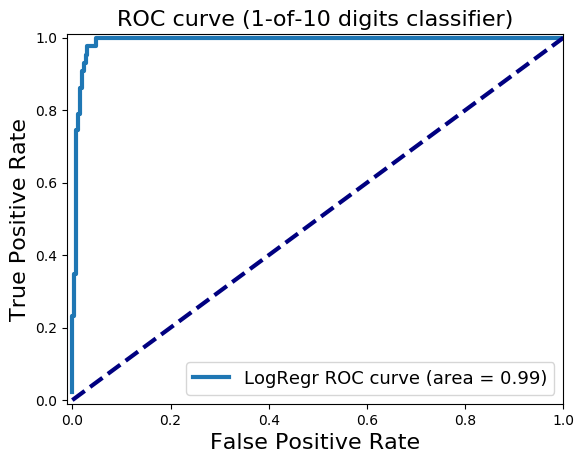
If you are passionate about cricket, and love analyzing cricket performances, then check out my 2 racy books on cricket! In my books, I perform detailed yet compact analysis of performances of both batsmen, bowlers besides evaluating team & match performances in Tests , ODIs, T20s & IPL. You can buy my books on cricket from Amazon at $12.99 for the paperback and $4.99/$6.99 respectively for the kindle versions. The books can be accessed at Cricket analytics with cricketr  and Beaten by sheer pace-Cricket analytics with yorkr  A must read for any cricket lover! Check it out!!

1


Feel free to download/clone these templates  from Github yorkrT20Template and perform your own analysis

There will be 5 folders at the root

  1. T20data – Match files as yaml from Cricsheet
  2. T20Matches – Yaml match files converted to dataframes
  3. T20MatchesBetween2Teams – All Matches between any 2 T20 teams
  4. allMatchesAllOpposition – A T20 countries match data against all other teams
  5. BattingBowlingDetails – Batting and bowling details of all countries
library(yorkr)
library(dplyr)

The first few steps take care of the data setup. This needs to be done before any of the analysis of T20 batsmen, bowlers, any T20 match, matches between any 2 T20 countries or analysis of a teams performance against all other countries

There will be 5 folders at the root

  1. T20data
  2. T20Matches
  3. T20MatchesBetween2Teams
  4. allMatchesAllOpposition
  5. BattingBowlingDetails

The source YAML files will be in T20Data folder

1.Create directory T20Matches

Some files may give conversions errors. You could try to debug the problem or just remove it from the T20data folder. At most 2-4 file will have conversion problems and I usally remove then from the files to be converted.

Also take a look at my Inswinger shiny app which was created after performing the same conversion on the Dec 16 data .

convertAllYaml2RDataframesT20("T20Data","T20Matches")

2.Save all matches between all combinations of T20 nations

This function will create the set of all matches between every T20 country against every other T20 country. This uses the data that was created in T20Matches, with the convertAllYaml2RDataframesT20() function.

setwd("./T20MatchesBetween2Teams")
saveAllMatchesBetweenTeams(dir=".",odir=".")

3.Save all matches against all opposition

This will create a consolidated dataframe of all matches played by every T20 playing nation against all other nattions. This also uses the data that was created in T20Matches, with the convertAllYaml2RDataframesT20() function.

setwd("../allMatchesAllOpposition")
saveAllMatchesAllOpposition(dir=".",odir=".")

4. Create batting and bowling details for each T20 country

These are the current T20 playing nations. You can add to this vector as more countries start playing T20. You will get to know all T20 nations by also look at the directory created above namely allMatchesAllOpposition. his also uses the data that was created in T20Matches, with the convertAllYaml2RDataframesT20() function.

setwd("../BattingBowlingDetails")
teams <-c("Australia","India","Pakistan","West Indies", 'Sri Lanka',
          "England", "Bangladesh","Netherlands","Scotland", "Afghanistan",
          "Zimbabwe","Ireland","New Zealand","South Africa","Canada",
          "Bermuda","Kenya","Hong Kong","Nepal","Oman","Papua New Guinea",
          "United Arab Emirates")

for(i in seq_along(teams)){
    print(teams[i])
    val <- paste(teams[i],"-details",sep="")
    val <- getTeamBattingDetails(teams[i],dir="../T20Matches", save=TRUE)

}

for(i in seq_along(teams)){
    print(teams[i])
    val <- paste(teams[i],"-details",sep="")
    val <- getTeamBowlingDetails(teams[i],dir="../T20Matches", save=TRUE)

}

5. Get the list of batsmen for a particular country

For e.g. if you wanted to get the batsmen of Canada you would do the following. By replacing Canada for any other country you can get the batsmen of that country. These batsmen names can then be used in the batsmen analysis

country="Canada"
teamData <- paste(country,"-BattingDetails.RData",sep="")
load(teamData)
countryDF <- battingDetails
bmen <- countryDF %>% distinct(batsman) 
bmen <- as.character(bmen$batsman)
batsmen <- sort(bmen)
batsmen

6. Get the list of bowlers for a particular country

The method below can get the list of bowler names for any T20 nation. These names can then be used in the bowler analysis below

country="Netherlands"
teamData <- paste(country,"-BowlingDetails.RData",sep="")
load(teamData)
countryDF <- bowlingDetails
bwlr <- countryDF %>% distinct(bowler) 
bwlr <- as.character(bwlr$bowler)
bowler <- sort(bwlr)
bowler

Now we are all set

A)  International T20 Match Analysis

Load any match data from the ./T20Matches folder for e.g. Afganistan-England-2016-03-23.RData

setwd("./T20Matches")
load("Afghanistan-England-2016-03-23.RData")
afg_eng<- overs
#The steps are
load("Country1-Country2-Date.Rdata")
country1_country2 <- overs

All analysis for this match can be done now

2. Scorecard

teamBattingScorecardMatch(country1_country2,"Country1")
teamBattingScorecardMatch(country1_country2,"Country2")

3.Batting Partnerships

teamBatsmenPartnershipMatch(country1_country2,"Country1","Country2")
teamBatsmenPartnershipMatch(country1_country2,"Country2","Country1")

4. Batsmen vs Bowler Plot

teamBatsmenVsBowlersMatch(country1_country2,"Country1","Country2",plot=TRUE)
teamBatsmenVsBowlersMatch(country1_country2,"Country1","Country2",plot=FALSE)

5. Team bowling scorecard

teamBowlingScorecardMatch(country1_country2,"Country1")
teamBowlingScorecardMatch(country1_country2,"Country2")

6. Team bowling Wicket kind match

teamBowlingWicketKindMatch(country1_country2,"Country1","Country2")
m <-teamBowlingWicketKindMatch(country1_country2,"Country1","Country2",plot=FALSE)
m

7. Team Bowling Wicket Runs Match

teamBowlingWicketRunsMatch(country1_country2,"Country1","Country2")
m <-teamBowlingWicketRunsMatch(country1_country2,"Country1","Country2",plot=FALSE)
m

8. Team Bowling Wicket Match

m <-teamBowlingWicketMatch(country1_country2,"Country1","Country2",plot=FALSE)
m
teamBowlingWicketMatch(country1_country2,"Country1","Country2")

9. Team Bowler vs Batsmen

teamBowlersVsBatsmenMatch(country1_country2,"Country1","Country2")
m <- teamBowlersVsBatsmenMatch(country1_country2,"Country1","Country2",plot=FALSE)
m

10. Match Worm chart

matchWormGraph(country1_country2,"Country1","Country2")

B)  International T20 Matches between 2 teams

Load match data between any 2 teams from ./T20MatchesBetween2Teams for e.g.Australia-India-allMatches

setwd("./T20MatchesBetween2Teams")
load("Australia-India-allMatches.RData")
aus_ind_matches <- matches
#Replace below with your own countries
country1<-"England"
country2 <- "South Africa"
country1VsCountry2 <- paste(country1,"-",country2,"-allMatches.RData",sep="")
load(country1VsCountry2)
country1_country2_matches <- matches

2.Batsmen partnerships

m<- teamBatsmenPartnershiOppnAllMatches(country1_country2_matches,"country1",report="summary")
m
m<- teamBatsmenPartnershiOppnAllMatches(country1_country2_matches,"country2",report="summary")
m
m<- teamBatsmenPartnershiOppnAllMatches(country1_country2_matches,"country1",report="detailed")
m
teamBatsmenPartnershipOppnAllMatchesChart(country1_country2_matches,"country1","country2")

3. Team batsmen vs bowlers

teamBatsmenVsBowlersOppnAllMatches(country1_country2_matches,"country1","country2")

4. Bowling scorecard

a <-teamBattingScorecardOppnAllMatches(country1_country2_matches,main="country1",opposition="country2")
a

5. Team bowling performance

teamBowlingPerfOppnAllMatches(country1_country2_matches,main="country1",opposition="country2")

6. Team bowler wickets

teamBowlersWicketsOppnAllMatches(country1_country2_matches,main="country1",opposition="country2")
m <-teamBowlersWicketsOppnAllMatches(country1_country2_matches,main="country1",opposition="country2",plot=FALSE)
teamBowlersWicketsOppnAllMatches(country1_country2_matches,"country1","country2",top=3)
m

7. Team bowler vs batsmen

teamBowlersVsBatsmenOppnAllMatches(country1_country2_matches,"country1","country2",top=5)

8. Team bowler wicket kind

teamBowlersWicketKindOppnAllMatches(country1_country2_matches,"country1","country2",plot=TRUE)
m <- teamBowlersWicketKindOppnAllMatches(country1_country2_matches,"country1","country2",plot=FALSE)
m[1:30,]

9. Team bowler wicket runs

teamBowlersWicketRunsOppnAllMatches(country1_country2_matches,"country1","country2")

10. Plot wins and losses

setwd("./T20Matches")
plotWinLossBetweenTeams("country1","country2")

C)  International T20 Matches for a team against all other teams

Load the data between for a T20 team against all other countries ./allMatchesAllOpposition for e.g all matches of India

load("allMatchesAllOpposition-India.RData")
india_matches <- matches
country="country1"
allMatches <- paste("allMatchesAllOposition-",country,".RData",sep="")
load(allMatches)
country1AllMatches <- matches

2. Team’s batting scorecard all Matches

m <-teamBattingScorecardAllOppnAllMatches(country1AllMatches,theTeam="country1")
m

3. Batting scorecard of opposing team

m <-teamBattingScorecardAllOppnAllMatches(matches=country1AllMatches,theTeam="country2")

4. Team batting partnerships

m <- teamBatsmenPartnershipAllOppnAllMatches(country1AllMatches,theTeam="country1")
m
m <- teamBatsmenPartnershipAllOppnAllMatches(country1AllMatches,theTeam='country1',report="detailed")
head(m,30)
m <- teamBatsmenPartnershipAllOppnAllMatches(country1AllMatches,theTeam='country1',report="summary")
m

5. Team batting partnerships plot

teamBatsmenPartnershipAllOppnAllMatchesPlot(country1AllMatches,"country1",main="country1")
teamBatsmenPartnershipAllOppnAllMatchesPlot(country1AllMatches,"country1",main="country2")

6, Team batsmen vs bowlers report

m <-teamBatsmenVsBowlersAllOppnAllMatchesRept(country1AllMatches,"country1",rank=0)
m
m <-teamBatsmenVsBowlersAllOppnAllMatchesRept(country1AllMatches,"country1",rank=1,dispRows=30)
m
m <-teamBatsmenVsBowlersAllOppnAllMatchesRept(matches=country1AllMatches,theTeam="country2",rank=1,dispRows=25)
m

7. Team batsmen vs bowler plot

d <- teamBatsmenVsBowlersAllOppnAllMatchesRept(country1AllMatches,"country1",rank=1,dispRows=50)
d
teamBatsmenVsBowlersAllOppnAllMatchesPlot(d)
d <- teamBatsmenVsBowlersAllOppnAllMatchesRept(country1AllMatches,"country1",rank=2,dispRows=50)
teamBatsmenVsBowlersAllOppnAllMatchesPlot(d)

8. Team bowling scorecard

teamBowlingScorecardAllOppnAllMatchesMain(matches=country1AllMatches,theTeam="country1")
teamBowlingScorecardAllOppnAllMatches(country1AllMatches,'country2')

9. Team bowler vs batsmen

teamBowlersVsBatsmenAllOppnAllMatchesMain(country1AllMatches,theTeam="country1",rank=0)
teamBowlersVsBatsmenAllOppnAllMatchesMain(country1AllMatches,theTeam="country1",rank=2)
teamBowlersVsBatsmenAllOppnAllMatchesRept(matches=country1AllMatches,theTeam="country1",rank=0)

10. Team Bowler vs bastmen

df <- teamBowlersVsBatsmenAllOppnAllMatchesRept(country1AllMatches,theTeam="country1",rank=1)
teamBowlersVsBatsmenAllOppnAllMatchesPlot(df,"country1","country1")

11. Team bowler wicket kind

teamBowlingWicketKindAllOppnAllMatches(country1AllMatches,t1="country1",t2="All")
teamBowlingWicketKindAllOppnAllMatches(country1AllMatches,t1="country1",t2="country2")

12.

teamBowlingWicketRunsAllOppnAllMatches(country1AllMatches,t1="country1",t2="All",plot=TRUE)
teamBowlingWicketRunsAllOppnAllMatches(country1AllMatches,t1="country1",t2="country2",plot=TRUE)

D) Batsman functions

Get the batsman’s details for a batsman

setwd("../BattingBowlingDetails")
kohli <- getBatsmanDetails(team="India",name="Kohli",dir=".")
batsmanDF <- getBatsmanDetails(team="country1",name="batsmanName",dir=".")

2. Runs vs deliveries

batsmanRunsVsDeliveries(batsmanDF,"batsmanName")

3. Batsman 4s & 6s

batsman46 <- select(batsmanDF,batsman,ballsPlayed,fours,sixes,runs)
p1 <- batsmanFoursSixes(batsman46,"batsmanName")

4. Batsman dismissals

batsmanDismissals(batsmanDF,"batsmanName")

5. Runs vs Strike rate

batsmanRunsVsStrikeRate(batsmanDF,"batsmanName")

6. Batsman Moving Average

batsmanMovingAverage(batsmanDF,"batsmanName")

7. Batsman cumulative average

batsmanCumulativeAverageRuns(batsmanDF,"batsmanName")

8. Batsman cumulative strike rate

batsmanCumulativeStrikeRate(batsmanDF,"batsmanName")

9. Batsman runs against oppositions

batsmanRunsAgainstOpposition(batsmanDF,"batsmanName")

10. Batsman runs vs venue

batsmanRunsVenue(batsmanDF,"batsmanName")

11. Batsman runs predict

batsmanRunsPredict(batsmanDF,"batsmanName")

12. Bowler functions

For example to get Ravicahnder Ashwin’s bowling details

setwd("../BattingBowlingDetails")
ashwin <- getBowlerWicketDetails(team="India",name="Ashwin",dir=".")
bowlerDF <- getBatsmanDetails(team="country1",name="bowlerName",dir=".")

13. Bowler Mean Economy rate

bowlerMeanEconomyRate(bowlerDF,"bowlerName")

14. Bowler mean runs conceded

bowlerMeanRunsConceded(bowlerDF,"bowlerName")

15. Bowler Moving Average

bowlerMovingAverage(bowlerDF,"bowlerName")

16. Bowler cumulative average wickets

bowlerCumulativeAvgWickets(bowlerDF,"bowlerName")

17. Bowler cumulative Economy Rate (ER)

bowlerCumulativeAvgEconRate(bowlerDF,"bowlerName")

18. Bowler wicket plot

bowlerWicketPlot(bowlerDF,"bowlerName")

19. Bowler wicket against opposition

bowlerWicketsAgainstOpposition(bowlerDF,"bowlerName")

20. Bowler wicket at cricket grounds

bowlerWicketsVenue(bowlerDF,"bowlerName")

21. Predict number of deliveries to wickets

setwd("./T20Matches")
bowlerDF1 <- getDeliveryWickets(team="country1",dir=".",name="bowlerName",save=FALSE)
bowlerWktsPredict(bowlerDF1,"bowlerName")