Practical Machine Learning with R and Python – Part 4

This is the 4th installment of my ‘Practical Machine Learning with R and Python’ series. In this part I discuss classification with Support Vector Machines (SVMs), using both a Linear and a Radial basis kernel, and Decision Trees. Further, a closer look is taken at some of the metrics associated with binary classification, namely accuracy vs precision and recall. I also touch upon Validation curves, Precision-Recall, ROC curves and AUC with equivalent code in R and Python

This post is a continuation of my 3 earlier posts on Practical Machine Learning in R and Python
1. Practical Machine Learning with R and Python – Part 1
2. Practical Machine Learning with R and Python – Part 2
3. Practical Machine Learning with R and Python – Part 3

The RMarkdown file with the code and the associated data files can be downloaded from Github at MachineLearning-RandPython-Part4

Note: Please listen to my video presentations Machine Learning in youtube
1. Machine Learning in plain English-Part 1
2. Machine Learning in plain English-Part 2
3. Machine Learning in plain English-Part 3

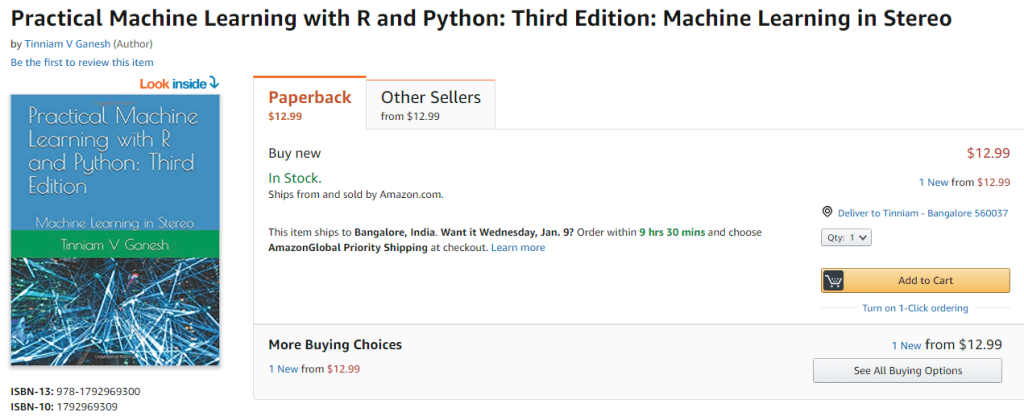
Check out my compact and minimal book  “Practical Machine Learning with R and Python:Third edition- Machine Learning in stereo”  available in Amazon in paperback($12.99) and kindle($8.99) versions. My book includes implementations of key ML algorithms and associated measures and metrics. The book is ideal for anybody who is familiar with the concepts and would like a quick reference to the different ML algorithms that can be applied to problems and how to select the best model. Pick your copy today!!
 

Support Vector Machines (SVM) are another useful Machine Learning model that can be used for both regression and classification problems. SVMs used in classification, compute the hyperplane, that separates the 2 classes with the maximum margin. To do this the features may be transformed into a larger multi-dimensional feature space. SVMs can be used with different kernels namely linear, polynomial or radial basis to determine the best fitting model for a given classification problem.

In the 2nd part of this series Practical Machine Learning with R and Python – Part 2, I had mentioned the various metrics that are used in classification ML problems namely Accuracy, Precision, Recall and F1 score. Accuracy gives the fraction of data that were correctly classified as belonging to the +ve or -ve class. However ‘accuracy’ in itself is not a good enough measure because it does not take into account the fraction of the data that were incorrectly classified. This issue becomes even more critical in different domains. For e.g a surgeon who would like to detect cancer, would like to err on the side of caution, and classify even a possibly non-cancerous patient as possibly having cancer, rather than mis-classifying a malignancy as benign. Here we would like to increase recall or sensitivity which is  given by Recall= TP/(TP+FN) or we try reduce mis-classification by either increasing the (true positives) TP or reducing (false negatives) FN

On the other hand, search algorithms would like to increase precision which tries to reduce the number of irrelevant results in the search result. Precision= TP/(TP+FP). In other words we do not want ‘false positives’ or irrelevant results to come in the search results and there is a need to reduce the false positives.

When we try to increase ‘precision’, we do so at the cost of ‘recall’, and vice-versa. I found this diagram and explanation in Wikipedia very useful Source: Wikipedia

“Consider a brain surgeon tasked with removing a cancerous tumor from a patient’s brain. The surgeon needs to remove all of the tumor cells since any remaining cancer cells will regenerate the tumor. Conversely, the surgeon must not remove healthy brain cells since that would leave the patient with impaired brain function. The surgeon may be more liberal in the area of the brain she removes to ensure she has extracted all the cancer cells. This decision increases recall but reduces precision. On the other hand, the surgeon may be more conservative in the brain she removes to ensure she extracts only cancer cells. This decision increases precision but reduces recall. That is to say, greater recall increases the chances of removing healthy cells (negative outcome) and increases the chances of removing all cancer cells (positive outcome). Greater precision decreases the chances of removing healthy cells (positive outcome) but also decreases the chances of removing all cancer cells (negative outcome).”

1.1a. Linear SVM – R code

In R code below I use SVM with linear kernel

source('RFunctions-1.R')
library(dplyr)
library(e1071)
library(caret)
library(reshape2)
library(ggplot2)
# Read data. Data from SKLearn
cancer <- read.csv("cancer.csv")
cancer$target <- as.factor(cancer$target)

# Split into training and test sets
train_idx <- trainTestSplit(cancer,trainPercent=75,seed=5)
train <- cancer[train_idx, ]
test <- cancer[-train_idx, ]

# Fit a linear basis kernel. DO not scale the data
svmfit=svm(target~., data=train, kernel="linear",scale=FALSE)
ypred=predict(svmfit,test)
#Print a confusion matrix
confusionMatrix(ypred,test$target)
## Confusion Matrix and Statistics
## 
##           Reference
## Prediction  0  1
##          0 54  3
##          1  3 82
##                                           
##                Accuracy : 0.9577          
##                  95% CI : (0.9103, 0.9843)
##     No Information Rate : 0.5986          
##     P-Value [Acc > NIR] : <2e-16          
##                                           
##                   Kappa : 0.9121          
##  Mcnemar's Test P-Value : 1               
##                                           
##             Sensitivity : 0.9474          
##             Specificity : 0.9647          
##          Pos Pred Value : 0.9474          
##          Neg Pred Value : 0.9647          
##              Prevalence : 0.4014          
##          Detection Rate : 0.3803          
##    Detection Prevalence : 0.4014          
##       Balanced Accuracy : 0.9560          
##                                           
##        'Positive' Class : 0               
## 

1.1b Linear SVM – Python code

The code below creates a SVM with linear basis in Python and also dumps the corresponding classification metrics

import numpy as np
import pandas as pd
import os
import matplotlib.pyplot as plt
from sklearn.model_selection import train_test_split
from sklearn.svm import LinearSVC

from sklearn.datasets import make_classification, make_blobs

from sklearn.metrics import confusion_matrix
from matplotlib.colors import ListedColormap
from sklearn.datasets import load_breast_cancer
# Load the cancer data
(X_cancer, y_cancer) = load_breast_cancer(return_X_y = True)
X_train, X_test, y_train, y_test = train_test_split(X_cancer, y_cancer,
                                                   random_state = 0)
clf = LinearSVC().fit(X_train, y_train)
print('Breast cancer dataset')
print('Accuracy of Linear SVC classifier on training set: {:.2f}'
     .format(clf.score(X_train, y_train)))
print('Accuracy of Linear SVC classifier on test set: {:.2f}'
     .format(clf.score(X_test, y_test)))
## Breast cancer dataset
## Accuracy of Linear SVC classifier on training set: 0.92
## Accuracy of Linear SVC classifier on test set: 0.94

1.2 Dummy classifier

Often when we perform classification tasks using any ML model namely logistic regression, SVM, neural networks etc. it is very useful to determine how well the ML model performs agains at dummy classifier. A dummy classifier uses some simple computation like frequency of majority class, instead of fitting and ML model. It is essential that our ML model does much better that the dummy classifier. This problem is even more important in imbalanced classes where we have only about 10% of +ve samples. If any ML model we create has a accuracy of about 0.90 then it is evident that our classifier is not doing any better than a dummy classsfier which can just take a majority count of this imbalanced class and also come up with 0.90. We need to be able to do better than that.

In the examples below (1.3a & 1.3b) it can be seen that SVMs with ‘radial basis’ kernel with unnormalized data, for both R and Python, do not perform any better than the dummy classifier.

1.2a Dummy classifier – R code

R does not seem to have an explicit dummy classifier. I created a simple dummy classifier that predicts the majority class. SKlearn in Python also includes other strategies like uniform, stratified etc. but this should be possible to create in R also.

# Create a simple dummy classifier that computes the ratio of the majority class to the totla
DummyClassifierAccuracy <- function(train,test,type="majority"){
  if(type=="majority"){
      count <- sum(train$target==1)/dim(train)[1]
  }
  count
}


cancer <- read.csv("cancer.csv")
cancer$target <- as.factor(cancer$target)

# Create training and test sets
train_idx <- trainTestSplit(cancer,trainPercent=75,seed=5)
train <- cancer[train_idx, ]
test <- cancer[-train_idx, ]

#Dummy classifier majority class
acc=DummyClassifierAccuracy(train,test)
sprintf("Accuracy is %f",acc)
## [1] "Accuracy is 0.638498"

1.2b Dummy classifier – Python code

This dummy classifier uses the majority class.

import numpy as np
import pandas as pd
import os
import matplotlib.pyplot as plt
from sklearn.datasets import load_breast_cancer
from sklearn.model_selection import train_test_split
from sklearn.dummy import DummyClassifier
from sklearn.metrics import confusion_matrix
(X_cancer, y_cancer) = load_breast_cancer(return_X_y = True)
X_train, X_test, y_train, y_test = train_test_split(X_cancer, y_cancer,
                                                   random_state = 0)

# Negative class (0) is most frequent
dummy_majority = DummyClassifier(strategy = 'most_frequent').fit(X_train, y_train)
y_dummy_predictions = dummy_majority.predict(X_test)

print('Dummy classifier accuracy on test set: {:.2f}'
     .format(dummy_majority.score(X_test, y_test)))
## Dummy classifier accuracy on test set: 0.63

1.3a – Radial SVM (un-normalized) – R code

SVMs perform better when the data is normalized or scaled. The 2 examples below show that SVM with radial basis kernel does not perform any better than the dummy classifier

library(dplyr)
library(e1071)
library(caret)
library(reshape2)
library(ggplot2)

# Radial SVM unnormalized
train_idx <- trainTestSplit(cancer,trainPercent=75,seed=5)
train <- cancer[train_idx, ]
test <- cancer[-train_idx, ]
# Unnormalized data
svmfit=svm(target~., data=train, kernel="radial",cost=10,scale=FALSE)
ypred=predict(svmfit,test)
confusionMatrix(ypred,test$target)
## Confusion Matrix and Statistics
## 
##           Reference
## Prediction  0  1
##          0  0  0
##          1 57 85
##                                           
##                Accuracy : 0.5986          
##                  95% CI : (0.5131, 0.6799)
##     No Information Rate : 0.5986          
##     P-Value [Acc > NIR] : 0.5363          
##                                           
##                   Kappa : 0               
##  Mcnemar's Test P-Value : 1.195e-13       
##                                           
##             Sensitivity : 0.0000          
##             Specificity : 1.0000          
##          Pos Pred Value :    NaN          
##          Neg Pred Value : 0.5986          
##              Prevalence : 0.4014          
##          Detection Rate : 0.0000          
##    Detection Prevalence : 0.0000          
##       Balanced Accuracy : 0.5000          
##                                           
##        'Positive' Class : 0               
## 

1.4b – Radial SVM (un-normalized) – Python code

import numpy as np
import pandas as pd
import os
import matplotlib.pyplot as plt
from sklearn.datasets import load_breast_cancer
from sklearn.model_selection import train_test_split
from sklearn.svm import SVC

# Load the cancer data
(X_cancer, y_cancer) = load_breast_cancer(return_X_y = True)
X_train, X_test, y_train, y_test = train_test_split(X_cancer, y_cancer,
                                                   random_state = 0)


clf = SVC(C=10).fit(X_train, y_train)
print('Breast cancer dataset (unnormalized features)')
print('Accuracy of RBF-kernel SVC on training set: {:.2f}'
     .format(clf.score(X_train, y_train)))
print('Accuracy of RBF-kernel SVC on test set: {:.2f}'
     .format(clf.score(X_test, y_test)))
## Breast cancer dataset (unnormalized features)
## Accuracy of RBF-kernel SVC on training set: 1.00
## Accuracy of RBF-kernel SVC on test set: 0.63

1.5a – Radial SVM (Normalized) -R Code

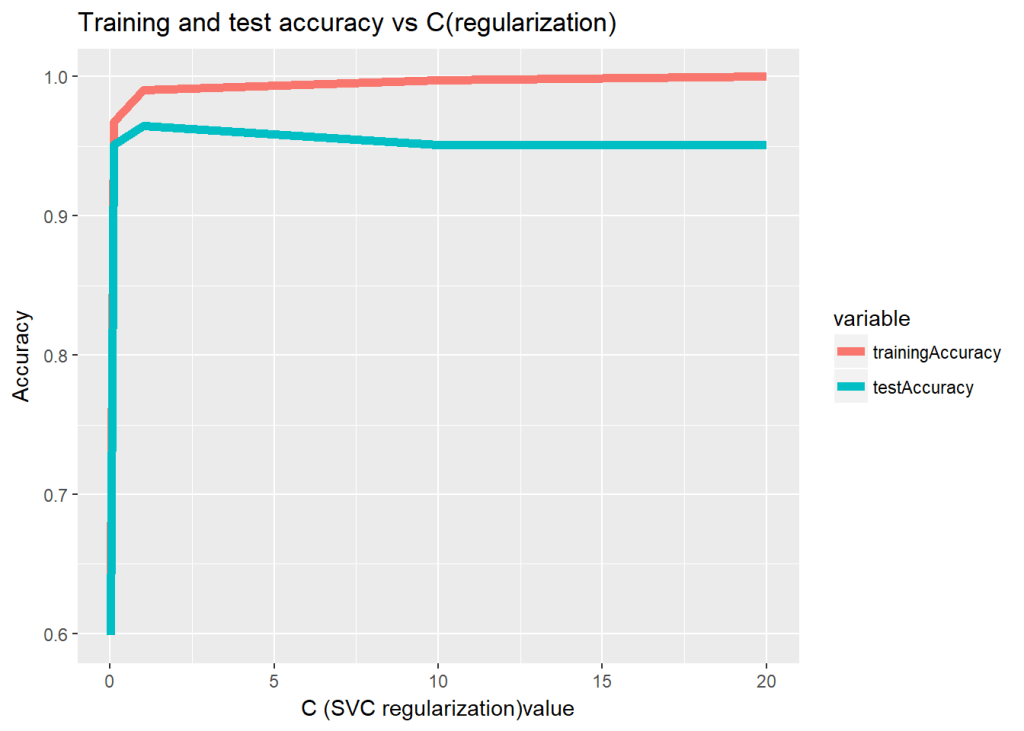
The data is scaled (normalized ) before using the SVM model. The SVM model has 2 paramaters a) C – Large C (less regularization), more regularization b) gamma – Small gamma has larger decision boundary with more misclassfication, and larger gamma has tighter decision boundary

The R code below computes the accuracy as the regularization paramater is changed

trainingAccuracy <- NULL
testAccuracy <- NULL
C1 <- c(.01,.1, 1, 10, 20)
for(i in  C1){
  
    svmfit=svm(target~., data=train, kernel="radial",cost=i,scale=TRUE)
    ypredTrain <-predict(svmfit,train)
    ypredTest=predict(svmfit,test)
    a <-confusionMatrix(ypredTrain,train$target)
    b <-confusionMatrix(ypredTest,test$target)
    trainingAccuracy <-c(trainingAccuracy,a$overall[1])
    testAccuracy <-c(testAccuracy,b$overall[1])
    
}
print(trainingAccuracy)
##  Accuracy  Accuracy  Accuracy  Accuracy  Accuracy 
## 0.6384977 0.9671362 0.9906103 0.9976526 1.0000000
print(testAccuracy)
##  Accuracy  Accuracy  Accuracy  Accuracy  Accuracy 
## 0.5985915 0.9507042 0.9647887 0.9507042 0.9507042
a <-rbind(C1,as.numeric(trainingAccuracy),as.numeric(testAccuracy))
b <- data.frame(t(a))
names(b) <- c("C1","trainingAccuracy","testAccuracy")
df <- melt(b,id="C1")
ggplot(df) + geom_line(aes(x=C1, y=value, colour=variable),size=2) +
    xlab("C (SVC regularization)value") + ylab("Accuracy") +
    ggtitle("Training and test accuracy vs C(regularization)")
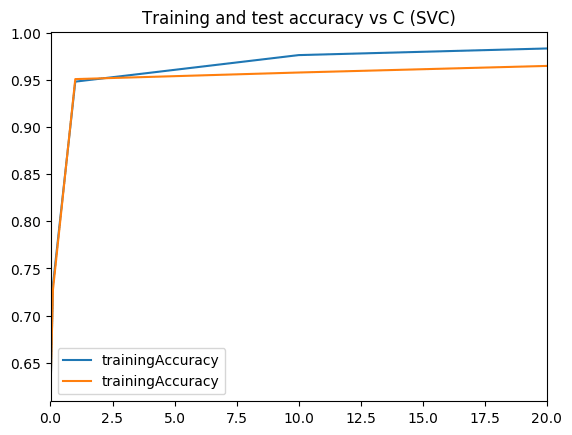
1.5b – Radial SVM (normalized) – Python

The Radial basis kernel is used on normalized data for a range of ‘C’ values and the result is plotted.

import numpy as np
import pandas as pd
import os
import matplotlib.pyplot as plt
from sklearn.datasets import load_breast_cancer
from sklearn.model_selection import train_test_split
from sklearn.svm import SVC
from sklearn.preprocessing import MinMaxScaler
scaler = MinMaxScaler()

# Load the cancer data
(X_cancer, y_cancer) = load_breast_cancer(return_X_y = True)
X_train, X_test, y_train, y_test = train_test_split(X_cancer, y_cancer,
                                                   random_state = 0)
X_train_scaled = scaler.fit_transform(X_train)
X_test_scaled = scaler.transform(X_test)
   
print('Breast cancer dataset (normalized with MinMax scaling)')
trainingAccuracy=[]
testAccuracy=[]
for C1 in [.01,.1, 1, 10, 20]:
    clf = SVC(C=C1).fit(X_train_scaled, y_train)
    acctrain=clf.score(X_train_scaled, y_train)
    accTest=clf.score(X_test_scaled, y_test)
    trainingAccuracy.append(acctrain)
    testAccuracy.append(accTest)
    
# Create a dataframe
C1=[.01,.1, 1, 10, 20]   
trainingAccuracy=pd.DataFrame(trainingAccuracy,index=C1)
testAccuracy=pd.DataFrame(testAccuracy,index=C1)

# Plot training and test R squared as a function of alpha
df=pd.concat([trainingAccuracy,testAccuracy],axis=1)
df.columns=['trainingAccuracy','trainingAccuracy']

fig1=df.plot()
fig1=plt.title('Training and test accuracy vs C (SVC)')
fig1.figure.savefig('fig1.png', bbox_inches='tight')
## Breast cancer dataset (normalized with MinMax scaling)

Output image: 

1.6a Validation curve – R code

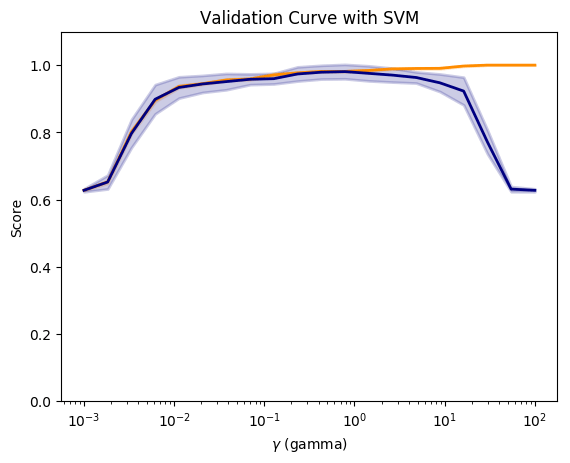
Sklearn includes code creating validation curves by varying paramaters and computing and plotting accuracy as gamma or C or changd. I did not find this R but I think this is a useful function and so I have created the R equivalent of this.

# The R equivalent of np.logspace
seqLogSpace <- function(start,stop,len){
  a=seq(log10(10^start),log10(10^stop),length=len)
  10^a
}

# Read the data. This is taken the SKlearn cancer data
cancer <- read.csv("cancer.csv")
cancer$target <- as.factor(cancer$target)

set.seed(6)

# Create the range of C1 in log space
param_range = seqLogSpace(-3,2,20)
# Initialize the overall training and test accuracy to NULL
overallTrainAccuracy <- NULL
overallTestAccuracy <- NULL

# Loop over the parameter range of Gamma
for(i in param_range){
    # Set no of folds
    noFolds=5
    # Create the rows which fall into different folds from 1..noFolds
    folds = sample(1:noFolds, nrow(cancer), replace=TRUE) 
    # Initialize the training and test accuracy of folds to 0
    trainingAccuracy <- 0
    testAccuracy <- 0
    
    # Loop through the folds
    for(j in 1:noFolds){
        # The training is all rows for which the row is != j (k-1 folds -> training)
        train <- cancer[folds!=j,]
        # The rows which have j as the index become the test set
        test <- cancer[folds==j,]
        # Create a SVM model for this
        svmfit=svm(target~., data=train, kernel="radial",gamma=i,scale=TRUE)
  
        # Add up all the fold accuracy for training and test separately  
        ypredTrain <-predict(svmfit,train)
        ypredTest=predict(svmfit,test)
        
        # Create confusion matrix 
        a <-confusionMatrix(ypredTrain,train$target)
        b <-confusionMatrix(ypredTest,test$target)
        # Get the accuracy
        trainingAccuracy <-trainingAccuracy + a$overall[1]
        testAccuracy <-testAccuracy+b$overall[1]

    }
    # Compute the average of accuracy for K folds for number of features 'i'
    overallTrainAccuracy=c(overallTrainAccuracy,trainingAccuracy/noFolds)
    overallTestAccuracy=c(overallTestAccuracy,testAccuracy/noFolds)
}
#Create a dataframe
a <- rbind(param_range,as.numeric(overallTrainAccuracy),
               as.numeric(overallTestAccuracy))
b <- data.frame(t(a))
names(b) <- c("C1","trainingAccuracy","testAccuracy")
df <- melt(b,id="C1")
#Plot in log axis
ggplot(df) + geom_line(aes(x=C1, y=value, colour=variable),size=2) +
      xlab("C (SVC regularization)value") + ylab("Accuracy") +
      ggtitle("Training and test accuracy vs C(regularization)") + scale_x_log10()

1.6b Validation curve – Python

Compute and plot the validation curve as gamma is varied.

import numpy as np
import pandas as pd
import os
import matplotlib.pyplot as plt
from sklearn.datasets import load_breast_cancer
from sklearn.model_selection import train_test_split
from sklearn.preprocessing import MinMaxScaler
from sklearn.svm import SVC
from sklearn.model_selection import validation_curve


# Load the cancer data
(X_cancer, y_cancer) = load_breast_cancer(return_X_y = True)
scaler = MinMaxScaler()
X_scaled = scaler.fit_transform(X_cancer)

# Create a gamma values from 10^-3 to 10^2 with 20 equally spaced intervals
param_range = np.logspace(-3, 2, 20)
# Compute the validation curve
train_scores, test_scores = validation_curve(SVC(), X_scaled, y_cancer,
                                            param_name='gamma',
                                            param_range=param_range, cv=10)
                                            
#Plot the figure                                           
fig2=plt.figure()

#Compute the mean
train_scores_mean = np.mean(train_scores, axis=1)
train_scores_std = np.std(train_scores, axis=1)
test_scores_mean = np.mean(test_scores, axis=1)
test_scores_std = np.std(test_scores, axis=1)

fig2=plt.title('Validation Curve with SVM')
fig2=plt.xlabel('$\gamma$ (gamma)')
fig2=plt.ylabel('Score')
fig2=plt.ylim(0.0, 1.1)
lw = 2

fig2=plt.semilogx(param_range, train_scores_mean, label='Training score',
            color='darkorange', lw=lw)

fig2=plt.fill_between(param_range, train_scores_mean - train_scores_std,
                train_scores_mean + train_scores_std, alpha=0.2,
                color='darkorange', lw=lw)

fig2=plt.semilogx(param_range, test_scores_mean, label='Cross-validation score',
            color='navy', lw=lw)

fig2=plt.fill_between(param_range, test_scores_mean - test_scores_std,
                test_scores_mean + test_scores_std, alpha=0.2,
                color='navy', lw=lw)
fig2.figure.savefig('fig2.png', bbox_inches='tight')

Output image: 
1.7a Validation Curve (Preventing data leakage) – Python code

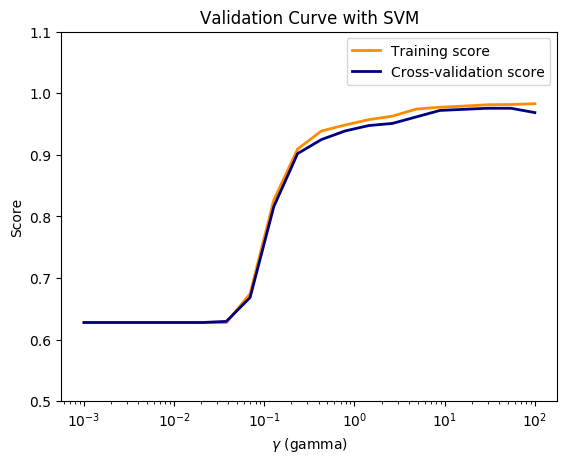
In this course Applied Machine Learning in Python, the Professor states that when we apply the same data transformation to a entire dataset, it will cause a data leakage. “The proper way to do cross-validation when you need to scale the data is not to scale the entire dataset with a single transform, since this will indirectly leak information into the training data about the whole dataset, including the test data (see the lecture on data leakage later in the course). Instead, scaling/normalizing must be computed and applied for each cross-validation fold separately”

So I apply separate scaling to the training and testing folds and plot. In the lecture the Prof states that this can be done using pipelines.

import numpy as np
import pandas as pd
import os
import matplotlib.pyplot as plt
from sklearn.datasets import load_breast_cancer
from sklearn.cross_validation import  KFold
from sklearn.preprocessing import MinMaxScaler
from sklearn.svm import SVC

# Read the data
(X_cancer, y_cancer) = load_breast_cancer(return_X_y = True)
# Set the parameter range
param_range = np.logspace(-3, 2, 20)

# Set number of folds
folds=5
#Initialize
overallTrainAccuracy=[]
overallTestAccuracy=[]

# Loop over the paramater range
for c in  param_range:
    trainingAccuracy=0
    testAccuracy=0
    kf = KFold(len(X_cancer),n_folds=folds)
    # Partition into training and test folds
    for train_index, test_index in kf:
            # Partition the data acccording the fold indices generated
            X_train, X_test = X_cancer[train_index], X_cancer[test_index]
            y_train, y_test = y_cancer[train_index], y_cancer[test_index]  

            
            # Scale the X_train and X_test 
            scaler = MinMaxScaler()
            X_train_scaled = scaler.fit_transform(X_train)
            X_test_scaled = scaler.transform(X_test)
            # Fit a SVC model for each C
            clf = SVC(C=c).fit(X_train_scaled, y_train)
            #Compute the training and test score
            acctrain=clf.score(X_train_scaled, y_train)
            accTest=clf.score(X_test_scaled, y_test)
            trainingAccuracy += np.sum(acctrain)
            testAccuracy += np.sum(accTest)
    # Compute the mean training and testing accuracy
    overallTrainAccuracy.append(trainingAccuracy/folds)
    overallTestAccuracy.append(testAccuracy/folds)
        

overallTrainAccuracy=pd.DataFrame(overallTrainAccuracy,index=param_range)
overallTestAccuracy=pd.DataFrame(overallTestAccuracy,index=param_range)

# Plot training and test R squared as a function of alpha
df=pd.concat([overallTrainAccuracy,overallTestAccuracy],axis=1)
df.columns=['trainingAccuracy','testAccuracy']


fig3=plt.title('Validation Curve with SVM')
fig3=plt.xlabel('$\gamma$ (gamma)')
fig3=plt.ylabel('Score')
fig3=plt.ylim(0.5, 1.1)
lw = 2

fig3=plt.semilogx(param_range, overallTrainAccuracy, label='Training score',
            color='darkorange', lw=lw)

fig3=plt.semilogx(param_range, overallTestAccuracy, label='Cross-validation score',
            color='navy', lw=lw)

fig3=plt.legend(loc='best')
fig3.figure.savefig('fig3.png', bbox_inches='tight')

Output image: 
1.8 a Decision trees – R code

Decision trees in R can be plotted using RPart package

library(rpart)
library(rpart.plot)
rpart = NULL
# Create a decision tree
m <-rpart(Species~.,data=iris)
#Plot
rpart.plot(m,extra=2,main="Decision Tree - IRIS")


1.8 b Decision trees – Python code

from sklearn.datasets import load_iris
from sklearn.tree import DecisionTreeClassifier
from sklearn import tree
from sklearn.model_selection import train_test_split
import graphviz 

iris = load_iris()
X_train, X_test, y_train, y_test = train_test_split(iris.data, iris.target, random_state = 3)
clf = DecisionTreeClassifier().fit(X_train, y_train)

print('Accuracy of Decision Tree classifier on training set: {:.2f}'
     .format(clf.score(X_train, y_train)))
print('Accuracy of Decision Tree classifier on test set: {:.2f}'
     .format(clf.score(X_test, y_test)))

dot_data = tree.export_graphviz(clf, out_file=None, 
                         feature_names=iris.feature_names,  
                         class_names=iris.target_names,  
                         filled=True, rounded=True,  
                         special_characters=True)  
graph = graphviz.Source(dot_data)  
graph
## Accuracy of Decision Tree classifier on training set: 1.00
## Accuracy of Decision Tree classifier on test set: 0.97

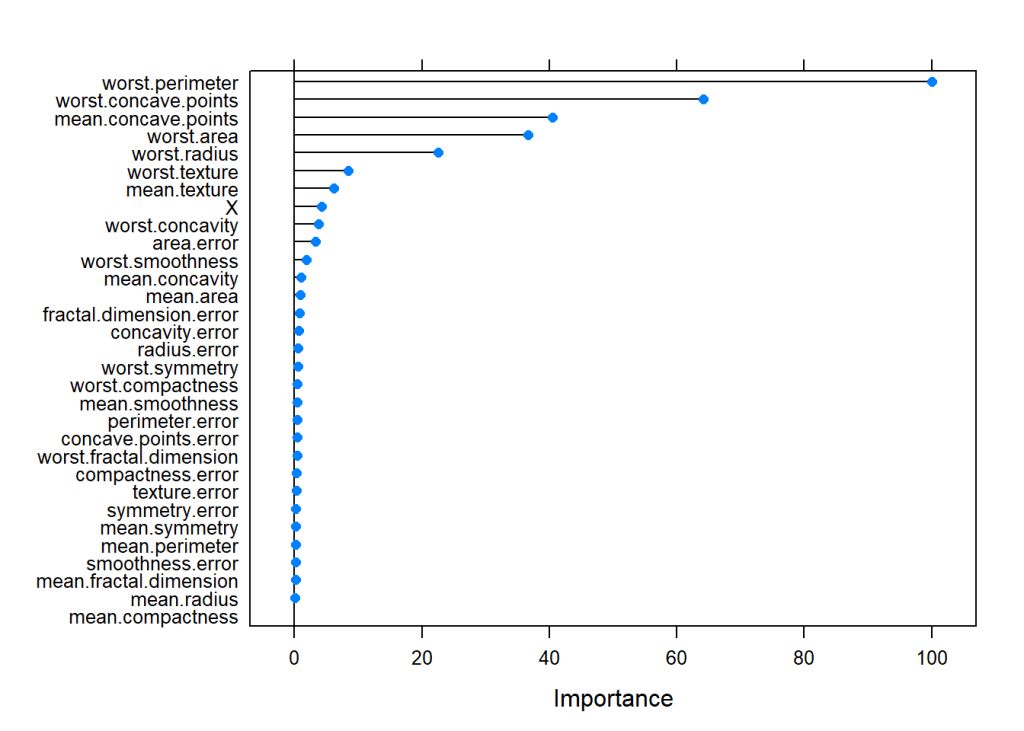
1.9a Feature importance – R code

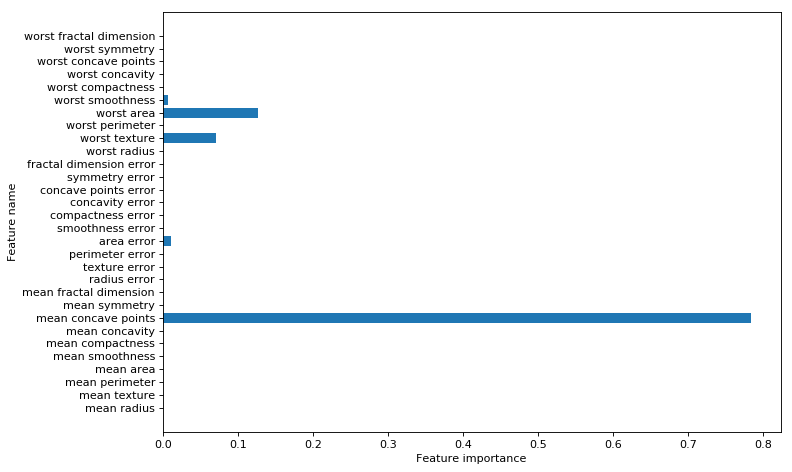
I found the following code which had a snippet for feature importance. Sklean has a nice method for this. For some reason the results in R and Python are different. Any thoughts?

set.seed(3)
# load the library
library(mlbench)
library(caret)
# load the dataset
cancer <- read.csv("cancer.csv")
cancer$target <- as.factor(cancer$target)
# Split as data
data <- cancer[,1:31]
target <- cancer[,32]

# Train the model
model <- train(data, target, method="rf", preProcess="scale", trControl=trainControl(method = "cv"))
# Compute variable importance
importance <- varImp(model)
# summarize importance
print(importance)
# plot importance
plot(importance)

1.9b Feature importance – Python code

import numpy as np
import pandas as pd
import os
import matplotlib.pyplot as plt
from sklearn.tree import DecisionTreeClassifier
from sklearn.model_selection import train_test_split
from sklearn.datasets import load_breast_cancer
import numpy as np
# Read the data
cancer= load_breast_cancer()
(X_cancer, y_cancer) = load_breast_cancer(return_X_y = True)
X_train, X_test, y_train, y_test = train_test_split(X_cancer, y_cancer, random_state = 0)
# Use the DecisionTreClassifier
clf = DecisionTreeClassifier(max_depth = 4, min_samples_leaf = 8,
                            random_state = 0).fit(X_train, y_train)

c_features=len(cancer.feature_names)
print('Breast cancer dataset: decision tree')
print('Accuracy of DT classifier on training set: {:.2f}'
     .format(clf.score(X_train, y_train)))
print('Accuracy of DT classifier on test set: {:.2f}'
     .format(clf.score(X_test, y_test)))

# Plot the feature importances
fig4=plt.figure(figsize=(10,6),dpi=80)

fig4=plt.barh(range(c_features), clf.feature_importances_)
fig4=plt.xlabel("Feature importance")
fig4=plt.ylabel("Feature name")
fig4=plt.yticks(np.arange(c_features), cancer.feature_names)
fig4=plt.tight_layout()
plt.savefig('fig4.png', bbox_inches='tight')
## Breast cancer dataset: decision tree
## Accuracy of DT classifier on training set: 0.96
## Accuracy of DT classifier on test set: 0.94

Output image: 
1.10a Precision-Recall, ROC curves & AUC- R code

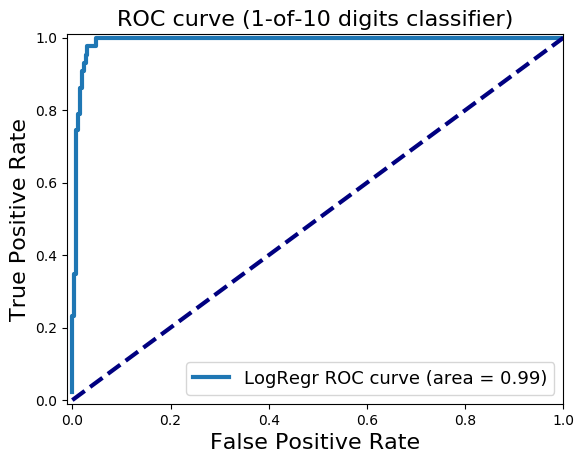
I tried several R packages for plotting the Precision and Recall and AUC curve. PRROC seems to work well. The Precision-Recall curves show the tradeoff between precision and recall. The higher the precision, the lower the recall and vice versa.AUC curves that hug the top left corner indicate a high sensitivity,specificity and an excellent accuracy.

source("RFunctions-1.R")
library(dplyr)
library(caret)
library(e1071)
library(PRROC)
# Read the data (this data is from sklearn!)
d <- read.csv("digits.csv")
digits <- d[2:66]
digits$X64 <- as.factor(digits$X64)

# Split as training and test sets
train_idx <- trainTestSplit(digits,trainPercent=75,seed=5)
train <- digits[train_idx, ]
test <- digits[-train_idx, ]

# Fit a SVM model with linear basis kernel with probabilities
svmfit=svm(X64~., data=train, kernel="linear",scale=FALSE,probability=TRUE)
ypred=predict(svmfit,test,probability=TRUE)
head(attr(ypred,"probabilities"))
##               0            1
## 6  7.395947e-01 2.604053e-01
## 8  9.999998e-01 1.842555e-07
## 12 1.655178e-05 9.999834e-01
## 13 9.649997e-01 3.500032e-02
## 15 9.994849e-01 5.150612e-04
## 16 9.999987e-01 1.280700e-06
# Store the probability of 0s and 1s
m0<-attr(ypred,"probabilities")[,1]
m1<-attr(ypred,"probabilities")[,2]

# Create a dataframe of scores
scores <- data.frame(m1,test$X64)

# Class 0 is data points of +ve class (in this case, digit 1) and -ve class (digit 0)
#Compute Precision Recall
pr <- pr.curve(scores.class0=scores[scores$test.X64=="1",]$m1,
               scores.class1=scores[scores$test.X64=="0",]$m1,
               curve=T)

# Plot precision-recall curve
plot(pr)

#Plot the ROC curve
roc<-roc.curve(m0, m1,curve=TRUE)
plot(roc)

1.10b Precision-Recall, ROC curves & AUC- Python code

For Python Logistic Regression is used to plot Precision Recall, ROC curve and compute AUC

import numpy as np
import pandas as pd
import matplotlib.pyplot as plt
from sklearn.model_selection import train_test_split
from sklearn.linear_model import LogisticRegression
from sklearn.datasets import load_digits
from sklearn.metrics import precision_recall_curve
from sklearn.metrics import roc_curve, auc
#Load the digits
dataset = load_digits()
X, y = dataset.data, dataset.target
#Create 2 classes -i) Digit 1 (from digit 1) ii) Digit 0 (from all other digits)
# Make a copy of the target
z= y.copy()
# Replace all non 1's as 0
z[z != 1] = 0

X_train, X_test, y_train, y_test = train_test_split(X, z, random_state=0)
# Fit a LR model
lr = LogisticRegression().fit(X_train, y_train)

#Compute the decision scores
y_scores_lr = lr.fit(X_train, y_train).decision_function(X_test)
y_score_list = list(zip(y_test[0:20], y_scores_lr[0:20]))

#Show the decision_function scores for first 20 instances
y_score_list

precision, recall, thresholds = precision_recall_curve(y_test, y_scores_lr)
closest_zero = np.argmin(np.abs(thresholds))
closest_zero_p = precision[closest_zero]
closest_zero_r = recall[closest_zero]
#Plot
plt.figure()
plt.xlim([0.0, 1.01])
plt.ylim([0.0, 1.01])
plt.plot(precision, recall, label='Precision-Recall Curve')
plt.plot(closest_zero_p, closest_zero_r, 'o', markersize = 12, fillstyle = 'none', c='r', mew=3)
plt.xlabel('Precision', fontsize=16)
plt.ylabel('Recall', fontsize=16)
plt.axes().set_aspect('equal')
plt.savefig('fig5.png', bbox_inches='tight')

#Compute and plot the ROC
y_score_lr = lr.fit(X_train, y_train).decision_function(X_test)
fpr_lr, tpr_lr, _ = roc_curve(y_test, y_score_lr)
roc_auc_lr = auc(fpr_lr, tpr_lr)

plt.figure()
plt.xlim([-0.01, 1.00])
plt.ylim([-0.01, 1.01])
plt.plot(fpr_lr, tpr_lr, lw=3, label='LogRegr ROC curve (area = {:0.2f})'.format(roc_auc_lr))
plt.xlabel('False Positive Rate', fontsize=16)
plt.ylabel('True Positive Rate', fontsize=16)
plt.title('ROC curve (1-of-10 digits classifier)', fontsize=16)
plt.legend(loc='lower right', fontsize=13)
plt.plot([0, 1], [0, 1], color='navy', lw=3, linestyle='--')
plt.axes()
plt.savefig('fig6.png', bbox_inches='tight')

output

output
1.10c Precision-Recall, ROC curves & AUC- Python code

In the code below classification probabilities are used to compute and plot precision-recall, roc and AUC

import numpy as np
import pandas as pd
import matplotlib.pyplot as plt
from sklearn.model_selection import train_test_split
from sklearn.datasets import load_digits
from sklearn.svm import LinearSVC
from sklearn.calibration import CalibratedClassifierCV

dataset = load_digits()
X, y = dataset.data, dataset.target
# Make a copy of the target
z= y.copy()
# Replace all non 1's as 0
z[z != 1] = 0


X_train, X_test, y_train, y_test = train_test_split(X, z, random_state=0)
svm = LinearSVC()
# Need to use CalibratedClassifierSVC to redict probabilities for lInearSVC
clf = CalibratedClassifierCV(svm) 
clf.fit(X_train, y_train)
y_proba_lr = clf.predict_proba(X_test)
from sklearn.metrics import precision_recall_curve

precision, recall, thresholds = precision_recall_curve(y_test, y_proba_lr[:,1])
closest_zero = np.argmin(np.abs(thresholds))
closest_zero_p = precision[closest_zero]
closest_zero_r = recall[closest_zero]
#plt.figure(figsize=(15,15),dpi=80)
plt.figure()
plt.xlim([0.0, 1.01])
plt.ylim([0.0, 1.01])
plt.plot(precision, recall, label='Precision-Recall Curve')
plt.plot(closest_zero_p, closest_zero_r, 'o', markersize = 12, fillstyle = 'none', c='r', mew=3)
plt.xlabel('Precision', fontsize=16)
plt.ylabel('Recall', fontsize=16)
plt.axes().set_aspect('equal')
plt.savefig('fig7.png', bbox_inches='tight')

output

Note: As with other posts in this series on ‘Practical Machine Learning with R and Python’,   this post is based on these 2 MOOC courses
1. Statistical Learning, Prof Trevor Hastie & Prof Robert Tibesherani, Online Stanford
2. Applied Machine Learning in Python Prof Kevyn-Collin Thomson, University Of Michigan, Coursera

Conclusion

This 4th part looked at SVMs with linear and radial basis, decision trees, precision-recall tradeoff, ROC curves and AUC.

Stick around for further updates. I’ll be back!
Comments, suggestions and correction are welcome.

Also see
1. A primer on Qubits, Quantum gates and Quantum Operations
2. Dabbling with Wiener filter using OpenCV
3. The mind of a programmer
4. Sea shells on the seashore
5. yorkr pads up for the Twenty20s: Part 1- Analyzing team”s match performance

To see all posts see Index of posts

Practical Machine Learning with R and Python – Part 3

In this post ‘Practical Machine Learning with R and Python – Part 3’,  I discuss ‘Feature Selection’ methods. This post is a continuation of my 2 earlier posts

  1. Practical Machine Learning with R and Python – Part 1
  2. Practical Machine Learning with R and Python – Part 2

While applying Machine Learning techniques, the data set will usually include a large number of predictors for a target variable. It is quite likely, that not all the predictors or feature variables will have an impact on the output. Hence it is becomes necessary to choose only those features which influence the output variable thus simplifying  to a reduced feature set on which to train the ML model on. The techniques that are used are the following

  • Best fit
  • Forward fit
  • Backward fit
  • Ridge Regression or L2 regularization
  • Lasso or L1 regularization

This post includes the equivalent ML code in R and Python.

All these methods remove those features which do not sufficiently influence the output. As in my previous 2 posts on “Practical Machine Learning with R and Python’, this post is largely based on the topics in the following 2 MOOC courses
1. Statistical Learning, Prof Trevor Hastie & Prof Robert Tibesherani, Online Stanford
2. Applied Machine Learning in Python Prof Kevyn-Collin Thomson, University Of Michigan, Coursera

You can download this R Markdown file and the associated data from Github – Machine Learning-RandPython-Part3. 

Note: Please listen to my video presentations Machine Learning in youtube
1. Machine Learning in plain English-Part 1
2. Machine Learning in plain English-Part 2
3. Machine Learning in plain English-Part 3

Check out my compact and minimal book  “Practical Machine Learning with R and Python:Third edition- Machine Learning in stereo”  available in Amazon in paperback($12.99) and kindle($8.99) versions. My book includes implementations of key ML algorithms and associated measures and metrics. The book is ideal for anybody who is familiar with the concepts and would like a quick reference to the different ML algorithms that can be applied to problems and how to select the best model. Pick your copy today!!


1.1 Best Fit

For a dataset with features f1,f2,f3…fn, the ‘Best fit’ approach, chooses all possible combinations of features and creates separate ML models for each of the different combinations. The best fit algotithm then uses some filtering criteria based on Adj Rsquared, Cp, BIC or AIC to pick out the best model among all models.

Since the Best Fit approach searches the entire solution space it is computationally infeasible. The number of models that have to be searched increase exponentially as the number of predictors increase. For ‘p’ predictors a total of 2^{p} ML models have to be searched. This can be shown as follows

There are C_{1} ways to choose single feature ML models among ‘n’ features, C_{2} ways to choose 2 feature models among ‘n’ models and so on, or

1+C_{1} + C_{2} +... + C_{n}
= Total number of models in Best Fit.  Since from Binomial theorem we have
(1+x)^{n} = 1+C_{1}x + C_{2}x^{2} +... + C_{n}x^{n}
When x=1 in the equation (1) above, this becomes
2^{n} = 1+C_{1} + C_{2} +... + C_{n}

Hence there are 2^{n} models to search amongst in Best Fit. For 10 features this is 2^{10} or ~1000 models and for 40 features this becomes 2^{40} which almost 1 trillion. Usually there are datasets with 1000 or maybe even 100000 features and Best fit becomes computationally infeasible.

Anyways I have included the Best Fit approach as I use the Boston crime datasets which is available both the MASS package in R and Sklearn in Python and it has 13 features. Even this small feature set takes a bit of time since the Best fit needs to search among ~2^{13}= 8192  models

Initially I perform a simple Linear Regression Fit to estimate the features that are statistically insignificant. By looking at the p-values of the features it can be seen that ‘indus’ and ‘age’ features have high p-values and are not significant

1.1a Linear Regression – R code

source('RFunctions-1.R')
#Read the Boston crime data
df=read.csv("Boston.csv",stringsAsFactors = FALSE) # Data from MASS - SL
# Rename the columns
names(df) <-c("no","crimeRate","zone","indus","charles","nox","rooms","age",
              "distances","highways","tax","teacherRatio","color","status","cost")
# Select specific columns
df1 <- df %>% dplyr::select("crimeRate","zone","indus","charles","nox","rooms","age",
                            "distances","highways","tax","teacherRatio","color","status","cost")
dim(df1)
## [1] 506  14
# Linear Regression fit
fit <- lm(cost~. ,data=df1)
summary(fit)
## 
## Call:
## lm(formula = cost ~ ., data = df1)
## 
## Residuals:
##     Min      1Q  Median      3Q     Max 
## -15.595  -2.730  -0.518   1.777  26.199 
## 
## Coefficients:
##                Estimate Std. Error t value Pr(>|t|)    
## (Intercept)   3.646e+01  5.103e+00   7.144 3.28e-12 ***
## crimeRate    -1.080e-01  3.286e-02  -3.287 0.001087 ** 
## zone          4.642e-02  1.373e-02   3.382 0.000778 ***
## indus         2.056e-02  6.150e-02   0.334 0.738288    
## charles       2.687e+00  8.616e-01   3.118 0.001925 ** 
## nox          -1.777e+01  3.820e+00  -4.651 4.25e-06 ***
## rooms         3.810e+00  4.179e-01   9.116  < 2e-16 ***
## age           6.922e-04  1.321e-02   0.052 0.958229    
## distances    -1.476e+00  1.995e-01  -7.398 6.01e-13 ***
## highways      3.060e-01  6.635e-02   4.613 5.07e-06 ***
## tax          -1.233e-02  3.760e-03  -3.280 0.001112 ** 
## teacherRatio -9.527e-01  1.308e-01  -7.283 1.31e-12 ***
## color         9.312e-03  2.686e-03   3.467 0.000573 ***
## status       -5.248e-01  5.072e-02 -10.347  < 2e-16 ***
## ---
## Signif. codes:  0 '***' 0.001 '**' 0.01 '*' 0.05 '.' 0.1 ' ' 1
## 
## Residual standard error: 4.745 on 492 degrees of freedom
## Multiple R-squared:  0.7406, Adjusted R-squared:  0.7338 
## F-statistic: 108.1 on 13 and 492 DF,  p-value: < 2.2e-16

Next we apply the different feature selection models to automatically remove features that are not significant below

1.1a Best Fit – R code

The Best Fit requires the ‘leaps’ R package

library(leaps)
source('RFunctions-1.R')
#Read the Boston crime data
df=read.csv("Boston.csv",stringsAsFactors = FALSE) # Data from MASS - SL
# Rename the columns
names(df) <-c("no","crimeRate","zone","indus","charles","nox","rooms","age",
              "distances","highways","tax","teacherRatio","color","status","cost")
# Select specific columns
df1 <- df %>% dplyr::select("crimeRate","zone","indus","charles","nox","rooms","age",
                            "distances","highways","tax","teacherRatio","color","status","cost")

# Perform a best fit
bestFit=regsubsets(cost~.,df1,nvmax=13)

# Generate a summary of the fit
bfSummary=summary(bestFit)

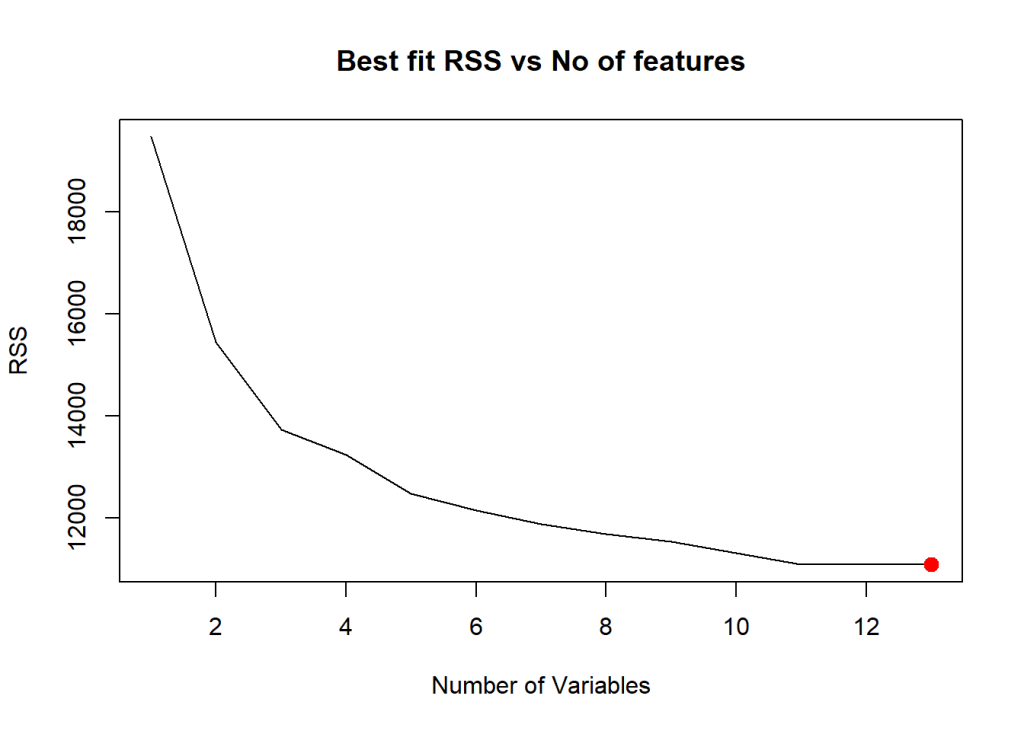
# Plot the Residual Sum of Squares vs number of variables 
plot(bfSummary$rss,xlab="Number of Variables",ylab="RSS",type="l",main="Best fit RSS vs No of features")
# Get the index of the minimum value
a=which.min(bfSummary$rss)
# Mark this in red
points(a,bfSummary$rss[a],col="red",cex=2,pch=20)

The plot below shows that the Best fit occurs with all 13 features included. Notice that there is no significant change in RSS from 11 features onward.

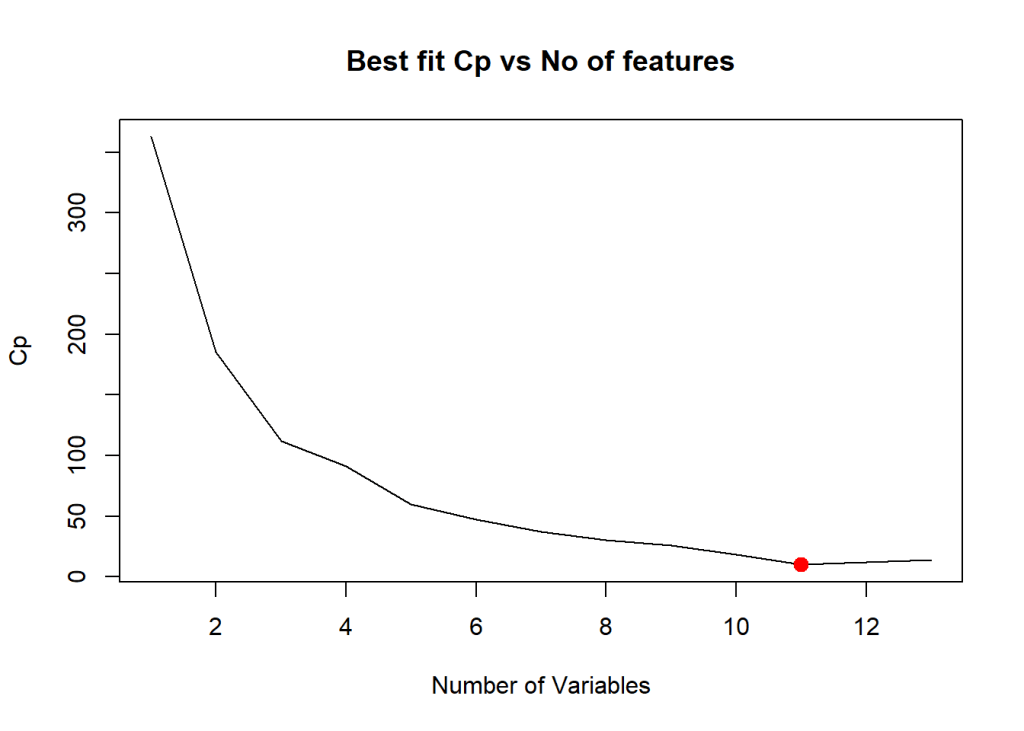
# Plot the CP statistic vs Number of variables
plot(bfSummary$cp,xlab="Number of Variables",ylab="Cp",type='l',main="Best fit Cp vs No of features")
# Find the lowest CP value
b=which.min(bfSummary$cp)
# Mark this in red
points(b,bfSummary$cp[b],col="red",cex=2,pch=20)

Based on Cp metric the best fit occurs at 11 features as seen below. The values of the coefficients are also included below

# Display the set of features which provide the best fit
coef(bestFit,b)
##   (Intercept)     crimeRate          zone       charles           nox 
##  36.341145004  -0.108413345   0.045844929   2.718716303 -17.376023429 
##         rooms     distances      highways           tax  teacherRatio 
##   3.801578840  -1.492711460   0.299608454  -0.011777973  -0.946524570 
##         color        status 
##   0.009290845  -0.522553457
#  Plot the BIC value
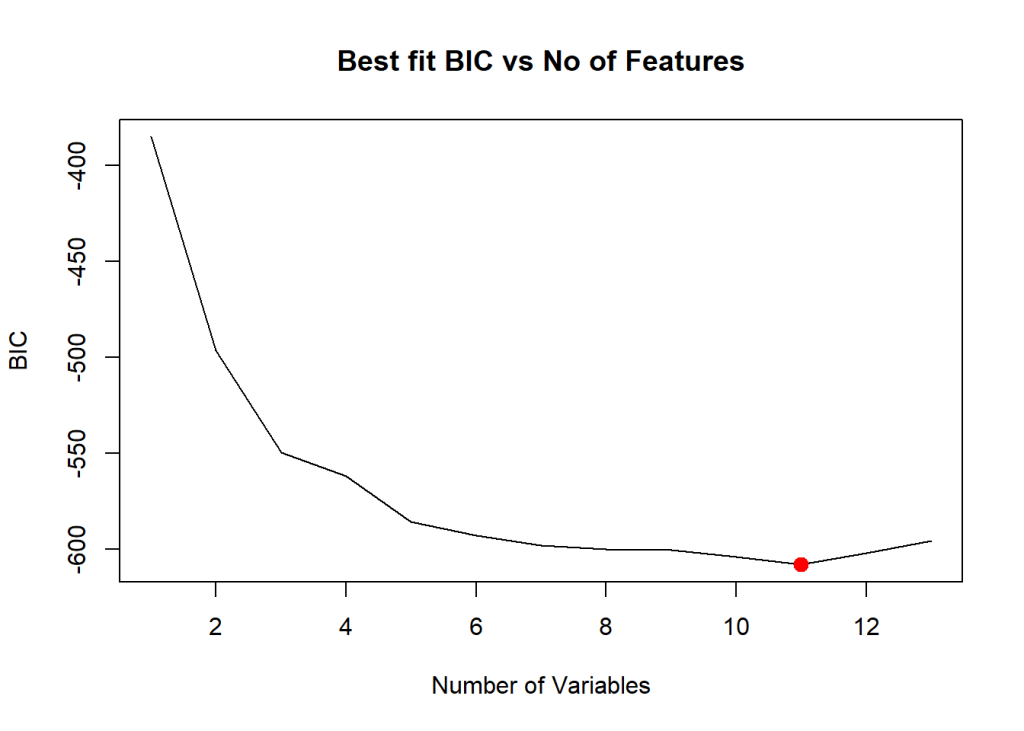
plot(bfSummary$bic,xlab="Number of Variables",ylab="BIC",type='l',main="Best fit BIC vs No of Features")
# Find and mark the min value
c=which.min(bfSummary$bic)
points(c,bfSummary$bic[c],col="red",cex=2,pch=20)

# R has some other good plots for best fit
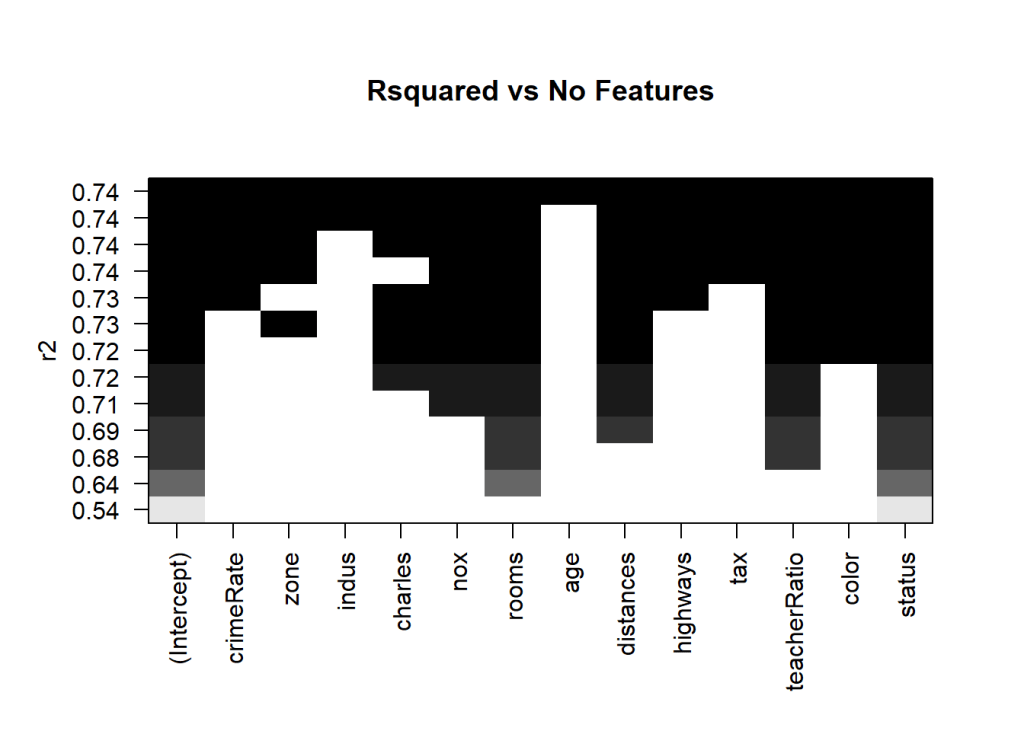
plot(bestFit,scale="r2",main="Rsquared vs No Features")

R has the following set of really nice visualizations. The plot below shows the Rsquared for a set of predictor variables. It can be seen when Rsquared starts at 0.74- indus, charles and age have not been included. 

plot(bestFit,scale="Cp",main="Cp vs NoFeatures")

The Cp plot below for value shows indus, charles and age as not included in the Best fit

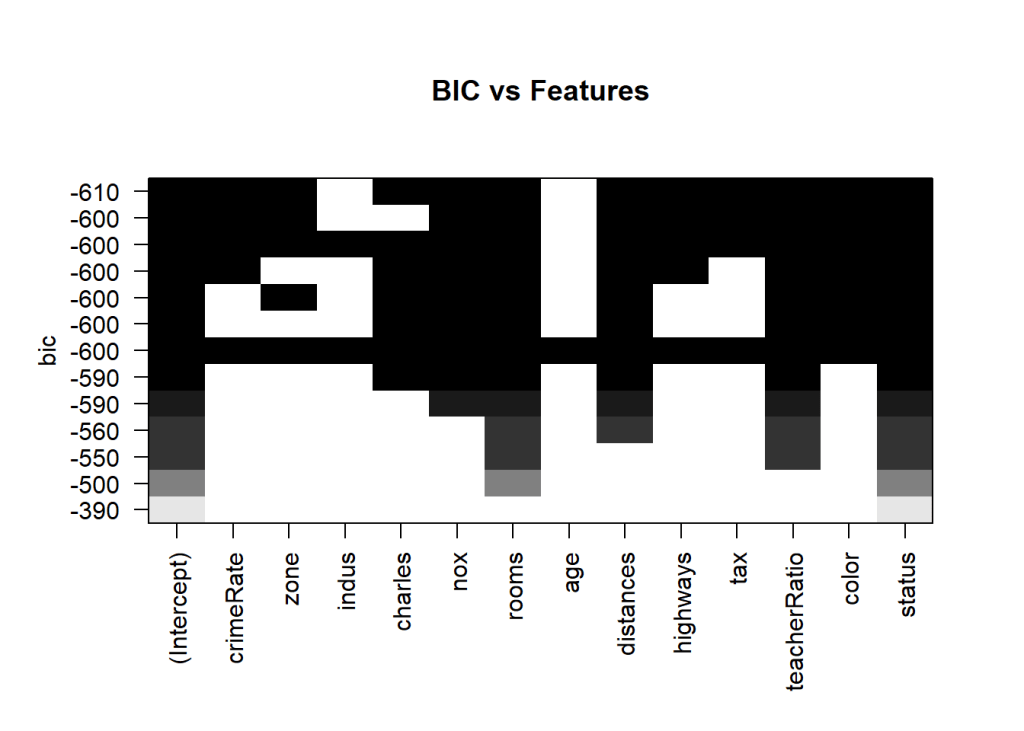
plot(bestFit,scale="bic",main="BIC vs Features")

1.1b Best fit (Exhaustive Search ) – Python code

The Python package for performing a Best Fit is the Exhaustive Feature Selector EFS.

import numpy as np
import pandas as pd
import os
import matplotlib.pyplot as plt
from sklearn.model_selection import train_test_split
from sklearn.linear_model import LinearRegression
from mlxtend.feature_selection import ExhaustiveFeatureSelector as EFS

# Read the Boston crime data
df = pd.read_csv("Boston.csv",encoding = "ISO-8859-1")

#Rename the columns
df.columns=["no","crimeRate","zone","indus","chasRiver","NO2","rooms","age",
              "distances","idxHighways","taxRate","teacherRatio","color","status","cost"]
# Set X and y 
X=df[["crimeRate","zone","indus","chasRiver","NO2","rooms","age",
              "distances","idxHighways","taxRate","teacherRatio","color","status"]]
y=df['cost']

# Perform an Exhaustive Search. The EFS and SFS packages use 'neg_mean_squared_error'. The 'mean_squared_error' seems to have been deprecated. I think this is just the MSE with the a negative sign.
lr = LinearRegression()
efs1 = EFS(lr, 
           min_features=1,
           max_features=13,
           scoring='neg_mean_squared_error',
           print_progress=True,
           cv=5)


# Create a efs fit
efs1 = efs1.fit(X.as_matrix(), y.as_matrix())

print('Best negtive mean squared error: %.2f' % efs1.best_score_)
## Print the IDX of the best features 
print('Best subset:', efs1.best_idx_)
Features: 8191/8191Best negtive mean squared error: -28.92
## ('Best subset:', (0, 1, 4, 6, 7, 8, 9, 10, 11, 12))

The indices for the best subset are shown above.

1.2 Forward fit

Forward fit is a greedy algorithm that tries to optimize the feature selected, by minimizing the selection criteria (adj Rsqaured, Cp, AIC or BIC) at every step. For a dataset with features f1,f2,f3…fn, the forward fit starts with the NULL set. It then pick the ML model with a single feature from n features which has the highest adj Rsquared, or minimum Cp, BIC or some such criteria. After picking the 1 feature from n which satisfies the criteria the most, the next feature from the remaining n-1 features is chosen. When the 2 feature model which satisfies the selection criteria the best is chosen, another feature from the remaining n-2 features are added and so on. The forward fit is a sub-optimal algorithm. There is no guarantee that the final list of features chosen will be the best among the lot. The computation required for this is of  n + n-1 + n -2 + .. 1 = n(n+1)/2 which is of the order of n^{2}. Though forward fit is a sub optimal solution it is far more computationally efficient than best fit
1.2a Forward fit – R code

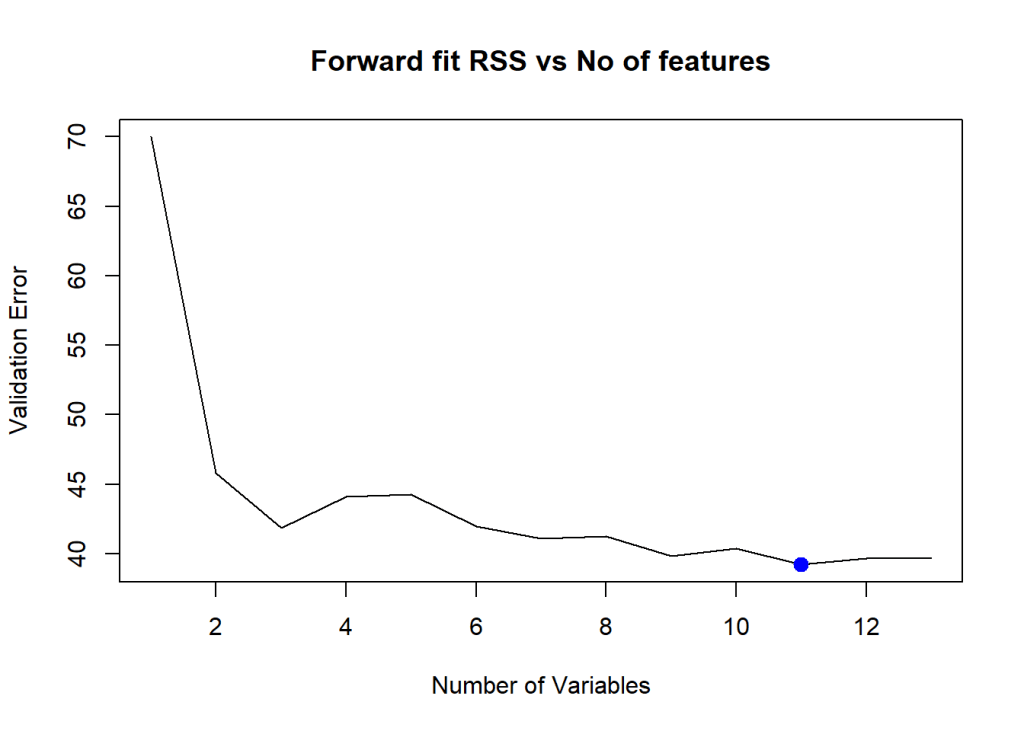
Forward fit in R determines that 11 features are required for the best fit. The features are shown below

library(leaps)
# Read the data
df=read.csv("Boston.csv",stringsAsFactors = FALSE) # Data from MASS - SL
# Rename the columns
names(df) <-c("no","crimeRate","zone","indus","charles","nox","rooms","age",
              "distances","highways","tax","teacherRatio","color","status","cost")

# Select columns
df1 <- df %>% dplyr::select("crimeRate","zone","indus","charles","nox","rooms","age",
                     "distances","highways","tax","teacherRatio","color","status","cost")

#Split as training and test 
train_idx <- trainTestSplit(df1,trainPercent=75,seed=5)
train <- df1[train_idx, ]
test <- df1[-train_idx, ]

# Find the best forward fit
fitFwd=regsubsets(cost~.,data=train,nvmax=13,method="forward")

# Compute the MSE
valErrors=rep(NA,13)
test.mat=model.matrix(cost~.,data=test)
for(i in 1:13){
    coefi=coef(fitFwd,id=i)
    pred=test.mat[,names(coefi)]%*%coefi
    valErrors[i]=mean((test$cost-pred)^2)
}

# Plot the Residual Sum of Squares
plot(valErrors,xlab="Number of Variables",ylab="Validation Error",type="l",main="Forward fit RSS vs No of features")
# Gives the index of the minimum value
a<-which.min(valErrors)
print(a)
## [1] 11
# Highlight the smallest value
points(c,valErrors[a],col="blue",cex=2,pch=20)

Forward fit R selects 11 predictors as the best ML model to predict the ‘cost’ output variable. The values for these 11 predictors are included below

#Print the 11 ccoefficients
coefi=coef(fitFwd,id=i)
coefi
##   (Intercept)     crimeRate          zone         indus       charles 
##  2.397179e+01 -1.026463e-01  3.118923e-02  1.154235e-04  3.512922e+00 
##           nox         rooms           age     distances      highways 
## -1.511123e+01  4.945078e+00 -1.513220e-02 -1.307017e+00  2.712534e-01 
##           tax  teacherRatio         color        status 
## -1.330709e-02 -8.182683e-01  1.143835e-02 -3.750928e-01

1.2b Forward fit with Cross Validation – R code

The Python package SFS includes N Fold Cross Validation errors for forward and backward fit so I decided to add this code to R. This is not available in the ‘leaps’ R package, however the implementation is quite simple. Another implementation is also available at Statistical Learning, Prof Trevor Hastie & Prof Robert Tibesherani, Online Stanford 2.

library(dplyr)
df=read.csv("Boston.csv",stringsAsFactors = FALSE) # Data from MASS - SL
names(df) <-c("no","crimeRate","zone","indus","charles","nox","rooms","age",
              "distances","highways","tax","teacherRatio","color","status","cost")

# Select columns
df1 <- df %>% dplyr::select("crimeRate","zone","indus","charles","nox","rooms","age",
                     "distances","highways","tax","teacherRatio","color","status","cost")

set.seed(6)
# Set max number of features
nvmax<-13
cvError <- NULL
# Loop through each features
for(i in 1:nvmax){
    # Set no of folds
    noFolds=5
    # Create the rows which fall into different folds from 1..noFolds
    folds = sample(1:noFolds, nrow(df1), replace=TRUE) 
    cv<-0
    # Loop through the folds
    for(j in 1:noFolds){
        # The training is all rows for which the row is != j (k-1 folds -> training)
        train <- df1[folds!=j,]
        # The rows which have j as the index become the test set
        test <- df1[folds==j,]
        # Create a forward fitting model for this
        fitFwd=regsubsets(cost~.,data=train,nvmax=13,method="forward")
        # Select the number of features and get the feature coefficients
        coefi=coef(fitFwd,id=i)
        #Get the value of the test data
        test.mat=model.matrix(cost~.,data=test)
        # Multiply the tes data with teh fitted coefficients to get the predicted value
        # pred = b0 + b1x1+b2x2... b13x13
        pred=test.mat[,names(coefi)]%*%coefi
        # Compute mean squared error
        rss=mean((test$cost - pred)^2)
        # Add all the Cross Validation errors
        cv=cv+rss
    }
    # Compute the average of MSE for K folds for number of features 'i'
    cvError[i]=cv/noFolds
}
a <- seq(1,13)
d <- as.data.frame(t(rbind(a,cvError)))
names(d) <- c("Features","CVError")
#Plot the CV Error vs No of Features
ggplot(d,aes(x=Features,y=CVError),color="blue") + geom_point() + geom_line(color="blue") +
    xlab("No of features") + ylab("Cross Validation Error") +
    ggtitle("Forward Selection - Cross Valdation Error vs No of Features")

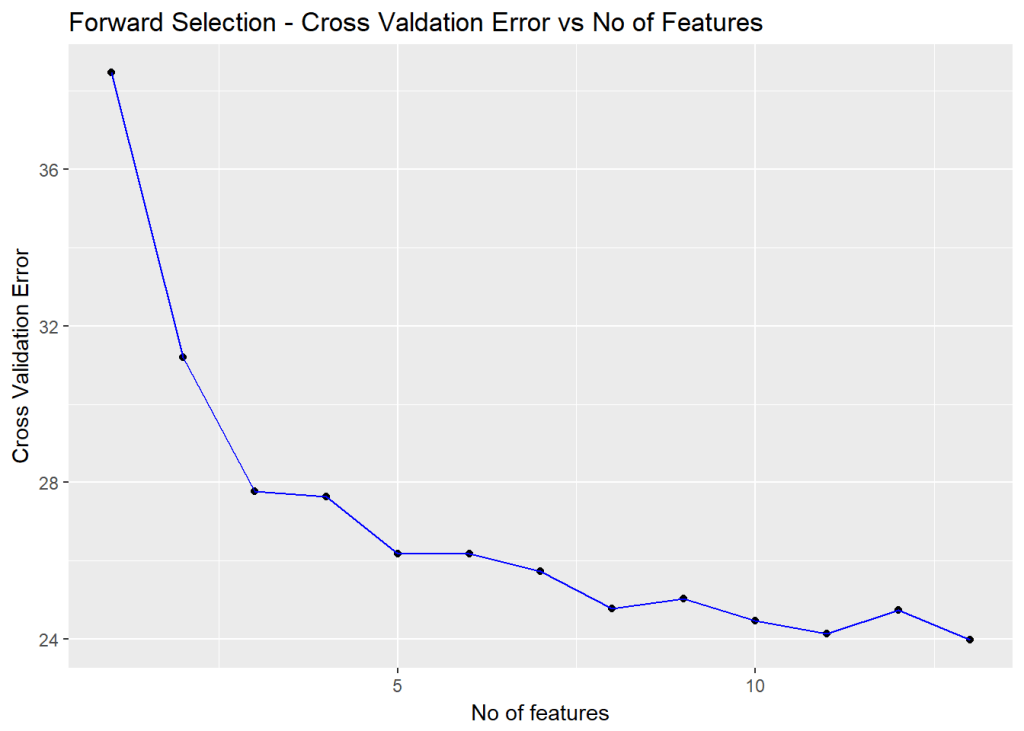
Forward fit with 5 fold cross validation indicates that all 13 features are required

# This gives the index of the minimum value
a=which.min(cvError)
print(a)
## [1] 13
#Print the 13 coefficients of these features
coefi=coef(fitFwd,id=a)
coefi
##   (Intercept)     crimeRate          zone         indus       charles 
##  36.650645380  -0.107980979   0.056237669   0.027016678   4.270631466 
##           nox         rooms           age     distances      highways 
## -19.000715500   3.714720418   0.019952654  -1.472533973   0.326758004 
##           tax  teacherRatio         color        status 
##  -0.011380750  -0.972862622   0.009549938  -0.582159093

1.2c Forward fit – Python code

The Backward Fit in Python uses the Sequential feature selection (SFS) package (SFS)(https://rasbt.github.io/mlxtend/user_guide/feature_selection/SequentialFeatureSelector/)

Note: The Cross validation error for SFS in Sklearn is negative, possibly because it computes the ‘neg_mean_squared_error’. The earlier ‘mean_squared_error’ in the package seems to have been deprecated. I have taken the -ve of this neg_mean_squared_error. I think this would give mean_squared_error.

import numpy as np
import pandas as pd
import os
import matplotlib.pyplot as plt
from sklearn.model_selection import train_test_split
from sklearn.linear_model import LinearRegression
from sklearn.datasets import load_boston
from mlxtend.plotting import plot_sequential_feature_selection as plot_sfs
import matplotlib.pyplot as plt
from mlxtend.feature_selection import SequentialFeatureSelector as SFS
from sklearn.linear_model import LinearRegression


df = pd.read_csv("Boston.csv",encoding = "ISO-8859-1")
#Rename the columns
df.columns=["no","crimeRate","zone","indus","chasRiver","NO2","rooms","age",
              "distances","idxHighways","taxRate","teacherRatio","color","status","cost"]
X=df[["crimeRate","zone","indus","chasRiver","NO2","rooms","age",
              "distances","idxHighways","taxRate","teacherRatio","color","status"]]
y=df['cost']
lr = LinearRegression()
# Create a forward fit model
sfs = SFS(lr, 
          k_features=(1,13), 
          forward=True, # Forward fit
          floating=False, 
          scoring='neg_mean_squared_error',
          cv=5)

# Fit this on the data
sfs = sfs.fit(X.as_matrix(), y.as_matrix())
# Get all the details of the forward fits
a=sfs.get_metric_dict()
n=[]
o=[]

# Compute the mean cross validation scores
for i in np.arange(1,13):
    n.append(-np.mean(a[i]['cv_scores']))  
m=np.arange(1,13)
# Get the index of the minimum CV score

# Plot the CV scores vs the number of features
fig1=plt.plot(m,n)
fig1=plt.title('Mean CV Scores vs No of features')
fig1.figure.savefig('fig1.png', bbox_inches='tight')

print(pd.DataFrame.from_dict(sfs.get_metric_dict(confidence_interval=0.90)).T)

idx = np.argmin(n)
print "No of features=",idx
#Get the features indices for the best forward fit and convert to list
b=list(a[idx]['feature_idx'])
print(b)

# Index the column names. 
# Features from forward fit
print("Features selected in forward fit")
print(X.columns[b])
##    avg_score ci_bound                                          cv_scores  \
## 1   -42.6185  19.0465  [-23.5582499971, -41.8215743748, -73.993608929...   
## 2   -36.0651  16.3184  [-18.002498199, -40.1507894517, -56.5286659068...   
## 3   -34.1001    20.87  [-9.43012884381, -25.9584955394, -36.184188174...   
## 4   -33.7681  20.1638  [-8.86076528781, -28.650217633, -35.7246353855...   
## 5   -33.6392  20.5271  [-8.90807628524, -28.0684679108, -35.827463022...   
## 6   -33.6276  19.0859  [-9.549485942, -30.9724602876, -32.6689523347,...   
## 7   -32.4082  19.1455  [-10.0177149635, -28.3780298492, -30.926917231...   
## 8   -32.3697   18.533  [-11.1431684243, -27.5765510172, -31.168994094...   
## 9   -32.4016  21.5561  [-10.8972555995, -25.739780653, -30.1837430353...   
## 10  -32.8504  22.6508  [-12.3909282079, -22.1533250755, -33.385407342...   
## 11  -34.1065  24.7019  [-12.6429253721, -22.1676650245, -33.956999528...   
## 12  -35.5814   25.693  [-12.7303397453, -25.0145323483, -34.211898373...   
## 13  -37.1318  23.2657  [-12.4603005692, -26.0486211062, -33.074137979...   
## 
##                                    feature_idx  std_dev  std_err  
## 1                                        (12,)  18.9042  9.45212  
## 2                                     (10, 12)  16.1965  8.09826  
## 3                                  (10, 12, 5)  20.7142  10.3571  
## 4                               (10, 3, 12, 5)  20.0132  10.0066  
## 5                            (0, 10, 3, 12, 5)  20.3738  10.1869  
## 6                         (0, 3, 5, 7, 10, 12)  18.9433  9.47167  
## 7                      (0, 2, 3, 5, 7, 10, 12)  19.0026  9.50128  
## 8                   (0, 1, 2, 3, 5, 7, 10, 12)  18.3946  9.19731  
## 9               (0, 1, 2, 3, 5, 7, 10, 11, 12)  21.3952  10.6976  
## 10           (0, 1, 2, 3, 4, 5, 7, 10, 11, 12)  22.4816  11.2408  
## 11        (0, 1, 2, 3, 4, 5, 6, 7, 10, 11, 12)  24.5175  12.2587  
## 12     (0, 1, 2, 3, 4, 5, 6, 7, 9, 10, 11, 12)  25.5012  12.7506  
## 13  (0, 1, 2, 3, 4, 5, 6, 7, 8, 9, 10, 11, 12)  23.0919   11.546  
## No of features= 7
## [0, 2, 3, 5, 7, 10, 12]
## #################################################################################
## Features selected in forward fit
## Index([u'crimeRate', u'indus', u'chasRiver', u'rooms', u'distances',
##        u'teacherRatio', u'status'],
##       dtype='object')

The table above shows the average score, 10 fold CV errors, the features included at every step, std. deviation and std. error

The above plot indicates that 8 features provide the lowest Mean CV error

1.3 Backward Fit

Backward fit belongs to the class of greedy algorithms which tries to optimize the feature set, by dropping a feature at every stage which results in the worst performance for a given criteria of Adj RSquared, Cp, BIC or AIC. For a dataset with features f1,f2,f3…fn, the backward fit starts with the all the features f1,f2.. fn to begin with. It then pick the ML model with a n-1 features by dropping the feature,f_{j}, for e.g., the inclusion of which results in the worst performance in adj Rsquared, or minimum Cp, BIC or some such criteria. At every step 1 feature is dopped. There is no guarantee that the final list of features chosen will be the best among the lot. The computation required for this is of n + n-1 + n -2 + .. 1 = n(n+1)/2 which is of the order of n^{2}. Though backward fit is a sub optimal solution it is far more computationally efficient than best fit

1.3a Backward fit – R code

library(dplyr)
# Read the data
df=read.csv("Boston.csv",stringsAsFactors = FALSE) # Data from MASS - SL
# Rename the columns
names(df) <-c("no","crimeRate","zone","indus","charles","nox","rooms","age",
              "distances","highways","tax","teacherRatio","color","status","cost")

# Select columns
df1 <- df %>% dplyr::select("crimeRate","zone","indus","charles","nox","rooms","age",
                     "distances","highways","tax","teacherRatio","color","status","cost")

set.seed(6)
# Set max number of features
nvmax<-13
cvError <- NULL
# Loop through each features
for(i in 1:nvmax){
    # Set no of folds
    noFolds=5
    # Create the rows which fall into different folds from 1..noFolds
    folds = sample(1:noFolds, nrow(df1), replace=TRUE) 
    cv<-0
    for(j in 1:noFolds){
        # The training is all rows for which the row is != j 
        train <- df1[folds!=j,]
        # The rows which have j as the index become the test set
        test <- df1[folds==j,]
        # Create a backward fitting model for this
        fitFwd=regsubsets(cost~.,data=train,nvmax=13,method="backward")
        # Select the number of features and get the feature coefficients
        coefi=coef(fitFwd,id=i)
        #Get the value of the test data
        test.mat=model.matrix(cost~.,data=test)
        # Multiply the tes data with teh fitted coefficients to get the predicted value
        # pred = b0 + b1x1+b2x2... b13x13
        pred=test.mat[,names(coefi)]%*%coefi
        # Compute mean squared error
        rss=mean((test$cost - pred)^2)
        # Add the Residual sum of square
        cv=cv+rss
    }
    # Compute the average of MSE for K folds for number of features 'i'
    cvError[i]=cv/noFolds
}
a <- seq(1,13)
d <- as.data.frame(t(rbind(a,cvError)))
names(d) <- c("Features","CVError")
# Plot the Cross Validation Error vs Number of features
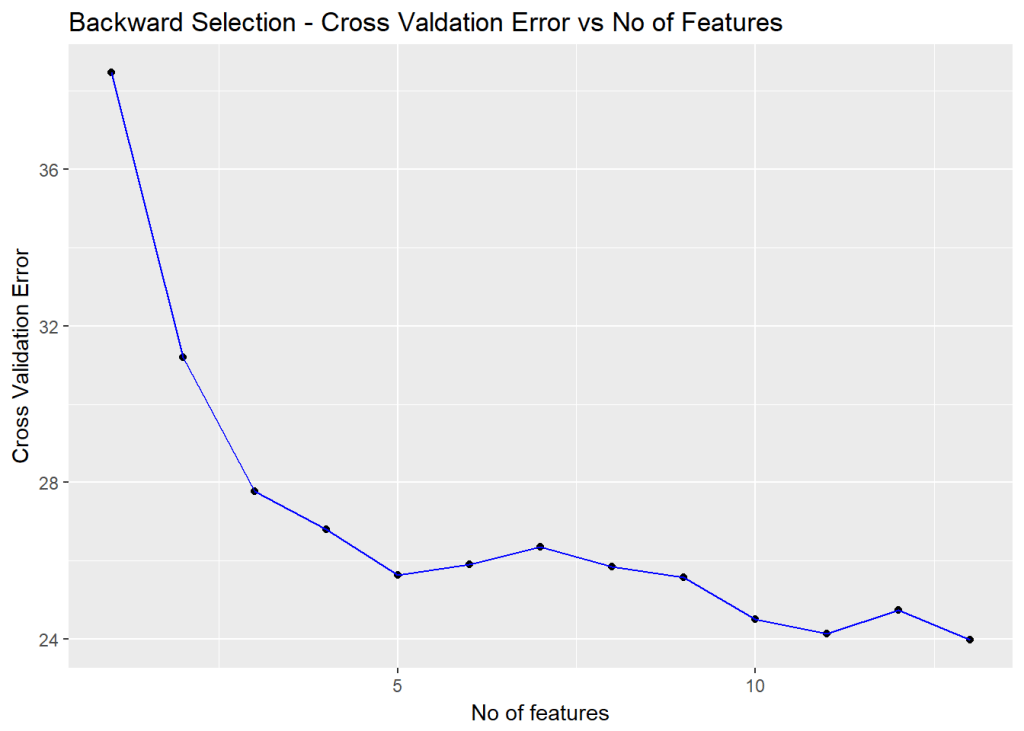
ggplot(d,aes(x=Features,y=CVError),color="blue") + geom_point() + geom_line(color="blue") +
    xlab("No of features") + ylab("Cross Validation Error") +
    ggtitle("Backward Selection - Cross Valdation Error vs No of Features")

# This gives the index of the minimum value
a=which.min(cvError)
print(a)
## [1] 13
#Print the 13 coefficients of these features
coefi=coef(fitFwd,id=a)
coefi
##   (Intercept)     crimeRate          zone         indus       charles 
##  36.650645380  -0.107980979   0.056237669   0.027016678   4.270631466 
##           nox         rooms           age     distances      highways 
## -19.000715500   3.714720418   0.019952654  -1.472533973   0.326758004 
##           tax  teacherRatio         color        status 
##  -0.011380750  -0.972862622   0.009549938  -0.582159093

Backward selection in R also indicates the 13 features and the corresponding coefficients as providing the best fit

1.3b Backward fit – Python code

The Backward Fit in Python uses the Sequential feature selection (SFS) package (SFS)(https://rasbt.github.io/mlxtend/user_guide/feature_selection/SequentialFeatureSelector/)

import numpy as np
import pandas as pd
import os
import matplotlib.pyplot as plt
from sklearn.model_selection import train_test_split
from sklearn.linear_model import LinearRegression
from mlxtend.plotting import plot_sequential_feature_selection as plot_sfs
import matplotlib.pyplot as plt
from mlxtend.feature_selection import SequentialFeatureSelector as SFS
from sklearn.linear_model import LinearRegression

# Read the data
df = pd.read_csv("Boston.csv",encoding = "ISO-8859-1")
#Rename the columns
df.columns=["no","crimeRate","zone","indus","chasRiver","NO2","rooms","age",
              "distances","idxHighways","taxRate","teacherRatio","color","status","cost"]
X=df[["crimeRate","zone","indus","chasRiver","NO2","rooms","age",
              "distances","idxHighways","taxRate","teacherRatio","color","status"]]
y=df['cost']
lr = LinearRegression()

# Create the SFS model
sfs = SFS(lr, 
          k_features=(1,13), 
          forward=False, # Backward
          floating=False, 
          scoring='neg_mean_squared_error',
          cv=5)

# Fit the model
sfs = sfs.fit(X.as_matrix(), y.as_matrix())
a=sfs.get_metric_dict()
n=[]
o=[]

# Compute the mean of the validation scores
for i in np.arange(1,13):
    n.append(-np.mean(a[i]['cv_scores'])) 
m=np.arange(1,13)

# Plot the Validation scores vs number of features
fig2=plt.plot(m,n)
fig2=plt.title('Mean CV Scores vs No of features')
fig2.figure.savefig('fig2.png', bbox_inches='tight')

print(pd.DataFrame.from_dict(sfs.get_metric_dict(confidence_interval=0.90)).T)

# Get the index of minimum cross validation error
idx = np.argmin(n)
print "No of features=",idx
#Get the features indices for the best forward fit and convert to list
b=list(a[idx]['feature_idx'])
# Index the column names. 
# Features from backward fit
print("Features selected in bacward fit")
print(X.columns[b])
##    avg_score ci_bound                                          cv_scores  \
## 1   -42.6185  19.0465  [-23.5582499971, -41.8215743748, -73.993608929...   
## 2   -36.0651  16.3184  [-18.002498199, -40.1507894517, -56.5286659068...   
## 3   -35.4992  13.9619  [-17.2329292677, -44.4178648308, -51.633177846...   
## 4    -33.463  12.4081  [-20.6415333292, -37.3247852146, -47.479302977...   
## 5   -33.1038  10.6156  [-20.2872309863, -34.6367078466, -45.931870352...   
## 6   -32.0638  10.0933  [-19.4463829372, -33.460638577, -42.726257249,...   
## 7   -30.7133  9.23881  [-19.4425181917, -31.1742902259, -40.531266671...   
## 8   -29.7432  9.84468  [-19.445277268, -30.0641187173, -40.2561247122...   
## 9   -29.0878  9.45027  [-19.3545569877, -30.094768669, -39.7506036377...   
## 10  -28.9225  9.39697  [-18.562171585, -29.968504938, -39.9586835965,...   
## 11  -29.4301  10.8831  [-18.3346152225, -30.3312847532, -45.065432793...   
## 12  -30.4589  11.1486  [-18.493389527, -35.0290639374, -45.1558231765...   
## 13  -37.1318  23.2657  [-12.4603005692, -26.0486211062, -33.074137979...   
## 
##                                    feature_idx  std_dev  std_err  
## 1                                        (12,)  18.9042  9.45212  
## 2                                     (10, 12)  16.1965  8.09826  
## 3                                  (10, 12, 7)  13.8576  6.92881  
## 4                               (12, 10, 4, 7)  12.3154  6.15772  
## 5                            (4, 7, 8, 10, 12)  10.5363  5.26816  
## 6                         (4, 7, 8, 9, 10, 12)  10.0179  5.00896  
## 7                      (1, 4, 7, 8, 9, 10, 12)  9.16981  4.58491  
## 8                  (1, 4, 7, 8, 9, 10, 11, 12)  9.77116  4.88558  
## 9               (0, 1, 4, 7, 8, 9, 10, 11, 12)  9.37969  4.68985  
## 10           (0, 1, 4, 6, 7, 8, 9, 10, 11, 12)   9.3268   4.6634  
## 11        (0, 1, 3, 4, 6, 7, 8, 9, 10, 11, 12)  10.8018  5.40092  
## 12     (0, 1, 2, 3, 4, 6, 7, 8, 9, 10, 11, 12)  11.0653  5.53265  
## 13  (0, 1, 2, 3, 4, 5, 6, 7, 8, 9, 10, 11, 12)  23.0919   11.546  
## No of features= 9
## Features selected in bacward fit
## Index([u'crimeRate', u'zone', u'NO2', u'distances', u'idxHighways', u'taxRate',
##        u'teacherRatio', u'color', u'status'],
##       dtype='object')

The table above shows the average score, 10 fold CV errors, the features included at every step, std. deviation and std. error

Backward fit in Python indicate that 10 features provide the best fit

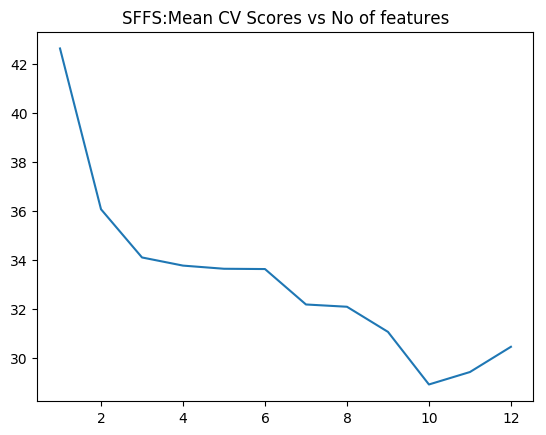
1.3c Sequential Floating Forward Selection (SFFS) – Python code

The Sequential Feature search also includes ‘floating’ variants which include or exclude features conditionally, once they were excluded or included. The SFFS can conditionally include features which were excluded from the previous step, if it results in a better fit. This option will tend to a better solution, than plain simple SFS. These variants are included below

import numpy as np
import pandas as pd
import os
import matplotlib.pyplot as plt
from sklearn.model_selection import train_test_split
from sklearn.linear_model import LinearRegression
from sklearn.datasets import load_boston
from mlxtend.plotting import plot_sequential_feature_selection as plot_sfs
import matplotlib.pyplot as plt
from mlxtend.feature_selection import SequentialFeatureSelector as SFS
from sklearn.linear_model import LinearRegression


df = pd.read_csv("Boston.csv",encoding = "ISO-8859-1")
#Rename the columns
df.columns=["no","crimeRate","zone","indus","chasRiver","NO2","rooms","age",
              "distances","idxHighways","taxRate","teacherRatio","color","status","cost"]
X=df[["crimeRate","zone","indus","chasRiver","NO2","rooms","age",
              "distances","idxHighways","taxRate","teacherRatio","color","status"]]
y=df['cost']
lr = LinearRegression()

# Create the floating forward search
sffs = SFS(lr, 
          k_features=(1,13), 
          forward=True,  # Forward
          floating=True,  #Floating
          scoring='neg_mean_squared_error',
          cv=5)

# Fit a model
sffs = sffs.fit(X.as_matrix(), y.as_matrix())
a=sffs.get_metric_dict()
n=[]
o=[]
# Compute mean validation scores
for i in np.arange(1,13):
    n.append(-np.mean(a[i]['cv_scores'])) 


m=np.arange(1,13)


# Plot the cross validation score vs number of features
fig3=plt.plot(m,n)
fig3=plt.title('SFFS:Mean CV Scores vs No of features')
fig3.figure.savefig('fig3.png', bbox_inches='tight')

print(pd.DataFrame.from_dict(sffs.get_metric_dict(confidence_interval=0.90)).T)
# Get the index of the minimum CV score
idx = np.argmin(n)
print "No of features=",idx
#Get the features indices for the best forward floating fit and convert to list
b=list(a[idx]['feature_idx'])
print(b)

print("#################################################################################")
# Index the column names. 
# Features from forward fit
print("Features selected in forward fit")
print(X.columns[b])
##    avg_score ci_bound                                          cv_scores  \
## 1   -42.6185  19.0465  [-23.5582499971, -41.8215743748, -73.993608929...   
## 2   -36.0651  16.3184  [-18.002498199, -40.1507894517, -56.5286659068...   
## 3   -34.1001    20.87  [-9.43012884381, -25.9584955394, -36.184188174...   
## 4   -33.7681  20.1638  [-8.86076528781, -28.650217633, -35.7246353855...   
## 5   -33.6392  20.5271  [-8.90807628524, -28.0684679108, -35.827463022...   
## 6   -33.6276  19.0859  [-9.549485942, -30.9724602876, -32.6689523347,...   
## 7   -32.1834  12.1001  [-17.9491036167, -39.6479234651, -45.470227740...   
## 8   -32.0908  11.8179  [-17.4389015788, -41.2453629843, -44.247557798...   
## 9   -31.0671  10.1581  [-17.2689542913, -37.4379370429, -41.366372300...   
## 10  -28.9225  9.39697  [-18.562171585, -29.968504938, -39.9586835965,...   
## 11  -29.4301  10.8831  [-18.3346152225, -30.3312847532, -45.065432793...   
## 12  -30.4589  11.1486  [-18.493389527, -35.0290639374, -45.1558231765...   
## 13  -37.1318  23.2657  [-12.4603005692, -26.0486211062, -33.074137979...   
## 
##                                    feature_idx  std_dev  std_err  
## 1                                        (12,)  18.9042  9.45212  
## 2                                     (10, 12)  16.1965  8.09826  
## 3                                  (10, 12, 5)  20.7142  10.3571  
## 4                               (10, 3, 12, 5)  20.0132  10.0066  
## 5                            (0, 10, 3, 12, 5)  20.3738  10.1869  
## 6                         (0, 3, 5, 7, 10, 12)  18.9433  9.47167  
## 7                      (0, 1, 2, 3, 7, 10, 12)  12.0097  6.00487  
## 8                   (0, 1, 2, 3, 7, 8, 10, 12)  11.7297  5.86484  
## 9                (0, 1, 2, 3, 7, 8, 9, 10, 12)  10.0822  5.04111  
## 10           (0, 1, 4, 6, 7, 8, 9, 10, 11, 12)   9.3268   4.6634  
## 11        (0, 1, 3, 4, 6, 7, 8, 9, 10, 11, 12)  10.8018  5.40092  
## 12     (0, 1, 2, 3, 4, 6, 7, 8, 9, 10, 11, 12)  11.0653  5.53265  
## 13  (0, 1, 2, 3, 4, 5, 6, 7, 8, 9, 10, 11, 12)  23.0919   11.546  
## No of features= 9
## [0, 1, 2, 3, 7, 8, 9, 10, 12]
## #################################################################################
## Features selected in forward fit
## Index([u'crimeRate', u'zone', u'indus', u'chasRiver', u'distances',
##        u'idxHighways', u'taxRate', u'teacherRatio', u'status'],
##       dtype='object')

The table above shows the average score, 10 fold CV errors, the features included at every step, std. deviation and std. error

SFFS provides the best fit with 10 predictors

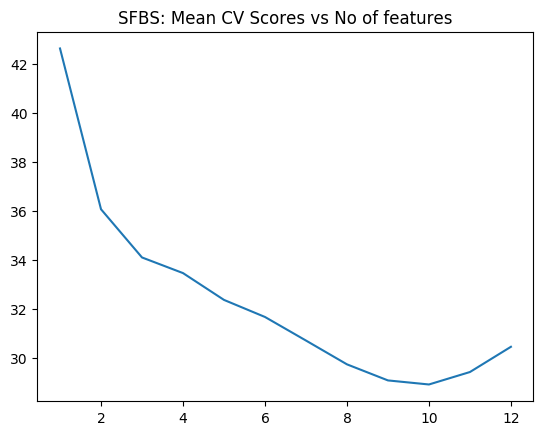
1.3d Sequential Floating Backward Selection (SFBS) – Python code

The SFBS is an extension of the SBS. Here features that are excluded at any stage can be conditionally included if the resulting feature set gives a better fit.

import numpy as np
import pandas as pd
import os
import matplotlib.pyplot as plt
from sklearn.model_selection import train_test_split
from sklearn.linear_model import LinearRegression
from sklearn.datasets import load_boston
from mlxtend.plotting import plot_sequential_feature_selection as plot_sfs
import matplotlib.pyplot as plt
from mlxtend.feature_selection import SequentialFeatureSelector as SFS
from sklearn.linear_model import LinearRegression


df = pd.read_csv("Boston.csv",encoding = "ISO-8859-1")
#Rename the columns
df.columns=["no","crimeRate","zone","indus","chasRiver","NO2","rooms","age",
              "distances","idxHighways","taxRate","teacherRatio","color","status","cost"]
X=df[["crimeRate","zone","indus","chasRiver","NO2","rooms","age",
              "distances","idxHighways","taxRate","teacherRatio","color","status"]]
y=df['cost']
lr = LinearRegression()

sffs = SFS(lr, 
          k_features=(1,13), 
          forward=False, # Backward
          floating=True, # Floating
          scoring='neg_mean_squared_error',
          cv=5)

sffs = sffs.fit(X.as_matrix(), y.as_matrix())
a=sffs.get_metric_dict()
n=[]
o=[]
# Compute the mean cross validation score
for i in np.arange(1,13):
    n.append(-np.mean(a[i]['cv_scores']))  
    
m=np.arange(1,13)

fig4=plt.plot(m,n)
fig4=plt.title('SFBS: Mean CV Scores vs No of features')
fig4.figure.savefig('fig4.png', bbox_inches='tight')

print(pd.DataFrame.from_dict(sffs.get_metric_dict(confidence_interval=0.90)).T)

# Get the index of the minimum CV score
idx = np.argmin(n)
print "No of features=",idx
#Get the features indices for the best backward floating fit and convert to list
b=list(a[idx]['feature_idx'])
print(b)

print("#################################################################################")
# Index the column names. 
# Features from forward fit
print("Features selected in backward floating fit")
print(X.columns[b])
##    avg_score ci_bound                                          cv_scores  \
## 1   -42.6185  19.0465  [-23.5582499971, -41.8215743748, -73.993608929...   
## 2   -36.0651  16.3184  [-18.002498199, -40.1507894517, -56.5286659068...   
## 3   -34.1001    20.87  [-9.43012884381, -25.9584955394, -36.184188174...   
## 4    -33.463  12.4081  [-20.6415333292, -37.3247852146, -47.479302977...   
## 5   -32.3699  11.2725  [-20.8771078371, -34.9825657934, -45.813447203...   
## 6   -31.6742  11.2458  [-20.3082500364, -33.2288990522, -45.535507868...   
## 7   -30.7133  9.23881  [-19.4425181917, -31.1742902259, -40.531266671...   
## 8   -29.7432  9.84468  [-19.445277268, -30.0641187173, -40.2561247122...   
## 9   -29.0878  9.45027  [-19.3545569877, -30.094768669, -39.7506036377...   
## 10  -28.9225  9.39697  [-18.562171585, -29.968504938, -39.9586835965,...   
## 11  -29.4301  10.8831  [-18.3346152225, -30.3312847532, -45.065432793...   
## 12  -30.4589  11.1486  [-18.493389527, -35.0290639374, -45.1558231765...   
## 13  -37.1318  23.2657  [-12.4603005692, -26.0486211062, -33.074137979...   
## 
##                                    feature_idx  std_dev  std_err  
## 1                                        (12,)  18.9042  9.45212  
## 2                                     (10, 12)  16.1965  8.09826  
## 3                                  (10, 12, 5)  20.7142  10.3571  
## 4                               (4, 10, 7, 12)  12.3154  6.15772  
## 5                            (12, 10, 4, 1, 7)  11.1883  5.59417  
## 6                        (4, 7, 8, 10, 11, 12)  11.1618  5.58088  
## 7                      (1, 4, 7, 8, 9, 10, 12)  9.16981  4.58491  
## 8                  (1, 4, 7, 8, 9, 10, 11, 12)  9.77116  4.88558  
## 9               (0, 1, 4, 7, 8, 9, 10, 11, 12)  9.37969  4.68985  
## 10           (0, 1, 4, 6, 7, 8, 9, 10, 11, 12)   9.3268   4.6634  
## 11        (0, 1, 3, 4, 6, 7, 8, 9, 10, 11, 12)  10.8018  5.40092  
## 12     (0, 1, 2, 3, 4, 6, 7, 8, 9, 10, 11, 12)  11.0653  5.53265  
## 13  (0, 1, 2, 3, 4, 5, 6, 7, 8, 9, 10, 11, 12)  23.0919   11.546  
## No of features= 9
## [0, 1, 4, 7, 8, 9, 10, 11, 12]
## #################################################################################
## Features selected in backward floating fit
## Index([u'crimeRate', u'zone', u'NO2', u'distances', u'idxHighways', u'taxRate',
##        u'teacherRatio', u'color', u'status'],
##       dtype='object')

The table above shows the average score, 10 fold CV errors, the features included at every step, std. deviation and std. error

SFBS indicates that 10 features are needed for the best fit

1.4 Ridge regression

In Linear Regression the Residual Sum of Squares (RSS) is given as

RSS = \sum_{i=1}^{n} (y_{i} - \beta_{0} - \sum_{j=1}^{p}\beta_jx_{ij})^{2}
Ridge regularization =\sum_{i=1}^{n} (y_{i} - \beta_{0} - \sum_{j=1}^{p}\beta_jx_{ij})^{2} + \lambda \sum_{j=1}^{p}\beta^{2}

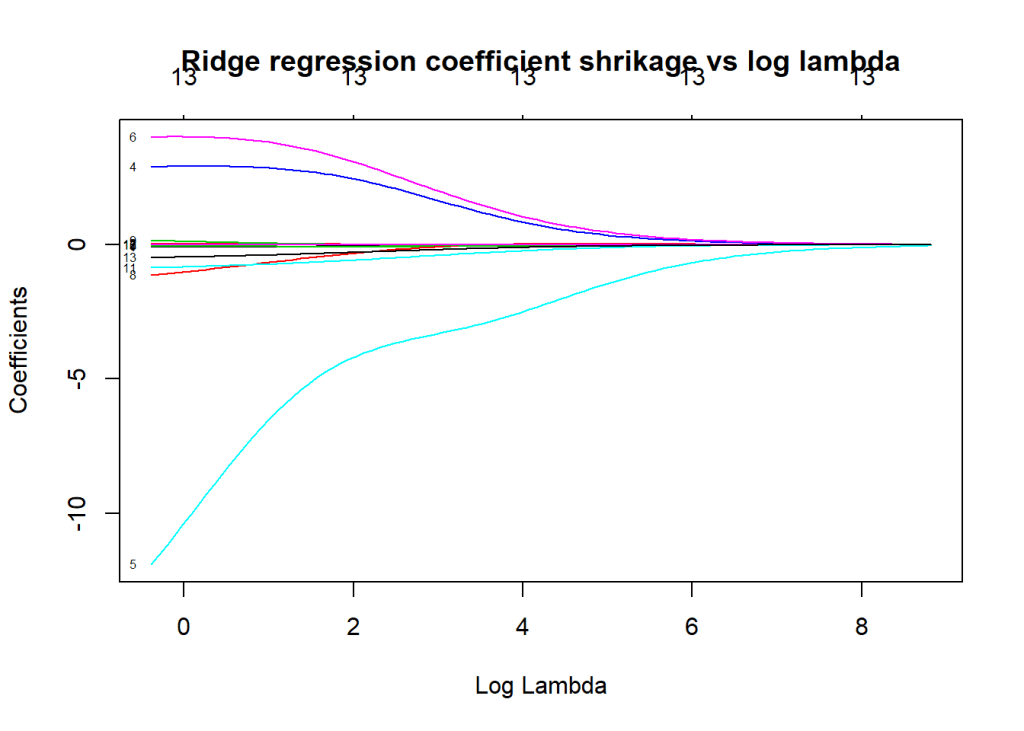
where is the regularization or tuning parameter. Increasing increases the penalty on the coefficients thus shrinking them. However in Ridge Regression features that do not influence the target variable will shrink closer to zero but never become zero except for very large values of

Ridge regression in R requires the ‘glmnet’ package

1.4a Ridge Regression – R code

library(glmnet)
library(dplyr)
# Read the data
df=read.csv("Boston.csv",stringsAsFactors = FALSE) # Data from MASS - SL
#Rename the columns
names(df) <-c("no","crimeRate","zone","indus","charles","nox","rooms","age",
              "distances","highways","tax","teacherRatio","color","status","cost")
# Select specific columns
df1 <- df %>% dplyr::select("crimeRate","zone","indus","charles","nox","rooms","age",
                            "distances","highways","tax","teacherRatio","color","status","cost")

# Set X and y as matrices
X=as.matrix(df1[,1:13])
y=df1$cost

# Fit a Ridge model
fitRidge <-glmnet(X,y,alpha=0)

#Plot the model where the coefficient shrinkage is plotted vs log lambda
plot(fitRidge,xvar="lambda",label=TRUE,main= "Ridge regression coefficient shrikage vs log lambda")

The plot below shows how the 13 coefficients for the 13 predictors vary when lambda is increased. The x-axis includes log (lambda). We can see that increasing lambda from 10^{2} to 10^{6} significantly shrinks the coefficients. We can draw a vertical line from the x-axis and read the values of the 13 coefficients. Some of them will be close to zero
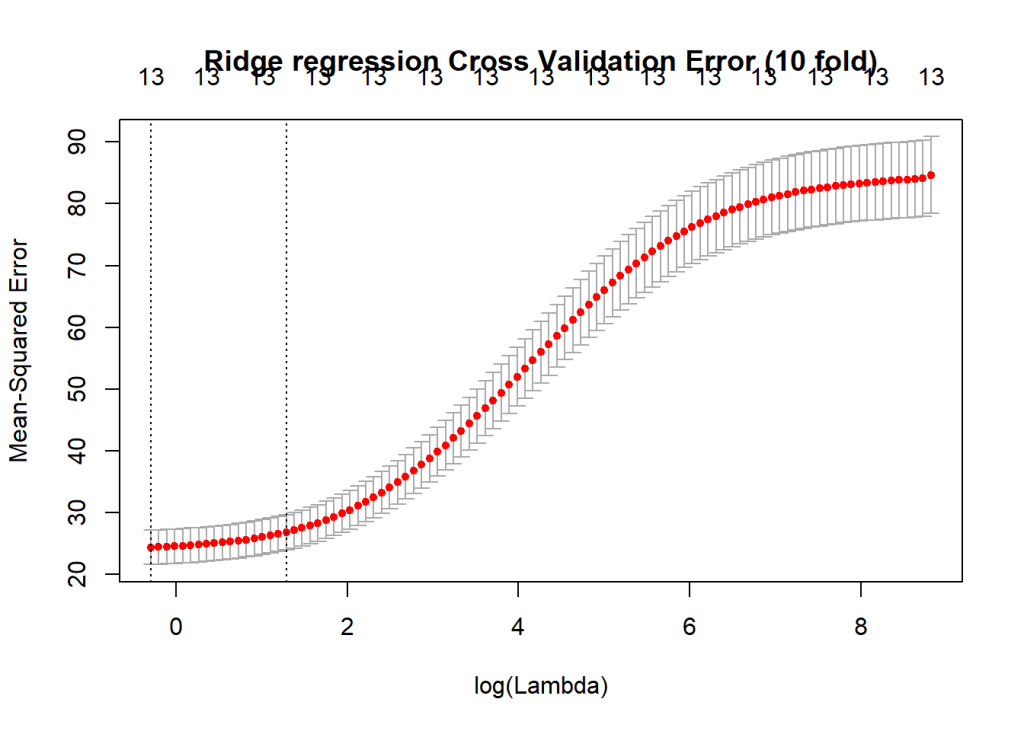
# Compute the cross validation error
cvRidge=cv.glmnet(X,y,alpha=0)

#Plot the cross validation error
plot(cvRidge, main="Ridge regression Cross Validation Error (10 fold)")

This gives the 10 fold Cross Validation  Error with respect to log (lambda) As lambda increase the MSE increases

1.4a Ridge Regression – Python code

The coefficient shrinkage for Python can be plotted like R using Least Angle Regression model a.k.a. LARS package. This is included below

import numpy as np
import pandas as pd
import os
import matplotlib.pyplot as plt
from sklearn.model_selection import train_test_split


df = pd.read_csv("Boston.csv",encoding = "ISO-8859-1")
#Rename the columns
df.columns=["no","crimeRate","zone","indus","chasRiver","NO2","rooms","age",
              "distances","idxHighways","taxRate","teacherRatio","color","status","cost"]
X=df[["crimeRate","zone","indus","chasRiver","NO2","rooms","age",
              "distances","idxHighways","taxRate","teacherRatio","color","status"]]
y=df['cost']
from sklearn.preprocessing import MinMaxScaler
scaler = MinMaxScaler()

from sklearn.linear_model import Ridge
X_train, X_test, y_train, y_test = train_test_split(X, y,
                                                   random_state = 0)

# Scale the X_train and X_test
X_train_scaled = scaler.fit_transform(X_train)
X_test_scaled = scaler.transform(X_test)

# Fit a ridge regression with alpha=20
linridge = Ridge(alpha=20.0).fit(X_train_scaled, y_train)

# Print the training R squared
print('R-squared score (training): {:.3f}'
     .format(linridge.score(X_train_scaled, y_train)))
# Print the test Rsquared
print('R-squared score (test): {:.3f}'
     .format(linridge.score(X_test_scaled, y_test)))
print('Number of non-zero features: {}'
     .format(np.sum(linridge.coef_ != 0)))

trainingRsquared=[]
testRsquared=[]
# Plot the effect of alpha on the test Rsquared
print('Ridge regression: effect of alpha regularization parameter\n')
# Choose a list of alpha values
for this_alpha in [0.001,.01,.1,0, 1, 10, 20, 50, 100, 1000]:
    linridge = Ridge(alpha = this_alpha).fit(X_train_scaled, y_train)
    # Compute training rsquared
    r2_train = linridge.score(X_train_scaled, y_train)
    # Compute test rsqaured
    r2_test = linridge.score(X_test_scaled, y_test)
    num_coeff_bigger = np.sum(abs(linridge.coef_) > 1.0)
    trainingRsquared.append(r2_train)
    testRsquared.append(r2_test)
    
# Create a dataframe
alpha=[0.001,.01,.1,0, 1, 10, 20, 50, 100, 1000]    
trainingRsquared=pd.DataFrame(trainingRsquared,index=alpha)
testRsquared=pd.DataFrame(testRsquared,index=alpha)

# Plot training and test R squared as a function of alpha
df3=pd.concat([trainingRsquared,testRsquared],axis=1)
df3.columns=['trainingRsquared','testRsquared']

fig5=df3.plot()
fig5=plt.title('Ridge training and test squared error vs Alpha')
fig5.figure.savefig('fig5.png', bbox_inches='tight')

# Plot the coefficient shrinage using the LARS package

from sklearn import linear_model
# #############################################################################
# Compute paths

n_alphas = 200
alphas = np.logspace(0, 8, n_alphas)

coefs = []
for a in alphas:
    ridge = linear_model.Ridge(alpha=a, fit_intercept=False)
    ridge.fit(X_train_scaled, y_train)
    coefs.append(ridge.coef_)

# #############################################################################
# Display results

ax = plt.gca()

fig6=ax.plot(alphas, coefs)
fig6=ax.set_xscale('log')
fig6=ax.set_xlim(ax.get_xlim()[::-1])  # reverse axis
fig6=plt.xlabel('alpha')
fig6=plt.ylabel('weights')
fig6=plt.title('Ridge coefficients as a function of the regularization')
fig6=plt.axis('tight')
plt.savefig('fig6.png', bbox_inches='tight')
## R-squared score (training): 0.620
## R-squared score (test): 0.438
## Number of non-zero features: 13
## Ridge regression: effect of alpha regularization parameter

The plot below shows the training and test error when increasing the tuning or regularization parameter ‘alpha’

For Python the coefficient shrinkage with LARS must be viewed from right to left, where you have increasing alpha. As alpha increases the coefficients shrink to 0.

1.5 Lasso regularization

The Lasso is another form of regularization, also known as L1 regularization. Unlike the Ridge Regression where the coefficients of features which do not influence the target tend to zero, in the lasso regualrization the coefficients become 0. The general form of Lasso is as follows

\sum_{i=1}^{n} (y_{i} - \beta_{0} - \sum_{j=1}^{p}\beta_jx_{ij})^{2} + \lambda \sum_{j=1}^{p}|\beta|

1.5a Lasso regularization – R code

library(glmnet)
library(dplyr)
df=read.csv("Boston.csv",stringsAsFactors = FALSE) # Data from MASS - SL
names(df) <-c("no","crimeRate","zone","indus","charles","nox","rooms","age",
              "distances","highways","tax","teacherRatio","color","status","cost")
df1 <- df %>% dplyr::select("crimeRate","zone","indus","charles","nox","rooms","age",
                            "distances","highways","tax","teacherRatio","color","status","cost")

# Set X and y as matrices
X=as.matrix(df1[,1:13])
y=df1$cost

# Fit the lasso model
fitLasso <- glmnet(X,y)
# Plot the coefficient shrinkage as a function of log(lambda)
plot(fitLasso,xvar="lambda",label=TRUE,main="Lasso regularization - Coefficient shrinkage vs log lambda")

The plot below shows that in L1 regularization the coefficients actually become zero with increasing lambda

# Compute the cross validation error (10 fold)
cvLasso=cv.glmnet(X,y,alpha=0)
# Plot the cross validation error
plot(cvLasso)

This gives the MSE for the lasso model

1.5 b Lasso regularization – Python code

import numpy as np
import pandas as pd
import os
import matplotlib.pyplot as plt
from sklearn.model_selection import train_test_split
from sklearn.linear_model import Lasso
from sklearn.preprocessing import MinMaxScaler
from sklearn import linear_model

scaler = MinMaxScaler()
df = pd.read_csv("Boston.csv",encoding = "ISO-8859-1")
#Rename the columns
df.columns=["no","crimeRate","zone","indus","chasRiver","NO2","rooms","age",
              "distances","idxHighways","taxRate","teacherRatio","color","status","cost"]
X=df[["crimeRate","zone","indus","chasRiver","NO2","rooms","age",
              "distances","idxHighways","taxRate","teacherRatio","color","status"]]
y=df['cost']
X_train, X_test, y_train, y_test = train_test_split(X, y,
                                                   random_state = 0)

X_train_scaled = scaler.fit_transform(X_train)
X_test_scaled = scaler.transform(X_test)

linlasso = Lasso(alpha=0.1, max_iter = 10).fit(X_train_scaled, y_train)

print('Non-zero features: {}'
     .format(np.sum(linlasso.coef_ != 0)))
print('R-squared score (training): {:.3f}'
     .format(linlasso.score(X_train_scaled, y_train)))
print('R-squared score (test): {:.3f}\n'
     .format(linlasso.score(X_test_scaled, y_test)))
print('Features with non-zero weight (sorted by absolute magnitude):')

for e in sorted (list(zip(list(X), linlasso.coef_)),
                key = lambda e: -abs(e[1])):
    if e[1] != 0:
        print('\t{}, {:.3f}'.format(e[0], e[1]))
        

print('Lasso regression: effect of alpha regularization\n\
parameter on number of features kept in final model\n')

trainingRsquared=[]
testRsquared=[]
#for alpha in [0.01,0.05,0.1, 1, 2, 3, 5, 10, 20, 50]:
for alpha in [0.01,0.07,0.05, 0.1, 1,2, 3, 5, 10]:
    linlasso = Lasso(alpha, max_iter = 10000).fit(X_train_scaled, y_train)
    r2_train = linlasso.score(X_train_scaled, y_train)
    r2_test = linlasso.score(X_test_scaled, y_test)
    trainingRsquared.append(r2_train)
    testRsquared.append(r2_test)
    
alpha=[0.01,0.07,0.05, 0.1, 1,2, 3, 5, 10]    
#alpha=[0.01,0.05,0.1, 1, 2, 3, 5, 10, 20, 50]
trainingRsquared=pd.DataFrame(trainingRsquared,index=alpha)
testRsquared=pd.DataFrame(testRsquared,index=alpha)

df3=pd.concat([trainingRsquared,testRsquared],axis=1)
df3.columns=['trainingRsquared','testRsquared']

fig7=df3.plot()
fig7=plt.title('LASSO training and test squared error vs Alpha')
fig7.figure.savefig('fig7.png', bbox_inches='tight')


## Non-zero features: 7
## R-squared score (training): 0.726
## R-squared score (test): 0.561
## 
## Features with non-zero weight (sorted by absolute magnitude):
##  status, -18.361
##  rooms, 18.232
##  teacherRatio, -8.628
##  taxRate, -2.045
##  color, 1.888
##  chasRiver, 1.670
##  distances, -0.529
## Lasso regression: effect of alpha regularization
## parameter on number of features kept in final model
## 
## Computing regularization path using the LARS ...
## .C:\Users\Ganesh\ANACON~1\lib\site-packages\sklearn\linear_model\coordinate_descent.py:484: ConvergenceWarning: Objective did not converge. You might want to increase the number of iterations. Fitting data with very small alpha may cause precision problems.
##   ConvergenceWarning)

The plot below gives the training and test R squared error

1.5c Lasso coefficient shrinkage – Python code

To plot the coefficient shrinkage for Lasso the Least Angle Regression model a.k.a. LARS package. This is shown below

import numpy as np
import pandas as pd
import os
import matplotlib.pyplot as plt
from sklearn.model_selection import train_test_split
from sklearn.linear_model import Lasso
from sklearn.preprocessing import MinMaxScaler
from sklearn import linear_model
scaler = MinMaxScaler()
df = pd.read_csv("Boston.csv",encoding = "ISO-8859-1")
#Rename the columns
df.columns=["no","crimeRate","zone","indus","chasRiver","NO2","rooms","age",
              "distances","idxHighways","taxRate","teacherRatio","color","status","cost"]
X=df[["crimeRate","zone","indus","chasRiver","NO2","rooms","age",
              "distances","idxHighways","taxRate","teacherRatio","color","status"]]
y=df['cost']
X_train, X_test, y_train, y_test = train_test_split(X, y,
                                                   random_state = 0)

X_train_scaled = scaler.fit_transform(X_train)
X_test_scaled = scaler.transform(X_test)


print("Computing regularization path using the LARS ...")
alphas, _, coefs = linear_model.lars_path(X_train_scaled, y_train, method='lasso', verbose=True)

xx = np.sum(np.abs(coefs.T), axis=1)
xx /= xx[-1]

fig8=plt.plot(xx, coefs.T)

ymin, ymax = plt.ylim()
fig8=plt.vlines(xx, ymin, ymax, linestyle='dashed')
fig8=plt.xlabel('|coef| / max|coef|')
fig8=plt.ylabel('Coefficients')
fig8=plt.title('LASSO Path - Coefficient Shrinkage vs L1')
fig8=plt.axis('tight')
plt.savefig('fig8.png', bbox_inches='tight')
This plot show the coefficient shrinkage for lasso.
This 3rd part of the series covers the main ‘feature selection’ methods. I hope these posts serve as a quick and useful reference to ML code both for R and Python!
Stay tuned for further updates to this series!
Watch this space!


You may also like

1. Natural language processing: What would Shakespeare say?
2. Introducing QCSimulator: A 5-qubit quantum computing simulator in R
3. GooglyPlus: yorkr analyzes IPL players, teams, matches with plots and tables
4. My travels through the realms of Data Science, Machine Learning, Deep Learning and (AI)
5. Experiments with deblurring using OpenCV
6. R vs Python: Different similarities and similar differences

To see all posts see Index of posts

Practical Machine Learning with R and Python – Part 2

In this 2nd part of the series “Practical Machine Learning with R and Python – Part 2”, I continue where I left off in my first post Practical Machine Learning with R and Python – Part 2. In this post I cover the some classification algorithmns and cross validation. Specifically I touch
-Logistic Regression
-K Nearest Neighbors (KNN) classification
-Leave out one Cross Validation (LOOCV)
-K Fold Cross Validation
in both R and Python.

As in my initial post the algorithms are based on the following courses.

You can download this R Markdown file along with the data from Github. I hope these posts can be used as a quick reference in R and Python and Machine Learning.I have tried to include the coolest part of either course in this post.

Note: Please listen to my video presentations Machine Learning in youtube
1. Machine Learning in plain English-Part 1
2. Machine Learning in plain English-Part 2
3. Machine Learning in plain English-Part 3

Check out my compact and minimal book  “Practical Machine Learning with R and Python:Third edition- Machine Learning in stereo”  available in Amazon in paperback($12.99) and kindle($8.99) versions. My book includes implementations of key ML algorithms and associated measures and metrics. The book is ideal for anybody who is familiar with the concepts and would like a quick reference to the different ML algorithms that can be applied to problems and how to select the best model. Pick your copy today!!


The following classification problem is based on Logistic Regression. The data is an included data set in Scikit-Learn, which I have saved as csv and use it also for R. The fit of a classification Machine Learning Model depends on how correctly classifies the data. There are several measures of testing a model’s classification performance. They are

Accuracy = TP + TN / (TP + TN + FP + FN) – Fraction of all classes correctly classified
Precision = TP / (TP + FP) – Fraction of correctly classified positives among those classified as positive
Recall = TP / (TP + FN) Also known as sensitivity, or True Positive Rate (True positive) – Fraction of correctly classified as positive among all positives in the data
F1 = 2 * Precision * Recall / (Precision + Recall)

1a. Logistic Regression – R code

The caret and e1071 package is required for using the confusionMatrix call

source("RFunctions.R")
library(dplyr)
library(caret)
library(e1071)
# Read the data (from sklearn)
cancer <- read.csv("cancer.csv")
# Rename the target variable
names(cancer) <- c(seq(1,30),"output")
# Split as training and test sets
train_idx <- trainTestSplit(cancer,trainPercent=75,seed=5)
train <- cancer[train_idx, ]
test <- cancer[-train_idx, ]

# Fit a generalized linear logistic model, 
fit=glm(output~.,family=binomial,data=train,control = list(maxit = 50))
# Predict the output from the model
a=predict(fit,newdata=train,type="response")
# Set response >0.5 as 1 and <=0.5 as 0
b=ifelse(a>0.5,1,0)
# Compute the confusion matrix for training data
confusionMatrix(b,train$output)
## Confusion Matrix and Statistics
## 
##           Reference
## Prediction   0   1
##          0 154   0
##          1   0 272
##                                      
##                Accuracy : 1          
##                  95% CI : (0.9914, 1)
##     No Information Rate : 0.6385     
##     P-Value [Acc > NIR] : < 2.2e-16  
##                                      
##                   Kappa : 1          
##  Mcnemar's Test P-Value : NA         
##                                      
##             Sensitivity : 1.0000     
##             Specificity : 1.0000     
##          Pos Pred Value : 1.0000     
##          Neg Pred Value : 1.0000     
##              Prevalence : 0.3615     
##          Detection Rate : 0.3615     
##    Detection Prevalence : 0.3615     
##       Balanced Accuracy : 1.0000     
##                                      
##        'Positive' Class : 0          
## 
m=predict(fit,newdata=test,type="response")
n=ifelse(m>0.5,1,0)
# Compute the confusion matrix for test output
confusionMatrix(n,test$output)
## Confusion Matrix and Statistics
## 
##           Reference
## Prediction  0  1
##          0 52  4
##          1  5 81
##                                           
##                Accuracy : 0.9366          
##                  95% CI : (0.8831, 0.9706)
##     No Information Rate : 0.5986          
##     P-Value [Acc > NIR] : <2e-16          
##                                           
##                   Kappa : 0.8677          
##  Mcnemar's Test P-Value : 1               
##                                           
##             Sensitivity : 0.9123          
##             Specificity : 0.9529          
##          Pos Pred Value : 0.9286          
##          Neg Pred Value : 0.9419          
##              Prevalence : 0.4014          
##          Detection Rate : 0.3662          
##    Detection Prevalence : 0.3944          
##       Balanced Accuracy : 0.9326          
##                                           
##        'Positive' Class : 0               
## 

1b. Logistic Regression – Python code

import numpy as np
import pandas as pd
import os
import matplotlib.pyplot as plt
from sklearn.model_selection import train_test_split
from sklearn.linear_model import LogisticRegression
os.chdir("C:\\Users\\Ganesh\\RandPython")
from sklearn.datasets import make_classification, make_blobs

from sklearn.metrics import confusion_matrix
from matplotlib.colors import ListedColormap
from sklearn.datasets import load_breast_cancer
# Load the cancer data
(X_cancer, y_cancer) = load_breast_cancer(return_X_y = True)
X_train, X_test, y_train, y_test = train_test_split(X_cancer, y_cancer,
                                                   random_state = 0)
# Call the Logisitic Regression function
clf = LogisticRegression().fit(X_train, y_train)
fig, subaxes = plt.subplots(1, 1, figsize=(7, 5))
# Fit a model
clf = LogisticRegression().fit(X_train, y_train)

# Compute and print the Accuray scores
print('Accuracy of Logistic regression classifier on training set: {:.2f}'
     .format(clf.score(X_train, y_train)))
print('Accuracy of Logistic regression classifier on test set: {:.2f}'
     .format(clf.score(X_test, y_test)))
y_predicted=clf.predict(X_test)
# Compute and print confusion matrix
confusion = confusion_matrix(y_test, y_predicted)
from sklearn.metrics import accuracy_score, precision_score, recall_score, f1_score
print('Accuracy: {:.2f}'.format(accuracy_score(y_test, y_predicted)))
print('Precision: {:.2f}'.format(precision_score(y_test, y_predicted)))
print('Recall: {:.2f}'.format(recall_score(y_test, y_predicted)))
print('F1: {:.2f}'.format(f1_score(y_test, y_predicted)))
## Accuracy of Logistic regression classifier on training set: 0.96
## Accuracy of Logistic regression classifier on test set: 0.96
## Accuracy: 0.96
## Precision: 0.99
## Recall: 0.94
## F1: 0.97

2. Dummy variables

The following R and Python code show how dummy variables are handled in R and Python. Dummy variables are categorival variables which have to be converted into appropriate values before using them in Machine Learning Model For e.g. if we had currency as ‘dollar’, ‘rupee’ and ‘yen’ then the dummy variable will convert this as
dollar 0 0 0
rupee 0 0 1
yen 0 1 0

2a. Logistic Regression with dummy variables- R code

# Load the dummies library
library(dummies) 
df <- read.csv("adult1.csv",stringsAsFactors = FALSE,na.strings = c(""," "," ?"))

# Remove rows which have NA
df1 <- df[complete.cases(df),]
dim(df1)
## [1] 30161    16
# Select specific columns
adult <- df1 %>% dplyr::select(age,occupation,education,educationNum,capitalGain,
                               capital.loss,hours.per.week,native.country,salary)
# Set the dummy data with appropriate values
adult1 <- dummy.data.frame(adult, sep = ".")

#Split as training and test
train_idx <- trainTestSplit(adult1,trainPercent=75,seed=1111)
train <- adult1[train_idx, ]
test <- adult1[-train_idx, ]

# Fit a binomial logistic regression
fit=glm(salary~.,family=binomial,data=train)
# Predict response
a=predict(fit,newdata=train,type="response")
# If response >0.5 then it is a 1 and 0 otherwise
b=ifelse(a>0.5,1,0)
confusionMatrix(b,train$salary)
## Confusion Matrix and Statistics
## 
##           Reference
## Prediction     0     1
##          0 16065  3145
##          1   968  2442
##                                           
##                Accuracy : 0.8182          
##                  95% CI : (0.8131, 0.8232)
##     No Information Rate : 0.753           
##     P-Value [Acc > NIR] : < 2.2e-16       
##                                           
##                   Kappa : 0.4375          
##  Mcnemar's Test P-Value : < 2.2e-16       
##                                           
##             Sensitivity : 0.9432          
##             Specificity : 0.4371          
##          Pos Pred Value : 0.8363          
##          Neg Pred Value : 0.7161          
##              Prevalence : 0.7530          
##          Detection Rate : 0.7102          
##    Detection Prevalence : 0.8492          
##       Balanced Accuracy : 0.6901          
##                                           
##        'Positive' Class : 0               
## 
# Compute and display confusion matrix
m=predict(fit,newdata=test,type="response")
## Warning in predict.lm(object, newdata, se.fit, scale = 1, type =
## ifelse(type == : prediction from a rank-deficient fit may be misleading
n=ifelse(m>0.5,1,0)
confusionMatrix(n,test$salary)
## Confusion Matrix and Statistics
## 
##           Reference
## Prediction    0    1
##          0 5263 1099
##          1  357  822
##                                           
##                Accuracy : 0.8069          
##                  95% CI : (0.7978, 0.8158)
##     No Information Rate : 0.7453          
##     P-Value [Acc > NIR] : < 2.2e-16       
##                                           
##                   Kappa : 0.4174          
##  Mcnemar's Test P-Value : < 2.2e-16       
##                                           
##             Sensitivity : 0.9365          
##             Specificity : 0.4279          
##          Pos Pred Value : 0.8273          
##          Neg Pred Value : 0.6972          
##              Prevalence : 0.7453          
##          Detection Rate : 0.6979          
##    Detection Prevalence : 0.8437          
##       Balanced Accuracy : 0.6822          
##                                           
##        'Positive' Class : 0               
## 

2b. Logistic Regression with dummy variables- Python code

Pandas has a get_dummies function for handling dummies

import numpy as np
import pandas as pd
import os
import matplotlib.pyplot as plt
from sklearn.model_selection import train_test_split
from sklearn.linear_model import LogisticRegression
from sklearn.metrics import confusion_matrix
from sklearn.metrics import accuracy_score, precision_score, recall_score, f1_score
# Read data
df =pd.read_csv("adult1.csv",encoding="ISO-8859-1",na_values=[""," "," ?"])
# Drop rows with NA
df1=df.dropna()
print(df1.shape)
# Select specific columns
adult = df1[['age','occupation','education','educationNum','capitalGain','capital-loss', 
             'hours-per-week','native-country','salary']]

X=adult[['age','occupation','education','educationNum','capitalGain','capital-loss', 
             'hours-per-week','native-country']]
# Set approporiate values for dummy variables
X_adult=pd.get_dummies(X,columns=['occupation','education','native-country'])
y=adult['salary']

X_adult_train, X_adult_test, y_train, y_test = train_test_split(X_adult, y,
                                                   random_state = 0)
clf = LogisticRegression().fit(X_adult_train, y_train)

# Compute and display Accuracy and Confusion matrix
print('Accuracy of Logistic regression classifier on training set: {:.2f}'
     .format(clf.score(X_adult_train, y_train)))
print('Accuracy of Logistic regression classifier on test set: {:.2f}'
     .format(clf.score(X_adult_test, y_test)))
y_predicted=clf.predict(X_adult_test)
confusion = confusion_matrix(y_test, y_predicted)
print('Accuracy: {:.2f}'.format(accuracy_score(y_test, y_predicted)))
print('Precision: {:.2f}'.format(precision_score(y_test, y_predicted)))
print('Recall: {:.2f}'.format(recall_score(y_test, y_predicted)))
print('F1: {:.2f}'.format(f1_score(y_test, y_predicted)))
## (30161, 16)
## Accuracy of Logistic regression classifier on training set: 0.82
## Accuracy of Logistic regression classifier on test set: 0.81
## Accuracy: 0.81
## Precision: 0.68
## Recall: 0.41
## F1: 0.51

3a – K Nearest Neighbors Classification – R code

The Adult data set is taken from UCI Machine Learning Repository

source("RFunctions.R")
df <- read.csv("adult1.csv",stringsAsFactors = FALSE,na.strings = c(""," "," ?"))
# Remove rows which have NA
df1 <- df[complete.cases(df),]
dim(df1)
## [1] 30161    16
# Select specific columns
adult <- df1 %>% dplyr::select(age,occupation,education,educationNum,capitalGain,
                               capital.loss,hours.per.week,native.country,salary)
# Set dummy variables
adult1 <- dummy.data.frame(adult, sep = ".")

#Split train and test as required by KNN classsification model
train_idx <- trainTestSplit(adult1,trainPercent=75,seed=1111)
train <- adult1[train_idx, ]
test <- adult1[-train_idx, ]
train.X <- train[,1:76]
train.y <- train[,77]
test.X <- test[,1:76]
test.y <- test[,77]

# Fit a model for 1,3,5,10 and 15 neighbors
cMat <- NULL
neighbors <-c(1,3,5,10,15)
for(i in seq_along(neighbors)){
    fit =knn(train.X,test.X,train.y,k=i)
    table(fit,test.y)
    a<-confusionMatrix(fit,test.y)
    cMat[i] <- a$overall[1]
    print(a$overall[1])
}
##  Accuracy 
## 0.7835831 
##  Accuracy 
## 0.8162047 
##  Accuracy 
## 0.8089113 
##  Accuracy 
## 0.8209787 
##  Accuracy 
## 0.8184591
#Plot the Accuracy for each of the KNN models
df <- data.frame(neighbors,Accuracy=cMat)
ggplot(df,aes(x=neighbors,y=Accuracy)) + geom_point() +geom_line(color="blue") +
    xlab("Number of neighbors") + ylab("Accuracy") +
    ggtitle("KNN regression - Accuracy vs Number of Neighors (Unnormalized)")

3b – K Nearest Neighbors Classification – Python code

import numpy as np
import pandas as pd
import os
import matplotlib.pyplot as plt
from sklearn.model_selection import train_test_split
from sklearn.metrics import confusion_matrix
from sklearn.metrics import accuracy_score, precision_score, recall_score, f1_score
from sklearn.neighbors import KNeighborsClassifier
from sklearn.preprocessing import MinMaxScaler

# Read data
df =pd.read_csv("adult1.csv",encoding="ISO-8859-1",na_values=[""," "," ?"])
df1=df.dropna()
print(df1.shape)
# Select specific columns
adult = df1[['age','occupation','education','educationNum','capitalGain','capital-loss', 
             'hours-per-week','native-country','salary']]

X=adult[['age','occupation','education','educationNum','capitalGain','capital-loss', 
             'hours-per-week','native-country']]
             
#Set values for dummy variables
X_adult=pd.get_dummies(X,columns=['occupation','education','native-country'])
y=adult['salary']

X_adult_train, X_adult_test, y_train, y_test = train_test_split(X_adult, y,
                                                   random_state = 0)
                                                   
# KNN classification in Python requires the data to be scaled. 
# Scale the data
scaler = MinMaxScaler()
X_train_scaled = scaler.fit_transform(X_adult_train)
# Apply scaling to test set also
X_test_scaled = scaler.transform(X_adult_test)
# Compute the KNN model for 1,3,5,10 & 15 neighbors
accuracy=[]
neighbors=[1,3,5,10,15]
for i in neighbors:
    knn = KNeighborsClassifier(n_neighbors = i)
    knn.fit(X_train_scaled, y_train)
    accuracy.append(knn.score(X_test_scaled, y_test))
    print('Accuracy test score: {:.3f}'
        .format(knn.score(X_test_scaled, y_test)))

# Plot the models with the Accuracy attained for each of these models    
fig1=plt.plot(neighbors,accuracy)
fig1=plt.title("KNN regression - Accuracy vs Number of neighbors")
fig1=plt.xlabel("Neighbors")
fig1=plt.ylabel("Accuracy")
fig1.figure.savefig('foo1.png', bbox_inches='tight')
## (30161, 16)
## Accuracy test score: 0.749
## Accuracy test score: 0.779
## Accuracy test score: 0.793
## Accuracy test score: 0.804
## Accuracy test score: 0.803

Output image:

4 MPG vs Horsepower

The following scatter plot shows the non-linear relation between mpg and horsepower. This will be used as the data input for computing K Fold Cross Validation Error

4a MPG vs Horsepower scatter plot – R Code

df=read.csv("auto_mpg.csv",stringsAsFactors = FALSE) # Data from UCI
df1 <- as.data.frame(sapply(df,as.numeric))
df2 <- df1 %>% dplyr::select(cylinder,displacement, horsepower,weight, acceleration, year,mpg)
df3 <- df2[complete.cases(df2),]
ggplot(df3,aes(x=horsepower,y=mpg)) + geom_point() + xlab("Horsepower") + 
    ylab("Miles Per gallon") + ggtitle("Miles per Gallon vs Hosrsepower")

4b MPG vs Horsepower scatter plot – Python Code

import numpy as np
import pandas as pd
import os
import matplotlib.pyplot as plt
autoDF =pd.read_csv("auto_mpg.csv",encoding="ISO-8859-1")
autoDF.shape
autoDF.columns
autoDF1=autoDF[['mpg','cylinder','displacement','horsepower','weight','acceleration','year']]
autoDF2 = autoDF1.apply(pd.to_numeric, errors='coerce')
autoDF3=autoDF2.dropna()
autoDF3.shape
#X=autoDF3[['cylinder','displacement','horsepower','weight']]
X=autoDF3[['horsepower']]
y=autoDF3['mpg']

fig11=plt.scatter(X,y)
fig11=plt.title("KNN regression - Accuracy vs Number of neighbors")
fig11=plt.xlabel("Neighbors")
fig11=plt.ylabel("Accuracy")
fig11.figure.savefig('foo11.png', bbox_inches='tight')

5 K Fold Cross Validation

K Fold Cross Validation is a technique in which the data set is divided into K Folds or K partitions. The Machine Learning model is trained on K-1 folds and tested on the Kth fold i.e.
we will have K-1 folds for training data and 1 for testing the ML model. Since we can partition this as C_{1}^{K} or K choose 1, there will be K such partitions. The K Fold Cross
Validation estimates the average validation error that we can expect on a new unseen test data.

The formula for K Fold Cross validation is as follows

MSE_{K} = \frac{\sum (y-yhat)^{2}}{n_{K}}
and
n_{K} = \frac{N}{K}
and
CV_{K} = \sum_{K=1}^{K} (\frac{n_{K}}{N}) MSE_{K}

where n_{K} is the number of elements in partition ‘K’ and N is the total number of elements

CV_{K} =\sum_{K=1}^{K} MSE_{K}

CV_{K} =\frac{\sum_{K=1}^{K} MSE_{K}}{K}
Leave Out one Cross Validation (LOOCV) is a special case of K Fold Cross Validation where N-1 data points are used to train the model and 1 data point is used to test the model. There are N such paritions of N-1 & 1 that are possible. The mean error is measured The Cross Valifation Error for LOOCV is

CV_{N} = \frac{1}{n} *\frac{\sum_{1}^{n}(y-yhat)^{2}}{1-h_{i}}
where h_{i} is the diagonal hat matrix

see [Statistical Learning]

The above formula is also included in this blog post

It took me a day and a half to implement the K Fold Cross Validation formula. I think it is correct. In any case do let me know if you think it is off

5a. Leave out one cross validation (LOOCV) – R Code

R uses the package ‘boot’ for performing Cross Validation error computation

library(boot)
library(reshape2)
# Read data
df=read.csv("auto_mpg.csv",stringsAsFactors = FALSE) # Data from UCI
df1 <- as.data.frame(sapply(df,as.numeric))
# Select complete cases
df2 <- df1 %>% dplyr::select(cylinder,displacement, horsepower,weight, acceleration, year,mpg)
df3 <- df2[complete.cases(df2),]
set.seed(17)
cv.error=rep(0,10)
# For polynomials 1,2,3... 10 fit a LOOCV model
for (i in 1:10){
    glm.fit=glm(mpg~poly(horsepower,i),data=df3)
    cv.error[i]=cv.glm(df3,glm.fit)$delta[1]
    
}
cv.error
##  [1] 24.23151 19.24821 19.33498 19.42443 19.03321 18.97864 18.83305
##  [8] 18.96115 19.06863 19.49093
# Create and display a plot
folds <- seq(1,10)
df <- data.frame(folds,cvError=cv.error)
ggplot(df,aes(x=folds,y=cvError)) + geom_point() +geom_line(color="blue") +
    xlab("Degree of Polynomial") + ylab("Cross Validation Error") +
    ggtitle("Leave one out Cross Validation - Cross Validation Error vs Degree of Polynomial")

5b. Leave out one cross validation (LOOCV) – Python Code

In Python there is no available function to compute Cross Validation error and we have to compute the above formula. I have done this after several hours. I think it is now in reasonable shape. Do let me know if you think otherwise. For LOOCV I use the K Fold Cross Validation with K=N

import numpy as np
import pandas as pd
import os
import matplotlib.pyplot as plt
from sklearn.linear_model import LinearRegression
from sklearn.cross_validation import train_test_split, KFold
from sklearn.preprocessing import PolynomialFeatures
from sklearn.metrics import mean_squared_error
# Read data
autoDF =pd.read_csv("auto_mpg.csv",encoding="ISO-8859-1")
autoDF.shape
autoDF.columns
autoDF1=autoDF[['mpg','cylinder','displacement','horsepower','weight','acceleration','year']]
autoDF2 = autoDF1.apply(pd.to_numeric, errors='coerce')
# Remove rows with NAs
autoDF3=autoDF2.dropna()
autoDF3.shape
X=autoDF3[['horsepower']]
y=autoDF3['mpg']

# For polynomial degree 1,2,3... 10
def computeCVError(X,y,folds):
    deg=[]
    mse=[]
    degree1=[1,2,3,4,5,6,7,8,9,10]
    
    nK=len(X)/float(folds)
    xval_err=0
    # For degree 'j'
    for j in degree1: 
        # Split as 'folds'
        kf = KFold(len(X),n_folds=folds)
        for train_index, test_index in kf:
            # Create the appropriate train and test partitions from the fold index
            X_train, X_test = X.iloc[train_index], X.iloc[test_index]
            y_train, y_test = y.iloc[train_index], y.iloc[test_index]  

            # For the polynomial degree 'j'
            poly = PolynomialFeatures(degree=j)        
            # Transform the X_train and X_test
            X_train_poly = poly.fit_transform(X_train)
            X_test_poly = poly.fit_transform(X_test)
            # Fit a model on the transformed data
            linreg = LinearRegression().fit(X_train_poly, y_train)
            # Compute yhat or ypred
            y_pred = linreg.predict(X_test_poly)   
            # Compute MSE * n_K/N
            test_mse = mean_squared_error(y_test, y_pred)*float(len(X_train))/float(len(X))     
            # Add the test_mse for this partition of the data
            mse.append(test_mse)
        # Compute the mean of all folds for degree 'j'   
        deg.append(np.mean(mse))
        
    return(deg)


df=pd.DataFrame()
print(len(X))
# Call the function once. For LOOCV K=N. hence len(X) is passed as number of folds
cvError=computeCVError(X,y,len(X))

# Create and plot LOOCV
df=pd.DataFrame(cvError)
fig3=df.plot()
fig3=plt.title("Leave one out Cross Validation - Cross Validation Error vs Degree of Polynomial")
fig3=plt.xlabel("Degree of Polynomial")
fig3=plt.ylabel("Cross validation Error")
fig3.figure.savefig('foo3.png', bbox_inches='tight')


6a K Fold Cross Validation – R code

Here K Fold Cross Validation is done for 4, 5 and 10 folds using the R package boot and the glm package

library(boot)
library(reshape2)
set.seed(17)
#Read data
df=read.csv("auto_mpg.csv",stringsAsFactors = FALSE) # Data from UCI
df1 <- as.data.frame(sapply(df,as.numeric))
df2 <- df1 %>% dplyr::select(cylinder,displacement, horsepower,weight, acceleration, year,mpg)
df3 <- df2[complete.cases(df2),]
a=matrix(rep(0,30),nrow=3,ncol=10)
set.seed(17)
# Set the folds as 4,5 and 10
folds<-c(4,5,10)
for(i in seq_along(folds)){
    cv.error.10=rep(0,10)
    for (j in 1:10){
        # Fit a generalized linear model
        glm.fit=glm(mpg~poly(horsepower,j),data=df3)
        # Compute K Fold Validation error
        a[i,j]=cv.glm(df3,glm.fit,K=folds[i])$delta[1]
        
    }
    
}

# Create and display the K Fold Cross Validation Error
b <- t(a)
df <- data.frame(b)
df1 <- cbind(seq(1,10),df)
names(df1) <- c("PolynomialDegree","4-fold","5-fold","10-fold")

df2 <- melt(df1,id="PolynomialDegree")
ggplot(df2) + geom_line(aes(x=PolynomialDegree, y=value, colour=variable),size=2) +
    xlab("Degree of Polynomial") + ylab("Cross Validation Error") +
    ggtitle("K Fold Cross Validation - Cross Validation Error vs Degree of Polynomial")

6b. K Fold Cross Validation – Python code

The implementation of K-Fold Cross Validation Error has to be implemented and I have done this below. There is a small discrepancy in the shapes of the curves with the R plot above. Not sure why!

import numpy as np
import pandas as pd
import os
import matplotlib.pyplot as plt
from sklearn.linear_model import LinearRegression
from sklearn.cross_validation import train_test_split, KFold
from sklearn.preprocessing import PolynomialFeatures
from sklearn.metrics import mean_squared_error
# Read data
autoDF =pd.read_csv("auto_mpg.csv",encoding="ISO-8859-1")
autoDF.shape
autoDF.columns
autoDF1=autoDF[['mpg','cylinder','displacement','horsepower','weight','acceleration','year']]
autoDF2 = autoDF1.apply(pd.to_numeric, errors='coerce')
# Drop NA rows
autoDF3=autoDF2.dropna()
autoDF3.shape
#X=autoDF3[['cylinder','displacement','horsepower','weight']]
X=autoDF3[['horsepower']]
y=autoDF3['mpg']

# Create Cross Validation function
def computeCVError(X,y,folds):
    deg=[]
    mse=[]
    # For degree 1,2,3,..10
    degree1=[1,2,3,4,5,6,7,8,9,10]
    
    nK=len(X)/float(folds)
    xval_err=0
    for j in degree1: 
        # Split the data into 'folds'
        kf = KFold(len(X),n_folds=folds)
        for train_index, test_index in kf:
            # Partition the data acccording the fold indices generated
            X_train, X_test = X.iloc[train_index], X.iloc[test_index]
            y_train, y_test = y.iloc[train_index], y.iloc[test_index]  

            # Scale the X_train and X_test as per the polynomial degree 'j'
            poly = PolynomialFeatures(degree=j)             
            X_train_poly = poly.fit_transform(X_train)
            X_test_poly = poly.fit_transform(X_test)
            # Fit a polynomial regression
            linreg = LinearRegression().fit(X_train_poly, y_train)
            # Compute yhat or ypred
            y_pred = linreg.predict(X_test_poly)  
            # Compute MSE *(nK/N)
            test_mse = mean_squared_error(y_test, y_pred)*float(len(X_train))/float(len(X))  
            # Append to list for different folds
            mse.append(test_mse)
        # Compute the mean for poylnomial 'j' 
        deg.append(np.mean(mse))
        
    return(deg)

# Create and display a plot of K -Folds
df=pd.DataFrame()
for folds in [4,5,10]:
    cvError=computeCVError(X,y,folds)
    #print(cvError)
    df1=pd.DataFrame(cvError)
    df=pd.concat([df,df1],axis=1)
    #print(cvError)
    
df.columns=['4-fold','5-fold','10-fold']
df=df.reindex([1,2,3,4,5,6,7,8,9,10])
df
fig2=df.plot()
fig2=plt.title("K Fold Cross Validation - Cross Validation Error vs Degree of Polynomial")
fig2=plt.xlabel("Degree of Polynomial")
fig2=plt.ylabel("Cross validation Error")
fig2.figure.savefig('foo2.png', bbox_inches='tight')

output

This concludes this 2nd part of this series. I will look into model tuning and model selection in R and Python in the coming parts. Comments, suggestions and corrections are welcome!
To be continued….
Watch this space!

Also see

  1. Design Principles of Scalable, Distributed Systems
  2. Re-introducing cricketr! : An R package to analyze performances of cricketers
  3. Spicing up a IBM Bluemix cloud app with MongoDB and NodeExpress
  4. Using Linear Programming (LP) for optimizing bowling change or batting lineup in T20 cricket
  5. Simulating an Edge Shape in Android

To see all posts see Index of posts

Practical Machine Learning with R and Python – Part 1

Introduction

This is the 1st part of a series of posts I intend to write on some common Machine Learning Algorithms in R and Python. In this first part I cover the following Machine Learning Algorithms

  • Univariate Regression
  • Multivariate Regression
  • Polynomial Regression
  • K Nearest Neighbors Regression

The code includes the implementation in both R and Python. This series of posts are based on the following 2 MOOC courses I did at Stanford Online and at Coursera

  1. Statistical Learning, Prof Trevor Hastie & Prof Robert Tibesherani, Online Stanford
  2. Applied Machine Learning in Python Prof Kevyn-Collin Thomson, University Of Michigan, Coursera

I have used the data sets from UCI Machine Learning repository(Communities and Crime and Auto MPG). I also use the Boston data set from MASS package

Note: Please listen to my video presentations Machine Learning in youtube
1. Machine Learning in plain English-Part 1
2. Machine Learning in plain English-Part 2
3. Machine Learning in plain English-Part 3

Check out my compact and minimal book  “Practical Machine Learning with R and Python:Third edition- Machine Learning in stereo”  available in Amazon in paperback($12.99) and kindle($8.99) versions. My book includes implementations of key ML algorithms and associated measures and metrics. The book is ideal for anybody who is familiar with the concepts and would like a quick reference to the different ML algorithms that can be applied to problems and how to select the best model. Pick your copy today!!

While coding in R and Python I found that there were some aspects that were more convenient in one language and some in the other. For example, plotting the fit in R is straightforward in R, while computing the R squared, splitting as Train & Test sets etc. are already available in Python. In any case, these minor inconveniences can be easily be implemented in either language.

R squared computation in R is computed as follows
RSS=\sum (y-yhat)^{2}
TSS= \sum(y-mean(y))^{2}
Rsquared- 1-\frac{RSS}{TSS}

Note: You can download this R Markdown file and the associated data sets from Github at MachineLearning-RandPython
Note 1: This post was created as an R Markdown file in RStudio which has a cool feature of including R and Python snippets. The plot of matplotlib needs a workaround but otherwise this is a real cool feature of RStudio!

1.1a Univariate Regression – R code

Here a simple linear regression line is fitted between a single input feature and the target variable

# Source in the R function library
source("RFunctions.R")
# Read the Boston data file
df=read.csv("Boston.csv",stringsAsFactors = FALSE) # Data from MASS - Statistical Learning

# Split the data into training and test sets (75:25)
train_idx <- trainTestSplit(df,trainPercent=75,seed=5)
train <- df[train_idx, ]
test <- df[-train_idx, ]

# Fit a linear regression line between 'Median value of owner occupied homes' vs 'lower status of 
# population'
fit=lm(medv~lstat,data=df)
# Display details of fir
summary(fit)
## 
## Call:
## lm(formula = medv ~ lstat, data = df)
## 
## Residuals:
##     Min      1Q  Median      3Q     Max 
## -15.168  -3.990  -1.318   2.034  24.500 
## 
## Coefficients:
##             Estimate Std. Error t value Pr(>|t|)    
## (Intercept) 34.55384    0.56263   61.41   <2e-16 ***
## lstat       -0.95005    0.03873  -24.53   <2e-16 ***
## ---
## Signif. codes:  0 '***' 0.001 '**' 0.01 '*' 0.05 '.' 0.1 ' ' 1
## 
## Residual standard error: 6.216 on 504 degrees of freedom
## Multiple R-squared:  0.5441, Adjusted R-squared:  0.5432 
## F-statistic: 601.6 on 1 and 504 DF,  p-value: < 2.2e-16
# Display the confidence intervals
confint(fit)
##                 2.5 %     97.5 %
## (Intercept) 33.448457 35.6592247
## lstat       -1.026148 -0.8739505
plot(df$lstat,df$medv, xlab="Lower status (%)",ylab="Median value of owned homes ($1000)", main="Median value of homes ($1000) vs Lowe status (%)")
abline(fit)
abline(fit,lwd=3)
abline(fit,lwd=3,col="red")

rsquared=Rsquared(fit,test,test$medv)
sprintf("R-squared for uni-variate regression (Boston.csv)  is : %f", rsquared)
## [1] "R-squared for uni-variate regression (Boston.csv)  is : 0.556964"

1.1b Univariate Regression – Python code

import numpy as np
import pandas as pd
import os
import matplotlib.pyplot as plt
from sklearn.model_selection import train_test_split
from sklearn.linear_model import LinearRegression
#os.chdir("C:\\software\\machine-learning\\RandPython")

# Read the CSV file
df = pd.read_csv("Boston.csv",encoding = "ISO-8859-1")
# Select the feature variable
X=df['lstat']

# Select the target 
y=df['medv']

# Split into train and test sets (75:25)
X_train, X_test, y_train, y_test = train_test_split(X, y,random_state = 0)
X_train=X_train.values.reshape(-1,1)
X_test=X_test.values.reshape(-1,1)

# Fit a linear model
linreg = LinearRegression().fit(X_train, y_train)

# Print the training and test R squared score
print('R-squared score (training): {:.3f}'.format(linreg.score(X_train, y_train)))
print('R-squared score (test): {:.3f}'.format(linreg.score(X_test, y_test)))
     
# Plot the linear regression line
fig=plt.scatter(X_train,y_train)

# Create a range of points. Compute yhat=coeff1*x + intercept and plot
x=np.linspace(0,40,20)
fig1=plt.plot(x, linreg.coef_ * x + linreg.intercept_, color='red')
fig1=plt.title("Median value of homes ($1000) vs Lowe status (%)")
fig1=plt.xlabel("Lower status (%)")
fig1=plt.ylabel("Median value of owned homes ($1000)")
fig.figure.savefig('foo.png', bbox_inches='tight')
fig1.figure.savefig('foo1.png', bbox_inches='tight')
print "Finished"
## R-squared score (training): 0.571
## R-squared score (test): 0.458
## Finished

1.2a Multivariate Regression – R code

# Read crimes data
crimesDF <- read.csv("crimes.csv",stringsAsFactors = FALSE)

# Remove the 1st 7 columns which do not impact output
crimesDF1 <- crimesDF[,7:length(crimesDF)]

# Convert all to numeric
crimesDF2 <- sapply(crimesDF1,as.numeric)

# Check for NAs
a <- is.na(crimesDF2)
# Set to 0 as an imputation
crimesDF2[a] <-0
#Create as a dataframe
crimesDF2 <- as.data.frame(crimesDF2)
#Create a train/test split
train_idx <- trainTestSplit(crimesDF2,trainPercent=75,seed=5)
train <- crimesDF2[train_idx, ]
test <- crimesDF2[-train_idx, ]

# Fit a multivariate regression model between crimesPerPop and all other features
fit <- lm(ViolentCrimesPerPop~.,data=train)

# Compute and print R Squared
rsquared=Rsquared(fit,test,test$ViolentCrimesPerPop)
sprintf("R-squared for multi-variate regression (crimes.csv)  is : %f", rsquared)
## [1] "R-squared for multi-variate regression (crimes.csv)  is : 0.653940"

1.2b Multivariate Regression – Python code

import numpy as np
import pandas as pd
import os
import matplotlib.pyplot as plt
from sklearn.model_selection import train_test_split
from sklearn.linear_model import LinearRegression
# Read the data
crimesDF =pd.read_csv("crimes.csv",encoding="ISO-8859-1")
#Remove the 1st 7 columns
crimesDF1=crimesDF.iloc[:,7:crimesDF.shape[1]]
# Convert to numeric
crimesDF2 = crimesDF1.apply(pd.to_numeric, errors='coerce')
# Impute NA to 0s
crimesDF2.fillna(0, inplace=True)

# Select the X (feature vatiables - all)
X=crimesDF2.iloc[:,0:120]

# Set the target
y=crimesDF2.iloc[:,121]

X_train, X_test, y_train, y_test = train_test_split(X, y,random_state = 0)
# Fit a multivariate regression model
linreg = LinearRegression().fit(X_train, y_train)

# compute and print the R Square
print('R-squared score (training): {:.3f}'.format(linreg.score(X_train, y_train)))
print('R-squared score (test): {:.3f}'.format(linreg.score(X_test, y_test)))
## R-squared score (training): 0.699
## R-squared score (test): 0.677

1.3a Polynomial Regression – R

For Polynomial regression , polynomials of degree 1,2 & 3 are used and R squared is computed. It can be seen that the quadaratic model provides the best R squared score and hence the best fit

 # Polynomial degree 1
df=read.csv("auto_mpg.csv",stringsAsFactors = FALSE) # Data from UCI
df1 <- as.data.frame(sapply(df,as.numeric))

# Select key columns
df2 <- df1 %>% select(cylinder,displacement, horsepower,weight, acceleration, year,mpg)
df3 <- df2[complete.cases(df2),]

# Split as train and test sets
train_idx <- trainTestSplit(df3,trainPercent=75,seed=5)
train <- df3[train_idx, ]
test <- df3[-train_idx, ]

# Fit a model of degree 1
fit <- lm(mpg~. ,data=train)
rsquared1 <-Rsquared(fit,test,test$mpg)
sprintf("R-squared for Polynomial regression of degree 1 (auto_mpg.csv)  is : %f", rsquared1)
## [1] "R-squared for Polynomial regression of degree 1 (auto_mpg.csv)  is : 0.763607"
# Polynomial degree 2 - Quadratic
x = as.matrix(df3[1:6])
# Make a  polynomial  of degree 2 for feature variables before split
df4=as.data.frame(poly(x,2,raw=TRUE))
df5 <- cbind(df4,df3[7])

# Split into train and test set
train_idx <- trainTestSplit(df5,trainPercent=75,seed=5)
train <- df5[train_idx, ]
test <- df5[-train_idx, ]

# Fit the quadratic model
fit <- lm(mpg~. ,data=train)
# Compute R squared
rsquared2=Rsquared(fit,test,test$mpg)
sprintf("R-squared for Polynomial regression of degree 2 (auto_mpg.csv)  is : %f", rsquared2)
## [1] "R-squared for Polynomial regression of degree 2 (auto_mpg.csv)  is : 0.831372"
#Polynomial degree 3
x = as.matrix(df3[1:6])
# Make polynomial of degree 4  of feature variables before split
df4=as.data.frame(poly(x,3,raw=TRUE))
df5 <- cbind(df4,df3[7])
train_idx <- trainTestSplit(df5,trainPercent=75,seed=5)

train <- df5[train_idx, ]
test <- df5[-train_idx, ]
# Fit a model of degree 3
fit <- lm(mpg~. ,data=train)
# Compute R squared
rsquared3=Rsquared(fit,test,test$mpg)
sprintf("R-squared for Polynomial regression of degree 2 (auto_mpg.csv)  is : %f", rsquared3)
## [1] "R-squared for Polynomial regression of degree 2 (auto_mpg.csv)  is : 0.773225"
df=data.frame(degree=c(1,2,3),Rsquared=c(rsquared1,rsquared2,rsquared3))
# Make a plot of Rsquared and degree
ggplot(df,aes(x=degree,y=Rsquared)) +geom_point() + geom_line(color="blue") +
    ggtitle("Polynomial regression - R squared vs Degree of polynomial") +
    xlab("Degree") + ylab("R squared")

1.3a Polynomial Regression – Python

For Polynomial regression , polynomials of degree 1,2 & 3 are used and R squared is computed. It can be seen that the quadaratic model provides the best R squared score and hence the best fit

import numpy as np
import pandas as pd
import os
import matplotlib.pyplot as plt
from sklearn.model_selection import train_test_split
from sklearn.linear_model import LinearRegression
from sklearn.preprocessing import PolynomialFeatures
autoDF =pd.read_csv("auto_mpg.csv",encoding="ISO-8859-1")
autoDF.shape
autoDF.columns
# Select key columns
autoDF1=autoDF[['mpg','cylinder','displacement','horsepower','weight','acceleration','year']]
# Convert columns to numeric
autoDF2 = autoDF1.apply(pd.to_numeric, errors='coerce')
# Drop NAs
autoDF3=autoDF2.dropna()
autoDF3.shape
X=autoDF3[['cylinder','displacement','horsepower','weight','acceleration','year']]
y=autoDF3['mpg']

# Polynomial degree 1
X_train, X_test, y_train, y_test = train_test_split(X, y,random_state = 0)
linreg = LinearRegression().fit(X_train, y_train)
print('R-squared score - Polynomial degree 1 (training): {:.3f}'.format(linreg.score(X_train, y_train)))
# Compute R squared     
rsquared1 =linreg.score(X_test, y_test)
print('R-squared score - Polynomial degree 1 (test): {:.3f}'.format(linreg.score(X_test, y_test)))

# Polynomial degree 2
poly = PolynomialFeatures(degree=2)
X_poly = poly.fit_transform(X)
X_train, X_test, y_train, y_test = train_test_split(X_poly, y,random_state = 0)
linreg = LinearRegression().fit(X_train, y_train)

# Compute R squared
print('R-squared score - Polynomial degree 2 (training): {:.3f}'.format(linreg.score(X_train, y_train)))
rsquared2 =linreg.score(X_test, y_test)
print('R-squared score - Polynomial degree 2 (test): {:.3f}\n'.format(linreg.score(X_test, y_test)))

#Polynomial degree 3

poly = PolynomialFeatures(degree=3)
X_poly = poly.fit_transform(X)
X_train, X_test, y_train, y_test = train_test_split(X_poly, y,random_state = 0)
linreg = LinearRegression().fit(X_train, y_train)
print('(R-squared score -Polynomial degree 3  (training): {:.3f}'
     .format(linreg.score(X_train, y_train)))
# Compute R squared     
rsquared3 =linreg.score(X_test, y_test)
print('R-squared score Polynomial degree 3 (test): {:.3f}\n'.format(linreg.score(X_test, y_test)))
degree=[1,2,3]
rsquared =[rsquared1,rsquared2,rsquared3]
fig2=plt.plot(degree,rsquared)
fig2=plt.title("Polynomial regression - R squared vs Degree of polynomial")
fig2=plt.xlabel("Degree")
fig2=plt.ylabel("R squared")
fig2.figure.savefig('foo2.png', bbox_inches='tight')
print "Finished plotting and saving"
## R-squared score - Polynomial degree 1 (training): 0.811
## R-squared score - Polynomial degree 1 (test): 0.799
## R-squared score - Polynomial degree 2 (training): 0.861
## R-squared score - Polynomial degree 2 (test): 0.847
## 
## (R-squared score -Polynomial degree 3  (training): 0.933
## R-squared score Polynomial degree 3 (test): 0.710
## 
## Finished plotting and saving

1.4 K Nearest Neighbors

The code below implements KNN Regression both for R and Python. This is done for different neighbors. The R squared is computed in each case. This is repeated after performing feature scaling. It can be seen the model fit is much better after feature scaling. Normalization refers to

X_{normalized} = \frac{X-min(X)}{max(X-min(X))}

Another technique that is used is Standardization which is

X_{standardized} = \frac{X-mean(X)}{sd(X)}

1.4a K Nearest Neighbors Regression – R( Unnormalized)

The R code below does not use feature scaling

# KNN regression requires the FNN package
df=read.csv("auto_mpg.csv",stringsAsFactors = FALSE) # Data from UCI
df1 <- as.data.frame(sapply(df,as.numeric))
df2 <- df1 %>% select(cylinder,displacement, horsepower,weight, acceleration, year,mpg)
df3 <- df2[complete.cases(df2),]

# Split train and test
train_idx <- trainTestSplit(df3,trainPercent=75,seed=5)
train <- df3[train_idx, ]
test <- df3[-train_idx, ]
#  Select the feature variables
train.X=train[,1:6]
# Set the target for training
train.Y=train[,7]
# Do the same for test set
test.X=test[,1:6]
test.Y=test[,7]

rsquared <- NULL
# Create a list of neighbors
neighbors <-c(1,2,4,8,10,14)
for(i in seq_along(neighbors)){
    # Perform a KNN regression fit
    knn=knn.reg(train.X,test.X,train.Y,k=neighbors[i])
    # Compute R sqaured
    rsquared[i]=knnRSquared(knn$pred,test.Y)
}

# Make a dataframe for plotting
df <- data.frame(neighbors,Rsquared=rsquared)
# Plot the number of neighors vs the R squared
ggplot(df,aes(x=neighbors,y=Rsquared)) + geom_point() +geom_line(color="blue") +
    xlab("Number of neighbors") + ylab("R squared") +
    ggtitle("KNN regression - R squared vs Number of Neighors (Unnormalized)")

1.4b K Nearest Neighbors Regression – Python( Unnormalized)

The Python code below does not use feature scaling

import numpy as np
import pandas as pd
import os
import matplotlib.pyplot as plt
from sklearn.model_selection import train_test_split
from sklearn.linear_model import LinearRegression
from sklearn.preprocessing import PolynomialFeatures
from sklearn.neighbors import KNeighborsRegressor
autoDF =pd.read_csv("auto_mpg.csv",encoding="ISO-8859-1")
autoDF.shape
autoDF.columns
autoDF1=autoDF[['mpg','cylinder','displacement','horsepower','weight','acceleration','year']]
autoDF2 = autoDF1.apply(pd.to_numeric, errors='coerce')
autoDF3=autoDF2.dropna()
autoDF3.shape
X=autoDF3[['cylinder','displacement','horsepower','weight','acceleration','year']]
y=autoDF3['mpg']

# Perform a train/test split
X_train, X_test, y_train, y_test = train_test_split(X, y, random_state = 0)
# Create a list of neighbors
rsquared=[]
neighbors=[1,2,4,8,10,14]
for i in neighbors:
        # Fit a KNN model
        knnreg = KNeighborsRegressor(n_neighbors = i).fit(X_train, y_train)
        # Compute R squared
        rsquared.append(knnreg.score(X_test, y_test))
        print('R-squared test score: {:.3f}'
        .format(knnreg.score(X_test, y_test)))
# Plot the number of neighors vs the R squared        
fig3=plt.plot(neighbors,rsquared)
fig3=plt.title("KNN regression - R squared vs Number of neighbors(Unnormalized)")
fig3=plt.xlabel("Neighbors")
fig3=plt.ylabel("R squared")
fig3.figure.savefig('foo3.png', bbox_inches='tight')
print "Finished plotting and saving"
## R-squared test score: 0.527
## R-squared test score: 0.678
## R-squared test score: 0.707
## R-squared test score: 0.684
## R-squared test score: 0.683
## R-squared test score: 0.670
## Finished plotting and saving

1.4c K Nearest Neighbors Regression – R( Normalized)

It can be seen that R squared improves when the features are normalized.

df=read.csv("auto_mpg.csv",stringsAsFactors = FALSE) # Data from UCI
df1 <- as.data.frame(sapply(df,as.numeric))
df2 <- df1 %>% select(cylinder,displacement, horsepower,weight, acceleration, year,mpg)
df3 <- df2[complete.cases(df2),]

# Perform MinMaxScaling of feature variables 
train.X.scaled=MinMaxScaler(train.X)
test.X.scaled=MinMaxScaler(test.X)

# Create a list of neighbors
rsquared <- NULL
neighbors <-c(1,2,4,6,8,10,12,15,20,25,30)
for(i in seq_along(neighbors)){
    # Fit a KNN model
    knn=knn.reg(train.X.scaled,test.X.scaled,train.Y,k=i)
    # Compute R ssquared
    rsquared[i]=knnRSquared(knn$pred,test.Y)
    
}

df <- data.frame(neighbors,Rsquared=rsquared)
# Plot the number of neighors vs the R squared 
ggplot(df,aes(x=neighbors,y=Rsquared)) + geom_point() +geom_line(color="blue") +
    xlab("Number of neighbors") + ylab("R squared") +
    ggtitle("KNN regression - R squared vs Number of Neighors(Normalized)")

1.4d K Nearest Neighbors Regression – Python( Normalized)

R squared improves when the features are normalized with MinMaxScaling

import numpy as np
import pandas as pd
import os
import matplotlib.pyplot as plt
from sklearn.model_selection import train_test_split
from sklearn.linear_model import LinearRegression
from sklearn.preprocessing import PolynomialFeatures
from sklearn.neighbors import KNeighborsRegressor
from sklearn.preprocessing import MinMaxScaler
autoDF =pd.read_csv("auto_mpg.csv",encoding="ISO-8859-1")
autoDF.shape
autoDF.columns
autoDF1=autoDF[['mpg','cylinder','displacement','horsepower','weight','acceleration','year']]
autoDF2 = autoDF1.apply(pd.to_numeric, errors='coerce')
autoDF3=autoDF2.dropna()
autoDF3.shape
X=autoDF3[['cylinder','displacement','horsepower','weight','acceleration','year']]
y=autoDF3['mpg']

# Perform a train/ test  split
X_train, X_test, y_train, y_test = train_test_split(X, y, random_state = 0)
# Use MinMaxScaling
scaler = MinMaxScaler()
X_train_scaled = scaler.fit_transform(X_train)
# Apply scaling on test set
X_test_scaled = scaler.transform(X_test)

# Create a list of neighbors
rsquared=[]
neighbors=[1,2,4,6,8,10,12,15,20,25,30]
for i in neighbors:
    # Fit a KNN model
    knnreg = KNeighborsRegressor(n_neighbors = i).fit(X_train_scaled, y_train)
    # Compute R squared
    rsquared.append(knnreg.score(X_test_scaled, y_test))
    print('R-squared test score: {:.3f}'
        .format(knnreg.score(X_test_scaled, y_test)))

# Plot the number of neighors vs the R squared 
fig4=plt.plot(neighbors,rsquared)
fig4=plt.title("KNN regression - R squared vs Number of neighbors(Normalized)")
fig4=plt.xlabel("Neighbors")
fig4=plt.ylabel("R squared")
fig4.figure.savefig('foo4.png', bbox_inches='tight')
print "Finished plotting and saving"
## R-squared test score: 0.703
## R-squared test score: 0.810
## R-squared test score: 0.830
## R-squared test score: 0.838
## R-squared test score: 0.834
## R-squared test score: 0.828
## R-squared test score: 0.827
## R-squared test score: 0.826
## R-squared test score: 0.816
## R-squared test score: 0.815
## R-squared test score: 0.809
## Finished plotting and saving

Conclusion

In this initial post I cover the regression models when the output is continous. I intend to touch upon other Machine Learning algorithms.
Comments, suggestions and corrections are welcome.

Watch this this space!

To be continued….

You may like
1. Using Linear Programming (LP) for optimizing bowling change or batting lineup in T20 cricket
2. Neural Networks: The mechanics of backpropagation
3. More book, more cricket! 2nd edition of my books now on Amazon
4. Spicing up a IBM Bluemix cloud app with MongoDB and NodeExpress
5. Introducing cricket package yorkr:Part 4-In the block hole!

To see all posts see Index of posts

My 2 video presentations on ‘Essential Python for Datascience’

Here, in this post I include 2 sessions on ‘Essential Python for Datascience’. These 2 presentations cover the most important features of the Python language with which you can hit the ground running in datascience. All  the related material for these sessions can be cloned/downloaded from Github at ‘EssentialPythonForDatascience

1. Essential Python for Datascience -1
In this  video presentation I cover basic data types like tuples,lists, dictionaries. How to get the type of a variable, subsetting and numpy arrays. Some basic operations on numpy arrays, slicing is also covered

2. Essential Python for Datascience -2
In the 2nd part I cover Pandas, pandas Series, dataframes, how to subset dataframes using iloc,loc, selection of specific columns, filtering dataframes by criteria etc. Other operations include group_by, apply,agg. Lastly I also touch upon matplotlib.

This is no means an exhaustive coverage of the multitude of features available in Python but can provide as a good starting point for those venturing into datascience with Python.

Good luck with Python!

Also see
1. My 3 video presentations on “Essential R”
2. Neural Networks: The mechanics of backpropagation
3. Introducing QCSimulator: A 5-qubit quantum computing simulator in R
4. Deblurring with OpenCV: Weiner filter reloaded
5. GooglyPlus: yorkr analyzes IPL players, teams, matches with plots and table

To see all posts see Index of posts

My travels through the realms of Data Science, Machine Learning, Deep Learning and (AI)

Then felt I like some watcher of the skies 
When a new planet swims into his ken; 
Or like stout Cortez when with eagle eyes 
He star’d at the Pacific—and all his men 
Look’d at each other with a wild surmise— 
Silent, upon a peak in Darien. 
On First Looking into Chapman’s Homer by John Keats

The above excerpt from John Keat’s poem captures the the exhilaration that one experiences, when discovering something for the first time. This also  summarizes to some extent my own as enjoyment while pursuing Data Science, Machine Learning and the like.

I decided to write this post, as occasionally youngsters approach me and ask me where they should start their adventure in Data Science & Machine Learning. There are other times, when the ‘not-so-youngsters’ want to know what their next step should be after having done some courses. This post includes my travels through the domains of Data Science, Machine Learning, Deep Learning and (soon to be done AI).

By no means, am I an authority in this field, which is ever-widening and almost bottomless, yet I would like to share some of my experiences in this fascinating field. I include a short review of the courses I have done below. I also include alternative routes through  courses which I did not do, but are probably equally good as well.  Feel free to pick and choose any course or set of courses. Alternatively, you may prefer to read books or attend bricks-n-mortar classes, In any case,  I hope the list below will provide you with some overall direction.

All my learning in the above domains have come from MOOCs and I restrict myself to the top 3 MOOCs, or in my opinion, ‘the original MOOCs’, namely Coursera, edX or Udacity, but may throw in some courses from other online sites if they are only available there. I would recommend these 3 MOOCs over the other numerous online courses and also over face-to-face classroom courses for the following reasons. These MOOCs

  • Are taken by world class colleges and the lectures are delivered by top class Professors who have a great depth of knowledge and a wealth of experience
  • The Professors, besides delivering quality content, also point out to important tips, tricks and traps
  • You can revisit lectures in online courses anytime to refresh your memory
  • Lectures are usually short between 8 -15 mins (Personally, my attention span is around 15-20 mins at a time!)

Here is a fair warning and something quite obvious. No amount of courses, lectures or books will help if you don’t put it to use through some language like Octave, R or Python.

The journey
My trip through Data Science, Machine Learning  started with an off-chance remark,about 3 years ago,  from an old friend of mine who spoke to me about having done a few  courses at Coursera, and really liked it.  He further suggested that I should try. This was the final push which set me sailing into this vast domain.

I have included the list of the courses I have done over the past 5 years (37+ certifications completed and another 9 audited-listened only without doing the assignments). For each of the courses I have included a short review of the course, whether I think the course is mandatory, the language in which the course is based on, and finally whether I have done the course myself etc. I have also included alternative courses, which I may have not done, but which I think are equally good. Finally, I suggest some courses which I have heard of and which are very good and worth taking.

1. Machine Learning, Stanford, Prof Andrew Ng, Coursera
(Requirement: Mandatory, Language:Octave,Status:Completed)
This course provides an excellent foundation to build your Machine Learning citadel on. The course covers the mathematical details of linear, logistic and multivariate regression. There is also a good coverage of topics like Neural Networks, SVMs, Anamoly Detection, underfitting, overfitting, regularization etc. Prof Andrew Ng presents the material in a very lucid manner. It is a great course to start with. It would be a good idea to brush up  some basics of linear algebra, matrices and a little bit of calculus, specifically computing the local maxima/minima. You should be able to take this course even if you don’t know Octave as the Prof goes over the key aspects of the language.

2. Statistical Learning, Prof Trevor Hastie & Prof Robert Tibesherani, Online Stanford– (Requirement:Mandatory, Language:R, Status;Completed) –
The course includes linear and polynomial regression, logistic regression. Details also include cross-validation and the bootstrap methods, how to do model selection and regularization (ridge and lasso). It also touches on non-linear models, generalized additive models, boosting and SVMs. Some unsupervised learning methods are  also discussed. The 2 Professors take turns in delivering lectures with a slight touch of humor.

3a. Data Science Specialization: Prof Roger Peng, Prof Brian Caffo & Prof Jeff Leek, John Hopkins University (Requirement: Option A, Language: R Status: Completed)
This is a comprehensive 10 module specialization based on R. This Specialization gives a very broad overview of Data Science and Machine Learning. The modules cover R programming, Statistical Inference, Practical Machine Learning, how to build R products and R packages and finally has a very good Capstone project on NLP

3b. Applied Data Science with Python Specialization: University of Michigan (Requirement: Option B, Language: Python, Status: Not done)
In this specialization I only did  the Applied Machine Learning in Python (Prof Kevyn-Collin Thomson). This is a very good course that covers a lot of Machine Learning algorithms(linear, logistic, ridge, lasso regression, knn, SVMs etc. Also included are confusion matrices, ROC curves etc. This is based on Python’s Scikit Learn

3c. Machine Learning Specialization, University Of Washington (Requirement:Option C, Language:Python, Status : Not completed). This appears to be a very good Specialization in Python

4. Statistics with R Specialization, Duke University (Requirement: Useful and a must know, Language R, Status:Not Completed)
I audited (listened only) to the following 2 modules from this Specialization.
a.Inferential Statistics
b.Linear Regression and Modeling
Both these courses are taught by Prof Mine Cetikya-Rundel who delivers her lessons with extraordinary clarity.  Her lectures are filled with many examples which she walks you through in great detail

5.Bayesian Statistics: From Concept to Data Analysis: Univ of California, Santa Cruz (Requirement: Optional, Language : R, Status:Completed)
This is an interesting course and provides an alternative point of view to frequentist approach

6. Data Science and Engineering with Spark, University of California, Berkeley, Prof Antony Joseph, Prof Ameet Talwalkar, Prof Jon Bates
(Required: Mandatory for Big Data, Status:Completed, Language; pySpark)
This specialization contains 3 modules
a.Introduction to Apache Spark
b.Distributed Machine Learning with Apache Spark
c.Big Data Analysis with Apache Spark

This is an excellent course for those who want to make an entry into Distributed Machine Learning. The exercises are fairly challenging and your code will predominantly be made of map/reduce and lambda operations as you process data that is distributed across Spark RDDs. I really liked  the part where the Prof shows how a matrix multiplication on a single machine is of the order of O(nd^2+d^3) (which is the basis of Machine Learning) is reduced to O(nd^2) by taking outer products on data which is distributed.

7. Deep Learning Prof Andrew Ng, Younes Bensouda Mourri, Kian Katanforoosh : Requirement:Mandatory,Language:Python, Tensorflow Status:Completed)

This course had 5 Modules which start from the fundamentals of Neural Networks, their derivation and vectorized Python implementation. The specialization also covers regularization, optimization techniques, mini batch normalization, Convolutional Neural Networks, Recurrent Neural Networks, LSTMs applied to a wide variety of real world problems

The modules are
a. Neural Networks and Deep Learning
In this course Prof Andrew Ng explains differential calculus, linear algebra and vectorized Python implementations of Deep Learning algorithms. The derivation for back-propagation is done and then the Prof shows how to compute a multi-layered DL network
b.Improving Deep Neural Networks: Hyperparameter tuning, Regularization and Optimization
Deep Neural Networks can be very flexible, and come with a lots of knobs (hyper-parameters) to tune with. In this module, Prof Andrew Ng shows a systematic way to tune hyperparameters and by how much should one tune. The course also covers regularization(L1,L2,dropout), gradient descent optimization and batch normalization methods. The visualizations used to explain the momentum method, RMSprop, Adam,LR decay and batch normalization are really powerful and serve to clarify the concepts. As an added bonus,the module also includes a great introduction to Tensorflow.
c.Structuring Machine Learning Projects
A very good module with useful tips, tricks and traps that need to be considered while working on Machine Learning and Deep Learning projects
d. Convolutional Neural Networks
This domain has a lot of really cool ideas, where images represented as 3D volumes, are compressed and stretched longitudinally before applying a multi-layered deep learning neural network to this thin slice for performing classification,detection etc. The Prof provides a glimpse into this fascinating world of image classification, detection andl neural art transfer with frameworks like Keras and Tensorflow.
e. Sequence Models
In this module covers in good detail concepts like RNNs, GRUs, LSTMs, word embeddings, beam search and attention model.

8. Neural Networks for Machine Learning, Prof Geoffrey Hinton,University of Toronto
(Requirement: Mandatory, Language;Octave, Status:Completed)
This is a broad course which starts from the basic of Perceptrons, all the way to Boltzman Machines, RNNs, CNNS, LSTMs etc The course also covers regularisation, learning rate decay, momentum method etc

9.Probabilistic Graphical Models, Stanford  Prof Daphne Koller(Language:Octave, Status: Partially completed)
This has 3 courses
a.Probabilistic Graphical Models 1: Representation – Done
b.Probabilistic Graphical Models 2: Inference – To do
c.Probabilistic Graphical Models 3: Learning – To do
This course discusses how a system, which can be represented as a complex interaction
of probability distributions, will behave. This is probably the toughest course I did.  I did manage to get through the 1st module, While I felt that grasped a few things, I did not wholly understand the import of this. However I feel this is an important domain and I will definitely revisit this in future

10. Reinforcement Specialization : University of Alberta, Prof Adam White and Prof Martha White
(Requirement: Very important, Language;Python, Status: Partially Completed)
This is a set of 4 courses. I did the first 2 of the 4. Reinforcement Learning appears deceptively simple, but it is anything but simple. Definitely a very critical area to learn.

a.Fundamentals of Reinforcement Learning: This course discusses Markov models, value functions and Bellman equations and dynamic programming.
b.Sample based learning Learning methods: This course touches on Monte Carlo methods, Temporal Difference methods, Q Learning etc.

Reinforcement Learning is a must-have in your AI arsenal.

11. Tensorflow in Practice Specialization – Prof Laurence Moroney – Deep Learning.AI
(Requirement: Important, Language;Python, Status: Completed)
This is a good course but definitely do the Deep Learning Specialization by Prof Andrew Ng
There are 4 courses in this Specialization. I completed all 4 courses. They are fairly straight forward
a. Introduction to TensorFlow – This course introduces you to Tensorflow, image recognition with brute-force method
b. Convolutional Neural Networks in Tensorflow – This course touches on how to build a CNN, image augmentation, transfer learning and multi-class classification
c. Natural Language Processing in Tensorflow – Word embeddings, sentiment analysis, LSTMs, RNNs are discussed.
d. Sequences, time series and prediction – This course discusses using RNNs for time series, auto correlation

12. Natural Language Processing  Specialization – Prof Younes Bensouda, Lukasz Kaiser from DeepLearning.AI
(Requirement: Very Important, Language;Python, Status: Partially Completed)
This is the latest specialization from Deep Learning.AI. I have completed the first 2 courses
a.Natural Language Processing with Classification and Vector Spaces -The first course deals with sentiment analysis with Naive Bayes, vector space models, capturing dependencies using PCA etc
b. Natural Language Processing with Probabilistic Models – In this course techniques for auto correction, Markov models and Viterbi algorithm for Parts of Speech tagging, auto completion and word embedding are discussed.

13. Mining Massive Data Sets Prof Jure Leskovec, Prof Anand Rajaraman and ProfJeff Ullman. Online Stanford, Status Partially done.,
I did quickly audit this course, a year back, when it used to be in Coursera. It now seems to have moved to Stanford online. But this is a very good course that discusses key concepts of Mining Big Data of the order a few Petabytes

14. Introduction to Artificial Intelligence, Prof Sebastian Thrun & Prof Peter Norvig, Udacity
This is a really good course. I have started on this course a couple of times and somehow gave up. Will revisit to complete in future. Quite extensive in its coverage.Touches BFS,DFS, A-Star, PGM, Machine Learning etc.

15.Deep Learning (with TensorFlow), Vincent Vanhoucke, Principal Scientist at Google Brain.
Got started on this one and abandoned some time back. In my to do list though

16. Generative AI with LLMs

My learning journey is based on Lao Tzu’s dictum of ‘A good traveler has no fixed plans and is not intent on arriving’. You could have a goal and try to plan your courses accordingly.
And so my journey continues…

I hope you find this list useful.
Have a great journey ahead!!!

R vs Python: Different similarities and similar differences

A debate about which language is better suited for Datascience, R or Python, can set off diehard fans of these languages into a tizzy. This post tries to look at some of the different similarities and similar differences between these languages. To a large extent the ease or difficulty in learning R or Python is subjective. I have heard that R has a steeper learning curve than Python and also vice versa. This probably depends on the degree of familiarity with the languuge To a large extent both R an Python do the same thing in just slightly different ways and syntaxes. The ease or the difficulty in the R/Python construct’s largely is in the ‘eyes of the beholder’ nay, programmer’ we could say.  I include my own experience with the languages below.

Check out my compact and minimal book  “Practical Machine Learning with R and Python:Third edition- Machine Learning in stereo”  available in Amazon in paperback($12.99) and kindle($8.99) versions. My book includes implementations of key ML algorithms and associated measures and metrics. The book is ideal for anybody who is familiar with the concepts and would like a quick reference to the different ML algorithms that can be applied to problems and how to select the best model. Pick your copy today!!

1. R data types

R has the following data types

  1.  Character
  2. Integer
  3. Numeric
  4. Logical
  5. Complex
  6. Raw

Python has several data types

  1. Int
  2. float
  3. Long
  4. Complex and so on

2. R Vector vs Python List

A common data type in R is the vector. Python has a similar data type, the list

# R vectors
a<-c(4,5,1,3,4,5)
print(a[3])
## [1] 1
print(a[3:4]) # R does not always need the explicit print. 
## [1] 1 3
#R type of variable
print(class(a))
## [1] "numeric"
# Length of a
print(length(a))
## [1] 6
# Python lists
a=[4,5,1,3,4,5] # 
print(a[2]) # Some python IDEs require the explicit print
print(a[2:5])
print(type(a))
# Length of a
print(len(a))
## 1
## [1, 3, 4]
## 
## 6

2a. Other data types – Python

Python also has certain other data types like the tuple, dictionary etc as shown below. R does not have as many of the data types, nevertheless we can do everything that Python does in R

# Python tuple
b = (4,5,7,8)
print(b)


#Python dictionary
c={'name':'Ganesh','age':54,'Work':'Professional'}
print(c)
#Print type of variable c
## (4, 5, 7, 8)
## {'name': 'Ganesh', 'age': 54, 'Work': 'Professional'}

2.Type of Variable

To know the type of the variable in R we use ‘class’, In Python the corresponding command is ‘type’

#R - Type of variable
a<-c(4,5,1,3,4,5)
print(class(a))
## [1] "numeric"
#Python - Print type of tuple a
a=[4,5,1,3,4,5]
print(type(a))
b=(4,3,"the",2)
print(type(b))
## 
## 

3. Length

To know length in R, use length()

#R - Length of vector
# Length of a
a<-c(4,5,1,3,4,5)
print(length(a))
## [1] 6

To know the length of a list,tuple or dict we can use len()

# Python - Length of list , tuple etc
# Length of a
a=[4,5,1,3,4,5]
print(len(a))
# Length of b
b = (4,5,7,8)
print(len(b))
## 6
## 4

4. Accessing help

To access help in R we use the ‘?’ or the ‘help’ function

#R - Help - To be done in R console or RStudio
#?sapply
#help(sapply)

Help in python on any topic involves

#Python help - This can be done on a (I)Python console
#help(len)
#?len

5. Subsetting

The key difference between R and Python with regards to subsetting is that in R the index starts at 1. In Python it starts at 0, much like C,C++ or Java To subset a vector in R we use

#R - Subset
a<-c(4,5,1,3,4,8,12,18,1)
print(a[3])
## [1] 1
# To print a range or a slice. Print from the 3rd to the 5th element
print(a[3:6])
## [1] 1 3 4 8

Python also uses indices. The difference in Python is that the index starts from 0/

#Python - Subset
a=[4,5,1,3,4,8,12,18,1]
# Print the 4th element (starts from 0)
print(a[3])

# Print a slice from 4 to 6th element
print(a[3:6])
## 3
## [3, 4, 8]

6. Operations on vectors in R and operation on lists in Python

In R we can do many operations on vectors for e.g. element by element addition, subtraction, exponentation,product etc. as show

#R - Operations on vectors
a<- c(5,2,3,1,7)
b<- c(1,5,4,6,8)

#Element wise Addition
print(a+b)
## [1]  6  7  7  7 15
#Element wise subtraction
print(a-b)
## [1]  4 -3 -1 -5 -1
#Element wise product
print(a*b)
## [1]  5 10 12  6 56
# Exponentiating the elements of a vector
print(a^2)
## [1] 25  4  9  1 49

In Python to do this on lists we need to use the ‘map’ and the ‘lambda’ function as follows

# Python - Operations on list
a =[5,2,3,1,7]
b =[1,5,4,6,8]

#Element wise addition with map & lambda
print(list(map(lambda x,y: x+y,a,b)))
#Element wise subtraction
print(list(map(lambda x,y: x-y,a,b)))
#Element wise product
print(list(map(lambda x,y: x*y,a,b)))
# Exponentiating the elements of a list
print(list(map(lambda x: x**2,a)))
## [6, 7, 7, 7, 15]
## [4, -3, -1, -5, -1]
## [5, 10, 12, 6, 56]
## [25, 4, 9, 1, 49]

However if we create ndarrays from lists then we can do the element wise addition,subtraction,product, etc. like R. Numpy is really a powerful module with many, many functions for matrix manipulations

import numpy as np
a =[5,2,3,1,7]
b =[1,5,4,6,8]
a=np.array(a)
b=np.array(b)
#Element wise addition
print(a+b)
#Element wise subtraction
print(a-b)
#Element wise product
print(a*b)
# Exponentiating the elements of a list
print(a**2)
## [ 6  7  7  7 15]
## [ 4 -3 -1 -5 -1]
## [ 5 10 12  6 56]
## [25  4  9  1 49]

7. Getting the index of element

To determine the index of an element which satisifies a specific logical condition in R use ‘which’. In the code below the index of element which is equal to 1 is 4

# R - Which
a<- c(5,2,3,1,7)
print(which(a == 1))
## [1] 4

In Python array we can use np.where to get the same effect. The index will be 3 as the index starts from 0

# Python - np.where
import numpy as np
a =[5,2,3,1,7]
a=np.array(a)
print(np.where(a==1))
## (array([3], dtype=int64),)

8. Data frames

R, by default comes with a set of in-built datasets. There are some datasets which come with the SkiKit- Learn package

# R 
# To check built datasets use
#data() - In R console or in R Studio
#iris - Don't print to console

We can use the in-built data sets that come with Scikit package

#Python
import sklearn as sklearn
import pandas as pd
from sklearn import datasets
# This creates a Sklearn bunch
data = datasets.load_iris()
# Convert to Pandas dataframe
iris = pd.DataFrame(data.data, columns=data.feature_names)

9. Working with dataframes

With R you can work with dataframes directly. For more complex dataframe operations in R there are convenient packages like dplyr, reshape2 etc. For Python we need to use the Pandas package. Pandas is quite comprehensive in the list of things we can do with data frames The most common operations on a dataframe are

  • Check the size of the dataframe
  • Take a look at the top 5 or bottom 5 rows of dataframe
  • Check the content of the dataframe

a.Size

In R use dim()

#R - Size
dim(iris)
## [1] 150   5

For Python use .shape

#Python - size
import sklearn as sklearn
import pandas as pd
from sklearn import datasets
data = datasets.load_iris()
# Convert to Pandas dataframe
iris = pd.DataFrame(data.data, columns=data.feature_names)
iris.shape

b. Top & bottom 5 rows of dataframe

To know the top and bottom rows of a data frame we use head() & tail as shown below for R and Python

#R 
head(iris,5)
##   Sepal.Length Sepal.Width Petal.Length Petal.Width Species
## 1          5.1         3.5          1.4         0.2  setosa
## 2          4.9         3.0          1.4         0.2  setosa
## 3          4.7         3.2          1.3         0.2  setosa
## 4          4.6         3.1          1.5         0.2  setosa
## 5          5.0         3.6          1.4         0.2  setosa
tail(iris,5)
##     Sepal.Length Sepal.Width Petal.Length Petal.Width   Species
## 146          6.7         3.0          5.2         2.3 virginica
## 147          6.3         2.5          5.0         1.9 virginica
## 148          6.5         3.0          5.2         2.0 virginica
## 149          6.2         3.4          5.4         2.3 virginica
## 150          5.9         3.0          5.1         1.8 virginica
#Python
import sklearn as sklearn
import pandas as pd
from sklearn import datasets
data = datasets.load_iris()
# Convert to Pandas dataframe
iris = pd.DataFrame(data.data, columns=data.feature_names)
print(iris.head(5))
print(iris.tail(5))
##    sepal length (cm)  sepal width (cm)  petal length (cm)  petal width (cm)
## 0                5.1               3.5                1.4               0.2
## 1                4.9               3.0                1.4               0.2
## 2                4.7               3.2                1.3               0.2
## 3                4.6               3.1                1.5               0.2
## 4                5.0               3.6                1.4               0.2
##      sepal length (cm)  sepal width (cm)  petal length (cm)  petal width (cm)
## 145                6.7               3.0                5.2               2.3
## 146                6.3               2.5                5.0               1.9
## 147                6.5               3.0                5.2               2.0
## 148                6.2               3.4                5.4               2.3
## 149                5.9               3.0                5.1               1.8

c. Check the content of the dataframe

#R
summary(iris)
##   Sepal.Length    Sepal.Width     Petal.Length    Petal.Width   
##  Min.   :4.300   Min.   :2.000   Min.   :1.000   Min.   :0.100  
##  1st Qu.:5.100   1st Qu.:2.800   1st Qu.:1.600   1st Qu.:0.300  
##  Median :5.800   Median :3.000   Median :4.350   Median :1.300  
##  Mean   :5.843   Mean   :3.057   Mean   :3.758   Mean   :1.199  
##  3rd Qu.:6.400   3rd Qu.:3.300   3rd Qu.:5.100   3rd Qu.:1.800  
##  Max.   :7.900   Max.   :4.400   Max.   :6.900   Max.   :2.500  
##        Species  
##  setosa    :50  
##  versicolor:50  
##  virginica :50  
##                 
##                 
## 
str(iris)
## 'data.frame':    150 obs. of  5 variables:
##  $ Sepal.Length: num  5.1 4.9 4.7 4.6 5 5.4 4.6 5 4.4 4.9 ...
##  $ Sepal.Width : num  3.5 3 3.2 3.1 3.6 3.9 3.4 3.4 2.9 3.1 ...
##  $ Petal.Length: num  1.4 1.4 1.3 1.5 1.4 1.7 1.4 1.5 1.4 1.5 ...
##  $ Petal.Width : num  0.2 0.2 0.2 0.2 0.2 0.4 0.3 0.2 0.2 0.1 ...
##  $ Species     : Factor w/ 3 levels "setosa","versicolor",..: 1 1 1 1 1 1 1 1 1 1 ...
#Python
import sklearn as sklearn
import pandas as pd
from sklearn import datasets
data = datasets.load_iris()
# Convert to Pandas dataframe
iris = pd.DataFrame(data.data, columns=data.feature_names)
print(iris.info())
## 
## RangeIndex: 150 entries, 0 to 149
## Data columns (total 4 columns):
## sepal length (cm)    150 non-null float64
## sepal width (cm)     150 non-null float64
## petal length (cm)    150 non-null float64
## petal width (cm)     150 non-null float64
## dtypes: float64(4)
## memory usage: 4.8 KB
## None

d. Check column names

#R
names(iris)
## [1] "Sepal.Length" "Sepal.Width"  "Petal.Length" "Petal.Width" 
## [5] "Species"
colnames(iris)
## [1] "Sepal.Length" "Sepal.Width"  "Petal.Length" "Petal.Width" 
## [5] "Species"
#Python
import sklearn as sklearn
import pandas as pd
from sklearn import datasets
data = datasets.load_iris()
# Convert to Pandas dataframe
iris = pd.DataFrame(data.data, columns=data.feature_names)
#Get column names
print(iris.columns)
## Index(['sepal length (cm)', 'sepal width (cm)', 'petal length (cm)',
##        'petal width (cm)'],
##       dtype='object')

e. Rename columns

In R we can assign a vector to column names

#R
colnames(iris) <- c("lengthOfSepal","widthOfSepal","lengthOfPetal","widthOfPetal","Species")
colnames(iris)
## [1] "lengthOfSepal" "widthOfSepal"  "lengthOfPetal" "widthOfPetal" 
## [5] "Species"

In Python we can assign a list to s.columns

#Python
import sklearn as sklearn
import pandas as pd
from sklearn import datasets
data = datasets.load_iris()
# Convert to Pandas dataframe
iris = pd.DataFrame(data.data, columns=data.feature_names)
iris.columns = ["lengthOfSepal","widthOfSepal","lengthOfPetal","widthOfPetal"]
print(iris.columns)
## Index(['lengthOfSepal', 'widthOfSepal', 'lengthOfPetal', 'widthOfPetal'], dtype='object')

f.Details of dataframe

#Python
import sklearn as sklearn
import pandas as pd
from sklearn import datasets
data = datasets.load_iris()
# Convert to Pandas dataframe
iris = pd.DataFrame(data.data, columns=data.feature_names)
print(iris.info())
## 
## RangeIndex: 150 entries, 0 to 149
## Data columns (total 4 columns):
## sepal length (cm)    150 non-null float64
## sepal width (cm)     150 non-null float64
## petal length (cm)    150 non-null float64
## petal width (cm)     150 non-null float64
## dtypes: float64(4)
## memory usage: 4.8 KB
## None

g. Subsetting dataframes

# R
#To subset a dataframe 'df' in R we use df[row,column] or df[row vector,column vector]
#df[row,column]
iris[3,4]
## [1] 0.2
#df[row vector, column vector]
iris[2:5,1:3]
##   lengthOfSepal widthOfSepal lengthOfPetal
## 2           4.9          3.0           1.4
## 3           4.7          3.2           1.3
## 4           4.6          3.1           1.5
## 5           5.0          3.6           1.4
#If we omit the row vector, then it implies all rows or if we omit the column vector
# then implies all columns for that row
iris[2:5,]
##   lengthOfSepal widthOfSepal lengthOfPetal widthOfPetal Species
## 2           4.9          3.0           1.4          0.2  setosa
## 3           4.7          3.2           1.3          0.2  setosa
## 4           4.6          3.1           1.5          0.2  setosa
## 5           5.0          3.6           1.4          0.2  setosa
# In R we can all specific columns by column names
iris$Sepal.Length[2:5]
## NULL
#Python
# To select an entire row we use .iloc. The index can be used with the ':'. If 
# .iloc[start row: end row]. If start row is omitted then it implies the beginning of
# data frame, if end row is omitted then it implies all rows till end
#Python
import sklearn as sklearn
import pandas as pd
from sklearn import datasets
data = datasets.load_iris()
# Convert to Pandas dataframe
iris = pd.DataFrame(data.data, columns=data.feature_names)
print(iris.iloc[3])
print(iris[:5])
# In python we can select columns by column name as follows
print(iris['sepal length (cm)'][2:6])
#If you want to select more than 2 columns then you must use the double '[[]]' since the 
# index is a list itself
print(iris[['sepal length (cm)','sepal width (cm)']][4:7])
## sepal length (cm)    4.6
## sepal width (cm)     3.1
## petal length (cm)    1.5
## petal width (cm)     0.2
## Name: 3, dtype: float64
##    sepal length (cm)  sepal width (cm)  petal length (cm)  petal width (cm)
## 0                5.1               3.5                1.4               0.2
## 1                4.9               3.0                1.4               0.2
## 2                4.7               3.2                1.3               0.2
## 3                4.6               3.1                1.5               0.2
## 4                5.0               3.6                1.4               0.2
## 2    4.7
## 3    4.6
## 4    5.0
## 5    5.4
## Name: sepal length (cm), dtype: float64
##    sepal length (cm)  sepal width (cm)
## 4                5.0               3.6
## 5                5.4               3.9
## 6                4.6               3.4

h. Computing Mean, Standard deviation

#R 
#Mean
mean(iris$lengthOfSepal)
## [1] 5.843333
#Standard deviation
sd(iris$widthOfSepal)
## [1] 0.4358663
#Python
#Mean
import sklearn as sklearn
import pandas as pd
from sklearn import datasets
data = datasets.load_iris()
# Convert to Pandas dataframe
iris = pd.DataFrame(data.data, columns=data.feature_names)
# Convert to Pandas dataframe
print(iris['sepal length (cm)'].mean())
#Standard deviation
print(iris['sepal width (cm)'].std())
## 5.843333333333335
## 0.4335943113621737

i. Boxplot

Boxplot can be produced in R using baseplot

#R
boxplot(iris$lengthOfSepal)

Matplotlib is a popular package in Python for plots

#Python
import sklearn as sklearn
import pandas as pd
import matplotlib.pyplot as plt
from sklearn import datasets
data = datasets.load_iris()
# Convert to Pandas dataframe
iris = pd.DataFrame(data.data, columns=data.feature_names)
img=plt.boxplot(iris['sepal length (cm)'])
plt.show(img)

j.Scatter plot

#R
plot(iris$widthOfSepal,iris$lengthOfSepal)

#Python
import matplotlib.pyplot as plt
import sklearn as sklearn
import pandas as pd
from sklearn import datasets
data = datasets.load_iris()
# Convert to Pandas dataframe
iris = pd.DataFrame(data.data, columns=data.feature_names)
img=plt.scatter(iris['sepal width (cm)'],iris['sepal length (cm)'])
#plt.show(img)

k. Read from csv file

#R
tendulkar= read.csv("tendulkar.csv",stringsAsFactors = FALSE,na.strings=c(NA,"-"))
#Dimensions of dataframe
dim(tendulkar)
## [1] 347  13
names(tendulkar)
##  [1] "X"          "Runs"       "Mins"       "BF"         "X4s"       
##  [6] "X6s"        "SR"         "Pos"        "Dismissal"  "Inns"      
## [11] "Opposition" "Ground"     "Start.Date"

Use pandas.read_csv() for Python

#Python
import pandas as pd
#Read csv
tendulkar= pd.read_csv("tendulkar.csv",na_values=["-"])
print(tendulkar.shape)
print(tendulkar.columns)
## (347, 13)
## Index(['Unnamed: 0', 'Runs', 'Mins', 'BF', '4s', '6s', 'SR', 'Pos',
##        'Dismissal', 'Inns', 'Opposition', 'Ground', 'Start Date'],
##       dtype='object')

l. Clean the dataframe in R and Python.

The following steps are done for R and Python
1.Remove rows with ‘DNB’
2.Remove rows with ‘TDNB’
3.Remove rows with absent
4.Remove the “*” indicating not out
5.Remove incomplete rows with NA for R or NaN in Python
6.Do a scatter plot

#R
# Remove rows with 'DNB'
a <- tendulkar$Runs != "DNB"
tendulkar <- tendulkar[a,]
dim(tendulkar)
## [1] 330  13
# Remove rows with 'TDNB'
b <- tendulkar$Runs != "TDNB"
tendulkar <- tendulkar[b,]

# Remove rows with absent
c <- tendulkar$Runs != "absent"
tendulkar <- tendulkar[c,]
dim(tendulkar)
## [1] 329  13
# Remove the "* indicating not out
tendulkar$Runs <- as.numeric(gsub("\\*","",tendulkar$Runs))
dim(tendulkar)
## [1] 329  13
# Select only complete rows - complete.cases()
c <- complete.cases(tendulkar)
#Subset the rows which are complete
tendulkar <- tendulkar[c,]
dim(tendulkar)
## [1] 327  13
# Do some base plotting - Scatter plot
plot(tendulkar$BF,tendulkar$Runs)

#Python 
import pandas as pd
import matplotlib.pyplot as plt
#Read csv
tendulkar= pd.read_csv("tendulkar.csv",na_values=["-"])
print(tendulkar.shape)
# Remove rows with 'DNB'
a=tendulkar.Runs !="DNB"
tendulkar=tendulkar[a]
print(tendulkar.shape)
# Remove rows with 'TDNB'
b=tendulkar.Runs !="TDNB"
tendulkar=tendulkar[b]
print(tendulkar.shape)
# Remove rows with absent
c= tendulkar.Runs != "absent"
tendulkar=tendulkar[c]
print(tendulkar.shape)
# Remove the "* indicating not out
tendulkar.Runs= tendulkar.Runs.str.replace(r"[*]","")
#Select only complete rows - dropna()
tendulkar=tendulkar.dropna()
print(tendulkar.shape)
tendulkar.Runs = tendulkar.Runs.astype(int)
tendulkar.BF = tendulkar.BF.astype(int)
#Scatter plot
plt.scatter(tendulkar.BF,tendulkar.Runs)
## (347, 13)
## (330, 13)
## (329, 13)
## (329, 13)
## (327, 13)

m.Chaining operations on dataframes

To chain a set of operations we need to use an R package like dplyr. Pandas does this The following operations are done on tendulkar data frame by dplyr for R and Pandas for Python below

  1. Group by ground
  2. Compute average runs in each ground
  3. Arrange in descending order
#R
library(dplyr)
tendulkar1 <- tendulkar %>% group_by(Ground) %>% summarise(meanRuns= mean(Runs)) %>%
         arrange(desc(meanRuns))
head(tendulkar1,10)
## # A tibble: 10 × 2
##           Ground  meanRuns
##                 
## 1         Multan 194.00000
## 2          Leeds 193.00000
## 3  Colombo (RPS) 143.00000
## 4        Lucknow 142.00000
## 5          Dhaka 132.75000
## 6     Manchester  93.50000
## 7         Sydney  87.22222
## 8   Bloemfontein  85.00000
## 9     Georgetown  81.00000
## 10 Colombo (SSC)  77.55556
#Python
import pandas as pd
#Read csv
tendulkar= pd.read_csv("tendulkar.csv",na_values=["-"])
print(tendulkar.shape)
# Remove rows with 'DNB'
a=tendulkar.Runs !="DNB"
tendulkar=tendulkar[a]
# Remove rows with 'TDNB'
b=tendulkar.Runs !="TDNB"
tendulkar=tendulkar[b]
# Remove rows with absent
c= tendulkar.Runs != "absent"
tendulkar=tendulkar[c]
# Remove the "* indicating not out
tendulkar.Runs= tendulkar.Runs.str.replace(r"[*]","")

#Select only complete rows - dropna()
tendulkar=tendulkar.dropna()
tendulkar.Runs = tendulkar.Runs.astype(int)
tendulkar.BF = tendulkar.BF.astype(int)
tendulkar1= tendulkar.groupby('Ground').mean()['Runs'].sort_values(ascending=False)
print(tendulkar1.head(10))
## (347, 13)
## Ground
## Multan           194.000000
## Leeds            193.000000
## Colombo (RPS)    143.000000
## Lucknow          142.000000
## Dhaka            132.750000
## Manchester        93.500000
## Sydney            87.222222
## Bloemfontein      85.000000
## Georgetown        81.000000
## Colombo (SSC)     77.555556
## Name: Runs, dtype: float64

9. Functions

product <- function(a,b){
  c<- a*b
  c
}
product(5,7)
## [1] 35
def product(a,b):
  c = a*b
  return c
  
print(product(5,7))
## 35

Conclusion

Personally, I took to R, much like a ‘duck takes to water’. I found the R syntax very simple and mostly intuitive. R packages like dplyr, ggplot2, reshape2, make the language quite irrestible. R is weakly typed and has only numeric and character types as opposed to the full fledged data types in Python.

Python, has too many bells and whistles, which can be a little bewildering to the novice. It is possible that they may be useful as one becomes more experienced with the language. Also I found that installing Python packages sometimes gives errors with Python versions 2.7 or 3.6. This will leave you scrambling to google to find how to fix these problems. These can be quite frustrating. R on the other hand makes installing R packages a breeze.

Anyway, this is my current opinion, and like all opinions, may change in the course of time. Let’s see!

I may write a follow up post with more advanced features of R and Python. So do keep checking! Long live R! Viva la Python!

Note: This post was created using RStudio’s RMarkdown which allows you to embed R and Python code snippets. It works perfectly, except that matplotlib’s pyplot does not display.

Also see
1. My book ‘Deep Learning from first principles:Second Edition’ now on Amazon
2.  Dabbling with Wiener filter using OpenCV
3. My book ‘Practical Machine Learning in R and Python: Third edition’ on Amazon
4. Design Principles of Scalable, Distributed Systems
5. Re-introducing cricketr! : An R package to analyze performances of cricketers
6. Natural language processing: What would Shakespeare say?
7. Brewing a potion with Bluemix, PostgreSQL, Node.js in the cloud
8. Simulating an Edge Shape in Android
To see all posts click Index of posts

IBM Data Science Experience:  First steps with yorkr

Fresh, and slightly dizzy, from my foray into Quantum Computing with IBM’s Quantum Experience, I now turn my attention to IBM’s Data Science Experience (DSE).

I am on the verge of completing a really great 3 module ‘Data Science and Engineering with Spark XSeries’ from the University of California, Berkeley and I have been thinking of trying out some form of integrated delivery platform for performing analytics, for quite some time.  Coincidentally,  IBM comes out with its Data Science Experience. a month back. There are a couple of other collaborative platforms available for playing around with Apache Spark or Data Analytics namely Jupyter notebooks, Databricks, Data.world.

I decided to go ahead with IBM’s Data Science Experience as  the GUI is a lot cooler, includes shared data sets and integrates with Object Storage, Cloudant DB etc,  which seemed a lot closer to the cloud, literally!  IBM’s DSE is an interactive, collaborative, cloud-based environment for performing data analysis with Apache Spark. DSE is hosted on IBM’s PaaS environment, Bluemix. It should be possible to access in DSE the plethora of cloud services available on Bluemix. IBM’s DSE uses Jupyter notebooks for creating and analyzing data which can be easily shared and has access to a few hundred publicly available datasets

Disclaimer: This article represents the author’s viewpoint only and doesn’t necessarily represent IBM’s positions, strategies or opinions

In this post, I use IBM’s DSE and my R package yorkr, for analyzing the performance of 1 ODI match (Aus-Ind, 2 Feb 2012)  and the batting performance of Virat Kohli in IPL matches. These are my ‘first’ steps in DSE so, I use plain old “R language” for analysis together with my R package ‘yorkr’. I intend to  do more interesting stuff on Machine learning with SparkR, Sparklyr and PySpark in the weeks and months to come.

You can checkout the Jupyter notebooks created with IBM’s DSE Y at Github  – “Using R package yorkr – A quick overview’ and  on NBviewer at “Using R package yorkr – A quick overview

Working with Jupyter notebooks are fairly straight forward which can handle code in R, Python and Scala. Each cell can either contain code (Python or Scala), Markdown text, NBConvert or Heading. The code is written into the cells and can be executed sequentially. Here is a screen shot of the notebook.

Untitled

The ‘File’ menu can be used for ‘saving and checkpointing’ or ‘reverting’ to a checkpoint. The ‘kernel’ menu can be used to start, interrupt, restart and run all cells etc. Data Sources icon can be used to load data sources to your code. The data is uploaded to Object Storage with appropriate credentials. You will have to  import this data from Object Storage using the credentials. In my notebook with yorkr I directly load the data from Github.  You can use the sharing to share the notebook. The shared notebook has an extension ‘ipynb’. You can use the ‘Sharing’ icon  to share the notebook. The shared notebook has an extension ‘ipynb’. You an import this notebook directly into your environment and can get started with the code available in the notebook.

You can import existing R, Python or Scala notebooks as shown below. My notebook ‘Using R package yorkr – A quick overview’ can be downloaded using the link ‘yorkrWithDSE’ and clicking the green download icon on top right corner.

Untitled2

I have also uploaded the file to Github and you can download from here too ‘yorkrWithDSE’. This notebook can be imported into your DSE as shown below

Untitled1

Jupyter notebooks have been integrated with Github and are rendered directly from Github.  You can view my Jupyter notebook here  – “Using R package yorkr – A quick overview’. You can also view it on NBviewer at “Using R package yorkr – A quick overview

So there it is. You can download my notebook, import it into IBM’s Data Science Experience and then use data from ‘yorkrData” as shown. As already mentioned yorkrData contains converted data for ODIs, T20 and IPL. For details on how to use my R package yorkr  please my posts on yorkr at “Index of posts

Hope you have fun playing wit IBM’s Data Science Experience and my package yorkr.

I will be exploring IBM’s DSE in weeks and months to come in the areas of Machine Learning with SparkR,SparklyR or pySpark.

Watch this space!!!

Disclaimer: This article represents the author’s viewpoint only and doesn’t necessarily represent IBM’s positions, strategies or opinions

Also see

1. Introducing QCSimulator: A 5-qubit quantum computing simulator in R
2. Natural Processing Language : What would Shakespeare say?
3. Introducing cricket package yorkr:Part 1- Beaten by sheer pace!
4. A closer look at “Robot horse on a Trot! in Android”
5.  Re-introducing cricketr! : An R package to analyze performances of cricketers
6.   What’s up Watson? Using IBM Watson’s QAAPI with Bluemix, NodeExpress – Part 1
7.  Deblurring with OpenCV: Wiener filter reloaded

To see all my posts check
Index of posts

The common alphabet of programming languages

                                                                   a                                                                                    

                                    “All animals are equal, but some animals are more equal than other.”                                     “Four legs good, two legs bad.”

from Animal Farm by George Orwell

Note: This post is largely intended for those who are embarking on their journey into the world of programming. The article below highlights a set of constructs that recur in many imperative, dynamic and object-oriented languages.  While these constructs cannot be applied directly to functional programming languages like Lisp,Haskell or Clojure, it may help. To some extent the programming language domain has been intentionally oversimplified to show that languages are not as daunting as they seem. Clearly there are a  lot more subtle and complex differences among languages. Hope you have fun programming!

Introduction: Anybody who is about to venture into the deep waters of programming will be bewildered and awed by the almost limitless number of programming languages and the associated paradigms on which they are based on. It is easy to feel apprehensive of programming, when faced with this  this array of languages, not to mention the seemingly quirky syntax of each language.  Many opinions abound, about what is the best programming language. In my opinion each language is best suited for a particular class of problems and is usually clunky if used outside of this. As an aside here is an interesting link provided by reader AKS to Rosetta Code, which is stated to be a a programming chrestomathy (present solutions to the same task in as many different languages as possible, to demonstrate how languages are similar and different, and to aid a person with a grounding in one approach to a problem in learning another. Rosetta Code currently has 772 tasks, 165 draft tasks, and is aware of 582 languages)

You are likely to hear  “All programming languages are equal, but some languages are more equal than others” from seasoned programmers who have their own pet language. There may also be others who swear that “procedural languages good, object oriented languages bad” or maybe “object oriented languages good, aspect oriented languages bad”. Unity in diversity Regardless of the language this post discusses a thread that is common to all programming languages. In fact any programming language can be expressed as

Lx = C + Sx

Where Lx is any programming language ‘x’. All programming languages have a set of core, common constructs which I have denoted as ‘C’ and a set of Specialized constructs, unique to each language ‘x’ which I have denoted as Sx. I would like to look at these constructs that are common to most programming languages like C,C++,Perl, Python, Ruby, C#, R, Octave etc. In my opinion knowing these core, common constructs and a few of the more specialized constructs should allow you to get started off in the language of your choice. You can pick up the more unique constructs as you go along.   Here are the common constructs (C mentioned above) that you must familiarize yourself with when embarking on a new language

  1. Reading user input and printing to screen
  2. Reading and writing from a file
  3. Conditional statement if-then-else if-else
  4. Loops – For, while, repeat, do while etc.

Knowing these constructs and some of the basic concepts unique to each language for e.g.
– Structure, Pointers in C,
– Classes, inheritance in C++
– Subsetting in Octave, R
– car, cdr in Lisp will enable you to get started off in your chosen language.
I show the examples of these core constructs in many languages. Note the similarity between these constructs
1. C
Read from and write to console

scanf(x,”%d); printf(“The value of x is %d”, x);
Read from and write to file
fread(buffer, strlen(c)+1, 1, fp);
fwrite(c, strlen(c) + 1, 1, fp);

Conditional
if(x > 5) {
printf(“x is greater than 5”);
}
else if (x < 5)
{ printf(“x is less than 5”);
}
else{ printf(“x is equal to 5”);
}

Loops I will only consider for loops, though one could use while, repeat etC.
for(i =0; i <100; i++)
{ money = money++)
}

2. C++
Read from and write to console
cin >> age;
Cout << “The value is “ << value

Read from and write to a file // open a file in read mode.
ifstream infile;
infile.open("afile.dat");
cout << "Reading from the file" <<
endl;
infile >> data;
ofstream outfile;
outfile.open("afile.dat");
// write inputted data into the file.
outfile << data <<
endl;

Conditional same as C
if(x > 5) {
printf(“x is greater than 5”);
}

else if (x < 5) {
printf(“x is less than 5”);
}
else{ printf(“x is equal to 5”);
}

Loops
for(i =0; i <100; i++)
{ money = money++)

}

2. C++ Read from and write to console
cin >> age;
Cout << “The value is “ << value
Read from and write to a file // open a file in read mode.
ifstream infile;
infile.open("afile.dat");
cout << "Reading from the file" << endl;
infile >> data; ofstream outfile;
outfile.open("afile.dat");
// write inputted data into the file.
outfile << data << endl;
Conditional same as C
if(x > 5) {
printf(“x is greater than 5”);
}
else if (x < 5) {
printf(“x is less than 5”);
}
else{ printf(“x is equal to 5”);
}
Loops
for(i =0; i <100; i++){
money = money++)
}
3. Java
Reading from  and writing to standard input
Console c = System.console();
int val = c.readLine("Enter a value: ");
System.out.println("Value is "+ val);
Reading and writing from file
try {
in = new FileInputStream("input.txt");
out = new FileOutputStream("output.txt");
int c;
while ((c = in.read()) != -1) {
out.write(c); } } ...
Conditional (same as C)
if(x > 5) {
printf(“x is greater than 5”);
}
else if (x < 5) {
printf(“x is less than 5”);
}
else{ printf(“x is equal to 5”); }
Loops (same as C)
for(i =0; i <100; i++){
money = money++)
}

4. Perl Read from console
#!/usr/bin/perl
$userinput =  ;
chomp ($userinput);
Write to console
print "User typed $userinput\n";
Reading and write to a file
open(IN,"infile") || die "cannot open input file";
open(OUT,"outfile") || die "cannot open output file";
while() {
print OUT $_;
# echo line read
}
close(IN);
close(OUT)
Conditional
if( $a  ==  20 ){
# if condition is true then print the following
printf "a has a value which is 20\n";
}
elsif( $a ==  30 ){
# if condition is true then print the following
printf "a has a value which is 30\n";
}else{
# if none of the above conditions is true
printf "a has a value which is $a\n";
}
Loops
for (my $i=0; $i <= 9; $i++) {
print "$i\n";
}

5. Lisp
The syntax for Lisp will be different from the others as it is a functional language. You need to familiarize yourself with these constructs to move ahead
Read and write to console
To read from standard input use
(let ((temp 0))
(print ‘(Enter temp))
(setf temp (read))
(print (append ‘(the temp is) (list temp))))
Read from and write to file
(with-open-file (stream “C:\\acl82express\\lisp\\count.cl”)
(do ((line (read-line stream nil) (read-line stream nil)))
(with-open-file (stream “C:\\acl82express\\lisp\\test.txt” :direction :output :if-exists :supersede)
(write-line “test” stream) nil)
Conditional
$ (cond ((< x 5)
(setf x (+ x 8))
(setf y (* 2 y)))
((= x 10) (setf x (* x 2)))
(t (setf x 8)))
Loops
$  (setf x 5)
$ (let ((i 0))
(loop (setf y (* x i))
(when (> i 10) (return))
(print i) (prin1 y) (incf i )))

6. Python
Reading and writing from console
var = raw_input("Please enter something: ")
print “You entered: ”  value
Reading and writing from files
f = open(filename, 'r')
a = f.readline().strip()
target = open(filename, 'w')
target.write(line1)
Conditionals
if x > 5:
print "x is greater than 5”
elif
x < 5:
print "x is less than 5"
else:
print "x is equal to 5"
Loops
for i in range(0, 6):
print "Value is :" % i 7.

R
x=5
paste('The value of x is =',x)
Reading and writing to a file
infile = read.csv(“file”)
write(x, file = "data", sep = " ")
Conditional
if(x > 5){
print(“x is greater than 5”) 
}else if(x < 5){
print(“x is less than 5”) 
}else {
print(“x is equal to 5”)
}
Loops
for (i in 1:10) print(i)

Conclusion
As can be seen the core constructs are very similar in different languages save for some minor variations. It is generally useful to get started with just knowing these constructs and few other important other features  of the language that you are trying to learn. It is possible to code most programs with these Core constructs and a few of the Specialized constructs in the language. These Core constructs are the glue that hold your code together.

You can learn more compact and more powerful features of the language as you go along The above core constructs are like the letters of the programming language alphabet. You need to construct words by stringing together these constructs and form sensible sentences which will be your program. Good luck with your adventure in your next new programming language!!!

Also see
1.Programming languages in layman’s language
2. The mind of the programmer
3. How to program – Some essential tips
4. Programming Zen and now – Some essential tips -2 

You may also like
1. A crime map of India in R: Crimes against women
2.  What’s up Watson? Using IBM Watson’s QAAPI with Bluemix, NodeExpress – Part 1
3.  Bend it like Bluemix, MongoDB with autoscaling – Part 2
4. Informed choices through Machine Learning : Analyzing Kohli, Tendulkar and Dravid
5. Thinking Web Scale (TWS-3): Map-Reduce – Bring compute to data
6. Deblurring with OpenCV:Weiner filter reloaded