Installing and using OpenCV with Visual Studio 2010 express

Here’s the low-down on installing and getting started with OpenCV on Visual Studio Express 2010 on Windows.

1) Download OpenCV2.2 from Source Forge
Download the OpenCV-2.2.0-win32-vs2010.exe as it already contains the libraries and the binaries required for running OpenCV.
You can untar the file into a directory named /opencv2.2/

2) Download and install Visual Studio 2010 express (free) version and install on your PC.

3) Once Visual Studio 2010  is installed open VC++ and select  “New Project” and choose Win32 Console Application for e.g. first

4) Include the any relevant OpenCV code into first.cpp (snippet given below)

5) Include the following 3 directories under
Browse to the folder containing the files below and select them
Project->first properties->VC++ Directories->Include Directories. Click Edit
.\opencv2.2\include
.\opencv2.2\include\opencv
.\opencv2.2\include\opencv2
Click Apply and OK

6) Now include the library path
Browse to the folder below

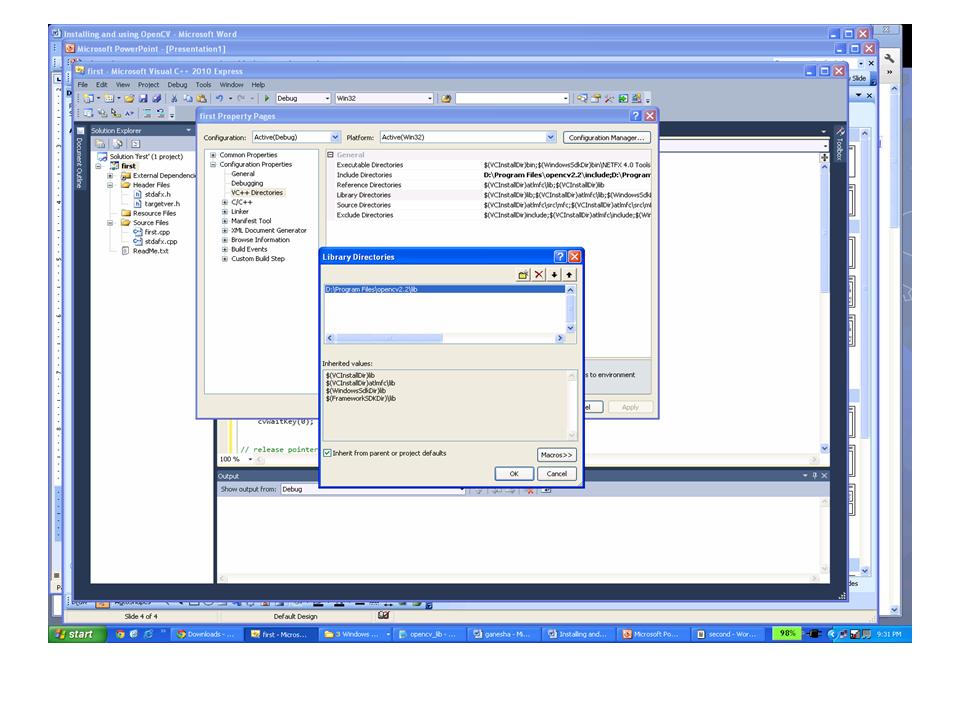
Project->first properties->Library Directories
.\opencv2.2\lib
Click Apply and OK

7) Now the last step is to include all the necessary OpenCV libraries during the linking phase
For this go to Project->first properties->Linker->Input->Additional Dependencies and cut and paste all the following libraries by clicking the “Edit”

opencv_calib3d220.lib
opencv_calib3d220d.lib
opencv_contrib220.lib
opencv_contrib220d.lib
opencv_core220.lib
opencv_core220d.lib
opencv_features2d220.lib
opencv_features2d220d.lib
opencv_ffmpeg220.lib
opencv_ffmpeg220d.lib
opencv_flann220.lib
opencv_flann220d.lib
opencv_gpu220.lib
opencv_gpu220d.lib
opencv_highgui220.lib
opencv_highgui220d.lib
opencv_imgproc220.lib
opencv_imgproc220d.lib
opencv_legacy220.lib
opencv_legacy220d.lib
opencv_ml220.lib
opencv_ml220d.lib
opencv_objdetect220.lib
opencv_objdetect220d.lib
opencv_ts220.lib
opencv_video220.lib
opencv_video220d.lib

Click Apply and Ok.

8) Copy the baboon.jpg from the .\opencv2.2\samples\cpp to your projects\first\first folder

9) Now you are good to go. Build by choosing Debug->Build Solution
It should through fine  when  you now run the code
You should see

Here is a sample snippet

#include "stdafx.h"
#include "cv.h"
#include "highgui.h"
int main( int argc, char** argv ) {
// cvLoadImage determines an image type and creates datastructure with appropriate size
    IplImage* img = cvLoadImage("baboon.jpg",1);
// create a window. Window name is determined by a supplied argument
    cvNamedWindow( "test", CV_WINDOW_AUTOSIZE );
    // Apply Gaussian smooth
    //cvSmooth( img, img, CV_GAUSSIAN, 9, 9, 0, 0 );
    cvErode (img, img,NULL,2);
// Display an image inside and window. Window name is determined by a supplied argument
    cvShowImage( "test", img );
    //Save image
        cvSaveImage( "c:\\shanthi\\baboon2.png", img, 0);
// wait indefinitely for keystroke
    cvWaitKey(0);
// release pointer to an object
    cvReleaseImage( &img );
// Destroy a window
    cvDestroyWindow( argv[1] );
}

Checkout my book ‘Deep Learning from first principles Second Edition- In vectorized Python, R and Octave’.  My book is available on Amazon  as paperback ($18.99) and in kindle version($9.99/Rs449).

You may also like my companion book “Practical Machine Learning with R and Python:Third Edition- Machine Learning in stereo” available in Amazon in paperback($12.99) and Kindle($9.99/Rs449) versions.

See also
– Experiments with deblurring using OpenCV
– De-blurring revisited with Wiener filter using OpenCV
–  Dabbling with Wiener filter using OpenCV
– Re-working the Lucy-Richardson Algorithm in OpenCV

You may also like
1.  What’s up Watson? Using IBM Watson’s QAAPI with Bluemix, NodeExpress – Part 1
2.  Bend it like Bluemix, MongoDB with autoscaling – Part 1
3. Informed choices through Machine Learning : Analyzing Kohli, Tendulkar and Dravid
4. A crime map of India in R: Crimes against women

Find me on Google+

Computer Vision: Ramblings on derivatives, histograms and contours

Images can be visualized to be functions of the form f(x,y) where f(x,y) represents the intensity at the pixel position ,y. However images can be grayscale, color or four channels and each channel may consist of integers or floating point numbers. However the changes in the values can be viewed as a continuous function. Here is a nice representation of an image as a continuous function (courtesy: Prof Darrell’s lecture at Berkeley on Filters)
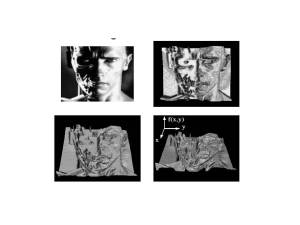
Given that the image can be viewed as a continuous function in 2 or 3 axes we have derivatives that can be taken of the images. The derivates determine the maximum and minimum of this changing function. The key derivatives in image processing are the Sobel, the Scharr and the Laplacian filters. These provide the 1st order or 2nd order derivative and hence can be used for determining edges of an image.

I was keen on playing around with derivatives and also understanding how the histograms look like.

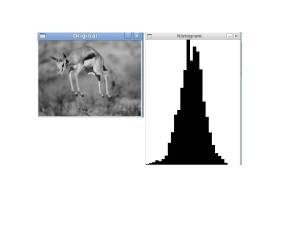
Here is the original image and its histogram. Clearly there is a nice spread of the values.
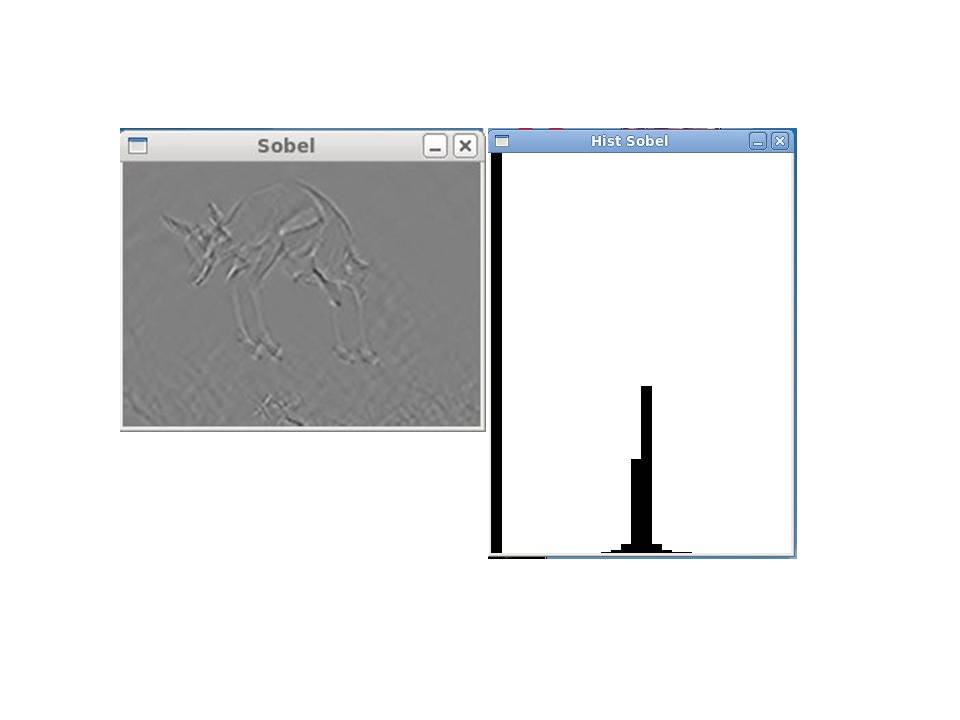
Sobel filter and its histogram

The output of the Sobel filter on the original image is shown. The edges with Sobel’s derivative somehow are not too pronounced. The Sobel derivate can be used for obtaining the gradient of the image. The corresponding histogram of the Sobel’s gradient is shown.

The code snippet ( The complete code is given below)

    IplImage* out_sobel = cvCreateImage( cvSize(img->width, img->height), IPL_DEPTH_16S, 1);
    cvSobel(in_gray, out_sobel, 1,1,7);
    cvShowImage("Sobel", out_sobel);

    //create an image to hold the histogram
    IplImage* histImage_Sobel = cvCreateImage(cvSize(300,400), 8, 1);

    //create a histogram to store the information from the image
    CvHistogram* histSobel = cvCreateHist(1, &hist_size, CV_HIST_ARRAY, ranges, 1);

    //calculate the histogram and apply to hist
    cvCalcHist( &histImage_Sobel, histSobel, 0, NULL );

    //grab the min and max values and their indeces
    cvGetMinMaxHistValue( histSobel, &min_value, &max_value, &min_idx, &max_idx);

    //scale the bin values so that they will fit in the image representation
    cvScale( histSobel->bins, histSobel->bins, ((double)histImage_Sobel->height)/max_value, 0 );

    //set all histogram values to 255
    cvSet( histImage_Sobel, cvScalarAll(255), 0 );

    //create a factor for scaling along the width
    bin_w = cvRound((double)histImage_Sobel->width/hist_size);

    for( i = 0; i < hist_size; i++ ) {
    //draw the histogram data onto the histogram image
    cvRectangle( histImage_Sobel, cvPoint(i*bin_w, histImage_Sobel->height),
    		   cvPoint((i+1)*bin_w,
    		   histImage_Sobel->height - cvRound(cvGetReal1D(histSobel->bins,i))),
    		   cvScalarAll(0), -1, 8, 0 );
    		//get the value at the current histogram bucket
    		float* bins = cvGetHistValue_1D(histSobel,i);
    		//increment the mean value
    		mean += bins[0];
    	}

    cvShowImage("Hist Sobel",histImage_Sobel);
...
...
(Please see Gavin S. Page's tutorial(vast.uccs.edu/~tboult/CS330/NOTES/OpenCVTutorial_II.ppt) on histograms)

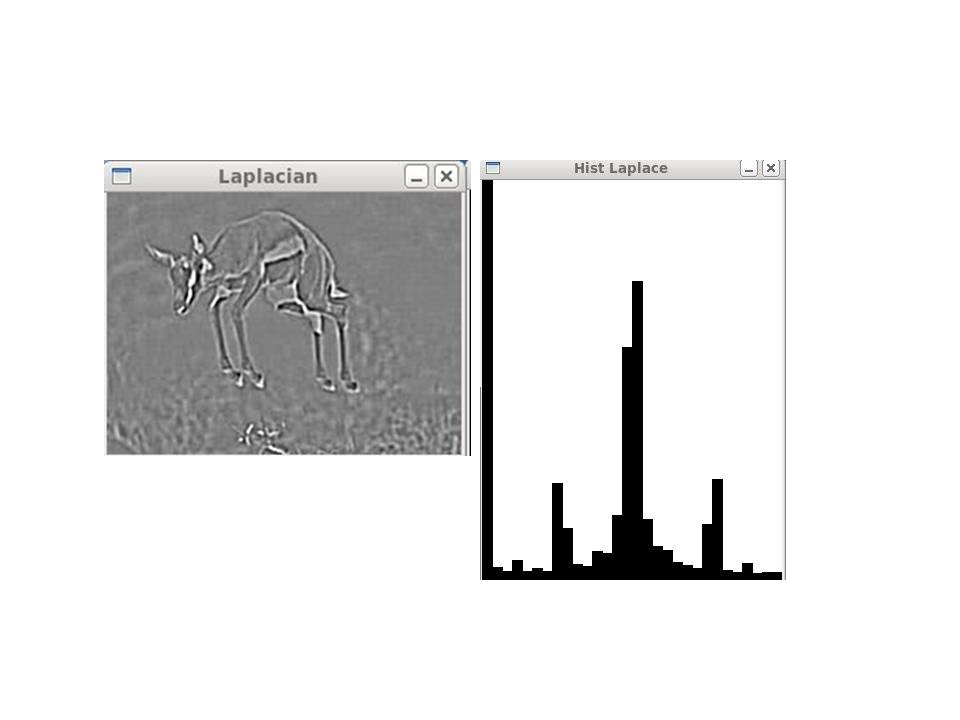
Laplacian and its histogram

The Laplacian provides the 2nd order derivative and hence can be used to determine local maxima and local minima. The Laplacian provides for much more pronounced edges and can be used to extract features of an object of interest. Its corresponding histogram is also included.

Canny filter and Contours

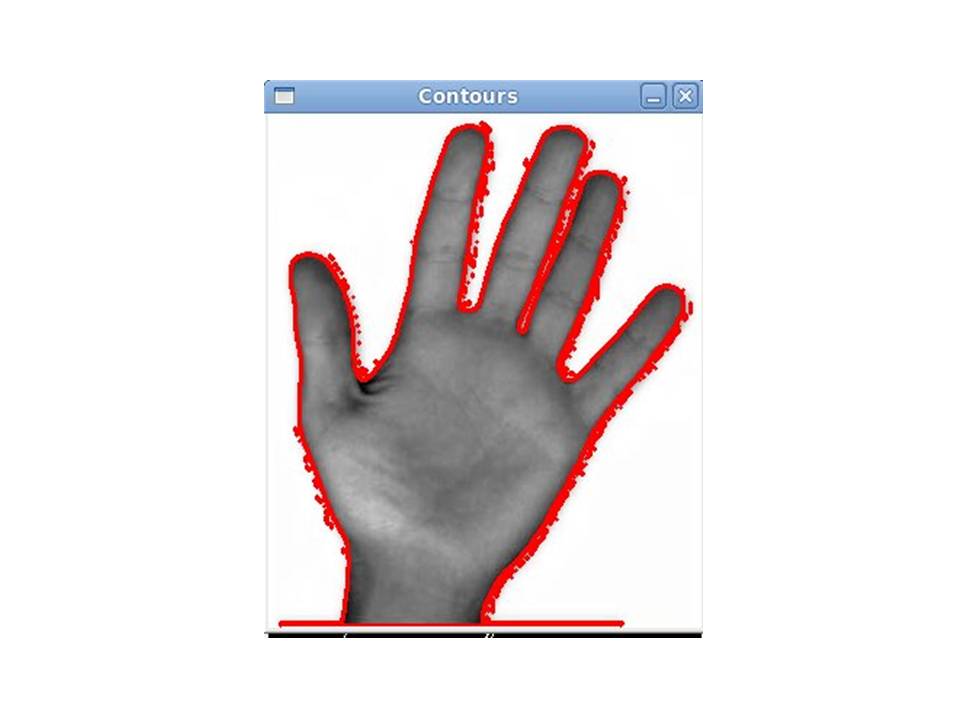
The third filter is cvCanny which is most suitable for obtaining clear edges in an image. The canny is usually used along with cvFindContours to determine the general shape of an object. I used the canny filter which I passed to a contour detecting function. However the contour detecting function identified more than 228 contours most of which were useless except for 1 which had included the complete contour of the hand as shown.
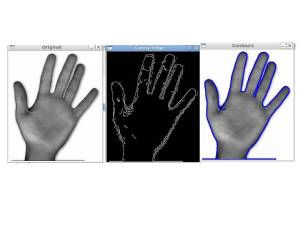
However when I increased the max_depth to 1 I found that it was immediately able to get the complete contour of the hand besides a lot of extraneous contours.

I guess the challenge with the contour function is being able to programmatically reject all those contours which of lesser importance (possibly a future post).

Code for Sobel, Laplacian and Histograms

#include "cv.h"
#include "highgui.h"
#include "stdio.h"

int main(int argc, char** argv)
{
	IplImage* img = cvLoadImage("gazelle.jpg",1);
	IplImage* dst;
	IplImage* in_gray;
	int hist_size=30;
	float gray_ranges[] = { 0, 255 };
	float* ranges[]     = { gray_ranges};
	int min_idx,max_idx;
	float min_value,max_value;
	int bin_w;
	int i;
	float mean,variance;

	cvNamedWindow("Original",CV_WINDOW_AUTOSIZE);
	cvNamedWindow("histogram",CV_WINDOW_AUTOSIZE);
	cvNamedWindow("Sobel",CV_WINDOW_AUTOSIZE);
	cvNamedWindow("Hist Sobel",CV_WINDOW_AUTOSIZE);

	cvNamedWindow("Laplacian",CV_WINDOW_AUTOSIZE);
	cvNamedWindow("Hist Laplace",CV_WINDOW_AUTOSIZE);

	in_gray = cvCreateImage(cvSize(img->width, img->height), IPL_DEPTH_8U, 1);
	cvCvtColor(img, in_gray, CV_BGR2GRAY);
	cvShowImage("Original", in_gray);

	//create a rectangular area to evaluate
	CvRect rect = cvRect(0, 0, 300, 400 );
	//apply the rectangle to the image and establish a region of interest
	cvSetImageROI(in_gray, rect);

	//create an image to hold the histogram
	IplImage* histImage = cvCreateImage(cvSize(300,400), 8, 1);

	//create a histogram to store the information from the image
	CvHistogram* hist = cvCreateHist(1, &hist_size, CV_HIST_ARRAY, ranges, 1);

	//calculate the histogram and apply to hist
	cvCalcHist( &in_gray, hist, 0, NULL );

	//grab the min and max values and their indeces
	cvGetMinMaxHistValue( hist, &min_value, &max_value, &min_idx, &max_idx);

	//scale the bin values so that they will fit in the image representation
	cvScale( hist->bins, hist->bins, ((double)histImage->height)/max_value, 0 );

	//set all histogram values to 255
	cvSet( histImage, cvScalarAll(255), 0 );

	//create a factor for scaling along the width
	bin_w = cvRound((double)histImage->width/hist_size);

	for( i = 0; i < hist_size; i++ ) {
		//draw the histogram data onto the histogram image
		cvRectangle( histImage, cvPoint(i*bin_w, histImage->height),
		   cvPoint((i+1)*bin_w,
		   histImage->height - cvRound(cvGetReal1D(hist->bins,i))),
		   cvScalarAll(0), -1, 8, 0 );
		//get the value at the current histogram bucket
		float* bins = cvGetHistValue_1D(hist,i);
		//increment the mean value
		mean += bins[0];
	}

	//finish mean calculation
	mean /= hist_size;

	//go back through now that mean has been calculated in order to calculate variance
	for( i = 0; i < hist_size; i++ ) {
		float* bins = cvGetHistValue_1D(hist,i);
		variance += pow((bins[0] - mean),2);
	}
	//finish variance calculation
	variance /= hist_size;

	cvShowImage("histogram",histImage);

    IplImage* out_sobel = cvCreateImage( cvSize(img->width, img->height), IPL_DEPTH_16S, 1);
    cvSobel(in_gray, out_sobel, 1,1,7);
    cvShowImage("Sobel", out_sobel);

    //create an image to hold the histogram
    IplImage* histImage_Sobel = cvCreateImage(cvSize(300,400), 8, 1);

    //create a histogram to store the information from the image
    CvHistogram* histSobel = cvCreateHist(1, &hist_size, CV_HIST_ARRAY, ranges, 1);

    //calculate the histogram and apply to hist
    cvCalcHist( &histImage_Sobel, histSobel, 0, NULL );

    //grab the min and max values and their indeces
    cvGetMinMaxHistValue( histSobel, &min_value, &max_value, &min_idx, &max_idx);

    //scale the bin values so that they will fit in the image representation
    cvScale( histSobel->bins, histSobel->bins, ((double)histImage_Sobel->height)/max_value, 0 );

    //set all histogram values to 255
    cvSet( histImage_Sobel, cvScalarAll(255), 0 );

    //create a factor for scaling along the width
    bin_w = cvRound((double)histImage_Sobel->width/hist_size);

    for( i = 0; i < hist_size; i++ ) {
    //draw the histogram data onto the histogram image
    cvRectangle( histImage_Sobel, cvPoint(i*bin_w, histImage_Sobel->height),
    		   cvPoint((i+1)*bin_w,
    		   histImage_Sobel->height - cvRound(cvGetReal1D(histSobel->bins,i))),
    		   cvScalarAll(0), -1, 8, 0 );
    		//get the value at the current histogram bucket
    		float* bins = cvGetHistValue_1D(histSobel,i);
    		//increment the mean value
    		mean += bins[0];
    	}

    cvShowImage("Hist Sobel",histImage_Sobel);

    // Create Laplacian and the histogram for it
    IplImage *output=cvCreateImage( cvSize(img->width, img->height), IPL_DEPTH_16S, 1);
    cvLaplace(in_gray, output, 7);
    cvShowImage("Laplacian", output);

    //create an image to hold the histogram
     IplImage* histImage_Laplace = cvCreateImage(cvSize(300,400), 8, 1);

     //create a histogram to store the information from the image
     CvHistogram* histLaplace = cvCreateHist(1, &hist_size, CV_HIST_ARRAY, ranges, 1);

     //calculate the histogram and apply to hist
     cvCalcHist( &histImage_Laplace, histLaplace, 0, NULL );

     //grab the min and max values and their indeces
     cvGetMinMaxHistValue( histLaplace, &min_value, &max_value, &min_idx, &max_idx);

     //scale the bin values so that they will fit in the image representation
     cvScale( histLaplace->bins, histLaplace->bins, ((double)histImage_Laplace->height)/max_value, 0 );

     //set all histogram values to 255
     cvSet( histImage_Laplace, cvScalarAll(255), 0 );

     //create a factor for scaling along the width
     bin_w = cvRound((double)histImage_Laplace->width/hist_size);

     for( i = 0; i < hist_size; i++ ) {
     //draw the histogram data onto the histogram image
     cvRectangle( histImage_Laplace, cvPoint(i*bin_w, histImage_Laplace->height),
     		   cvPoint((i+1)*bin_w,
     		   histImage_Laplace->height - cvRound(cvGetReal1D(histLaplace->bins,i))),
     		   cvScalarAll(0), -1, 8, 0 );
     		//get the value at the current histogram bucket
     		float* bins = cvGetHistValue_1D(histLaplace,i);
     		//increment the mean value
     		mean += bins[0];
     	}

     cvShowImage("Hist Laplace",histImage_Laplace);

	cvWaitKey(0);

	printf("Mean= %f\n",mean);
	printf("variance=%f\n",variance);

	//clean up images
	cvReleaseImage(&histImage_Laplace);
	cvReleaseImage(&histImage_Sobel);
	cvReleaseImage(&histImage);
	cvReleaseImage(&in_gray);
	cvReleaseImage(&img);

	//remove windows
	cvDestroyWindow("Original");

	cvDestroyWindow("histogram");
}

Code for Canny & Contours
#include "cv.h"
#include "highgui.h"

#define CVX_RED		CV_RGB(0xff,0x00,0x00)
#define CVX_GREEN	CV_RGB(0x00,0xff,0x00)
#define CVX_BLUE	CV_RGB(0x00,0x00,0xff)

int main(int argc, char* argv[])
{
	CvSeq* c;
	int i;
	cvNamedWindow("Original", 1 );
	cvNamedWindow("Canny_Edge", 1 );
	cvNamedWindow("Contours", 1 );
	IplImage* img_8uc1 = cvLoadImage( argv[1], CV_LOAD_IMAGE_GRAYSCALE );
	IplImage* img_edge = cvCreateImage( cvGetSize(img_8uc1), 8, 1 );
	IplImage* img_8uc3 = cvCreateImage( cvGetSize(img_8uc1), 8, 3 );
	cvThreshold( img_8uc1, img_edge, 128, 255, CV_THRESH_BINARY );
	CvMemStorage* storage =cvCreateMemStorage(0);

	CvSeq* first_contour = NULL;

	int Nc;
	int n=0;

	cvShowImage("Original", img_8uc1);

    IplImage *out_canny=cvCreateImage( cvSize(img_8uc1->width, img_8uc1->height), IPL_DEPTH_8U, 1);
	cvCanny(img_8uc1, out_canny, 50.0 ,100.0, 3);
	cvShowImage("Canny_Edge", out_canny);

/*	Nc = cvFindContours(
			img_edge,
			storage,
			&first_contour,
			sizeof(CvContour),
			CV_RETR_LIST,
			CV_CHAIN_APPROX_SIMPLE,
			cvPoint(0,0)// Try all four values and see what happens
	);*/

	Nc = cvFindContours(
			out_canny,
			storage,
			&first_contour,
			sizeof(CvContour),
			CV_RETR_TREE,
			CV_CHAIN_APPROX_SIMPLE,
			cvPoint(0,0)// Try all four values and see what happens
	);

	printf("Total contours detected: %d\n",Nc);

	for(c=first_contour; c!=NULL; c=c->h_next )
	{
		cvCvtColor( img_8uc1, img_8uc3, CV_GRAY2BGR );
		cvDrawContours(
					img_8uc3,
					c,
					CVX_RED,
					CVX_BLUE,
					1,        // Try different values of max_level, and see what happens
					2,
					8,
					cvPoint(0,0));
			printf("Contour #%d\n",n);

			cvShowImage("Contours", img_8uc3 );
			printf(" %d elements: \n",c->total);

			for(i=0; i<c->total; ++i ) {
				CvPoint* p = CV_GET_SEQ_ELEM( CvPoint, c, i );
				printf("(%d,%d)\n",p->x,p->y);

			}
			cvWaitKey(0);
			n++;
	}
	printf("Finished all contours\n");
	cvCvtColor( img_8uc1, img_8uc3, CV_GRAY2BGR );
	cvShowImage( argv[0], img_8uc3 );
	cvWaitKey(0);
	cvDestroyWindow( argv[0] );
	cvReleaseImage( &img_8uc1 );
	cvReleaseImage( &img_8uc3 );
	cvReleaseImage( &img_edge );
	return 0;
}


Find me on Google+

OpenCV: Fun with filters and convolution

My initial encounter with filters, convolution and correlation in OpenCV made me play around with the filters for Gaussian smooth, erosion and dilation operations on random image files. However I found the experience rather unsatisfactory and I wanted to get a real feel for the working of these operations. Suddenly a thought struck me. Could I restore an old family photograph of my parents? The photograph has areas of white patches that had to be removed.

So I started to dig a little more into the filters, convolution and correlation matrices to get a better understanding.

This is the original photograph.

My Mom & late Dad
As can be seen there are large patches in several places in the photograph. So I decided to use cvFloodFill to fill these areas.

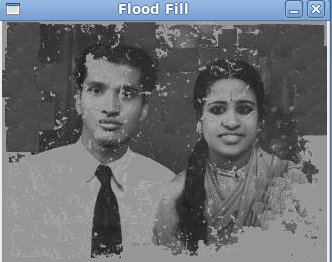
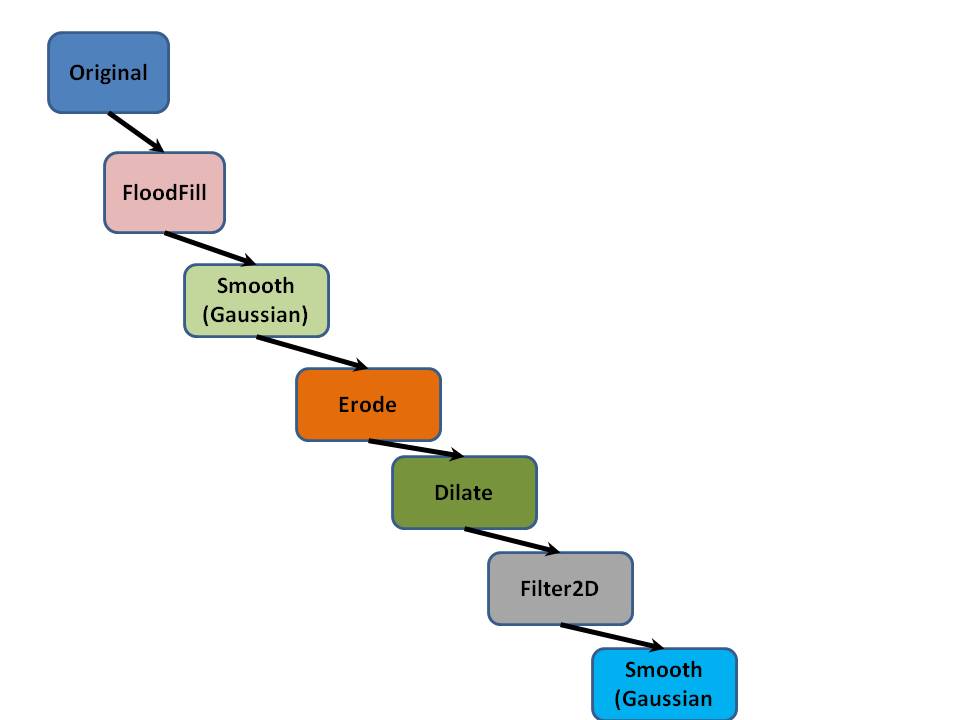
a)      cvFloodFill: Since I had to identify the spots where these patches occurred I took a dump of the cvMat of the image which I resized to about 29 x 42. By inspecting the data I could see that the patches typically corresponded to intensity values that were greater than 170. So I decided that the cvFloodFill should happen with the seed around these parts.   So the code checks the intensity values > 170 and calls cvFloodFill. After much tweaking I could see that the white patches were now filled with gray (newval intensity= 150.0) So I was able to get rid of the white patches.


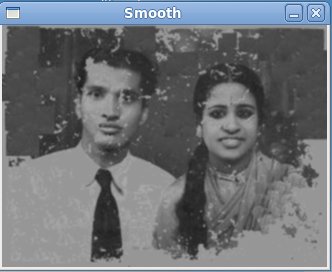
b)      cvSmooth: The next step that I took was to perform a Gaussian smooth of the picture. This smoothed out the filled parts


c)       cvErode & cvDilate: I followed this with cvErode to smooth out the dark areas  and cvDilate to smooth out the bright areas.


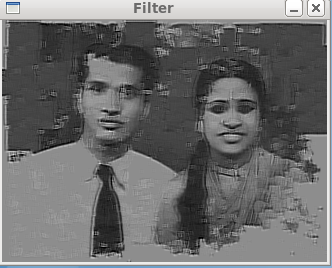
d)      cvFilter2D:  I wanted to now sharpen the image. I did a lot of experiments with different kernel values but I found this to be extremely difficult to work with. After much trial and error I came with a kernel values of
double a[9]={-1,20,1,-1,20,1,-1,20,1};
The sharpening was reasonable but there are areas where there are white streaks. I still need to figure out a kernel that can sharpen images. For this also to understand what was happening I tried to dump the values of the image to get a feel of where the values lay.


e)      cvSmooth: Finally I performed a cvSmooth of the filtered output.

While I have had fair success there is still a lot more left to be desired from the final version.
The complete process flow

The code is included below

#include “cv.h”
#include “highgui.h”
#include “stdio.h”
int main(int argc, char** argv)
{
IplImage* img = cvLoadImage(“dad_mom.jpg”,0);
IplImage* dst;
IplImage* dst1;
IplImage* dst2;
IplImage* dst3;
IplImage* dst4;
int i,j,k;
int height,width,step,channels;
uchar* data;
uchar* data1;
uchar* outdata;
CvScalar s;
CvScalar lodiff,highdiff,newval;
// get the image data
height    = img->height;
width     = img->width;
step      = img->widthStep;
channels  = img->nChannels;
data      = (uchar *)img->imageData;
double a[9]={-1,20,1,-1,20,1,-1,20,1};
//double a[9]={1/16,1/8,1/16,1/8,1/4,1/8,1/16,1/8,1/16};
double values[9]={1/16,0,-1/16,2/16,0,-2/16,1/16,0,-1/16};
CvPoint seed;
CvMat kernel= cvMat(3,3,CV_32FC1,a);
printf(“Processing a %d x %d image with %d channels\n”,height,width,channels);
// Create windows
cvNamedWindow(“Original”,CV_WINDOW_AUTOSIZE);
cvNamedWindow(“Flood Fill”,CV_WINDOW_AUTOSIZE);
cvNamedWindow(“Smooth”,CV_WINDOW_AUTOSIZE);
cvNamedWindow(“Erode”,CV_WINDOW_AUTOSIZE);
cvNamedWindow(“Dilate”,CV_WINDOW_AUTOSIZE);
cvNamedWindow(“Filter”,CV_WINDOW_AUTOSIZE);
cvNamedWindow(“Smooth1”,CV_WINDOW_AUTOSIZE);
// Original image
cvShowImage(“Original”, img);
/* Flood fill in white patches intensity > 170.0 */
highdiff=cvRealScalar(5.0);
lodiff=cvRealScalar(5.0);
newval=cvRealScalar(150.0);
for(i=0;i<height;i++) {
for(j=0;j<width;j++) {
for(k=0;k<channels;k++) {
//printf(“Data = %d \n”,data[i*step+j*channels+k]);
if((data[i*step+j*channels+k]) > 170.0)
{
seed=cvPoint(j,i);
//printf(“data=%dFlood
seed=%d,%d\n”,data[i*step+j*channels+k],i,j);
cvFloodFill(img,seed,newval,lodiff,highdiff, NULL,CV_FLOODFILL_FIXED_RANGE,NULL);                                                                              }
else
{
;
}
}
}
//printf(“\n”);
}
cvShowImage(“Flood Fill”,img);
// Gaussian smooth
dst = cvCloneImage(img);
cvSmooth( img, dst, CV_GAUSSIAN, 3, 3, 0, 0 );
cvShowImage(“Smooth”,dst);
// Erode the image
dst1 = cvCloneImage(img);
IplConvKernel* kern = cvCreateStructuringElementEx(3,3,1,1,CV_SHAPE_RECT,values);
cvErode(dst,dst1,kern,1);
cvShowImage(“Erode”,dst1);
// Perform dilation operation
dst2 = cvCloneImage(img);
cvDilate(dst1,dst2,kern,1);
cvShowImage(“Dilate”,dst2);
// Filter the image with convolution kernel. Sharpen the image
dst3 = cvCloneImage(img);
printf(“reached here\n”);
cvFilter2D(dst2,dst3,&kernel,cvPoint(-1,-1));
cvShowImage(“Filter”,dst3);
// Smoothen the image
dst4 = cvCloneImage(img);
cvSmooth( dst3, dst4, CV_MEDIAN, 3, 0, 0, 0 );
cvShowImage(“Smooth1”,dst4);
// Cleanup
cvWaitKey(0);
cvReleaseImage(&img);
cvReleaseImage(&dst);
cvDestroyWindow(“Original”);
vDestroyWindow(“Restore”);

}

Checkout my book ‘Deep Learning from first principles Second Edition- In vectorized Python, R and Octave’.  My book is available on Amazon  as paperback ($18.99) and in kindle version($9.99/Rs449).

You may also like my companion book “Practical Machine Learning with R and Python:Second Edition- Machine Learning in stereo” available in Amazon in paperback($12.99) and Kindle($9.99/Rs449) versions.


Find me on Google+

Hand detection through Haartraining: A hands-on approach

Detection of objects from images or from video is no trivial task. We need to use some type of machine learning algorithm and train it to detect features and also identify misses and false positives.  The haartraining algorithm does just this. It creates a series of haarclassifiers which ensure that non-features are quickly rejected as the object is identified.

This post will highlight the necessary steps required to build a haarclassifier for detection a hand or any object of interest. This post is sequel to my earlier post (OpenCV: Haartraining and all that jazz!) and has a lot more detail. In order to train the haarclassifier, it is suggested, that at least 1000 positive samples (images with the object of interest- hand in this case) and 2000 negative samples (any other image) is required.

As before for performing haartraining the following 3 steps have to be performed
1)      Create samples (createsamples.cpp)
2)      Haar Training (haartraining.cpp)
3)      Performance testing of the classifier (performance.cpp)

In order to build the above 3 utilities please refer to my earlier post OpenCV: Haartraining and all that jazz!

The steps required for training a haarcascade to recognize on normal open palm is given below

Create Samples: This step can be further broken down into the following 3 steps
a)      Creation of positive samples
b)      Superimposing the positive sample on the negative sample
c)      Merging of vector files of samples.
A)      Creation of positive samples:

a)Get a series of images with objects of interest (positive samples):For this step take photos using the webcam (or camera) of the objects that you are interested. I had taken several snapshots of my hand ( I later simply downloaded images from Google images for because of the excessive clutter in the snaps taken).


b) Crop Images:In this step you need to crop the images such that it only contains the object of interest. You can use any photo editing tool of your choice and save all the positive images in a directory for e.g. ./hands
c) Mark the object:Now the image with the positive sample has to be marked. This will be used for creating the samples.
The tool that is to be used for marking is objectmarker.cpp. You can downloaded the source code for this from Achu Wilson’s blogNow build objectmarker.cpp with the include directories and libraries of OpenCV. Once you have successfully built objectmarker you are ready to mark the positive samples. Samples have to be marked  because the description file for the positive samples file must be in the following format

[filename] [# of objects] [[x y width height] [… 2nd object] …]

This will be used for generating the positive training samples.  This file is will be used with the createsamples utility to create positive training samples.
The command to use to run objectmarker is as follows
$ objectmarker <output file> <dir>
for e.g.
$objectmarker pos_desc.txt ./images
where dir is the directory containing the positive images
and output file will contain the positions of the objects marked as follows
pos_desc.txt
/images/hand1.bmp 1 0 0 246 50
/images/hand2.bmp 1 187 26 333 400
….
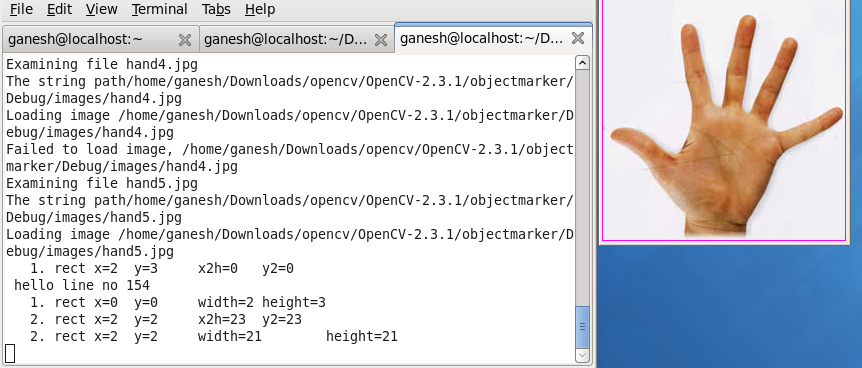
The use of the utility objectmarker is an art 😉 and you need to be trained to get the proper data. Make sure you get sensible widths and heights. There are times when you get -ve widths and -ve heights which are clearly wrong.

An alternative easy way is to open the jpg/bmp in a photo editor and check the width and height in pixels (188 x 200 say) and create the description file as
/images/hand1.bmp 1 0 0 188 200
Ideally the objectmarker should give you values close to this if the sample image file has only the object of interest (hand)
Create positive training samples
The createsamples utility can now be used for creating positive training sample files. The command is
createsamples -info pos_desc.txt -vec pos.vec -w 20 -h 20

This will create positive training samples with the object of interest, in our case the “hand”.  Now, you should verify that the tool has done something sensible by checking the training samples generated.  The command to use to display the positive training samples captured in the pos.vec is to run
createsamples -vec pos.vec -w 20 -h 20
If the objects have been marked accurately you should see a series of hands (positive samples). If the samples have not been marked correctly the positive training file will give incorrect results.
Create negative background training samples
This step is used to create training samples with one positive image superimposed against a set of negative background samples. The command to use is
createsamples -img ./image/hand_1.BMP -num 9 -bg bg.txt -vec neg1.vec -maxxangle 0.6 -maxyangle 0 -maxzangle 0.3 -maxidev 100 -bgcolor 0 -bgthresh 0 -w 20 -h 20
where bg.txt will contain the list of negative samples in the following format
./negative/airplane.jpg
./negative/baboon.jpg
./negative/cat.jpg

The positive hand images will be superimposed against the negative background in various angles of distortion.

All the negative training samples will be collected in the training file neg1.vec as above. As before you can verify that the createsamples utility has done something reasonable by executing

createsamples -vec neg1.vec -w 20 -h 20.
This should show a series of images of hands in various angles of distortion against the negative image background.
 Creating several negative training samples with all positive samples
The createsamples utility takes one positive sample and superimposes it against the negative samples in bg.txt file. However we need to repeat this process for each of the positive sample (hand) that we have. Since this can be laborious process you can use the following shell script, I wrote,  to repeat the negative training sample with every positive sample with create_neg_training.sh

create_neg_training.sh
#!/bin/bash
let j=1
for  i in `cat hands.txt`
do
        createsamples -img ./image/$i -num 9 -bg bg.txt -vec “neg_training$j.vec” -maxxangle 0.6 -maxyangle 0 -maxzangle 0.3 -maxidev 100 -bgcolor 0 -bgthresh 0 -w 20 -h 20
       let j=j+1
done
where the positive samples are under ./image directory. For each positive hand sample a negative training sample file is create namely neg_training1.vec, neg_training2.vec etc.

Merging samples:
As seen above the createsamples utility superimposes only positive sample (hand) against a series of negative samples. Since we would like to repeat the utility for multiple positive samples there needs to be a way for merging all the training samples. A useful utility (mergevec.cpp) has been created  and is available for download in Natoshi Seo’s blog
Download mergevec.cpp and build it along with (cvboost.cpp, cvhaarclassifier.cpp, cvhaartarining.cpp, cvsamples.cpp, cvcommon.cpp) with usual include files and the link libraries.
Once built it can be executed by executing
mergevec pos_neg.txt pos_neg.vec – w 20 -h 20
where pos_neg.txt will contain both the positive and negative training sample files as follows
pos_neg.txt
./vec/pos.vec
./vec/neg_training1.vec
./vec/neg_training2.vec
….

As before you can verify that the entire training file pos_neg.vec is sensible by executing
createsamples -vec pos_neg.vec -w 20 -h 20
Now the pos_neg.vec will contain all the training samples that are required for the haartraining process.

HaarTraining
The haartraining can be run with the training samples generated from the mergevec utility described above.
The command is
./haartrainer -data haarcascade -vec pos_neg.vec -bg bg.txt -nstages 20 -nsplits 2 -minhitrate 0.999 -maxfalsealarm 0.5 -npos 7 -nneg 9 -w 20 -h 20 -nonsym -mem 512 -mode ALL
Several posts have suggested that nstages should be ideally 20 and splits should be 2.
npos indicates the number of positive samples and -nneg the number of negative samples. In my case I had just used 7 positive and 9 negative samples. This step is extremely CPU intensive and can take several hours/days to complete. I had reduced the number of stages to 14. The haartraining utility will create a haarcascade directory and a haarcascade.xml.

Performance testing : The first way to test the integrity of the haarcascades is to run the performance utility described in my earlier post OpenCV:Haartraining and all that jazz! If you want to use the performance utility you should also create test samples which can be used for testing with the command

createsamples -img ./image/hand-1.bmp -num 10 -bg bg.txt -info test.dat -maxxangle 0.6 -maxyangle 0 -maxzangle 0.3 -maxidev 100 -bgcolor 0 -bgthresh 0
The test.dat can be used with the performance utility as follows
./performance -data haarcascade.xml -info test.dat -w 20 -h 20

I wanted something that would be more visually satisfying that seeing the output of the  performance utility. This utility just spews out textual information of hits, misses.
So I decided to use the facedetect.c with the haarcascade trained by my positive and negative samples to check whether it was working.  The test below describes using the facedetect.c for detecting the hand.
The code for facedetect.c can be downloaded from Willow Garage Wiki.

Compile and link the facedetect.c as handetect with the usual suspects. Once this builds successfully you can use
handdetect –-cascade=haarcascade.xml hands.jpg

where hands.jpg was my test image. If the handdetect does indeed detect the hand in the image it will l enclose the object detected with a rectangle. See the output below


While my haarcascade does detect 5 hands it does appear shifted. This could be partly because the number of positive and negative training samples used were 7 & 9 respectively which is very low. Also I used only 14 stages in the haartraining. As mentioned in the beginning there is a need for at least 1000 positive and 2000 negative samples which has to be used. Also haartraining should have 20 stages and 2 nsplits.  Hopefully if you follow this you would have developed a fairly true haarcascade.
If you are adventurous enough you could run the above with the webcam as
handdetect –cascade=haarcascade.xml 0
where 0 indicates the webcam. Assuming that your haarcascade is perfect you should be able to track your hand in real time.
Haarpy training!
See also
– OpenCV: Haartraing and all that jazz!
– De-blurring revisited with Wiener filter using OpenCV
–  Dabbling with Wiener filter using OpenCV
– Deblurring with OpenCV: Wiener filter reloaded
– Re-working the Lucy-Richardson Algorithm in OpenCV

You may also like
1.  What’s up Watson? Using IBM Watson’s QAAPI with Bluemix, NodeExpress – Part 1
2.  Bend it like Bluemix, MongoDB with autoscaling – Part 1
3. Informed choices through Machine Learning : Analyzing Kohli, Tendulkar and Dravid
4. A crime map of India in R: Crimes against women

Find me on Google+

OpenCV: Haartraining and all that jazz!

Object detection in OpenCV can be done through Haartraining. OpenCV haartraining applications provide the ability to detect objects of interest to us like faces, eyes, moving cars etc. What is required is that we need to identify positive and negative samples and use the utilities that OpenCV provides us to train the application to be able to recognize the objects we want. The positive and negative samples are used to create classifiers which are then utilized to detect the objects that we intend to.

Fortunately the tar file (OpenCV-2.3.1a.tar.bz2) which can be downloaded from the OpenCV site already comes bundled with all the necessary utilities to create a fully trained haar classifier. We just to have to build and run the commands to create our our classifiers.

This post will look at the necessary steps for creating a haarclassifier. To get started with OpenCV please look at my earlier post Computer Vision: Getting started with OpenCV.

Once you have installed OpenCV look under modules/haartraining. All the necessary files are included.

There are 3 steps in this process

1) Create samples   2) Train and create a classified haar 3) Performance testing

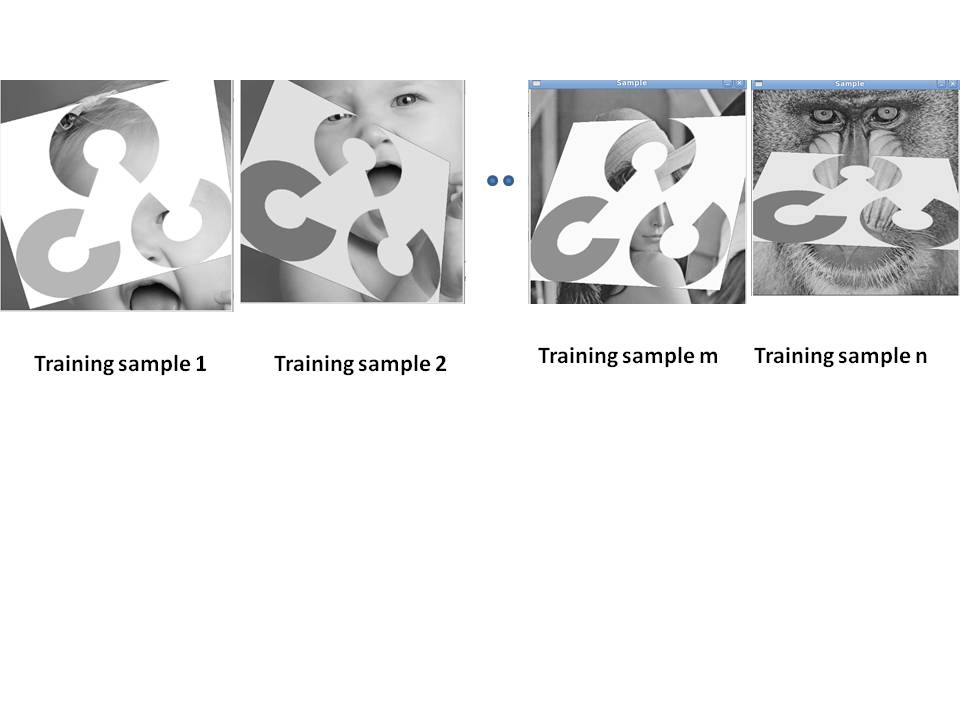
 Create Samples (createsamples.cpp) : This is the first utility that has to be executed. This utility takes as input positive samples (images of the object that we are interested in) and negative samples (images that do not include the object that we are interested in). The createsamples utility superimposes the objects that we want to recognize in various degrees of rotation against the background of the negative samples. The composite images file is then used to train the haar application.

The first step is to build createsamples.cpp. Make sure you include ../OpenCV-2.3./modules/haartraining. Build the following files

(createsamples.cpp, cvboost.cpp, cvhaarclassifier.cpp, cvhaartarining.cpp, cvsamples.cpp, cvcommon.cpp)

Once createsamples.cpp successfully builds we can create samples required  for the training.

The command is

$./myhaartraining -img logo.png -vec samples1.jpg -bg bg.txt  -w 20 -h 20

Where I have chosen the OpenCV logo as my object of interest.

The samples are created in samples1.jpg

The bg.txt contains a list of the negative samples included as below

./img/airplane.jpg

./img/baboon.jpg

./img/kid.jpg

./img/lena.jpg

-w stands for the width and -h stands for the height of the samples/

This will create superimposed positive samples in the negative sample background. A few of these a are shown below

Make sure that the width and height are small i.e < 50 otherwise the haartraining application core dumps because of lack of memory.

To check if the samples are created properly run a test round as follows run the command with the following options

$./myhaartraining -img logo.png -vec samples1.jpg -bg bg.txt -n 10 – show  -w 20 -h 20

where -n is the number of samples to be generated (default is 1000) -show will show a series of images with the positive samples superimposed on the negative samples. This can be used to check if createsamples utility is working properly. For a more thorough and detailed explanation see my post Hand detection through Haartraining: A hands-on approach

Haartrainer (haartrainer.cpp): This utility takes as input the samples from the createsamples utility and creates a trained haar classifier. To build the haartrained files, build the haartraining.cpp. As before make sure you include the appropriate files along with the all the opencv libraries. Buid the following files

(haartraining.cpp, cvboost.cpp, cvhaarclassifier.cpp, cvhaartarining.cpp, cvsamples.cpp, cvcommon.cpp)

The command to use is

./haartrainer -data test2 -vec samples1.jpg -bg bg.txt -npos 1 -nneg 4 -nstages 20 -mem 500 -w 20 -h 20

In the above command test2 is the directory name in which the trained classifier is stored. The -vec option denotes the samples that were captured by the createsamples utility above. The bg.txt contains the negative samples file. The width and height have to be the same as used in the create samples utility. As mentioned before if the width and height are too large you the haartrainer will bail out with “Insufficient memory”

If the haartrainer executes successfully the test2 directory will have all the trained files and the directory will also have the haarclassifier as a test2.xml.

Once these two steps go through successfully we have to run the performance step

Performance (performance.cpp): This step is run to ensure that we have trained our application to properly recognize the object we intended to. As before the necessary file to build is performance.cpp. The files to build are

(performance.cpp, cvboost.cpp, cvhaarclassifier.cpp, cvhaartarining.cpp, cvsamples.cpp, cvcommon.cpp)

Once this built successfuly you can now run using the command

./performance -data test2.xml -info bg.txt -w 20 -h 20

Make sure that the bg.txt contains the images from which the object has to be detected in the following

format

[positive filename] [# of objects] [[x y width height]

bg.txt

/img/logo5.jpg 1 145 100 20 20

./img/logo6.jpg 1 145 100 20 20

./img/logo3.jpg 1 145 100 45 45

./img/logo4.jpg 1 145 100 45 45

./img/airplane.jpg 1 145 100 45 45

./img/baboon.jpg 1 145 100 45 45

./img/kid.jpg 1 145 100 45 45

./img/lena.jpg 1 145 100 45 45

./img/opencv-logo2.png 1 145 100 35 35

./img/logo.png 1 145 100 45 45

When this is run we get

ganesh@localhost Debug]$ ./performance -data test3.xml -info bg.txt -w 20 -h 20

+================================+======+======+======+

|            File Name           | Hits |Missed| False|

+================================+======+======+======+

|                 ./img/logo5.jpg|     0|     1|    43|

+——————————–+——+——+——+

|                 ./img/logo6.jpg|     0|     1|    51|

+——————————–+——+——+——+

|                 ./img/logo3.jpg|     1|     0|    37|

+——————————–+——+——+——+

|                 ./img/logo4.jpg|     0|     1|     7|

+——————————–+——+——+——+

|              ./img/airplane.jpg|     1|     0|   226|

+——————————–+——+——+——+

|                ./img/baboon.jpg|     0|     1|   236|

+——————————–+——+——+——+

|                   ./img/kid.jpg|     0|     1|  1291|

+——————————–+——+——+——+

|                  ./img/lena.jpg|     0|     1|   188|

+——————————–+——+——+——+

|          ./img/opencv-logo2.png|     0|     1|     3|

+——————————–+——+——+——+

|                  ./img/logo.png|     0|     1|    33|

+——————————–+——+——+——+

|                           Total|     2|     8|  2115|

+================================+======+======+======+

As can be seen the training has been too accurate. There are hits and misses along with a false positive. The number of positive and negative samples, the co-ordinates and the number of stages all have to fine tuned to get the correct result.

Watch this space!

I will be back! Hasta la vista!

Please do take a look at my sequel to this post Hand detection through Haartraining: A Hands-on approach for a more robust haartraining method

Find me on Google+

Adding the OpenFlow variable in the IMS equation

This post has been cited in the Springer  book “The Future Internet” in the chapter Integrating OpenFlow in IMS Networks and Enabling for Future Internet Research and Experimentation. See the 9th reference under References,

IMS a non-starter: IP Multimedia Systems (IMS) has been the grand vision of this decade. Unfortunately it has remained just that, a vision, with sporadic deployments. IMS has been a non-starter in many respects. Operators and Network Providers somehow don’t find any compelling reason to re-architect the network with IMS network elements. There have been no killer applications too.  But IP Multimedia Systems definitely hold enormous potential and a couple of breakthroughs in key technologies can result in the ‘tipping point’ of this great technology which promises access agnostic services including applications like video-conferencing, multi-player gaming, white boarding all using an all-IP backbone. In this context please do read my post “The Case for a Cloud based IMS solution

SDNs, revolutionary: In this scenario a radically new, emerging concept is the Software Define Networks (SDNs). SDN is the result of pioneering effort by Stanford University and University of California, Berkeley and is based on the Open Flow Protocol and represents a paradigm shift to the way networking elements operate. SDNs consist of the OpenFlow Controller which is able to control network resources in a programmatic manner. These network resources can span routers, hubs and switches, known as a slice, and can be controlled through the OpenFlow Controller. The key aspect of the OpenFlow protocol is the ability to manage slices of virtualized resources from end-to-end. It is this particular aspect of Software Defined Networks (SDNs) and the OpenFlow protocol which can be leveraged in IMS networks. Do read my post Software Defined Networks: A glimpse of tomorrow for more details

This article looks at a way in which OpenFlow protocol can be included in the IMS fabric and provide for QoS in the IMS network. However, please note that this post is exploratory in nature and does not purport to be a well researched article. Nevertheless the idea is well worth mulling over.

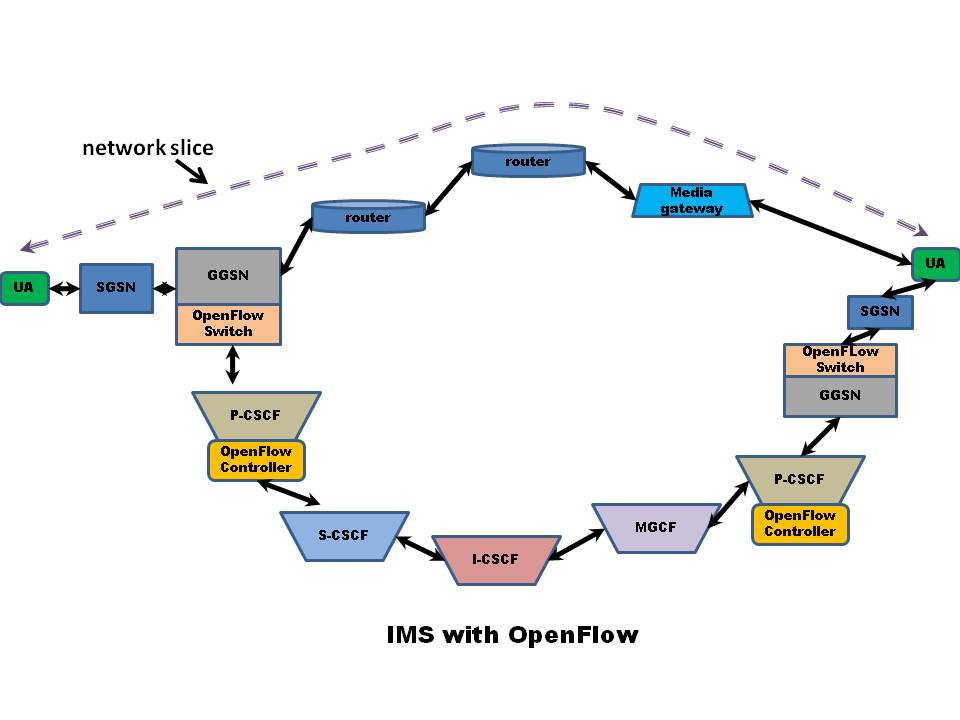
QoS in IMS: The current method of ensuring differentiated QoS in IMS networks is through two key network elements, namely the Policy Decision Point (PDP) and the Policy Enforcement Point (PEP). The PDP retrieves the necessary policy rules (flow parameters), in response to a RSVP message, which it then sends to the PEP. The PEP then executes these instructions. In the IMS the Policy Control Function (PCF), in the P-CSCF, plays the role of the PDP. The PEP resides in the GGSN. In an IMS call flow, the SDP message is encapsulated within SIP and carries the QoS parameters. The PCF examines the parameters, retrieves appropriate policies and informs the PEP in the GGSN for that traffic flow.

OpenFlow in P-CSCF: This post looks at a technique in which the OpenFlow Controller can be a part of the P-CSCF. The QoS parameters which come in the SDP message can be similarly examined. Instead of retrieving fixed policy rules, the OpenFlow Controller in the P-CSCF can be made to programmatically identify bandwidth speeds, the routers and the network slice through which the flow should flow. It would then inform the equivalent of the OpenFlow Switch in the GGSN which would control the necessary network resources end-to-end. The advantage of using OpenFlow Controller/OpenFlow switch to the PDP/PEP combination would be the ability to adapt the network flow according to bandwidth changes and traffic. The OpenFlow Controller will be able to dynamically re-route the traffic to alternate network resources, or a different ‘network slice’ in cases of congestion.

Conclusion: In my opinion, adding the OpenFlow Protocol to the IP Multimedia Switching fabric can provide for a much more control and better QoS in the network. It may also be able to provide for a lot more interesting applications to the already existing set of powerful applications

Find me on Google+

Assistive Technology and OpenCV

Assistive technology (AT) or Adaptive technology refers to technology or devices that assist people with disabilities.  AT provides for a greater degree of freedom and independence by enabling disabled people to perform tasks that they were formerly unable to perform.

Examples of assistive technology include large computer keyboards for visually impaired, Braille buttons in elevators, hearing aids etc. People with learning abilities, for e.g dyslexics find text –to –speech (TTS) technology is useful.

In the context of Assistive technology, OpenCV can be used in multiple ways. OpenCV (Open Source Computer Vision) is a set of powerful APIs that can perform real time computer image processing. OpenCV is being used by many organizations in complex application like biometrics for recognizing fingerprints, face, to medical imaging for detection of tumors and cancerous cells. Applications of OpenCV have also been developed in office security for the detection of intruders to terrain mapping by spy planes and drones. OpenCV is truly a powerful tool for performing complex image processing operation.

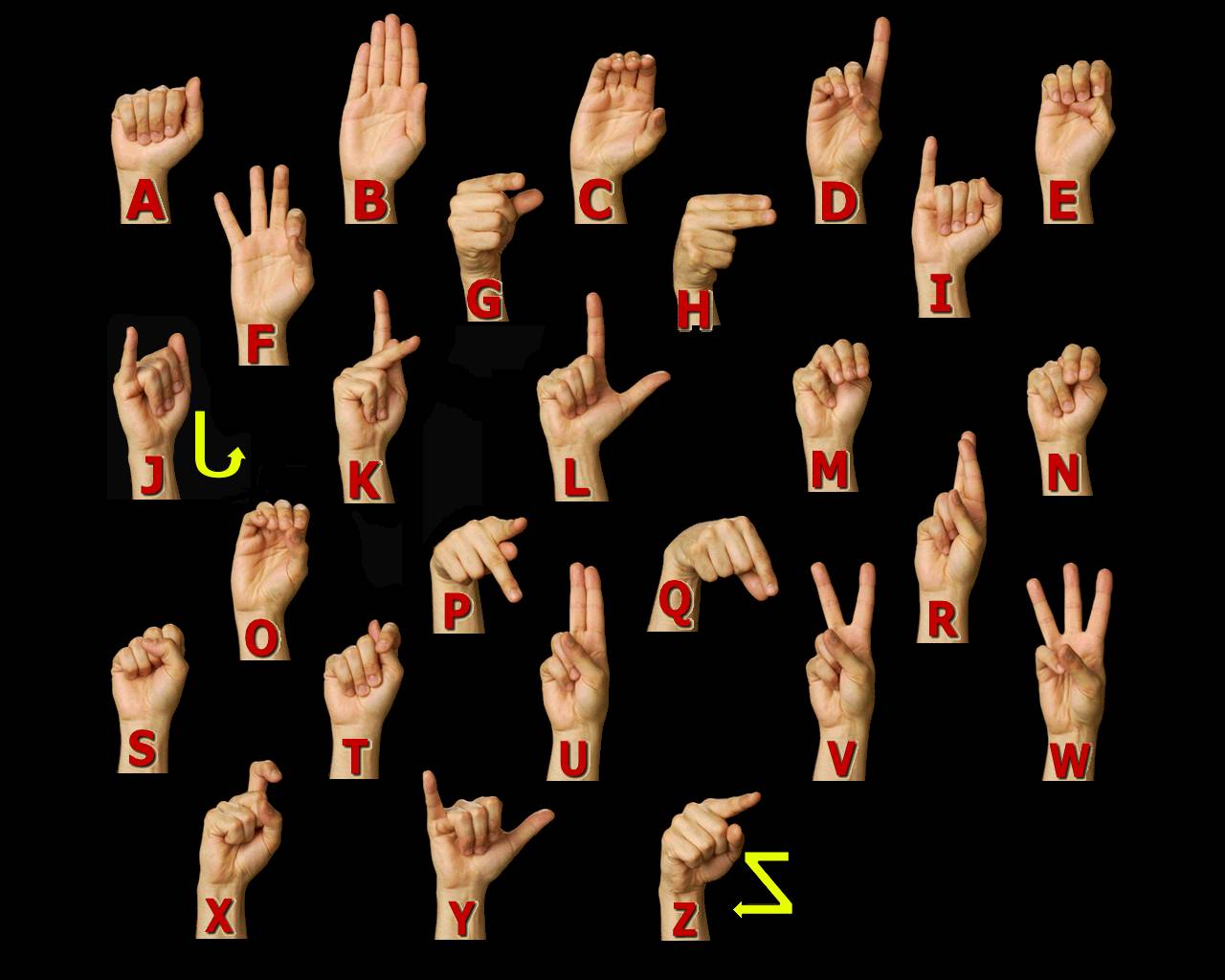
One such application of OpenCV is the area of gesture detection and recognition. A successful implementation of gesture detection and recognition can have significant implications. It can be used to interpret sign language, the language of the deaf, and those with motor and speech disabilities.

Clearly the ability to recognize gestures is no easy task. The software has to be trained to initially recognize different gestures of sign language. An image processing tool that can recognize the symbols of sign language will be a boon to those with severe motor disabilities that they can use the keyboard for typing.

Imagine somebody who has motor disabilities being able to use the PC for browsing, accessing social networks all through sign language. Such a tool will really allow such people to live life in a much more regular way.  Assuming the software is powerful enough the disable person will also be able to create documents through sign language.

If the power of OpenCV can be harnessed for gesture detection and interpretation the applications can be manifold. One such application would be sign language which would be a boon for many disabled people.

Added as an afterthought
While the post is about using OpenCV for recognition of sign language to empower disabled people, I think gesture recognition would be really welcome for everybody. Imagine being able to browse websites using gestures, scrolling up/down, going back/forward and pointing and clicking on links by simply waving the hand appropriately. If we could use gestures to flip through TV channels by snapping our fingers or waving left to right or right to left, that would be really cool. The possibilities are endless…

Do read my futuristic short story – The Anomaly for an interesting application of the above technology

Find me on Google+

Computer Vision: Getting started with OpenCV

 OpenCV (Open Source Computer Vision) is a library of APIs aimed at enabling real time computer vision. OpenCV had Intel as  the champion during its early developmental stages from 1999 to its first formal release in 2006. This post looks at the steps    involved in installing OpenCV on your Linux machine and getting started with some simple programs. For the steps for installing OpenCV in Windows look at my post “Installing and using OpenCV with Visual Studio 2010 express

As a first step download the tarball  OpenCV-2.3.1a.tar.bz2 from the link below to directory

$HOME/opencv

http://sourceforge.net/projects/opencvlibrary/files/opencv-unix/2.3.1/ 

Unzip and and untar the bzipped file using

$ tar jxvf OpenCV-2.3.1a.tar.bz2

Now

$ cd OpenCV-2.3.1

You have to run cmake to configure the directories before running make. I personally found it

easier to run the cmake wizard using

$ cmake -i

Follow through all the prompts that the cmake wizard gives and make appropriate choices.

Once this complete

Run

$ make

Login as root

$ su – root

password: *******

Run

$ make install

This should install all the appropriate files and libraries in /usr/local/lib

Now assuming that everything is fine you should be good to go.

Start Eclipse, open a new C project.

Under Project->Properties->Settings->GCC Compiler ->Directories include the following 2 include paths

../opencv/OpenCV-2.3.1/include/opencv

../opencv/OpenCV-2.3.1/include/opencv2

Under

Project->Properties->Settings->GCC Linker ->Libraries in the library search path

include /usr/local/lib

Under libraries include the following

opencv_highgui , opencv_core , opencv_imgproc , opencv_highgui, opencv_ml, opencv_video, opencv_features2d, opencv_calib3d

, opencv_objdetect, opencv_contrib, opencv_legacy, opencv_flann

(To get the list of libraries you could also run the following command)

pkg-config –libs /usr/local/lib/pkgconfig/opencv.pc

-L/usr/local/lib -lopencv_core -lopencv_imgproc -lopencv_highgui -lopencv_ml -lopencv_video -lopencv_features2d -lopencv_calib3d -lopencv_objdetect -lopencv_contrib -lopencv_legacy -lopencv_flann

Now you are ready to create your first OpenCV program

The one below will convert an image to test.png

#include “highgui.h”

int main( int argc, char** argv ) {

IplImage* img = cvLoadImage( argv[1],1);

cvSaveImage( “test.png”, img, 0);

cvReleaseImage( &img );

return 0;

}

If you get a runtime error cannot find shared library

“ibopencv_core.so.2.3: cannot open shared object file: No such file or directory”

then you need to ensure that the linker knows the paths of the libraries.

The commands are as follows

$vi /etc/ld.so.conf.d/opencv.conf

Enter

/usr/local/lib

and save file

Now execute

$ldconfig /etc/ld.so.conf

You can check if everything is fine by running

$[root@localhost mycode]# ldconfig -v | grep open

ldconfig: /etc/ld.so.conf.d/kernel-2.6.32.26-175.fc12.i686.PAE.conf:6: duplicate hwcap 0 nosegneg

libopencv_gpu.so.2.3 -> libopencv_gpu.so.2.3.1

libopencv_ml.so.2.3 -> libopencv_ml.so.2.3.1

libopencv_legacy.so.2.3 -> libopencv_legacy.so.2.3.1

libopencv_objdetect.so.2.3 -> libopencv_objdetect.so.2.3.1

libopencv_video.so.2.3 -> libopencv_video.so.2.3.1

…..

Now re-build the code and everything should be fine.

Here’s a second program to run various transformations to an image

IplImage* img = cvLoadImage( argv[1],1);

// create a window. Window name is determined by a supplied argument

cvNamedWindow( argv[1], CV_WINDOW_AUTOSIZE );

// Apply Gaussian smooth

//cvSmooth( img, img, CV_GAUSSIAN, 9, 9, 0, 0 );

cvErode (img,img,NULL,2);

// Display an image inside and window.

cvShowImage( argv[1], img );

//Save image

cvSaveImage( “/home/ganesh/Desktop/baby2.png“, img, 0);

….

There are many samples also downloaded along with the installation. You can try them out. I found the facedetect.cpp sample interesting. It is based on Haar cacades and works really well. Compile facedetect.cpp under samples/c

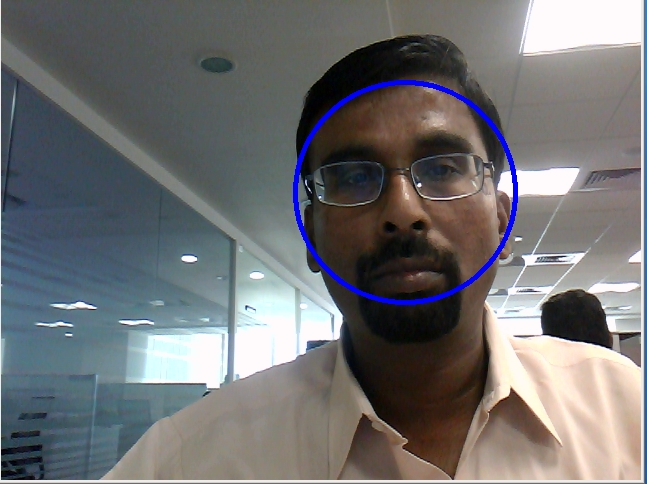
Check it out. Including facedetect.cpp detecting my face in real time …

Have fun with OpenCV.

Get going! Get hooked!

Find me on Google+

Technologies to watch: 2012 and beyond

Published in Telecom Asia – Technologies to watch:2012 and beyond

Published in Telecoms Europe – Hot technologies for 2012 and beyond

A keen observer of the technological firmament, today, will observe a grand spectacle of diverse technological events. Some technological trends will blaze a trail and will become trend setters while others will vanish without a trace. The factors that make certain technologies to endure in comparison to others could be many, ranging from pure necessity to a coolness factor, from innovativeness to a cost factor.  This article looks at some of the technologies that are certain to be trail blazers in the years to come

Software Defined Networks (SDNs):  Software Defined Networks (SDNs) are based on the path breaking paradigm of separating the control of a network flow from the actual flow of data. SDN is the result of pioneering effort by Stanford University and University of California, Berkeley and is based on the Open Flow Protocol and represents a paradigm shift to the way networking elements operate. Software Defined Networks (SDN) decouples the routing and switching of the data flows and moves the control of the flow to a separate network element namely, the Flow controller.   The motivation for this is that the flow of data packets through the network can be controlled in a programmatic manner. The OpenFlow Protocol has 3 components to it. The Flow Controller that controls the flows, the OpenFlow switch and the Flow Table and a secure connection between the Flow Controller and the OpenFlow switch. Software Define Networks (SDNs) also include the ability to virtualize the network resources. Virtualized network resources are known as a “network slice”. A slice can span several network elements including the network backbone, routers and hosts. The ability to control multiple traffic flows programmatically provides enormous flexibility and power in the hands of users.  SDNs are bound to be the networks elements of the future.

Smart Grids: The energy industry is delicately poised for a complete transformation with the evolution of the smart grid concept. There is now an imminent need for an increased efficiency in power generation, transmission and distribution coupled with a reduction of energy losses. In this context many leading players in the energy industry are coming up with a connected end-to-end digital grid to smartly manage energy transmission and distribution.  The digital grid will have smart meters, sensors and other devices distributed throughout the grid capable of sensing, collecting, analyzing and distributing the data to devices that can take action on them. The huge volume of collected data will be sent to intelligent device which will use the wireless 3G networks to transmit the data.  Appropriate action like alternate routing and optimal energy distribution would then happen. Smart Grids are a certainty given that this technology addresses the dire need of efficient energy management. Smart Grids besides managing energy efficiently also save costs by preventing inefficiency and energy losses.

The NoSQL Paradigm: In large web applications where performance and scalability are key concerns a non –relational database like NoSQL is a better choice to the more traditional relational databases. There are several examples of such databases – the more reputed are Google’s BigTable,   HBase, Amazon’s Dynamo, CouchDB  & MongoDB. These databases partition the data horizontally and distribute it among many regular commodity servers.  Accesses to the data are based on get(key) or set(key, value) type of APIs. Accesses to the data are based on a consistent hashing scheme for example the Distributed Hash Table (DHT) method. The ability to distribute data and the queries to one of several servers provides the key benefit of scalability. Clearly having a single database handling an enormous amount of transactions will result in performance degradation as the number of transaction increases. Applications that have to frequently access and manage petabytes of data will clearly have to move to the NoSQL paradigm of databases.

Near Field Communications (NFC): Near Field Communications (NFC) is a technology whose time has come. Mobile phones enabled with NFC technology can be used for a variety of purposes. One such purpose is integrating credit card functionality into mobile phones using NFC. Already the major players in mobile are integrating NFC into their newer versions of mobile phones including Apple’s iPhone, Google’s Android, and Nokia. We will never again have to carry in our wallets with a stack of credit cards. Our mobile phone will double up as a Visa, MasterCard, etc. NFC also allows retail stores to send promotional coupons to subscribers who are in the vicinity of the shopping mall. Posters or trailers of movies running in a theatre can be sent as multi-media clips when travelling near a movie hall. NFC also allows retail stores to send promotional coupons to subscribers who are  in the vicinity of the shopping mall besides allowing exchanging contact lists with friends when they are close proximity.

The Other Suspects: Besides the above we have other usual suspects

Long Term Evolution (LTE): LTE enables is latest wireless technology that enables wireless access speeds of up to 56 Mbps. With the burgeoning interest in tablets, smartphones with the countless apps LTE will be used heavily as we move along. For a vision of where telecom is headed, do read my post ‘The Future of Telecom“.

Cloud Computing: Cloud Computing is the other technology that is bound to gain momentum in the years ahead. Besides obviating the need for upfront capital expenditure the cloud enables quick and easy deployment of applications. Moreover the elasticity of the cloud will make it irresistible to large enterprises and corporations.

The above is a list of technologies to watch as create new paths and blaze new trails. All these technologies are bound to transform the world as we know it and make our lives easier, better and more comfortable. These are the technologies that we need to focus on as we move bravely into our future. Do read my post for the year 2011 “Technology Trends – 2011 and beyond

Find me on Google+

Tomorrow’s wireless ecosystem

The wireless networks of today had its humble beginnings in 1924 when the first mobile radio was demonstrated. It was many years since this beginning, that a completely functional cellular network was established. The earliest systems were the analog 1G system that was demonstrated in 1978 in US with great success. The initial mobile systems were primarily used for making mobile voice calls. This continued for the next 2 decades as the network evolved to digital based 2G systems.


It was around 1999-2000 that ETSI standardized GPRS or 2.5G technology to use the cellular network for data. Though the early data rates, of 144 kbps, were modest, the entry of GPRS proved to be a turning point in technological history. GPRS provided the triple benefits of wireless connectivity, mobility and internet access.  Technological advancement enabled faster and higher speeds of wireless, mobile access to the internet. The deployments of 3G enabled speeds of up to 2 Mbps for fixed access while LTE promised speeds of almost 56 Mbps per second coupled with excellent spectral efficiency.


The large increase of bandwidth along with mobility has allowed different technologies to take advantage of the wireless infrastructure for their purposes.  While Wi-Fi networks based on 802.11 and WiMAX based on 802.16 will play a part in the wireless ecosystem this post looks at the role that will be played by cellular networks from 2G to 4G.


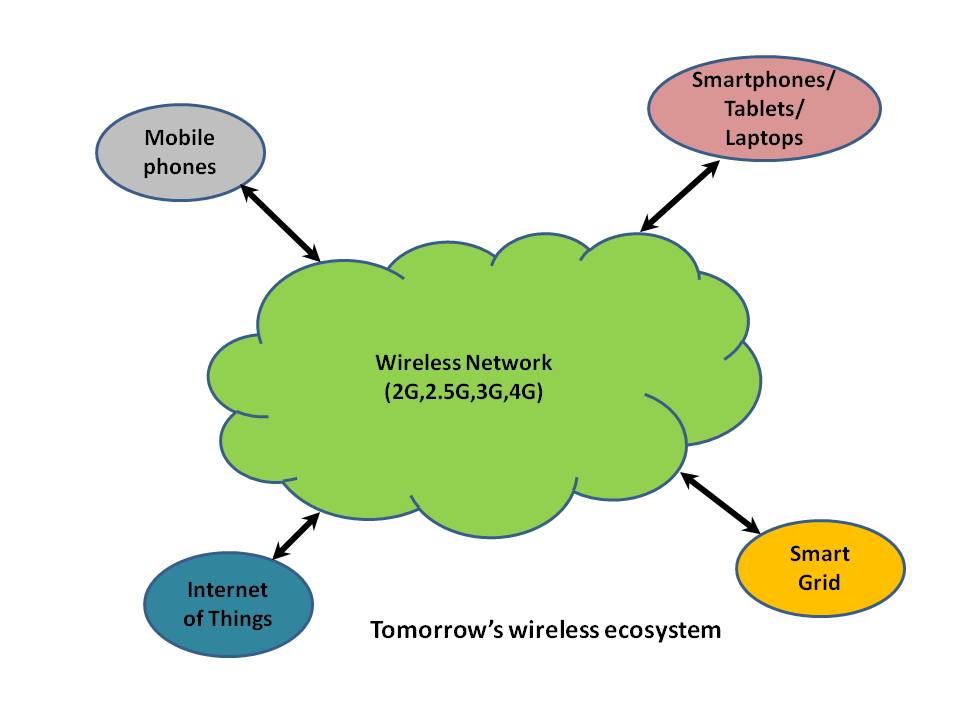
The cellular network with its feature of wireless access, mobility and the ability to handle voice, video and data calls will be the host of multiple disparate technologies as we move forward into the future.  Below are listed some of the major users of the wireless network in the future


Mobile Phones:  The cellular network was created to handle voice calls originating from mobile phones. A large part of mobile traffic will still be for mobile to mobile calls. As the penetration of the cellular networks occurs in emerging economies we can expect that there will be considerable traffic from voice calls. It is likely that as the concept of IP Multimedia System (IMS) finds widespread acceptance the mobile phone will also be used for making video calls. With the advent of the Smartphone this is a distinct possibility in the future.

Smartphones, tablets and Laptops: These devices will be the next major users of the cellular network. Smartphones, besides being able to make calls, also allow for many new compelling data applications. Exciting apps on tablets like the iPad and laptops consume a lot of bandwidth and use the GPRS, 3G or LTE network for data transfer. In fact in a recent report it has been found that a majority of data traffic in the wireless network are video. Consumers use the iPad and the laptop for watching videos on Youtube and for browsing using the wireless network.

Internet of Things (IoT):  The internet of things, also known as M2M, envisages a network in which passive or intelligent devices are spread throughout the network and collect and transmit data to back end database. RFIDs were the early enablers of this technology. These sensors and intelligent devices will collect data and transmit the data using the wireless network. Applications for the Internet of Things range from devices that monitor and transmit data about the health of cardiac patients to being able to monitor the structural integrity of bridges.

Smart Grid: The energy industry is delicately poised for a complete transformation with the evolution of the smart grid concept. There is now an imminent need for an increased efficiency in power generation, transmission and distribution coupled with a reduction of energy losses. In this context many leading players in the energy industry are coming up with a connected end-to-end digital grid to smartly manage energy transmission and distribution.  The digital grid will have smart meters, sensors and other devices distributed throughout the grid capable of sensing, collecting, analyzing and distributing the data to devices that can take action on them. The huge volume of collected data will be sent to intelligent device which will use the wireless 3G networks to transmit the data.  Appropriate action like alternate routing and optimal energy distribution would then happen. The Smart Grid will be a major user of the cellular wireless network in the future.

Hence it can be seen the users of the wireless network will increase dramatically as we move forward into the future. Multiple technologies will compete for the available bandwidth. For handling this exponential growth in traffic we not only need faster speeds for the traffic but also sufficient spectrum available for use and it is necessary that ITU addresses the spectrum needs on a war footing.

It is thus clear that the telecom network will have to become more sophisticated and more technologically advanced as we move forward into the future.


Find me on Google+