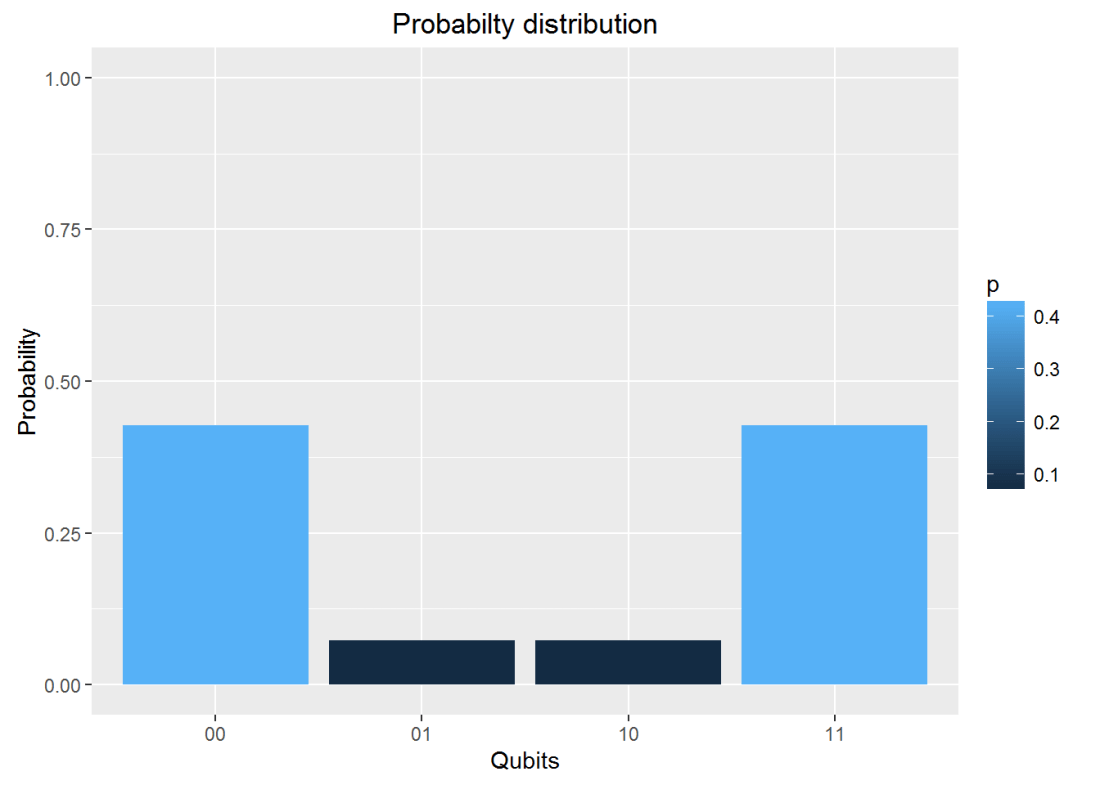
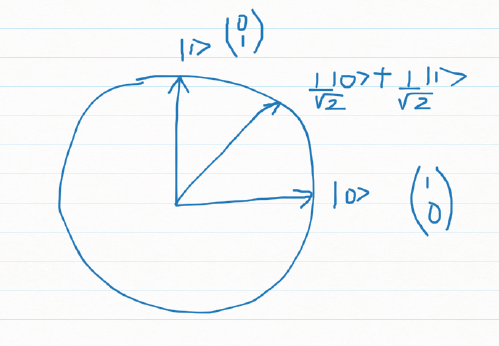
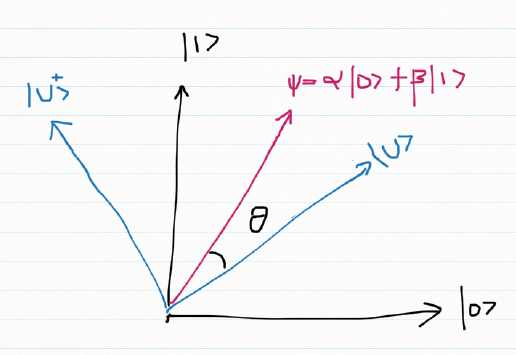
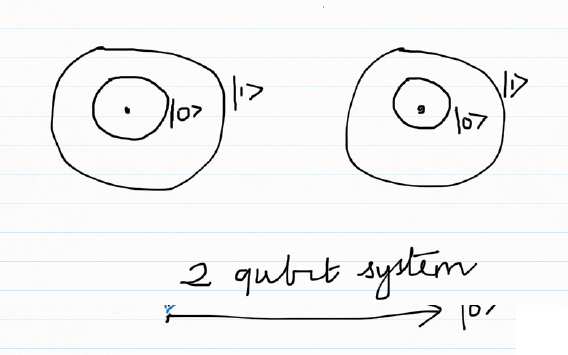
Googly: An interactive app for analyzing IPL players, matches and teams using R package yorkr

Presenting ‘Googly’, a cool Shiny app that I developed over the last couple of days. This interactive Shiny app was on my mind for quite some time, and I finally got down to implementing it. The Googly Shiny app is based on my R package ‘yorkr’ which is now available in CRAN. The R package and hence this Shiny app is based on data from Cricsheet.

If you are passionate about cricket, and love analyzing cricket performances, then check out my 2 racy books on cricket! In my books, I perform detailed yet compact analysis of performances of both batsmen, bowlers besides evaluating team & match performances in Tests , ODIs, T20s & IPL. You can buy my books on cricket from Amazon at $12.99 for the paperback and $4.99/$6.99 respectively for the kindle versions. The books can be accessed at Cricket analytics with cricketr  and Beaten by sheer pace-Cricket analytics with yorkr  A must read for any cricket lover! Check it out!!

1

Googly is based on R package yorkr, and uses the data of all IPL matches from 2008 up to 2016, available on Cricsheet.

Googly can do detailed analyses of a) Individual IPL batsman b) Individual IPL bowler c) Any IPL match d) Head to head confrontation between 2 IPL teams e) All matches of an IPL team against all other teams.

With respect to the individual IPL batsman and bowler performance, I was in a bit of a ‘bind’ literally (pun unintended), as any IPL player could have played in more than 1 IPL team. Fortunately ‘rbind’ came to my rescue. I just get all the batsman’s/bowler’s performance in each IPL team, and then consolidate it into a single large dataframe to do the analyses of.

The Shiny app can be accessed at Googly

The code for Googly is available at Github. Feel free to clone/download/fork  the code from Googly

Check out my 2 books on cricket, a) Cricket analytics with cricketr b) Beaten by sheer pace – Cricket analytics with yorkr, now available in both paperback & kindle versions on Amazon!!! Pick up your copies today!

Also see my post GooglyPlus: yorkr analyzes IPL players, teams, matches with plots and tables

Based on the 5 detailed analysis domains there are 5 tabs

IPL Batsman: This tab can be used to perform analysis of all IPL batsman. If a batsman has played in more than 1 team, then the overall performance is considered. There are 10 functions for the IPL Batsman. They are shown below

  1. Batsman Runs vs. Deliveries
  2. Batsman’s Fours & Sixes
  3. Dismissals of batsman
  4. Batsman’s Runs vs Strike Rate
  5. Batsman’s Moving Average
  6. Batsman’s Cumulative Average Run
  7. Batsman’s Cumulative Strike Rate
  8. Batsman’s Runs against Opposition
  9. Batsman’s Runs at Venue
  10. Predict Runs of batsman

IPL Bowler: This tab can be used to analyze individual IPL bowlers. The functions handle IPL bowlers who have played in more than 1 IPL team.

  1. Mean Economy Rate of bowler
  2. Mean runs conceded by bowler
  3. Bowler’s Moving Average
  4. Bowler’s Cumulative Avg. Wickets
  5. Bowler’s Cumulative Avg. Economy Rate
  6. Bowler’s Wicket Plot
  7. Bowler’s Wickets against opposition
  8. Bowler’s Wickets at Venues
  9. Bowler’s wickets prediction

IPL match: This tab can be used for analyzing individual IPL matches. The available functions are

  1. Batting Partnerships
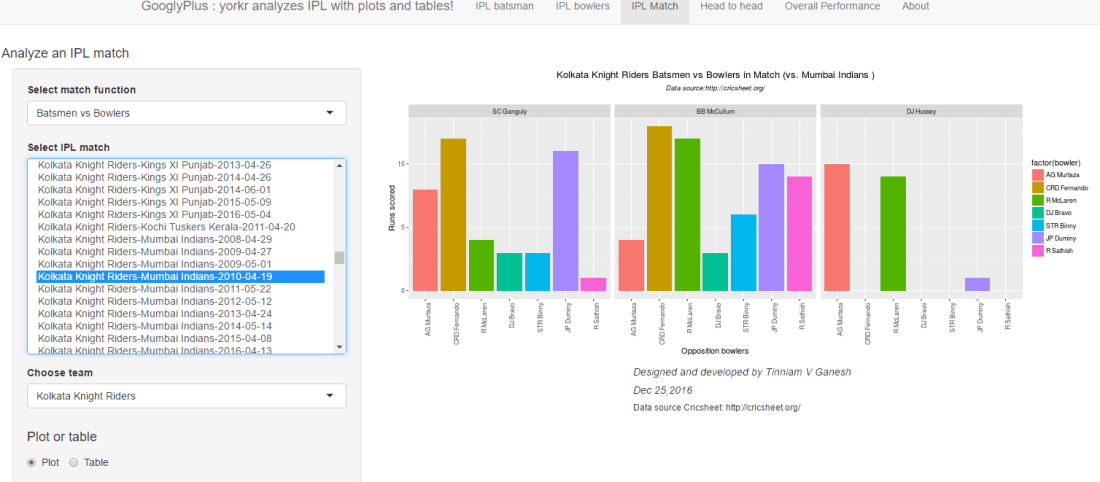
  2. Batsmen vs Bowlers
  3. Bowling Wicket Kind
  4. Bowling Wicket Runs
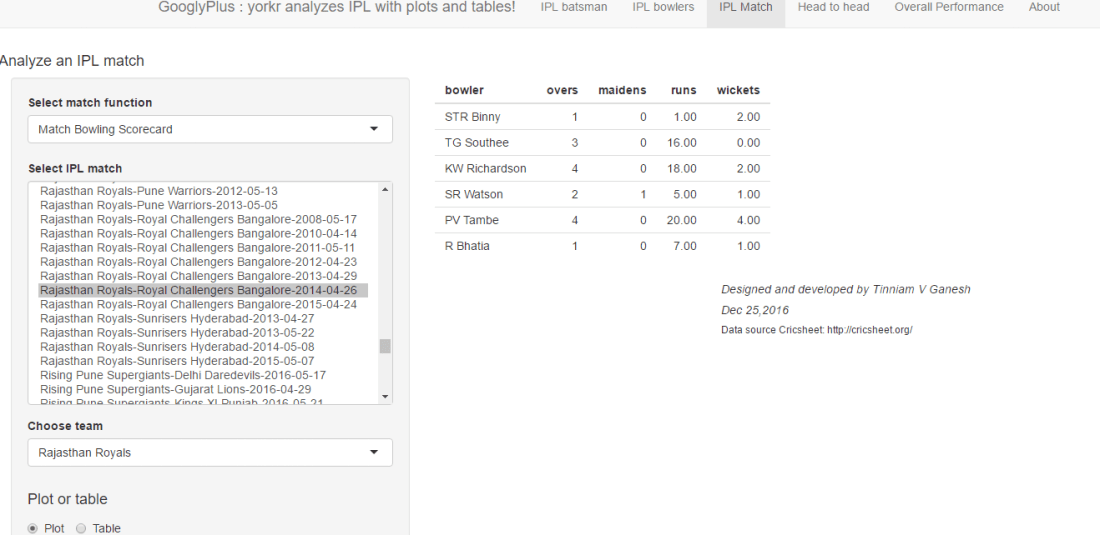
  5. Bowling Wicket Match
  6. Bowler vs Batsmen
  7. Match Worm Graph

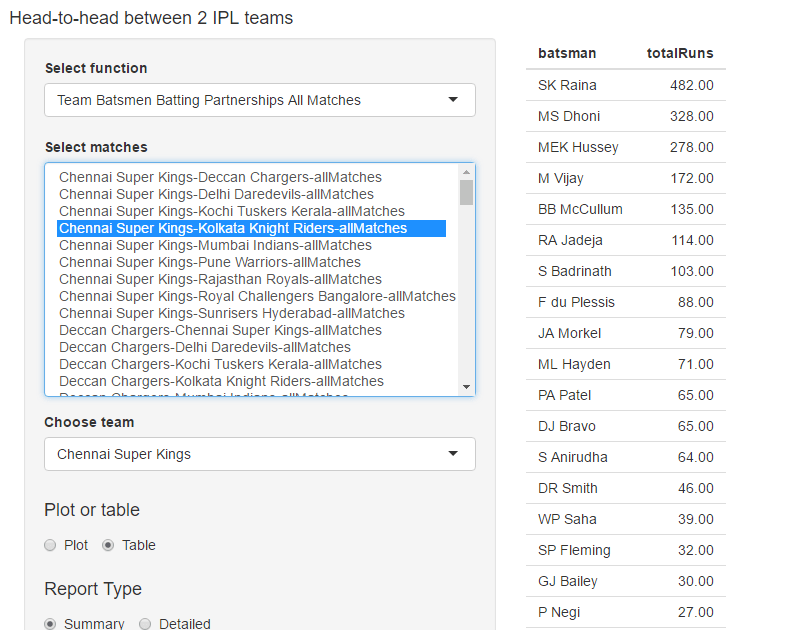
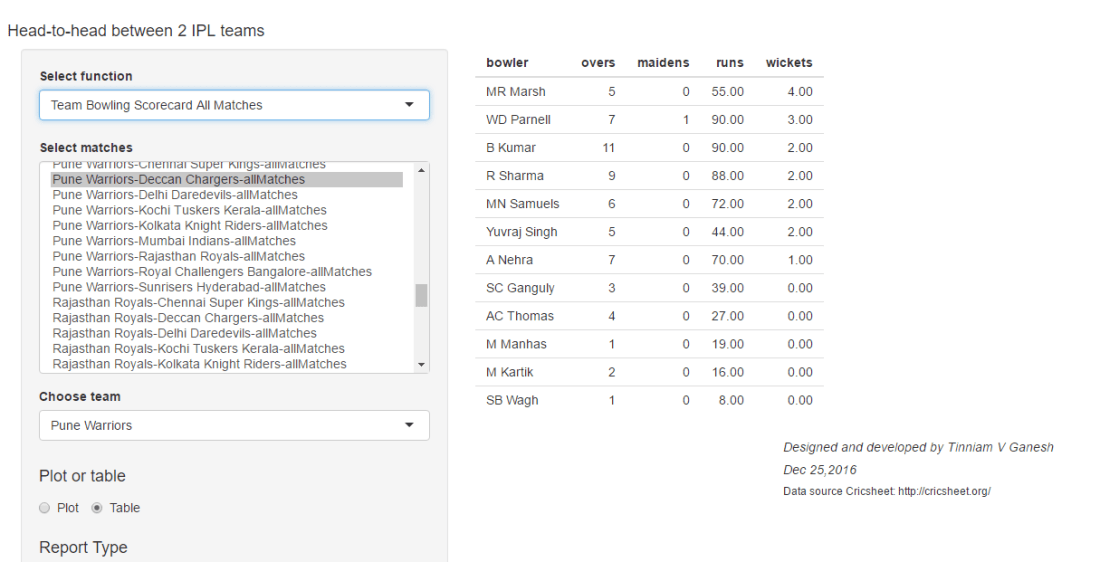
Head to head : This tab can be used for analyzing head-to-head confrontations, between any 2 IPL teams for e.g. all matches between Chennai Super Kings vs. Deccan Chargers or Kolkata Knight Riders vs. Delhi Daredevils. The available functions are

  1. Team Batsmen Batting Partnerships All Matches
  2. Team Batsmen vs Bowlers all Matches
  3. Team Wickets Opposition All Matches
  4. Team Bowler vs Batsmen All Matches
  5. Team Bowlers Wicket Kind All Matches
  6. Team Bowler Wicket Runs All Matches
  7. Win Loss All Matches

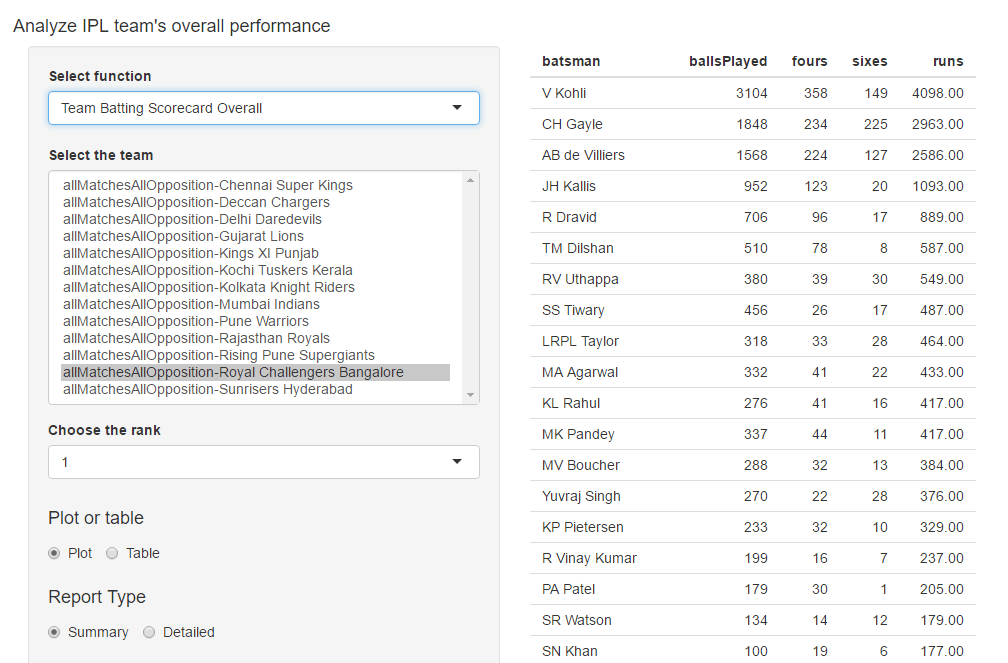
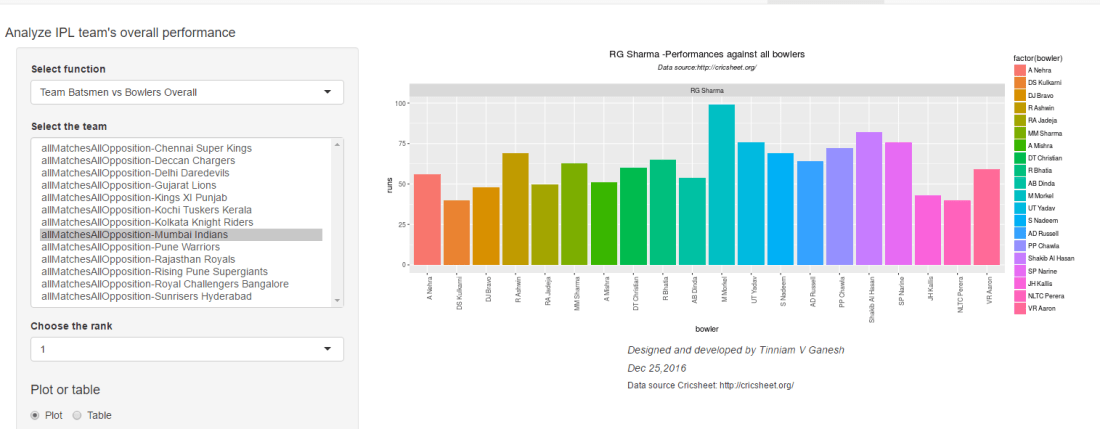
Overall performance : this tab can be used analyze the overall performance of any IPL team. For this analysis all matches played by this team is considered. The available functions are

  1. Team Batsmen Partnerships Overall
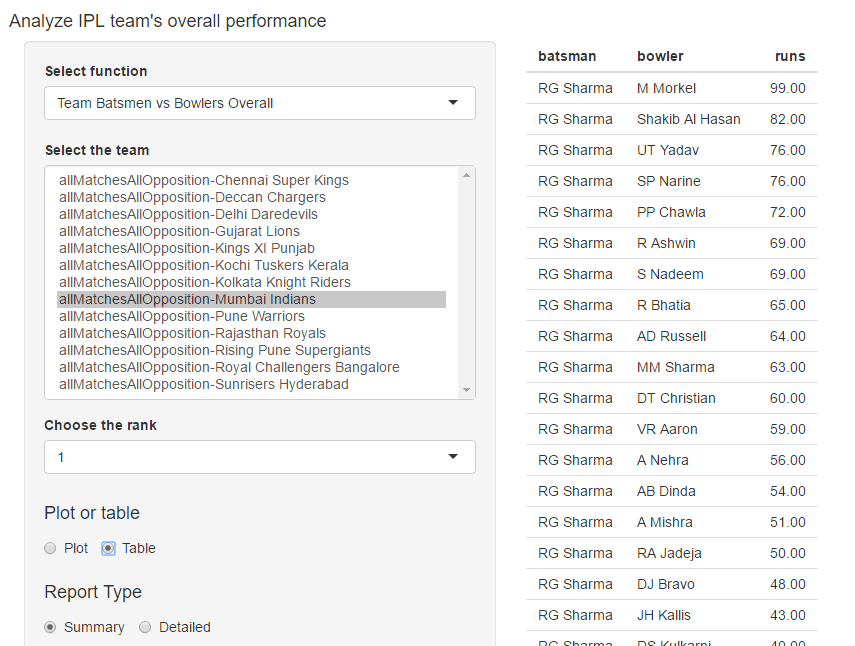
  2. Team Batsmen vs Bowlers Overall
  3. Team Bowler vs Batsmen Overall
  4. Team Bowler Wicket Kind Overall

Below I include a random set of charts that are generated in each of the 5 tabs

A. IPL Batsman
a. A Symonds : Runs vs Deliveries
untitled

b. AB Devilliers – Cumulative Strike Rate
untitled

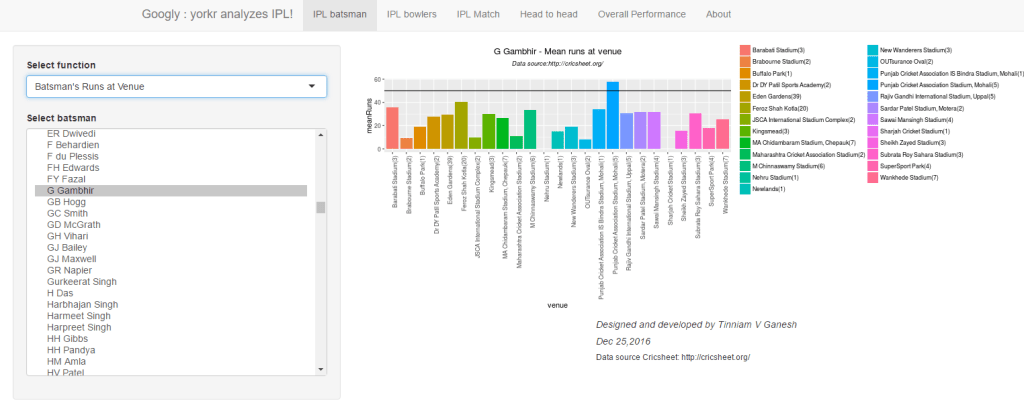
c.  Gautam Gambhir – Runs at venues
untitled

d. CH Gayle – Predict runs 
untitled

B. IPL Bowler
a. Ashish Nehra – Cumulative Average Wickets
untitled

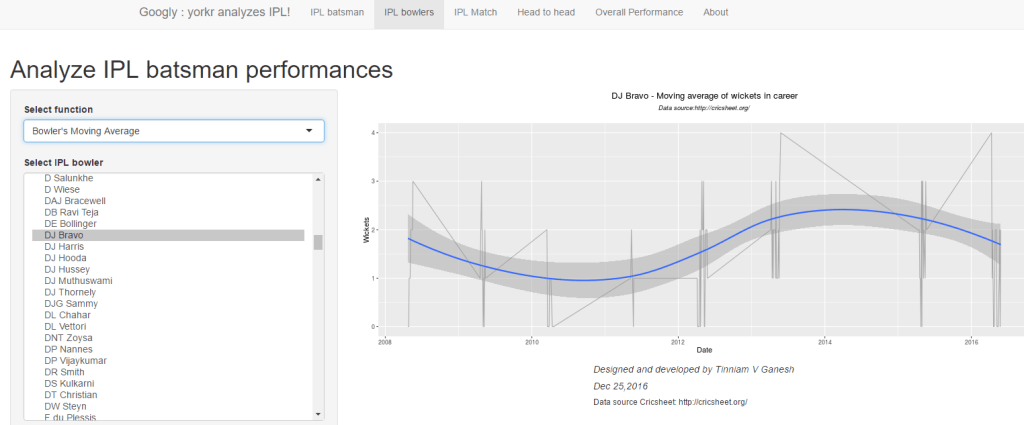
b.  DJ Bravo – Moving Average of wickets
untitled

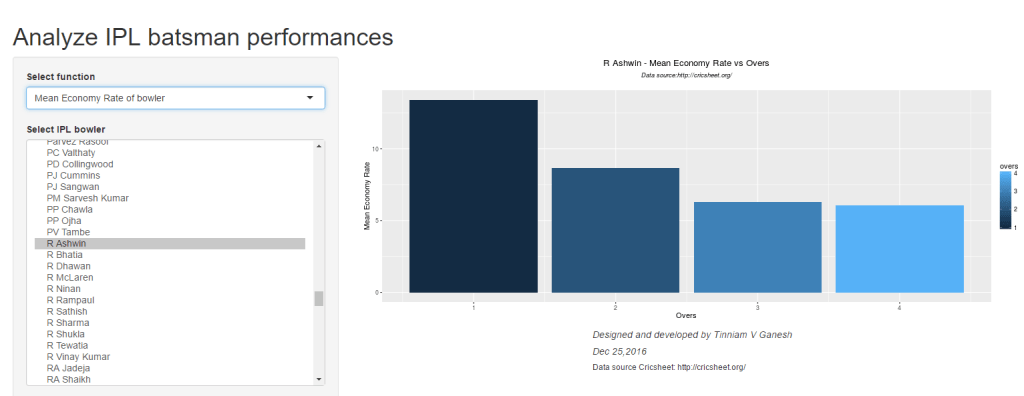
c. R Ashwin – Mean Economy rate vs Overs
untitled

C.IPL Match
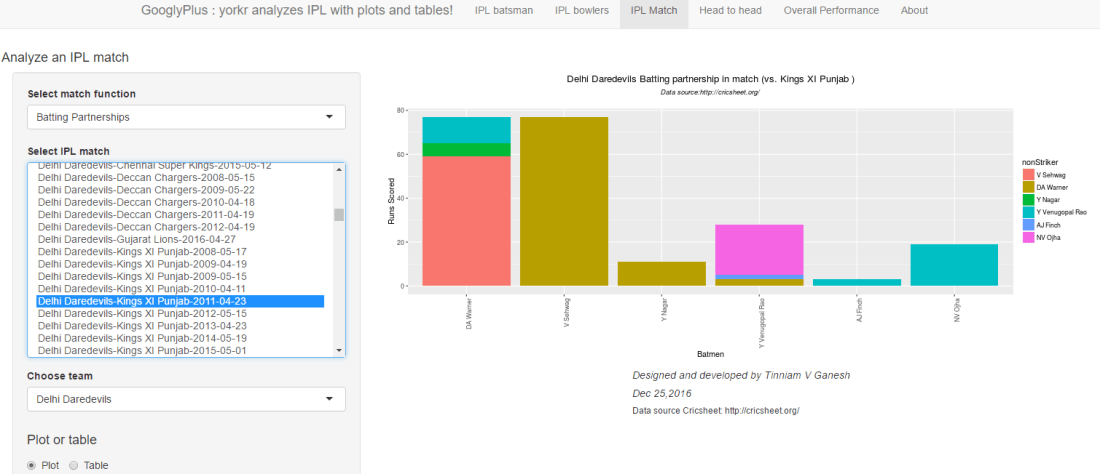
a. Chennai Super Kings vs Deccan Chargers   (2008 -05-06) – Batsmen Partnerships

Note: You can choose either team in the match from the drop down ‘Choose team’

untitled

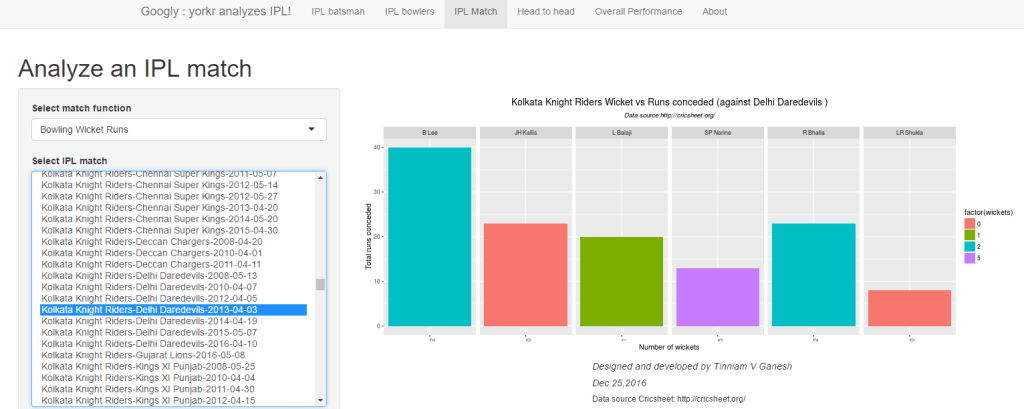
b. Kolkata Knight Riders vs Delhi Daredevils (2013-04-02) – Bowling wicket runs
untitled

c. Mumbai Indians vs Kings XI Punjab (2010-03-30) – Match worm graph
untitled

D. Head to head confrontation
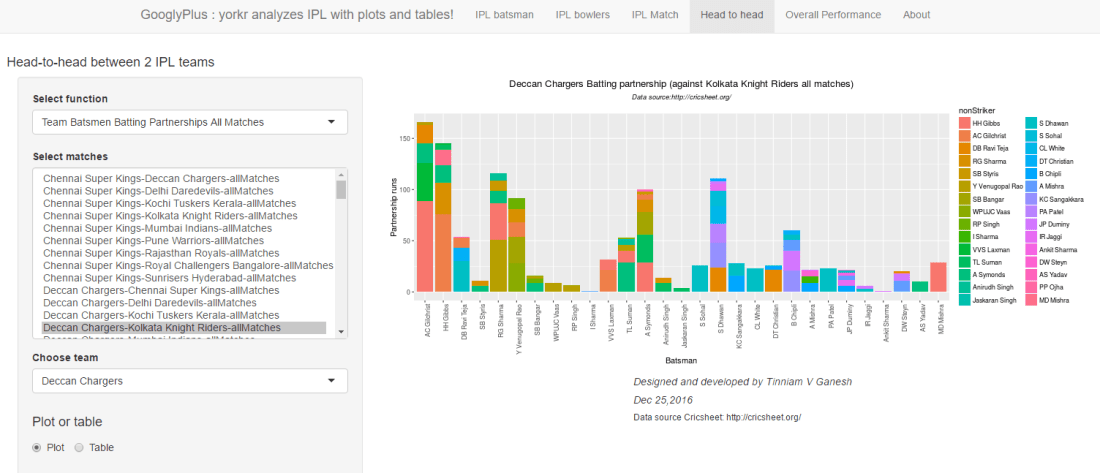
a. Rising Pune Supergiants vs Mumbai Indians in all matches – Team batsmen partnerships

Note: You can choose the partnership of either team in the drop down ‘Choose team’
untitled

b.  Gujarat Lions – Royal Challengers Bangalore all matches – Bowlers performance against batsmen
untitled

E. Overall Performance
a.  Royal Challengers Bangalore overall performance – Batsman Partnership (Rank=1)
This is Virat Kohli for RCB. Try out other ranks
untitled

b.  Rajashthan Royals overall Performance – Bowler vs batsman (Rank =2)
This is Vinay Kumar.
untitled

The Shiny app Googly can be accessed at Googly. Feel free to clone/fork the code from Github at Googly

For details on my R package yorkr, please see my blog Giga thoughts. There are more than 15 posts detailing the functions and their usage.

Do bowl a Googly!!!

You may like my other Shiny apps

Also see my other posts

  1. Introducing QCSimulator: A 5-qubit quantum computing simulator in R
  2. Deblurring with OpenCV: Weiner filter reloaded
  3. Rock N’ Roll with Bluemix, Cloudant & NodeExpress
  4. Introducing cricket package yorkr: Part 1- Beaten by sheer pace!
  5. Fun simulation of a Chain in Android
  6. Beaten by sheer pace! Cricket analytics with yorkr in paperback and Kindle versions
  7. Introducing cricketr! : An R package to analyze performances of cricketers
  8. Cricket analytics with cricketr!!!

For more posts see Index of posts
Analyzing World Bank data with WDI, googleVis Motion Charts

Recently I was surfing the web, when I came across a real cool post New R package to access World Bank data, by Markus Gesmann on using googleVis and motion charts with World Bank Data. The post also introduced me to Hans Rosling, Professor of Sweden’s Karolinska Institute. Hans Rosling, the creator of the famous Gapminder chart, the “Heath and Wealth of Nations” displays global trends through animated charts (A must see!!!). As they say, in Hans Rosling’s hands, data dances and sings. Take a look at some of his Ted talks for e.g. Hans Rosling:New insights on poverty. Prof Rosling developed the breakthrough software behind the visualizations, in the Gapminder. The free software, which can be loaded with any data – was purchased by Google in March 2007.

In this post, I recreate some of the Gapminder charts with the help of R packages WDI and googleVis. The WDI  package of  Vincent Arel-Bundock, provides a set of really useful functions to get to data based on the World Bank Data indicators.  googleVis provides motion charts with which you can animate the data.. Incidentally Datacamp has a very nice, short course on googleVis “Having fun with googleVis

See an updated version of this post Revisiting World Bank data analysis with WDI and gVisMotionChart

You can clone/download the code from Github at worldBankAnalysis which is in the form of an Rmd file.

library(WDI)
library(ggplot2)
library(googleVis)
library(plyr)

1.Get the data from 1960 to 2016 for the following

  1. Population – SP.POP.TOTL
  2. GDP in US $ – NY.GDP.MKTP.CD
  3. Life Expectancy at birth (Years) – SP.DYN.LE00.IN
  4. GDP Per capita income – NY.GDP.PCAP.PP.CD
  5. Fertility rate (Births per woman) – SP.DYN.TFRT.IN
  6. Poverty headcount ratio – SI.POV.2DAY
# World population total
population = WDI(indicator='SP.POP.TOTL', country="all",start=1960, end=2016)
# GDP in US $
gdp= WDI(indicator='NY.GDP.MKTP.CD', country="all",start=1960, end=2016)
# Life expectancy at birth (Years)
lifeExpectancy= WDI(indicator='SP.DYN.LE00.IN', country="all",start=1960, end=2016)
# GDP Per capita
income = WDI(indicator='NY.GDP.PCAP.PP.CD', country="all",start=1960, end=2016)
# Fertility rate (births per woman)
fertility = WDI(indicator='SP.DYN.TFRT.IN', country="all",start=1960, end=2016)
# Poverty head count
poverty= WDI(indicator='SI.POV.2DAY', country="all",start=1960, end=2016)

2.Rename the columns

names(population)[3]="Total population"
names(lifeExpectancy)[3]="Life Expectancy (Years)"
names(gdp)[3]="GDP (US$)"
names(income)[3]="GDP per capita income"
names(fertility)[3]="Fertility (Births per woman)"
names(poverty)[3]="Poverty headcount ratio"

3.Join the data frames

Join the individual data frames to one large wide data frame with all the indicators for the countries


j1 <- join(population, gdp)
j2 <- join(j1,lifeExpectancy)
j3 <- join(j2,income)
j4 <- join(j3,poverty)
wbData <- join(j4,fertility)

4.Use WDI_data

Use WDI_data to get the list of indicators and the countries. Join the countries and region

#This returns  list of 2 matrixes
wdi_data =WDI_data
# The 1st matrix is the list is the set of all World Bank Indicators
indicators=wdi_data[[1]]
# The 2nd  matrix gives the set of countries and regions
countries=wdi_data[[2]]
df = as.data.frame(countries)
aa <- df$region != "Aggregates"
# Remove the aggregates
countries_df <- df[aa,]
# Subset from the development data only those corresponding to the countries
bb = subset(wbData, country %in% countries_df$country)
cc = join(bb,countries_df)
dd = complete.cases(cc)
developmentDF = cc[dd,]

5.Create and display the motion chart

gg<- gvisMotionChart(cc,
                                idvar = "country",
                                timevar = "year",
                                xvar = "GDP",
                                yvar = "Life Expectancy",
                                sizevar ="Population",
                                colorvar = "region")
plot(gg)
cat(gg$html$chart, file="chart1.html")

Note: Unfortunately it is not possible to embed the motion chart in WordPress. It is has to hosted on a server as a Webpage. After exploring several possibilities I came up with the following process to display the animation graph. The plot is saved as a html file using ‘cat’ as shown above. The chart1.html page is then hosted as a Github page (gh-page) on Github.

Here is the ggvisMotionChart

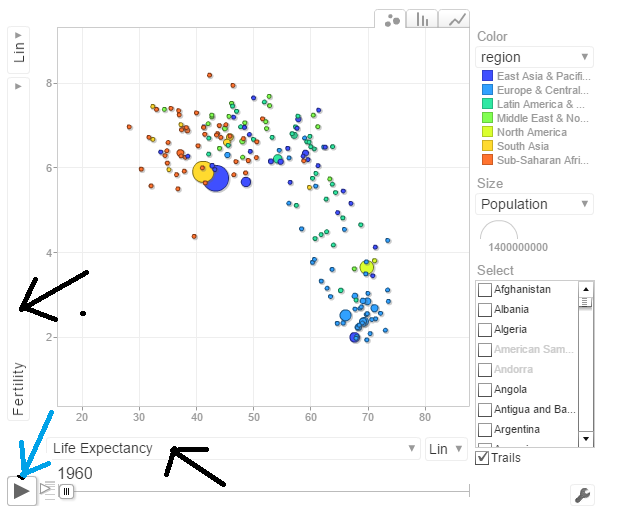
Do give  World Bank Motion Chart1  a spin.  Here is how the Motion Chart has to be used

untitled

You can select Life Expectancy, Population, Fertility etc by clicking the black arrows. The blue arrow shows the ‘play’ button to set animate the motion chart. You can also select the countries and change the size of the circles. Do give it a try. Here are some quick analysis by playing around with the motion charts with different parameters chosen

The set of charts below are screenshots captured by running the motion chart World Bank Motion Chart1

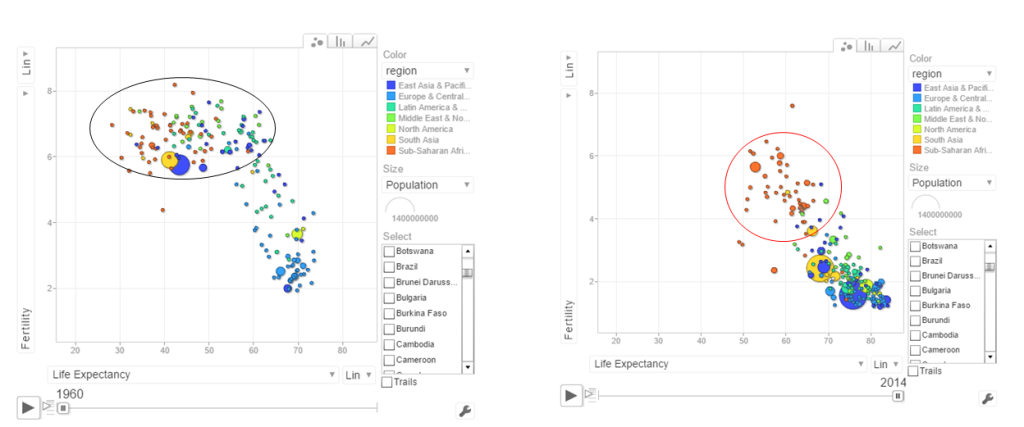
a. Life Expectancy vs Fertility chart

This chart is used by Hans Rosling in his Ted talk. The left chart shows low life expectancy and high fertility rate for several sub Saharan and East Asia Pacific countries in the early 1960’s. Today the fertility has dropped and the life expectancy has increased overall. However the sub Saharan countries still have a high fertility rate

pic1

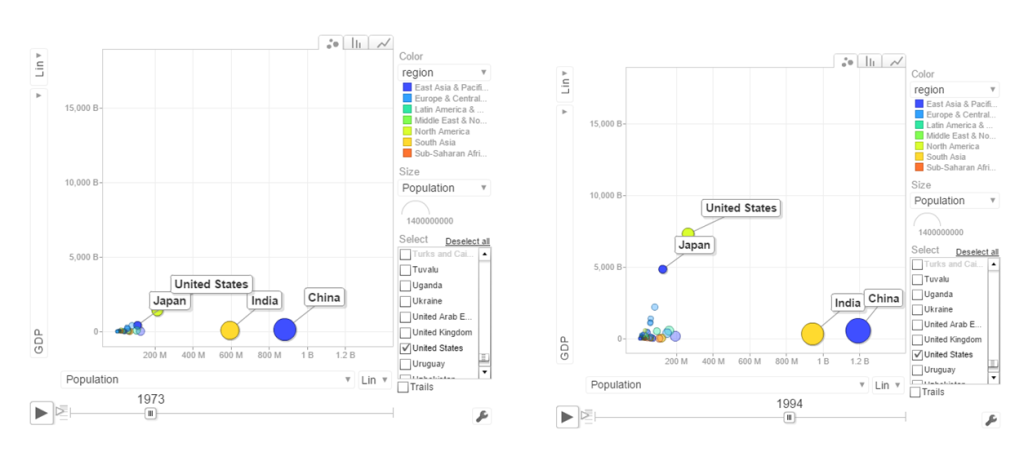
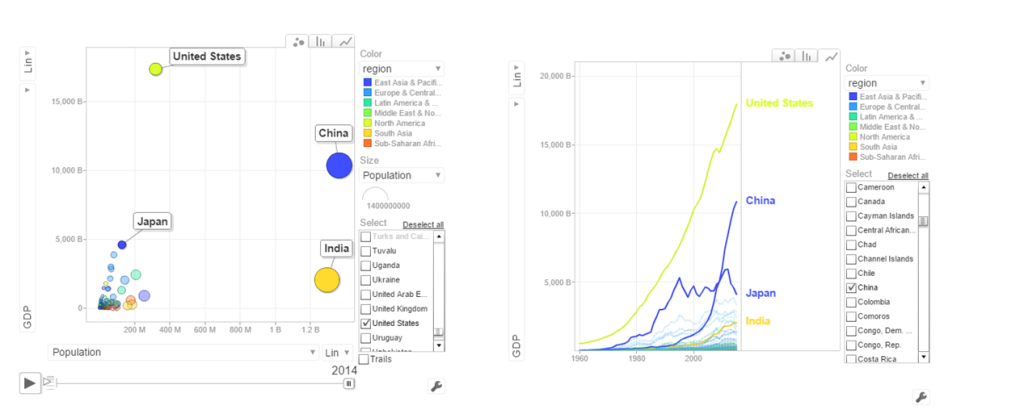
b. Population vs GDP

The chart below shows that GDP of India and China have the same GDP from 1973-1994 with US and Japan well ahead.

pic2

From 1998- 2014 China really pulls away from India and Japan as seen below

pic3

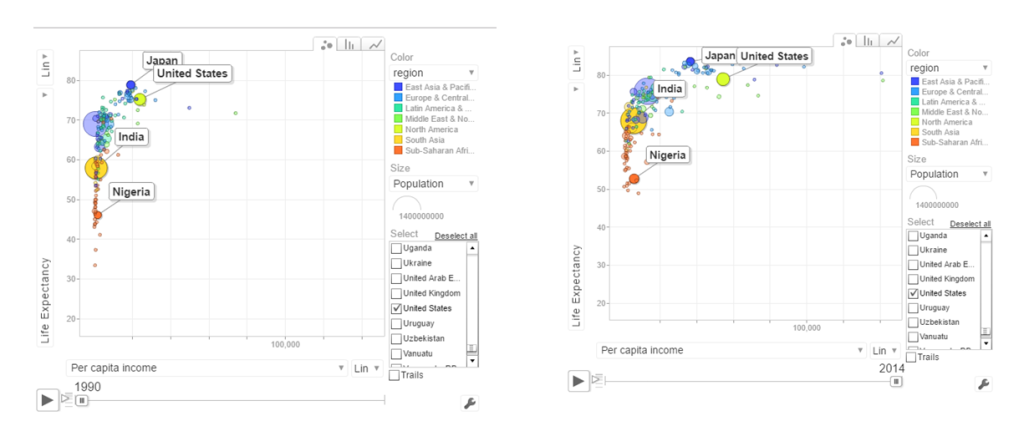
c. Per capita income vs Life Expectancy

In the 1990’s the per capita income and life expectancy of the sub -saharan countries are low (42-50). Japan and US have a good life expectancy in 1990’s. In 2014 the per capita income of the sub-saharan countries are still low though the life expectancy has marginally improved.

pic4

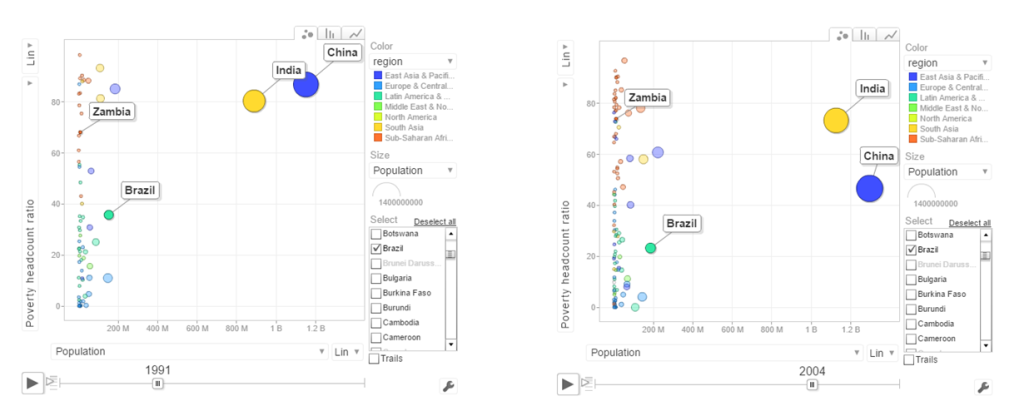
d. Population vs Poverty headcount

pic5

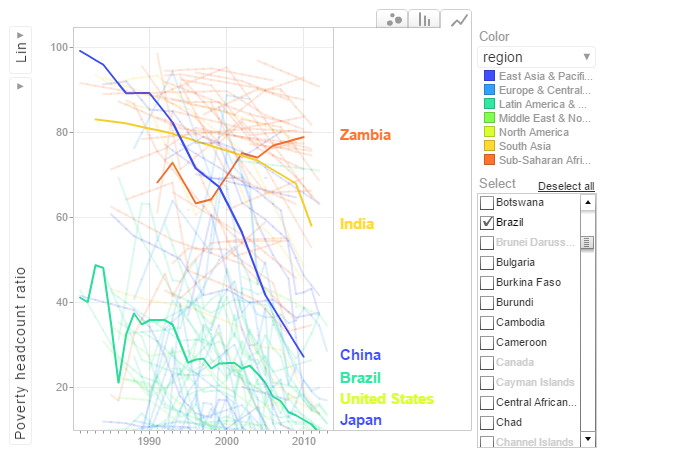
In the early 1990’s China had a higher poverty head count ratio than India. By 2004 China had this all figured out and the poverty head count ratio drops significantly. This can also be seen in the chart below.

pop_pov3

In the chart above China shows a drastic reduction in poverty headcount ratio vs India. Strangely Zambia shows an increase in the poverty head count ratio.

6.Get the data for the 2nd set of indicators

  1. Total population  – SP.POP.TOTL
  2. GDP in US$ – NY.GDP.MKTP.CD
  3. Access to electricity (% population) – EG.ELC.ACCS.ZS
  4. Electricity consumption KWh per capita -EG.USE.ELEC.KH.PC
  5. CO2 emissions -EN.ATM.CO2E.KT
  6. Sanitation Access – SH.STA.ACSN
# World population
population = WDI(indicator='SP.POP.TOTL', country="all",start=1960, end=2016)
# GDP in US $
gdp= WDI(indicator='NY.GDP.MKTP.CD', country="all",start=1960, end=2016)
# Access to electricity (% population)
elecAccess= WDI(indicator='EG.ELC.ACCS.ZS', country="all",start=1960, end=2016)
# Electric power consumption Kwh per capita
elecConsumption= WDI(indicator='EG.USE.ELEC.KH.PC', country="all",start=1960, end=2016)
#CO2 emissions
co2Emissions= WDI(indicator='EN.ATM.CO2E.KT', country="all",start=1960, end=2016)
# Access to sanitation (% population)
sanitationAccess= WDI(indicator='SH.STA.ACSN', country="all",start=1960, end=2016)

7.Rename the columns

names(population)[3]="Total population"
names(gdp)[3]="GDP US($)"
names(elecAccess)[3]="Access to Electricity (% popn)"
names(elecConsumption)[3]="Electric power consumption (KWH per capita)"
names(co2Emissions)[3]="CO2 emisions"
names(sanitationAccess)[3]="Access to sanitation(% popn)"

8.Join the individual data frames

Join the individual data frames to one large wide data frame with all the indicators for the countries


j1 <- join(population, gdp)
j2 <- join(j1,elecAccess)
j3 <- join(j2,elecConsumption)
j4 <- join(j3,co2Emissions)
wbData1 <- join(j3,sanitationAccess)


9.Use WDI_data

Use WDI_data to get the list of indicators and the countries. Join the countries and region

#This returns  list of 2 matrixes
wdi_data =WDI_data
# The 1st matrix is the list is the set of all World Bank Indicators
indicators=wdi_data[[1]]
# The 2nd  matrix gives the set of countries and regions
countries=wdi_data[[2]]
df = as.data.frame(countries)
aa <- df$region != "Aggregates"
# Remove the aggregates
countries_df <- df[aa,]
# Subset from the development data only those corresponding to the countries
ee = subset(wbData1, country %in% countries_df$country)
ff = join(ee,countries_df)
## Joining by: iso2c, country

10.Create and display the motion chart

gg1<- gvisMotionChart(ff,
                                idvar = "country",
                                timevar = "year",
                                xvar = "GDP",
                                yvar = "Access to Electricity",
                                sizevar ="Population",
                                colorvar = "region")
plot(gg1)
cat(gg1$html$chart, file="chart2.html")

This is World Bank Motion Chart2  which has a different set of parameters like Access to Energy, CO2 emissions etc

The set of charts below are screenshots of the motion chart World Bank Motion Chart 2

a. Access to Electricity vs Population
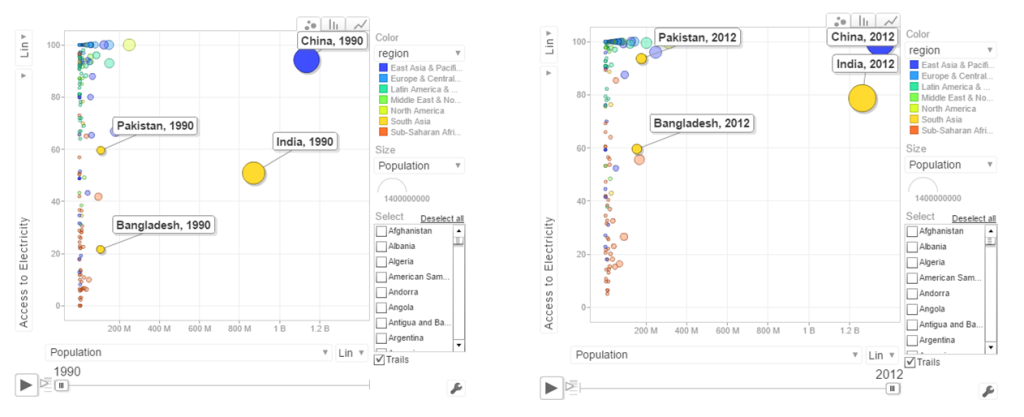
pic6The above chart shows that in China 100% population have access to electricity. India has made decent progress from 50% in 1990 to 79% in 2012. However Pakistan seems to have been much better in providing access to electricity. Pakistan moved from 59% to close 98% access to electricity

b. Power consumption vs population

powercon

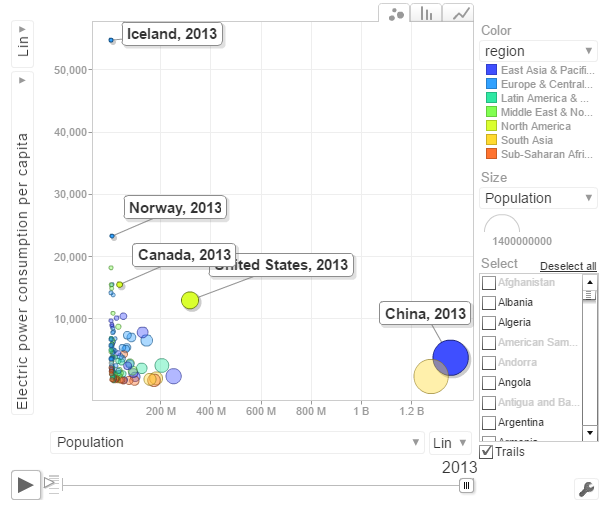
The above chart shows the Power consumption vs Population. China and India have proportionally much lower consumption that Norway, US, Canada

c. CO2 emissions vs Population

pic7

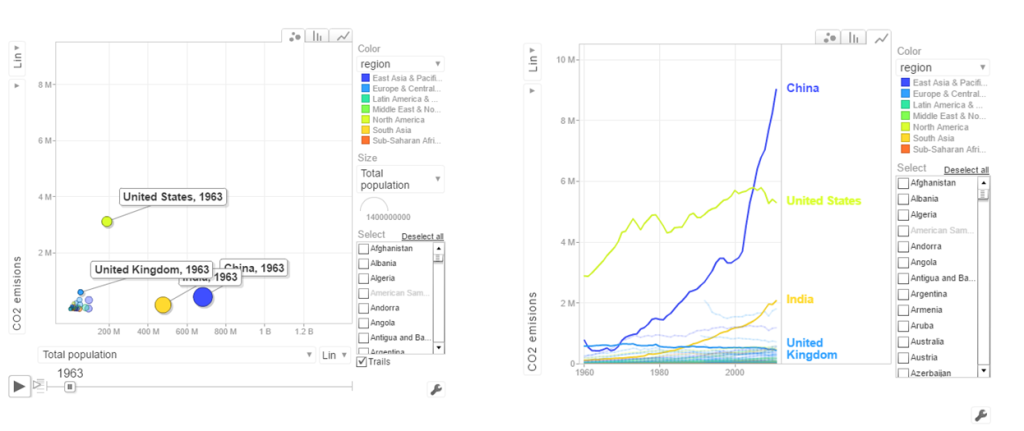
In 1963 the CO2 emissions were fairly low and about comparable for all countries. US, India have shown a steady increase while China shows a steep increase. Interestingly UK shows a drop in CO2 emissions

d.  Access to sanitation
san

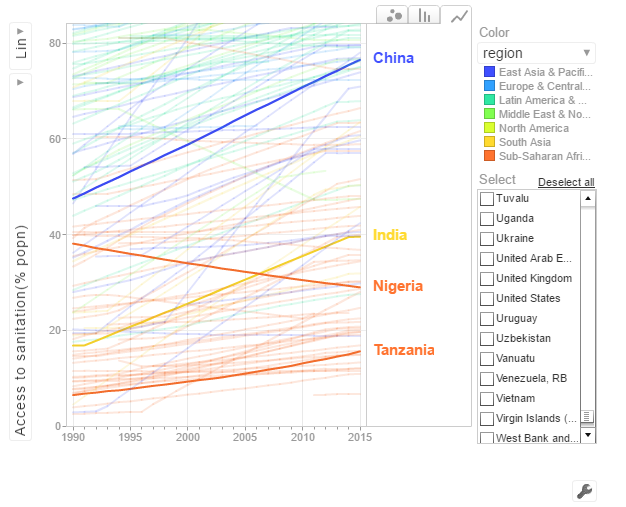
India shows an improvement but it has a long way to go with only 40% of population with access to sanitation. China has made much better strides with 80% having access to sanitation in 2015. Strangely Nigeria shows a drop in sanitation by almost about 20% of population.

The code is available at Github at worldBankAnalysys

Conclusion: So there you have it. I have shown some screenshots of some sample parameters of the World indicators. Please try to play around with World Bank Motion Chart1 & World Bank Motion Chart 2  with your own set of parameters and countries.  You can also create your own motion chart from the 100s of WDI indicators avaialable at  World Bank Data indicator.

Finally, I  would really like to thank Prof Hans Rosling, googleVis and  WDI (Vincent  Arel-Bundock) for making this visualization possible!

Also see
1.  Introducing QCSimulator: A 5-qubit quantum computing simulator in R
2. Dabbling with Wiener filter using OpenCV
3. Designing a Social Web Portal
4. Design Principles of Scalable, Distributed Systems
5. Re-introducing cricketr! : An R package to analyze performances of cricketers
6. Natural language processing: What would Shakespeare say?

To see all posts Index of posts

cricketr sizes up legendary All-rounders of yesteryear

Introduction

This is a post I have been wanting to write for several months, but had to put it off for one reason or another. In this post I use my R package cricketr to analyze the performance of All-rounder greats namely Kapil Dev, Ian Botham, Imran Khan and Richard Hadlee. All these players had talent that was natural and raw. They were good strikers of the ball and extremely lethal with their bowling. The ODI data for these players have been taken from ESPN Cricinfo.

Please be mindful of the ESPN Cricinfo Terms of Use

If you are passionate about cricket, and love analyzing cricket performances, then check out my racy book on cricket ‘Cricket analytics with cricketr and cricpy – Analytics harmony with R & Python’! This book discusses and shows how to use my R package ‘cricketr’ and my Python package ‘cricpy’ to analyze batsmen and bowlers in all formats of the game (Test, ODI and T20). The paperback is available on Amazon at $21.99 and  the kindle version at $9.99/Rs 449/-. A must read for any cricket lover! Check it out!!

You can download the latest PDF version of the book  at  ‘Cricket analytics with cricketr and cricpy: Analytics harmony with R and Python-6th edition

Untitled

You can also read this post at Rpubs as cricketr-AR. Dowload this report as a PDF file from cricketr-AR

Important note 1: The latest release of ‘cricketr’ now includes the ability to analyze performances of teams now!!  See Cricketr adds team analytics to its repertoire!!!

Important note 2 : Cricketr can now do a more fine-grained analysis of players, see Cricketr learns new tricks : Performs fine-grained analysis of players

Important note 3: Do check out the python avatar of cricketr, ‘cricpy’ in my post ‘Introducing cricpy:A python package to analyze performances of cricketers

Note: If you would like to do a similar analysis for a different set of batsman and bowlers, you can clone/download my skeleton cricketr template from Github (which is the R Markdown file I have used for the analysis below). You will only need to make appropriate changes for the players you are interested in. Just a familiarity with R and R Markdown only is needed.

Important note: Do check out my other posts using cricketr at cricketr-posts

All Rounders

  1. Kapil Dev (Ind)
  2. Ian Botham (Eng)
  3. Imran Khan (Pak)
  4. Richard Hadlee (NZ)

I have sprinkled the plots with a few of my comments. Feel free to draw your conclusions! The analysis is included below

if (!require("cricketr")){ 
    install.packages("cricketr",) 
} 

library(cricketr)

The data for any particular ODI player can be obtained with the getPlayerDataOD() function. To do you will need to go to ESPN CricInfo Playerand type in the name of the player for e.g Kapil Dev, etc. This will bring up a page which have the profile number for the player e.g. for Kapil Dev this would be http://www.espncricinfo.com/india/content/player/30028.html. Hence, Kapils’s profile is 30028. This can be used to get the data for Kapil Dev’s data as shown below. I have already executed the below 4 commands and I will use the files to run further commands

#kapil1 
#botham11 
#imran1 
#hadlee1 

Analyses of batting performances of the All Rounders

The following plots gives the analysis of the 4 ODI batsmen

  1. Kapil Dev (Ind) – Innings – 225, Runs = 3783, Average=23.79, Strike Rate= 95.07
  2. Ian Botham (Eng) – Innings – 116, Runs= 2113, Average=23.21, Strike Rate= 79.10
  3. Imran Khan (Pak) – Innings – 175, Runs= 3709, Average=33.41, Strike Rate= 72.65
  4. Richard Hadlee (NZ) – Innings – 115, Runs= 1751, Average=21.61, Strike Rate= 75.50

Plot of 4s, 6s and the scoring rate in ODIs

The 3 charts below give the number of

  1. 4s vs Runs scored
  2. 6s vs Runs scored
  3. Balls faced vs Runs scored

A regression line is fitted in each of these plots for each of the ODI batsmen

A. Kapil Dev
It can be seen that Kapil scores four 4’s when he scores 50. Also after facing 50 deliveries he scores around 43

par(mfrow=c(1,3))
par(mar=c(4,4,2,2))
batsman4s("./kapil1.csv","Kapil")
batsman6s("./kapil1.csv","Kapil")
batsmanScoringRateODTT("./kapil1.csv","Kapil")

kapil-4s6ssr-1

dev.off()
## null device 
##           1

B. Ian Botham
Botham scores around 39 runs after 50 deliveries

par(mfrow=c(1,3))
par(mar=c(4,4,2,2))
batsman4s("./botham1.csv","Botham")
batsman6s("./botham1.csv","Botham")
batsmanScoringRateODTT("./botham1.csv","Botham")

botham-4s6sr-1

dev.off()
## null device 
##           1

C. Imran Khan
Imran scores around 36 runs for 50 deliveries

par(mfrow=c(1,3))
par(mar=c(4,4,2,2))
batsman4s("./imran1.csv","Imran")
batsman6s("./imran1.csv","Imran")
batsmanScoringRateODTT("./imran1.csv","Imran")

imran-4s6ssr-1

dev.off()
## null device 
##           1

D. Richard Hadlee
Hadlee also scores around 30 runs facing 50 deliveries

par(mfrow=c(1,3))
par(mar=c(4,4,2,2))
batsman4s("./hadlee1.csv","Hadlee")
batsman6s("./hadlee1.csv","Hadlee")
batsmanScoringRateODTT("./hadlee1.csv","Hadlee")

hadlee-4s6sout-1

dev.off()
## null device 
##           1

Cumulative Average runs of batsman in career

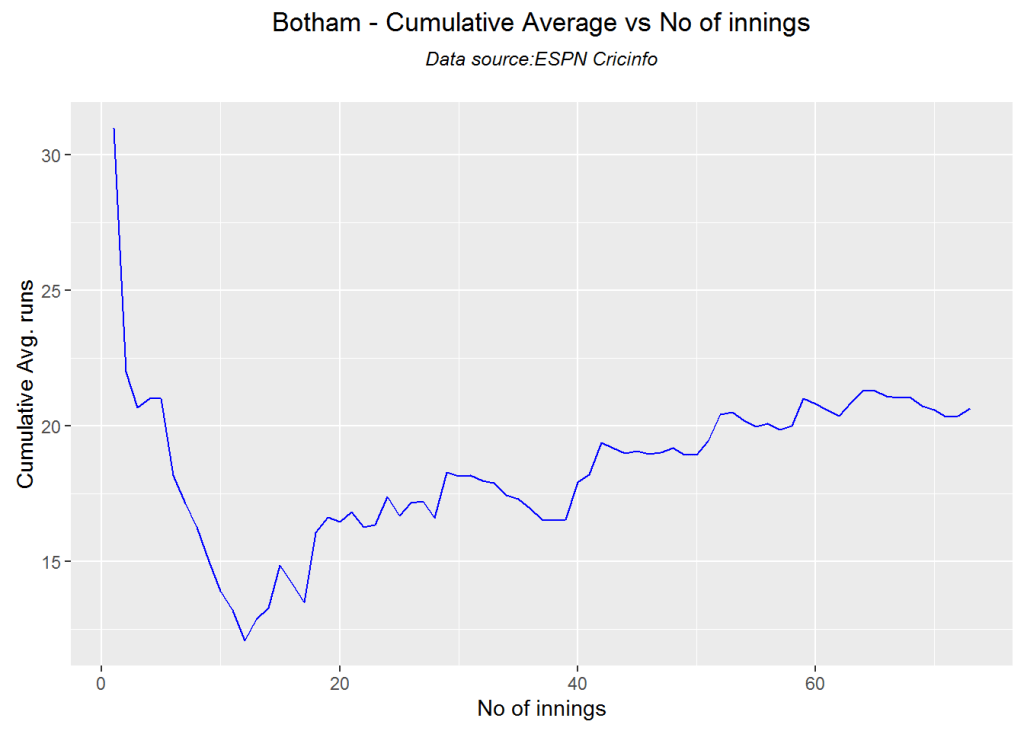
Kapils cumulative avrerage runs drops towards the last 15 innings wheres Botham had a good run towards the end of his career. Imran performance as a batsman really peaks towards the end with a cumulative average of almost 25 runs. Hadlee has a stead performance

par(mfrow=c(2,2))
par(mar=c(4,4,2,2))
batsmanCumulativeAverageRuns("./kapil1.csv","Kapil")

kbih-car-1

batsmanCumulativeAverageRuns("./botham1.csv","Botham")

kbih-car-2

batsmanCumulativeAverageRuns("./imran1.csv","Imran")

kbih-car-3

batsmanCumulativeAverageRuns("./hadlee1.csv","Hadlee")

kbih-car-4

dev.off()
## null device 
##           1

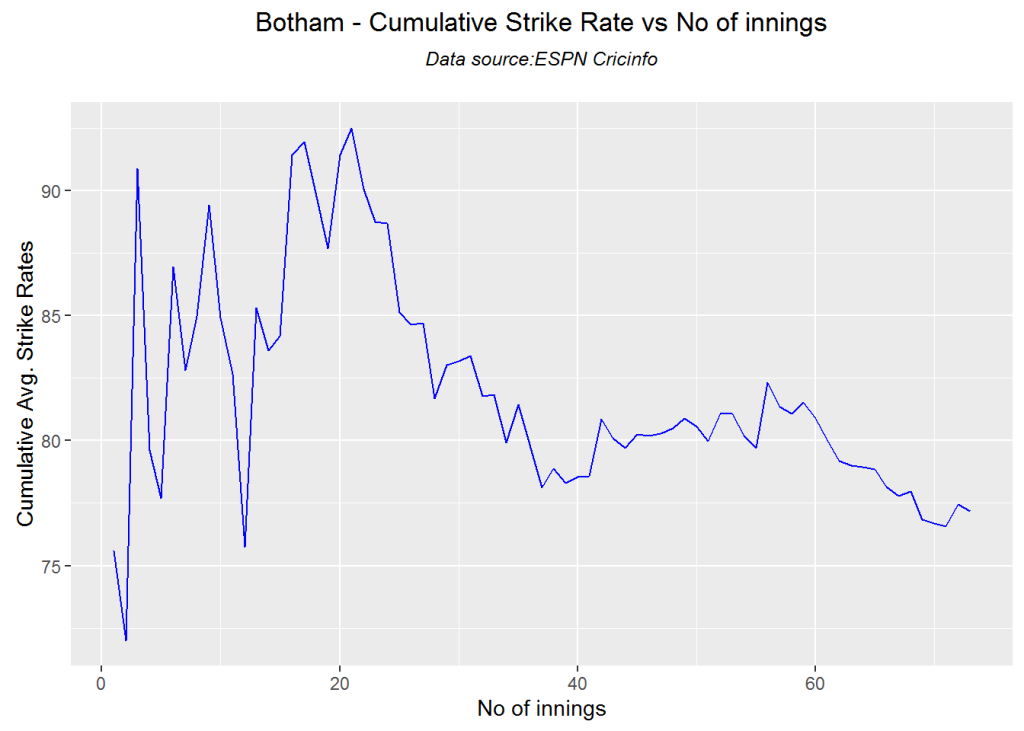
Cumulative Average strike rate of batsman in career

Kapil’s strike rate is superlative touching the 90’s steadily. Botham’s strike drops dramatically towards the latter part of his career. Imran average at a steady 75 and Hadlee averages around 85.

par(mfrow=c(2,2))
par(mar=c(4,4,2,2))
batsmanCumulativeStrikeRate("./kapil1.csv","Kapil")

kbih-casr-1

batsmanCumulativeStrikeRate("./botham1.csv","Botham")

kbih-casr-2

batsmanCumulativeStrikeRate("./imran1.csv","Imran")

kbih-casr-3

batsmanCumulativeStrikeRate("./hadlee1.csv","Hadlee")

kbih-casr-4

dev.off()
## null device 
##           1

Relative Mean Strike Rate

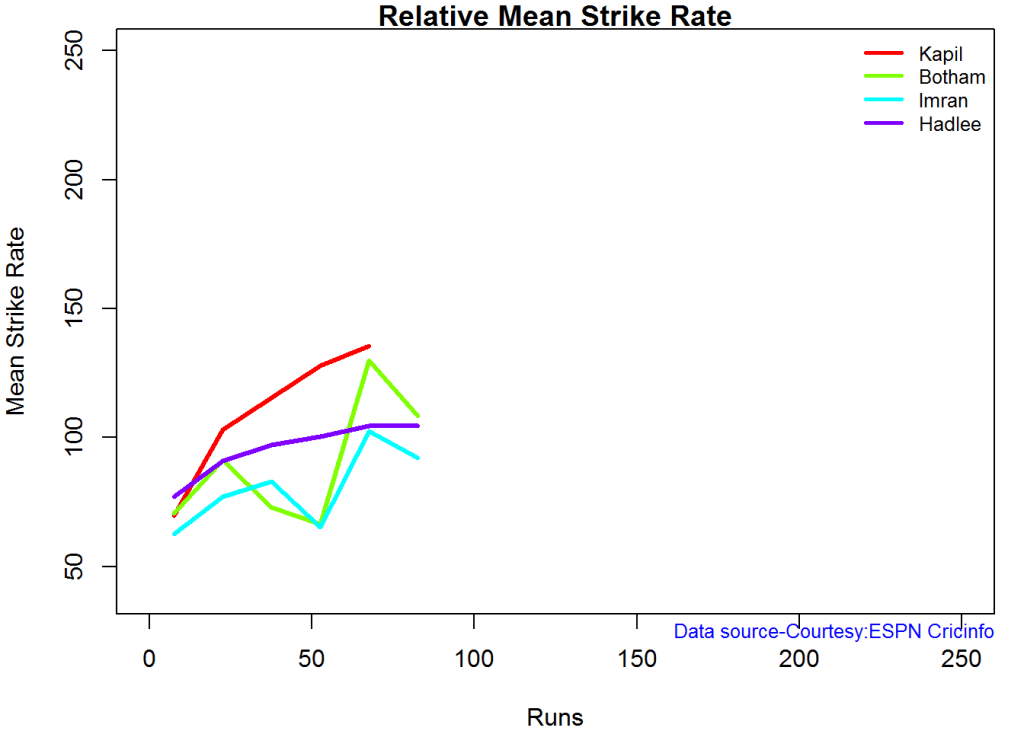
Kapil tops the strike rate among all the all-rounders. This is really a revelation to me. This can also be seen in the original data in Kapil’s strike rate is at a whopping 95.07 in comparison to Botham, Inran and Hadlee who are at 79.1,72.65 and 75.50 respectively

par(mar=c(4,4,2,2))
frames <- list("./kapil1.csv","./botham1.csv","imran1.csv","hadlee1.csv")
names <- list("Kapil","Botham","Imran","Hadlee")
relativeBatsmanSRODTT(frames,names)

plot-1-1

Relative Runs Frequency Percentage

This plot shows that Imran has a much better average runs scored over the other all rounders followed by Kapil

frames <- list("./kapil1.csv","./botham1.csv","imran1.csv","hadlee1.csv")
names <- list("Kapil","Botham","Imran","Hadlee")
relativeRunsFreqPerfODTT(frames,names)

plot-2-1

Relative cumulative average runs in career

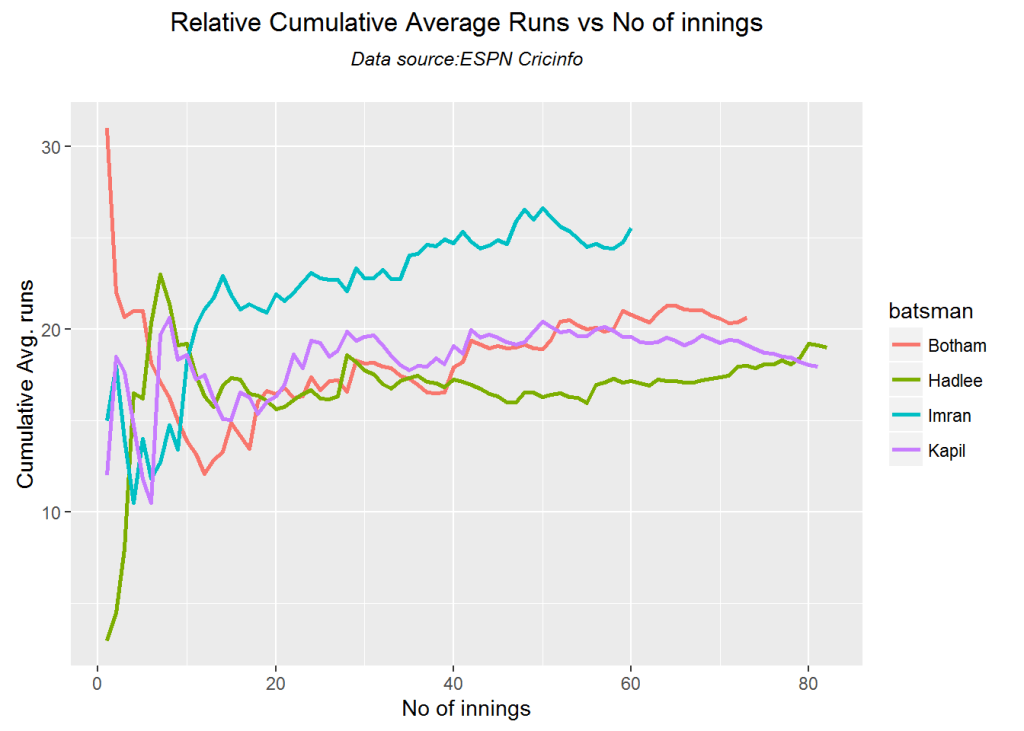
It can be seen clearly that Imran Khan leads the pack in cumulative average runs followed by Kapil Dev and then Botham

frames <- list("./kapil1.csv","./botham1.csv","imran1.csv","hadlee1.csv")
names <- list("Kapil","Botham","Imran","Hadlee")
relativeBatsmanCumulativeAvgRuns(frames,names)

kbih-relcar-1

Relative cumulative average strike rate in career

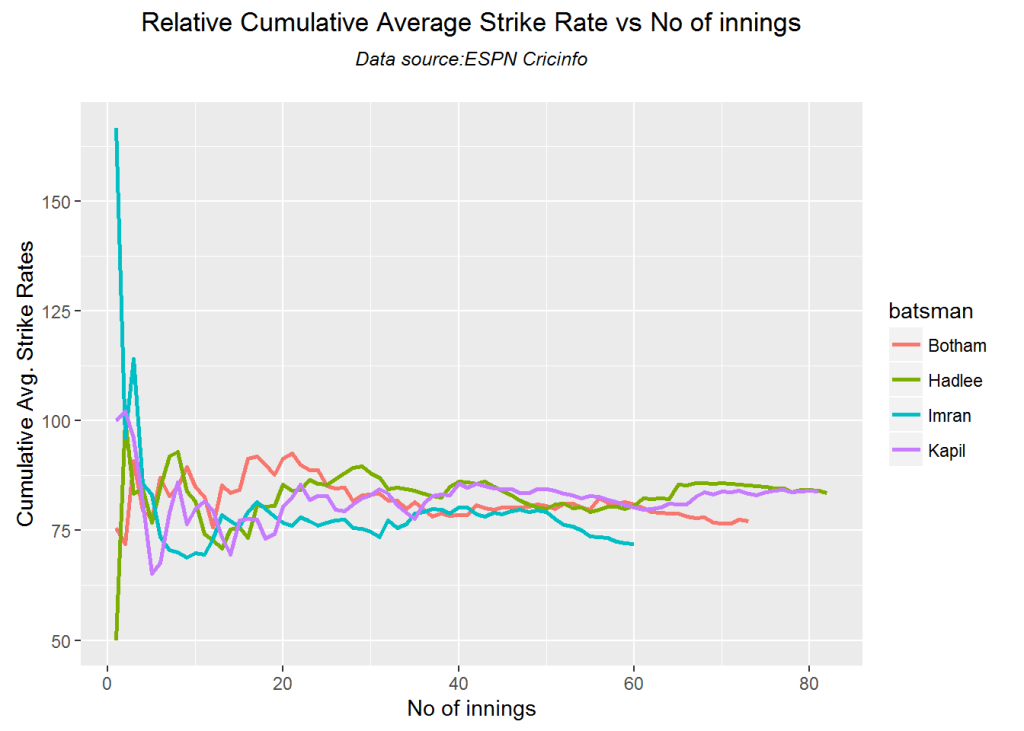
In the cumulative strike rate Hadlee and Kapil run a close race.

frames <- list("./kapil1.csv","./botham1.csv","imran1.csv","hadlee1.csv")
names <- list("Kapil","Botham","Imran","Hadlee")
relativeBatsmanCumulativeStrikeRate(frames,names)

kbih-relcsr-1

Percent 4’s,6’s in total runs scored

The plot below shows the contrib

frames <- list("./kapil1.csv","./botham1.csv","imran1.csv","hadlee1.csv")
names <- list("Kapil","Botham","Imran","Hadlee")
runs4s6s <-batsman4s6s(frames,names)

plot-46s-1

print(runs4s6s)
##                Kapil Botham Imran Hadlee
## Runs(1s,2s,3s) 72.08  66.53 77.53  73.27
## 4s             21.98  25.78 17.61  21.08
## 6s              5.94   7.68  4.86   5.65

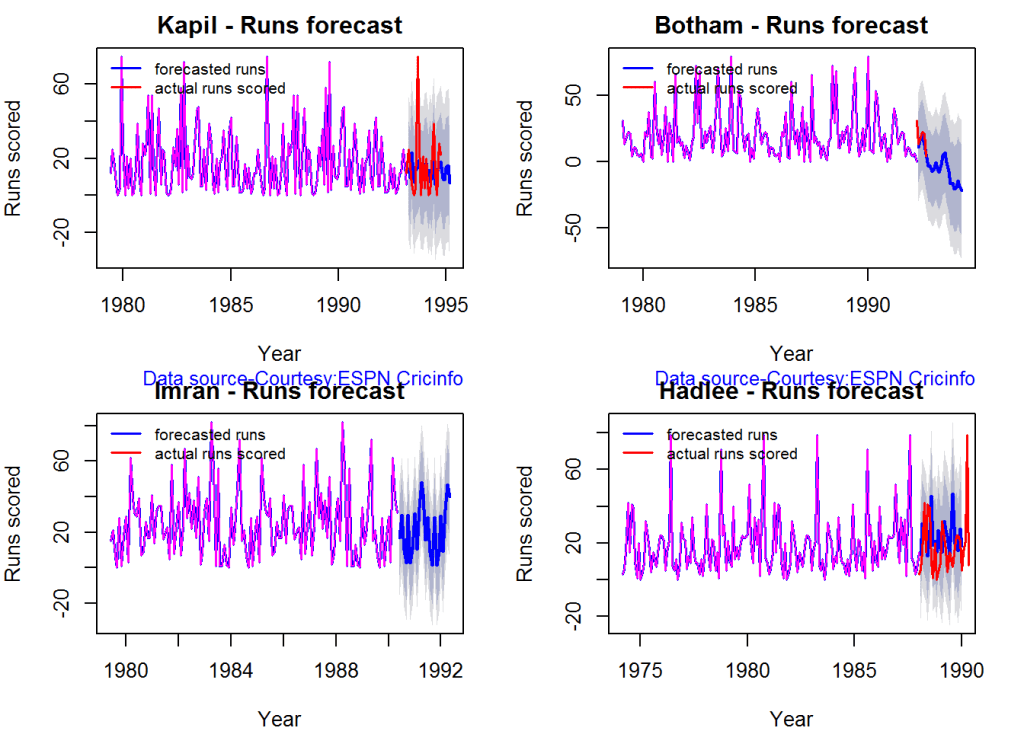
Runs forecast

The forecast for the batsman is shown below.

par(mfrow=c(2,2))
par(mar=c(4,4,2,2))
batsmanPerfForecast("./kapil1.csv","Kapil")
batsmanPerfForecast("./botham1.csv","Botham")
batsmanPerfForecast("./imran1.csv","Imran")
batsmanPerfForecast("./hadlee1.csv","Hadlee")

plot-fcst-1

dev.off()
## null device 
##           1

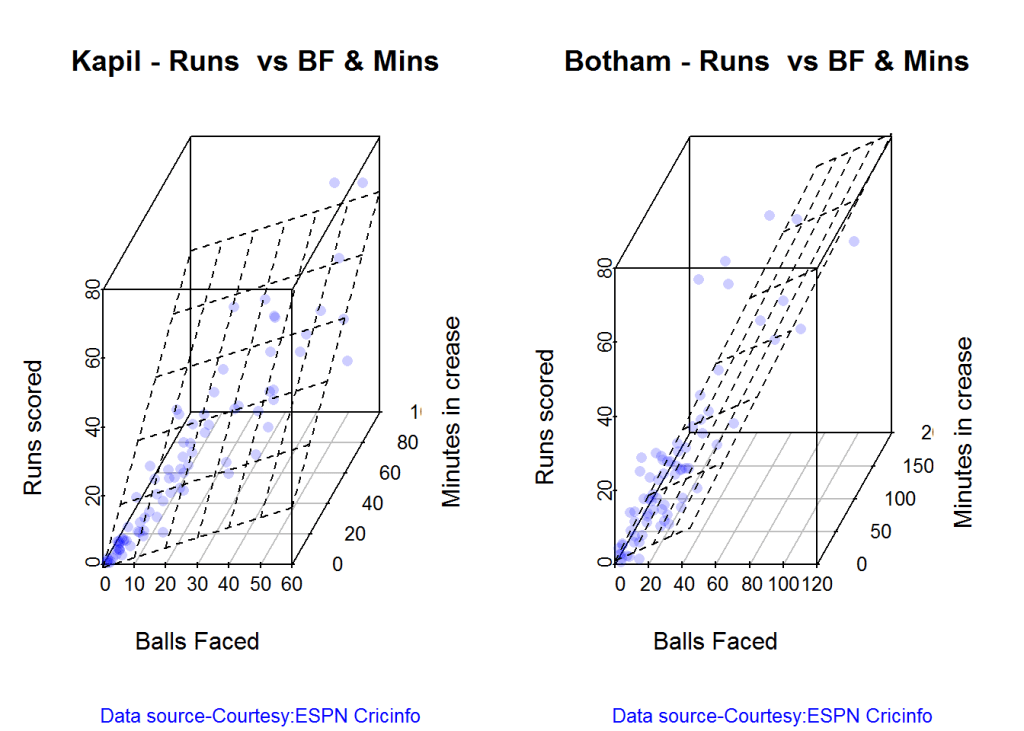
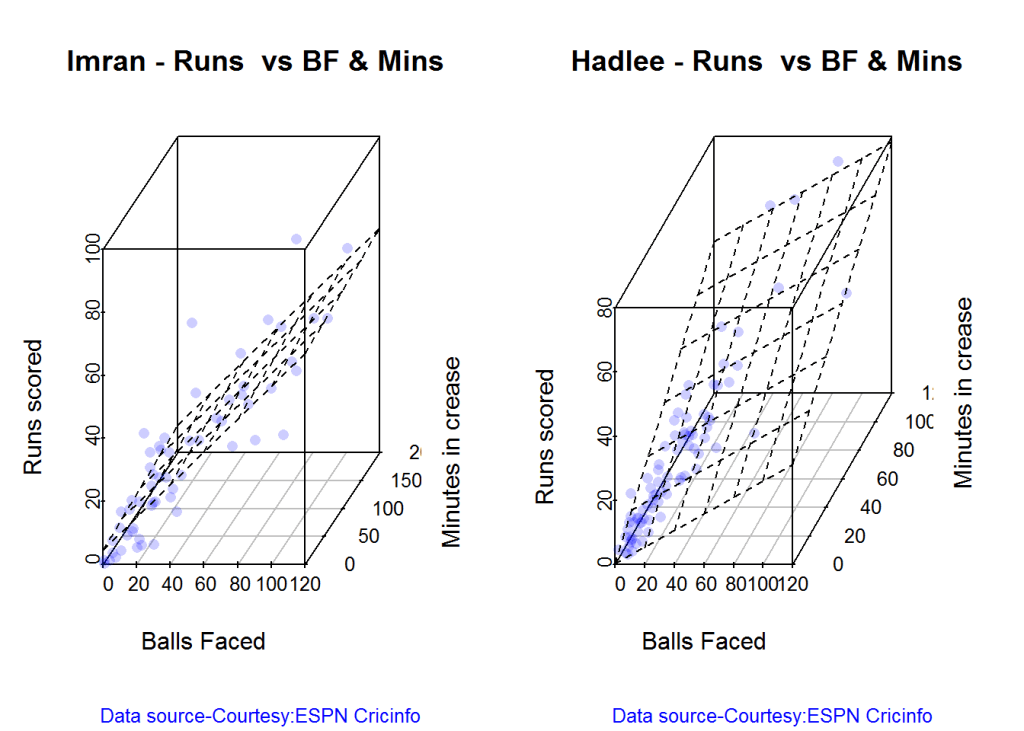
3D plot of Runs vs Balls Faced and Minutes at Crease

The plot is a scatter plot of Runs vs Balls faced and Minutes at Crease. A prediction plane is fitted

par(mfrow=c(1,2))
par(mar=c(4,4,2,2))
battingPerf3d("./kapil1.csv","Kapil")
battingPerf3d("./botham1.csv","Botham")

plot-3-1

dev.off()
## null device 
##           1
par(mfrow=c(1,2))
par(mar=c(4,4,2,2))
battingPerf3d("./imran1.csv","Imran")
battingPerf3d("./hadlee1.csv","Hadlee")

plot-4-1

dev.off()
## null device 
##           1

Predicting Runs given Balls Faced and Minutes at Crease

A multi-variate regression plane is fitted between Runs and Balls faced +Minutes at crease.

BF <- seq( 10, 200,length=10)
Mins <- seq(30,220,length=10)
newDF <- data.frame(BF,Mins)

kapil <- batsmanRunsPredict("./kapil1.csv","Kapil",newdataframe=newDF)
botham <- batsmanRunsPredict("./botham1.csv","Botham",newdataframe=newDF)
imran <- batsmanRunsPredict("./imran1.csv","Imran",newdataframe=newDF)
hadlee <- batsmanRunsPredict("./hadlee1.csv","Hadlee",newdataframe=newDF)

The fitted model is then used to predict the runs that the batsmen will score for a hypotheticial Balls faced and Minutes at crease. It can be seen that Kapil is the best bet for a balls faced and minutes at crease followed by Botham.

batsmen <-cbind(round(kapil$Runs),round(botham$Runs),round(imran$Runs),round(hadlee$Runs))
colnames(batsmen) <- c("Kapil","Botham","Imran","Hadlee")
newDF <- data.frame(round(newDF$BF),round(newDF$Mins))
colnames(newDF) <- c("BallsFaced","MinsAtCrease")
predictedRuns <- cbind(newDF,batsmen)
predictedRuns
##    BallsFaced MinsAtCrease Kapil Botham Imran Hadlee
## 1          10           30    16      6    10     15
## 2          31           51    33     22    22     28
## 3          52           72    49     38    33     42
## 4          73           93    65     54    45     56
## 5          94          114    81     70    56     70
## 6         116          136    97     86    67     84
## 7         137          157   113    102    79     97
## 8         158          178   130    117    90    111
## 9         179          199   146    133   102    125
## 10        200          220   162    149   113    139

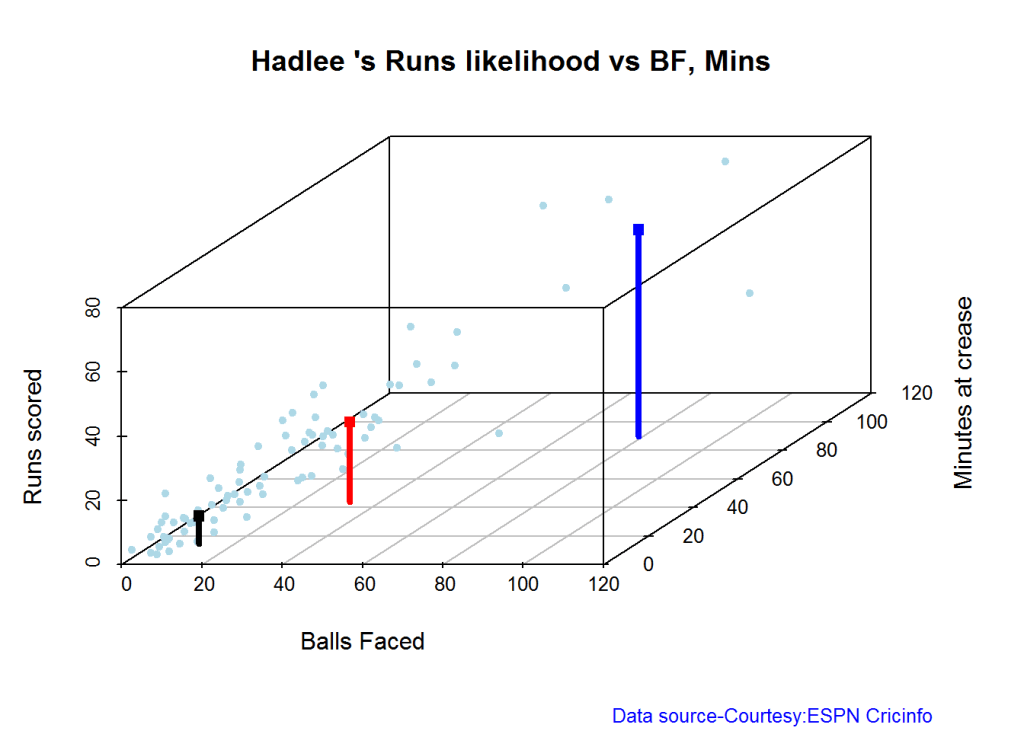
Highest runs likelihood

The plots below the runs likelihood of batsman. This uses K-Means . A. Kapil Dev

batsmanRunsLikelihood("./kapil1.csv","Kapil")

kapil11-1

## Summary of  Kapil 's runs scoring likelihood
## **************************************************
## 
## There is a 34.57 % likelihood that Kapil  will make  22 Runs in  24 balls over 34  Minutes 
## There is a 17.28 % likelihood that Kapil  will make  46 Runs in  46 balls over  65  Minutes 
## There is a 48.15 % likelihood that Kapil  will make  5 Runs in  7 balls over 9  Minutes

B. Ian Botham

batsmanRunsLikelihood("./botham1.csv","Botham")

devilliers-1

## Summary of  Botham 's runs scoring likelihood
## **************************************************
## 
## There is a 47.95 % likelihood that Botham  will make  9 Runs in  12 balls over 15  Minutes 
## There is a 39.73 % likelihood that Botham  will make  23 Runs in  32 balls over  44  Minutes 
## There is a 12.33 % likelihood that Botham  will make  59 Runs in  74 balls over 101  Minutes

C. Imran Khan

batsmanRunsLikelihood("./imran1.csv","Imran")

gaylecache-true-1

## Summary of  Imran 's runs scoring likelihood
## **************************************************
## 
## There is a 23.33 % likelihood that Imran  will make  36 Runs in  54 balls over 74  Minutes 
## There is a 60 % likelihood that Imran  will make  14 Runs in  18 balls over  23  Minutes 
## There is a 16.67 % likelihood that Imran  will make  53 Runs in  90 balls over 115  Minutes

D. Richard Hadlee

batsmanRunsLikelihood("./hadlee1.csv","Hadlee")

maxwell-1

## Summary of  Hadlee 's runs scoring likelihood
## **************************************************
## 
## There is a 6.1 % likelihood that Hadlee  will make  64 Runs in  79 balls over 90  Minutes 
## There is a 42.68 % likelihood that Hadlee  will make  25 Runs in  33 balls over  44  Minutes 
## There is a 51.22 % likelihood that Hadlee  will make  9 Runs in  11 balls over 15  Minutes

Average runs at ground and against opposition

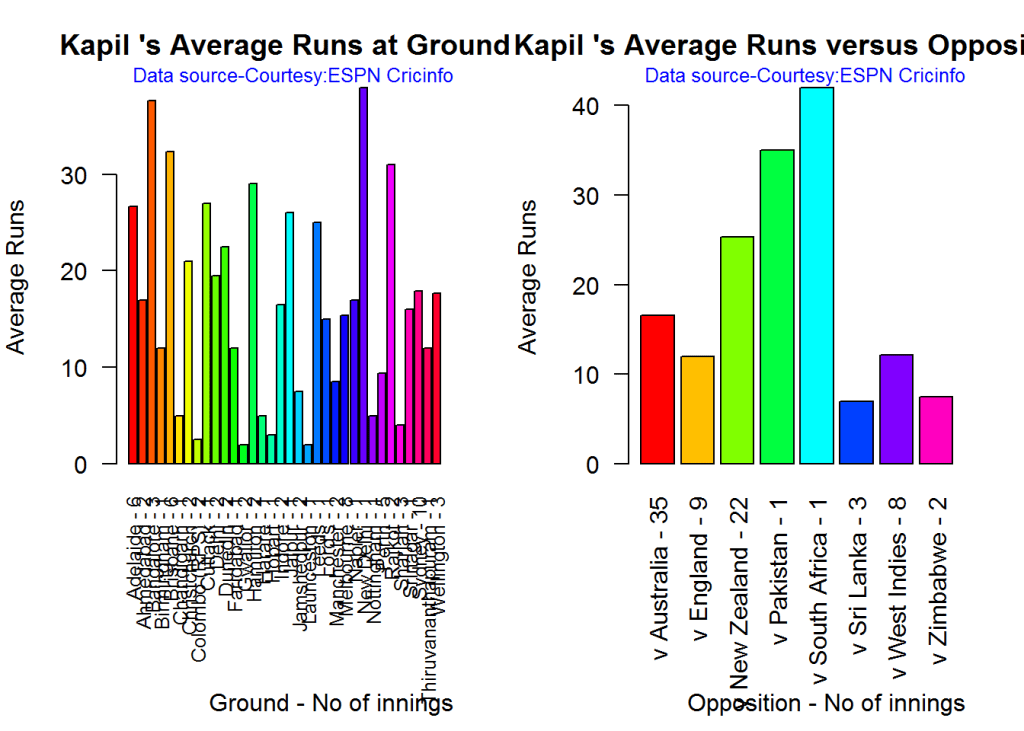
A. Kapil Dev

par(mfrow=c(1,2))
par(mar=c(4,4,2,2))
batsmanAvgRunsGround("./kapil1.csv","Kapil")
batsmanAvgRunsOpposition("./kapil1.csv","Kapil")

avgrg-1-1

dev.off()
## null device 
##           1

B. Ian Botham

par(mfrow=c(1,2))
par(mar=c(4,4,2,2))
batsmanAvgRunsGround("./botham1.csv","Botham")
batsmanAvgRunsOpposition("./botham1.csv","Botham")

avgrg-2-1

dev.off()
## null device 
##           1

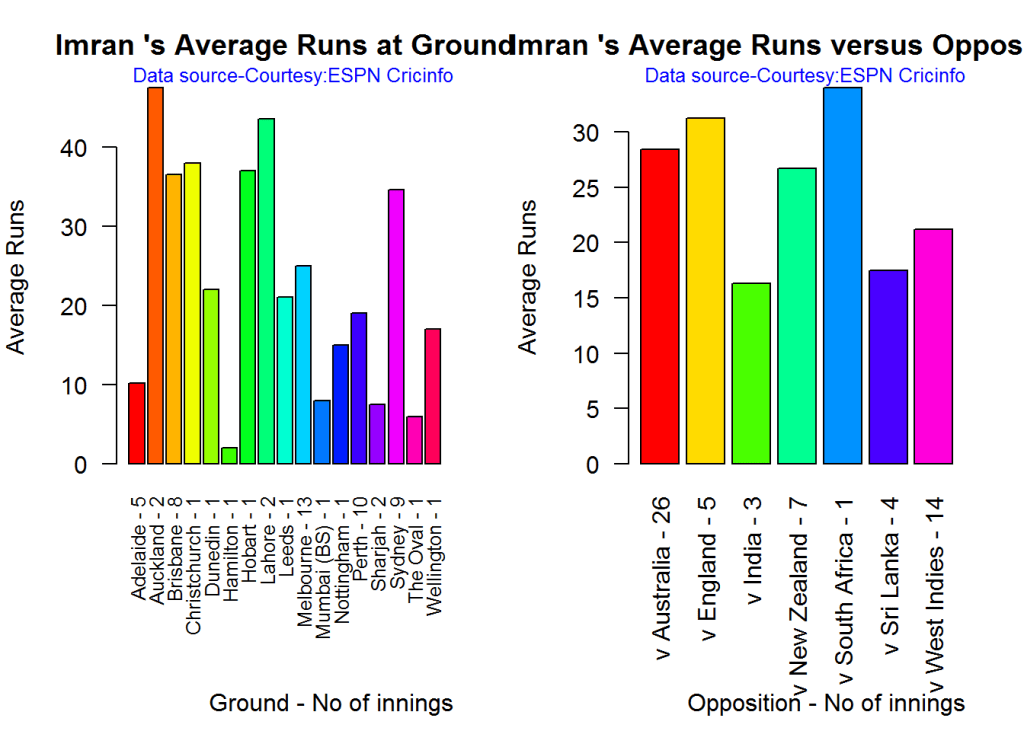
C. Imran Khan

par(mfrow=c(1,2))
par(mar=c(4,4,2,2))
batsmanAvgRunsGround("./imran1.csv","Imran")
batsmanAvgRunsOpposition("./imran1.csv","Imran")

avgrg-3-1

dev.off()
## null device 
##           1

D. Richard Hadlee

par(mfrow=c(1,2))
par(mar=c(4,4,2,2))
batsmanAvgRunsGround("./hadlee1.csv","Hadlee")
batsmanAvgRunsOpposition("./hadlee1.csv","Hadlee")

avgrg-4-1

dev.off()
## null device 
##           1

Moving Average of runs over career

The moving average for the 4 batsmen indicate the following

Kapil’s performance drops significantly while there is a slump in Botham’s performance. On the other hand Imran and Hadlee’s performance were on the upswing.

par(mfrow=c(2,2))
par(mar=c(4,4,2,2))
batsmanMovingAverage("./kapil1.csv","Kapil")
batsmanMovingAverage("./botham1.csv","Botham")
batsmanMovingAverage("./imran1.csv","Imran")
batsmanMovingAverage("./hadlee1.csv","Hadlee")

sdgm-ma-1

dev.off()
## null device 
##           1

Check batsmen in-form, out-of-form

[1] “**************************** Form status of Kapil ****************************\n\n
Population size: 72
Mean of population: 19.38 \n
Sample size: 9 Mean of sample: 6.78 SD of sample: 6.14 \n\n
Null hypothesis H0 : Kapil ‘s sample average is within 95% confidence interval of population average\n
Alternative hypothesis Ha : Kapil ‘s sample average is below the 95% confidence interval of population average\n\n
Kapil ‘s Form Status: Out-of-Form because the p value: 8.4e-05 is less than alpha= 0.05

“**************************** Form status of Botham ****************************\n\n
Population size: 65
Mean of population: 21.29 \n
Sample size: 8 Mean of sample: 15.38 SD of sample: 13.19 \n\n
Null hypothesis H0 : Botham ‘s sample average is within 95% confidence interval of population average\n
Alternative hypothesis Ha : Botham ‘s sample average is below the 95% confidence interval of population average\n\n
Botham ‘s Form Status: In-Form because the p value: 0.120342 is greater than alpha= 0.05 \n

“**************************** Form status of Imran ****************************\n\n
Population size: 54
Mean of population: 24.94 \n
Sample size: 6 Mean of sample: 30.83 SD of sample: 25.4 \n\n
Null hypothesis H0 : Imran ‘s sample average is within 95% confidence interval of population average\n
Alternative hypothesis Ha : Imran ‘s sample average is below the 95% confidence interval of population average\n\n
Imran ‘s Form Status: In-Form because the p value: 0.704683 is greater than alpha= 0.05 \n

“**************************** Form status of Hadlee ****************************\n\n
Population size: 73
Mean of population: 18 \n
Sample size: 9 Mean of sample: 27 SD of sample: 24.27 \n\n
Null hypothesis H0 : Hadlee ‘s sample average is within 95% confidence interval of population average\n
Alternative hypothesis Ha : Hadlee ‘s sample average is below the 95% confidence interval of population average\n\n
Hadlee ‘s Form Status: In-Form because the p value: 0.85262 is greater than alpha= 0.05 \n *******************************************************************************************\n\n”

Analyses of bowling performances of the All Rounders

The following plots gives the analysis of the 4 ODI batsmen

  1. Kapil Dev (Ind) – Innings – 225, Wickets = 253, Average=27.45, Economy Rate= 3.71
  2. Ian Botham (Eng) – Innings – 116, Wickets = 145, Average=28.54, Economy Rate= 3.96
  3. Imran Khan (Pak) – Innings – 175, Wickets = 182, Average=26.61, Economy Rate= 3.89
  4. Richard Hadlee (NZ) – Innings – 115, Wickets = 158, Average=21.56, Economy Rate= 3.30

Botham has the highest number of innings and wickets followed closely by Mitchell. Imran and Hadlee have relatively fewer innings.

To get the bowler’s data use

#kapil2 
#botham2 
#imran2 
#hadlee2 

“`

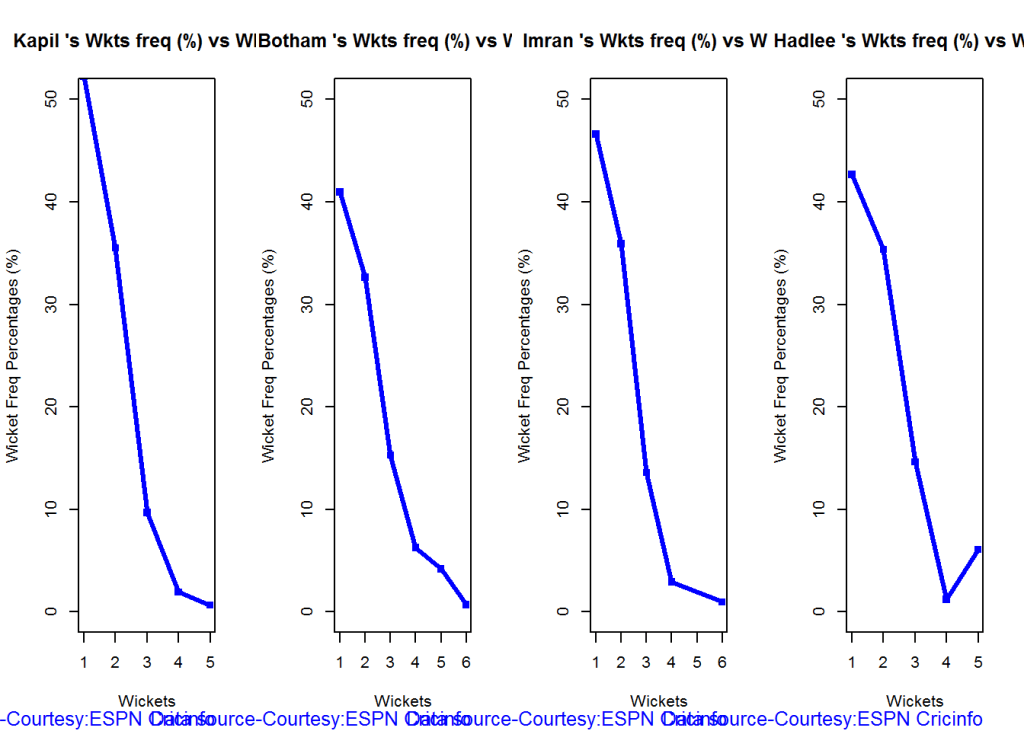
Wicket Frequency percentage

This plot gives the percentage of wickets for each wickets (1,2,3…etc).

par(mfrow=c(1,4))
par(mar=c(4,4,2,2))
bowlerWktsFreqPercent("./kapil2.csv","Kapil")
bowlerWktsFreqPercent("./botham2.csv","Botham")
bowlerWktsFreqPercent("./imran2.csv","Imran")
bowlerWktsFreqPercent("./hadlee2.csv","Hadlee")

relbowlfp-1

dev.off()
## null device 
##           1

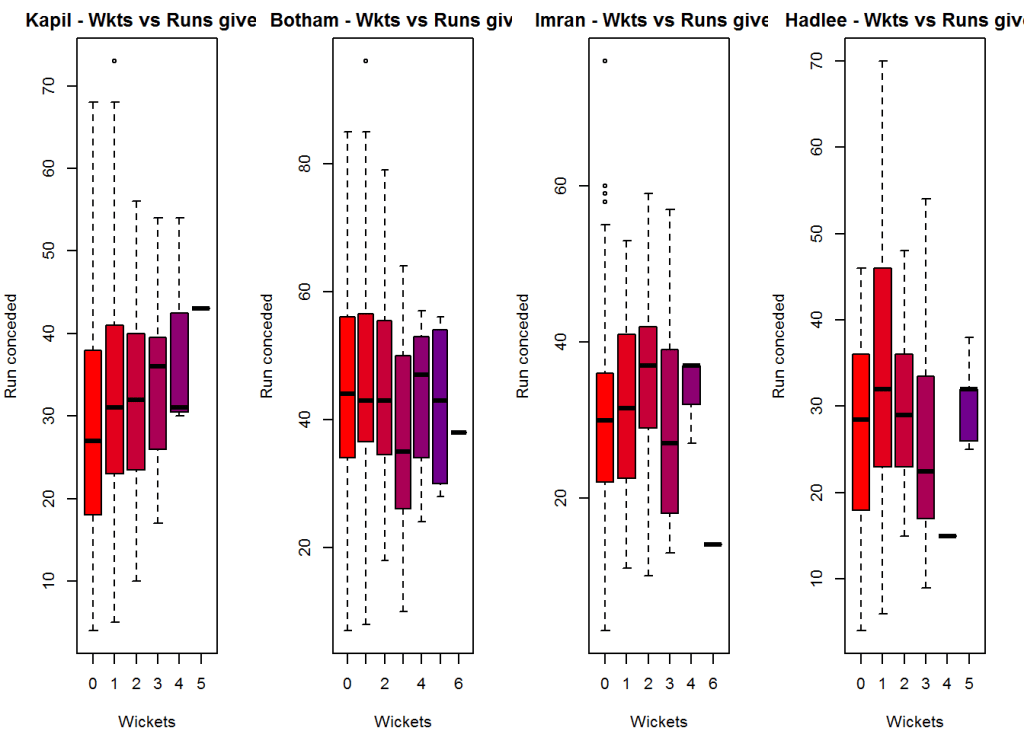
Wickets Runs plot

The plot below gives a boxplot of the runs ranges for each of the wickets taken by the bowlers.

par(mfrow=c(1,4))
par(mar=c(4,4,2,2))

bowlerWktsRunsPlot("./kapil2.csv","Kapil")
bowlerWktsRunsPlot("./botham2.csv","Botham")
bowlerWktsRunsPlot("./imran2.csv","Imran")
bowlerWktsRunsPlot("./hadlee2.csv","Hadlee")

wktsrun-1

dev.off()
## null device 
##           1

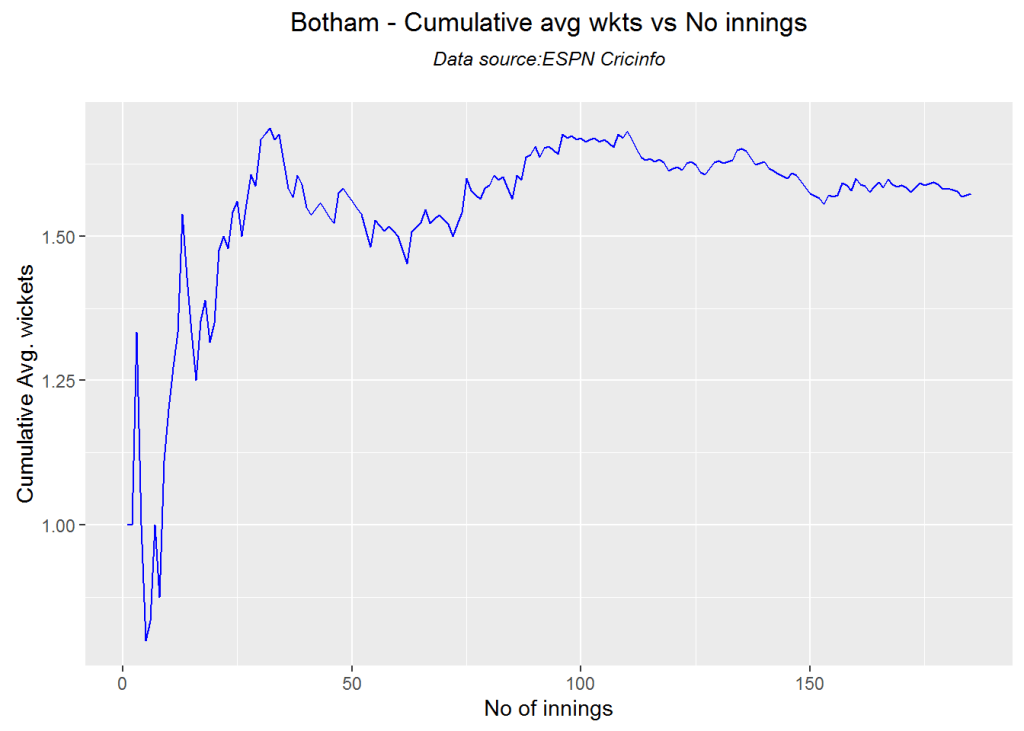
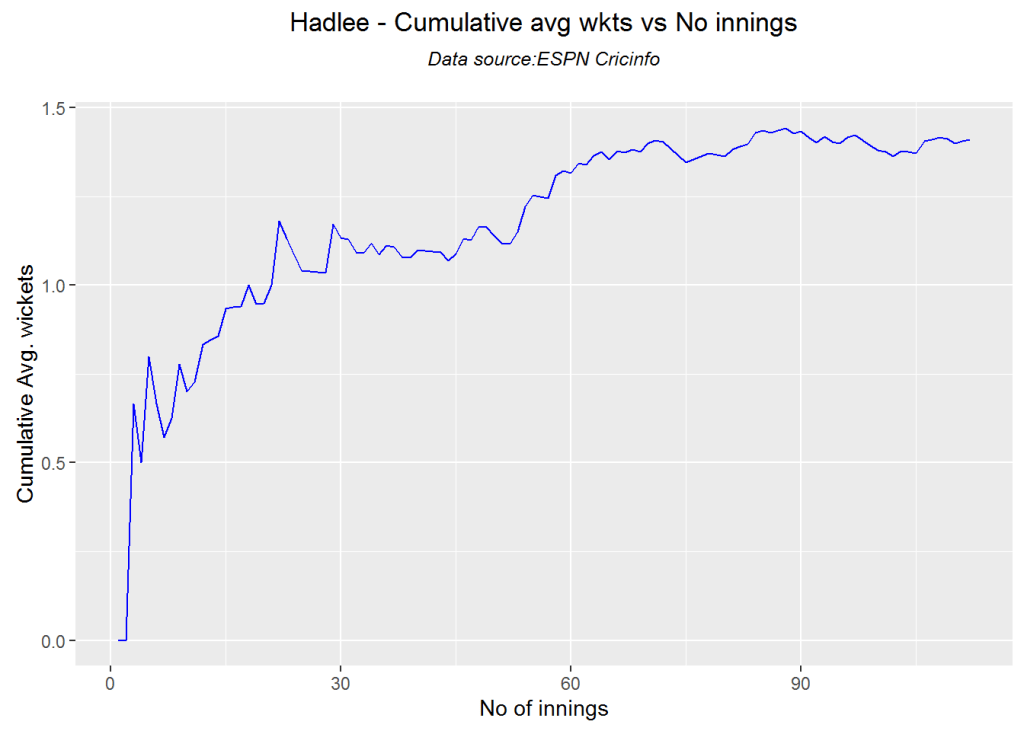
Cumulative average wicket plot

Botham has the best cumulative average wicket touching almost 1.6 wickets followed by Hadlee

par(mfrow=c(1,3))
par(mar=c(4,4,2,2))
bowlerCumulativeAvgWickets("./kapil2.csv","Kapil")

kwm-bowlcaw-1

bowlerCumulativeAvgWickets("./botham2.csv","Botham")

kwm-bowlcaw-2

bowlerCumulativeAvgWickets("./imran2.csv","Imran")

kwm-bowlcaw-3

bowlerCumulativeAvgWickets("./hadlee2.csv","Hadlee")

kwm-bowlcaw-4

dev.off()
## null device 
##           1
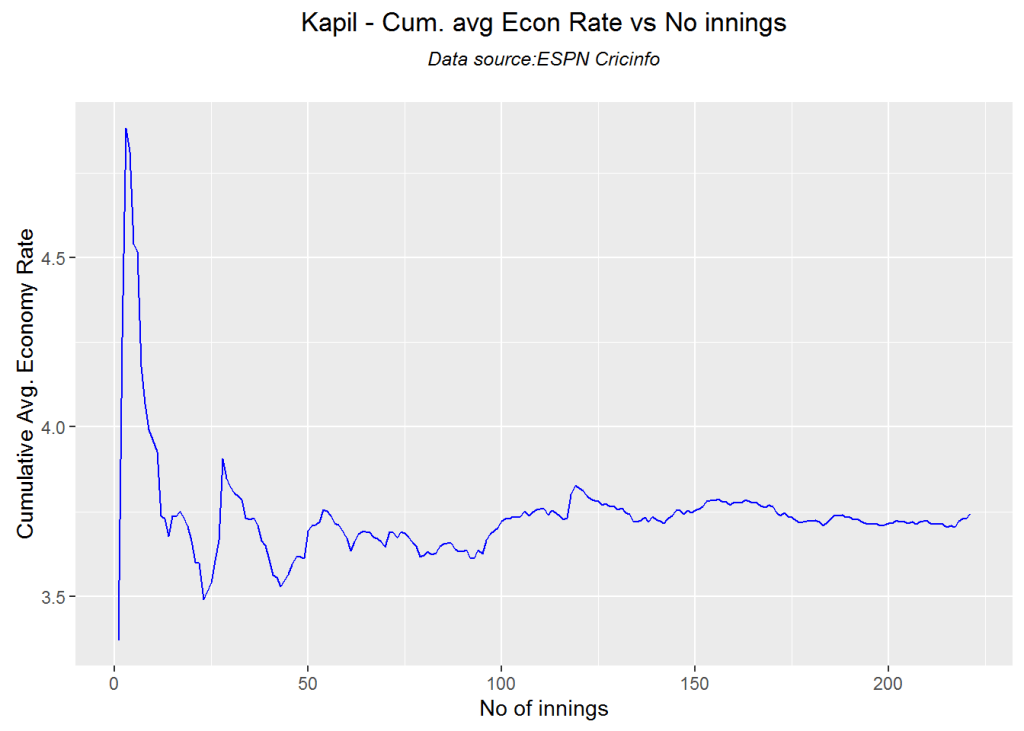
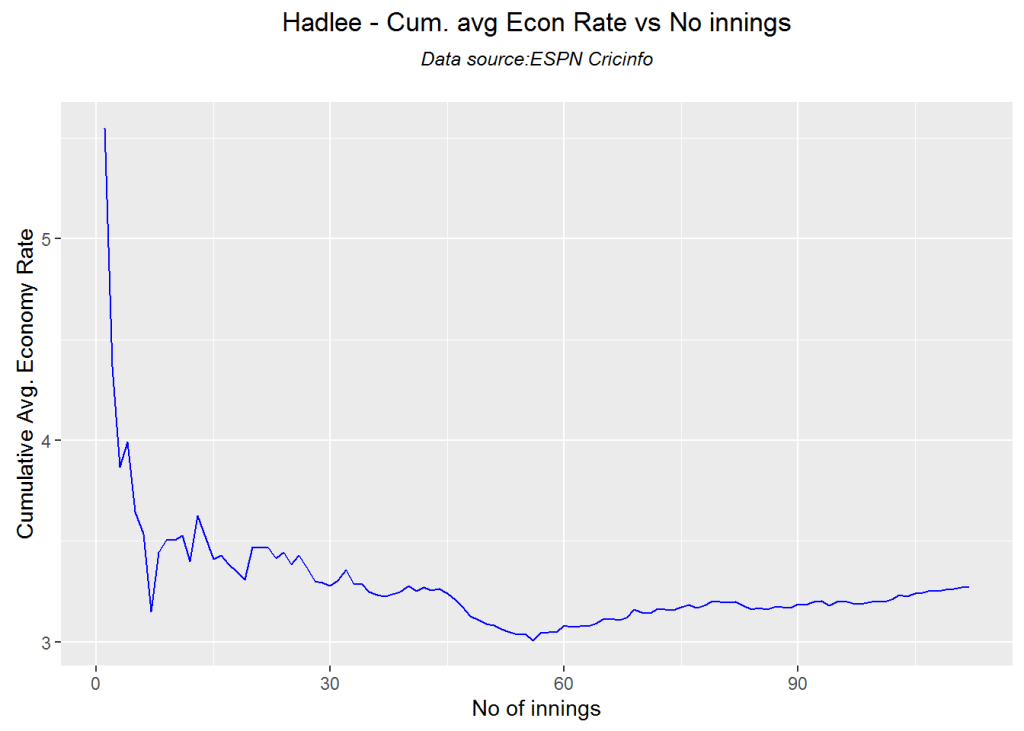
par(mfrow=c(1,3))
par(mar=c(4,4,2,2))
bowlerCumulativeAvgEconRate("./kapil2.csv","Kapil")

kwm-bowlcer-1

bowlerCumulativeAvgEconRate("./botham2.csv","Botham")

kwm-bowlcer-2

bowlerCumulativeAvgEconRate("./imran2.csv","Imran")

kwm-bowlcer-3

bowlerCumulativeAvgEconRate("./hadlee2.csv","Hadlee")

kwm-bowlcer-4

dev.off()
## null device 
##           1

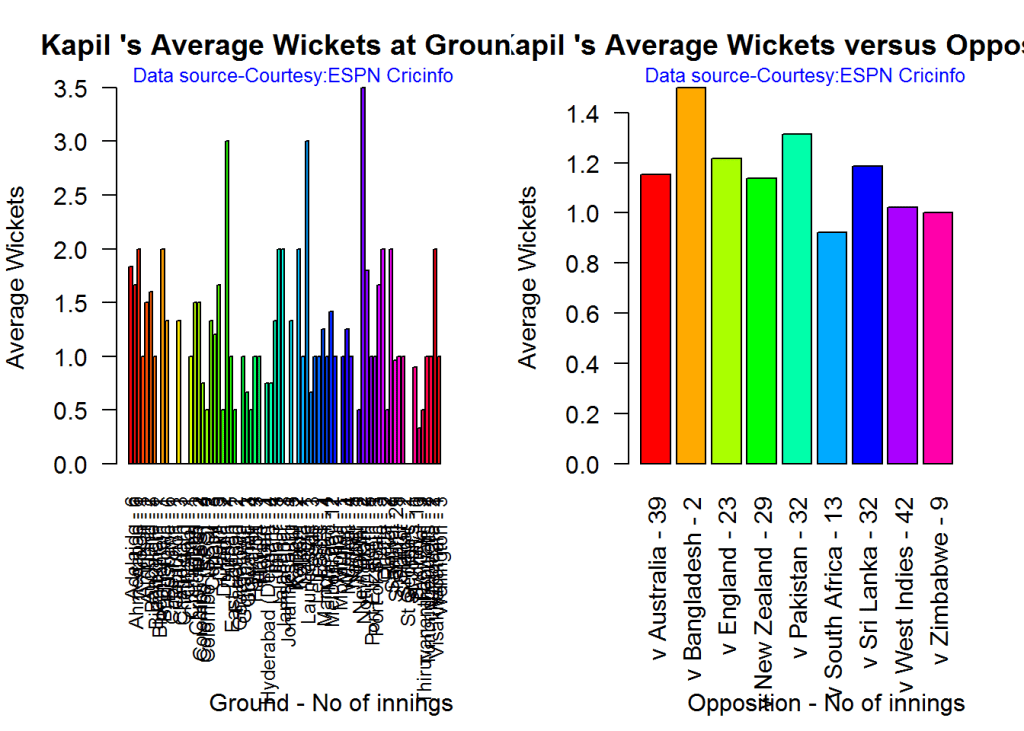
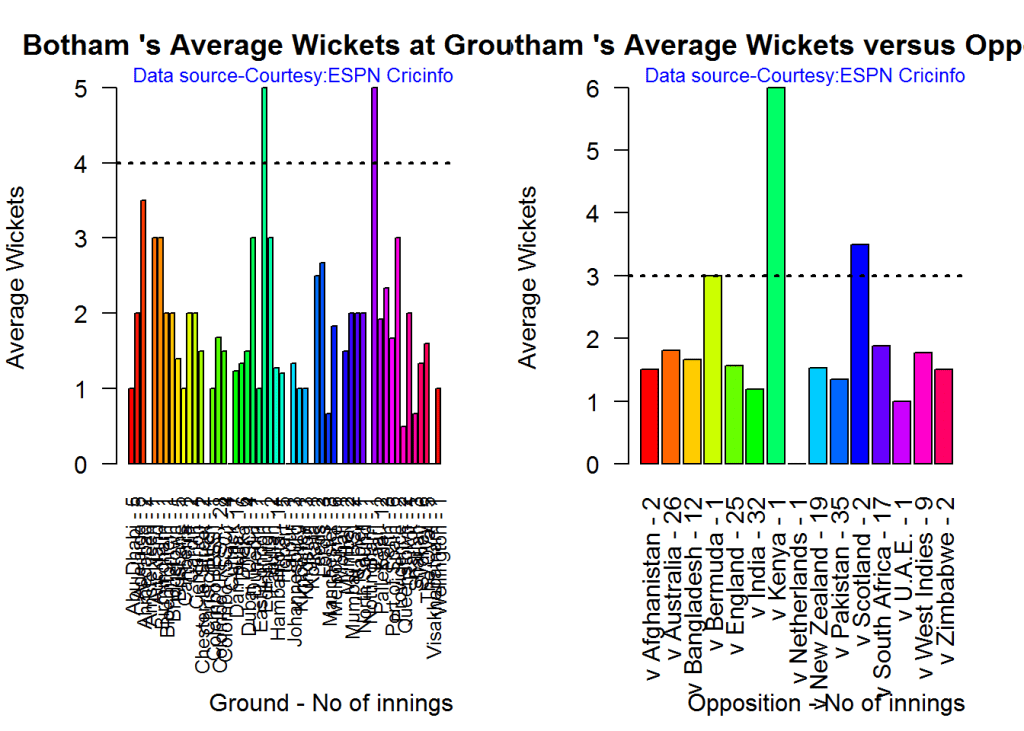
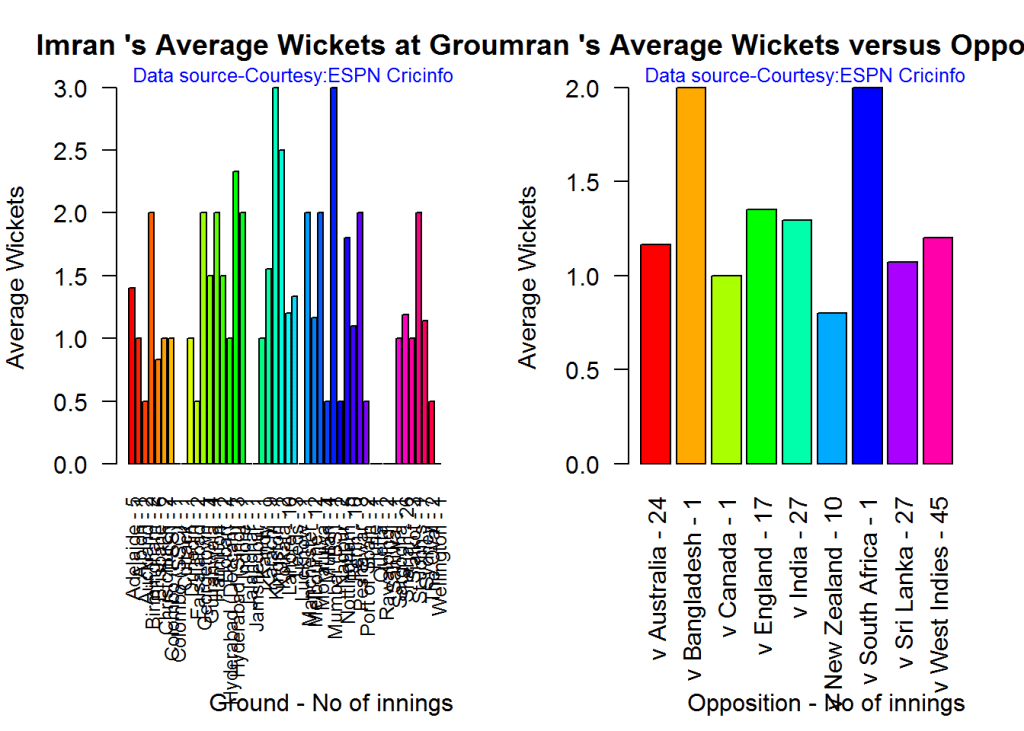
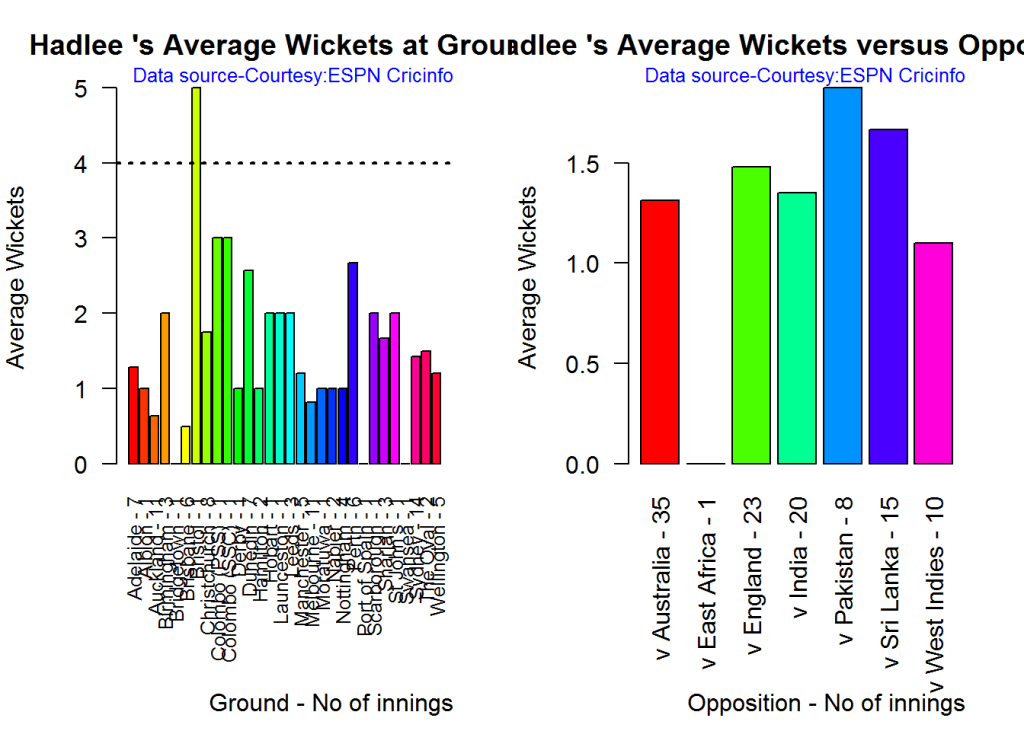
Average wickets in different grounds and opposition

A. Kapil Dev

par(mfrow=c(1,2))
par(mar=c(4,4,2,2))
bowlerAvgWktsGround("./kapil2.csv","Kapil")
bowlerAvgWktsOpposition("./kapil2.csv","Kapil")

gr-1-1

dev.off()
## null device 
##           1

B. Ian Botham

par(mfrow=c(1,2))
par(mar=c(4,4,2,2))
bowlerAvgWktsGround("./botham2.csv","Botham")
bowlerAvgWktsOpposition("./botham2.csv","Botham")

gr-2-1

dev.off()
## null device 
##           1

C. Imran Khan

par(mfrow=c(1,2))
par(mar=c(4,4,2,2))
bowlerAvgWktsGround("./imran2.csv","Imran")
bowlerAvgWktsOpposition("./imran2.csv","Imran")

gr-3-1

dev.off()
## null device 
##           1

D. Richard Hadlee

par(mfrow=c(1,2))
par(mar=c(4,4,2,2))
bowlerAvgWktsGround("./hadlee2.csv","Hadlee")
bowlerAvgWktsOpposition("./hadlee2.csv","Hadlee")

gr-4-1

dev.off()
## null device 
##           1

Relative bowling performance

It can be seen that Botham is the most effective wicket taker of the lot

frames <- list("./kapil2.csv","./botham2.csv","imran2.csv","hadlee2.csv")
names <- list("Kapil","Botham","Imran","Hadlee")
relativeBowlingPerf(frames,names)

relbowlperf-1

Relative Economy Rate against wickets taken

Hadlee has the best overall economy rate followed by Kapil Dev

frames <- list("./kapil2.csv","./botham2.csv","imran2.csv","hadlee2.csv")
names <- list("Kapil","Botham","Imran","Hadlee")
relativeBowlingERODTT(frames,names)

relbowler-1

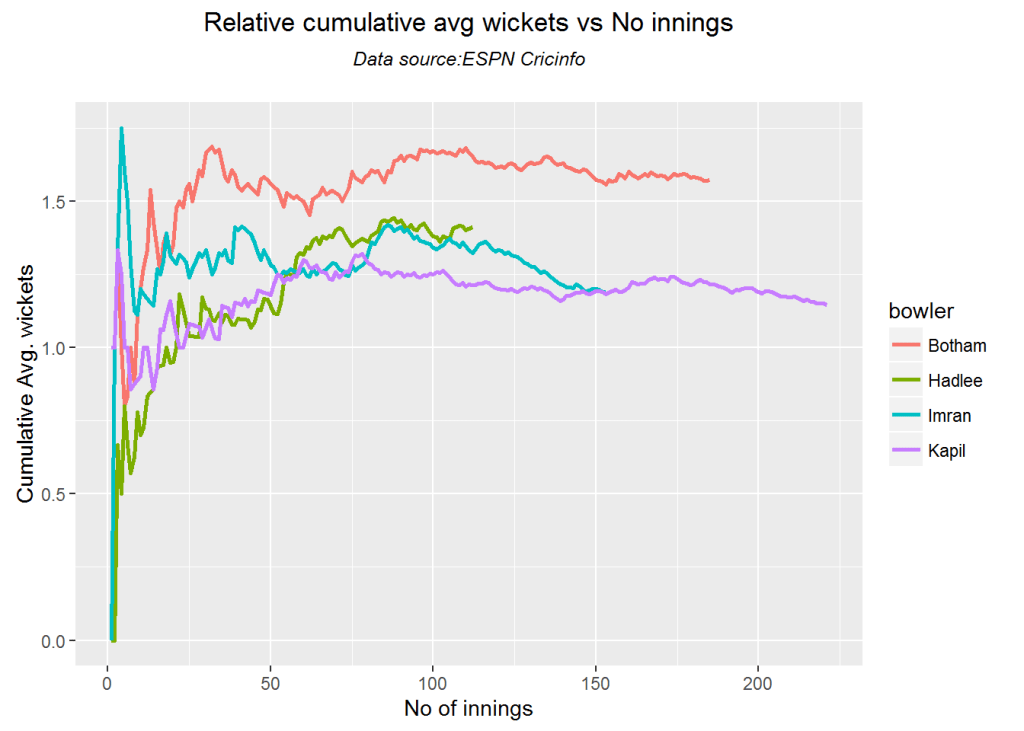
Relative cumulative average wickets of bowlers in career

This plot confirms the wicket taking ability of Botham followed by Hadlee

frames <- list("./kapil2.csv","./botham2.csv","imran2.csv","hadlee2.csv")
names <- list("Kapil","Botham","Imran","Hadlee")
relativeBowlerCumulativeAvgWickets(frames,names)

rbcaw-1

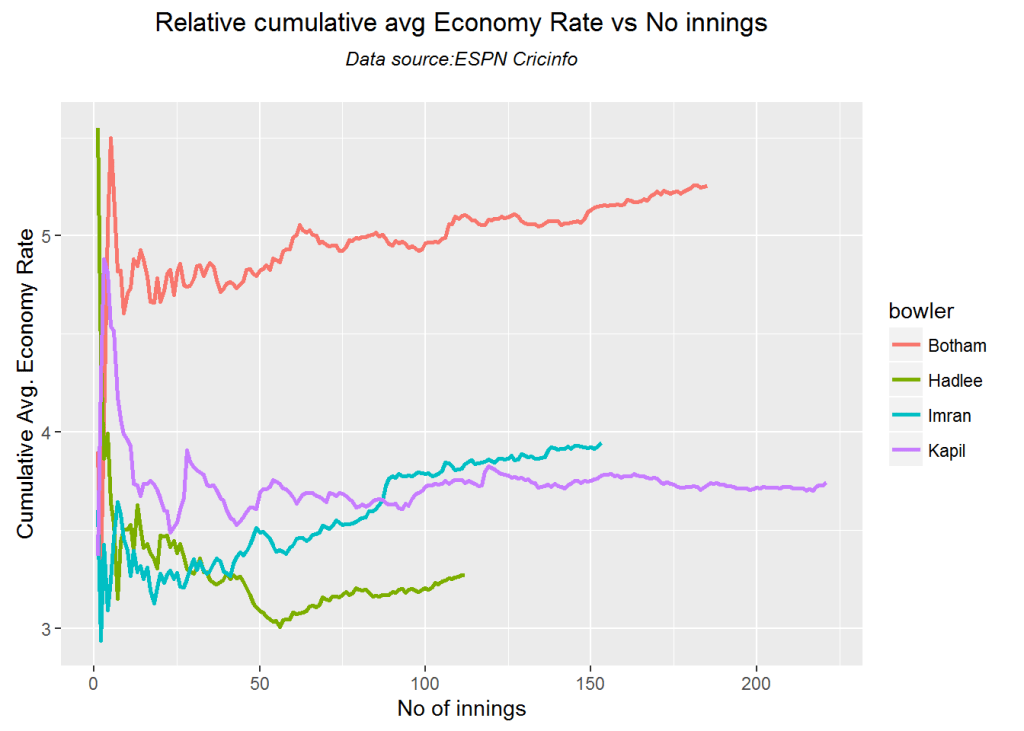
Relative cumulative average economy rate of bowlers

frames <- list("./kapil2.csv","./botham2.csv","imran2.csv","hadlee2.csv")
names <- list("Kapil","Botham","Imran","Hadlee")
relativeBowlerCumulativeAvgEconRate(frames,names)

rbcer-1

Moving average of wickets over career

This plot shows that Hadlee has the best economy rate followed by Kapil

par(mfrow=c(2,2))
par(mar=c(4,4,2,2))
bowlerMovingAverage("./kapil2.csv","Kapil")
bowlerMovingAverage("./botham2.csv","Botham")
bowlerMovingAverage("./imran2.csv","Imran")
bowlerMovingAverage("./hadlee2.csv","Hadlee")

jmss-bowlma-1

dev.off()
## null device 
##           1

Wickets forecast

par(mfrow=c(2,2))
par(mar=c(4,4,2,2))
bowlerPerfForecast("./kapil2.csv","Kapil")
bowlerPerfForecast("./botham2.csv","Botham")
bowlerPerfForecast("./imran2.csv","Imran")
bowlerPerfForecast("./hadlee2.csv","Hadlee")

jjmss-pfcst-1

dev.off()
## null device 
##           1

Check bowler in-form, out-of-form

“**************************** Form status of Kapil ****************************\n\n
Population size: 198
Mean of population: 1.2 \n Sample size: 23 Mean of sample: 0.65 SD of sample: 0.83 \n\n
Null hypothesis H0 : Kapil ‘s sample average is within 95% confidence interval \n of population average\n
Alternative hypothesis Ha : Kapil ‘s sample average is below the 95% confidence\n interval of population average\n\n
Kapil ‘s Form Status: Out-of-Form because the p value: 0.002097 is less than alpha= 0.05 \n

“**************************** Form status of Botham ****************************\n\n
Population size: 166
Mean of population: 1.58 \n Sample size: 19 Mean of sample: 1.47 SD of sample: 1.12 \n\n
Null hypothesis H0 : Botham ‘s sample average is within 95% confidence interval \n of population average\n
Alternative hypothesis Ha : Botham ‘s sample average is below the 95% confidence\n interval of population average\n\n
Botham ‘s Form Status: In-Form because the p value: 0.336694 is greater than alpha= 0.05 \n

“**************************** Form status of Imran ****************************\n\n
Population size: 137
Mean of population: 1.23 \n Sample size: 16 Mean of sample: 0.81 SD of sample: 0.91 \n\n
Null hypothesis H0 : Imran ‘s sample average is within 95% confidence interval \n of population average\n
Alternative hypothesis Ha : Imran ‘s sample average is below the 95% confidence\n interval of population average\n\n
Imran ‘s Form Status: Out-of-Form because the p value: 0.041727 is less than alpha= 0.05 \n

“**************************** Form status of Hadlee ****************************\n\n
Population size: 100
Mean of population: 1.38 \n Sample size: 12 Mean of sample: 1.67 SD of sample: 1.37 \n\n
Null hypothesis H0 : Hadlee ‘s sample average is within 95% confidence interval \n of population average\n
Alternative hypothesis Ha : Hadlee ‘s sample average is below the 95% confidence\n interval of population average\n\n
Hadlee ‘s Form Status: In-Form because the p value: 0.761265 is greater than alpha= 0.05 \n *******************************************************************************************\n\n”

Key findings

Here are some key conclusions ODI batsmen

  1. Kapil Dev’s strike rate stands high above the other 3
  2. Imran Khan has the best cumulative average runs followed by Kapil
  3. Botham is the most effective wicket taker followed by Hadlee
  4. Hadlee is the most economical bowler and is followed by Kapil Dev
  5. For a hypothetical Balls Faced and Minutes at creases Kapil will score the most runs followed by Botham
  6. The moving average of indicates that the best is yet to come for Imran and Hadlee. Kapil and Botham were on the decline

Also see my other posts in R

  1. A primer on Qubits, Quantum gates abd Quantum operations
  2. Deblurring with OpenCV:Weiner filter reloaded
  3. Designing a Social Web Portal
  4. A crime map of India in R – Crimes against women
  5. Bend it like Bluemix, MongoDB with autoscaling – Part 2
  6. Mirror, mirror . the best batsman of them all?

For a full list of posts see Index of posts

IBM Data Science Experience:  First steps with yorkr

Fresh, and slightly dizzy, from my foray into Quantum Computing with IBM’s Quantum Experience, I now turn my attention to IBM’s Data Science Experience (DSE).

I am on the verge of completing a really great 3 module ‘Data Science and Engineering with Spark XSeries’ from the University of California, Berkeley and I have been thinking of trying out some form of integrated delivery platform for performing analytics, for quite some time.  Coincidentally,  IBM comes out with its Data Science Experience. a month back. There are a couple of other collaborative platforms available for playing around with Apache Spark or Data Analytics namely Jupyter notebooks, Databricks, Data.world.

I decided to go ahead with IBM’s Data Science Experience as  the GUI is a lot cooler, includes shared data sets and integrates with Object Storage, Cloudant DB etc,  which seemed a lot closer to the cloud, literally!  IBM’s DSE is an interactive, collaborative, cloud-based environment for performing data analysis with Apache Spark. DSE is hosted on IBM’s PaaS environment, Bluemix. It should be possible to access in DSE the plethora of cloud services available on Bluemix. IBM’s DSE uses Jupyter notebooks for creating and analyzing data which can be easily shared and has access to a few hundred publicly available datasets

Disclaimer: This article represents the author’s viewpoint only and doesn’t necessarily represent IBM’s positions, strategies or opinions

In this post, I use IBM’s DSE and my R package yorkr, for analyzing the performance of 1 ODI match (Aus-Ind, 2 Feb 2012)  and the batting performance of Virat Kohli in IPL matches. These are my ‘first’ steps in DSE so, I use plain old “R language” for analysis together with my R package ‘yorkr’. I intend to  do more interesting stuff on Machine learning with SparkR, Sparklyr and PySpark in the weeks and months to come.

You can checkout the Jupyter notebooks created with IBM’s DSE Y at Github  – “Using R package yorkr – A quick overview’ and  on NBviewer at “Using R package yorkr – A quick overview

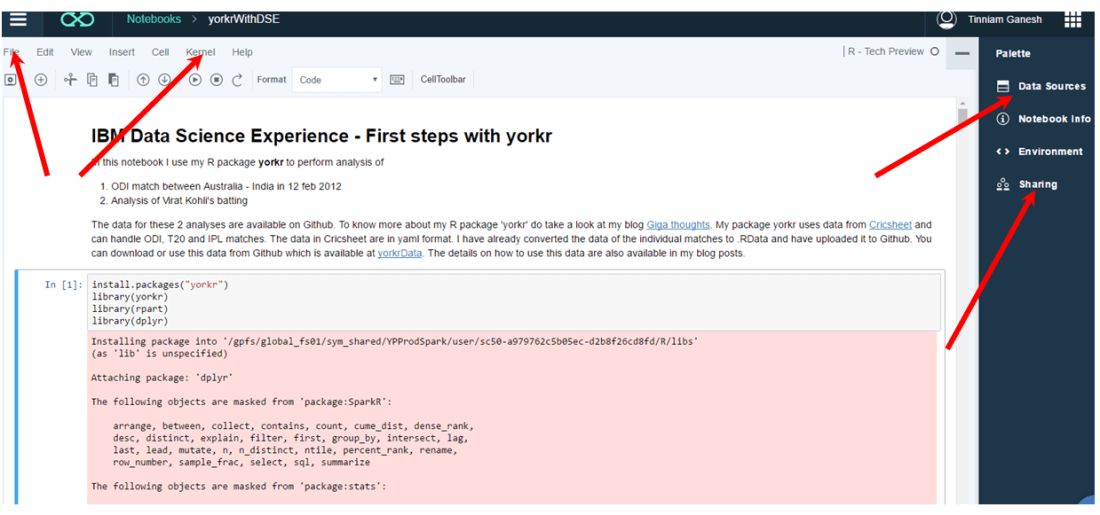
Working with Jupyter notebooks are fairly straight forward which can handle code in R, Python and Scala. Each cell can either contain code (Python or Scala), Markdown text, NBConvert or Heading. The code is written into the cells and can be executed sequentially. Here is a screen shot of the notebook.

Untitled

The ‘File’ menu can be used for ‘saving and checkpointing’ or ‘reverting’ to a checkpoint. The ‘kernel’ menu can be used to start, interrupt, restart and run all cells etc. Data Sources icon can be used to load data sources to your code. The data is uploaded to Object Storage with appropriate credentials. You will have to  import this data from Object Storage using the credentials. In my notebook with yorkr I directly load the data from Github.  You can use the sharing to share the notebook. The shared notebook has an extension ‘ipynb’. You can use the ‘Sharing’ icon  to share the notebook. The shared notebook has an extension ‘ipynb’. You an import this notebook directly into your environment and can get started with the code available in the notebook.

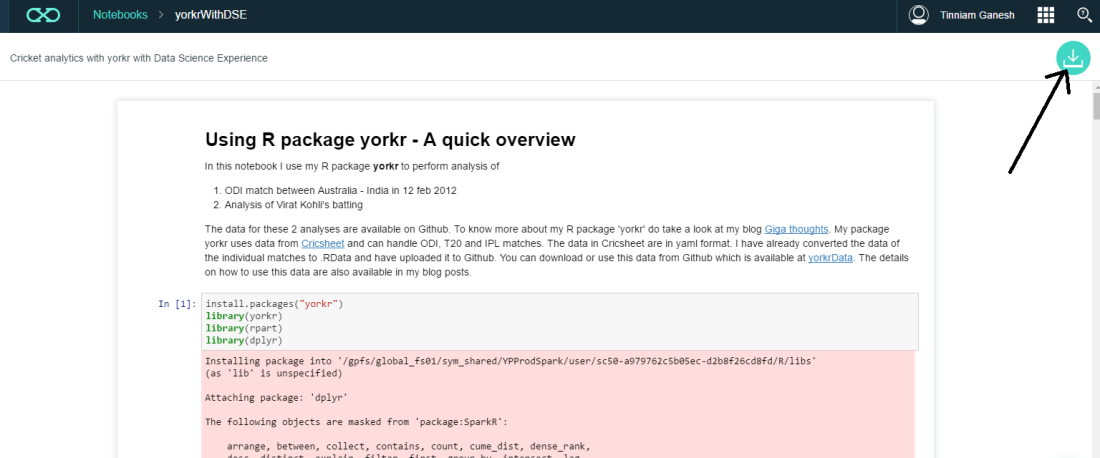
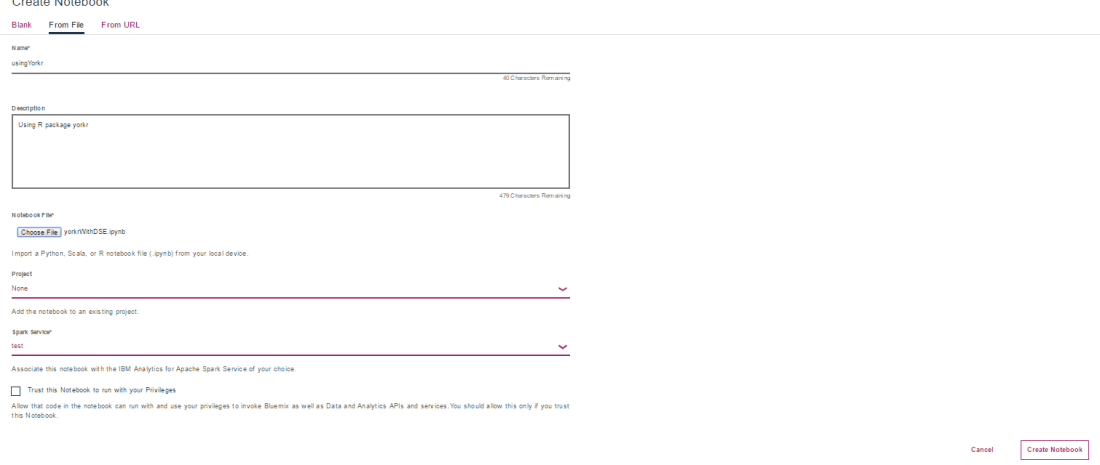
You can import existing R, Python or Scala notebooks as shown below. My notebook ‘Using R package yorkr – A quick overview’ can be downloaded using the link ‘yorkrWithDSE’ and clicking the green download icon on top right corner.

Untitled2

I have also uploaded the file to Github and you can download from here too ‘yorkrWithDSE’. This notebook can be imported into your DSE as shown below

Untitled1

Jupyter notebooks have been integrated with Github and are rendered directly from Github.  You can view my Jupyter notebook here  – “Using R package yorkr – A quick overview’. You can also view it on NBviewer at “Using R package yorkr – A quick overview

So there it is. You can download my notebook, import it into IBM’s Data Science Experience and then use data from ‘yorkrData” as shown. As already mentioned yorkrData contains converted data for ODIs, T20 and IPL. For details on how to use my R package yorkr  please my posts on yorkr at “Index of posts

Hope you have fun playing wit IBM’s Data Science Experience and my package yorkr.

I will be exploring IBM’s DSE in weeks and months to come in the areas of Machine Learning with SparkR,SparklyR or pySpark.

Watch this space!!!

Disclaimer: This article represents the author’s viewpoint only and doesn’t necessarily represent IBM’s positions, strategies or opinions

Also see

1. Introducing QCSimulator: A 5-qubit quantum computing simulator in R
2. Natural Processing Language : What would Shakespeare say?
3. Introducing cricket package yorkr:Part 1- Beaten by sheer pace!
4. A closer look at “Robot horse on a Trot! in Android”
5.  Re-introducing cricketr! : An R package to analyze performances of cricketers
6.   What’s up Watson? Using IBM Watson’s QAAPI with Bluemix, NodeExpress – Part 1
7.  Deblurring with OpenCV: Wiener filter reloaded

To see all my posts check
Index of posts

Introducing QCSimulator: A 5-qubit quantum computing simulator in R

Introduction

My 5-qubit Quantum Computing Simulator,QCSimulator, is finally ready, and here it is! I have been able to successfully complete this simulator by working through a fair amount of material. To a large extent, the simulator is easy, if one understands how to solve the quantum circuit. However the theory behind quantum computing itself, is quite formidable, and I hope to scale this mountain over a period of time.

QCSimulator is now on CRAN!!!

The code for the QCSimulator package is also available at Github QCSimulator. This post has also been published at Rpubs as QCSimulator and can be downloaded as a PDF document at QCSimulator.pdf

Disclaimer: This article represents the author’s viewpoint only and doesn’t necessarily represent IBM’s positions, strategies or opinions

install.packages("QCSimulator")
library(QCSimulator)
library(ggplot2)

1. Initialize the environment and set global variables

Here I initialize the environment with global variables and then display a few of them.

rm(list=ls())
#Call the init function to initialize the environment and create global variables
init()

# Display some of global variables in environment
ls()
##  [1] "I16"     "I2"      "I4"      "I8"      "q0_"     "q00_"    "q000_"  
##  [8] "q0000_"  "q00000_" "q00001_" "q0001_"  "q00010_" "q00011_" "q001_"  
## [15] "q0010_"  "q00100_" "q00101_" "q0011_"  "q00110_" "q00111_" "q01_"   
## [22] "q010_"   "q0100_"  "q01000_" "q01001_" "q0101_"  "q01010_" "q01011_"
## [29] "q011_"   "q0110_"  "q01100_" "q01101_" "q0111_"  "q01111_" "q1_"    
## [36] "q10_"    "q100_"   "q1000_"  "q10000_" "q10001_" "q1001_"  "q10010_"
## [43] "q10011_" "q101_"   "q1010_"  "q10100_" "q10101_" "q1011_"  "q10110_"
## [50] "q10111_" "q11_"    "q110_"   "q1100_"  "q11000_" "q11001_" "q1101_" 
## [57] "q11010_" "q11011_" "q111_"   "q1110_"  "q11100_" "q11101_" "q1111_" 
## [64] "q11110_" "q11111_"
#1. 2 x 2 Identity matrix 
I2
##      [,1] [,2]
## [1,]    1    0
## [2,]    0    1
#2. 8 x 8 Identity matrix 
I8
##      [,1] [,2] [,3] [,4] [,5] [,6] [,7] [,8]
## [1,]    1    0    0    0    0    0    0    0
## [2,]    0    1    0    0    0    0    0    0
## [3,]    0    0    1    0    0    0    0    0
## [4,]    0    0    0    1    0    0    0    0
## [5,]    0    0    0    0    1    0    0    0
## [6,]    0    0    0    0    0    1    0    0
## [7,]    0    0    0    0    0    0    1    0
## [8,]    0    0    0    0    0    0    0    1
#3. Qubit |00>
q00_
##      [,1]
## [1,]    1
## [2,]    0
## [3,]    0
## [4,]    0
#4. Qubit |010>
q010_
##      [,1]
## [1,]    0
## [2,]    0
## [3,]    1
## [4,]    0
## [5,]    0
## [6,]    0
## [7,]    0
## [8,]    0
#5. Qubit |0100>
q0100_
##       [,1]
##  [1,]    0
##  [2,]    0
##  [3,]    0
##  [4,]    0
##  [5,]    1
##  [6,]    0
##  [7,]    0
##  [8,]    0
##  [9,]    0
## [10,]    0
## [11,]    0
## [12,]    0
## [13,]    0
## [14,]    0
## [15,]    0
## [16,]    0
#6. Qubit 10010
q10010_
##       [,1]
##  [1,]    0
##  [2,]    0
##  [3,]    0
##  [4,]    0
##  [5,]    0
##  [6,]    0
##  [7,]    0
##  [8,]    0
##  [9,]    0
## [10,]    0
## [11,]    0
## [12,]    0
## [13,]    0
## [14,]    0
## [15,]    0
## [16,]    0
## [17,]    0
## [18,]    0
## [19,]    1
## [20,]    0
## [21,]    0
## [22,]    0
## [23,]    0
## [24,]    0
## [25,]    0
## [26,]    0
## [27,]    0
## [28,]    0
## [29,]    0
## [30,]    0
## [31,]    0
## [32,]    0

The QCSimulator implements the following gates

  1. Pauli X,Y,Z, S,S’, T, T’ gates
  2. Rotation , Hadamard,CSWAP,Toffoli gates
  3. 2,3,4,5 qubit CNOT gates e.g CNOT2_01,CNOT3_20,CNOT4_13 etc
  4. Toffoli State,SWAPQ0Q1

2. To display the unitary matrix of gates

To check the unitary matrix of gates, we need to pass the appropriate identity matrix as an argument. Hence below the qubit gates require a 2 x 2 unitary matrix and the 2 & 3 qubit CNOT gates require a 4 x 4 and 8 x 8 identity matrix respectively

PauliX(I2)
##      [,1] [,2]
## [1,]    0    1
## [2,]    1    0
Hadamard(I2)
##           [,1]       [,2]
## [1,] 0.7071068  0.7071068
## [2,] 0.7071068 -0.7071068
S1Gate(I2)
##      [,1] [,2]
## [1,] 1+0i 0+0i
## [2,] 0+0i 0-1i
CNOT2_10(I4)
##      [,1] [,2] [,3] [,4]
## [1,]    1    0    0    0
## [2,]    0    0    0    1
## [3,]    0    0    1    0
## [4,]    0    1    0    0
CNOT3_20(I8)
##      [,1] [,2] [,3] [,4] [,5] [,6] [,7] [,8]
## [1,]    1    0    0    0    0    0    0    0
## [2,]    0    0    0    0    0    1    0    0
## [3,]    0    0    1    0    0    0    0    0
## [4,]    0    0    0    0    0    0    0    1
## [5,]    0    0    0    0    1    0    0    0
## [6,]    0    1    0    0    0    0    0    0
## [7,]    0    0    0    0    0    0    1    0
## [8,]    0    0    0    1    0    0    0    0

3. Compute the inner product of vectors

For example of phi = 1/2|0> + sqrt(3)/2|1> and si= 1/sqrt(2)(10> + |1>) then the inner product is the dot product of the vectors

phi = matrix(c(1/2,sqrt(3)/2),nrow=2,ncol=1)
si = matrix(c(1/sqrt(2),1/sqrt(2)),nrow=2,ncol=1)
angle= innerProduct(phi,si)
cat("Angle between vectors is:",angle)
## Angle between vectors is: 15

4. Compute the dagger function for a gate

The gate dagger computes and displays the transpose of the complex conjugate of the matrix

TGate(I2)
##      [,1]                 [,2]
## [1,] 1+0i 0.0000000+0.0000000i
## [2,] 0+0i 0.7071068+0.7071068i
GateDagger(TGate(I2))
##      [,1]                 [,2]
## [1,] 1+0i 0.0000000+0.0000000i
## [2,] 0+0i 0.7071068-0.7071068i

5. Invoking gates in series

The Quantum gates can be chained by passing each preceding Quantum gate as the argument. The final gate in the chain will have the qubit or the identity matrix passed to it.

# Call in reverse order
# Superposition states
# |+> state
Hadamard(q0_)
##           [,1]
## [1,] 0.7071068
## [2,] 0.7071068
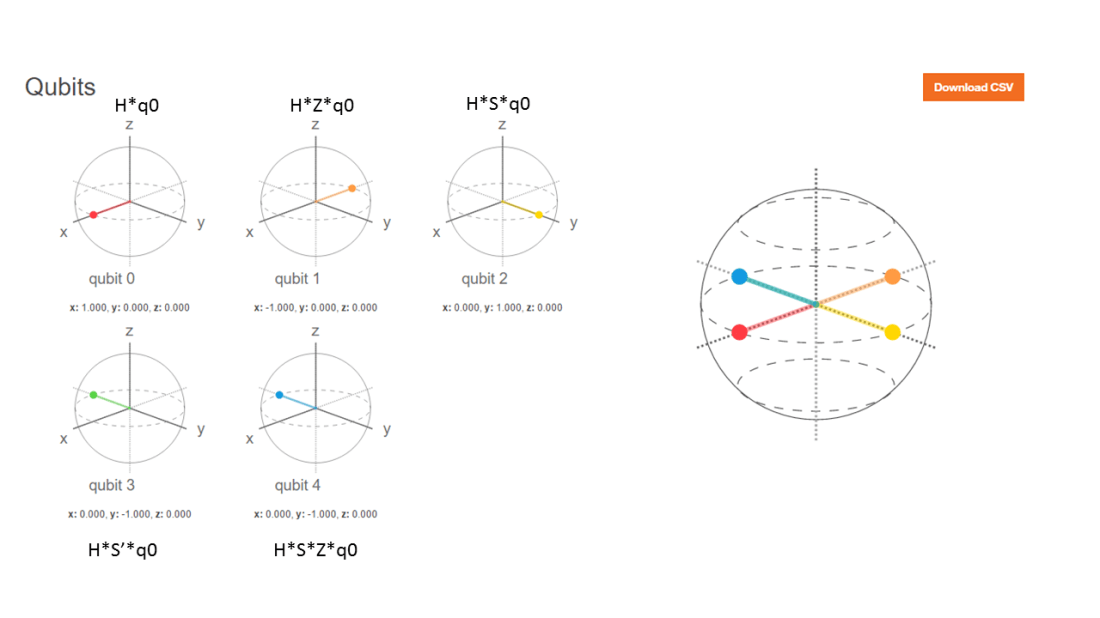
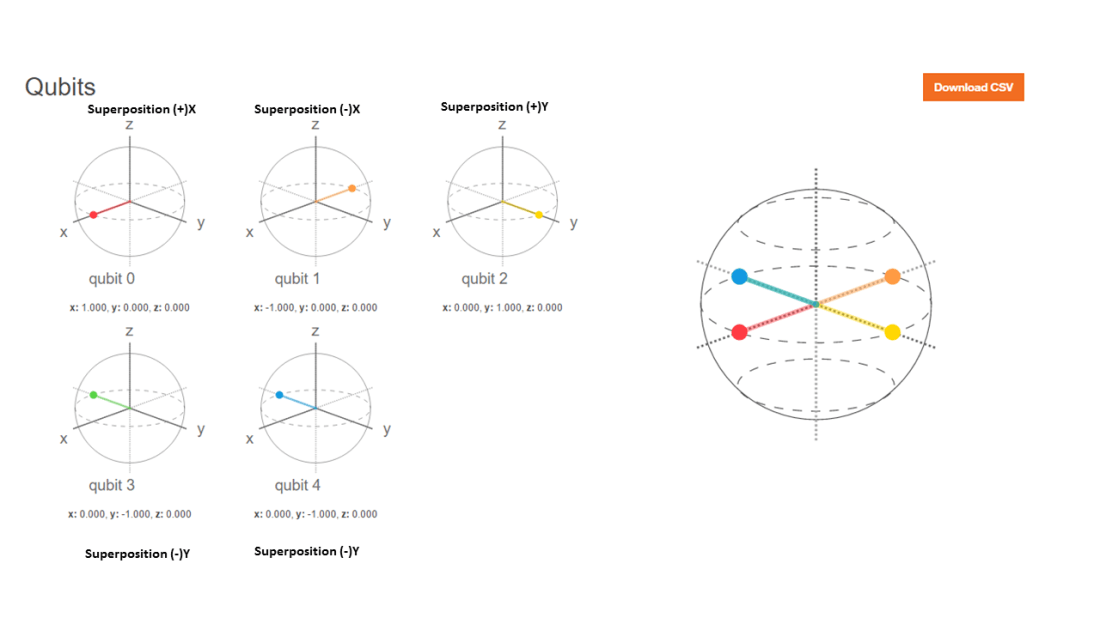
# |-> ==> H x Z 
PauliZ(Hadamard(q0_))
##            [,1]
## [1,]  0.7071068
## [2,] -0.7071068
# (+i) Y ==> H x  S 
 SGate(Hadamard(q0_))
##                      [,1]
## [1,] 0.7071068+0.0000000i
## [2,] 0.0000000+0.7071068i
# (-i)Y ==> H x S1
 S1Gate(Hadamard(q0_))
##                      [,1]
## [1,] 0.7071068+0.0000000i
## [2,] 0.0000000-0.7071068i
# Q1 -- TGate- Hadamard
Q1 = Hadamard(TGate(I2))

6. More gates in series

TGate of depth 2

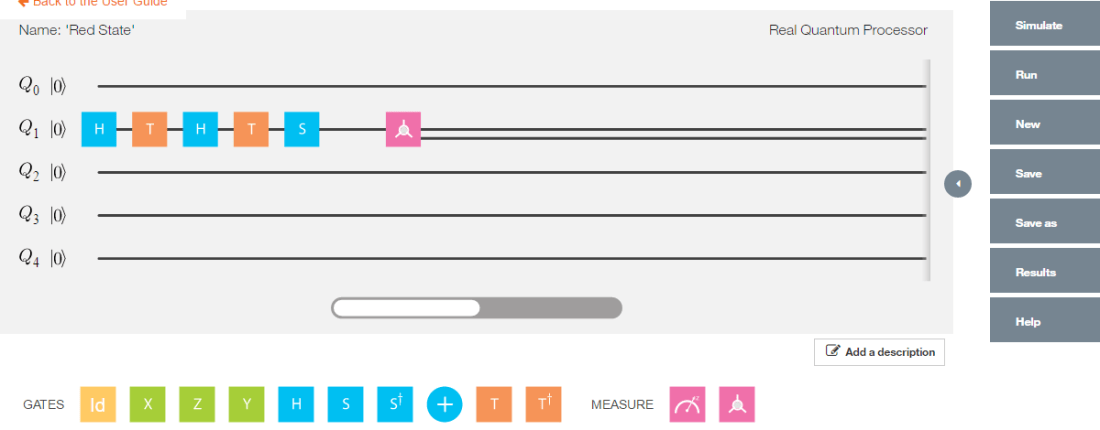
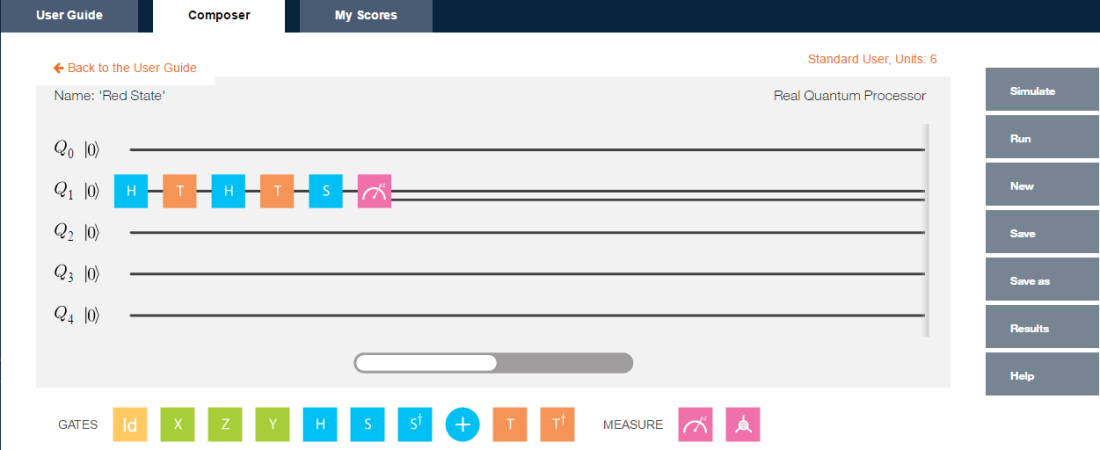
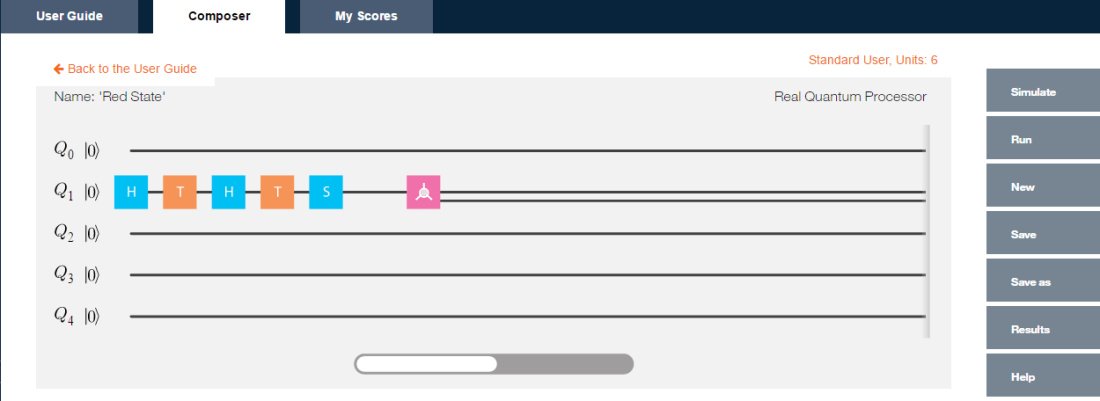
The Quantum circuit for a TGate of Depth 2 is

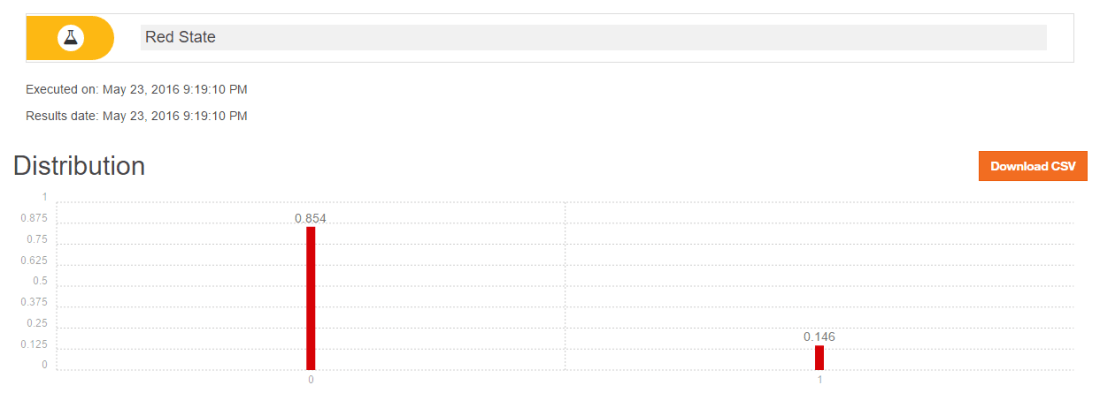
Q0 — Hadamard-TGate-Hadamard-TGate-SGate-Measurement as shown in IBM’s Quantum Experience Composer

Untitled

Implementing the quantum gates in series in reverse order we have

# Invoking this in reverse order we get
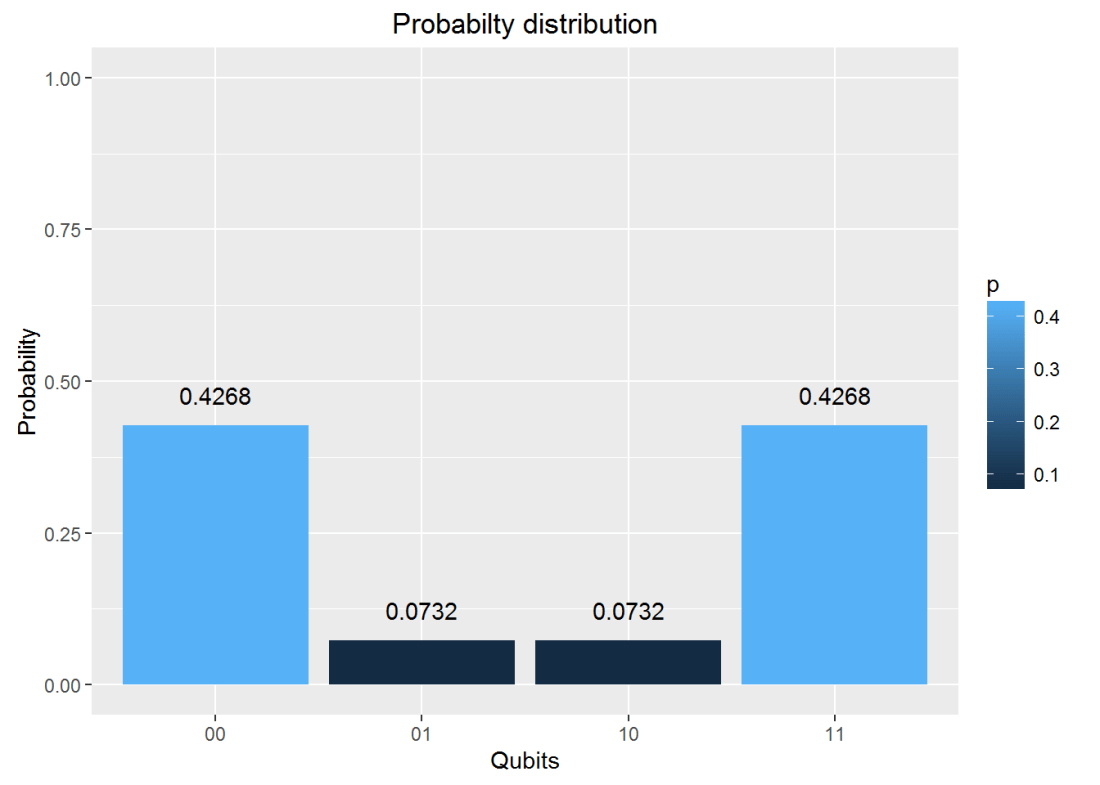
a = SGate(TGate(Hadamard(TGate(Hadamard(q0_)))))
result=measurement(a)

plotMeasurement(result)

fig0-1

7. Invoking gates in parallel

To obtain the results of gates in parallel we have to take the Tensor Product Note:In the TensorProduct invocation the Identity matrix is passed as an argument to get the unitary matrix of the gate. Q0 – Hadamard-Measurement Q1 – Identity- Measurement

# 
a = TensorProd(Hadamard(I2),I2)
b = DotProduct(a,q00_)
plotMeasurement(measurement(b))

fig1-1

a = TensorProd(PauliZ(I2),Hadamard(I2))
b = DotProduct(a,q00_)
plotMeasurement(measurement(b))

fig1-2

8. Measurement

The measurement of a Quantum circuit can be obtained using the measurement function. Consider the following Quantum circuit
Q0 – H-T-H-T-S-H-T-H-T-H-T-H-S-Measurement where H – Hadamard gate, T – T Gate and S- S Gate

a = SGate(Hadamard(TGate(Hadamard(TGate(Hadamard(TGate(Hadamard(SGate(TGate(Hadamard(TGate(Hadamard(I2)))))))))))))
measurement(a)
##          0        1
## v 0.890165 0.109835

9. Plot measurement

Using the same example as above Q0 – H-T-H-T-S-H-T-H-T-H-T-H-S-Measurement where H – Hadamard gate, T – T Gate and S- S Gate we can plot the measurement

a = SGate(Hadamard(TGate(Hadamard(TGate(Hadamard(TGate(Hadamard(SGate(TGate(Hadamard(TGate(Hadamard(I2)))))))))))))
result = measurement(a)
plotMeasurement(result)

fig2-1

10. Evaluating a Quantum Circuit

The above procedures for evaluating a quantum gates in series and parallel can be used to evalute more complex quantum circuits where the quantum gates are in series and in parallel.

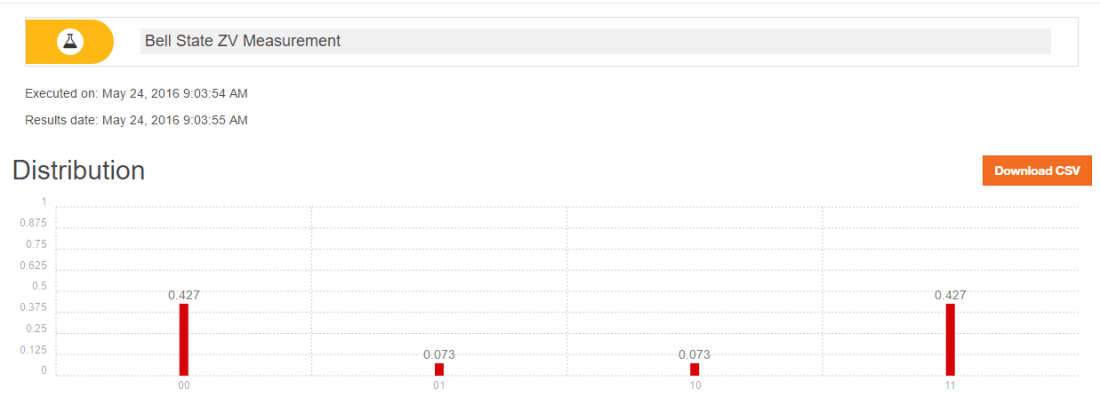
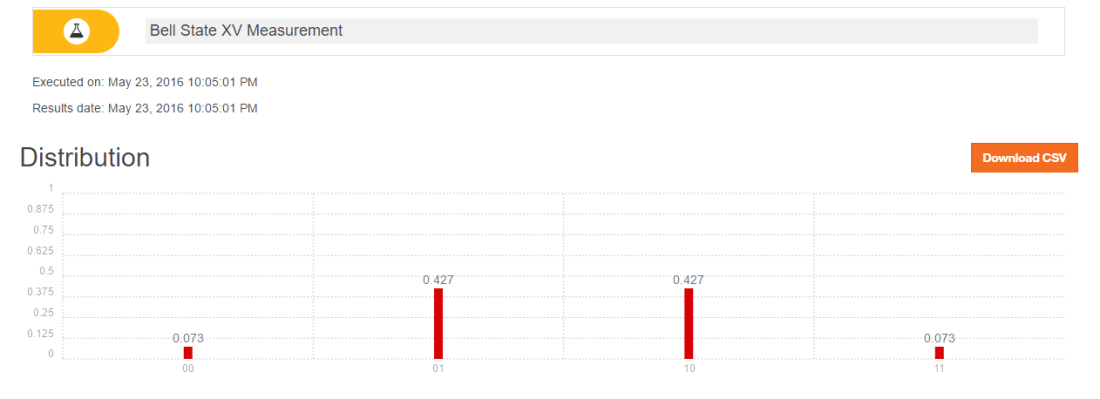
Here is an evaluation of one such circuit, the Bell ZQ state using the QCSimulator (from IBM’s Quantum Experience)

pic3

# 1st composite
a = TensorProd(Hadamard(I2),I2)
# Output of CNOT
b = CNOT2_01(a)
# 2nd series
c=Hadamard(TGate(Hadamard(SGate(I2))))
#3rd composite
d= TensorProd(I2,c)
# Output of 2nd composite
e = DotProduct(b,d)
#Action of quantum circuit on |00>
f = DotProduct(e,q00_)
result= measurement(f)
plotMeasurement(result)

fig3-1

11. Toffoli State

This circuit for this comes from IBM’s Quantum Experience. This circuit is available in the package. This is how the state was constructed. This circuit is shown below

pic2

The implementation of the above circuit in QCSimulator is as below

  # Computation of the Toffoli State
    H=1/sqrt(2) * matrix(c(1,1,1,-1),nrow=2,ncol=2)
    I=matrix(c(1,0,0,1),nrow=2,ncol=2)

    # 1st composite
    # H x H x H
    a = TensorProd(TensorProd(H,H),H)
    # 1st CNOT
    a1= CNOT3_12(a)

    # 2nd composite
    # I x I x T1Gate
    b = TensorProd(TensorProd(I,I),T1Gate(I))
    b1 = DotProduct(b,a1)
    c = CNOT3_02(b1)

    # 3rd composite
    # I x I x TGate
    d = TensorProd(TensorProd(I,I),TGate(I))
    d1 = DotProduct(d,c)
    e = CNOT3_12(d1)

    # 4th composite
    # I x I x T1Gate
    f = TensorProd(TensorProd(I,I),T1Gate(I))
    f1 = DotProduct(f,e)
    g = CNOT3_02(f1)

    #5th composite
    # I x T x T
    h = TensorProd(TensorProd(I,TGate(I)),TGate(I))
    h1 = DotProduct(h,g)
    i = CNOT3_12(h1)

    #6th composite
    # I x H x H
    j = TensorProd(TensorProd(I,Hadamard(I)),Hadamard(I))
    j1 = DotProduct(j,i)
    k = CNOT3_12(j1)

    # 7th composite
    # I x H x H
    l = TensorProd(TensorProd(I,Hadamard(I)),Hadamard(I))
    l1 = DotProduct(l,k)
    m = CNOT3_12(l1)
    n = CNOT3_02(m)

    #8th composite
    # T x H x T1
    o = TensorProd(TensorProd(TGate(I),Hadamard(I)),T1Gate(I))
    o1 = DotProduct(o,n)
    p = CNOT3_02(o1)
    result = measurement(p)
    plotMeasurement(result)

fig4-1

12. GHZ YYX measurement

Here is another Quantum circuit, namely the entangled GHZ YYX state. This is

pic1

and is implemented in QCSimulator as

# Composite 1
a = TensorProd(TensorProd(Hadamard(I2),Hadamard(I2)),PauliX(I2))
b= CNOT3_12(a)
c= CNOT3_02(b)
# Composite 2
d= TensorProd(TensorProd(Hadamard(I2),Hadamard(I2)),Hadamard(I2))
e= DotProduct(d,c)
#Composite 3
f= TensorProd(TensorProd(S1Gate(I2),S1Gate(I2)),Hadamard(I2))
g= DotProduct(f,e)
#Composite 4
i= TensorProd(TensorProd(Hadamard(I2),Hadamard(I2)),I2)
j = DotProduct(i,g)
result=measurement(j)
plotMeasurement(result)

fig5-1

Conclusion

The 5 qubit Quantum Computing Simulator is now fully functional. I hope to add more gates and functionality in the months to come.

Feel free to install the package from Github and give it a try.

Disclaimer: This article represents the author’s viewpoint only and doesn’t necessarily represent IBM’s positions, strategies or opinions

References

  1. IBM’s Quantum Experience
  2. Quantum Computing in Python by Dr. Christine Corbett Moran
  3. Lecture notes-1
  4. Lecture notes-2
  5. Quantum Mechanics and Quantum Computationat edX- UC, Berkeley

My other posts on Quantum Computing

  1. Venturing into IBM’s Quantum Experience 2.Going deeper into IBM’s Quantum Experience!
  2. A primer on Qubits, Quantum gates and Quantum Operations
  3. Exploring Quantum Gate operations with QCSimulator
  4. Taking a closer look at Quantum gates and their operations

You may also like
For more posts on other topics like Cloud Computing, IBM Bluemix, Distributed Computing, OpenCV, R, cricket please check my Index of posts

Taking a closer look at Quantum gates and their operations

This post is a continuation of my earlier post ‘Exploring Quantum gate operations with QCSimulator’. Here I take a closer look at more quantum gates and their operations, besides implementing these new gates in my Quantum Computing simulator, the  QCSimulator in R.

Disclaimer: This article represents the author’s viewpoint only and doesn’t necessarily represent IBM’s positions, strategies or opinions

In  quantum circuits, gates  are unitary matrices which operate on 1,2 or 3 qubit systems which are represented as below

1 qubit
|0> = \begin{pmatrix}1\\0\end{pmatrix} and |1> = \begin{pmatrix}0\\1\end{pmatrix}

2 qubits
|0> \otimes |0> = \begin{pmatrix}1\\ 0\\ 0\\0\end{pmatrix}
|0> \otimes |1> = \begin{pmatrix}0\\ 1\\ 0\\0\end{pmatrix}
|1> \otimes |o> = \begin{pmatrix}0\\ 0\\ 1\\0\end{pmatrix}
|1> \otimes |1> = \begin{pmatrix}0\\ 0\\ 0\\1\end{pmatrix}

3 qubits
|0> \otimes |0> \otimes |0> = \begin{pmatrix}1\\ 0\\0\\ 0\\ 0\\0\\ 0\\0\end{pmatrix}
|0> \otimes |0> \otimes |1> = \begin{pmatrix}0\\ 1\\0\\ 0\\ 0\\0\\ 0\\0\end{pmatrix}
|0> \otimes |1> \otimes |0> = \begin{pmatrix}0\\ 0\\1\\ 0\\ 0\\0\\ 0\\0\end{pmatrix}


|1> \otimes |1> \otimes |1> = \begin{pmatrix}0\\ 0\\0\\ 0\\ 0\\0\\ 0\\1\end{pmatrix}
Hence single qubit is represented as 2 x 1 matrix, 2 qubit as 4 x 1 matrix and 3 qubit as 8 x 1 matrix

1) Composing Quantum gates in series
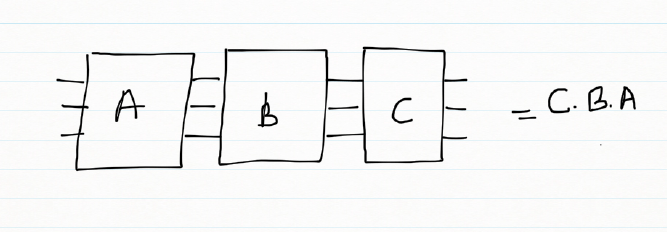
When quantum gates are connected in a series. The overall effect of the these quantum gates in series is obtained my taking the dot product of the unitary gates in reverse. For e.g.
Untitled

In the following picture the effect of the quantum gates A,B,C is the dot product of the gates taken reverse order
result = C . B . A

This overall action of the 3 quantum gates can be represented by a single ‘transfer’ matrix which is the dot product of the gates
Untitled

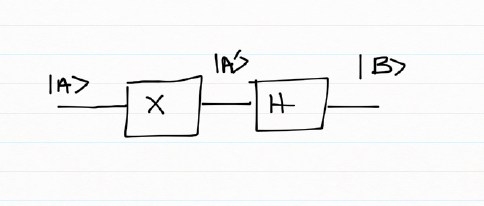
If we had a Pauli X followed by a Hadamard gate the combined effect of these gates on the inputs can be deduced by constructing a truth table

Input Pauli X – Output A’ Hadamard – Output B
|0> |1> 1/√2(|0>  – |1>)
|1> |0> 1/√2(|0>  + |1>)

Or

|0> -> 1/√2(|0>  – |1>)
|1> -> 1/√2(|0>  + |1>)
which is
\begin{pmatrix}1\\0\end{pmatrix}  ->1/√2 \begin{pmatrix}1\\0\end{pmatrix}\begin{pmatrix}0\\1\end{pmatrix} = 1/√2  \begin{pmatrix}1\\-1\end{pmatrix}
\begin{pmatrix}0\\1\end{pmatrix}  ->1/√2 \begin{pmatrix}1\\0\end{pmatrix} + \begin{pmatrix}0\\1\end{pmatrix} = 1/√2  \begin{pmatrix}1\\1\end{pmatrix}
Therefore the ‘transfer’ matrix can be written as
T = 1/√2 \begin{pmatrix}1 & 1\\ -1 & 1\end{pmatrix}

2)Quantum gates in parallel
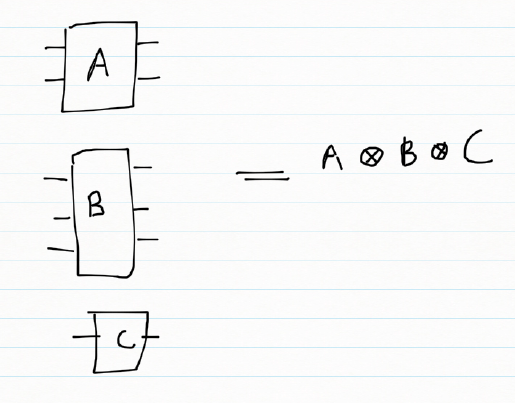
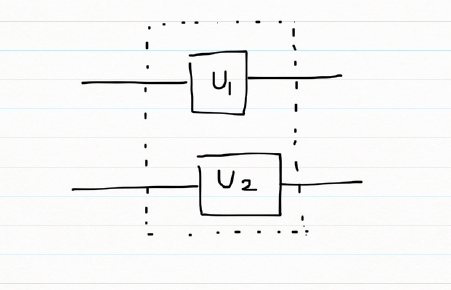
When quantum gates are in parallel then the composite effect of the gates can be obtained by taking the tensor product of the quantum gates.
Untitled

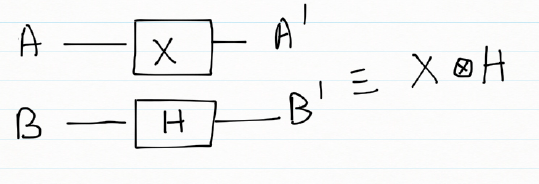
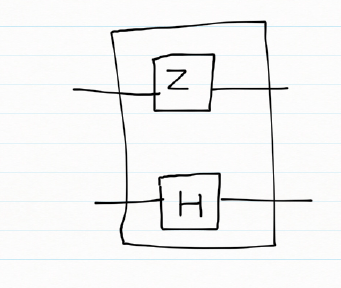
If we consider the combined action of a Pauli X gate and a Hadamard gate in parallel
Untitled

A B A’ B’
|0> |0> |1> 1/√2(|0>  + |1>)
|0> |1> |1> 1/√2(|0>  – |1>)
|1> |0> |0> 1/√2(|0>  + |1>)
|1> |1> |0> 1/√2(|0>  – |1>)

Or

|00> => |1> \otimes 1/√2(|0>  + |1>) = 1/√2 (|10> + |11>)
|01> => |1> \otimes 1/√2(|0>  – |1>) = 1/√2 (|10> – |11>)
|10> => |0> \otimes 1/√2(|0>  + |1>) = 1/√2 (|00> + |01>)
|11> => |0> \otimes 1/√2(|0>  – |1>) = 1/√2 (|10> – |11>)

|00> = \begin{pmatrix}1\\ 0\\ 0\\0\end{pmatrix} =>1/√2\begin{pmatrix} 0\\ 0\\ 1\\ 1\end{pmatrix}
|01> = \begin{pmatrix}0\\ 1\\ 0\\0\end{pmatrix} =>1/√2\begin{pmatrix} 0\\ 0\\ 1\\ -1\end{pmatrix}
|10> = \begin{pmatrix}0\\ 0\\ 1\\0\end{pmatrix} =>1/√2\begin{pmatrix} 1\\ 0\\ 1\\ -1\end{pmatrix}
|11> = \begin{pmatrix}0\\ 0\\ 0\\1\end{pmatrix} =>1/√2\begin{pmatrix} 1\\ 0\\ -1\\ -1\end{pmatrix}

Here are more Quantum gates
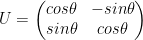
a) Rotation gate
U = \begin{pmatrix}cos\theta & -sin\theta\\ sin\theta & cos\theta\end{pmatrix}

b) Toffoli gate
The Toffoli gate flips the 3rd qubit if the 1st and 2nd qubit are |1>

Toffoli gate
Input Output
|000> |000>
|001> |001>
|010> |010>
|011> |011>
|100> |100>
|101> |101>
|110> |111>
|111> |110>

c) Fredkin gate
The Fredkin gate swaps the 2nd and 3rd qubits if the 1st qubit is |1>

Fredkin gate
Input Output
|000> |000>
|001> |001>
|010> |010>
|011> |011>
|100> |100>
|101> |110>
|110> |101>
|111> |111>

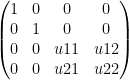
d) Controlled U gate
A controlled U gate can be represented as
controlled U = \begin{pmatrix}1 & 0 & 0 & 0\\ 0 &1  &0  & 0\\ 0 &0  &u11  &u12 \\ 0 & 0 &u21  &u22 \end{pmatrix}   – (A)
where U =  \begin{pmatrix}u11 &u12 \\ u21 & u22\end{pmatrix}

e) Controlled Pauli gates
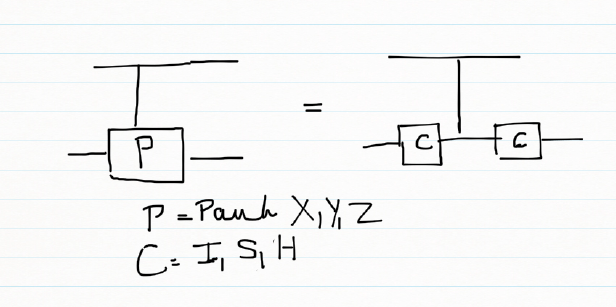
Controlled Pauli gates are created based on the following identities. The CNOT gate is a controlled Pauli X gate where controlled U is a Pauli X gate and matches the CNOT unitary matrix. Pauli gates can be constructed using

a) H x X x H = Z    &
H x H = I

b) S x X x S1
S x S1 = I

the controlled Pauli X, Y , Z are contructed using the CNOT for the controlled X in the above identities
In general a controlled Pauli gate can be created as below
Untitled

f) CPauliX
Here C is the 2 x2  Identity matrix. Simulating this in my QCSimulator
CPauliX I=matrix(c(1,0,0,1),nrow=2,ncol=2)
# Compute 1st composite
a = TensorProd(I,I)
b = CNOT2_01(a)
# Compute 1st composite
c = TensorProd(I,I)
#Take dot product
d = DotProduct(c,b)
#Take dot product with qubit
e = DotProduct(d,q)
e
}

Implementing the above with I, S, H gives Pauli X, Y and Z as seen below

library(QCSimulator)
I4=matrix(c(1,0,0,0,
            0,1,0,0,
            0,0,1,0,
            0,0,0,1),nrow=4,ncol=4)

#Controlled Pauli X
CPauliX(I4)
##      [,1] [,2] [,3] [,4]
## [1,]    1    0    0    0
## [2,]    0    1    0    0
## [3,]    0    0    0    1
## [4,]    0    0    1    0
#Controlled Pauli Y
CPauliY(I4)
##      [,1] [,2] [,3] [,4]
## [1,] 1+0i 0+0i 0+0i 0+0i
## [2,] 0+0i 1+0i 0+0i 0+0i
## [3,] 0+0i 0+0i 0+0i 0-1i
## [4,] 0+0i 0+0i 0+1i 0+0i
#Controlled Pauli Z
CPauliZ(I4)
##      [,1] [,2] [,3] [,4]
## [1,]    1    0    0    0
## [2,]    0    1    0    0
## [3,]    0    0    1    0
## [4,]    0    0    0   -1

g) CSWAP gate

Untitled

q00=matrix(c(1,0,0,0),nrow=4,ncol=1)
q01=matrix(c(0,1,0,0),nrow=4,ncol=1)
q10=matrix(c(0,0,1,0),nrow=4,ncol=1)
q11=matrix(c(0,0,0,1),nrow=4,ncol=1)
CSWAP(q00)
##      [,1]
## [1,]    1
## [2,]    0
## [3,]    0
## [4,]    0
#Swap qubits 
CSWAP(q01)
##      [,1]
## [1,]    0
## [2,]    0
## [3,]    1
## [4,]    0
#Swap qubits 
CSWAP(q10)
##      [,1]
## [1,]    0
## [2,]    1
## [3,]    0
## [4,]    0
CSWAP(q11)
##      [,1]
## [1,]    0
## [2,]    0
## [3,]    0
## [4,]    1

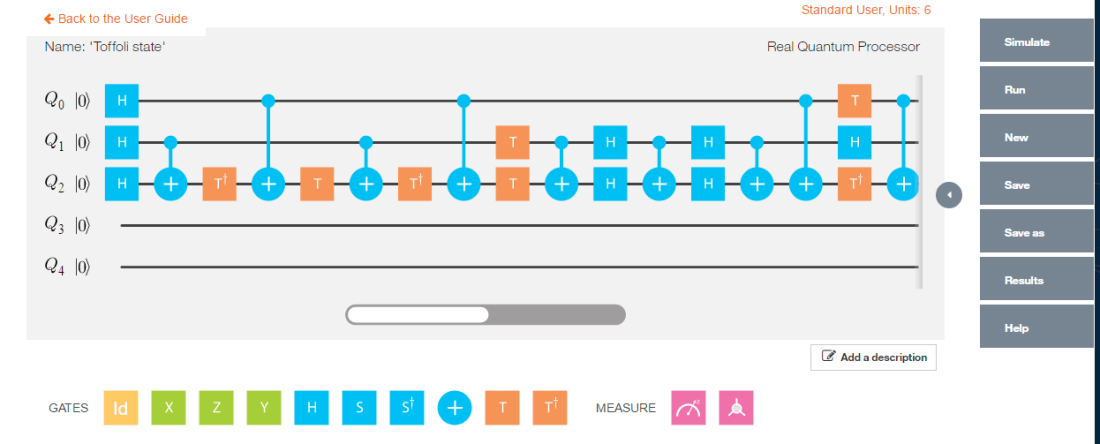
h) Toffoli state
The Toffoli state creates a 3 qubit entangled state 1/2(|000> + |001> + |100> + |111>)
Untitled

Simulating the Toffoli state in IBM Quantum Experience we get
Untitled

h) Implementation of Toffoli state in QCSimulator 

#ToffoliState 
    # Computation of the Toffoli State
    H=1/sqrt(2) * matrix(c(1,1,1,-1),nrow=2,ncol=2)
    I=matrix(c(1,0,0,1),nrow=2,ncol=2)

    # 1st composite
    # H x H x H
    a = TensorProd(TensorProd(H,H),H)
    # 1st CNOT
    a1= CNOT3_12(a)

    # 2nd composite
    # I x I x T1Gate
    b = TensorProd(TensorProd(I,I),T1Gate(I))
    b1 = DotProduct(b,a1)
    c = CNOT3_02(b1)

    # 3rd composite
    # I x I x TGate
    d = TensorProd(TensorProd(I,I),TGate(I))
    d1 = DotProduct(d,c)
    e = CNOT3_12(d1)

    # 4th composite
    # I x I x T1Gate
    f = TensorProd(TensorProd(I,I),T1Gate(I))
    f1 = DotProduct(f,e)
    g = CNOT3_02(f1)

    #5th composite
    # I x T x T
    h = TensorProd(TensorProd(I,TGate(I)),TGate(I))
    h1 = DotProduct(h,g)
    i = CNOT3_12(h1)

    #6th composite
    # I x H x H
    j = TensorProd(TensorProd(I,Hadamard(I)),Hadamard(I))
    j1 = DotProduct(j,i)
    k = CNOT3_12(j1)

    # 7th composite
    # I x H x H
    l = TensorProd(TensorProd(I,Hadamard(I)),Hadamard(I))
    l1 = DotProduct(l,k)
    m = CNOT3_12(l1)
    n = CNOT3_02(m)

    #8th composite
    # T x H x T1
    o = TensorProd(TensorProd(TGate(I),Hadamard(I)),T1Gate(I))
    o1 = DotProduct(o,n)
    p = CNOT3_02(o1)
    result = measurement(p)
    plotMeasurement(result)

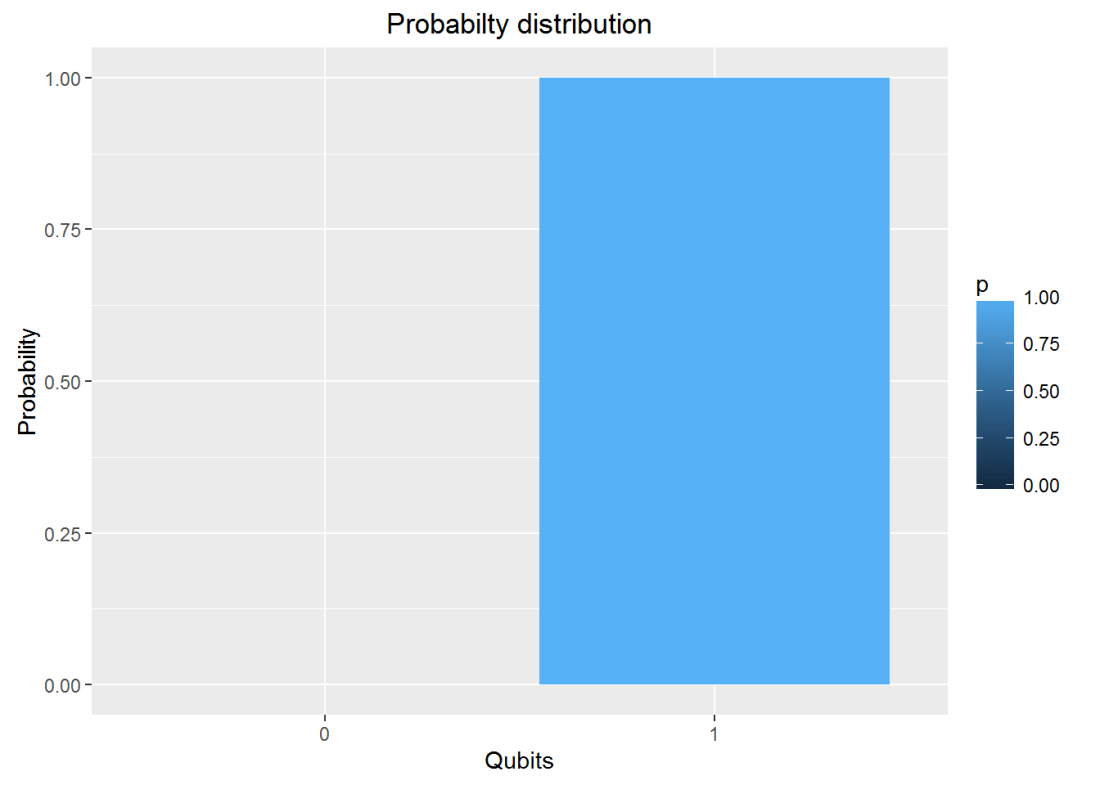
a-1
The measurement is identical to the that of IBM Quantum Experience

Conclusion:  This post looked at more Quantum gates. I have implemented all the gates in my QCSimulator which I hope to release in a couple of months.

Disclaimer: This article represents the author’s viewpoint only and doesn’t necessarily represent IBM’s positions, strategies or opinions

References
1. http://www1.gantep.edu.tr/~koc/qc/chapter4.pdf
2. http://iontrap.umd.edu/wp-content/uploads/2016/01/Quantum-Gates-c2.pdf
3. https://quantumexperience.ng.bluemix.net/

Also see
1.  Venturing into IBM’s Quantum Experience
2. Going deeper into IBM’s Quantum Experience!
3.  A primer on Qubits, Quantum gates and Quantum Operations
4. Exploring Quantum gate operations with QCSimulator

Take a look at my other posts at
1. Index of posts

Exploring Quantum Gate operations with QCSimulator

Introduction: Ever since I was initiated into Quantum Computing, through IBM’s Quantum Experience I have been hooked. My initial encounter with domain made me very excited and all wound up. The reason behind this, I think, is because there is an air of mystery around ‘Quantum’ anything.  After my early rush with the Quantum Experience, I have deliberately slowed down to digest the heady stuff.

This post also includes my early prototype of a Quantum Computing Simulator( QCSimulator) which I am creating in R. I hope to have a decent Quantum Computing simulator available, in the next couple of months. The ideas for this simulator are based on IBM’s Quantum Experience and the lectures on Quantum Mechanics and Quantum Computation by Prof Umesh Vazirani from University of California at Berkeley at edX. This calls to this simulator have been included in R Markdown file and has been published at RPubs as Quantum Computing Simulator

Disclaimer: This article represents the author’s viewpoint only and doesn’t necessarily represent IBM’s positions, strategies or opinions

In this post I explore quantum gate operations

A) Quantum Gates
Quantum gates are represented as a n x n unitary matrix. In mathematics, a complex square matrix U is unitary if its conjugate transpose Uǂ is also its inverse – that is, if
U ǂU =U U ǂ=I

a) Clifford Gates
The following gates are known as Clifford Gates and are represented as the unitary matrix below

1. Pauli X
\begin{pmatrix}0&1\\1&0\end{pmatrix}

2.Pauli Y
\begin{pmatrix}0&-i\\i&0\end{pmatrix}

3. Pauli Z
\begin{pmatrix}1&0\\0&-1\end{pmatrix}

4. Hadamard
1/√2 \begin{pmatrix}1 & 1\\ 1 & -1\end{pmatrix}

5. S Gate
\begin{pmatrix}1 & 0\\ 0 & i\end{pmatrix}

6. S1 Gate
\begin{pmatrix}1 & 0\\ 0 & -i\end{pmatrix}

7. CNOT
\begin{pmatrix}1 & 0 & 0 &0 \\ 0 & 1 & 0 &0 \\  0& 0 &  0&1 \\ 0 & 0 & 1 & 0\end{pmatrix}

b) Non-Clifford Gate
The following are the non-Clifford gates
1. Toffoli Gate
T = \begin{pmatrix}1 & 0\\ 0 & e^{^{i\prod /4}}\end{pmatrix}

2. Toffoli1 Gate
T1 = \begin{pmatrix}1 & 0\\ 0 & e^{^{-i\prod /4}}\end{pmatrix}

B) Evolution of a 1 qubit Quantum System
The diagram below shows how a 1 qubit system evolves on the application of Quantum Gates.

Untitled

C) Evolution of a 2 Qubit  System
The following diagram depicts the evolution of a 2 qubit system. The 4 different maximally entangled states can be obtained by using a Hadamard and a CNOT gate to |00>, |01>, |10> & |11> resulting in the entangled states  Φ+, Ψ+, Φ, Ψrespectively

Untitled

D) Verifying Unitary’ness
XXǂ = XǂX= I
TTǂ = TǂT=I
SSǂ = SǂS=I
The Uǂ  function in the simulator is
Uǂ = GateDagger(U)

E) A look at some Simulator functions
The unitary functions for the Clifford and non-Clifford gates have been implemented functions. The unitary functions can be chained together by invoking each successive Gate as argument to the function.

1. Creating the dagger function
HDagger = GateDagger(Hadamard)
HDagger x Hadamard
TDagger = GateDagger(TGate)
TDagger x TGate

H
##           [,1]       [,2]
## [1,] 0.7071068  0.7071068
## [2,] 0.7071068 -0.7071068
HDagger = GateDagger(H)
HDagger
##           [,1]       [,2]
## [1,] 0.7071068  0.7071068
## [2,] 0.7071068 -0.7071068
HDagger %*% H
##      [,1] [,2]
## [1,]    1    0
## [2,]    0    1
T
##      [,1]                 [,2]
## [1,] 1+0i 0.0000000+0.0000000i
## [2,] 0+0i 0.7071068+0.7071068i
TDagger = GateDagger(T)
TDagger
##      [,1]                 [,2]
## [1,] 1+0i 0.0000000+0.0000000i
## [2,] 0+0i 0.7071068-0.7071068i
TDagger %*% T
##      [,1] [,2]
## [1,] 1+0i 0+0i
## [2,] 0+0i 1+0i

2. Angle between 2 vectors – Inner product
The angle between 2 vectors can be obtained by taking the inner product between the vectors

#1. a is the diagonal vector 1/2 |0> + 1/2 |1> and b = q0 = |0>
diagonal <-  matrix(c(1/sqrt(2),1/sqrt(2)),nrow=2,ncol=1)
q0=matrix(c(1,0),nrow=2,ncol=1)
innerProduct(diagonal,q0)
##      [,1]
## [1,]   45
#2. a = 1/2|0> + sqrt(3)/2|1> and  b= 1/sqrt(2) |0> + 1/sqrt(2) |1>
a = matrix(c(1/2,sqrt(3)/2),nrow=2,ncol=1)
b = matrix(c(1/sqrt(2),1/sqrt(2)),nrow=2,ncol=1)
innerProduct(a,b)
##      [,1]
## [1,]   15

3. Chaining Quantum Gates
For e.g.
H x q0
S x H x q0 == > SGate(Hadamard(q0))

Or
H x S x S x H x q0 == > Hadamard(SGate(SGate(Hadamard))))

# H x q0
Hadamard(q0)
##           [,1]
## [1,] 0.7071068
## [2,] 0.7071068
# S x H x q0
SGate(Hadamard(q0))
##                      [,1]
## [1,] 0.7071068+0.0000000i
## [2,] 0.0000000+0.7071068i
# H x S x S x H x q0
Hadamard(SGate(SGate(Hadamard(q0))))
##      [,1]
## [1,] 0+0i
## [2,] 1+0i
# S x T x H x T x H x q0
SGate(TGate(Hadamard(TGate(Hadamard(q0)))))
##                      [,1]
## [1,] 0.8535534+0.3535534i
## [2,] 0.1464466+0.3535534i

4. Measurement
The output of Quantum Gate operations can be measured with
measurement(a)
measurement(q0)
measurement(Hadamard(q0))
a=SGate(TGate(Hadamard(TGate(Hadamard(I)))))
measurement(a)
measurement(SGate(TGate(Hadamard(TGate(Hadamard(I))))))

measurement(q0)
##   0 1
## v 1 0
measurement(Hadamard(q0))
##     0   1
## v 0.5 0.5
a <- SGate(TGate(Hadamard(TGate(Hadamard(q0)))))
measurement(a)
##           0         1
## v 0.8535534 0.1464466

5. Plot the measurements

plotMeasurement(q1)

unnamed-chunk-5-1

plotMeasurement(Hadamard(q0))

unnamed-chunk-5-2

a = measurement(SGate(TGate(Hadamard(TGate(Hadamard(q0))))))
plotMeasurement(a)

unnamed-chunk-5-3

6. Using the QCSimulator for one of the Bell tests
Here I compute the following measurement of  Bell state ZW  with the QCSimulator
Untitled

When this is simulated on IBM’s Quantum Experience the result is
Untitled

Below I simulate the same on my R based QCSimulator

# Compute the effect of the Composite H gate with the Identity matrix (I)
a=kronecker(H,I,"*")
a
##           [,1]      [,2]       [,3]       [,4]
## [1,] 0.7071068 0.0000000  0.7071068  0.0000000
## [2,] 0.0000000 0.7071068  0.0000000  0.7071068
## [3,] 0.7071068 0.0000000 -0.7071068  0.0000000
## [4,] 0.0000000 0.7071068  0.0000000 -0.7071068
# Compute the applcation of CNOT on this result
b = CNOT(a)
b
##           [,1]      [,2]       [,3]       [,4]
## [1,] 0.7071068 0.0000000  0.7071068  0.0000000
## [2,] 0.0000000 0.7071068  0.0000000  0.7071068
## [3,] 0.0000000 0.7071068  0.0000000 -0.7071068
## [4,] 0.7071068 0.0000000 -0.7071068  0.0000000
# Obtain the result of CNOT on q00
c = b %*% q00
c
##           [,1]
## [1,] 0.7071068
## [2,] 0.0000000
## [3,] 0.0000000
## [4,] 0.7071068
# Compute the effect of the composite HxTxHxS gates and the Identity matrix(I) for measurement
d=Hadamard(TGate(Hadamard(SGate(I))))
e=kronecker(I, d,"*")

# Applying  the composite gate on the output 'c'
f = e %*% c
# Measure the output
g <- measurement(f)
g
##          00        01        10        11
## v 0.4267767 0.0732233 0.0732233 0.4267767
#Plot the measurement
plotMeasurement(g)

aaunnamed-chunk-6-1
which is exactly the result obtained with IBM’s Quantum Experience!

Conclusion : In  this post I dwell on 1 and 2-qubit quantum gates and explore their operation. I have started to construct a  R based Quantum Computing Simulator. I hope to have a reasonable simulator in the next couple of months. Let’s see.

Watch this space!

Disclaimer: This article represents the author’s viewpoint only and doesn’t necessarily represent IBM’s positions, strategies or opinions

References
1.  IBM Quantum Experience – User Guide
2. Quantum Mechanics and Quantum Conputing, UC Berkeley

Also see
1.  Venturing into IBM’s Quantum Experience
2. Going deeper into IBM’s Quantum Experience!
3.  A primer on Qubits, Quantum gates and Quantum Operations

You may also like
1.  My TEDx talk on the “Internet of Things”
2. Experiments with deblurring using OpenCV
3. TWS-5: Google’s Page Rank: Predicting the movements of a random web walker

For more posts see
Index of posts

A primer on Qubits, Quantum gates and Quantum Operations

Introduction: After my initial encounter with IBM’s Quantum Experience, and my playing around with qubits, quantum gates and trying out the Bell experiment I can now say that I am fairly hooked to quantum computing.

So, I decided that  before going any  further,  that I  needed to  spend a little time more, getting to know more about the basics of Dirac’s bra-ket notation, qubits and ensuring that my knowledge is properly “chunked” ( See Learning to Learn: Powerful mental tools to master tough subjects, a really good course!!)

So, I started to look around for material on Quantum Computing, and finally landed on the classic course “Quantum Mechanics and Quantum Computing”, from University of California, Berkeley by Prof Umesh V Vazirani at edX. I have started to audit the course (listen in, without doing the assignments). The Prof is unbelievably good, and makes the topic both interesting and absorbing. This post is based on my notes of week 1 & 2 lectures. I have tried to articulate as best as I can, what I have understood of the lectures, though I would strongly recommend  you to, at least audit the archived course. By the way, I also had to refresh my knowledge of basic trigonometry and linear algebra. My knowledge of the basics of matrix manipulation, vectors etc. were buried deep within the sands of time. Luckily for me, they were reasonably intact.

A) Quantum states
A hydrogen atom has 1 electron in orbit. The electron can be either in the idle state or in the excited state. We can represent the idle state with |0> and the excited state with |1>, which is Dirac’s ‘ket’ notation.

Untitled

This electron will be in a superposition state which is represented by
Ψ = α |0> + β |1> where α & β are complex numbers and obey | α|2 + | β|2 = 1
For e.g. we could have the superposition state
\varphi= \frac{1}{2} + \frac{1i}{2}|0> + \frac{1}{\sqrt{2}}|1>
It can be seen that | α|2 = \frac{1}{2} and | β|2 = = \frac{1}{2}
For a complex number α = a+ bi  == > | α| = \sqrt{a^{2} + b^{2}}

B) Measurement
However, when the electron or the qubit is measured,  the state of superposition collapses to either |0> or |1> with the following probability’s

The resulting state is
|0> with probability | α|2
|1> with probability | β |2

And | α|2 + | β|2 = 1 because the sum of the probabilities must add up to 1  i.e. \sum p_{i} = 1

C) Geometric interpretation
Let us consider a qubit that is in a superposition state
Ψ = α |0> + β |1> where α & β are complex numbers and obey | α|2 + | β|2 = 1

We can write this as a vector  \begin{pmatrix} \alpha\\ \beta \end{pmatrix} representing the state of the electron

It can be seen that if
\alpha=1 and \beta=0 then |0> = \begin{pmatrix}1\\ 0\end{pmatrix}
and
\alpha=0 and \beta=1  then |1> = \begin{pmatrix}0\\ 1\end{pmatrix}
Untitled

Measuring a qubit in standard basis
If we represent the qubit geometrically then the superposition can be represented as a vector which makes an angle theta with |0>
\varphi = cos\theta|0> + sin\theta|1>

Measuring this  \varphi is the projection of on one of the standard basis |0> or |1>
The output is is |0> with probability cos^{2}\theta and
|1> with probability sin^{2}\theta

D) Measuring a qubit in any basis
Untitled
The qubit can be measured in any arbitrary basis. For e.g.  if
Ψ = α |0> + β |1>   and we have the diagonal basis
|u>| and |u’> as shown and Ψ makes an angle \theta with |u> then we can write

|u> with probability cos2Θ
And |u’> with probability sin2Θ

E) K Qubit system
Let us assume that we have a Quantum System with k qubits
|0>, |1>, |2>… |k-1>

The qubit will be in a superimposed state
Ψ = α0 |0>+ α1 |1> + α2|2> + … + αk-1 |k-1>
Where αj is a complex vector with the property ∑ αj = 1

Here Ψ is a unit vector in a K dimensional complex vector space, known as Hilbert Space
For e.g. a 3 qubit quantum system
\varphi = \frac{1}{2}+\frac{i}{2}|0> - \frac{1}{2} |1> + \frac{1}{2}|2>
Then P(0) = ½ P(1) = ¼ and P(2) = ¼   ∑Pj = 1

We could also write
\varphi = \begin{pmatrix} \alpha_{0}\\ \alpha_{1}\\ .. \\\alpha_{k-1}\\\end{pmatrix}
Or
Ψ = α0 |0>+ α1 |1> + α2|2> + … + αk-1 |k-1>

F) Measuring the angle between 2 complex vectors
To measure the angle between 2 complex vectors
\varphi = \begin{pmatrix} \alpha_{0}\\ \alpha_{1}\\\alpha_{2}\\\end{pmatrix}
And
\phi = \begin{pmatrix} \beta_{0}\\ \beta_{1}\\\beta_{2}\\\end{pmatrix}
we need to take the inner product of the complex conjugate of the 1st vector and the 2nd
cosΘ = inner product  => \bar{\varphi} . \phi
cos\theta = \bar\alpha_{0}\beta_{0} + \bar\alpha_{1}\beta_{1} + \bar\alpha_{2}\beta_{2}

For e.g.
If \varphi = \frac{1}{2} |0> + \frac{\sqrt 3}{2}|1> which makes 60 degrees with the |0> basis

And
\phi = \frac{1}{\sqrt 2} |0> + \frac{1}{\sqrt 2}|1> which is the diagonal |+> basis
Then the angle between these 2 vectors are obtained by taking the inner product
cosΘ =  ½ * 1/√2 + √3/2 * ½

G) Measuring Ψ in |+> or |-> basis
For e.g. if
\varphi = \frac{1}{2} |0> + \frac{\sqrt 3}{2}|1>   – (A)

Then we can specify/measure Ψ in |+> or |-> basis as follow
|+> = 1/√2(|0> + |1>) and |-> = 1/√2(|0> – |1>)
Or |0> = 1/√2(|+> + |->)   and |1> = 1/√2(|+> – |->)

We can write
Ψ= α|+> + β|->

Substituting for |0> and |1>  in (A) we get
\varphi = \frac{1+ \sqrt 3}{2 \sqrt 2} |+> \frac{1 - \sqrt 3 }{2 \sqrt 2} |->

H) Quantum gates
I) Clifford gates
Pauli gates
a) Pauli X
The Pauli X gate does a bit flip
|0> ==>  X|0> ==> |1>
|1> ==>  X|1> ==> |0>
and is represented
\begin{pmatrix}0&1\\1&0\end{pmatrix}

b) Pauli Z
This gates does a phase flip and is represented as the 2 x 2 unitary matrix
\begin{pmatrix}1&0\\0&-1\end{pmatrix}

c) Pauli Y
The Pauli operator Y  does both  a bit and a phase flip. The Y operator is represented as
\begin{pmatrix}0&-i\\i&0\end{pmatrix}

K) Superposition gates
Superposition is the concept that adding quantum states together results in a new quantum state. There are 3 gates that perform superposition of qubits the H, S and S’ gate.
a) H gate (Hadamard gate)
The H gate, also known as the Hadamard Gate when applied |0> state results in the qubit being half the time in  |0> and the other half in |1>
The H gate can be represented as
1/√2 \begin{pmatrix}1 & 1\\ 1 & -1\end{pmatrix}

b) S gate
The S gate can be represented as
\begin{pmatrix}1 & 0\\ 0 & i\end{pmatrix}

c) S’ gate
And the S’ gate is
\begin{pmatrix}1 & 0\\ 0 & -i\end{pmatrix}

L) Non-Clifford Gates
The quantum gates discussed in my earlier post Pauli X, Y, Z, H, S and S1 are members of a special group of gates known as the ‘Clifford group’.
The non-Clifford gates, discussed are the T and  Tǂ gates

These are given by
T = \begin{pmatrix}1 & 0\\ 0 & e^{^{i\prod /4}}\end{pmatrix}
Tǂ =\begin{pmatrix}1 & 0\\ 0 & e^{^{-i\prod /4}}\end{pmatrix}

M) 2 qubit system
A 2 qubit system
Untitled

A 2 qubit system is a superposition of all possible 2 qubit states. A 2 qubit system and can be represented as

Ψ = α00 |00> + α01 |01> + α10 |10> + α11 |11>

Measuring the 2 qubit system, as earlier, results in the collapse of the superposition and the result is one of 4 qubit states. The probability of the measure state is the square of the amplitude | αij|2

N) Entanglement
A  2 qubit system in which we have
Ψ = α0 |0> + α1 |1> and Φ= β0 |0> + β1 |1> the superimposed state is obtained by taking the tensor product of the 2 qubits
\chi = (\alpha_{0} |0> + \alpha_{1}|1>)\otimes  (\beta_{0} |0> + \beta_{1} |1>)
Where  \otimes is the tensor product

The state
Ψ = 1/√2|00> + 1/√2|11>
Is called an ‘entangled’ state because it cannot  be reduced to a product of 2 vectors

N) 2 qubit gates

Untitled

A 2 qubit system is a superposition of all possible 2 qubit states. A 2 qubit system and can be represented as
Ψ = α00 |00> + α01 |01> + α10 |10> + α11 |11>

Measuring the 2 qubit system, as earlier, results in the collapse of the superposition and the result is one of 4 qubit states. The probability of the measure state is the square of the amplitude | αij|2
More specifically a 2 qubit system in which we have
Ψ = α0 |0> + α1 |1> and Φ= β0 |0> + β1 |1> the superimposed state is obtained by taking the tensor product of the 2 qubits
\chi = (\alpha_{0} |0> + \alpha_{1}|1>)\otimes  (\beta_{0} |0> + \beta_{1} |1>)

Where \otimes is the tensor product
The state
Ψ = 1/√2|00> + 1/√2|11>
Is called an ‘entangled’ state because it cannot  be reduced to a product of 2 vectors
A quantum gate is a 2 x 2 unitary matrix U such that
α0 |0> + α1 |1>    == > Quantum Gate == > β0|0> + β1 |1>

Unitary functions: In mathematics, a complex square matrix U is unitary if its conjugate transpose U* is also its inverse
If
U=\begin{pmatrix}a & c \\b & d\end{pmatrix}
And U* = \begin{pmatrix}\bar a & \bar b \\ \bar c & \bar d\end{pmatrix}
Then
UU* = I where I is the Identity matrix

2 qubit gates is  4 x 4 unitary matrix
For a 2 qubit that is in the superposition state
Ψ = α00 |00> + α01 |01> + α10 |10> + α11 |11>

A 2 qubit gate’s operation on Ψ is
\begin{pmatrix}a & e & i & m \\ b & f & j & n\\ c & g & k & o\\ d & h & l & p\end{pmatrix} * \begin{pmatrix}\alpha_{00}\\ \alpha_{01}\\ \alpha_{10}\\\alpha_{11}\end{pmatrix}

One important 2 qubit gate is the CNOT gate which is shown  below

Untitled


The CNOT gate is represented by the following unitary matrix
\begin{pmatrix}1 & 0 & 0 & 0\\ 0 & 1 & 0 & 0 \\0 & 0  & 0  & 1\\ 0 & 0 & 1 & 0\end{pmatrix}

If 2  2×2 qubit gates were applied to 2 qubits the composite gate would be Tensor product of the 2 matrices

u1 = \begin{pmatrix}a & c\\ b & d\end{pmatrix}
u2 = \begin{pmatrix}e & g\\ f & h\end{pmatrix}
then
U= u1 \otimes u2
U = \begin{pmatrix}a\begin{pmatrix}e & g\\ f & h\end{pmatrix} & c\begin{pmatrix}a & c\\ b & d\end{pmatrix}\\ b \begin{pmatrix}a & c \\ b & d\end{pmatrix}& d\begin{pmatrix}a & c\\ b & d\end{pmatrix}\end{pmatrix}
The above product is also known as the Kronecker product

O) Tensor product of 2 qubits
Ψ = α0 |0> + α1 |1> and Φ= β0 |0> + β1 |1>
$latex \varphi \otimes \phi= α0 β0|0>|0> + α0 β1|0>|1> + α1 β0|1>|0> + α1 β1|1>|1>
= α0 β0|00> + α0 β1|01> + α1 β0|10> + α1 β1|11>
Untitled

If a Z gate and a Hadamard gate H were applied on 2 qubits, it is interest to know what the resulting composite gate would be.

Z = \begin{pmatrix}1 & 0\\ 0 & -1\end{pmatrix} and H = \begin{pmatrix}\frac{1}{\sqrt 2} & \frac{1}{\sqrt 2} \\ \frac{1}{\sqrt 2} & \frac{-1}{\sqrt 2}\end{pmatrix}
The composite gate is obtained by the tensor product of
Z \otimes H
Hence the result of the composite gate is
=\begin{pmatrix}1\begin{pmatrix}\frac{1}{\sqrt 2}   & \frac{1}{\sqrt 2}\\  \frac{1}{\sqrt 2}& \frac{-1}{\sqrt 2}\end{pmatrix} & 0\\ 0 & -1\begin{pmatrix}\frac{1}{\sqrt 2} & \frac{1}{\sqrt 2}\\ \frac{1}{\sqrt 2} &\frac{-1}{\sqrt 2} \end{pmatrix}\end{pmatrix}
=\begin{pmatrix}\begin{pmatrix}\frac{1}{\sqrt 2}   & \frac{1}{\sqrt 2}\\  \frac{1}{\sqrt 2}& \frac{-1}{\sqrt 2}\end{pmatrix} & 0\\ 0 & -\begin{pmatrix}\frac{-1}{\sqrt 2} & \frac{-1}{\sqrt 2}\\ \frac{-1}{\sqrt 2} &\frac{1}{\sqrt 2} \end{pmatrix}\end{pmatrix}

which is the entangled state.

Conclusion: This post includes most of the required basics to get started on Quantum Computing. I will probably add another post detailing the operations of the Quantum Gates on qubits.

Note:
1.The equations and matrices have been created using LaTeX notation using the online LaTex equation creator
2. The figures have been created using the app Bamboo Paper, which I think is cooler than creating in Powerpoint

Also see
1.Venturing into IBM’s Quantum Experience
2. Going deeper into IBM’s Quantum Experience!

You may also like
1.  Sixer – R package cricketr’s new Shiny avatar
2. Natural language processing: What would Shakespeare say?
3. Sea shells on the seashore
4. How to program – Some essential tips
5. Rock N’ Roll with Bluemix, Cloudant & NodeExpress
6. The Many Faces of Latency

Going deeper into IBM’s Quantum Experience!

Introduction

In this post I delve deeper into IBM’s Quantum Experience. As mentioned in my earlier post “Venturing into IBM’s Quantum Experience”, IBM, has opened up its Quantum computing environment, to the general public, as the Quantum Experience. The access to Quantum Experience is through IBM’s Platform as a Service (PaaS) offering, Bluemix™. Clearly this is a great engineering feat, which integrates the highly precise environment of Quantum Computing, where the qubits are maintained at 5 milliKelvin, and the IBM Bluemix PaaS environment on Softlayer. The Quantum Experience, is in fact Quantum Computing as a Service (QCaaS).  In my opinion, the Quantum Experience, provides a glimpse of tomorrow, today,

Disclaimer: This article represents the author’s viewpoint only and doesn’t necessarily represent IBM’s positions, strategies or opinions

Note: Also by the way, feel free to holler if you find anything incorrect or off the mark in my post. I am just getting started on quantum computing so there may be slip ups.

A) Bloch sphere

6In my earlier post the operations of the X, Y, Z, H, S, and S1 were measured using the standard or diagonal basis and the results were in probabilities of the qubit(s). However, the probabilities alone, in the standard basis, are not enough to specify a quantum state because it does not capture the phase of the superposition. A convenient representation for a qubit is the Bloch sphere.

The general state of a quantum two-level system can be written in the form

|ψ⟩=α|0⟩+β|1⟩,

Where α and β are complex numbers with |α|2+|β|2=1. This leads to the “canonical” parameterized form

|ψ⟩= cos Θ/2 |0> + e sin Θ/2 |1>                        (A)

in terms of only two real numbers θ and φ, with natural ranges 0 ≤ θ ≤ π and 0 ≤ φ ≤ 2π. These are the same as the polar angles in 3-dimensional spherical coordinates, and this leads to the representation of the state (1) as a point on a unit sphere called the Bloch sphere.

In the notation of (A), the state |0> is represented by the North pole, and the state |1> by the South pole. Note:  The states |0> and |1> , n the Bloch sphere are not orthogonal to each other. The states on the equator of the Bloch sphere, correspond to superpositions of |0> and |1> with equal weights (θ = π∕2), and different phases, parameterized by the azimuthal angle φ (the “longitude”)

In the picture below  Bloch  measurements  are performed on the operations on the qubits

1

The results of the Bloch measurements for the combination of  quantum gates are shown below

i) Quantum gate operations and Bloch measurements

4

ii) Quantum gate operations as Superposition operations

5

B) Classical vs Quantum computing
A classical computer that has N-bits has 2^{N}possible configurations. However, at any
one point in time, it can be in one, and only one of  2N  configurations. Interestingly, the quantum computer also takes in a n -bit number and outputs a n -bit number; but because of the superposition principle and the possibility of entanglement, the intermediate state is very different.

A system which had N different mutually exclusive states can be represented as |1>, |2>. . . |N> using the Dirac’s bra-ket notation

A pure quantum state is a superposition of all these states
Φ = α1 1> + α2 2> + …. + αN N>
To describe it requires complex numbers, giving a lot more room for maneuvering.

C) The CNOT gate
The CNOT gate or the Controlled-Not gate is an example of a two-qubit quantum gate. The CNOT gate’s action is to flip (apply a NOT or X gate to) the target qubit if the control qubit is 1; otherwise it does nothing. The CNOT plays the role of the classical XOR gate, but unlike the XOR, The CNOT gate is a two-output gate and is reversible It is represented by the matrix by the following 4 x 4 matrix

\begin{pmatrix}1 & 0 & 0 &0 \\ 0 & 1 & 0 &0 \\  0& 0 &  0&1 \\ 0 & 0 & 1 & 0\end{pmatrix}

The CNOT gate flips the target bit if the control bit is 1, otherwise it does nothing if it’s 0:

More specifically
CNOT|0>|b> = |0>|b>
CNOT|1>|b>= |1>|1 – b>

The operation of the CNOT gate can be elaborated as below
The 2-qubit basis states can be represented as four-dimensional vectors
|00> = \begin{pmatrix} 1& 0 & 0 & 0 \end{pmatrix}^{T}
|01> = \begin{pmatrix} 0& 1 & 0 & 0 \end{pmatrix}^{T}
|10> = \begin{pmatrix} 0& 0 & 1 & 0 \end{pmatrix}^{T}
|11> = \begin{pmatrix} 0& 0 & 0 & 1 \end{pmatrix}^{T}

For example, a quantum state may be expanded as a linear combination of this basis:
|ψ⟩=a|00⟩+b|01⟩+c|10⟩+d|11⟩

The CNOT matrix can  be applied as below
CNOT*|ψ⟩=CNOT*(a|00⟩+b|01⟩+c|10⟩+d|11⟩)
= a*CNOT*|00⟩+…+d*CNOT*|11⟩

where you perform standard matrix multiplication on the basis vectors to get:
CNOT*|ψ⟩=a|00⟩+b|01⟩+c|11⟩+d|10⟩

In other words, the CNOT gate has transformed
|10⟩↦|11⟩ and |11⟩↦|10⟩

i) CNOT operations in R code

# CNOT gate
cnot= matrix(c(1,0,0,0,0,1,0,0,0,0,0,1,0,0,1,0),nrow=4,ncol=4)
cnot
##      [,1] [,2] [,3] [,4]
## [1,]    1    0    0    0
## [2,]    0    1    0    0
## [3,]    0    0    0    1
## [4,]    0    0    1    0
#a. Qubit |00> 
q00=matrix(c(1,0,0,0),nrow=4,ncol=1)
q00
##      [,1]
## [1,]    1
## [2,]    0
## [3,]    0
## [4,]    0
# CNOT *q00 ==> q00
a <- cnot %*% q00
a
##      [,1]
## [1,]    1
## [2,]    0
## [3,]    0
## [4,]    0
#b.Qubit |01>
q01=matrix(c(0,1,0,0),nrow=4,ncol=1)
q01
##      [,1]
## [1,]    0
## [2,]    1
## [3,]    0
## [4,]    0
# CNOT *q01 ==> q01
a <- cnot %*% q01
a
##      [,1]
## [1,]    0
## [2,]    1
## [3,]    0
## [4,]    0
#c. Qubit |10>
q10=matrix(c(0,0,1,0),nrow=4,ncol=1)
q10
##      [,1]
## [1,]    0
## [2,]    0
## [3,]    1
## [4,]    0
# CNOT *q10 ==> q11
a <- cnot %*% q10
a
##      [,1]
## [1,]    0
## [2,]    0
## [3,]    0
## [4,]    1
#d. Qubit |11>
q11=matrix(c(0,0,0,1),nrow=4,ncol=1)
q11
##      [,1]
## [1,]    0
## [2,]    0
## [3,]    0
## [4,]    1
# CNOT *q11 ==> q10
a <- cnot %*% q11
a
##      [,1]
## [1,]    0
## [2,]    0
## [3,]    1
## [4,]    0

D) Non Clifford gates
The quantum gates discussed in my earlier post (Pauli X, Y, Z, H, S and S1) and the CNOT are members of a special group of gates known as the ‘Clifford group’. These gates can be simulated efficiently on a classical computer. Therefore, the Clifford group is not universal.  A finite set of gates that can approximate any arbitrary unitary matrix is known as a universal gate set. This is similar,  to how certain sets of classical logic gates, such as {AND, NOT}, are functionally complete and can be used to build any Boolean function ( I remember this axiom/fact from my Digital Electronics -101 class about 3  decades back!).

Adding almost any non-Clifford gate to single-qubit Clifford gates and CNOT gates makes the group universal which I presume can simulate any arbitrary unitary matrix.  The non-Clifford gates, discussed are the T and  Tǂ gates

These are given by

T = \begin{pmatrix}1 & 0\\ 0 & e^{^{i\prod /4}}\end{pmatrix}

Tǂ =\begin{pmatrix}1 & 0\\ 0 & e^{^{-i\prod /4}}\end{pmatrix}

i) T gate operations
The T gate makes it possible to reach  different points of the Bloch sphere.  By increasing the number of T-gates in the quantum circuit ( we start to cover the Bloch sphere more densely with states that can be reached

ii)  T Gates of depth 2 – Computational Measurement
9

Simulating in Composer
10

iii) Simulating in R Code
Measurement only gives the real part and does not provide info on phase

# T Gate 
T=matrix(c(1,0,0,exp(1i*pi/4)),nrow=2,ncol=2)
# Simulating T Gate depth-2 - Computational  measurement
a=S%*%T%*%H%*%T%*%H%*%q0
a
##                      [,1]
## [1,] 0.8535534+0.3535534i
## [2,] 0.1464466+0.3535534i

iv) 2 T Gates – Bloch  Measurement
7

Bloch measurement

8

v) Simulating T gate in R code
This gives the phase values as shown in the Bloch sphere

# Simulating T Gate depth-2 - Bloch measurement (use a diagonal basis H gate in front)
a=H%*%S%*%T%*%H%*%T%*%H%*%q0
a
##                [,1]
## [1,] 0.7071068+0.5i
## [2,] 0.5000000+0.0i


E) Quantum Entanglement – The case of ‘The Spooky action at a distance’
One of the infamous counter-intuitive ideas of quantum mechanics is that two systems that appear too far apart to influence each other can nevertheless behave in ways that, though individually random, are too strongly correlated to be described by any classical local theory.  For e.g. when the 1st qubit of a pair of “quantum  entangled” qubits are measured, this automatically determines the 2nd qubit, though the individual qubits may be separated by extremely large distances. It appears that the measurement of the first qubit cannot affect the 2nd qubit which is too far apart to be be influenced and also given the fact  that nothing can travel faster than the speed of light.  More specifically

“Suppose Alice has the first qubit of the pair, and Bob has the second. If Alice measures her qubit in the computational basis and gets outcome b ∈ {0, 1},  then the state collapses to |bb> . In other words the measurements and outcome of the 1st qubit determines the outcome of the  2nd qubit . How weird is that?

Similarly, if Alice measures her qubit in some other basis, this will collapse the joint state (including Bob’s qubit) to some state that depends on her measurement basis as well as its outcome. Somehow Alice’s action seems to have an instantaneous effect on Bob’s side—even if the two qubits are light-years apart!”

How weird is that!

Einstein, whose theory of relativity posits that information and causation cannot travel faster than the speed of light, was greatly troubled by this, . Einstein called such effects of entanglement “spooky action at a distance”.

In the 1960s, John Bell devised entanglement-based experiments whose behavior cannot be reproduced by any “local realist” theory where the implication of local and realist is given below

Locality: No information can travel faster than the speed of light. There is a hidden variable that defines all the correlations.

Realism:  All observables have a definite value independent of the measurement

i) Bell state measurements
The mathematical proof for the Bell tests  are quite abstract  and mostly escaped my grasp. I  hope to get my arms around this beast, in the weeks and months to come. However, I understood how to run the tests and perform the calculations which are included below.  I have executed the Bell Tests on

a) Ideal Quantum Processor (Simulator with ideal conditions)
b) Realistic Quantum Processor (Simulator with realistic conditions)
c) Real Quantum Processor. For this I used 8192 ‘shots’ repeats of the experiment

I finally calculate |C| for all 3 tests

The steps involved in calculating |C|
1.  Execute ZW, ZV, XW, XV
2. Calculate = P(00) + P(11) – P(01) – P(10)
3.  Finally |C| = ZW + ZV + XW – XV

Preparation of Qubit |00>
The qubits are in state |00> The H gate  takes the first qubit to the equal superposition

1/√2(|00> + |10>)  and the CNOT gate flips the second qubit if the first is excited, making the state  1/√2(|00> + |11>). This is the entangled state (commonly called a Bell state)

11

Simulating in Composer
This prepares the entangled state 1/√2(|00> + |11>)

12

It can be seen that the the qubits |00> and  |11> are created

1) Simulations on Ideal Quantum processor

a) Bell state ZW (Ideal) 
13
Simulation
24
P(00) = 0.427
P(01) = 0.073
P(10) =0.073
P(11) = 0.427

b) Bell state ZV (Ideal) 
14

Simulation

25
P(00) = 0.427
P(01) = 0.073
P(10) =0.073
P(11) = 0.427

c) Bell state XW (Ideal)
26

Measurement
27
P(00) = 0.427
P(01) = 0.073
P(10) =0.073
P(11) = 0.427

d) Bell state XV (Ideal)
28

Simulating Bell State XV in Composer
16
P(00) = 0.073
P(01) = 0.473
P(10) = 0.473
P(11) =0.73

Bell test measurement in Ideal Quantum Processor are given below
Untitled

For the Ideal Quantum Processor
|C) = 2.832

2) Simulations on the Realistic  Quantum Processor
The Bell tests above were simulated on Realistic Quantum Processor. The results are included below

Untitled

For the Realistic Quantum Processor
|C) = 2.523

3) Real IBM Quantum  Processor (8192 shots)
Finally the Bell Tests were executed in IBM’s Real Quantum Processor for 8192 shots, each requiring 5 standard units. The tests were queued, executed and the results sent by mail. The results are included below
a) Bell State ZW measurement (Real)
29

b) Bell state ZV measurement  (Real)
30
c) Bell State XW measurement (Real)
31
d) Bell state XV measurement (Real)

32

;

The results were tabulated and |C| computed. Bell test measurement in Real Quantum Processor are given below

Untitled

The Bell measurements on the Reak Quantum Processor is
|C) = 2.509

Conclusion
This post included details on the CNOT and the non-Clifford gates. The Bell tests were performed on all 3 processors Ideal, Realistic and Real Quantum Processors and in each case the |C| > 2. While I have been to execute the tests I will definitely have to spend more time understanding the nuances.

I hope to continue this journey into quantum computing the months to come. Watch this space!

Disclaimer: This article represents the author’s viewpoint only and doesn’t necessarily represent IBM’s positions, strategies or opinions

References
1.IBM Quantum Experience – User Guide
2.Quantum Computing lecture notes – Ronald De Wolf
3.Bloch sphere
4.Basic concepts in quantum computation
5.Physics Stack Exchange

You may also like
1.Revisiting crimes against women in India
2.Natural language processing: What would Shakespeare say?
3. My book ‘Practical Machine Learning with R and Python’ on Amazon
4. Introducing QCSimulator: A 5-qubit quantum computing simulator in R
5.Beaten by sheer pace – Cricket analytics with yorkr
6.A method for optimal bandwidth usage by auctioning available bandwidth using the OpenFlow protocol
7.TWS-4: Gossip protocol: Epidemics and rumors to the rescue
8.Bend it like Bluemix, MongoDB using Auto-scale – Part 1!
9.Fun simulation of a Chain in Android
10.Cricket analytics with cricketr in paperback and Kindle versions

Venturing into IBM’s Quantum Experience

UntitledIntroduction: IBM opened the doors of its Quantum Computing Environment, termed “Quantum Experience” to the general public about 10 days back. The access to IBM’s Quantum Experience is through Bluemix service , IBM’s  PaaS (Platform as a Service). So I  signed up for IBM’s quantum experience with great excitement. So here I am, an engineer trying to enter into and understand the weird,weird world of the quantum physicist!

Disclaimer: This article represents the author’s viewpoint only and doesn’t necessarily represent IBM’s positions, strategies or opinions

The idea of Quantum computing was initially mooted by Nobel Laureate Richard Feynman, Yuri Manning and Paul Benioff in the 1980s. While there was some interest in the field for the next several years, work in Quantum computing received a shot in the arm after Peter Shor’s discovery of an efficient quantum algorithm for integer factorization and discrete logarithms.

Problems that are considered to be computationally hard to solve with classical computers can be solved through quantum computing with an exponential improvement in efficiency.  Some areas that are supposed to be key candidates for quantum computing, are quantum money and cryptography.

Quantum computing will become predominant in our futures owing to 2 main reasons. The 1st reason, as already mentioned, is extraordinary performance improvements. The 2nd is due to the process of miniaturization. Ever since the advent of the transistor and the integrated circuit, the advancement in computing has led the relentless pursuit of miniaturization.,  In recent times the number of transistors has increased to such an extent, that quantum effects become apparent,  at such micro levels,  while  making the chips extremely powerful and cheap. The 18 core Xeon Haswell  Inel processoir packs 5.5 billion transistor in 661 mm2

 In classical computers the computation is based on the ‘binary digit’ or ‘bit’ which can be in either state 0 or 1. In quantum computing the unit of computation is the ‘quantum bit’ or the qubit. The quantum bit  can be in the states of 0, 1 and both simultaneously by the principle of superposition.

A qubit is a quantum system consisting of two levels, labeled |0⟩ and |1⟩ (using Dirac’s bracket notation) and is represented by a two-dimensional vector space.

|0>=\begin{pmatrix}1\\ 0\end{pmatrix}

|1>=\begin{pmatrix}0\\ 1\end{pmatrix}

Consider some physical system that can be in N different, mutually exclusive classical states. Then in the classical computing the system can be in one of the 2^{N} states. For e.g. if we had 3 bits the classical computer could be in one of {000,001,010,011,100,101,110,111} states.

A quantum computer takes advantage of a special kind of superposition that allows for exponentially many logical states at once, all the states from |00…0⟩ to |11…1⟩

Hence, the qubit need not be |0> or |1> but can be in any state |Ψ> which can be any superposition |ψ⟩=α|0⟩+β|1⟩, where α and β are the amplitudes. The superposition quantities α and β are complex numbers and obey |α|2+|β|2=1

Let us consider  a system which had N different mutually exclusive states. Using Dirac’s notation these states can be represented as |1>, |2>. . . |N>.

A pure quantum state is a superposition of all these states

Φ = α1 |1> + α2 |2> + …. + αN |N>

Where αi is the amplitude of qubit ‘I’ |i> in Φ. Hence, a system in quantum state |φi is in all classical states at the same time. It is state |1> with an amplitude of α1, in state |2> with an amplitude α2 etc.

A quantum system which is in all states at once can be either measured or allowed to evolve unitarily without measuring

Measurement

The interesting fact is that when we measure the quantum state Φ, the measured state will not be the quantum state Φ, but one  classical state |j> , where |j> is one of the states |1>,|2,.. |N>. The likelihood for the measured state to be |j> is dependent on the probability |αj |2, which is the squared norm of the corresponding amplitude αj. Hence observing the quantum state Φ results in the collapse of the quantum superposition state Φ top a classical state |j> and all the information in the amplitudes αj I

Φ = α1 |1> + α2 |2> + … + αN |N>

Unitary evolution

The other alternative is instead of measuring the quantum state Φ, is to apply a series of unitary operations and allow the quantum system to evolve.

In this post I use IBM’s Quantum Experience. The IBM’s Quantum Experience uses a type of qubit made from superconducting materials such as niobium and aluminum, patterned on a silicon substrate.

For this superconducting qubit to behave as the abstract notion of the qubit, the device is cooled down considerably. In fact, in the IBM Quantum Lab, the temperature is maintained at 5 milliKelvin, in a dilution refrigerator

The Quantum Composer a Graphical User Interface (GUI) for programming the quantum processor. With the quantum composer we can construct quantum circuits using a library of well-defined gates and measurements.

The IBM’s Quantum Composer is designed like a musical staff with 5 horizontal lines for the 5 qubits. Quantum gates can be dragged and dropped on these horizontal lines to operate on the qubits

Quantum gates are represented as unitary matrices, and operations on qubits are matrix operations, and as such require knowledge of linear algebra. It is claimed, that while the math behind quantum computing may not be too hard, the challenge is that certain aspects of quantum computing are counter-intuitive. This should be challenge. I hope that over the next few months I will be able to develop at least some basic understanding for the reason behind the efficiency of quantum algorithms

Pauli gates

The operation of a quantum gate can be represented as a matrix.  A gate that acts on one qubit is represented by a 2×2 unitary matrix. A unitary matrix is one, in which the conjugate transpose of the matrix is also its inverse. Since quantum operations need to be reversible, and preserve probability amplitudes, the matrices must be unitary.

To understand the operations of the gates on the qubits, I have used R language to represent matrices, and to perform the matrix operations. Personally , this made things a lot clearer to me!

Performing measurement

The following picture shows how the qubit state is measured in the Quantum composer

1

Simulation in the Quantum Composer

When the above measurement is simulated in the composer by clicking the ‘Simulate’ button the result is as below

2

This indicates that the measurement will display qubit |0> with a 100% probability or the qubit is in the ‘idle’ state.

A) Pauli operators

A common group of gates are the Pauli operators

a) The Pauli X

|0> ==>  X|0> ==> |1>

The Pauli X gate which is represented as below  does a bit flip

\begin{pmatrix}0&1\\1&0\end{pmatrix}

This can be composed in the Quantum composer as

3

When this simulated the Pauli X gate does a bit flip and the result is

4

which is qubit |1> which comes up as 1 (100% probability)

Pauli operator X using R code

# Qubit '0'
q0=matrix(c(1,0),nrow=2,ncol=1)
q0
##      [,1]
## [1,]    1
## [2,]    0
# Qubit '1'
q1=matrix(c(0,1),nrow=2,ncol=1)
q1
##      [,1]
## [1,]    0
## [2,]    1
# Pauli operator X
X= matrix(c(0,1,1,0),nrow=2,ncol=2)
X
##      [,1] [,2]
## [1,]    0    1
## [2,]    1    0
# Performing a X operation on q0 flips a q0 to q1
a=X%*%q0
a
##      [,1]
## [1,]    0
## [2,]    1

b) Pauli operator Z

The Z operator does a phase flip and is represented by the matrix

\begin{pmatrix}1&0\\0&-1\end{pmatrix}

Simulation in the Quantum composer
8

Pauli operator Z using R code

# Pauli operator Z
Z=matrix(c(1,0,0,-1),nrow=2,ncol=2)
Z
##      [,1] [,2]
## [1,]    1    0
## [2,]    0   -1
# Performing a Z operation changes the phase and leaves the bit 
a=Z%*%q0
a
##      [,1]
## [1,]    1
## [2,]    0

c) Pauli operator Y

The Pauli operator Y  does both  a bit and a phase flip. The Y operator is represented as

\begin{pmatrix}0&-i\\i&0\end{pmatrix}

Simulating in the composer gives the following

11

Pauli operator Y in  R code

# Pauli operator Y
Y=matrix(c(0,-1i,1i,0),nrow=2,ncol=2)
Y
##      [,1] [,2]
## [1,] 0+0i 0+1i
## [2,] 0-1i 0+0i
# Performing a Y operation does a bit flip and changes the phase 
a=Y%*%q0
a
##      [,1]
## [1,] 0+0i
## [2,] 0-1i

B) Superposition
Superposition is the concept that adding quantum states together results in a new quantum state. There are 3 gates that perform superposition of qubits the H, S and S’ gate.
a) H gate (Hadamard gate)
The H gate, also known as the Hadamard Gate when applied |0> state results in the qubit being half the time in  |0> and the other half in |1>
The H gate can be represented as

1/√2 \begin{pmatrix}1 & 1\\ 1 & -1\end{pmatrix}

# Superposition gates
# H, S & S1
H=1/sqrt(2) * matrix(c(1,1,1,-1),nrow=2,ncol=2)
H
##           [,1]       [,2]
## [1,] 0.7071068  0.7071068
## [2,] 0.7071068 -0.7071068

b) S gate
The S gate can be represented as
\begin{pmatrix}1 & 0\\ 0 & i\end{pmatrix}

S=matrix(c(1,0,0,1i),nrow=2,ncol=2)
S
##      [,1] [,2]
## [1,] 1+0i 0+0i
## [2,] 0+0i 0+1i

c) S’ gate
And the S’ gate is
\begin{pmatrix}1 & 0\\ 0 & -i\end{pmatrix}

S1=matrix(c(1,0,0,-1i),nrow=2,ncol=2)
S1
##      [,1] [,2]
## [1,] 1+0i 0+0i
## [2,] 0+0i 0-1i

d) Superposition (+)
Applying the Hadamard gate H to |0> causes it to become |+>. This is the standard superposition state
Where |+> = 1/√2 (|0> + |1>)

|0> ==> H|0>  ==>  |+>
Where the qubit is one half of the time in |0> and the other half of the time in |1>
Simulating in the Composer
14

Superposition(+) in R code
Superposition of qubit |0> results in |+> as shown below

|0> ==> H|0>  ==>  |+>

# H|0>
a <- H%*%q0
a
##           [,1]
## [1,] 0.7071068
## [2,] 0.7071068
# This is equal to 1/sqrt(2) (|0> + |1>)
b <- 1/sqrt(2) * (q0+q1)
b
##           [,1]
## [1,] 0.7071068
## [2,] 0.7071068

e) Superposition (-)

A new qubit state |-> is obtained by applying the H gates to |0> and then applying the Z gate which is known as the  diagonal basis. The H makes the above superposition and then the Z flips the phase (|1⟩ to −|1⟩)

Where |-> = 1/√2 (|0> – |1>)
|0> ==>  Z*H*|0> ==>  |->

Simulating in the Composer
15

Superposition(-) in R code

# The diagonal basis
# It can be seen that a <==>b
a <- Z%*%H%*%q0
a
##            [,1]
## [1,]  0.7071068
## [2,] -0.7071068
b <- 1/sqrt(2) * (q0-q1)
b
##            [,1]
## [1,]  0.7071068
## [2,] -0.7071068

C) Measuring superposition

But when we measure the superposition states the result is always a 0 or 1. In order to distinguish between the |+> and the |-> states we need to measure in the diagonal basis. This is done by using the H gate before the measurement

a) Superposition (+) measurement

19

Superposition(+) in R code

# Superposition (+) measurement
a <- H%*%H%*%q0
# The result is |0>
a
##      [,1]
## [1,]    1
## [2,]    0

b) Superposition (-) measurement

Simulating in composer

22

Simulating Superposition(-) in R code

# Superposition (-) measurement
a <- H%*%Z%*%H%*%q0
#The resultis |1>
a
##      [,1]
## [1,]    0
## [2,]    1

D) Y basis
A third basis us the circular or Y basis

|ac*> = 1/√2(|0> + i|1>)
ac* – the symbol is an anti-clockwise arrow

And

|c*> = 1/√2(|0> – i|1>)
c* – the symbol for clockwise arrow

a) Superposition (+i)Y

Simulating in Composer
29

Superposition (+i)Y in R code

#Superposition(+i) Y
a <- S%*%H%*%q0
a
##                      [,1]
## [1,] 0.7071068+0.0000000i
## [2,] 0.0000000+0.7071068i
b <- 1/sqrt(2)*(q0 +1i*q1)
b
##                      [,1]
## [1,] 0.7071068+0.0000000i
## [2,] 0.0000000+0.7071068i

b) Superposition(-i)Y 

Simulating Superposition (-i)Y in Quantum Composer
30

Superposition (-i)Y in R 

#Superposition(-i) Y
a <- S1%*%H%*%q0
a
##                      [,1]
## [1,] 0.7071068+0.0000000i
## [2,] 0.0000000-0.7071068i
b <- 1/sqrt(2)*(q0 -1i*q1)
b
##                      [,1]
## [1,] 0.7071068+0.0000000i
## [2,] 0.0000000-0.7071068i

To measure the circular basis we need to add a S1 and H gate

c) Superposition (+i) Y measurement

Simulation in Quantum composer

25

Superposition (+i) Y in R 

#Superposition(+i) Y measurement
a <- H%*%S1%*%S%*%H%*%q0
a
##      [,1]
## [1,] 1+0i
## [2,] 0+0i

d) Superposition (-Y) simulation

28

Superposition (-i) Y in R

#Superposition(+i) Y measurement
a <- H%*%S1%*%S%*%H%*%q0
a
##      [,1]
## [1,] 1+0i
## [2,] 0+0i

I hope to make more headway and develop the intuition for quantum algorithms in the weeks and months to come.

Watch this space. I’ll be back!

Disclaimer: This article represents the author’s viewpoint only and doesn’t necessarily represent IBM’s positions, strategies or opinions

References
1.IBM’s  Quantum Experience User Guide
2. Quantum computing lecture notes

Also see
1. Natural language processing: What would Shakespeare say?
2. Literacy in India – A deepR dive
3. Re-introducing cricketr! : An R package to analyze performances of cricketers
4. Design Principles of Scalable, Distributed Systems
5. A closer look at “Robot Horse on a Trot” in Android
6. What’s up Watson? Using IBM Watson’s QAAPI with Bluemix, NodeExpress – Part 1
7. Introducing cricket package yorkr: Part 1- Beaten by sheer pace!
8. Experiments with deblurring using OpenCV
9. Architecting a cloud based IP Multimedia System (IMS)