Getting started with Node.js and Mongodb

Here is a post in which I try to get my arms around Node.js & MongoDB. This is first encounter with Web programming. There is a veritable universe of frameworks, languages, libraries and modules out there.

There are a gazillion blogs already on this topic so here is one more. When I came across Node.js recently,  I have been  impressed mightily with its ability to quickly cook up Webservers, TCP based server side programming and the like with really brief code. Another alluring fact was that it is based on Javascript which itself smacks of plain C, added to its charm. The experience with Node.js is difficult for a beginner. Also I must add that the Node.js’es callback functions takes a bit of getting used and I have had my share of pain with it.

MongoDB is an open-source document database, and one of the  leading NoSQL databases out there.

First things first – Install Node.js from Nodejs.org. Next install MongoDB for your OS and machine type. You will also need to install the mongodb module for use with Node.js. You can this by opening a command prompt and typing

npm install mongodb -g

This will allow you to access the mongodb module for use within your program. Now you should be good to go and create some basic code to manipulate MongoDB through Node.js.  This code is based on the commands from the following MongoDB wiki

Here are the steps for a basic CRUD (Create,Remove,Update & Delete) operations on MongoDB with Node.js

1. Create a folder c:\node\mongotest

2. Go to the directory where you have extracted the mongodb files and type in

mongod –dbpath c:\node\mongotest

This  will  start the database.

3. Here are the main functions of the code.

Connect to the mongodb database

var MongoClient = require('mongodb').MongoClient;
// Connect to the db
MongoClient.connect(“mongodb://localhost:27017/exampleDb”, function(err, db) {
if(!err) {
console.log(“We are connected”);
}

4. Create a collection of documents

//Create a collection test
console.log(“Creating a collection test”);
var collection = db.collection(‘test’);

5. Insert documents into the collection

//Create documents to insert
var doc1 = {‘hello’:’doc1′};
var doc2 = {‘hello’:’doc2′};
var lotsOfDocs = [{‘hello’:’doc3′}, {‘hello’:’doc4′}];
//Insert the docs
console.log(“Inserting the docs”);
collection.insert(doc1,function(err,result){});
collection.insert(doc2, {w:1}, function(err, result) {});

6. Update the inserted documents as follows

//Updating
var doc3 = {key:1,value:1};
collection.insert(doc3,{w:1},function(err,result) {
if(err) {
console.log(‘Could not insert’);
}
collection.update({key:1},{$set:{value:2}},{w:1},function(err,result) {});
});

7. Delete specific  documents from the database. Note: The remove() command requires a callback which I have included separately instead of the standard anonymous callback style

var mycallback = function(err,results) {
console.log(“mycallback”);
if(err) throw err;
}
//Deleting documents
console.log(“The delete operation”);
var doc4=[{key1:1},{key2:2},{key3:3}];
//Insert the document and then remove
collection.insert(doc4,{w:1},function(err,result) {
collection.remove({key1:1},mycallback);
collection.remove({key4:4},{w:1},mycallback);
});

8. Finally retrieve the inserted/updated records from the database

var stream = collection.find({mykey:{$ne:2}}).stream();
console.log(“Printing values…”);
stream.on(“data”, function(item) {
console.log(item);
});
stream.on(“end”, function() {});

The stream.on(“data”,) retrieves all the data till it encounters a stream.on(“end”).

So if I execute the above code I get the following output

C:\test \mongotest>node app3.js
We are connected
Creating a collection test
Inserting the docs
The delete operation
Printing values…
{ _id: 53c27ecbd5f4c59c1a2a5d39, hello: ‘doc1’ }
{ _id: 53c27ecbd5f4c59c1a2a5d3a, hello: ‘doc2’ }
{ _id: 53c27ecbd5f4c59c1a2a5d3b, key: 1, value: 1 }
{ _id: 53c27ecbd5f4c59c1a2a5d3c, key1: 1 }
{ _id: 53c27ecbd5f4c59c1a2a5d3d, key2: 2 }
{ _id: 53c27ecbd5f4c59c1a2a5d3e, key3: 3 }
mycallback
mycallback

The code can be cloned from Github at node-mongo

Also see
1. A Bluemix recipe with MongoDB and Node.js
2. Spicing up IBM Bluemix with MongoDB and NodeExpress
3. A Cloud Medley with IBM’s Bluemix, Cloudant and Node.js
4. Rock N’ Roll with Bluemix, Cloudant & NodeExpress


Find me on Google+

Mixing Twilio with IBM Bluemix

This post walks you through the steps to get started with Twilio on IBM’s Bluemix. Twilio comes as a service that you can add  to your Mobile Cloud or Node.js app. Here’s a quick look at Twilio. Twilio, is a cloud communications IaaS organization which  allows you use standard web languages to build voice, SMS and VOIP applications via a Web API.

Twilio provides the  ability to build VOIP applications using APIs. Twilio itself resides in the cloud and is always available. It also provides SIP integration which means that it can be integrated with Soft switches. Twilio looks really  interesting with its ability to combine the  cloud, Web and VOIP, SMS  and  the like.

This post barely scratches the surface of Twilio & Blue mix. This article provides aa hands-on experience for integration of Twilio with Bluemix and is based on this Twilio blog post. It enables you to send a SMS to your mobile phone by typing in a URL.

As in my earlier post the steps are

1) Fire-up a Node.js  Webstarter application from the  Bluemix dashboard.  In my case I have named the application websms. Once this is up and running

2) Click Add a Service and under ‘Web and Application’ choose Twilio.

3) Enter a  name for the Twilio service. You will also need the Account SID and Authorization token

4) For this go to http://www.twilio.com and sign up2

5) Once you have registered, go to your Dashboard for the Account SID and Auth Token. If the Auth token is encrypted, you can click the ‘lock’ symbol to display the Auth token in plain text.

6) Enter the Accout SID and Auth Token in the Twilio service in Bluemix

7)  To get started you can simply  fork my Twilio  websms code from devops.

8) Now clone the code into a folder you create as follows

git clone https://hub.jazz.net/git/tvganesh/websms

9) You will need to modify the following files

package.json

manifest.yml

app.js


10) You can create package.json by running
npm init. Make sure you enter the name of the application you created in Bluemix. In my case it is “websms’ For the rest of the options you can choose the default. Here is the package.json file
"name": "websms",
"version": "0.0.0",
"description": "This README.md file is displayed on your project page. You should edit this \r file to describe your project, including instructions for building and \r running the project, pointers to the license under which you are making the \r project available, and anything else you think would be useful for others to\r know.",
"main": "app.js",
"dependencies": {
"gopher": "^0.0.7",
"express": "^3.12.0",
"twilio": "^1.6.0",
"ejs": "^1.0.0"
},
"devDependencies": {},
"scripts": {
"test": "echo \"Error: no test specified\" && exit 1"
},
"repository": {
"type": "git",
"url": "https://hub.jazz.net/git/tvganesh/websms"
},
"author": "",
"license": "ISC"
}

11) In the manifest.yml make sure you enter the name of your application and the host

applications:
- host: websms
disk: 1024M
name: websms
command: node app.js
path: .
domain: <your domain>
mem: 128M
instances: 1

12) Lastly make changes to your app.js.

// dependencies
var app = require('gopher'),
twilio = require('twilio');
var config = JSON.parse(process.env.VCAP_SERVICES);
var twilioSid, twilioToken;
config['user-provided'].forEach(function(service) {
if (service.name == 'Twilio') {
twilioSid = service.credentials.accountSID;
twilioToken = service.credentials.authToken;
}
});
// URL test
app.get('/', function(request, response) {
var client = new twilio.RestClient(twilioSid, twilioToken);
client.sendMessage({
to:'<Your mobile number>',
from:'<Number from Twilio dashboard',
body:'Twilio notification through Bluemix!'
}, function(err, message) {
response.send('Message sent! ID: '+message.sid);
});
});

13) After you have made the changes you will need to push the changes to Bluemix using the command line based ‘cf’ tool
14) Login into cf with
cf login – a http://api.ng.bluemix.net

15) Push the websms onto bluemix

16) In the folder where you websms files reside entr the following command
cf push websms -p . -m 512M

17) This should push the code to Bluemix.
Note: If you happen to get a
Server error, status code: 400, error code: 170001, message: Staging error: cannot get instances since staging failed
then you need to make sure to check the changes made to  files app.js, package.,json or the manigfest,yml.

18)  If all things went smoothly, go to your Bluemix dashboard and click the link adjacent to the Routes. You should see that an SMS has been sent as shown

3

19) Your mobile should now display the message that was sent as shown below
Screenshot_2014-06-22-13-41-44

20) Check the  analytics in your Twilio dashboard
1

Disclaimer: This article represents the author’s viewpoint only and doesn’t necessarily represent IBM’s positions, strategies or opinions

Find me on Google+

Test driving Push notification in Bluemix

This post is a continuation of my earlier post ‘Getting started with mobile cloud in Bluemix‘. Here I take a test drive of the push service that Bluemix offers based on the article “Extend an Android app using the Push cloud service” from developerWorks.

This post assumes that you have already completed the changes from my earlier post for the mobile cloud. If you haven’t,  you could clone the code from “mobile data” which is the official IBM version of this app and includes all the changes needed for persisting data in the cloud through their Android.

The Mobile Cloud App I created on Bluemix is “mobtvg“. The main steps to have Push notification service using Bluemix are

  1. GCM services : Get Google API Project number  & GCM API Key
  2. Include the Google Play services library project
  3. Add the jar files to enable Push service
  4. Modify the server side Node.js file to send push notifications to all registered devices
  5. Make necessary code changes
  6. Run the application and test for notification

Here are more details on the above steps

a) GCM services : Google Cloud Messaging for Android (GCM) is a service that allows you to send data from your server to your users’ Android-powered device, and also to receive messages from devices on the same connection. The 1st thing to do is get the Google API Project number & GCM API key.

– Click on Google Developer Console

– Click Create Project. Enter Project name & click Create.

– Note the Project Number on top of the page.

– Click API & Auth on left panel. Click API.

– Scroll down and turn-on Google Messaging for Android

–  Click credentials and click “Create new key”. Click server key. Click create

-Copy API key in the Public API access

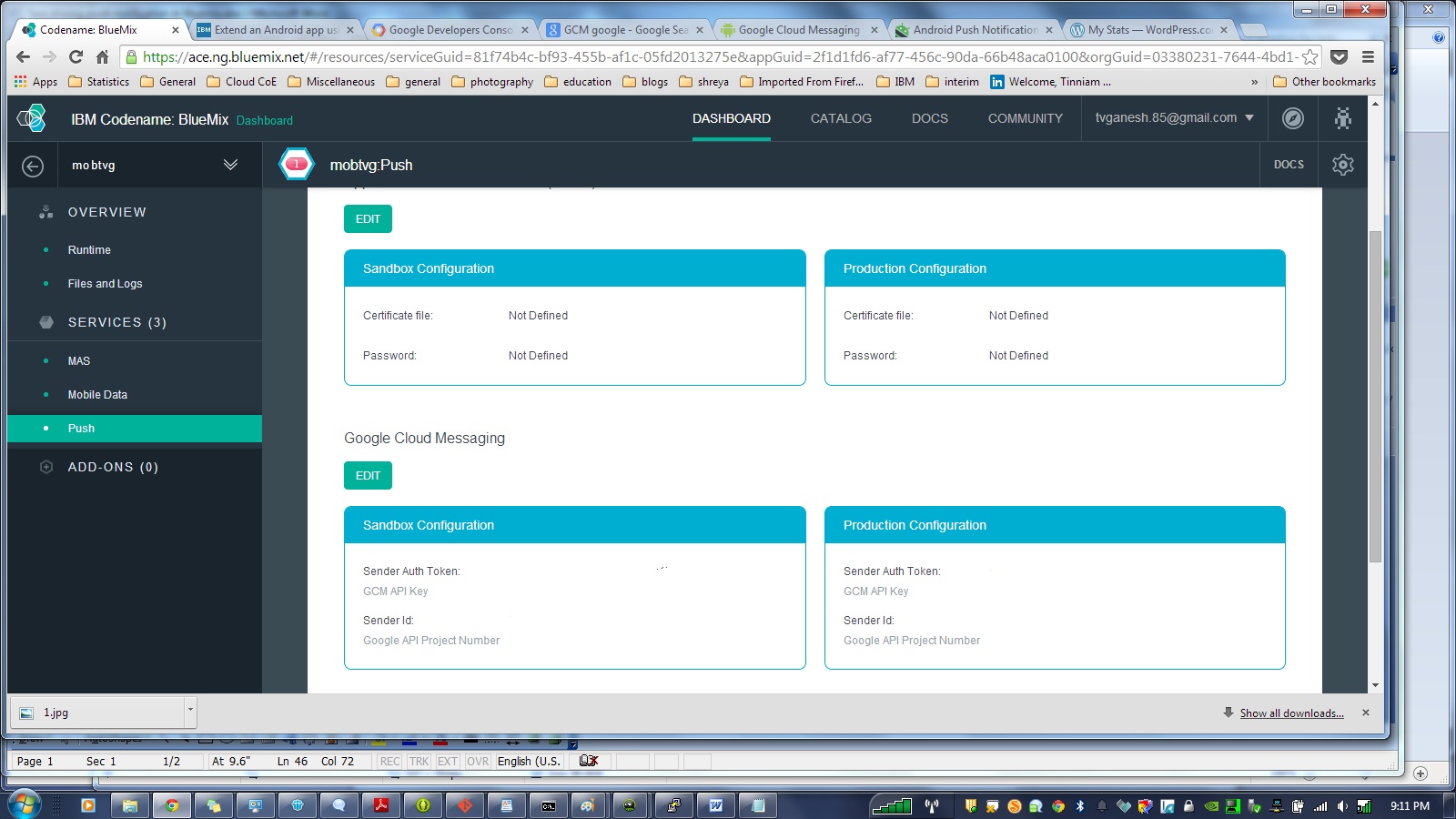
Now go the Bluemix dashboard and click your application. Click the Push module. In the Configuration tab, scroll down to Google Cloud Messaging and  click ‘Edit’

Enter the Google API Project Number & GCM API key for both the Sandbox & Production configuration and click Save.

4
b) In Eclipse click Windows->Android SDK manager. Scroll down to the bottom and under Extras select Google Play services. Click install. Once the installation is successful import the project as follows File-Import->Android->Existing Android  code into Workspace. Click Next. In the next screen Browse to the path where your ADT bundle is installed and choose the folder

<ADT-Bundle>\ sdk\extras\google\google_play_services

and Click Ok. Also  check ‘Copy project into workspace’. This will copy.

3

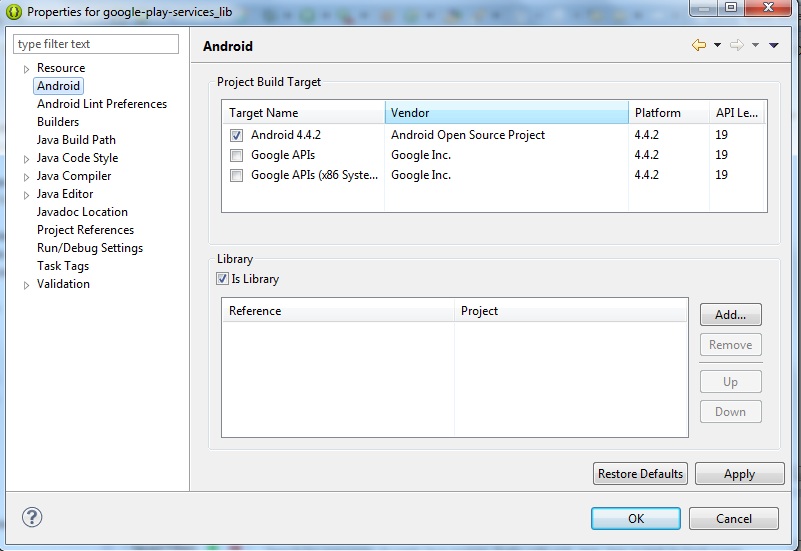
Now build the Google Play Services Project. To do this the project. Click Project->Properties->Android and make sure that you select ‘Is library project’ and then click build.

5

Add a reference to the Google Play services in the Androidmanifest.xml

<meta-data

android:name=”com.google.android.gms.version”

android:value=”@integer/google_play_services_version” />

c) Make all the code changes given in Step 4 of “Extend an Android app using the Push cloud service.

d) In MainActivity.java make sure you change the app_name to the name of your app for e.g

public static final String CLASS_NAME = “MainActivity”;

public static final String APP_NAME = “mobtvg“;

Also ensure that under assets folder you have populated the Application ID in the bluemix.properties file

applicationID=<Application ID from Bluemix>

d) Add ibmcloudcode.jar, ibmpush.jar, android-support-v4.jar (from <Android_SDK_Location>/extras/android/support/v4)

e) Now the Mobile Push project need to include this library project. To do this select your Mobile App project. Click Project->Properties->Android. Click Add and select google-play-services-lib. Note: Make sure “Is library project” is unchecked otherwise you are in for a lot of grief.

8

f) Now you need to make changes to the Node.js application to push any changes from the server to all registered devices.  The code for this is in bluelist-push-node. Note; Making changes through the GUI results in an error that “manifest.yml is not in root node”. So I suggest that you take the ‘cf’ route as follows.

– Clone the code using Git

git clone https://hub.jazz.net/git/mobilecloud/bluelist-push

Go to bluelist-push-node folder

i) Open the app.js with your favorite editor and enter the Application ID of your Bluemix application

//Data Values

var values = {

version:”0.3.1″,

//change this to the actual application id of your mobile backend starter

appID : “<APPLICATION ID>”,

host : “https://mobile.ng.bluemix.net&#8221;

}

ii) Open manifest.yml and change host name & name to the name of your application for e.g.

host: mobtvg

disk: 1024M

name: mobtvg

command: node app.js

path: .

domain: ng.bluemix.net

mem: 128M

instances: 1

iii) Once the changes are complete, open a command propmpt and  login into Bluemix using ‘cf’ as follows

– cd to the directory in which Node.js & manifest.yml exist, Do

cf login – a http://api.ng.bluemix.net

cf push mobtvg -p . -m 512M

(Note the changes are pushed to the mobile cloud app on Bluemix)

This will run through and finally give the status that the app is running successfully.

f) Now that all changes are complete the Mobile Cloud with Push can be tested..

g) Click Window->Android Virtual Device Manager. Click the Device definitions. You choose Google Nexus, Nexus 7. Click Create AVD.

Note: Make sure you choose Google API Level Y and not Android x.x.x API Y.

6

Let the AVD come up and display the current items in the grocery list.

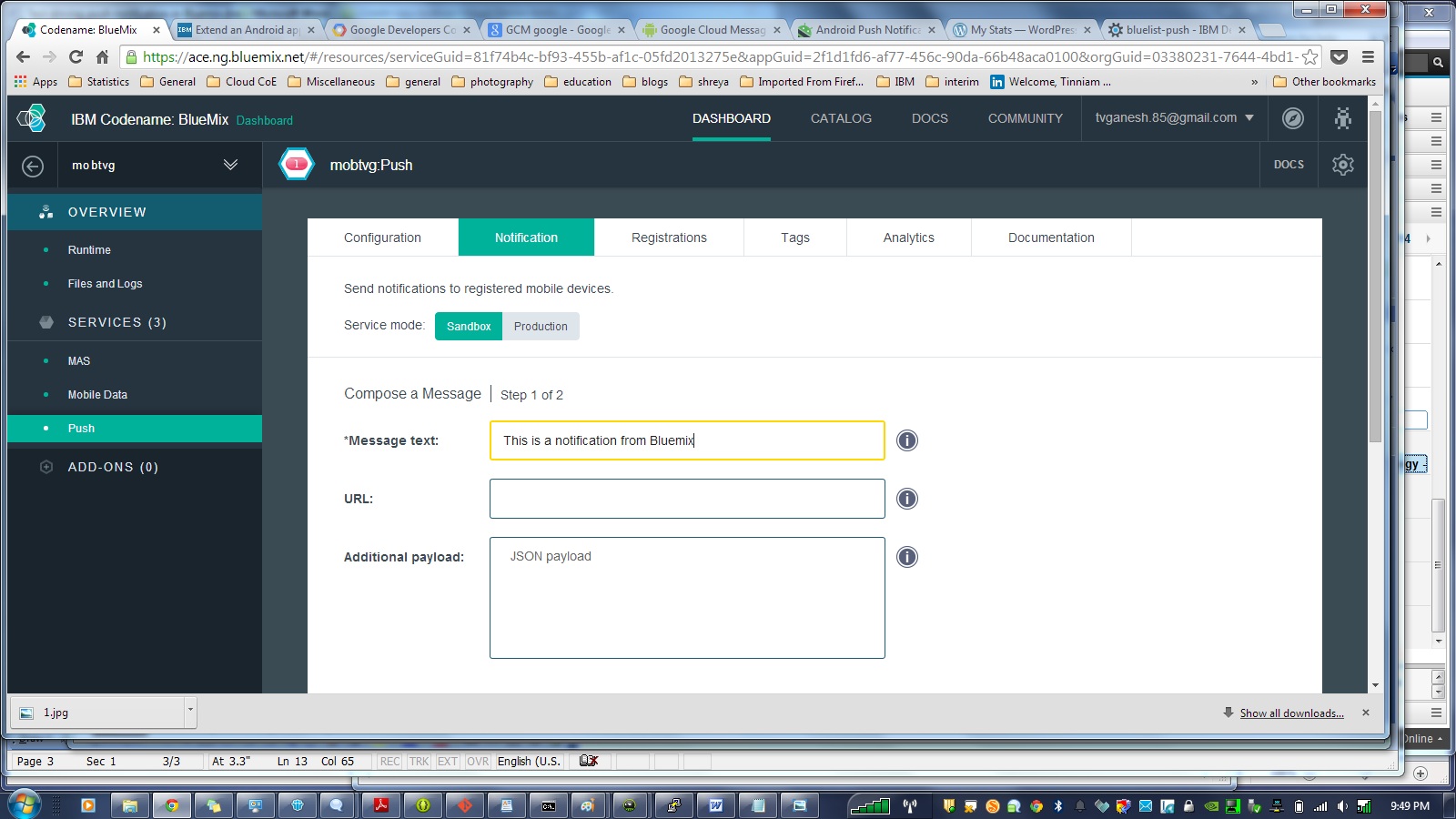
h) Login to Bluemix. Click Push and select the Notifications tab and enter a test message for e.g. “This is a notification from Bluemix” and click send.

7

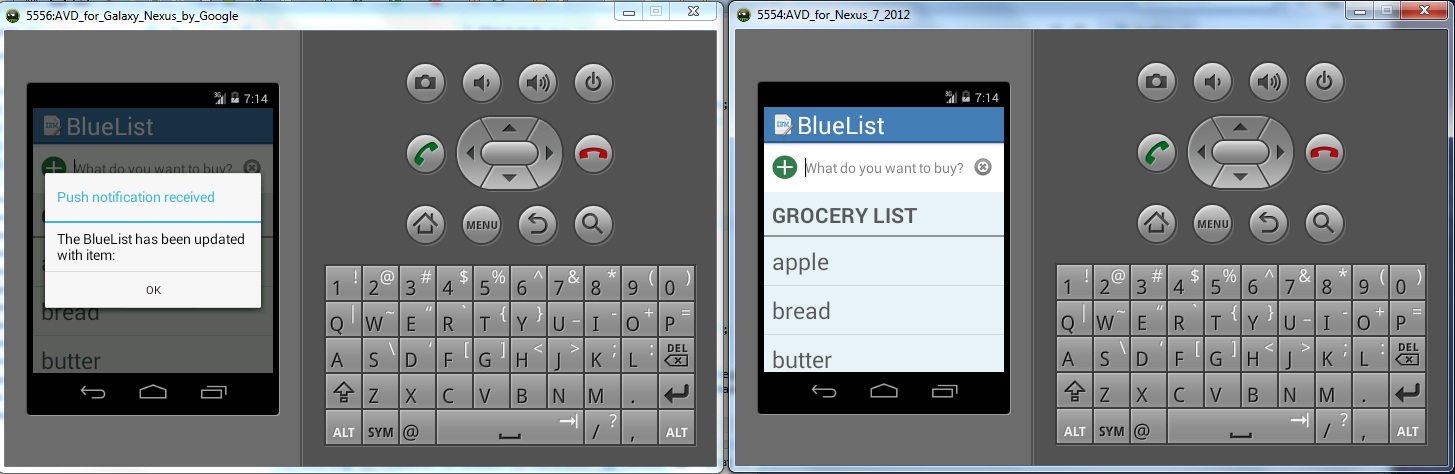
This will result in a Push Notification to be sent to the AVD. You should see this popup on you AVD as shown below

1

i) Add another AVD through Windows-Android Virtual Device manager. While one AVD is running go to Run->Run Configurations->Target Device and choose the newly created AVD.

j) This will start a second AVD which will refresh with the contents of the grocery list. Now adda new item in one of AVD devices. This will result in a Push notification to the other device that the Bluelist has been updated.

2

There you have it.

1) A mobile cloud applications in which changes persist in the cloud and are refreshed each time the Android device is restarted.

2) A Push notification that is sent to all registered devices whenever there is a change to the list.

Disclaimer: This article represents the author’s viewpoint only and doesn’t necessarily represent IBM’s positions, strategies or opinions

Find me on Google+

Getting started with a Mobile Cloud app with Bluemix

This post gives the key steps to get going in building a Mobile Cloud application on IBM’s Bluemix. This post focuses on using the Android Platform for building the application. IBM Bluemix’es mobile cloud application includes under its hood mobile services like mobile application security, push and mobile data. A Node.js is also thrown in to provide server-side functions.

The Bluemix Mobile architecture is shown below

BuildingMobile


As in the previous post an existing Mobile cloud application IBM’s bluelist -base is cloned to get familiarity with the steps involved. The IBM’s bluelist-base app enables the user to maintain a grocery list that persists as mobile data in the cloud instance. To get started perform the following

1) Install ADT + Eclipse bundle from the aforementioned link

2) Unzip and install Eclipse and the ADT bundle

3) Make sure you have the Java JDK for Eclipse. If not install from the following site Java SE Development Kit 8 Downloads

4) Since we will be cloning an existing application and using Eclipse to make the changes we need to install EGit.

5) To do this open Eclipse and select Help-> Install New Software and type in http://download.eclipse.org/egit/updates in the Work with text field and hit enter. You should see the following

1

6) Once EGit is installed the IBM’s bluelist-base App can be cloned as follows

7) In Eclipse click File->Import->Git->Import from Git and click Next

8) Choose Clone URI and Click Next

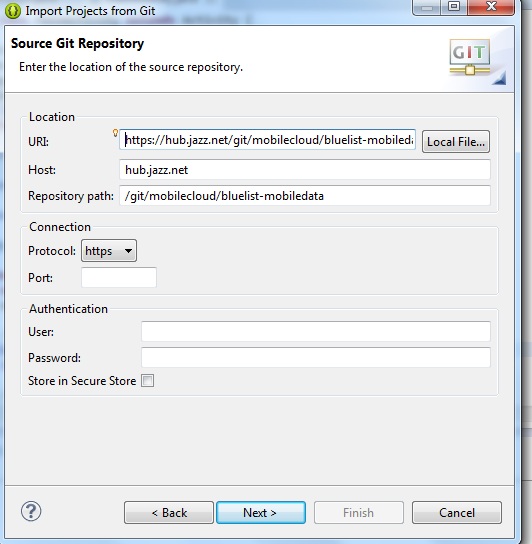
9) Enter the URI for IBM’s bluelist-base. This shown below

2

10) This will download all the necessary source files and other Android related files and directories into the workspace.

11) After this perform the Steps 2 to Step 6 from the link given Build an Android app using the MobileData cloud service

12) After you make the necessary code changes you are good to go

13) Make sure you right-click and add all the necessary imports required (also Ctrl+Shift + O)

14) Build the Project and make sure that there are no errors

15) You are now ready to run the mobile cloud application. We need to run the mobile app on a Virtual simulator. This can be done as

a) In Eclipse click Window->Android Virtual Device Manager. Click the Device Definitions tab.

b) Choose Nexus 7 (Google) and Click Create AVD.
c) This will open a New Window. Set the following Skin->QVGA and Enter 100 MiB in SD Card size and click OK. This will add this as a AVD.

16) Now run the application.

17) This will bring up the AVD. This takes some time You should see the IBM bluelist showing up as one of the apps.

18) Click on IBM Bluelist. You can add grocery items. These items will persist even if you have to restart your application

3

19) The data is persisted in the IBM’s cloud. This can be checked by logging into BlueMix’es dashboard

4

20) Click the Mobile Data and the data entered in the AVD device will show up in Data Classes drop down.

5

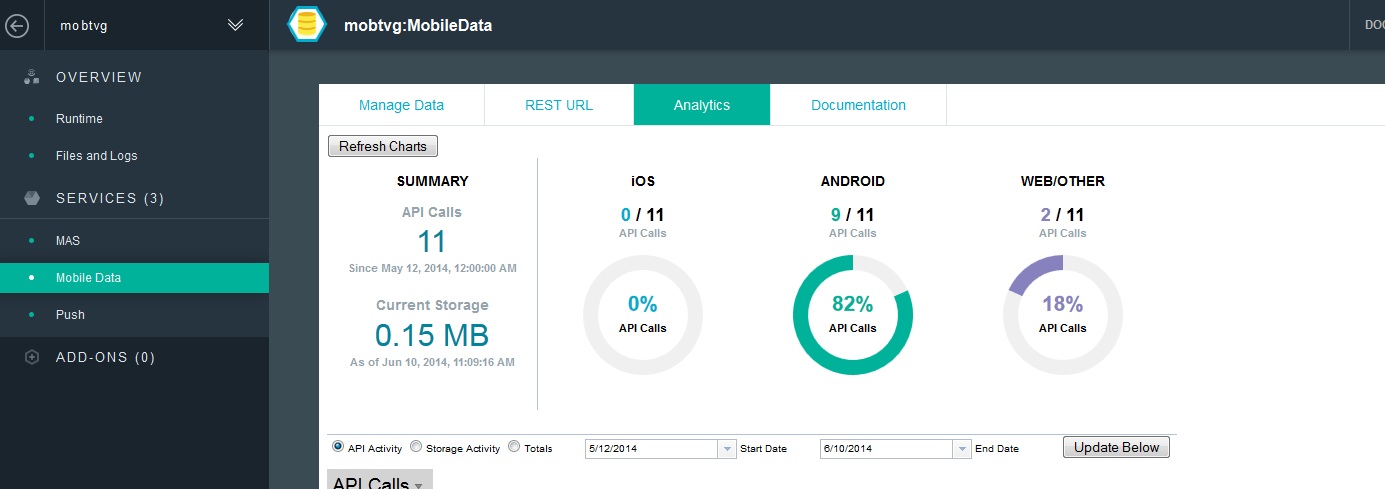
21) The Analytics tab will give a graphical output of the API calls

6

So not the mobile app that is cloud enabled is ready.

Clearly the ability to build Android Apps with the data stored at a cloud opens up numerous possibilities for apps like Evernote, Pocket across several devices.

There you have your first Mobile Cloud App.

Watch this space!

Disclaimer: This article represents the author’s viewpoint only and doesn’t necessarily represent IBM’s positions, strategies or opinions

Find me on Google+
Get your feet wet with IBM Bluemix

This post provides the initial steps to get started on IBM’s Bluemix (currently in beta). Bluemix is open-standard, cloud based Platform-as-a-Service (PaaS) from IBM. Bluemix allows one to quickly put together mobile, web, Big Data, IoT applications. Bluemix is an implementation of IBM’s Open Cloud Architecture, Cloud Foundry which enables developers to rapidly build, deploy, and manage their cloud applications. The developers can tap into a growing ecosystem of available services and runtime frameworks.

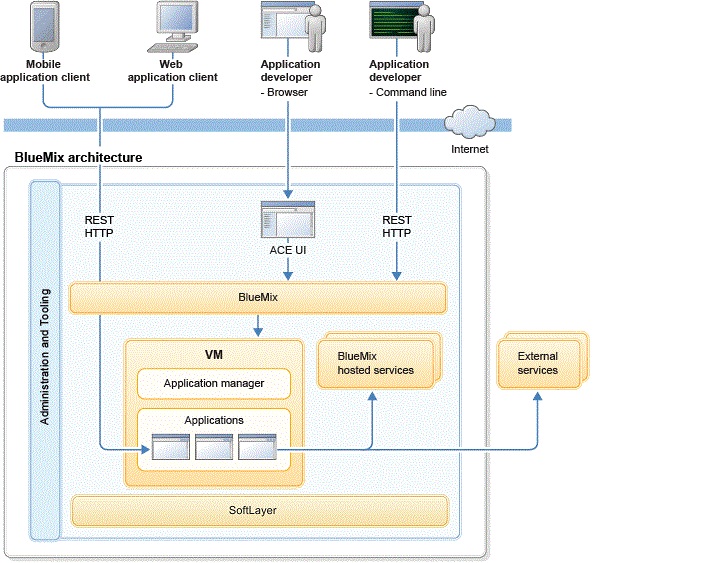
Bluemix uses the Softlayer infrastructure to host the user applications. Clients/developers interact with Bluemix either with HTTP or REST as shown below
8

Here are the steps to get going on Bluemix

First things first

I would suggest that you get all the registrations and installations right away.

Bluemix dashboard– Get started by creating an account on Bluemix. This will provide you access to the Bluemix’s dashboard from which you can quickly create applications (mobile, Web, IoT, BigData) etc

Devops: Register for an account with Devops. Devops allows you to easily develop, deploy and track your code online. Devops also allows you to collaborate with others by forking code from their Git repositories

Cf Interface : Install the Command line interface ‘cf” to Bluemix. The ‘cf’ command interface is built with Google’s Go programming language. With ‘cf ‘you can login to Bluemix, create an application, add services and manage your application. You can also do this from the Bluemix’es dashboard.

Install Git: There are multiple ways to develop code for Bluemix. Git command line happens to be one of them, So it makes sense to have this installed. You can install this from this link https://hub.jazz.net/tutorials/clients#installing_git

Install Node.js:The application that this post discusses is based on a Node.js based application so it will help to have it installed. Node.js is a platform that enables building of fast, scalable network applications and created by Ryan Dahl.

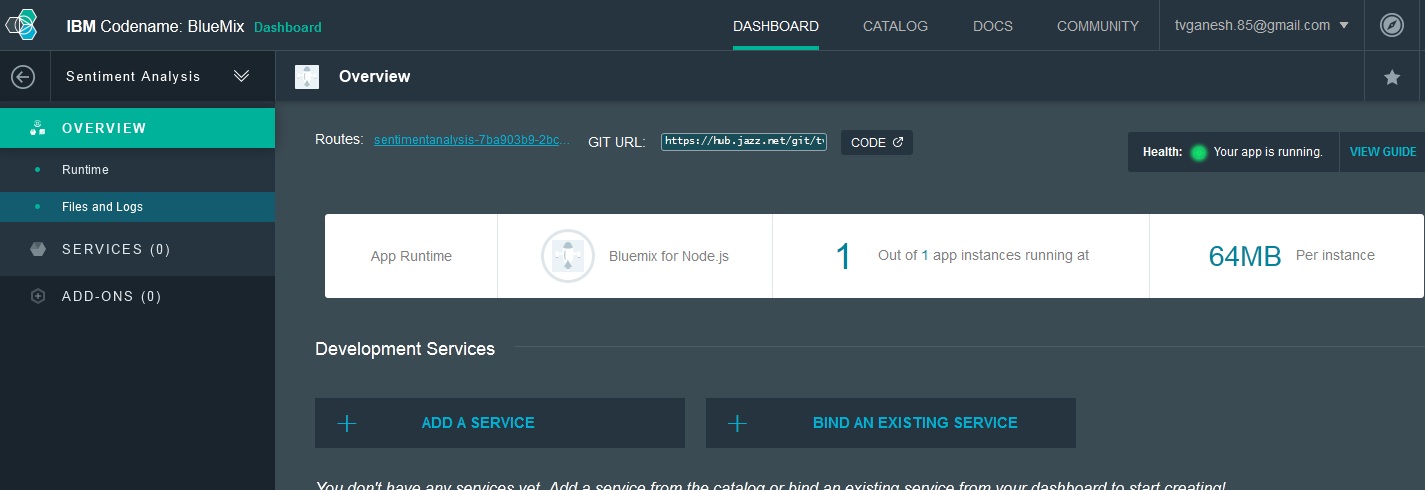
Kicking off Bluemix : A good first application to get moving on in Bluemix is the already available Sentiment Analysis of Twitter. This application uses the Node.js ‘sentiment’ module to perform some basic sentiment analysis.

The quickest and most painless way to get started on Bluemix is to ‘fork’ the code for Sentiment Analysis from Devops.

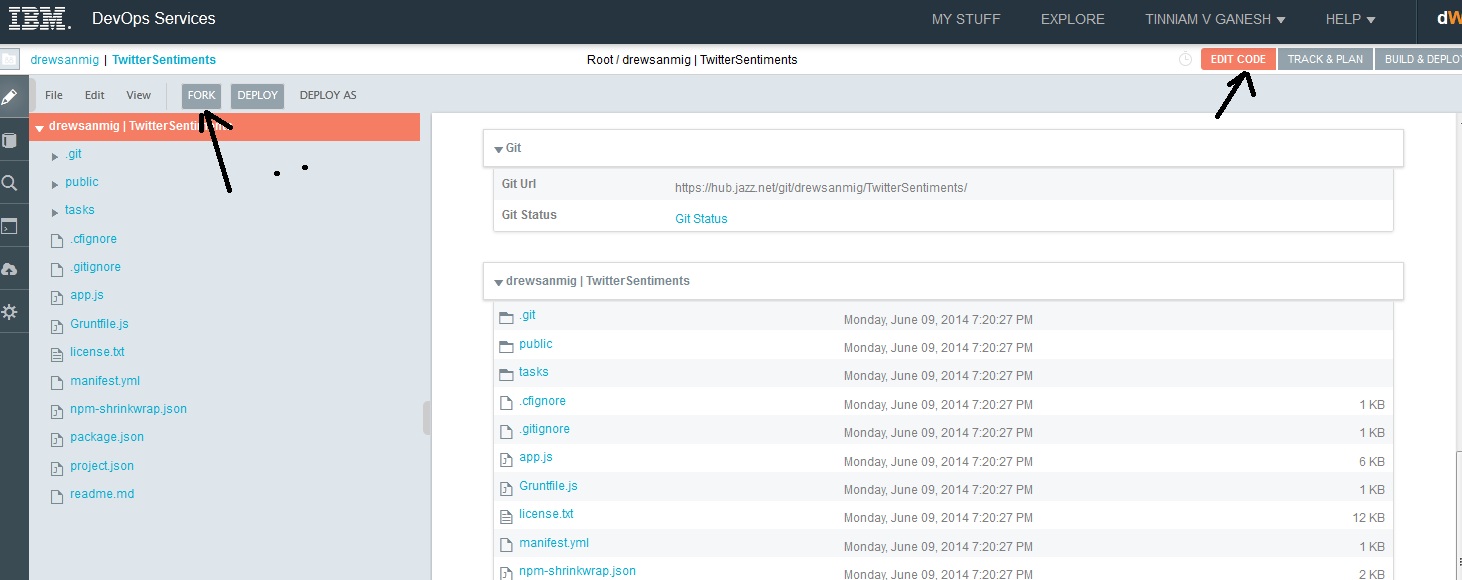
1) Login to your Devops account. Click the following Sentiments link from Devops, in which I have created a slight modification to the sentiment analysis application. You can also clone the code from GitHub at sentiments.

2) Click the Edit Code button at the top. This will open the files and directories in this project (see picture below)

3) Next click the “Fork’ button on the panel on the left side. This will create a copy of the above code in your own repository (see picture below )

1

4) The Twitter sentiment analysis code is in app.js written in Node.js. You can make changes to the code as needed. I have made a few modifications to the code that I had forked. I added changes which adds a textual output of the Twitter sentiment

;

How to make code changes with Web IDE

5) To make code changes double click the app.js file. This will open up the code window. You can use the GUI based IDE to make the code changes and merge with the master branch, The steps are
a) Make the necessary changes and click the symbol shown

2

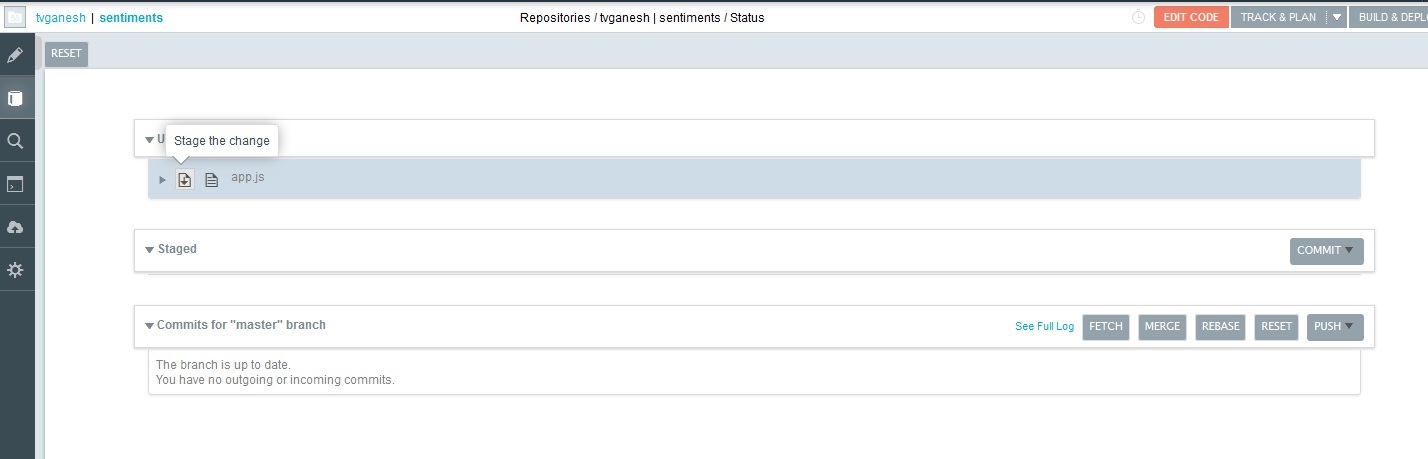
3. This will open a new window as shown below

3

4) Click the ‘Stage to change’ button.

5) This will move the changes to Staged. Click the ‘Commit’ button and enter the reason for the change and click the “Submit’

4

6) This will move the changes from ‘Staged’ to ‘Commits for master branch’

7) Now click ‘Push all’ and click ‘Ok’ in the Git Push popup window. This will merge the changes into the master branch.

8) Once this done click ‘Build & Deploy’ button

9) Your changes will transition from ‘Pending’ to ‘OK’. Now click the ‘Manage’ button. This will deploy the application with the latest changes on to Bluemix.

10) Do the following to populate the details for the parameters below  with a Twitter app that you create for your application

var tweeter = new twitter({
consumer_key:  <your API key>,
consumer_secret: <your API secret>,
access_token_key:<your access token >,
access_token_secret: <your access token secret>
});

11) To do this log into http://dev.twitter.com

12) Click My applications where your picture is displayed and then click Create application.

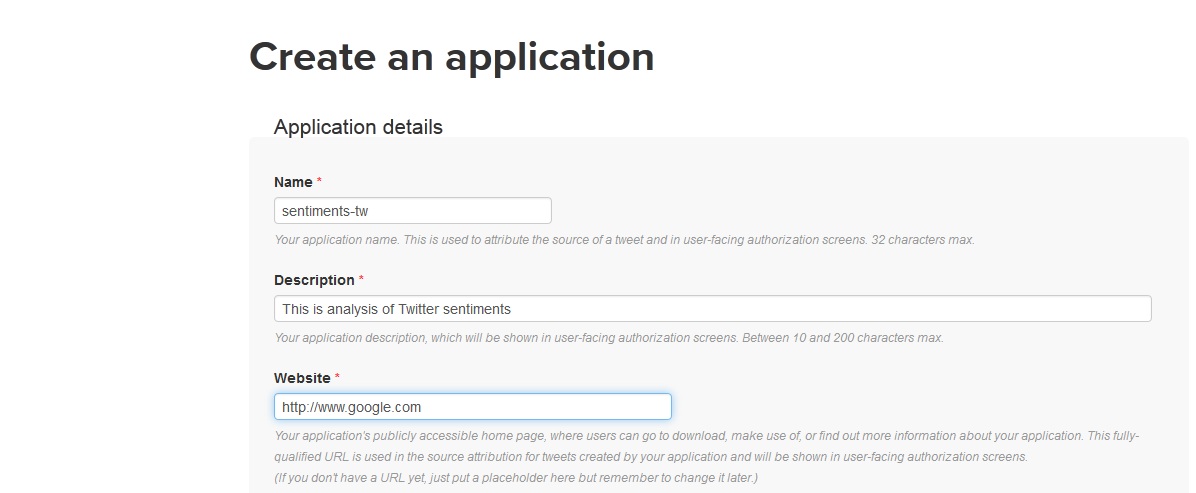
13) Enter the details for Name,Description & Website (can be any valid website) and then click Create Twitter application.. This will create the Twitter application.

1

14) Click the API tab. Scroll down to the bottom and click “Create my access token”.

15) This will generate the Access token & Access token secret. Enter all the details (API Key, API secret, Access Token, Access Token secret into app.js and push to the master branch before deploying on Bluemix


Code changes with Git command line

11) Incidentally the changes to code can also be made through the Git command shell as follows

a) git clone https://hub.jazz.net/git/tvganesh/sentiments

b) Modify the code using any editor and save the changes

c) Go the directory containing the files and do

git add *

d) git commit -m “Cosmetic” app.js

e) git push

This will push the changes to the git repository in the master branch

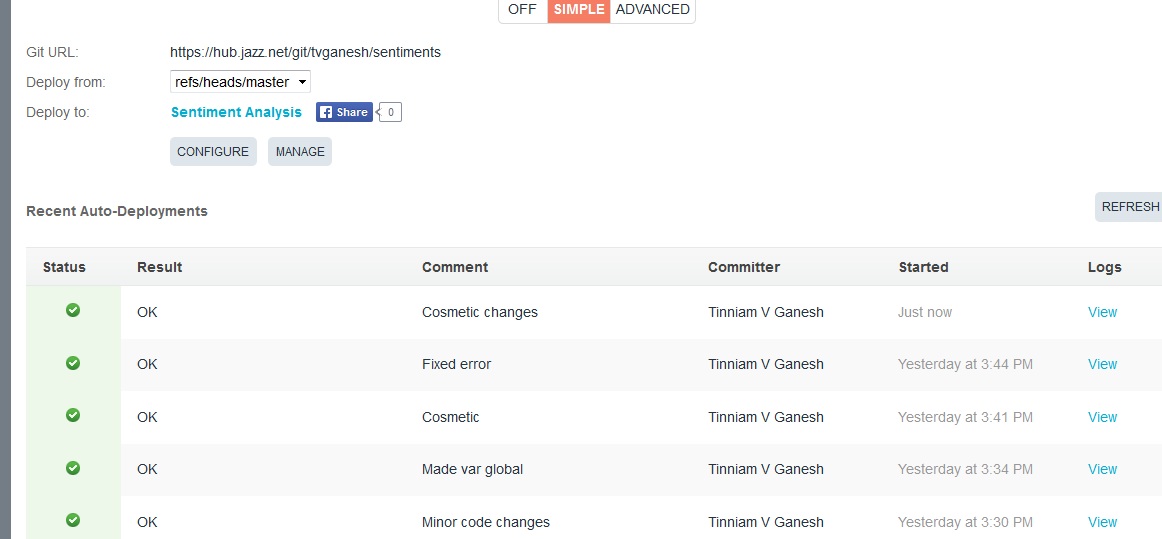
8) Click the ‘Build & deploy’ in the top right corner. You should see this

5

9) Click the ‘Manage’ button which will push the application onto the BlueMix

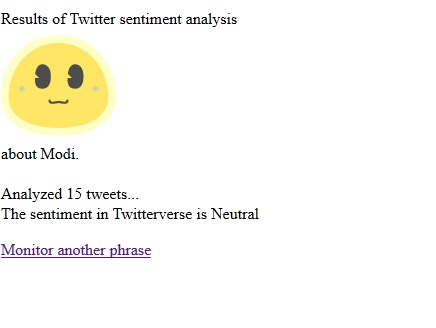
10) To test this application click the link next to ‘Routes’ . Enter a phrase that you would like to search and hit ‘Go’

6

You should see the application checking Twitter periodically for the tweets.

7

Thats it! You have built your first Bluemix application.

The ability to integrate Node.js into your cloud application allows one to easily create powerful applications.

Hasta la vista! I’ll be back!

Disclaimer: This article represents the author’s viewpoint only and doesn’t necessarily represent IBM’s positions, strategies or opinions

Find me on Google+

Introducing the Software Defined Computing Pattern

We are on the verge of a new ‘Software Defined’ revolution. The phrase ‘software defined’ refers to the ability to be able to programmatically control computing elements namely compute, storage, network. We are entering into a bold, brave ‘software defined’ era. Before we delve into the ‘whats’ of this revolution I would rather like to outline the ‘whys’. What motivated this new thinking in computing?

Why “Software Defined’?

In the late 90s, IT infrastructure was unwieldy and unmanageable, Whenever new IT infrastructure had to be procured there was the need to accurately size the required hardware infrastructure, software, software licenses, routers, switches and storage elements The problem in those days had to do with dimensioning. The CIO and IT managers had to be able to calculate the requisite hardware, and software elements. The problem was that if the estimate was too conservative the infrastructure would be under-dimensioned and would not be able to handle the load. On the other hand if it was over-dimensioned then hardware and software would lie idle and would result in a wasted resources and money. So it used to be a fine balancing act. Even if the IT managers got lucky and got the size right, it is quite likely that conditions in the enterprise changed resulting in them having to take a relook at their infrastructure.

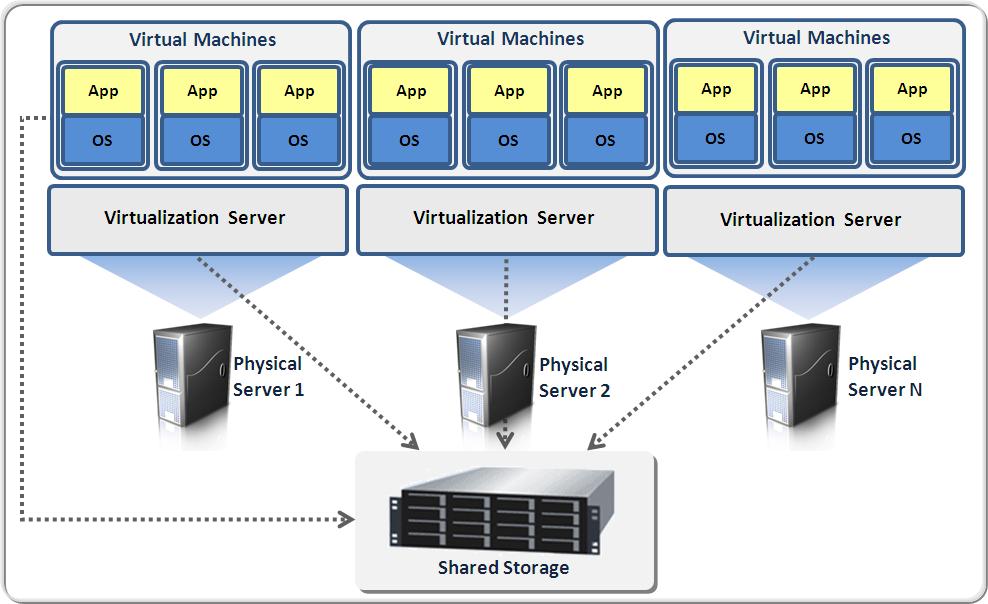
This problem of dimensioning IT infrastructure was effectively solved by a technology called ‘virtualization’. In the mid 1960s IBM created a CP-67 Mainframe computer, which had the elements of virtualization. Much later in 1998, VMWare created the VMWare workstation that could run multiple Operating Systems (OS’es). In essence virtualization abstracts the hardware of the computer, storage and network ports through a software known as the hypervisor. Over the hypervisor, the user can run any operating system like Windows, Linux, AIX etc. These OS’es which run on top of the hypervisor are known as guest OS’es. Besides, virtualization technology, enables different virtual servers to share one physical server. This process, called server consolidation, helps to increase hardware utilization, load balancing, and optimization of the IT resources.

The ability to virtualize the computer hardware really triggered some major advancements in computing. Prior to virtualization each server would run a single OS with a single application resulting in the server being idle for close to 60% of the time. Virtualization now made it possible for enterprises to run several OS’es each with its own application on a single computer. Hence the computing resources were used more effectively and efficiently. This is shown below

a

Virtualization and the dotcom bust around the year 2000 effectively paved the way for a ‘Software Defined’ future. In others words there was a need to control resources programmatically aimed at more efficient utilization of the resources.

The move to the Cloud: Prior to the advent of the cloud, enterprises hosted their applications in their internal IT infrastructure with virtualization technology. With the pay-per-use, utility style computing, spearheaded by the likes of Amazon, many enterprises moved their applications to shared, multi-tenant (multiple customers) , 3rd party hosting service provider, also known as the cloud providers

With the advent of Cloud Computing the software defined era made major advances. Here is the reason why. Computing as such stands on 3 main pillars- computing, storage and networking.

As mentioned earlier in the post, one of the thorny issues in procuring & managing IT infrastructure is the problem of dimensioning or right sizing. Virtualization did solve this problem to some extent but there was a need to provide more control to the user. This is where the ‘Software Defined’ technologies emerged. This ‘Software Defined’ paradigm is based on prudence and sound engineering judgment. The whole premise of making anything ‘software defined’ is to ensure that resources allocated for any task (computing, storage or networking) are optimal. The idea is that resources should be allocated exactly as needed and released and included into a shared, common pool, when idle. Hence we have the advent of

  • Software Defined Compute
  • Software Defined Storage
  • Software Defined Network

Software Defined Compute (SDC): In the clouds these days it is possible to precisely control the computing elements that will make up your application. So you can choose your CPU type, CPU speed, hypervisor, OS, RAM size, disks etc. You can also provision your application to expand or contract elastically to the demands of the times rather than under-provisioning or over-provisioning, This is done through a process called auto scaling. The desired configuration can be controlled through APIs provided by the Cloud Provider.

Software Defined Storage (SDS): There are multiple storage technologies that span DAS, SATA drives, SAN and NAS storage. These different storage technologies address different needs of price, storage capacity and performance, The Software Defined Storage allows the user to control the type of storage that is needed for the application through software APIs. In storage the initial allocation to each application is rather conservative. Additional storage is assigned from a common pool of storage to the applications that needs it the most. Once the storage is no longer needed it is reclaimed.

Software Defined Network(SDN): SDN is the result of pioneering effort by Stanford University and University of California, Berkeley and is based on the Open Flow Protocol and represents a paradigm shift to the way networking elements operate. Software Defined Networks (SDN) decouples the routing and switching of the data flows and moves the control of the flow to a separate network element namely, the flow controller.   The motivation for this is that the flow of data packets through the network can be controlled in a programmatic manner allowing for multiple data streams to flow over the communicating paths with each stream individually defined for speed, latency, QoS etc.

Software Defined Datacenter (SDDC): A datacenter has racks and racks of servers, storage boxes, and networking equipment. A datacenter where one is able to provision, manage and operate these equipment through APIs or through programs is a Software Defined Datacenter. Imagine being able to put together a car with the body of a BMW, the interior of a Merc, the engine of a Ferrari and the electronics of a Tesla! That is what a SDDC allows you to do!

Software Defined Computing Pattern (SDCP): Once the SDC, SDS and SDN reach a level of maturity I think the next logical step would be a move to Software Defined Computing Patterns. This is what I am implying by this. Theoretically we can reduce the different types of enterprise applications to a set of computing patterns for e.g. e-commerce, social network, email server, Web portal etc. The Software Defined Computing Pattern would allow the user to choose a computing pattern based on the enterprise application. This would result in the setting up of the appropriate computing resources, storage resources, middleware and networking elements in a cloud. . The user would them need to host their applications on this environment. Here is a good link to cloud patterns.

In this context I would like to bring to your notice that there is another parallel trend called Software Defined Architecture (SDA) coined by Gartner in 2014. The SDA Gateway is responsible for virtualizing the internal API, protocols and models used to external API, User Interface and resources. Here is a diagram of SDA

sda-2

The pace of progress in the last couple of years has been really scorching. The ability to have solve most large problem through a Software Defined Computing Pattern is sure to happen.

The mind of a programmer

aHere is a short essay on the minds of the programmer and programming in general. Programming has been variously described as a science, an art, as black magic, as the work of craftsman etc. It is true, programming can be any or all of that described above. Programming in my opinion is going to become increasingly important in the years ahead. I would certainly advocate some knowledge and grasp of programming. There are many books that claim to teach programming anywhere between 3 to 21 days etc. This is not true. Learning to program is just the beginning of a never ending process. Here is a great piece by Peter Norvig – Teach yourself programming in 10 years.

Programming can be considered to be a language to express your thoughts on the solution to a problem. The ability to express in a programming language can vary between being simply pedestrian to being absolutely poetic! There are those who can wax eloquent in a programming language. In any case, programming is a means to an end, the end being the solution to a problem. Typically the solution to the problem, is expressed as an algorithm, which is then is coded through a programming language,. Programming can be a highly analytical and creative activity.

Programming is different from most other professions that I can think of.  To get started all you need is a computer and an Integrated Development Environments (IDE) for e.g. Eclipse, which can be downloaded for free. The IDE can be used for writing code. There are no other associated costs.

Programming is also different from other professions in the sense, that you get your response immediately.  For e.g. a painter can paint anything and imagine that he/she is the next Rembrandt or Picasso.  A guitarist can create the most hideous sound and think he is Jimi Hendrix’s re-incarnation.  Other professions like architects, civil engineers, scientists have to wait for several months to know whether they are in the right direction or not. It is not so with programming. You write code. When you compile it or execute it, the verdict is instantaneous. It is simply a “no go”, if you are wrong. There is no middle path. You are either right or you are wrong.

Having said that, I would like to look at the typical experiences of a programmer?

Tears, sweat and frustration: In the beginning programming is usually very intimidating and frustrating. In the initial stages when you grapple with the quirky syntax of the language, and try to formulate your thoughts around the problem, you will hit many speed bumps. It can be exhausting, tiring and nerve racking.  There are no shortcuts in learning how to program. You have to go through the grind, memorize certain phrases and hope that your program works.  Once you have you arms around the syntax, you are on your way to actually writing code that achieves something. Here again you will run into all sorts of problems, like loops that never end, inexplicable program crashes and mysterious run time errors etc. The early stages can be difficult and quite unforgiving. This phase requires patience to get through.

Feelings of megalomania: Someone with 5 to 7 years of programming experience knows most of the typical constructs by heart and will be able to quickly churn out programs, rather fast. This is a dangerous phase. Since you have been doing the same thing for a couple of years you are typically aware of the problems and can possibly tweak code to make it solve a slightly different problem. This is usually the stage when programmers start to experience a sense of megalomania. There are delusions of grandeur. You may remember the programmer shown in Golden Eye who keeps saying “I am invincible!” whenever he is able to solve a knotty problem. These programmers have the feeling that “Nothing is impossible”

Programming is a great leveler.  Programming can be a great boost to your ego. When you are able to visualize a problem, strategize the solution and actually get it to work, it does wonders to your ego. Programming can really boost your self-esteem. But you should not just stick to your comfort zone and write code in exactly the same language in exactly the same domain.  It really helps to move to a different language, preferably a different paradigm – for example a move from procedural (C) to Object Oriented (Java, C++) or from object oriented to functional (Lisp, Haskell). Similarly moving from Web programming to protocol design or from data communication to app design will do wonders. The shift to a new programming paradigm and new technical domain will put you on even keel. All your knowledge and expertise will evaporate when you move to a new domain. Moving around in technology will keep you more grounded. You will realize that there is still so much more to learn. There is yet another universe.

In other words, programming keeps you honest!

My journey of 25+ years as a programming has helped me to learn technology in all its flavors. More importantly I was able to learn about myself. I have seen it all. Sweat, tears, frustration, fear, anger, pride and ecstasy.

.

A few years back, once you learned the basics, if your work did not involve coding, there was not much to do. But these days you can really do some fun things. You can imagine any app you want and actually start to realize it. Who knows, your app may be the next block buster! I am certain all of us have ideas which we want to implement. Programming allows you to just that!

Programming really makes you exercise your grey cells. Who knows we will soon hear that research has proved that programming helps prevent Alzheimer’s and Parkinson’s disease.:-)

In any case, learning to program is one good thing.

Also see
1. Programming languages in layman’s language
2. The common alphabet of programming languages
3. How to program – Some essential tips
4. Programming Zen and now – Some essential tips -2 

You may also like
1. A crime map of India in R: Crimes against women
2.  What’s up Watson? Using IBM Watson’s QAAPI with Bluemix, NodeExpress – Part 1
3.  Bend it like Bluemix, MongoDB with autoscaling – Part 2
4. Informed choices through Machine Learning : Analyzing Kohli, Tendulkar and Dravid
5. Thinking Web Scale (TWS-3): Map-Reduce – Bring compute to data
6. Deblurring with OpenCV:Weiner filter reloaded

Find me on Google+
Divining Twitterverse with R

In this post I continue my journey into Twitterverse with R and capture the tweet frequency for the hashtags #NaMo, #AAP and #RaGa over the last 7 days.  This seemed the most appropriate thing to do given that the 16th Indian General Election 2014 is just around the corner. The handshake that has to be established with Twitter is the same as mentioned in my last post “To R is human …”

Here is a great blog post on measuring tweet frequencies – Getting Genetics done by Stephen Turner.

Once the initial handshake is done the following has to be done. It appears that searchTwitter can only search tweets within the last 7 days and that too for a maximum of 1500 tweets.

This is done as follows for the hashtag #NaMo.  The dates variable creates 7 date strings. The for loop performs a searchTwitter everyday for the last 7 days

#Search the last 7 days for the hashtag #NaMo everyday

dates <- paste(“2014-03-“,10:17,sep=””) # need to go to 18th to catch tweets from 17th

for (i in 2:length(dates)) {

print(paste(dates[i-1], dates[i]))

tweets <- c(tweets, searchTwitter(“#Namo”, since=dates[i-1], until=dates[i], n=1500))

}

The tweets are then converted to dataframes for processing

# Create a dataframe from the tweets

tweets <- twListToDF(tweets)

tweets <- unique(tweets)

Finally the tweets are plotted using ggplot

#Plot the frequency of tweets in 2 hour windows

minutes <- 120

ggplot(data=tweets, aes(x=created)) +

geom_bar(aes(fill=..count..), binwidth=60*minutes) +

scale_x_datetime(“Date”) +

scale_y_continuous(“Frequency”) +

opts(title=”#NaMo Tweet Frequency March 11-17″, legend.position=’none’)

ggsave(file=’NaMo-frequency.png’, width=7, height=7, dpi=100)

The plot for #NaMo is shown below

namo

The same is performed for

#AAP

AAP

And for #RaGa

RaGa

While the number of tweets for #NaMo is very high, #RaGa seems to occur in lower number but consistently everyday

Of course we can check the tweets whether is sentiment is positive or negative for the hashtags. Thats for another day though.

The code can be cloned at Rtweet-frequency

Find me on Google+
To R is human …

“To R is human, to dabble in it fun” one could say. In this post I try to be a little of Nate Silver looking at Twiiterverse. Since the Indian general election 2014 is around the corner for constituting the 16th Lok Sabha in India I wanted to play around a little bit. Anyway here goes.

To get started on Twitter, with R we first need to establish a handshake between Twitter and R. We need to authenticate our R application with Twitter to enable us to mine the tweets in Twitterverse.. The steps are fairly straightforward. The R app you create has to authenticated and authorized with Twitter.

The first step is to create an app at Twitter at http://dev.twitter.com.. Login to your twitter account. Click the drop down at your photo and choose “My applications”. Then click “Create new application”. Now do the following
– Enter a unique name for your application
– Enter a description
– For the ‘Website’ enter any valid URL
– Leave the Callback URL blank
– Accept the conditions

bb
Leave this in your browser. The handshake between your R application and Twitter needs to be established as follows

#install the necessary packages
install.packages("ROAuth")
install.packages("twitteR")
install.packages("wordcloud")
install.packages("tm")

library("ROAuth")
library("twitteR")
library("wordcloud")
library("tm")
library(RCurl)

# Set SSL certs globally
options(RCurlOptions = list(cainfo = system.file("CurlSSL", "cacert.pem", package = "RCurl")))

require(twitteR)
reqURL <- "https://api.twitter.com/oauth/request_token"
accessURL <- "https://api.twitter.com/oauth/access_token"
authURL <- "https://api.twitter.com/oauth/authorize"

Now go to your browser. In the created Twitter application, choose the API Keys tab. Copy and paste the API key and API secret in the next 2 lines

apiKey <- "Your API key here"
apiSecret <- "Your API secret here"
twitCred twitCred$handshake(cainfo = system.file("CurlSSL", "cacert.pem", package = "RCurl"))

When you enter this you should see the following
To enable the connection, please direct your web browser to:
https://api.twitter.com/oauth/authorize?oauth_token=WnTGL4eHsiNJRFRiW1UU3GoYSvVZiYDBbO3WAsZO

Copy and paste the link given in a new tab in your browser. Copy the 7 digit PIN and paste it in the space below
When complete, record the PIN given to you and provide it here: 7377963

registerTwitterOAuth(twitCred)

This should complete the authorization. Now you are good to go.

Here is a short example of performing Text Mining with the help of package “tm”.

I wanted to create a word cloud around the hashtag #NaMo

So here is the code. We need to create a Corpus

#Search Twitter for the hashtag #NaMo

#Search Twitter for the hashtag #NaMo
r_stats<- searchTwitter("#NaMo",n=500, cainfo="cacert.pem")


# Save text
r_stats_text <- sapply(r_stats, function(x) x$getText())
# Create a corpus
r_stats_text_corpus <- Corpus(VectorSource(r_stats_text))
# Clean up the text
r_stats_text_corpus <- tm_map(r_stats_text_corpus, tolower)
r_stats_text_corpus <- tm_map(r_stats_text_corpus, removePunctuation)
r_stats_text_corpus <- tm_map(r_stats_text_corpus, function(x)removeWords(x,stopwords()))

# Now create a word cloud
wordcloud(r_stats_text_corpus)

modi

This will create a Wordcloud of the words most used with the hashtag, in this case #NaMo

You can clone the code at Rwordcloud

Watch this space. Hasta la vista. I’ll be back!

Find me on Google+

C Language – The code of God

dna

One could easily say “In the beginning there was C language. All else were variants” and not be far from the truth.  As I headed to work today I was ruminating on the impact C language has had to the computing landscape for the past 4 decades. No other language has had such a significant impact.

C Language was created by Dennis Ritchie & Brian Kernighan in Bell Labs, around 1972. C was the trigger for many seismic shifts in the computing industry. The language is terse and compact. C language strikes a rich balance between brevity and readability.

C language, in my opinion, is the code of God.

We can easily divide the epoch of programming languages as before C and after C. Before C, there was a babel of languages from FORTRAN, COBOL, Pascal, Basic, Prolog, Ada, Lisp and numerous others. When C language, entered the scene, many other languages simply faded away. C set the tone for programming and spawned an entire industry.

Many of the popular constructs like the if-then-else, for, while loops had a crisp simplicity in C. C included in its repertoire the ability to manipulate the bits of registers  all the way to creating complex and rich data structures with the help of structures and pointers. In fact C was probably one of key enablers for the development of the legendary Operating System (OS), UNIX from Bell Labs.

Building the innards of an OS is an undertaking of gigantic proportions and requires the need to be able to manipulate the registers of the numerous input/output devices, the processors and the memory.  C was eminently suited for this the job. Also the complex algorithms of OS for e.g. process scheduling, memory management, IO management, disk management could now be programed simultaneously in a bottom-up fashion by working at the ‘bit’ level and in a top-down fashion allowing for complex data structures and algorithms required for scheduling, memory and IO management. . With a powerful language C, the birth of UNIX was a given.  When AT&T distributed UNIX to the universities in the late 1970 it created serious shock waves in the industry. Since then UNIX has resulted in numerous variants – Solaris, HP-UX, AIX, iOS, Linux and then Android and so on. Well, that’s another story!

C came at an opportune time when the internet was at its infancy. C proceeded to be useful also for protocol of the internet namely TCP/IP. C spawned an army of programmers all keen to take on this new language twiddling bits, bytes and complex data structures of the OS and protocols.

C, UNIX and TCP/IP almost entirely power the internet and the WorldWideWeb.

The beauty and brevity of the language enabled programmers to easily express complex problems as units of C functions. Pointers, and bit manipulation gave it a power that was unparalleled at that time. Soon C became the de facto programming standard. C, in fact, became a way of thinking for problems!

So it was not surprising that languages that came after C used the same or similar constructs. C++ maintained identical constructs of C to maintain backward compatibility as well as to allow the already existing millions of C programmers easily assimilate the OO paradigm. Java, from Sun Micro Systems, followed suit.  Java, a very powerful and popular language, also retained the flavor of C.

Many interpreted and dynamic languages like Perl, Python, and Ruby all have C look-alike constructs,

Even in the languages of the Word Wide Web, C familiarity is extremely useful. JavaScript, PHP look familiar to one who is proficient in C.

The only other language which is entirely different from C from the bottom up, in my opinion is Lisp. Lisp is older than C and requires an entirely different way of thinking. There are possibly others too.

C balances economy of syntax, style and structure in programming exquisitely. It does have a few shortcomings, as its detractors would like to say. For e.g. C in the hands of a novice can spell disaster. It has also been accused of allowing programmers to create impregnable code. But in the hands of an experienced programmer it is possible to create really, robust code. UNIX and its variants are considered to be more resilient than OS’es to hackers.

C is really the soul of programming!

Find me on Google+