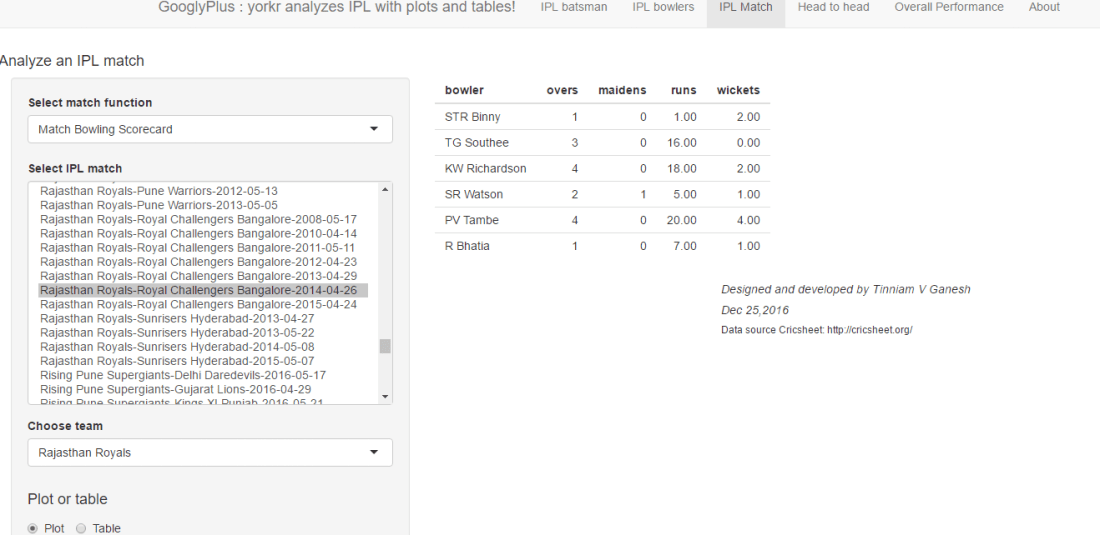
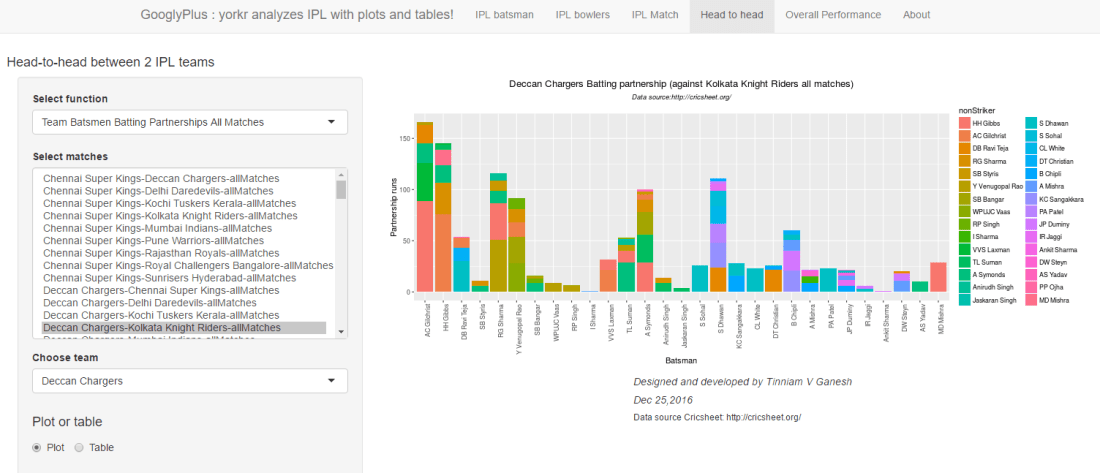
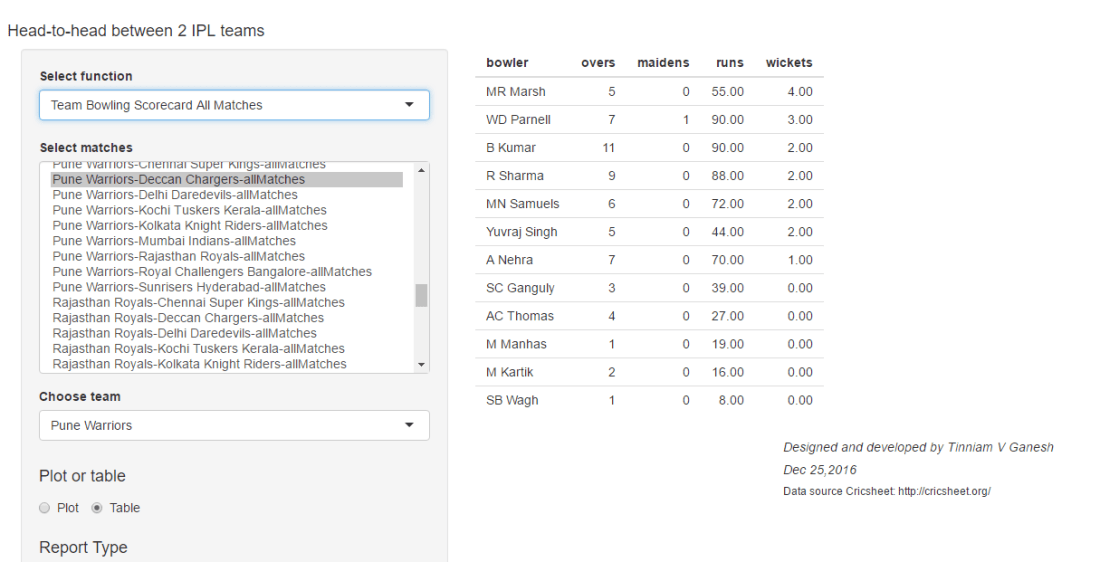
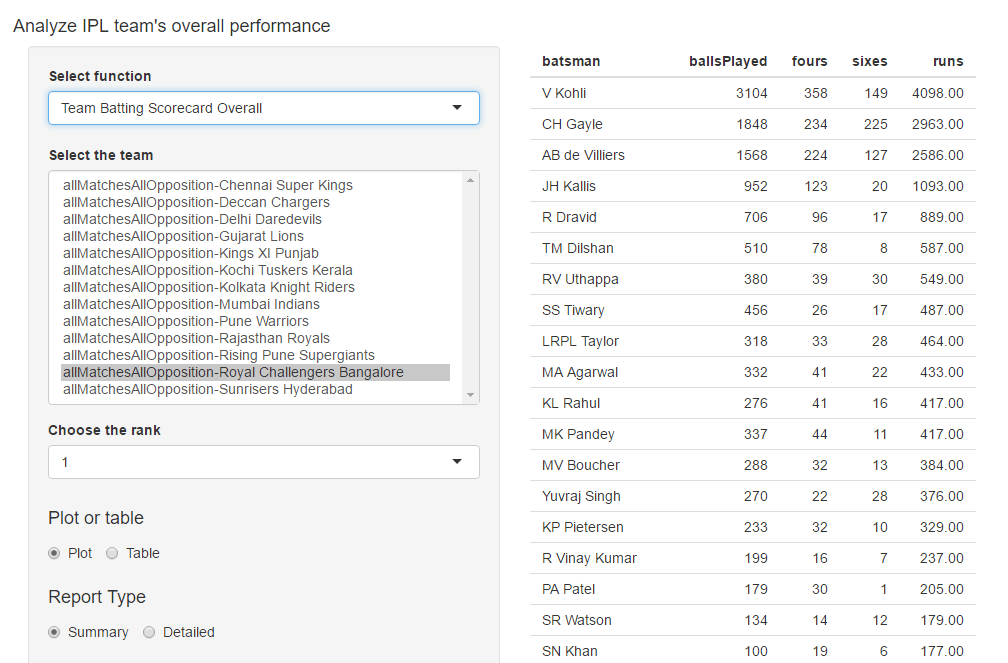
Pitching yorkpy…on the middle and outside off-stump to IPL – Part 2

When you come to a fork in the road, take it.
You’ve got to be very careful if you don’t know where you are going, because you might not get there

      Yogi Berra

Try taking his (Rahul Dravid’s) wicket in the first 15 minutes. If you can’t then only try to take the remaining wickets

      Steve Waugh
      

Introduction

This post is a follow-up to my previous post, Pitching yorkpy…short of good length to IPL-Part 1, in which I analyzed individual IPL matches. In this 2nd post I analyze the data in all matches between any 2 IPL teams, say CSK-RCB, MI-KKR or DD-RPS and so on. As I have already mentioned yorky is the python clone of my R packkage yorkr and this post is almost a mirror image of my post with yorkr namely yorkr crashes the IPL party! – Part 2. The signatures of yorkpy and yorkr are identical and will work in amost the same way. yorkpy, like yorkr, uses data from Cricsheet

You can clone/download the code at Github yorkpy
This post has been published to RPubs at yorkpy-Part2
You can download this post as PDF at IPLT20-yorkpy-part2
You can download all the data used in this post and the previous post at yorkpyData

Note: If you would like to do a similar analysis for a different set of batsman and bowlers, you can clone/download my skeleton yorkpy-template from Github (which is the R Markdown file I have used for the analysis below).

2. Get data for all T20 matches between 2 teams

We can get all IPL T20 matches between any 2 teams using the function below. The dir parameter should point to the folder which has the IPL T20 csv files of the individual matches (see Pitching yorkpy…short of good length to IPL-Part 1). This function creates a data frame of all the IPL T20 matches and and also saves the dataframe as CSV file if save=True. If save=False the dataframe is just returned and not saved.

import pandas as pd
import os
import yorkpy.analytics as yka
#dir1= "C:\\software\\cricket-package\\yorkpyPkg\\yorkpyData\\IPLConverted"
#yka.getAllMatchesBetweenTeams("Kolkata Knight Riders","Delhi Daredevils",dir=dir1,save=True)

3. Save data for all matches between all combination of 2 teams

This can be done locally using the function below. You could use this function to combine all IPL Twenty20 matches between any 2 IPL teams into a single dataframe and save it in the current folder. All the dataframes for all combinations have already been done and are available as CSV files in Github at yorkpyData

import pandas as pd
import os
import yorkpy.analytics as yka
#dir1= "C:\\software\\cricket-package\\yorkpyPkg\\yorkpyData\\IPLConverted"
#yka.saveAllMatchesBetween2IPLTeams(dir1)

Note: In the functions below, I have randomly chosen any 2 IPL teams and analyze how the teams have performed against each other in different areas. You are free to choose any 2 combination of IPL teams for your analysis

4.Team Batsmen partnership in Twenty20 (all matches with opposing IPL team – summary)

The function below computes the highest partnerships between the 2 IPL teams Chennai Superkings and Delhi Daredevils. Any other 2 IPL team could have also been chosen. The summary gives the top 3 batsmen for Delhi Daredevils namely Sehwag, Gambhir and Dinesh Karthik when the report=‘summary’

import pandas as pd
import os
import yorkpy.analytics as yka
dir1= "C:\\software\\cricket-package\\yorkpyIPLData\\data1"
path=os.path.join(dir1,"Chennai Super Kings-Delhi Daredevils-allMatches.csv")
csk_dd_matches = pd.read_csv(path)
m=yka.teamBatsmenPartnershiOppnAllMatches(csk_dd_matches,'Delhi Daredevils',report="summary")
print(m)
##            batsman  totalPartnershipRuns
## 49        V Sehwag                   233
## 12       G Gambhir                   200
## 21      KD Karthik                   180
## 10       DA Warner                   134
## 4   AB de Villiers                   133

5. Team Batsmen partnership in Twenty20 (all matches with opposing IPL team -detailed)

The function below gives the detailed breakup of partnerships between Deccan Chargers and Mumbai Indians for Deccan Chargers.

import pandas as pd
import os
import yorkpy.analytics as yka
dir1= "C:\\software\\cricket-package\\yorkpyIPLData\\data1"
path=os.path.join(dir1,"Deccan Chargers-Mumbai Indians-allMatches.csv")
dc_mi_matches = pd.read_csv(path)
theTeam='Deccan Chargers'
m=yka.teamBatsmenPartnershiOppnAllMatches(dc_mi_matches,theTeam,report="detailed", top=4)
print(m)
##          batsman  totalPartnershipRuns      non_striker  partnershipRuns
## 0   AC Gilchrist                   201        A Symonds                0
## 1   AC Gilchrist                   201         HH Gibbs               53
## 2   AC Gilchrist                   201        MD Mishra                0
## 3   AC Gilchrist                   201        RG Sharma               20
## 4   AC Gilchrist                   201    Shahid Afridi                6
## 5   AC Gilchrist                   201         TL Suman                7
## 6   AC Gilchrist                   201       VVS Laxman              115
## 7       S Dhawan                   122         A Mishra                9
## 8       S Dhawan                   122         B Chipli                1
## 9       S Dhawan                   122         CL White                2
## 10      S Dhawan                   122     DT Christian               52
## 11      S Dhawan                   122         IR Jaggi                2
## 12      S Dhawan                   122        JP Duminy                9
## 13      S Dhawan                   122    KC Sangakkara               16
## 14      S Dhawan                   122         PA Patel               22
## 15      S Dhawan                   122          S Sohal                9
## 16     RG Sharma                   103        A Symonds               11
## 17     RG Sharma                   103     AC Gilchrist               18
## 18     RG Sharma                   103         DR Smith                6
## 19     RG Sharma                   103         HH Gibbs                3
## 20     RG Sharma                   103   Jaskaran Singh               15
## 21     RG Sharma                   103        KAJ Roach                4
## 22     RG Sharma                   103        LPC Silva                0
## 23     RG Sharma                   103         TL Suman               14
## 24     RG Sharma                   103  Y Venugopal Rao               32
## 25      HH Gibbs                   102     AC Gilchrist               40
## 26      HH Gibbs                   102         DR Smith               24
## 27      HH Gibbs                   102        MD Mishra               27
## 28      HH Gibbs                   102        RG Sharma                8
## 29      HH Gibbs                   102       VVS Laxman                1
## 30      HH Gibbs                   102  Y Venugopal Rao                2

6. Team Batsmen partnership in Twenty20 – Chart (all matches with opposing IPL team)

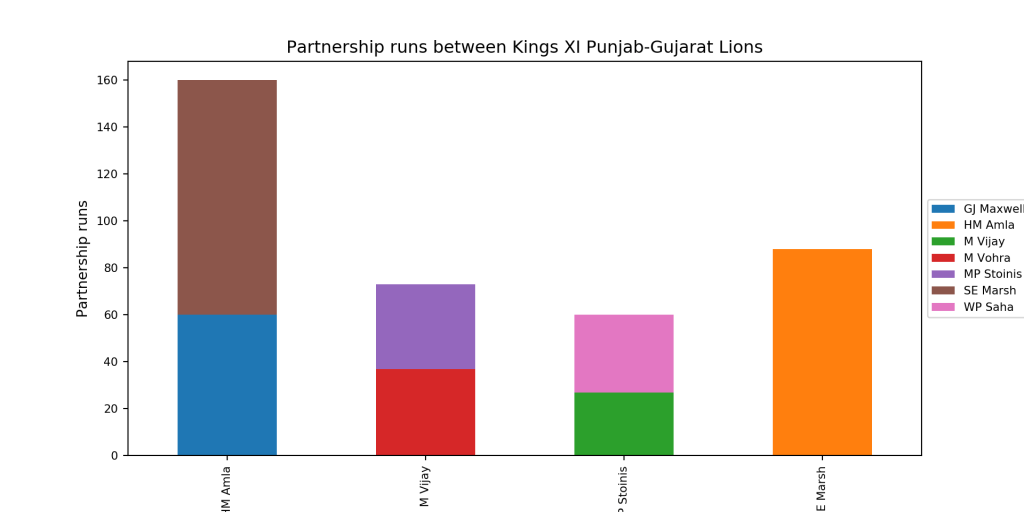
The function below plots the partnerships in all matches between 2 IPL teams and plots as chart

import pandas as pd
import os
import yorkpy.analytics as yka
dir1= "C:\\software\\cricket-package\\yorkpyIPLData\\data1"
path=os.path.join(dir1,"Gujarat Lions-Kings XI Punjab-allMatches.csv")
gl_kxip_matches = pd.read_csv(path)
yka.teamBatsmenPartnershipOppnAllMatchesChart(gl_kxip_matches,'Kings XI Punjab','Gujarat Lions', plot=True, top=4, partnershipRuns=20)
7.Team Batsmen partnership in Twenty20 – Dataframe (all matches with opposing IPL team)

This function does not plot the data but returns the dataframe to the user to plot or manipulate.

Note: Many of the plots include an additional parameters for e.g. plot which is either True or False. The default value is plot=True. When plot=True the plot will be displayed. When plot=False the data frame will be returned to the user. The user can use this to create an interactive charts. The parameter top= specifies the number of top batsmen that need to be included in the chart, and partnershipRuns gives the minimum cutoff runs in partnerships to be considered

import pandas as pd
import os
import yorkpy.analytics as yka
dir1= "C:\\software\\cricket-package\\yorkpyIPLData\\data1"
path=os.path.join(dir1,"Kolkata Knight Riders-Rising Pune Supergiants-allMatches.csv")
kkr_rps_matches = pd.read_csv(path)
m=yka.teamBatsmenPartnershipOppnAllMatchesChart(kkr_rps_matches,'Rising Pune Supergiants','Kolkata Knight Riders', plot=False, top=5, partnershipRuns=20)
print(m)
##         batsman   non_striker  partnershipRuns
## 0     AM Rahane  F du Plessis               20
## 1     AM Rahane     JA Morkel               16
## 2     AM Rahane   NLTC Perera                6
## 3     AM Rahane     SPD Smith               25
## 4     AM Rahane    UT Khawaja                2
## 5     GJ Bailey     IK Pathan                4
## 6     GJ Bailey     SS Tiwary               28
## 7     GJ Bailey    UT Khawaja                1
## 8      MS Dhoni     IK Pathan                5
## 9      MS Dhoni     JA Morkel                1
## 10     MS Dhoni   NLTC Perera                2
## 11     MS Dhoni      R Ashwin                1
## 12     MS Dhoni      R Bhatia               22
## 13    SPD Smith     AM Rahane               31
## 14  NLTC Perera     AM Rahane               12
## 15  NLTC Perera      MS Dhoni               13

8. Team batsmen versus bowler in Twenty20-Chart (all matches with opposing IPL team)

The plots below provide information on how each of the top batsmen of the IPL teams fared against the opposition bowlers

import pandas as pd
import os
import yorkpy.analytics as yka
dir1= "C:\\software\\cricket-package\\yorkpyIPLData\\data1"
path=os.path.join(dir1,"Rajasthan Royals-Royal Challengers Bangalore-allMatches.csv")
rr_rcb_matches = pd.read_csv(path)
yka.teamBatsmenVsBowlersOppnAllMatches(rr_rcb_matches,'Rajasthan Royals',"Royal Challengers Bangalore",plot=True,top=3,runsScored=20)

9 Team batsmen versus bowler in Twenty20-Dataframe (all matches with opposing IPL team)

This function provides the bowling performance, the number of overs bowled, maidens, runs conceded. wickets taken and economy rate for the IPL match

import pandas as pd
import os
import yorkpy.analytics as yka
dir1= "C:\\software\\cricket-package\\yorkpyIPLData\\data1"
path=os.path.join(dir1,"Mumbai Indians-Delhi Daredevils-allMatches.csv")
mi_dd_matches = pd.read_csv(path)
m=yka.teamBatsmenVsBowlersOppnAllMatches(mi_dd_matches,'Delhi Daredevils',"Mumbai Indians",plot=False,top=2,runsScored=50)
print(m)
##       batsman           bowler  runsScored
## 0    V Sehwag          A Nehra         6.0
## 1    V Sehwag       AG Murtaza         6.0
## 2    V Sehwag         AM Nayar        14.0
## 3    V Sehwag         CJ McKay        10.0
## 4    V Sehwag     CRD Fernando         9.0
## 5    V Sehwag         DJ Bravo         9.0
## 6    V Sehwag      DJ Thornely         0.0
## 7    V Sehwag         DR Smith        13.0
## 8    V Sehwag      DS Kulkarni        20.0
## 9    V Sehwag  Harbhajan Singh        54.0
## 10   V Sehwag        JJ Bumrah        19.0
## 11   V Sehwag       KA Pollard        37.0
## 12   V Sehwag         MM Patel        27.0
## 13   V Sehwag          PP Ojha         7.0
## 14   V Sehwag         R Shukla         9.0
## 15   V Sehwag      RJ Peterson         7.0
## 16   V Sehwag         RP Singh        28.0
## 17   V Sehwag       SL Malinga        32.0
## 18   V Sehwag       SM Pollock        25.0
## 19   V Sehwag    ST Jayasuriya        29.0
## 20   V Sehwag           Z Khan        14.0
## 21  JP Duminy      CJ Anderson         3.0
## 22  JP Duminy        HH Pandya         7.0
## 23  JP Duminy  Harbhajan Singh        29.0
## 24  JP Duminy        J Suchith         5.0
## 25  JP Duminy        JJ Bumrah        70.0
## 26  JP Duminy       KA Pollard        29.0
## 27  JP Duminy        KH Pandya         8.0
## 28  JP Duminy       M de Lange         6.0
## 29  JP Duminy   MJ McClenaghan        14.0
## 30  JP Duminy           N Rana         1.0
## 31  JP Duminy          PP Ojha        16.0
## 32  JP Duminy    R Vinay Kumar        18.0
## 33  JP Duminy        RG Sharma         3.0
## 34  JP Duminy          S Gopal         8.0
## 35  JP Duminy       SL Malinga         8.0
## 36  JP Duminy       TG Southee         3.0

10. Team batting scorecard(all matches with opposing IPL team)

This function provides the overall scorecard for an IPL team in all matches against another IPL team. In the snippet below the batting scorecard of RCB is show against CSK. Kohli, Gayle and De villiers lead the pack.

import pandas as pd
import os
import yorkpy.analytics as yka
dir1= "C:\\software\\cricket-package\\yorkpyIPLData\\data1"
path=os.path.join(dir1,"Royal Challengers Bangalore-Chennai Super Kings-allMatches.csv")
rcb_csk_matches = pd.read_csv(path)
scorecard=yka.teamBattingScorecardOppnAllMatches(rcb_csk_matches,'Royal Challengers Bangalore',"Chennai Super Kings")
print(scorecard)
##              batsman  runs  balls  4s  6s          SR
## 5            V Kohli   706    570  51  30  123.859649
## 20          CH Gayle   270    228  12  23  118.421053
## 19    AB de Villiers   241    157  26   9  153.503185
## 6           R Dravid   133    117  18   0  113.675214
## 3          JH Kallis   123    113  21   0  108.849558
## 22        MA Agarwal   120    104  15   4  115.384615
## 2        LRPL Taylor   117    102   5   6  114.705882
## 11        RV Uthappa   115     77   7   8  149.350649
## 21         SS Tiwary    86     88   4   3   97.727273
## 17         MK Pandey    73     72  10   0  101.388889
## 32        KD Karthik    61     58   9   0  105.172414
## 34           D Wiese    51     43   4   2  118.604651
## 33           SN Khan    50     36   5   1  138.888889
## 1           W Jaffer    50     36   5   2  138.888889
## 7            P Kumar    39     25   2   2  156.000000
## 28      Yuvraj Singh    38     33   2   1  115.151515
## 4         MV Boucher    37     33   4   1  112.121212
## 23     LA Pomersbach    31     21   2   2  147.619048
## 8             Z Khan    29     27   3   0  107.407407
## 12      KP Pietersen    23     15   2   1  153.333333
## 38          CL White    21     13   2   1  161.538462
## 26       YV Takawale    19     17   4   0  111.764706
## 31          MS Bisla    17     14   3   0  121.428571
## 14     R Vinay Kumar    17     10   1   1  170.000000
## 25        RR Rossouw    15     13   1   1  115.384615
## 40        AUK Pathan    14      6   2   1  233.333333
## 42   JJ van der Wath    14     11   1   1  127.272727
## 27            VH Zol    13     12   0   1  108.333333
## 30          MA Starc    13     16   1   0   81.250000
## 24      MC Henriques    12      4   3   0  300.000000
## 44          A Mithun    11      8   2   0  137.500000
## 50          PA Patel    10     14   2   0   71.428571
## 36        SP Goswami    10     19   1   0   52.631579
## 0           B Chipli     8     12   1   0   66.666667
## 9            B Akhil     8     12   1   0   66.666667
## 29            S Rana     6      8   0   0   75.000000
## 16  RE van der Merwe     5     12   0   0   41.666667
## 49   KB Arun Karthik     5      5   0   0  100.000000
## 54     Mandeep Singh     4      7   0   0   57.142857
## 37     Misbah-ul-Haq     4      6   0   0   66.666667
## 52      NJ Maddinson     4      7   1   0   57.142857
## 51          AN Ahmed     4      1   1   0  400.000000
## 15          A Kumble     3      6   0   0   50.000000
## 43        DL Vettori     3      4   0   0   75.000000
## 47      DT Christian     2      2   0   0  100.000000
## 45   J Syed Mohammad     2      3   0   0   66.666667
## 35          HV Patel     2      5   0   0   40.000000
## 41         CA Pujara     2      6   0   0   33.333333
## 10          DW Steyn     1      5   0   0   20.000000
## 18        EJG Morgan     1      4   0   0   25.000000
## 46        RR Bhatkal     0      2   0   0    0.000000
## 48         R Rampaul     0      6   0   0    0.000000
## 13         R Bishnoi     0      1   0   0    0.000000
## 39        TM Dilshan     0      1   0   0    0.000000
## 53     Iqbal Abdulla     0      3   0   0    0.000000
## 55         S Aravind     0      1   0   0    0.000000

11.Team Bowling scorecard (all matches with opposing IPL team)

The output below gives the performance of Rajasthan Royals bowlers against Kolkata Knight Riders in all matches between the 2 IPL teams.

import pandas as pd
import os
import yorkpy.analytics as yka
dir1= "C:\\software\\cricket-package\\yorkpyIPLData\\data1"
path=os.path.join(dir1,"Kolkata Knight Riders-Rajasthan Royals-allMatches.csv")
rcb_csk_matches = pd.read_csv(path)
scorecard=yka.teamBowlingScorecardOppnAllMatches(rcb_csk_matches,'Rajasthan Royals',"Kolkata Knight Riders")
print(scorecard)
##               bowler  overs  runs  maidens  wicket   econrate
## 31   Shakib Al Hasan     25   153        0       9   6.120000
## 12          I Sharma     15   118        0       6   7.866667
## 33          Umar Gul      8    61        0       6   7.625000
## 29         SP Narine     24   155        0       6   6.458333
## 1           AB Dinda     20   126        0       6   6.300000
## 23     R Vinay Kumar      8    72        0       5   9.000000
## 22          R Bhatia     15   104        0       5   6.933333
## 0         AB Agarkar     12   105        0       4   8.750000
## 17         LR Shukla     12    87        0       4   7.250000
## 6              B Lee     15    90        0       4   6.000000
## 3         AD Russell      7    59        0       4   8.428571
## 34         YK Pathan      8    61        0       4   7.625000
## 14        JD Unadkat      4    26        0       3   6.500000
## 15         JH Kallis     20   149        0       3   7.450000
## 16          L Balaji     11    73        0       3   6.636364
## 27           SE Bond      8    52        1       3   6.500000
## 10     CK Langeveldt      4    15        0       3   3.750000
## 13     Iqbal Abdulla     10    70        0       3   7.000000
## 28   SMSM Senanayake      4    26        0       2   6.500000
## 7         BAW Mendis      4    19        0       2   4.750000
## 18          M Kartik      8    56        0       2   7.000000
## 4      Anureet Singh      4    35        0       2   8.750000
## 32          UT Yadav      7    67        0       2   9.571429
## 30         SS Sarkar      3    15        0       1   5.000000
## 26        SC Ganguly      6    61        0       1  10.166667
## 5      Azhar Mahmood      3    41        0       1  13.666667
## 19          M Morkel      8    78        0       1   9.750000
## 11         DJ Hussey      2    26        0       0  13.000000
## 2         AD Mathews      3    33        0       0  11.000000
## 8           BJ Hodge      2    34        0       0  17.000000
## 25          S Narwal      2    17        0       0   8.500000
## 24  RN ten Doeschate      2    14        0       0   7.000000
## 21         PP Chawla      4    39        0       0   9.750000
## 20    Mohammed Shami      3    26        0       0   8.666667
## 9           CH Gayle      4    20        0       0   5.000000

12. Team Bowling wicket kind -Chart (all matches with opposing IPL team)

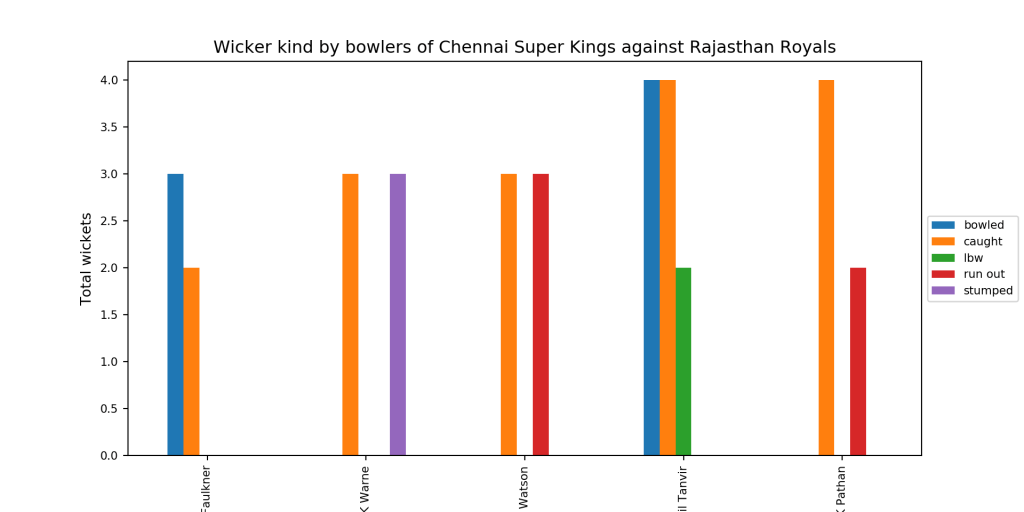
The functions compute and display the kind of wickets taken(bowled, caught, lbw etc) by an IPL team in all matches against another IPL team

import pandas as pd
import os
import yorkpy.analytics as yka
dir1= "C:\\software\\cricket-package\\yorkpyIPLData\\data1"
path=os.path.join(dir1,"Chennai Super Kings-Rajasthan Royals-allMatches.csv")
csk_rr_matches = pd.read_csv(path)
yka.teamBowlingWicketKindOppositionAllMatches(csk_rr_matches,'Chennai Super Kings','Rajasthan Royals',plot=True,top=5,wickets=1)
13. Team Bowling wicket kind -Dataframe (all matches with opposing IPL team)

This gives the type of wickets taken

import pandas as pd
import os
import yorkpy.analytics as yka
dir1= "C:\\software\\cricket-package\\yorkpyIPLData\\data1"
path=os.path.join(dir1,"Delhi Daredevils-Pune Warriors-allMatches.csv")
dd_pw_matches = pd.read_csv(path)
m=yka.teamBowlingWicketKindOppositionAllMatches(dd_pw_matches,'Pune Warriors','Delhi Daredevils',plot=False,top=4,wickets=1)
print(m)
##       bowler    kind  wickets
## 0  IK Pathan  bowled        1
## 1  IK Pathan  caught        3
## 2   M Morkel  bowled        1
## 3   M Morkel  caught        3
## 4   S Nadeem  bowled        1
## 5   S Nadeem  caught        2
## 6   UT Yadav  caught        3

14 Team Bowler vs Batman -Plot (all matches with opposing IPL team)

The function below gives the performance of bowlers in all matches against another IPL team.

import pandas as pd
import os
import yorkpy.analytics as yka
dir1= "C:\\software\\cricket-package\\yorkpyIPLData\\data1"
path=os.path.join(dir1,"Sunrisers Hyderabad-Kolkata Knight Riders-allMatches.csv")
srh_kkr_matches = pd.read_csv(path)
yka.teamBowlersVsBatsmenOppnAllMatches(srh_kkr_matches,'Sunrisers Hyderabad','Kolkata Knight Riders',plot=True,top=5,runsConceded=10)

15 Team Bowler vs Batman – Dataframe (all matches with opposing IPL team)

import pandas as pd
import os
import yorkpy.analytics as yka
dir1= "C:\\software\\cricket-package\\yorkpyIPLData\\data1"
path=os.path.join(dir1,"Royal Challengers Bangalore-Kings XI Punjab-allMatches.csv")
srh_kkr_matches = pd.read_csv(path)
m=yka.teamBowlersVsBatsmenOppnAllMatches(srh_kkr_matches,'Royal Challengers Bangalore','Kings XI Punjab',plot=False,top=1,runsConceded=30)
print(m)
##        bowler           batsman  runsConceded
## 0   PP Chawla          A Kumble             1
## 1   PP Chawla          A Mithun             1
## 2   PP Chawla       AB McDonald             3
## 3   PP Chawla    AB de Villiers            29
## 4   PP Chawla         CA Pujara            13
## 5   PP Chawla          CH Gayle            62
## 6   PP Chawla     CK Langeveldt             1
## 7   PP Chawla          CL White             3
## 8   PP Chawla        DL Vettori             1
## 9   PP Chawla          DT Patil             4
## 10  PP Chawla         JH Kallis            17
## 11  PP Chawla   JJ van der Wath             1
## 12  PP Chawla   KB Arun Karthik             4
## 13  PP Chawla      KP Pietersen            14
## 14  PP Chawla       LRPL Taylor             6
## 15  PP Chawla            M Kaif             2
## 16  PP Chawla         MK Pandey            10
## 17  PP Chawla        MV Boucher             9
## 18  PP Chawla     Misbah-ul-Haq             0
## 19  PP Chawla           P Kumar             0
## 20  PP Chawla          R Dravid            28
## 21  PP Chawla  RE van der Merwe             7
## 22  PP Chawla        RV Uthappa            19
## 23  PP Chawla         SS Tiwary             6
## 24  PP Chawla           V Kohli            56
## 25  PP Chawla            Z Khan             0

16 Team Wins and Losses (all matches with opposing IPL team)

The function below computes and plot the number of wins and losses in a head-on confrontation between 2 IPL teams

import pandas as pd
import os
import yorkpy.analytics as yka
dir1= "C:\\software\\cricket-package\\yorkpyIPLData\\data1"
path=os.path.join(dir1,"Chennai Super Kings-Delhi Daredevils-allMatches.csv")
csk_dd_matches = pd.read_csv(path)
yka.plotWinLossBetweenTeams(csk_dd_matches,'Chennai Super Kings','Delhi Daredevils')

17 Team Wins by win type (all matches with opposing IPL team)

This function shows how the win happened whether by runs or by wickets

import pandas as pd
import os
import yorkpy.analytics as yka
dir1= "C:\\software\\cricket-package\\yorkpyIPLData\\data1"
path=os.path.join(dir1,"Chennai Super Kings-Delhi Daredevils-allMatches.csv")
csk_dd_matches = pd.read_csv(path)
yka.plotWinsByRunOrWickets(csk_dd_matches,'Chennai Super Kings')

18 Team Wins by toss decision-field (all matches with opposing IPL team)

This show how Rajasthan Royals fared when it chose to field on winning the toss

import pandas as pd
import os
import yorkpy.analytics as yka
dir1= "C:\\software\\cricket-package\\yorkpyIPLData\\data1"
path=os.path.join(dir1,"Rajasthan Royals-Kings XI Punjab-allMatches.csv")
rr_kxip_matches = pd.read_csv(path)
yka.plotWinsbyTossDecision(rr_kxip_matches,'Rajasthan Royals',tossDecision='field')

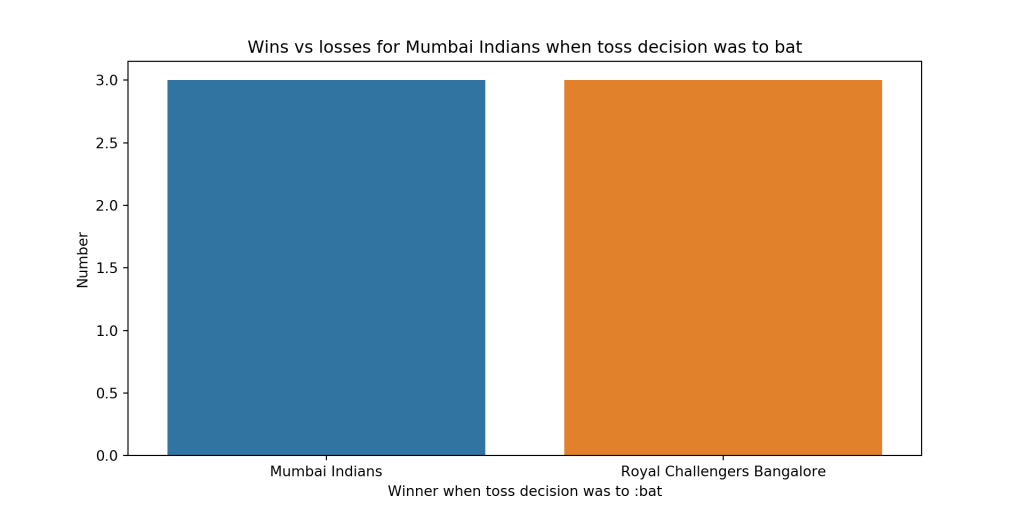
18 Team Wins by toss decision-bat (all matches with opposing IPL team)

This plot shows how Mumbai Indians fared when it chose to bat on winning the toss

import pandas as pd
import os
import yorkpy.analytics as yka
dir1= "C:\\software\\cricket-package\\yorkpyIPLData\\data1"
path=os.path.join(dir1,"Mumbai Indians-Royal Challengers Bangalore-allMatches.csv")
mi_rcb_matches = pd.read_csv(path)
yka.plotWinsbyTossDecision(mi_rcb_matches,'Mumbai Indians',tossDecision='bat')
Feel free to clone/download the code from Github yorkpy

Important note: Do check out my other posts using yorkpy at yorkpy-posts

Pitching yorkpy … short of good length to IPL – Part 1

I fear not the man who has practiced 10,000 kicks once, but I fear the man who has practiced one kick 10,000 times.
Bruce Lee

I’ve missed more than 9000 shots in my career. I’ve lost almost 300 games. 26 times, I’ve been trusted to take the game winning shot and missed. I’ve failed over and over and over again in my life. And that is why I succeed.
Michael Jordan

Man, it doesn’t matter where you come in to bat, the score is still zero
Viv Richards

Introduction

“If cricketr is to cricpy, then yorkr is to _____?”. Yes, you guessed it right, it is yorkpy. In this post, I introduce my 2nd python package, yorkpy, which is a python clone of my R package yorkr. This package is based on data from Cricsheet. yorkpy currently handles IPL T20 matches.

When I created cricpy, the python avatar, of my R package cricketr, see Introducing cricpy:A python package to analyze performances of cricketers, I had decided that I should avoid doing a python avatar of my R package yorkr (see Introducing cricket package yorkr: Part 1- Beaten by sheer pace!) , as it was more involved, and required the parsing of match data available as yaml files.

Just out of curiosity, I tried the python package ‘yaml’ to read the match data, and lo and behold, I was sucked into the developing the package and so, yorkpy was born. Of course, it goes without saying that, usually when I am in the thick of developing something, I occasionally wonder, why I am doing it, for whom and for what purpose? Maybe it is the joy of ideation, the problem-solving,  the programmer’s high, for sharing my ideas etc. Anyway, whatever be the reason, I hope you enjoy this post and also find yorkpy useful.

You can clone/download the code at Github yorkpy
This post has been published to RPubs at yorkpy-Part1
You can download this post as PDF at IPLT20-yorkpy-part1

Note: If you would like to do a similar analysis for a different set of batsman and bowlers, you can clone/download my skeleton yorkpy-template from Github (which is the R Markdown file I have used for the analysis below).

The IPL T20 functions in yorkpy are

2. Install the package using ‘pip install’

import pandas as pd
import yorkpy.analytics as yka
#pip install yorkpy

3. Load a yaml file from Cricsheet

There are 2 functions that can be to convert the IPL Twenty20 yaml files to pandas dataframeare

  1. convertYaml2PandasDataframeT20
  2. convertAllYaml2PandasDataframesT20

Note 1: While I have already converted the IPL T20 files, you will need to use these functions for future IPL matches

4. Convert and save IPL T20 yaml file to pandas dataframe

This function will convert a IPL T20 IPL yaml file, in the format as specified in Cricsheet to pandas dataframe. This will be saved as as CSV file in the target directory. The name of the file wil have the following format team1-team2-date.csv. The IPL T20 zip file can be downloaded from Indian Premier League matches.  An example of how a yaml file can be converted to a dataframe and saved is shown below.

import pandas as pd
import yorkpy.analytics as yka
#convertYaml2PandasDataframe(".\\1082593.yaml","..\ipl", ..\\data")

5. Convert and save all IPL T20 yaml files to dataframes

This function will convert all IPL T20 yaml files from a source directory to dataframes, and save it in the target directory, with the names as mentioned above. Since I have already done this, I will not be executing this again. You can download the zip of all the converted RData files from Github at yorkpyData

import pandas as pd
import yorkpy.analytics as yka
#convertAllYaml2PandasDataframes("..\\ipl", "..\\data")

You can download the the zip of the files and use it directly in the functions as follows.For the analysis below I chosen a set of random IPL matches

The randomly selected IPL T20 matches are

  • Chennai Super Kings vs Kings Xi Punjab, 2014-05-30
  • Deccan Chargers vs Delhi Daredevils, 2012-05-10
  • Gujarat Lions vs Mumbai Indians, 2017-04-29
  • Kolkata Knight Riders vs Rajasthan Royals, 2010-04-17
  • Rising Pune Supergiants vs Royal Challengers Bangalore, 2017-04-29

6. Team batting scorecard

The function below computes the batting score card of a team in an IPL match. The scorecard gives the balls faced, the runs scored, 4s, 6s and strike rate. The example below is based on the CSK KXIP match on 30 May 2014.

You can check against the actual scores in this match Chennai Super Kings-Kings XI Punjab-2014-05-30

import pandas as pd
import yorkpy.analytics as yka
csk_kxip=pd.read_csv(".\\Chennai Super Kings-Kings XI Punjab-2014-05-30.csv")
scorecard,extras=yka.teamBattingScorecardMatch(csk_kxip,"Chennai Super Kings")
print(scorecard)
##         batsman  runs  balls  4s  6s          SR
## 0      DR Smith     7     12   0   0   58.333333
## 1  F du Plessis     0      1   0   0    0.000000
## 2      SK Raina    87     26  12   6  334.615385
## 3   BB McCullum    11     16   0   0   68.750000
## 4     RA Jadeja    27     22   2   1  122.727273
## 5     DJ Hussey     1      3   0   0   33.333333
## 6      MS Dhoni    42     34   3   3  123.529412
## 7      R Ashwin    10     11   0   0   90.909091
## 8     MM Sharma     1      3   0   0   33.333333
print(extras)
##    total  wides  noballs  legbyes  byes  penalty  extras
## 0    428     14        3        5     5        0      27
print("\n\n")
scorecard1,extras1=yka.teamBattingScorecardMatch(csk_kxip,"Kings XI Punjab")
print(scorecard1)
##       batsman  runs  balls  4s  6s          SR
## 0    V Sehwag   122     62  12   8  196.774194
## 1     M Vohra    34     33   1   2  103.030303
## 2  GJ Maxwell    13      8   1   1  162.500000
## 3   DA Miller    38     19   5   1  200.000000
## 4   GJ Bailey     1      2   0   0   50.000000
## 5     WP Saha     6      4   0   1  150.000000
## 6  MG Johnson     1      1   0   0  100.000000
print(extras1)
##    total  wides  noballs  legbyes  byes  penalty  extras
## 0    428     14        3        5     5        0      27

Let’s take another random match between Gujarat Lions and Mumbai Indian on 29 Apr 2017 Gujarat Lions-Mumbai Indians-2017-04-29

import pandas as pd
gl_mi=pd.read_csv(".\\Gujarat Lions-Mumbai Indians-2017-04-29.csv")
import yorkpy.analytics as yka
scorecard,extras=yka.teamBattingScorecardMatch(gl_mi,"Gujarat Lions")
print(scorecard)
##          batsman  runs  balls  4s  6s          SR
## 0   Ishan Kishan    48     38   6   2  126.315789
## 1    BB McCullum     6      4   1   0  150.000000
## 2       SK Raina     1      3   0   0   33.333333
## 3       AJ Finch     0      3   0   0    0.000000
## 4     KD Karthik     2      9   0   0   22.222222
## 5      RA Jadeja    28     22   2   1  127.272727
## 6    JP Faulkner    21     29   2   0   72.413793
## 7      IK Pathan     2      3   0   0   66.666667
## 8         AJ Tye    25     12   2   2  208.333333
## 9   Basil Thampi     2      4   0   0   50.000000
## 10    Ankit Soni     7      2   0   1  350.000000
print(extras)
##    total  wides  noballs  legbyes  byes  penalty  extras
## 0    306      8        3        1     0        0      12
print("\n\n")
scorecard1,extras1=yka.teamBattingScorecardMatch(gl_mi,"Mumbai Indians")
print(scorecard1)
##             batsman  runs  balls  4s  6s          SR
## 0          PA Patel    70     45   9   1  155.555556
## 1        JC Buttler     9      7   2   0  128.571429
## 2            N Rana    19     16   1   1  118.750000
## 3         RG Sharma     5     13   0   0   38.461538
## 4        KA Pollard    15     11   2   0  136.363636
## 5         KH Pandya    29     20   2   1  145.000000
## 6         HH Pandya     4      5   0   0   80.000000
## 7   Harbhajan Singh     0      1   0   0    0.000000
## 8    MJ McClenaghan     1      1   0   0  100.000000
## 9         JJ Bumrah     0      1   0   0    0.000000
## 10       SL Malinga     0      1   0   0    0.000000
print(extras1)
##    total  wides  noballs  legbyes  byes  penalty  extras
## 0    306      8        3        1     0        0      12

7. Plot the team batting partnerships

The functions below plot the team batting partnership in the match. It shows what the partnership were in the mtach

Note: Many of the plots include an additional parameters plot which is either True or False. The default value is plot=True. When plot=True the plot will be displayed. When plot=False the data frame will be returned to the user. The user can use this to create an interactive chart using one of the packages like rcharts, ggvis,googleVis or plotly.

import pandas as pd
import yorkpy.analytics as yka
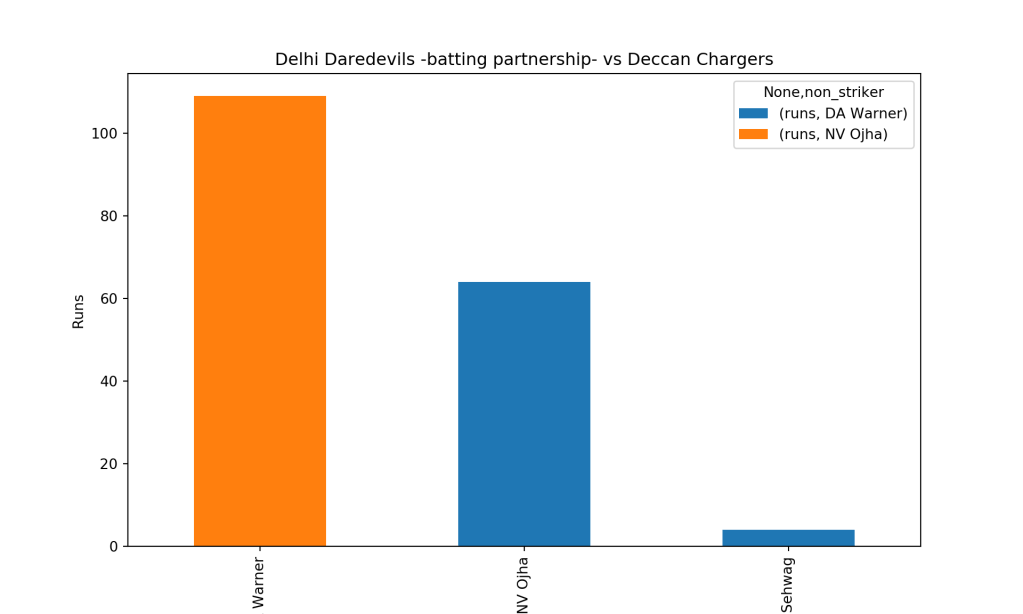
dc_dd=pd.read_csv(".\\Deccan Chargers-Delhi Daredevils-2012-05-10.csv")
yka.teamBatsmenPartnershipMatch(dc_dd,'Deccan Chargers','Delhi Daredevils')

yka.teamBatsmenPartnershipMatch(dc_dd,'Delhi Daredevils','Deccan Chargers',plot=True)
# Print partnerships as a dataframe

rps_rcb=pd.read_csv(".\\Rising Pune Supergiant-Royal Challengers Bangalore-2017-04-29.csv")
m=yka.teamBatsmenPartnershipMatch(rps_rcb,'Royal Challengers Bangalore','Rising Pune Supergiant',plot=False)
print(m)
##            batsman     non_striker  runs
## 0   AB de Villiers         V Kohli     3
## 1         AF Milne         V Kohli     5
## 2        KM Jadhav         V Kohli     7
## 3           P Negi         V Kohli     3
## 4        S Aravind         V Kohli     0
## 5        S Aravind       YS Chahal     8
## 6         S Badree         V Kohli     2
## 7        STR Binny         V Kohli     1
## 8      Sachin Baby         V Kohli     2
## 9          TM Head         V Kohli     2
## 10         V Kohli  AB de Villiers    17
## 11         V Kohli        AF Milne     5
## 12         V Kohli       KM Jadhav     4
## 13         V Kohli          P Negi     9
## 14         V Kohli       S Aravind     2
## 15         V Kohli        S Badree     8
## 16         V Kohli     Sachin Baby     1
## 17         V Kohli         TM Head     9
## 18       YS Chahal       S Aravind     4

8. Batsmen vs Bowler

The function below computes and plots the performances of the batsmen vs the bowlers. As before the plot parameter can be set to True or False. By default it is plot=True

import pandas as pd
import yorkpy.analytics as yka
gl_mi=pd.read_csv(".\\Gujarat Lions-Mumbai Indians-2017-04-29.csv")
yka.teamBatsmenVsBowlersMatch(gl_mi,"Gujarat Lions","Mumbai Indians", plot=True)
# Print 

csk_kxip=pd.read_csv(".\\Chennai Super Kings-Kings XI Punjab-2014-05-30.csv")
m=yka.teamBatsmenVsBowlersMatch(csk_kxip,'Chennai Super Kings','Kings XI Punjab',plot=False)
print(m)
##          batsman           bowler  runs
## 0    BB McCullum         AR Patel     4
## 1    BB McCullum       GJ Maxwell     1
## 2    BB McCullum  Karanveer Singh     6
## 3      DJ Hussey          P Awana     1
## 4       DR Smith       MG Johnson     7
## 5       DR Smith          P Awana     0
## 6       DR Smith   Sandeep Sharma     0
## 7   F du Plessis       MG Johnson     0
## 8      MM Sharma         AR Patel     0
## 9      MM Sharma       MG Johnson     0
## 10     MM Sharma          P Awana     1
## 11      MS Dhoni         AR Patel    12
## 12      MS Dhoni  Karanveer Singh     2
## 13      MS Dhoni       MG Johnson    11
## 14      MS Dhoni          P Awana    15
## 15      MS Dhoni   Sandeep Sharma     2
## 16      R Ashwin         AR Patel     1
## 17      R Ashwin  Karanveer Singh     4
## 18      R Ashwin       MG Johnson     1
## 19      R Ashwin          P Awana     1
## 20      R Ashwin   Sandeep Sharma     3
## 21     RA Jadeja         AR Patel     5
## 22     RA Jadeja       GJ Maxwell     3
## 23     RA Jadeja  Karanveer Singh    19
## 24     RA Jadeja          P Awana     0
## 25      SK Raina       MG Johnson    21
## 26      SK Raina          P Awana    40
## 27      SK Raina   Sandeep Sharma    26

9. Bowling Scorecard

This function provides the bowling performance, the number of overs bowled, maidens, runs conceded. wickets taken and economy rate for the IPL match

import pandas as pd
import yorkpy.analytics as yka
dc_dd=pd.read_csv(".\\Deccan Chargers-Delhi Daredevils-2012-05-10.csv")
a=yka.teamBowlingScorecardMatch(dc_dd,'Deccan Chargers')
print(a)
##        bowler  overs  runs  maidens  wicket  econrate
## 0  AD Russell      4    39        0       0      9.75
## 1   IK Pathan      4    46        0       1     11.50
## 2    M Morkel      4    32        0       1      8.00
## 3    S Nadeem      4    39        0       0      9.75
## 4    VR Aaron      4    30        0       2      7.50
rps_rcb=pd.read_csv(".\\Rising Pune Supergiant-Royal Challengers Bangalore-2017-04-29.csv")
b=yka.teamBowlingScorecardMatch(rps_rcb,'Royal Challengers Bangalore')
print(b)
##               bowler  overs  runs  maidens  wicket  econrate
## 0          DL Chahar      2    18        0       0      9.00
## 1       DT Christian      4    25        0       1      6.25
## 2        Imran Tahir      4    18        0       3      4.50
## 3         JD Unadkat      4    19        0       1      4.75
## 4        LH Ferguson      4     7        1       3      1.75
## 5  Washington Sundar      2     7        0       1      3.50

10. Wicket Kind

The plots below provide the kind of wicket taken by the bowler (caught, bowled, lbw etc.) for the IPL match

import pandas as pd
import yorkpy.analytics as yka
kkr_rr=pd.read_csv(".\\Kolkata Knight Riders-Rajasthan Royals-2010-04-17.csv")
yka.teamBowlingWicketKindMatch(kkr_rr,'Kolkata Knight Riders','Rajasthan Royals')

csk_kxip=pd.read_csv(".\\Chennai Super Kings-Kings XI Punjab-2014-05-30.csv")
m = yka.teamBowlingWicketKindMatch(csk_kxip,'Chennai Super Kings','Kings-Kings XI Punjab',plot=False)
print(m)
##             bowler     kind  player_out
## 0         AR Patel  run out           1
## 1         AR Patel  stumped           1
## 2  Karanveer Singh  run out           1
## 3       MG Johnson   caught           1
## 4          P Awana   caught           2
## 5   Sandeep Sharma   bowled           1

11. Wicket vs Runs conceded

The plots below provide the wickets taken and the runs conceded by the bowler in the IPL T20 match

import pandas as pd
import yorkpy.analytics as yka
dc_dd=pd.read_csv(".\\Deccan Chargers-Delhi Daredevils-2012-05-10.csv")
yka.teamBowlingWicketMatch(dc_dd,"Deccan Chargers", "Delhi Daredevils",plot=True)

print("\n\n")
rps_rcb=pd.read_csv(".\\Rising Pune Supergiant-Royal Challengers Bangalore-2017-04-29.csv")
a=yka.teamBowlingWicketMatch(rps_rcb,"Royal Challengers Bangalore", "Rising Pune Supergiant",plot=False)
print(a)
##               bowler      player_out  kind
## 0       DT Christian         V Kohli     1
## 1        Imran Tahir        AF Milne     1
## 2        Imran Tahir          P Negi     1
## 3        Imran Tahir        S Badree     1
## 4         JD Unadkat         TM Head     1
## 5        LH Ferguson  AB de Villiers     1
## 6        LH Ferguson       KM Jadhav     1
## 7        LH Ferguson       STR Binny     1
## 8  Washington Sundar     Sachin Baby     1

12. Bowler Vs Batsmen

The functions compute and display how the different bowlers of the IPL team performed against the batting opposition.

import pandas as pd
import yorkpy.analytics as yka
csk_kxip=pd.read_csv(".\\Chennai Super Kings-Kings XI Punjab-2014-05-30.csv")
yka.teamBowlersVsBatsmenMatch(csk_kxip,"Chennai Super Kings","Kings XI Punjab")

print("\n\n")
kkr_rr=pd.read_csv(".\\Kolkata Knight Riders-Rajasthan Royals-2010-04-17.csv")
m =yka.teamBowlersVsBatsmenMatch(kkr_rr,"Rajasthan Royals","Kolkata Knight Riders",plot=False)
print(m)
##        batsman      bowler  runs
## 0     AC Voges    AB Dinda     1
## 1     AC Voges  JD Unadkat     1
## 2     AC Voges   LR Shukla     1
## 3     AC Voges    M Kartik     5
## 4     AJ Finch    AB Dinda     3
## 5     AJ Finch  JD Unadkat     3
## 6     AJ Finch   LR Shukla    13
## 7     AJ Finch    M Kartik     2
## 8     AJ Finch     SE Bond     0
## 9      AS Raut    AB Dinda     1
## 10     AS Raut  JD Unadkat     1
## 11    FY Fazal    AB Dinda     1
## 12    FY Fazal   LR Shukla     3
## 13    FY Fazal    M Kartik     3
## 14    FY Fazal     SE Bond     6
## 15     NV Ojha    AB Dinda    10
## 16     NV Ojha  JD Unadkat     5
## 17     NV Ojha   LR Shukla     0
## 18     NV Ojha    M Kartik     1
## 19     NV Ojha     SE Bond     2
## 20     P Dogra  JD Unadkat     2
## 21     P Dogra   LR Shukla     5
## 22     P Dogra    M Kartik     1
## 23     P Dogra     SE Bond     0
## 24  SK Trivedi    AB Dinda     4
## 25    SK Warne    AB Dinda     2
## 26    SK Warne    M Kartik     1
## 27    SK Warne     SE Bond     0
## 28   SR Watson    AB Dinda     2
## 29   SR Watson  JD Unadkat    13
## 30   SR Watson   LR Shukla     1
## 31   SR Watson    M Kartik    18
## 32   SR Watson     SE Bond    10
## 33   YK Pathan  JD Unadkat     1
## 34   YK Pathan   LR Shukla     7

13. Match worm chart

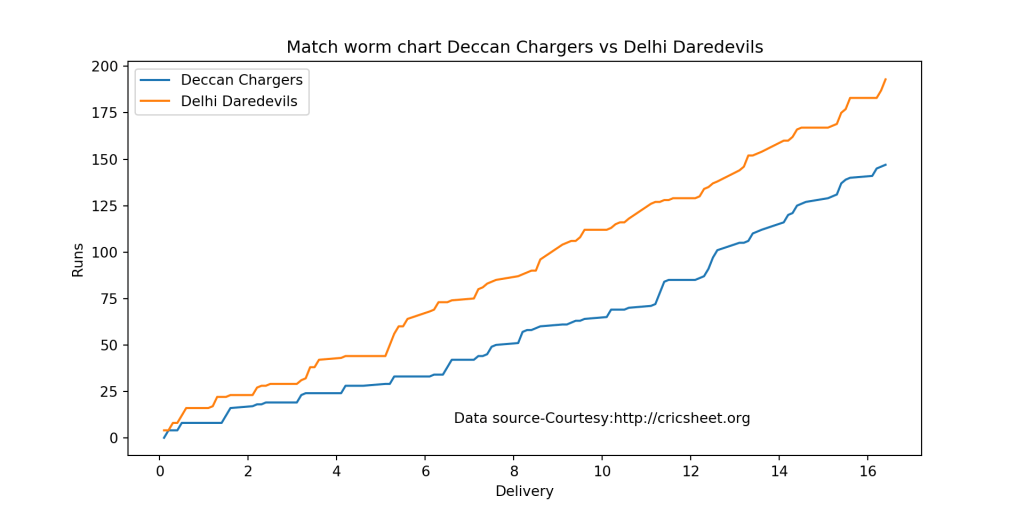
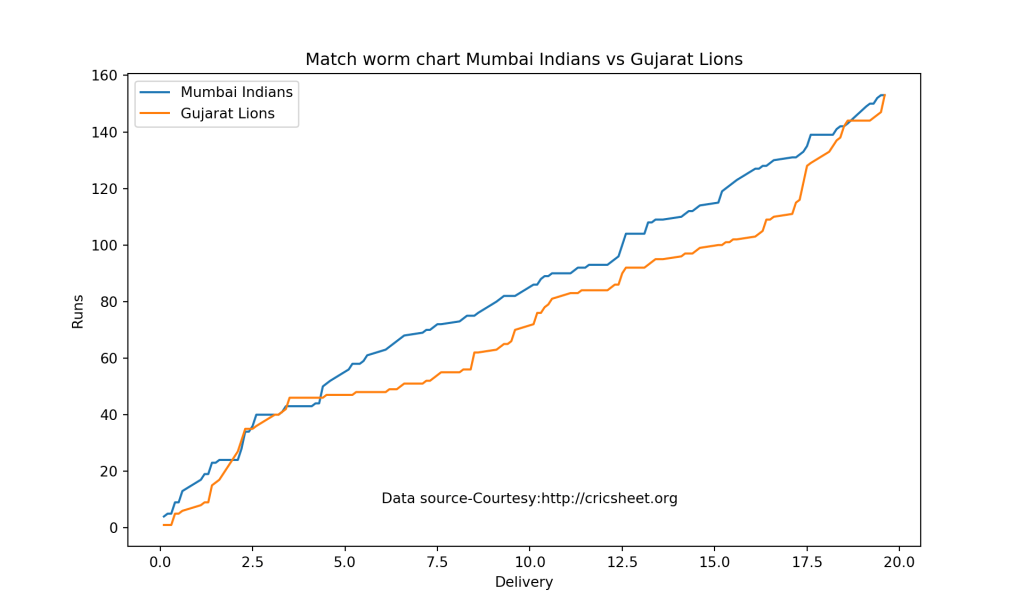
The plots below provide the match worm graph for the IPL Twenty 20 matches

import pandas as pd
import yorkpy.analytics as yka
dc_dd=pd.read_csv(".\\Deccan Chargers-Delhi Daredevils-2012-05-10.csv")
yka.matchWormChart(dc_dd,"Deccan Chargers", "Delhi Daredevils")

gl_mi=pd.read_csv(".\\Gujarat Lions-Mumbai Indians-2017-04-29.csv")
yka.matchWormChart(gl_mi,"Mumbai Indians","Gujarat Lions")

Feel free to clone/download the code from Github yorkpy

Conclusion

This post included all functions between 2 IPL teams from the package yorkpy for IPL Twenty20 matches. As mentioned above the yaml match files have been already converted to dataframes and are available for download from Github at yorkpyData

After having used Python and R for analytics, Machine Learning and Deep Learning, I have now realized that neither language is superior or inferior. Both have, some good packages and some that are not so well suited.

To be continued. Watch this space!

Important note: Do check out my other posts using yorkpy at yorkpy-posts

You may also like
1.My book ‘Deep Learning from first principles:Second Edition’ now on Amazon
2.My book ‘Practical Machine Learning in R and Python: Second edition’ on Amazon
2. Cricpy takes a swing at the ODIs
3. Introducing cricket package yorkr: Part 1- Beaten by sheer pace!
4. Big Data-1: Move into the big league:Graduate from Python to Pyspark
5. Simulating an Edge Shape in Android

To see all posts click Index of posts

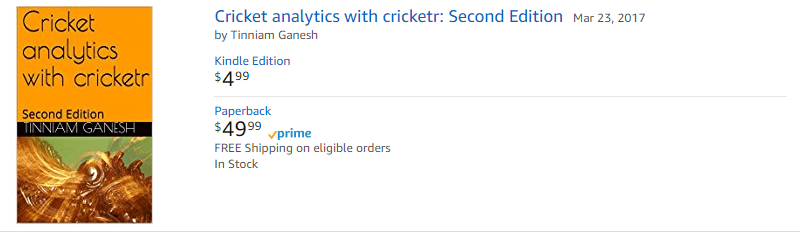
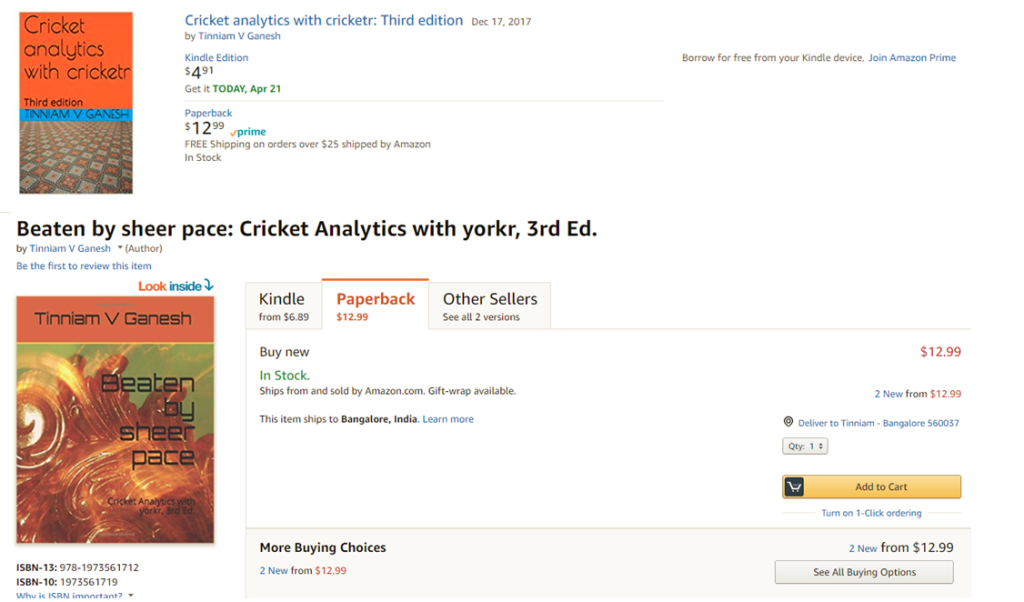
The 3rd paperback & kindle editions of my books on Cricket, now on Amazon

The 3rd  paperback & kindle edition of both my books on cricket is now available on Amazon

a) Cricket analytics with cricketr, Third Edition. The paperback edition is $12.99 and the kindle edition is $4.99/Rs320.  This book is based on my R package ‘cricketr‘, available on CRAN and uses ESPN Cricinfo Statsguru

b) Beaten by sheer pace! Cricket analytics with yorkr, 3rd edition . The paperback is $12.99 and the kindle version is $6.99/Rs448. This is based on my R package ‘yorkr‘ on CRAN and uses data from Cricsheet
Pick up your copies today!!

Note: In the 3rd edition of  the paperback book, the charts will be in black and white. If you would like the charts to be in color, please check out the 2nd edition of these books see More book, more cricket! 2nd edition of my books now on Amazon

You may also like
1. My book ‘Practical Machine Learning with R and Python’ on Amazon
2. A crime map of India in R: Crimes against women
3.  What’s up Watson? Using IBM Watson’s QAAPI with Bluemix, NodeExpress – Part 1
4.  Bend it like Bluemix, MongoDB with autoscaling – Part 2
5. Informed choices through Machine Learning : Analyzing Kohli, Tendulkar and Dravid
6. Thinking Web Scale (TWS-3): Map-Reduce – Bring compute to data

To see all posts see Index of posts

More book, more cricket! 2nd edition of my books now on Amazon

a) Cricket analytics with cricketr
b) Beaten by sheer pace – Cricket analytics with yorkr
is now available on Amazon, both as Paperback and Kindle versions.

The Kindle versions are just $4.99 for both books. Pick up your copies today!!!

A) Cricket analytics with cricketr: Second Edition

Click hereCricket analytics with cricketr: Second Edition

You can download the latest PDF version of the book  at  ‘Cricket analytics with cricketr and cricpy: Analytics harmony with R and Python-6th edition

B) Beaten by sheer pace: Cricket analytics with yorkr(2nd edition)

Click here Beaten by sheer pace! Cricket analytics with yorkr

Pick up your copies today!!!

Analysis of IPL T20 matches with yorkr templates

Introduction

In this post I create RMarkdown templates for end-to-end analysis of IPL T20 matches, that are available on Cricsheet based on my R package yorkr.  With these templates you can convert all IPL data which is in yaml format to R dataframes. Further I create data and the necessary templates for analyzing IPL matches, teams and players. All of these can be accessed at yorkrIPLTemplate.

If you are passionate about cricket, and love analyzing cricket performances, then check out my 2 racy books on cricket! In my books, I perform detailed yet compact analysis of performances of both batsmen, bowlers besides evaluating team & match performances in Tests , ODIs, T20s & IPL. You can buy my books on cricket from Amazon at $12.99 for the paperback and $4.99/$6.99 respectively for the kindle versions. The books can be accessed at Cricket analytics with cricketr  and Beaten by sheer pace-Cricket analytics with yorkr  A must read for any cricket lover! Check it out!!

1

9/Rs 320 and $6.99/Rs448 respectively

The templates are

  1. Template for conversion and setup – IPLT20Template.Rmd
  2. Any IPL match – IPLMatchtemplate.Rmd
  3. IPL matches between 2 nations – IPLMatches2TeamTemplate.Rmd
  4. A IPL nations performance against all other IPL nations – IPLAllMatchesAllOppnTemplate.Rmd
  5. Analysis of IPL batsmen and bowlers of all IPL nations – IPLBatsmanBowlerTemplate.Rmd

Besides the templates the repository also includes the converted data for all IPL matches I downloaded from Cricsheet in Dec 2016. So this data is complete till the 2016 IPL season. You can recreate the files as more matches are added to Cricsheet site in IPL 2017 and future seasons. This post contains all the steps needed for detailed analysis of IPL matches, teams and IPL player. This will also be my reference in future if I decide to analyze IPL in future!

See my earlier posts where I analyze IPL T20
1. yorkr crashes the IPL party ! – Part 1
2. yorkr crashes the IPL party! – Part 2
3. yorkr crashes the IPL party! – Part 3!
4. yorkr crashes the IPL party! – Part 4

There will be 5 folders at the root

  1. IPLdata – Match files as yaml from Cricsheet
  2. IPLMatches – Yaml match files converted to dataframes
  3. IPLMatchesBetween2Teams – All Matches between any 2 IPL teams
  4. allMatchesAllOpposition – An IPL teams’s performance against all other teams
  5. BattingBowlingDetails – Batting and bowling details of all IPL teams
library(yorkr)
library(dplyr)

The first few steps take care of the data setup. This needs to be done before any of the analysis of IPL batsmen, bowlers, any IPL match, matches between any 2 IPL countries or analysis of a teams performance against all other countries

There will be 5 folders at the root

  1. data
  2. IPLMatches
  3. IPLMatchesBetween2Teams
  4. allMatchesAllOpposition
  5. BattingBowlingDetails

The source YAML files will be in IPLData folder

1.Create directory of IPLMatches

Some files may give conversions errors. You could try to debug the problem or just remove it from the IPLdata folder. At most 2-4 file will have conversion problems and I usally remove then from the files to be converted.

Also take a look at my GooglyPlus shiny app which was created after performing the same conversion on the Dec 16 data .

convertAllYaml2RDataframesT20("data","IPLMatches")

2.Save all matches between all combinations of IPL nations

This function will create the set of all matches between each IPL team against every other IPL team. This uses the data that was created in IPLMatches, with the convertAllYaml2RDataframesIPL() function.

setwd("./IPLMatchesBetween2Teams")
saveAllMatchesBetween2IPLTeams(dir= ,odir= )

3.Save all matches against all opposition

This will create a consolidated dataframe of all matches played by every IPL playing nation against all other nattions. This also uses the data that was created in IPLMatches, with the convertAllYaml2RDataframesIPL() function.

setwd("../allMatchesAllOpposition")
saveAllMatchesAllOppositionIPLT20(dir= ,odir= )

4. Create batting and bowling details for each IPL team

These are the current IPL playing teams. You can add to this vector as newer IPL teams start playing IPL. You will get to know all IPL teams by also look at the directory created above namely allMatchesAllOpposition. This also uses the data that was created in IPLMatches, with the convertAllYaml2RDataframesIPL() function.

setwd("../BattingBowlingDetails")
ipl_teams <- list("Chennai Super Kings","Deccan Chargers", "Delhi Daredevils","Kings XI Punjab", 
              "Kochi Tuskers Kerala","Kolkata Knight Riders","Mumbai Indians","Pune Warriors",
              "Rajasthan Royals","Royal Challengers Bangalore","Sunrisers Hyderabad","Gujarat Lions",
                 "Rising Pune Supergiants")

for(i in seq_along(ipl_teams)){
    print(ipl_teams[i])
    val <- paste(ipl_teams[i],"-details",sep="")
    val <- getTeamBattingDetails(ipl_teams[i],dir="../IPLMatches", save=TRUE)

}

for(i in seq_along(ipl_teams)){
    print(ipl_teams[i])
    val <- paste(ipl_teams[i],"-details",sep="")
    val <- getTeamBowlingDetails(ipl_teams[i],dir="../IPLMatches", save=TRUE)

}

5. Get the list of batsmen for a particular IPL team

The following code is needed for analyzing individual IPL batsmen. In IPL a player could have played in multiple IPL teams.

getBatsmen <- function(df){
    bmen <- df %>% distinct(batsman) 
    bmen <- as.character(bmen$batsman)
    batsmen <- sort(bmen)
}
load("Chennai Super Kings-BattingDetails.RData")
csk_details <- battingDetails
load("Deccan Chargers-BattingDetails.RData")
dc_details <- battingDetails
load("Delhi Daredevils-BattingDetails.RData")
dd_details <- battingDetails
load("Kings XI Punjab-BattingDetails.RData")
kxip_details <- battingDetails
load("Kochi Tuskers Kerala-BattingDetails.RData")
ktk_details <- battingDetails
load("Kolkata Knight Riders-BattingDetails.RData")
kkr_details <- battingDetails
load("Mumbai Indians-BattingDetails.RData")
mi_details <- battingDetails
load("Pune Warriors-BattingDetails.RData")
pw_details <- battingDetails
load("Rajasthan Royals-BattingDetails.RData")
rr_details <- battingDetails
load("Royal Challengers Bangalore-BattingDetails.RData")
rcb_details <- battingDetails
load("Sunrisers Hyderabad-BattingDetails.RData")
sh_details <- battingDetails
load("Gujarat Lions-BattingDetails.RData")
gl_details <- battingDetails
load("Rising Pune Supergiants-BattingDetails.RData")
rps_details <- battingDetails

#Get the batsmen for each IPL team
csk_batsmen <- getBatsmen(csk_details)
dc_batsmen <- getBatsmen(dc_details)
dd_batsmen <- getBatsmen(dd_details)
kxip_batsmen <- getBatsmen(kxip_details)
ktk_batsmen <- getBatsmen(ktk_details)
kkr_batsmen <- getBatsmen(kkr_details)
mi_batsmen <- getBatsmen(mi_details)
pw_batsmen <- getBatsmen(pw_details)
rr_batsmen <- getBatsmen(rr_details)
rcb_batsmen <- getBatsmen(rcb_details)
sh_batsmen <- getBatsmen(sh_details)
gl_batsmen <- getBatsmen(gl_details)
rps_batsmen <- getBatsmen(rps_details)

# Save the dataframes
save(csk_batsmen,file="csk.RData")
save(dc_batsmen, file="dc.RData")
save(dd_batsmen, file="dd.RData")
save(kxip_batsmen, file="kxip.RData")
save(ktk_batsmen, file="ktk.RData")
save(kkr_batsmen, file="kkr.RData")
save(mi_batsmen , file="mi.RData")
save(pw_batsmen, file="pw.RData")
save(rr_batsmen, file="rr.RData")
save(rcb_batsmen, file="rcb.RData")
save(sh_batsmen, file="sh.RData")
save(gl_batsmen, file="gl.RData")
save(rps_batsmen, file="rps.RData")

6. Get the list of bowlers for a particular IPL team

The method below can get the list of bowler names for any IPL team.The following code is needed for analyzing individual IPL bowlers. In IPL a player could have played in multiple IPL teams.

getBowlers <- function(df){
    bwlr <- df %>% distinct(bowler) 
    bwlr <- as.character(bwlr$bowler)
    bowler <- sort(bwlr)
}

load("Chennai Super Kings-BowlingDetails.RData")
csk_details <- bowlingDetails
load("Deccan Chargers-BowlingDetails.RData")
dc_details <- bowlingDetails
load("Delhi Daredevils-BowlingDetails.RData")
dd_details <- bowlingDetails
load("Kings XI Punjab-BowlingDetails.RData")
kxip_details <- bowlingDetails
load("Kochi Tuskers Kerala-BowlingDetails.RData")
ktk_details <- bowlingDetails
load("Kolkata Knight Riders-BowlingDetails.RData")
kkr_details <- bowlingDetails
load("Mumbai Indians-BowlingDetails.RData")
mi_details <- bowlingDetails
load("Pune Warriors-BowlingDetails.RData")
pw_details <- bowlingDetails
load("Rajasthan Royals-BowlingDetails.RData")
rr_details <- bowlingDetails
load("Royal Challengers Bangalore-BowlingDetails.RData")
rcb_details <- bowlingDetails
load("Sunrisers Hyderabad-BowlingDetails.RData")
sh_details <- bowlingDetails
load("Gujarat Lions-BowlingDetails.RData")
gl_details <- bowlingDetails
load("Rising Pune Supergiants-BowlingDetails.RData")
rps_details <- bowlingDetails

# Get the bowlers for each team
csk_bowlers <- getBowlers(csk_details)
dc_bowlers <- getBowlers(dc_details)
dd_bowlers <- getBowlers(dd_details)
kxip_bowlers <- getBowlers(kxip_details)
ktk_bowlers <- getBowlers(ktk_details)
kkr_bowlers <- getBowlers(kkr_details)
mi_bowlers <- getBowlers(mi_details)
pw_bowlers <- getBowlers(pw_details)
rr_bowlers <- getBowlers(rr_details)
rcb_bowlers <- getBowlers(rcb_details)
sh_bowlers <- getBowlers(sh_details)
gl_bowlers <- getBowlers(gl_details)
rps_bowlers <- getBowlers(rps_details)

#Save the dataframes
save(csk_bowlers,file="csk1.RData")
save(dc_bowlers, file="dc1.RData")
save(dd_bowlers, file="dd1.RData")
save(kxip_bowlers, file="kxip1.RData")
save(ktk_bowlers, file="ktk1.RData")
save(kkr_bowlers, file="kkr1.RData")
save(mi_bowlers , file="mi1.RData")
save(pw_bowlers, file="pw1.RData")
save(rr_bowlers, file="rr1.RData")
save(rcb_bowlers, file="rcb1.RData")
save(sh_bowlers, file="sh1.RData")
save(gl_bowlers, file="gl1.RData")
save(rps_bowlers, file="rps1.RData")

Now we are all set

A)  IPL T20 Match Analysis

1 IPL Match Analysis

Load any match data from the ./IPLMatches folder for e.g. Chennai Super Kings-Deccan Chargers-2008-05-06.RData

setwd("./IPLMatches")
load("Chennai Super Kings-Deccan Chargers-2008-05-06.RData")
csk_dc<- overs
#The steps are
load("IPLTeam1-IPLTeam2-Date.Rdata")
IPLTeam1_IPLTeam2 <- overs

All analysis for this match can be done now

2. Scorecard

teamBattingScorecardMatch(IPLTeam1_IPLTeam2,"IPLTeam1")
teamBattingScorecardMatch(IPLTeam1_IPLTeam2,"IPLTeam2")

3.Batting Partnerships

teamBatsmenPartnershipMatch(IPLTeam1_IPLTeam2,"IPLTeam1","IPLTeam2")
teamBatsmenPartnershipMatch(IPLTeam1_IPLTeam2,"IPLTeam2","IPLTeam1")

4. Batsmen vs Bowler Plot

teamBatsmenVsBowlersMatch(IPLTeam1_IPLTeam2,"IPLTeam1","IPLTeam2",plot=TRUE)
teamBatsmenVsBowlersMatch(IPLTeam1_IPLTeam2,"IPLTeam1","IPLTeam2",plot=FALSE)

5. Team bowling scorecard

teamBowlingScorecardMatch(IPLTeam1_IPLTeam2,"IPLTeam1")
teamBowlingScorecardMatch(IPLTeam1_IPLTeam2,"IPLTeam2")

6. Team bowling Wicket kind match

teamBowlingWicketKindMatch(IPLTeam1_IPLTeam2,"IPLTeam1","IPLTeam2")
m <-teamBowlingWicketKindMatch(IPLTeam1_IPLTeam2,"IPLTeam1","IPLTeam2",plot=FALSE)
m

7. Team Bowling Wicket Runs Match

teamBowlingWicketRunsMatch(IPLTeam1_IPLTeam2,"IPLTeam1","IPLTeam2")
m <-teamBowlingWicketRunsMatch(IPLTeam1_IPLTeam2,"IPLTeam1","IPLTeam2",plot=FALSE)
m

8. Team Bowling Wicket Match

m <-teamBowlingWicketMatch(IPLTeam1_IPLTeam2,"IPLTeam1","IPLTeam2",plot=FALSE)
m
teamBowlingWicketMatch(IPLTeam1_IPLTeam2,"IPLTeam1","IPLTeam2")

9. Team Bowler vs Batsmen

teamBowlersVsBatsmenMatch(IPLTeam1_IPLTeam2,"IPLTeam1","IPLTeam2")
m <- teamBowlersVsBatsmenMatch(IPLTeam1_IPLTeam2,"IPLTeam1","IPLTeam2",plot=FALSE)
m

10. Match Worm chart

matchWormGraph(IPLTeam1_IPLTeam2,"IPLTeam1","IPLTeam2")

B)  IPL  Matches between 2  IPL teams

1 IPL Match Analysis

Load any match data from the ./IPLMatches folder for e.g. Chennai Super Kings-Deccan Chargers-2008-05-06.RData

setwd("./IPLMatches")
load("Chennai Super Kings-Deccan Chargers-2008-05-06.RData")
csk_dc<- overs
#The steps are
load("IPLTeam1-IPLTeam2-Date.Rdata")
IPLTeam1_IPLTeam2 <- overs

All analysis for this match can be done now

2. Scorecard

teamBattingScorecardMatch(IPLTeam1_IPLTeam2,"IPLTeam1")
teamBattingScorecardMatch(IPLTeam1_IPLTeam2,"IPLTeam2")

3.Batting Partnerships

teamBatsmenPartnershipMatch(IPLTeam1_IPLTeam2,"IPLTeam1","IPLTeam2")
teamBatsmenPartnershipMatch(IPLTeam1_IPLTeam2,"IPLTeam2","IPLTeam1")

4. Batsmen vs Bowler Plot

teamBatsmenVsBowlersMatch(IPLTeam1_IPLTeam2,"IPLTeam1","IPLTeam2",plot=TRUE)
teamBatsmenVsBowlersMatch(IPLTeam1_IPLTeam2,"IPLTeam1","IPLTeam2",plot=FALSE)

5. Team bowling scorecard

teamBowlingScorecardMatch(IPLTeam1_IPLTeam2,"IPLTeam1")
teamBowlingScorecardMatch(IPLTeam1_IPLTeam2,"IPLTeam2")

6. Team bowling Wicket kind match

teamBowlingWicketKindMatch(IPLTeam1_IPLTeam2,"IPLTeam1","IPLTeam2")
m <-teamBowlingWicketKindMatch(IPLTeam1_IPLTeam2,"IPLTeam1","IPLTeam2",plot=FALSE)
m

7. Team Bowling Wicket Runs Match

teamBowlingWicketRunsMatch(IPLTeam1_IPLTeam2,"IPLTeam1","IPLTeam2")
m <-teamBowlingWicketRunsMatch(IPLTeam1_IPLTeam2,"IPLTeam1","IPLTeam2",plot=FALSE)
m

8. Team Bowling Wicket Match

m <-teamBowlingWicketMatch(IPLTeam1_IPLTeam2,"IPLTeam1","IPLTeam2",plot=FALSE)
m
teamBowlingWicketMatch(IPLTeam1_IPLTeam2,"IPLTeam1","IPLTeam2")

9. Team Bowler vs Batsmen

teamBowlersVsBatsmenMatch(IPLTeam1_IPLTeam2,"IPLTeam1","IPLTeam2")
m <- teamBowlersVsBatsmenMatch(IPLTeam1_IPLTeam2,"IPLTeam1","IPLTeam2",plot=FALSE)
m

10. Match Worm chart

matchWormGraph(IPLTeam1_IPLTeam2,"IPLTeam1","IPLTeam2")

C)  IPL Matches for a team against all other teams

1. IPL Matches for a team against all other teams

Load the data between for a IPL team against all other countries ./allMatchesAllOpposition for e.g all matches of Kolkata Knight Riders

load("allMatchesAllOpposition-Kolkata Knight Riders.RData")
kkr_matches <- matches
IPLTeam="IPLTeam1"
allMatches <- paste("allMatchesAllOposition-",IPLTeam,".RData",sep="")
load(allMatches)
IPLTeam1AllMatches <- matches

2. Team’s batting scorecard all Matches

m <-teamBattingScorecardAllOppnAllMatches(IPLTeam1AllMatches,theTeam="IPLTeam1")
m

3. Batting scorecard of opposing team

m <-teamBattingScorecardAllOppnAllMatches(matches=IPLTeam1AllMatches,theTeam="IPLTeam2")

4. Team batting partnerships

m <- teamBatsmenPartnershipAllOppnAllMatches(IPLTeam1AllMatches,theTeam="IPLTeam1")
m
m <- teamBatsmenPartnershipAllOppnAllMatches(IPLTeam1AllMatches,theTeam='IPLTeam1',report="detailed")
head(m,30)
m <- teamBatsmenPartnershipAllOppnAllMatches(IPLTeam1AllMatches,theTeam='IPLTeam1',report="summary")
m

5. Team batting partnerships plot

teamBatsmenPartnershipAllOppnAllMatchesPlot(IPLTeam1AllMatches,"IPLTeam1",main="IPLTeam1")
teamBatsmenPartnershipAllOppnAllMatchesPlot(IPLTeam1AllMatches,"IPLTeam1",main="IPLTeam2")

6, Team batsmen vs bowlers report

m <-teamBatsmenVsBowlersAllOppnAllMatchesRept(IPLTeam1AllMatches,"IPLTeam1",rank=0)
m
m <-teamBatsmenVsBowlersAllOppnAllMatchesRept(IPLTeam1AllMatches,"IPLTeam1",rank=1,dispRows=30)
m
m <-teamBatsmenVsBowlersAllOppnAllMatchesRept(matches=IPLTeam1AllMatches,theTeam="IPLTeam2",rank=1,dispRows=25)
m

7. Team batsmen vs bowler plot

d <- teamBatsmenVsBowlersAllOppnAllMatchesRept(IPLTeam1AllMatches,"IPLTeam1",rank=1,dispRows=50)
d
teamBatsmenVsBowlersAllOppnAllMatchesPlot(d)
d <- teamBatsmenVsBowlersAllOppnAllMatchesRept(IPLTeam1AllMatches,"IPLTeam1",rank=2,dispRows=50)
teamBatsmenVsBowlersAllOppnAllMatchesPlot(d)

8. Team bowling scorecard

teamBowlingScorecardAllOppnAllMatchesMain(matches=IPLTeam1AllMatches,theTeam="IPLTeam1")
teamBowlingScorecardAllOppnAllMatches(IPLTeam1AllMatches,'IPLTeam2')

9. Team bowler vs batsmen

teamBowlersVsBatsmenAllOppnAllMatchesMain(IPLTeam1AllMatches,theTeam="IPLTeam1",rank=0)
teamBowlersVsBatsmenAllOppnAllMatchesMain(IPLTeam1AllMatches,theTeam="IPLTeam1",rank=2)
teamBowlersVsBatsmenAllOppnAllMatchesRept(matches=IPLTeam1AllMatches,theTeam="IPLTeam1",rank=0)

10. Team Bowler vs bastmen

df <- teamBowlersVsBatsmenAllOppnAllMatchesRept(IPLTeam1AllMatches,theTeam="IPLTeam1",rank=1)
teamBowlersVsBatsmenAllOppnAllMatchesPlot(df,"IPLTeam1","IPLTeam1")

11. Team bowler wicket kind

teamBowlingWicketKindAllOppnAllMatches(IPLTeam1AllMatches,t1="IPLTeam1",t2="All")
teamBowlingWicketKindAllOppnAllMatches(IPLTeam1AllMatches,t1="IPLTeam1",t2="IPLTeam2")

12.

teamBowlingWicketRunsAllOppnAllMatches(IPLTeam1AllMatches,t1="IPLTeam1",t2="All",plot=TRUE)
teamBowlingWicketRunsAllOppnAllMatches(IPLTeam1AllMatches,t1="IPLTeam1",t2="IPLTeam2",plot=TRUE)

1 IPL Batsman setup functions

Get the batsman’s details for a batsman

setwd("../BattingBowlingDetails")
# IPL Team names
IPLTeamNames <- list("Chennai Super Kings","Deccan Chargers", "Delhi Daredevils","Kings Xi Punjab", 
                  "Kochi Tuskers Kerala","Kolkata Knight Riders","Mumbai Indians","Pune Warriors",
                  "Rajasthan Royals","Royal Challengers Bangalore","Sunrisers Hyderabad","Gujarat Lions",
                  "Rising Pune Supergiants")           


# Check and get the team indices of IPL teams in which the batsman has played
getTeamIndex <- function(batsman){
    setwd("./BattingBowlingDetails")
    load("csk.RData")
    load("dc.RData")
    load("dd.RData")
    load("kxip.RData")
    load("ktk.RData")
    load("kkr.RData")
    load("mi.RData")
    load("pw.RData")
    load("rr.RData")
    load("rcb.RData")
    load("sh.RData")
    load("gl.RData")
    load("rps.RData")
    setwd("..")
    getwd()
    print(ls())
    teams_batsmen = list(csk_batsmen,dc_batsmen,dd_batsmen,kxip_batsmen,ktk_batsmen,kkr_batsmen,mi_batsmen,
                         pw_batsmen,rr_batsmen,rcb_batsmen,sh_batsmen,gl_batsmen,rps_batsmen)
    b <- NULL
    for (i in 1:length(teams_batsmen)){
        a <- which(teams_batsmen[[i]] == batsman)

        if(length(a) != 0)
            b <- c(b,i)
    }
    b
}

# Get the list of the IPL team names from the indices passed
getTeams <- function(x){

    l <- NULL
    # Get the teams passed in as indexes
    for (i in seq_along(x)){

        l <- c(l, IPLTeamNames[[x[i]]]) 

    }
    l
}

# Create a consolidated data frame with all teams the IPL batsman has played for
getIPLBatsmanDF <- function(teamNames){
    batsmanDF <- NULL
   # Create a consolidated Data frame of batsman for all IPL teams played
    for (i in seq_along(teamNames)){
       df <- getBatsmanDetails(team=teamNames[i],name=IPLBatsman,dir="./BattingBowlingDetails")
       batsmanDF <- rbind(batsmanDF,df) 

    }
    batsmanDF
}

2. Create a consolidated IPL batsman data frame

# Since an IPL batsman coculd have played in multiple teams we need to determine these teams and
# create a consolidated data frame for the analysis
# For example to check MS Dhoni we need to do the following

IPLBatsman = "MS Dhoni"
#Check and get the team indices of IPL teams in which the batsman has played
i <- getTeamIndex(IPLBatsman)

# Get the team names in which the IPL batsman has played
teamNames <- getTeams(i)
    # Check if file exists in the directory. This check is necessary when moving between matchType


############## Create a consolidated IPL batsman dataframe for analysis
batsmanDF <- getIPLBatsmanDF(teamNames)

3. Runs vs deliveries

# For e.g. batsmanName="MS Dhoni""
#batsmanRunsVsDeliveries(batsmanDF, "MS Dhoni")
batsmanRunsVsDeliveries(batsmanDF,"batsmanName")

4. Batsman 4s & 6s

batsman46 <- select(batsmanDF,batsman,ballsPlayed,fours,sixes,runs)
p1 <- batsmanFoursSixes(batsman46,"batsmanName")

5. Batsman dismissals

batsmanDismissals(batsmanDF,"batsmanName")

6. Runs vs Strike rate

batsmanRunsVsStrikeRate(batsmanDF,"batsmanName")

7. Batsman Moving Average

batsmanMovingAverage(batsmanDF,"batsmanName")

8. Batsman cumulative average

batsmanCumulativeAverageRuns(batsmanDF,"batsmanName")

9. Batsman cumulative strike rate

batsmanCumulativeStrikeRate(batsmanDF,"batsmanName")

10. Batsman runs against oppositions

batsmanRunsAgainstOpposition(batsmanDF,"batsmanName")

11. Batsman runs vs venue

batsmanRunsVenue(batsmanDF,"batsmanName")

12. Batsman runs predict

batsmanRunsPredict(batsmanDF,"batsmanName")

13.Bowler set up functions

setwd("../BattingBowlingDetails")
# IPL Team names
IPLTeamNames <- list("Chennai Super Kings","Deccan Chargers", "Delhi Daredevils","Kings Xi Punjab", 
                  "Kochi Tuskers Kerala","Kolkata Knight Riders","Mumbai Indians","Pune Warriors",
                  "Rajasthan Royals","Royal Challengers Bangalore","Sunrisers Hyderabad","Gujarat Lions",
                  "Rising Pune Supergiants")    


# Get the team indices of IPL teams for which the bowler as played
getTeamIndex_bowler <- function(bowler){
    # Load IPL Bowlers
    setwd("./data")
    load("csk1.RData")
    load("dc1.RData")
    load("dd1.RData")
    load("kxip1.RData")
    load("ktk1.RData")
    load("kkr1.RData")
    load("mi1.RData")
    load("pw1.RData")
    load("rr1.RData")
    load("rcb1.RData")
    load("sh1.RData")
    load("gl1.RData")
    load("rps1.RData")
    setwd("..")
    teams_bowlers = list(csk_bowlers,dc_bowlers,dd_bowlers,kxip_bowlers,ktk_bowlers,kkr_bowlers,mi_bowlers,
                         pw_bowlers,rr_bowlers,rcb_bowlers,sh_bowlers,gl_bowlers,rps_bowlers)
    b <- NULL
    for (i in 1:length(teams_bowlers)){
        a <- which(teams_bowlers[[i]] == bowler)
        if(length(a) != 0){
            b <- c(b,i)
        }
    }
    b
}


# Get the list of the IPL team names from the indices passed
getTeams <- function(x){

    l <- NULL
    # Get the teams passed in as indexes
    for (i in seq_along(x)){

        l <- c(l, IPLTeamNames[[x[i]]]) 

    }
    l
}

# Get the team names
teamNames <- getTeams(i)

getIPLBowlerDF <- function(teamNames){
    bowlerDF <- NULL

    # Create a consolidated Data frame of batsman for all IPL teams played
    for (i in seq_along(teamNames)){
          df <- getBowlerWicketDetails(team=teamNames[i],name=IPLBowler,dir="./BattingBowlingDetails")
          bowlerDF <- rbind(bowlerDF,df) 

    }
    bowlerDF
}

14. Get the consolidated data frame for an IPL bowler

# Since an IPL bowler could have played in multiple teams we need to determine these teams and
# create a consolidated data frame for the analysis
# For example to check R Ashwin we need to do the following

IPLBowler = "R Ashwin"
#Check and get the team indices of IPL teams in which the batsman has played
i <- getTeamIndex(IPLBowler)

# Get the team names in which the IPL batsman has played
teamNames <- getTeams(i)
    # Check if file exists in the directory. This check is necessary when moving between matchType


############## Create a consolidated IPL batsman dataframe for analysis
bowlerDF <- getIPLBowlerDF(teamNames)

15. Bowler Mean Economy rate

# For e.g. to get the details of R Ashwin do
#bowlerMeanEconomyRate(bowlerDF,"R Ashwin")
bowlerMeanEconomyRate(bowlerDF,"bowlerName")

16. Bowler mean runs conceded

bowlerMeanRunsConceded(bowlerDF,"bowlerName")

17. Bowler Moving Average

bowlerMovingAverage(bowlerDF,"bowlerName")

18. Bowler cumulative average wickets

bowlerCumulativeAvgWickets(bowlerDF,"bowlerName")

19. Bowler cumulative Economy Rate (ER)

bowlerCumulativeAvgEconRate(bowlerDF,"bowlerName")

20. Bowler wicket plot

bowlerWicketPlot(bowlerDF,"bowlerName")

21. Bowler wicket against opposition

bowlerWicketsAgainstOpposition(bowlerDF,"bowlerName")

22. Bowler wicket at cricket grounds

bowlerWicketsVenue(bowlerDF,"bowlerName")

23. Predict number of deliveries to wickets

setwd("./IPLMatches")
bowlerDF1 <- getDeliveryWickets(team="IPLTeam1",dir=".",name="bowlerName",save=FALSE)
bowlerWktsPredict(bowlerDF1,"bowlerName")

You may like
1. Using Linear Programming (LP) for optimizing bowling change or batting lineup in T20 cricket
2. Neural Networks: The mechanics of backpropagation
3. More book, more cricket! 2nd edition of my books now on Amazon
4. Spicing up a IBM Bluemix cloud app with MongoDB and NodeExpress
5. Introducing cricket package yorkr:Part 4-In the block hole!

Analysis of International T20 matches with yorkr templates

Introduction

In this post I create yorkr templates for International T20 matches that are available on Cricsheet. With these templates you can convert all T20 data which is in yaml format to R dataframes. Further I create data and the necessary templates for analyzing. All of these templates can be accessed from Github at yorkrT20Template. The templates are

  1. Template for conversion and setup – T20Template.Rmd
  2. Any T20 match – T20Matchtemplate.Rmd
  3. T20 matches between 2 nations – T20Matches2TeamTemplate.Rmd
  4. A T20 nations performance against all other T20 nations – T20AllMatchesAllOppnTemplate.Rmd
  5. Analysis of T20 batsmen and bowlers of all T20 nations – T20BatsmanBowlerTemplate.Rmd

Besides the templates the repository also includes the converted data for all T20 matches I downloaded from Cricsheet in Dec 2016, You can recreate the files as more matches are added to Cricsheet site. This post contains all the steps needed for T20 analysis, as more matches are played around the World and more data is added to Cricsheet. This will also be my reference in future if I decide to analyze T20 in future!

If you are passionate about cricket, and love analyzing cricket performances, then check out my 2 racy books on cricket! In my books, I perform detailed yet compact analysis of performances of both batsmen, bowlers besides evaluating team & match performances in Tests , ODIs, T20s & IPL. You can buy my books on cricket from Amazon at $12.99 for the paperback and $4.99/$6.99 respectively for the kindle versions. The books can be accessed at Cricket analytics with cricketr  and Beaten by sheer pace-Cricket analytics with yorkr  A must read for any cricket lover! Check it out!!

1


Feel free to download/clone these templates  from Github yorkrT20Template and perform your own analysis

There will be 5 folders at the root

  1. T20data – Match files as yaml from Cricsheet
  2. T20Matches – Yaml match files converted to dataframes
  3. T20MatchesBetween2Teams – All Matches between any 2 T20 teams
  4. allMatchesAllOpposition – A T20 countries match data against all other teams
  5. BattingBowlingDetails – Batting and bowling details of all countries
library(yorkr)
library(dplyr)

The first few steps take care of the data setup. This needs to be done before any of the analysis of T20 batsmen, bowlers, any T20 match, matches between any 2 T20 countries or analysis of a teams performance against all other countries

There will be 5 folders at the root

  1. T20data
  2. T20Matches
  3. T20MatchesBetween2Teams
  4. allMatchesAllOpposition
  5. BattingBowlingDetails

The source YAML files will be in T20Data folder

1.Create directory T20Matches

Some files may give conversions errors. You could try to debug the problem or just remove it from the T20data folder. At most 2-4 file will have conversion problems and I usally remove then from the files to be converted.

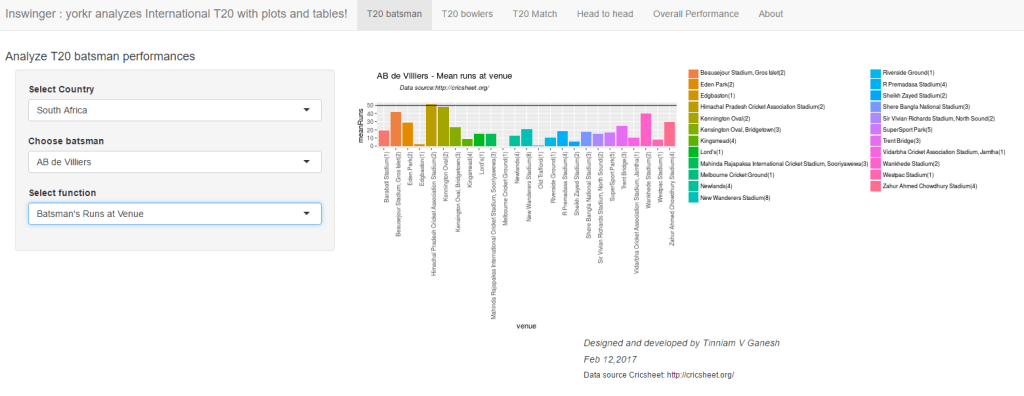
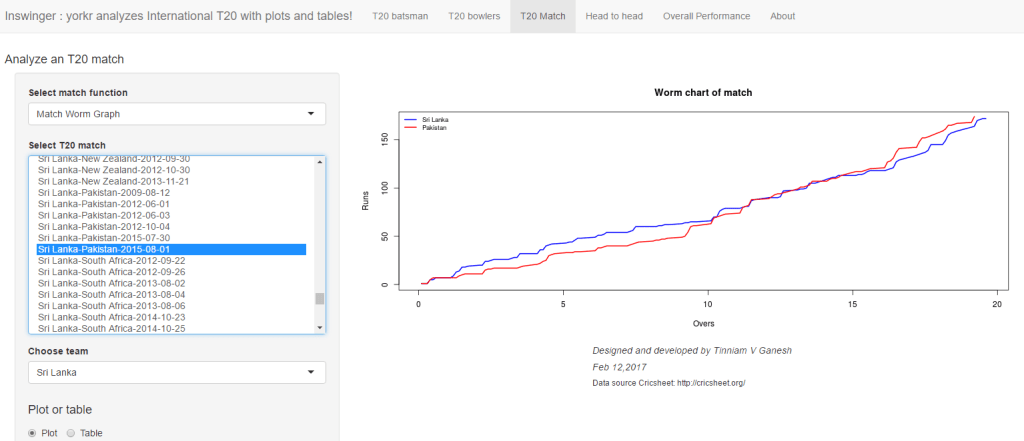
Also take a look at my Inswinger shiny app which was created after performing the same conversion on the Dec 16 data .

convertAllYaml2RDataframesT20("T20Data","T20Matches")

2.Save all matches between all combinations of T20 nations

This function will create the set of all matches between every T20 country against every other T20 country. This uses the data that was created in T20Matches, with the convertAllYaml2RDataframesT20() function.

setwd("./T20MatchesBetween2Teams")
saveAllMatchesBetweenTeams(dir=".",odir=".")

3.Save all matches against all opposition

This will create a consolidated dataframe of all matches played by every T20 playing nation against all other nattions. This also uses the data that was created in T20Matches, with the convertAllYaml2RDataframesT20() function.

setwd("../allMatchesAllOpposition")
saveAllMatchesAllOpposition(dir=".",odir=".")

4. Create batting and bowling details for each T20 country

These are the current T20 playing nations. You can add to this vector as more countries start playing T20. You will get to know all T20 nations by also look at the directory created above namely allMatchesAllOpposition. his also uses the data that was created in T20Matches, with the convertAllYaml2RDataframesT20() function.

setwd("../BattingBowlingDetails")
teams <-c("Australia","India","Pakistan","West Indies", 'Sri Lanka',
          "England", "Bangladesh","Netherlands","Scotland", "Afghanistan",
          "Zimbabwe","Ireland","New Zealand","South Africa","Canada",
          "Bermuda","Kenya","Hong Kong","Nepal","Oman","Papua New Guinea",
          "United Arab Emirates")

for(i in seq_along(teams)){
    print(teams[i])
    val <- paste(teams[i],"-details",sep="")
    val <- getTeamBattingDetails(teams[i],dir="../T20Matches", save=TRUE)

}

for(i in seq_along(teams)){
    print(teams[i])
    val <- paste(teams[i],"-details",sep="")
    val <- getTeamBowlingDetails(teams[i],dir="../T20Matches", save=TRUE)

}

5. Get the list of batsmen for a particular country

For e.g. if you wanted to get the batsmen of Canada you would do the following. By replacing Canada for any other country you can get the batsmen of that country. These batsmen names can then be used in the batsmen analysis

country="Canada"
teamData <- paste(country,"-BattingDetails.RData",sep="")
load(teamData)
countryDF <- battingDetails
bmen <- countryDF %>% distinct(batsman) 
bmen <- as.character(bmen$batsman)
batsmen <- sort(bmen)
batsmen

6. Get the list of bowlers for a particular country

The method below can get the list of bowler names for any T20 nation. These names can then be used in the bowler analysis below

country="Netherlands"
teamData <- paste(country,"-BowlingDetails.RData",sep="")
load(teamData)
countryDF <- bowlingDetails
bwlr <- countryDF %>% distinct(bowler) 
bwlr <- as.character(bwlr$bowler)
bowler <- sort(bwlr)
bowler

Now we are all set

A)  International T20 Match Analysis

Load any match data from the ./T20Matches folder for e.g. Afganistan-England-2016-03-23.RData

setwd("./T20Matches")
load("Afghanistan-England-2016-03-23.RData")
afg_eng<- overs
#The steps are
load("Country1-Country2-Date.Rdata")
country1_country2 <- overs

All analysis for this match can be done now

2. Scorecard

teamBattingScorecardMatch(country1_country2,"Country1")
teamBattingScorecardMatch(country1_country2,"Country2")

3.Batting Partnerships

teamBatsmenPartnershipMatch(country1_country2,"Country1","Country2")
teamBatsmenPartnershipMatch(country1_country2,"Country2","Country1")

4. Batsmen vs Bowler Plot

teamBatsmenVsBowlersMatch(country1_country2,"Country1","Country2",plot=TRUE)
teamBatsmenVsBowlersMatch(country1_country2,"Country1","Country2",plot=FALSE)

5. Team bowling scorecard

teamBowlingScorecardMatch(country1_country2,"Country1")
teamBowlingScorecardMatch(country1_country2,"Country2")

6. Team bowling Wicket kind match

teamBowlingWicketKindMatch(country1_country2,"Country1","Country2")
m <-teamBowlingWicketKindMatch(country1_country2,"Country1","Country2",plot=FALSE)
m

7. Team Bowling Wicket Runs Match

teamBowlingWicketRunsMatch(country1_country2,"Country1","Country2")
m <-teamBowlingWicketRunsMatch(country1_country2,"Country1","Country2",plot=FALSE)
m

8. Team Bowling Wicket Match

m <-teamBowlingWicketMatch(country1_country2,"Country1","Country2",plot=FALSE)
m
teamBowlingWicketMatch(country1_country2,"Country1","Country2")

9. Team Bowler vs Batsmen

teamBowlersVsBatsmenMatch(country1_country2,"Country1","Country2")
m <- teamBowlersVsBatsmenMatch(country1_country2,"Country1","Country2",plot=FALSE)
m

10. Match Worm chart

matchWormGraph(country1_country2,"Country1","Country2")

B)  International T20 Matches between 2 teams

Load match data between any 2 teams from ./T20MatchesBetween2Teams for e.g.Australia-India-allMatches

setwd("./T20MatchesBetween2Teams")
load("Australia-India-allMatches.RData")
aus_ind_matches <- matches
#Replace below with your own countries
country1<-"England"
country2 <- "South Africa"
country1VsCountry2 <- paste(country1,"-",country2,"-allMatches.RData",sep="")
load(country1VsCountry2)
country1_country2_matches <- matches

2.Batsmen partnerships

m<- teamBatsmenPartnershiOppnAllMatches(country1_country2_matches,"country1",report="summary")
m
m<- teamBatsmenPartnershiOppnAllMatches(country1_country2_matches,"country2",report="summary")
m
m<- teamBatsmenPartnershiOppnAllMatches(country1_country2_matches,"country1",report="detailed")
m
teamBatsmenPartnershipOppnAllMatchesChart(country1_country2_matches,"country1","country2")

3. Team batsmen vs bowlers

teamBatsmenVsBowlersOppnAllMatches(country1_country2_matches,"country1","country2")

4. Bowling scorecard

a <-teamBattingScorecardOppnAllMatches(country1_country2_matches,main="country1",opposition="country2")
a

5. Team bowling performance

teamBowlingPerfOppnAllMatches(country1_country2_matches,main="country1",opposition="country2")

6. Team bowler wickets

teamBowlersWicketsOppnAllMatches(country1_country2_matches,main="country1",opposition="country2")
m <-teamBowlersWicketsOppnAllMatches(country1_country2_matches,main="country1",opposition="country2",plot=FALSE)
teamBowlersWicketsOppnAllMatches(country1_country2_matches,"country1","country2",top=3)
m

7. Team bowler vs batsmen

teamBowlersVsBatsmenOppnAllMatches(country1_country2_matches,"country1","country2",top=5)

8. Team bowler wicket kind

teamBowlersWicketKindOppnAllMatches(country1_country2_matches,"country1","country2",plot=TRUE)
m <- teamBowlersWicketKindOppnAllMatches(country1_country2_matches,"country1","country2",plot=FALSE)
m[1:30,]

9. Team bowler wicket runs

teamBowlersWicketRunsOppnAllMatches(country1_country2_matches,"country1","country2")

10. Plot wins and losses

setwd("./T20Matches")
plotWinLossBetweenTeams("country1","country2")

C)  International T20 Matches for a team against all other teams

Load the data between for a T20 team against all other countries ./allMatchesAllOpposition for e.g all matches of India

load("allMatchesAllOpposition-India.RData")
india_matches <- matches
country="country1"
allMatches <- paste("allMatchesAllOposition-",country,".RData",sep="")
load(allMatches)
country1AllMatches <- matches

2. Team’s batting scorecard all Matches

m <-teamBattingScorecardAllOppnAllMatches(country1AllMatches,theTeam="country1")
m

3. Batting scorecard of opposing team

m <-teamBattingScorecardAllOppnAllMatches(matches=country1AllMatches,theTeam="country2")

4. Team batting partnerships

m <- teamBatsmenPartnershipAllOppnAllMatches(country1AllMatches,theTeam="country1")
m
m <- teamBatsmenPartnershipAllOppnAllMatches(country1AllMatches,theTeam='country1',report="detailed")
head(m,30)
m <- teamBatsmenPartnershipAllOppnAllMatches(country1AllMatches,theTeam='country1',report="summary")
m

5. Team batting partnerships plot

teamBatsmenPartnershipAllOppnAllMatchesPlot(country1AllMatches,"country1",main="country1")
teamBatsmenPartnershipAllOppnAllMatchesPlot(country1AllMatches,"country1",main="country2")

6, Team batsmen vs bowlers report

m <-teamBatsmenVsBowlersAllOppnAllMatchesRept(country1AllMatches,"country1",rank=0)
m
m <-teamBatsmenVsBowlersAllOppnAllMatchesRept(country1AllMatches,"country1",rank=1,dispRows=30)
m
m <-teamBatsmenVsBowlersAllOppnAllMatchesRept(matches=country1AllMatches,theTeam="country2",rank=1,dispRows=25)
m

7. Team batsmen vs bowler plot

d <- teamBatsmenVsBowlersAllOppnAllMatchesRept(country1AllMatches,"country1",rank=1,dispRows=50)
d
teamBatsmenVsBowlersAllOppnAllMatchesPlot(d)
d <- teamBatsmenVsBowlersAllOppnAllMatchesRept(country1AllMatches,"country1",rank=2,dispRows=50)
teamBatsmenVsBowlersAllOppnAllMatchesPlot(d)

8. Team bowling scorecard

teamBowlingScorecardAllOppnAllMatchesMain(matches=country1AllMatches,theTeam="country1")
teamBowlingScorecardAllOppnAllMatches(country1AllMatches,'country2')

9. Team bowler vs batsmen

teamBowlersVsBatsmenAllOppnAllMatchesMain(country1AllMatches,theTeam="country1",rank=0)
teamBowlersVsBatsmenAllOppnAllMatchesMain(country1AllMatches,theTeam="country1",rank=2)
teamBowlersVsBatsmenAllOppnAllMatchesRept(matches=country1AllMatches,theTeam="country1",rank=0)

10. Team Bowler vs bastmen

df <- teamBowlersVsBatsmenAllOppnAllMatchesRept(country1AllMatches,theTeam="country1",rank=1)
teamBowlersVsBatsmenAllOppnAllMatchesPlot(df,"country1","country1")

11. Team bowler wicket kind

teamBowlingWicketKindAllOppnAllMatches(country1AllMatches,t1="country1",t2="All")
teamBowlingWicketKindAllOppnAllMatches(country1AllMatches,t1="country1",t2="country2")

12.

teamBowlingWicketRunsAllOppnAllMatches(country1AllMatches,t1="country1",t2="All",plot=TRUE)
teamBowlingWicketRunsAllOppnAllMatches(country1AllMatches,t1="country1",t2="country2",plot=TRUE)

D) Batsman functions

Get the batsman’s details for a batsman

setwd("../BattingBowlingDetails")
kohli <- getBatsmanDetails(team="India",name="Kohli",dir=".")
batsmanDF <- getBatsmanDetails(team="country1",name="batsmanName",dir=".")

2. Runs vs deliveries

batsmanRunsVsDeliveries(batsmanDF,"batsmanName")

3. Batsman 4s & 6s

batsman46 <- select(batsmanDF,batsman,ballsPlayed,fours,sixes,runs)
p1 <- batsmanFoursSixes(batsman46,"batsmanName")

4. Batsman dismissals

batsmanDismissals(batsmanDF,"batsmanName")

5. Runs vs Strike rate

batsmanRunsVsStrikeRate(batsmanDF,"batsmanName")

6. Batsman Moving Average

batsmanMovingAverage(batsmanDF,"batsmanName")

7. Batsman cumulative average

batsmanCumulativeAverageRuns(batsmanDF,"batsmanName")

8. Batsman cumulative strike rate

batsmanCumulativeStrikeRate(batsmanDF,"batsmanName")

9. Batsman runs against oppositions

batsmanRunsAgainstOpposition(batsmanDF,"batsmanName")

10. Batsman runs vs venue

batsmanRunsVenue(batsmanDF,"batsmanName")

11. Batsman runs predict

batsmanRunsPredict(batsmanDF,"batsmanName")

12. Bowler functions

For example to get Ravicahnder Ashwin’s bowling details

setwd("../BattingBowlingDetails")
ashwin <- getBowlerWicketDetails(team="India",name="Ashwin",dir=".")
bowlerDF <- getBatsmanDetails(team="country1",name="bowlerName",dir=".")

13. Bowler Mean Economy rate

bowlerMeanEconomyRate(bowlerDF,"bowlerName")

14. Bowler mean runs conceded

bowlerMeanRunsConceded(bowlerDF,"bowlerName")

15. Bowler Moving Average

bowlerMovingAverage(bowlerDF,"bowlerName")

16. Bowler cumulative average wickets

bowlerCumulativeAvgWickets(bowlerDF,"bowlerName")

17. Bowler cumulative Economy Rate (ER)

bowlerCumulativeAvgEconRate(bowlerDF,"bowlerName")

18. Bowler wicket plot

bowlerWicketPlot(bowlerDF,"bowlerName")

19. Bowler wicket against opposition

bowlerWicketsAgainstOpposition(bowlerDF,"bowlerName")

20. Bowler wicket at cricket grounds

bowlerWicketsVenue(bowlerDF,"bowlerName")

21. Predict number of deliveries to wickets

setwd("./T20Matches")
bowlerDF1 <- getDeliveryWickets(team="country1",dir=".",name="bowlerName",save=FALSE)
bowlerWktsPredict(bowlerDF1,"bowlerName")

cricketr and yorkr books – Paperback now in Amazon

My books
– Cricket Analytics with cricketr
– Beaten by sheer pace!: Cricket analytics with yorkr
are now available on Amazon in both Paperback and Kindle versions

The cricketr and yorkr packages are written in R, and both are available in CRAN. The books contain details on how to use these R packages to analyze performance of cricketers.

cricketr is based on data from ESPN Cricinfo Statsguru, and can analyze Test, ODI and T20 batsmen & bowlers. yorkr is based on data from Cricsheet, and can analyze ODI, T20 and IPL. yorkr can analyze batsmen, bowlers, matches and teams.

Cricket Analytics with cricketr
You can access the paperback at Cricket analytics with cricketr
untitled1

Beaten by sheer pace! Cricket Analytics with yorkr
You can buy the paperback from Amazon at Beaten by sheer pace: Cricket analytics with yorkr
untitled

Order your copy today! Hope you have a great time reading!

You can download the latest PDF version of the book  at  ‘Cricket analytics with cricketr and cricpy: Analytics harmony with R and Python-6th edition

Inswinger: yorkr swings into International T20s

In this post I introduce ‘Inswinger’ an interactive Shiny app to analyze International T20 players, matches and teams. This app was a natural consequence to my earlier Shiny app ‘GooglyPlus’. Most of the structure for this app remained the same, I only had to work with a different dataset, so to speak.

The Googly Shiny app is based on my R package ‘yorkr’ which is now available in CRAN. The R package and hence this Shiny app is based on data from Cricsheet. Inswinger is based on the latest data dump from Cricsheet (Dec 2016) and includes all International T20 till then. There are a lot of new Internationation teams like Oman, Hong Kong, UAE, etc. In total there are 22 different International T20 teams in my Inswinger app.

The countries are a) Afghanistan b) Australia c) Bangladesh d) Bermuda e) Canada f) England g) Hong Kong h) India i) Ireland j) Kenya k) Nepal l) Netherlands m) New Zealand n) Oman o) Pakistan p) Papua New Guinea q) Scotland r) South Africa s) Sri Lanka t) United Arab Emirates u) West Indies v) Zimbabwe

If you are passionate about cricket, and love analyzing cricket performances, then check out my 2 racy books on cricket! In my books, I perform detailed yet compact analysis of performances of both batsmen, bowlers besides evaluating team & match performances in Tests , ODIs, T20s & IPL. You can buy my books on cricket from Amazon at $12.99 for the paperback and $4.99/$6.99 respectively for the kindle versions. The books can be accessed at Cricket analytics with cricketr  and Beaten by sheer pace-Cricket analytics with yorkr  A must read for any cricket lover! Check it out!!

1


My R package ‘yorkr’,  on which both these Shiny apps are based, has the ability to output either a dataframe or plot, depending on a parameter plot=TRUE or FALSE. Hence in the Inswinger Shiny app results can be displayed both as table or a plot depending on the choice of function.

Inswinger can do detailed analyses of a) Individual T20 batsman b) Individual T20 bowler c) Any T20 match d) Head to head confrontation between 2 T20 teams e) All matches of a T20 team against all other teams.

The Shiny app can be accessed at Inswinger

The code for Inswinger is available at Github. Feel free to clone/download/fork  the code from Inswinger

Based on the 5 detailed analysis domains there are 5 tabs
A) T20 Batsman: This tab can be used to perform analysis of all T20 batsman. If a batsman has played in more than 1 team, then the overall performance is considered. There are 10 functions for the T20 Batsman. They are shown below
– Batsman Runs vs. Deliveries
– Batsman’s Fours & Sixes
– Dismissals of batsman
– Batsman’s Runs vs Strike Rate
– Batsman’s Moving Average
– Batsman’s Cumulative Average Run
– Batsman’s Cumulative Strike Rate
– Batsman’s Runs against Opposition
– Batsman’s Runs at Venue
– Predict Runs of batsman

B) T20 Bowler: This tab can be used to analyze individual T20 bowlers. The functions handle T20 bowlers who have played in more than 1 T20 team.
– Mean Economy Rate of bowler
– Mean runs conceded by bowler
– Bowler’s Moving Average
– Bowler’s Cumulative Avg. Wickets
– Bowler’s Cumulative Avg. Economy Rate
– Bowler’s Wicket Plot
– Bowler’s Wickets against opposition
– Bowler’s Wickets at Venues
– Bowler’s wickets prediction

C) T20 match: This tab can be used for analyzing individual T20 matches. The available functions are
– Match Batting Scorecard – Table
– Batting Partnerships – Plot, Table
– Batsmen vs Bowlers – Plot, Table
– Match Bowling Scorecard   – Table
– Bowling Wicket Kind – Plot, Table
– Bowling Wicket Runs – Plot, Table
– Bowling Wicket Match – Plot, Table
– Bowler vs Batsmen – Plot, Table
– Match Worm Graph – Plot

D) Head to head: This tab can be used for analyzing head-to-head confrontations, between any 2 T20 teams for e.g. all matches between India vs Australia or West Indies vs Sri Lanka . The available functions are
-Team Batsmen Batting Partnerships All Matches – Plot, Table {Summary and Detailed}
-Team Batting Scorecard All Matches – Table
-Team Batsmen vs Bowlers all Matches – Plot, Table
-Team Wickets Opposition All Matches – Plot, Table
-Team Bowling Scorecard All Matches – Table
-Team Bowler vs Batsmen All Matches – Plot, Table
-Team Bowlers Wicket Kind All Matches – Plot, Table
-Team Bowler Wicket Runs All Matches – Plot, Table
– Win Loss All Matches – Plot

E) T20 team’s overall performance: this tab can be used analyze the overall performance of any T20 team. For this analysis all matches played by this team is considered. The available functions are
-Team Batsmen Partnerships Overall – Plot, Table {Summary and Detailed)}
-Team Batting Scorecard Overall –Table
-Team Batsmen vs Bowlers Overall – Plot, Table
-Team Bowler vs Batsmen Overall – Plot, Table
-Team Bowling Scorecard Overall – Table
-Team Bowler Wicket Kind Overall – Plot, Table

Below I include a random set of charts that are generated in each of the 5 tabs
A. IPL Batsman
a. Shakib-al-Hassan (Bangladesh) :  Runs vs Deliveries
untitled

b. Virat Kohli (India) – Cumulative Average
untitled

c.  AB Devilliers (South Africa) – Runs at venues
untitled

d. Glenn Maxwell (Australia)  – Predict runs vs deliveries faces
untitled

B. IPL Bowler
a. TG Southee (New Zealand) – Mean Economy Rate vs overs
untitled

b) DJ Bravo – Moving Average of wickets
untitled

c) AC Evans (Scotland) – Bowler Wickets Against Opposition
untitled

C.T20 Match
a. Match Score (Afghanistan vs Canada, 2012-03-18)
untitled

b)  Match batting partnerships (Plot) Hong Kong vs Oman (2015-11-21), Hong Kong
Hong Kong Partnerships
untitled

c) Match batting partnerships (Table) – Ireland vs Scotland(2012-03-18, Ireland)
Batting partnership can also be displayed as a table
untitled

d) Batsmen vs Bowlers (Plot) – India vs England (2012-12-22)
untitled

e) Match Worm Chart – Sri Lanka vs Pakistan (2015-08-01)
untitled

D.Head to head
a) Team Batsmen Partnership (Plot) – India vs Australia (all matches)
Virat Kohli has the highest total runs in partnerships against Australia
untitled

b)  Team Batsmen Partnership (Summary – Table) – Kenya vs Bangladesh
untitled

c) Team Bowling Scorecard (Table only) India vs South Africa all Matches
untitled

d) Wins- Losses New Zealand vs West Indies all Matches
untitled

C) Overall performances
a) Batting Scorecard All Matches  (Table only) – England’s overall batting performance
Eoin Morgan, Kevin Pieterson  & SJ Taylor have the best performance
untitled

b) Batsman vs Bowlers all Matches (Plot)
India’s best performing batsman (Rank=1) is Virat Kohli
untitled

c)  Batsman vs Bowlers all Matches (Table)
The plot above for Virat Kohli can also be displayed as a table. Kohli has score most runs DJ Bravo, SR Watson & Shahid Afridi
untitled

The Inswinger Shiny app can be accessed at Inswinger. Give it a swing!

The code for Inswinger is available at Github. Feel free to clone/download/fork  the code from Inswinger

Also see my other Shiny apps
1.GooglyPlus
2.What would Shakespeare say?
3.Sixer
4.Revisiting crimes against women in India

You may also like
1. Neural Networks: The mechanics of backpropagation
A primer on Qubits, Quantum gates and Quantum Operation
2. Re-working the Lucy Richardson algorithm in OpenCV
3.Design Principles of Scalable, Distributed Systems
4.Spicing up a IBM Bluemix cloud app with MongoDB and NodeExpress
5.Programming languages in layman’s language
7.Re-introducing cricketr! : An R package to analyze performances of cricketers

To see all posts take at a look at Index of Posts

GooglyPlus: yorkr analyzes IPL players, teams, matches with plots and tables

In this post I introduce my new Shiny app,“GooglyPlus”, which is a  more evolved version of my earlier Shiny app “Googly”. My R package ‘yorkr’,  on which both these Shiny apps are based, has the ability to output either a dataframe or plot, depending on a parameter plot=TRUE or FALSE. My initial version of the app only included plots, and did not exercise the yorkr package fully. Moreover, I am certain, there may be a set of cricket aficionados who would prefer, numbers to charts. Hence I have created this enhanced version of the Googly app and appropriately renamed it as GooglyPlus. GooglyPlus is based on the yorkr package which uses data from Cricsheet. The app is based on IPL data from  all IPL matches from 2008 up to 2016. Feel free to clone/fork or download the code from Github at GooglyPlus.

If you are passionate about cricket, and love analyzing cricket performances, then check out my 2 racy books on cricket! In my books, I perform detailed yet compact analysis of performances of both batsmen, bowlers besides evaluating team & match performances in Tests , ODIs, T20s & IPL. You can buy my books on cricket from Amazon at $12.99 for the paperback and $4.99/$6.99 respectively for the kindle versions. The books can be accessed at Cricket analytics with cricketr  and Beaten by sheer pace-Cricket analytics with yorkr  A must read for any cricket lover! Check it out!!

1


Click  GooglyPlus to access the Shiny app!

The changes for GooglyPlus over the earlier Googly app is only in the following 3 tab panels

  • IPL match
  • Head to head
  • Overall Performance

The analysis of IPL batsman and IPL bowler tabs are unchanged. These charts are as they were before.

The changes are only in  tabs i) IPL match ii) Head to head and  iii) Overall Performance. New functionality has been added and existing functions now have the dual option of either displaying a plot or a table.

The changes are

A) IPL Match
The following additions/enhancements have been done

-Match Batting Scorecard – Table
-Batting Partnerships – Plot, Table (New)
-Batsmen vs Bowlers – Plot, Table(New)
-Match Bowling Scorecard   – Table (New)
-Bowling Wicket Kind – Plot, Table (New)
-Bowling Wicket Runs – Plot, Table (New)
-Bowling Wicket Match – Plot, Table (New)
-Bowler vs Batsmen – Plot, Table (New)
-Match Worm Graph – Plot

B) Head to head
The following functions have been added/enhanced

-Team Batsmen Batting Partnerships All Matches – Plot, Table {Summary (New) and Detailed (New)}
-Team Batting Scorecard All Matches – Table (New)
-Team Batsmen vs Bowlers all Matches – Plot, Table (New)
-Team Wickets Opposition All Matches – Plot, Table (New)
-Team Bowling Scorecard All Matches – Table (New)
-Team Bowler vs Batsmen All Matches – Plot, Table (New)
-Team Bowlers Wicket Kind All Matches – Plot, Table (New)
-Team Bowler Wicket Runs All Matches – Plot, Table (New)
-Win Loss All Matches – Plot

C) Overall Performance
The following additions/enhancements have been done in this tab

-Team Batsmen Partnerships Overall – Plot, Table {Summary (New) and Detailed (New)}
-Team Batting Scorecard Overall –Table (New)
-Team Batsmen vs Bowlers Overall – Plot, Table (New)
-Team Bowler vs Batsmen Overall – Plot, Table (New)
-Team Bowling Scorecard Overall – Table (New)
-Team Bowler Wicket Kind Overall – Plot, Table (New)

Included below are some random charts and tables. Feel free to explore the Shiny app further

1) IPL Match
a) Match Batting Scorecard (Table only)
This is the batting score card for the Chennai Super Kings & Deccan Chargers 2011-05-11

untitled

b)  Match batting partnerships (Plot)
Delhi Daredevils vs Kings XI Punjab – 2011-04-23

untitled

c) Match batting partnerships (Table)
The same batting partnership  Delhi Daredevils vs Kings XI Punjab – 2011-04-23 as a table

untitled

d) Batsmen vs Bowlers (Plot)
Kolkata Knight Riders vs Mumbai Indians 2010-04-19

Untitled.png

e)  Match Bowling Scorecard (Table only)
untitled

B) Head to head

a) Team Batsmen Partnership (Plot)
Deccan Chargers vs Kolkata Knight Riders all matches

untitled

b)  Team Batsmen Partnership (Summary – Table)
In the following tables it can be seen that MS Dhoni has performed better that SK Raina  CSK against DD matches, whereas SK Raina performs better than Dhoni in CSK vs  KKR matches

i) Chennai Super Kings vs Delhi Daredevils (Summary – Table)

untitled

ii) Chennai Super Kings vs Kolkata Knight Riders (Summary – Table)
untitled

iii) Rising Pune Supergiants vs Gujarat Lions (Detailed – Table)
This table provides the detailed partnership for RPS vs GL all matches

untitled

c) Team Bowling Scorecard (Table only)
This table gives the bowling scorecard of Pune Warriors vs Deccan Chargers in all matches

untitled

C) Overall performances
a) Batting Scorecard All Matches  (Table only)

This is the batting scorecard of Royal Challengers Bangalore. The top 3 batsmen are V Kohli, C Gayle and AB Devilliers in that order

untitled

b) Batsman vs Bowlers all Matches (Plot)
This gives the performance of Mumbai Indian’s batsman of Rank=1, which is Rohit Sharma, against bowlers of all other teams

untitled

c)  Batsman vs Bowlers all Matches (Table)
The above plot as a table. It can be seen that Rohit Sharma has scored maximum runs against M Morkel, then Shakib Al Hasan and then UT Yadav.

untitled

d) Bowling scorecard (Table only)
The table below gives the bowling scorecard of CSK. R Ashwin leads with a tally of 98 wickets followed by DJ Bravo who has 88 wickets and then JA Morkel who has 83 wickets in all matches against all teams

Untitled.png

This is just a random selection of functions. Do play around with the app and checkout how the different IPL batsmen, bowlers and teams stack against each other. Do read my earlier post Googly: An interactive app for analyzing IPL players, matches and teams using R package yorkr  for more details about the app and other functions available.

Click GooglyPlus to access the Shiny app!

You can clone/fork/download the code from Github at GooglyPlus

Hope you have fun playing around with the Shiny app!

Note: In the tabs, for some of the functions, not all controls  are required. It is possible to enable the controls selectively but this has not been done in this current version. I may make the changes some time in the future.

Take a look at my other Shiny apps
a.Revisiting crimes against women in India
b. Natural language processing: What would Shakespeare say?

Check out some of my other posts
1. Analyzing World Bank data with WDI, googleVis Motion Charts
2. Video presentation on Machine Learning, Data Science, NLP and Big Data – Part 1
3. Singularity
4. Design principles of scalable, distributed systems
5. Simulating an Edge shape in Android
6. Dabbling with Wiener filter in OpenCV

To see all posts click Index of Posts

Googly: An interactive app for analyzing IPL players, matches and teams using R package yorkr

Presenting ‘Googly’, a cool Shiny app that I developed over the last couple of days. This interactive Shiny app was on my mind for quite some time, and I finally got down to implementing it. The Googly Shiny app is based on my R package ‘yorkr’ which is now available in CRAN. The R package and hence this Shiny app is based on data from Cricsheet.

If you are passionate about cricket, and love analyzing cricket performances, then check out my 2 racy books on cricket! In my books, I perform detailed yet compact analysis of performances of both batsmen, bowlers besides evaluating team & match performances in Tests , ODIs, T20s & IPL. You can buy my books on cricket from Amazon at $12.99 for the paperback and $4.99/$6.99 respectively for the kindle versions. The books can be accessed at Cricket analytics with cricketr  and Beaten by sheer pace-Cricket analytics with yorkr  A must read for any cricket lover! Check it out!!

1

Googly is based on R package yorkr, and uses the data of all IPL matches from 2008 up to 2016, available on Cricsheet.

Googly can do detailed analyses of a) Individual IPL batsman b) Individual IPL bowler c) Any IPL match d) Head to head confrontation between 2 IPL teams e) All matches of an IPL team against all other teams.

With respect to the individual IPL batsman and bowler performance, I was in a bit of a ‘bind’ literally (pun unintended), as any IPL player could have played in more than 1 IPL team. Fortunately ‘rbind’ came to my rescue. I just get all the batsman’s/bowler’s performance in each IPL team, and then consolidate it into a single large dataframe to do the analyses of.

The Shiny app can be accessed at Googly

The code for Googly is available at Github. Feel free to clone/download/fork  the code from Googly

Check out my 2 books on cricket, a) Cricket analytics with cricketr b) Beaten by sheer pace – Cricket analytics with yorkr, now available in both paperback & kindle versions on Amazon!!! Pick up your copies today!

Also see my post GooglyPlus: yorkr analyzes IPL players, teams, matches with plots and tables

Based on the 5 detailed analysis domains there are 5 tabs

IPL Batsman: This tab can be used to perform analysis of all IPL batsman. If a batsman has played in more than 1 team, then the overall performance is considered. There are 10 functions for the IPL Batsman. They are shown below

  1. Batsman Runs vs. Deliveries
  2. Batsman’s Fours & Sixes
  3. Dismissals of batsman
  4. Batsman’s Runs vs Strike Rate
  5. Batsman’s Moving Average
  6. Batsman’s Cumulative Average Run
  7. Batsman’s Cumulative Strike Rate
  8. Batsman’s Runs against Opposition
  9. Batsman’s Runs at Venue
  10. Predict Runs of batsman

IPL Bowler: This tab can be used to analyze individual IPL bowlers. The functions handle IPL bowlers who have played in more than 1 IPL team.

  1. Mean Economy Rate of bowler
  2. Mean runs conceded by bowler
  3. Bowler’s Moving Average
  4. Bowler’s Cumulative Avg. Wickets
  5. Bowler’s Cumulative Avg. Economy Rate
  6. Bowler’s Wicket Plot
  7. Bowler’s Wickets against opposition
  8. Bowler’s Wickets at Venues
  9. Bowler’s wickets prediction

IPL match: This tab can be used for analyzing individual IPL matches. The available functions are

  1. Batting Partnerships
  2. Batsmen vs Bowlers
  3. Bowling Wicket Kind
  4. Bowling Wicket Runs
  5. Bowling Wicket Match
  6. Bowler vs Batsmen
  7. Match Worm Graph

Head to head : This tab can be used for analyzing head-to-head confrontations, between any 2 IPL teams for e.g. all matches between Chennai Super Kings vs. Deccan Chargers or Kolkata Knight Riders vs. Delhi Daredevils. The available functions are

  1. Team Batsmen Batting Partnerships All Matches
  2. Team Batsmen vs Bowlers all Matches
  3. Team Wickets Opposition All Matches
  4. Team Bowler vs Batsmen All Matches
  5. Team Bowlers Wicket Kind All Matches
  6. Team Bowler Wicket Runs All Matches
  7. Win Loss All Matches

Overall performance : this tab can be used analyze the overall performance of any IPL team. For this analysis all matches played by this team is considered. The available functions are

  1. Team Batsmen Partnerships Overall
  2. Team Batsmen vs Bowlers Overall
  3. Team Bowler vs Batsmen Overall
  4. Team Bowler Wicket Kind Overall

Below I include a random set of charts that are generated in each of the 5 tabs

A. IPL Batsman
a. A Symonds : Runs vs Deliveries
untitled

b. AB Devilliers – Cumulative Strike Rate
untitled

c.  Gautam Gambhir – Runs at venues
untitled

d. CH Gayle – Predict runs 
untitled

B. IPL Bowler
a. Ashish Nehra – Cumulative Average Wickets
untitled

b.  DJ Bravo – Moving Average of wickets
untitled

c. R Ashwin – Mean Economy rate vs Overs
untitled

C.IPL Match
a. Chennai Super Kings vs Deccan Chargers   (2008 -05-06) – Batsmen Partnerships

Note: You can choose either team in the match from the drop down ‘Choose team’

untitled

b. Kolkata Knight Riders vs Delhi Daredevils (2013-04-02) – Bowling wicket runs
untitled

c. Mumbai Indians vs Kings XI Punjab (2010-03-30) – Match worm graph
untitled

D. Head to head confrontation
a. Rising Pune Supergiants vs Mumbai Indians in all matches – Team batsmen partnerships

Note: You can choose the partnership of either team in the drop down ‘Choose team’
untitled

b.  Gujarat Lions – Royal Challengers Bangalore all matches – Bowlers performance against batsmen
untitled

E. Overall Performance
a.  Royal Challengers Bangalore overall performance – Batsman Partnership (Rank=1)
This is Virat Kohli for RCB. Try out other ranks
untitled

b.  Rajashthan Royals overall Performance – Bowler vs batsman (Rank =2)
This is Vinay Kumar.
untitled

The Shiny app Googly can be accessed at Googly. Feel free to clone/fork the code from Github at Googly

For details on my R package yorkr, please see my blog Giga thoughts. There are more than 15 posts detailing the functions and their usage.

Do bowl a Googly!!!

You may like my other Shiny apps

Also see my other posts

  1. Introducing QCSimulator: A 5-qubit quantum computing simulator in R
  2. Deblurring with OpenCV: Weiner filter reloaded
  3. Rock N’ Roll with Bluemix, Cloudant & NodeExpress
  4. Introducing cricket package yorkr: Part 1- Beaten by sheer pace!
  5. Fun simulation of a Chain in Android
  6. Beaten by sheer pace! Cricket analytics with yorkr in paperback and Kindle versions
  7. Introducing cricketr! : An R package to analyze performances of cricketers
  8. Cricket analytics with cricketr!!!

For more posts see Index of posts