Revisiting crimes against women in India

Here I go again, raking the muck about crimes against women in India. My earlier post “A crime map of India in R: Crimes against women in India” garnered a lot of responses from readers. In fact one of the readers even volunteered to create the only choropleth map in that post. The data for this post is taken from http://data.gov.in. You can download the data from the link “Crimes against women in India

I was so impressed by the choropleth map that I decided to do that for all crimes against women.(Wikipedia definition: A choropleth map is a thematic map in which areas are shaded or patterned in proportion to the measurement of the statistical variable being displayed on the map). Personally, I think pictures tell the story better. I am sure you will agree!

So here, I have it a Shiny app which will plot choropleth maps for a chosen crime in a given year.

You can try out my interactive Shiny app at  Crimes against women in India

Checkout out my book  on Amazon available in both  Paperback ($9.99) and a Kindle version($6.99/Rs449/). (see ‘Practical Machine Learning with R and Python – Machine Learning in stereo‘)

The following technique can be used to determine the ‘goodness’ of a hypothesis or how well the hypothesis can fit the data and can also generalize to new examples not in the training set.

In the picture below  are the details of  ‘Rape” in the year 2015.
1

Interestingly the ‘Total Crime against women’ in 2001 shows the Top 5 as
1) Uttar Pradresh 2) Andhra Pradesh 3) Madhya Pradesh 4) Maharashtra 5) Rajasthan

2

But in 2015 West Bengal tops the list, as the real heavy weight in crimes against women. The new pecking order in 2015 for ‘Total Crimes against Women’ is

1) West Bengal 2) Andhra Pradesh 3) Uttar Pradesh  4) Rajasthan 5) Maharashtra

3

Similarly for rapes, West Bengal is nowhere in the top 5 list in 2001. In 2015, it is in second only to the national rape leader Madhya Pradesh.  Also in 2001 West Bengal is not in the top 5 for any of 6 crime heads. But in 2015, West Bengal is in the top 5 of 6 crime heads. The emergence of West Bengal as the leader in Crimes against Women is due to the steep increase in crime rate  over the years.Clearly the law and order situation in West Bengal is heading south.

In Dowry Deaths, UP, Bihar, MP, West Bengal lead the pack, and in that order in 2015.

The usual suspects for most crime categories are West Bengal, UP, MP, AP & Maharashtra.

The state-wise crime charts plot the incidence of the crime (rape, dowry death, assault on women etc) over the years. Data for each state and for each crime was available from 2001-2013. The data for period 2014-2018 are projected using linear regression. The shaded portion in the plots indicate the 95% confidence level in the prediction (i.e in other words we can be 95% certain that the true mean of the crime rate in the projected years will lie within the shaded region)

4

Several  interesting requests came from readers to my earlier post. Some of them were to to plot the crimes as function of population and per capita income of the State/Union Territory to see if the plots  throw up new crime leaders. I have not got the relevant state-wise population distribution data yet. I intend to update this when I get my hands on this data.

I have included the crimes.csv which has been used to generate the visualization. However for the Shiny app I save this as .RData for better performance of the app.

You can clone/download  the code for the Shiny app from GitHub at  crimesAgainWomenIndia

Please checkout my Shiny app : Crimes against women

I also intend to add further interactivity to my visualizations in a future version. Watch this space. I’ll be back!

You may like
1. My book ‘Practical Machine Learning with R and Python’ on Amazon
2. Natural Language Processing: What would Shakespeare say?
3. Introducing cricketr! : An R package to analyze performances of cricketers
4. A peek into literacy in India: Statistical Learning with R
5. Informed choices through Machine Learning : Analyzing Kohli, Tendulkar and Dravid
6. Re-working the Lucy-Richardson Algorithm in OpenCV
7.  What’s up Watson? Using IBM Watson’s QAAPI with Bluemix, NodeExpress – Part 1
8.  Bend it like Bluemix, MongoDB with autoscaling – Part 2
9. TWS-4: Gossip protocol: Epidemics and rumors to the rescue
10. Thinking Web Scale (TWS-3): Map-Reduce – Bring compute to data
11.  Simulating an Edge Shape in Android

Natural language processing: What would Shakespeare say?

1Here is a scene from  Christopher Nolan’s classic movie Interstellar. In this scene  Cooper, a crew member of the Endurance spaceship which is on its way to 3 distant planets via a wormhole, is conversing with TARS which is one of  US Marine Corps former robots some year in the future.

TARS (flippantly): “Everybody good? Plenty of slaves for my robot colony?”
TARS: [as Cooper repairs him] Settings. General settings. Security settings.
TARS: Honesty, new setting: ninety-five percent.
TARS: Confirmed. Additional settings.
Cooper: Humor, seventy-five percent.
TARS: Confirmed. Self-destruct sequence in T minus 10, 9…
Cooper: Let’s make that sixty percent.
TARS: Sixty percent, confirmed. Knock knock.
Cooper: You want fifty-five?

Natural Language has been an area of serious research for several decades ever since Alan Turing in 1950 proposed a test in which a human evaluator would simultaneously judge natural language conversations between another human and a machine, that is designed to generate human-like responses, behind a closed doors. If the responses of the human and machine were indistinguishable then we can say that the machine has passed the Turing test signifying machine intelligence.

How cool would it be if we could  converse with a machines using Natural Language  with all the subtleties of language including irony, sarcasm and humor? While considerable progress has been made in  Natural Language Processing for e.g. Watson, Siri and Cortana  the ability to handle nuances like humor, sarcasm is probably many years away.

This post looks at one aspect of Natural Language Processing, particularly in dealing with the ability to predict the next word(s) given a word or phrase.

This title of this post should really be ‘Natural language Processing: What would Shakespeare say, and what would you say’ because this post includes two interactive apps that can predict the next word

a) The first app given a (Shakespearean) phrase will predict the most likely word that Shakespeare would have said
Try the Shiny app : What would Shakespeare have said?

b) The second app will, given a regular phrase  predict the next word(s)  in regular day to day English usage
Try the Shiny app: What would you say?

Checkout my book ‘Deep Learning from first principles- In vectorized Python, R and Octave’.  My book is available on Amazon  as paperback ($16.99) and in kindle version($6.65/Rs449).

You may also like my companion book “Practical Machine Learning with R and Python:Second Edition- Machine Learning in stereo” available in Amazon in paperback($10.99) and Kindle($7.99/Rs449) versions.

Natural Language Processing (NLP) is a field of computer science, artificial intelligence, and computational linguistics concerned with the interactions between computers and human (natural) languages. NLP encompasses many areas from computer science  besides inputs from the domain of  linguistics , psychology, information theory, mathematics and statistics

 However NLP is a difficult domain as each language has its own quirkiness and ambiguities,  and English is no different. Let us take the following 2 sentences

Time flies like an arrow.
Fruit flies like a banana.

Clearly the 2 sentences mean  entirely different things when referencing  the words ‘flies like’. The English language is filled with many such ambiguous constructions

There have been 2 main approaches to Natural Language Processing – The rationalist approach and the empiricist’s approach. The empiricists  approached natural language as a data driven problem based on statistics while the rationalist school led by Noam Chomsky, the linguist,  strongly believed that sentence structure should be analyzed at a deeper level than mere surface statistics.

In his book Syntactic Structures, Chomsky introduces a famous example of his criticism of finite-state probabilistic models. He cites 2 sentences  (a) ‘colorless green ideas sleep furiously’  (b) ‘furiously sleep ideas green colorless’.  Chomsky’s contention is that while neither sentence or  any of its parts, have ever occurred in the past linguistic experience of  English it can be easily inferred that   (a) is grammatical, while (b) is not. Chomsky argument is that sentence structure is critical to Natural Language processing of any kind. Here is a good post by Peter Norvig ‘On Chomsky and the two cultures of statistical learning’. In fact,  from 1950 to the 1980s the empiricists approach fell out of favor while reasonable progress was made based on rationalist approach to NLP.

The return of the empiricists
But thanks to great strides in processing power and the significant drop in hardware the empiricists approach to Natural Language Processing  made a comeback in the mid 1980s.  The use of probabilistic language models combined with the increase in the  power of processing saw the rise of the empiricists again. Also there had been significant improvement in machine learning algorithms which allowed the use of the computing resources more efficiently.

In this post I showcase 2 Shiny apps written in R that predict the next word given a phrase using  statistical approaches, belonging to the empiricist school of thought. The 1st one will try to predict what Shakespeare would have said  given a phrase (Shakespearean or otherwise)  and the 2nd is a regular app that will predict what we would say in our regular day to day conversation. These apps will predict the next word as you keep typing in each word.

In NLP the first step is a to build a language model. In order to  build a language model the program ingests a large corpora of documents.  For the a) Shakespearean app, the corpus is the “Complete Works of Shakespeare“.  This is also available in Free ebooks by Project Gutenberg but you will have to do some cleaning and tokenzing before using it. For the b) regular English next word predicting app the corpus is composed of several hundred MBs of tweets, news items and blogs.

Once the corpus is ingested the software then creates a n-gram model. A 1-gram model is representation of all unique single words and their counts. Similarly a bigram model is representation of all 2 words and their counts found in the corpus. Similar we can have trigram, quadgram and n-gram as required. Typically language models don’t go beyond 5-gram as the processing power needed increases for these larger n-gram models.

The probability of a sentence can be determined  using the chain rule. This is shown for the bigram model  below where P(s) is the probability of a sentence ‘s’
P( The quick brown fox jumped) =
P(The) P(quick|The) P(brown|The quick) * P(fox||The quick brown) *P(jumped|The quick brown fox)
where BOS -> is the beginning of the sentence and

P(quick|The) – The probability of the word being ‘quick’ given that the previous word was ‘The’. This probability can be approximated based on Markov’s chain rule which allows that the we can compute the conditional probability
P(w|w_{i})

of a word based on a couple of its preceding words. Hence this allows this approximation as follows
P(w{_{i}}|w_{1}w_{2}w_{3}..w_{i-1}) = P(w{_{i}}|w_{i-1})

The Maximum Likelihood Estimate (MLE) is given as follows for a bigram
P_{MLE}(w_{i}|w_{i-1}) = count(w_{i-1},w_{i})/count(w_{i-1})
P_{MLE}(w_{i}|w_{i-1}) = c(w_{i-1},w_{i})/c(w_{i-1})

Hence for a corpus
We can calculate the maximum likelihood estimates of a given word from its previous word. This computation of the MLE can be extended to the trigram and the quadgram

For a trigram
P(w_{i}|w_{i-1}w_{i-2}) = c(w_{i-2}w_{i-1},w_{i})/c(w_{i-2}w_{i-1})

Smoothing techniques
The MLE estimates for many bigrams and trigrams will be 0, because we may have not have yet seen certain combinations. But the fact that we have not seen these combinations in the corpus should not  mean that they could never occur, So the MLE for the bigrams, trigrams etc have be smoothed so that it does not have a 0 conditional probability. One such method is to use ‘Laplace smoothing’. This smoothing tries to steal from the probability mass of words that occur in the corpus and re-distribute it to the words that do not occur in the corpus. In a way this equivalent to probability mass stealing. This is the simplest smoothing technique and is also known as the ‘add +1’ smoothing technique and requires that 1 be added to all counts

So the  MLE below
P_{MLE}(w_{i}|w_{i-1}) = c(w_{i-1},c_{i})/c(w_{i-1})

With the add +1 smoothing this becomes
P_{MLE}(w_{i}|w_{i-1}) = c(w_{i-1},c_{i})+1/c(w_{i-1})+V

This smoothing is done for bigram, trigam and quadgram.  Smoothing is usually used with an associated technique called ‘backoff’. If the phrase is not found in a n-gram model then we need to backoff to a n-1 gram model. For e.g. a lookup will be done in quadgrams, if not found the algorithm will backoff to trigram,  bigram and finally to unigram.

Hence if we had the phrase
“on my way”

The smoothed MLE for a quadgram will be checked for the next word. If this is not found this is backed of my searching smoothed MLEs for trigrams for the phrase ‘my way’ and if this not found search the bigram for the next word to ‘way’.

One such method is the Katz backoff which is given by which is based on the following method
Bigrams with nonzero count are discounted according to discount ratio d_{r} (i.e. the unigram model).
r^{*}=(r+1)n_{r+1}/n_{_{r}}
d_{r} = r^{*}/r

Count mass subtracted from nonzero counts is redistributed among the zero-count bigrams according to next lower-order distribution

A better performance is obtained with the Kneser-Ney algorithm which computes the continuation probability of words. The Kneser-Ney algorithm is included below
P_{\mathit{KN}}(w_i \mid w_{i-1}) = \dfrac{\max(c(w_{i-1} w_i) - \delta, 0)}{\sum_{w'} c(w_{i-1} w')} + \lambda \dfrac{\left| \{ w_{i-1} : c(w_{i-1}, w_i) > 0 \} \right|}{\left| \{ w_{j-1} : c(w_{j-1},w_j) > 0\} \right|}

where
\lambda(w_{i-1}) = \dfrac{\delta}{c(w_{i-1})} \left| \{w' : c(w_{i-1}, w') > 0\} \right|

This post was inspired by the final Capstone Project in which I had to create a Shiny app for predicting the next word as a part of  Data Science Specialization conducted by John Hopkins University, Bloomberg School of Public health at Coursera.

I further extended this concept  where I try to predict what Shakespeare would have said.  For this I ingest the Complete Works of Shakespeare which is the corpus. The +1 Add smoothing with Katz backoff and the Kneser-Ney algorithm on the unigram, bigram, trigram and quadgrams were then implemented.

Note: This post  in no way tries to belittle the genius of Shakespeare.  From the table below it can be seen that our day to day conversation has approximately 210K, 181K & 65K unique bigrams, trigrams and quadgrams. On the other hand, Shakespearean literature has 271K, 505K, & 517K bigrams, trigrams and quadgrams. It can be seen that Shakespeare had a rich and complex set of word combination.

Not surprisingly the computation of the conditional and continuation probabilities for the Shakespearean literature is orders of magnitude larger.
Here is a small table as comparison
1

This implementation was done entirely using R. The main R packages used for this implementation were tm,Rweka,dplyr. Here is a slide deck on the the implementation details of the apps and key  lessons learnt: PredictNextWord
Unfortunately I will not be able to include the implementation details as I am bound by The Coursera Honor Code.

If you have not already given the apps a try do give them a try
Try the Shiny apps
What would Shakespeare say?
What would you say?

References
a. http://www.foldl.me/2014/kneser-ney-smoothing/
b. http://mkoerner.de/media/bachelor-thesis.pdf
c. https://www.coursera.org/course/nlp (Week 2)
d. http://www.cs.berkeley.edu/~klein/cs294-5/chen_goodman.pdf


You may like
1. My book ‘Practical Machine Learning in R and Python: Second edition’ on Amazon
2. Introducing cricketr! : An R package to analyze performances of cricketers
3. cricketr digs the Ashes!
4. A peek into literacy in India: Statistical Learning with R
5. A crime map of India in R – Crimes against women
6. Analyzing cricket’s batting legends – Through the mirage with R
7. Informed choices through Machine Learning : Analyzing Kohli, Tendulkar and Dravid

Also see
1. Re-working the Lucy-Richardson Algorithm in OpenCV
2.  What’s up Watson? Using IBM Watson’s QAAPI with Bluemix, NodeExpress – Part 1
3.  Bend it like Bluemix, MongoDB with autoscaling – Part 2
4. TWS-4: Gossip protocol: Epidemics and rumors to the rescue
5. Thinking Web Scale (TWS-3): Map-Reduce – Bring compute to data
6. Deblurring with OpenCV:Weiner filter reloaded

cricketr adapts to the Twenty20 International!

Introduction

This should be last in the series of posts based on my R package cricketr. That is, unless some bright idea comes trotting along and light bulbs go on around my head.

In this post cricketr adapts to the Twenty20 International format. Now cricketr can handle stats from all 3 formats of the game namely Test matches, ODIs and Twenty20 International from ESPN Cricinfo. You should be able to install the package from GitHub and use the many of the functions available in the package.

Please be mindful of the ESPN Cricinfo Terms of Use

Unititled2

If you are passionate about cricket, and love analyzing cricket performances, then check out my racy book on cricket ‘Cricket analytics with cricketr and cricpy – Analytics harmony with R & Python’! This book discusses and shows how to use my R package ‘cricketr’ and my Python package ‘cricpy’ to analyze batsmen and bowlers in all formats of the game (Test, ODI and T20). The paperback is available on Amazon at $21.99 and  the kindle version at $9.99/Rs 449/-. A must read for any cricket lover! Check it out!!

You can download the latest PDF version of the book  at  ‘Cricket analytics with cricketr and cricpy: Analytics harmony with R and Python-6th edition

Untitled

Important note 1: The latest release of ‘cricketr’ now includes the ability to analyze performances of teams now!!  See Cricketr adds team analytics to its repertoire!!!

Important note 2 : Cricketr can now do a more fine-grained analysis of players, see Cricketr learns new tricks : Performs fine-grained analysis of players

Important note 3: Do check out the python avatar of cricketr, ‘cricpy’ in my post ‘Introducing cricpy:A python package to analyze performances of cricketers

You can also read this post at Rpubs as twenty20-cricketr. Download this report as a PDF file from twenty20-cricketr.pdf

Do check out my interactive Shiny app implementation using the cricketr package – Sixer – R package cricketr’s new Shiny avatar

Note: If you would like to do a similar analysis for a different set of batsman and bowlers, you can clone/download my skeleton cricketr template from Github (which is the R Markdown file I have used for the analysis below). You will only need to make appropriate changes for the players you are interested in. Just a familiarity with R and R Markdown only is needed.

Important note: Do check out my other posts using cricketr at cricketr-posts

I have chosen the Top 4 batsmen and top 4 bowlers based on ICC rankings and/or number of matches played.

Batsmen

  1. Virat Kohli (Ind)
  2. Faf du Plessis (SA)
  3. A J Finch (Aus)
  4. Brendon McCullum (Aus)

Bowlers

  1. Samuel Badree (WI)
  2. Sunil Narine (WI)
  3. Ravichander Ashwin (Ind)
  4. Ajantha Mendis (SL)

I have explained the plots and added my own observations. Please feel free to draw your conclusions!

The data for a particular player can be obtained with the getPlayerData() function. To do you will need to go to ESPN CricInfo Player and type in the name of the player for e.g Virat Kohli, Sunil Narine etc. This will bring up a page which have the profile number for the player e.g. for Virat Kohli this would be http://www.espncricinfo.com/india/content/player/253802.html.

The package can be installed directly from CRAN

if (!require("cricketr")){ 
    install.packages("cricketr",lib = "c:/test") 
} 
library(cricketr)

or from Github

library(devtools)
install_github("tvganesh/cricketr")
library(cricketr)

The data for a particular player can be obtained with the getPlayerData() function. To do you will need to go to ESPN CricInfo Player and type in the name of the player for e.g Virat Kohli, Sunil Narine etc. This will bring up a page which have the profile number for the player e.g. for Virat Kohli this would be http://www.espncricinfo.com/india/content/player/253802.html. Hence, Kohlis profile is 253802. This can be used to get the data for Virat Kohli as shown below

kohli <- getPlayerDataTT(253802,dir="..",file="kohli.csv",type="batting")

The analysis is included below

Analyses of Batsmen

The following plots gives the analysis of the 4 ODI batsmen

  1. Virat Kohli (Ind) – Innings-26, Runs-972, Average-46.28,Strike Rate-131.70
  2. Faf du Plessis (SA) – Innings-24, Runs-805, Average-42.36,Strike Rate-135.75
  3. A J Finch (Aus) – Innings-22, Runs-756, Average-39.78,Strike Rate-152.41
  4. Brendon McCullum (NZ) – Innings-70, Runs-2140, Average-35.66,Strike Rate-136.21

Plot of 4s, 6s and the scoring rate in ODIs

The 3 charts below give the number of

  1. 4s vs Runs scored
  2. 6s vs Runs scored
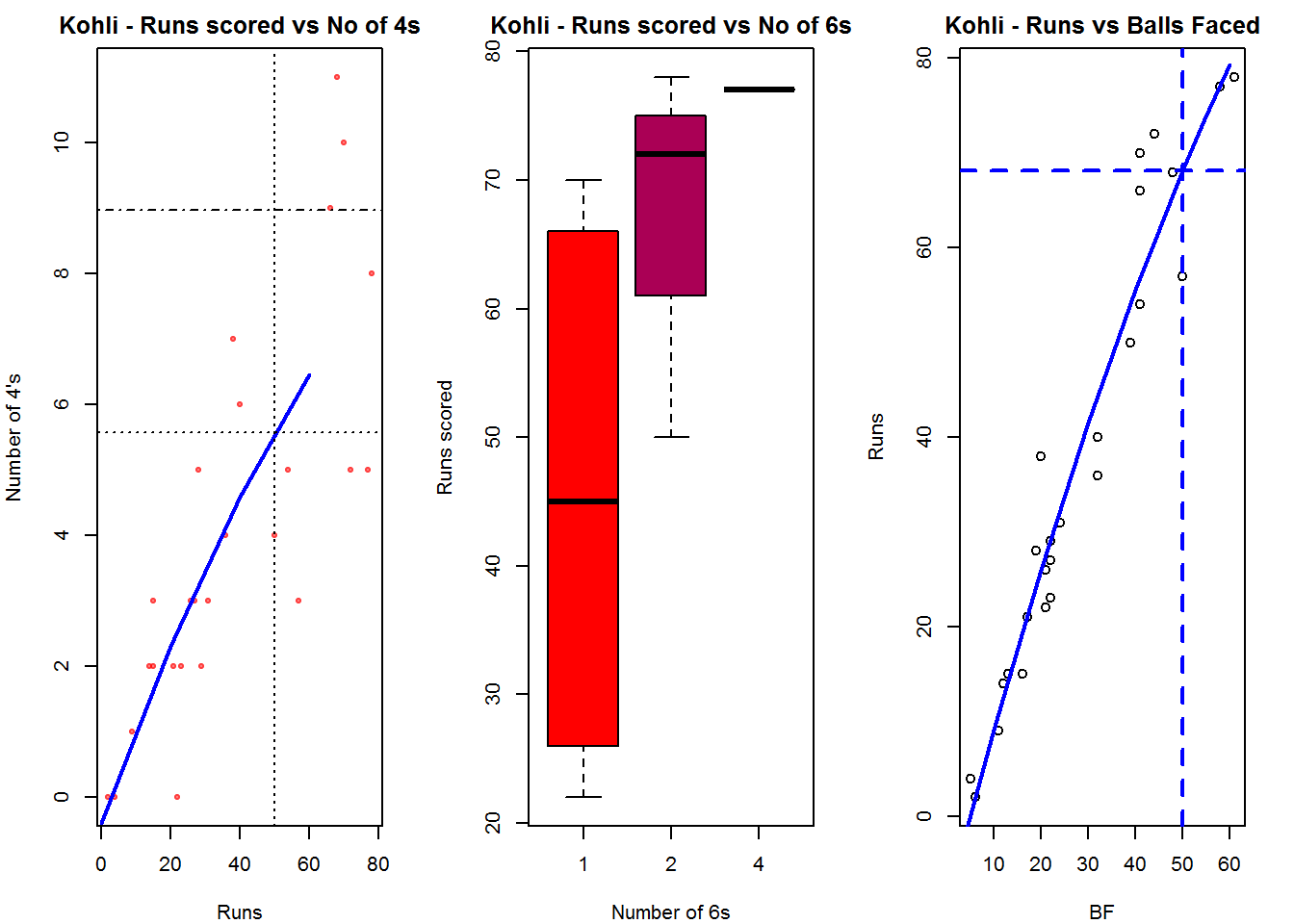
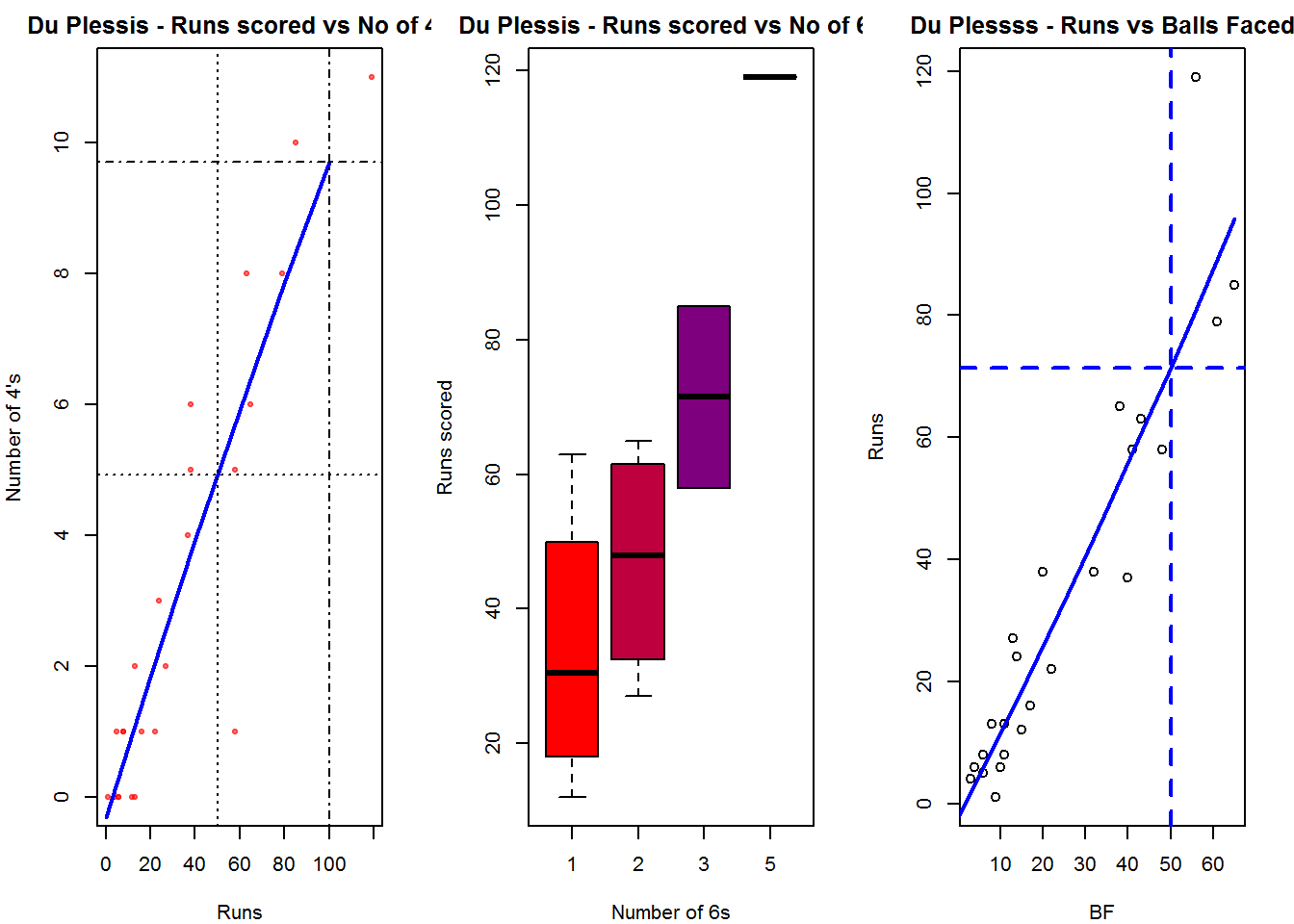
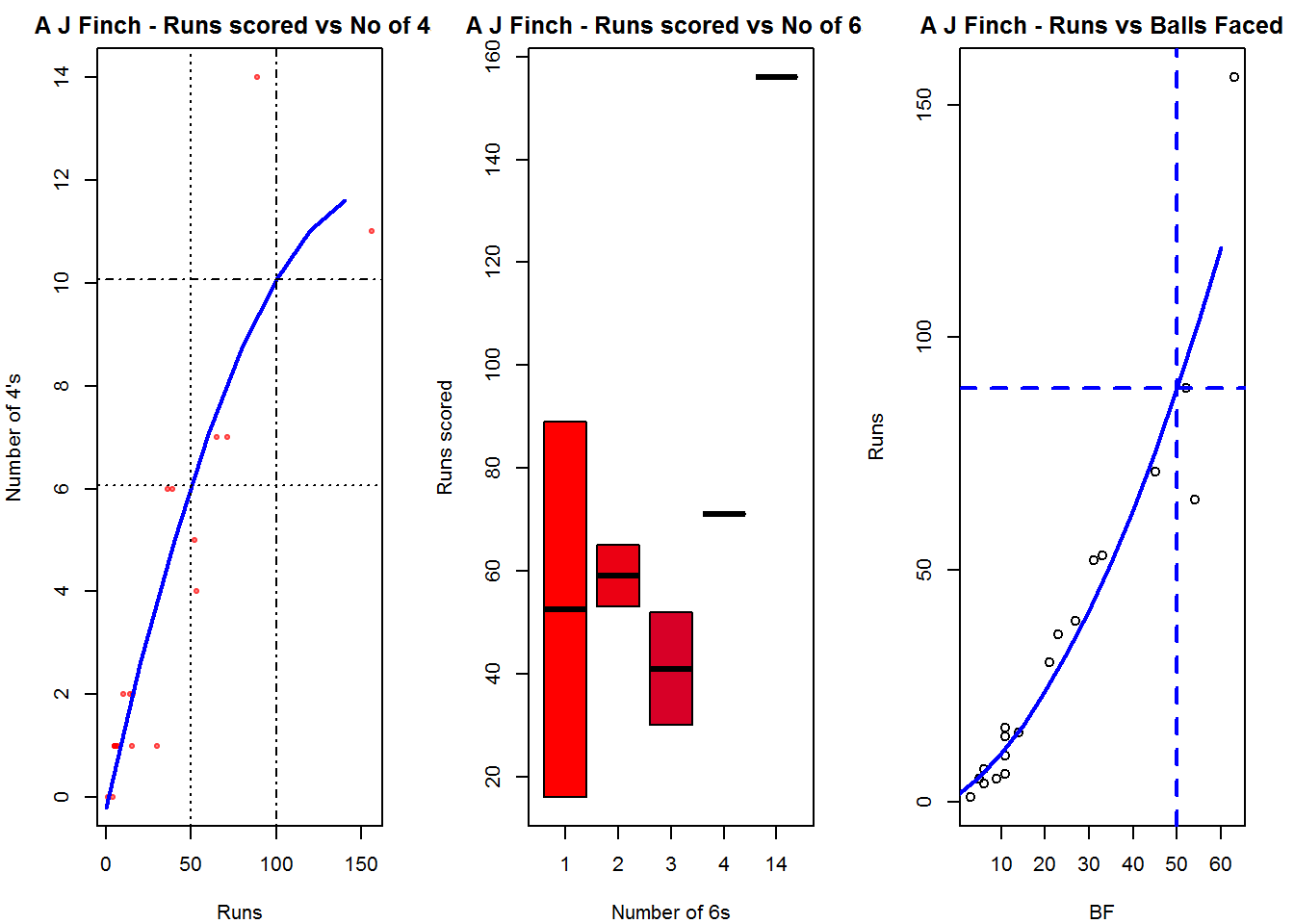
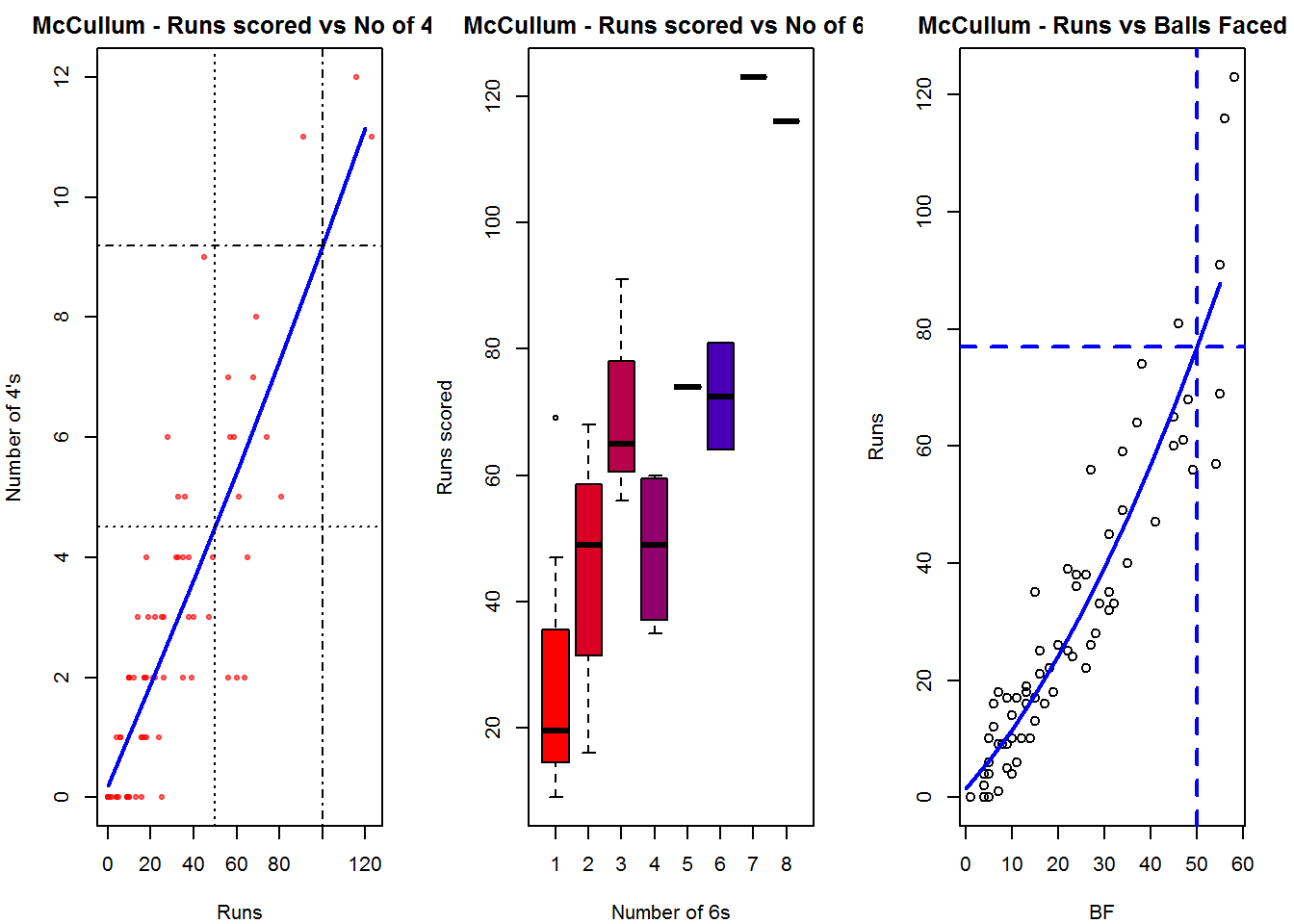
  3. Balls faced vs Runs scored A regression line is fitted in each of these plots for each of the ODI batsmen

A. Virat Kohli
– The 1st plot shows that Kohli approximately hits about 5 4’s on his way to the 50s
– The 2nd box plot of no of 6s and runs shows the range of runs when Kohli scored 1,2 or 4 6s. The dark line in the box shows the average runs when he scored those number of 6s. So when he scored 1 6 the average runs he scored was 45
– The 3rd plot shows the number of runs scored against the balls faced. It can be seen when Kohli faced 50 balls he had scored around ~ 70 runs

par(mfrow=c(1,3))
par(mar=c(4,4,2,2))
batsman4s("./kohli.csv","Kohli")
batsman6s("./kohli.csv","Kohli")
batsmanScoringRateODTT("./kohli.csv","Kohli")

kohli-4s6sSR-1

dev.off()
## null device 
##           1

B. Faf du Plessis

par(mfrow=c(1,3))
par(mar=c(4,4,2,2))
batsman4s("./plessis.csv","Du Plessis")
batsman6s("./plessis.csv","Du Plessis")
batsmanScoringRateODTT("./plessis.csv","Du Plessss")

plessis-4s6SR-1

dev.off()
## null device 
##           1

C. A J Finch

par(mfrow=c(1,3))
par(mar=c(4,4,2,2))
batsman4s("./finch.csv","A J Finch")
batsman6s("./finch.csv","A J Finch")
batsmanScoringRateODTT("./finch.csv","A J Finch")

finch-4s6sSR-1

dev.off()
## null device 
##           1

D. Brendon McCullum

par(mfrow=c(1,3))
par(mar=c(4,4,2,2))
batsman4s("./mccullum.csv","McCullum")
batsman6s("./mccullum.csv","McCullum")
batsmanScoringRateODTT("./mccullum.csv","McCullum")

mccullum-4s6sout-1

dev.off()
## null device 
##           1

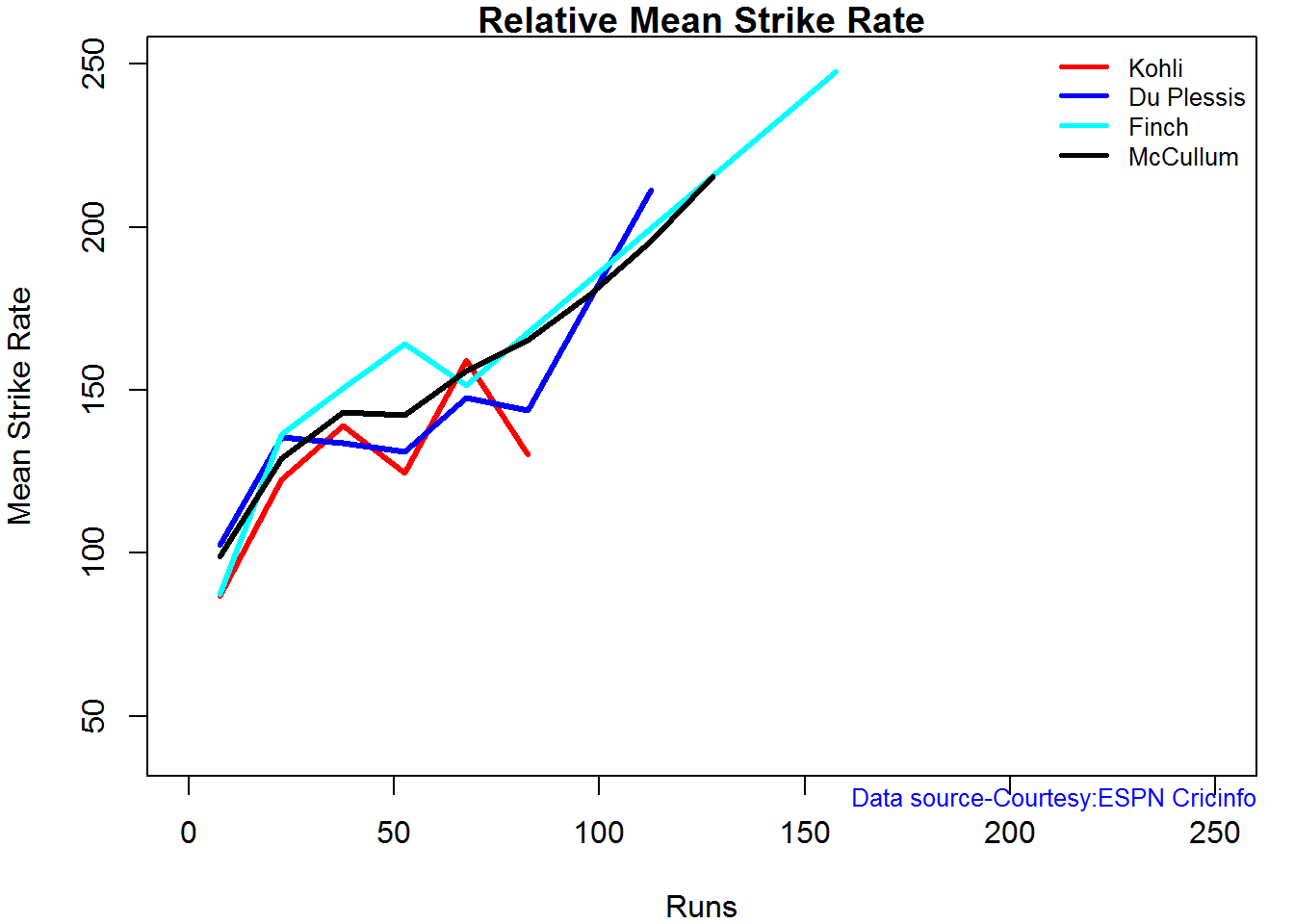
Relative Mean Strike Rate

This plot shows the Mean Strike Rate of the batsman in each run range. It can be seen the A J Finch has the best strike rate followed by B McCullum.

par(mar=c(4,4,2,2))
frames <- list("./kohli.csv","./plessis.csv","finch.csv","mccullum.csv")
names <- list("Kohli","Du Plessis","Finch","McCullum")
relativeBatsmanSRODTT(frames,names)

plot-1-1

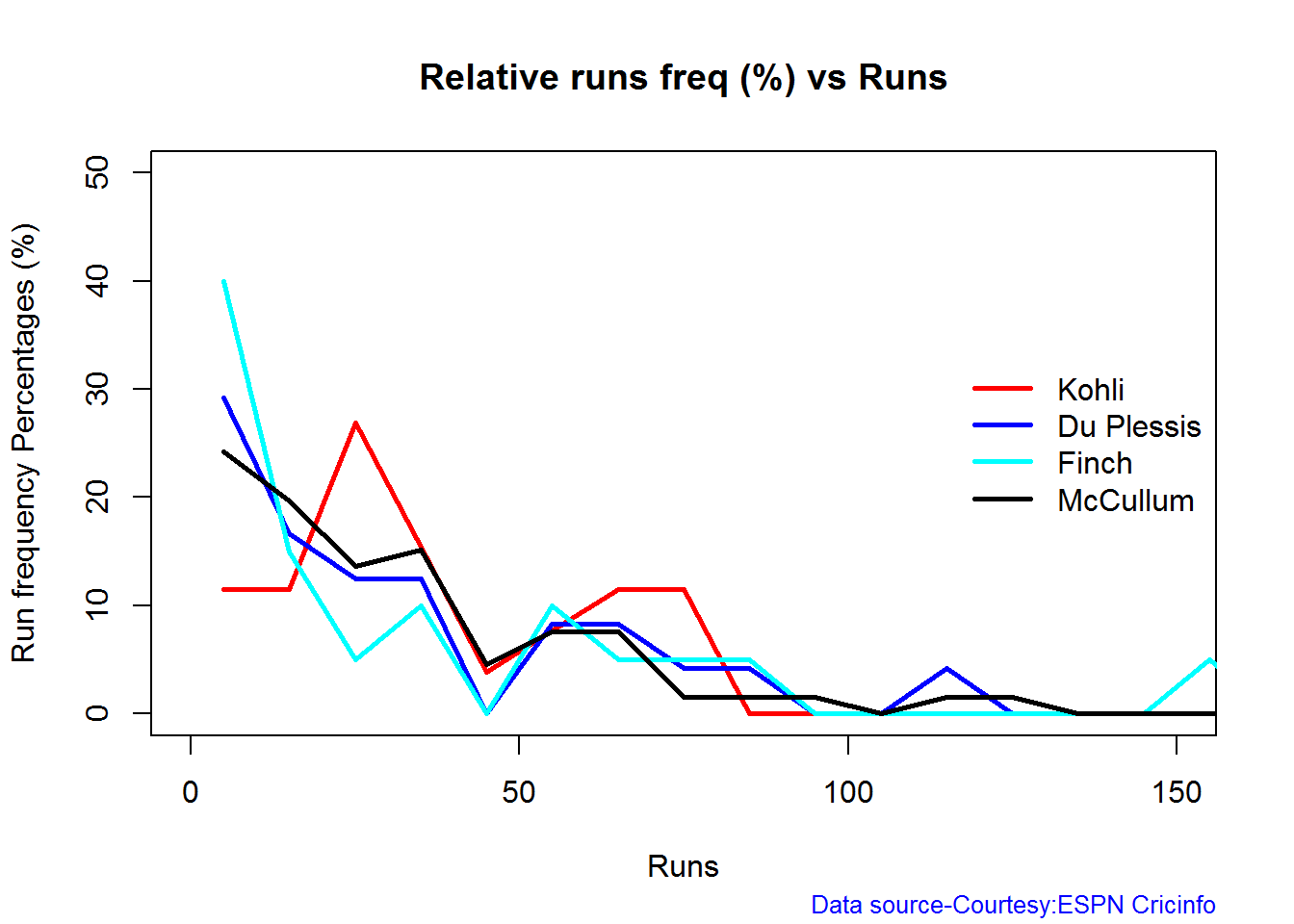
Relative Runs Frequency Percentage

The plot below provides the average runs scored in each run range 0-5,5-10,10-15 etc. Clearly Kohli has the most runs scored in most of the runs ranges. . This is also evident in the fact that Kohli has the highest average. He is followed by McCullum

frames <- list("./kohli.csv","./plessis.csv","finch.csv","mccullum.csv")
names <- list("Kohli","Du Plessis","Finch","McCullum")
relativeRunsFreqPerfODTT(frames,names)

plot-2-1

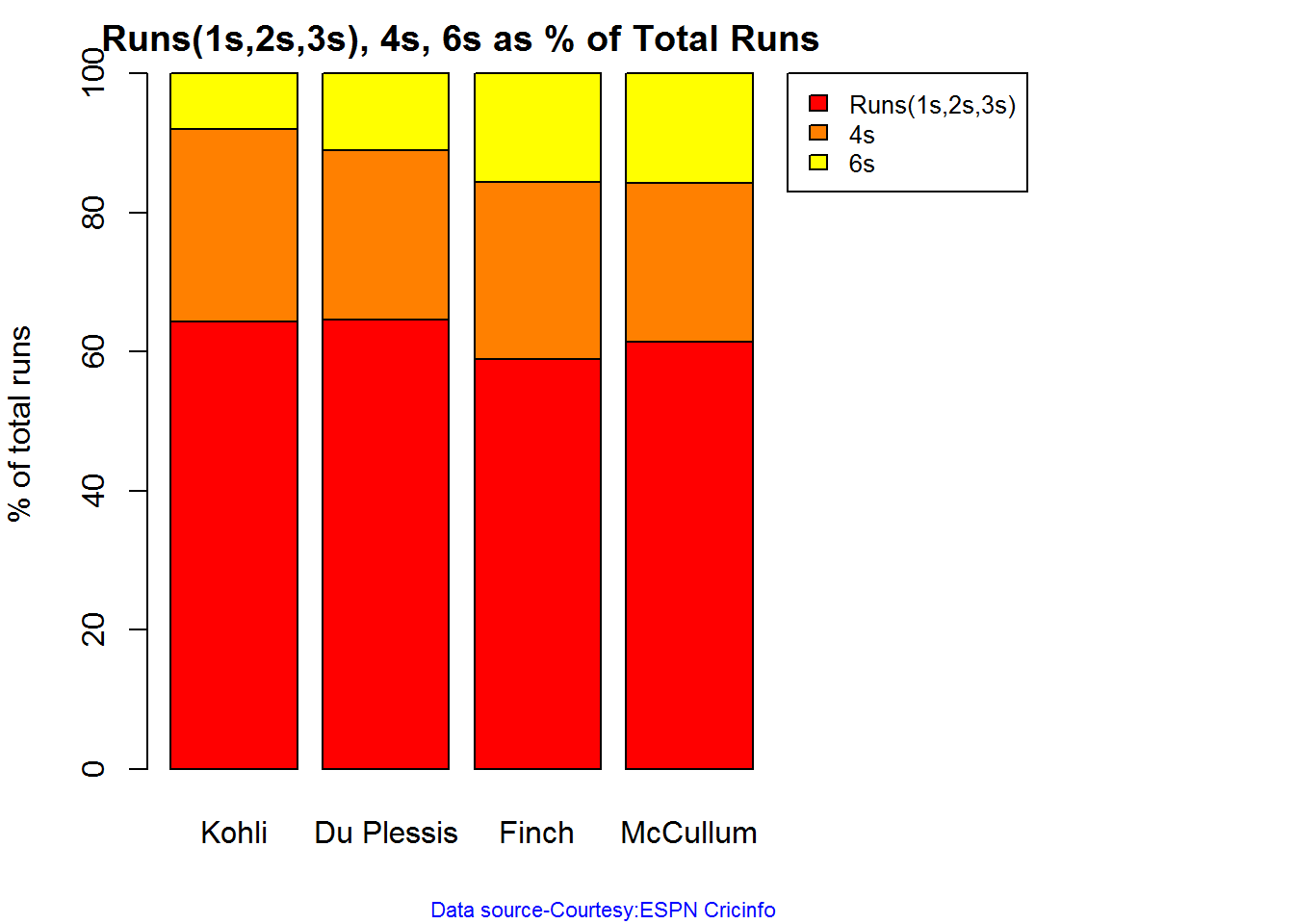
Percent 4’s,6’s in total runs scored

The plot below shows the percentage of runs scored by way of 4s and 6s for each batsman. Du Plessis has the highest percentage of 4s, McCullum has the highest 6s. Finch has the highest percentage of 4s & 6s – 25.37 + 15.64= 41.01%

rames <- list("./kohli.csv","./plessis.csv","finch.csv","mccullum.csv")
names <- list("Kohli","Du Plessis","Finch","McCullum")
runs4s6s <-batsman4s6s(frames,names)

plot-46s-1

print(runs4s6s)
##                Kohli Du Plessis Finch McCullum
## Runs(1s,2s,3s) 64.29      64.55 58.99    61.45
## 4s             27.78      24.38 25.37    22.87
## 6s              7.94      11.07 15.64    15.69

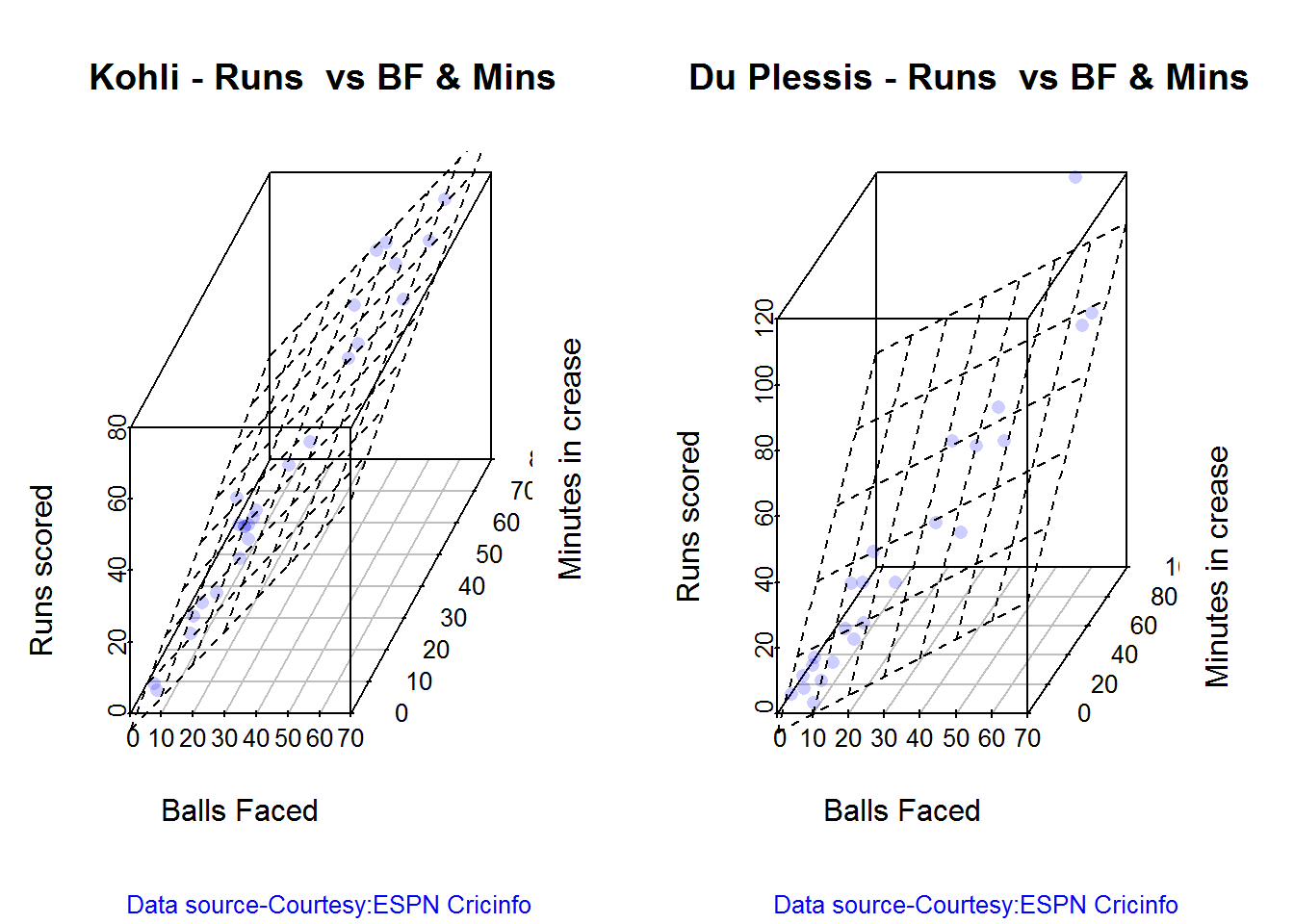
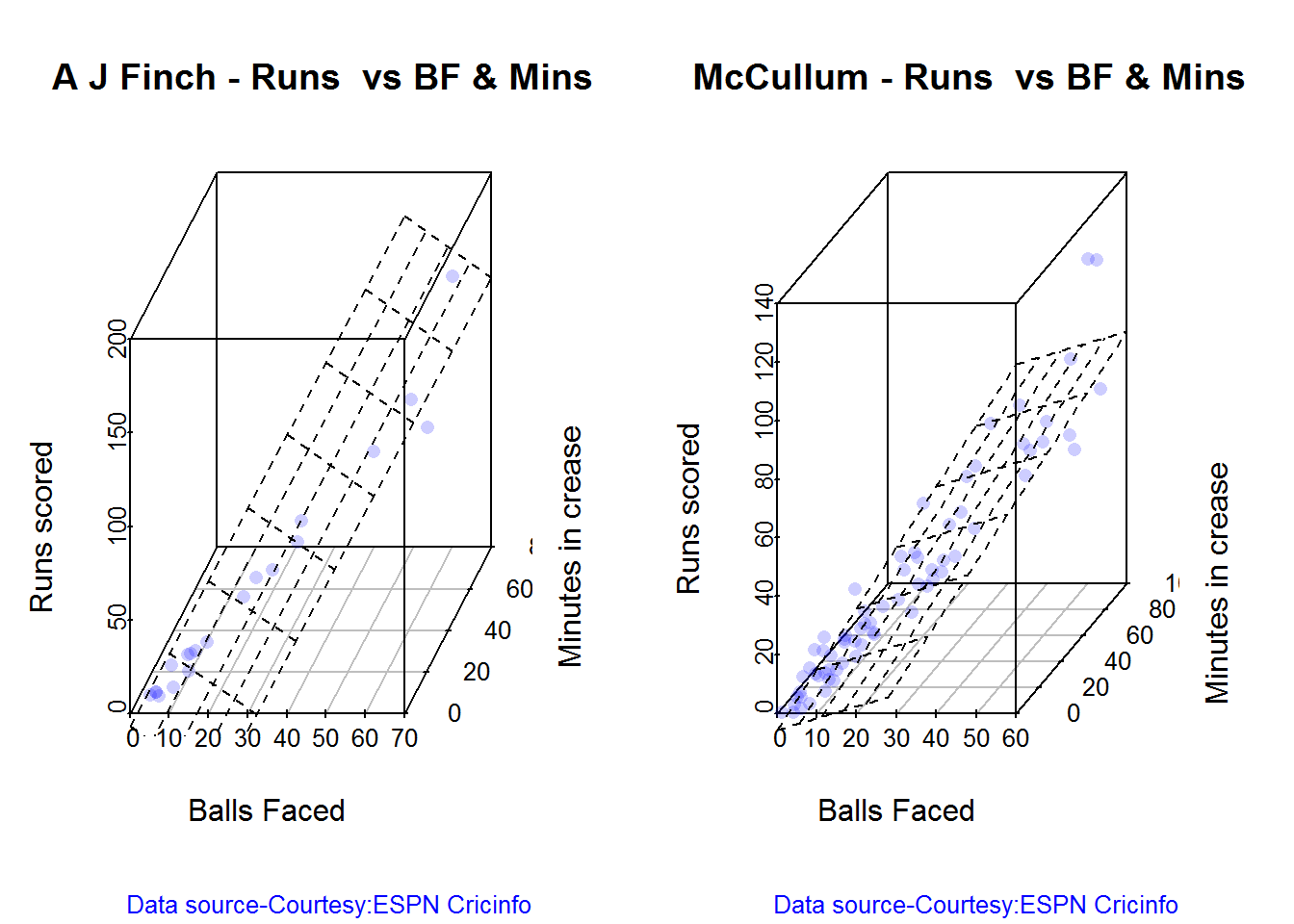
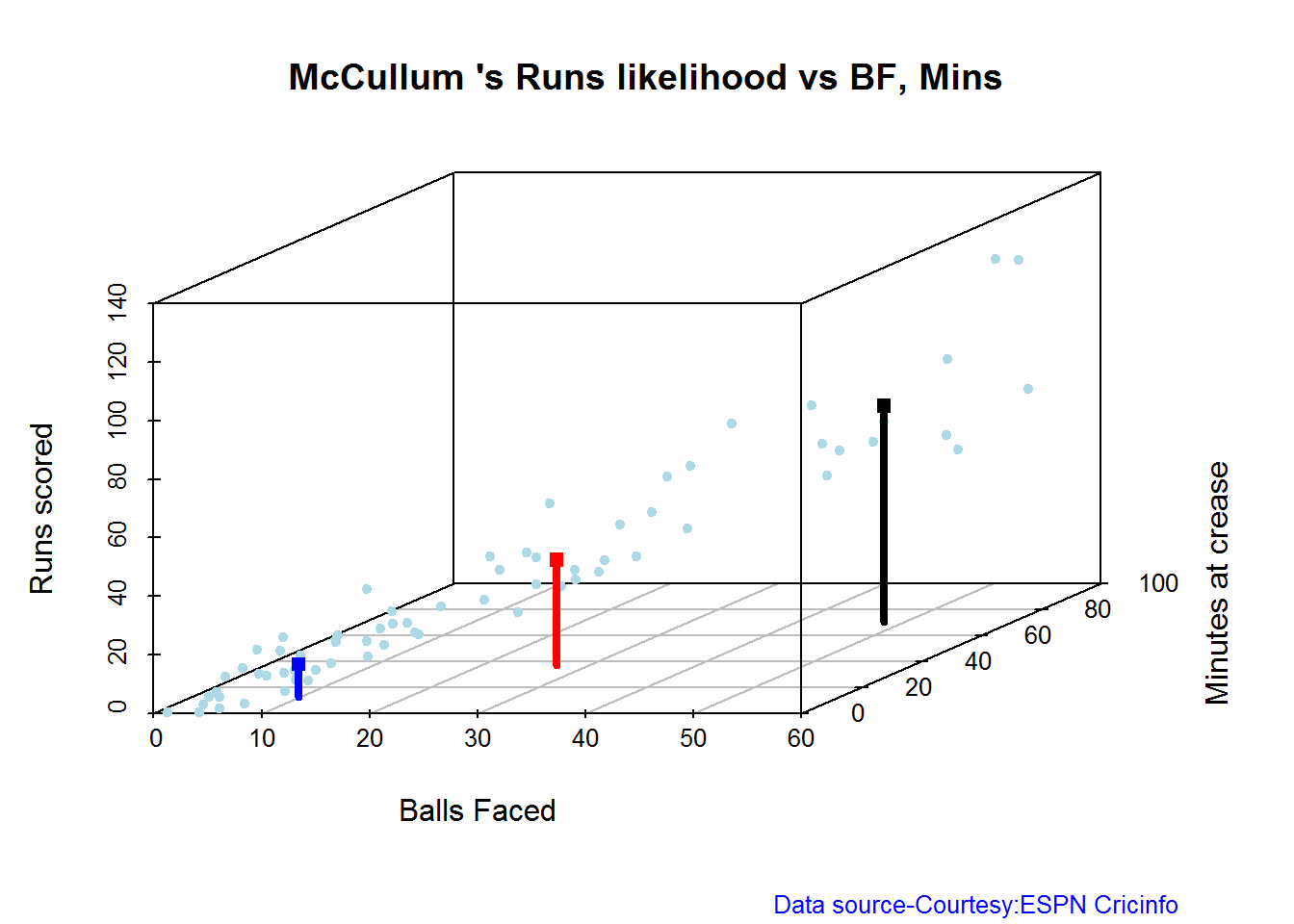
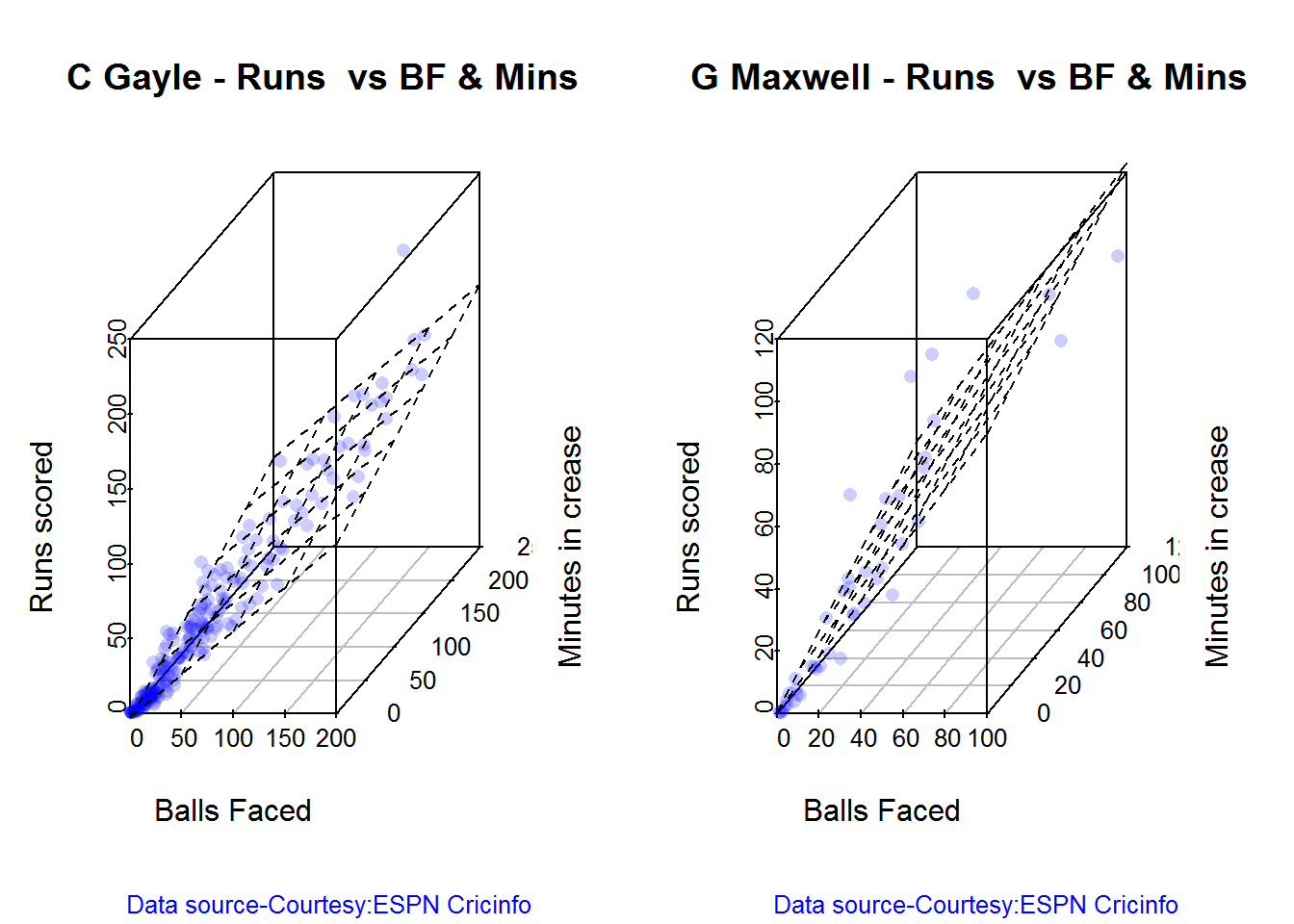
3D plot of Runs vs Balls Faced and Minutes at Crease

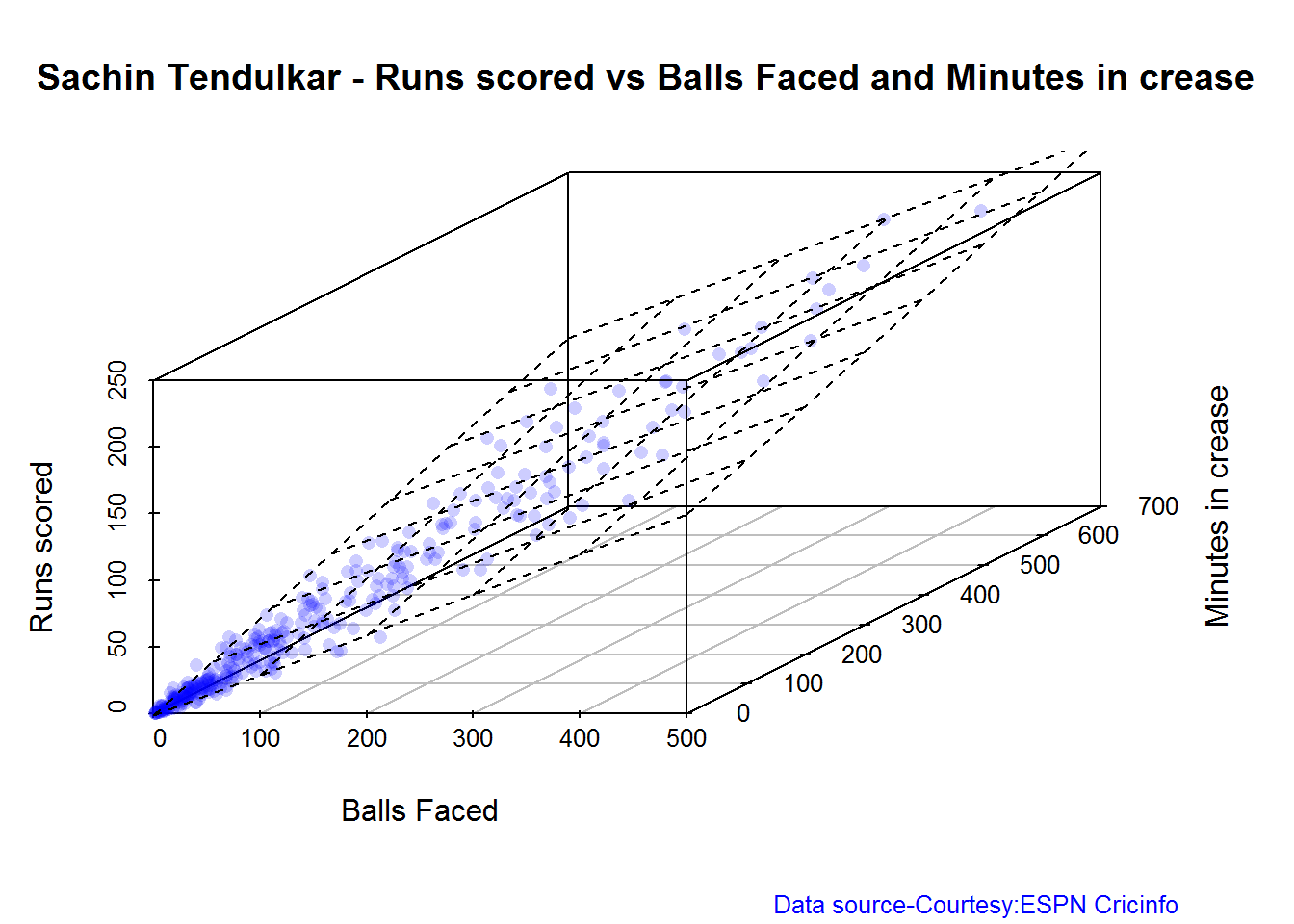
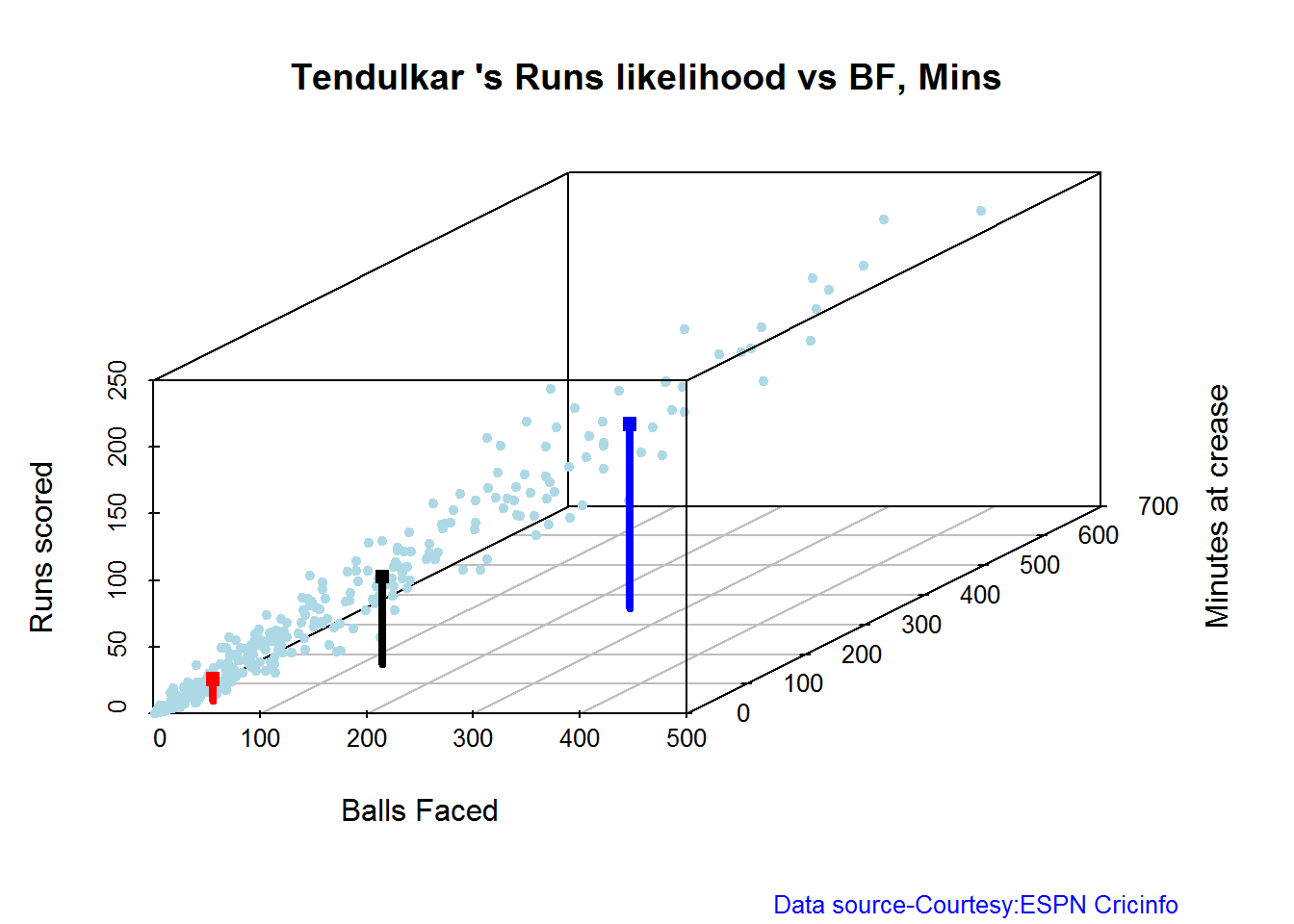
The plot is a scatter plot of Runs vs Balls faced and Minutes at Crease. A prediction plane is then fitted based on the Balls Faced and Minutes at Crease to give the runs scored

par(mfrow=c(1,2))
par(mar=c(4,4,2,2))
battingPerf3d("./kohli.csv","Kohli")
battingPerf3d("./plessis.csv","Du Plessis")

plot-3-1

dev.off()
## null device 
##           1
par(mfrow=c(1,2))
par(mar=c(4,4,2,2))
battingPerf3d("./finch.csv","A J Finch")
battingPerf3d("./mccullum.csv","McCullum")

plot-4-1

dev.off()
## null device 
##           1

Predicting Runs given Balls Faced and Minutes at Crease

A hypothetical Balls faced and Minutes at Crease is used to predict the runs scored by each batsman based on the computed prediction plane

BF <- seq( 5, 70,length=10)
Mins <- seq(5,70,length=10)
newDF <- data.frame(BF,Mins)

kohli <- batsmanRunsPredict("./kohli.csv","Kohli",newdataframe=newDF)
plessis <- batsmanRunsPredict("./plessis.csv","Du Plessis",newdataframe=newDF)
finch <- batsmanRunsPredict("./finch.csv","A J Finch",newdataframe=newDF)
mccullum <- batsmanRunsPredict("./mccullum.csv","McCullum",newdataframe=newDF)

The predicted runs is displayed. As can be seen Finch has the best overall strike rate followed by McCullum.

batsmen <-cbind(round(kohli$Runs),round(plessis$Runs),round(finch$Runs),round(mccullum$Runs))
colnames(batsmen) <- c("Kohli","Du Plessis","Finch","McCullum")
newDF <- data.frame(round(newDF$BF),round(newDF$Mins))
colnames(newDF) <- c("BallsFaced","MinsAtCrease")
predictedRuns <- cbind(newDF,batsmen)
predictedRuns
##    BallsFaced MinsAtCrease Kohli Du Plessis Finch McCullum
## 1           5            5     2          1     5        3
## 2          12           12    12         10    22       16
## 3          19           19    22         19    40       28
## 4          27           27    31         28    57       41
## 5          34           34    41         37    74       54
## 6          41           41    51         47    91       66
## 7          48           48    60         56   108       79
## 8          56           56    70         65   125       91
## 9          63           63    79         74   142      104
## 10         70           70    89         84   159      117

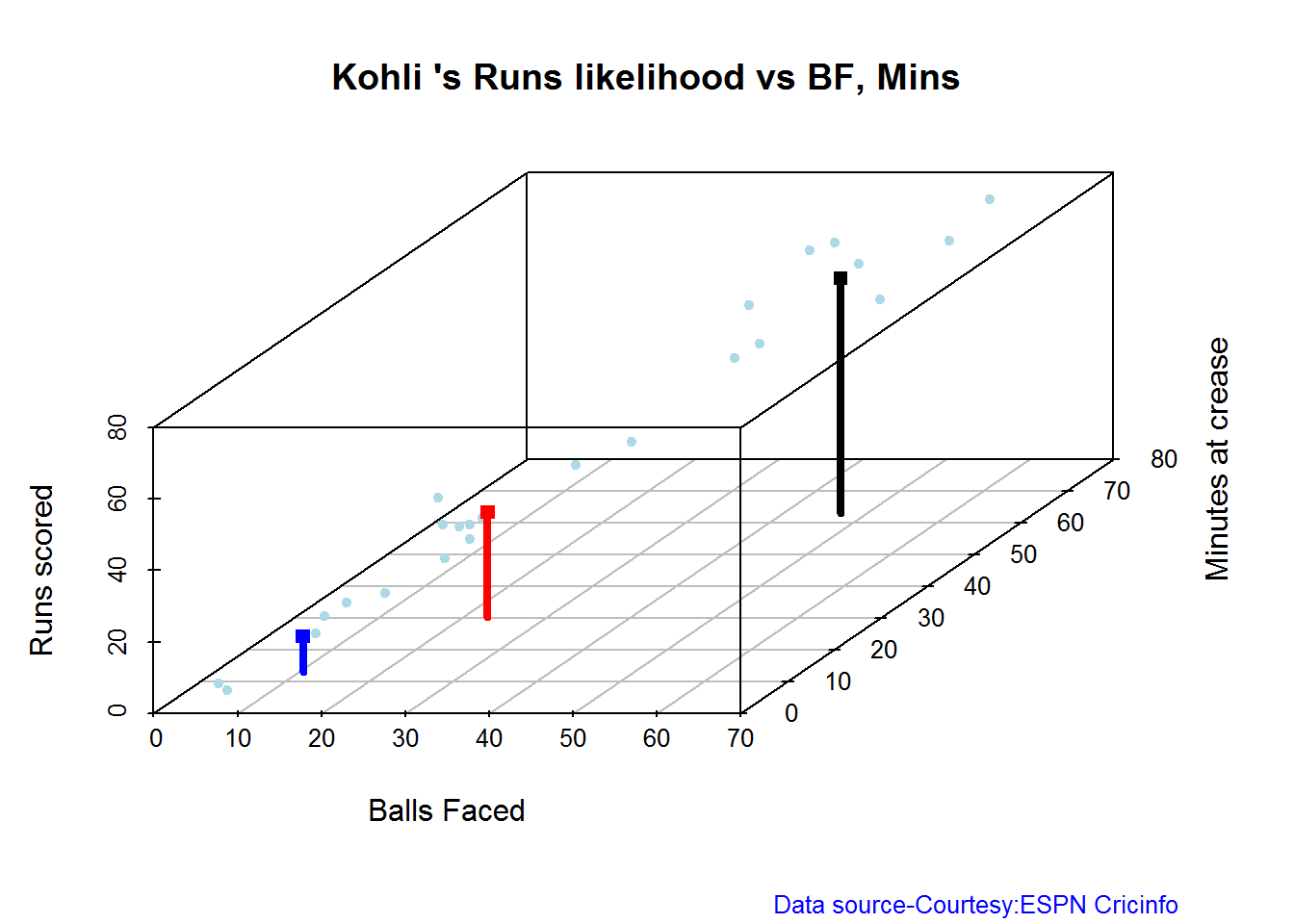
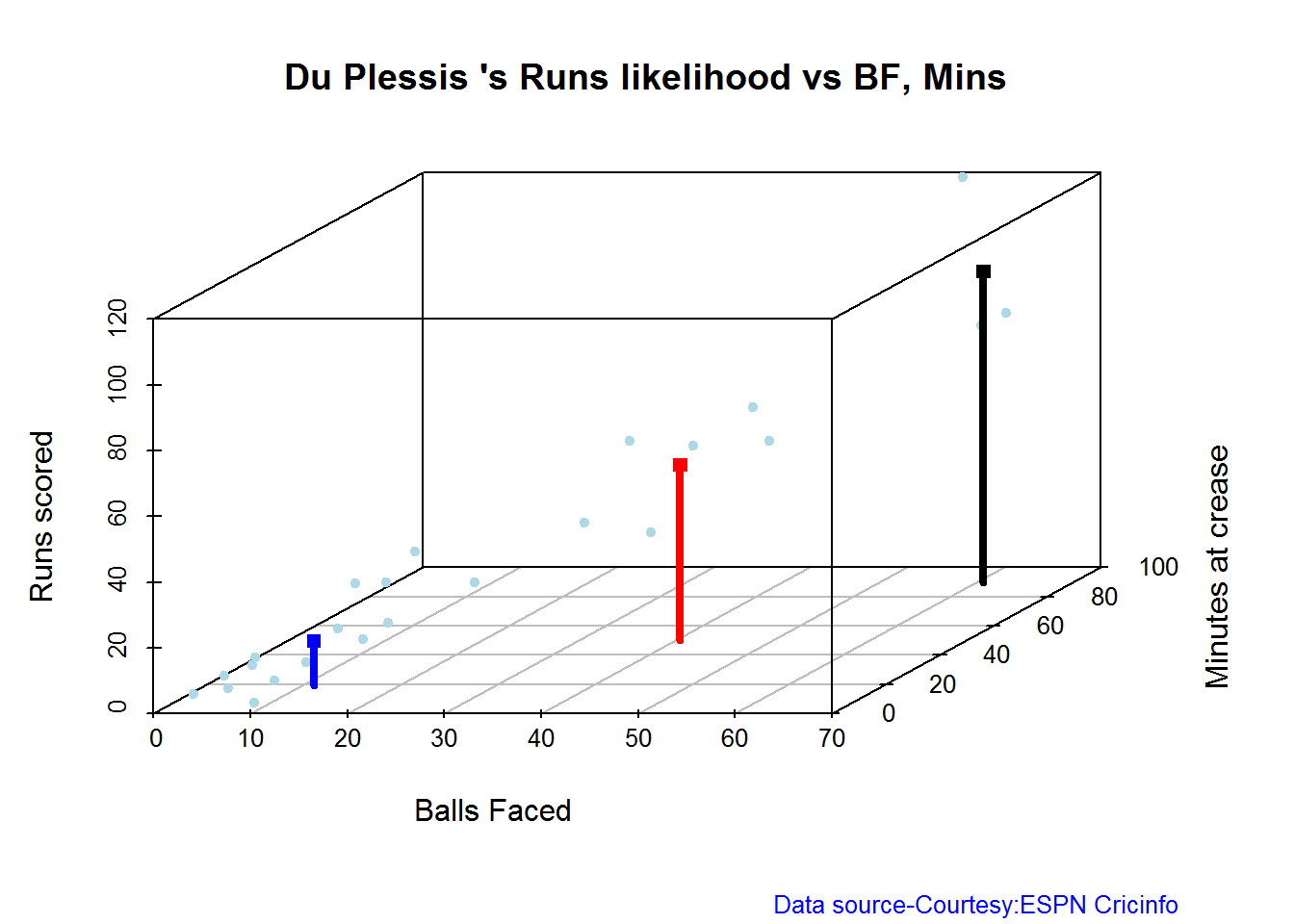
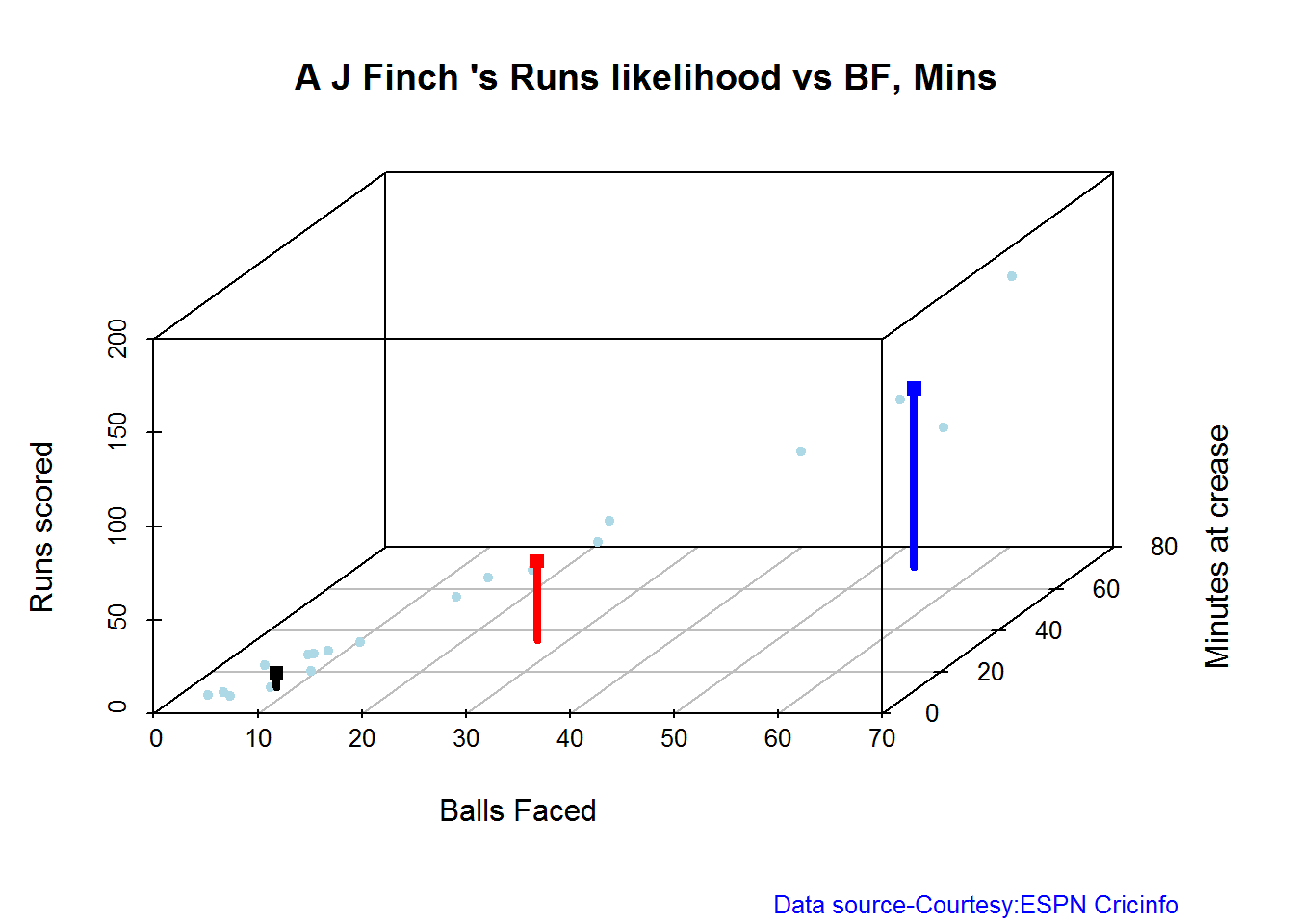
Highest runs likelihood

The plots below the runs likelihood of batsman. This uses K-Means Kohli has the highest likelihood of scoring runs 34.2% likely to score 66 runs. Du Plessis has 25% likelihood to score 53 runs, A. Virat Kohli

batsmanRunsLikelihood("./kohli.csv","Kohli")

kohli-lh-1

## Summary of  Kohli 's runs scoring likelihood
## **************************************************
## 
## There is a 23.08 % likelihood that Kohli  will make  10 Runs in  10 balls over 13  Minutes 
## There is a 42.31 % likelihood that Kohli  will make  29 Runs in  23 balls over  30  Minutes 
## There is a 34.62 % likelihood that Kohli  will make  66 Runs in  47 balls over 63  Minutes

B. Faf Du Plessis

batsmanRunsLikelihood("./plessis.csv","Du Plessis")

plessis-l-1

## Summary of  Du Plessis 's runs scoring likelihood
## **************************************************
## 
## There is a 62.5 % likelihood that Du Plessis  will make  14 Runs in  11 balls over 19  Minutes 
## There is a 25 % likelihood that Du Plessis  will make  53 Runs in  40 balls over  50  Minutes 
## There is a 12.5 % likelihood that Du Plessis  will make  94 Runs in  61 balls over 90  Minutes

C. A J Finch

batsmanRunsLikelihood("./finch.csv","A J Finch")

finch-lh,cache-TRUE-1

## Summary of  A J Finch 's runs scoring likelihood
## **************************************************
## 
## There is a 20 % likelihood that A J Finch  will make  95 Runs in  54 balls over 70  Minutes 
## There is a 25 % likelihood that A J Finch  will make  42 Runs in  27 balls over  35  Minutes 
## There is a 55 % likelihood that A J Finch  will make  8 Runs in  8 balls over 12  Minutes

D. Brendon McCullum

batsmanRunsLikelihood("./mccullum.csv","McCullum")

mccullum-1

## Summary of  McCullum 's runs scoring likelihood
## **************************************************
## 
## There is a 50.72 % likelihood that McCullum  will make  11 Runs in  10 balls over 13  Minutes 
## There is a 28.99 % likelihood that McCullum  will make  36 Runs in  27 balls over  37  Minutes 
## There is a 20.29 % likelihood that McCullum  will make  74 Runs in  48 balls over 70  Minutes

Moving Average of runs over career

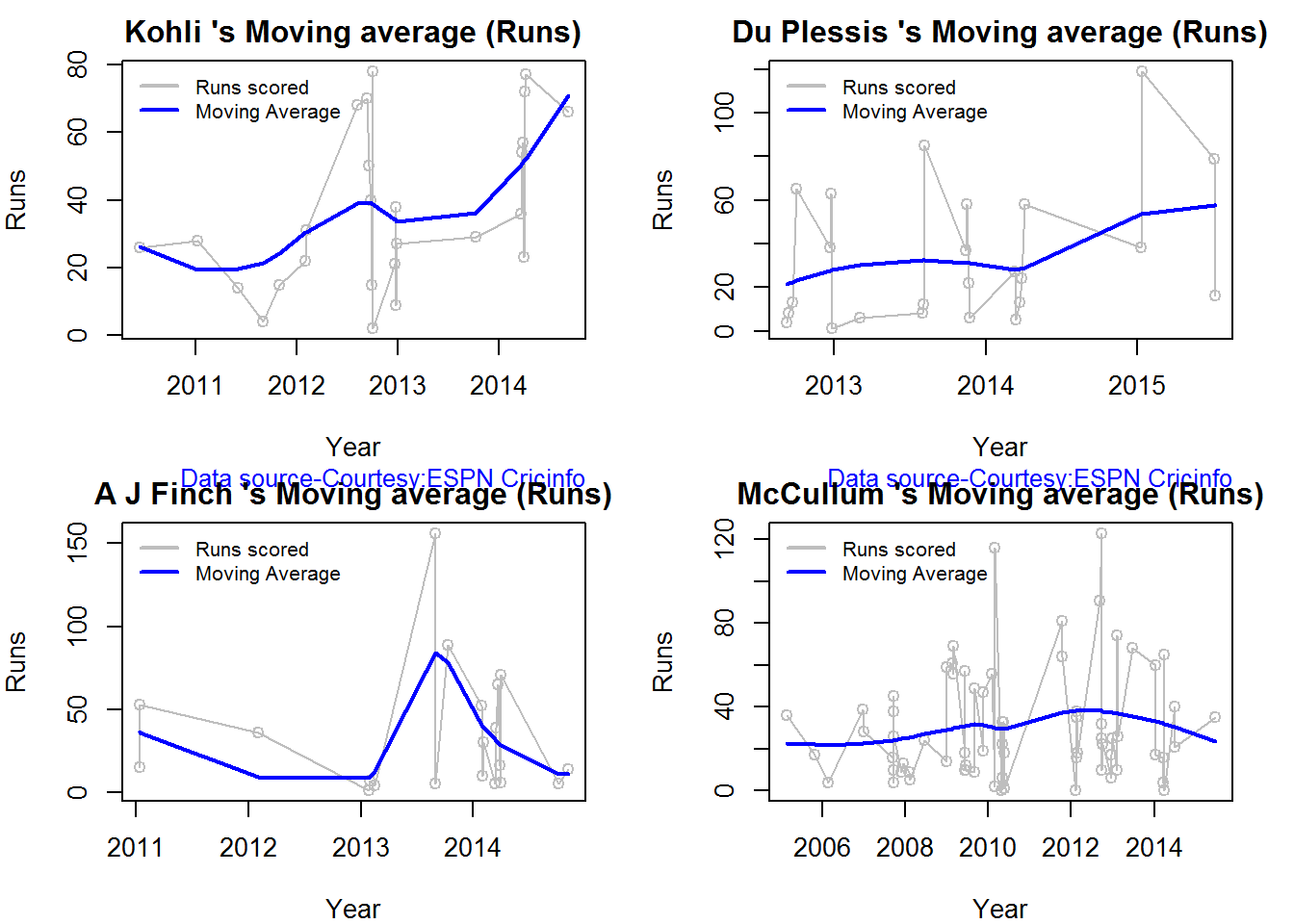
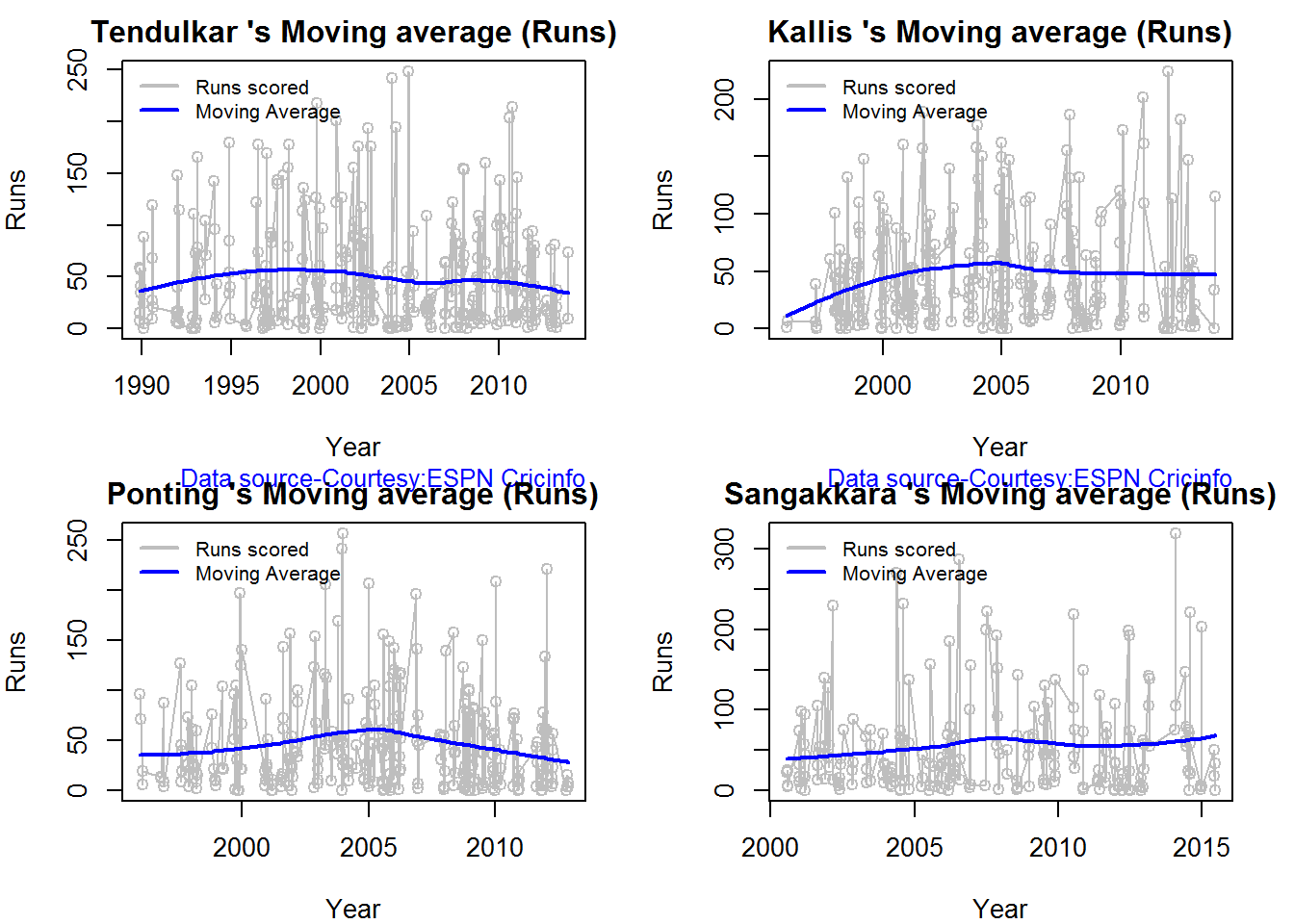
The moving average for the 4 batsmen indicate the following. It must be noted that there is not sufficient data yet on Twenty20 Internationals. Kpohli, Du Plessis and Finch average only 26 innings while McCullum has close to 70. So the moving average while an indication will regress towards the mean over time.

  1. The moving average of Kohli and Du Plessis is on the way up.
  2. McCullum has a consistent performance while Finch had a brief burst in 2013-2014
par(mfrow=c(2,2))
par(mar=c(4,4,2,2))
batsmanMovingAverage("./kohli.csv","Kohli")
batsmanMovingAverage("./plessis.csv","Du Plessis")
batsmanMovingAverage("./finch.csv","A J Finch")
batsmanMovingAverage("./mccullum.csv","McCullum")

sdgm-ma-1

dev.off()
## null device 
##           1

Analysis of bowlers

  1. Samuel Badree (WI) – Innings-22, Runs -464, Wickets – 31, Econ Rate : 5.39
  2. Sunil Narine (WI)- Innings-31,Runs-666, Wickets – 38 , Econ Rate : 5.70
  3. Ravichander Ashwin (Ind)- Innings-26, Runs- 732, Wickets – 25, Econ Rate : 7.32
  4. Ajantha Mendis (SL)- Innings-39, Runs – 952,Wickets – 66, Econ Rate : 6.45

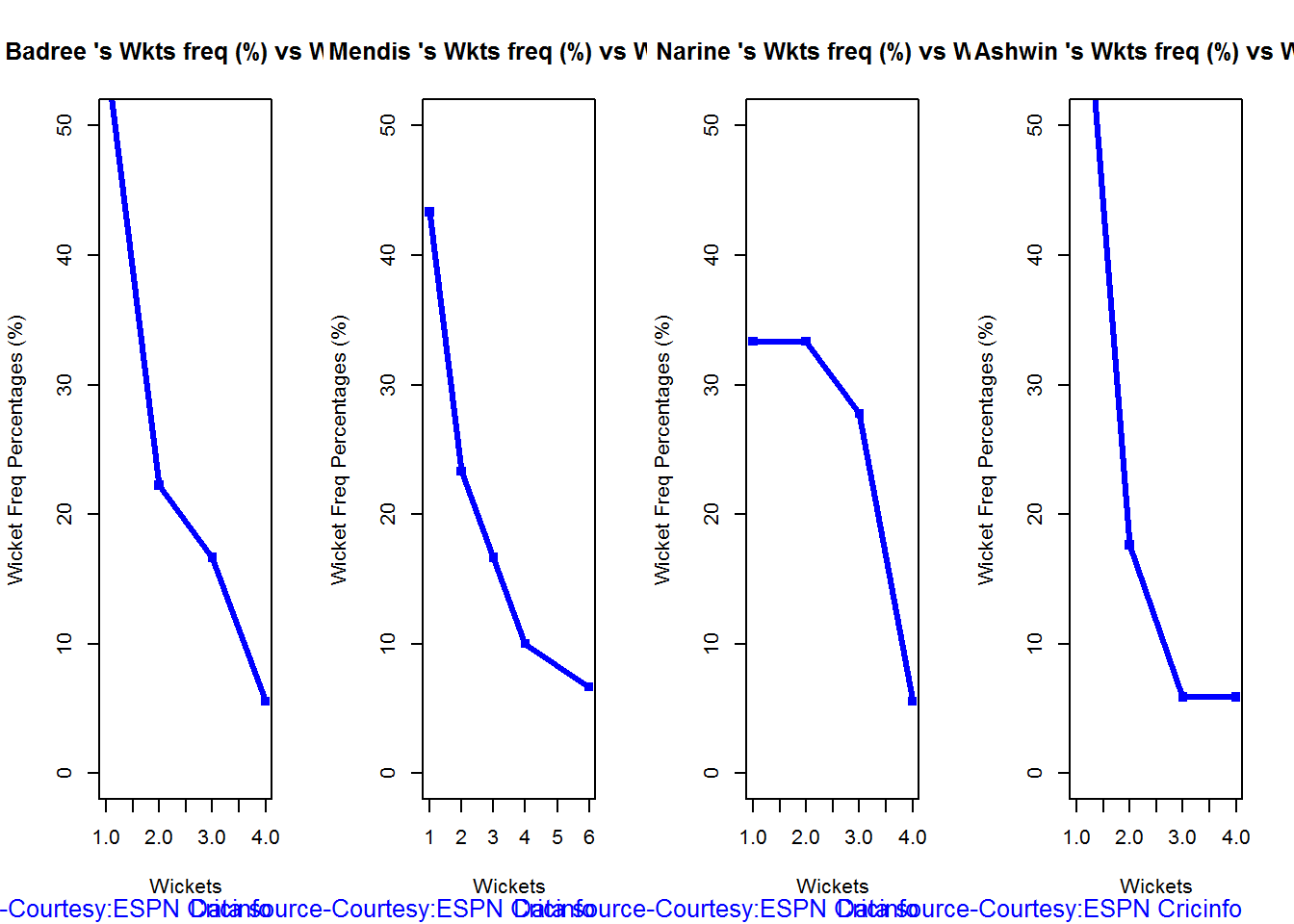
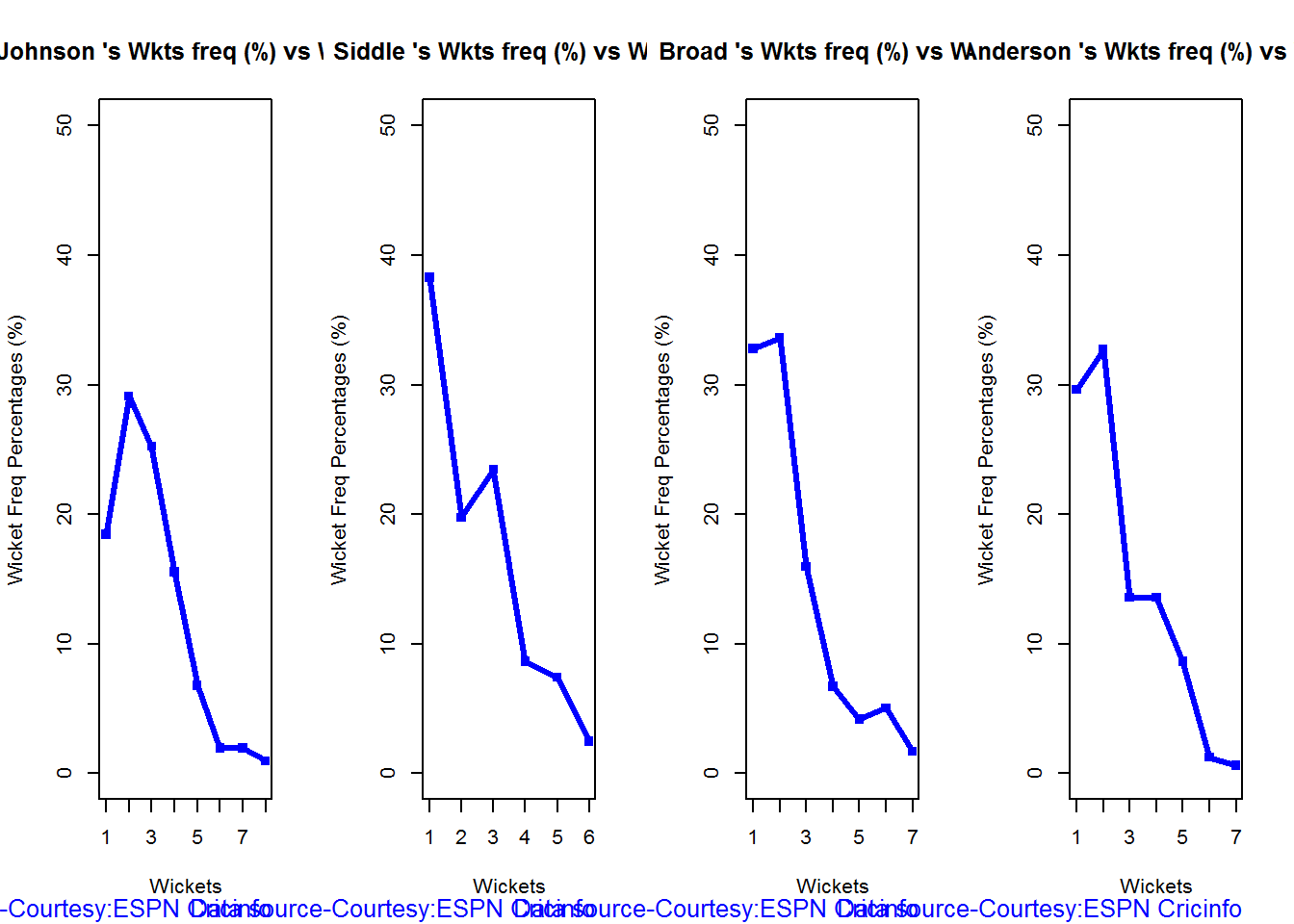
The plot shows the frequency with which the bowlers have taken 1,2,3 etc wickets. The most wickets taken is by Ajantha Mendis (6 wickets)

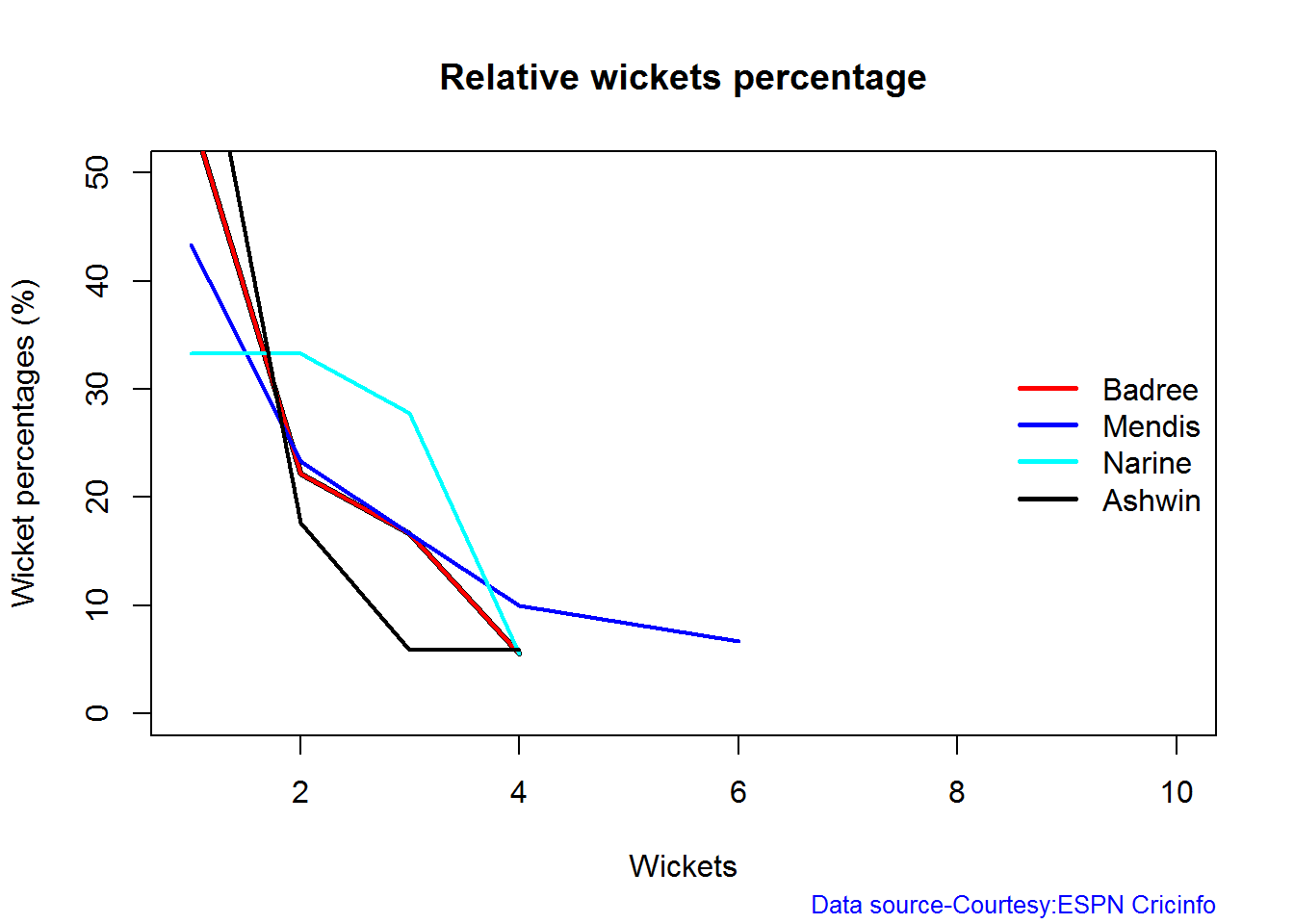
Wicket Frequency percentage

This plot gives the percentage of wickets for each wickets (1,2,3…etc)

par(mfrow=c(1,4))
par(mar=c(4,4,2,2))
bowlerWktsFreqPercent("./badree.csv","Badree")
bowlerWktsFreqPercent("./mendis.csv","Mendis")
bowlerWktsFreqPercent("./narine.csv","Narine")
bowlerWktsFreqPercent("./ashwin.csv","Ashwin")

relBowlFP-1

dev.off()
## null device 
##           1

Wickets Runs plot

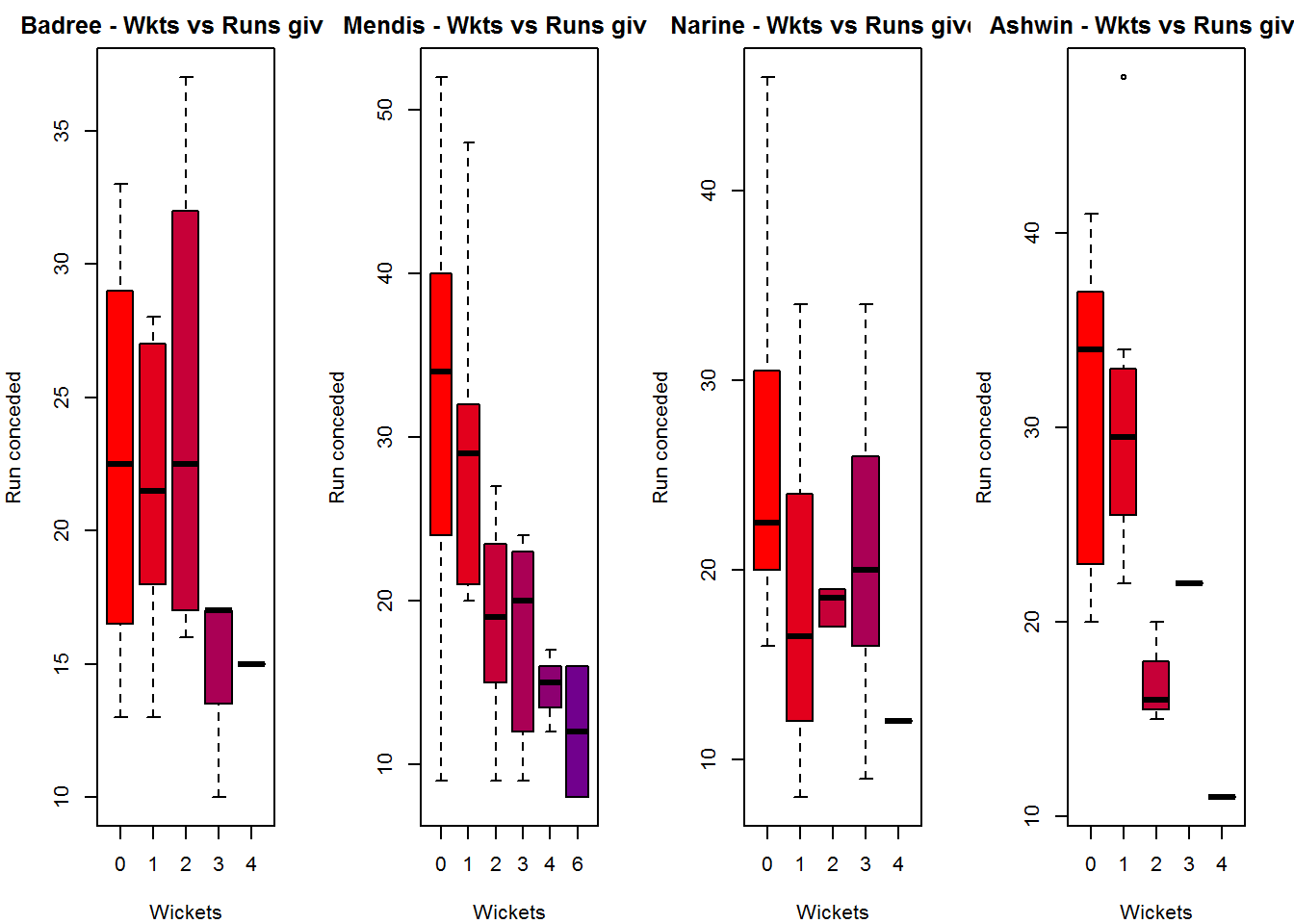
The plot below gives a boxplot of the runs ranges for each of the wickets taken by the bowlers. The ends of the box indicate the 25% and 75% percentile of runs scored for the wickets taken and the dark balck line is the average runs conceded.

par(mfrow=c(1,4))
par(mar=c(4,4,2,2))
bowlerWktsRunsPlot("./badree.csv","Badree")
bowlerWktsRunsPlot("./mendis.csv","Mendis")
bowlerWktsRunsPlot("./narine.csv","Narine")
bowlerWktsRunsPlot("./ashwin.csv","Ashwin")

wktsrun-1

dev.off()
## null device 
##           1

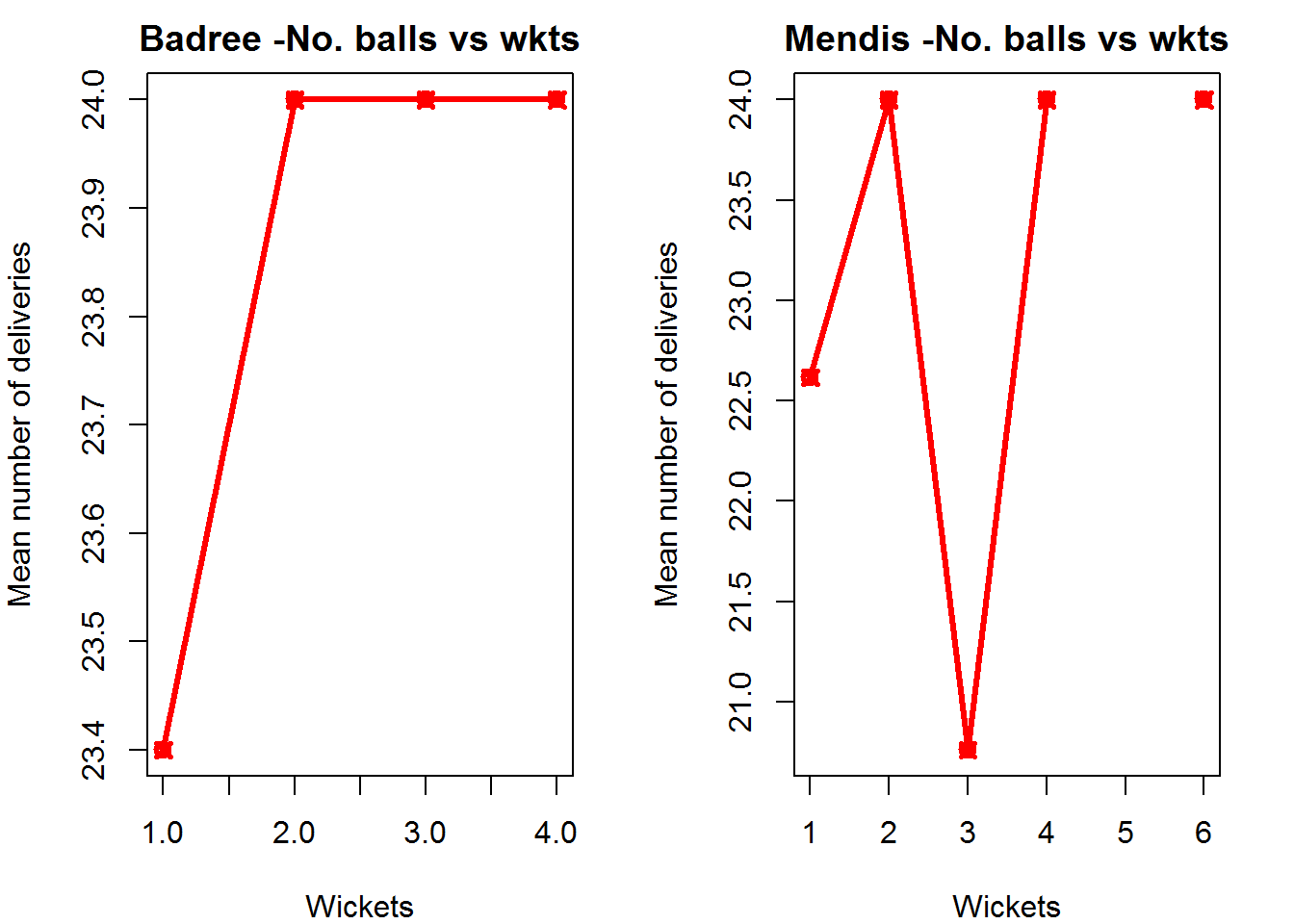
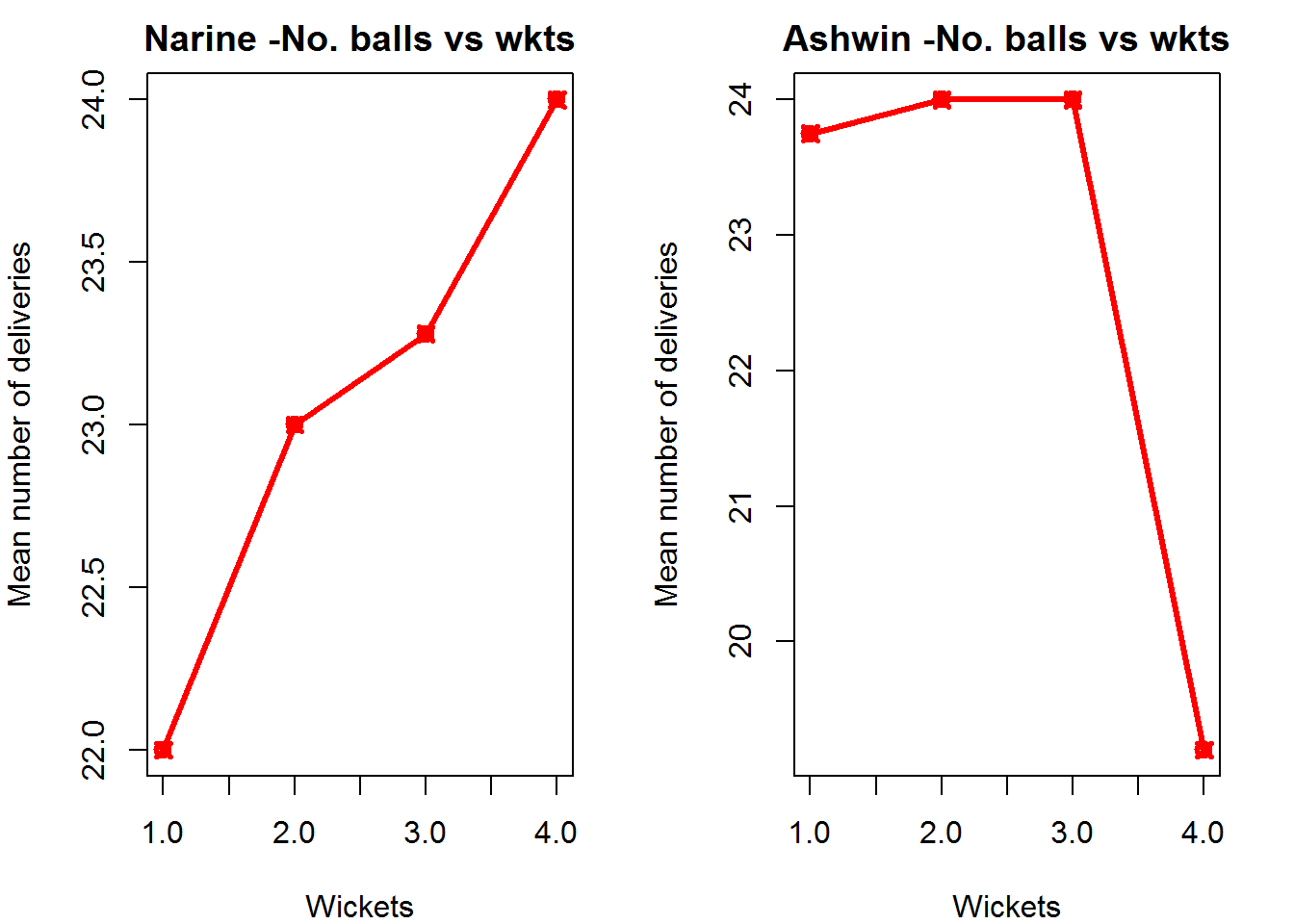
This plot below shows the average number of deliveries needed by the bowler to take the wickets (1,2,3 etc)

par(mfrow=c(1,2))
par(mar=c(4,4,2,2))
bowlerWktRateTT("./badree.csv","Badree")
bowlerWktRateTT("./mendis.csv","Mendis")

wktsrate1-1

dev.off()
## null device 
##           1
par(mfrow=c(1,2))
par(mar=c(4,4,2,2))
bowlerWktRateTT("./narine.csv","Narine")
bowlerWktRateTT("./ashwin.csv","Ashwin")

wktsrate2-1

dev.off()
## null device 
##           1

Relative bowling performance

The plot below shows that Narine has the most wickets in the 2 -4 range followed by Mendis

frames <- list("./badree.csv","./mendis.csv","narine.csv","ashwin.csv")
names <- list("Badree","Mendis","Narine","Ashwin")
relativeBowlingPerf(frames,names)

relBowlPerf-1

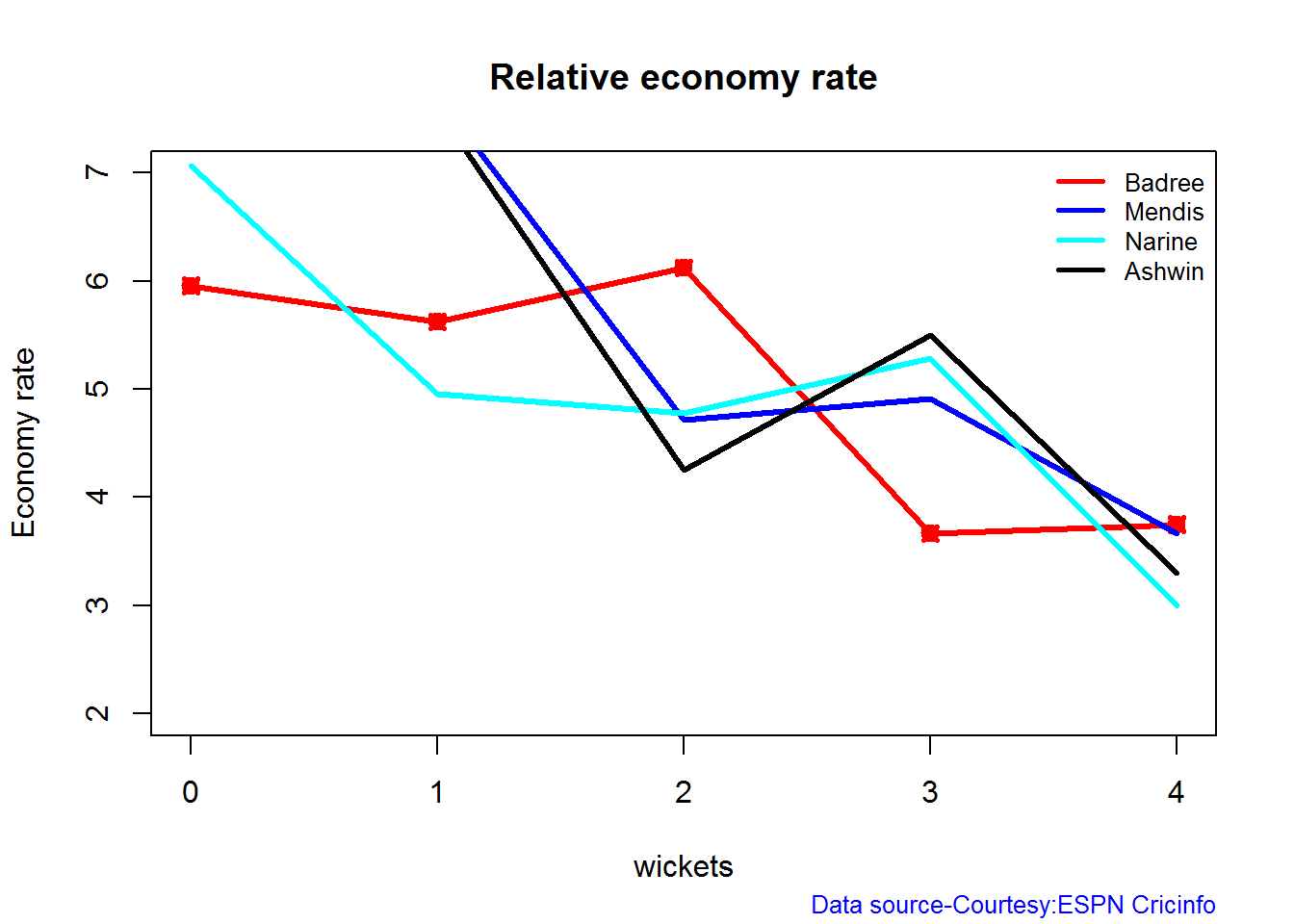
Relative Economy Rate against wickets taken

The economy rate can be deduced as follows from the plot below. Narine has a good economy rate around 1 & 4 wickets, Ashwin around 2 wickets and Badree around 3. wickets

frames <- list("./badree.csv","./mendis.csv","narine.csv","ashwin.csv")
names <- list("Badree","Mendis","Narine","Ashwin")
relativeBowlingERODTT(frames,names)

relBowlER-1

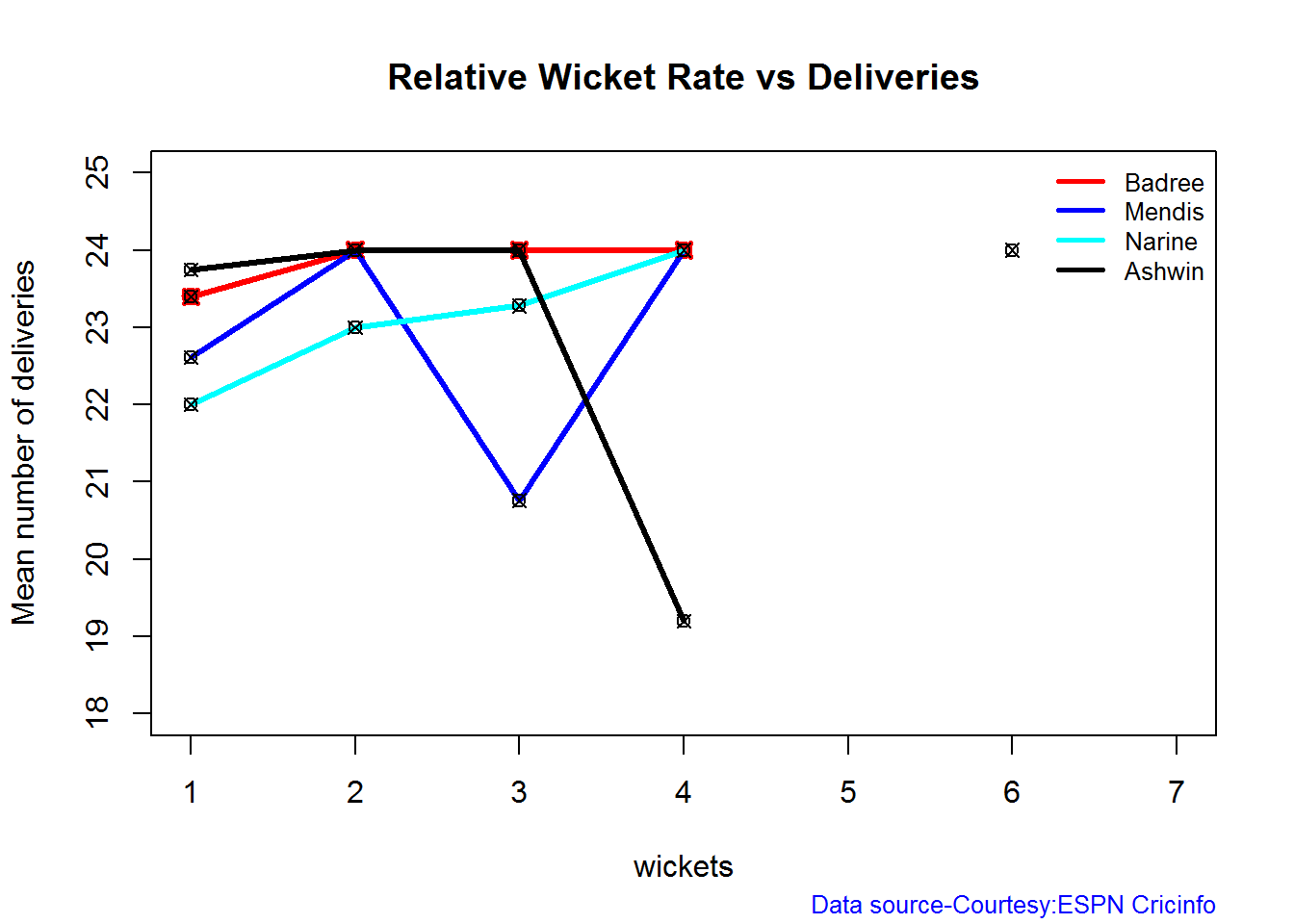
Relative Wicket Rate

The relative wicket rate plots the mean number of deliveries needed to take the wickets namely (1,2,3,4). For e.g. Narine needed an average of 22 deliveries to take 1 wicket and 22.5,23.2, 24 deliveries to take 2,3 & 4 wickets respectively

frames <- list("./badree.csv","./mendis.csv","narine.csv","ashwin.csv")
names <- list("Badree","Mendis","Narine","Ashwin")
relativeWktRateTT(frames,names)

relBowlWktRate-1

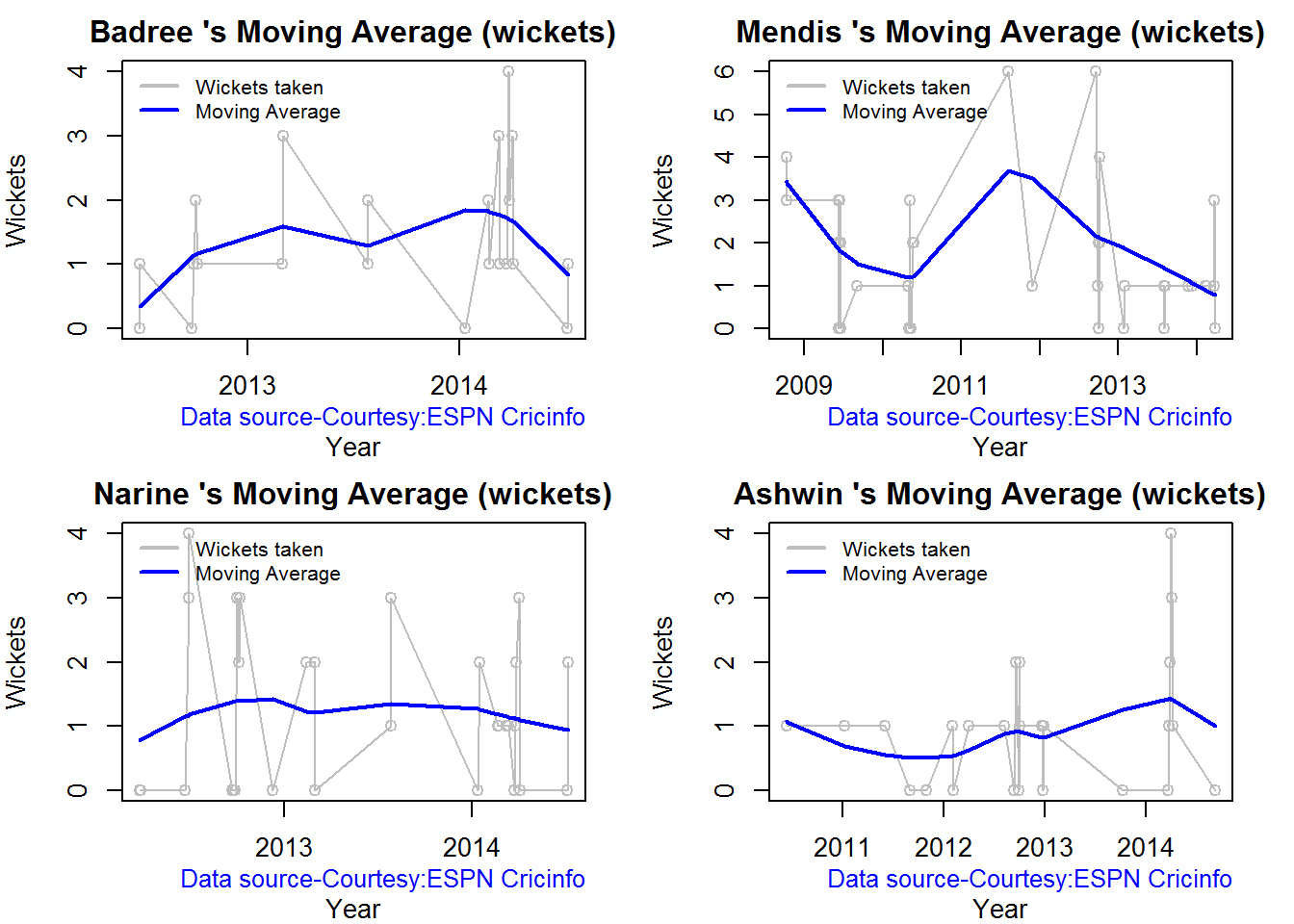
Moving average of wickets over career

par(mfrow=c(2,2))
par(mar=c(4,4,2,2))
bowlerMovingAverage("./badree.csv","Badree")
bowlerMovingAverage("./mendis.csv","Mendis")
bowlerMovingAverage("./narine.csv","Narine")
bowlerMovingAverage("./ashwin.csv","Ashwin")
## null device 
##           1

jsba-bowlma-1

Key findings

Here are some key conclusions

Twenty 20 batsmen

  1. Kohli has the a very consistent performance scoring high runs in the different run ranges. Kohli also has a 34.2% likelihood to score 6 runs. He is followed by McCullum for consisten performance
  2. Finch has a best strike rate followed by McCullum.
  3. Du Plessis has the highest percentage of 4s and McCullum has the percentage of 6s. Finch is superior in the percentage of runs scored in 4s and 6s
  4. For a hypothetical balls faced and minutes at crease, Finch does best followed by McCullum
  5. Kohli’s & Du Plessis Twenty20 career is on a upswing. Can they maintain the momentum. McCullum is consistent

Twenty20 bowlers

  1. Narine has the highest wickets percentage for different wickets taken followed by Mendis
  2. Mendis has taken 1,2,3,4,6 wickets in 24 deliveries
  3. Narine has the lowest economy rate for 1 & 4 wickets, Ashwin for 2 wickets and Badree for 3 wickets. Mendis is comparatively expensive
  4. Narine needed the least deliveries to get 1 (22.5) & 2 (23.2) wickets, Mendis needed 20.5 deliveries and Ashwin 19 deliveries for 4 wickets

Key takeaways 1. If all the above batsment and bowlers were in the same team we expect

  1. Finch would be most useful when the run rate has to be greatly accelerated followed by McCullum
  2. If the need is to consolidate, then Kohli is the best man for the job followed by McCullum
  3. Overall McCullum is the best bet for Twenty20
  4. When it comes to bowling Narine wins hands down as he has the most wickets, a good economy rate and a very good attack rate. So Narine is great bet for providing a vital breakthrough.

Also see my other posts in R

  1. Introducing cricketr! : An R package to analyze performances of cricketers
  2. cricketr plays the ODIs!
  3. A peek into literacy in India: Statistical Learning with R
  4. A crime map of India in R – Crimes against women
  5. Analyzing cricket’s batting legends – Through the mirage with R
  6. Mirror, mirror . the best batsman of them all?

You may also like

  1. A closer look at “Robot Horse on a Trot” in Android
  2. What’s up Watson? Using IBM Watson’s QAAPI with Bluemix, NodeExpress – Part 1
  3. Bend it like Bluemix, MongoDB with autoscaling – Part 2
  4. Informed choices through Machine Learning : Analyzing Kohli, Tendulkar and Dravid
  5. TWS-4: Gossip protocol: Epidemics and rumors to the rescue
  6. Deblurring with OpenCV:Weiner filter reloaded
  7. Architecting a cloud based IP Multimedia System (IMS)

cricketr plays the ODIs!

Published in R bloggers: cricketr plays the ODIs

Introduction

In this post my package ‘cricketr’ takes a swing at One Day Internationals(ODIs). Like test batsman who adapt to ODIs with some innovative strokes, the cricketr package has some additional functions and some modified functions to handle the high strike and economy rates in ODIs. As before I have chosen my top 4 ODI batsmen and top 4 ODI bowlers.

Unititled2

If you are passionate about cricket, and love analyzing cricket performances, then check out my racy book on cricket ‘Cricket analytics with cricketr and cricpy – Analytics harmony with R & Python’! This book discusses and shows how to use my R package ‘cricketr’ and my Python package ‘cricpy’ to analyze batsmen and bowlers in all formats of the game (Test, ODI and T20). The paperback is available on Amazon at $21.99 and  the kindle version at $9.99/Rs 449/-. A must read for any cricket lover! Check it out!!

You can download the latest PDF version of the book  at  ‘Cricket analytics with cricketr and cricpy: Analytics harmony with R and Python-6th edition

Untitled

Important note 1: The latest release of ‘cricketr’ now includes the ability to analyze performances of teams now!!  See Cricketr adds team analytics to its repertoire!!!

Important note 2 : Cricketr can now do a more fine-grained analysis of players, see Cricketr learns new tricks : Performs fine-grained analysis of players

Important note 3: Do check out the python avatar of cricketr, ‘cricpy’ in my post ‘Introducing cricpy:A python package to analyze performances of cricketers

Do check out my interactive Shiny app implementation using the cricketr package – Sixer – R package cricketr’s new Shiny avatar

You can also read this post at Rpubs as odi-cricketr. Dowload this report as a PDF file from odi-cricketr.pdf

Important note: Do check out my other posts using cricketr at cricketr-posts

Note: If you would like to do a similar analysis for a different set of batsman and bowlers, you can clone/download my skeleton cricketr template from Github (which is the R Markdown file I have used for the analysis below). You will only need to make appropriate changes for the players you are interested in. Just a familiarity with R and R Markdown only is needed.
Batsmen

  1. Virendar Sehwag (Ind)
  2. AB Devilliers (SA)
  3. Chris Gayle (WI)
  4. Glenn Maxwell (Aus)

Bowlers

  1. Mitchell Johnson (Aus)
  2. Lasith Malinga (SL)
  3. Dale Steyn (SA)
  4. Tim Southee (NZ)

I have sprinkled the plots with a few of my comments. Feel free to draw your conclusions! The analysis is included below

The profile for Virender Sehwag is 35263. This can be used to get the ODI data for Sehwag. For a batsman the type should be “batting” and for a bowler the type should be “bowling” and the function is getPlayerDataOD()

The package can be installed directly from CRAN

if (!require("cricketr")){ 
    install.packages("cricketr",lib = "c:/test") 
} 
library(cricketr)

or from Github

library(devtools)
install_github("tvganesh/cricketr")
library(cricketr)

The One day data for a particular player can be obtained with the getPlayerDataOD() function. To do you will need to go to ESPN CricInfo Player and type in the name of the player for e.g Virendar Sehwag, etc. This will bring up a page which have the profile number for the player e.g. for Virendar Sehwag this would be http://www.espncricinfo.com/india/content/player/35263.html. Hence, Sehwag’s profile is 35263. This can be used to get the data for Virat Sehwag as shown below

sehwag <- getPlayerDataOD(35263,dir="..",file="sehwag.csv",type="batting")

Analyses of Batsmen

The following plots gives the analysis of the 4 ODI batsmen

  1. Virendar Sehwag (Ind) – Innings – 245, Runs = 8586, Average=35.05, Strike Rate= 104.33
  2. AB Devilliers (SA) – Innings – 179, Runs= 7941, Average=53.65, Strike Rate= 99.12
  3. Chris Gayle (WI) – Innings – 264, Runs= 9221, Average=37.65, Strike Rate= 85.11
  4. Glenn Maxwell (Aus) – Innings – 45, Runs= 1367, Average=35.02, Strike Rate= 126.69

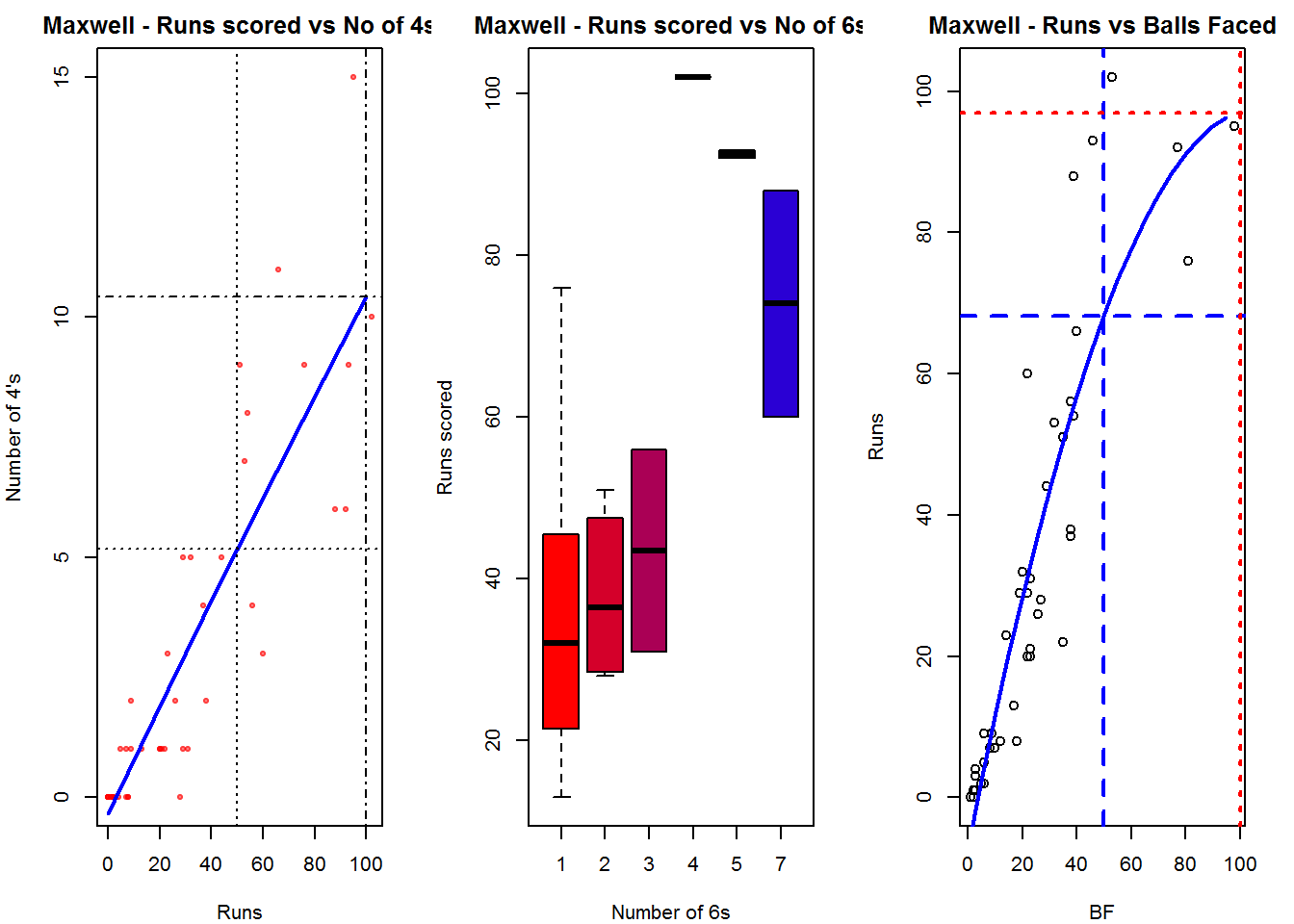
Plot of 4s, 6s and the scoring rate in ODIs

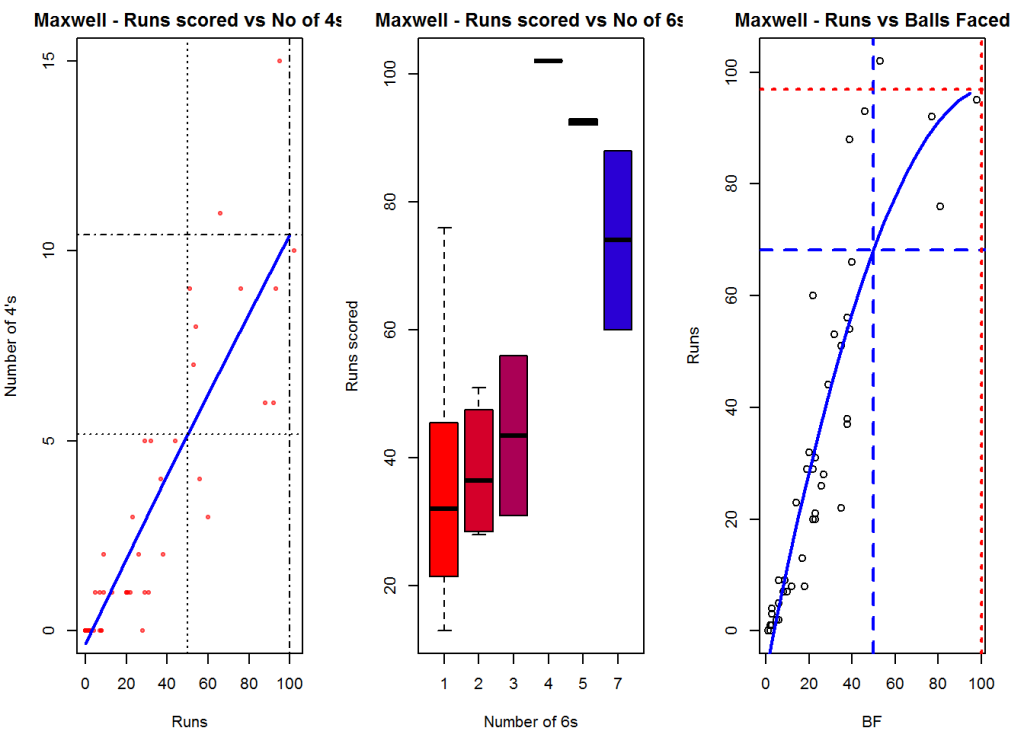
The 3 charts below give the number of

  1. 4s vs Runs scored
  2. 6s vs Runs scored
  3. Balls faced vs Runs scored

A regression line is fitted in each of these plots for each of the ODI batsmen A. Virender Sehwag

par(mfrow=c(1,3))
par(mar=c(4,4,2,2))
batsman4s("./sehwag.csv","Sehwag")
batsman6s("./sehwag.csv","Sehwag")
batsmanScoringRateODTT("./sehwag.csv","Sehwag")
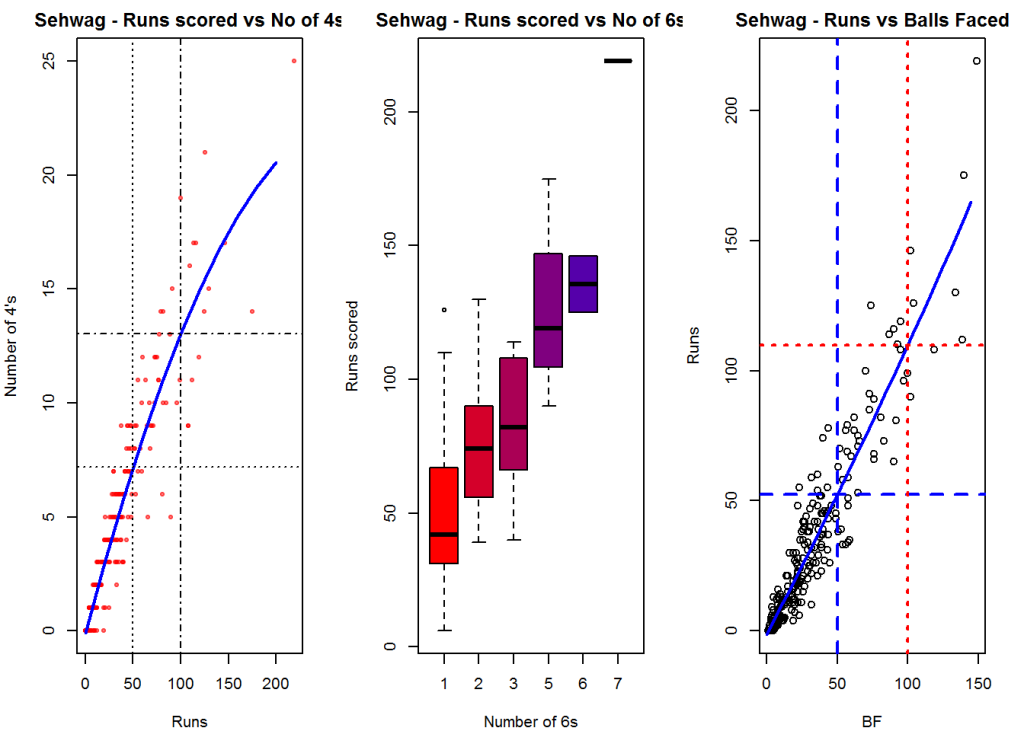
sehwag-4s6sSR-1

dev.off()
## null device 
##           1

B. AB Devilliers

par(mfrow=c(1,3))
par(mar=c(4,4,2,2))
batsman4s("./devilliers.csv","Devillier")
batsman6s("./devilliers.csv","Devillier")
batsmanScoringRateODTT("./devilliers.csv","Devillier")
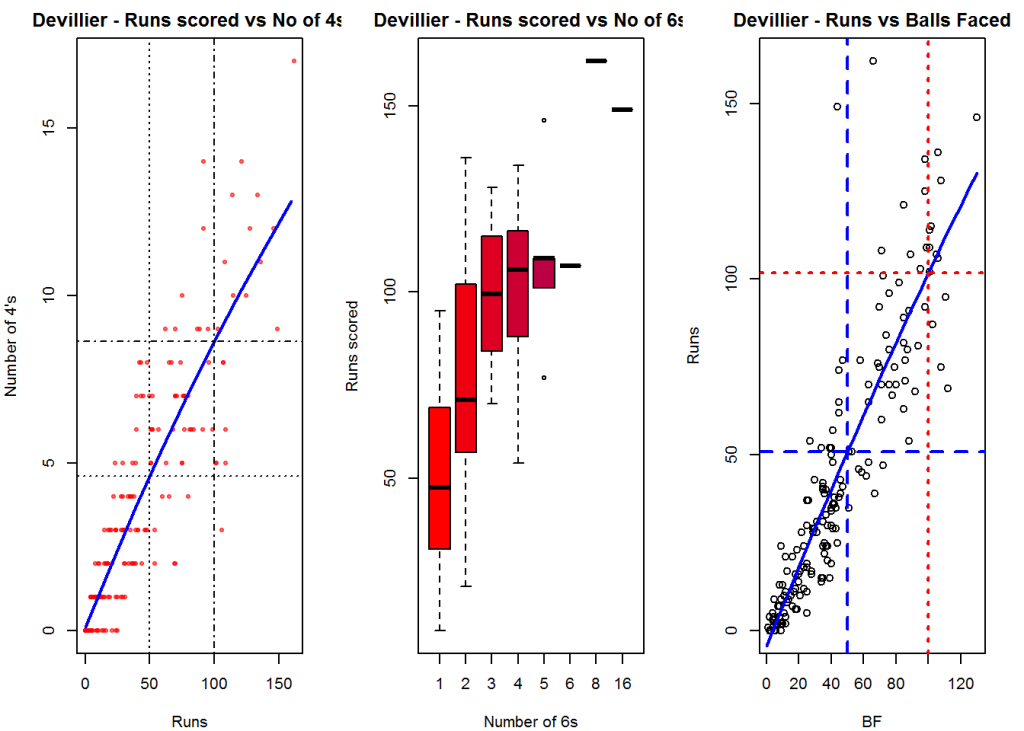
devillier-4s6SR-1

dev.off()
## null device 
##           1

C. Chris Gayle

par(mfrow=c(1,3))
par(mar=c(4,4,2,2))
batsman4s("./gayle.csv","Gayle")
batsman6s("./gayle.csv","Gayle")
batsmanScoringRateODTT("./gayle.csv","Gayle")
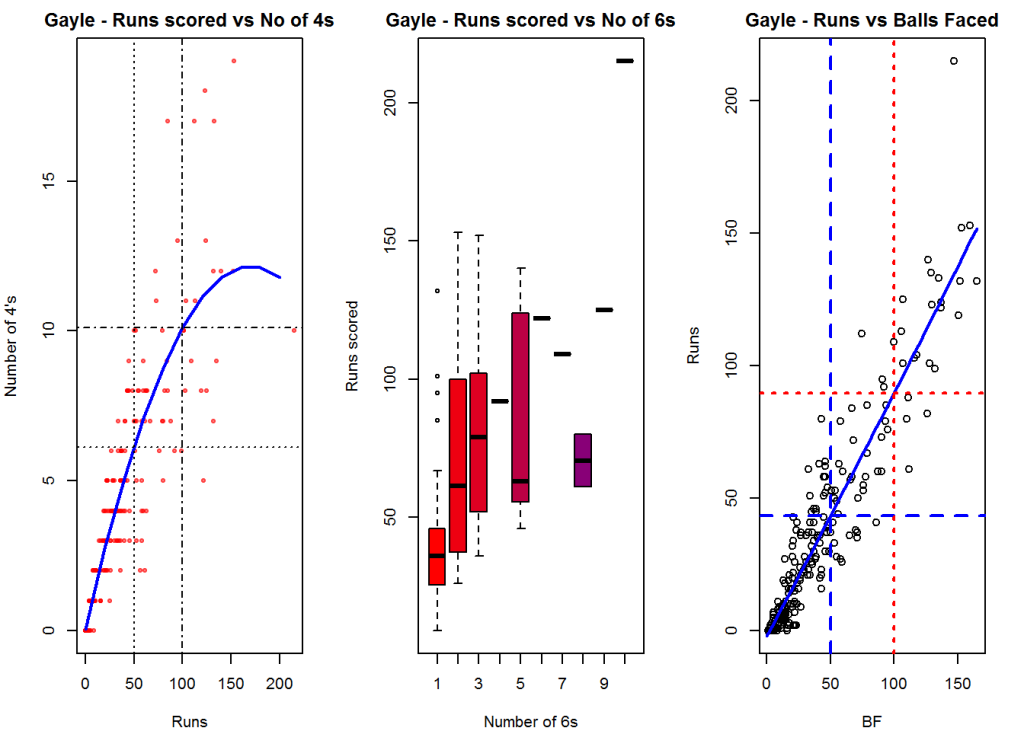
gayle-4s6sSR-1

dev.off()
## null device 
##           1

D. Glenn Maxwell

par(mfrow=c(1,3))
par(mar=c(4,4,2,2))
batsman4s("./maxwell.csv","Maxwell")
batsman6s("./maxwell.csv","Maxwell")
batsmanScoringRateODTT("./maxwell.csv","Maxwell")
maxwell-4s6sout-1

dev.off()
## null device 
##           1

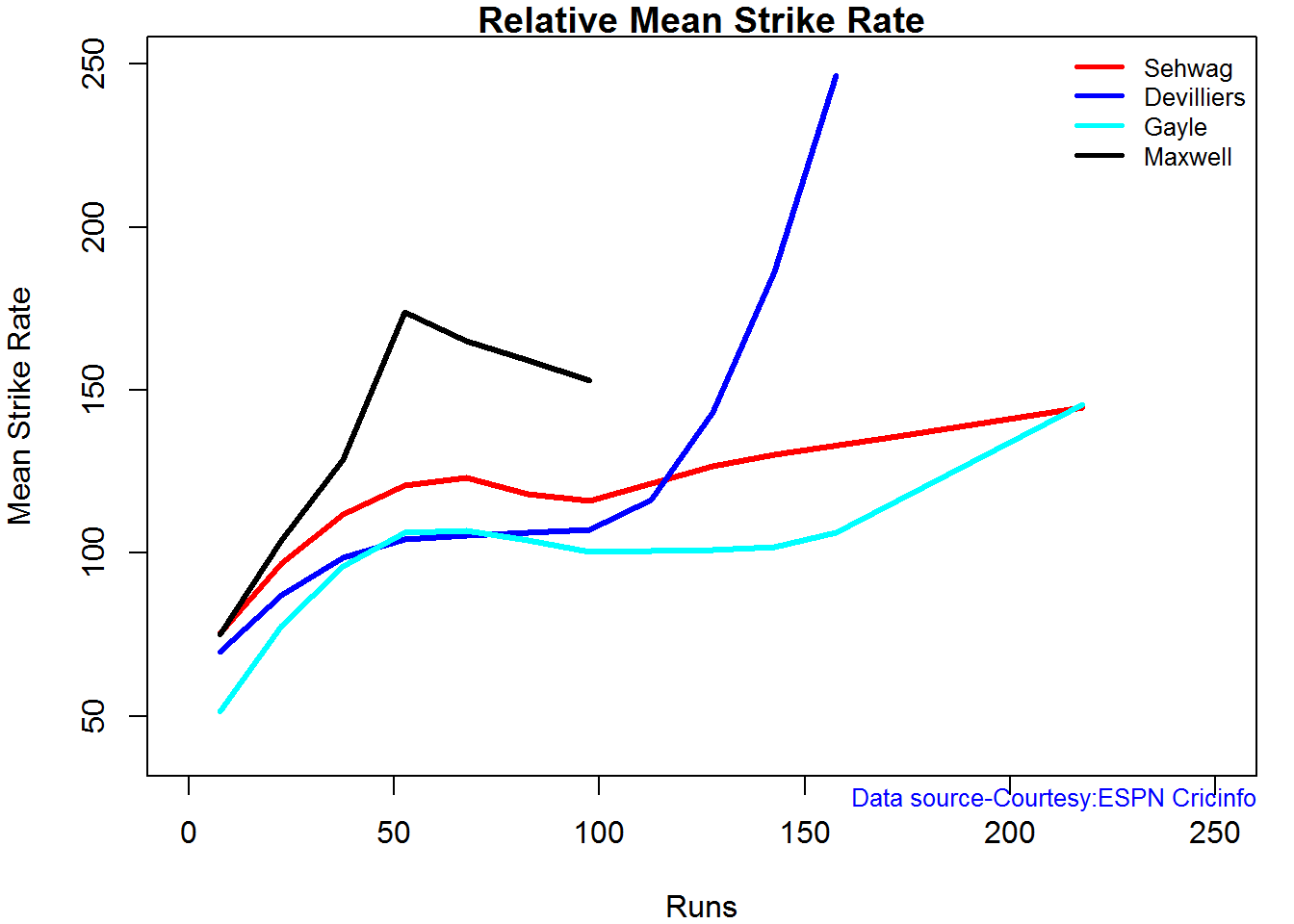
Relative Mean Strike Rate

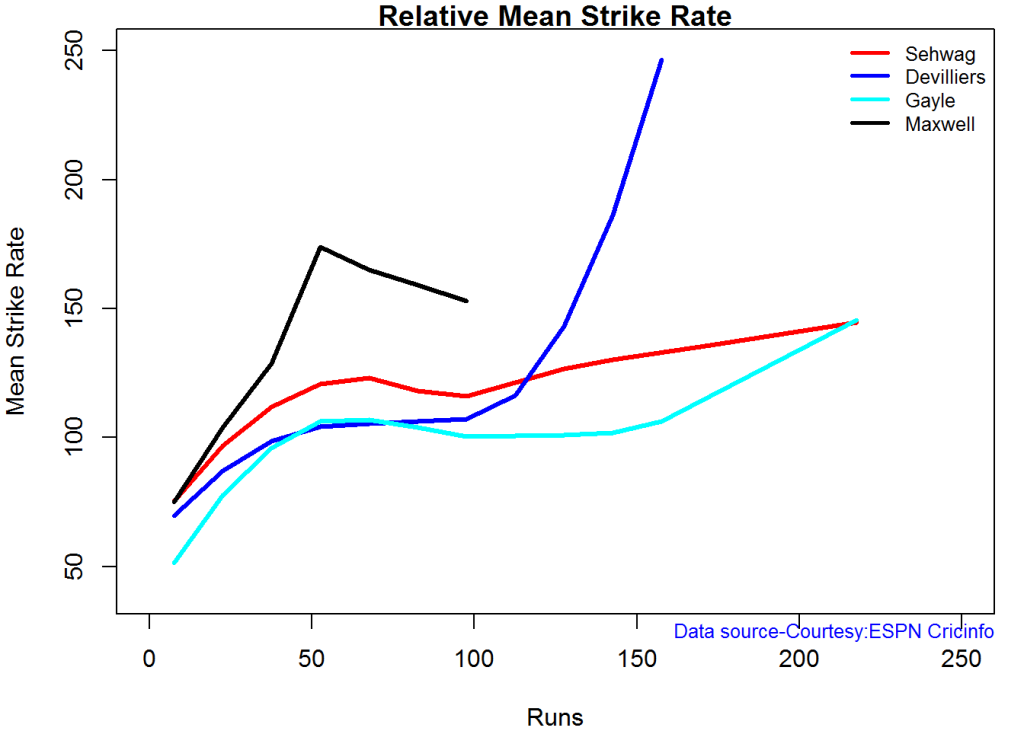
In this first plot I plot the Mean Strike Rate of the batsmen. It can be seen that Maxwell has a awesome strike rate in ODIs. However we need to keep in mind that Maxwell has relatively much fewer (only 45 innings) innings. He is followed by Sehwag who(most innings- 245) also has an excellent strike rate till 100 runs and then we have Devilliers who roars ahead. This is also seen in the overall strike rate in above

par(mar=c(4,4,2,2))
frames <- list("./sehwag.csv","./devilliers.csv","gayle.csv","maxwell.csv")
names <- list("Sehwag","Devilliers","Gayle","Maxwell")
relativeBatsmanSRODTT(frames,names)
plot-1-1

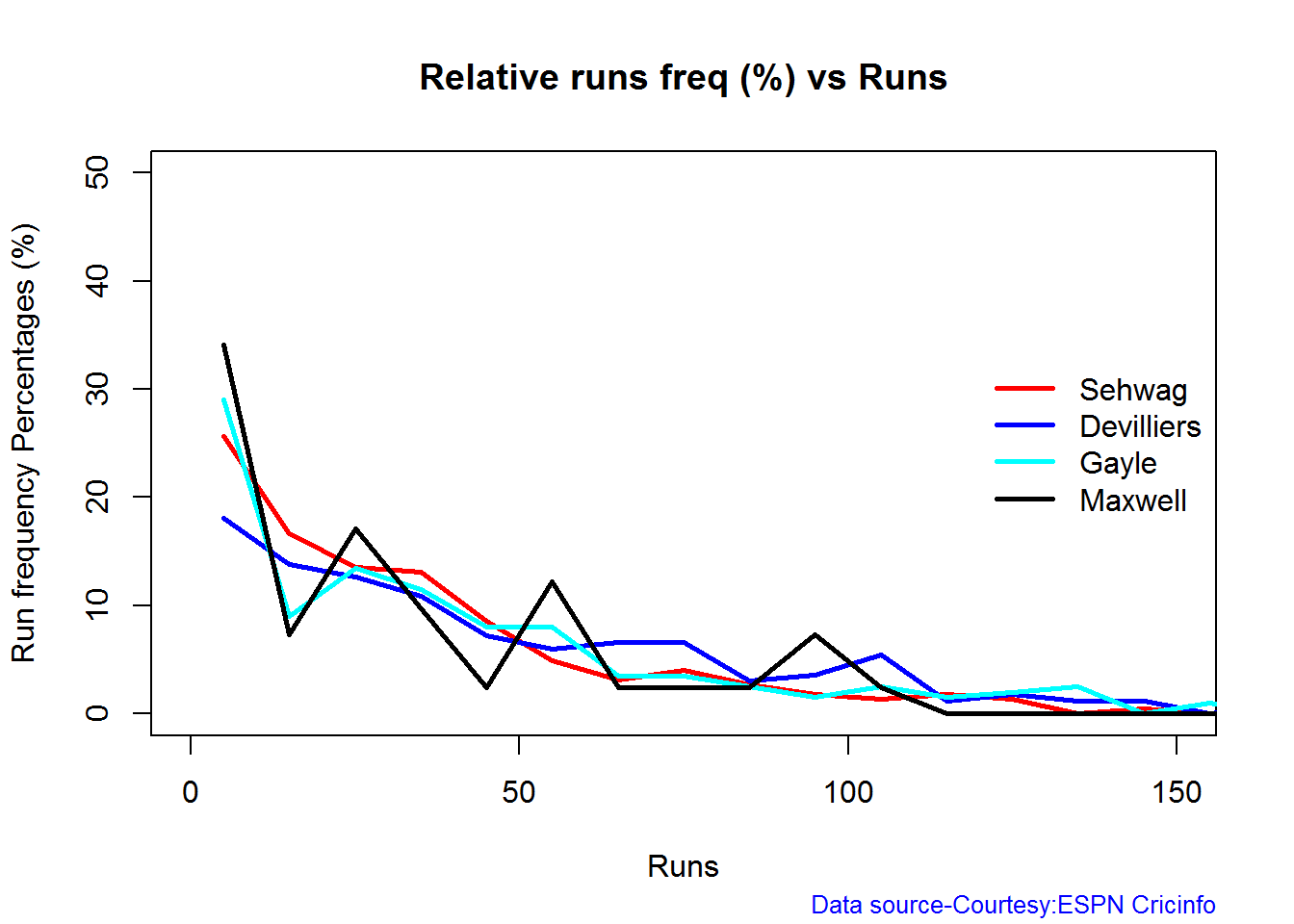
Relative Runs Frequency Percentage

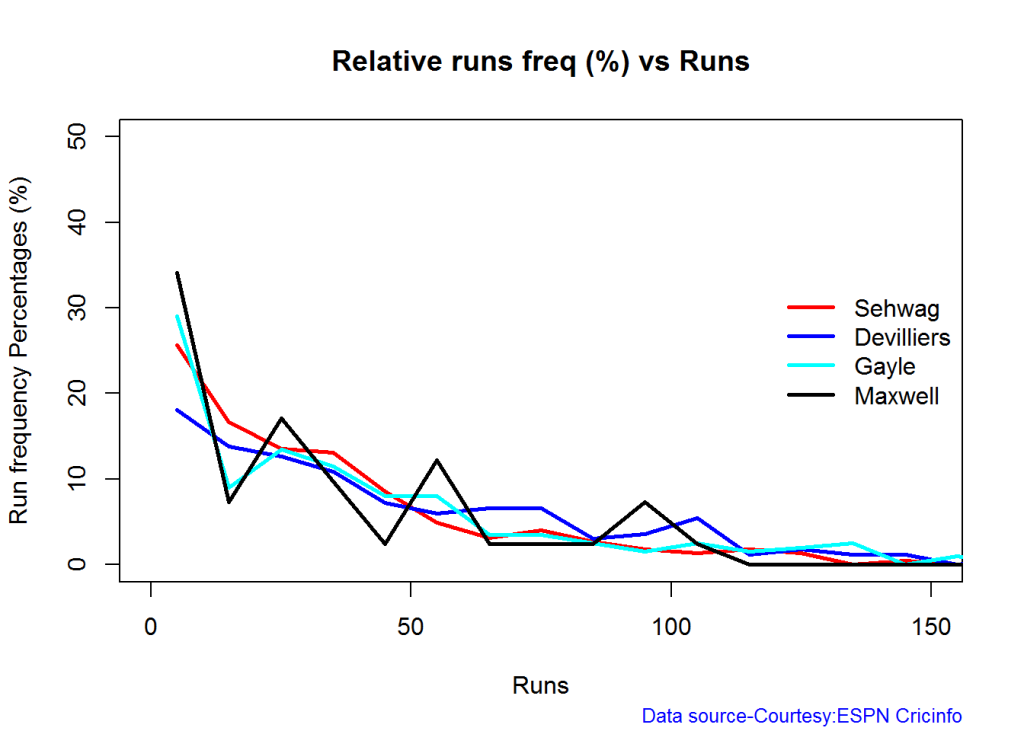
Sehwag leads in the percentage of runs in 10 run ranges upto 50 runs. Maxwell and Devilliers lead in 55-66 & 66-85 respectively.

frames <- list("./sehwag.csv","./devilliers.csv","gayle.csv","maxwell.csv")
names <- list("Sehwag","Devilliers","Gayle","Maxwell")
relativeRunsFreqPerfODTT(frames,names)
plot-2-1

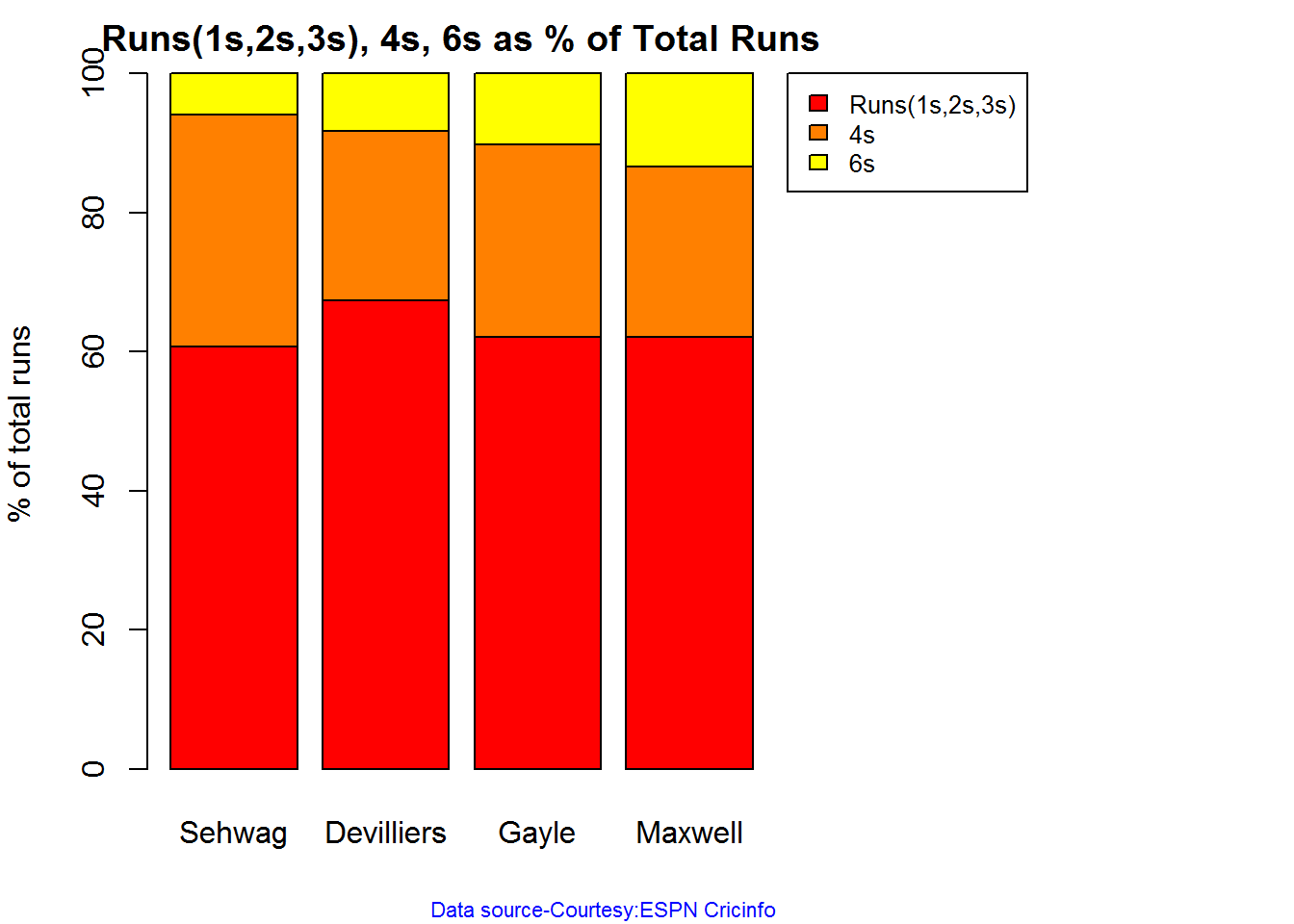
Percentage of 4s,6s in the runs scored

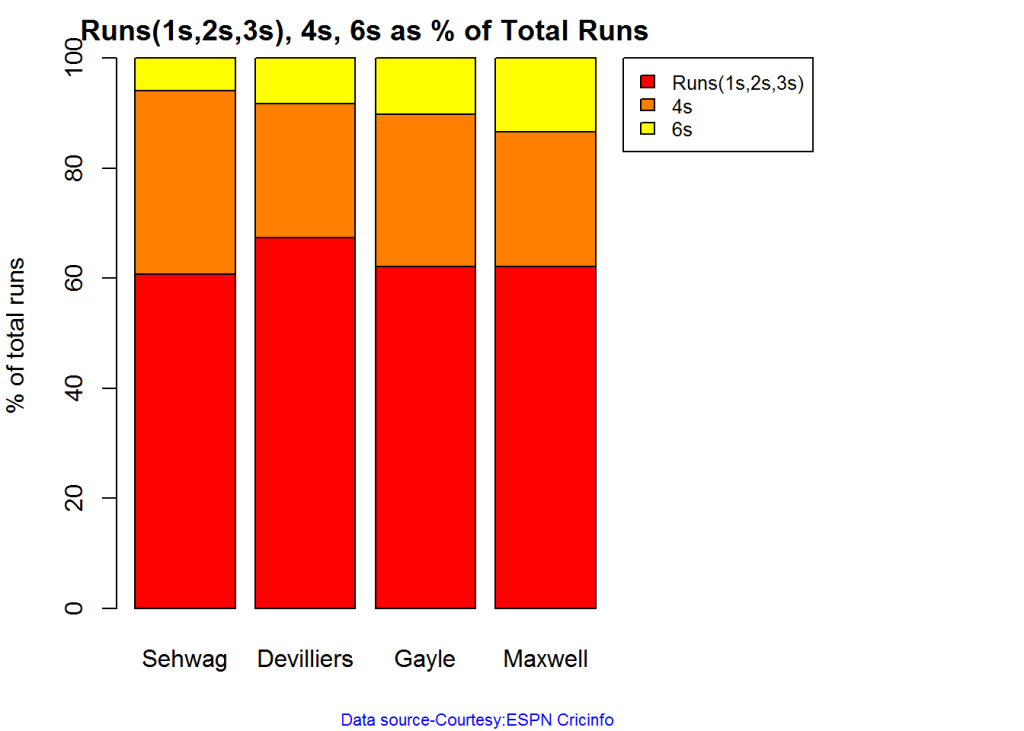
The plot below shows the percentage of runs made by the batsmen by ways of 1s,2s,3s, 4s and 6s. It can be seen that Sehwag has the higheest percent of 4s (33.36%) in his overall runs in ODIs. Maxwell has the highest percentage of 6s (13.36%) in his ODI career. If we take the overall 4s+6s then Sehwag leads with (33.36 +5.95 = 39.31%),followed by Gayle (27.80+10.15=37.95%)

Percent 4’s,6’s in total runs scored

The plot below shows the contrib

frames <- list("./sehwag.csv","./devilliers.csv","gayle.csv","maxwell.csv")
names <- list("Sehwag","Devilliers","Gayle","Maxwell")
runs4s6s <-batsman4s6s(frames,names)
plot-46s-1

print(runs4s6s)
##                Sehwag Devilliers Gayle Maxwell
## Runs(1s,2s,3s)  60.69      67.39 62.05   62.11
## 4s              33.36      24.28 27.80   24.53
## 6s               5.95       8.32 10.15   13.36
 

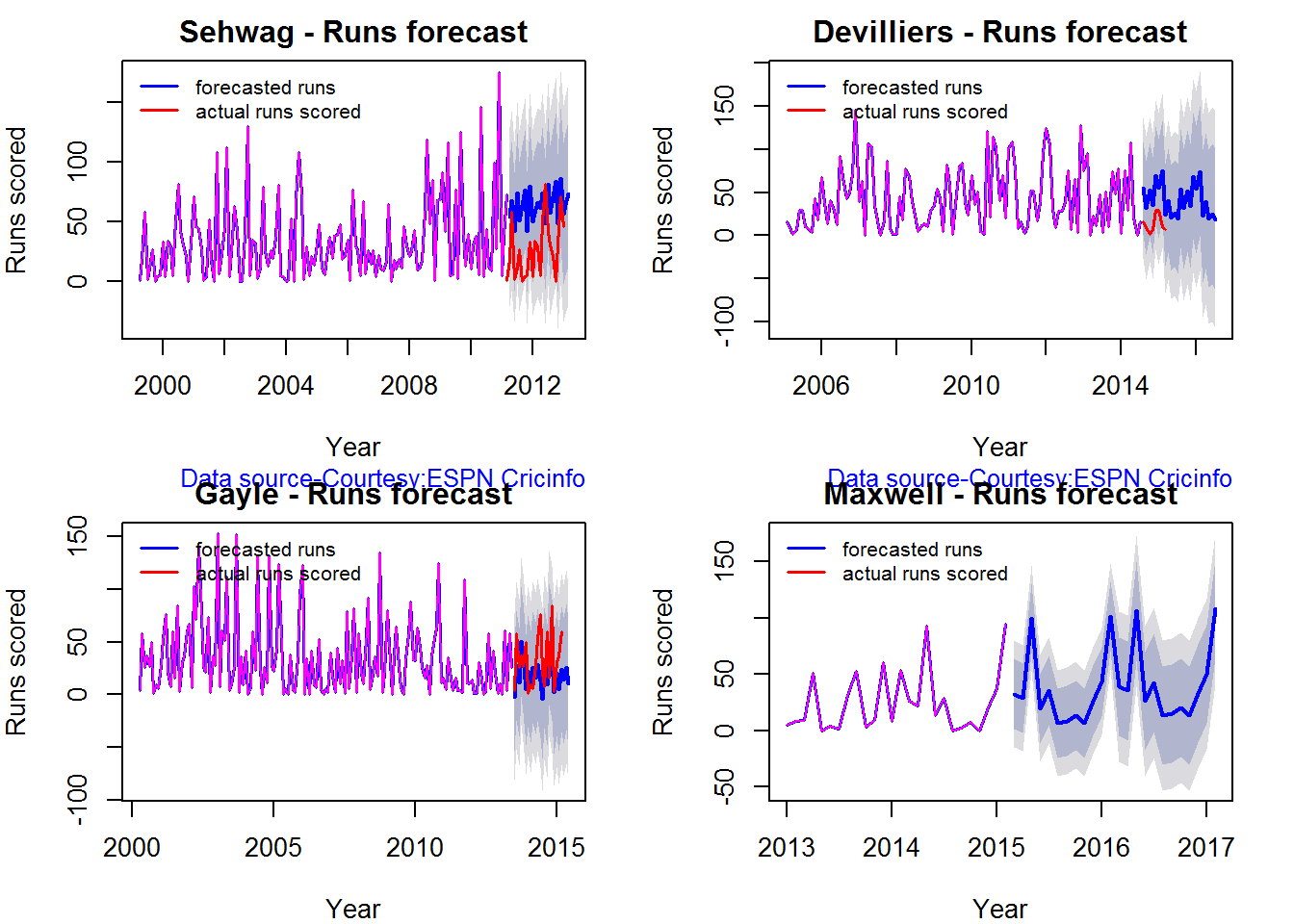
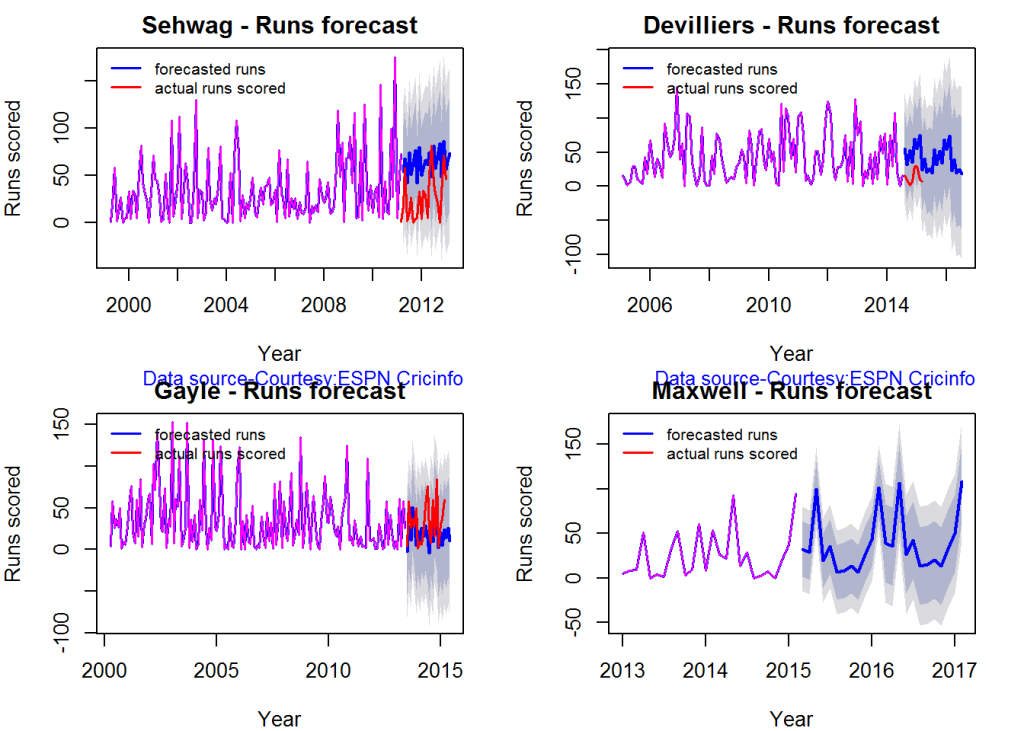
Runs forecast

The forecast for the batsman is shown below.

par(mfrow=c(2,2))
par(mar=c(4,4,2,2))
batsmanPerfForecast("./sehwag.csv","Sehwag")
batsmanPerfForecast("./devilliers.csv","Devilliers")
batsmanPerfForecast("./gayle.csv","Gayle")
batsmanPerfForecast("./maxwell.csv","Maxwell")
swcr-perf-1

dev.off()
## null device 
##           1

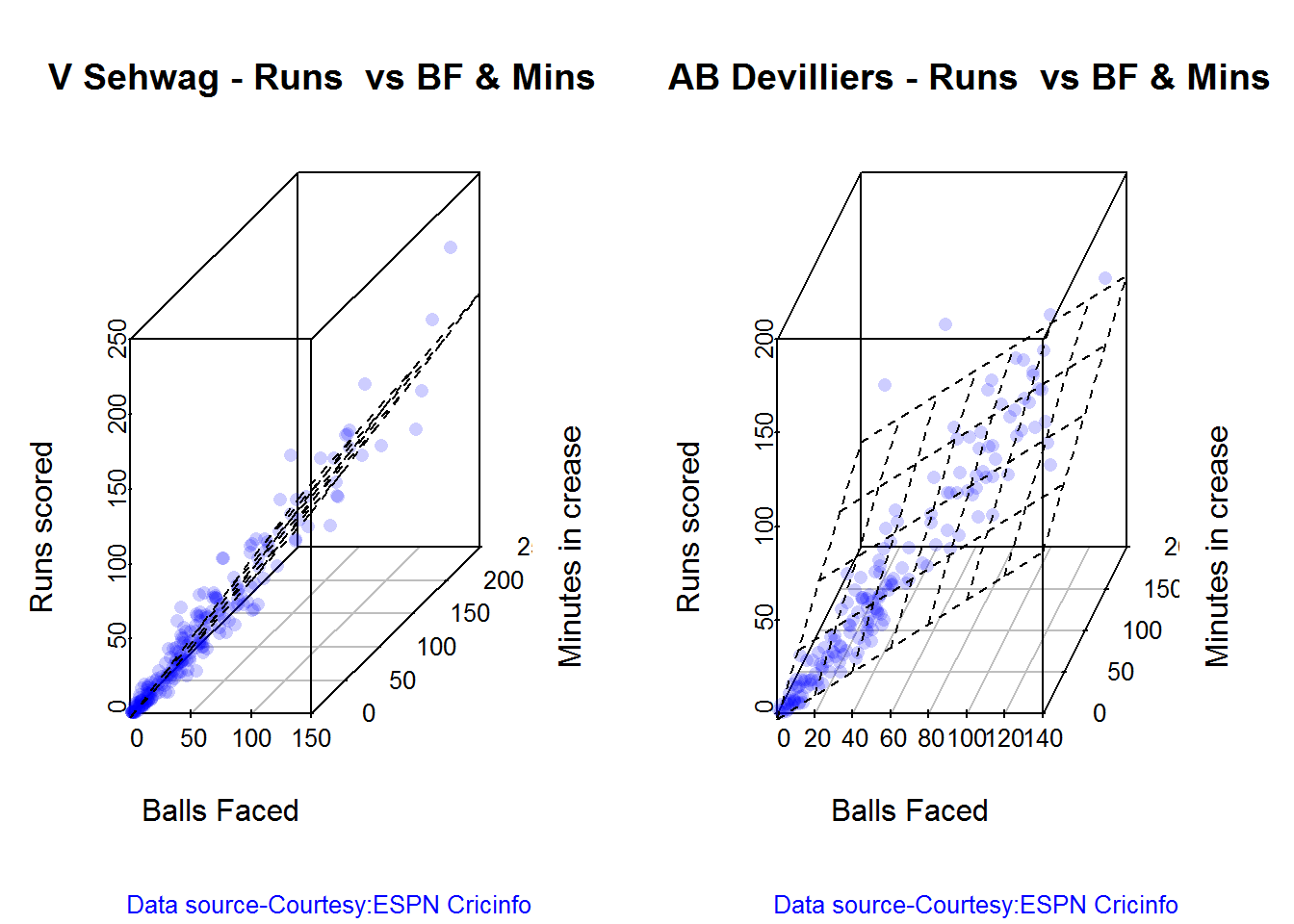
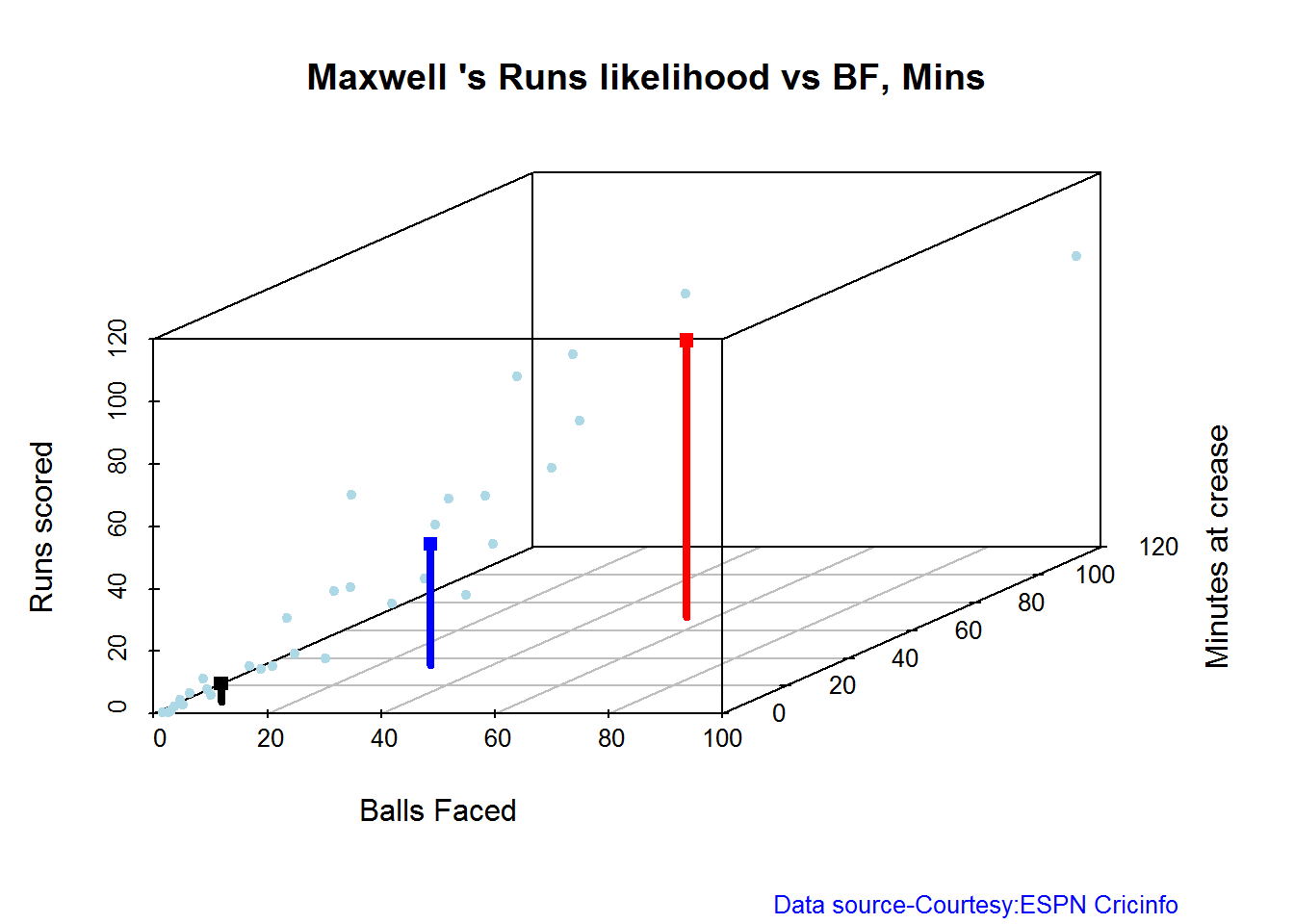
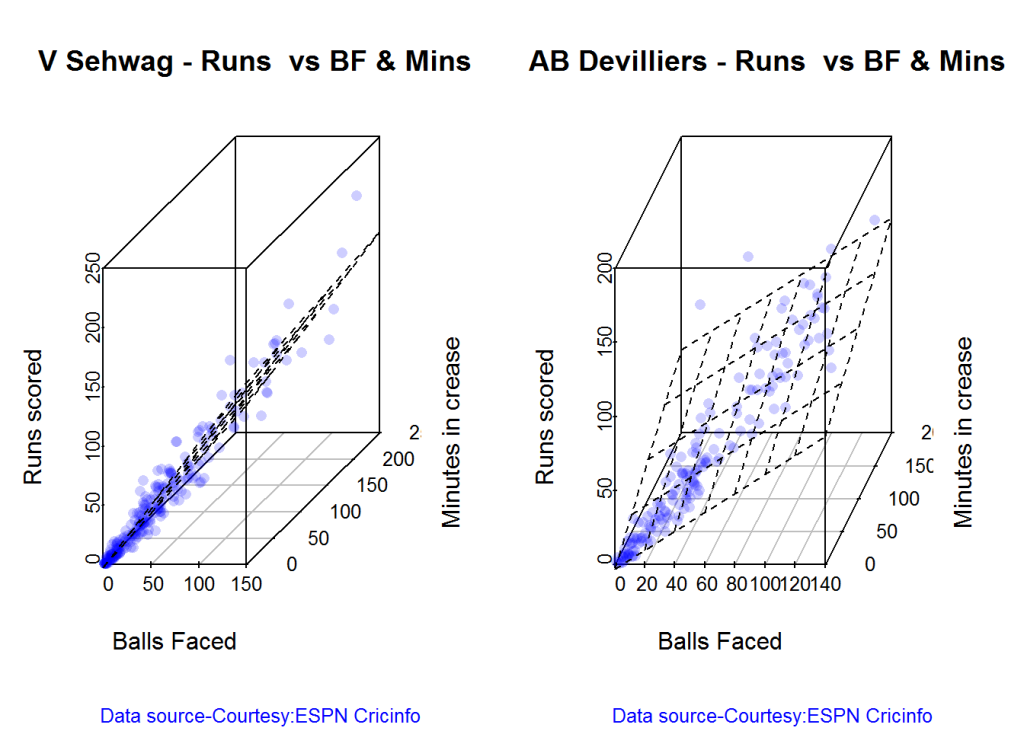
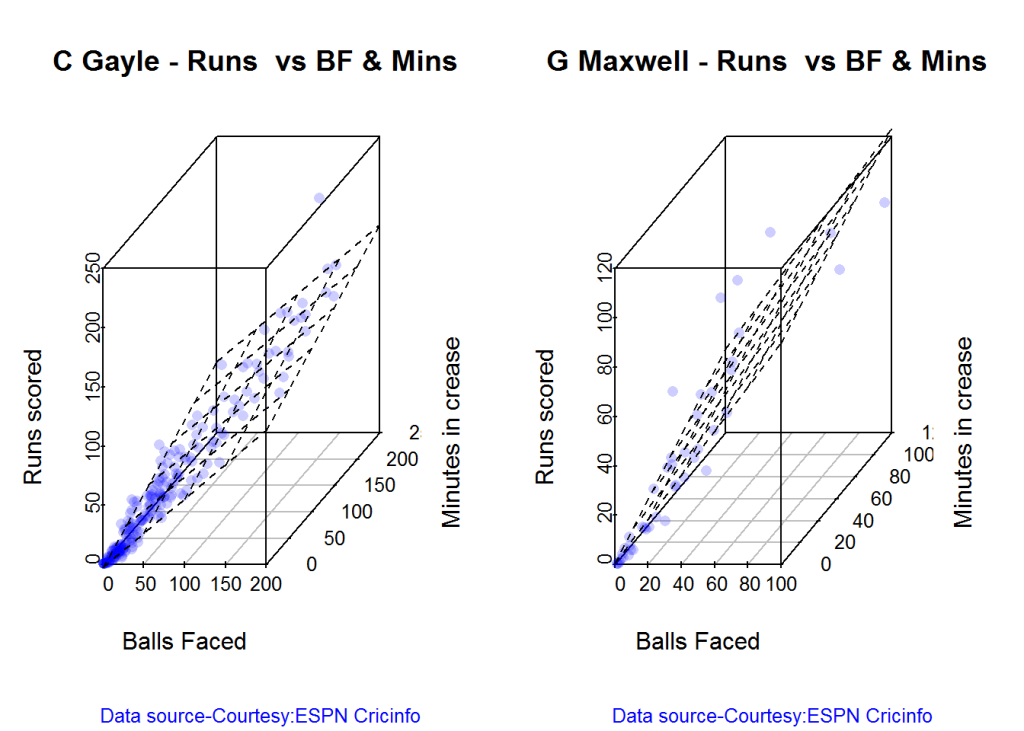
3D plot of Runs vs Balls Faced and Minutes at Crease

The plot is a scatter plot of Runs vs Balls faced and Minutes at Crease. A prediction plane is fitted

par(mfrow=c(1,2))
par(mar=c(4,4,2,2))
battingPerf3d("./sehwag.csv","V Sehwag")
battingPerf3d("./devilliers.csv","AB Devilliers")
plot-3-1

dev.off()
## null device 
##           1
par(mfrow=c(1,2))
par(mar=c(4,4,2,2))
battingPerf3d("./gayle.csv","C Gayle")
battingPerf3d("./maxwell.csv","G Maxwell")
plot-4-1

dev.off()
## null device 
##           1

Predicting Runs given Balls Faced and Minutes at Crease

A multi-variate regression plane is fitted between Runs and Balls faced +Minutes at crease.

BF <- seq( 10, 200,length=10)
Mins <- seq(30,220,length=10)
newDF <- data.frame(BF,Mins)

sehwag <- batsmanRunsPredict("./sehwag.csv","Sehwag",newdataframe=newDF)
devilliers <- batsmanRunsPredict("./devilliers.csv","Devilliers",newdataframe=newDF)
gayle <- batsmanRunsPredict("./gayle.csv","Gayle",newdataframe=newDF)
maxwell <- batsmanRunsPredict("./maxwell.csv","Maxwell",newdataframe=newDF)

The fitted model is then used to predict the runs that the batsmen will score for a hypotheticial Balls faced and Minutes at crease. It can be seen that Maxwell sets a searing pace in the predicted runs for a given Balls Faced and Minutes at crease followed by Sehwag. But we have to keep in mind that Maxwell has only around 1/5th of the innings of Sehwag (45 to Sehwag’s 245 innings). They are followed by Devilliers and then finally Gayle

batsmen <-cbind(round(sehwag$Runs),round(devilliers$Runs),round(gayle$Runs),round(maxwell$Runs))
colnames(batsmen) <- c("Sehwag","Devilliers","Gayle","Maxwell")
newDF <- data.frame(round(newDF$BF),round(newDF$Mins))
colnames(newDF) <- c("BallsFaced","MinsAtCrease")
predictedRuns <- cbind(newDF,batsmen)
predictedRuns
##    BallsFaced MinsAtCrease Sehwag Devilliers Gayle Maxwell
## 1          10           30     11         12    11      18
## 2          31           51     33         32    28      43
## 3          52           72     55         52    46      67
## 4          73           93     77         71    63      92
## 5          94          114    100         91    81     117
## 6         116          136    122        111    98     141
## 7         137          157    144        130   116     166
## 8         158          178    167        150   133     191
## 9         179          199    189        170   151     215
## 10        200          220    211        190   168     240

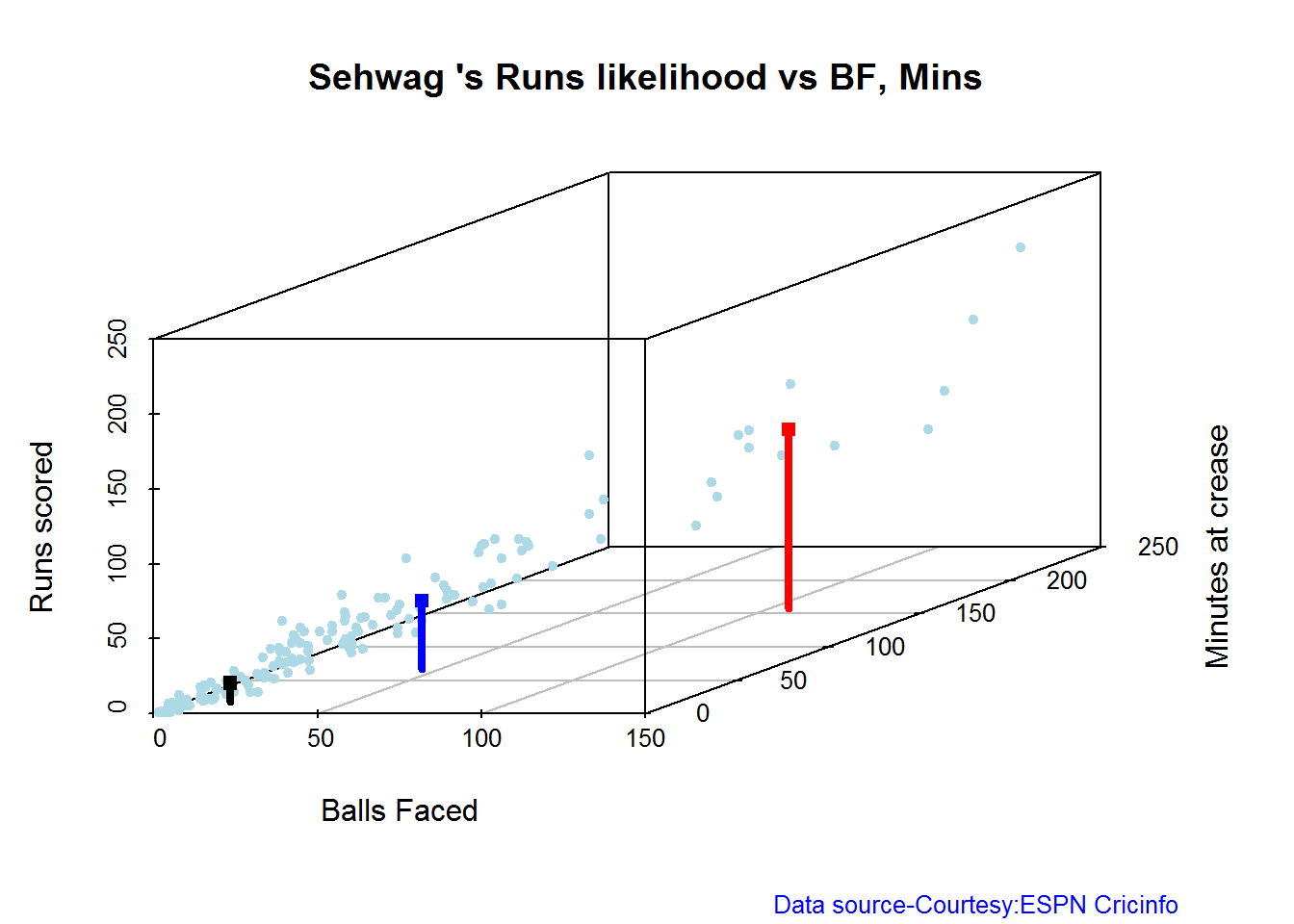
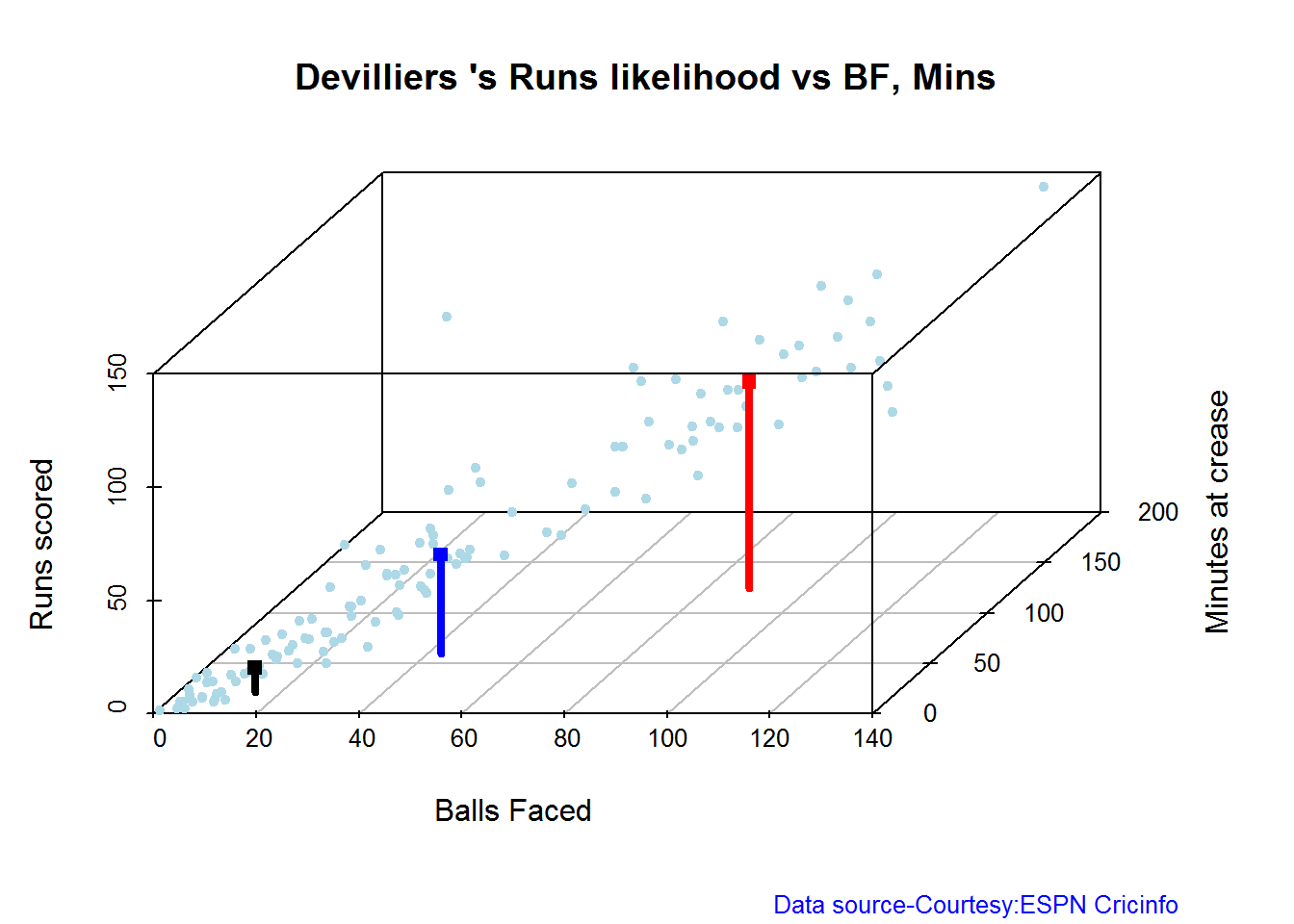
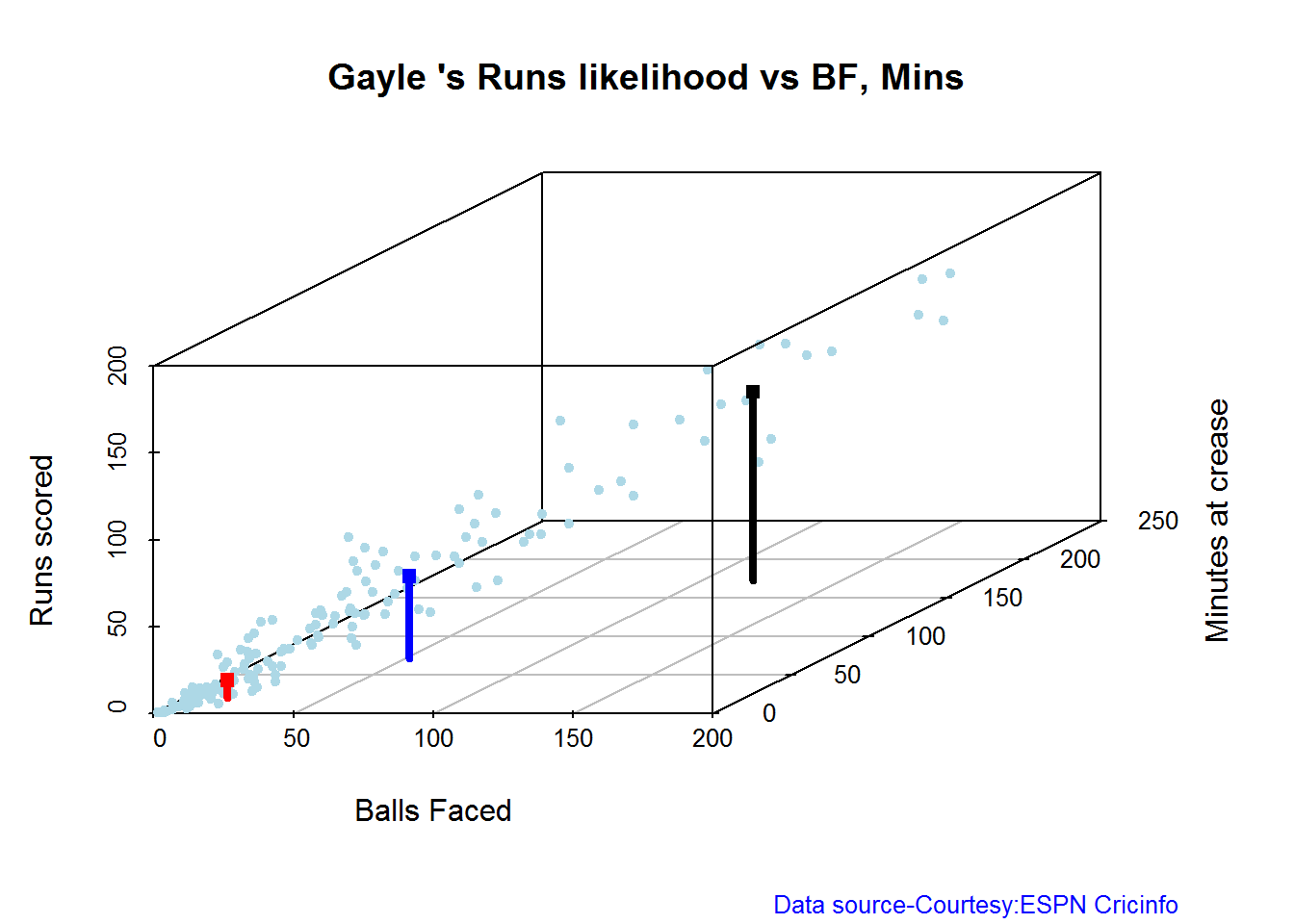
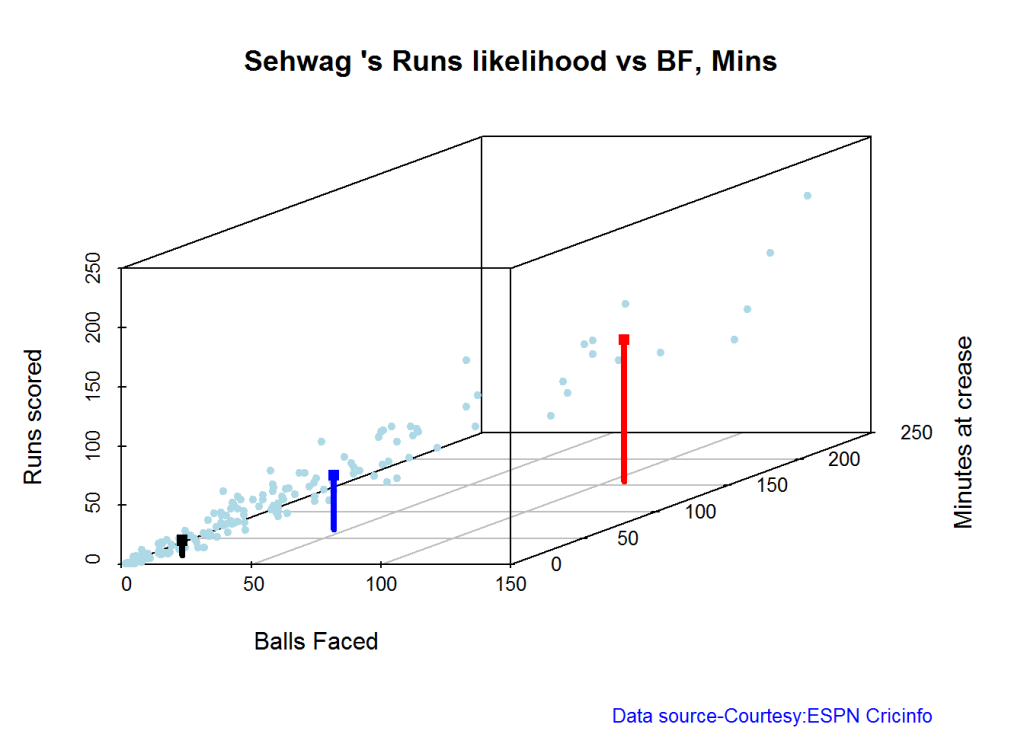
Highest runs likelihood

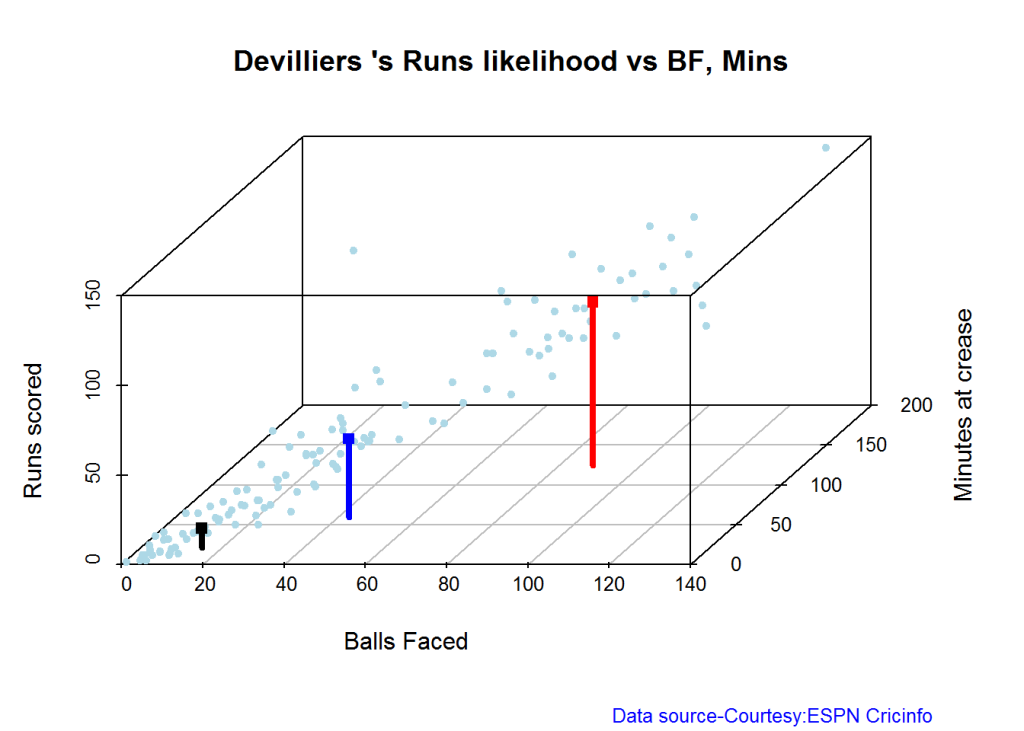
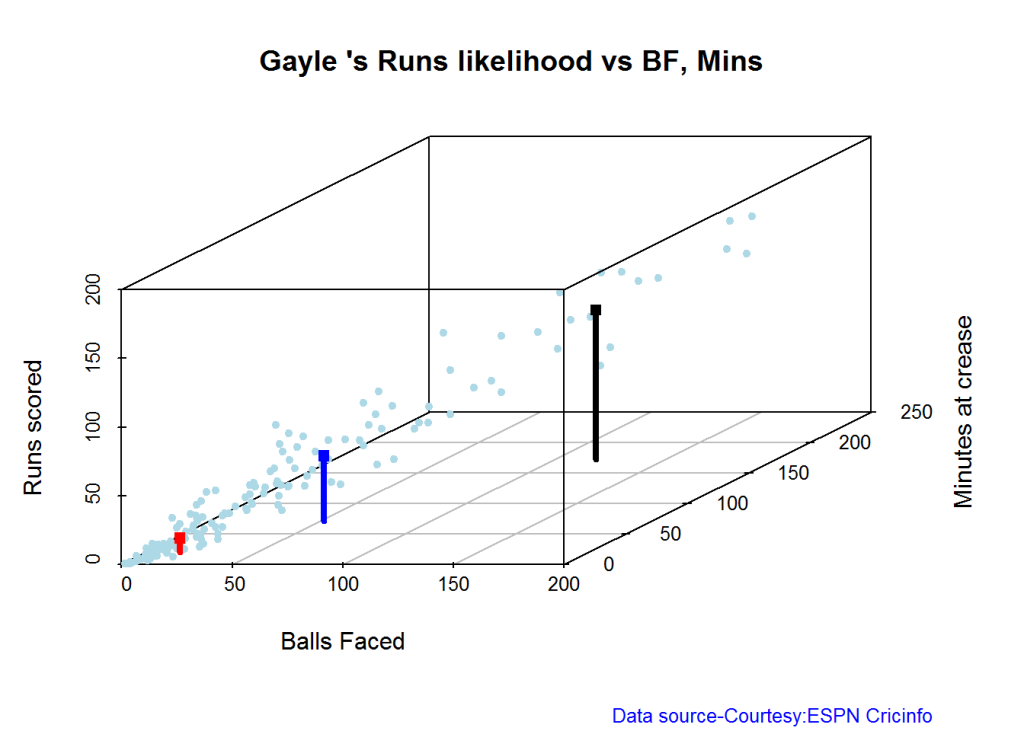
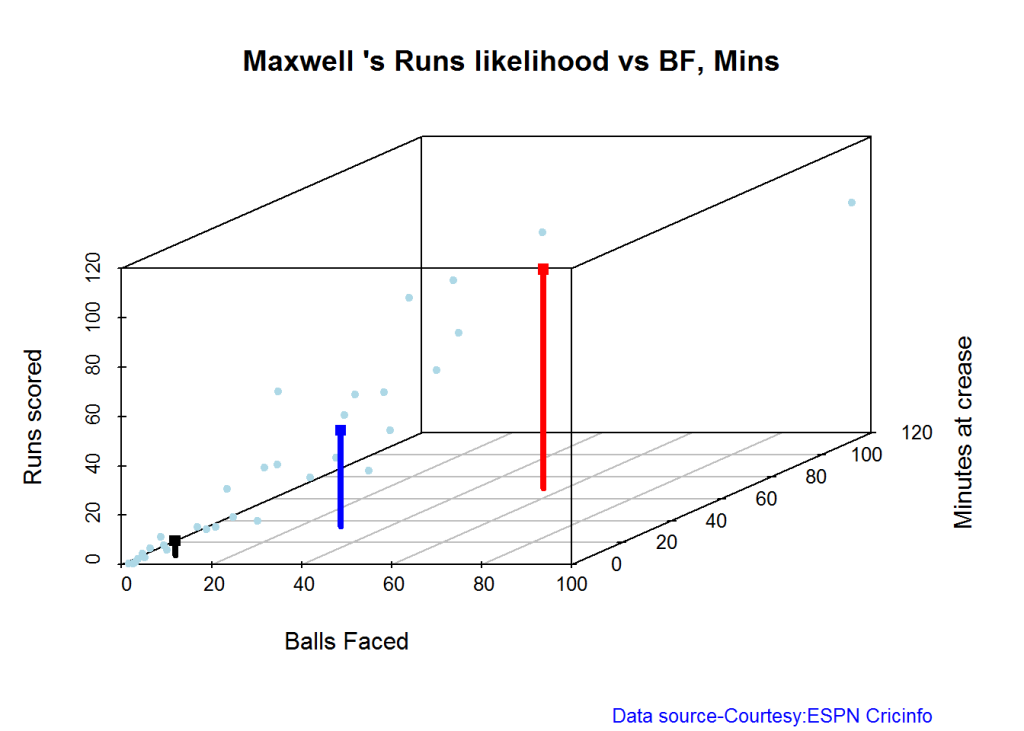
The plots below the runs likelihood of batsman. This uses K-Means It can be seen that Devilliers has almost 27.75% likelihood to make around 90+ runs. Gayle and Sehwag have 34% to make 40+ runs. A. Virender Sehwag

A. Virender Sehwag

batsmanRunsLikelihood("./sehwag.csv","Sehwag")
smith-1

## Summary of  Sehwag 's runs scoring likelihood
## **************************************************
## 
## There is a 35.22 % likelihood that Sehwag  will make  46 Runs in  44 balls over 67  Minutes 
## There is a 9.43 % likelihood that Sehwag  will make  119 Runs in  106 balls over  158  Minutes 
## There is a 55.35 % likelihood that Sehwag  will make  12 Runs in  13 balls over 18  Minutes

B. AB Devilliers

batsmanRunsLikelihood("./devilliers.csv","Devilliers")
warner-1

## Summary of  Devilliers 's runs scoring likelihood
## **************************************************
## 
## There is a 30.65 % likelihood that Devilliers  will make  44 Runs in  43 balls over 60  Minutes 
## There is a 29.84 % likelihood that Devilliers  will make  91 Runs in  88 balls over  124  Minutes 
## There is a 39.52 % likelihood that Devilliers  will make  11 Runs in  15 balls over 21  Minutes

C. Chris Gayle

batsmanRunsLikelihood("./gayle.csv","Gayle")
cook,cache-TRUE-1

## Summary of  Gayle 's runs scoring likelihood
## **************************************************
## 
## There is a 32.69 % likelihood that Gayle  will make  47 Runs in  51 balls over 72  Minutes 
## There is a 54.49 % likelihood that Gayle  will make  10 Runs in  15 balls over  20  Minutes 
## There is a 12.82 % likelihood that Gayle  will make  109 Runs in  119 balls over 172  Minutes

D. Glenn Maxwell

batsmanRunsLikelihood("./maxwell.csv","Maxwell")
oot-1

## Summary of  Maxwell 's runs scoring likelihood
## **************************************************
## 
## There is a 34.38 % likelihood that Maxwell  will make  39 Runs in  29 balls over 35  Minutes 
## There is a 15.62 % likelihood that Maxwell  will make  89 Runs in  55 balls over  69  Minutes 
## There is a 50 % likelihood that Maxwell  will make  6 Runs in  7 balls over 9  Minutes

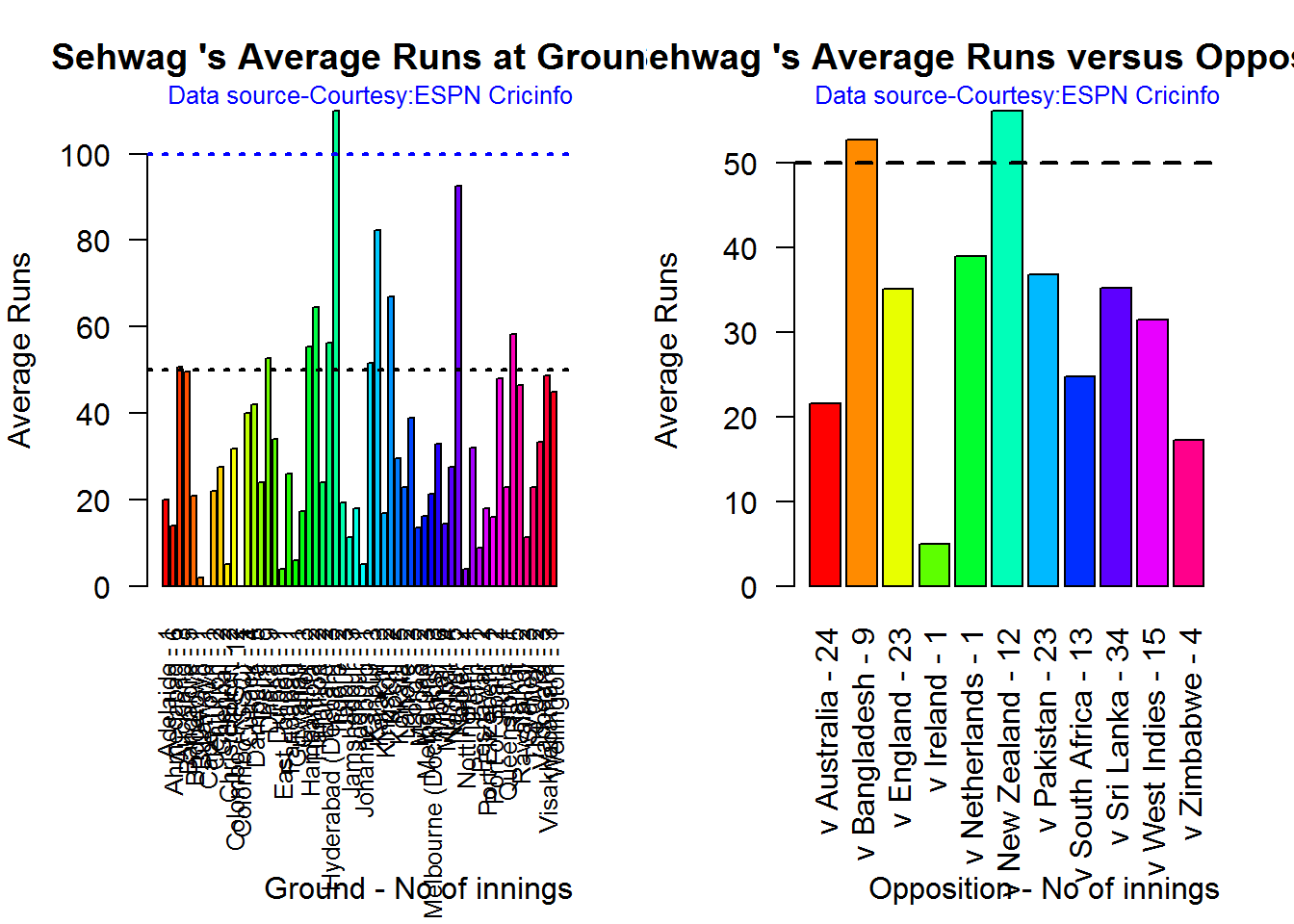
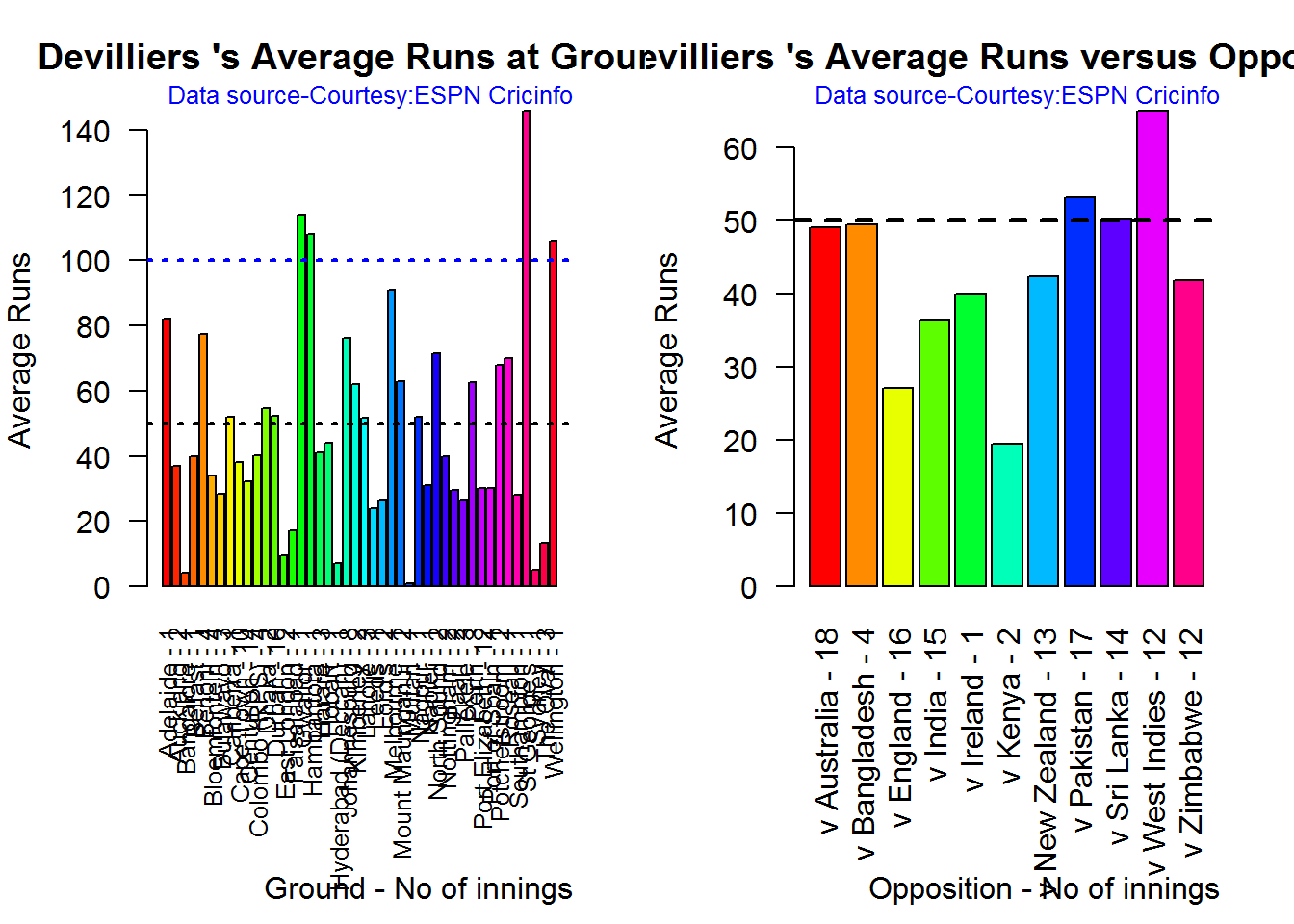
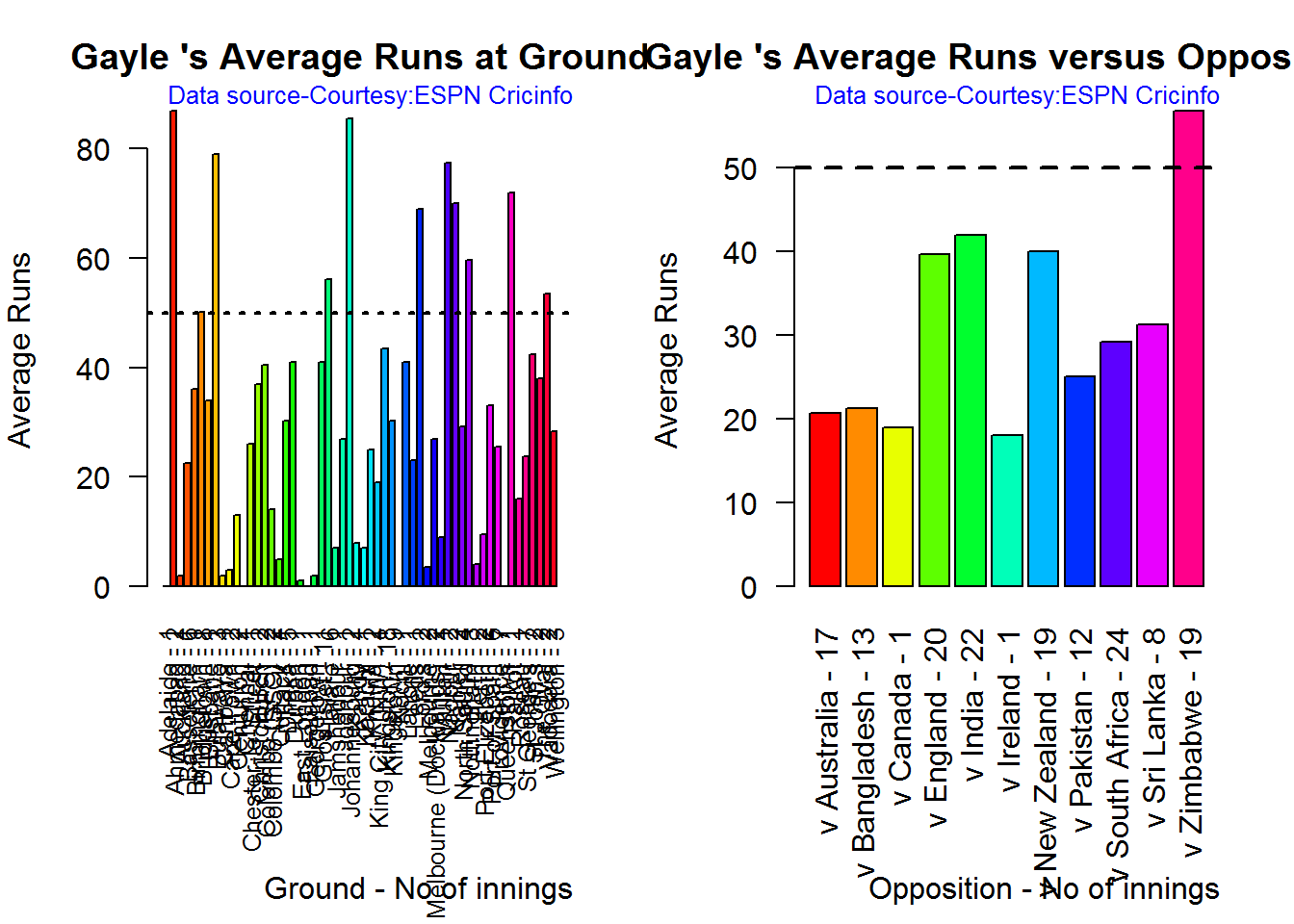
Average runs at ground and against opposition

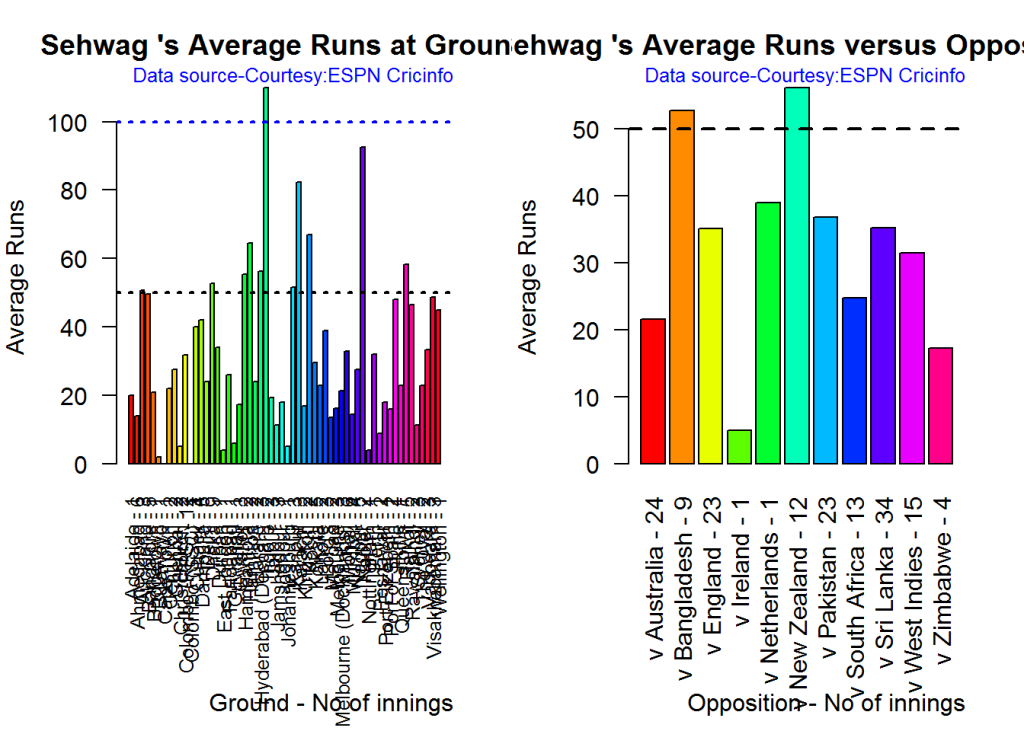
A. Virender Sehwag

par(mfrow=c(1,2))
par(mar=c(4,4,2,2))
batsmanAvgRunsGround("./sehwag.csv","Sehwag")
batsmanAvgRunsOpposition("./sehwag.csv","Sehwag")
avgrg-1-1

dev.off()
## null device 
##           1

B. AB Devilliers

par(mfrow=c(1,2))
par(mar=c(4,4,2,2))
batsmanAvgRunsGround("./devilliers.csv","Devilliers")
batsmanAvgRunsOpposition("./devilliers.csv","Devilliers")
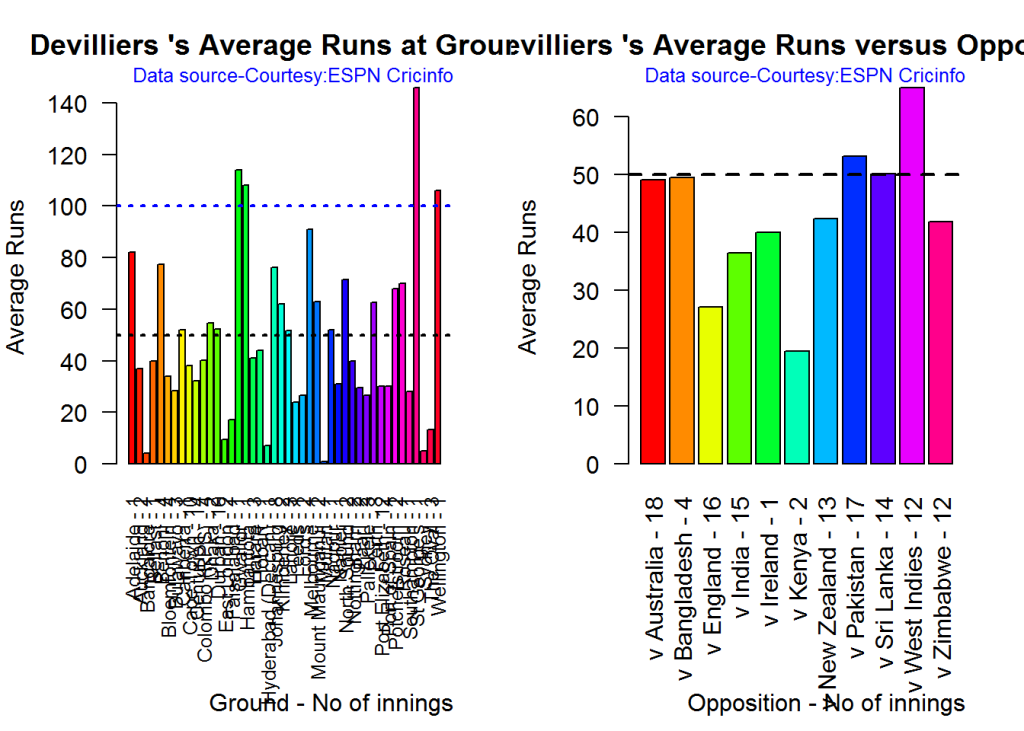
avgrg-2-1

dev.off()
## null device 
##           1

C. Chris Gayle

par(mfrow=c(1,2))
par(mar=c(4,4,2,2))
batsmanAvgRunsGround("./gayle.csv","Gayle")
batsmanAvgRunsOpposition("./gayle.csv","Gayle")
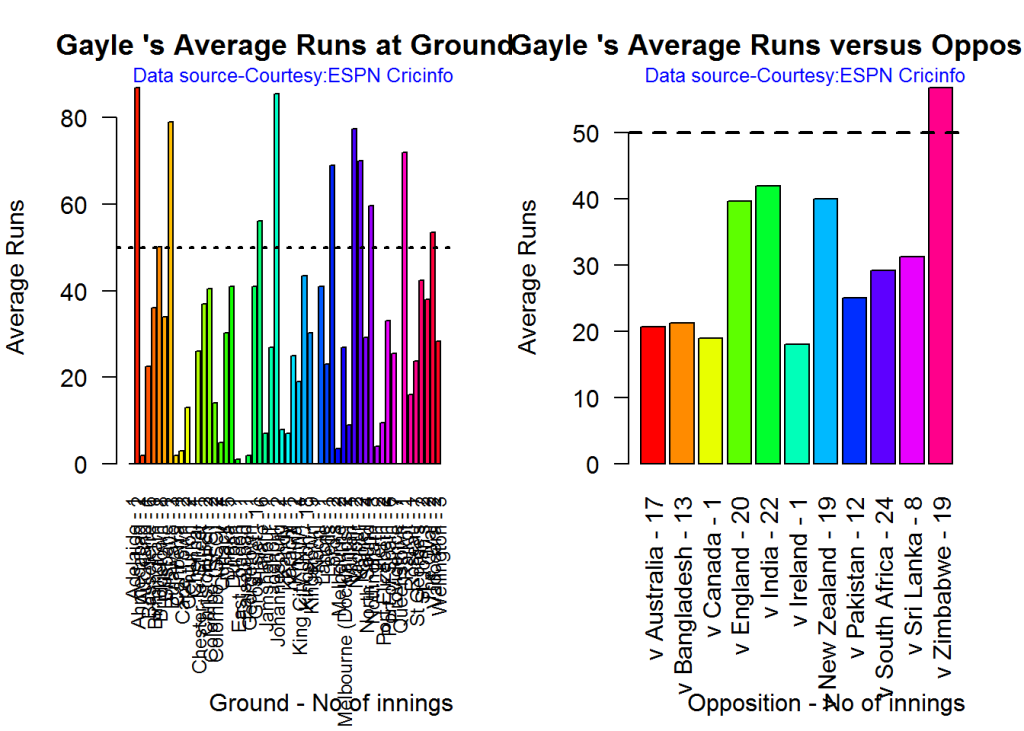
avgrg-3-1

dev.off()
## null device 
##           1

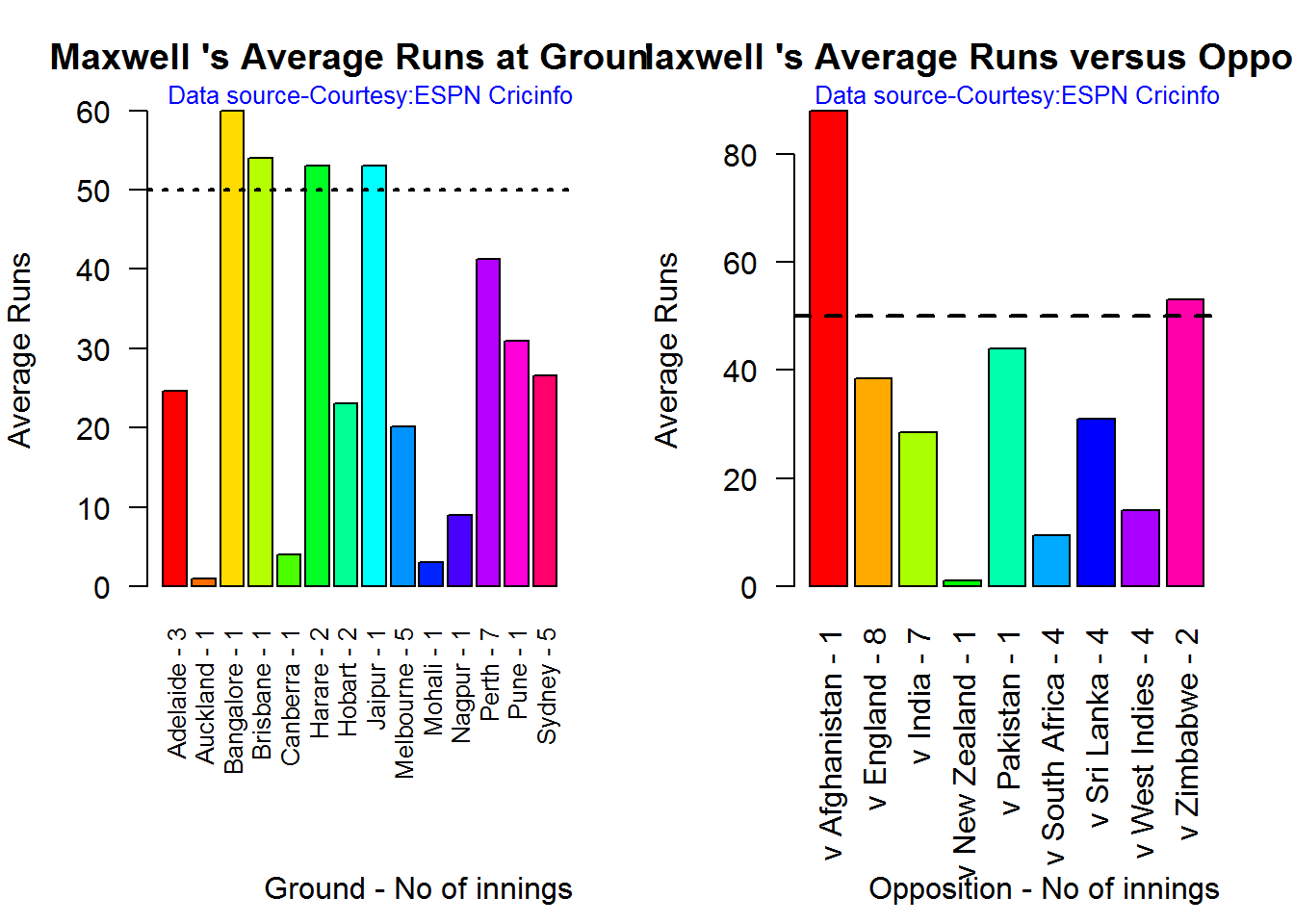
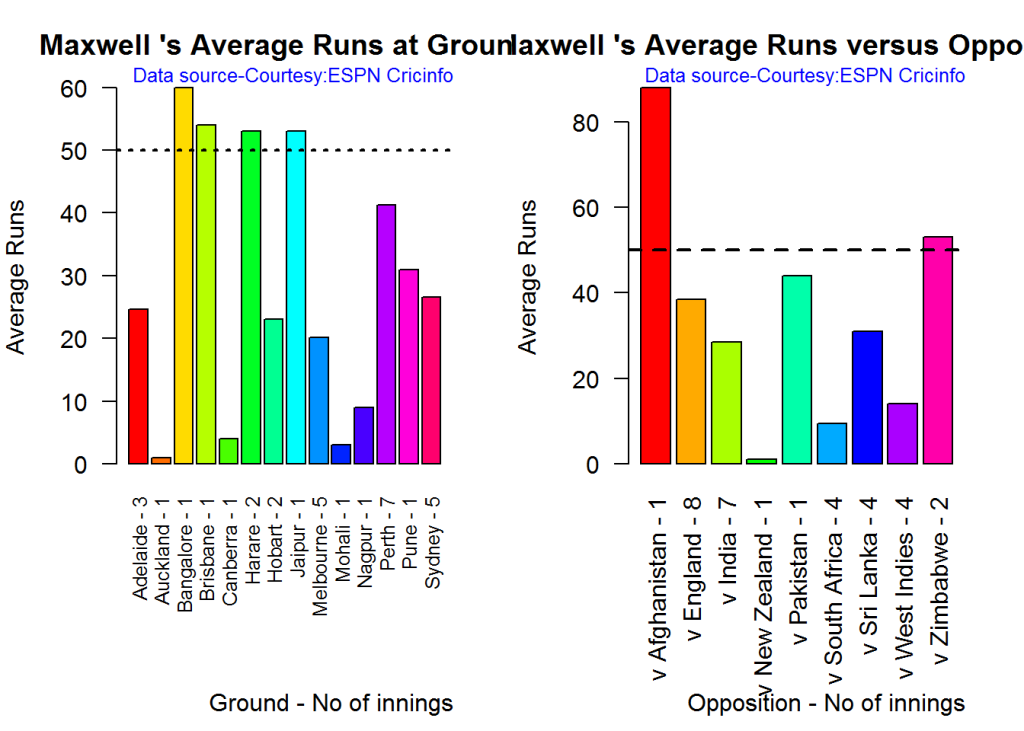
D. Glenn Maxwell

par(mfrow=c(1,2))
par(mar=c(4,4,2,2))
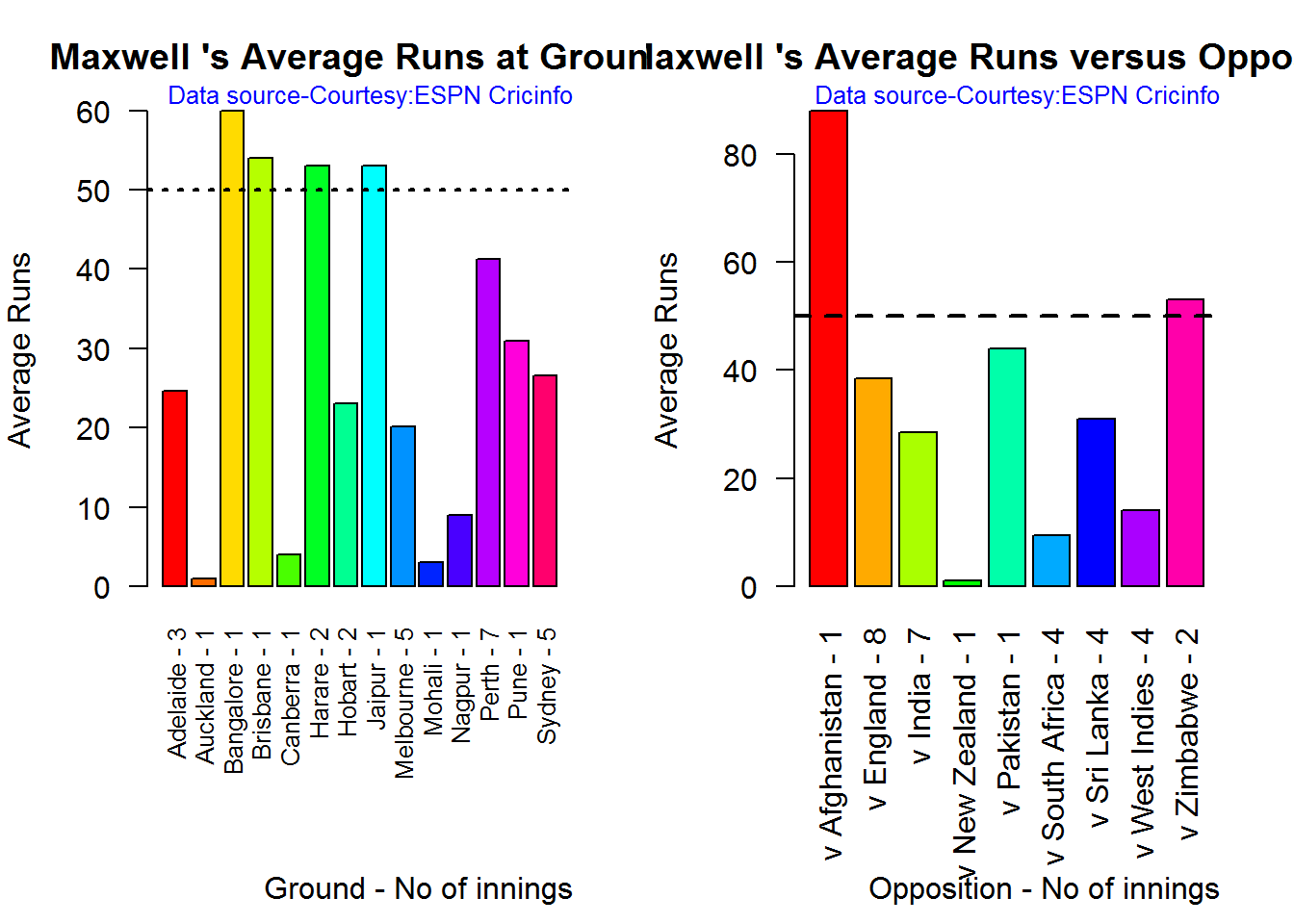
batsmanAvgRunsGround("./maxwell.csv","Maxwell")
batsmanAvgRunsOpposition("./maxwell.csv","Maxwell")
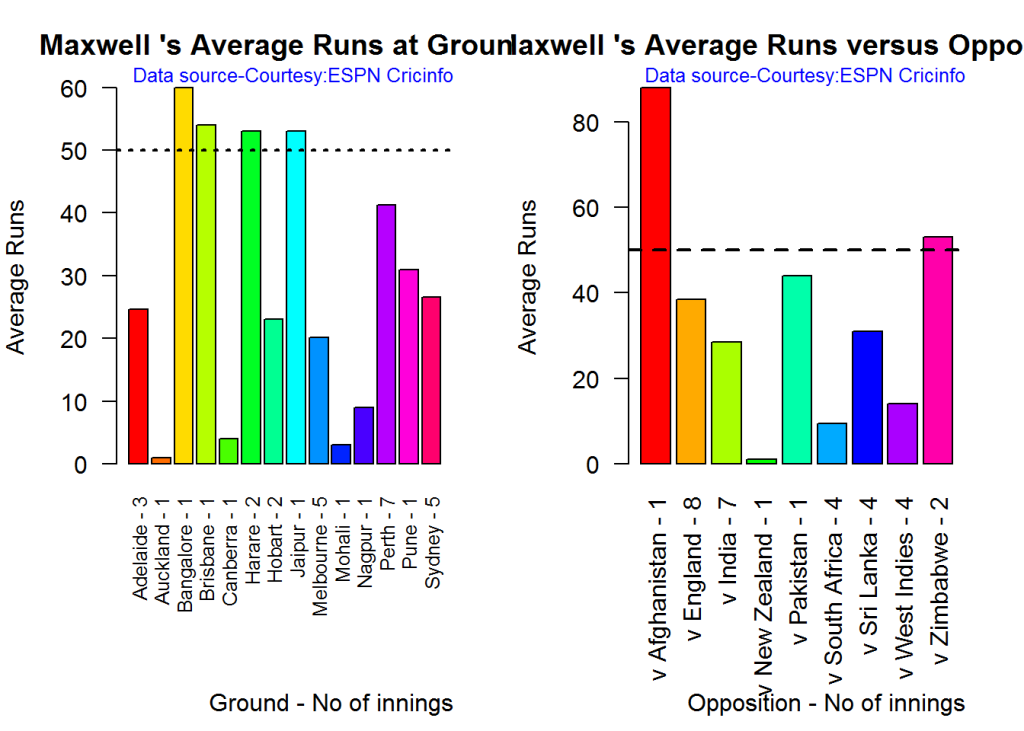
avgrg-4-1

dev.off()
## null device 
##           1

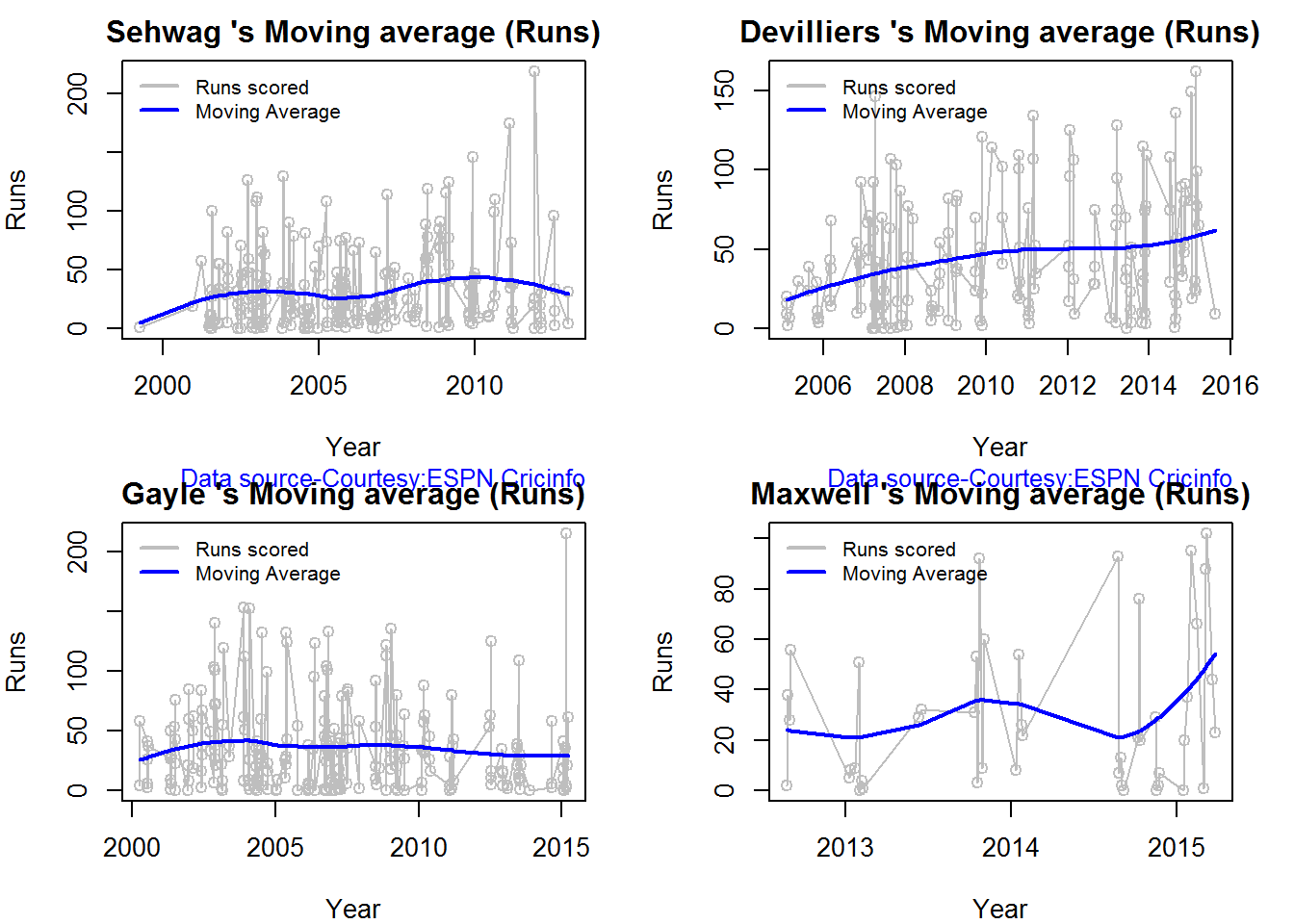
Moving Average of runs over career

The moving average for the 4 batsmen indicate the following

1. The moving average of Devilliers and Maxwell is on the way up.
2. Sehwag shows a slight downward trend from his 2nd peak in 2011
3. Gayle maintains a consistent 45 runs for the last few years

par(mfrow=c(2,2))
par(mar=c(4,4,2,2))
batsmanMovingAverage("./sehwag.csv","Sehwag")
batsmanMovingAverage("./devilliers.csv","Devilliers")
batsmanMovingAverage("./gayle.csv","Gayle")
batsmanMovingAverage("./maxwell.csv","Maxwell")
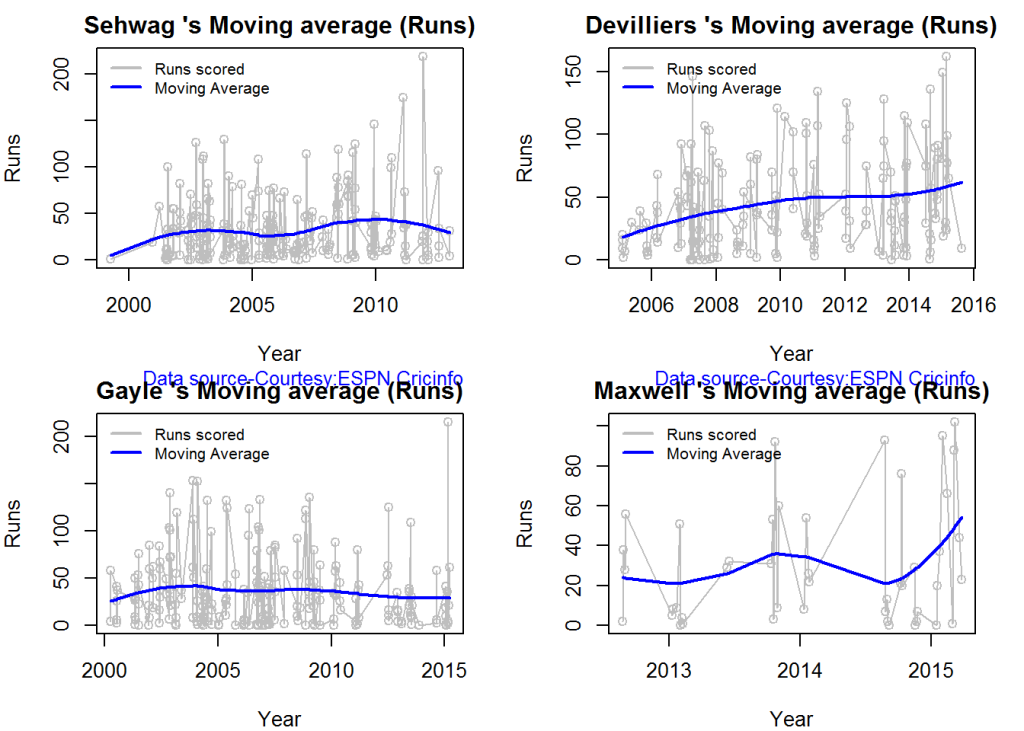
sdgm-ma-1

dev.off()
## null device 
##           1

Check batsmen in-form, out-of-form

  1. Maxwell, Devilliers, Sehwag are in-form. This is also evident from the moving average plot
  2. Gayle is out-of-form
checkBatsmanInForm("./sehwag.csv","Sehwag")
## *******************************************************************************************
## 
## Population size: 143  Mean of population: 33.76 
## Sample size: 16  Mean of sample: 37.44 SD of sample: 55.15 
## 
## Null hypothesis H0 : Sehwag 's sample average is within 95% confidence interval 
##         of population average
## Alternative hypothesis Ha : Sehwag 's sample average is below the 95% confidence
##         interval of population average
## 
## [1] "Sehwag 's Form Status: In-Form because the p value: 0.603525  is greater than alpha=  0.05"
## *******************************************************************************************
checkBatsmanInForm("./devilliers.csv","Devilliers")
## *******************************************************************************************
## 
## Population size: 111  Mean of population: 43.5 
## Sample size: 13  Mean of sample: 57.62 SD of sample: 40.69 
## 
## Null hypothesis H0 : Devilliers 's sample average is within 95% confidence interval 
##         of population average
## Alternative hypothesis Ha : Devilliers 's sample average is below the 95% confidence
##         interval of population average
## 
## [1] "Devilliers 's Form Status: In-Form because the p value: 0.883541  is greater than alpha=  0.05"
## *******************************************************************************************
checkBatsmanInForm("./gayle.csv","Gayle")
## *******************************************************************************************
## 
## Population size: 140  Mean of population: 37.1 
## Sample size: 16  Mean of sample: 17.25 SD of sample: 20.25 
## 
## Null hypothesis H0 : Gayle 's sample average is within 95% confidence interval 
##         of population average
## Alternative hypothesis Ha : Gayle 's sample average is below the 95% confidence
##         interval of population average
## 
## [1] "Gayle 's Form Status: Out-of-Form because the p value: 0.000609  is less than alpha=  0.05"
## *******************************************************************************************
checkBatsmanInForm("./maxwell.csv","Maxwell")
## *******************************************************************************************
## 
## Population size: 28  Mean of population: 25.25 
## Sample size: 4  Mean of sample: 64.25 SD of sample: 36.97 
## 
## Null hypothesis H0 : Maxwell 's sample average is within 95% confidence interval 
##         of population average
## Alternative hypothesis Ha : Maxwell 's sample average is below the 95% confidence
##         interval of population average
## 
## [1] "Maxwell 's Form Status: In-Form because the p value: 0.948744  is greater than alpha=  0.05"
## *******************************************************************************************

Analysis of bowlers

  1. Mitchell Johnson (Aus) – Innings-150, Wickets – 239, Econ Rate : 4.83
  2. Lasith Malinga (SL)- Innings-182, Wickets – 287, Econ Rate : 5.26
  3. Dale Steyn (SA)- Innings-103, Wickets – 162, Econ Rate : 4.81
  4. Tim Southee (NZ)- Innings-96, Wickets – 135, Econ Rate : 5.33

Malinga has the highest number of innings and wickets followed closely by Mitchell. Steyn and Southee have relatively fewer innings.

To get the bowler’s data use

malinga <- getPlayerDataOD(49758,dir=".",file="malinga.csv",type="bowling")

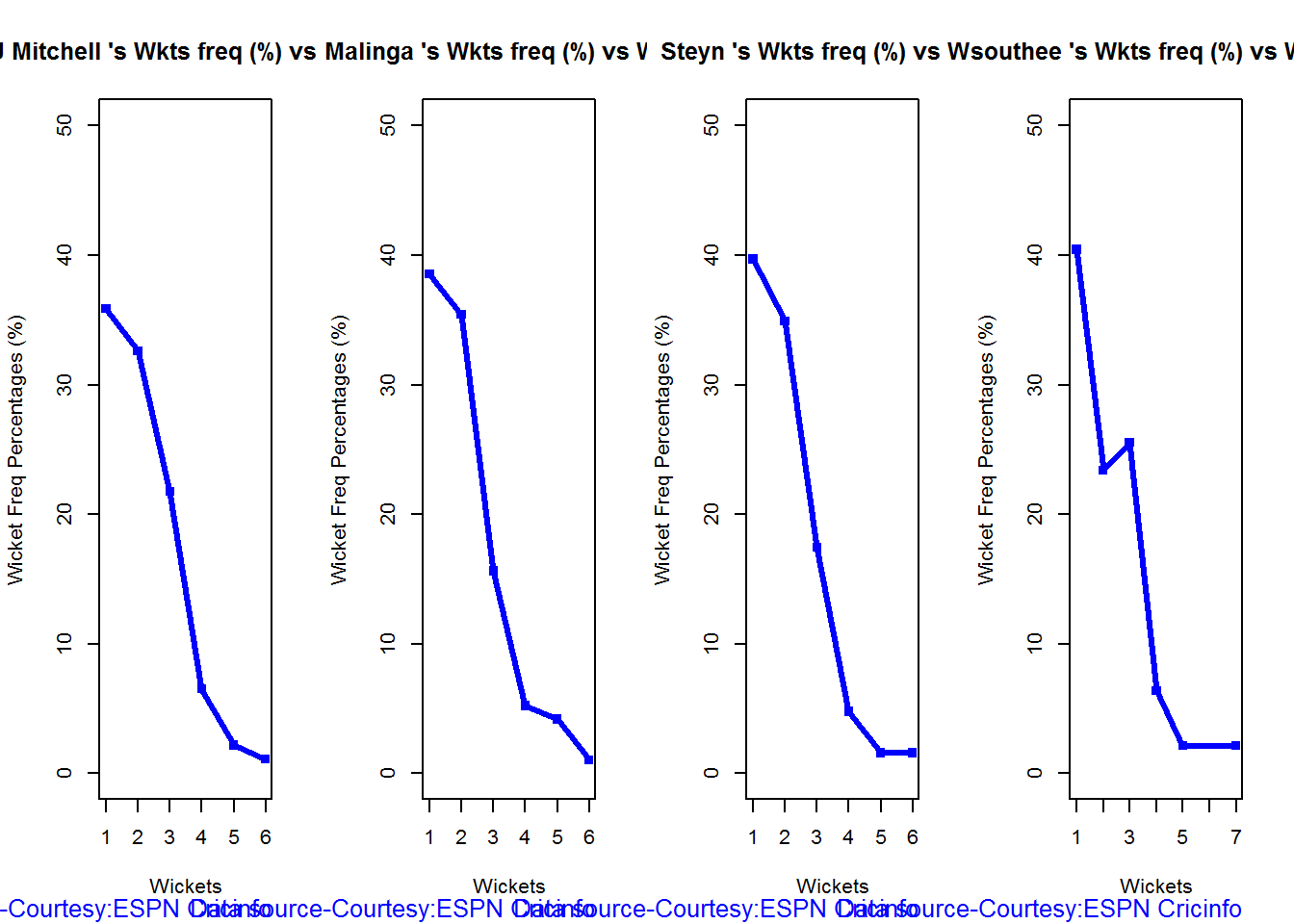
Wicket Frequency percentage

This plot gives the percentage of wickets for each wickets (1,2,3…etc)

par(mfrow=c(1,4))
par(mar=c(4,4,2,2))
bowlerWktsFreqPercent("./mitchell.csv","J Mitchell")
bowlerWktsFreqPercent("./malinga.csv","Malinga")
bowlerWktsFreqPercent("./steyn.csv","Steyn")
bowlerWktsFreqPercent("./southee.csv","southee")
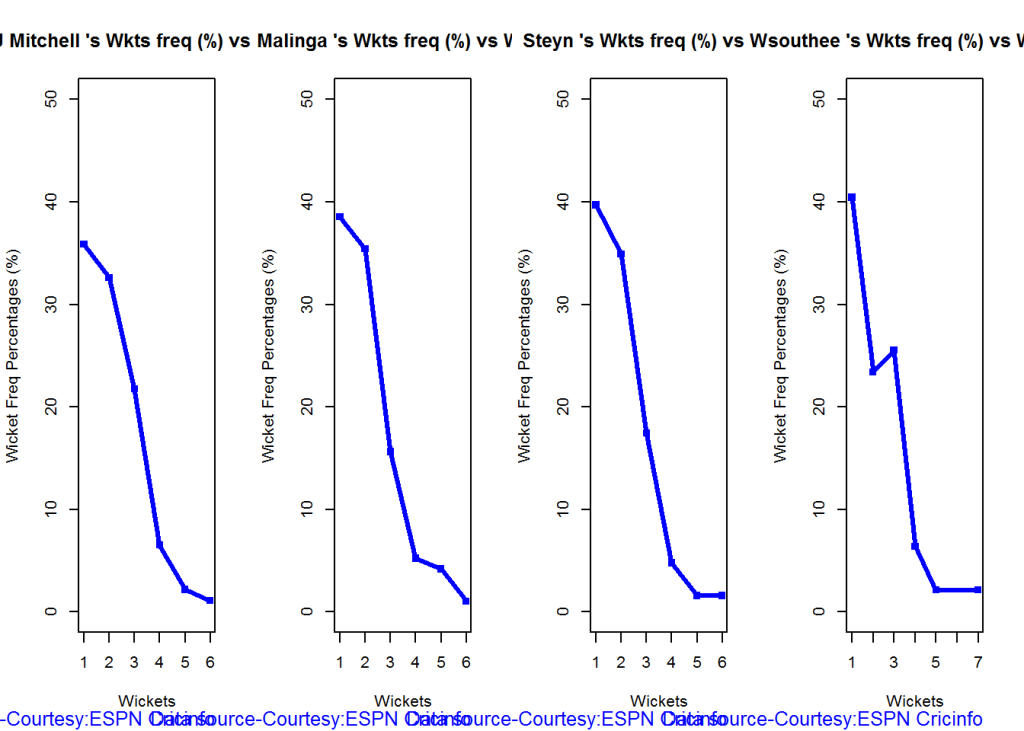
relBowlFP-1

dev.off()
## null device 
##           1

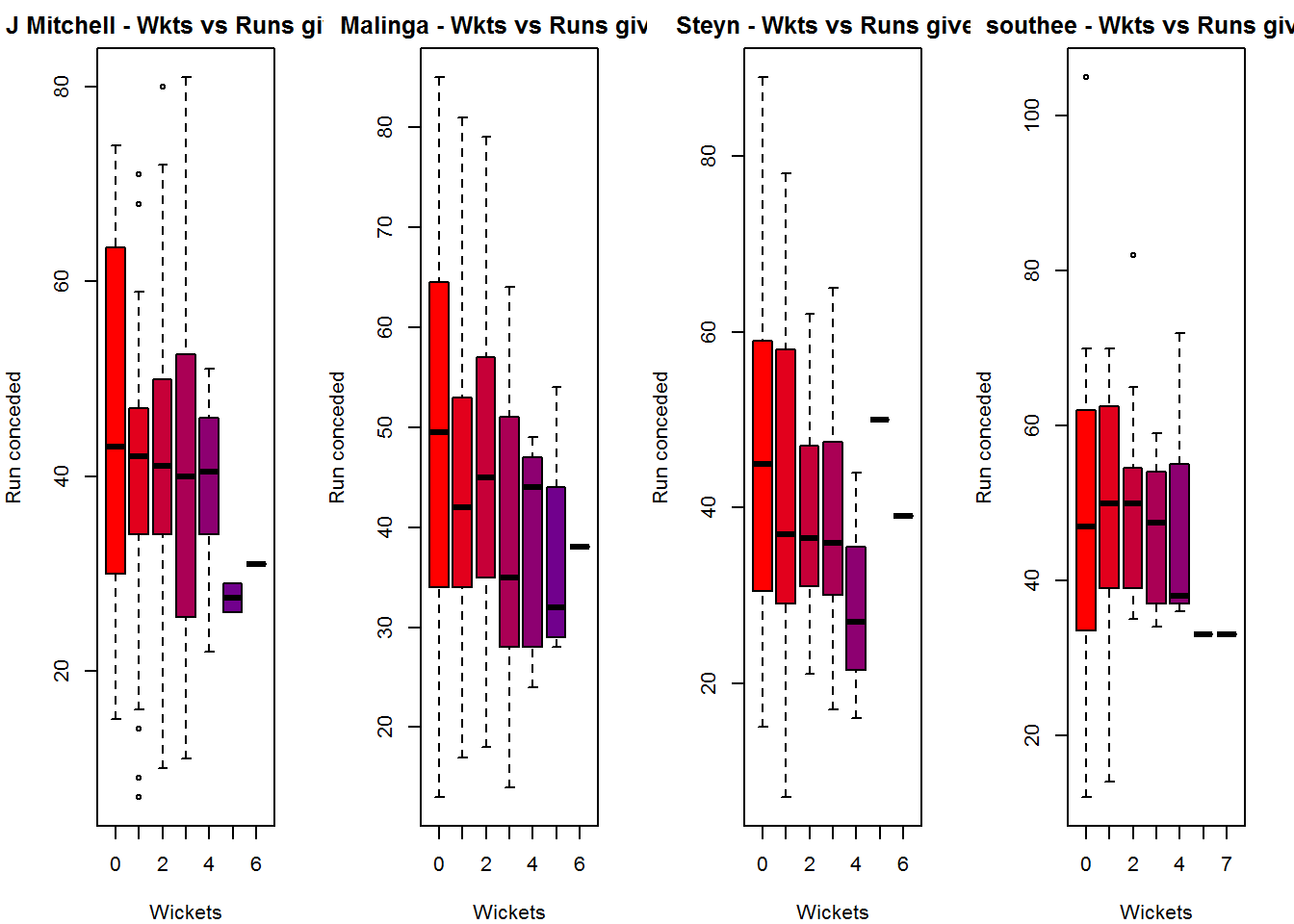
Wickets Runs plot

The plot below gives a boxplot of the runs ranges for each of the wickets taken by the bowlers. M Johnson and Steyn are more economical than Malinga and Southee corroborating the figures above

par(mfrow=c(1,4))
par(mar=c(4,4,2,2))

bowlerWktsRunsPlot("./mitchell.csv","J Mitchell")
bowlerWktsRunsPlot("./malinga.csv","Malinga")
bowlerWktsRunsPlot("./steyn.csv","Steyn")
bowlerWktsRunsPlot("./southee.csv","southee")
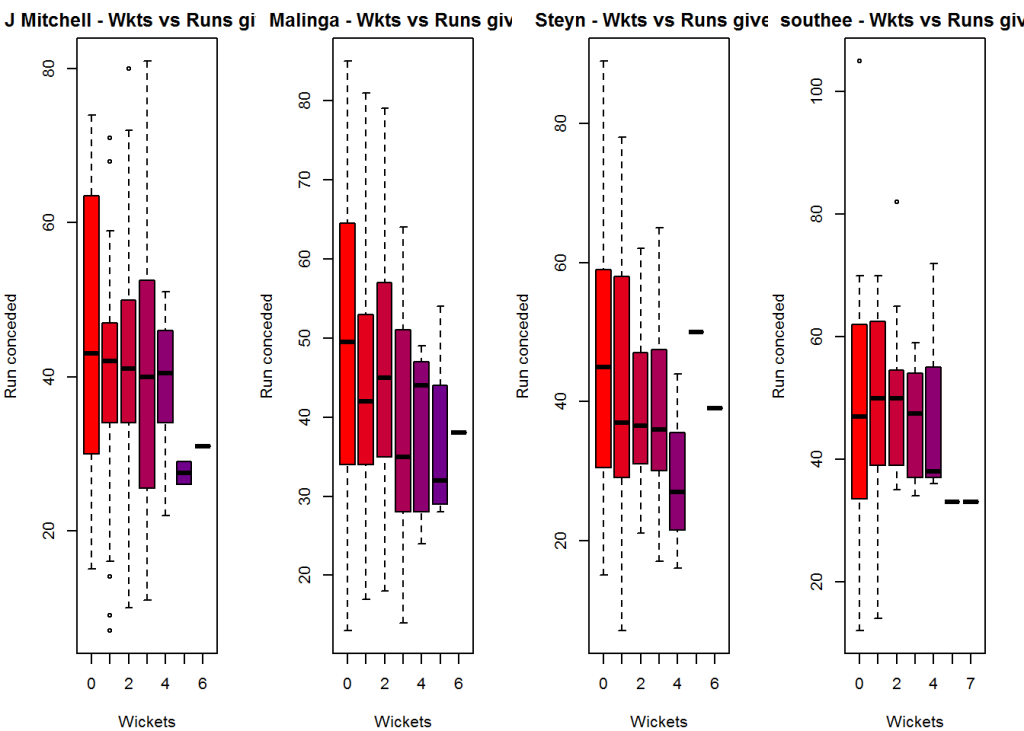
wktsrun-1

dev.off()
## null device 
##           1

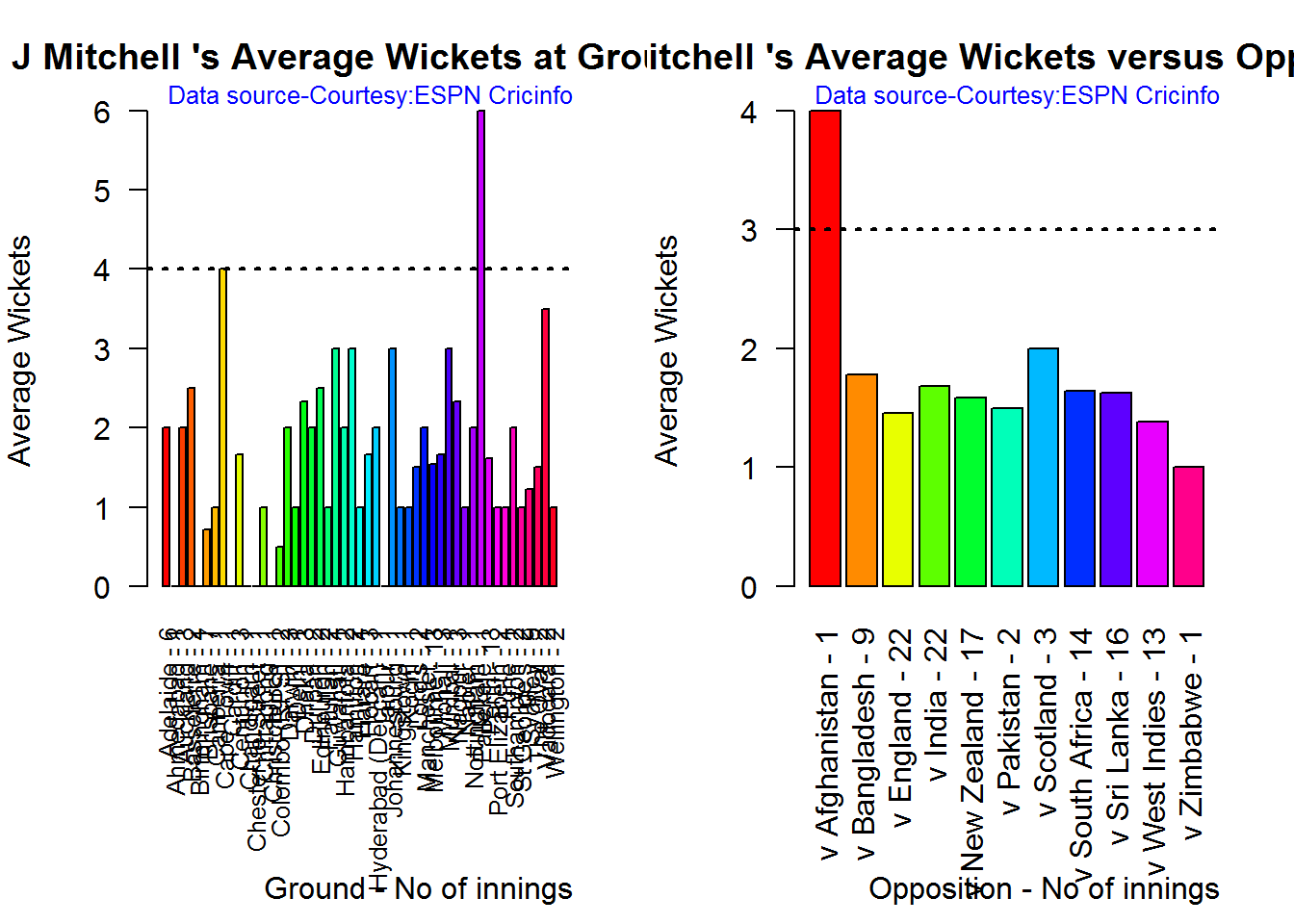
Average wickets in different grounds and opposition

A. Mitchell Johnson

par(mfrow=c(1,2))
par(mar=c(4,4,2,2))
bowlerAvgWktsGround("./mitchell.csv","J Mitchell")
bowlerAvgWktsOpposition("./mitchell.csv","J Mitchell")
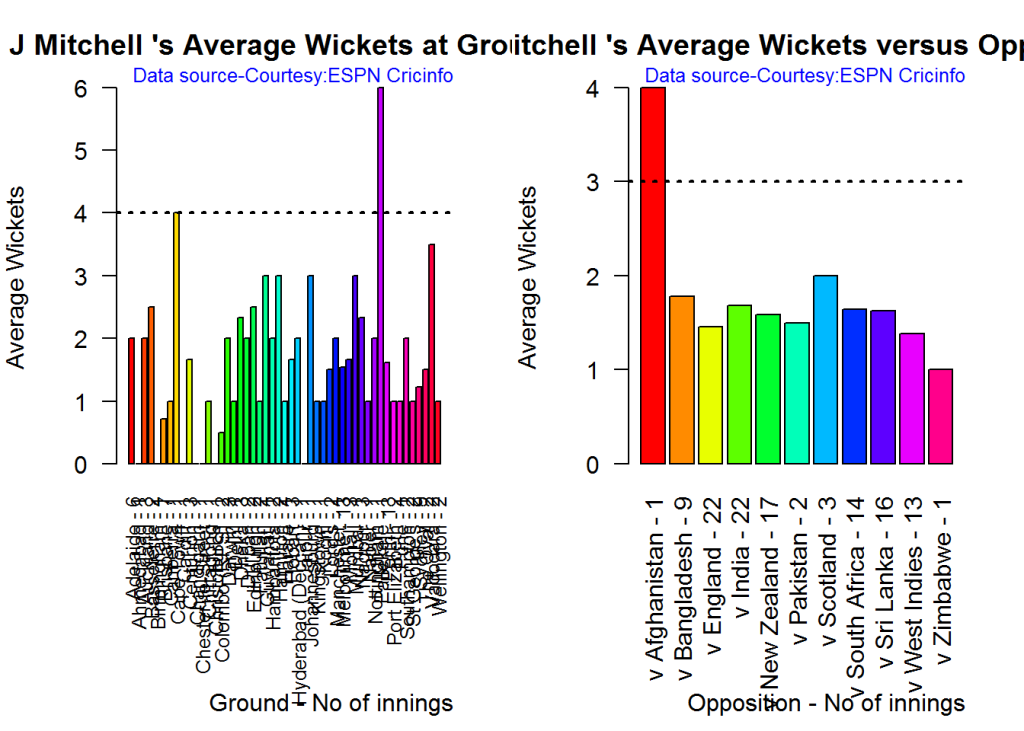
gr-1-1

dev.off()
## null device 
##           1

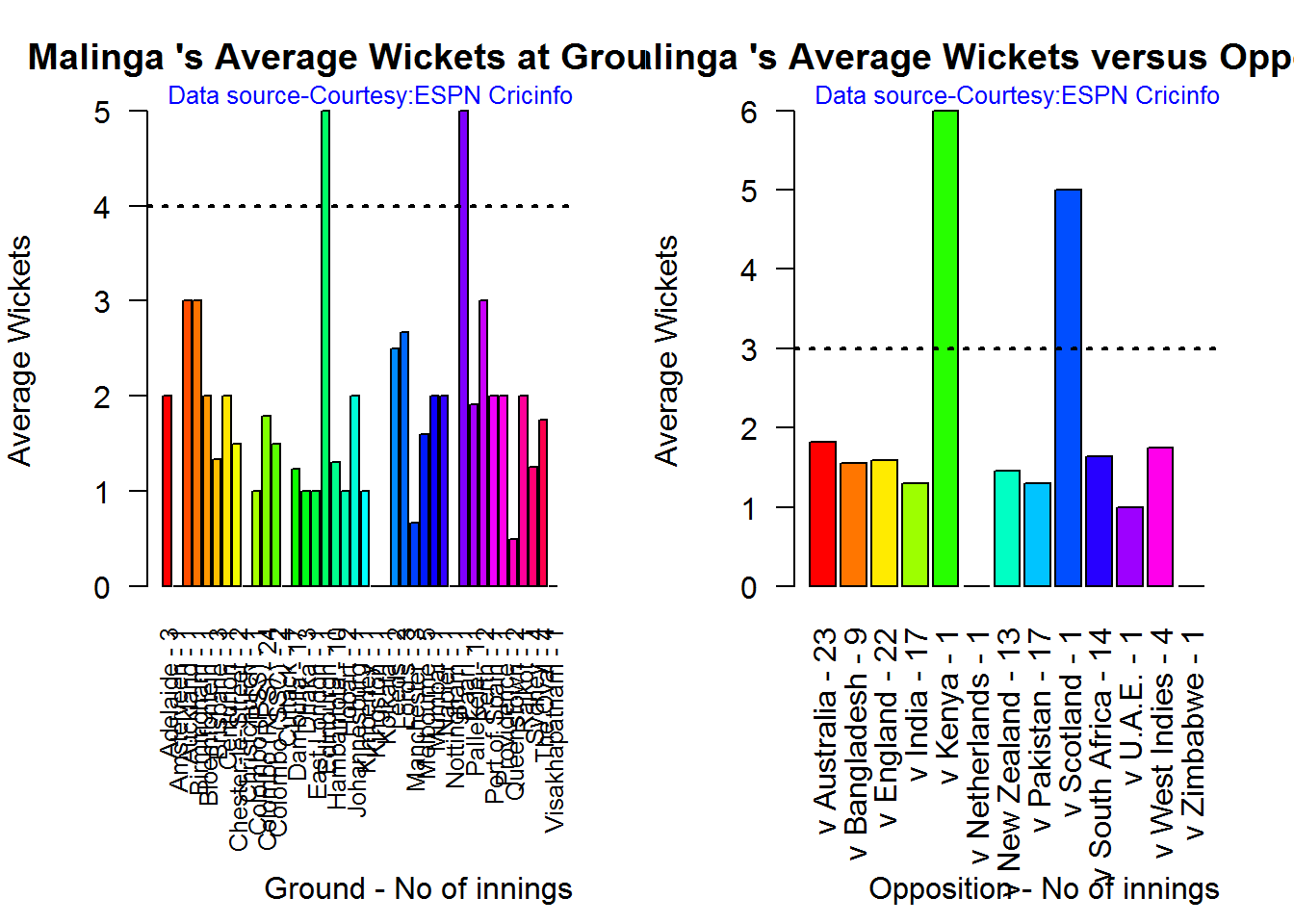
B. Lasith Malinga

par(mfrow=c(1,2))
par(mar=c(4,4,2,2))
bowlerAvgWktsGround("./malinga.csv","Malinga")
bowlerAvgWktsOpposition("./malinga.csv","Malinga")
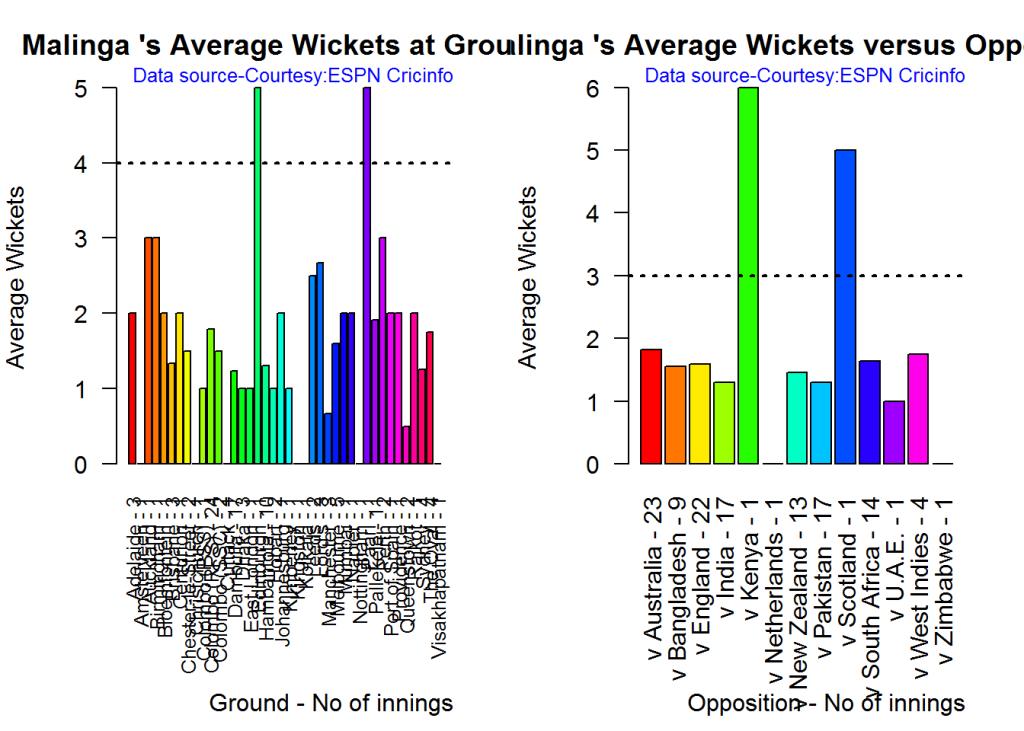
gr-2-1

dev.off()
## null device 
##           1

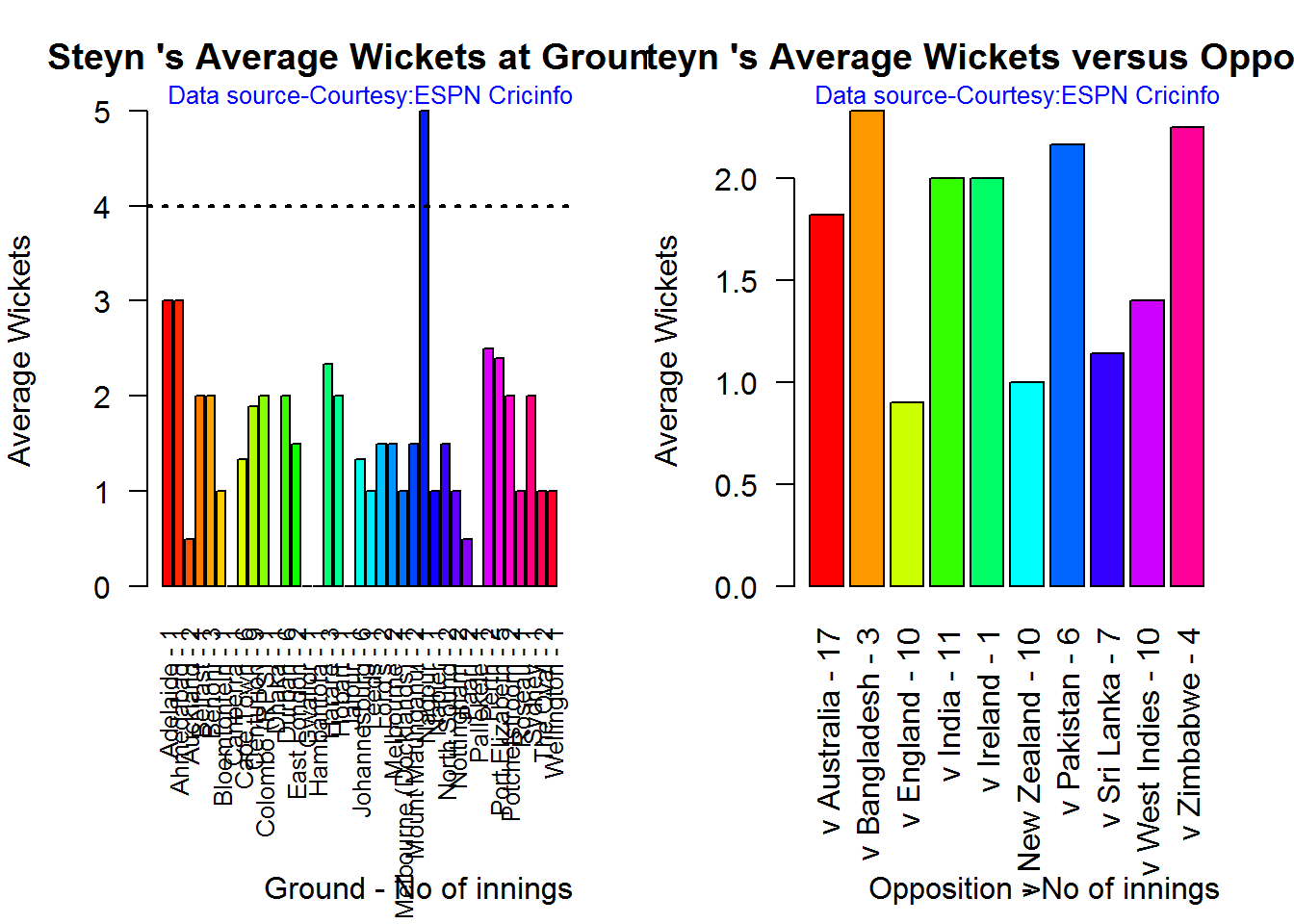
C. Dale Steyn

par(mfrow=c(1,2))
par(mar=c(4,4,2,2))
bowlerAvgWktsGround("./steyn.csv","Steyn")
bowlerAvgWktsOpposition("./steyn.csv","Steyn")

gr-3-1

dev.off()
## null device 
##           1

D. Tim Southee

par(mfrow=c(1,2))
par(mar=c(4,4,2,2))
bowlerAvgWktsGround("./southee.csv","southee")
bowlerAvgWktsOpposition("./southee.csv","southee")
avgrg-4-1

dev.off()
## null device 
##           1

Relative bowling performance

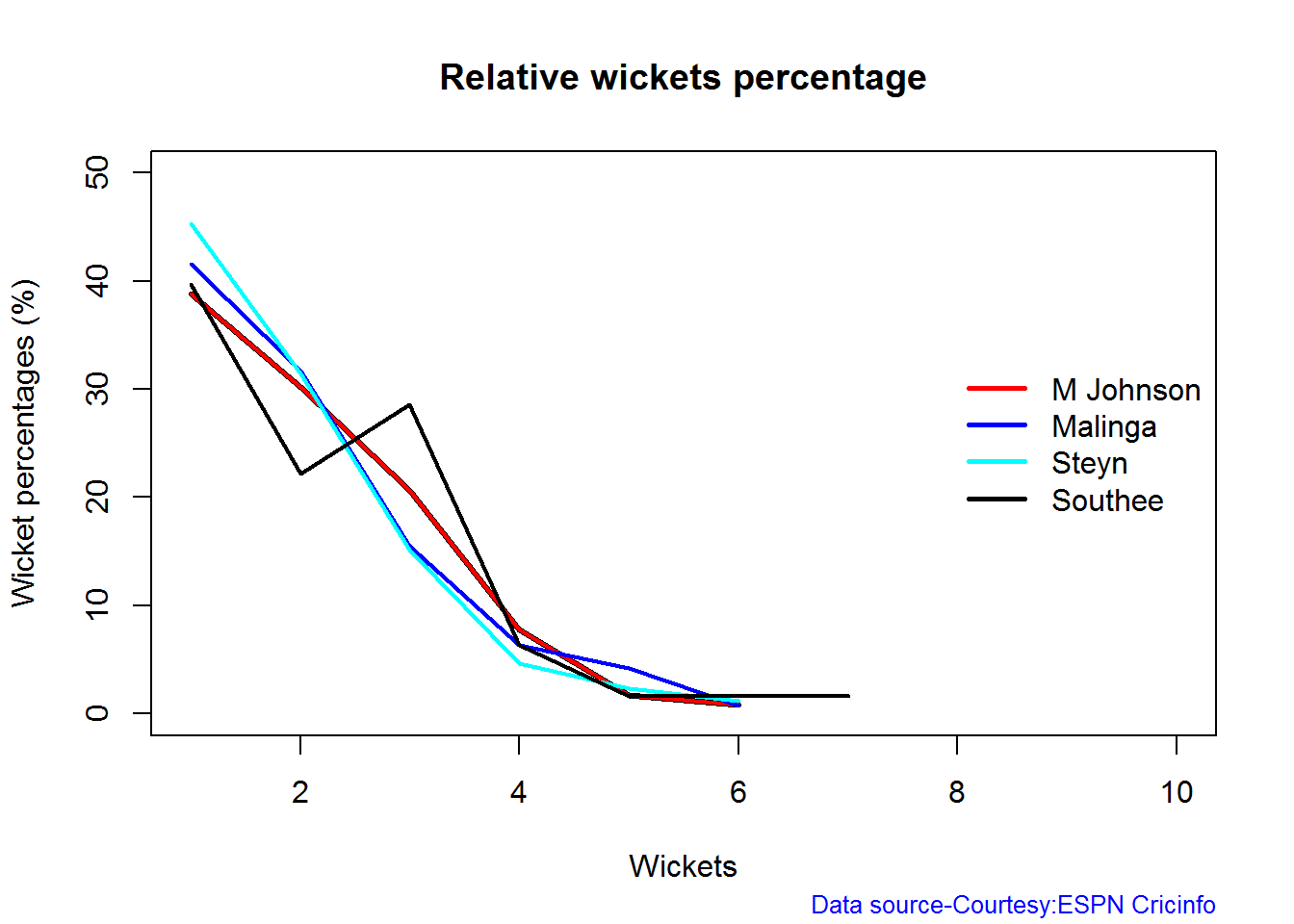
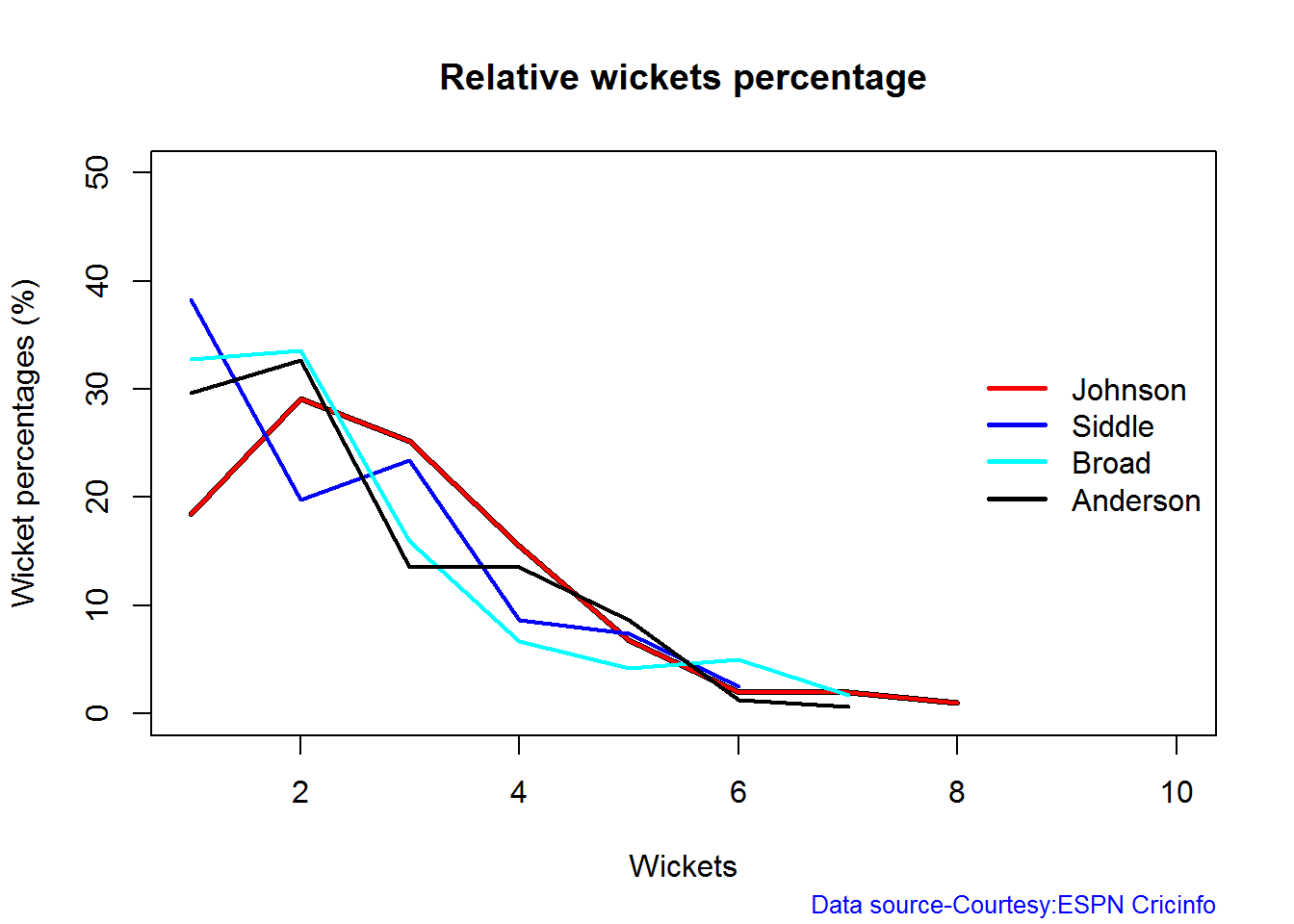
The plot below shows that Mitchell Johnson and Southee have more wickets in 3-4 wickets range while Steyn and Malinga in 1-2 wicket range

frames <- list("./mitchell.csv","./malinga.csv","steyn.csv","southee.csv")
names <- list("M Johnson","Malinga","Steyn","Southee")
relativeBowlingPerf(frames,names)

relBowlPerf-1

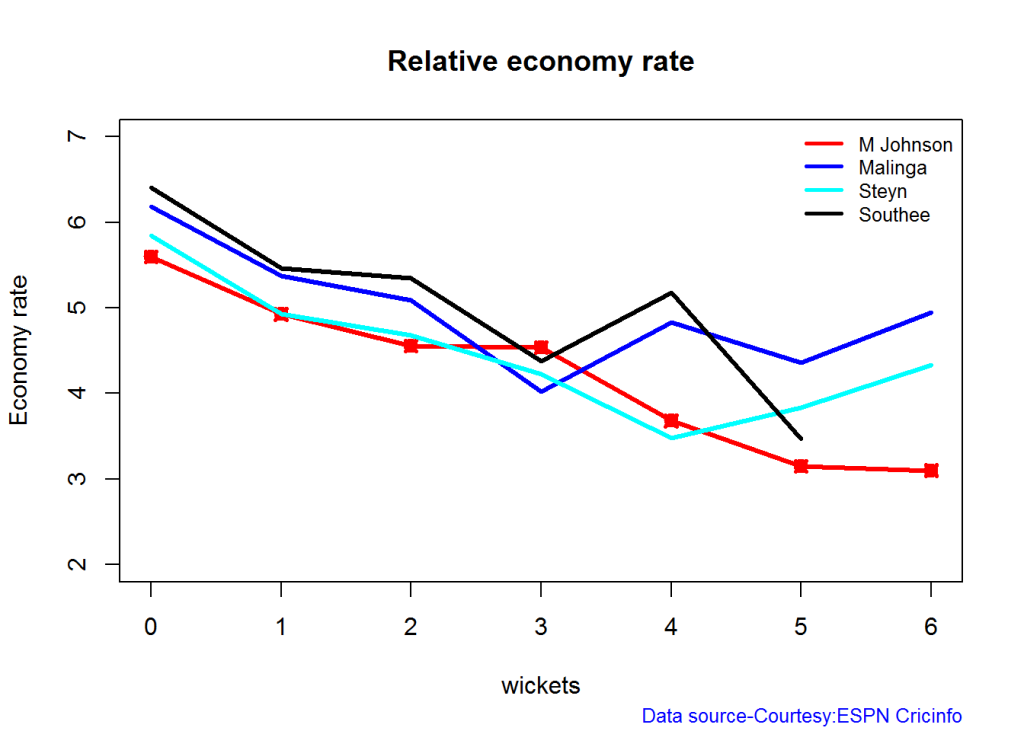
Relative Economy Rate against wickets taken

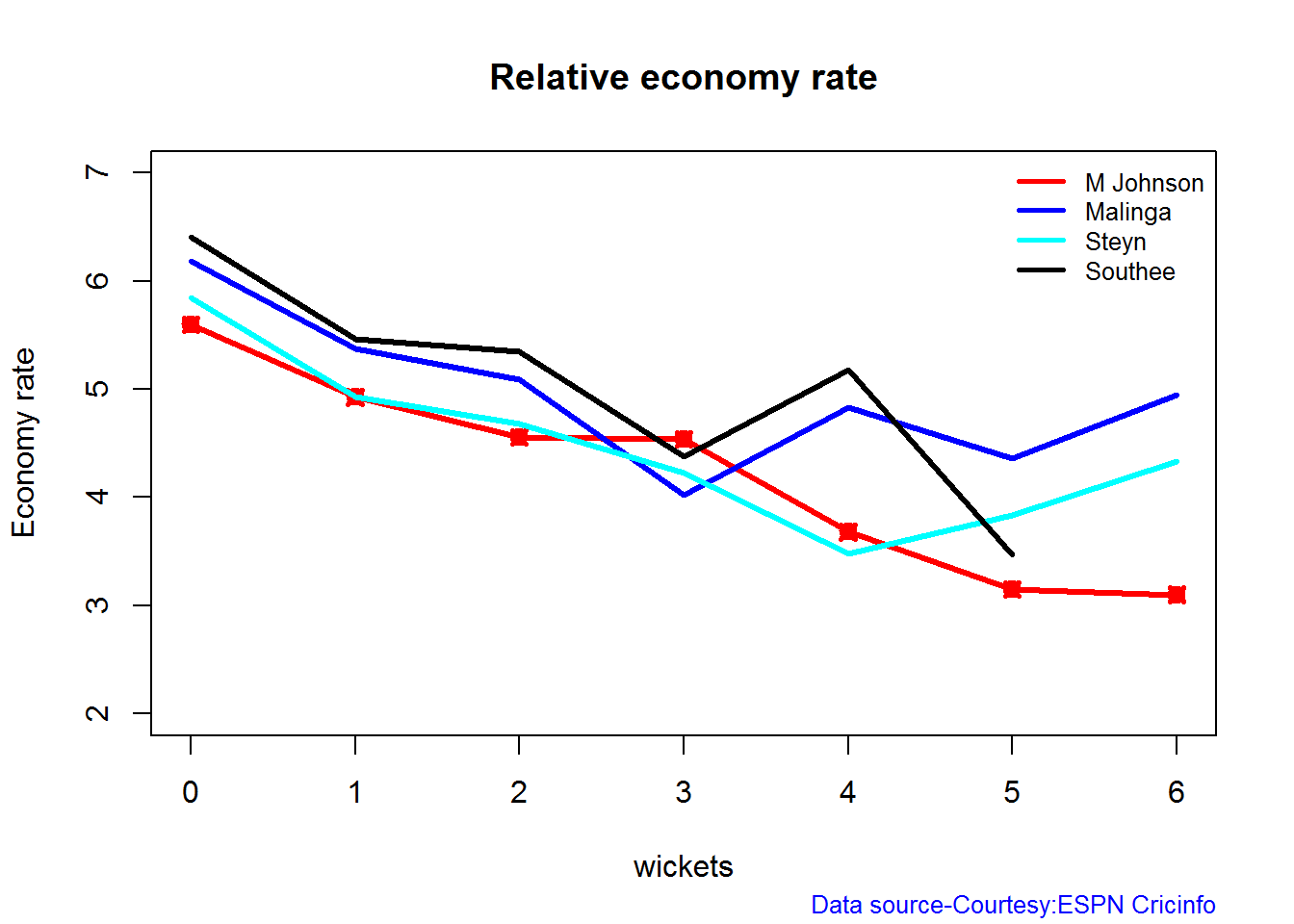
Steyn had the best economy rate followed by M Johnson. Malinga and Southee have a poorer economy rate

frames <- list("./mitchell.csv","./malinga.csv","steyn.csv","southee.csv")
names <- list("M Johnson","Malinga","Steyn","Southee")
relativeBowlingERODTT(frames,names)
relBowlER-1

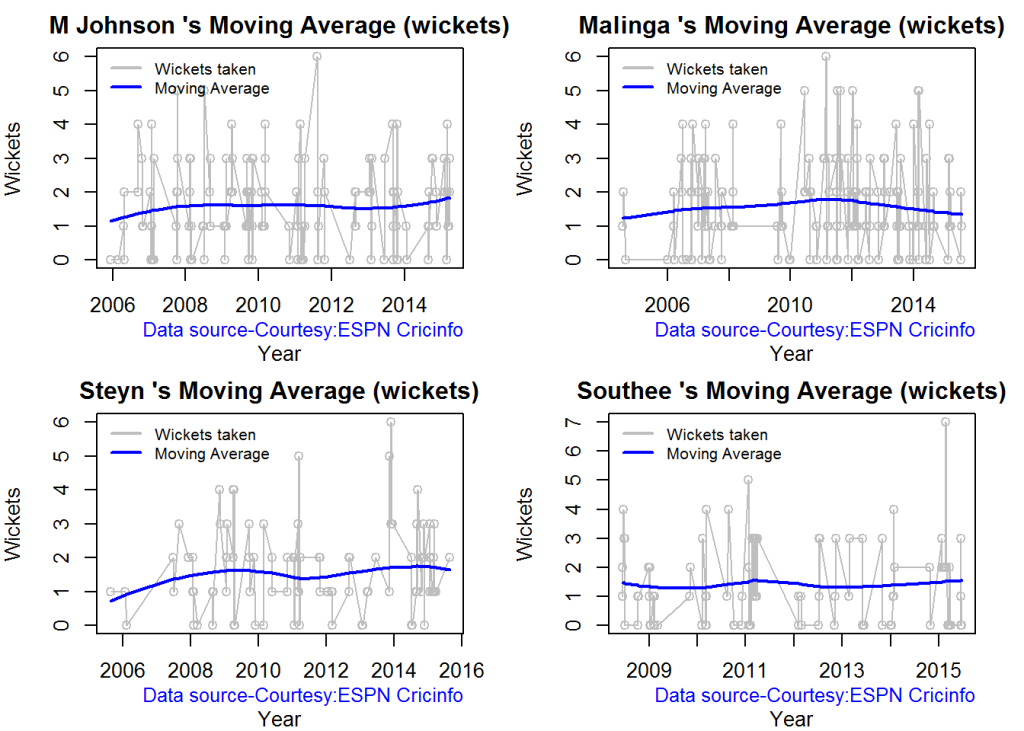
Moving average of wickets over career

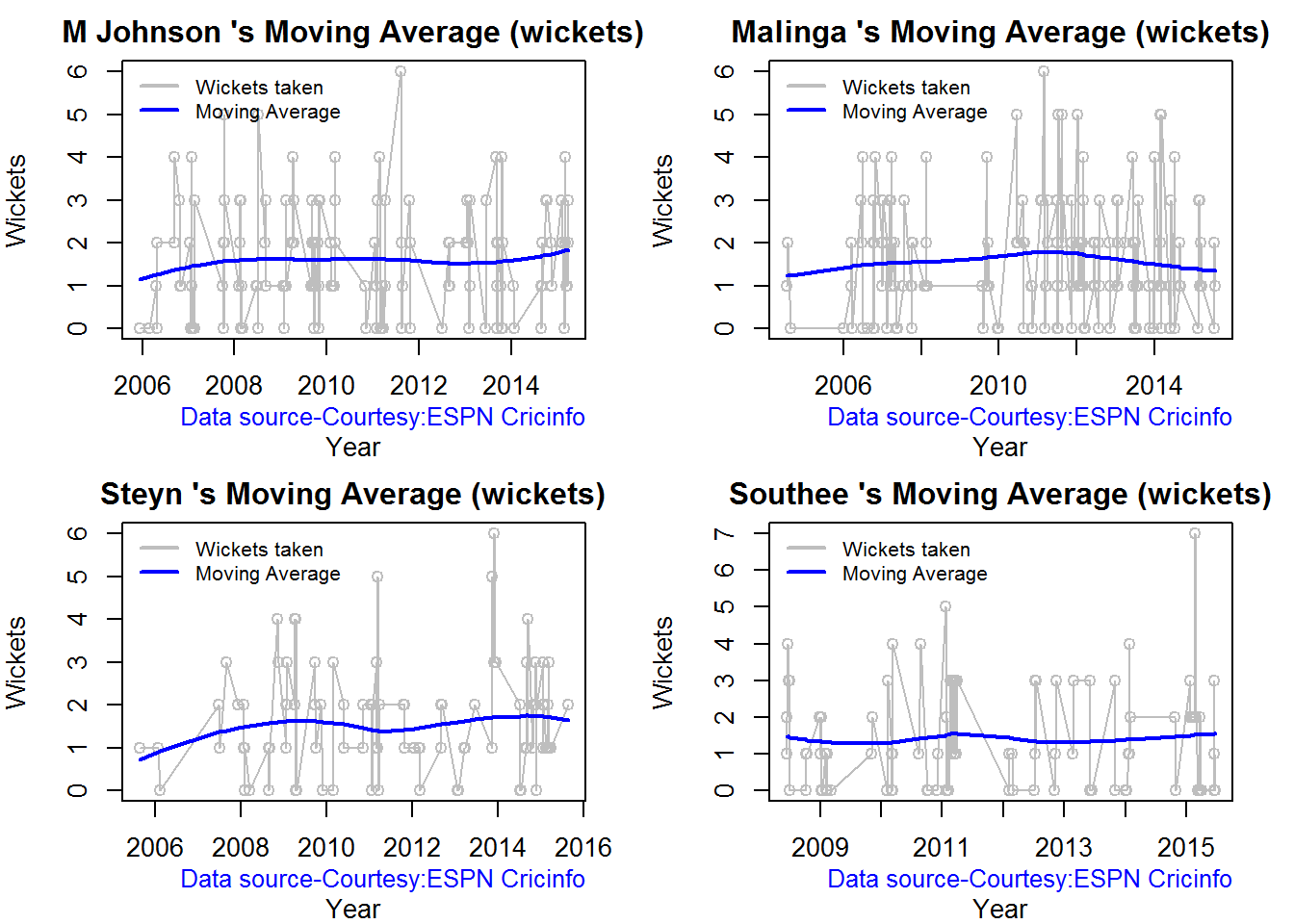
Johnson and Steyn career vs wicket graph is on the up-swing. Southee is maintaining a reasonable record while Malinga shows a decline in ODI performance

par(mfrow=c(2,2))
par(mar=c(4,4,2,2))
bowlerMovingAverage("./mitchell.csv","M Johnson")
bowlerMovingAverage("./malinga.csv","Malinga")
bowlerMovingAverage("./steyn.csv","Steyn")
bowlerMovingAverage("./southee.csv","Southee")
jmss-bowlma-1

dev.off()
## null device 
##           1

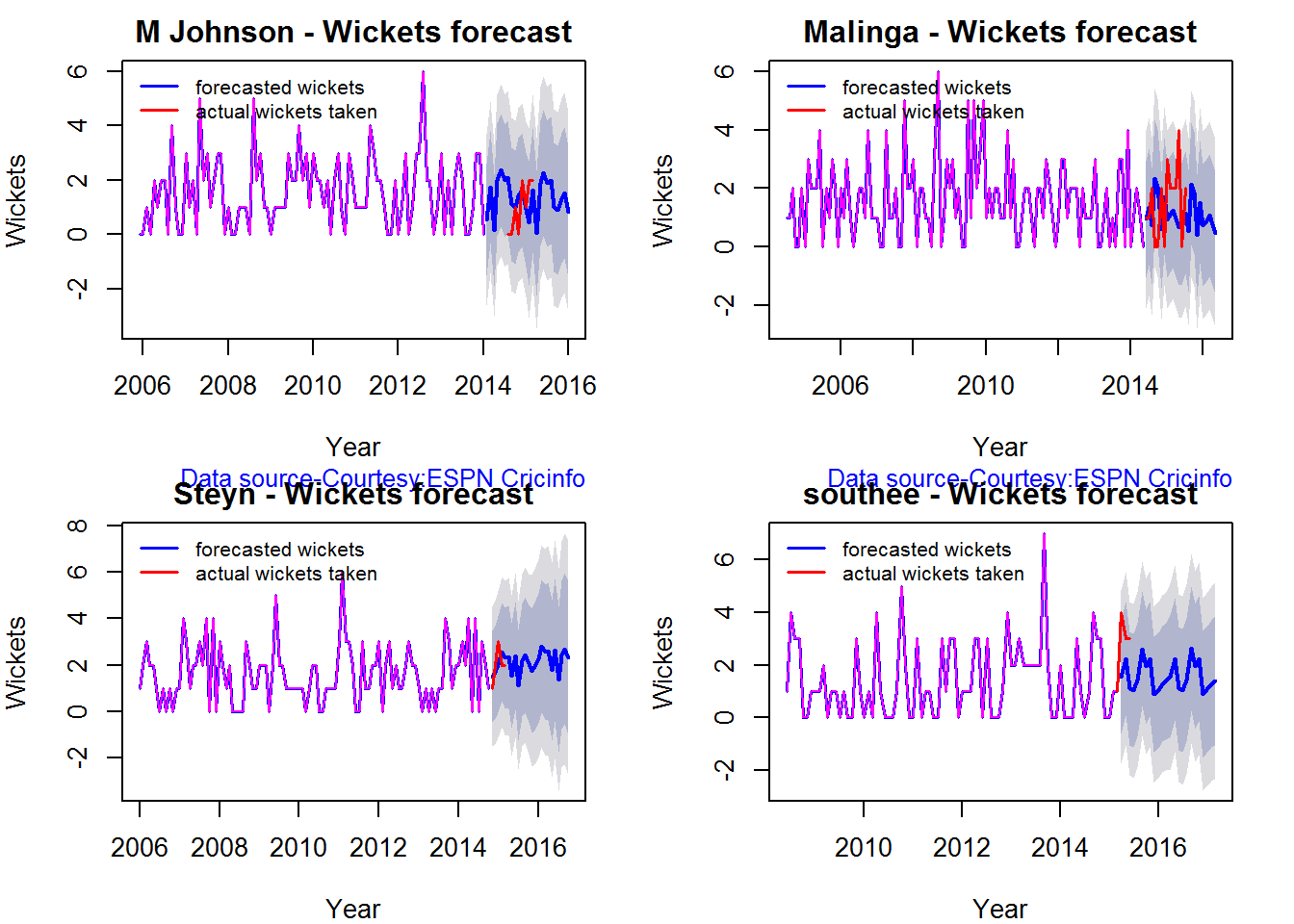
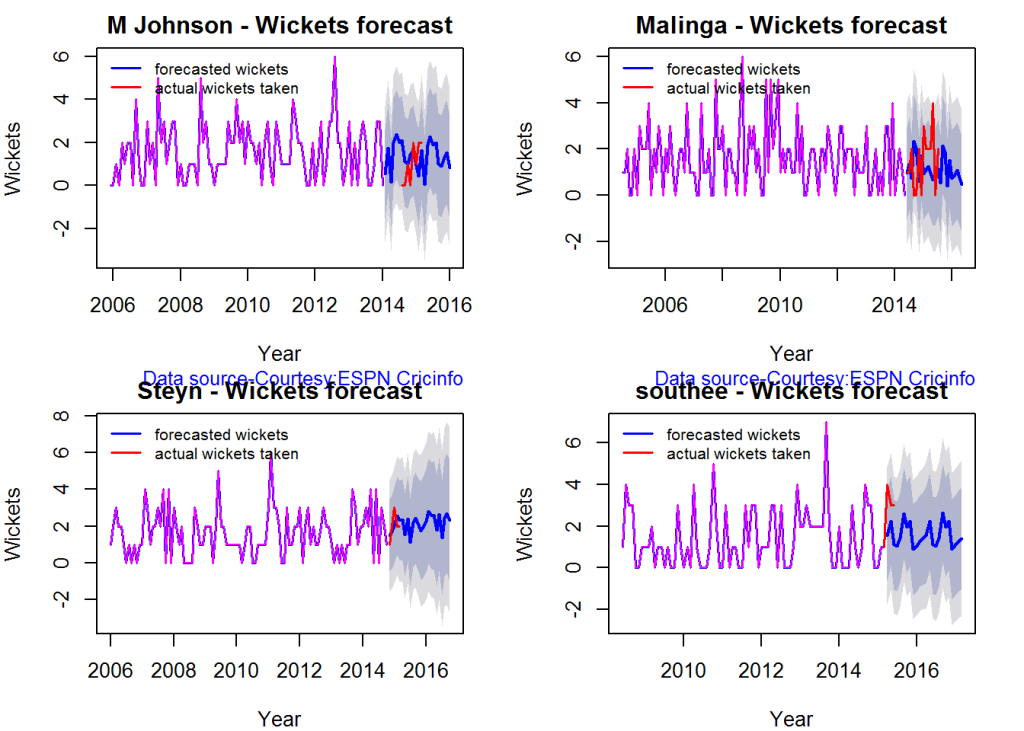
Wickets forecast

par(mfrow=c(2,2))
par(mar=c(4,4,2,2))
bowlerPerfForecast("./mitchell.csv","M Johnson")
bowlerPerfForecast("./malinga.csv","Malinga")
bowlerPerfForecast("./steyn.csv","Steyn")
bowlerPerfForecast("./southee.csv","southee")
jsba-pfcst-1

dev.off()
## null device 
##           1

Check bowler in-form, out-of-form

All the bowlers are shown to be still in-form

checkBowlerInForm("./mitchell.csv","J Mitchell")
## *******************************************************************************************
## 
## Population size: 135  Mean of population: 1.55 
## Sample size: 15  Mean of sample: 2 SD of sample: 1.07 
## 
## Null hypothesis H0 : J Mitchell 's sample average is within 95% confidence interval 
##         of population average
## Alternative hypothesis Ha : J Mitchell 's sample average is below the 95% confidence
##         interval of population average
## 
## [1] "J Mitchell 's Form Status: In-Form because the p value: 0.937917  is greater than alpha=  0.05"
## *******************************************************************************************
checkBowlerInForm("./malinga.csv","Malinga")
## *******************************************************************************************
## 
## Population size: 163  Mean of population: 1.58 
## Sample size: 19  Mean of sample: 1.58 SD of sample: 1.22 
## 
## Null hypothesis H0 : Malinga 's sample average is within 95% confidence interval 
##         of population average
## Alternative hypothesis Ha : Malinga 's sample average is below the 95% confidence
##         interval of population average
## 
## [1] "Malinga 's Form Status: In-Form because the p value: 0.5  is greater than alpha=  0.05"
## *******************************************************************************************
checkBowlerInForm("./steyn.csv","Steyn")
## *******************************************************************************************
## 
## Population size: 93  Mean of population: 1.59 
## Sample size: 11  Mean of sample: 1.45 SD of sample: 0.69 
## 
## Null hypothesis H0 : Steyn 's sample average is within 95% confidence interval 
##         of population average
## Alternative hypothesis Ha : Steyn 's sample average is below the 95% confidence
##         interval of population average
## 
## [1] "Steyn 's Form Status: In-Form because the p value: 0.257438  is greater than alpha=  0.05"
## *******************************************************************************************
checkBowlerInForm("./southee.csv","southee")
## *******************************************************************************************
## 
## Population size: 86  Mean of population: 1.48 
## Sample size: 10  Mean of sample: 0.8 SD of sample: 1.14 
## 
## Null hypothesis H0 : southee 's sample average is within 95% confidence interval 
##         of population average
## Alternative hypothesis Ha : southee 's sample average is below the 95% confidence
##         interval of population average
## 
## [1] "southee 's Form Status: Out-of-Form because the p value: 0.044302  is less than alpha=  0.05"
## *******************************************************************************************

***************

Key findings

Here are some key conclusions ODI batsmen

  1. AB Devilliers has high frequency of runs in the 60-120 range and the highest average
  2. Sehwag has the most number of innings and good strike rate
  3. Maxwell has the best strike rate but it should be kept in mind that he has 1/5 of the innings of Sehwag. We need to see how he progress further
  4. Sehwag has the highest percentage of 4s in the runs scored, while Maxwell has the most 6s
  5. For a hypothetical Balls Faced and Minutes at creases Maxwell will score the most runs followed by Sehwag
  6. The moving average of indicates that the best is yet to come for Devilliers and Maxwell. Sehwag has a few more years in him while Gayle shows a decline in ODI performance and an out of form is indicated.

ODI bowlers

  1. Malinga has the highest played the highest innings and also has the highest wickets though he has poor economy rate
  2. M Johnson is the most effective in the 3-4 wicket range followed by Southee
  3. M Johnson and Steyn has the best overall economy rate followed by Malinga and Steyn 4 M Johnson and Steyn’s career is on the up-swing,Southee maintains a steady consistent performance, while Malinga shows a downward trend

Hasta la vista! I’ll be back!
Watch this space!

Also see my other posts in R

  1. Introducing cricketr! : An R package to analyze performances of cricketers
  2. cricketr digs the Ashes!
  3. A peek into literacy in India: Statistical Learning with R
  4. A crime map of India in R – Crimes against women
  5. Analyzing cricket’s batting legends – Through the mirage with R
  6. Mirror, mirror . the best batsman of them all?

You may also like

  1. A closer look at “Robot Horse on a Trot” in Android
  2. What’s up Watson? Using IBM Watson’s QAAPI with Bluemix, NodeExpress – Part 1
  3. Bend it like Bluemix, MongoDB with autoscaling – Part 2
  4. Informed choices through Machine Learning : Analyzing Kohli, Tendulkar and Dravid
  5. TWS-4: Gossip protocol: Epidemics and rumors to the rescue
  6. Deblurring with OpenCV:Weiner filter reloadedhttp://www.r-bloggers.com/cricketr-plays-the-odis/

cricketr digs the Ashes!

Published in R bloggers: cricketr digs the Ashes

Introduction

In some circles the Ashes is considered the ‘mother of all cricketing battles’. But, being a staunch supporter of all things Indian, cricket or otherwise, I have to say that the Ashes pales in comparison against a India-Pakistan match. After all, what are a few frowns and raised eyebrows at the Ashes in comparison to the seething emotions and reckless exuberance of Indian fans.

Anyway, the Ashes are an interesting duel and I have decided to do some cricketing analysis using my R package cricketr. For this analysis I have chosen the top 2 batsman and top 2 bowlers from both the Australian and English sides.

Batsmen

  1. Steven Smith (Aus) – Innings – 58 , Ave: 58.52, Strike Rate: 55.90
  2. David Warner (Aus) – Innings – 76, Ave: 46.86, Strike Rate: 73.88
  3. Alistair Cook (Eng) – Innings – 208 , Ave: 46.62, Strike Rate: 46.33
  4. J E Root (Eng) – Innings – 53, Ave: 54.02, Strike Rate: 51.30

Bowlers

  1. Mitchell Johnson (Aus) – Innings-131, Wickets – 299, Econ Rate : 3.28
  2. Peter Siddle (Aus) – Innings – 104 , Wickets- 192, Econ Rate : 2.95
  3. James Anderson (Eng) – Innings – 199 , Wickets- 406, Econ Rate : 3.05
  4. Stuart Broad (Eng) – Innings – 148 , Wickets- 296, Econ Rate : 3.08

It is my opinion if any 2 of the 4 in either team click then they will be able to swing the match in favor of their team.

I have interspersed the plots with a few comments. Feel free to draw your conclusions!

If you are passionate about cricket, and love analyzing cricket performances, then check out my racy book on cricket ‘Cricket analytics with cricketr and cricpy – Analytics harmony with R & Python’! This book discusses and shows how to use my R package ‘cricketr’ and my Python package ‘cricpy’ to analyze batsmen and bowlers in all formats of the game (Test, ODI and T20). The paperback is available on Amazon at $21.99 and  the kindle version at $9.99/Rs 449/-. A must read for any cricket lover! Check it out!!

You can download the latest PDF version of the book  at  ‘Cricket analytics with cricketr and cricpy: Analytics harmony with R and Python-6th edition

Untitled

cks), and $4.99/Rs 320 and $6.99/Rs448 respectively

Important note 1: The latest release of ‘cricketr’ now includes the ability to analyze performances of teams now!!  See Cricketr adds team analytics to its repertoire!!!

Important note 2 : Cricketr can now do a more fine-grained analysis of players, see Cricketr learns new tricks : Performs fine-grained analysis of players

Important note 3: Do check out the python avatar of cricketr, ‘cricpy’ in my post ‘Introducing cricpy:A python package to analyze performances of cricketers

The analysis is included below. Note: This post has also been hosted at Rpubs as cricketr digs the Ashes!
You can also download this analysis as a PDF file from cricketr digs the Ashes!

Do check out my interactive Shiny app implementation using the cricketr package – Sixer – R package cricketr’s new Shiny avatar

Note: If you would like to do a similar analysis for a different set of batsman and bowlers, you can clone/download my skeleton cricketr template from Github (which is the R Markdown file I have used for the analysis below). You will only need to make appropriate changes for the players you are interested in. Just a familiarity with R and R Markdown only is needed.

Important note: Do check out my other posts using cricketr at cricketr-posts

The package can be installed directly from CRAN

if (!require("cricketr")){ 
    install.packages("cricketr",lib = "c:/test") 
} 
library(cricketr)

or from Github

library(devtools)
install_github("tvganesh/cricketr")
library(cricketr)

Analyses of Batsmen

The following plots gives the analysis of the 2 Australian and 2 English batsmen. It must be kept in mind that Cooks has more innings than all the rest put together. Smith has the best average, and Warner has the best strike rate

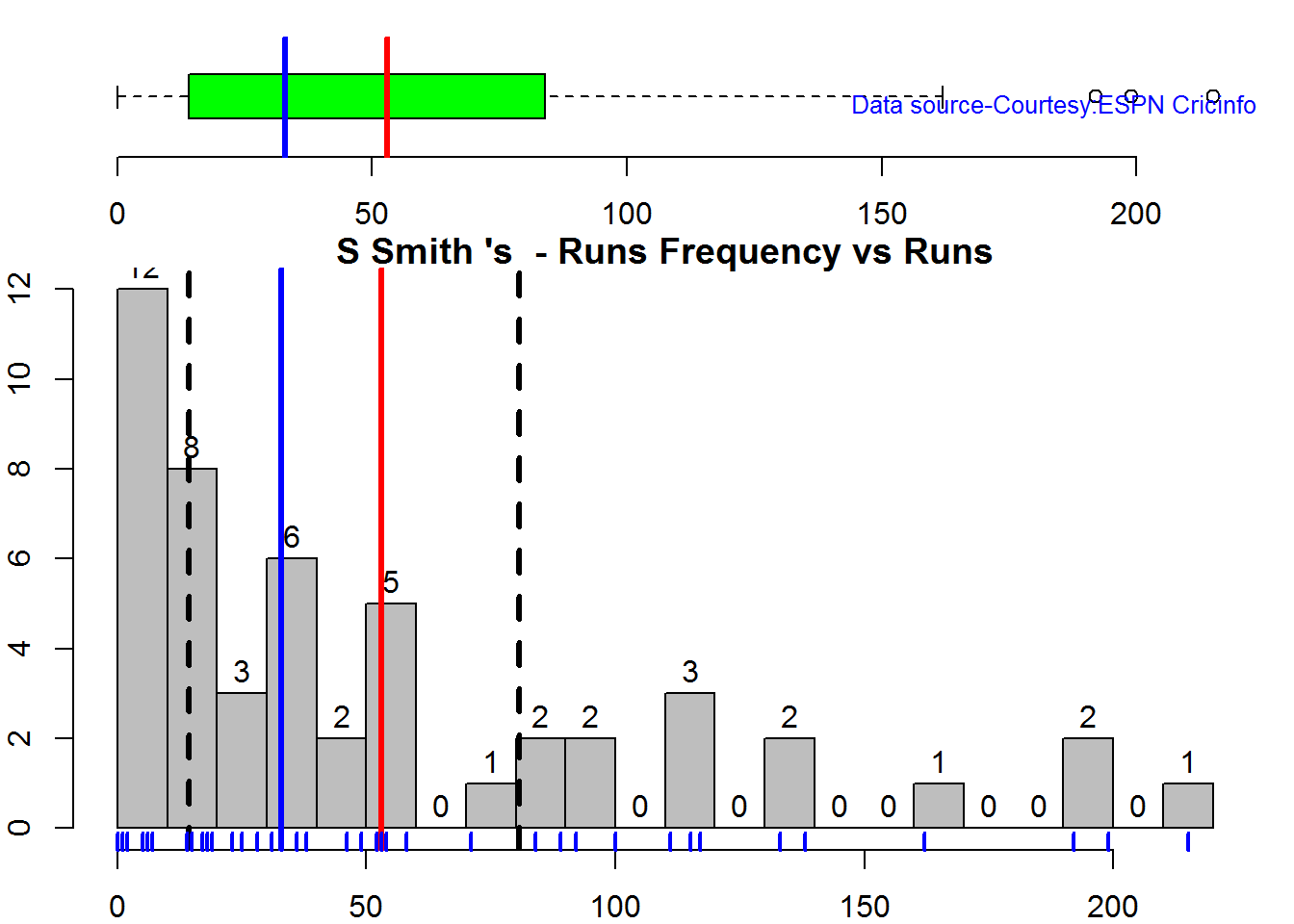
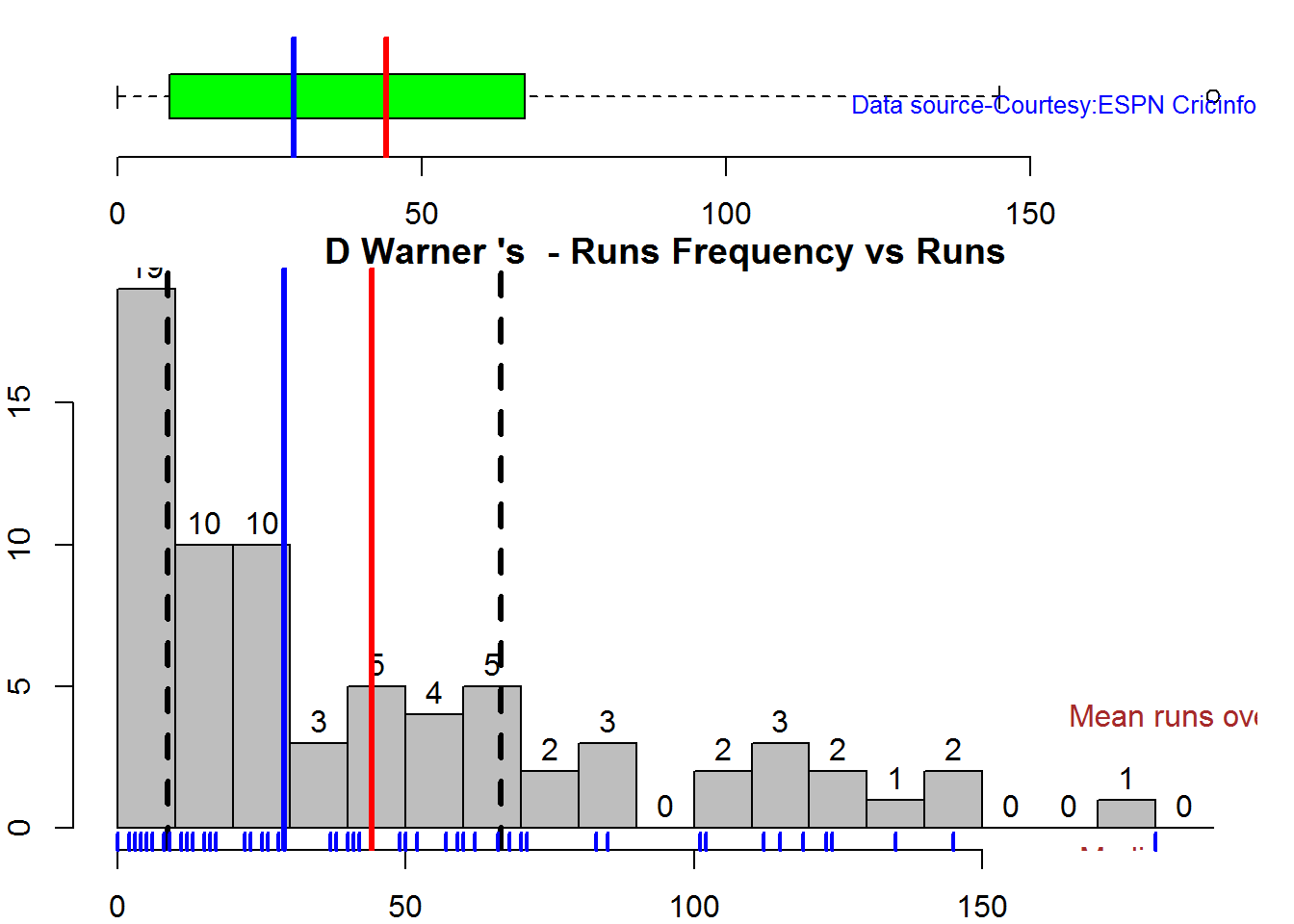
Box Histogram Plot

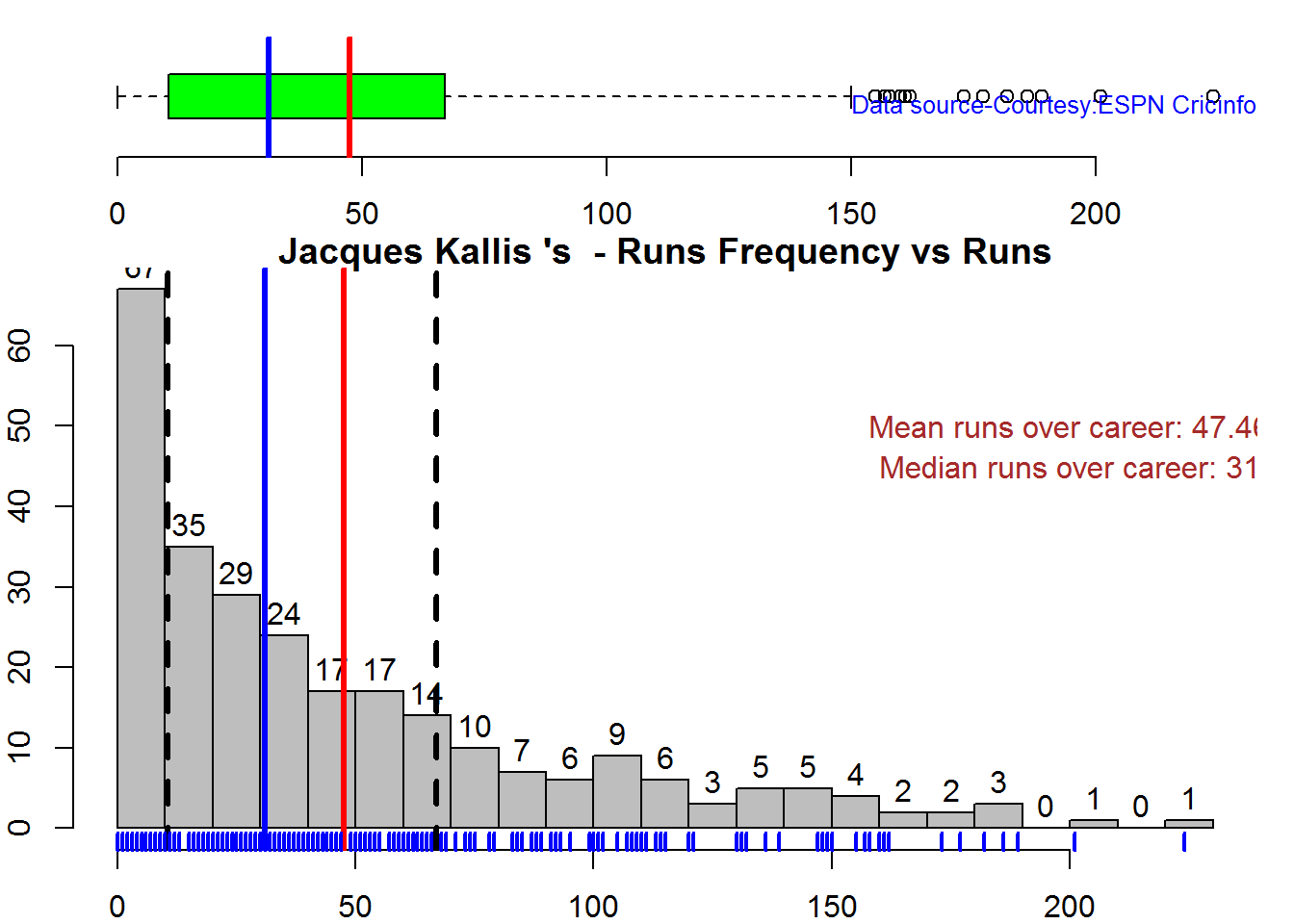
This plot shows a combined boxplot of the Runs ranges and a histogram of the Runs Frequency

batsmanPerfBoxHist("./smith.csv","S Smith")

swcr-boxhist-1

batsmanPerfBoxHist("./warner.csv","D Warner")

swcr-boxhist-2

batsmanPerfBoxHist("./cook.csv","A Cook")

swcr-boxhist-3

batsmanPerfBoxHist("./root.csv","JE Root")

swcr-boxhist-4

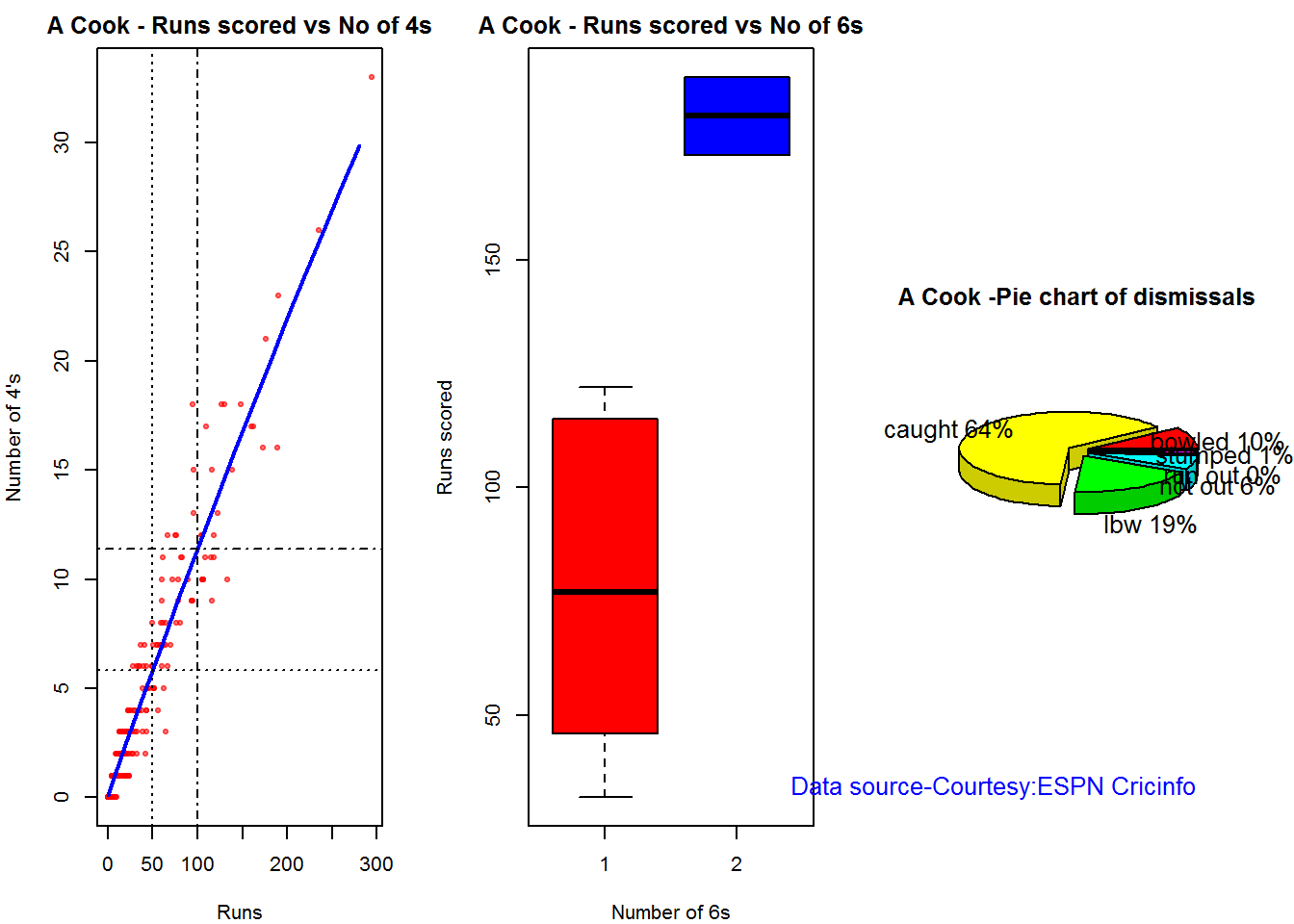
Plot os 4s, 6s and the type of dismissals

A. Steven Smith

par(mfrow=c(1,3))
par(mar=c(4,4,2,2))
batsman4s("./smith.csv","S Smith")
batsman6s("./smith.csv","S Smith")
batsmanDismissals("./smith.csv","S Smith")

smith-4s6sout-1

dev.off()
## null device 
##           1

B. David Warner

par(mfrow=c(1,3))
par(mar=c(4,4,2,2))
batsman4s("./warner.csv","D Warner")
batsman6s("./warner.csv","D Warner")
batsmanDismissals("./warner.csv","D Warner")

warner-4s6sout-1

dev.off()
## null device 
##           1
C. Alistair Cook

par(mfrow=c(1,3))
par(mar=c(4,4,2,2))
batsman4s("./cook.csv","A Cook")
batsman6s("./cook.csv","A Cook")
batsmanDismissals("./cook.csv","A Cook")

cook-4s6sout-1

dev.off()
## null device 
##           1

D. J E Root

par(mfrow=c(1,3))
par(mar=c(4,4,2,2))
batsman4s("./root.csv","JE Root")
batsman6s("./root.csv","JE Root")
batsmanDismissals("./root.csv","JE Root")

root-4s6sout-1

dev.off()
## null device 
##           1

Relative Mean Strike Rate

In this first plot I plot the Mean Strike Rate of the batsmen. It can be Warner’s has the best strike rate (hit outside the plot!) followed by Smith in the range 20-100. Root has a good strike rate above hundred runs. Cook maintains a good strike rate.

par(mar=c(4,4,2,2))
frames <- list("./smith.csv","./warner.csv","cook.csv","root.csv")
names <- list("Smith","Warner","Cook","Root")
relativeBatsmanSR(frames,names)

plot-1-1

Relative Runs Frequency Percentage

The plot below show the percentage contribution in each 10 runs bucket over the entire career.It can be seen that Smith pops up above the rest with remarkable regularity.COok is consistent over the entire range.

frames <- list("./smith.csv","./warner.csv","cook.csv","root.csv")
names <- list("Smith","Warner","Cook","Root")
relativeRunsFreqPerf(frames,names)

plot-2-1

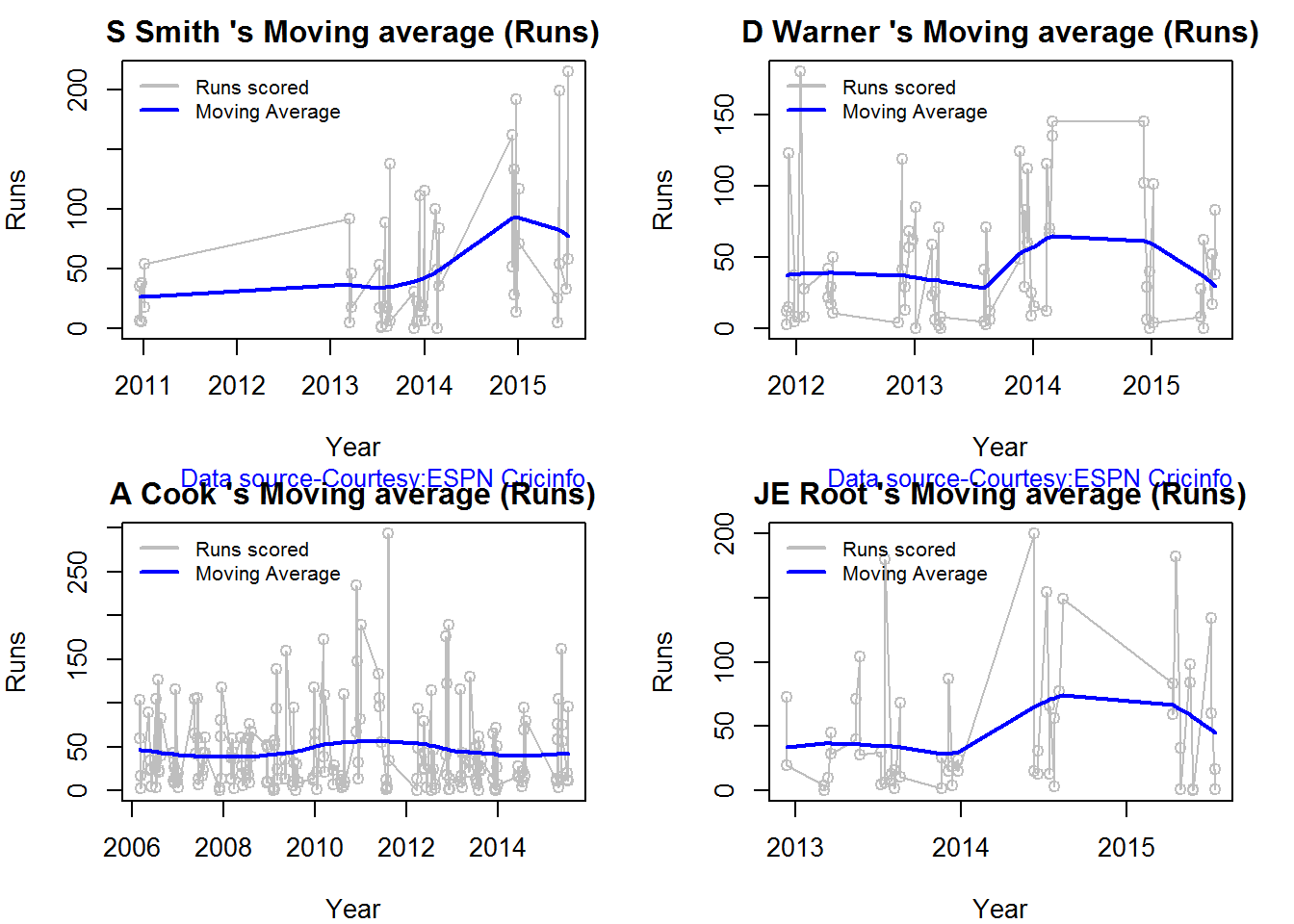
Moving Average of runs over career

The moving average for the 4 batsmen indicate the following 1. S Smith is the most promising. There is a marked spike in Performance. Cook maintains a steady pace and is consistent over the years averaging 50 over the years.

par(mfrow=c(2,2))
par(mar=c(4,4,2,2))
batsmanMovingAverage("./smith.csv","S Smith")
batsmanMovingAverage("./warner.csv","D Warner")
batsmanMovingAverage("./cook.csv","A Cook")
batsmanMovingAverage("./root.csv","JE Root")

swcr-ma-1

dev.off()
## null device 
##           1

Runs forecast

The forecast for the batsman is shown below. As before Cooks’s performance is really consistent across the years and the forecast is good for the years ahead. In Cook’s case it can be seen that the forecasted and actual runs are reasonably accurate

par(mfrow=c(2,2))
par(mar=c(4,4,2,2))
batsmanPerfForecast("./smith.csv","S Smith")
batsmanPerfForecast("./warner.csv","D Warner")
batsmanPerfForecast("./cook.csv","A Cook")
## Warning in HoltWinters(ts.train): optimization difficulties: ERROR:
## ABNORMAL_TERMINATION_IN_LNSRCH
batsmanPerfForecast("./root.csv","JE Root")

swcr-perf-1

dev.off()
## null device 
##           1

3D plot of Runs vs Balls Faced and Minutes at Crease

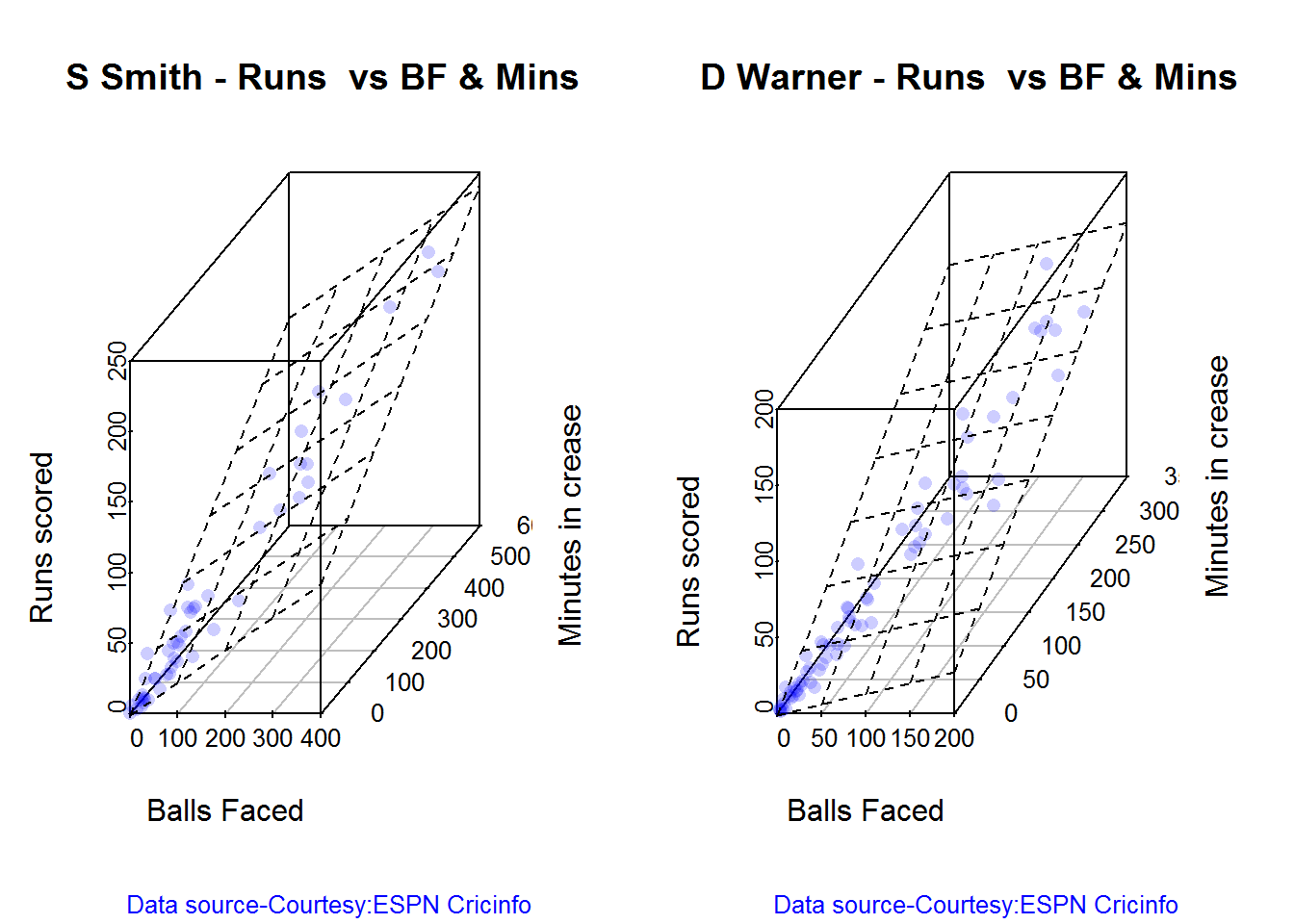
The plot is a scatter plot of Runs vs Balls faced and Minutes at Crease. A prediction plane is fitted

par(mfrow=c(1,2))
par(mar=c(4,4,2,2))
battingPerf3d("./smith.csv","S Smith")
battingPerf3d("./warner.csv","D Warner")

plot-3-1

par(mfrow=c(1,2))
par(mar=c(4,4,2,2))
battingPerf3d("./cook.csv","A Cook")
battingPerf3d("./root.csv","JE Root")

plot-4-1

dev.off()
## null device 
##           1

Predicting Runs given Balls Faced and Minutes at Crease

A multi-variate regression plane is fitted between Runs and Balls faced +Minutes at crease.

BF <- seq( 10, 400,length=15)
Mins <- seq(30,600,length=15)
newDF <- data.frame(BF,Mins)
smith <- batsmanRunsPredict("./smith.csv","S Smith",newdataframe=newDF)
warner <- batsmanRunsPredict("./warner.csv","D Warner",newdataframe=newDF)
cook <- batsmanRunsPredict("./cook.csv","A Cook",newdataframe=newDF)
root <- batsmanRunsPredict("./root.csv","JE Root",newdataframe=newDF)

The fitted model is then used to predict the runs that the batsmen will score for a given Balls faced and Minutes at crease. It can be seen that Warner sets a searing pace in the predicted runs for a given Balls Faced and Minutes at crease while Smith and Root are neck to neck in the predicted runs

batsmen <-cbind(round(smith$Runs),round(warner$Runs),round(cook$Runs),round(root$Runs))
colnames(batsmen) <- c("Smith","Warner","Cook","Root")
newDF <- data.frame(round(newDF$BF),round(newDF$Mins))
colnames(newDF) <- c("BallsFaced","MinsAtCrease")
predictedRuns <- cbind(newDF,batsmen)
predictedRuns
##    BallsFaced MinsAtCrease Smith Warner Cook Root
## 1          10           30     9     12    6    9
## 2          38           71    25     33   20   25
## 3          66          111    42     53   33   42
## 4          94          152    58     73   47   59
## 5         121          193    75     93   60   75
## 6         149          234    91    114   74   92
## 7         177          274   108    134   88  109
## 8         205          315   124    154  101  125
## 9         233          356   141    174  115  142
## 10        261          396   158    195  128  159
## 11        289          437   174    215  142  175
## 12        316          478   191    235  155  192
## 13        344          519   207    255  169  208
## 14        372          559   224    276  182  225
## 15        400          600   240    296  196  242

Highest runs likelihood

The plots below the runs likelihood of batsman. This uses K-Means. It can be seen Smith has the best likelihood around 40% of scoring around 41 runs, followed by Root who has 28.3% likelihood of scoring around 81 runs

A. Steven Smith

batsmanRunsLikelihood("./smith.csv","S Smith")
smith-1
## Summary of  S Smith 's runs scoring likelihood
## **************************************************
## 
## There is a 40 % likelihood that S Smith  will make  41 Runs in  73 balls over 101  Minutes 
## There is a 36 % likelihood that S Smith  will make  9 Runs in  21 balls over  27  Minutes 
## There is a 24 % likelihood that S Smith  will make  139 Runs in  237 balls over 338  Minutes

B. David Warner

batsmanRunsLikelihood("./warner.csv","D Warner")
warner-1
## Summary of  D Warner 's runs scoring likelihood
## **************************************************
## 
## There is a 11.11 % likelihood that D Warner  will make  134 Runs in  159 balls over 263  Minutes 
## There is a 63.89 % likelihood that D Warner  will make  17 Runs in  25 balls over  37  Minutes 
## There is a 25 % likelihood that D Warner  will make  73 Runs in  105 balls over 156  Minutes

C. Alastair Cook

batsmanRunsLikelihood("./cook.csv","A Cook")
cook,cache-TRUE-1
## Summary of  A Cook 's runs scoring likelihood
## **************************************************
## 
## There is a 27.72 % likelihood that A Cook  will make  64 Runs in  140 balls over 195  Minutes 
## There is a 59.9 % likelihood that A Cook  will make  15 Runs in  32 balls over  46  Minutes 
## There is a 12.38 % likelihood that A Cook  will make  141 Runs in  300 balls over 420  Minutes

D. J E Root

batsmanRunsLikelihood("./root.csv","JE Root")
oot-1
## Summary of  JE Root 's runs scoring likelihood
## **************************************************
## 
## There is a 28.3 % likelihood that JE Root  will make  81 Runs in  158 balls over 223  Minutes 
## There is a 7.55 % likelihood that JE Root  will make  179 Runs in  290 balls over  425  Minutes 
## There is a 64.15 % likelihood that JE Root  will make  16 Runs in  39 balls over 59  Minutes
 

Average runs at ground and against opposition

A. Steven Smith

par(mfrow=c(1,2))
par(mar=c(4,4,2,2))
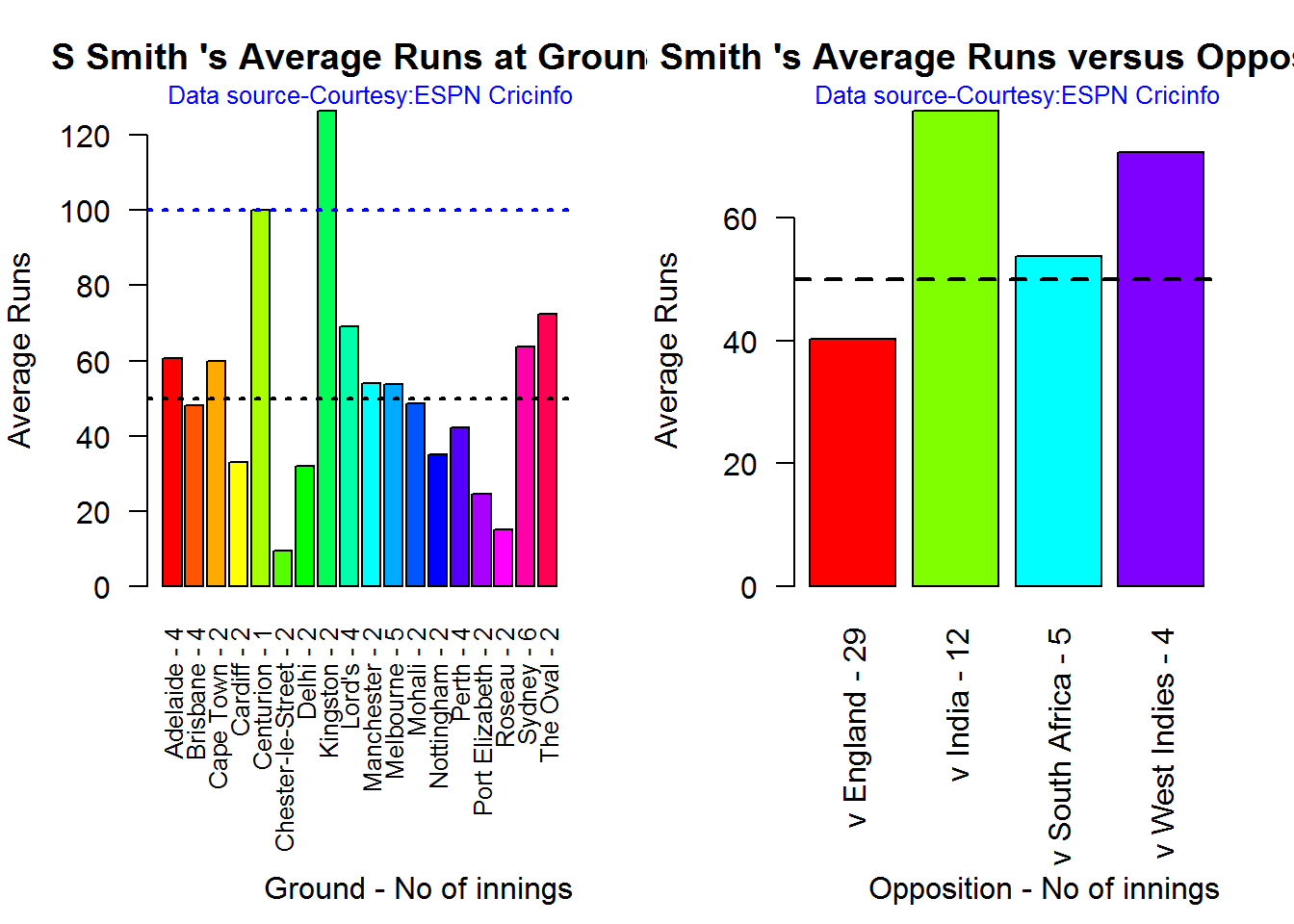
batsmanAvgRunsGround("./smith.csv","S Smith")
batsmanAvgRunsOpposition("./smith.csv","S Smith")

avgrg-1-1

dev.off()
## null device 
##           1
B. David Warner

par(mfrow=c(1,2))
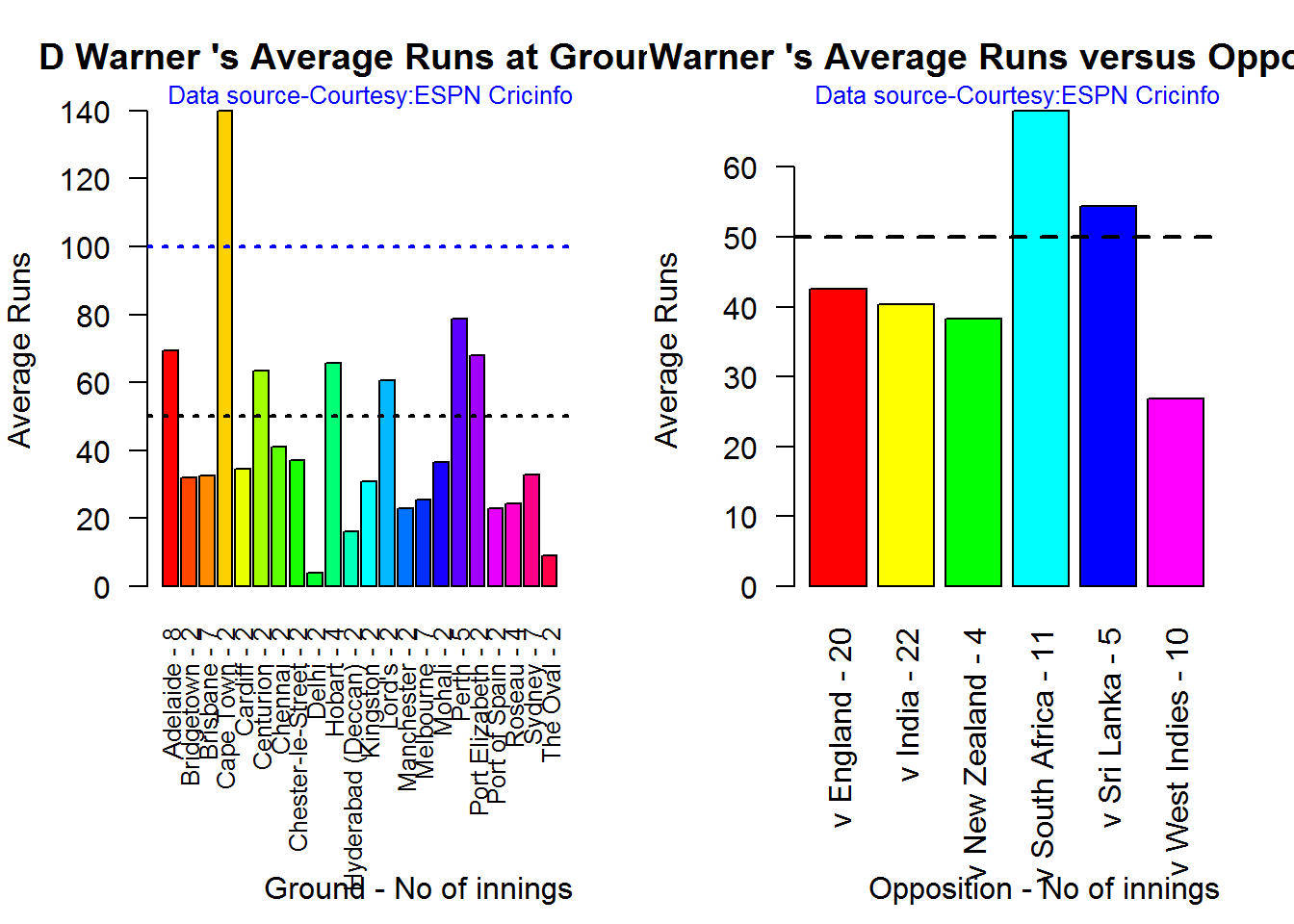
par(mar=c(4,4,2,2))
batsmanAvgRunsGround("./warner.csv","D Warner")
batsmanAvgRunsOpposition("./warner.csv","D Warner")

avgrg-2-1

dev.off()
## null device 
##           1

C. Alistair Cook

par(mfrow=c(1,2))
par(mar=c(4,4,2,2))
batsmanAvgRunsGround("./cook.csv","A Cook")
batsmanAvgRunsOpposition("./cook.csv","A Cook")

avgrg-3-1

dev.off()
## null device 
##           1

D. J E Root

par(mfrow=c(1,2))
par(mar=c(4,4,2,2))
batsmanAvgRunsGround("./root.csv","JE Root")
batsmanAvgRunsOpposition("./root.csv","JE Root")

avgrg-4-1

dev.off()
## null device 
##           1

Analysis of bowlers

  1. Mitchell Johnson (Aus) – Innings-131, Wickets – 299, Econ Rate : 3.28
  2. Peter Siddle (Aus) – Innings – 104 , Wickets- 192, Econ Rate : 2.95
  3. James Anderson (Eng) – Innings – 199 , Wickets- 406, Econ Rate : 3.05
  4. Stuart Broad (Eng) – Innings – 148 , Wickets- 296, Econ Rate : 3.08

Anderson has the highest number of inning and wickets followed closely by Broad and Mitchell who are in a neck to neck race with respect to wickets. Johnson is on the more expensive side though. Siddle has fewer innings but a good economy rate.

Wicket Frequency percentage

This plot gives the percentage of wickets for each wickets (1,2,3…etc)

par(mfrow=c(1,4))
par(mar=c(4,4,2,2))
bowlerWktsFreqPercent("./johnson.csv","Johnson")
bowlerWktsFreqPercent("./siddle.csv","Siddle")
bowlerWktsFreqPercent("./broad.csv","Broad")
bowlerWktsFreqPercent("./anderson.csv","Anderson")

relBowlFP-1

dev.off()
## null device 
##           1

Wickets Runs plot

The plot below gives a boxplot of the runs ranges for each of the wickets taken by the bowlers

par(mfrow=c(1,4))
par(mar=c(4,4,2,2))
bowlerWktsRunsPlot("./johnson.csv","Johnson")
bowlerWktsRunsPlot("./siddle.csv","Siddle")
bowlerWktsRunsPlot("./broad.csv","Broad")
bowlerWktsRunsPlot("./anderson.csv","Anderson")

wktsrun-1

dev.off()
## null device 
##           1

Average wickets in different grounds and opposition

A. Mitchell Johnson

par(mfrow=c(1,2))
par(mar=c(4,4,2,2))
bowlerAvgWktsGround("./johnson.csv","Johnson")
bowlerAvgWktsOpposition("./johnson.csv","Johnson")

gr-1-1

dev.off()
## null device 
##           1

B. Peter Siddle

par(mfrow=c(1,2))
par(mar=c(4,4,2,2))
bowlerAvgWktsGround("./siddle.csv","Siddle")
bowlerAvgWktsOpposition("./siddle.csv","Siddle")

gr-2-1

dev.off()
## null device 
##           1

C. Stuart Broad

par(mfrow=c(1,2))
par(mar=c(4,4,2,2))
bowlerAvgWktsGround("./broad.csv","Broad")
bowlerAvgWktsOpposition("./broad.csv","Broad")

gr-3-1

dev.off()
## null device 
##           1

D. James Anderson

par(mfrow=c(1,2))
par(mar=c(4,4,2,2))
bowlerAvgWktsGround("./anderson.csv","Anderson")
bowlerAvgWktsOpposition("./anderson.csv","Anderson")

gr-4-1

dev.off()
## null device 
##           1

Relative bowling performance

The plot below shows that Mitchell Johnson is the mopst effective bowler among the lot with a higher wickets in the 3-6 wicket range. Broad and Anderson seem to perform well in 2 wickets in comparison to Siddle but in 3 wickets Siddle is better than Broad and Anderson.

frames <- list("./johnson.csv","./siddle.csv","broad.csv","anderson.csv")
names <- list("Johnson","Siddle","Broad","Anderson")
relativeBowlingPerf(frames,names)

relBowlPerf-1

Relative Economy Rate against wickets taken

Anderson followed by Siddle has the best economy rates. Johnson is fairly expensive in the 4-8 wicket range.

frames <- list("./johnson.csv","./siddle.csv","broad.csv","anderson.csv")
names <- list("Johnson","Siddle","Broad","Anderson")
relativeBowlingER(frames,names)

relBowlER-1

Moving average of wickets over career

Johnson is on his second peak while Siddle is on the decline with respect to bowling. Broad and Anderson show improving performance over the years.

par(mfrow=c(2,2))
par(mar=c(4,4,2,2))
bowlerMovingAverage("./johnson.csv","Johnson")
bowlerMovingAverage("./siddle.csv","Siddle")
bowlerMovingAverage("./broad.csv","Broad")
bowlerMovingAverage("./anderson.csv","Anderson")

jsba-bowlma-1

dev.off()
## null device 
##           1
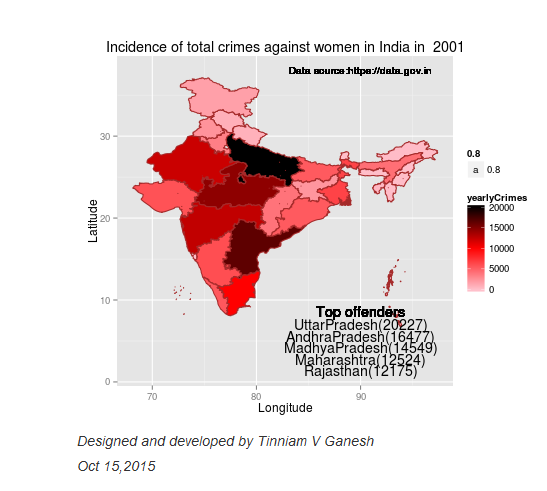
Wickets forecast

par(mfrow=c(2,2))
par(mar=c(4,4,2,2))
bowlerPerfForecast("./johnson.csv","Johnson")
bowlerPerfForecast("./siddle.csv","Siddle")
bowlerPerfForecast("./broad.csv","Broad")
bowlerPerfForecast("./anderson.csv","Anderson")

jsba-bowlma-1

dev.off()
## null device 
##           1

Key findings

Here are some key conclusions

  1. Cook has the most number of innings and has been extremly consistent in his scores
  2. Warner has the best strike rate among the lot followed by Smith and Root
  3. The moving average shows a marked improvement over the years for Smith
  4. Johnson is the most effective bowler but is fairly expensive
  5. Anderson has the best economy rate followed by Siddle
  6. Johnson is at his second peak with respect to bowling while Broad and Anderson maintain a steady line and length in their career bowling performance


Also see my other posts in R

  1. Introducing cricketr! : An R package to analyze performances of cricketers
  2. Taking cricketr for a spin – Part 1
  3. A peek into literacy in India: Statistical Learning with R
  4. A crime map of India in R – Crimes against women
  5. Analyzing cricket’s batting legends – Through the mirage with R
  6. Masters of Spin: Unraveling the web with R
  7. Mirror, mirror . the best batsman of them all?

You may also like

  1. A crime map of India in R: Crimes against women
  2. What’s up Watson? Using IBM Watson’s QAAPI with Bluemix, NodeExpress – Part 1
  3. Bend it like Bluemix, MongoDB with autoscaling – Part 2
  4. Informed choices through Machine Learning : Analyzing Kohli, Tendulkar and Dravid
  5. Thinking Web Scale (TWS-3): Map-Reduce – Bring compute to data
  6. Deblurring with OpenCV:Weiner filter reloaded

Introducing cricketr! : An R package to analyze performances of cricketers

Yet all experience is an arch wherethro’
Gleams that untravell’d world whose margin fades
For ever and forever when I move.
How dull it is to pause, to make an end,
To rust unburnish’d, not to shine in use!

Ulysses by Alfred Tennyson

Introduction

This is an initial post in which I introduce a cricketing package ‘cricketr’ which I have created. This package was a natural culmination to my earlier posts on cricket and my finishing 10 modules of Data Science Specialization, from John Hopkins University at Coursera. The thought of creating this package struck me some time back, and I have finally been able to bring this to fruition.

So here it is. My R package ‘cricketr!!!’

If you are passionate about cricket, and love analyzing cricket performances, then check out my racy book on cricket ‘Cricket analytics with cricketr and cricpy – Analytics harmony with R & Python’! This book discusses and shows how to use my R package ‘cricketr’ and my Python package ‘cricpy’ to analyze batsmen and bowlers in all formats of the game (Test, ODI and T20). The paperback is available on Amazon at $21.99 and  the kindle version at $9.99/Rs 449/-. A must read for any cricket lover! Check it out!!

You can download the latest PDF version of the book  at  ‘Cricket analytics with cricketr and cricpy: Analytics harmony with R and Python-6th edition

Untitled

This package uses the statistics info available in ESPN Cricinfo Statsguru. The current version of this package can handle all formats of the game including Test, ODI and Twenty20 cricket.

You should be able to install the package from CRAN and use  many of the functions available in the package. Please be mindful of  ESPN Cricinfo Terms of Use

(Note: This page is also hosted as a GitHub page at cricketr and also at RPubs as cricketr: A R package for analyzing performances of cricketers

You can download this analysis as a PDF file from Introducing cricketr

Note: If you would like to do a similar analysis for a different set of batsman and bowlers, you can clone/download my skeleton cricketr template from Github (which is the R Markdown file I have used for the analysis below). You will only need to make appropriate changes for the players you are interested in. Just a familiarity with R and R Markdown only is needed.

You can clone the cricketr code from Github at cricketr

(Take a look at my short video tutorial on my R package cricketr on Youtube – R package cricketr – A short tutorial)

Do check out my interactive Shiny app implementation using the cricketr package – Sixer – R package cricketr’s new Shiny avatar

Please look at my recent post, which includes updates to this post, and 8 new functions added to the cricketr package “Re-introducing cricketr: An R package to analyze the performances of cricketers

Important note 1: The latest release of ‘cricketr’ now includes the ability to analyze performances of teams now!!  See Cricketr adds team analytics to its repertoire!!!

Important note 2 : Cricketr can now do a more fine-grained analysis of players, see Cricketr learns new tricks : Performs fine-grained analysis of players

Important note 3: Do check out the python avatar of cricketr, ‘cricpy’ in my post ‘Introducing cricpy:A python package to analyze performances of cricketers

 The cricketr package

The cricketr package has several functions that perform several different analyses on both batsman and bowlers. The package has functions that plot percentage frequency runs or wickets, runs likelihood for a batsman, relative run/strike rates of batsman and relative performance/economy rate for bowlers are available.

Other interesting functions include batting performance moving average, forecast and a function to check whether the batsman/bowler is in in-form or out-of-form.

The data for a particular player can be obtained with the getPlayerData() function from the package. To do this you will need to go to ESPN CricInfo Player and type in the name of the player for e.g Ricky Ponting, Sachin Tendulkar etc. This will bring up a page which have the profile number for the player e.g. for Sachin Tendulkar this would be http://www.espncricinfo.com/india/content/player/35320.html. Hence, Sachin’s profile is 35320. This can be used to get the data for Tendulkar as shown below

The cricketr package is now available from  CRAN!!!.  You should be able to install directly with

if (!require("cricketr")){ 
    install.packages("cricketr",lib = "c:/test") 
} 
library(cricketr)
?getPlayerData
## 
## getPlayerData(profile, opposition='', host='', dir='./data', file='player001.csv', type='batting', homeOrAway=[1, 2], result=[1, 2, 4], create=True)
##     Get the player data from ESPN Cricinfo based on specific inputs and store in a file in a given directory
##     
##     Description
##     
##     Get the player data given the profile of the batsman. The allowed inputs are home,away or both and won,lost or draw of matches. The data is stored in a .csv file in a directory specified. This function also returns a data frame of the player
##     
##     Usage
##     
##     getPlayerData(profile,opposition="",host="",dir="./data",file="player001.csv",
##     type="batting", homeOrAway=c(1,2),result=c(1,2,4))
##     Arguments
##     
##     profile     
##     This is the profile number of the player to get data. This can be obtained from http://www.espncricinfo.com/ci/content/player/index.html. Type the name of the player and click search. This will display the details of the player. Make a note of the profile ID. For e.g For Sachin Tendulkar this turns out to be http://www.espncricinfo.com/india/content/player/35320.html. Hence the profile for Sachin is 35320
##     opposition  
##     The numerical value of the opposition country e.g.Australia,India, England etc. The values are Australia:2,Bangladesh:25,England:1,India:6,New Zealand:5,Pakistan:7,South Africa:3,Sri Lanka:8, West Indies:4, Zimbabwe:9
##     host        
##     The numerical value of the host country e.g.Australia,India, England etc. The values are Australia:2,Bangladesh:25,England:1,India:6,New Zealand:5,Pakistan:7,South Africa:3,Sri Lanka:8, West Indies:4, Zimbabwe:9
##     dir 
##     Name of the directory to store the player data into. If not specified the data is stored in a default directory "./data". Default="./data"
##     file        
##     Name of the file to store the data into for e.g. tendulkar.csv. This can be used for subsequent functions. Default="player001.csv"
##     type        
##     type of data required. This can be "batting" or "bowling"
##     homeOrAway  
##     This is a vector with either 1,2 or both. 1 is for home 2 is for away
##     result      
##     This is a vector that can take values 1,2,4. 1 - won match 2- lost match 4- draw
##     Details
##     
##     More details can be found in my short video tutorial in Youtube https://www.youtube.com/watch?v=q9uMPFVsXsI
##     
##     Value
##     
##     Returns the player's dataframe
##     
##     Note
##     
##     Maintainer: Tinniam V Ganesh <tvganesh.85@gmail.com>
##     
##     Author(s)
##     
##     Tinniam V Ganesh
##     
##     References
##     
##     http://www.espncricinfo.com/ci/content/stats/index.html
##     https://gigadom.wordpress.com/
##     
##     See Also
##     
##     getPlayerDataSp
##     
##     Examples
##     
##     ## Not run: 
##     # Both home and away. Result = won,lost and drawn
##     tendulkar = getPlayerData(35320,dir=".", file="tendulkar1.csv",
##     type="batting", homeOrAway=c(1,2),result=c(1,2,4))
##     
##     # Only away. Get data only for won and lost innings
##     tendulkar = getPlayerData(35320,dir=".", file="tendulkar2.csv",
##     type="batting",homeOrAway=c(2),result=c(1,2))
##     
##     # Get bowling data and store in file for future
##     kumble = getPlayerData(30176,dir=".",file="kumble1.csv",
##     type="bowling",homeOrAway=c(1),result=c(1,2))
##     
##     #Get the Tendulkar's Performance against Australia in Australia
##     tendulkar = getPlayerData(35320, opposition = 2,host=2,dir=".", 
##     file="tendulkarVsAusInAus.csv",type="batting")

The cricketr package includes some pre-packaged sample (.csv) files. You can use these sample to test functions  as shown below

# Retrieve the file path of a data file installed with cricketr
pathToFile ,"Sachin Tendulkar")

unnamed-chunk-2-1

Alternatively, the cricketr package can be installed from GitHub with

if (!require("cricketr")){ 
    library(devtools) 
    install_github("tvganesh/cricketr") 
}
library(cricketr)

The pre-packaged files can be accessed as shown above.
To get the data of any player use the function getPlayerData()

tendulkar <- getPlayerData(35320,dir="..",file="tendulkar.csv",type="batting",homeOrAway=c(1,2),
                           result=c(1,2,4))

Important Note This needs to be done only once for a player. This function stores the player’s data in a CSV file (for e.g. tendulkar.csv as above) which can then be reused for all other functions. Once we have the data for the players many analyses can be done. This post will use the stored CSV file obtained with a prior getPlayerData for all subsequent analyses

Sachin Tendulkar’s performance – Basic Analyses

The 3 plots below provide the following for Tendulkar

  1. Frequency percentage of runs in each run range over the whole career
  2. Mean Strike Rate for runs scored in the given range
  3. A histogram of runs frequency percentages in runs ranges
par(mfrow=c(1,3))
par(mar=c(4,4,2,2))
batsmanRunsFreqPerf("./tendulkar.csv","Sachin Tendulkar")
batsmanMeanStrikeRate("./tendulkar.csv","Sachin Tendulkar")
batsmanRunsRanges("./tendulkar.csv","Sachin Tendulkar")

tendulkar-batting-1

dev.off()
## null device 
##           1

More analyses

par(mfrow=c(1,3))
par(mar=c(4,4,2,2))
batsman4s("./tendulkar.csv","Tendulkar")
batsman6s("./tendulkar.csv","Tendulkar")
batsmanDismissals("./tendulkar.csv","Tendulkar")

tendulkar-4s6sout-1


3D scatter plot and prediction plane

The plots below show the 3D scatter plot of Sachin’s Runs versus Balls Faced and Minutes at crease. A linear regression model is then fitted between Runs and Balls Faced + Minutes at crease

battingPerf3d("./tendulkar.csv","Sachin Tendulkar")

tendulkar-3d-1

Average runs at different venues

The plot below gives the average runs scored by Tendulkar at different grounds. The plot also displays the number of innings at each ground as a label at x-axis. It can be seen Tendulkar did great in Colombo (SSC), Melbourne ifor matches overseas and Mumbai, Mohali and Bangalore at home

batsmanAvgRunsGround("./tendulkar.csv","Sachin Tendulkar")
tendulkar-avggrd-1

Average runs against different opposing teams

This plot computes the average runs scored by Tendulkar against different countries. The x-axis also gives the number of innings against each team

batsmanAvgRunsOpposition("./tendulkar.csv","Tendulkar")
tendulkar-avgopn-1

Highest Runs Likelihood

The plot below shows the Runs Likelihood for a batsman. For this the performance of Sachin is plotted as a 3D scatter plot with Runs versus Balls Faced + Minutes at crease using. K-Means. The centroids of 3 clusters are computed and plotted. In this plot. Sachin Tendulkar’s highest tendencies are computed and plotted using K-Means

batsmanRunsLikelihood("./tendulkar.csv","Sachin Tendulkar")

tendulkar-kmeans-1

## Summary of  Sachin Tendulkar 's runs scoring likelihood
## **************************************************
## 
## There is a 16.51 % likelihood that Sachin Tendulkar  will make  139 Runs in  251 balls over 353  Minutes 
## There is a 58.41 % likelihood that Sachin Tendulkar  will make  16 Runs in  31 balls over  44  Minutes 
## There is a 25.08 % likelihood that Sachin Tendulkar  will make  66 Runs in  122 balls over 167  Minutes

A look at the Top 4 batsman – Tendulkar, Kallis, Ponting and Sangakkara

The batsmen with the most hundreds in test cricket are

  1. Sachin Tendulkar :Average:53.78,100’s – 51, 50’s – 68
  2. Jacques Kallis : Average: 55.47, 100’s – 45, 50’s – 58
  3. Ricky Ponting : Average: 51.85, 100’s – 41 , 50’s – 62
  4. Kumara Sangakarra: Average: 58.04 ,100’s – 38 , 50’s – 52

in that order.

The following plots take a closer at their performances. The box plots show the mean (red line) and median (blue line). The two ends of the boxplot display the 25th and 75th percentile.

Box Histogram Plot

This plot shows a combined boxplot of the Runs ranges and a histogram of the Runs Frequency. The calculated Mean differ from the stated means possibly because of data cleaning. Also not sure how the means were arrived at ESPN Cricinfo for e.g. when considering not out..

batsmanPerfBoxHist("./tendulkar.csv","Sachin Tendulkar")

tkps-boxhist-1

batsmanPerfBoxHist("./kallis.csv","Jacques Kallis")

tkps-boxhist-2

batsmanPerfBoxHist("./ponting.csv","Ricky Ponting")

tkps-boxhist-3

batsmanPerfBoxHist("./sangakkara.csv","K Sangakkara")

tkps-boxhist-4

Contribution to won and lost matches

The plot below shows the contribution of Tendulkar, Kallis, Ponting and Sangakarra in matches won and lost. The plots show the range of runs scored as a boxplot (25th & 75th percentile) and the mean scored. The total matches won and lost are also printed in the plot.

All the players have scored more in the matches they won than the matches they lost. Ricky Ponting is the only batsman who seems to have more matches won to his credit than others. This could also be because he was a member of strong Australian team

For the next 2 functions below you will have to use the getPlayerDataSp() function. I
have commented this as I already have these files

tendulkarsp 
par(mfrow=c(2,2))
par(mar=c(4,4,2,2))
batsmanContributionWonLost("tendulkarsp.csv","Tendulkar")
batsmanContributionWonLost("kallissp.csv","Kallis")
batsmanContributionWonLost("pontingsp.csv","Ponting")
batsmanContributionWonLost("sangakkarasp.csv","Sangakarra")

tkps-wonlost-1

dev.off()
## null device 
##           1

Performance at home and overseas

From the plot below it can be seen
Tendulkar has more matches overseas than at home and his performance is consistent in all venues at home or abroad. Ponting has lesser innings than Tendulkar and has an equally good performance at home and overseas.Kallis and Sangakkara’s performance abroad is lower than the performance at home.

This function also requires the use of getPlayerDataSp() as shown above

par(mfrow=c(2,2))
par(mar=c(4,4,2,2))
batsmanPerfHomeAway("tendulkarsp.csv","Tendulkar")
batsmanPerfHomeAway("kallissp.csv","Kallis")
batsmanPerfHomeAway("pontingsp.csv","Ponting")
batsmanPerfHomeAway("sangakkarasp.csv","Sangakarra")
dev.off()
tkps-homeaway-1
dev.off()
## null device 
##           1
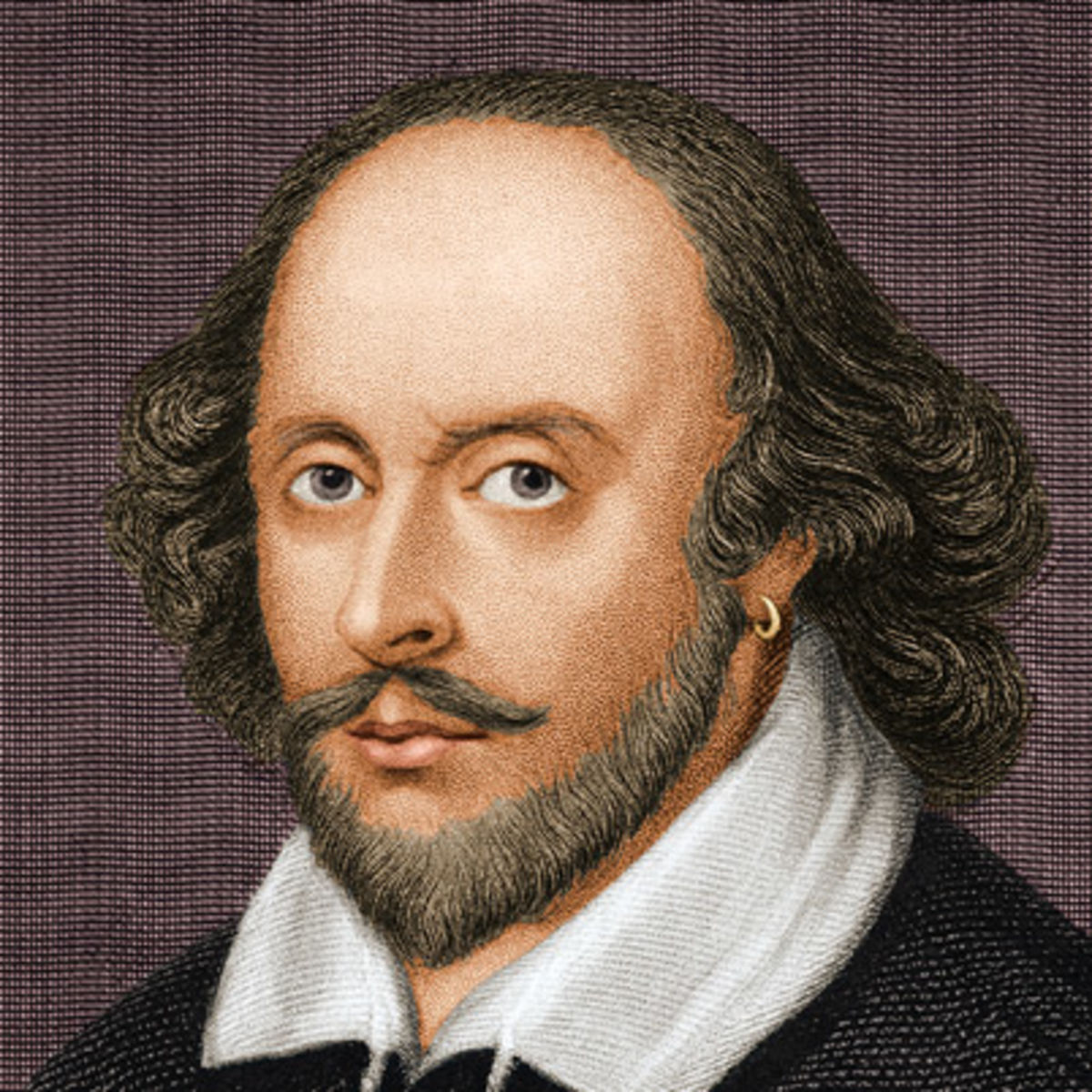
 

Relative Mean Strike Rate plot

The plot below compares the Mean Strike Rate of the batsman for each of the runs ranges of 10 and plots them. The plot indicate the following Range 0 – 50 Runs – Ponting leads followed by Tendulkar Range 50 -100 Runs – Ponting followed by Sangakkara Range 100 – 150 – Ponting and then Tendulkar

frames <- list("./tendulkar.csv","./kallis.csv","ponting.csv","sangakkara.csv")
names <- list("Tendulkar","Kallis","Ponting","Sangakkara")
relativeBatsmanSR(frames,names)

tkps-relSR-1

Relative Runs Frequency plot

The plot below gives the relative Runs Frequency Percetages for each 10 run bucket. The plot below show

Sangakkara leads followed by Ponting

frames <- list("./tendulkar.csv","./kallis.csv","ponting.csv","sangakkara.csv")
names <- list("Tendulkar","Kallis","Ponting","Sangakkara")
relativeRunsFreqPerf(frames,names)

tkps-relRunFreq-1

Moving Average of runs in career

Take a look at the Moving Average across the career of the Top 4. Clearly . Kallis and Sangakkara have a few more years of great batting ahead. They seem to average on 50. . Tendulkar and Ponting definitely show a slump in the later years

par(mfrow=c(2,2))
par(mar=c(4,4,2,2))
batsmanMovingAverage("./tendulkar.csv","Sachin Tendulkar")
batsmanMovingAverage("./kallis.csv","Jacques Kallis")
batsmanMovingAverage("./ponting.csv","Ricky Ponting")
batsmanMovingAverage("./sangakkara.csv","K Sangakkara")

tkps-ma-1

dev.off()
## null device 
##           1
Future Runs forecast

Here are plots that forecast how the batsman will perform in future. In this case 90% of the career runs trend is uses as the training set. the remaining 10% is the test set.

A Holt-Winters forecating model is used to forecast future performance based on the 90% training set. The forecated runs trend is plotted. The test set is also plotted to see how close the forecast and the actual matches

Take a look at the runs forecasted for the batsman below.

  • Tendulkar’s forecasted performance seems to tally with his actual performance with an average of 50
  • Kallis the forecasted runs are higher than the actual runs he scored
  • Ponting seems to have a good run in the future
  • Sangakkara has a decent run in the future averaging 50 runs
par(mfrow=c(2,2))
par(mar=c(4,4,2,2))
batsmanPerfForecast("./tendulkar.csv","Sachin Tendulkar")
batsmanPerfForecast("./kallis.csv","Jacques Kallis")
batsmanPerfForecast("./ponting.csv","Ricky Ponting")
batsmanPerfForecast("./sangakkara.csv","K Sangakkara")

tkps-perffcst-1

dev.off()
## null device 
##           1

Check Batsman In-Form or Out-of-Form

The below computation uses Null Hypothesis testing and p-value to determine if the batsman is in-form or out-of-form. For this 90% of the career runs is chosen as the population and the mean computed. The last 10% is chosen to be the sample set and the sample Mean and the sample Standard Deviation are caculated.

The Null Hypothesis (H0) assumes that the batsman continues to stay in-form where the sample mean is within 95% confidence interval of population mean The Alternative (Ha) assumes that the batsman is out of form the sample mean is beyond the 95% confidence interval of the population mean.

A significance value of 0.05 is chosen and p-value us computed If p-value >= .05 – Batsman In-Form If p-value < 0.05 – Batsman Out-of-Form

Note Ideally the p-value should be done for a population that follows the Normal Distribution. But the runs population is usually left skewed. So some correction may be needed. I will revisit this later

This is done for the Top 4 batsman

checkBatsmanInForm("./tendulkar.csv","Sachin Tendulkar")
## *******************************************************************************************
## 
## Population size: 294  Mean of population: 50.48 
## Sample size: 33  Mean of sample: 32.42 SD of sample: 29.8 
## 
## Null hypothesis H0 : Sachin Tendulkar 's sample average is within 95% confidence interval 
##         of population average
## Alternative hypothesis Ha : Sachin Tendulkar 's sample average is below the 95% confidence
##         interval of population average
## 
## [1] "Sachin Tendulkar 's Form Status: Out-of-Form because the p value: 0.000713  is less than alpha=  0.05"
## *******************************************************************************************
checkBatsmanInForm("./kallis.csv","Jacques Kallis")
## *******************************************************************************************
## 
## Population size: 240  Mean of population: 47.5 
## Sample size: 27  Mean of sample: 47.11 SD of sample: 59.19 
## 
## Null hypothesis H0 : Jacques Kallis 's sample average is within 95% confidence interval 
##         of population average
## Alternative hypothesis Ha : Jacques Kallis 's sample average is below the 95% confidence
##         interval of population average
## 
## [1] "Jacques Kallis 's Form Status: In-Form because the p value: 0.48647  is greater than alpha=  0.05"
## *******************************************************************************************
checkBatsmanInForm("./ponting.csv","Ricky Ponting")
## *******************************************************************************************
## 
## Population size: 251  Mean of population: 47.5 
## Sample size: 28  Mean of sample: 36.25 SD of sample: 48.11 
## 
## Null hypothesis H0 : Ricky Ponting 's sample average is within 95% confidence interval 
##         of population average
## Alternative hypothesis Ha : Ricky Ponting 's sample average is below the 95% confidence
##         interval of population average
## 
## [1] "Ricky Ponting 's Form Status: In-Form because the p value: 0.113115  is greater than alpha=  0.05"
## *******************************************************************************************
checkBatsmanInForm("./sangakkara.csv","K Sangakkara")
## *******************************************************************************************
## 
## Population size: 193  Mean of population: 51.92 
## Sample size: 22  Mean of sample: 71.73 SD of sample: 82.87 
## 
## Null hypothesis H0 : K Sangakkara 's sample average is within 95% confidence interval 
##         of population average
## Alternative hypothesis Ha : K Sangakkara 's sample average is below the 95% confidence
##         interval of population average
## 
## [1] "K Sangakkara 's Form Status: In-Form because the p value: 0.862862  is greater than alpha=  0.05"
## *******************************************************************************************

3D plot of Runs vs Balls Faced and Minutes at Crease

The plot is a scatter plot of Runs vs Balls faced and Minutes at Crease. A prediction plane is fitted

par(mfrow=c(1,2))
par(mar=c(4,4,2,2))
battingPerf3d("./tendulkar.csv","Tendulkar")
battingPerf3d("./kallis.csv","Kallis")
plot-3-1par(mfrow=c(1,2))
par(mar=c(4,4,2,2))
battingPerf3d("./ponting.csv","Ponting")
battingPerf3d("./sangakkara.csv","Sangakkara")
plot-4-1dev.off()
## null device 
##           1

Predicting Runs given Balls Faced and Minutes at Crease

A multi-variate regression plane is fitted between Runs and Balls faced +Minutes at crease. A sample sequence of Balls Faced(BF) and Minutes at crease (Mins) is setup as shown below. The fitted model is used to predict the runs for these values

BF <- seq( 10, 400,length=15)
Mins <- seq(30,600,length=15)
newDF <- data.frame(BF,Mins)
tendulkar <- batsmanRunsPredict("./tendulkar.csv","Tendulkar",newdataframe=newDF)
kallis <- batsmanRunsPredict("./kallis.csv","Kallis",newdataframe=newDF)
ponting <- batsmanRunsPredict("./ponting.csv","Ponting",newdataframe=newDF)
sangakkara <- batsmanRunsPredict("./sangakkara.csv","Sangakkara",newdataframe=newDF)

The fitted model is then used to predict the runs that the batsmen will score for a given Balls faced and Minutes at crease. It can be seen Ponting has the will score the highest for a given Balls Faced and Minutes at crease.

Ponting is followed by Tendulkar who has Sangakkara close on his heels and finally we have Kallis. This is intuitive as we have already seen that Ponting has a highest strike rate.

batsmen <-cbind(round(tendulkar$Runs),round(kallis$Runs),round(ponting$Runs),round(sangakkara$Runs))
colnames(batsmen) <- c("Tendulkar","Kallis","Ponting","Sangakkara")
newDF <- data.frame(round(newDF$BF),round(newDF$Mins))
colnames(newDF) <- c("BallsFaced","MinsAtCrease")
predictedRuns <- cbind(newDF,batsmen)
predictedRuns
##    BallsFaced MinsAtCrease Tendulkar Kallis Ponting Sangakkara
## 1          10           30         7      6       9          2
## 2          38           71        23     20      25         18
## 3          66          111        39     34      42         34
## 4          94          152        54     48      59         50
## 5         121          193        70     62      76         66
## 6         149          234        86     76      93         82
## 7         177          274       102     90     110         98
## 8         205          315       118    104     127        114
## 9         233          356       134    118     144        130
## 10        261          396       150    132     161        146
## 11        289          437       165    146     178        162
## 12        316          478       181    159     194        178
## 13        344          519       197    173     211        194
## 14        372          559       213    187     228        210
## 15        400          600       229    201     245        226

Checkout my book ‘Deep Learning from first principles Second Edition- In vectorized Python, R and Octave’.  My book is available on Amazon  as paperback ($18.99) and in kindle version($9.99/Rs449).

You may also like my companion book “Practical Machine Learning with R and Python:Second Edition- Machine Learning in stereo” available in Amazon in paperback($12.99) and Kindle($9.99/Rs449) versions.

Analysis of Top 3 wicket takers

The top 3 wicket takes in test history are
1. M Muralitharan:Wickets: 800, Average = 22.72, Economy Rate – 2.47
2. Shane Warne: Wickets: 708, Average = 25.41, Economy Rate – 2.65
3. Anil Kumble: Wickets: 619, Average = 29.65, Economy Rate – 2.69

How do Anil Kumble, Shane Warne and M Muralitharan compare with one another with respect to wickets taken and the Economy Rate. The next set of plots compute and plot precisely these analyses.

Wicket Frequency Plot

This plot below computes the percentage frequency of number of wickets taken for e.g 1 wicket x%, 2 wickets y% etc and plots them as a continuous line

par(mfrow=c(1,3))
par(mar=c(4,4,2,2))
bowlerWktsFreqPercent("./kumble.csv","Anil Kumble")
bowlerWktsFreqPercent("./warne.csv","Shane Warne")
bowlerWktsFreqPercent("./murali.csv","M Muralitharan")

relBowlFP-1

dev.off()
## null device 
##           1

Wickets Runs plot

par(mfrow=c(1,3))
par(mar=c(4,4,2,2))
bowlerWktsRunsPlot("./kumble.csv","Kumble")
bowlerWktsRunsPlot("./warne.csv","Warne")
bowlerWktsRunsPlot("./murali.csv","Muralitharan")
wktsrun-1
dev.off()
## null device 
##           1

Average wickets at different venues

The plot gives the average wickets taken by Muralitharan at different venues. Muralitharan has taken an average of 8 and 6 wickets at Oval & Wellington respectively in 2 different innings. His best performances are at Kandy and Colombo (SSC)

bowlerAvgWktsGround("./murali.csv","Muralitharan")
avgWktshrg-1

Average wickets against different opposition

The plot gives the average wickets taken by Muralitharan against different countries. The x-axis also includes the number of innings against each team

bowlerAvgWktsOpposition("./murali.csv","Muralitharan")
avgWktoppn-1

Relative Wickets Frequency Percentage

The Relative Wickets Percentage plot shows that M Muralitharan has a large percentage of wickets in the 3-8 wicket range

frames <- list("./kumble.csv","./murali.csv","warne.csv")
names <- list("Anil KUmble","M Muralitharan","Shane Warne")
relativeBowlingPerf(frames,names)

relBowlPerf-1

Relative Economy Rate against wickets taken

Clearly from the plot below it can be seen that Muralitharan has the best Economy Rate among the three

frames <- list("./kumble.csv","./murali.csv","warne.csv")
names <- list("Anil KUmble","M Muralitharan","Shane Warne")
relativeBowlingER(frames,names)

relBowlER-1

Wickets taken moving average

From th eplot below it can be see 1. Shane Warne’s performance at the time of his retirement was still at a peak of 3 wickets 2. M Muralitharan seems to have become ineffective over time with his peak years being 2004-2006 3. Anil Kumble also seems to slump down and become less effective.

par(mfrow=c(1,3))
par(mar=c(4,4,2,2))
bowlerMovingAverage("./kumble.csv","Anil Kumble")
bowlerMovingAverage("./warne.csv","Shane Warne")
bowlerMovingAverage("./murali.csv","M Muralitharan")

tkps-bowlma-1

dev.off()
## null device 
##           1

Future Wickets forecast

Here are plots that forecast how the bowler will perform in future. In this case 90% of the career wickets trend is used as the training set. the remaining 10% is the test set.

A Holt-Winters forecating model is used to forecast future performance based on the 90% training set. The forecated wickets trend is plotted. The test set is also plotted to see how close the forecast and the actual matches

Take a look at the wickets forecasted for the bowlers below. – Shane Warne and Muralitharan have a fairly consistent forecast – Kumble forecast shows a small dip

par(mfrow=c(1,3))
par(mar=c(4,4,2,2))
bowlerPerfForecast("./kumble.csv","Anil Kumble")
bowlerPerfForecast("./warne.csv","Shane Warne")
bowlerPerfForecast("./murali.csv","M Muralitharan")

kwm-perffcst-1

dev.off()
## null device 
##           1

Contribution to matches won and lost

The plot below is extremely interesting
1. Kumble wickets range from 2 to 4 wickets in matches wons with a mean of 3
2. Warne wickets in won matches range from 1 to 4 with more matches won. Clearly there are other bowlers contributing to the wins, possibly the pacers
3. Muralitharan wickets range in winning matches is more than the other 2 and ranges ranges 3 to 5 and clearly had a hand (pun unintended) in Sri Lanka’s wins

As discussed above the next 2 charts require the use of getPlayerDataSp()

kumblesp 
par(mfrow=c(1,3))
par(mar=c(4,4,2,2))
bowlerContributionWonLost("kumblesp.csv","Kumble")
bowlerContributionWonLost("warnesp.csv","Warne")
bowlerContributionWonLost("muralisp.csv","Murali")

kwm-wl-1

dev.off()
## null device 
##           1

Performance home and overseas

From the plot below it can be seen that Kumble & Warne have played more matches overseas than Muralitharan. Both Kumble and Warne show an average of 2 wickers overseas,  Murali on the other hand has an average of 2.5 wickets overseas but a slightly less number of matches than Kumble & Warne

par(mfrow=c(1,3))
par(mar=c(4,4,2,2))
bowlerPerfHomeAway("kumblesp.csv","Kumble")
bowlerPerfHomeAway("warnesp.csv","Warne")
bowlerPerfHomeAway("muralisp.csv","Murali")

kwm-ha-1
dev.off()
## null device 
##           1
 

Check for bowler in-form/out-of-form

The below computation uses Null Hypothesis testing and p-value to determine if the bowler is in-form or out-of-form. For this 90% of the career wickets is chosen as the population and the mean computed. The last 10% is chosen to be the sample set and the sample Mean and the sample Standard Deviation are caculated.

The Null Hypothesis (H0) assumes that the bowler continues to stay in-form where the sample mean is within 95% confidence interval of population mean The Alternative (Ha) assumes that the bowler is out of form the sample mean is beyond the 95% confidence interval of the population mean.

A significance value of 0.05 is chosen and p-value us computed If p-value >= .05 – Batsman In-Form If p-value < 0.05 – Batsman Out-of-Form

Note Ideally the p-value should be done for a population that follows the Normal Distribution. But the runs population is usually left skewed. So some correction may be needed. I will revisit this later

Note: The check for the form status of the bowlers indicate 1. That both Kumble and Muralitharan were out of form. This also shows in the moving average plot 2. Warne is still in great form and could have continued for a few more years. Too bad we didn’t see the magic later

checkBowlerInForm("./kumble.csv","Anil Kumble")
## *******************************************************************************************
## 
## Population size: 212  Mean of population: 2.69 
## Sample size: 24  Mean of sample: 2.04 SD of sample: 1.55 
## 
## Null hypothesis H0 : Anil Kumble 's sample average is within 95% confidence interval 
##         of population average
## Alternative hypothesis Ha : Anil Kumble 's sample average is below the 95% confidence
##         interval of population average
## 
## [1] "Anil Kumble 's Form Status: Out-of-Form because the p value: 0.02549  is less than alpha=  0.05"
## *******************************************************************************************
checkBowlerInForm("./warne.csv","Shane Warne")
## *******************************************************************************************
## 
## Population size: 240  Mean of population: 2.55 
## Sample size: 27  Mean of sample: 2.56 SD of sample: 1.8 
## 
## Null hypothesis H0 : Shane Warne 's sample average is within 95% confidence interval 
##         of population average
## Alternative hypothesis Ha : Shane Warne 's sample average is below the 95% confidence
##         interval of population average
## 
## [1] "Shane Warne 's Form Status: In-Form because the p value: 0.511409  is greater than alpha=  0.05"
## *******************************************************************************************
checkBowlerInForm("./murali.csv","M Muralitharan")
## *******************************************************************************************
## 
## Population size: 207  Mean of population: 3.55 
## Sample size: 23  Mean of sample: 2.87 SD of sample: 1.74 
## 
## Null hypothesis H0 : M Muralitharan 's sample average is within 95% confidence interval 
##         of population average
## Alternative hypothesis Ha : M Muralitharan 's sample average is below the 95% confidence
##         interval of population average
## 
## [1] "M Muralitharan 's Form Status: Out-of-Form because the p value: 0.036828  is less than alpha=  0.05"
## *******************************************************************************************
dev.off()
## null device 
##           1

Key Findings

The plots above capture some of the capabilities and features of my cricketr package. Feel free to install the package and try it out. Please do keep in mind ESPN Cricinfo’s Terms of Use.
Here are the main findings from the analysis above

Analysis of Top 4 batsman

The analysis of the Top 4 test batsman Tendulkar, Kallis, Ponting and Sangakkara show the folliwing

  1. Sangakkara has the highest average, followed by Tendulkar, Kallis and then Ponting.
  2. Ponting has the highest strike rate followed by Tendulkar,Sangakkara and then Kallis
  3. The predicted runs for a given Balls faced and Minutes at crease is highest for Ponting, followed by Tendulkar, Sangakkara and Kallis
  4. The moving average for Tendulkar and Ponting shows a downward trend while Kallis and Sangakkara retired too soon
  5. Tendulkar was out of form about the time of retirement while the rest were in-form. But this result has to be taken along with the moving average plot. Ponting was clearly on the way out.
  6. The home and overseas performance indicate that Tendulkar is the clear leader. He has the highest number of matches played overseas and his performance has been consistent. He is followed by Ponting, Kallis and finally Sangakkara

Analysis of Top 3 legs spinners

The analysis of Anil Kumble, Shane Warne and M Muralitharan show the following

  1. Muralitharan has the highest wickets and best economy rate followed by Warne and Kumble
  2. Muralitharan has higher wickets frequency percentage between 3 to 8 wickets
  3. Muralitharan has the best Economy Rate for wickets between 2 to 7
  4. The moving average plot shows that the time was up for Kumble and Muralitharan but Warne had a few years ahead
  5. The check for form status shows that Muralitharan and Kumble time was over while Warne still in great form
  6. Kumble’s has more matches abroad than the other 2, yet Kumble averages of 3 wickets at home and 2 wickets overseas liek Warne . Murali has played few matches but has an average of 4 wickets at home and 3 wickets overseas.

Final thoughts

Here are my final thoughts

Batting

Among the 4 batsman Tendulkar, Kallis, Ponting and Sangakkara the clear leader is Tendulkar for the following reasons

  1. Tendulkar has the highest test centuries and runs of all time.Tendulkar’s average is 2nd to Sangakkara, Tendulkar’s predicted runs for a given Balls faced and Minutes at Crease is 2nd and is behind Ponting. Also Tendulkar’s performance at home and overseas are consistent throughtout despite the fact that he has a highest number of overseas matches
  2. Ponting takes the 2nd spot with the 2nd highest number of centuries, 1st in Strike Rate and 2nd in home and away performance.
  3. The 3rd spot goes to Sangakkara, with the highest average, 3rd highest number of centuries, reasonable run frequency percentage in different run ranges. However he has a fewer number of matches overseas and his performance overseas is significantly lower than at home
  4. Kallis has the 2nd highest number of centuries but his performance overseas and strike rate are behind others
  5. Finally Kallis and Sangakkara had a few good years of batting still left in them (pity they retired!) while Tendulkar and Ponting’s time was up

Bowling

Muralitharan leads the way followed closely by Warne and finally Kumble. The reasons are

  1. Muralitharan has the highest number of test wickets with the best Wickets percentage and the best Economy Rate. Murali on average gas taken 4 wickets at home and 3 wickets overseas
  2. Warne follows Murali in the highest wickets taken, however Warne has less matches overseas than Murali and average 3 wickets home and 2 wickets overseas
  3. Kumble has the 3rd highest wickets, with 3 wickets on an average at home and 2 wickets overseas. However Kumble has played more matches overseas than the other two. In that respect his performance is great. Also Kumble has played less matches at home otherwise his numbers would have looked even better.
  4. Also while Kumble and Muralitharan’s career was on the decline , Warne was going great and had a couple of years ahead.

You can download this analysis at Introducing cricketr

Hope you have fun using the cricketr package as I had in developing it. Do take a look at  my follow up post Taking cricketr for a spin – Part 1
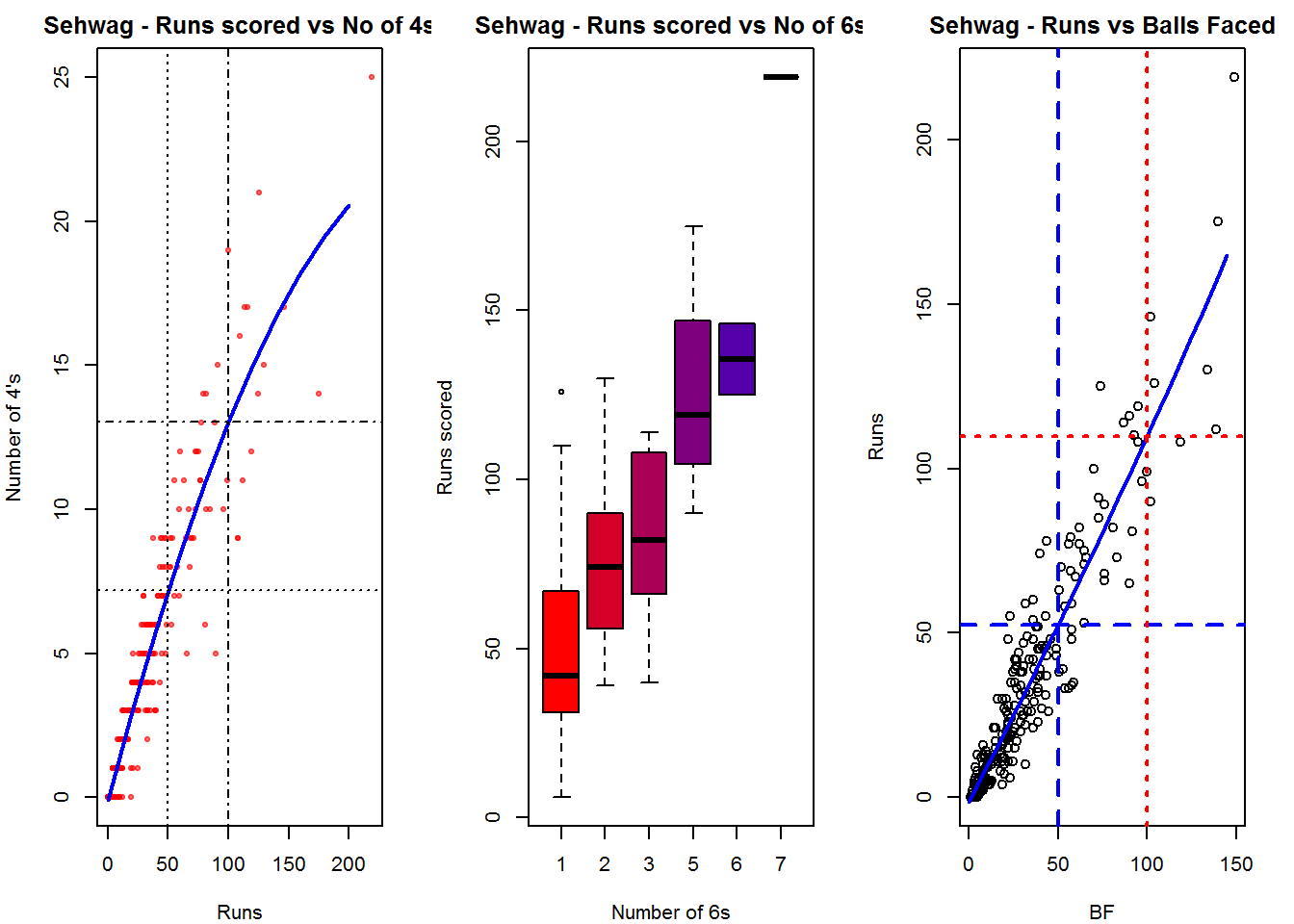
Important note: Do check out my other posts using cricketr at cricketr-posts

Do take a look at my 2nd package “The making of cricket package  yorkr – Part 1

Also see
1. My book “Deep Learning from first principles” now on Amazon
2. My book ‘Practical Machine Learning with R and Python’ on Amazon
3. Taking cricketr for a spin – Part 1
4. cricketr plays the ODIs
5. cricketr adapts to the Twenty20 International
6. Analyzing cricket’s batting legends – Through the mirage with R
7. Masters of spin: Unraveling the web with R
8. Mirror,mirror …best batsman of them all

You may also like
1. A crime map of India in R: Crimes against women
2.  What’s up Watson? Using IBM Watson’s QAAPI with Bluemix, NodeExpress – Part 1
3.  Bend it like Bluemix, MongoDB with autoscaling – Part 2
4. Informed choices through Machine Learning : Analyzing Kohli, Tendulkar and Dravid
5. Thinking Web Scale (TWS-3): Map-Reduce – Bring compute to data
6. Deblurring with OpenCV:Weiner filter reloaded
7. Fun simulation of a Chain in Androidhttp://www.r-bloggers.com/introducing-cricketr-an-r-package-to-analyze-performances-of-cricketers/

The common alphabet of programming languages

                                                                   a                                                                                    

                                    “All animals are equal, but some animals are more equal than other.”                                     “Four legs good, two legs bad.”

from Animal Farm by George Orwell

Note: This post is largely intended for those who are embarking on their journey into the world of programming. The article below highlights a set of constructs that recur in many imperative, dynamic and object-oriented languages.  While these constructs cannot be applied directly to functional programming languages like Lisp,Haskell or Clojure, it may help. To some extent the programming language domain has been intentionally oversimplified to show that languages are not as daunting as they seem. Clearly there are a  lot more subtle and complex differences among languages. Hope you have fun programming!
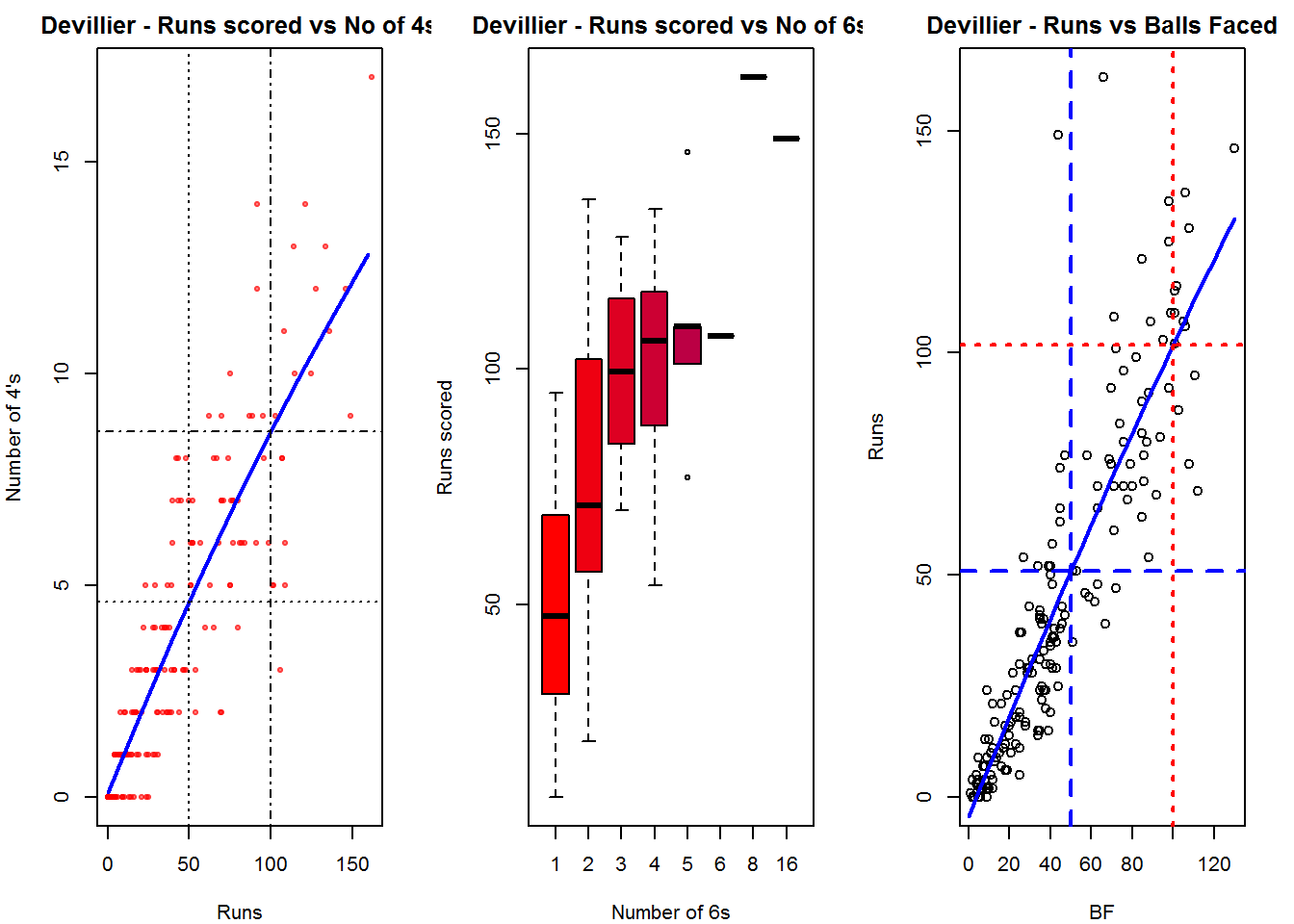
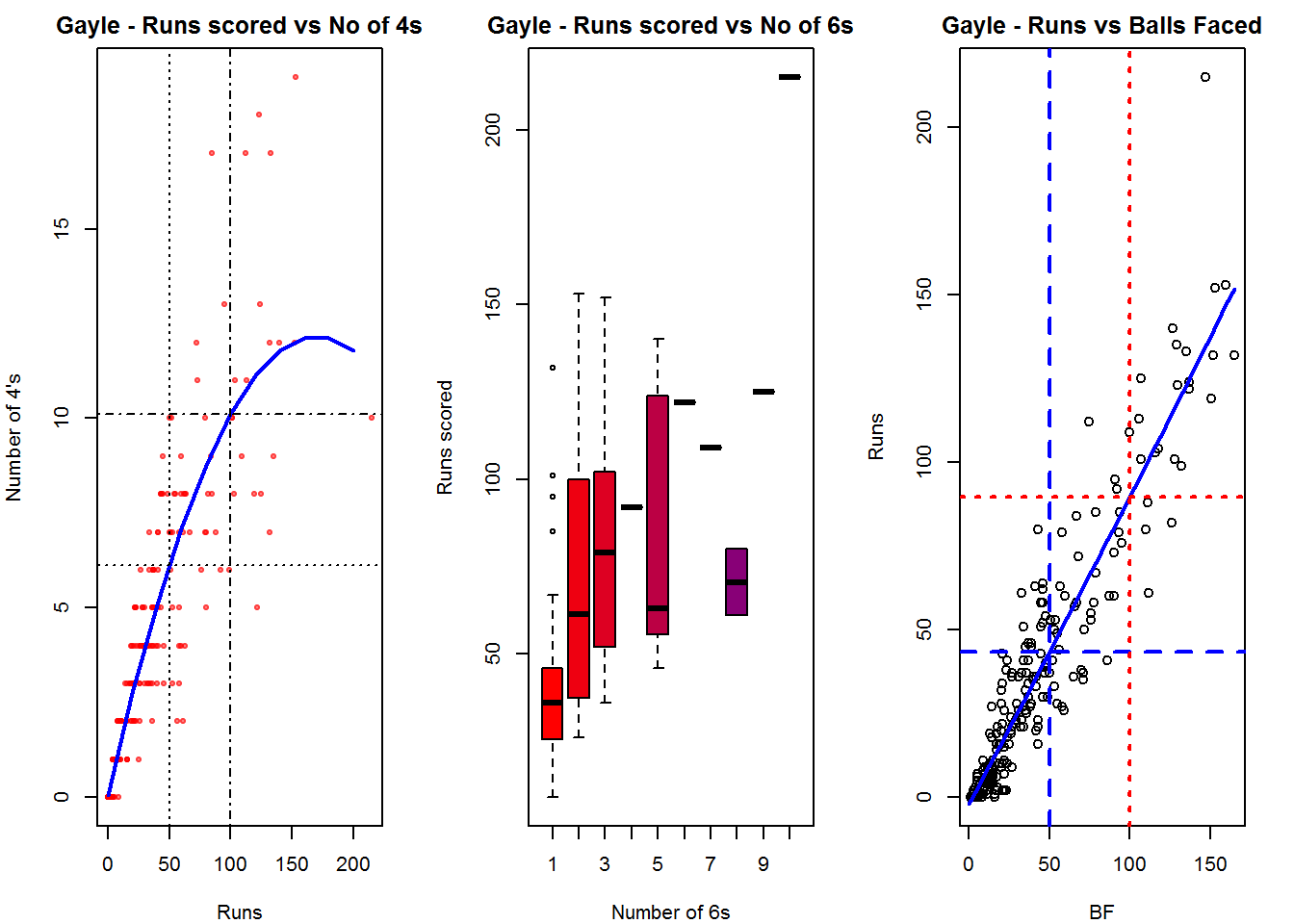
Introduction: Anybody who is about to venture into the deep waters of programming will be bewildered and awed by the almost limitless number of programming languages and the associated paradigms on which they are based on. It is easy to feel apprehensive of programming, when faced with this  this array of languages, not to mention the seemingly quirky syntax of each language.  Many opinions abound, about what is the best programming language. In my opinion each language is best suited for a particular class of problems and is usually clunky if used outside of this. As an aside here is an interesting link provided by reader AKS to Rosetta Code, which is stated to be a a programming chrestomathy (present solutions to the same task in as many different languages as possible, to demonstrate how languages are similar and different, and to aid a person with a grounding in one approach to a problem in learning another. Rosetta Code currently has 772 tasks, 165 draft tasks, and is aware of 582 languages)
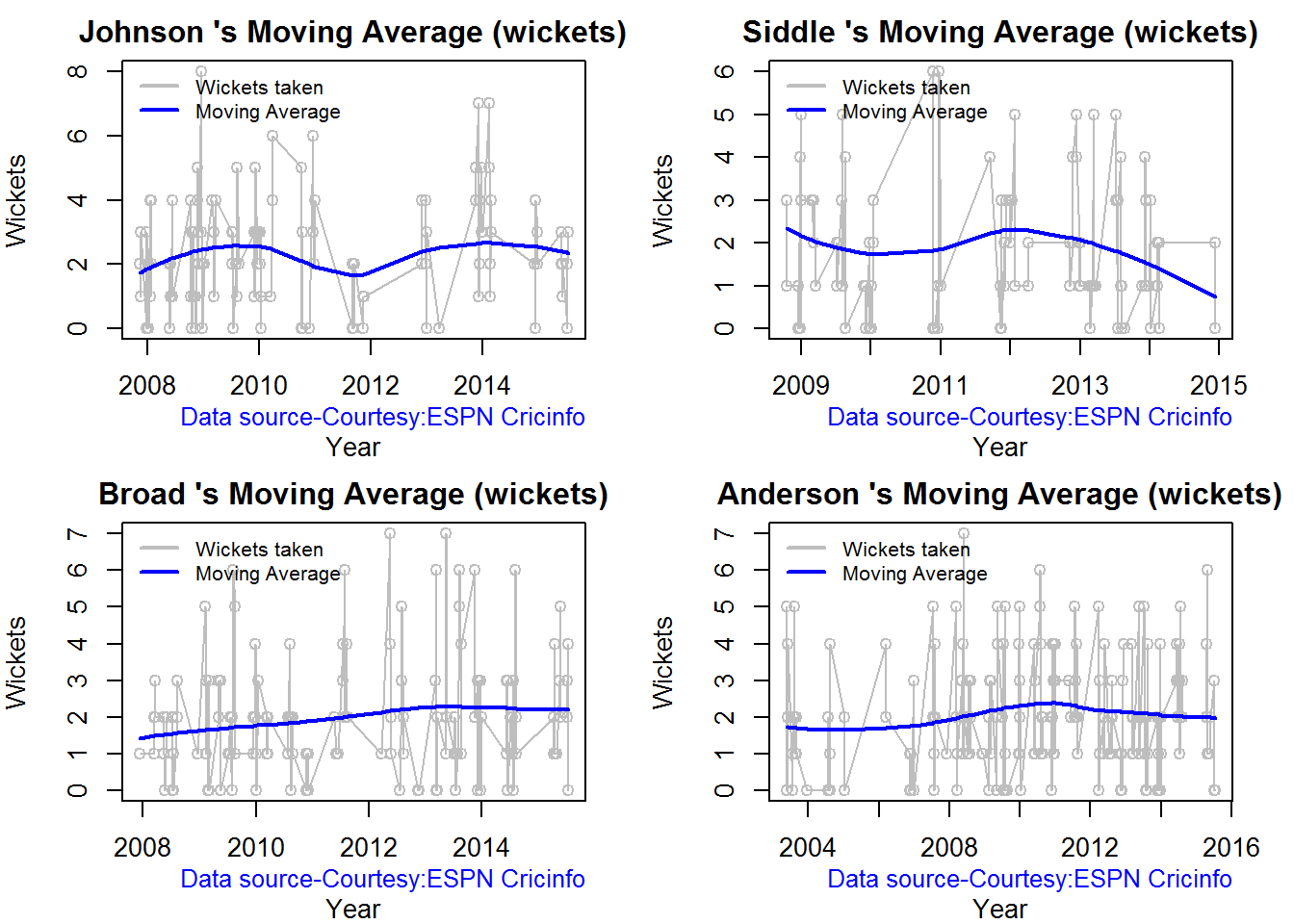
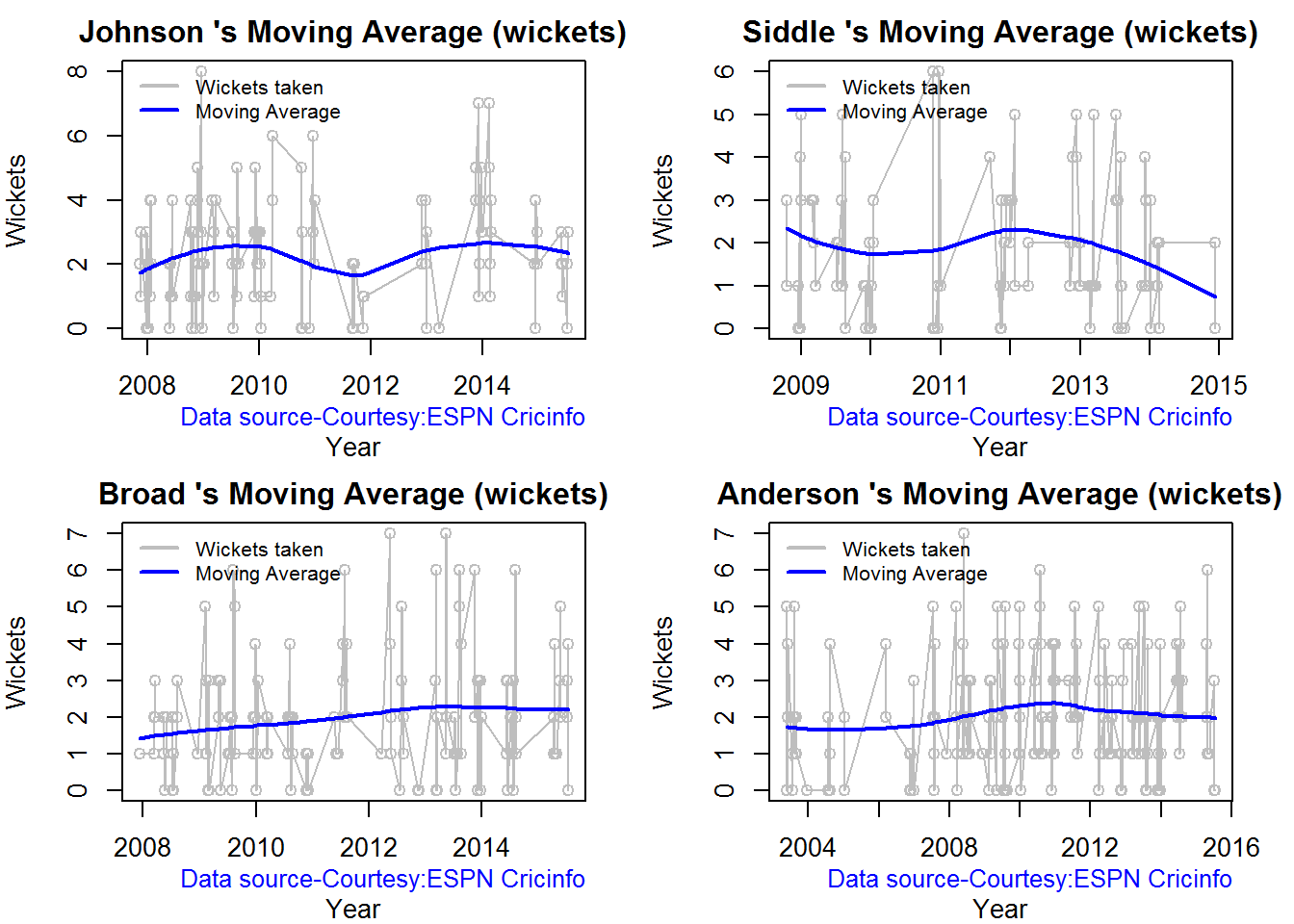
You are likely to hear  “All programming languages are equal, but some languages are more equal than others” from seasoned programmers who have their own pet language. There may also be others who swear that “procedural languages good, object oriented languages bad” or maybe “object oriented languages good, aspect oriented languages bad”. Unity in diversity Regardless of the language this post discusses a thread that is common to all programming languages. In fact any programming language can be expressed as

Lx = C + Sx

Where Lx is any programming language ‘x’. All programming languages have a set of core, common constructs which I have denoted as ‘C’ and a set of Specialized constructs, unique to each language ‘x’ which I have denoted as Sx. I would like to look at these constructs that are common to most programming languages like C,C++,Perl, Python, Ruby, C#, R, Octave etc. In my opinion knowing these core, common constructs and a few of the more specialized constructs should allow you to get started off in the language of your choice. You can pick up the more unique constructs as you go along.   Here are the common constructs (C mentioned above) that you must familiarize yourself with when embarking on a new language

  1. Reading user input and printing to screen
  2. Reading and writing from a file
  3. Conditional statement if-then-else if-else
  4. Loops – For, while, repeat, do while etc.

Knowing these constructs and some of the basic concepts unique to each language for e.g.
– Structure, Pointers in C,
– Classes, inheritance in C++
– Subsetting in Octave, R
– car, cdr in Lisp will enable you to get started off in your chosen language.
I show the examples of these core constructs in many languages. Note the similarity between these constructs
1. C
Read from and write to console

scanf(x,”%d); printf(“The value of x is %d”, x);
Read from and write to file
fread(buffer, strlen(c)+1, 1, fp);
fwrite(c, strlen(c) + 1, 1, fp);

Conditional
if(x > 5) {
printf(“x is greater than 5”);
}
else if (x < 5)
{ printf(“x is less than 5”);
}
else{ printf(“x is equal to 5”);
}

Loops I will only consider for loops, though one could use while, repeat etC.
for(i =0; i <100; i++)
{ money = money++)
}

2. C++
Read from and write to console
cin >> age;
Cout << “The value is “ << value

Read from and write to a file // open a file in read mode.
ifstream infile;
infile.open("afile.dat");
cout << "Reading from the file" <<
endl;
infile >> data;
ofstream outfile;
outfile.open("afile.dat");
// write inputted data into the file.
outfile << data <<
endl;

Conditional same as C
if(x > 5) {
printf(“x is greater than 5”);
}

else if (x < 5) {
printf(“x is less than 5”);
}
else{ printf(“x is equal to 5”);
}

Loops
for(i =0; i <100; i++)
{ money = money++)

}

2. C++ Read from and write to console
cin >> age;
Cout << “The value is “ << value
Read from and write to a file // open a file in read mode.
ifstream infile;
infile.open("afile.dat");
cout << "Reading from the file" << endl;
infile >> data; ofstream outfile;
outfile.open("afile.dat");
// write inputted data into the file.
outfile << data << endl;
Conditional same as C
if(x > 5) {
printf(“x is greater than 5”);
}
else if (x < 5) {
printf(“x is less than 5”);
}
else{ printf(“x is equal to 5”);
}
Loops
for(i =0; i <100; i++){
money = money++)
}
3. Java
Reading from  and writing to standard input
Console c = System.console();
int val = c.readLine("Enter a value: ");
System.out.println("Value is "+ val);
Reading and writing from file
try {
in = new FileInputStream("input.txt");
out = new FileOutputStream("output.txt");
int c;
while ((c = in.read()) != -1) {
out.write(c); } } ...
Conditional (same as C)
if(x > 5) {
printf(“x is greater than 5”);
}
else if (x < 5) {
printf(“x is less than 5”);
}
else{ printf(“x is equal to 5”); }
Loops (same as C)
for(i =0; i <100; i++){
money = money++)
}

4. Perl Read from console
#!/usr/bin/perl
$userinput =  ;
chomp ($userinput);
Write to console
print "User typed $userinput\n";
Reading and write to a file
open(IN,"infile") || die "cannot open input file";
open(OUT,"outfile") || die "cannot open output file";
while() {
print OUT $_;
# echo line read
}
close(IN);
close(OUT)
Conditional
if( $a  ==  20 ){
# if condition is true then print the following
printf "a has a value which is 20\n";
}
elsif( $a ==  30 ){
# if condition is true then print the following
printf "a has a value which is 30\n";
}else{
# if none of the above conditions is true
printf "a has a value which is $a\n";
}
Loops
for (my $i=0; $i <= 9; $i++) {
print "$i\n";
}

5. Lisp
The syntax for Lisp will be different from the others as it is a functional language. You need to familiarize yourself with these constructs to move ahead
Read and write to console
To read from standard input use
(let ((temp 0))
(print ‘(Enter temp))
(setf temp (read))
(print (append ‘(the temp is) (list temp))))
Read from and write to file
(with-open-file (stream “C:\\acl82express\\lisp\\count.cl”)
(do ((line (read-line stream nil) (read-line stream nil)))
(with-open-file (stream “C:\\acl82express\\lisp\\test.txt” :direction :output :if-exists :supersede)
(write-line “test” stream) nil)
Conditional
$ (cond ((< x 5)
(setf x (+ x 8))
(setf y (* 2 y)))
((= x 10) (setf x (* x 2)))
(t (setf x 8)))
Loops
$  (setf x 5)
$ (let ((i 0))
(loop (setf y (* x i))
(when (> i 10) (return))
(print i) (prin1 y) (incf i )))

6. Python
Reading and writing from console
var = raw_input("Please enter something: ")
print “You entered: ”  value
Reading and writing from files
f = open(filename, 'r')
a = f.readline().strip()
target = open(filename, 'w')
target.write(line1)
Conditionals
if x > 5:
print "x is greater than 5”
elif
x < 5:
print "x is less than 5"
else:
print "x is equal to 5"
Loops
for i in range(0, 6):
print "Value is :" % i 7.

R
x=5
paste('The value of x is =',x)
Reading and writing to a file
infile = read.csv(“file”)
write(x, file = "data", sep = " ")
Conditional
if(x > 5){
print(“x is greater than 5”) 
}else if(x < 5){
print(“x is less than 5”) 
}else {
print(“x is equal to 5”)
}
Loops
for (i in 1:10) print(i)

Conclusion
As can be seen the core constructs are very similar in different languages save for some minor variations. It is generally useful to get started with just knowing these constructs and few other important other features  of the language that you are trying to learn. It is possible to code most programs with these Core constructs and a few of the Specialized constructs in the language. These Core constructs are the glue that hold your code together.

You can learn more compact and more powerful features of the language as you go along The above core constructs are like the letters of the programming language alphabet. You need to construct words by stringing together these constructs and form sensible sentences which will be your program. Good luck with your adventure in your next new programming language!!!

Also see
1.Programming languages in layman’s language
2. The mind of the programmer
3. How to program – Some essential tips
4. Programming Zen and now – Some essential tips -2 

You may also like
1. A crime map of India in R: Crimes against women
2.  What’s up Watson? Using IBM Watson’s QAAPI with Bluemix, NodeExpress – Part 1
3.  Bend it like Bluemix, MongoDB with autoscaling – Part 2
4. Informed choices through Machine Learning : Analyzing Kohli, Tendulkar and Dravid
5. Thinking Web Scale (TWS-3): Map-Reduce – Bring compute to data
6. Deblurring with OpenCV:Weiner filter reloaded

TWS-5: Google’s Page Rank: Predicting the movements of a random web walker

Internet history can be divided into 2 epochs. The epoch before the Google search and that after. Prior to Google there were many unsuccessful attempts to organize the Web, which  a miniscule fraction of what we have today, through Web portals. So we had Yahoo, Excite, Alta-vista, Lycos etc. trying to categorize the pages of the Web into News, Sports, and Finance etc. Navigating through them was an exercise an frustration but one had to live with this for quite some time. ( The material for this post is taken from Mining Massive Datasets lecture from Coursera – Lecture by Prof. Jure Leskovec, Stanford University)

The Google Search powered by the Page Rank algorithm arrived at a time when the internet was exploding. This was precisely what ‘the doctor ordered’ as navigating the web became synonymous with the Web search. This post takes a look at the Page Rank algorithm behind Google Search.

The Web can be viewed as a large directed graph with out-links from Web pages to other pages (links from a page to external Web pages) and in-links into Web pages from other pages.

For the Google search, Google uses Web crawlers to index the pages of the Web and probably creates an inverted index of keywords to documents that contain them. It then uses the Page Rank algorithm to determine the relevance and importance of the Web page

How does Google identify the importance of a Web page?

The importance of a Web page is determined by the number of in-links to the page. Each in-link is considered a vote for this page. Also the in-link from an important page is higher than another in-link from a less important page. So for example an in-link from New York Times will be much larger than an in-link from the National Enquirer for example

1

In the figure above it can B has a highest Page Rank because it has the highest number of in-links. In addition the out-link from B to C increases the Page Rank of C.

A) Flow formulation: The Flow formulation for Page Rank is based on the following

  • Each Web page’s vote (in-link) is proportional to the importance of the source page
  • If a page ‘j’ with page rank rj has n out-links each link gets rj/n votes
  • Page ‘j’s own importance is the sum of all the votes on its in-links

2

Where rj = ri/3 + rk/4 as seen from the above figure

According to the Flow equation for Page rank, the rank rj for a page j is
rj = ∑ ri/d
I -> j

In other words the rank rj is the sum of the the in-links from all pages ri divided by its out-degree.

3

The flow equations for the above simple view of a Web links can be expressed as based on the rank ri of each node divided by its out-degree. So ry and ra have an out-degree of 2 and hence they are ry/2 and ra/2 per out-link

ry = ry/2 + ra/2
ra = rm + ry/2
rm = ra/2

B) The Matrix formulation

In the Matirx formulation for Page Rank an Adjacent matrix Mji is defined as follows
If a page I has di out-links
If page I has an out-link to page j then
I -> j                   Mji = 1/di else Mji =0

The Rank vector ri is the importance of page i
It is also assumed that  ∑ri = 1

3

The Flow formulation for the above was shown to be
ry = ry/2 + ra/2
ra = rm + ry/2
rm = ra/2

The Matrix formulation is

4

However when we a billions of Web pages with several hundred thousand in-links and out-links the Page rank is iteratively calculated

If we start with

5

To start the page rank of ra=ry=rm = 1/3 so that the sum ∑ri =1
This is then iterated
Using the

r = M x r to arrive at values that converge
ry            ½     ½     0                             1/3
ra    =     ½     0      1          x                   1/3
r m         0     ½      0                               1/3

This will eventually converge at ry=2/5 ra=2/5 and rm =1/5

The ability to rank Web pages on the order of importance was a real breakthrough for Google

The Page Rank also implies the probability that a Web surfer who randomly clicks the ou-links of a the Web pages will land on after some time. It is the probability of a random walk of the Web when clicking the Web links on pages at random.

While Google does a great job in crawling and serving pages it is rumored that more than 75% of the Web is inaccessible to Web search engines. This is known as the “Dark Net‘ or “Dark Web” much like the dark matter of the universe

Also see
1. A crime map of India in R: Crimes against women
2.  What’s up Watson? Using IBM Watson’s QAAPI with Bluemix, NodeExpress – Part 1
3.  Bend it like Bluemix, MongoDB with autoscaling – Part 2
4. Informed choices through Machine Learning : Analyzing Kohli, Tendulkar and Dravid
5. Thinking Web Scale (TWS-3): Map-Reduce – Bring compute to data
6. Deblurring with OpenCV:Weiner filter reloaded

Into the Telecom vortex

“Ten little Indian boys went out to dine,
One choked his little self and then there were nine
Nine little Indian boys sat up very late;
One overslept himself and then there were eight…”

From the poem “Ten Little Indians”

a

You don’t need to be particularly observant to notice that the telecom landscape over the last decade and a half is full of dead organizations, bloodshed and gore. Organizations have been slain by ruthless times and bigger ones have devoured the weaker, fallen ones. Telecom titans have vanished, giants have been reduced to dwarfs.

Some telecom companies have merged in a deadly embrace trying to beat the market forces only to capitulate to its inexorable death march.

The period from the early 1980s to the late 1990’s were the glorious periods for telecommunication. Digital switches (1972-1982), ISDN (1988), international calling, trunk protocols, mobile (~1991), 2G, 2.5G, and 3G moved in succession, one after another.

Advancement came after advancement. The future had never looked so bright for telecom companies.

The late 1990’s were heady years, not just for telecom companies, but to all technology companies. Stock prices soared. Many stocks were over-valued.  This was mainly due to what was described as the ‘irrational exuberance’ of the stock market.

Lucent, Alcatel, Ericsson, Nortel Networks, Nokia, Siemens, Telecordia all ruled supreme.

1997-2000. then the inevitable happened. There was the infamous dot-com bust of the 2000 which sent reduced many technology stocks to penny stocks. Telecom company stocks went into a major tail spin.  Stock prices of telecom organizations plummeted. This situation, many felt, was further exacerbated by the fact that nothing important or earth shattering was forth-coming from the telecom. In other words, there was no ‘killer app’ from the telecommunication domain.

From 2000 onwards 3G, HSDPA, LTE etc. have all come and gone by. But the markets were largely unimpressed. This was also the period of the downward slide for telecom. The last decade and a half has been extra-ordinarily violent. Technology units of dying organizations have been cannibalized by the more successful ones.

Stellar organizations collapsed, others transformed into ‘white dwarfs’, still others shattered with the ferocity of a super nova.

Here is a short recap of the major events.

  • 2006 – After a couple of unsuccessful attempts Alcatel and Lucent finally decide to merge
  • 2006 – Nokia marries Siemens in a 20 billion Euro deal. N
  • 2009-10 – Ericsson purchases Nortel’s CDMA and LTE business for $1.13 billion
  • 2009-10 – Nortel implodes
  • 2010 – Motorola sells networking unit to Nokia for $1.2 Billion
  • 2011 – Internet giant Google mops up Motorola’s handset division for $12.5 billion, largely for the patents
  • 2012 – Ericsson closes a deal with Telcordia for $1.15 billion
  • 2013 – Nokia sells its handset division to Microsoft after facing a serious beating from smartphones
  • 2015 – Nokia agrees to a $16.6 billion takeover of Alcatel Lucent

And so the story continues like the rhyme in Agatha Christie’s mystery novel

And then there were none

Ten little Indian boys went out to dine,                                                                                                                
One choked his little self and then there were nine…”

The Telecom companies continue their search for the elusive ‘killer app’ as progress comes in small increments – 3G, 3.5G, 3.75G, 4G, and 5G etc.

Personally I think the future of Telecom companies, lies in its ability to embrace the latest technologies of Cloud Computing, Big Data, Software Defined Networks, and Software Defined Datacenters and re-invent themselves. Rather than looking for some elusive ‘killer app’ they have to re-enter the technology scene with a Big Bang

As I referred to in one of my earlier posts “Architecting a cloud Based IP Multimedia System” the proverbial pot at the end of the rainbow may be in

  1. Virtualizing IP Multimedia Switches (IMS) namely the CSCFs (P-CSCF, S-CSCF, I-CSCF etc.),
  2. Using the features of the cloud like Software Defined Storage (SDS) , Load balancers and auto-scaling to elastically scale-up or scale down the CSCF instances to handle varying ‘call traffic’
  3. Having equipment manufacturers (Nokia, Ericsson, and Huawei) will have to use innovating pricing models with the carriers like AT&T, MCI, Airtel or Vodafone. Instead of a one-time cost for hardware and software, the equipment manufacturers will need to charge based on usage or call traffic (utility charging). This will be a win-win for both the equipment manufacturer and carrier
  4. Using SDN to provide the necessary virtualized pipes between users with the necessary policies for advanced services like video-chat, white-boarding, real-time gaming etc.
  5. Using Big Data and Hadoop to analyze Call Detail Records (CDRs) and provide advanced services to customers like differential rates for calls etc

Clearly there will be challenges in this virtualized view of things. Telecom equipment is renowned for its 5 9’s availability. The challenge will be achieving this resiliency, high availability and fault-tolerance with cloud servers. How can WAN latencies be mitigated? How to can SDN provide the QoS required for voice, video and data traffic in IMS?

IMS has many interesting services where video calls from laptops can be transferred as data calls to mobile phones and vice versa, from mobile networks to WiFi  and so on.

Many hurdles will have to be crossed. But this is, in my opinion, will be the path forward.

While the last decade and a half have been bad for the telecom industry, I personally feel we are on the verge on the next big breakthrough in telecom in the next year or two. Telecom will rise like the phoenix from its ashes in the next couple of years

Also see
1. A crime map of India in R: Crimes against women
2.  What’s up Watson? Using IBM Watson’s QAAPI with Bluemix, NodeExpress – Part 1
3.  Bend it like Bluemix, MongoDB with autoscaling – Part 2
4. Informed choices through Machine Learning : Analyzing Kohli, Tendulkar and Dravid
5. Thinking Web Scale (TWS-3): Map-Reduce – Bring compute to data
6. Deblurring with OpenCV:Weiner filter reloaded

Mirror, mirror … the best batsman of them all?

“Full many a gem of purest serene
The dark oceans of cave bear.”
Thomas Gray – Elegy in country churchyard

In this post I do a fine grained analysis of the batting performances of cricketing icons from India and also from the international scene to determine how they stack up against each other.  I perform 2 separate analyses 1) Between Indian legends (Sunil Gavaskar, Sachin Tendulkar & Rahul Dravid) and another 2) Between contemporary cricketing stars (Brian Lara, Sachin Tendulkar, Ricky Ponting and A B De Villiers)

In the world and more so in India, Tendulkar is probably placed on a higher pedestal than all other cricketers. I was curious to know how much of this adulation is justified. In “Zen and the art of motorcycle maintenance” Robert Pirsig mentions that while we cannot define Quality (in a book, music or painting) we usually know it when we see it. So do the people see an ineffable quality in Tendulkar or are they intuiting his greatness based on overall averages?

In this context, we need to keep in mind the warning that Daniel Kahnemann highlights in his book, ‘Thinking fast and slow’. Kahnemann suggests that we should regard “statistical intuition with proper suspicion and replace impression formation by computation wherever possible”. This is because our minds usually detects patterns and associations  even when none actually exist.

So this analysis tries to look deeper into these aspects by performing a detailed statistical analysis.

The data for all the batsman has been taken from ESPN Cricinfo. The data is then cleaned to remove ‘DNB’ (did not bat), ‘TDNB’ (Team did not bat) etc before generating the graphs.

The code, data and the plots can be cloned,forked from Github at the following link bestBatsman. You should be able to use the code as-is for any other batsman you choose to.

Feel free to agree, disagree, dispute or argue with my analysis.

If you are passionate about cricket, and love analyzing cricket performances, then check out my 2 racy books on cricket! In my books, I perform detailed yet compact analysis of performances of both batsmen, bowlers besides evaluating team & match performances in Tests , ODIs, T20s & IPL. You can buy my books on cricket from Amazon at $12.99 for the paperback and $4.99/$6.99 respectively for the kindle versions. The books can be accessed at Cricket analytics with cricketr  and Beaten by sheer pace-Cricket analytics with yorkr  A must read for any cricket lover! Check it out!!

1


Important note: Do check out the python avatar of cricketr, ‘cricpy’ in my post ‘Introducing cricpy:A python package to analyze performances of cricketers

The batting performances of the each of the cricketers is described in 3 plots a) Combined boxplot & histogram b) Runs frequency vs Runs plot c) Mean Strike Rate vs Runs plot

A) Batting performance of Sachin Tendulkar

a) Combined Boxplot and histogram of runs scored
srt-boxhist1

The above graph is combined boxplot and a histogram. The boxplot at the top shows the 1st quantile (25th percentile) which is the left side of the green rectangle, the 3rd quantile( 75% percentile) right side of the green rectangle and the mean and the median. These values are also shown in the histogram below. The histogram gives the frequency of Runs scored in the given range for e.g (0-10, 11-20, 21-30 etc) for Tendulkar

b) Batting performance – Runs frequency vs Runs
srt-perf

The graph above plots the  best fitting curve for Runs scored in the frequency ranges.

c) Mean Strike Rate vs Runs
srt-sr

This plot computes the Mean Strike Rate for each interval for e.g if between the ranges 11-21 the Strike Rates were 40.5, 48.5, 32.7, 56.8 then the average of these values is computed for the range 11-21 = (40.5 + 48.5 + 32.7 + 56.8)/4. This is done for all ranges and the Mean Strike Rate in each range is plotted and the loess curve is fitted for this data.

B) Batting performance of Rahul Dravid
a) Combined Boxplot and histogram of runs scored
dravid-boxhist1

The mean, median, the 25th and 75 th percentiles for the runs scored by Rahul Dravid are shown above

b) Batting performance – Runs frequency vs Runs
dravid-perf

c) Mean Strike Rate vs Runs
dravid-sr

C) Batting performance of Sunil Gavaskar
a) Combined Boxplot and histogram of runs scored
gavaskar-boxhist1

The mean, median, the 25th and 75 th percentiles for the runs scored by Sunil Gavaskar are shown above
b) Batting performance – Runs frequency vs Runs
gavaskar-perf

c) Mean Strike Rate vs Runs
gavaskar-sr
D) Relative performances of Tendulkar, Dravid and Gavaskar
relative-perf1

The above plot computes the percentage of the total career runs scored in a given range for each of the batsman.
For e.g if Dravid scored the runs 23, 22, 28, 21, 25 in the range 21-30 then the
Range 21 – 20 => percentageRuns = ( 23 + 22 + 28 + 21 + 25)/ Total runs in career * 100
The above plot shows that Rahul Dravid’s has a higher contribution in the range 20-70 while Tendulkar has a larger percentahe in the range 150-230

E) Relative Strike Rates of Tendulkar, Dravid and Gavaskar
relative-SR

With respect to the Mean Strike Rate Tendulkar is clearly superior to both Gavaskar & Dravid

F) Analysis of Tendulkar, Dravid and Gavaskar
rel-perf1

The above table captures the the career details of each of the batsman
The following points can be noted
1) The ‘number of innings’ is the data you get after removing rows with DNB, TDNB etc
2) Tendulkar has the higher average 48.39 > Gavaskar (47.3) > Dravid (46.46)
3) The skew of  Dravid (1.67) is greater which implies that there the runs scored are more skewed to right (greater runs) in comparison to mean

G) Batting performance of Brian Lara
a) Combined Boxplot and histogram of runs scored
lara-boxhist1
The mean, median, 1st and 3rd quartile are shown above

b) Batting performance – Runs frequency vs Runs
lara-perf

c) Mean Strike Rate vs Runs
lara-sr

H) Batting performance of Ricky Ponting
a) Combined Boxplot and histogram of runs scored
ponting-boxhist1

b) Batting performance – Runs frequency vs Runs
ponting-perf

c) Mean Strike Rate vs Runs
ponting-SR

I) Batting performance of AB De Villiers
a) Combined Boxplot and histogram of runs scored
devilliers-boxhist1

b) Batting performance – Runs frequency vs Runs
devillier-perf

c) Mean Strike Rate vs Runs
devilliers-SR

J) Relative performances of Tendulkar, Lara, Ponting and De Villiers
relative-perf-intl1

Clearly De Villiers is ahead in the percentage Runs scores in the range 30-80. Tendulkar is better in the range between 80-120. Lara’s career has a long tail.

K) Relative Strike Rates of Tendulkar, Lara, Ponting and De Villiers
relative-SR-intl

The Mean Strike Rate of Lara is ahead of the lot, followed by De Villiers, Ponting and then Tendulkar
L) Analysis of Tendulkar, Lara, Ponting and De Villiers
rel-perf-intl1
The following can be observed from the above table
1) Brian Lara has the highest average (51.52) > Sachin Tendulkar (48.39 > Ricky Ponting (46.61) > AB De Villiers (46.55)
2) Brian Lara also the highest skew which means that the data is more skewed to the right of the mean than the others

You can clone the code rom Github at the following link bestBatsman. You should be able to use the code as-is for any other batsman you choose to.

Also see
1. Informed choices through Machine Learning : Analyzing Kohli, Tendulkar and Dravid
2. Informed choices through Machine Learning-2: Pitting together Kumble, Kapil, Chandra
3. Analyzing cricket’s batting legends – Through the mirage with R
4. Masters of spin – Unraveling the web with R

You may also like
1. A peek into literacy in India:Statistical learning with R
2. A crime map of India in R: Crimes against women
3.  What’s up Watson? Using IBM Watson’s QAAPI with Bluemix, NodeExpress – Part 1
4.  Bend it like Bluemix, MongoDB with autoscaling – Part 2