Dissecting the Cloud – Part 1

“The Cloud brings it with it the promise of utility-style computing and the ability to pay according to usage.

Cloud Computing provides elasticity or the ability to grow and shrink based on traffic patterns.

Cloud Computing does away with CAPEX and the need to buy infrastructure upfront and replaces it with OPEX model and so on”.

All this old news and has been repeated many times. But what exactly constitutes cloud computing? What brings about the above features? What are its building blocks of the cloud that enable one to realize the above?

This post tries to look deeper into the innards of the Cloud to determine what the cloud really is.

Before we get to this I would like to dwell on an analogy to understand the Cloud better.

Let us assume, Mr. A owns a large building of about 15,000 sq feet and about 100 feet tall. Let us assume that Mr. A wants to rent this building.

Now, assume that the door of this building opens to single, large room on the inside!

Mr. X comes to rent this building. If this was the case then poor Mr. X would have to pay through his nose, presumably, for the entire building even though his requirement would have been for a small room of about 600 x 600 feet. Imagine the waste of space. Moreover this would also have resulted in an enormous waste of electricity. Imagine the lighting needed. Also an inordinate amount of water would have to be utilized if this single, large room needed to be cleaned. The cost for all of this would have to be borne by Mr. X.

This is clearly not a pleasant state of affairs for either Mr. X or for the owner Mr. A of the building.

The solution to this is easy.  What Mr. A needs to do, is to partition the building into self-contained rooms (600 x 600 sq feet) with all the amenities. Each self-contained unit would need to have its own electricity and water meter.

Now Mr. A can rent rooms to different tenants on their need basis. This is a win-win situation both for Mr, A and Mr. X. The tenants only need to pay for the rooms they occupy and the electricity and water they consume.

This is exactly the principle behind cloud computing and is known as ‘virtualization’

There are 3 computing components that one must consider. CPU, Network and Storage. The below picture shows the virtualization of CPU,RAM, NIC (network card), Disk (storage)

Server-Virtualization-Logical-View

The Cloud is essentially made up of  anywhere between 100 servers to 100,000 servers. The servers are akin to the large building. Running a single OS and application(s) on the entire server is a waste of computing, storage and network resources.

Virtualization abstracts the hardware, storage and network through the use of software known as the ‘hypervisor’. On top of the hypervisor several ‘guest OSes’ can run. Applications can then run on these guest OSes.

Hence over the CPU (single, dual or multi-core) of the server,  multiple guest OS’es  can run each with its own set of applications

This is similar to partitioning the large CPU resource of the server into smaller units.

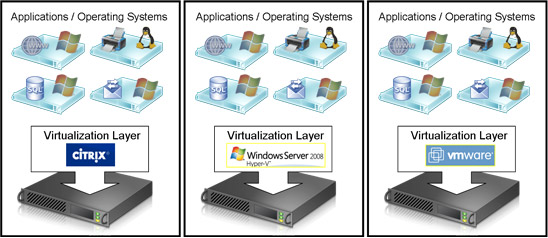
There are 3 main Virtualization technologies namely VMware, Citrix and MS Hyper-V

Here is a diagram showing the 3 main the virtualization technologies

thumb_server_virtualization_lrg

To be continued …


Find me on Google+

‘The Search’ is not yet over!

Published in Telecom Asia, Oc9, 2013 – ‘The search’ is not yet over!

In this post I take a look at the technologies that power the now indispensable and ubiquitous ‘search’ that we do over the web. It would be  easy to rewind the world by at least 3 decades by simply removing ‘the search’ from our lives.

A classic article in the New York Times, ‘The Twitter trap’ discusses how technology is slowly replacing some of our more common faculties like the ability to memorize or perform simple calculations mentally.

For e.g. until the 15th century people had to remember a lot of information. Then came Gutenberg with his landmark invention, the printing press, which did away with the need to store information. Closer to the 2oth century the ‘Google Search’ now obviates the need to remember facts about anything. Detailed information is just a mouse click away.

Here’s a closer look at evolution of search technologies

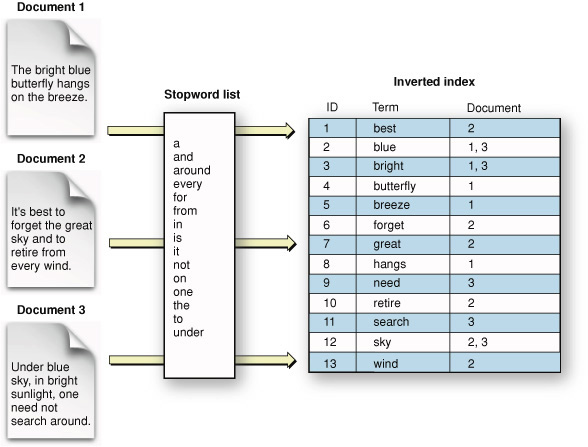
The Inverted Index: The inverted index is a way to search the existence of key words or phrases in documents.  The inverted index is an index data structure storing a mapping from content, such as words or numbers, to its locations in a document or a set of documents. The ability to store words and the documents in which it is present, allows for an quick  retrieval of the related documents in which the word(s) are present. Search engines like Google, Bing or Yahoo typically crawl of the web continuously and keep updating this index of words versus the documents as new web pages and web sites are added. The inverted index is a simplistic method and is neither accurate nor efficient.

inverted_index

Google’s Page Rank: As mentioned before merely the presence of words in documents alone is not sufficient to return good search results. So Google came along with its PageRank algorithm. PageRank is an algorithm used by the Google’s  web search engine to rank websites in their search engine results.  According to Google PageRank works by “counting the number and quality of links to a page to determine a rough estimate of how important the website is.”  The underlying assumption is that more important websites are likely to receive more links from other websites.

In essence the PageRank algorithm tries to determine the likelihood that a surfer will land on a particular page by randomly clicking on links. Clearly the PageRank algorithm has been very effective for searches as now ‘googling’ is synonymous to searching (see below from Wikipedia)

PageRanks

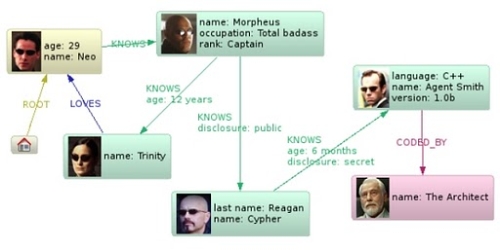
Graph database: While the ‘Google Search’ is extremely powerful it would make more sense if the search could be precisely tailored to what the user is trying to search. A typical Google search throws up a few 100 million results.  This has led to even more powerful techniques, one of which is the ‘Graph database’. In a Graph database data is represented as a graph. Nodes in the graph can be entities and edges could be relationships. A search on the graph database will result in the traversal of the graph from a specific start node to specific terminating node. Here is a fun representation of a simple Graph database representation from InfoQ

neo4j_matrix_0411

Google has recently come out with its Knowledge Graph which is based on this technology. Facebook allows users to create complex queries of status updates using the graph database.

Finally, what next??

A Cognitive Search??: Even with the graph database the results cannot be very context specific. What I would hope to happen in the future is have a sort of a ‘Cognitive Search’ where the results would be bounded and would take into account the semantics and context of a user specified phrase or request.

So for e.g. if a user specified ‘Events leading to the Iraq war’ the search should throw all results which finally culminated in the Iraq war.

Alternatively if I was interested in knowing for e.g. ‘the impact of iPad on computing’ then the search should throw precise results from  the making of the iPad, the launch of iPad, the various positive and negative reviews and impact iPad has had on the tablet and computing industry as a whole.

Another interesting query would ‘The events that led to the downfall of a particular government in election of 1998’ the search should precisely output all those events that were significant during this specific period.

I would assume that the results themselves would come out as a graph with nodes and edges specifying which event(s) triggered which other event(s) with varying degrees of importance.

However this kind of ability where the search is cognitive is probably several years away!

Find me on Google+

Future calls. Visualizing an IMS based future.

Future calls. In case you didn’t notice there is a word play in the previous sentence. I have used the word “calls” both as a verb and as a noun. Clever, right? 😉

This post takes a closer look at how the future would look like with regard to calls.

Our world is getting more interconnected and more digitized. We view this digitized world through either smartphones, tablets, laptops, smart TV etc. So these days we can browse the web through any of the above devices. Social applications like Facebook. Twitter, LinkedIn or utilities like Evernote and Pocket are equally accessible through any of the devices at any time and at any place.

While we are able to use these devices interchangeably why is that we always receive calls only through phones (mobile or landlines).  Would it be possible to switch calls between these devices?

In fact this is very possible and is included in the vision that IP Multimedia Systems had set for itself. While IMS is yet to take off, it is bound to get traction in the not too distant future.

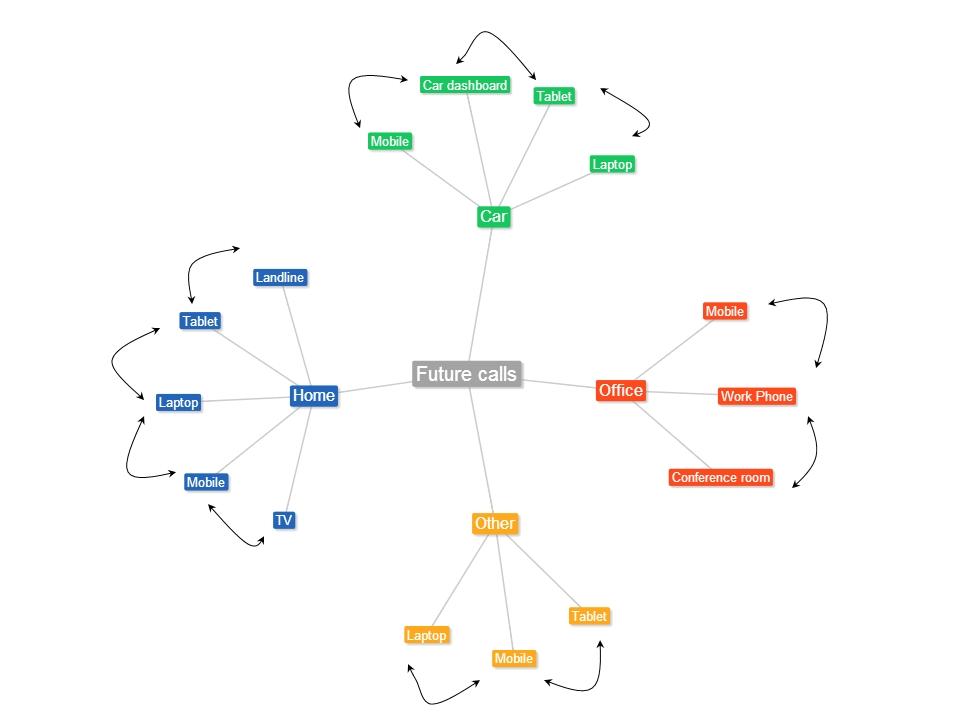
Assuming that this is going to happen, here is my visualization of how a typical day in the future (possibly 2015/2016) would look like.

Future calls

Here is an imagined scenario

Akash is joined to a conference call at 8.00 am, while at home. When he answers his smartphone he gets a notification “Nearby devices 1) Laptop2) Tablet 3) TV. Choose device to handover to”.  If he chooses the tablet, laptop or TV the call would be seamlessly transferred to this device.  When the call appears on his tablet, laptop or TV there could be another notification “Do you want to add video to the call? Choose Yes or No” the call would automatically be upgraded to a video call if the far end also has this capability. Lets assume that Akash completes this call.

On his way to the office he receives another call on his mobile. When Akash answers his smartphone he is again notified regarding the devices nearby 1) Laptop 2) Car dashboard. Now Akash can just command his smartphone to receive the call on his car dashboard if he is driving his car. If he is being driven he can handover the call to his laptop. When he receives the call in his laptop he could receive a popup, “Do you want to add video and/or data to this call?” If he chooses to add both video and data he can videoconference while also whiteboarding with his colleagues.

He can then continue the call on his smartphone while walking to his cubicle.

The transition between devices will be seamless.

This handover of calls between devices and also the switching back and forth from voice only to voice, video and data (whiteboarding) is bound to happen in the not too distant future.

So keep you ears and eyes wide open.


Find me on Google+

Envisioning a Software Defined IP Multimedia System (SD-IMS)

pot

In my earlier post “Architecting a cloud based IP Multimedia System (IMS)” I had suggested the idea of “cloudifying” the network elements of the IP Multimedia Systems. This would bring multiple benefits to the Service Providers as it would enable quicker deployment of the network elements of the IMS framework, faster ROI and reduction in CAPEX. Besides, the CSPs can take advantage of the elasticity and utility style pricing of the cloud.

This post takes this idea a logical step forward and proposes a Software Defined IP Multimedia System (SD-IMS).

In today’s world of scorching technological pace, static configurations for IT infrastructure, network bandwidth and QOS, and fixed storage volumes will no longer be sufficient.

We are in the age of being able to define requirements dynamically through software. This is the new paradigm in today’s world. Hence we have Software Defined Compute, Software Defined Network, Software Defined Storage and also Software Defined Radio.

This post will demonstrate the need for architecting an IP Multimedia System that uses all the above methodologies to further enable CSPs & Operators to get better returns faster without the headaches of earlier static networks.

IP Multimedia Systems (IMS) is the architectural framework proposed by 3GPP body to establish and maintain multimedia sessions using an all IP network. IMS is a grand vision that is access network agnostic, uses an all IP backbone to begin, manage and release multimedia sessions.

The problem:

Any core network has the problem of dimensioning the various network elements. There is always a fear of either under dimensioning the network and causing failed calls or in over dimensioning resulting in wasted excess capacity.

The IMS was created to handle voice, data and video calls. In addition in the IMS, the SIP User Endpoints can negotiate the media parameters and either move up from voice to video or down from video to voice by adding different encoders.  This requires that the key parameters of the pipe be changed dynamically to handle different QOS, bandwidth requirements dynamically.

The solution

The approach suggested in this post to have a Software Defined IP Multimedia System (SD-IMS) as follows.

In other words the compute instances, network, storage and the frequency need to be managed through software based on the demand.

Software Defined Compute (SDC): The traffic in a Core network can be seasonal, bursty and bandwidth intensive. To be able to handle this changing demands it is necessary that the CSCF instances (P-CSCF, S-CSCF,I-CSCF etc) all scale up or down. This can be done through Software Defined Compute or the process of auto scaling the CSCF instances. The CSCF compute instances will be created or destroyed depending on the traffic traversing the switch.

Software Defined Network (SDN): The IMS envisages the ability to transport voice, data and video besides allowing for media sessions to be negotiated by the SIP user endpoints. Software Defined Networks (SDNs) allow the network resources (routers, switches, hubs) to be virtualized.

SDNs can be made to dynamically route traffic flows based on decisions in real time. The flow of data packets through the network can be controlled in a programmatic manner through the Flow controller using the Openflow protocol. This is very well suited to the IMS architecture. Hence the SDN can allocate flows based on bandwidth, QoS and type of traffic (voice, data or video).

Software Defined Storage (SDS): A key component in the Core Network is the need to be able charge customers. Call Detail Records (CDRs) are generated at various points of the call which are then aggregated and sent to the bill center to generate the customer bill.

Software Defined (SDS) abstracts storage resources and enables pooling, replication, and on-demand provisioning of storage resources. The ability to be able to pool storage resources and allocate based on need is extremely important for the large amounts of data that is generated in Core Networks

Software Defined Radio (SDR): This is another aspect that all Core Networks must adhere to. The advent of mobile broadband has resulted in a mobile data explosion portending a possible spectrum crunch. In order to use the available spectrum efficiently and avoid the spectrum exhaustion Software Define Radio (SDR) has been proposed. SDRs allows the radio stations to hop frequencies enabling the radio stations to use a frequency where this less contention (see We need to think differently about spectrum allocation … now).In the future LTE-Advanced or LTE with CS fallback will have to be designed with SDRs in place.

Conclusion:

A Software Defined IMS makes eminent sense in the light of characteristics of a core network architecture.  Besides ‘cloudifying’ the network elements, the ability to programmatically control the CSCFs, network resources, storage and frequency, will be critical for the IMS. This is a novel idea but well worth a thought!

Find me on Google+

Presentation on Wireless Technologies – Part 2

Here is a continuation of my earlier presentation on Wireless Technologies – Part 1. These presentations trace the evolution of telecom from basic telephony all the way to the advances in LTE.

Find me on Google+

Presentation on Wireless Technologies – Part 1

This presentation traces the evolution of telecom, from the early days of basic of telephony to the current Long Term Evolution(LTE) technology

Find me on Google+

Presentation on “Intelligent Networks, CAMEL protocol, services & applications”

Find me on Google+

Presentation on the “Design principles of scalable, distributed systems”

Also see my blog post on this topic “Design principles of scalable, distributed system

Find me on Google+

A closer look at “Robot Horse on a Trot” in Android

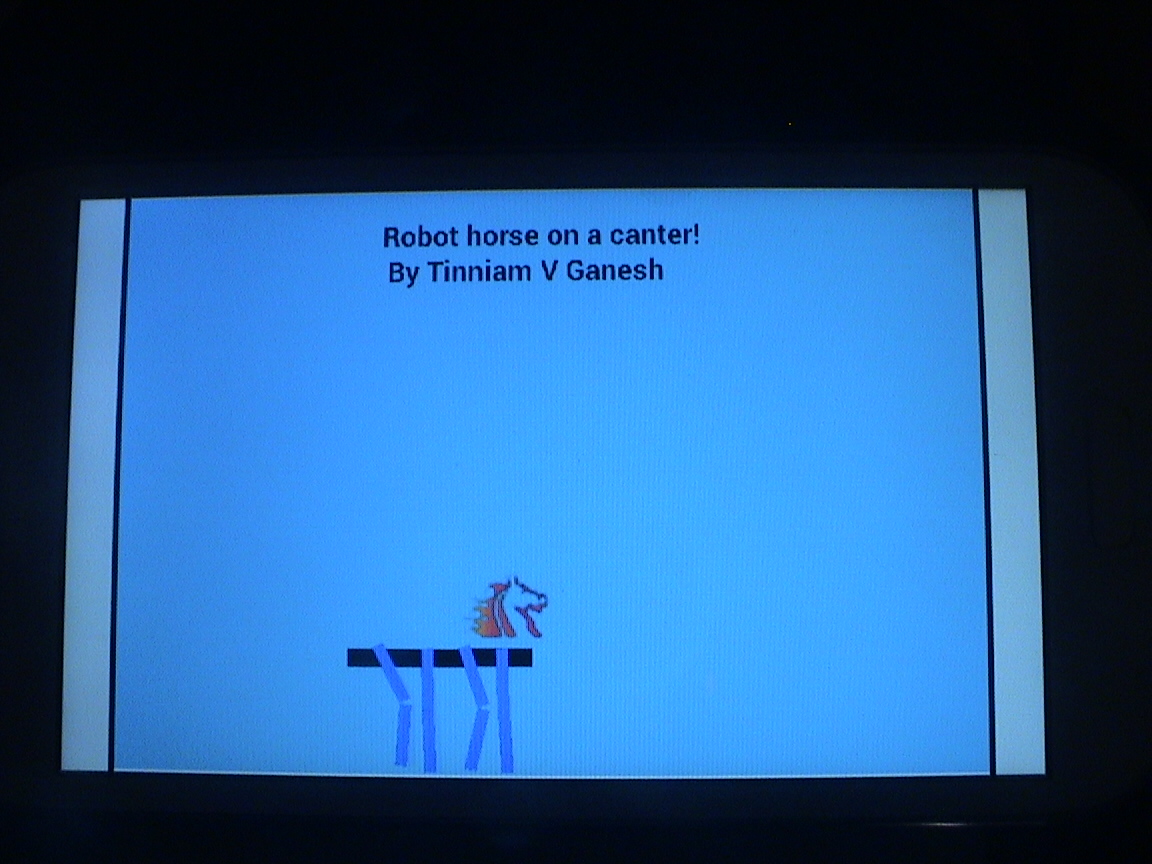
DSC00078This post is result of my dissatisfaction with the awkward and contrived gait of my Robot Walker in my earlier post “Simulating a Robot Walker” in Android. The movements seemed to be a little too contrived for my comfort so I decided to make a robot which has far more natural movements.

You can see the clip at Robot Horse on a canter using Android on Youtube
The complete code can be cloned at GitHub RobotHorse

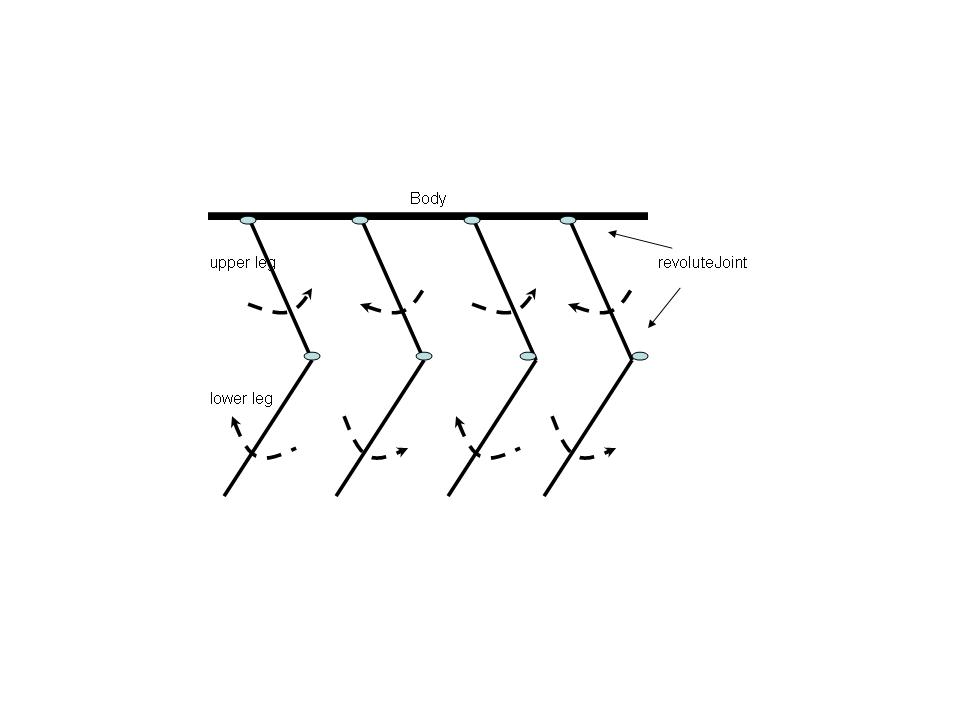
To do this I pondered on what constitutes a walking motion for any living thing. With a little effort it is clear that the following movements occur during walking

Mechanics of leg movements during walking

  1. The upper part of the leg swings upward and downward pivoted at the hip.
  2. The lower part of the leg, pivoted at the knee, swings in the opposite direction to the upper part of the leg. i.e when the upper part swings upward and counter-clockwise, the lower part of the leg swings downward & clockwise which results in the bend at the knees
  3. When one leg goes up, counterclockwise, the other leg goes down or it swing clockwise and vice versa. See figure below
horse

So with these rules it was easy to make the legs.

Frontal leg (first leg)
The upper part of the leg is connected to the Robot Body through a revoluteJoint with a pivot at the body. The upper leg has a motor and swings between an upper and lower limit
// Create upper leg
upperLeg = new Sprite(x, y, this.mLegTextureRegion, this.getVertexBufferObjectManager());
upperLegBody = PhysicsFactory.createBoxBody(this.mPhysicsWorld, upperLeg, BodyType.DynamicBody, LEG_FIXTURE_DEF);
this.mPhysicsWorld.registerPhysicsConnector(new PhysicsConnector(upperLeg, upperLegBody, true, true));
this.mScene.attachChild(upperLeg);

//Create an anchor/pivot at the body of the robot
Vector2 anchor1 = new Vector2(x/PIXEL_TO_METER_RATIO_DEFAULT,y/PIXEL_TO_METER_RATIO_DEFAULT);
//Attach upper leg to the body using a revolute joint with a motor
final RevoluteJointDef rJointDef = new RevoluteJointDef();
rJointDef.initialize(upperLegBody, robotBody, anchor1);
rJointDef.enableMotor = true;
rJointDef.enableLimit = true;
rJoint = (RevoluteJoint) this.mPhysicsWorld.createJoint(rJointDef);
rJoint.setMotorSpeed(4);
rJoint.setMaxMotorTorque(15);

//Set upper and lower limits for the swing of the leg
rJoint.setLimits((float)(0 * (Math.PI)/180), (float)(30 * (Math.PI)/180));

//Fire a periodic timer
new IntervalTimer(secs,rJoint);

The lower leg pivoted to the bottom of the upper leg through a revoluteJoint swings in the opposite direction of the upper leg between the reverse angle limts. By the way, I had tried every possible joint between the lower & the upper leg (distanceJoint, weldJoint,prismaticJoint) but the revoluteJoint is clearly the best.

// Create lower leg
lowerLeg= new Sprite(x, (y+50), this.mLegTextureRegion, this.getVertexBufferObjectManager());
lowerLegBody = PhysicsFactory.createBoxBody(this.mPhysicsWorld, lowerLeg, BodyType.DynamicBody, LEG_FIXTURE_DEF);
this.mPhysicsWorld.registerPhysicsConnector(new PhysicsConnector(lowerLeg, lowerLegBody, true, true));
this.mScene.attachChild(lowerLeg);
Vector2 anchor2 = new Vector2(x/PIXEL_TO_METER_RATIO_DEFAULT, (y+50)/PIXEL_TO_METER_RATIO_DEFAULT);

//Create a revoluteJoint between upper & lower leg
final RevoluteJointDef rJointDef1 = new RevoluteJointDef();
rJointDef1.initialize(lowerLegBody, upperLegBody, anchor2);

// The lower leg swings in opposite direction to upper leg
rJointDef1.enableMotor = true;
rJointDef1.enableLimit = true;
rJoint1 = (RevoluteJoint) this.mPhysicsWorld.createJoint(rJointDef1);
rJoint1.setMotorSpeed(-4);
rJoint.setMaxMotorTorque(15);

//Set upper and lower limits for the swing of the leg
// Set appropriate limits for lower leg
rJoint1.setLimits((float)(-30 * (Math.PI)/180), (float)(0 * (Math.PI)/180));
new IntervalTimer(secs,rJoint1);
Rear Leg (alternate leg)

Every alternate leg moves in the converse direction as the previous leg

//Create the alternative leg
publicvoid createAltLeg(float x, float y, int secs ){
// Create upper part of leg
upperLeg = new Sprite(x, y, this.mLegTextureRegion, this.getVertexBufferObjectManager());
upperLegBody = PhysicsFactory.createBoxBody(this.mPhysicsWorld, upperLeg, BodyType.DynamicBody, LEG_FIXTURE_DEF);
this.mPhysicsWorld.registerPhysicsConnector(new PhysicsConnector(upperLeg, upperLegBody, true, true));
this.mScene.attachChild(upperLeg);
//Create an anchor/pivot at the body of the robot
Vector2 anchor1 = new Vector2(x/PIXEL_TO_METER_RATIO_DEFAULT,y/PIXEL_TO_METER_RATIO_DEFAULT);
//Attach upper leg to the body using a revolute joint with a motor
final RevoluteJointDef rJointDef = new RevoluteJointDef();
rJointDef.initialize(upperLegBody, robotBody, anchor1);
rJointDef.enableMotor = true;
rJointDef.enableLimit = true;
rJoint = (RevoluteJoint) this.mPhysicsWorld.createJoint(rJointDef);
// This leg swings in the opposite direction of the previous leg
rJoint.setMotorSpeed(-4);
rJoint.setMaxMotorTorque(15);
//Set upper and lower limits for the swing of the leg
rJoint.setLimits((float)(0 * (Math.PI)/180), (float)(30 * (Math.PI)/180));
new IntervalTimer(secs,rJoint);
// Create lower leg
lowerLeg= new Sprite(x, (y+50), this.mLegTextureRegion, this.getVertexBufferObjectManager());
lowerLegBody = PhysicsFactory.createBoxBody(this.mPhysicsWorld, lowerLeg, BodyType.DynamicBody, LEG_FIXTURE_DEF);
this.mPhysicsWorld.registerPhysicsConnector(new PhysicsConnector(lowerLeg, lowerLegBody, true, true));
this.mScene.attachChild(lowerLeg);
Vector2 anchor2 = new Vector2(x/PIXEL_TO_METER_RATIO_DEFAULT, (y+50)/PIXEL_TO_METER_RATIO_DEFAULT);
//Create a revoluteJoint between upper & lower leg
final RevoluteJointDef rJointDef1 = new RevoluteJointDef();
rJointDef1.initialize(lowerLegBody, upperLegBody, anchor2);
rJointDef1.enableMotor = true;
rJointDef1.enableLimit = true;
rJoint1 = (RevoluteJoint) this.mPhysicsWorld.createJoint(rJointDef1);
//The lower part of the leg has the opposite swing to the upper part
rJoint1.setMotorSpeed(4);
rJoint.setMaxMotorTorque(15);
//Set appropriate upper and lower limits for the swing of the leg
rJoint1.setLimits((float)(-30 * (Math.PI)/180), (float)(0 * (Math.PI)/180));
// Fire a periodic timer
new IntervalTimer(secs,rJoint1);
I attached a horse’s head to the body using a WeldJoint
//Create the horse and attach the head using a Weld Joint
horse = new Sprite(140, 320, this.mHorseTextureRegion, this.getVertexBufferObjectManager());
horseBody = PhysicsFactory.createBoxBody(this.mPhysicsWorld, horse, BodyType.DynamicBody, HORSE_FIXTURE_DEF);
this.mPhysicsWorld.registerPhysicsConnector(new PhysicsConnector(horse, horseBody, true, true));
this.mScene.attachChild(horse);
Vector2 anchor = new Vector2(140/PIXEL_TO_METER_RATIO_DEFAULT, 320/PIXEL_TO_METER_RATIO_DEFAULT);
final WeldJointDef weldJointDef = new WeldJointDef();
weldJointDef.initialize(horseBody, robotBody, anchor);
this.mPhysicsWorld.createJoint(weldJointDef);

So now I had a horse that was ready to trot or canter around.

You can see the clip at Robot Horse on a canter using Android
The complete code can be cloned at GitHub RobotHorse

Some issues

Here are some issues with the above code

  • The horse is quite unstable. If I move the phone vertically, the horse tends to tip backwards. The above clip was recorded with the phone lying on a table
  • The motor speeds, torque and the masses of the different objects have to be adjusted very carefully. If the horse’s head or the body is too heavy the legs buckle under the weight
  • Sometimes when I start the simulation the horse seems to bounce off the floor

I have carefully adjusted the mass, friction, motor speeds etc very carefully. Feel free to play around with them.

Comments & suggestions are welcome.

Find me on Google+