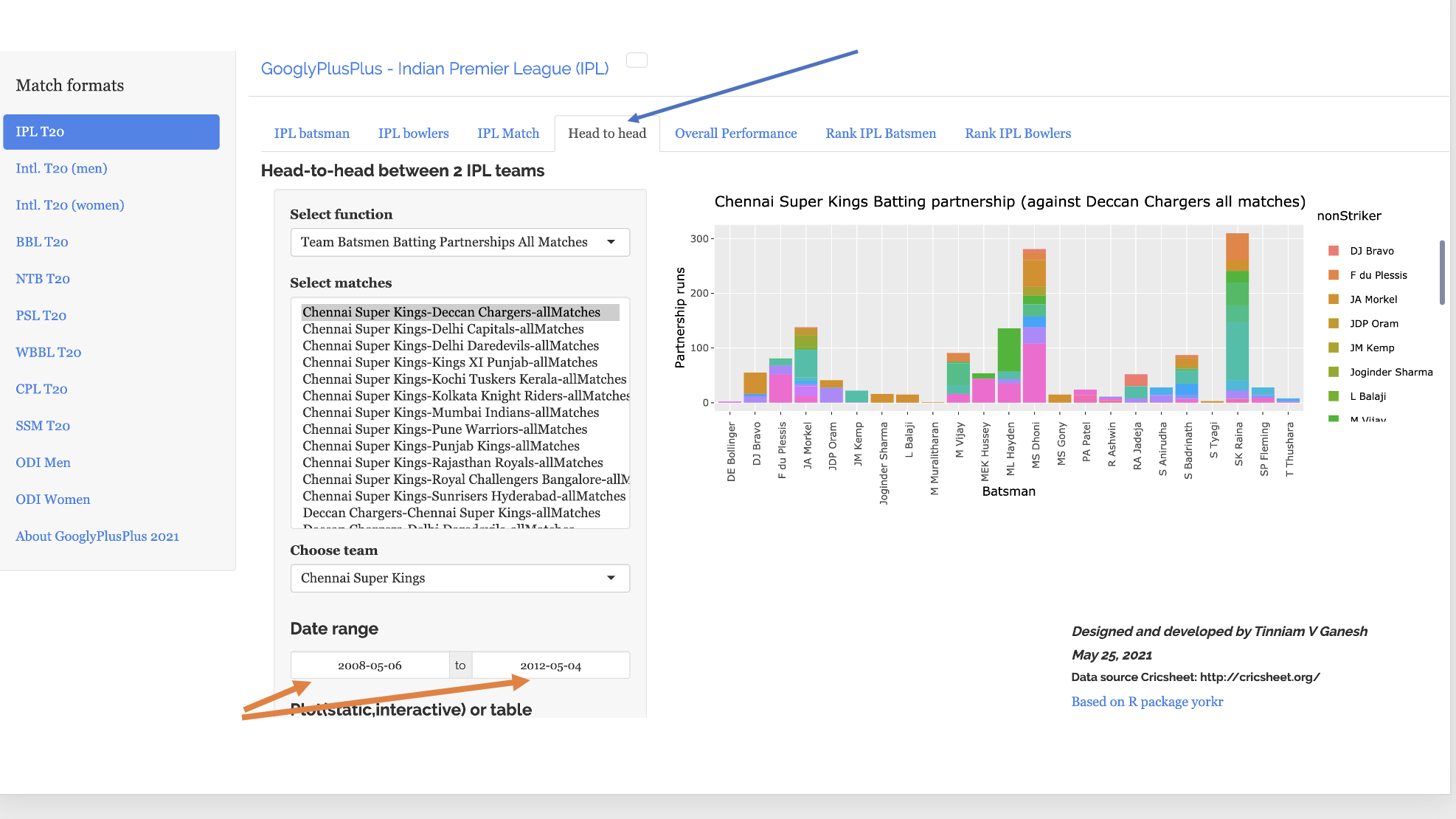
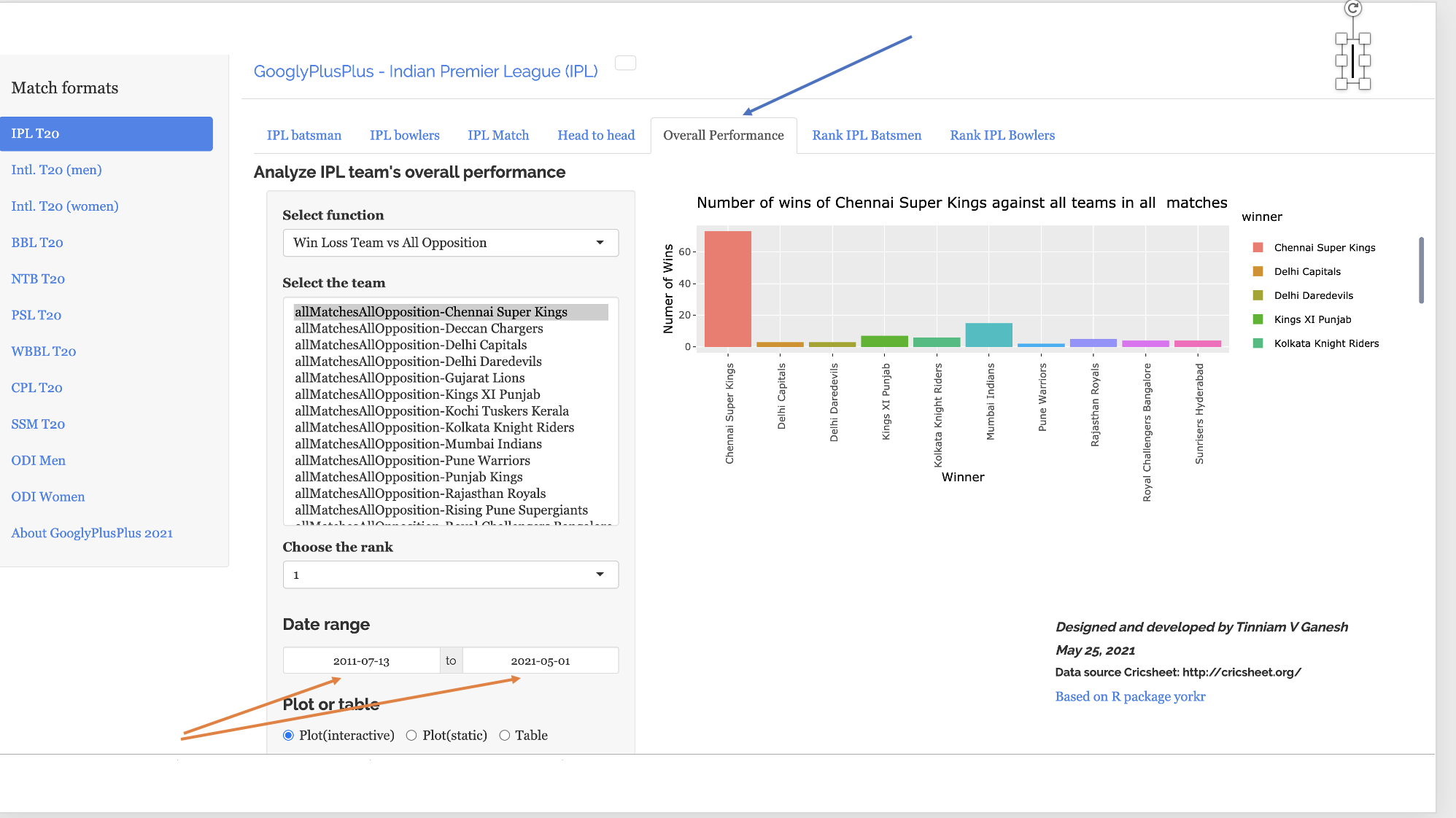
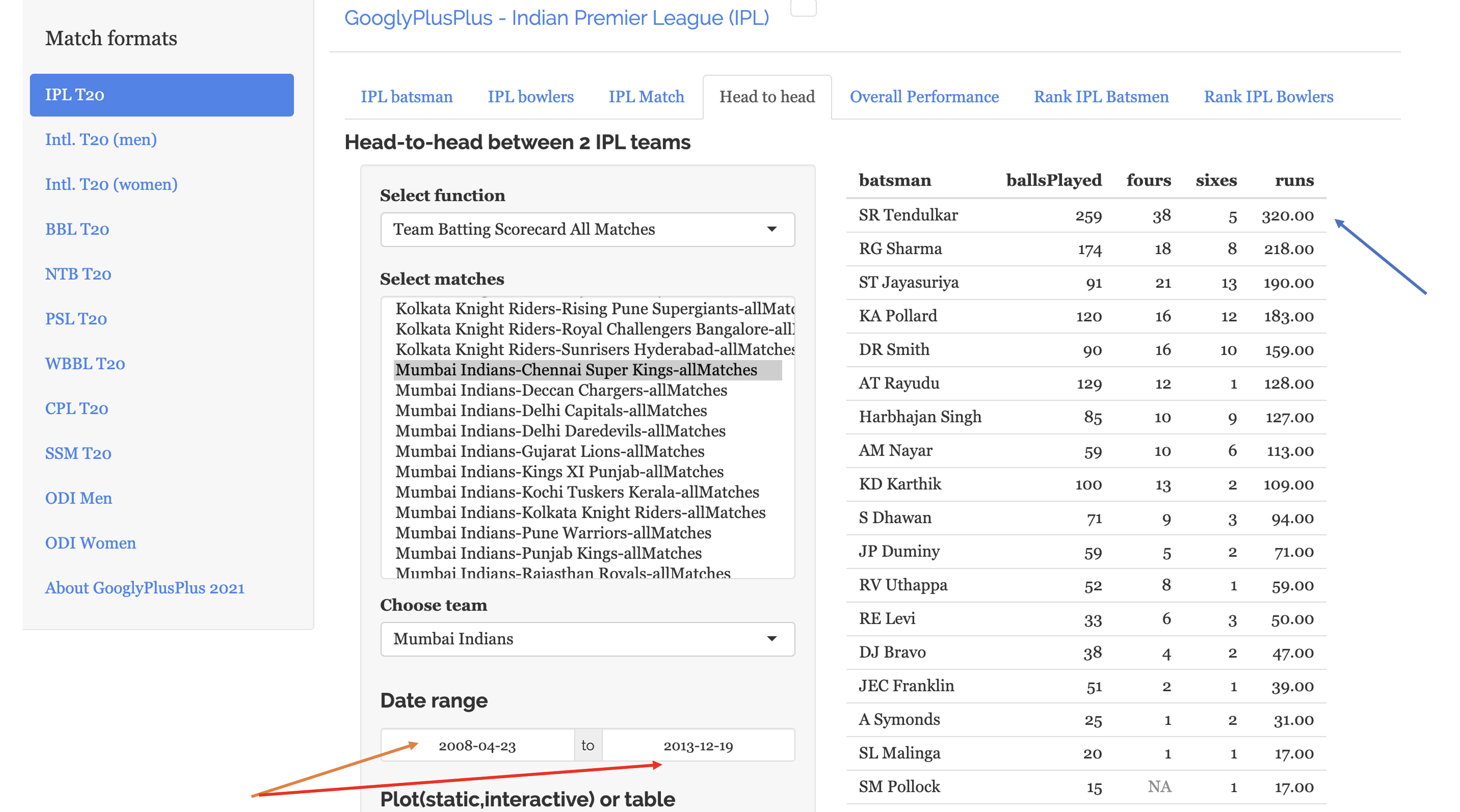
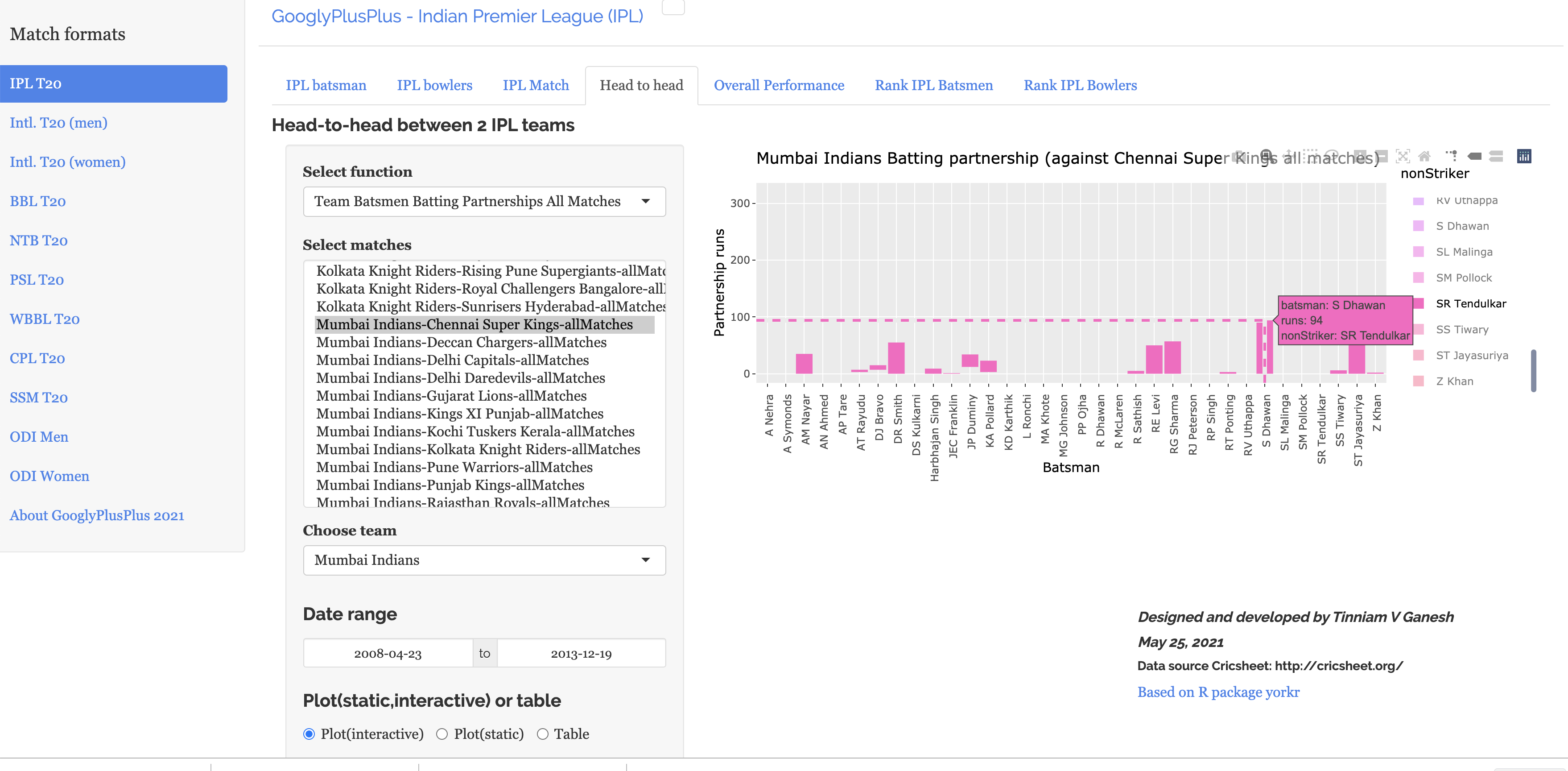
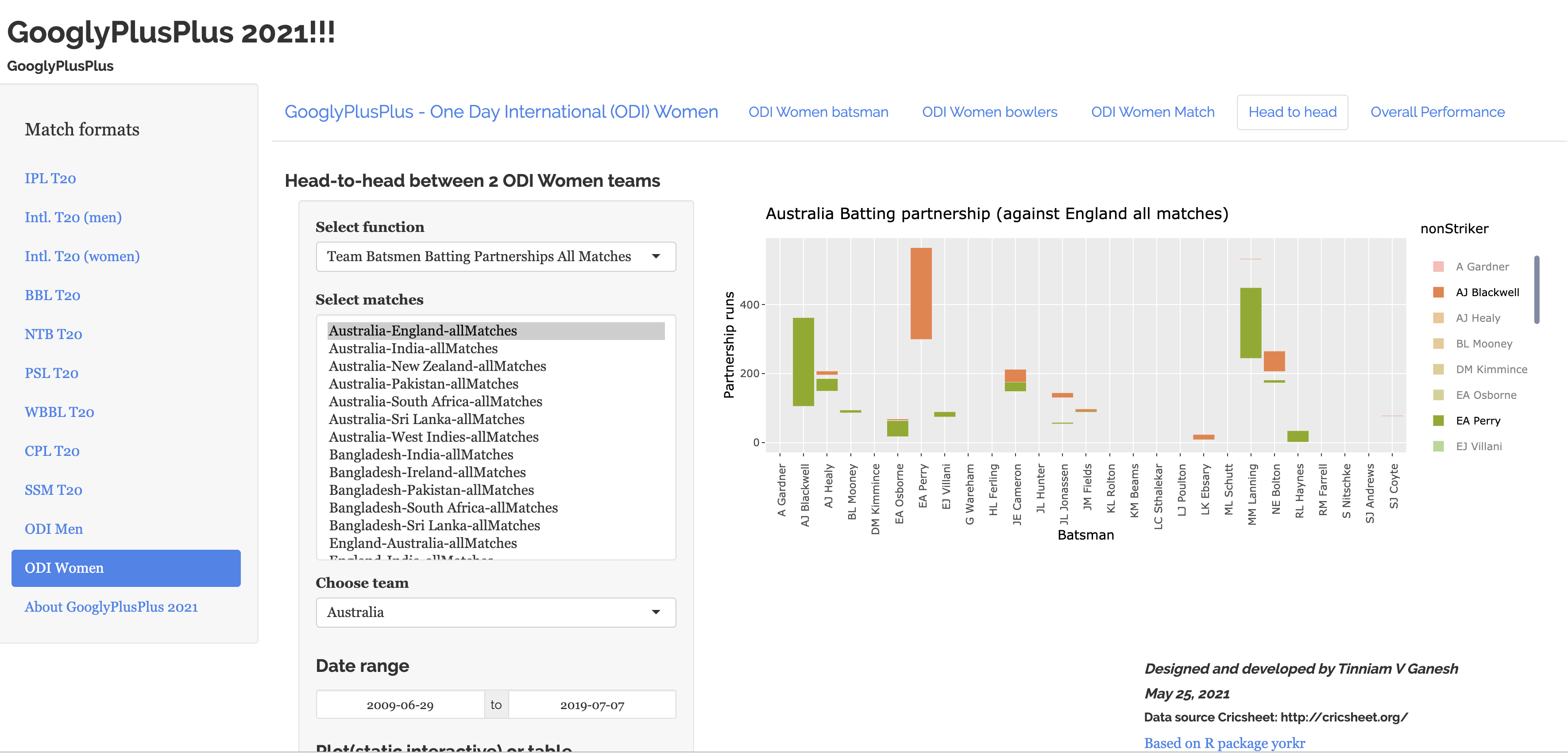
This latest update of GooglyPlusPlus2021 includes new controls which allow for granular analysis of teams and matches. This version includes a new ‘Date Range’ widget which will allow you to choose a specific interval between which you would like to analyze data. The Date Range widget has been added to 2 tabs namely
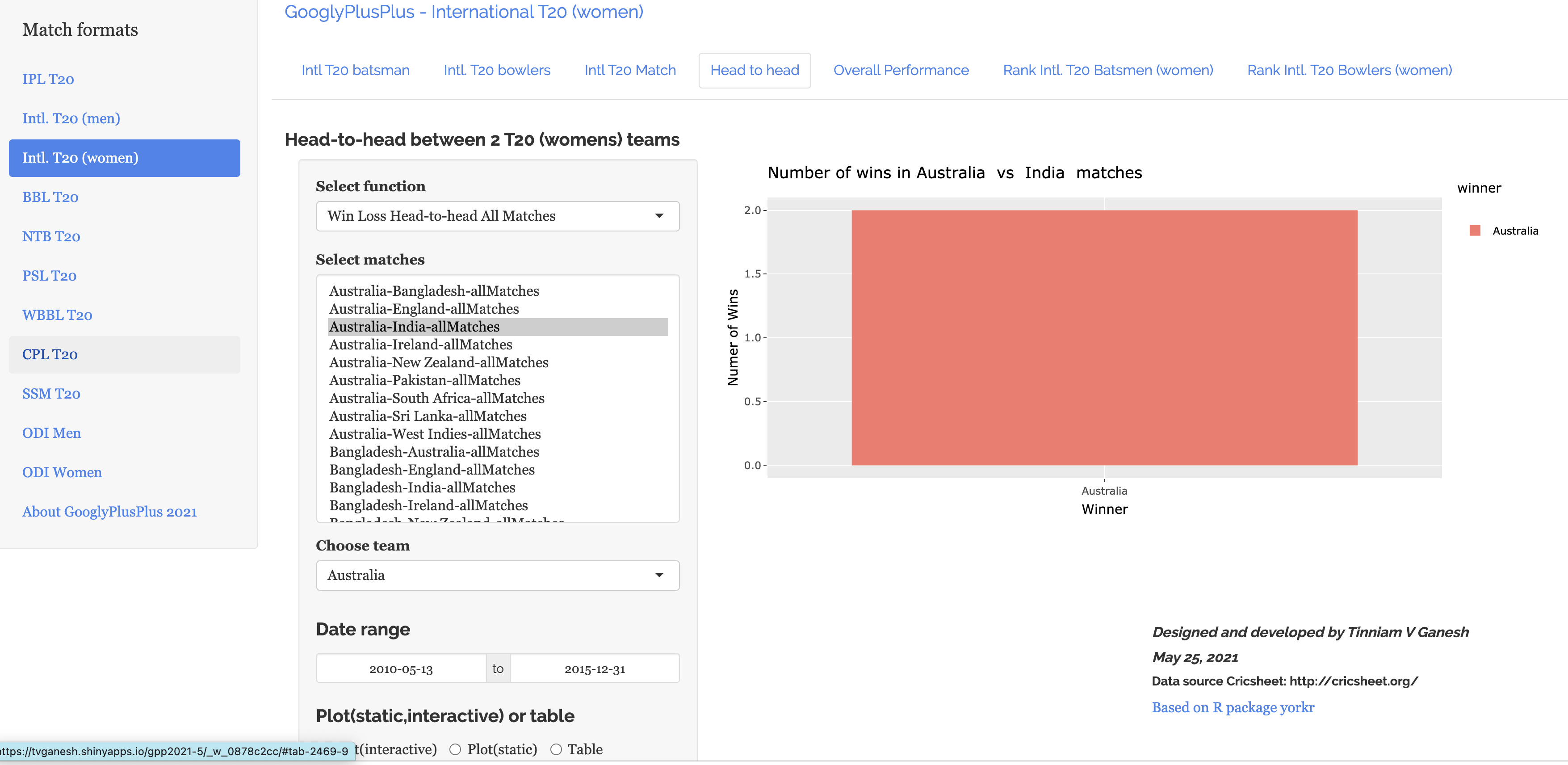
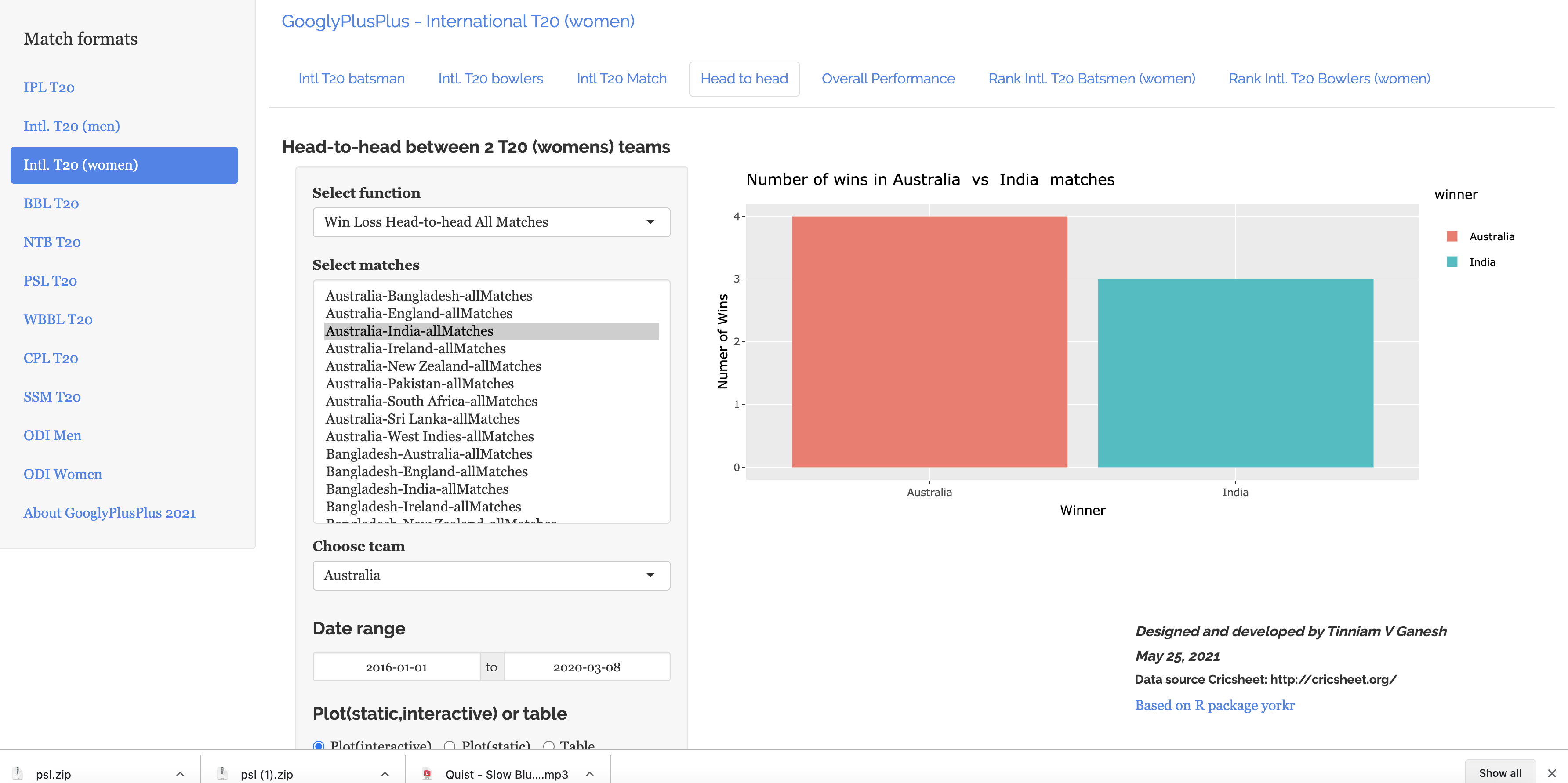
a) Head-to-Head
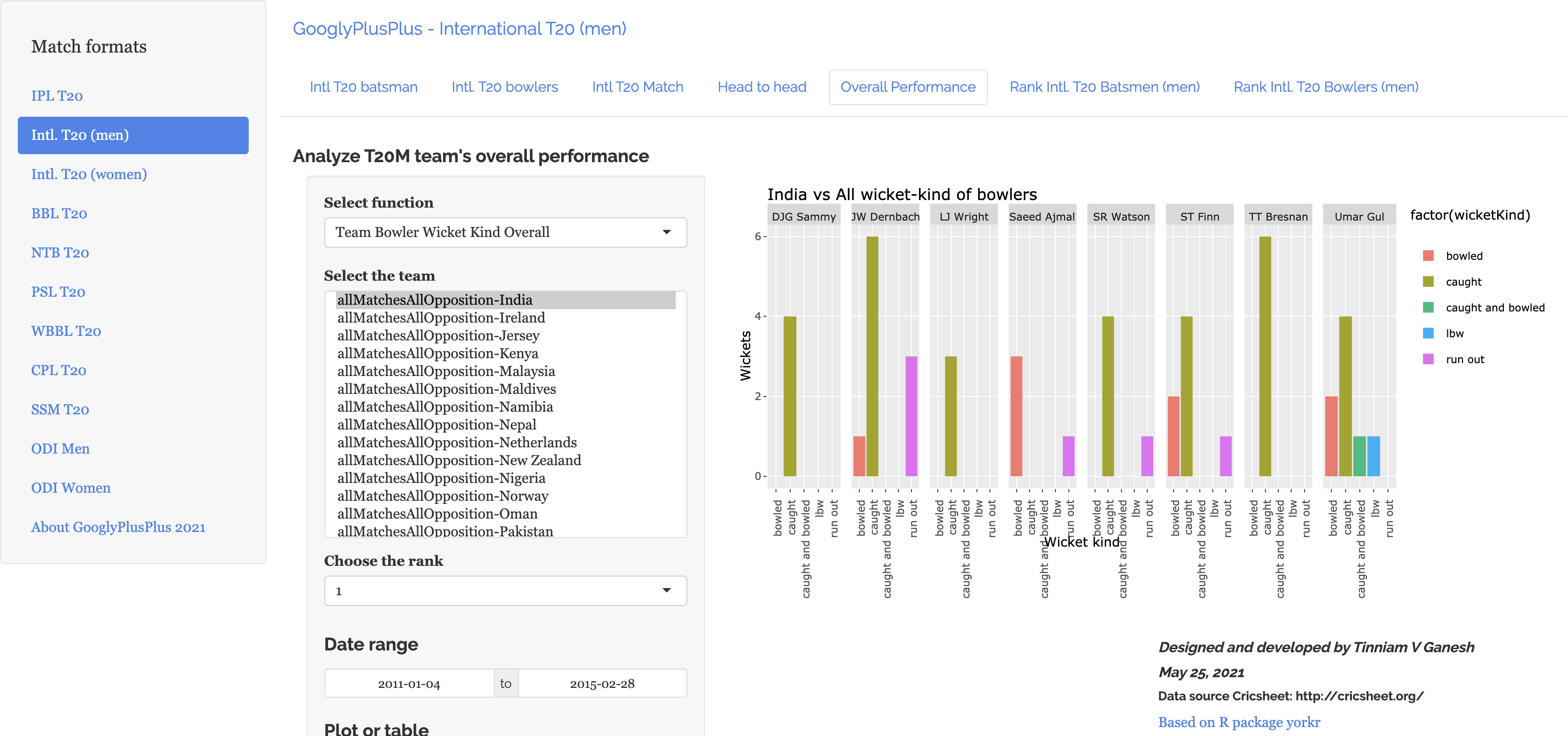
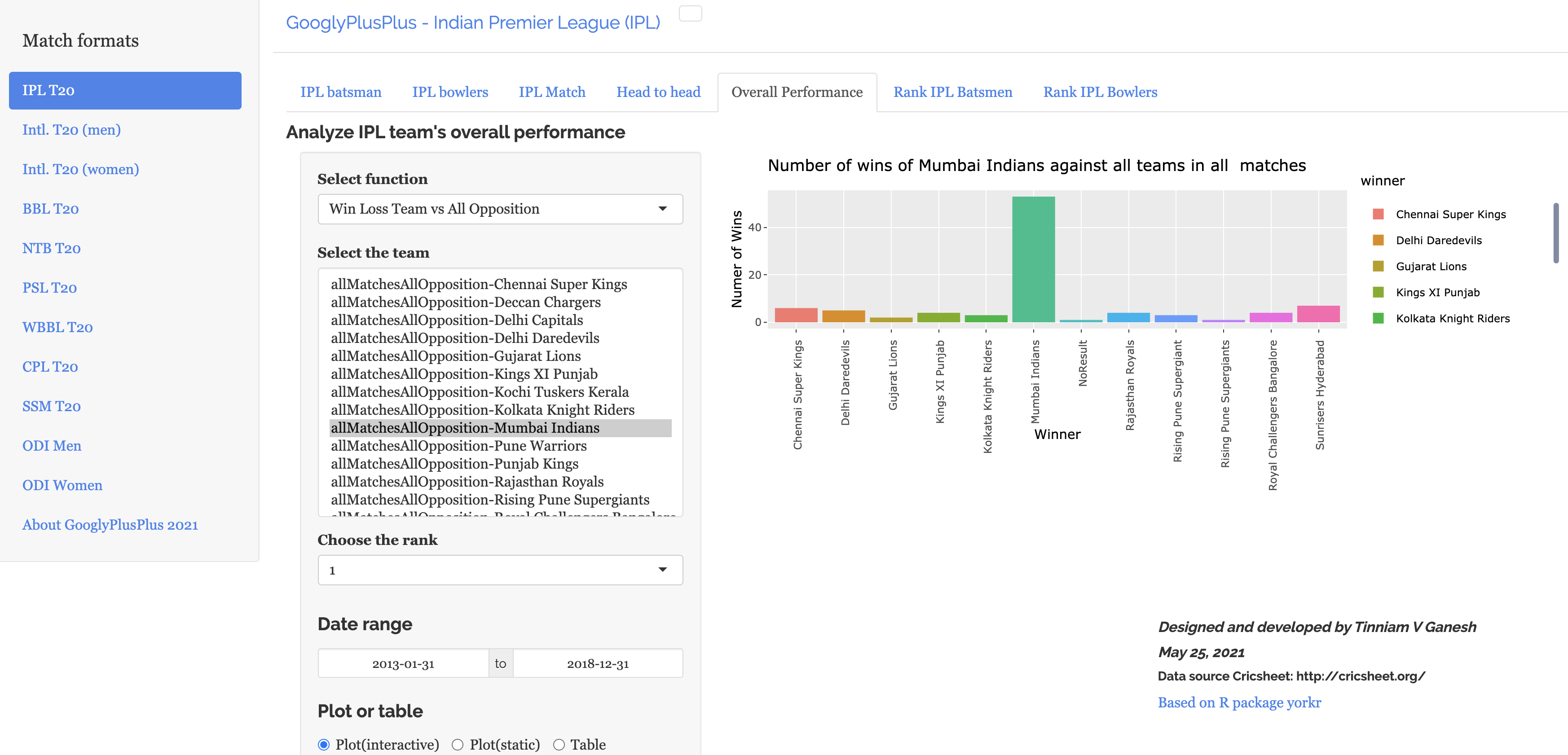
b) Overall Performance
Important note:
This change is applicable to all T20 formats and ODI formats that GooglyPlusPlus2021 handles. This means you can do fine-grained analysis of the following formats
a. IPL b. Intl. T20 (men) c. Intl. T20 (women)
d. BBL e. NTB f. PSL
g. WBB h. CPL i. SSM
j. ODI (men) k. ODI (women)
Important note 1: Also note that all charts in GooglyPlusPlus2021 are interactive. You ca hover over the charts to get details of the data below. You can also selectively filter in bar charts using double-click and click. To know more about how to use GooglyPlusPlus2021 interactively, please see my post GooglyPlusPlus2021 is now fully interactive!!
You can clone/download the code for GooglyPlusPlus2021 from Github at GooglyPlusPlus2021
GooglyPlusPlus2021 is now fully interactive. Please read the below post carefully to see the different ways you can interact with the data in the plots.
There are 2 main updates in this latest version of GooglyPlusPlus2021
a) GooglyPlusPlus gets all ‘touchy, feely‘ with the data and now you can interact with the plot/chart to get more details of the underlying data. There are many ways you can slice’n dice the data in the charts. The examples below illustrate a few of this. You can interact with plots by hover’ing, ‘click’ing and ‘double-click’ing curves, plots, barplots to get details of the data.
b) GooglyPlusPlus also includes the ‘Super Smash T20’ league from New Zealand. You can analyze batsmen, bowlers, matches, teams and rank Super Smash (SSM) also
Note: GooglyPlusPlus2021 can handle a total of 11 formats including T20 and ODI. They are
Within these 11 x 7 = 77 tabs you can analyze batsmen, bowlers, matches, head-to-head, team vs all other teams and rank players for T20 and ODI. In addition all plots have been made interactive so there is a lot more information that you can get from these charts
Below I have randomly included some charts for different formats to show how you can interact with them
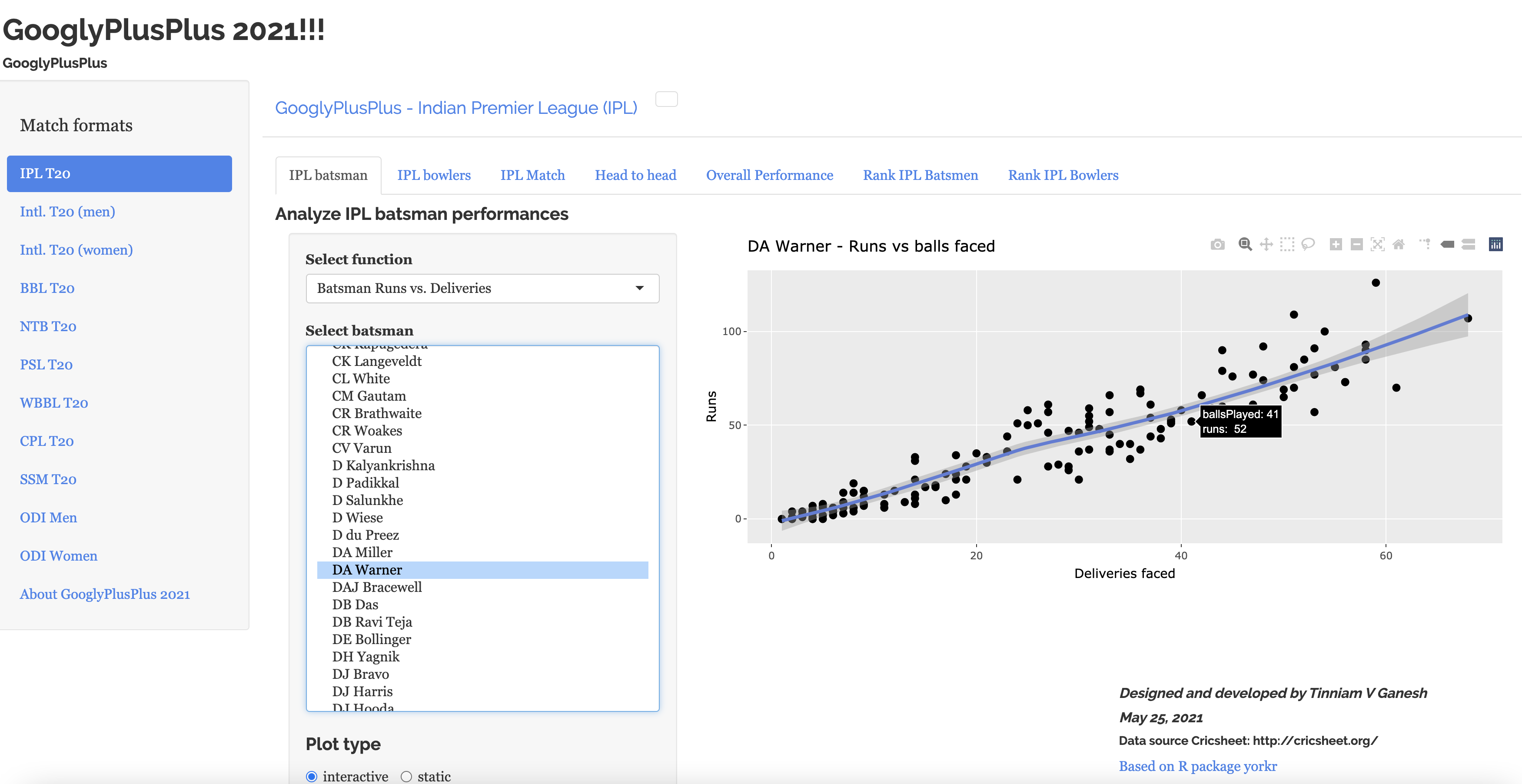
a) Batsman Analysis – Runs vs Deliveries (IPL)
Mouse-over/Hover
The plot below gives the number of runs scored by David Warner vs Deliveries faced.
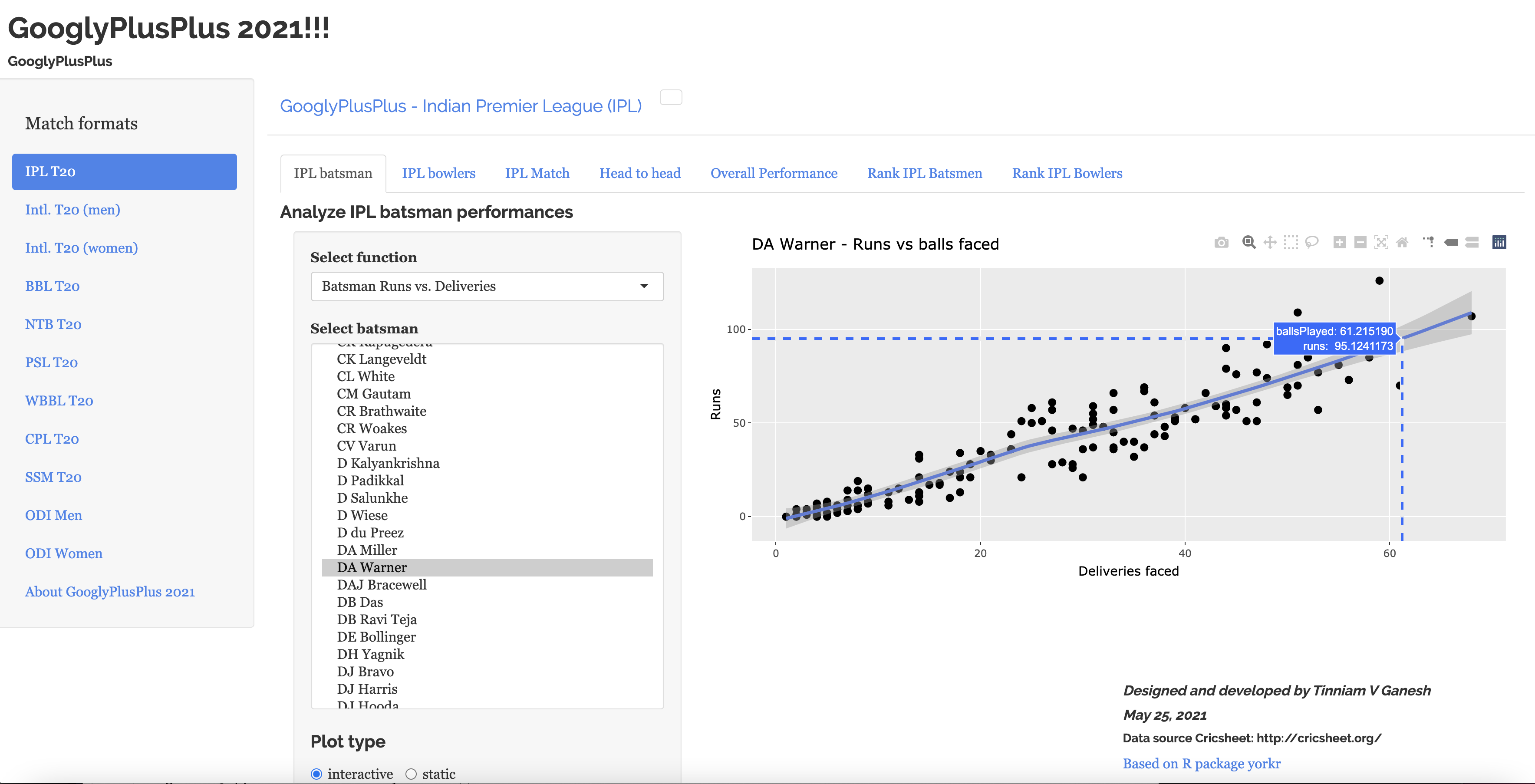
b) Batsman Analysis – Runs vs Deliveries (IPL) (prediction)
Since a 2nd order regression line,with confidence intervals(shaded area), has been fitted in the above plot, we can predict the runs given the ‘balls faced’ as below
Click ‘Toggle Spike lines’ (use palette on top-right)
By using hover(mouse-over) on the curve we can determine the predicted number of runs Warner will score given a certain number of deliveries
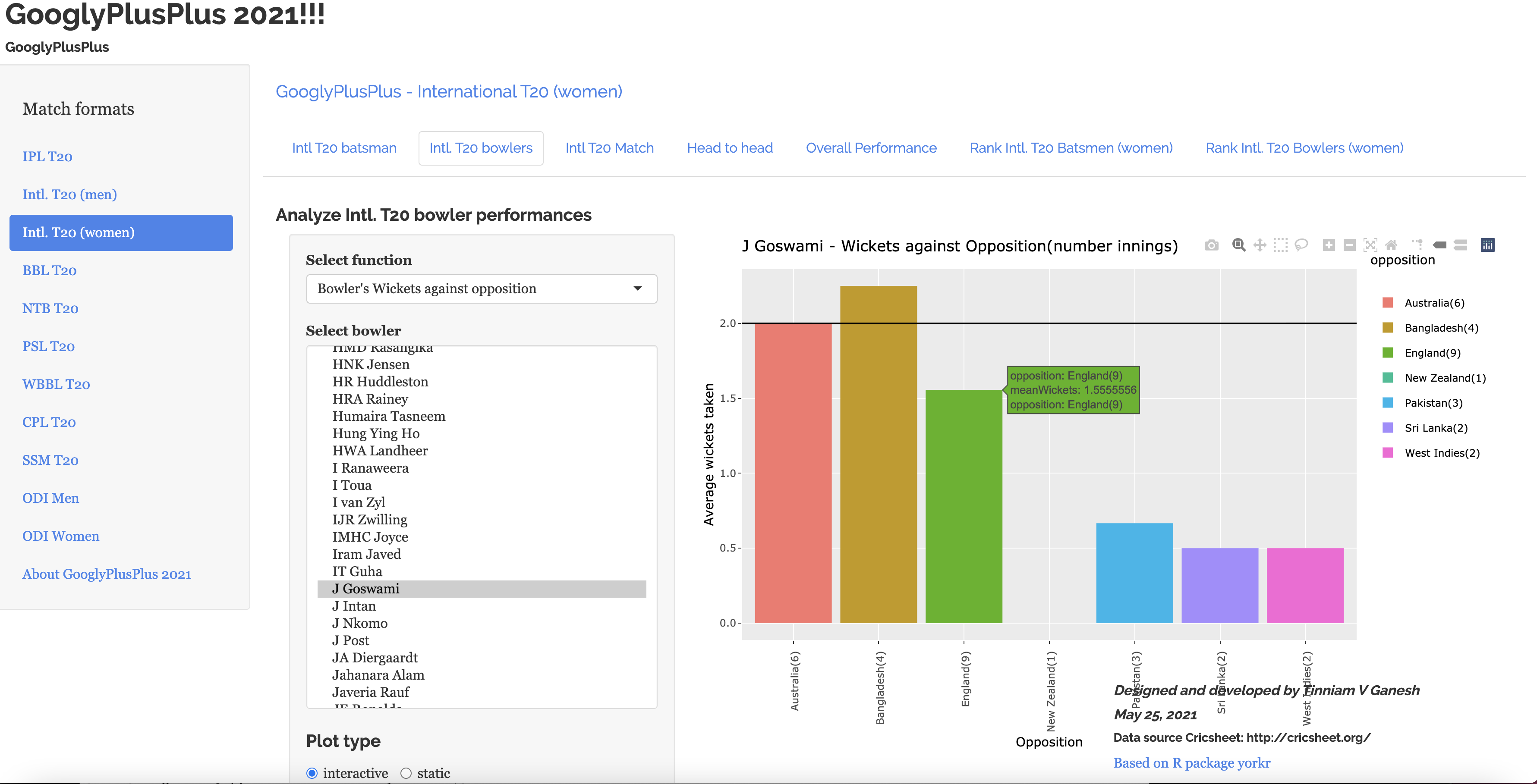
c) Bowler Analysis – Wickets against opposition – Intl. T20 (women)
Jhulan Goswami’s wickets against opposition countries in Intl. T20 (women)
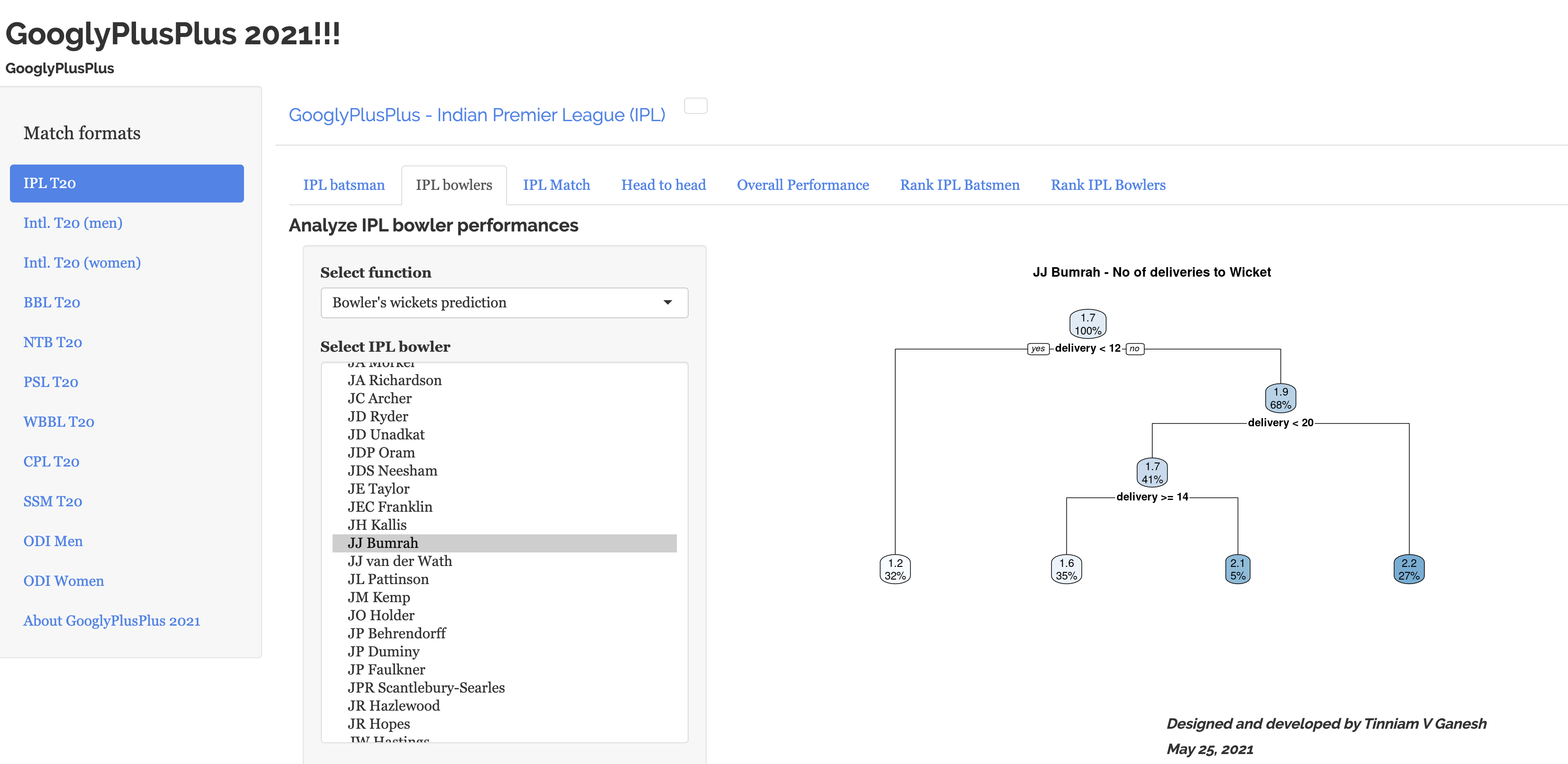
Note: Some plots are non-interactive, like the one below which predicts the number of wickets Bumrah will take based on number of deliveries bowled
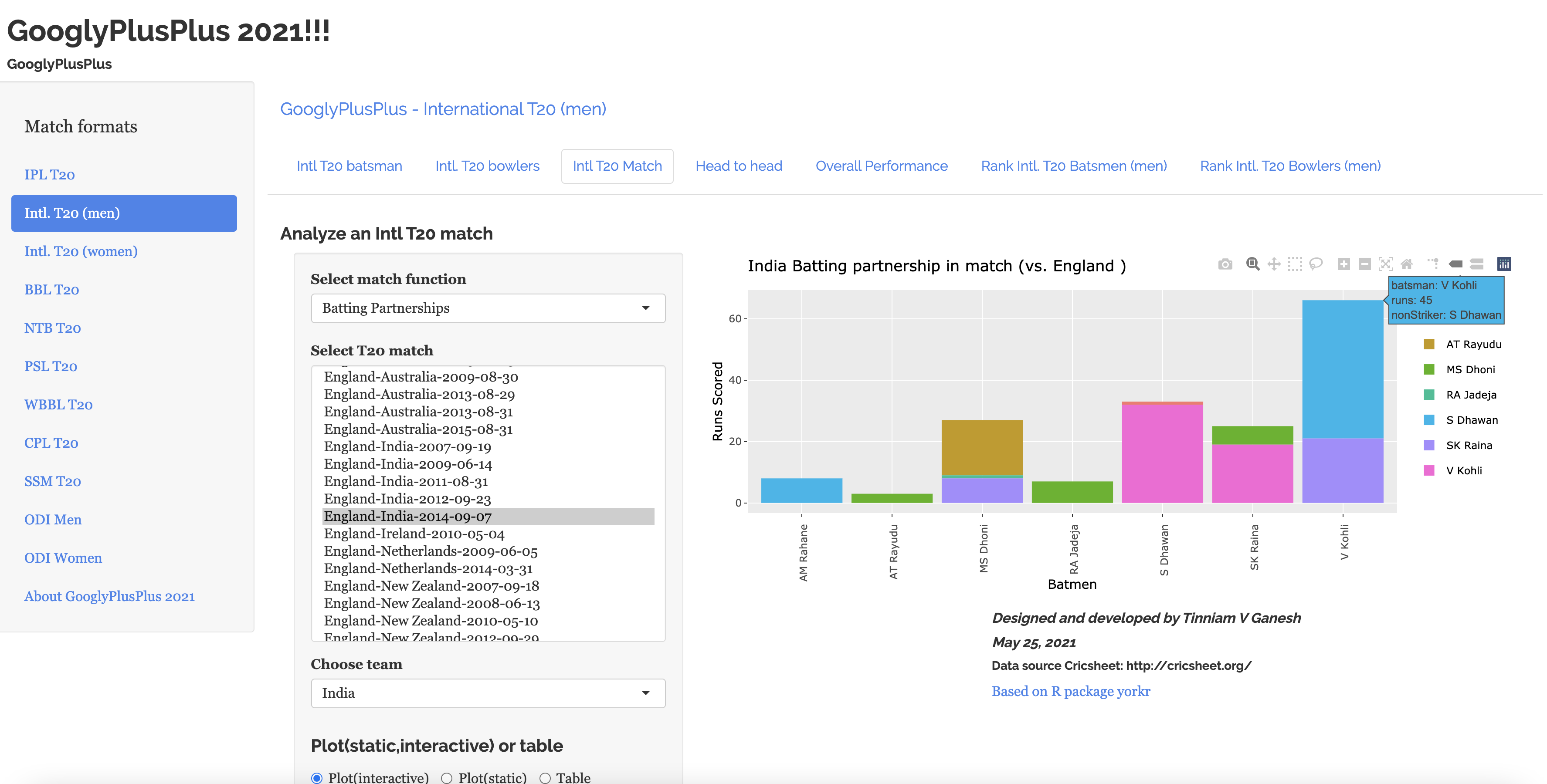
e) Match Analysis – Batsmen Partnership -Intl. T20 (men)
India vs England batting partnership between Virat Kohli & Shikhar Dhawan in all matches between England and India
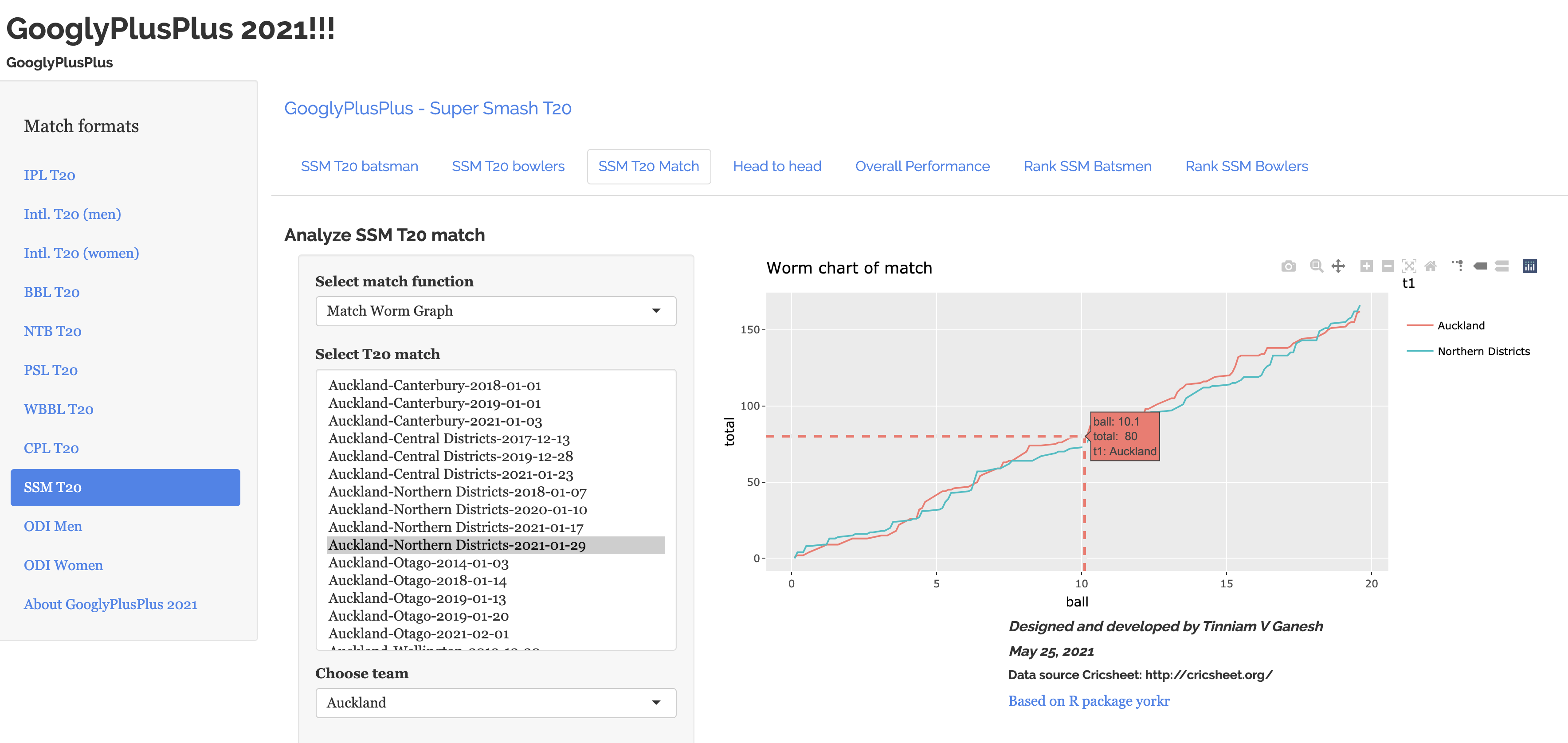
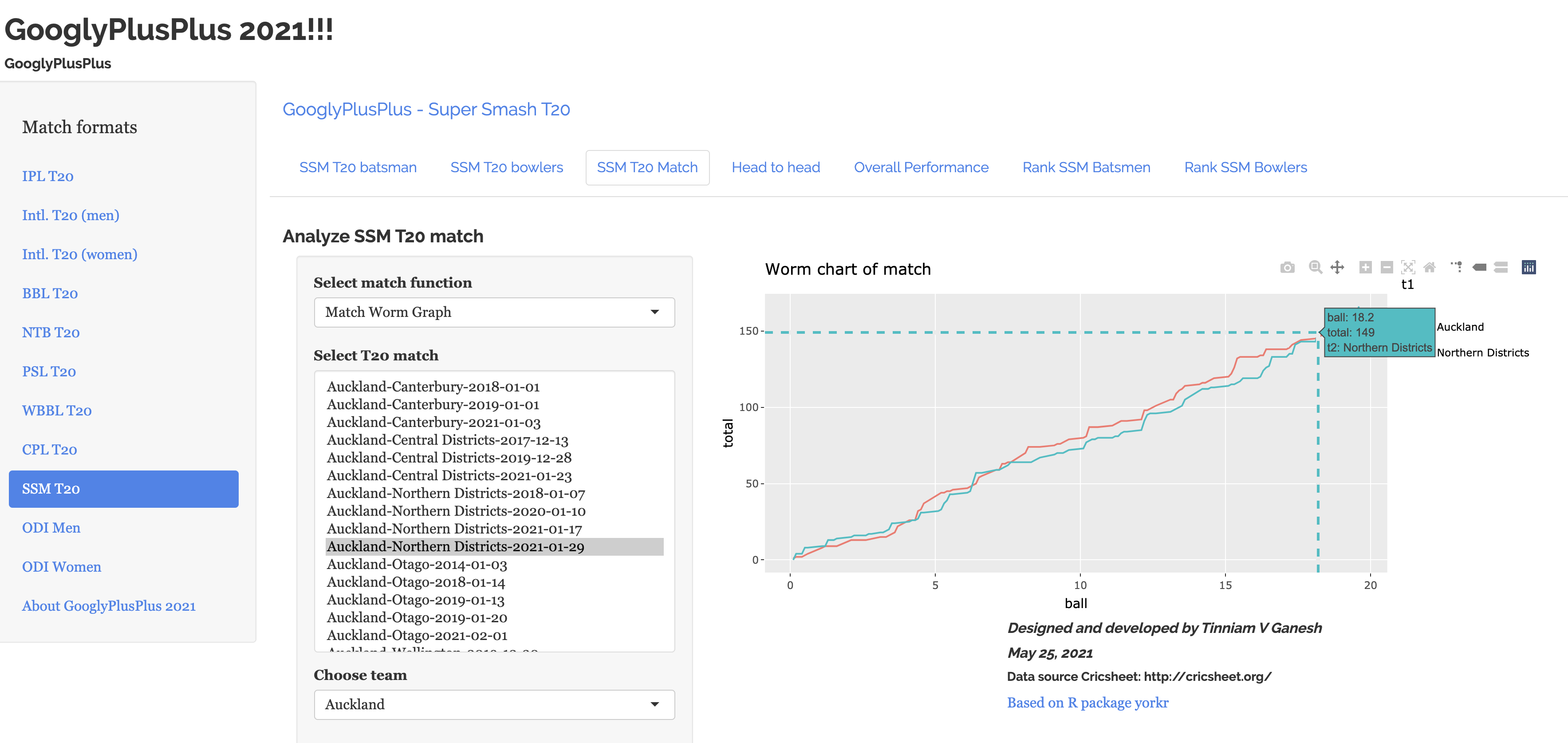
f) Match Analysis – Worm chart (Super Smash T20) SSM
i) Worm chart of Auckland vs Northern Districts (29 Jan 2021).
ii) The final cross-over happens around the 2nd delivery of the 19th over (18.2) as Northern Districts over-takes Auckland to win the match.
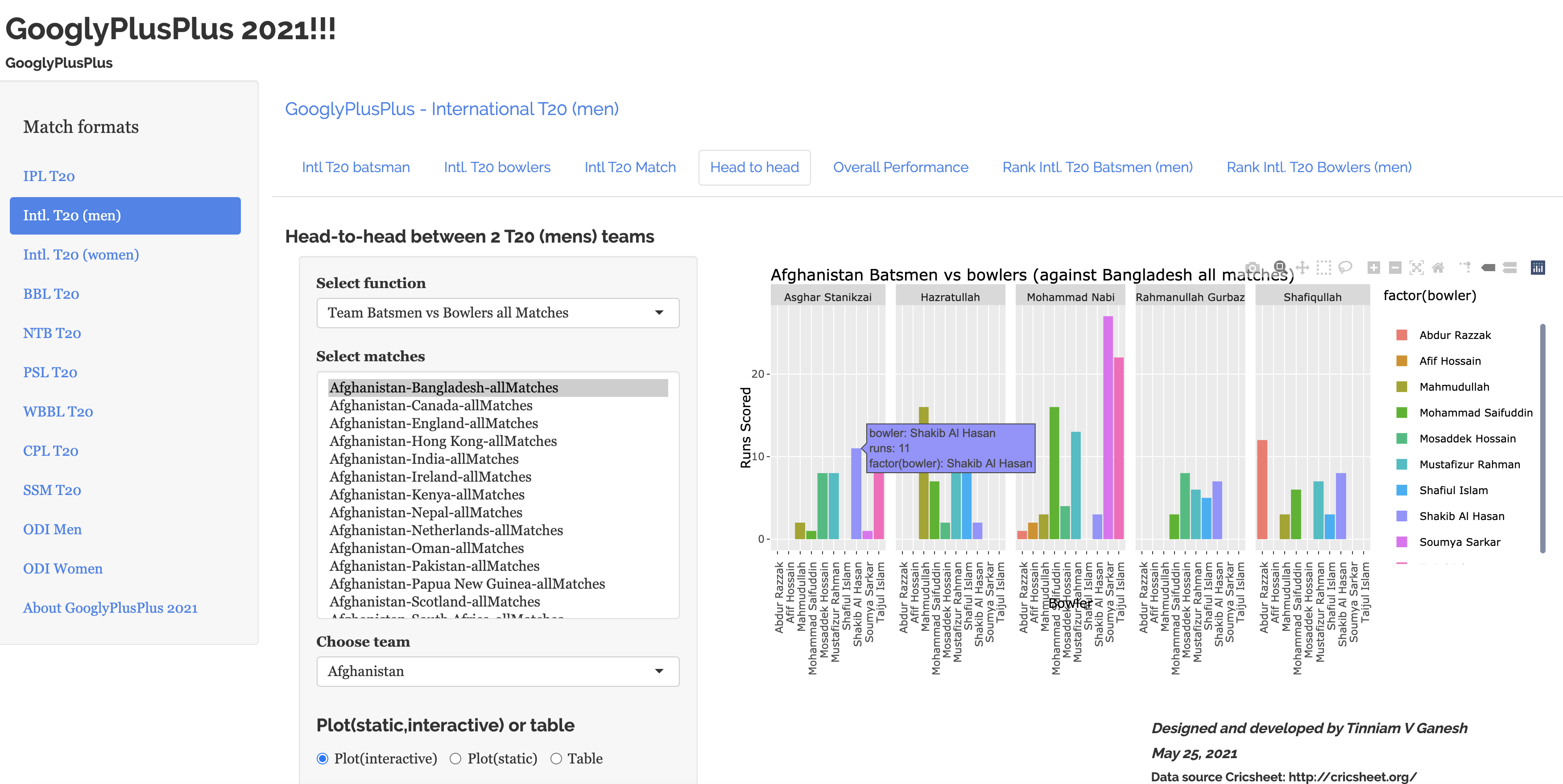
g) Head-to-head – Team batsmen vs bowlers (Bangladesh batsmen against Afghanistan bowlers) Intl. T20 (men)
Batting performance of Shakib-al-Hasan (Bangladesh) against Afghanistan bowlers in Intl. T20 (men)
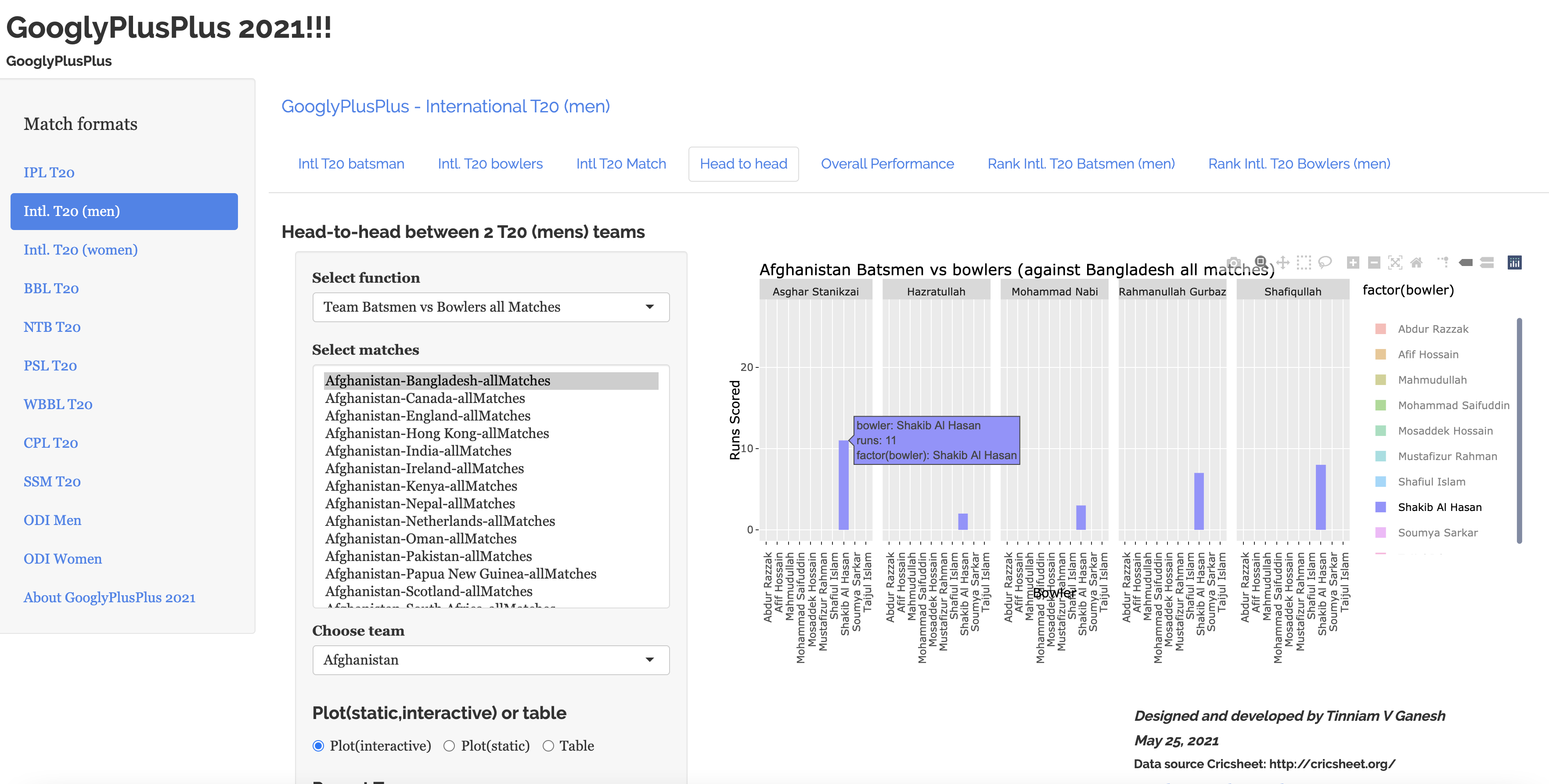
h) Head-to-head – Team batsmen vs bowlers (Bangladesh batsmen against Afghanistan bowlers) Intl. T20 (men) –Filter
Double click on Shakib-al-Hasan on the legend to get the performance of Shakib-al-Hasan against Afghanistan bowlers
Avoiding the clutter
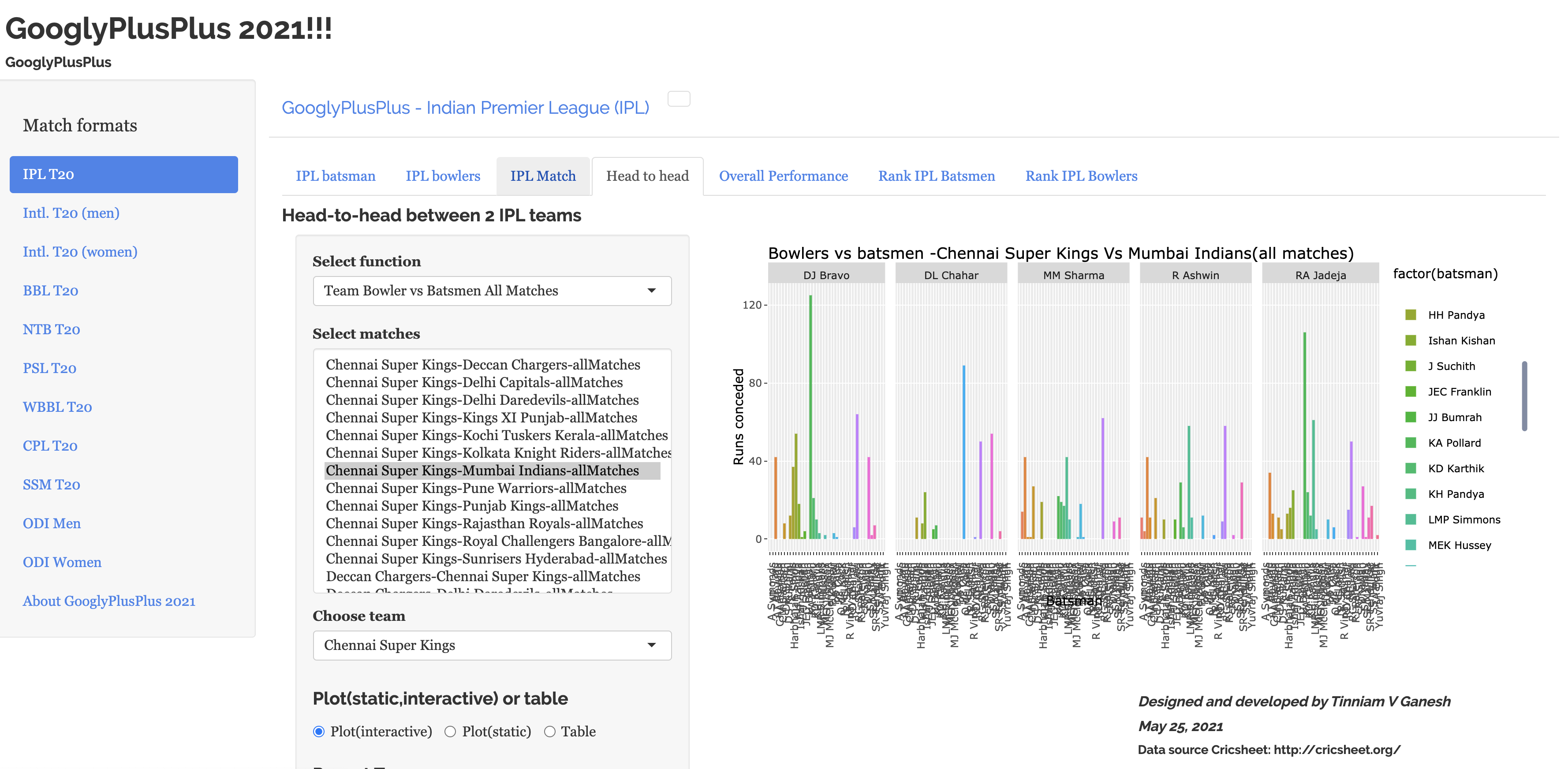
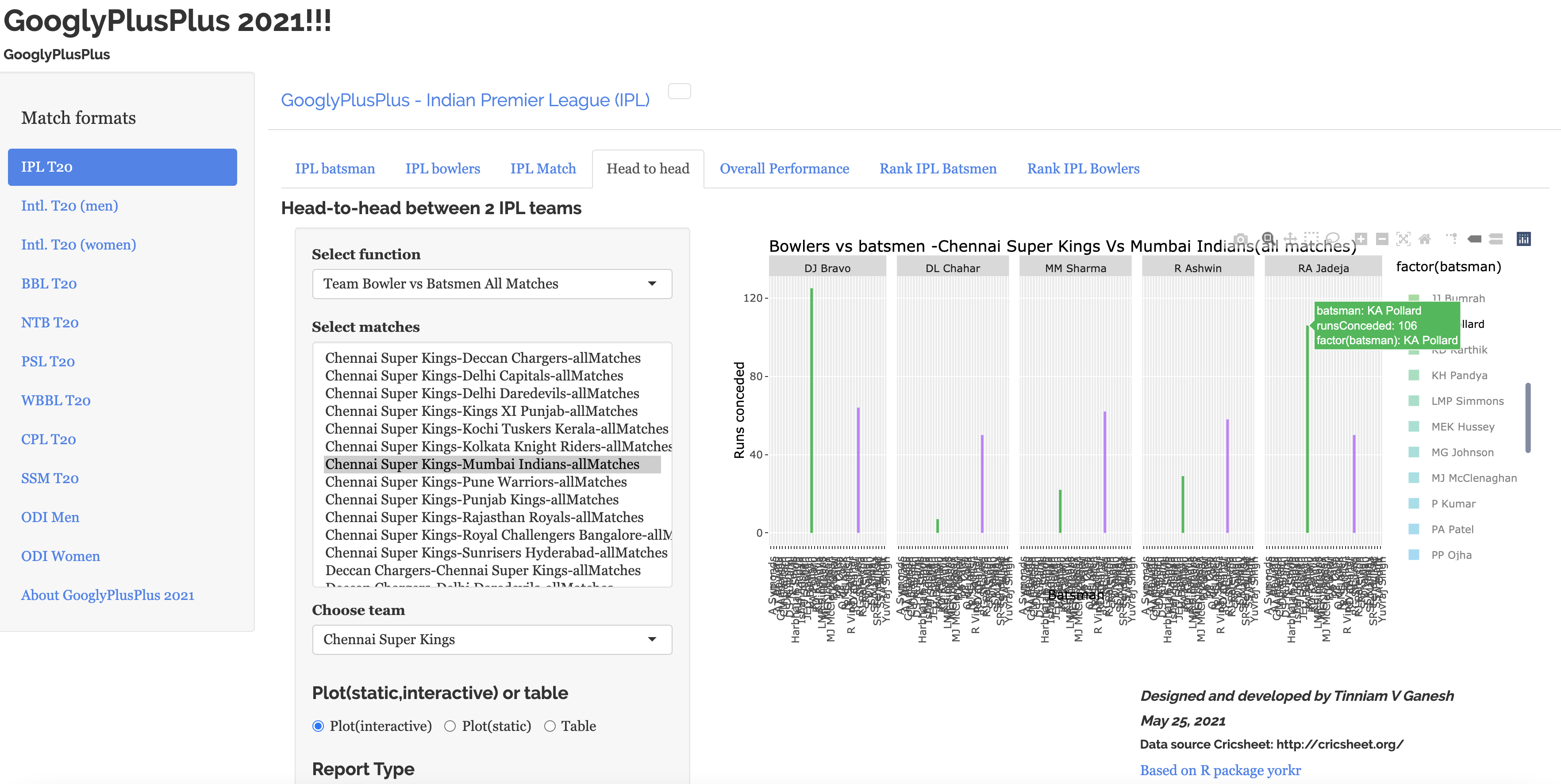
i) Head-to-head – Team bowler vs batsmen (Chennai Super Kings bowlers vs Mumbai Indians batsmen) – IPL
If you choose the above option the resulting plot is very crowded as shown below
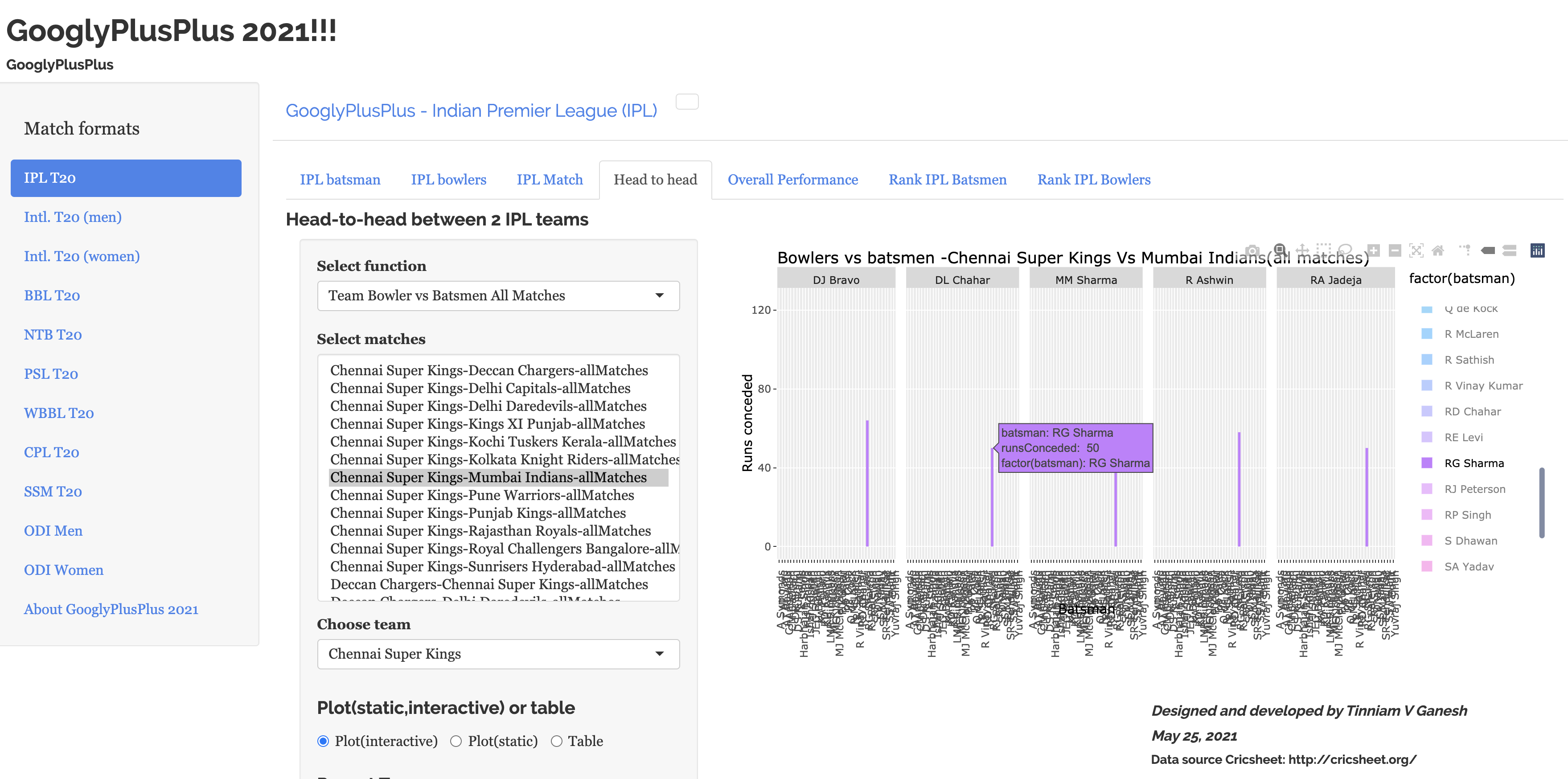
To get the performance of Mumbai Indian (MI) batsmen (Rohit Sharma & Kieron Pollard) against Chennai Super Kings (CSK) bowlers in all matches do as told below
Steps to avoid clutter in stacked bar plots
1) This can be avoided by selectively choosing to filter out the batsmen we are interested in. say RG Sharma and Kieron Pollard. Then double-ciick RG Sharma, this is will bring up the chart with only RG Sharma as below
2) Now add additional batsmen you are interested in by single-clicking. In the example below Kieron Pollard is added
You can continue to add additional players that you are interested by single clicking.
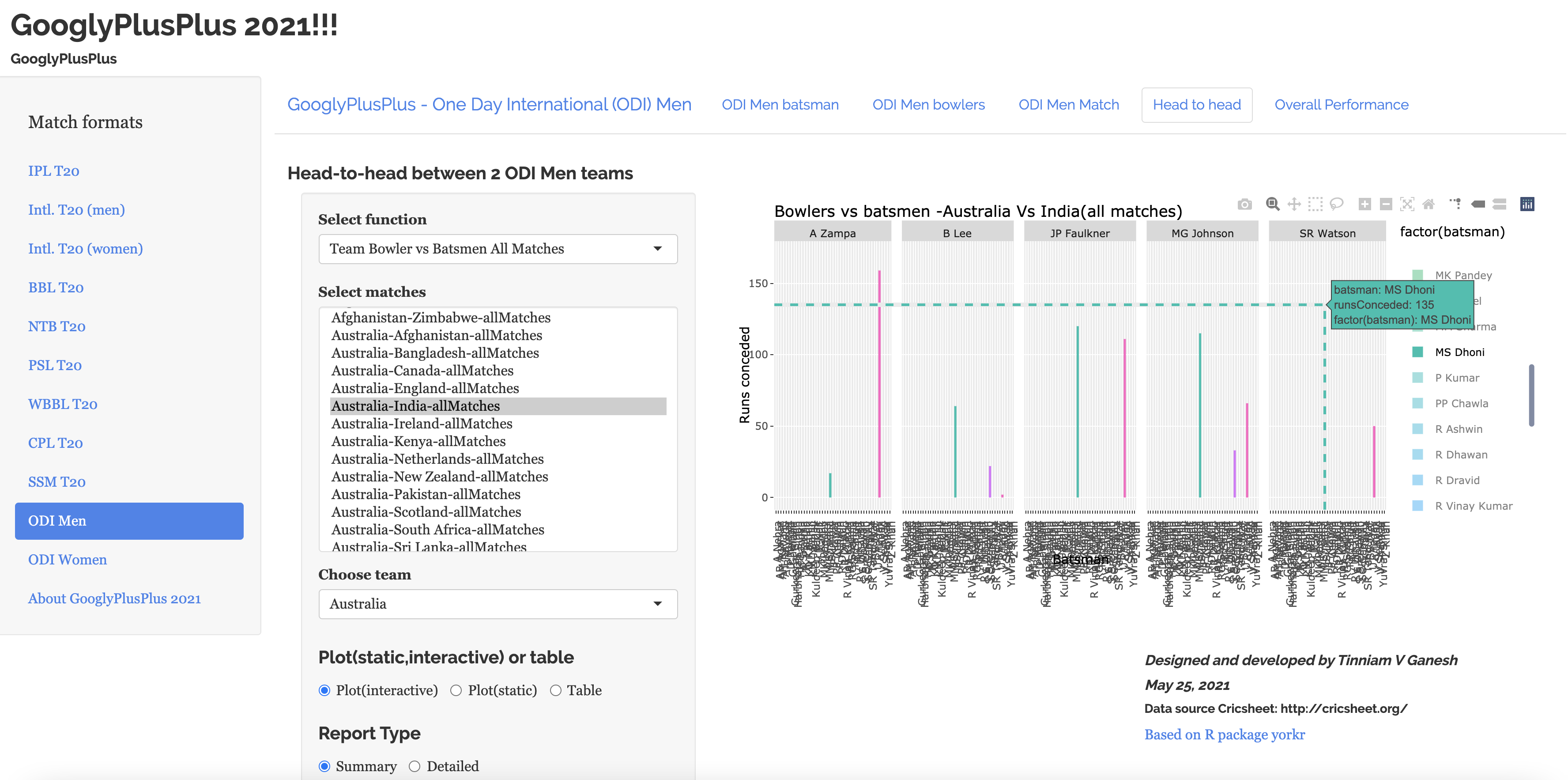
j) Head-to-head (Performance of Indian batsmen vs Australian bowlers)- ODI
In the plot V Kohli, MS Dhoni and SC Ganguly have been selected for their performance against Australian bowlers (use toggle spike lines)
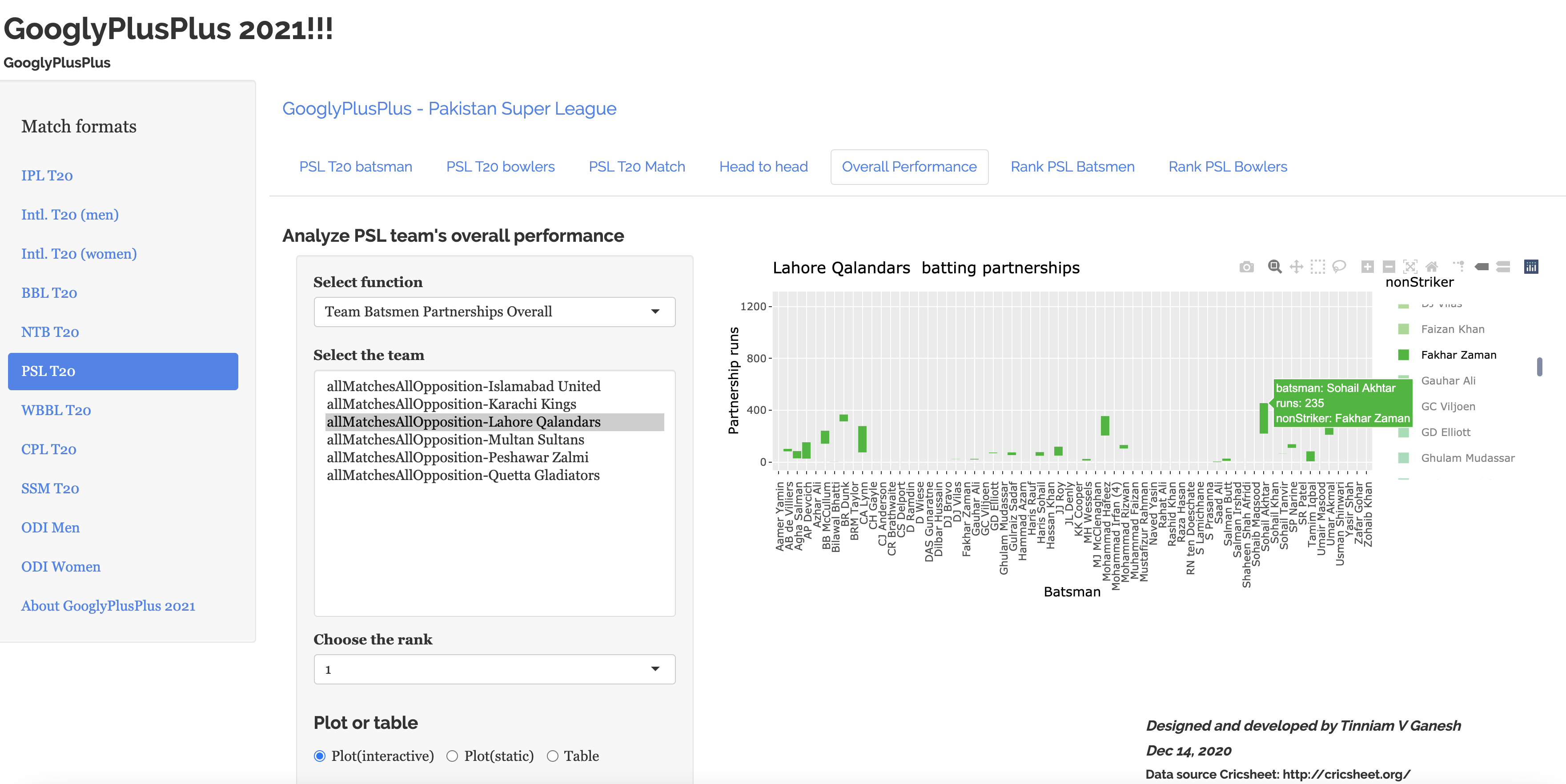
k) Overall Performance – PSL batting partnership against all teams (Fakhar Zaman)
The plot below shows Fakhar Zaman (Lahore Qalanders) partnerships with other teammates in all matches in PSL.
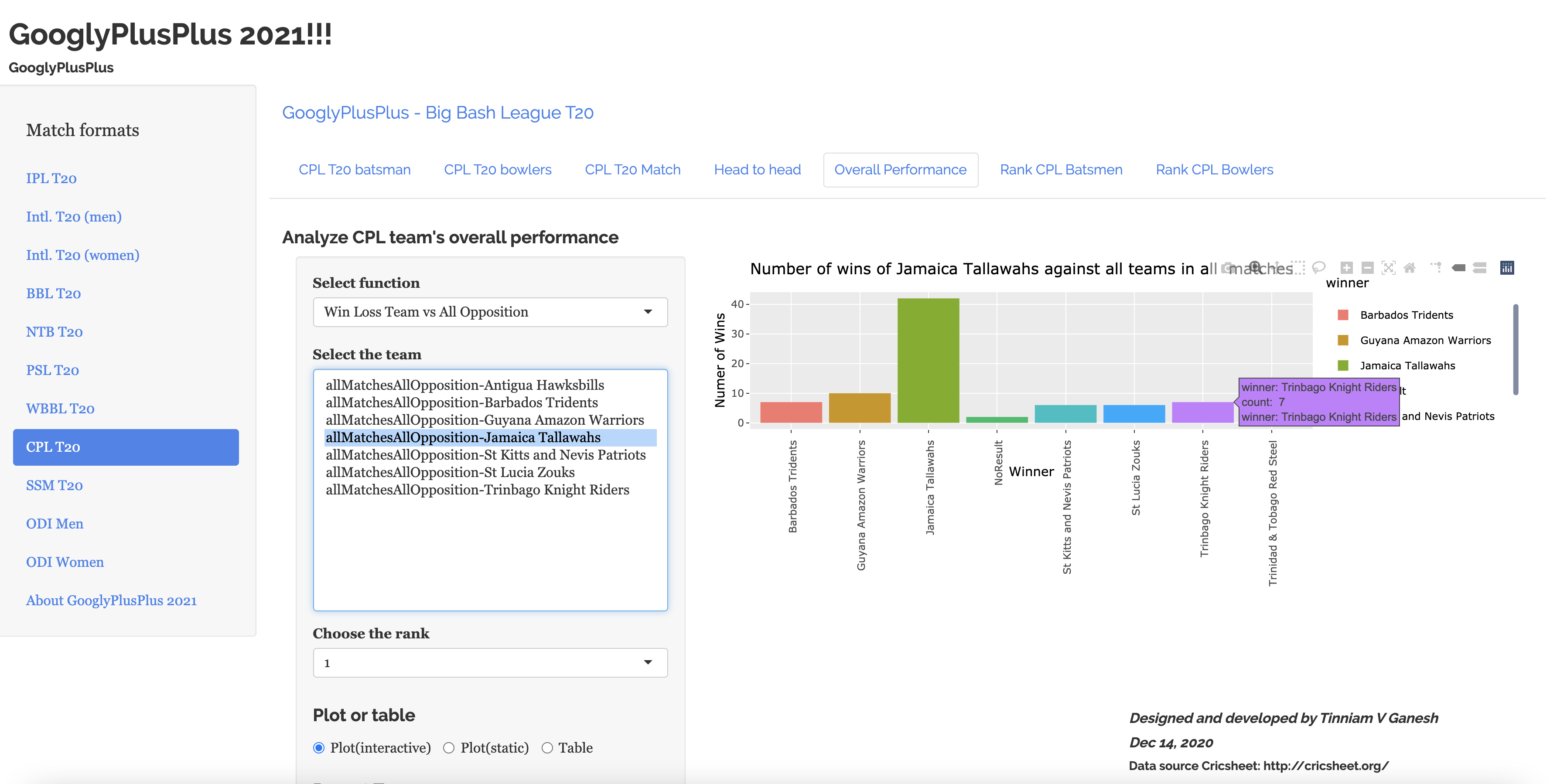
l) Win-loss against all teams (CPL)
Win-loss chart of Jamaica Talawallahs (CPL) in all matches against all opposition
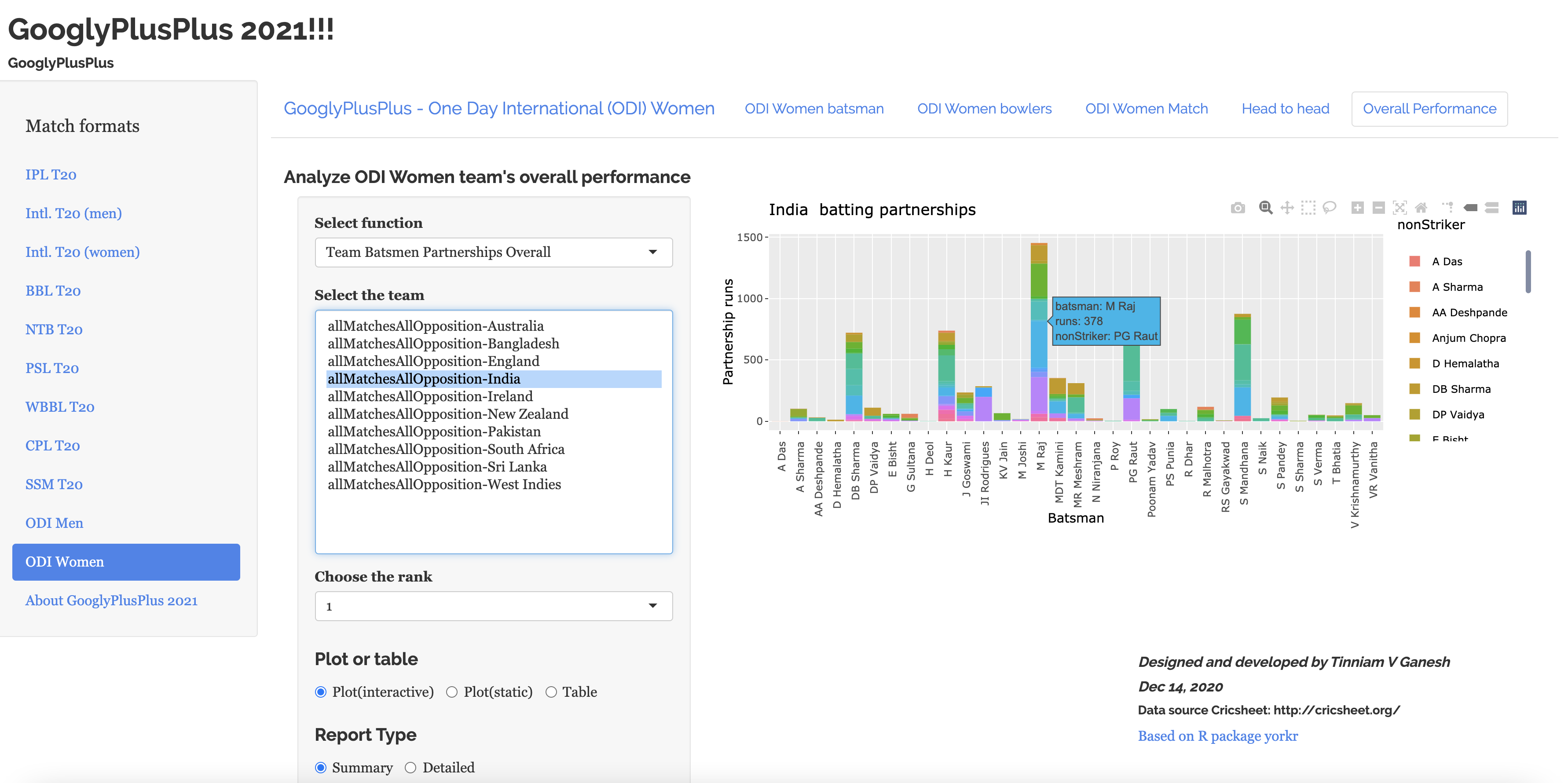
m) Team batting partnerships against all teams for India (ODI Women)
Batting partnerships of Indian ODI women against all other teams
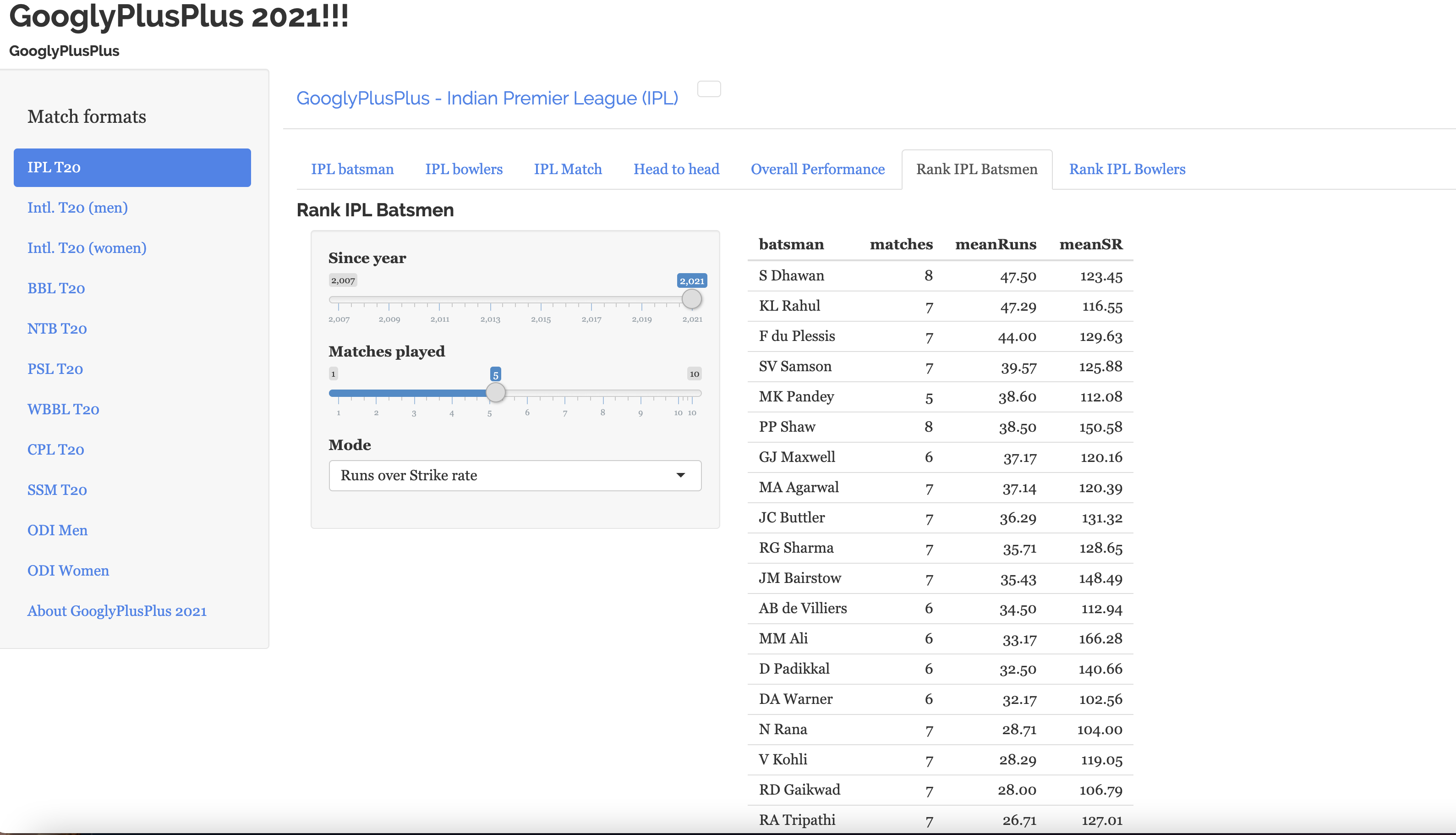
n) Ranking of batsmen (IPL 2021)
Finally here is the latest ranking of IPL batsmen for IPL 2021 (can be done for all other T20 formats)
“Would you tell me, please, which way I ought to go from here?” “That depends a good deal on where you want to get to.” “I don’t much care where –” “Then it doesn’t matter which way you go.” Lewis Carroll, Alice in Wonderland
Every time I think that I have my R packages or Shiny apps all wrapped up, I find another idea trots up and knocks at my door. Since I intend to keep GooglyPlusPlus current with the latest data, I decided to include the ranking functions in my Shiny app GooglyPlusPlus.
Fortunately, since GooglyPlusPlus is based on my R package ‘yorkr‘ (see Introducing cricket package yorkr: Beaten by sheer pace!), I could make the necessary changes to the ranking functions in the package, so that it could be incorporated into my latest Shiny app GooglyPlusPlus2021!! To know how to use GooglyPlusPlus see my post Introducing GooglyPlusPlus
Note: GooglyPlusPlus can analyze batsmen, bowlers, matches and teams.
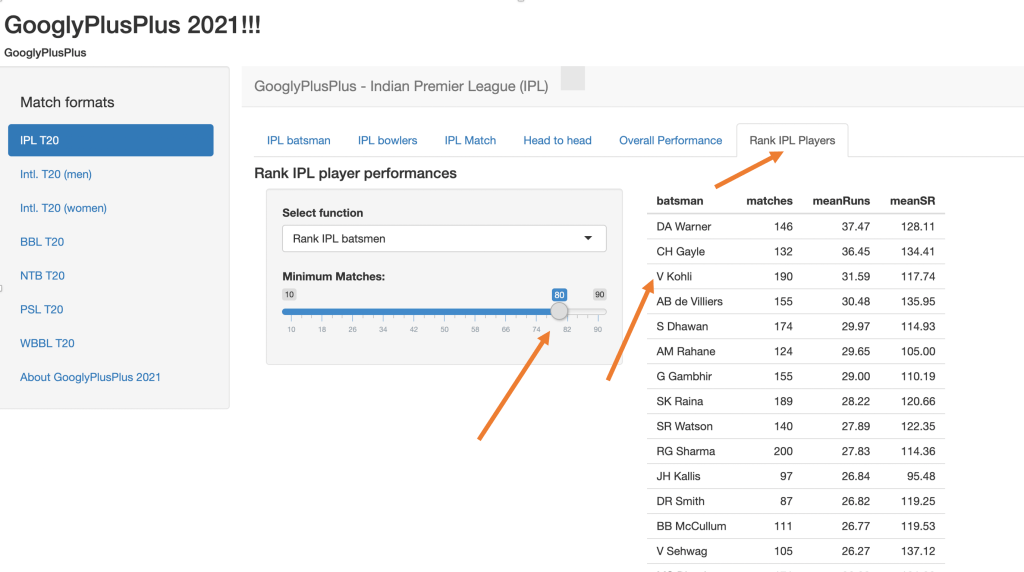
Ranking IPL batsmen (minMatches = 80) – The following table shows the ranking of IPL players who have played 80 matches or more
B) Identifying batsmen of potential and promise
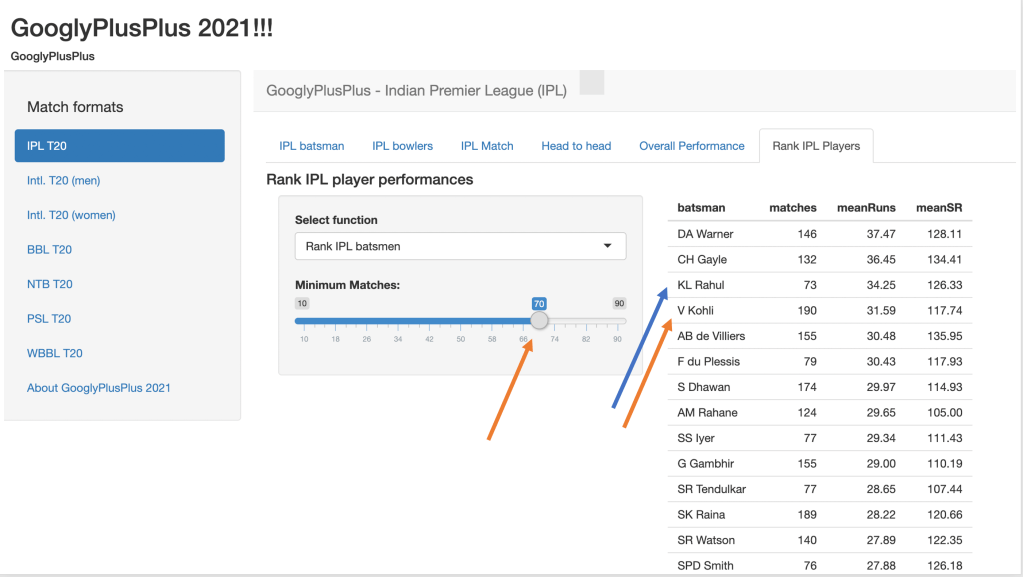
Ranking IPL batsmen (minMatches =70) – If we reduce the minimum number of matches played to 70, then we see it pushes up KL Rahul above Kohli.
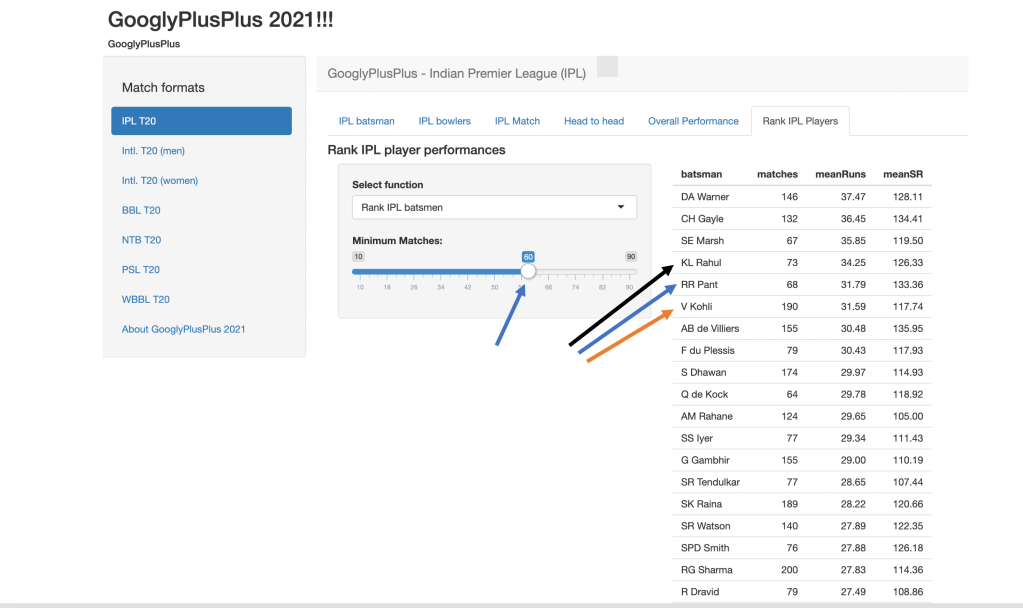
Ranking IPL batsmen (minMatches =60) – When the slider is moved to 60, we see that Rishabh Pant has a better mean average and mean strike rate and is also ranked above Kohli. We can identify promising players this way. However, it is also likely that some players may be just a bright flash in the pan
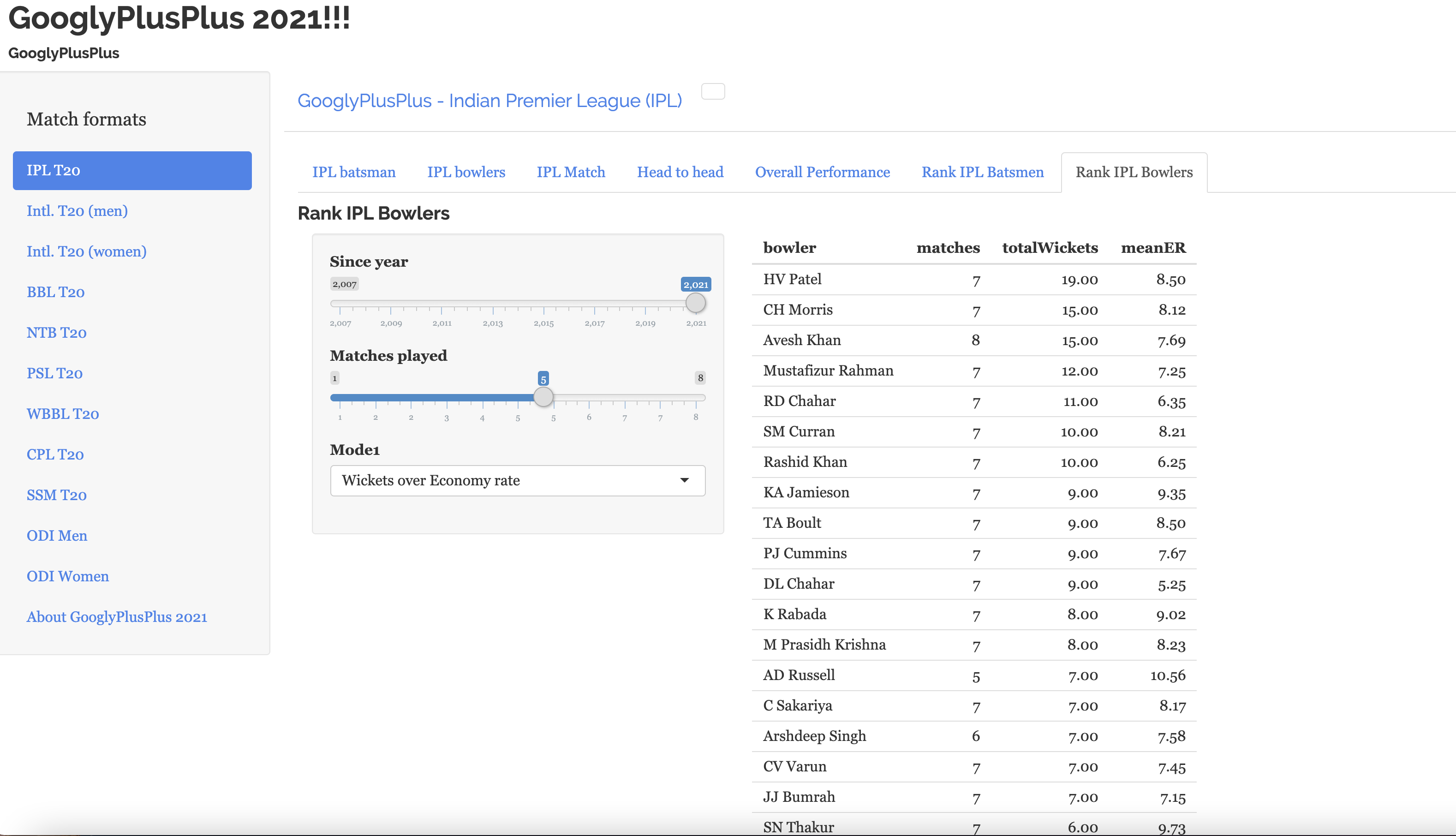
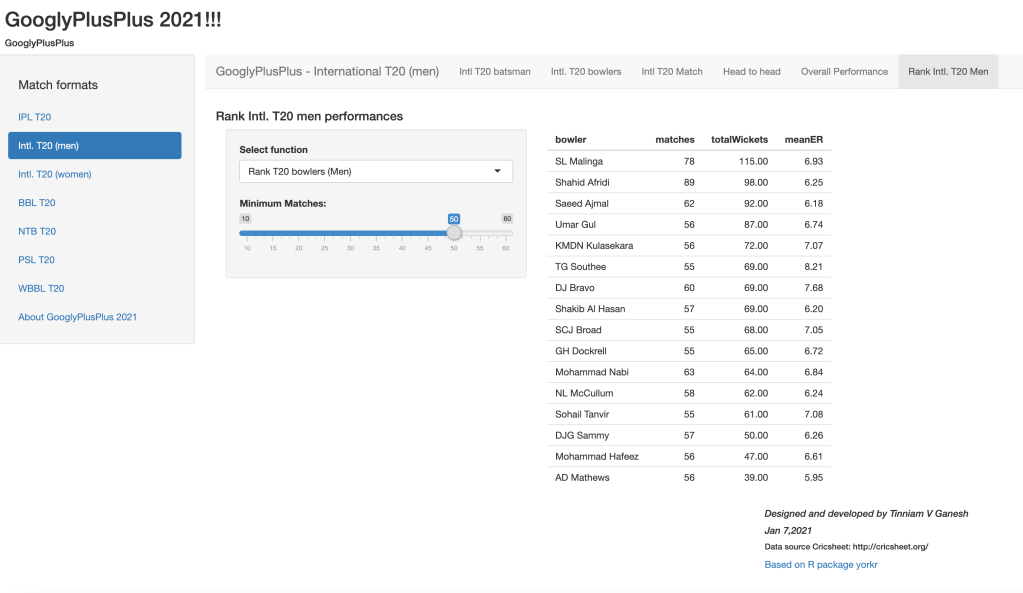
C) Ranking T20 bowlers (men)
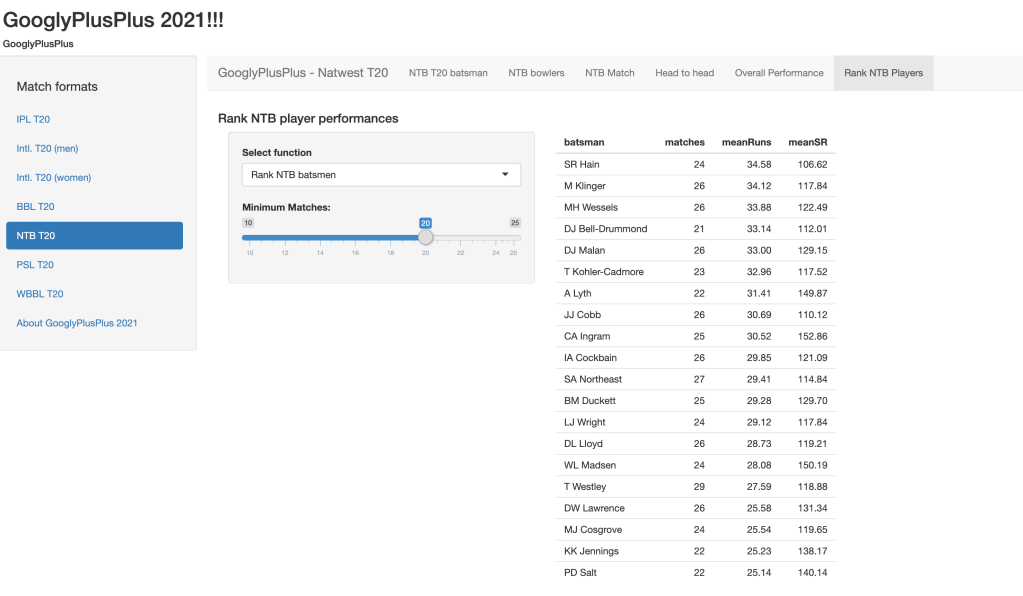
D) Ranking NTB Batsmen
GooglyPlusPlus2021 can rank all T20 formats (IPL, BBL, Intl. T20 (men), Intl. T20 (women), NTB, PSL and WBB. Do give it a try!
Also remember that GooglyPlusPlus2021 includes close to 100+ functions which enable it to perform analysis of batsmen, bowlers, T20 matches, head-to-head confrontation of T20 teams and overall performance of T20 teams . To know more about GooglyPlusPlus2021 see Introducing GooglyPlusPlus
You can download the code for this app from Github at GooglyPlusPlus2021
I have updated my GooglyPlusPlus Shiny app with data from latest IPL 2020. GooglyPlusPlus 2020 is also based on my R package yorkr. To know more about yorkr (see Revitalizing R package yorkr.) Now you should be able to analyze IPL matches, teams, players upto IPL 2020. Note: My latest GooglyPlusPlus 2020 can analyze all formats of T20 matches. yorkr uses data from Cricsheet
There are 5 tabs in each of the T20 formats
i) Analyze T20 batsmen ii) Analyze T20 bowlers. iii) Analyze T20 match iv) Analyze T20 team
vs another T20 team v) Analyze overall performance of T20 against all other teams
I plan to update GooglyPlusPlus at least twice a year to keep it abreast of all the latest data of all T20 formats
In GooglyPlusPlus 2020 you can check out IPL data upto 2020, besides other T20 formats like BBL, PSL, NTB, WBBL, Intl. T20 etc.
Important note: My earlier app GooglyPlusPlus handled all T20 formats including ODI (men and women). Due to an issue with Shiny, I could not include ODI matches in GooglyPlusPlus 2020
Here are some snapshots from GooglyPlusPlus 2020
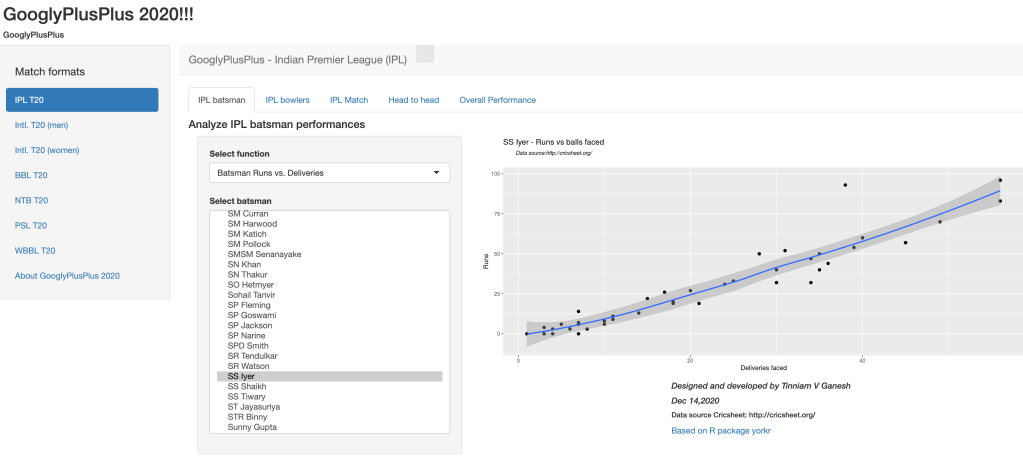
A. Batting – Runs vs Deliveries (Shreyas Iyer)
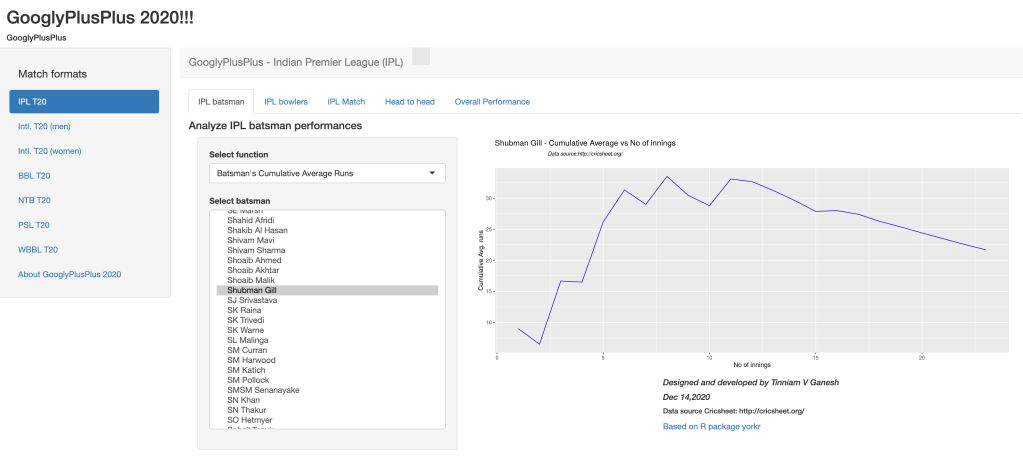
B. Batting – Cumulative Batting Average (Shubman Gill)
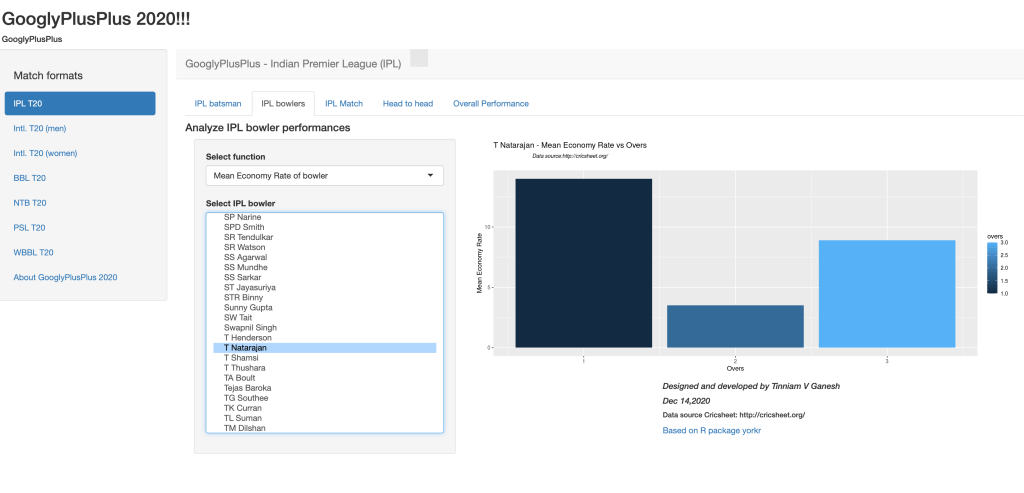
C. Bowling – Mean Economy Rate (T. Natarajan)
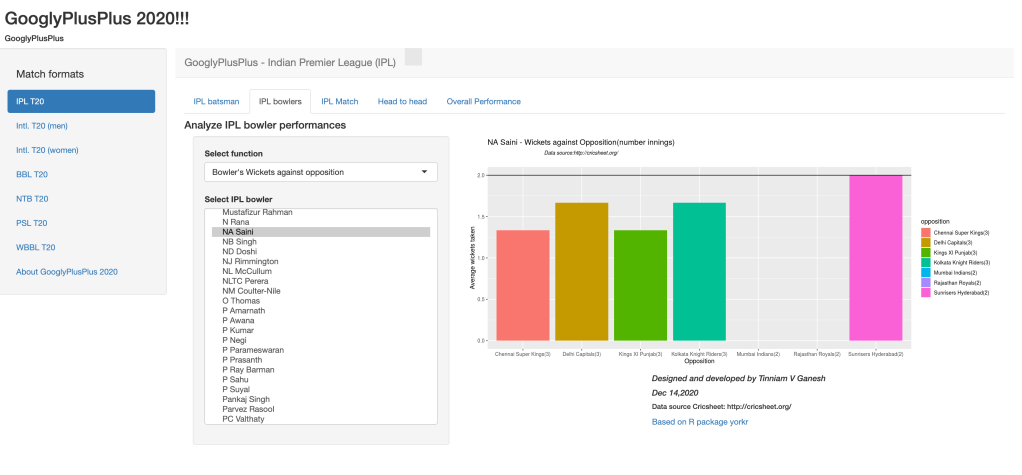
D. Bowling -Bowler’s wickets against opposition (N A Saini)
E. Match scorecard – CSK vs DC 2020-10-17
The scorecards batting and bowling are computed on the fly for all T20 matches
F. Match – Batsmen vs Bowlers (DD vs KKR 2015-04-20)
G. Head-to-head: MI vs KXIP all matches – Batting scorecard
H. Overall team performance- Team Bowler Wicket kind: Rajasthan Royals
Do take GooglyPlusPlus 2020 for a drive! While I have highlighted only IPL T20, because I have updated with the latest data, GooglyPlusPlus 2020 can also handle other T20 formats like BBL, Natwest, PSL, Intl. T20 (men &women) and WBB
“We can lift ourselves out of ignorance, we can find ourselves as creatures of excellence and intelligence and skill.” “Heaven is not a place, and it is not a time. Heaven is being perfect.” “Your whole body, from wingtip to wingtip, is nothing more than your thought itself, in a form you can see. Break the chains of your thought, and you break the chains of your body, too.”
From Jonathan Livingstone Seagull, by Richard Bach
Introduction
The metamorphosis is complete, from eggs to the butterfly! My R package yorkr, went on to become Googly, and then to GooglyPlus and now finally GooglyPlusPlus. My latest R Shiny app now provides interactive visualisation of almost all data in Cricsheet. GooglyPlusPlus visualizes the following matches
1. ODI (men)
2. ODI (women)
3. Intl. T20 (men)
4. Intl T20 (women)
5. IPL (Indian Premier League)
6. BBL (Big Bash League)
7. NTB (Natwest T20)
8. PSL (Pakistan Super League)
9. WBBL – Women’s BBL
This Shiny app was quite involved, and it took a lot of work to keep things organised and separate for the different forms of cricket. Anyway it is done and I am happy with the outcome.
Before you use the app, I would suggest that you take a look at the video “How to use GooglyPlusPlus?“. In this video, I show the different features of GooglyPlusPlus and how to navigate through them.
You can clone/fork and play around with the code of GooglyPlusPlus here at Github
A. Highlights of GooglyPlusPlus.
The R Shiny app GooglyPlusPlus has the following main pages for the 9 different cricket formats. See below
Important note: Below I will be including some random output from the GooglyPlusPlus app for different match formats, however there is a lot more features in GooglyPlusPlus
1. Indian Premier League (IPL)
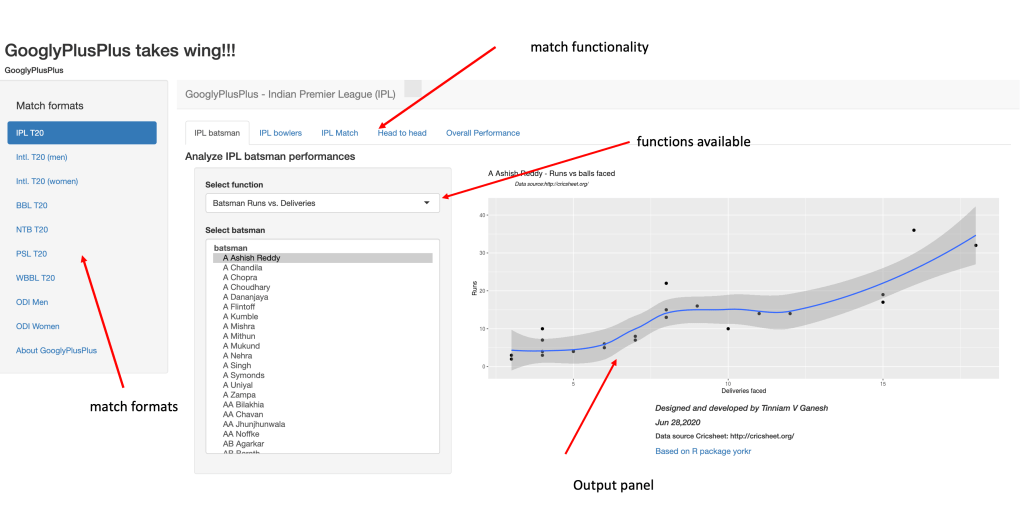
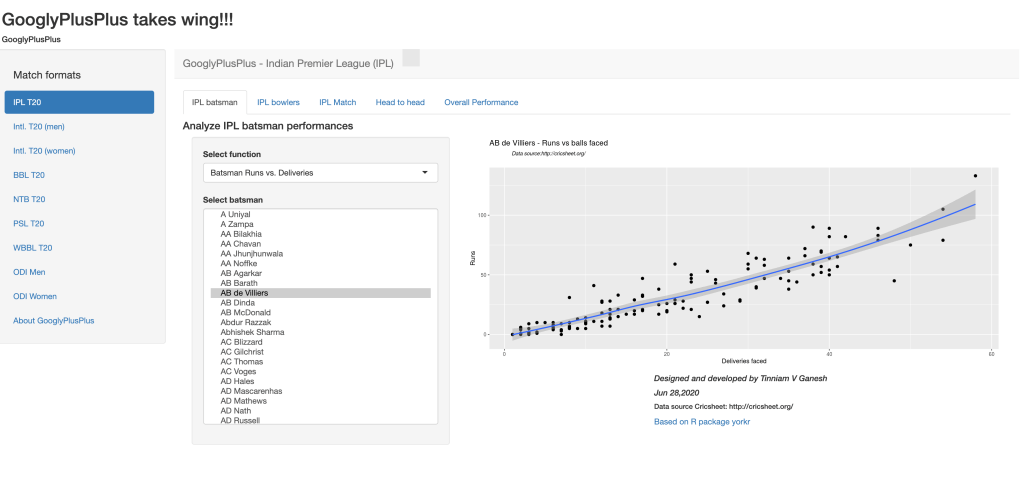
a. IPL batsman – Batsman Runs vs Deliveries
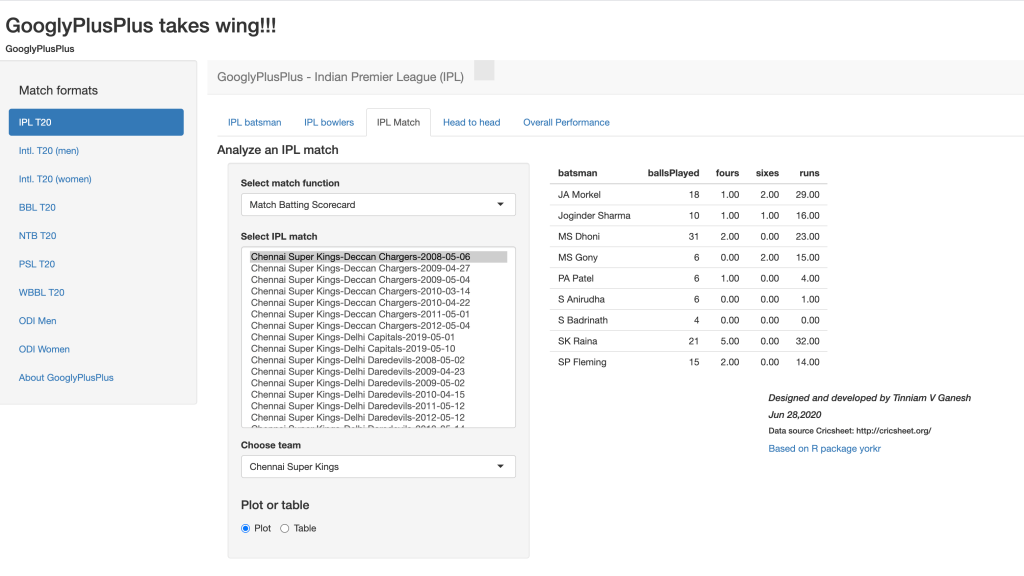
b. IPL Match – Match batting scorecard
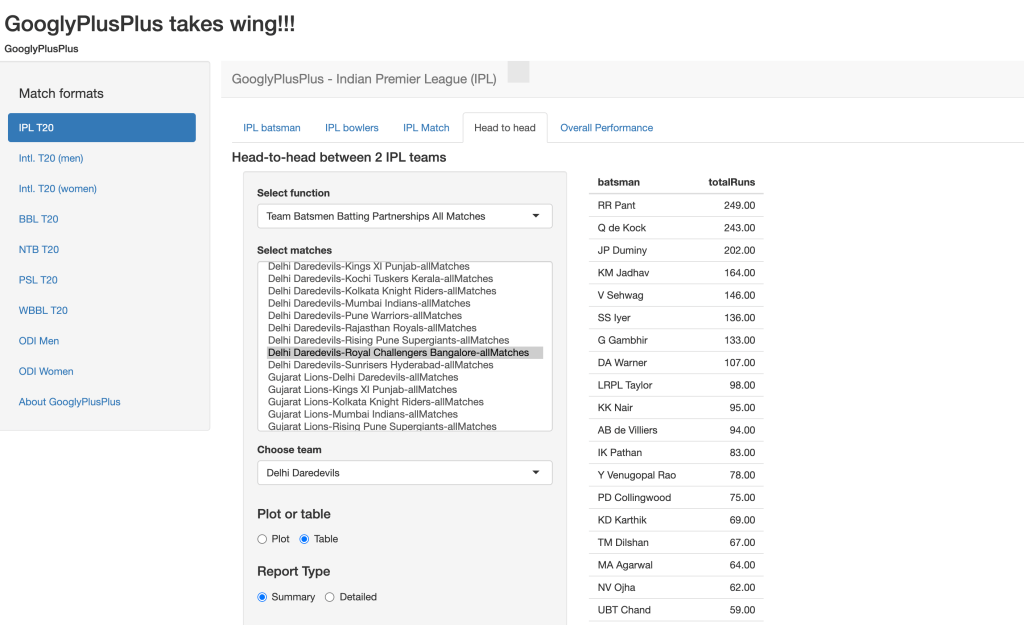
c. Head-to-head between 2 IPL Teams – Team Batsmen Batting Partnership All Matches
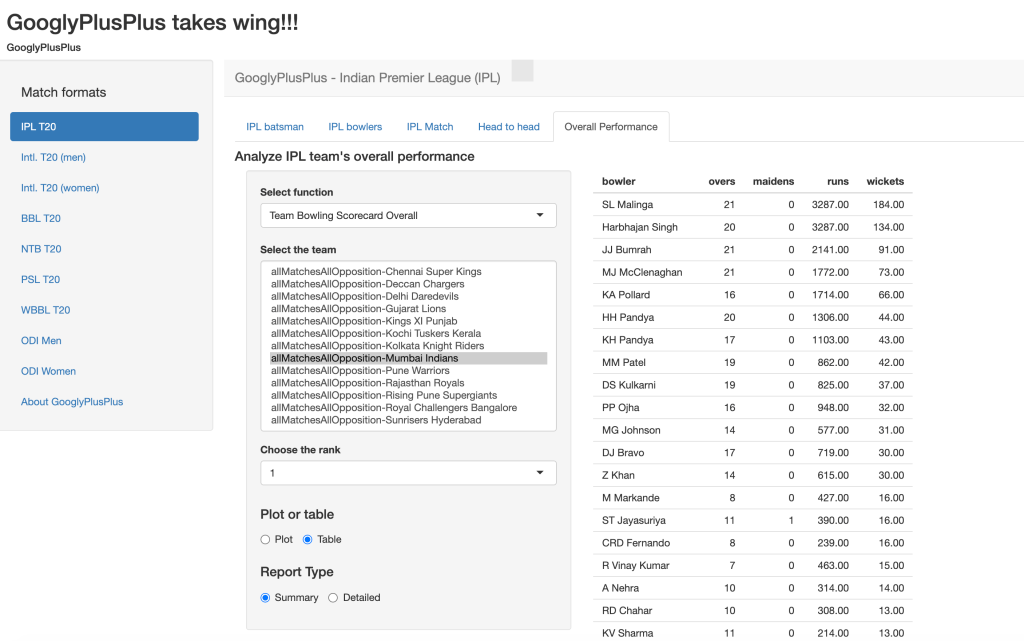
d. Overall Performance – Team Bowling Scorecard Overall
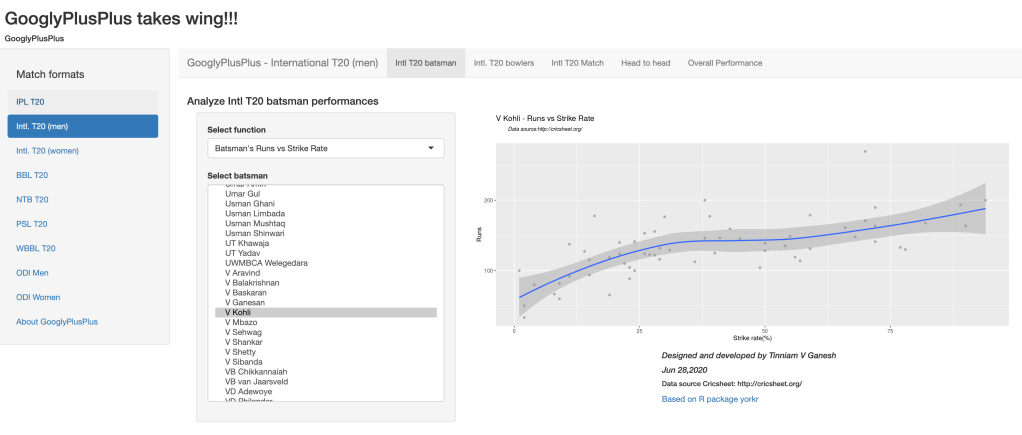
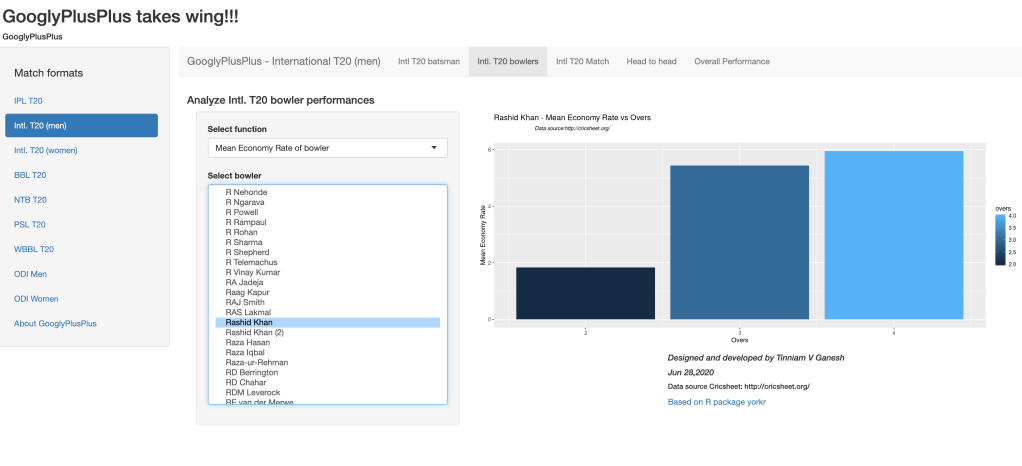
2. International T20 Men
a. Batsman Function- Runs vs Strike rate
b. Bowler Function – Mean Economy Rate
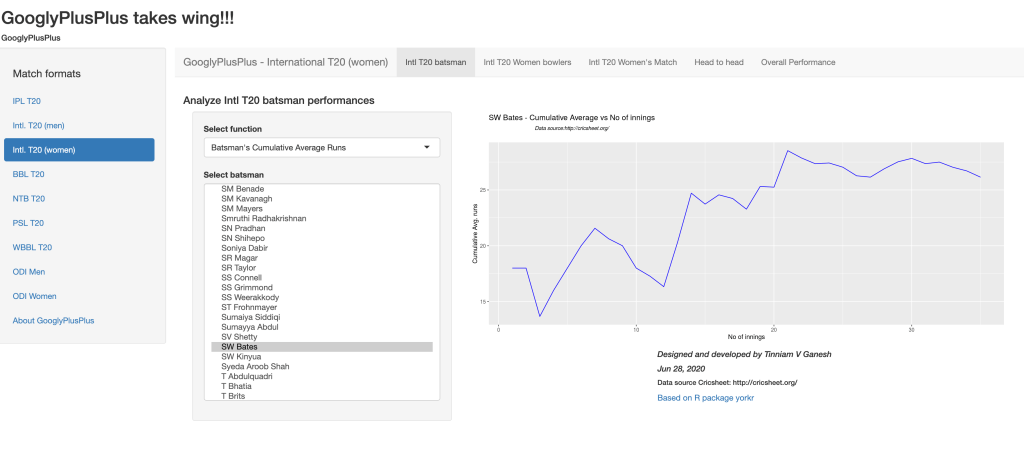
3. International T20 (Women)
a.Batsman Functions – Batsman Cumulative Average Runs
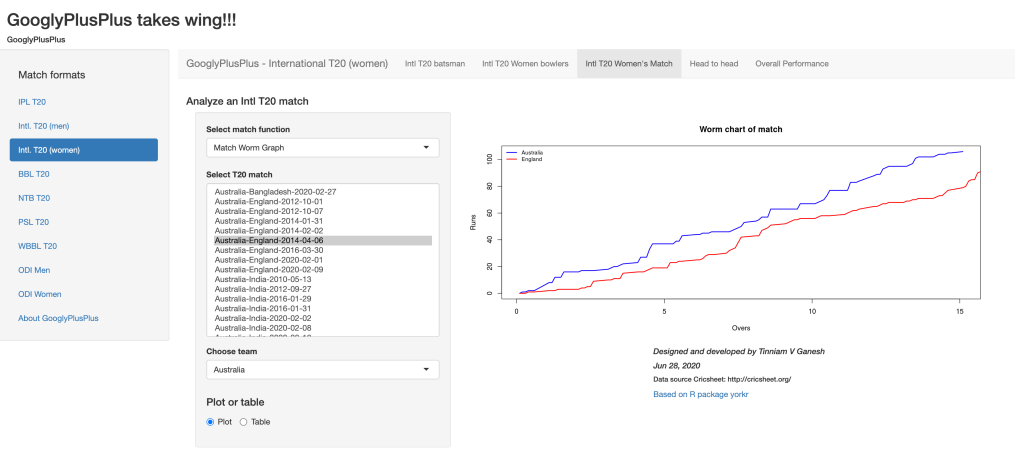
b. Intl T20 Women’s match – Match worm Graph
4. Big Bash League (BBL)
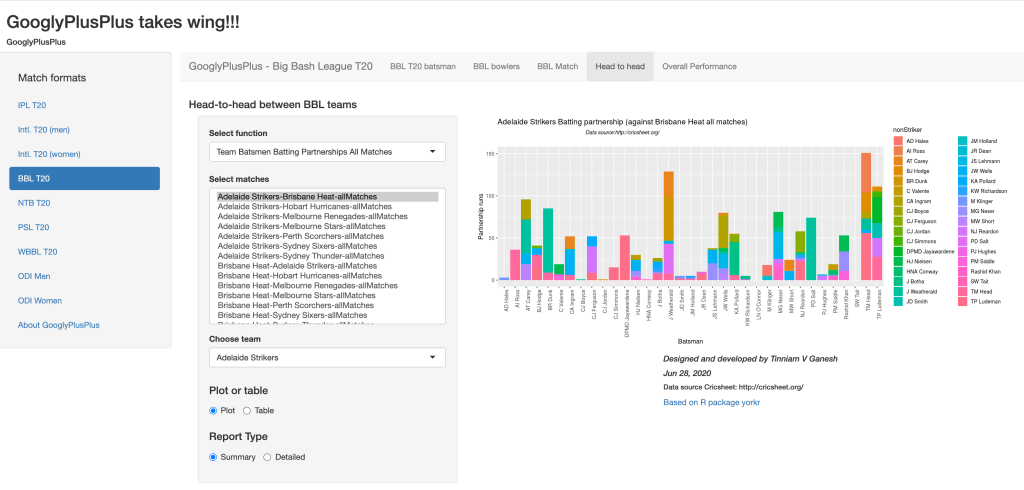
a.Head-to-Head: Team batsmen batting partnerships
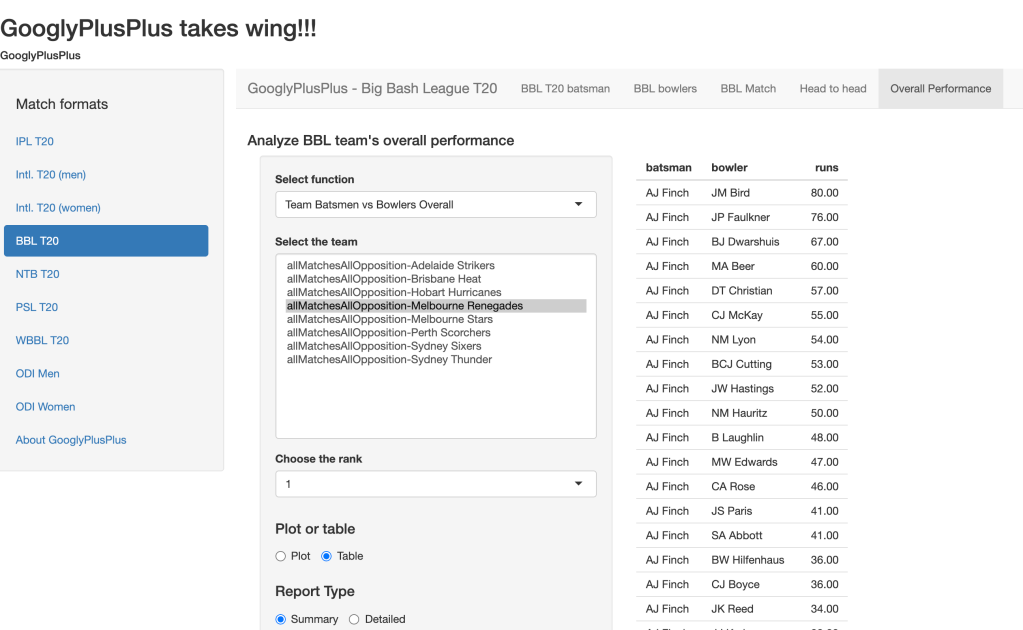
b. Overall Performance – Team batsmen vs bowlers
5. Natwest T20 (NTB)
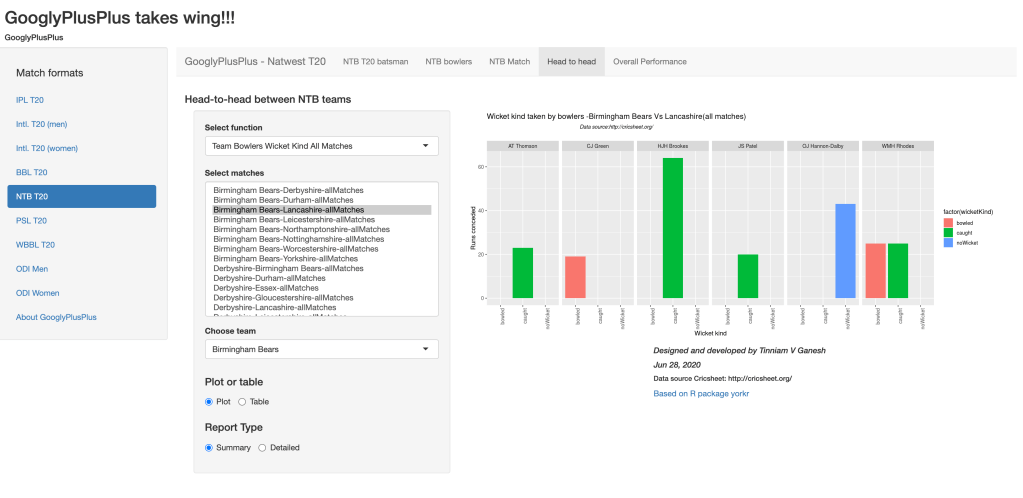
a. Head-to-head : Team bowlers vs batsmen
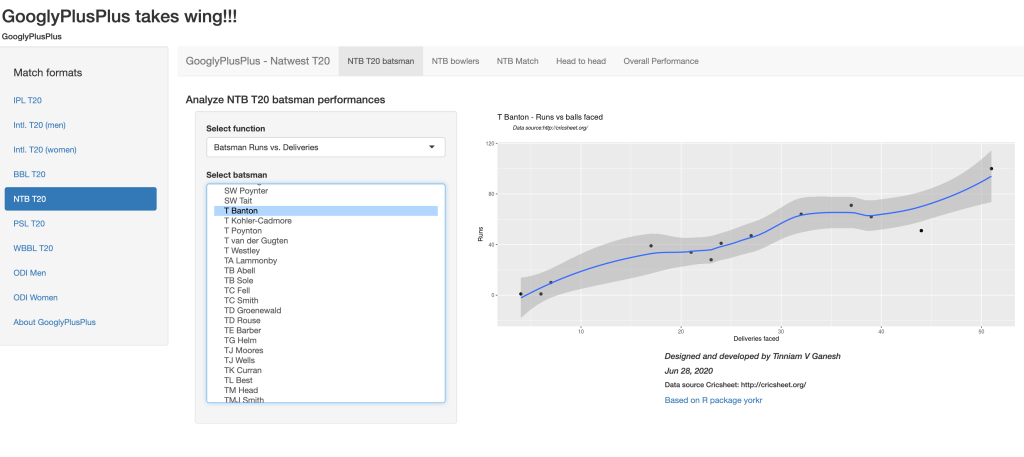
b. Batsman Runs vs Deliveries
6. Pakistan Super League (PSL)
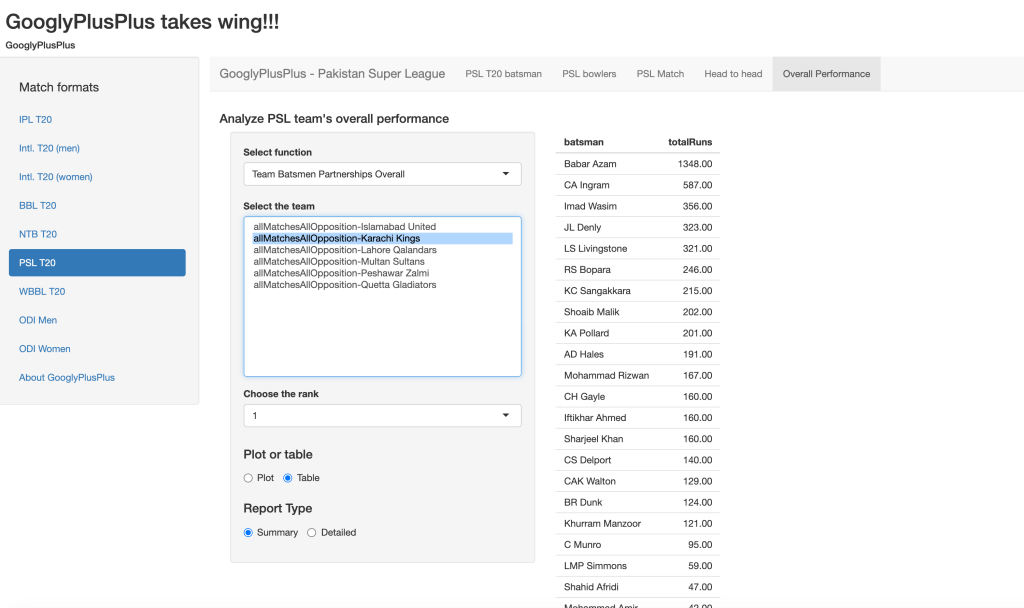
a. Overall Performance – Batsmen Partnership
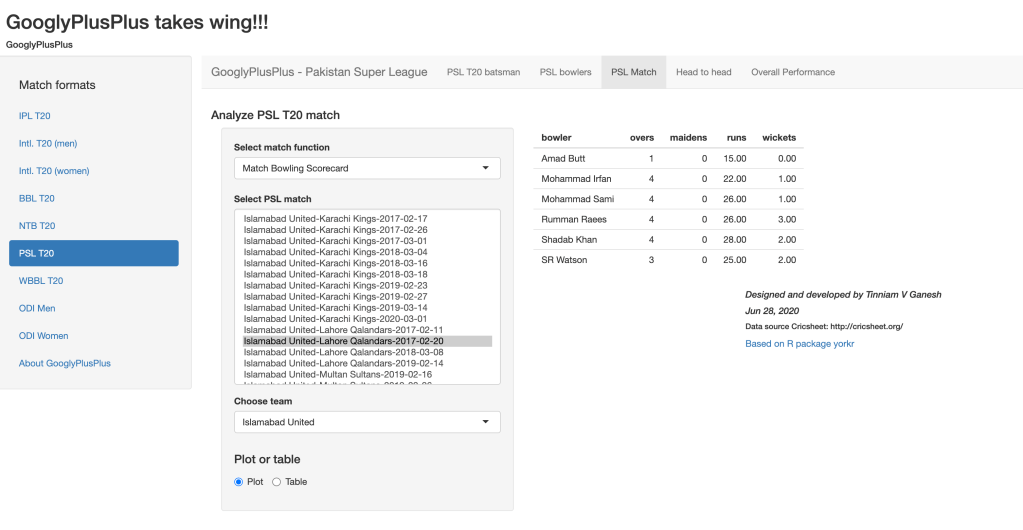
b. Bowling Scorecard
7. Women’s Big Bash League (WBBL)
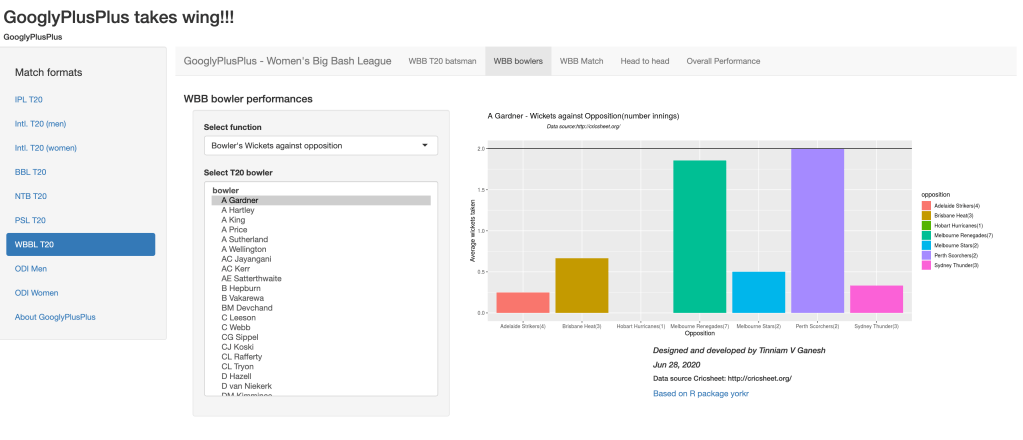
a. Bowler wicket against opposition
8. One Day International (ODI) Men
a. Batsman Runs Against Opposition
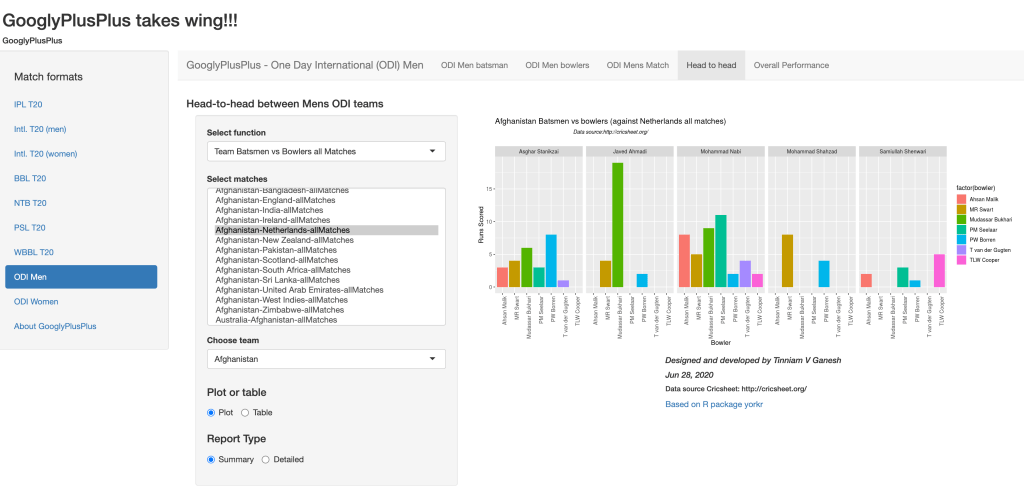
b. Team Batsmen against bowlers
9. One Day International (ODI) women)
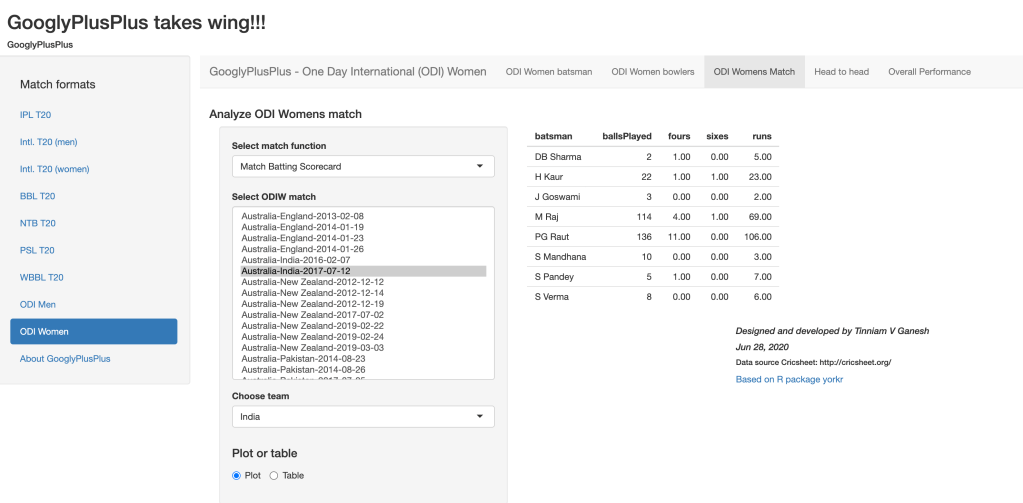
a. Match Batting Scorecard
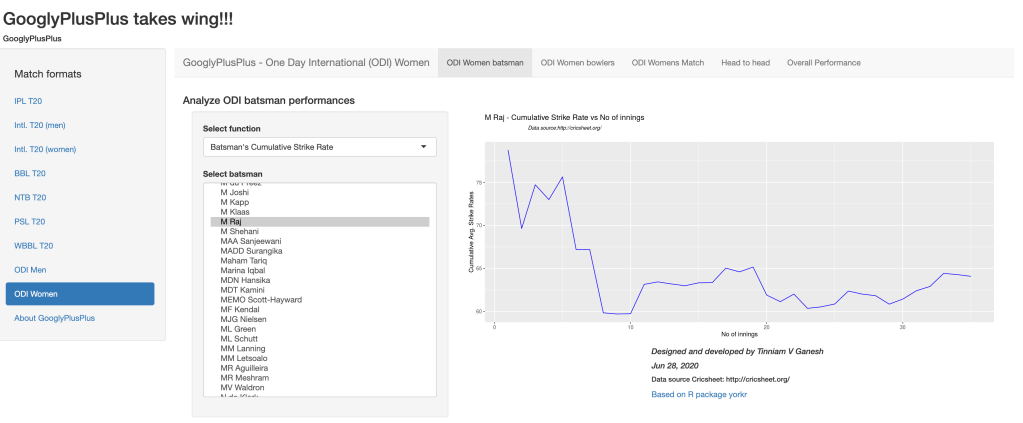
b. Batsman Cumulative Strike Rate
Conclusion
There you have it. I have randomly shown 2 functions for each cricket format. There are many functions in each tab for the for the different match formats – namely IPL, BBL, Intl T20 (men,women), PSL etc. Go ahead and give GooglyPlusPlus a spin!
“Do not take life too seriously. You will never get out of it alive.” – Elbert Hubbard
“How many people here have telekenetic powers? Raise my hand.” – Emo Philips
Have you ever noticed that anybody driving slower than you is an idiot, and anyone going faster than you is a maniac?” – George Carlin
It’s a wrap!!! In my previous posts,Revitalizing yorkr, I showed how you can use yorkr functions for Intl. ODI, Intl. T20 and IPL. My next post yorkr rocks women’s ODI and women’s Intl T20 yorkr handled women’s ODI and Intl. T20. In this post, yorkr wraps the remaining T20 formats namely
Big Bash League (BBL)
Natwest Super T20 (NTB)
Pakistan Super League (PSL)
Women’s Big Bash League (WBB)
The data for all the above T20 formats are taken from Cricsheet.
-All the data has been converted and is available in Github at yorkrData2020 organized as below. You can use any of the 90+ yorkr functions on the converted data.
I am going to randomly pick 2 yorkr functions for each of the T20 formats BBL, NTB, PSL and WBB to demonstrate yorkr below, however you can use any of the 90+ yorkr functions
load("../../../yorkrData2020/bbl/bblMatches2Teams/Melbourne Renegades-Sydney Sixers-allMatches.RData")
mr_ss_matches <- matches
m <-teamBatsmenPartnershiOppnAllMatches(mr_ss_matches,'Sydney Sixers',report="summary")
m
## # A tibble: 28 x 2
##    batsman      totalRuns
##    <chr>            <dbl>
##  1 MC Henriques       277
##  2 JR Philippe        186
##  3 NJ Maddinson       183
##  4 MJ Lumb            165
##  5 DP Hughes          158
##  6 JC Silk            141
##  7 SPD Smith          116
##  8 JM Vince            97
##  9 TK Curran           68
## 10 J Botha             33
## # … with 18 more rows
As mentioned above, I have randomly picked 2 yorkr functions for each of the T20 formats. You can use any of the 90+ functions for analysis of matches, teams, batsmen and bowlers.
## # A tibble: 31 x 4
##    bowler      matches totalWickets meanER
##    <chr>         <int>        <dbl>  <dbl>
##  1 M Strano         23           37   7.25
##  2 DM Kimmince      24           36   7.46
##  3 SJ Coyte         22           29   7.59
##  4 JL Jonassen      24           28   6.81
##  5 SJ Johnson       24           27   6.61
##  6 ML Schutt        22           26   6.03
##  7 SFM Devine       22           24   7.58
##  8 M Brown          23           23   7.33
##  9 M Kapp           19           23   5.05
## 10 H Graham         19           22   7.68
## # … with 21 more rows
Conclusion
yorkr can handle ODI and T20 matches in the format as represented in Cricsheet. In my posts, I have shown how yorkr can be used for Intl. ODI and Intl. T20 for both men and women. yorkr can also handle all T20 formats like IPL T20, BBL, Natwest T20, PSL and women’s BBL. Go ahead take yorkr for a ride and check out your favorite teams and players.
“I don’t count my sit-ups. I only start counting once it starts hurting. ”
Muhammad Ali
“Hard work beats talent when talent doesn’t work hard.”
Tim Notke
In my previous post Big Data 5: kNiFI-ing through cricket data with Apache NiFi and yorkpy, I created a Big Data Pipeline that takes raw data in YAML format from a Cricsheet to processing and ranking IPL T20 players. In that post I had mentioned that we could create a similar pipeline to create a real time dashboard of IPL Analytics. I could have have done this but I needed to know how to create a Web UI. After digging and poking around, I have been able to create a simple Web UI running off Apache Web server. This UI uses basic JQuery and CSS to display a real time IPL T20 dashboard. As in my previous post, this is an end-2-end Big Data pipeline which can handle large data sets at scheduled times, process them and generate real time dashboards.
We could imagine an inter-galactic T20 championship league where T20 data comes in every hour or sooner and we need to perform analytics to see if us earthlings are any better than people with pointy heads or little green men. The NiFi pipeline could be used as-is, however the yorkpy package would have to be rewritten in Pyspark. That is in another eon, though.
My package yorkpy has around ~45+ functions which fall in the following main categories
Watch the live demo of the end-2-end NiFi pipeline at ‘The T20 Dance‘
You can download the NiFi template and associated code from Github at T20 Dance
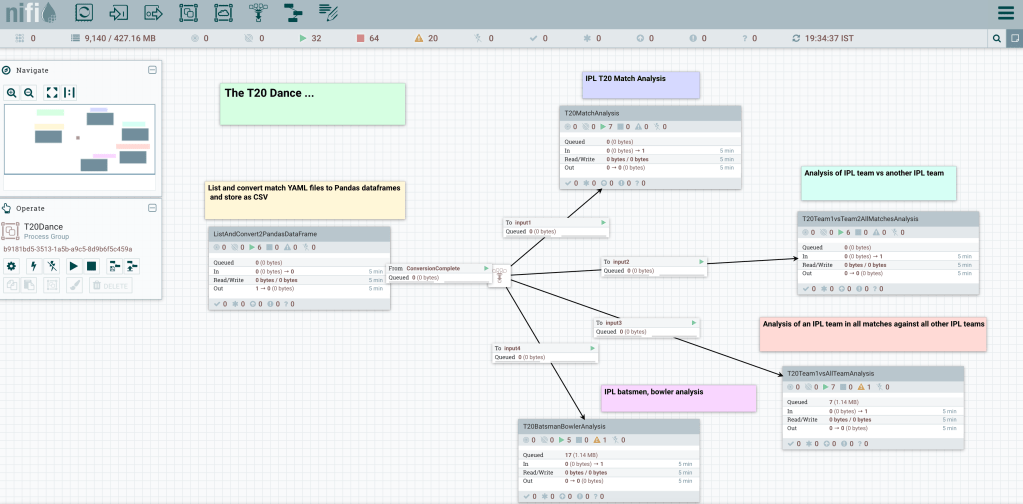
The Apache NiFi Pipeline is shown below
1. T20 Dance – Overall NiFi Pipeline
There are 5 process groups
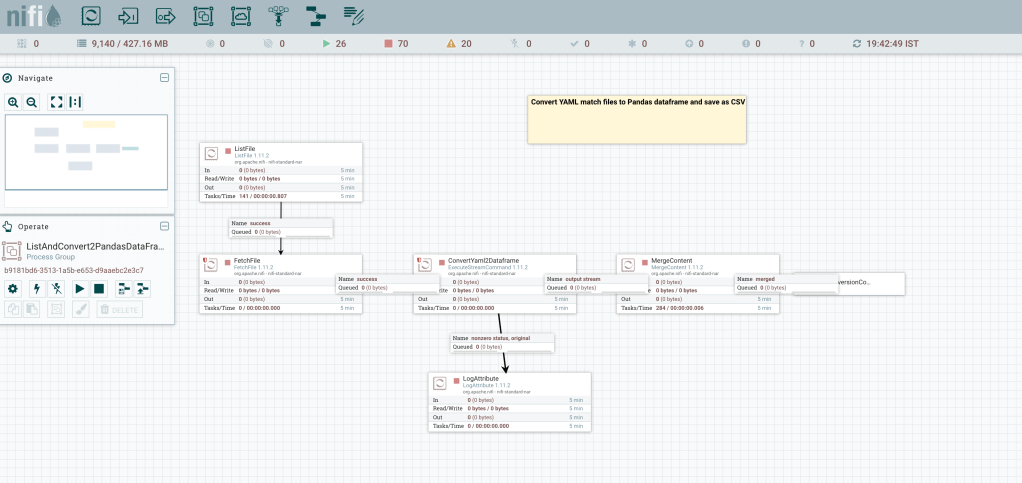
2. ListAndConvertYaml2DataFrames
This post starts with having the YAML files downloaded and unpacked from Cricsheet. The individual YAML files are converted into Pandas dataframes and saved as CSV. A concurrency of 12 is used to increase performance and process YAML files in parallel. The processor MergeContent creates a merged content to signal the completion of conversion and triggers the other Process Groups through a funnel.
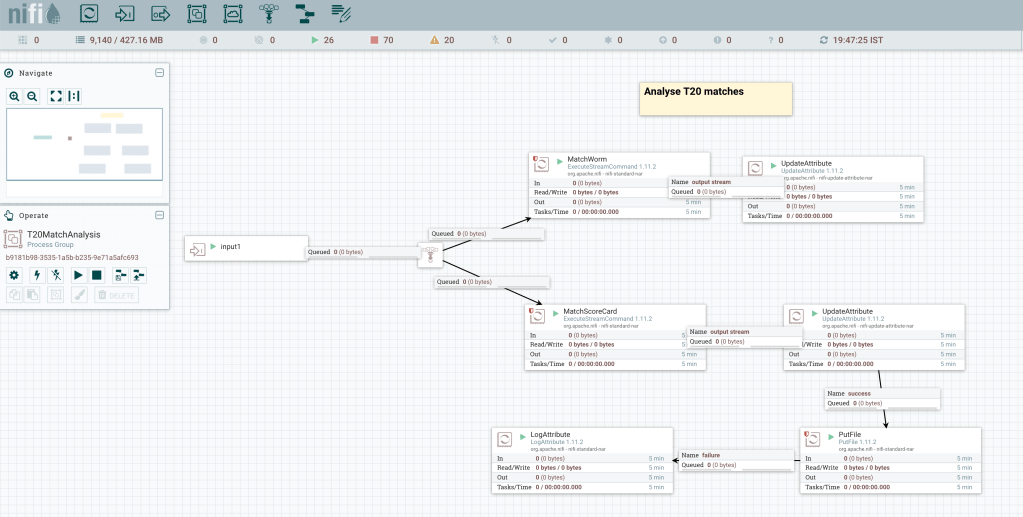
3. Analyse individual IPL T20 matches
This Process Group ‘Analyse T20 matches’ used the yorkpy’s Class 1 functions which can perform analysis of individual IPL T20 matches. The matchWorm() and matchScorecard() functions are used, through any other function could have been used. The Process Group is shown below
4. Analyse performance of an IPL team in all matches against another IPL team
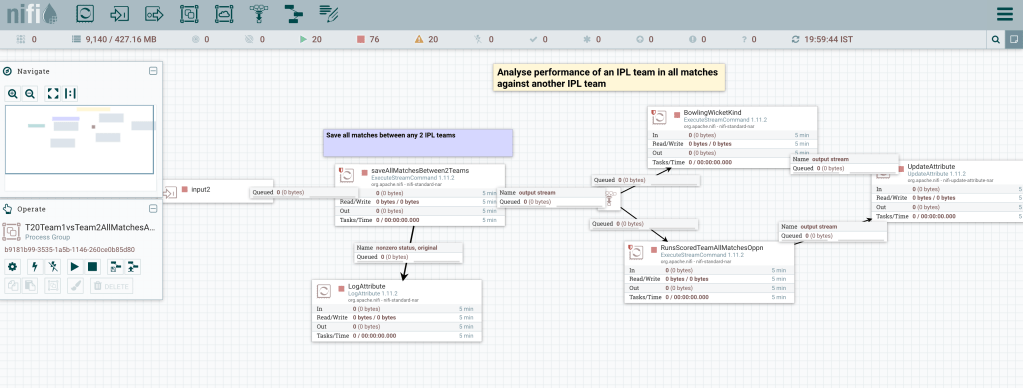
This Process Group ‘Analyse performance of IPL team in all matched against another IPL team‘ does analysis in all matches between any 2 IPL teams (Class 2) as shown below
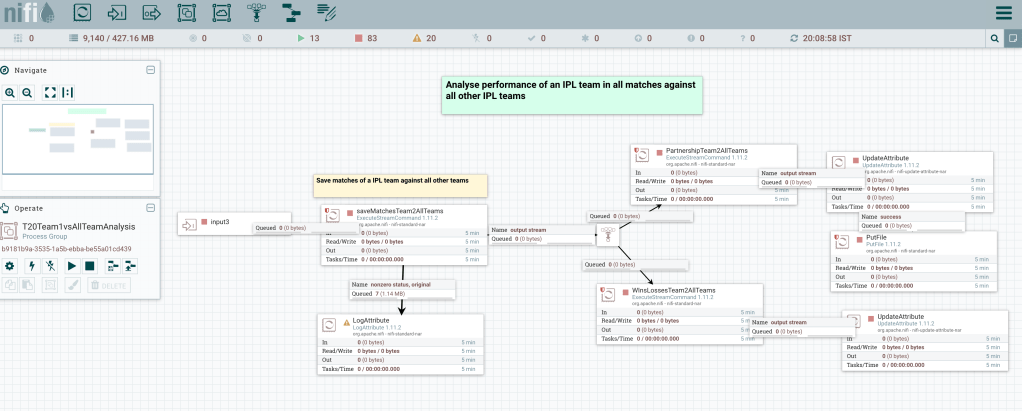
5. Analyse performance of IPL team in all matches against all other IPL teams
This uses Class 3 functions. Individual data sets for each IPL team versus all other IPL teams is created before Class 3 yorkpy functions are invoked. This is included below
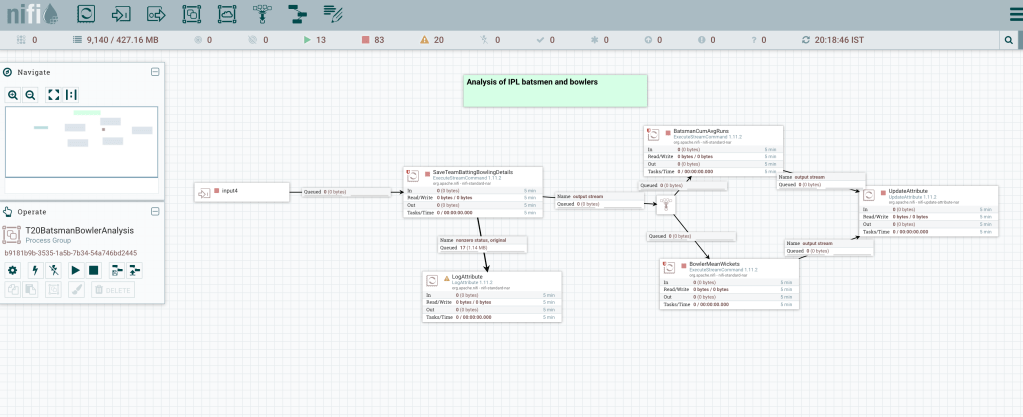
6. Analyse performances of IPL batsmen and bowlers
This Process Group uses Class 4 yorkpy functions. The match CSV files are processed to get batting and bowling details before calling the individual functions as shown below
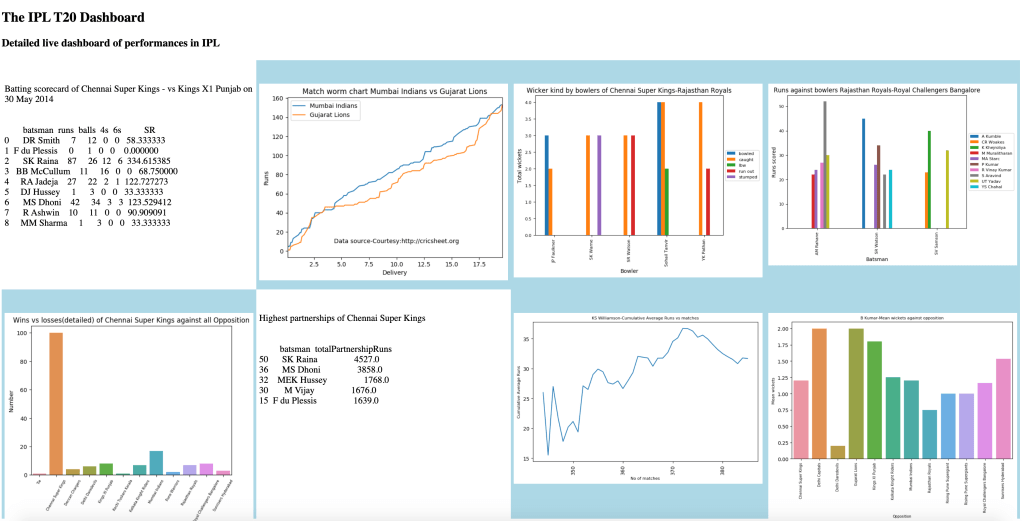
7. IPL T20 Dashboard
The IPL T20 Dashboard is shown
Conclusion
This NiFI pipeline was done for IPL T20 however, it could be done for any T20 format like Intl T20, BBL, Natwest etc which are posted in Cricsheet. Also, only a subset of the yorkpy functions were used. There is a much wider variety of functions available.
There is a voice that doesn’t use words, listen. When someone beats a rug, the blows are not against the rug, but against the dust in it. I lost my hat while gazing at the moon, and then I lost my mind.
Rumi
Introduction
After a long hiatus, I am back to my big, bad, blogging ways! In this post I rank T20 players from several different leagues namely
International T20
Indian Premier League (IPL) T20
Big Bash League (BBL) T20
Natwest Blast (NTB) T20
I have added 8 new functions to my Python Package yorkpy, which will perform the ranking for the above 4 T20 League formats. To know more about my Python package see Pitching yorkpy . short of good length to IPL – Part 1, and the related posts on yorkpy. The code can be easily extended to other leagues which have a the same ‘yaml’ format for the matches. I also fixed some issues which started to crop up, possibly because a few things have changed in the new data.
You can download the PDF of the post from Rank T20
yorkpy can be installed with ‘pip install yorkpy‘
1. International T20
The steps to do before ranking for International T20 matches are 1. Download International T20 zip file from Cricsheet Intl T20 2. Unzip the file. This will create a folder with yaml files
import yorkpy.analytics as yka
#yka.convertAllYaml2PandasDataframesT20("../t20s","../data")
This above step will convert the yaml files into CSV files. Now do the ranking as below
1a. Ranking of International T20 batsmen
import yorkpy.analytics as yka
intlT20RankBatting=yka.rankIntlT20Batting("C:\\software\\cricket-package\\yorkpyPkg\\data\\data")
intlT20RankBatting.head(15)
The steps to do before ranking for IPL T20 matches are 1. Download IPL T20 zip file from Cricsheet IPL T20 2. Unzip the file. This will create a folder with yaml files
import yorkpy.analytics as yka
#yka.convertAllYaml2PandasDataframesT20("../ipl","../ipldata")
This above step will convert the yaml files into CSV files in the /ipldata folder. Now do the ranking as below
2a. Ranking of batsmen in IPL T20
import yorkpy.analytics as yka
IPLT20RankBatting=yka.rankIPLT20Batting("C:\\software\\cricket-package\\yorkpyPkg\\data\\ipldata")
IPLT20RankBatting.head(15)
##                    matches  runs_mean     SR_mean
## batsman
## DA Warner              129  37.589147  119.917864
## CH Gayle               123  36.723577  125.256818
## SE Marsh                70  36.314286  114.707578
## KL Rahul                59  33.542373  123.424971
## MEK Hussey              60  33.400000  100.439187
## V Kohli                174  32.413793  115.830849
## KS Williamson           42  31.690476  120.443172
## AB de Villiers         143  30.923077  128.967081
## JC Buttler              45  30.800000  132.561154
## AM Rahane              118  30.330508  102.240398
## SR Tendulkar            79  29.949367  101.651959
## F du Plessis            65  29.415385  112.462114
## Q de Kock               51  29.333333  110.973836
## SS Iyer                 47  29.170213  102.144222
## G Gambhir              155  28.741935  103.997558
2b. Ranking of bowlers in IPL T20
import yorkpy.analytics as yka
IPLT20RankBowling=yka.rankIPLT20Bowling("C:\\software\\cricket-package\\yorkpyPkg\\data\\ipldata")
IPLT20RankBowling.head(15)
The steps to do before ranking for Natwest T20 matches are 1. Download Natwest T20 zip file from Cricsheet NTB T20 2. Unzip the file. This will create a folder with yaml files
import yorkpy.analytics as yka
#yka.convertAllYaml2PandasDataframesT20("../ntb","../ntbdata")
This above step will convert the yaml files into CSV files in the /ntbdata folder. Now do the ranking as below
3a. Ranking of NTB batsmen
import yorkpy.analytics as yka
NTBT20RankBatting=yka.rankNTBT20Batting("C:\\software\\cricket-package\\yorkpyPkg\\data\\ntbdata")
NTBT20RankBatting.head(15)
##                      matches  runs_mean     SR_mean
## batsman
## Babar Azam                13  44.461538  121.268809
## T Banton                  13  42.230769  139.376274
## JJ Roy                    12  41.250000  142.182147
## DJM Short                 12  40.250000  131.182294
## AN Petersen               12  37.916667  132.522727
## IR Bell                   13  37.615385  130.104721
## M Klinger                 26  35.346154  112.682922
## EJG Morgan                16  35.062500  129.817650
## AJ Finch                  19  34.578947  137.093465
## MH Wessels                26  33.884615  116.300969
## S Steel                   11  33.545455  140.118207
## DJ Bell-Drummond          21  33.142857  108.566309
## Ashar Zaidi               11  33.000000  178.553331
## DJ Malan                  26  33.000000  120.127202
## T Kohler-Cadmore          23  32.956522  112.493019
3b. Ranking of NTB bowlers
import yorkpy.analytics as yka
NTBT20RankBowling=yka.rankNTBT20Bowling("C:\\software\\cricket-package\\yorkpyPkg\\data\\ntbdata")
NTBT20RankBowling.head(15)
The steps to do before ranking for BBL T20 matches are 1. Download BBL T20 zip file from Cricsheet BBL T20 2. Unzip the file. This will create a folder with yaml files
import yorkpy.analytics as yka
#yka.convertAllYaml2PandasDataframesT20("../bbl","../bbldata")
This above step will convert the yaml files into CSV files in the /bbldata folder. Now do the ranking as below
4a. Ranking of BBL batsmen
import yorkpy.analytics as yka
BBLT20RankBatting=yka.rankBBLT20Batting("C:\\software\\cricket-package\\yorkpyPkg\\data\\bbldata")
BBLT20RankBatting.head(15)
You should be able to now rank players in the above formats as new data is added to Cricsheet. yorkpy can also be used for other leagues which follow the Cricsheet format.
In this post I create yorkpy templates for end-to-end analysis of any T20 matches that are available on Cricsheet as yaml format. These templates can be used to analyze Intl. T20, IPL, BBL and Natwest T20. In fact they can be used for any T20 games which have been saved in the yaml format as specified by Cricsheet Cricheet.
With these templates you can convert all T20 match data which is in yaml format to Pandas dataframes and save them as CSV. Note The data for Intl T20, IPL, BBL and Natwest T20 have already been converted and are available at allYorkpyData. This templates is also available at Github at yorkpyTemplate. The template includes the following steps
Template for conversion and setup
Analysis of Any T20 match
Analysis of a T20 team in all matches against another T20 team
Analysis of a T20 team in all matches against all other teams
Analysis of T20 batsmen and bowlers
You can recreate the files as more matches are added to Cricsheet site in IPL 2017 and future seasons. This post contains all the steps needed for detailed analysis of IPL matches, teams and IPL player. This will also be my reference in future if I decide to analyze IPL in future!
Install yorkpy with pip install yorkpy
Data conversion of the yaml files have to be done before any analysis of T20 batsmen, bowlers, any T20 match matches between any 2 T20 team or analysis of a teams performance against all other team can be done
The first step is To convert the YAML files that are available for the different T20 leagues namely Intl. T20, IPL, BBL, Natwest T20 which are available in yaml format in Cricsheet. For initial data setup we need to use slighly different functions for each of the T20 leagues since the teams are different. The function to convert yaml to Pandas dataframe and save as CSV is common for all leagues
A. For International T20
import yorkpy.analytics as yka
# COnvert yaml to pandas and save as CSV#yka.convertAllYaml2PandasDataframesT20(".", "..\\data1")# Save all matches between any 2 Intl T20 countries#yka.saveAllMatchesBetween2IntlT20s(dir1)#Save all matches between an Intl.T20 country and all other countries#yka.saveAllMatchesAllOppositionIntlT20(dir1)# Get batting details for a country#yka.getTeamBattingDetails(<country>,dir=dir1, save=True)#Get bowling details#yka.getTeamBowlingDetails(<country>,dir=dir1, save=True)
B. For Indian Premier League (IPL)
import yorkpy.analytics as yka
# COnvert yaml to pandas and save as CSV#yka.convertAllYaml2PandasDataframesT20(".", "..\\data1")# Save all matches between any 2 IPL teams#yka.saveAllMatchesBetween2IPLTeams(dir1)#Save all matches between an IPL team and all other teams#yka.saveAllMatchesAllOppositionIPLT20(dir1)# Get batting details for an IPL team#yka.getTeamBattingDetails(<team1>,dir=dir1, save=True)#Get bowling details for an IPL team#yka.getTeamBowlingDetails(<team1>>,dir=dir1, save=True)
C. For Big Bash League (BBL)
import yorkpy.analytics as yka
# COnvert yaml to pandas and save as CSV#yka.convertAllYaml2PandasDataframesT20(".", "..\\data1")# Save all matches between any 2 BBL teams#yka.saveAllMatchesBetween2BBLTeams(dir1)#Save all matches between an BBL team and all other teams#yka.saveAllMatchesAllOppositionBBLT20(dir1)# Get batting details for an BBL team#yka.getTeamBattingDetails(<team1>,dir=dir1, save=True)#Get bowling details for an BBL team#yka.getTeamBowlingDetails(<team1>>,dir=dir1, save=True)
D For Natwest T20
import yorkpy.analytics as yka
# COnvert yaml to pandas and save as CSV#yka.convertAllYaml2PandasDataframesT20(".", "..\\data1")# Save all matches between any 2 NWB teams#yka.saveAllMatchesBetween2NWBTeams(dir1)#Save all matches between an NWB team and all other teams#yka.saveAllMatchesAllOppositionNWBT20(dir1)# Get batting details for an NWB team#yka.getTeamBattingDetails(<team1>,dir=dir1, save=True)#Get bowling details for an NWB team#yka.getTeamBowlingDetails(<team1>>,dir=dir1, save=True)
Once the conversion has been done and the data has been setup we can use any of the yorkpy functions for the the 4 leagues (Intl. T20, IPL, BBL or Natwest T20) There are four classes of functions. These functions can be used for any of the
Class 1 – Functions that analyze a single T20 match
Class 2 – Functions that analyze the performance of a T20 team in all matches against another T20 team
Class 3 – Functions that analyze the performance of a T20 team against all other teams
Class 4 – Functions that analyze individual T20 batsmen or bowler
import yorkpy.analytics as yka
# Get scorecard#scorecard,extras=yka.teamBattingScorecardMatch(<team1>,"Name of Team")#Get partnership#match=pd.read_csv("<match.csv>")#yka.teamBatsmenPartnershipMatch(match,<team1>,<team2>,plot=True/False)#Batsmen vs bowler#match=pd.read_csv("<match.csv>")#yka.teamBatsmenVsBowlersMatch(match,<team1>,<team2>,plot=True/False)#Bowling scorecard#match=pd.read_csv("<match.csv>")#a=yka.teamBowlingScorecardMatch(match,<team1>)#Wicket Kind#match=pd.read_csv("<match.csv>")#yka.teamBowlingWicketKindMatch((match,<team1>,<team2>)#Wicket Match#match=pd.read_csv("<match.csv>")#yka.teamBowlingWicketMatch(match,<team1>,<team2>,plot=True/False)#Bowler vs Batsman#match=pd.read_csv("<match.csv>")#yka.teamBowlersVsBatsmenMatch(match,<team1>,<team2>)#Match worm chart#match=pd.read_csv("<match.csv>")#yka.matchWormChart(match,<team1>,<team2>,)
3. Class 2 functions
These set of functions analyze the performance a T20 team for e.g. Intl T20, BBL or Natwest T20 in all matches against another T20 team (country or IPL, BBL or Natwest T20 team. To see usages of Class 2 functions see Pitching yorkpy…on the middle and outside off-stump to IPL – Part 2
import yorkpy.analytics as yka
# Batting partnerships - Table#team1_team2_matches = pd.read_csv(<matches_between_2_teams.csv)#m=yka.teamBatsmenPartnershiOppnAllMatches(team1_team2_matches,<team1/team2>,report="summary/detailed", top=<n>)# Batting partnerships - Plot#team1_team2_matches = pd.read_csv(<matches_between_2_teams.csv)#yka.teamBatsmenPartnershipOppnAllMatchesChart(team1_team2_matches,<team1>,<team2> plot=<True/False>, top=<N>, partnershipRuns=<M>)#Batsmen vs Bowlers#team1_team2_matches = pd.read_csv(<matches_between_2_teams.csv)#yka.teamBatsmenVsBowlersOppnAllMatches(team1_team2_matches,<team1>,<team2> plot=<True/False>, top=<N>,runsScored=<M>)# Batting scorecard#team1_team2_matches = pd.read_csv(<matches_between_2_teams.csv)#scorecard=yka.teamBattingScorecardOppnAllMatches(team1_team2_matches,<team1>,<team2>)#Bowling scorecard#team1_team2_matches = pd.read_csv(<matches_between_2_teams.csv)#scorecard=yka.teamBowlingScorecardOppnAllMatches(team1_team2_matches,<team1>,<team2>)#Bowling wicket kind#team1_team2_matches = pd.read_csv(<matches_between_2_teams.csv)#yka.teamBowlingWicketKindOppositionAllMatches(team1_team2_matches,<team1>,<team2>,plot=<True/False>,top=<N>,wickets=<M>)#Bowler vs batsman#team1_team2_matches = pd.read_csv(<matches_between_2_teams.csv)#yka.teamBowlersVsBatsmenOppnAllMatches(team1_team2_matches,<team1>,<team2>,plot=<True/False>,top=<N>,runsConceded=<M>)# Wins vs losses#team1_team2_matches = pd.read_csv(<matches_between_2_teams.csv)#yka.plotWinLossBetweenTeams(team1_team2_matches,<team1>,<team2>)#Wins by win type#team1_team2_matches = pd.read_csv(<matches_between_2_teams.csv)#yka.plotWinsByRunOrWickets(team1_team2_matches,<team1>)#Wins by toss decision#team1_team2_matches = pd.read_csv(<matches_between_2_teams.csv)#yka.plotWinsbyTossDecision(team1_team2_matches,<team1>,tossDecision=<field/bat>)
4. Class 3 functions
This set of functions deals with analyzing the performance of a T20 team (Intl. T20, IPL, BBL or Natwest T20) in all matches against all other teams. To see usages of Class 3 functions see Pitching yorkpy…swinging away from the leg stump to IPL – Part 3. After the data is save all matches between all oppositions we can use this data
import yorkpy.analytics as yka
#Batsman partnerships#allmatches = pd.read_csv("<allmatchesForteam")#m=yka.teamBatsmenPartnershiAllOppnAllMatches(allmatches,<team1>,report=<"summary"/"detailed", top=<N>,partnershipRuns=<M>)#Batsmen vs Bowlers#allmatches = pd.read_csv("<allmatchesForteam")#yka.teamBatsmenVsBowlersAllOppnAllMatches(allmatches,<team1>,plot=<True/False>,top=N>,runsScored=<M>)#Batting scorecard#allmatches = pd.read_csv("<allmatchesForteam")#scorecard=yka.teamBattingScorecardAllOppnAllMatches(allmatches,<team1>)#Bowling scorecard#allmatches = pd.read_csv("<allmatchesForteam")#scorecard=yka.teamBowlingScorecardAllOppnAllMatches(allmatches,<team1>)#Bowling wicket kind#allmatches = pd.read_csv("<allmatchesForteam")#yka.teamBowlingWicketKindAllOppnAllMatches(allmatches,<team1>,plot=<True/False>,top=<N>,wickets=<M>)# Bowler vs Batsmen#allmatches = pd.read_csv("<allmatchesForteam")#yka.teamBowlersVsBatsmenAllOppnAllMatches(allmatches,<team1>,plot=<True/False>,top=<N>,runsConceded=<M>)# Wins vs losses#allmatches = pd.read_csv("<allmatchesForteam")#yka.plotWinLossByTeamAllOpposition(allmatches,<team1>,plot=<"summary"/"detailed">)# Wins by win type#allmatches = pd.read_csv("<allmatchesForteam")#yka.plotWinsByRunOrWicketsAllOpposition(allmatches,<team1>)# Wins by toss decision#allmatches = pd.read_csv("<allmatchesForteam")#yka.plotWinsbyTossDecisionAllOpposition(allmatches,<team1>,tossDecision='bat'/'field',plot='summary'/'detailed')
5. Class 4 functions
This set of functions are used for analyzing individual batsman/bowler. From the converted xxx-BattingDetails.csv and xxx-BowlingDetails.csv we can get the batsman and bowler details as shown below. Subsequenly we can perform analyses of the individual batsman and bowler. To see actual usages of Class 4 functions see Pitching yorkpy … in the block hole – Part 4
import yorkpy.analytics as yka
#Batsman analyses#Get batsman Dataframe#batsmanDF=yka.getBatsmanDetails(<team1>,<batsman>,dir=dir1)#Batsman Runs vs Deliveries#yka.batsmanRunsVsDeliveries(batsmanDF,<batsmanName>)#Batsman fours and sixes#yka.batsmanFoursSixes(batsmanDF,<batsmanName>)#Batsman dismissals#yka.batsmanDismissals(batsmanDF,<batsmanName>)#Batsman Runs vs Strike Rate#yka.batsmanRunsVsStrikeRate(batsmanDF,<batsmanName>)#Batsman Moving average#yka.batsmanMovingAverage(batsmanDF,<batsmanName>)#Batsman Cumulative average#yka.batsmanCumulativeAverageRuns(batsmanDF,<batsmanName>)#Batsman Cumulative Strike rate#yka.batsmanCumulativeStrikeRate(batsmanDF,<batsmanName>)#Batsman Runs against opposition#yka.batsmanRunsAgainstOpposition(batsmanDF,<batsmanName>)#Batsman Runs against opposition#yka.batsmanRunsVenue(batsmanDF,<batsmanName>)#Bowler analyses#Get bowler dataframe#bowlerDF=yka.getBowlerWicketDetails(<team1>,<bowler>dir=dir1)#Mean economy rate#yka.bowlerMeanEconomyRate(bowlerDF,<bowlerName>)#Mean Economy rate#yka.bowlerMeanEconomyRate(bowlerDF,<bowlerName>)#Mean Runs conceded#yka.bowlerMeanRunsConceded(bowlerDF,<bowlerName>)#Moving average of wickets#yka.bowlerMovingAverage((bowlerDF,<bowlerName>)# Cumulative average of wickets#yka.bowlerCumulativeAvgWickets(bowlerDF,<bowlerName>)# Cumulative economy rate#yka.bowlerCumulativeAvgEconRate(bowlerDF,<bowlerName>)# Wicket plot#yka.bowlerWicketPlot(df,name)# Wicket against opposition#yka.bowlerWicketsAgainstOpposition(bowlerDF,<bowlerName>)# Wickets at venue#yka.bowlerWicketsVenue(bowlerDF,<bowlerName>)Important note: Do check out my other posts using yorkpy at yorkpy-posts
Conclusion
With the above templates detailed analyis can be done on
A T20 match
Performance of a team in all matches against another team
Performance of a team in all matches against all other teams













 Giga thoughts ...