Optimal Deep Learning model selection using wandb.ai

In this post I use Weights and Biases’ wandb.ai ‘sweep’ feature, to automatically select the best Deep Learning model out of a set of models created through Grid Search. I chanced upon the Weights and Biases site when I was training and fine-tuning the T5 transformer model, on Kaggle, for my post GenerativeAI:Using T5 Transformer model to summarise Indian Philosophy. During this process Kaggle had requested for a token from wandb.ai.

Out of curiosity, I started to explore this Weights and Biases (W&B) machine learning site and was impressed with the visualisation capabilities of this site. So I decided to give weights and biases a try. It is quite interesting to see the live visualisation features of the site and it is becomes very easy to select the optimal model when we are trying to do a Grid search or Random search through a combination of hyper-parameters.
For this purpose, I used my processed T20 match dataset which I had used to compute the Win Probability of T20 teams. For more details please see my post GooglyPlusPlus: Win Probability using Deep Learning and player embeddings

Searching through high dimensional hyperparameter spaces to find the most performant model can quickly get unwieldy. Hyperparameter sweeps provide an organised and efficient way to automatically search through combinations of hyperparameter values (e.g. learning rate, batch size, epochs, dropout, optimizer type) to find the most optimal values.

Here are the steps

a) Install, import

!pip install wandb -qU
import wandb
from wandb.keras import WandbCallback
wandb.login()
import pandas as pd
import numpy as np
from zipfile import ZipFile
import tensorflow as tf
from tensorflow import keras
from tensorflow.keras import layers
from tensorflow.keras import regularizers
from pathlib import Path
import matplotlib.pyplot as plt

b) Load the dataset

import pandas as pd
import numpy as np
from zipfile import ZipFile
import tensorflow as tf
from tensorflow import keras
from tensorflow.keras import layers
from tensorflow.keras import regularizers

df1=pd.read_csv('t20.csv')
print("Shape of dataframe=",df1.shape)

train_dataset = df1.sample(frac=0.8,random_state=0)
test_dataset = df1.drop(train_dataset.index)
train_dataset1 = train_dataset[['batsmanIdx','bowlerIdx','ballNum','ballsRemaining','runs','runRate','numWickets','runsMomentum','perfIndex']]
test_dataset1 = test_dataset[['batsmanIdx','bowlerIdx','ballNum','ballsRemaining','runs','runRate','numWickets','runsMomentum','perfIndex']]
train_dataset1
train_labels = train_dataset.pop('isWinner')
test_labels = test_dataset.pop('isWinner')
train_dataset1

a=train_dataset1.describe()
stats=a.transpose
a

Shape of dataframe= (1359888, 10)
batsmanIdx	bowlerIdx	ballNum	ballsRemaining	runs	runRate	numWickets	runsMomentum	perfIndex
count	1.087910e+06	1.087910e+06	1.087910e+06	1.087910e+06	1.087910e+06	1.087910e+06	1.087910e+06	1.087910e+06	1.087910e+06
mean	2.561058e+03	1.939449e+03	1.185352e+02	6.001942e+01	8.110290e+01	1.611611e+00	2.604912e+00	2.886850e-01	9.619675e+00
std	1.479446e+03	1.095097e+03	6.934078e+01	3.514725e+01	4.977998e+01	2.983874e+00	2.195410e+00	6.066070e-01	4.602859e+00
min	1.000000e+00	1.000000e+00	1.000000e+00	1.000000e+00	-5.000000e+00	-5.000000e+00	0.000000e+00	3.571429e-02	0.000000e+00
25%	1.230000e+03	9.400000e+02	5.900000e+01	3.000000e+01	4.100000e+01	1.043478e+00	1.000000e+00	1.058824e-01	6.539326e+00
50%	2.492000e+03	1.919000e+03	1.170000e+02	5.900000e+01	7.800000e+01	1.300000e+00	2.000000e+00	1.408451e-01	9.246753e+00
75%	3.868000e+03	2.884000e+03	1.770000e+02	9.000000e+01	1.170000e+02	1.590312e+00	4.000000e+00	2.352941e-01	1.218349e+01
max	5.226000e+03	3.848000e+03	2.860000e+02	1.610000e+02	2.780000e+02	2.510000e+02	1.000000e+01	1.100000e+01	6.600000e+01

c) Define the Deep Learning model

import pandas as pd
import numpy as np
from keras.layers import Input, Embedding, Flatten, Dense
from keras.models import Model
from keras.layers import Input, Embedding, Flatten, Dense, Reshape, Concatenate, Dropout
from keras.models import Model

tf.random.set_seed(432)
# create input layers for each of the predictors
batsmanIdx_input = Input(shape=(1,), name='batsmanIdx')
bowlerIdx_input = Input(shape=(1,), name='bowlerIdx')
ballNum_input = Input(shape=(1,), name='ballNum')
ballsRemaining_input = Input(shape=(1,), name='ballsRemaining')
runs_input = Input(shape=(1,), name='runs')
runRate_input = Input(shape=(1,), name='runRate')
numWickets_input = Input(shape=(1,), name='numWickets')
runsMomentum_input = Input(shape=(1,), name='runsMomentum')
perfIndex_input = Input(shape=(1,), name='perfIndex')

# Set the embedding size
no_of_unique_batman=len(df1["batsmanIdx"].unique())
print(no_of_unique_batman)
no_of_unique_bowler=len(df1["bowlerIdx"].unique())
print(no_of_unique_bowler)
embedding_size_bat = no_of_unique_batman ** (1/4)
embedding_size_bwl = no_of_unique_bowler ** (1/4)


# create embedding layer for the categorical predictor
batsmanIdx_embedding = Embedding(input_dim=no_of_unique_batman+1, output_dim=16,input_length=1)(batsmanIdx_input)
batsmanIdx_flatten = Flatten()(batsmanIdx_embedding)
bowlerIdx_embedding = Embedding(input_dim=no_of_unique_bowler+1, output_dim=16,input_length=1)(bowlerIdx_input)
bowlerIdx_flatten = Flatten()(bowlerIdx_embedding)

# concatenate all the predictors
x = keras.layers.concatenate([batsmanIdx_flatten,bowlerIdx_flatten, ballNum_input, ballsRemaining_input, runs_input, runRate_input, numWickets_input, runsMomentum_input, perfIndex_input])

# add hidden layers
x = Dense(64, activation='relu')(x)
x = Dropout(0.1)(x)
x = Dense(32, activation='relu')(x)
x = Dropout(0.1)(x)
x = Dense(16, activation='relu')(x)
x = Dropout(0.1)(x)
x = Dense(8, activation='relu')(x)
x = Dropout(0.1)(x)
# add output layer
output = Dense(1, activation='sigmoid', name='output')(x)
print(output.shape)
# create model

# Initialize a new W&B run
#run = wandb.init(project='t20', group='cricket')

model = Model(inputs=[batsmanIdx_input,bowlerIdx_input, ballNum_input, ballsRemaining_input, runs_input, runRate_input, numWickets_input, runsMomentum_input, perfIndex_input], outputs=output)
model.summary()

# Initialize a new W&B run
run = wandb.init(project='t20', group='cricket')
wandb.init(
    # set the wandb project where this run will be logged
    project="t20",

    # track hyperparameters and run metadata
    config={
    "learning_rate": 0.02,
    "dropout": 0.01,
    "batch_size": 1024,
    "epochs": 5,
    }
)


5226
3848
(None, 1)
Model: "model"
__________________________________________________________________________________________________
 Layer (type)                Output Shape                 Param #   Connected to                  
==================================================================================================
 batsmanIdx (InputLayer)     [(None, 1)]                  0         []                            
                                                                                                  
 bowlerIdx (InputLayer)      [(None, 1)]                  0         []                            
                                                                                                  
 embedding (Embedding)       (None, 1, 16)                83632     ['batsmanIdx[0][0]']          
                                                                                                  
 embedding_1 (Embedding)     (None, 1, 16)                61584     ['bowlerIdx[0][0]']           
                                                                                                  
 flatten (Flatten)           (None, 16)                   0         ['embedding[0][0]']           
                                                                                                  
 flatten_1 (Flatten)         (None, 16)                   0         ['embedding_1[0][0]']         
                                                                                                  
 ballNum (InputLayer)        [(None, 1)]                  0         []                            
                                                                                                  
 ballsRemaining (InputLayer  [(None, 1)]                  0         []                            
 )                                                                                                
                                                                                                  
 runs (InputLayer)           [(None, 1)]                  0         []                            
                                                                                                  
 runRate (InputLayer)        [(None, 1)]                  0         []                            
                                                                                                  
 numWickets (InputLayer)     [(None, 1)]                  0         []                            
                                                                                                  
 runsMomentum (InputLayer)   [(None, 1)]                  0         []                            
                                                                                                  
 perfIndex (InputLayer)      [(None, 1)]                  0         []                            
                                                                                                  
 concatenate (Concatenate)   (None, 39)                   0         ['flatten[0][0]',             
                                                                     'flatten_1[0][0]',           
                                                                     'ballNum[0][0]',             
                                                                     'ballsRemaining[0][0]',      
                                                                     'runs[0][0]',                
                                                                     'runRate[0][0]',             
                                                                     'numWickets[0][0]',          
                                                                     'runsMomentum[0][0]',        
                                                                     'perfIndex[0][0]']           
                                                                                                  
 dense (Dense)               (None, 64)                   2560      ['concatenate[0][0]']         
                                                                                                  
 dropout (Dropout)           (None, 64)                   0         ['dense[0][0]']               
                                                                                                  
 dense_1 (Dense)             (None, 32)                   2080      ['dropout[0][0]']             
                                                                                                  
 dropout_1 (Dropout)         (None, 32)                   0         ['dense_1[0][0]']             
                                                                                                  
 dense_2 (Dense)             (None, 16)                   528       ['dropout_1[0][0]']           
                                                                                                  
 dropout_2 (Dropout)         (None, 16)                   0         ['dense_2[0][0]']             
                                                                                                  
 dense_3 (Dense)             (None, 8)                    136       ['dropout_2[0][0]']           
                                                                                                  
 dropout_3 (Dropout)         (None, 8)                    0         ['dense_3[0][0]']             
                                                                                                  
 output (Dense)              (None, 1)                    9         ['dropout_3[0][0]']           
                                                                                                  
==================================================================================================
Total params: 150529 (588.00 KB)
Trainable params: 150529 (588.00 KB)
Non-trainable params: 0 (0.00 Byte)

d) Create  a Training script

def get_optimizer(lr=1e-2, optimizer="adam"):
    "Select optmizer between adam and sgd with momentum"
    if optimizer.lower() == "adam":
        return tf.keras.optimizers.Adam(learning_rate=lr)
    if optimizer.lower() == "sgd":
        return tf.keras.optimizers.SGD(learning_rate=lr, momentum=0.1)

def train(model, batch_size=1024, epochs=10, lr=1e-2, optimizer='adam', log_freq=10):

    # Compile model like you usually do.
    tf.keras.backend.clear_session()
    model.compile(loss="binary_crossentropy",
                  optimizer=get_optimizer(lr, optimizer),
                  metrics=["accuracy"])

    # callback setup
    cbs = [WandbCallback(data_type='auto', log_batch_frequency=None)]

    # train the model
    history=model.fit([train_dataset1['batsmanIdx'],train_dataset1['bowlerIdx'],train_dataset1['ballNum'],train_dataset1['ballsRemaining'],train_dataset1['runs'],
           train_dataset1['runRate'],train_dataset1['numWickets'],train_dataset1['runsMomentum'],train_dataset1['perfIndex']], train_labels, epochs=epochs, batch_size=batch_size,callbacks=cbs,
          validation_data = ([test_dataset1['batsmanIdx'],test_dataset1['bowlerIdx'],test_dataset1['ballNum'],test_dataset1['ballsRemaining'],test_dataset1['runs'],
           test_dataset1['runRate'],test_dataset1['numWickets'],test_dataset1['runsMomentum'],test_dataset1['perfIndex']],test_labels), verbose=1)

e) Define the sweep for Grid Search

#Grid search
sweep_config = {
    'method': 'grid'
    }

metric = {
    'name': 'val_loss',
    'goal': 'minimize'
    }

sweep_config['metric'] = metric
# Optimizers - Adam, SGD
parameters_dict = {
    'optimizer': {
        'values': ['adam', 'sgd']
        },
    'dropout': {
          'values': [0.1, 0.05]
        },
    }

sweep_config['parameters'] = parameters_dict

parameters_dict.update({
    'epochs': {
        'value': 20}
    })

import math
# Set learning_rate, batch_size
parameters_dict.update({
    'learning_rate': {
         'values': [0.005,0.008,0.01,.03]  
      },
    'batch_size': {
        'values': [1024,2048]
      }
    })

import pprint
pprint.pprint(sweep_config)

'method': 'grid',
 'metric': {'goal': 'minimize', 'name': 'val_loss'},
 'parameters': {'batch_size': {'values': [1024, 2048]},
                'dropout': {'values': [0.1, 0.05]},
                'epochs': {'value': 20},
                'learning_rate': {'values': [0.005, 0.008, 0.01, 0.03]},
                'optimizer': {'values': ['adam', 'sgd']}}}

f) Wrap the Training Loop


def sweep_train(config_defaults=None):
    # Initialize wandb with a sample project name
    with wandb.init(config=config_defaults):  # this gets over-written in the Sweep

        # Specify the other hyperparameters to the configuration, if any
        wandb.config.architecture_name = "DL"
        wandb.config.dataset_name = "T20"
        # initialize model
        #model = T20Net(wandb.config.dropout)

        train(model,
              wandb.config.batch_size,
              wandb.config.epochs,
              wandb.config.learning_rate,
              wandb.config.optimizer)

g) Initialise Sweep and Run Agent

sweep_id = wandb.sweep(sweep_config, project="sweeps-keras-t20")
wandb.agent(sweep_id, sweep_train, count=10)
wandb: WARNING Calling wandb.login() after wandb.init() has no effect.
wandb: Agent Starting Run: zbaaq0bn with config:
wandb: 	batch_size: 1024
wandb: 	dropout: 0.1
wandb: 	epochs: 20
wandb: 	learning_rate: 0.005
wandb: 	optimizer: adam

Epoch 19/20
1061/1063 [============================>.] - ETA: 0s - loss: 0.3073 - accuracy: 0.8490/usr/local/lib/python3.10/dist-packages/keras/src/engine/training.py:3000: UserWarning: You are saving your model as an HDF5 file via `model.save()`. This file format is considered legacy. We recommend using instead the native Keras format, e.g. `model.save('my_model.keras')`.
  saving_api.save_model(
wandb: Adding directory to artifact (/content/wandb/run-20231004_065327-zbaaq0bn/files/model-best)... Done. 0.0s
1063/1063 [==============================] - 15s 14ms/step - loss: 0.3073 - accuracy: 0.8490 - val_loss: 0.3093 - val_accuracy: 0.8479
Epoch 20/20
1062/1063 [============================>.] - ETA: 0s - loss: 0.3052 - accuracy: 0.8502/usr/local/lib/python3.10/dist-packages/keras/src/engine/training.py:3000: UserWarning: You are saving your model as an HDF5 file via `model.save()`. This file format is considered legacy. We recommend using instead the native Keras format, e.g. `model.save('my_model.keras')`.
  saving_api.save_model(
wandb: Adding directory to artifact (/content/wandb/run-20231004_065327-zbaaq0bn/files/model-best)... Done. 0.0s
1063/1063 [==============================] - 18s 17ms/step - loss: 0.3052 - accuracy: 0.8502 - val_loss: 0.3068 - val_accuracy: 0.8490
Waiting for W&B process to finish... (success).
Run history:

accuracy	▁▅▅▆▆▆▇▇▇▇▇▇▇███████
epoch	▁▁▂▂▂▃▃▄▄▄▅▅▅▆▆▇▇▇██
loss	█▅▄▃▃▃▃▂▂▂▂▂▂▂▁▁▁▁▁▁
val_accuracy	▁▂▃▄▄▅▅▅▆▆▆▇▇▇▇▇▇███
val_loss	█▆▅▅▄▄▃▃▃▃▃▂▂▂▂▂▂▁▁▁

Run summary:

accuracy	0.85022
best_epoch	19
best_val_loss	0.30681
epoch	19
loss	0.30521
val_accuracy	0.849
val_loss	0.30681

...
...
wandb: Agent Starting Run: 4qtyxzq9 with config:
wandb: 	batch_size: 1024
wandb: 	dropout: 0.1
wandb: 	epochs: 20
wandb: 	learning_rate: 0.008
wandb: 	optimizer: sgd
...
...

Epoch 18/20
1063/1063 [==============================] - 13s 12ms/step - loss: 0.2672 - accuracy: 0.8697 - val_loss: 0.2819 - val_accuracy: 0.8624
Epoch 19/20
1061/1063 [============================>.] - ETA: 0s - loss: 0.2669 - accuracy: 0.8697/usr/local/lib/python3.10/dist-packages/keras/src/engine/training.py:3000: UserWarning: You are saving your model as an HDF5 file via `model.save()`. This file format is considered legacy. We recommend using instead the native Keras format, e.g. `model.save('my_model.keras')`.
  saving_api.save_model(
wandb: Adding directory to artifact (/content/wandb/run-20231004_070920-4qtyxzq9/files/model-best)... Done. 0.0s
1063/1063 [==============================] - 14s 13ms/step - loss: 0.2669 - accuracy: 0.8697 - val_loss: 0.2813 - val_accuracy: 0.8635
Epoch 20/20
1063/1063 [==============================] - 13s 12ms/step - loss: 0.2650 - accuracy: 0.8707 - val_loss: 0.2957 - val_accuracy: 0.8557
Waiting for W&B process to finish... (success).
6.805 MB of 6.818 MB uploaded (0.108 MB deduped)
Run history:

accuracy	▁▂▃▃▄▄▄▄▄▄▄▄▅▅▄▆▅▆▆█
epoch	▁▁▂▂▂▃▃▄▄▄▅▅▅▆▆▇▇▇██
loss	█▇▆▆▅▅▅▅▅▅▅▄▄▄▄▄▄▃▃▁
val_accuracy	▇▅▅▁█▅▇▆▆▅█▅▅▆▃▇▁▇█▁
val_loss	▃▄▄▅▁▃▂▃▃▃▁▄▄▂▆▂█▁▁█

Run summary:

accuracy	0.87067
best_epoch	18
best_val_loss	0.28127
epoch	19
loss	0.26499
val_accuracy	0.85565
val_loss	0.29573
...
...
wandb: Agent Starting Run: lt2fknva with config:
wandb: 	batch_size: 1024
wandb: 	dropout: 0.1
wandb: 	epochs: 20
wandb: 	learning_rate: 0.01
wandb: 	optimizer: adam
Tracking run with wandb version 0.15.11
Run data is saved locally in /content/wandb/run-20231004_071359-lt2fknva
Syncing run lively-sweep-5 to Weights & Biases (docs)
...
...
Epoch 19/20
1063/1063 [==============================] - 14s 13ms/step - loss: 0.2779 - accuracy: 0.8651 - val_loss: 0.2883 - val_accuracy: 0.8607
Epoch 20/20
1060/1063 [============================>.] - ETA: 0s - loss: 0.2795 - accuracy: 0.8643/usr/local/lib/python3.10/dist-packages/keras/src/engine/training.py:3000: UserWarning: You are saving your model as an HDF5 file via `model.save()`. This file format is considered legacy. We recommend using instead the native Keras format, e.g. `model.save('my_model.keras')`.
  saving_api.save_model(
wandb: Adding directory to artifact (/content/wandb/run-20231004_071359-lt2fknva/files/model-best)... Done. 0.0s
1063/1063 [==============================] - 16s 15ms/step - loss: 0.2795 - accuracy: 0.8643 - val_loss: 0.2831 - val_accuracy: 0.8620
Waiting for W&B process to finish... (success).
Run history:

accuracy	▁▁▁▂▂▃▃▄▅▅▅▆▆▆▆▆▇▇█▇
epoch	▁▁▂▂▂▃▃▄▄▄▅▅▅▆▆▇▇▇██
loss	███▇▇▆▅▆▅▄▄▃▃▃▃▂▂▂▁▂
val_accuracy	▁▅▂▆▆▅▂▆▆▅▇▇▆▇▅▃▃▆▇█
val_loss	▇▆▇▅▃▅█▆▅▄▂▃▄▂▆▆▇▃▃▁

Run summary:

accuracy	0.8643
best_epoch	19
best_val_loss	0.28309
epoch	19
loss	0.27949
val_accuracy	0.86195
val_loss	0.28309
...
...

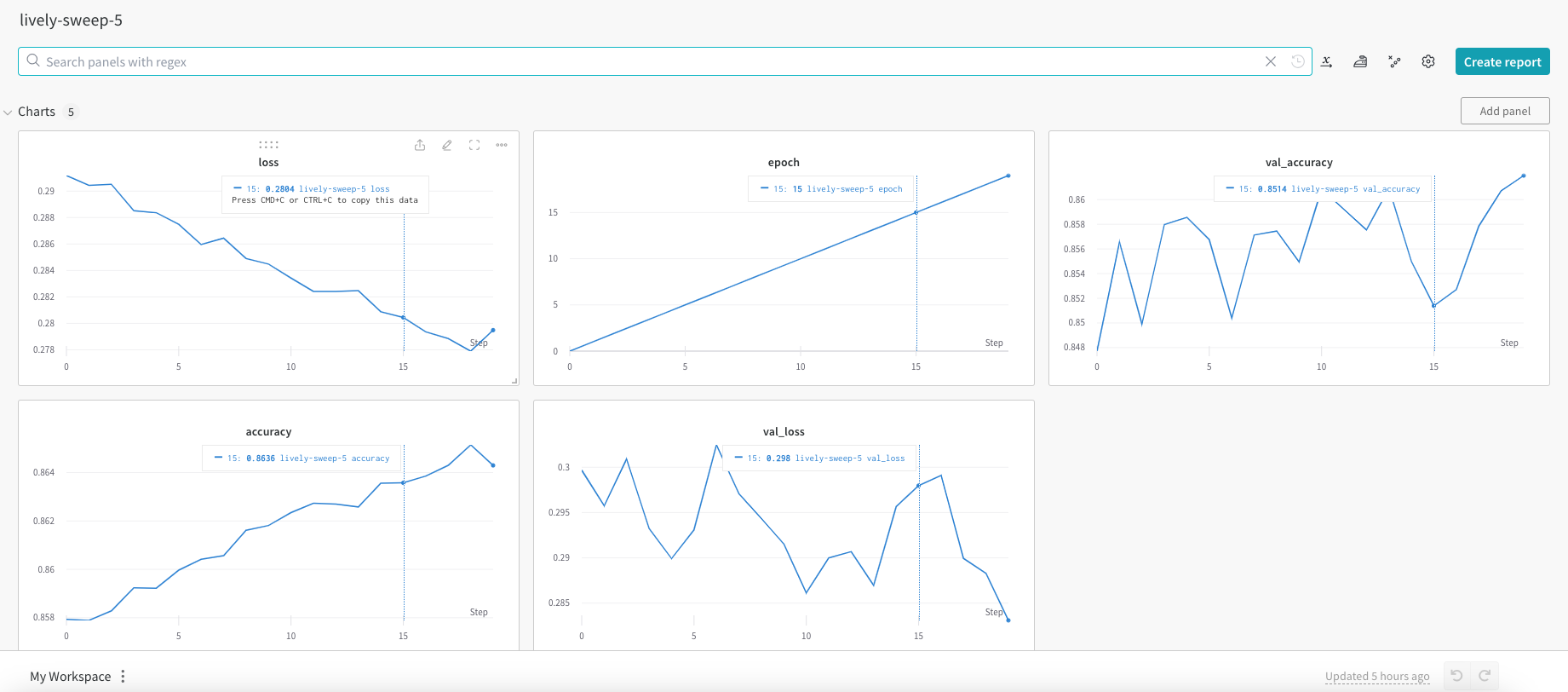
In the W & B site each of the runs or captured very nicely
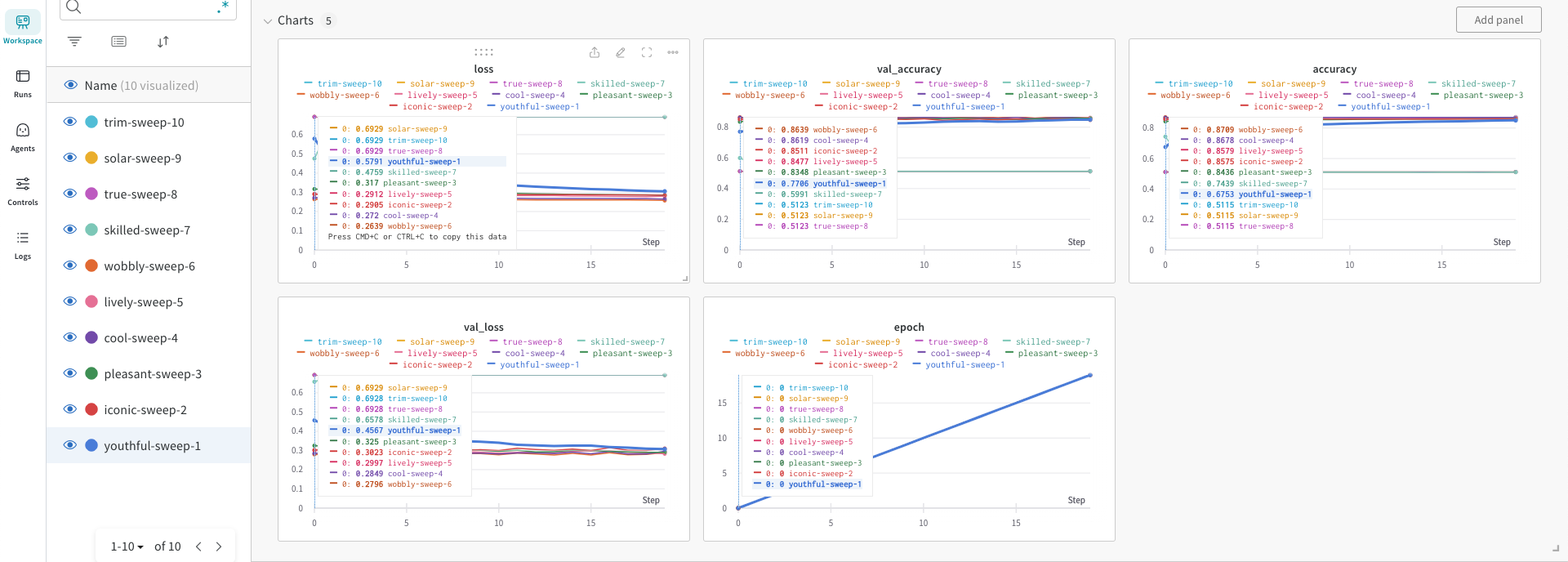
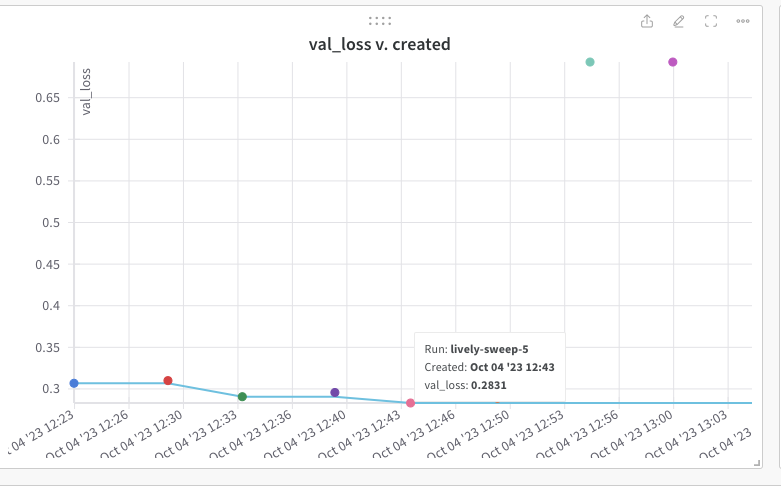
The best model is ‘lively-sweep-5‘ with the lowest validation loss
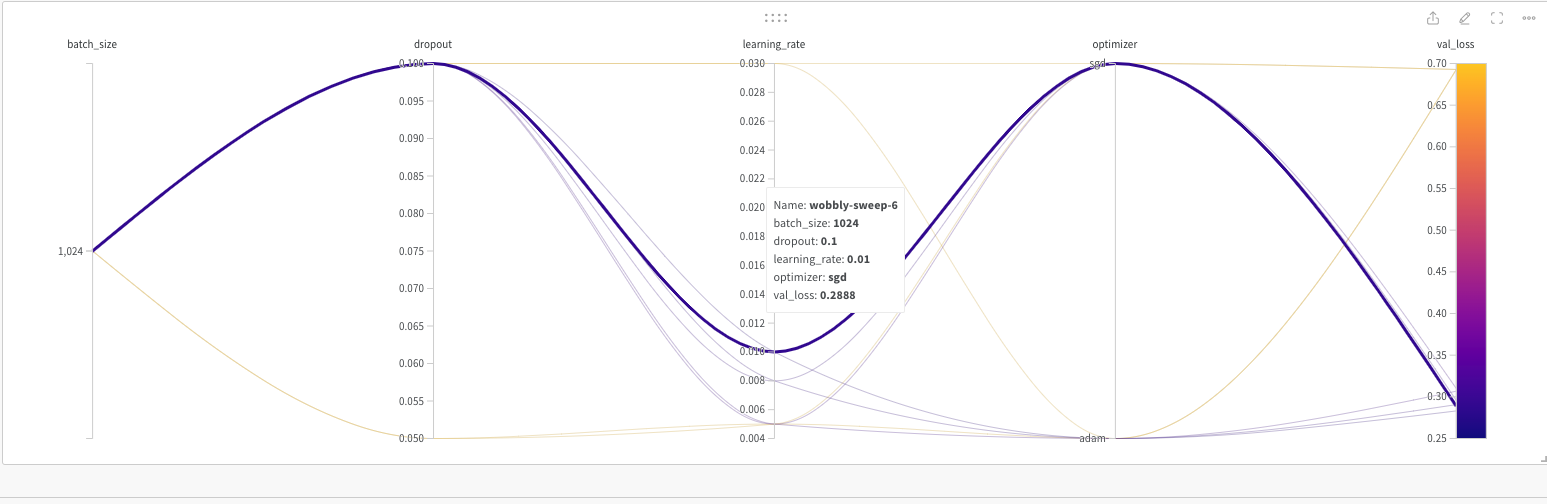
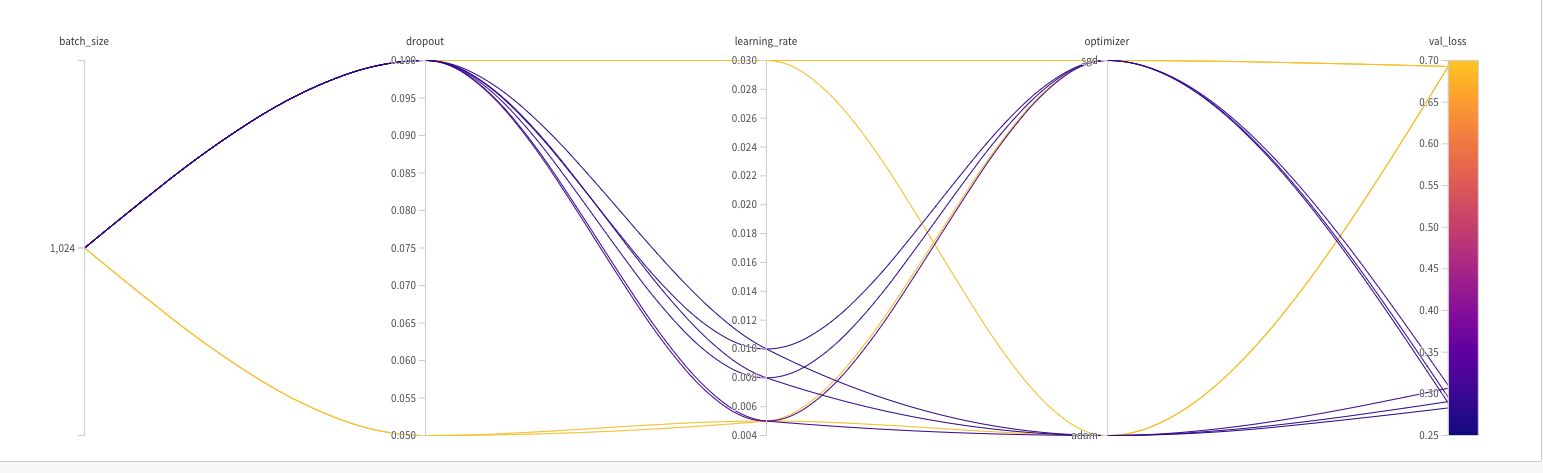
The picture below gives the validation loss for various combinations of the hyper-para meters
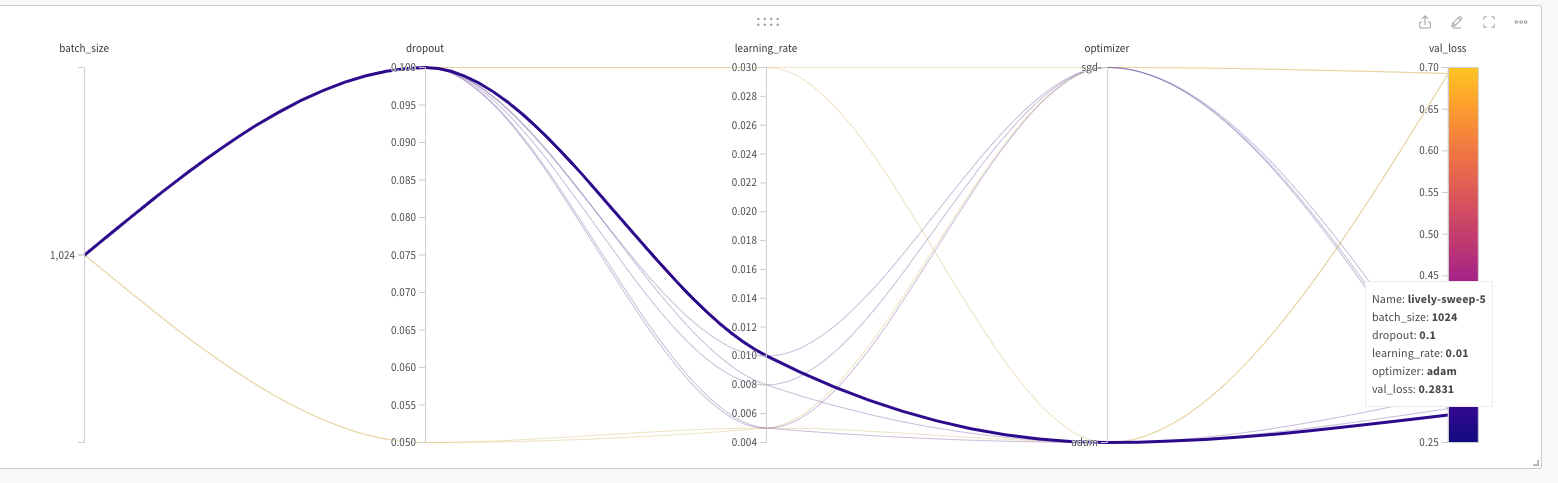
It is very easy to visually pick the best model with loss as shown below. It is lively-sweep-5. we can see the values of the hyper-parameters for this DL model

Details of optimal Deep Learning model

a. Run – lively-sweep-5

b. optimizer – adam

c. learning_rate – 0.01

d. batch_size – 1024

e. dropout – 0.1
We can see the performance of this model individually by clicking lively-sweep-6 on the left panel
It was good fun to play around with the Weights and Biases in selecting an optimal model

See also

  1. Deconstructing Convolutional Neural Networks with Tensorflow and Keras
  2. Deep Learning from first principles in Python, R and Octave – Part 7
  3. Identifying cricketing shots using AI
  4. Introducing cricket package yorkr: Part 2-Trapped leg before wicket!
  5. Introducing cricpy:A python package to analyze performances of cricketers

To see all posts click Index of posts

Identifying cricketing shots using AI

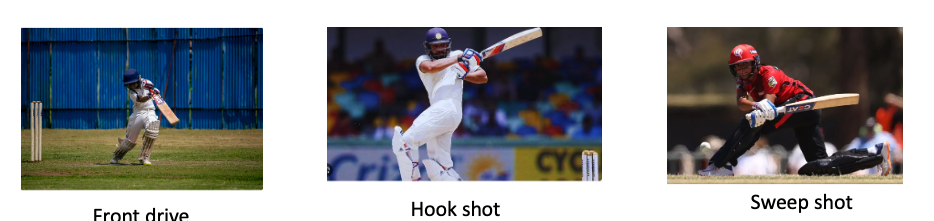
Image classification using Deep Learning has been around for almost a decade. In fact, this field with the use of Convolutional Neural Networks (CNN) is quite mature and the algorithms work very well in image classification, object detection, facial recognition and self-driving cars. In this post, I use AI image classification to identify cricketing shots. While the problem falls in a well known domain, the application of image  classification in identifying cricketing shots is probably new. I have selected three cricketing shots, namely, the front drive, sweep shot, and the hook shot for this purpose. My purpose was to build a proof-of-concept and not a perfect product. I have kept the dataset deliberately small (for obvious reasons) of just about 14 samples for each cricketing shot, and for a total of about 41 total samples for both training and test data. Anyway, I get a reasonable performance from the AI model.

Included below are some examples of the data set

This post is based on this or on Image classification from Hugging face. Interestingly, this, the model used here is based on Vision Transformers (ViT from Google Brain) and not on Convolutional Neural Networks as is usually done.

The steps are to fine-tune ViT Transformer with the ‘strokes’ dataset are

  1. Install the necessary libraries
! pip install transformers[torch] datasets evaluate accelerate -U
! pip install -U accelerate
! pip install -U transformers

b) Login to Hugging Face account

 from huggingface_hub import notebook_login
notebook_login()

Login successful

c) Load the batting strokes dataset with 41 images

from datasets import load_dataset
df1 = load_dataset("tvganesh/strokes",split='train')
type(df1)
len(df1)

41
df1
Dataset({
    features: ['image', 'label'],
    num_rows: 41
})

d) Create a dictionary that maps the label name to an integer and vice versa. Display the labels

labels = df1.features["label"].names
label2id, id2label = dict(), dict()
for i, label in enumerate(labels):
label2id[label] = str(i)
id2label[str(i)] = label

labels

['front drive', 'hook shot', 'sweep shot']

e) Load ViT image processor. To apply the correct transformations, ImageProcessor is initialised with a configuration that was saved along with the pretrained model 

from transformers import AutoImageProcessor

checkpoint = "google/vit-base-patch16-224-in21k"
image_processor = AutoImageProcessor.from_pretrained(checkpoint)

f) Apply image transformations to the images to make the model more robust against overfitting

from torchvision.transforms import RandomResizedCrop, Compose, Normalize, ToTensor

normalize = Normalize(mean=image_processor.image_mean, std=image_processor.image_std)
size = (
    image_processor.size["shortest_edge"]
    if "shortest_edge" in image_processor.size
    else (image_processor.size["height"], image_processor.size["width"])
)
_transforms = Compose([RandomResizedCrop(size), ToTensor(), normalize])

g) Create a preprocessing function to apply the transforms and return pixel_values of the image as the inputs to the model – :

def transforms(examples):
    examples["pixel_values"] = [_transforms(img.convert("RGB")) for img in examples["image"]]
    del examples["image"]
    return examples

h) Apply the preprocessing function over the entire dataset, using Hugging Face Dataset’s ‘with_transform’ method

df1 = df1.with_transform(transforms)
from transformers import DefaultDataCollator
data_collator = DefaultDataCollator()

i) Evaluate model’s performance with evaluate

import evaluate
accuracy = evaluate.load("accuracy")

j) Calculate accuracy by passing in predictions and labels

import numpy as np
def compute_metrics(eval_pred):
    predictions, labels = eval_pred
    predictions = np.argmax(predictions, axis=1)
    return accuracy.compute(predictions=predictions, references=labels)

k) Load ViT by specifying the number of labels along with the number of expected labels, and the label mapping

 from transformers import AutoModelForImageClassification, TrainingArguments, Trainer

model = AutoModelForImageClassification.from_pretrained(
    checkpoint,
    num_labels=len(labels),
    id2label=id2label,
    label2id=label2id,
)

l)

  1. Pass the training arguments to Trainer along with the model, dataset, tokenizer, data collator, and compute_metrics function.
  2. Call train() to finetune your model.
training_args = TrainingArguments(
    output_dir="data_classify",
    remove_unused_columns=False,
    evaluation_strategy="epoch",
    save_strategy="epoch",
    learning_rate=5e-5,
    per_device_train_batch_size=8,
    #gradient_accumulation_steps=4,
    per_device_eval_batch_size=6,
    num_train_epochs=20,
    warmup_ratio=0.1,
    logging_steps=10,
    load_best_model_at_end=True,
    metric_for_best_model="accuracy",
    push_to_hub=True,
)

trainer = Trainer(
    model=model,
    args=training_args,
    data_collator=data_collator,
    train_dataset=train_dataset,
    eval_dataset=test_dataset,
    tokenizer=image_processor,
    compute_metrics=compute_metrics,
)

trainer.train()

Epoch	Training Loss	Validation Loss	Accuracy
1	No log	0.434451	1.000000
2	No log	0.388312	1.000000
3	0.361200	0.409932	0.888889
4	0.361200	0.245226	1.000000
5	0.293400	0.196930	1.000000
6	0.293400	0.167858	1.000000
7	0.293400	0.140349	1.000000
8	0.203000	0.153016	1.000000
9	0.203000	0.116115	1.000000
10	0.150500	0.129171	1.000000
11	0.150500	0.103121	1.000000
12	0.150500	0.108433	1.000000
13	0.138800	0.107799	1.000000
14	0.138800	0.093700	1.000000
15	0.107600	0.100769	1.000000
16	0.107600	0.113148	1.000000
17	0.107600	0.100740	1.000000
18	0.104700	0.177483	0.888889
19	0.104700	0.084438	1.000000
20	0.090200	0.112654	1.000000
TrainOutput(global_step=80, training_loss=0.18118578270077706, metrics={'train_runtime': 176.3834, 'train_samples_per_second': 3.628, 'train_steps_per_second': 0.454, 'total_flos': 4.959531785650176e+16, 'train_loss': 0.18118578270077706, 'epoch': 20.0})

m) Push to Hub

trainer.push_to_hub()

You can try out my fine-tuned model at identify_stroke̱

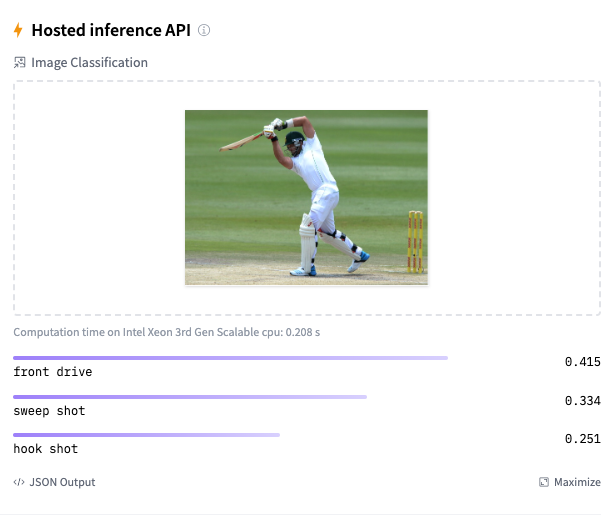
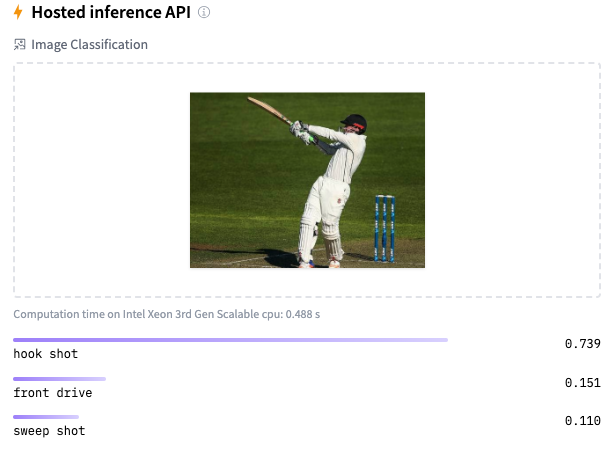
Here are a couple of trials

As I mentioned before, the model should be reasonably accurate but not perfect, since my training dataset is extremely small. This is just a prototype to show that shot identification in cricket with AI is in the realm of the possible.

References

  1. Image classification
  2. AN IMAGE IS WORTH 16X16 WORDS:TRANSFORMERS FOR IMAGE RECOGNITION AT SCALE

Do take a look at

  1. Using Reinforcement Learning to solve Gridworld
  2. Deconstructing Convolutional Neural Networks with Tensorflow and Keras
  3. GenerativeAI:Using T5 Transformer model to summarise Indian Philosophy
  4. GooglyPlusPlus: Win Probability using Deep Learning and player embeddings
  5. T20 Win Probability using CTGANs, synthetic data
  6. Deep Learning from first principles in Python, R and Octave – Part 6
  7. Introducing QCSimulator: A 5-qubit quantum computing simulator in R
  8. Big Data 6: The T20 Dance of Apache NiFi and yorkpy
  9. Re-introducing cricketr! : An R package to analyze performances of cricketers

To see all posts click Index of posts
Computing IPL player similarity using Embeddings, Deep Learning

In this post, I revisit the visualisation of IPL batsman and bowler similarities using Google’s Embedding Projector. I had previously done this using multivariate regression in my earlier post ‘Using embeddings, collaborative filtering with Deep Learning to analyse T20 players.’ However, I was not too satisfied with the result since I was not getting the required accuracy.

This post uses the win-loss status of IPL matches from 2014 onwards upto 2023 in Logistic Regression with Deep Learning. A 16-dimensional embedding layer is added for the batsman and the bowler for ball-by-ball data. Since I have used a reduced size data set (from 2014) I get a slightly reduced accuracy, but still I think this is a well-formulated problem.

A Deep Learning network performs gradient descent based using Adam optimisation to arrive at an accuracy of 0.8047. The weights of the learnt Deep Learning network in ‘layer 0’ is used for displaying the batsman and bowler similarities.

Similarity measures – Cosine similarity

A cosine similarity is a value that is bound by a constrained range of 0 and 1. The closer the value is to 0 means that the two vectors are orthogonal or perpendicular to each other. When the value is closer to one, it means the angle is smaller and the batsman and bowler are similar.

a) Data set

For the data set only IPL T20 matches from Jan 2014 upto the present (May 2023) was taken. A Deep Learning model using Logistic Regression with batsman and bowler embedding is used to minimise the error. An accuracy of 0.8047 is obtained. In my earlier post ‘GooglyPlusPlus: Win Probability using Deep Learning and player embeddings‘ I had used data from all T20 leagues (~1.2 million rows) and got an accuracy of 0.8647

b) Import the data

import pandas as pd
import numpy as np
from zipfile import ZipFile
import tensorflow as tf
from tensorflow import keras
from tensorflow.keras import layers
from tensorflow.keras import regularizers
from pathlib import Path
import matplotlib.pyplot as plt

import pandas as pd
import numpy as np
from zipfile import ZipFile
import tensorflow as tf
from tensorflow import keras
from tensorflow.keras import layers
from tensorflow.keras import regularizers

df1=pd.read_csv('ipl2014_23.csv')
print("Shape of dataframe=",df1.shape)

train_dataset = df1.sample(frac=0.8,random_state=0)
test_dataset = df1.drop(train_dataset.index)
train_dataset1 = train_dataset[['batsmanIdx','bowlerIdx','ballNum','ballsRemaining','runs','runRate','numWickets','runsMomentum','perfIndex']]
test_dataset1 = test_dataset[['batsmanIdx','bowlerIdx','ballNum','ballsRemaining','runs','runRate','numWickets','runsMomentum','perfIndex']]
train_dataset1
train_labels = train_dataset.pop('isWinner')
test_labels = test_dataset.pop('isWinner')
train_dataset1

a=train_dataset1.describe()
stats=a.transpose

Shape of dataframe= (138896, 10)
batsmanIdx	bowlerIdx	ballNum	ballsRemaining	runs	runRate	numWickets	runsMomentum	perfIndex
count	111117.000000	111117.000000	111117.000000	111117.000000	111117.000000	111117.000000	111117.000000	111117.000000	111117.000000
mean	218.672939	169.204145	120.372067	60.749822	86.881701	1.636353	2.423167	0.296061	10.578927
std	118.405729	96.934754	69.991408	35.298794	51.643164	2.672564	2.085956	0.620872	4.436981
min	1.000000	1.000000	1.000000	1.000000	-5.000000	-5.000000	0.000000	0.057143	0.000000
25%	111.000000	89.000000	60.000000	30.000000	45.000000	1.160000	1.000000	0.106383	7.733333
50%	220.000000	170.000000	119.000000	60.000000	85.000000	1.375000	2.000000	0.142857	10.329545
75%	325.000000	249.000000	180.000000	91.000000	126.000000	1.640000	4.000000	0.240000	13.108696
max	411.000000	332.000000	262.000000	135.000000	258.000000	251.000000	10.000000	11.000000	66.000000

c) Create a Deep Learning ML model using batsman & bowler embeddings

import pandas as pd
import numpy as np
from keras.layers import Input, Embedding, Flatten, Dense
from keras.models import Model
from keras.layers import Input, Embedding, Flatten, Dense, Reshape, Concatenate, Dropout
from keras.models import Model

tf.random.set_seed(432)
# create input layers for each of the predictors
batsmanIdx_input = Input(shape=(1,), name='batsmanIdx')
bowlerIdx_input = Input(shape=(1,), name='bowlerIdx')
ballNum_input = Input(shape=(1,), name='ballNum')
ballsRemaining_input = Input(shape=(1,), name='ballsRemaining')
runs_input = Input(shape=(1,), name='runs')
runRate_input = Input(shape=(1,), name='runRate')
numWickets_input = Input(shape=(1,), name='numWickets')
runsMomentum_input = Input(shape=(1,), name='runsMomentum')
perfIndex_input = Input(shape=(1,), name='perfIndex')

# Set the embedding size
no_of_unique_batman=len(df1["batsmanIdx"].unique())
print(no_of_unique_batman)
no_of_unique_bowler=len(df1["bowlerIdx"].unique())
print(no_of_unique_bowler)
embedding_size_bat = no_of_unique_batman ** (1/4)
embedding_size_bwl = no_of_unique_bowler ** (1/4)


# create embedding layer for the categorical predictor
batsmanIdx_embedding = Embedding(input_dim=no_of_unique_batman+1, output_dim=16,input_length=1)(batsmanIdx_input)
batsmanIdx_flatten = Flatten()(batsmanIdx_embedding)
bowlerIdx_embedding = Embedding(input_dim=no_of_unique_bowler+1, output_dim=16,input_length=1)(bowlerIdx_input)
bowlerIdx_flatten = Flatten()(bowlerIdx_embedding)

# concatenate all the predictors
x = keras.layers.concatenate([batsmanIdx_flatten,bowlerIdx_flatten, ballNum_input, ballsRemaining_input, runs_input, runRate_input, numWickets_input, runsMomentum_input, perfIndex_input])

# add hidden layers
#x = Dense(64, activation='relu')(x)
#x = Dropout(0.1)(x)
x = Dense(32, activation='relu')(x)
x = Dropout(0.1)(x)
x = Dense(16, activation='relu')(x)
x = Dropout(0.1)(x)
x = Dense(8, activation='relu')(x)
x = Dropout(0.1)(x)
# add output layer
output = Dense(1, activation='sigmoid', name='output')(x)
print(output.shape)
# create model
model = Model(inputs=[batsmanIdx_input,bowlerIdx_input, ballNum_input, ballsRemaining_input, runs_input, runRate_input, numWickets_input, runsMomentum_input, perfIndex_input], outputs=output)
model.summary()

# compile model
optimizer=keras.optimizers.Adam(learning_rate=.01, beta_1=0.9, beta_2=0.999, epsilon=1e-07, amsgrad=True)

model.compile(optimizer=optimizer, loss='binary_crossentropy', metrics=['accuracy'])

# train the model
history=model.fit([train_dataset1['batsmanIdx'],train_dataset1['bowlerIdx'],train_dataset1['ballNum'],train_dataset1['ballsRemaining'],train_dataset1['runs'],
           train_dataset1['runRate'],train_dataset1['numWickets'],train_dataset1['runsMomentum'],train_dataset1['perfIndex']], train_labels, epochs=40, batch_size=1024,
          validation_data = ([test_dataset1['batsmanIdx'],test_dataset1['bowlerIdx'],test_dataset1['ballNum'],test_dataset1['ballsRemaining'],test_dataset1['runs'],
           test_dataset1['runRate'],test_dataset1['numWickets'],test_dataset1['runsMomentum'],test_dataset1['perfIndex']],test_labels), verbose=1)

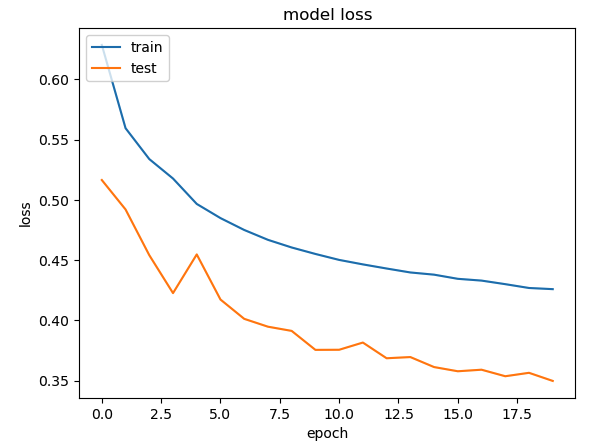
plt.plot(history.history["loss"])
plt.plot(history.history["val_loss"])
plt.title("model loss")
plt.ylabel("loss")
plt.xlabel("epoch")
plt.legend(["train", "test"], loc="upper left")
plt.show()

d) Project embeddings with Google’s Embedding projector

try:
  # %tensorflow_version only exists in Colab.
  %tensorflow_version 2.x
except Exception:
  pass

%load_ext tensorboard
import os
import tensorflow as tf
import tensorflow_datasets as tfds
from tensorboard.plugins import projector

%pwd
# Set up a logs directory, so Tensorboard knows where to look for files.
log_dir='/logs/batsmen/'
if not os.path.exists(log_dir):
    os.makedirs(log_dir)

df3=pd.read_csv('batsmen.csv')
batsmen = df3["batsman"].unique().tolist()
batsmen
# Create dictionary of batsman to index
batsmen2index = {x: i for i, x in enumerate(batsmen)}
batsmen2index
# Create dictionary of index to batsman
index2batsmen = {i: x for i, x in enumerate(batsmen)}
index2batsmen


# Save Labels separately on a line-by-line manner.
with open(os.path.join(log_dir, 'metadata.tsv'), "w") as f:
  for batsmanIdx in range(1, 411):
       # Get the name of batsman associated at the current index
        batsman = index2batsmen.get([batsmanIdx][0])

        f.write("{}\n".format(batsman))

# Save the weights we want to analyze as a variable. Note that the first
# value represents any unknown word, which is not in the metadata, here
# we will remove this value.
weights = tf.Variable(model.get_weights()[0][1:])
print(weights)
print(type(weights))
print(len(model.get_weights()[0]))
# Create a checkpoint from embedding, the filename and key are the
# name of the tensor.
checkpoint = tf.train.Checkpoint(embedding=weights)
checkpoint.save(os.path.join(log_dir, "embedding.ckpt"))

# Set up config.
config = projector.ProjectorConfig()
embedding = config.embeddings.add()
# The name of the tensor will be suffixed by `/.ATTRIBUTES/VARIABLE_VALUE`.
embedding.tensor_name = "embedding/.ATTRIBUTES/VARIABLE_VALUE"
embedding.metadata_path = 'metadata.tsv'
projector.visualize_embeddings(log_dir, config)
# Now run tensorboard against on log data we just saved.

%reload_ext tensorboard
%tensorboard --logdir /logs/batsmen/

e) Here are similarity measures for some batsmen

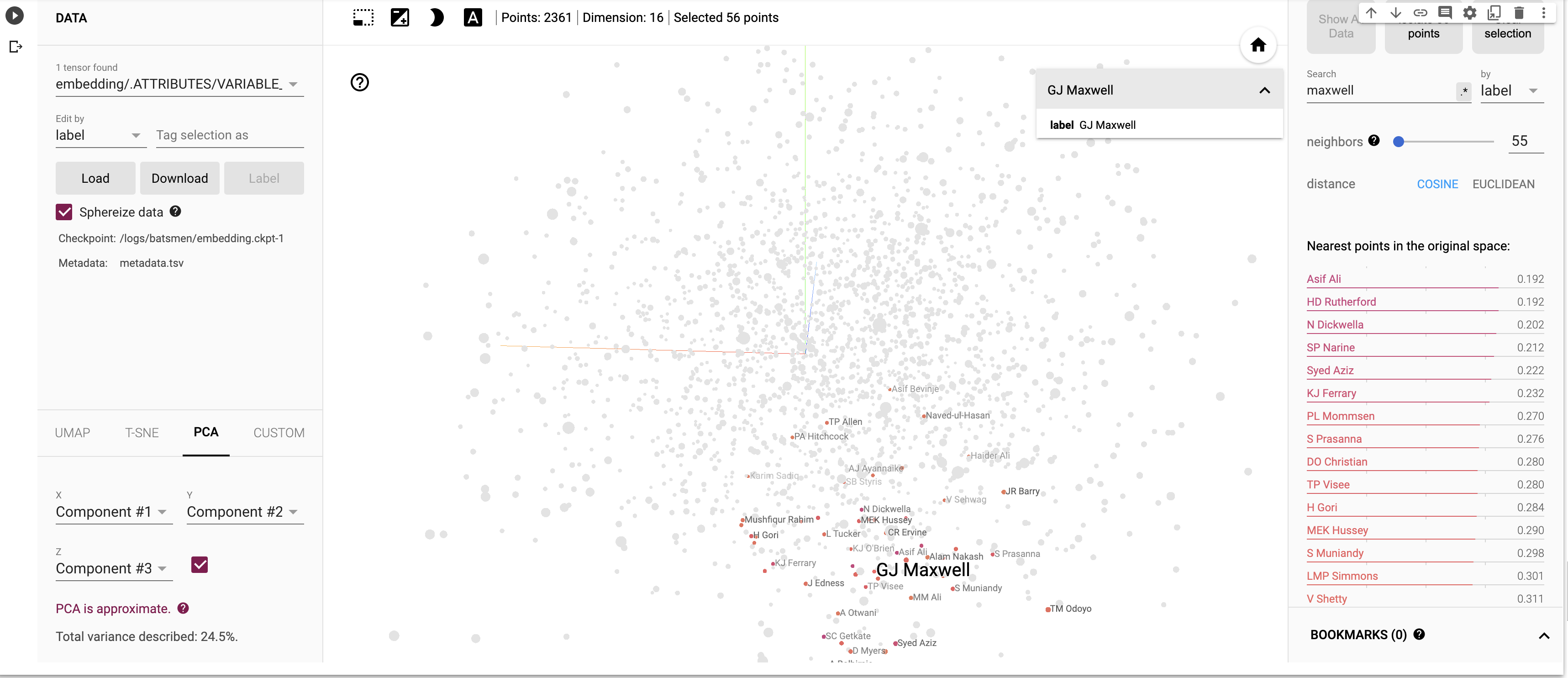
I) Principal Component Analysis (PCA) : In the charts and video animation below, the 16-dimensional embedding vector of batsmen and bowler is reduced to 3 principal components in a lower dimension for visualisation and analysis as shown below

a) Yashasvi Jaiswal (similar players

i) PCA – Chart

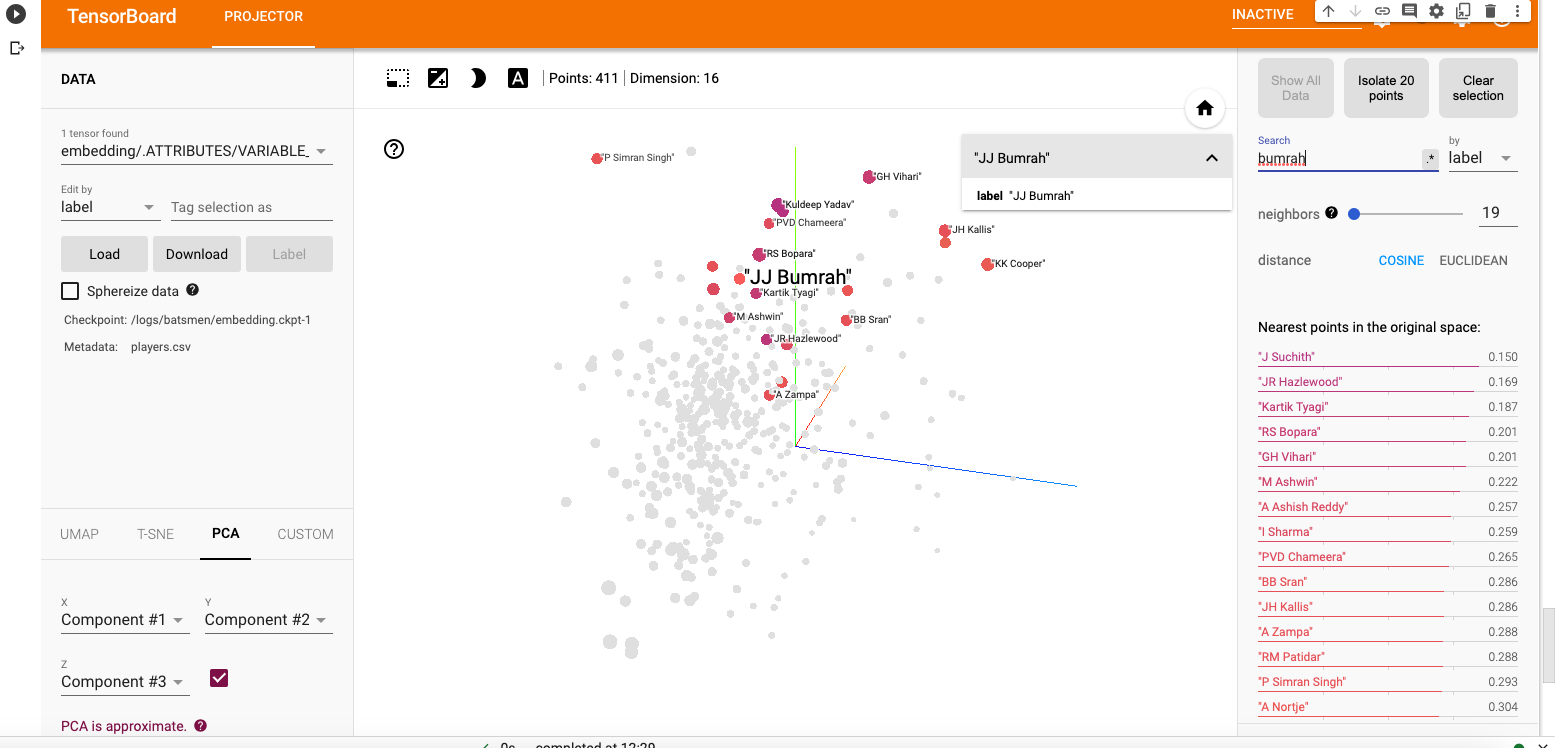
Yashasvi Jaiswal style of attack is similar to Faf Du Plessis, Quentim De Kock, Bravo etc. In the below chart the ange between Jaiswal and SP Narine is 0.109, and Faf du Plessis is 0.253. These represent the angle in radians. The smaller the angle the more similar the performance style of the players and cos 0=1 or the players are similar.

ii) PCA animation video for Yashasvi Jaiswal

b) Suryakumar Yadav (SKY)

i) PCA -Chart

The closest neighbours for SKY is RV Uthappa, Rahul Tripathi, Q de Kock, Samson, Rashid Khan

ii) PCA – Animation video for Suryakumar Yadav

c) M S Dhoni

i) PCA – Chart

Dhoni rubs shoulders with Bravo, AB De Villiers, Shane Watson, Chris Gayle, Rayadu, Gautam Gambhir

ii) PCA – Animation video for M S Dhoni

f) PCA Analysis for bowlers

a) Jasprit Bumrah

i) PCA – Chart

Bumrah bowling performance is similar to Josh Hazzlewood, Chameera, Kuldeep Yadav, Nortje, Adam Zampa etc.

ii) PCA Animation video for Jasprit Bumrah

b) Yuzhvendra Chahal

i) PCA – Chart

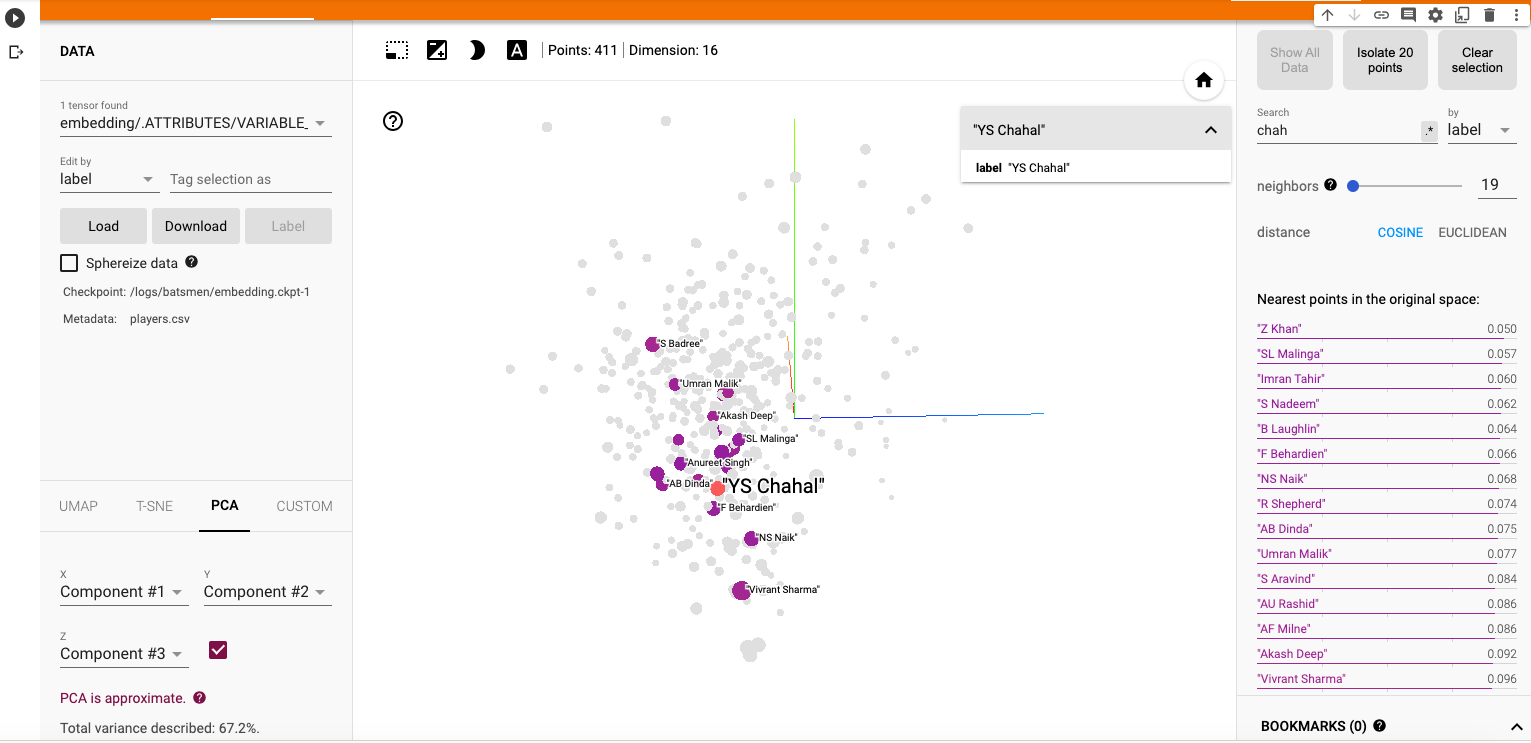
Chahal’s performance has a strong similarity to Malinga, Zaheer Khan, Imran Tahir, R Sheperd, Adil Rashid

ii) PCA Animation video for YS Chahal

f) Other similarity measures ( t-SNE & UMAP)

There are 2 other similarity visualisations in Google’s Embedding Projector namely

i) t-SNE (t-distributed Stochastic Neighbor Embedding) – t-SNE tries to find a faithful representation of the data distribution in higher dimensional space to a lower dimensional space. t-SNE differs from PCA by preserving only or local similarities whereas PCA is maintains preserving large pairwise distances.

a) t-SNE Animation video

ii) UMAP – Uniform Manifold Approximation and Projection

UMAP learns the manifold structure of the high dimensional data and finds a low dimensional embedding that preserves the essential topological structure of that manifold.

ii) UMAP – Animation video

The Embedding projector thus helps in identifying players based on how they perform against bowlers, and probably picks up a lot of features like strike rate and performance in different stages of the game.

Hope you enjoyed the post!

Also see

  1. Exploring Quantum Gate operations with QCSimulator
  2. De-blurring revisited with Wiener filter using OpenCV
  3. Using Reinforcement Learning to solve Gridworld
  4. Deep Learning from first principles in Python, R and Octave – Part 4
  5. Big Data 6: The T20 Dance of Apache NiFi and yorkpy
  6. Latency, throughput implications for the Cloud
  7. Programming languages in layman’s language
  8. Practical Machine Learning with R and Python – Part 6
  9. Using Linear Programming (LP) for optimizing bowling change or batting lineup in T20 cricket
  10. A closer look at “Robot Horse on a Trot” in Android

To see all posts click Index of posts
IPL 2023:GooglyPlusPlus now with by AI/ML models, near real-time analytics!

It is carnival time again as IPL 2023 is underway!! The new GooglyPlusPlus now includes AI/ML models for computing ball-by-ball Win Probability of matches and each individual player’s Win Probability Contribution (WPC). GooglyPlusPlus uses 2 ML models

  • Deep Learning (Tensorflow) – accuracy : 0.8584
  • Logistic Regression (glmnet-tidymodels) : 0.728

Besides, as before, GooglyPlusPlus will also include the usual near real-time analytics with the Shiny app being automatically updated with the previous day’s match data.

Note: The Win Probability Computation can also be done on a live feed of streaming data. Since, I don’t have access to live feeds, the app will show how Win Probability changed during the course of completed matches. For more details on Win Probability and Win Probability Contribution see my posts

GooglyPlusPlus has been also updated with all the latest T20 league’s match data. It includes data from BBL 2022, NTB 2022, CPL 2022, PSL 2023, ICC T20 2022 and now IPL 2023.

GooglyPlusPlus has the following functionality

  • Batsman tab: For detailed analysis of batsmen
  • Bowler tab: For detailed analysis of bowlers
  • Match tab: Analysis of individual matches, plot of Runs vs SR, Wickets vs ER in power play, middle and death overs, Win Probability Analysis of teams and Win Probability Contribution of players
  • Head-to-head tab: Detailed analysis of team-vs-team batting/bowling scorecard, batting, bowling performances, performances in power play, middle and death overs
  • Team performance tab: Analysis of team-vs-all other teams with batting /bowling scorecard, batting, bowling performances, performances in power play, middle and death overs
  • Optimisation tab: Allows one to pit batsmen vs bowlers and vice-versa. This tab also uses integer programming to optimise batting and bowling lineup
  • Batting analysis tab: Ranks batsmen using Runs or SR. Also plots performances of batsmen in power play, middle and death overs and plots them in a 4×4 grid
  • Bowling analysis tab: Ranks bowlers based on Wickets or ER. Also plots performances of bowlers in power play, middle and death overs and plots them in a 4×4 grid

Also note all these tabs and features are available for all T20 formats namely IPL, Intl. T20 (men, women), BBL, NTB, PSL, CPL, SSM.

Important note: It is possible, that at times, the Win Probability (Deep Learning) for some recent IPL matches will give an error. This is because I need to rebuild the models on a daily basis as the matches use player embeddings and there are new players. While I will definitely rebuild the models on weekends and whenever I find time, you may have to bear with this error occasionally.

Note: All charts are interactive, which means that you can hover, zoom-in, zoom-out, pan etc on the charts

The latest avatar of GooglyPlusPlus2023 is based on my R package yorkr with data from Cricsheet.

Check out the latest version of GooglyPlusPlus

Follow me on twitter for daily highlights @tvganesh_85

GooglyPlusPlus can analyse players, matches, teams, rank, compute win probability and much more.

Included below are some random analyses of IPL 2023 matches so far

A) Chennai Super Kings vs Gujarat Titans – 31 Mar 2023

GT won by 5 wickets ( 4 balls remaining)

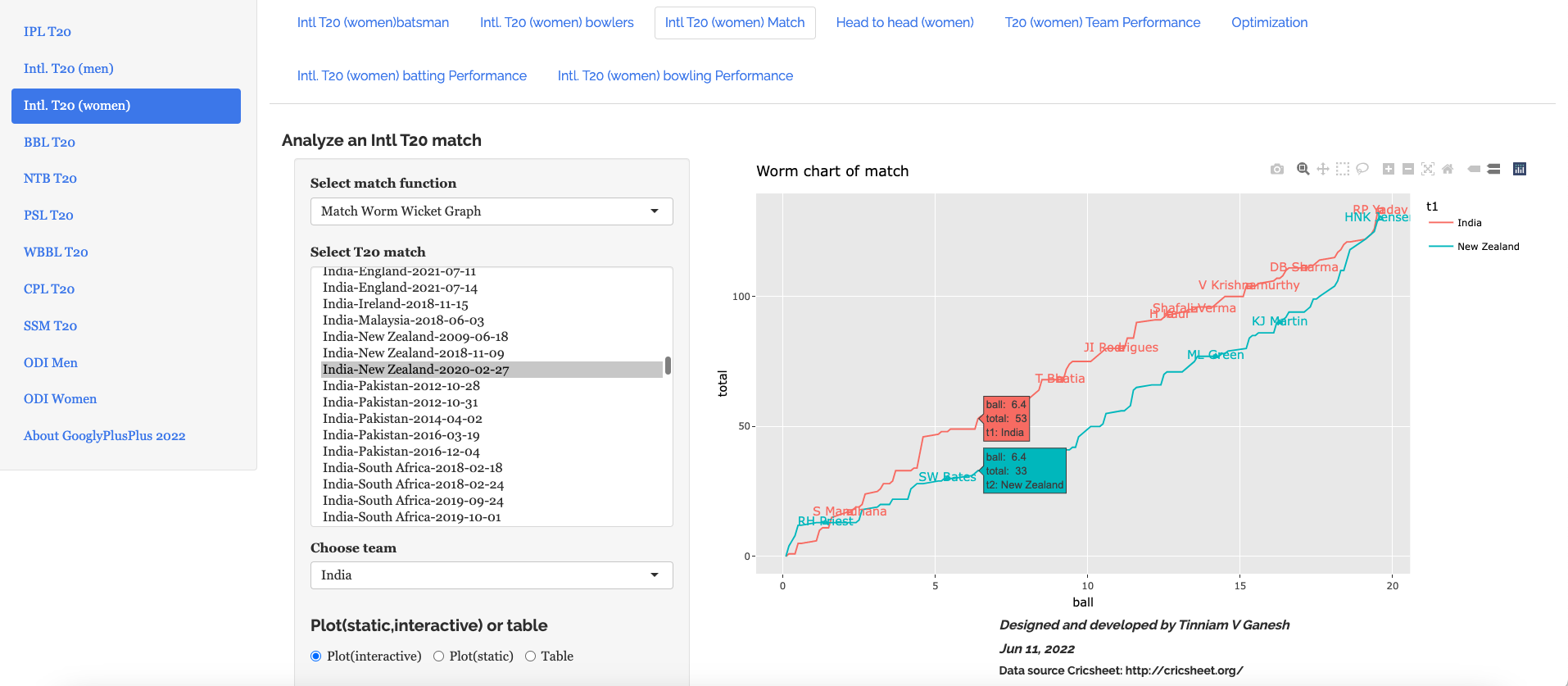
a) Worm Wicket Chart

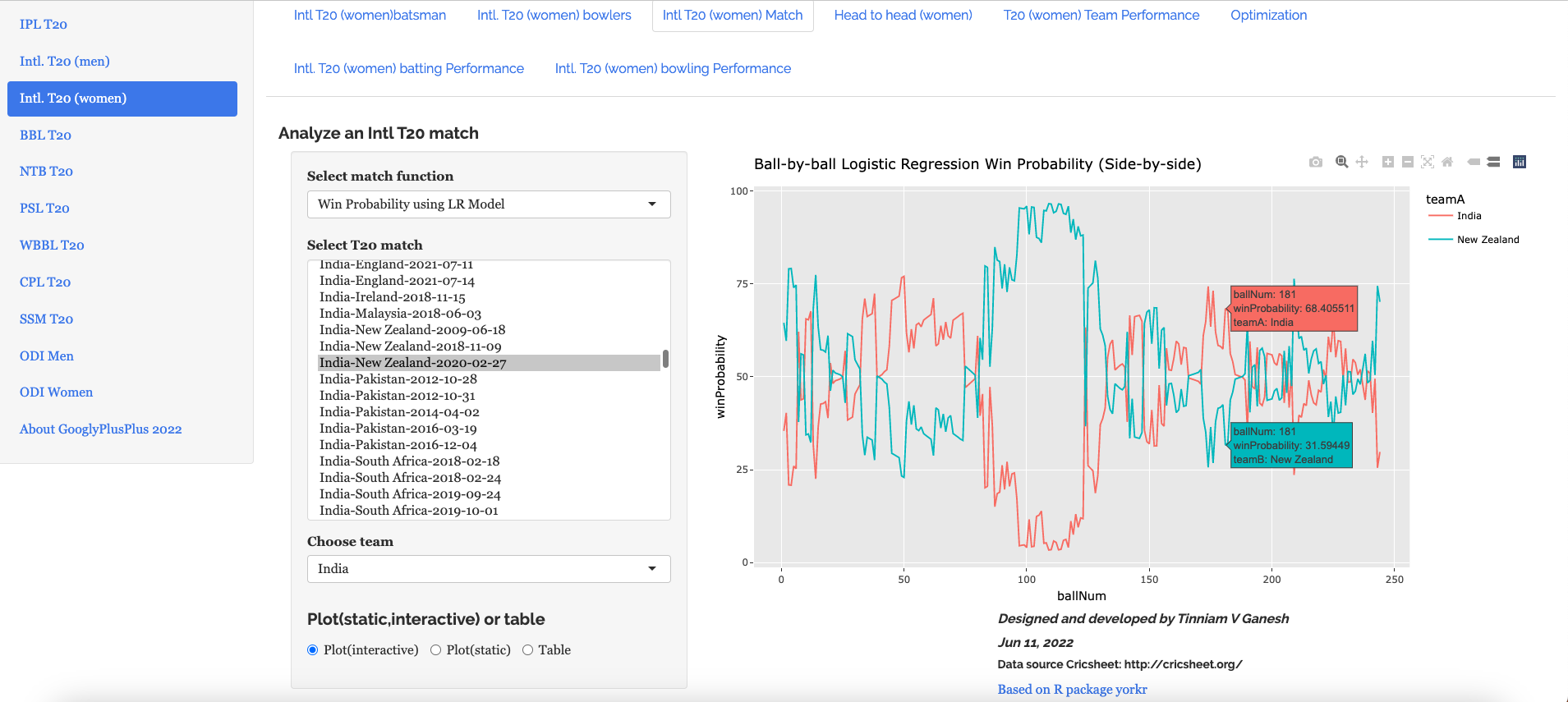
b) Ball-by-ball Win Probability (Logistic Regression) (side-by-side)

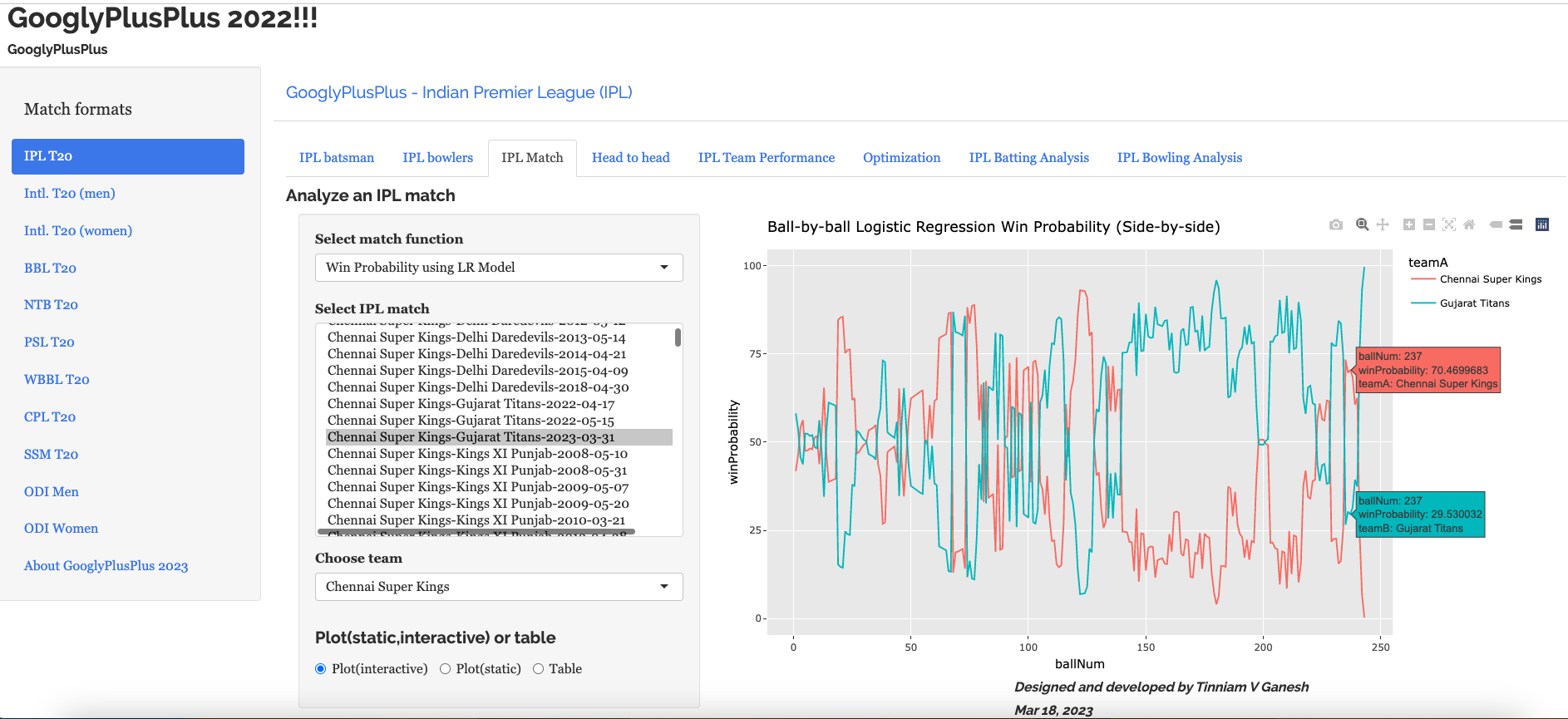
This model shows that CSK had the upper hand in the 2nd last over, before it changed to GT. More details on Win Probability and Win Probability Contribution in the posts given by the links above.

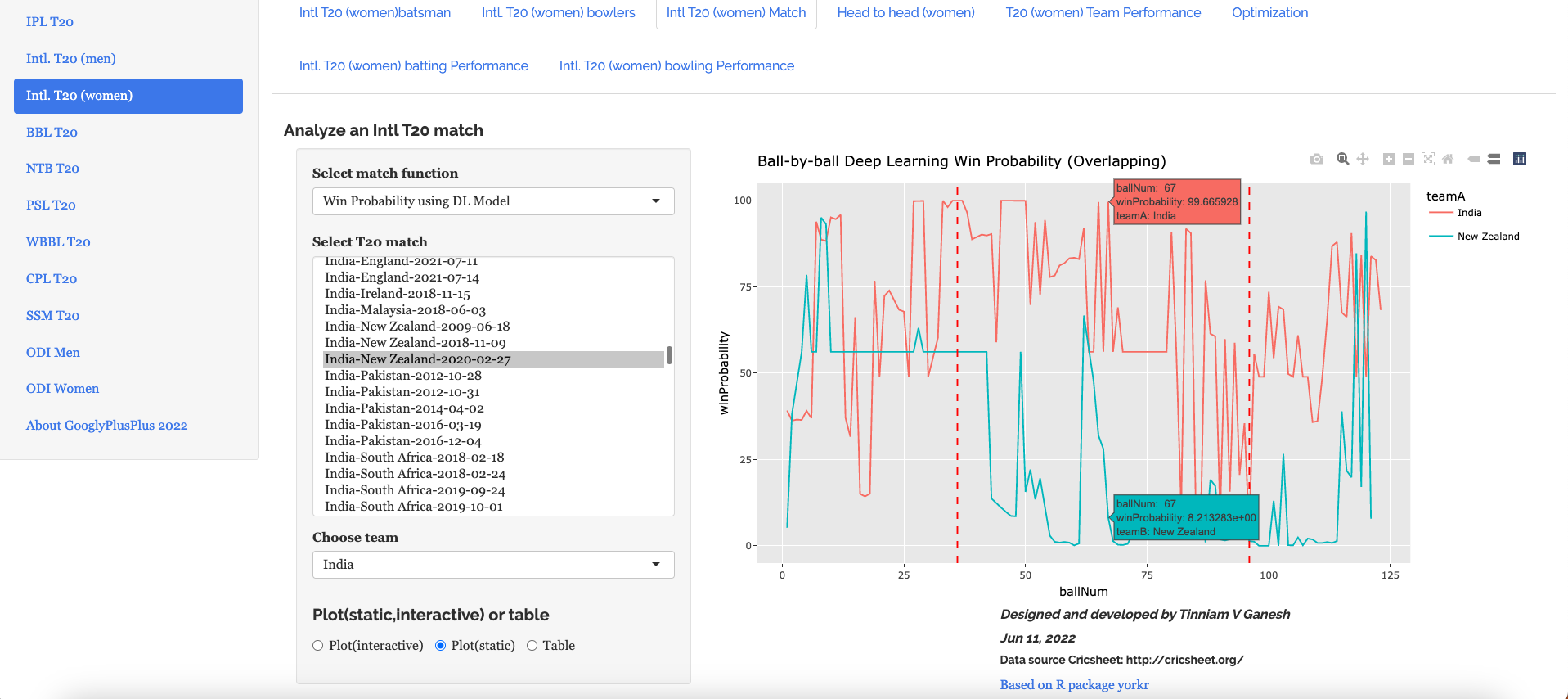
c) b) Ball-by-ball Win Probability (Logistic Regression) (overlapping)

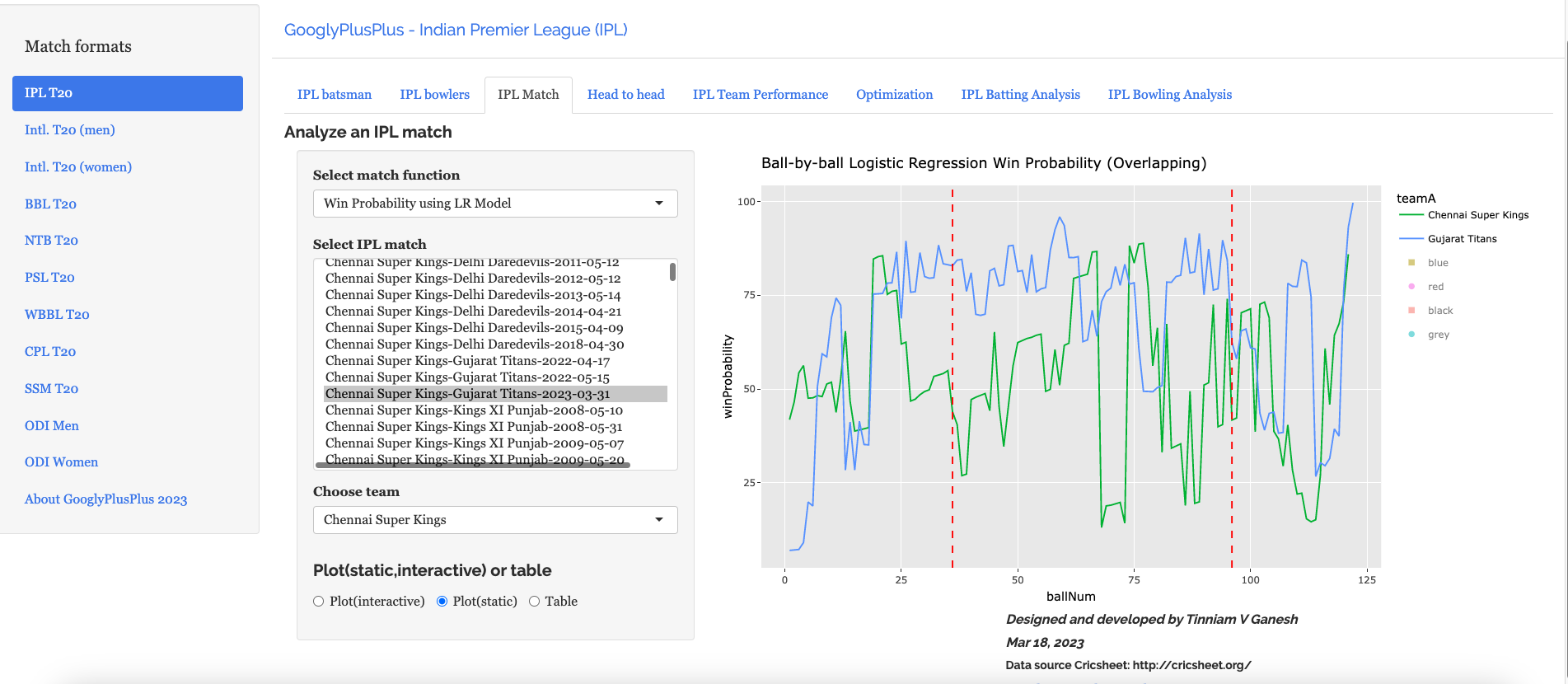
Here the ball-by-ball win probability is overlapped. CSK and GT both had nearly the same probability of winning in the 2nd last over before GT edges CSK out

B) Punjab Kings vs Rajasthan Royals – 05 Apr 2023

This was a another closely fought match. PBKS won by 5 runs

a) Worm wicket chart

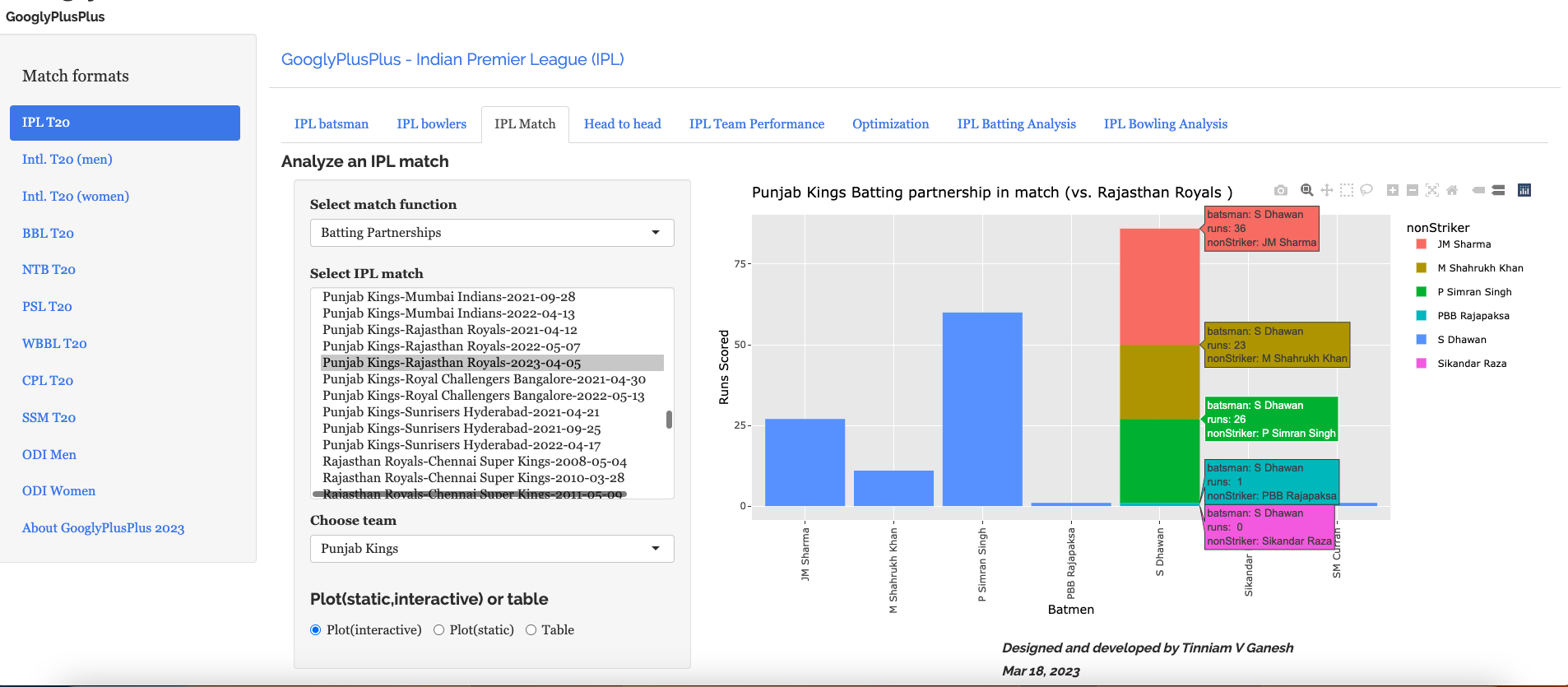
b) Batting partnerships

Shikhar Dhawan scored 86 runs

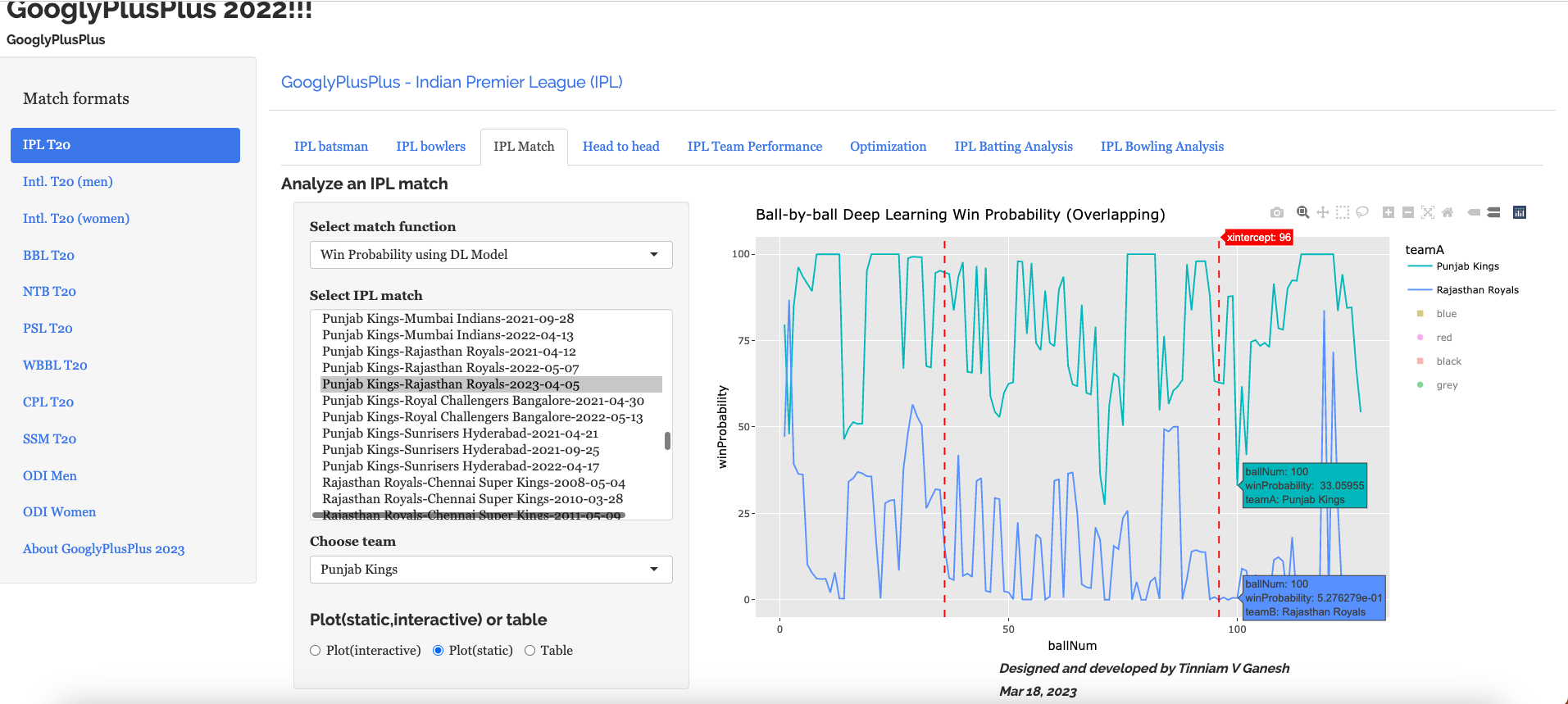
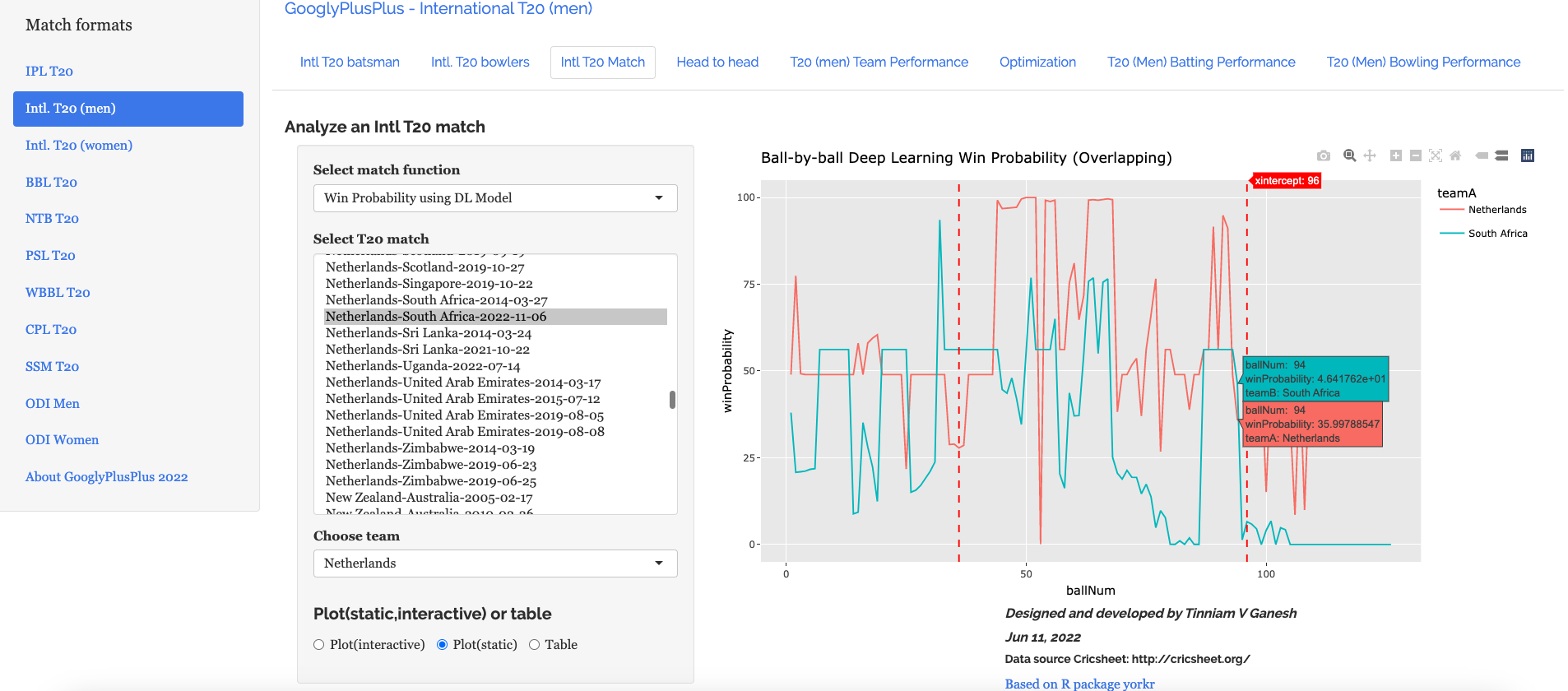
c) Ball-by-ball Win Probability using Deep Learning (overlapping)

PBKS was generally ahead in the win probability race

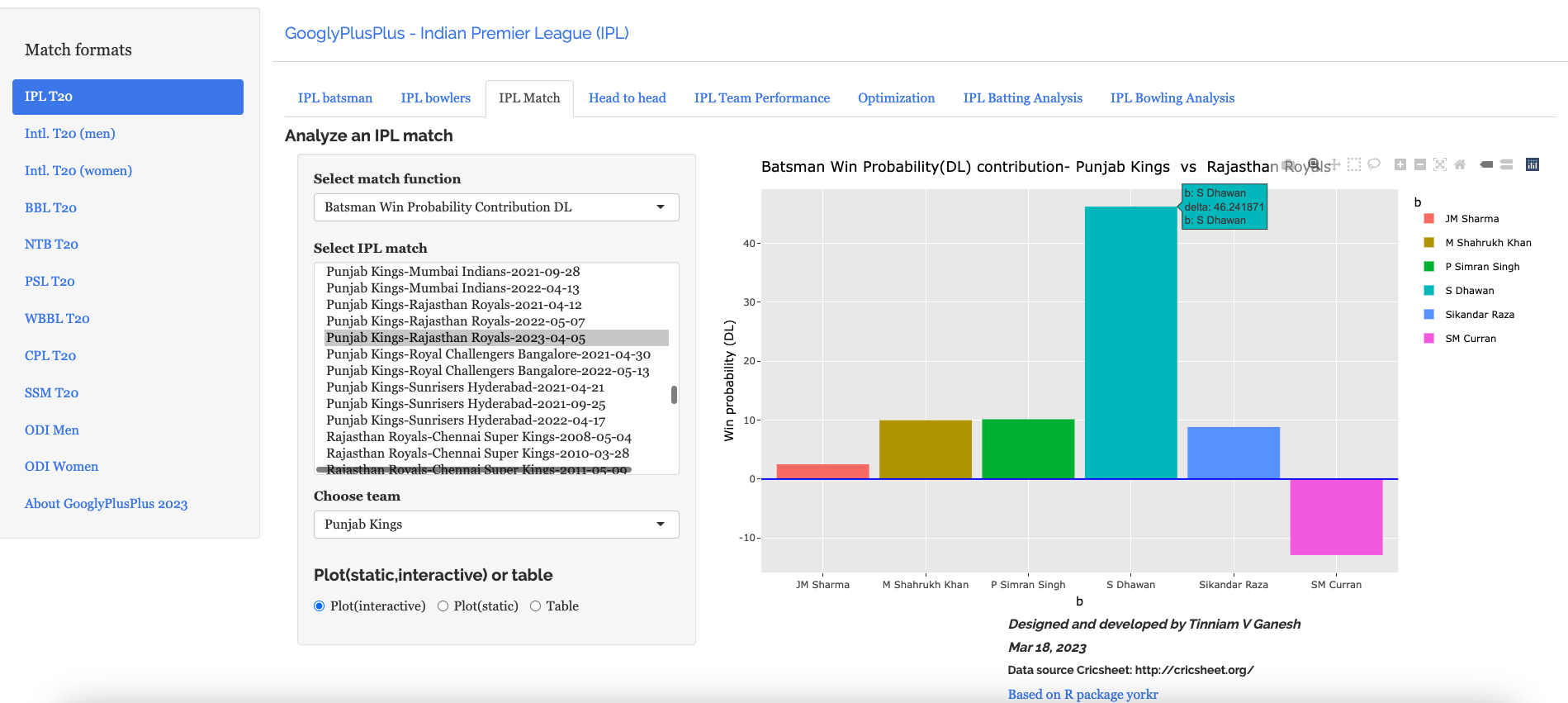
d) Batsman Win Probability Contribution

This plot shows how the different batsmen contributed to the Win Probability. We can see that Shikhar Dhawan has a highest win probability. He played a very sensible innings. Also it appears that there is no difference between Prabhsimran Singh and others, though he score 60 runs. This computation is based on when they come to bat and how the win probability changes when they get dismissed, as seen in the 2nd chart

C) Delhi Capitals vs Gujarat Titans – 4 Apr 2023

GT won by 6 wickets (11 balls remaining)

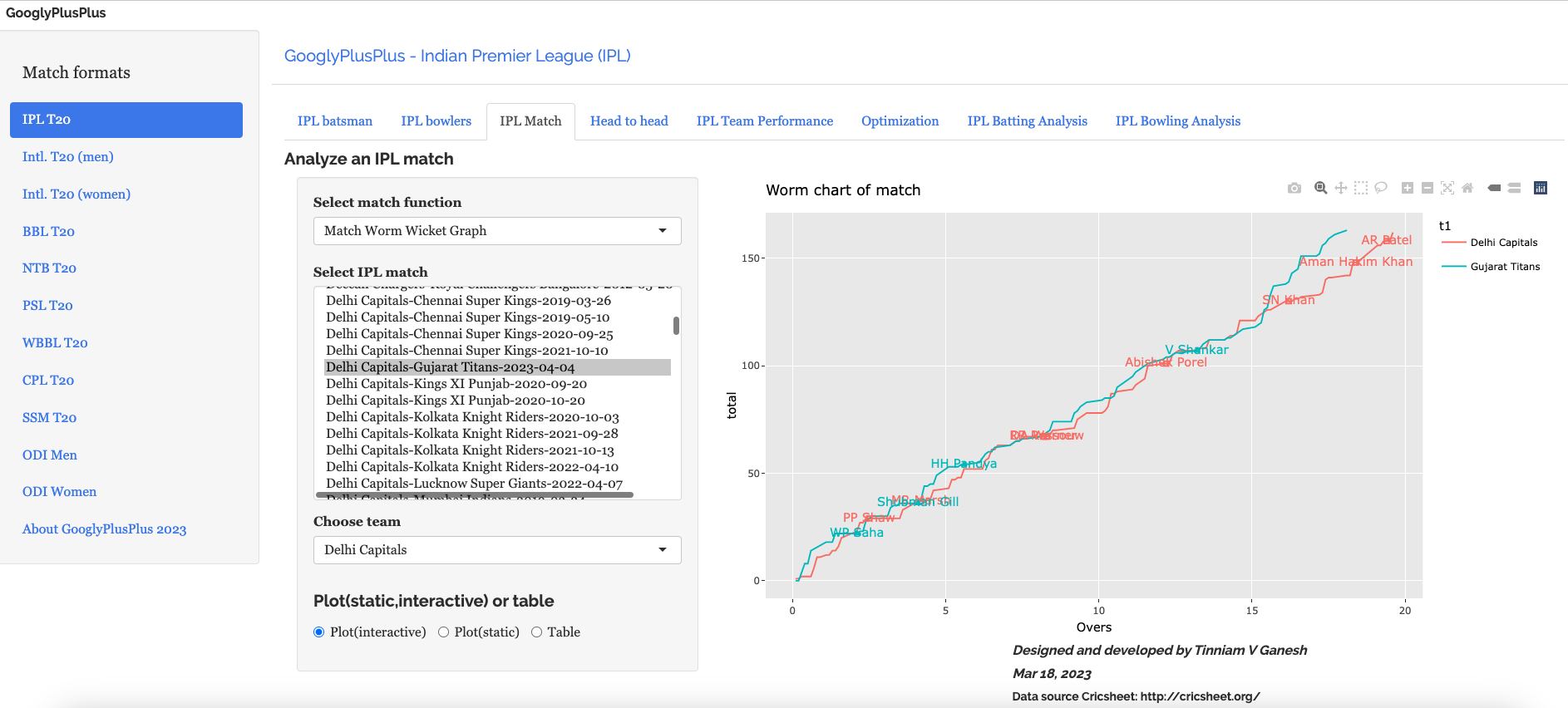
a) Worm wicket chart

b) Runs scored across 20 overs

c) Runs vs SR plot

d) Batting scorecard (Gujarat Titans)

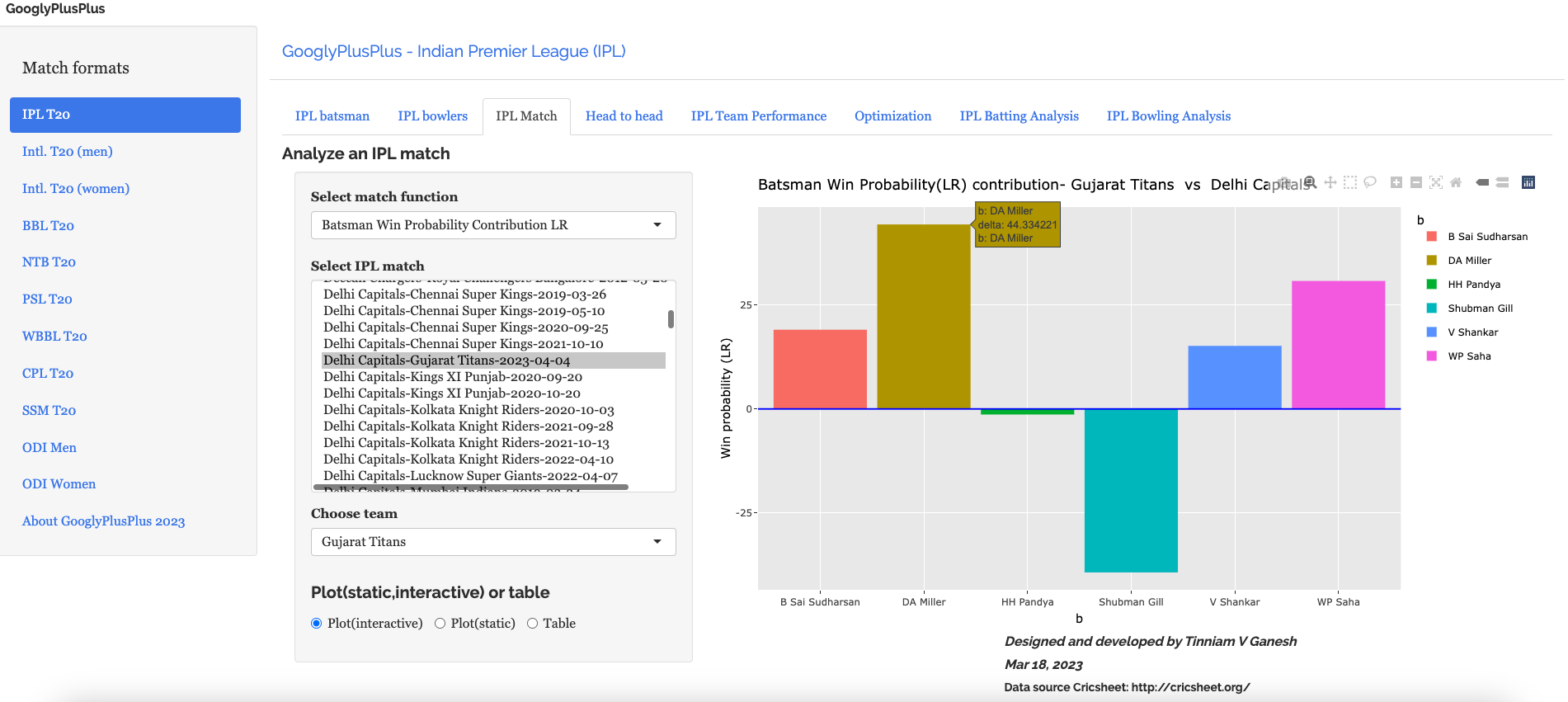
e) Batsman Win Probability Contribution (Gujarat Titans)

Miller has a higher percentage in the Win Contribution than Sai Sudershan who held the innings together.Strange are the ways of the ML models!!

D) Sunrisers Hyderabad vs Lucknow Supergiants ( 7 Apr 2023)

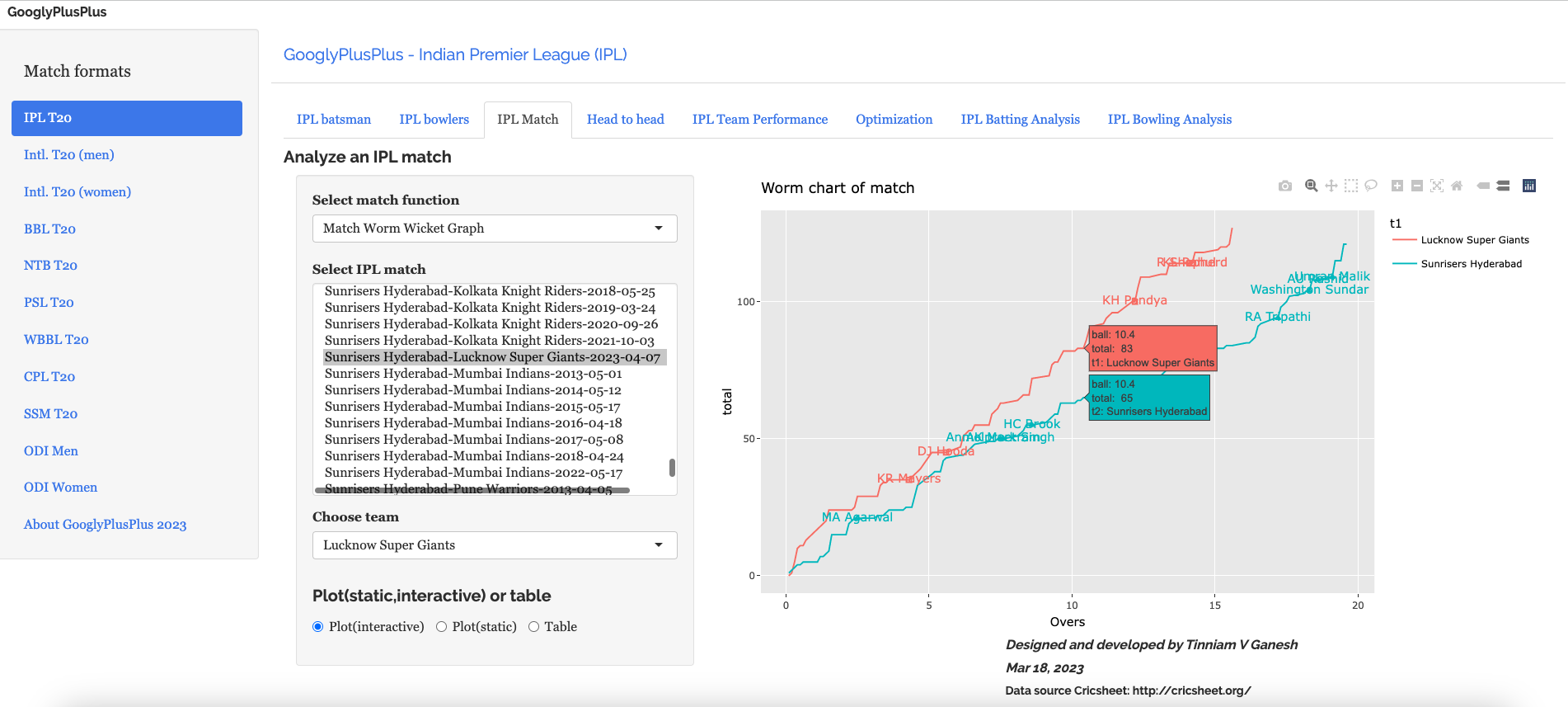
LSG won by 5 wickets (24 balls left). SRH were bamboozled by the pitch while LSG was able to cruise along

a) Worm wicket chart

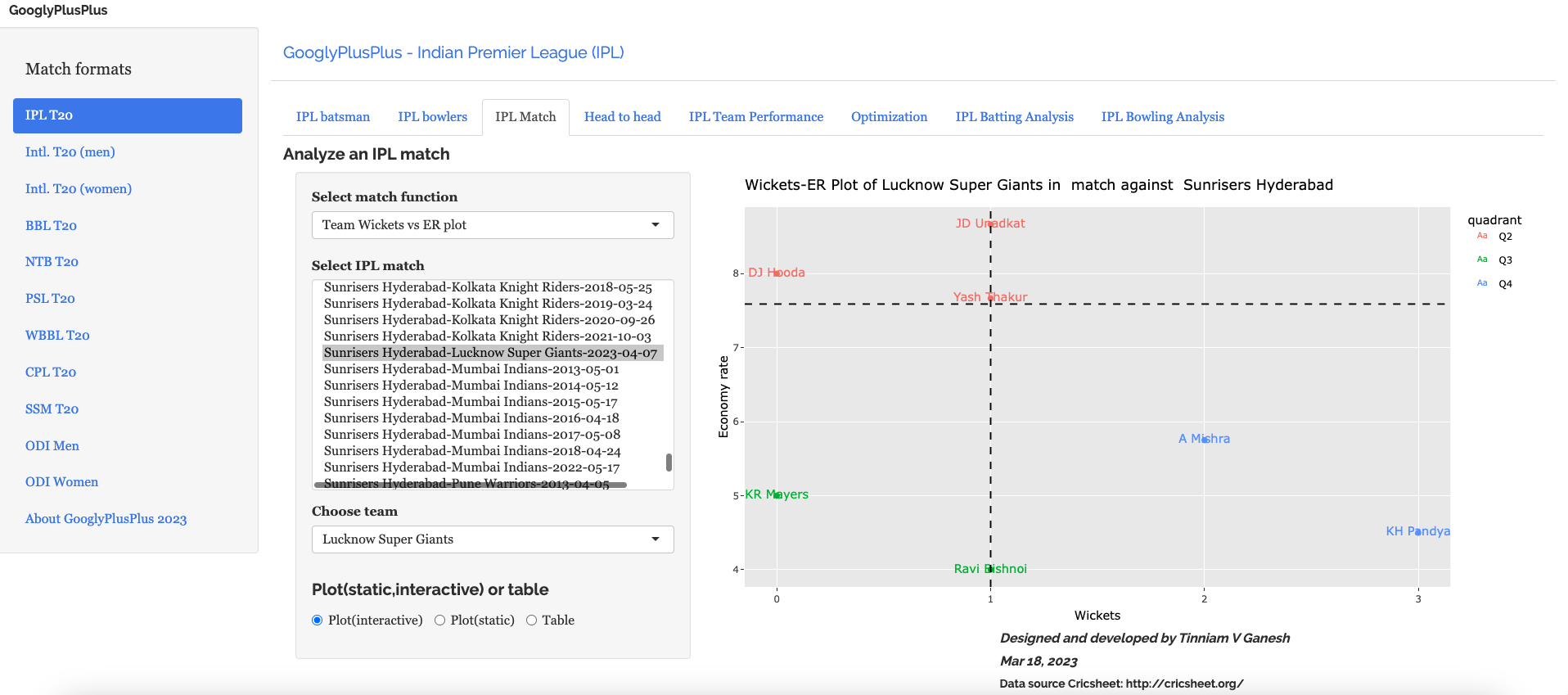
b) Wickets vs ER plot

c) Wickets across 20 overs

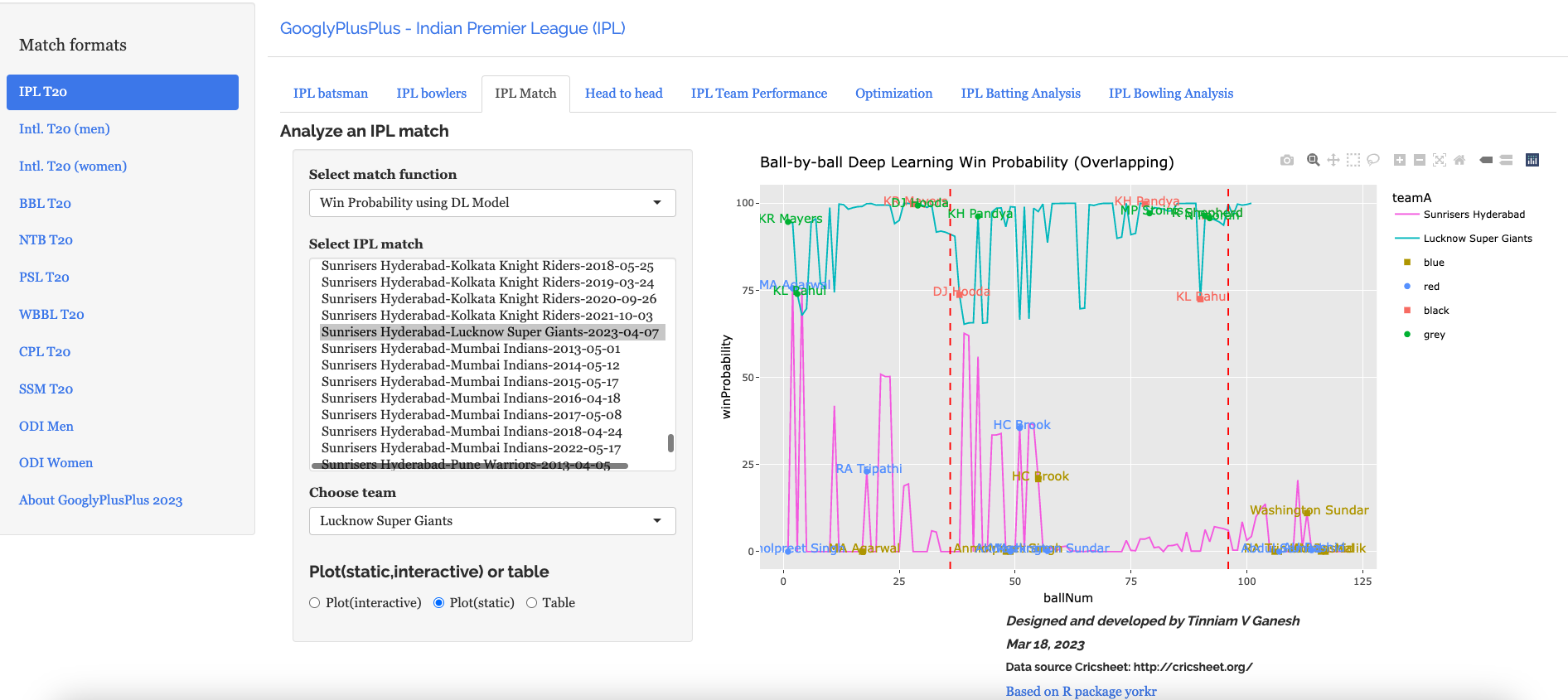
d) Ball-by-ball win probability using Deep Learning (overlapping)

e) Bowler Win Probability Contribution (LSG)

Bishnoi has a higher win probability contribution than Krunal, though he just took 1 wicket to Krunal’s 3 wickets. This is based on how the Win Probability changed at that point in the game.

The above set of plots are just a random sample.

Note: There are 8 tabs each for 9 T20 leagues (BBL, CPL, T20 (men), T20 (women), IPL, PSL, NTB, SSM, WBB). So there are a lot more detailed charts/analses.

Do take GooglyPlusPlus for a test drive!!!

Follow me on twitter @tvganesh_85 for daily highlights of previous day matches

Take a look at some of my other posts

  1. Using Reinforcement Learning to solve Gridworld
  2. Deep Learning from first principles in Python, R and Octave – Part 6
  3. Big Data-4: Webserver log analysis with RDDs, Pyspark, SparkR and SparklyR
  4. Experiments with deblurring using OpenCV
  5. Singularity
  6. Practical Machine Learning with R and Python – Part 6
  7. Pitching yorkpy … short of good length to IPL – Part 1
  8. Analyzing performances of cricketers using cricketr template
  9. Cricpy takes guard for the Twenty20s
  10. Simulating an Edge Shape in Android

To see all posts click Index of posts
GooglyPlusPlus: Computing T20 player’s Win Probability Contribution

In this post, I compute each batsman’s or bowler’s Win Probability Contribution (WPC) in a T20 match. This metric captures by how much the player (batsman or bowler) changed/impacted the Win Probability of the T20 match. For this computation I use my machine learning models, I had created earlier, which predicts the ball-by-ball win probability as the T20 match progresses through the 2 innings of the match.

In the picture snippet below, you can see how the win probability changes ball-by-ball for each batsman for a T20 match between CSK vs LSG- 31 Mar 2022

In my previous posts I had created several Machine Learning models. In order to compute the player’s Win Probability contribution in this post, I have used the following ML models

The batsman’s or bowler’s win probability contribution changes ball-by=ball. The player’s contribution is calculated as the difference in win probability when the batsman faces the 1st ball in his innings and the last ball either when is out or the innings comes to an end. If the difference is +ve the the player has had a positive impact, and likewise for negative contribution. Similarly, for a bowler, it is the win probability when he/she comes into bowl till, the last delivery he/she bowls

Note: The Win Probability Contribution does not have any relation to the how much runs or at what strike rate the batsman scored the runs. Rather the model computes different win probability for each player, based on his/her embedding, the ball in the innings and six other feature vectors like runs, run rate, runsMomentum etc. These values change for every ball as seen in the table above. Also, this is not continuous. The 2 ML models determine the Win Probability for a specific player, ball and the context in the match.

This metric is similar to Win Probability Added (WPA) used in Sabermetrics for baseball. Here is the definition of WPA from Fangraphs “Win Probability Added (WPA) captures the change in Win Expectancy from one plate appearance to the next and credits or debits the player based on how much their action increased their team’s odds of winning.” This article in Fangraphs explains in detail how this computation is done.

In this post I have added 4 new function to my R package yorkr.

  • batsmanWinProbLR – batsman’s win probability contribution based on glmnet (Logistic Regression)
  • bowlerWinProbLR – bowler’s win probability contribution based on glmnet (Logistic Regression)
  • batsmanWinProbDL – batsman’s win probability contribution based on Deep Learning Model
  • bowlerWinProbDL – bowlerWinProbLR – bowler’s win probability contribution based on Deep Learning

Hence there are 4 additional features in GooglyPlusPlus based on the above 4 functions. In addition I have also updated

-winProbLR (overLap) function to include the names of batsman when they come to bat and when they get out or the innings comes to an end, based on Logistic Regression

-winProbDL(overLap) function to include the names of batsman when they come to bat and when they get out based on Deep Learning

Hence there are 6 new features in this version of GooglyPlusPlus.

Note: All these new 6 features are available for all 9 formats of T20 in GooglyPlusPlus namely

a) IPL b) BBL c) NTB d) PSL e) Intl, T20 (men) f) Intl. T20 (women) g) WBB h) CSL i) SSM

Check out the latest version of GooglyPlusPlus at gpp2023-2

Note: The data for GooglyPlusPlus comes from Cricsheet and the Shiny app is based on my R package yorkr

A) Chennai SuperKings vs Delhi Capitals – 04 Oct 2021

To understand Win Probability Contribution better let us look at Chennai Super Kings vs Delhi Capitals match on 04 Oct 2021

This was closely fought match with fortunes swinging wildly. If we take a look at the Worm wicket chart of this match

a) Worm Wicket chartCSK vs DC – 04 Oct 2021

Delhi Capitals finally win the match

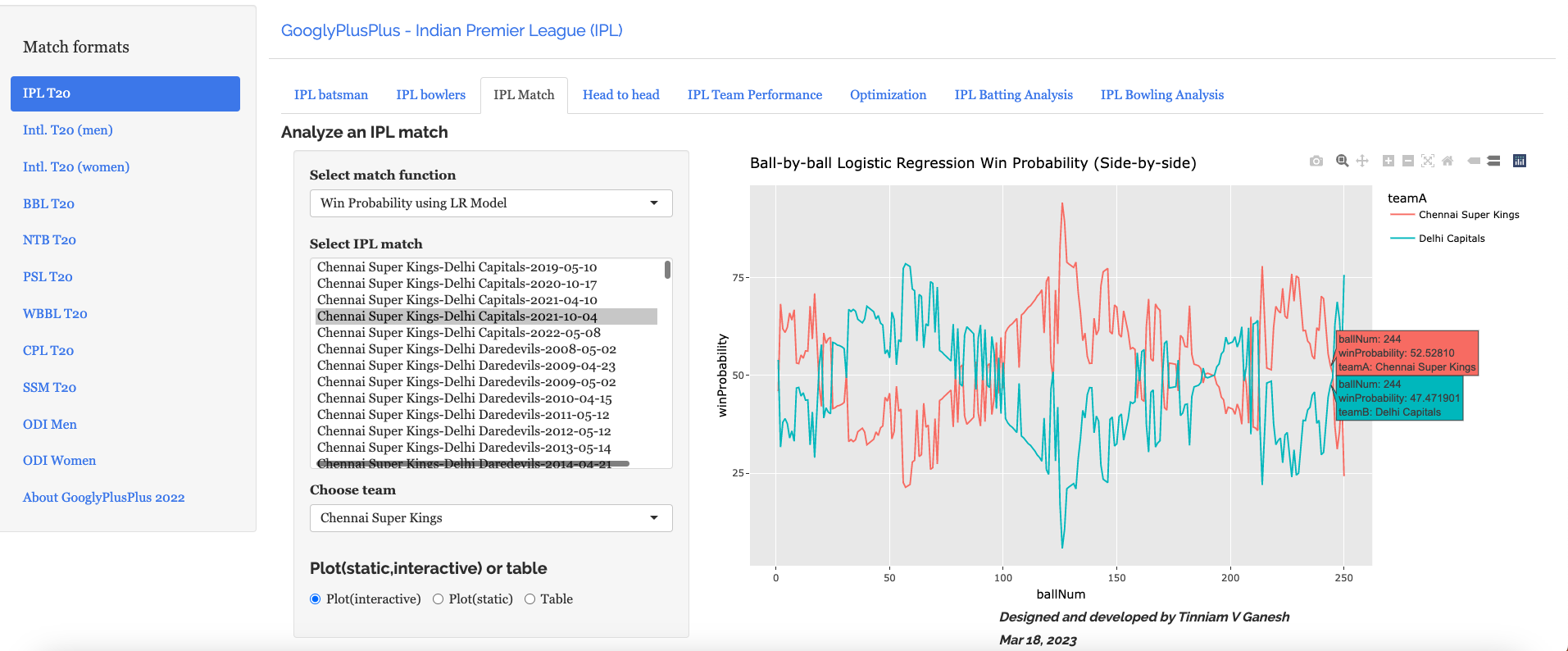
b) Win Probability Logistic Regression (side-by-side) – CSK vs DC – 4 Oct 2021

Plotting how win probability changes over the course of the match using Logistic Regression Model

In this match Delhi Capitals won. The batting scorecard of Delhi Capitals

c) Batting Scorecard of Delhi Capitals – CSK vs DC – 4 Oct 2021

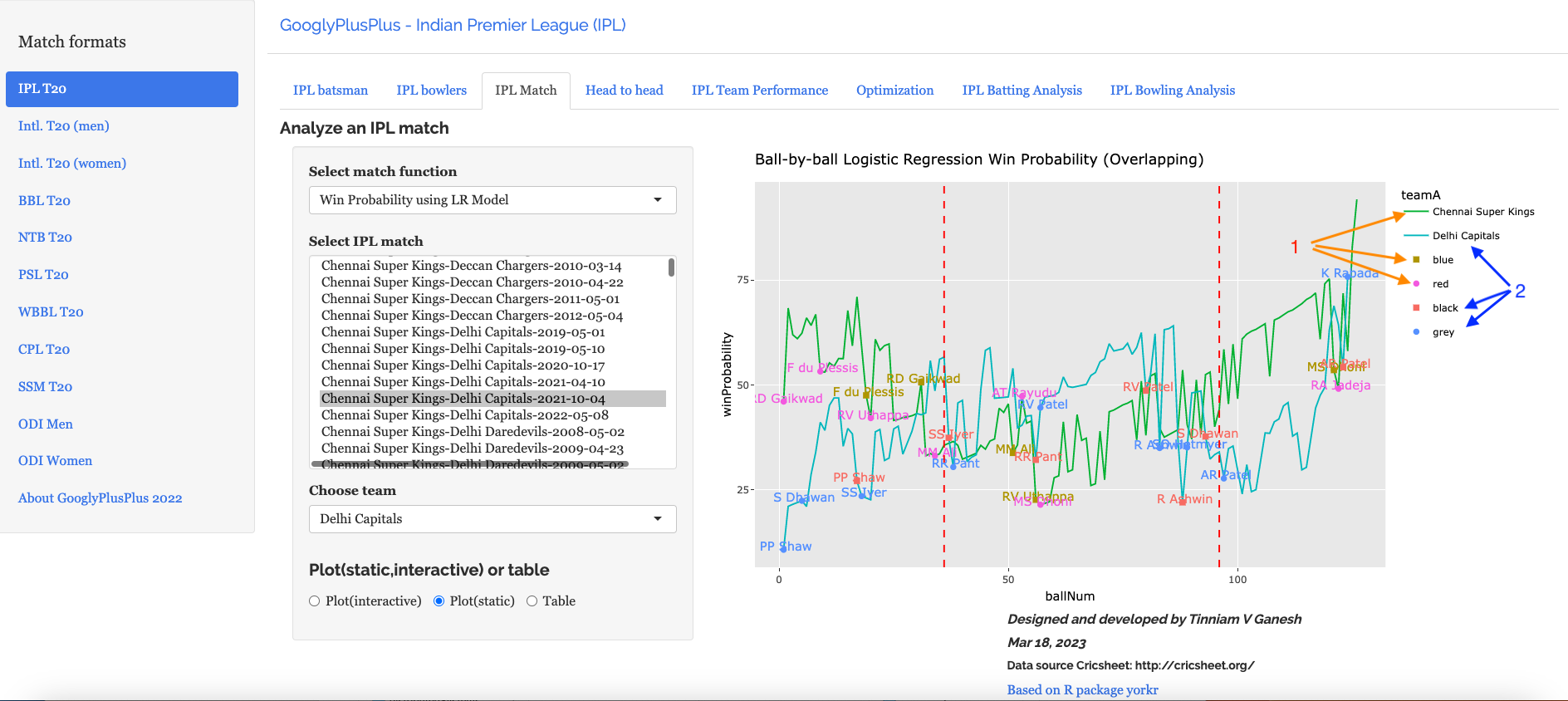
d) Win Probability Logistic Regression (Overlapping) – CSK vs DC – 4 Oct 2021

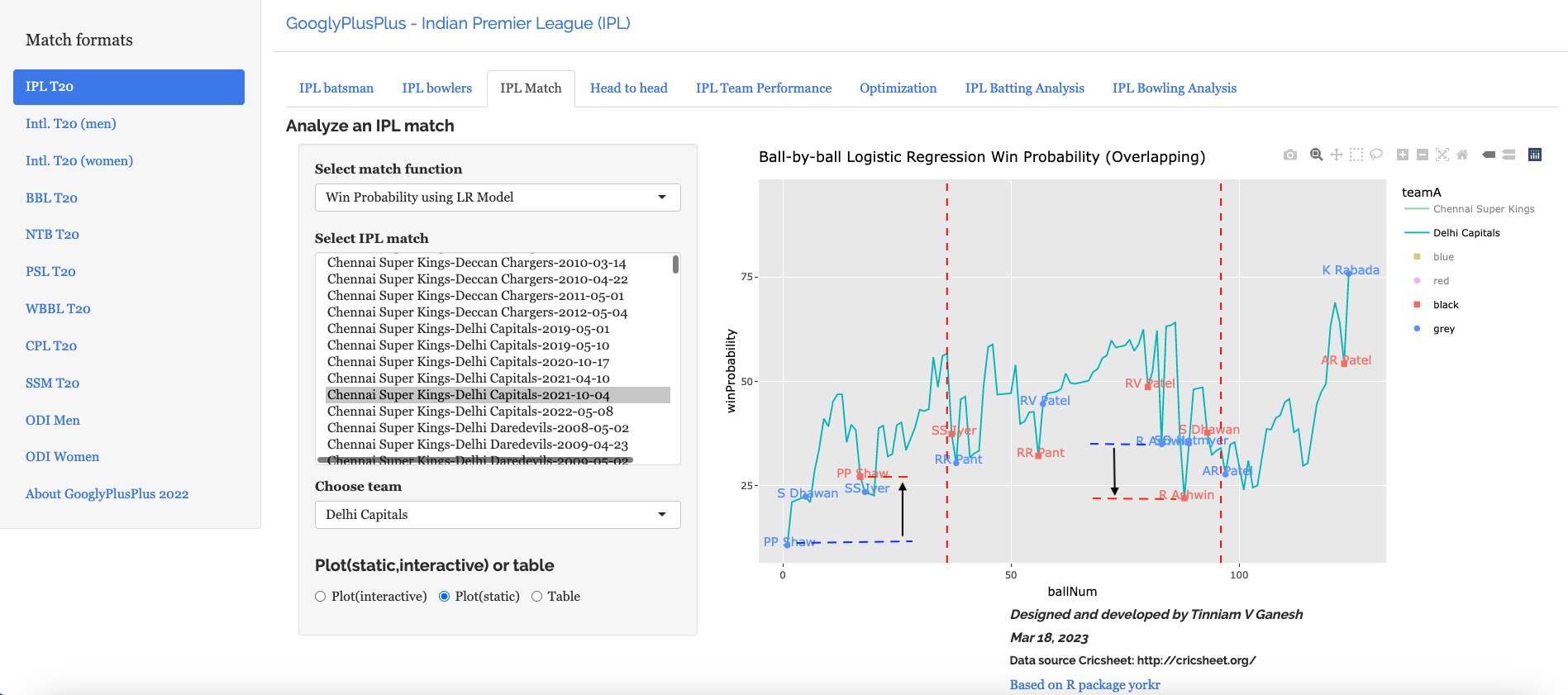
The Win Probability LR (overlapping) shows the probability function of both teams superimposed over one another. The plot includes when a batsman came into to play and when he got out. This is for both teams. This looks a little noisy, but there is a way to selectively display the change in Win Probability for each team. This can be done , by clicking the 3 arrows (orange or blue) from top to bottom. First double-click the team CSK or DC, then click the next 2 items (blue,red or black,grey) Sorry the legends don’t match the colors! 😦

Below we can see how the win probability changed for Delhi Capitals during their innings, as batsmen came into to play. See below

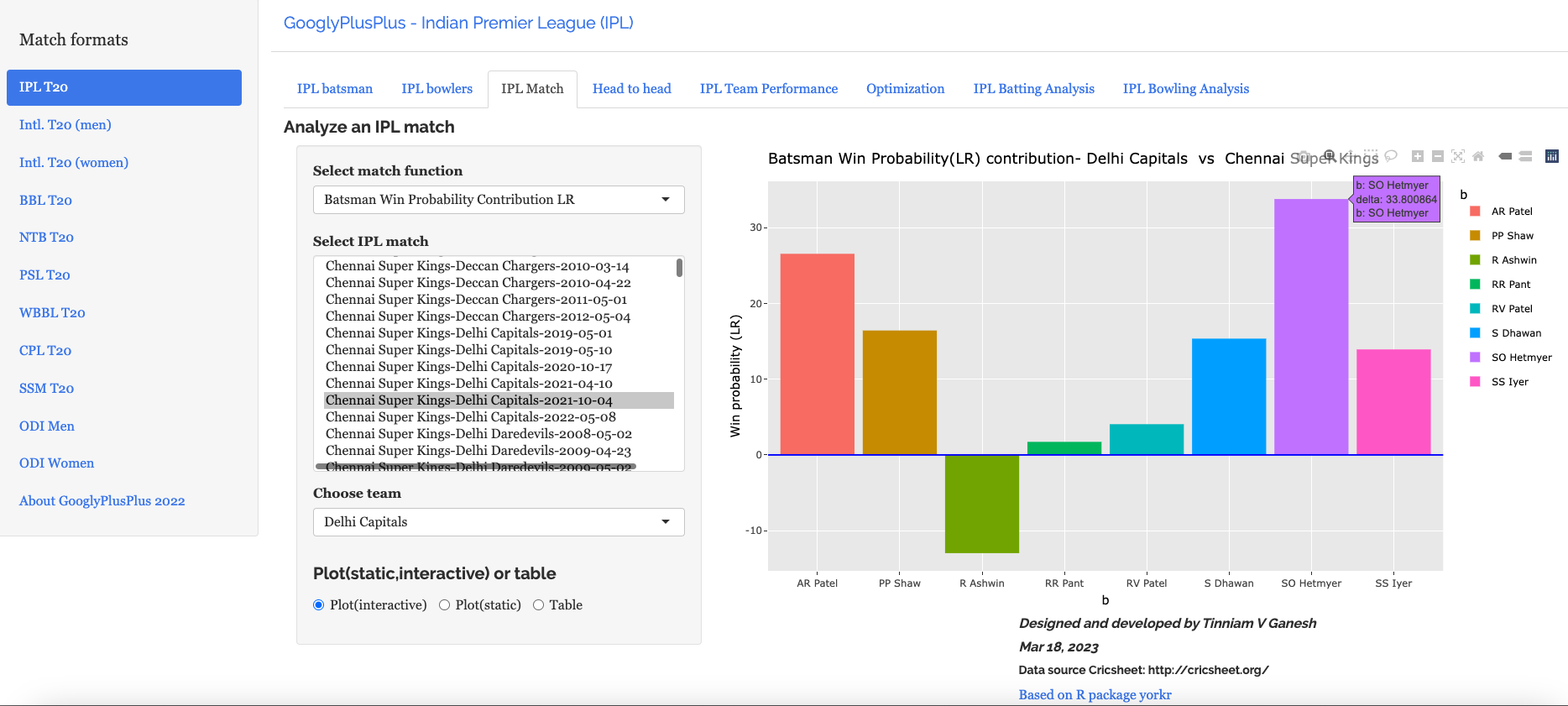
e) Batsman Win Probability contribution:DC – CSK vs DC – 4 Oct 2021

Computing the individual batsman’s Win Contribution and plotting we have. Hetmeyer has a higher Win Probability contribution than Shikhar Dhawan depsite scoring fewer runs

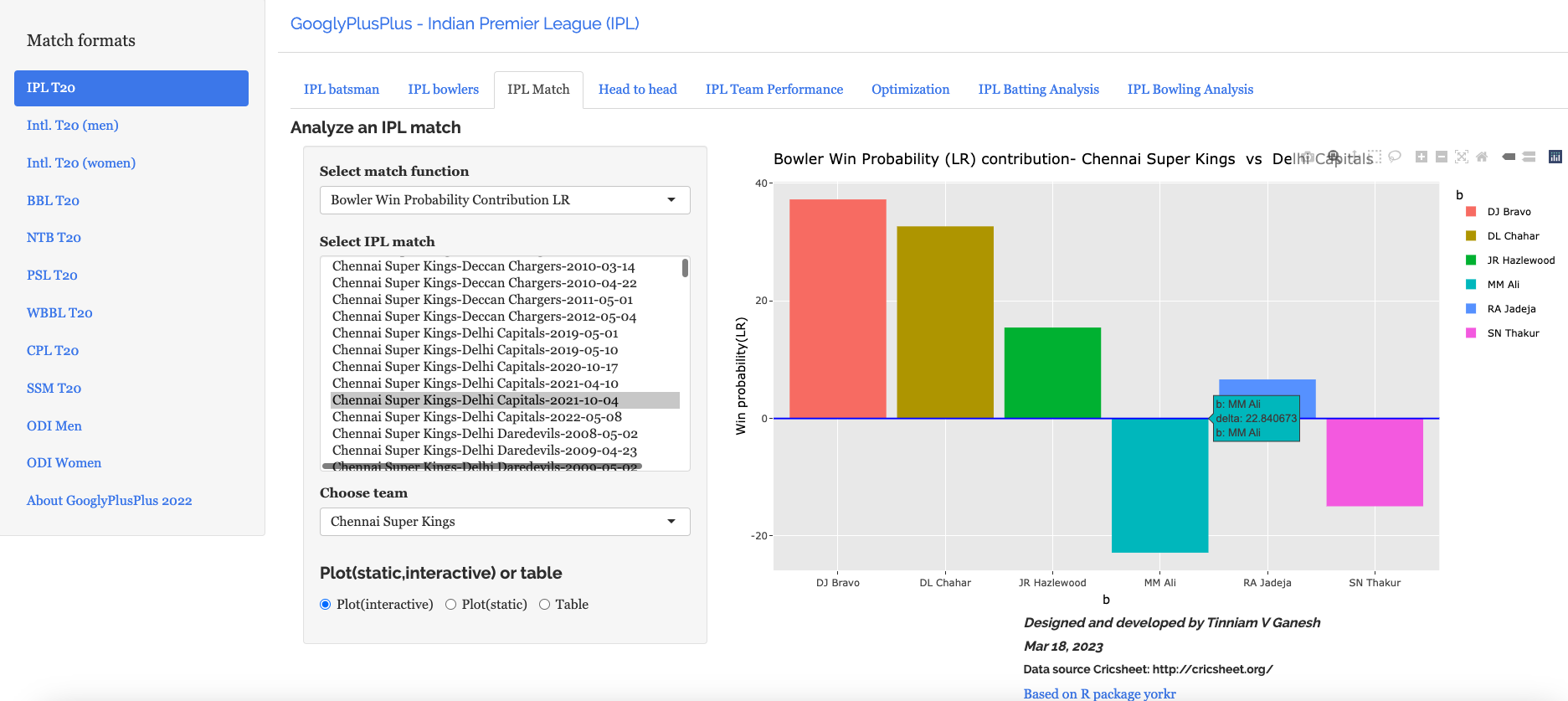
f) Bowler’s Win Probability contribution :CSK – CSK vs DC – 4 Oct 2021

We can also check the Win Probability of the bowlers. So for e.g the CSK bowlers and which bowlers had the most impact. Moeen Ali has the least impact in this match

B) Intl. T20 (men) Australia vs India – 25 Sep 2022

a) Worm wicket chart – Australia vs India – 25 Sep 2022

This was another close match in which India won with the penultimate ball

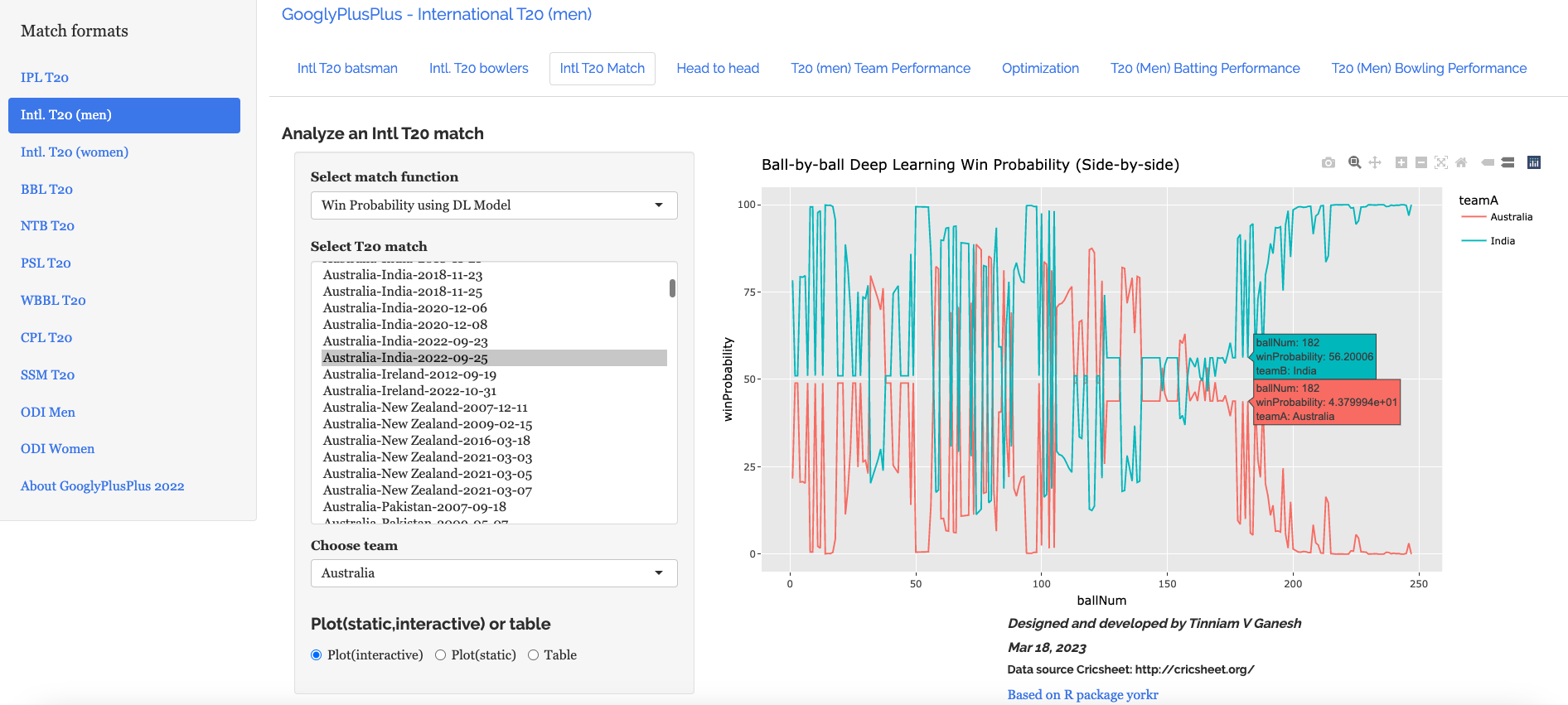
b) Win Probability based on Deep Learning model (side-by-side) – Australia vs India – 25 Sep 2022

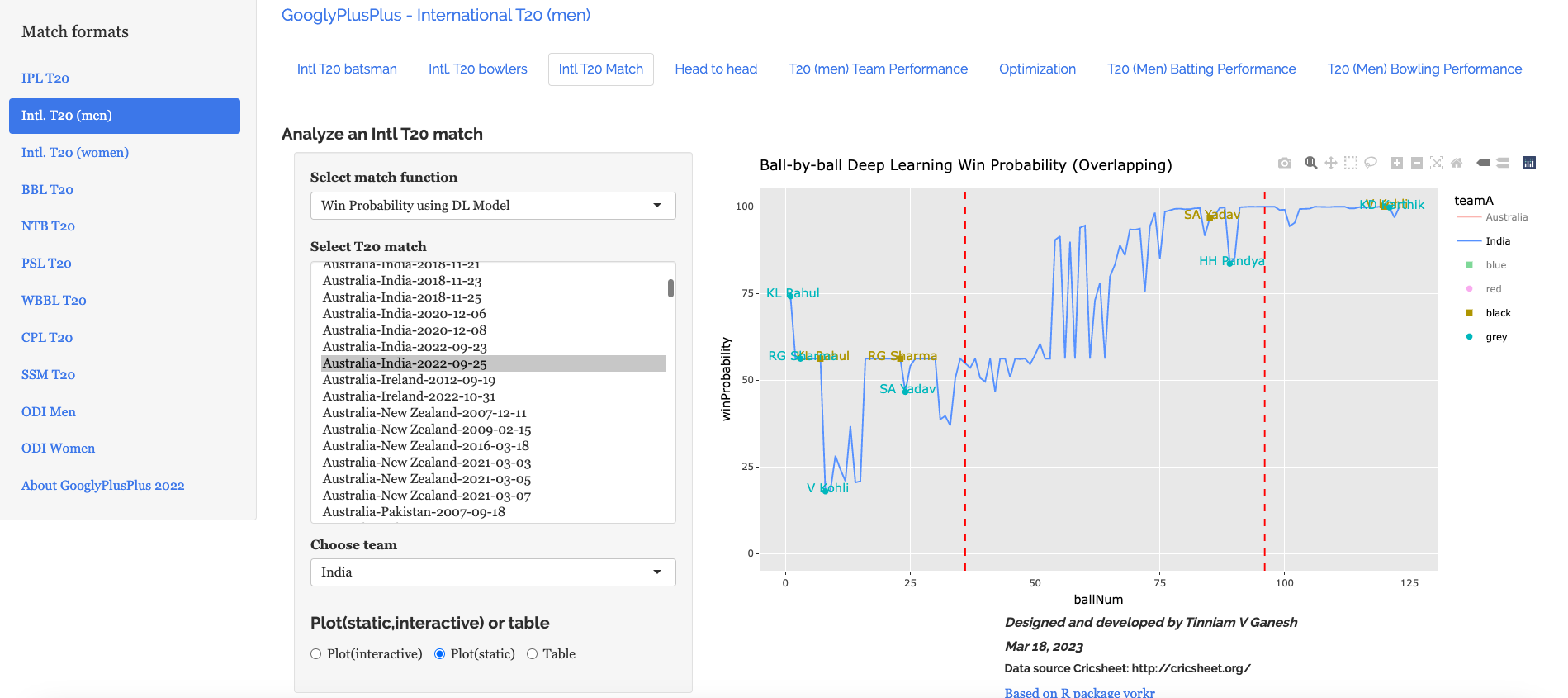
c) Win Probability based on Deep Learning model (overlapping) – Australia vs India – 25 Sep 2022

The plot below shows how the Win Probability of the teams varied across the 20 overs. The 2 Win Probability distributions are superimposed over each other

d) Batsman Win Probability Contribution : IndiaAustralia vs India – 25 Sep 2022

Selectively choosing the India Win Probability plot by double-clicking legend ‘India’ on the right , followed by single click of black, grey legend we have

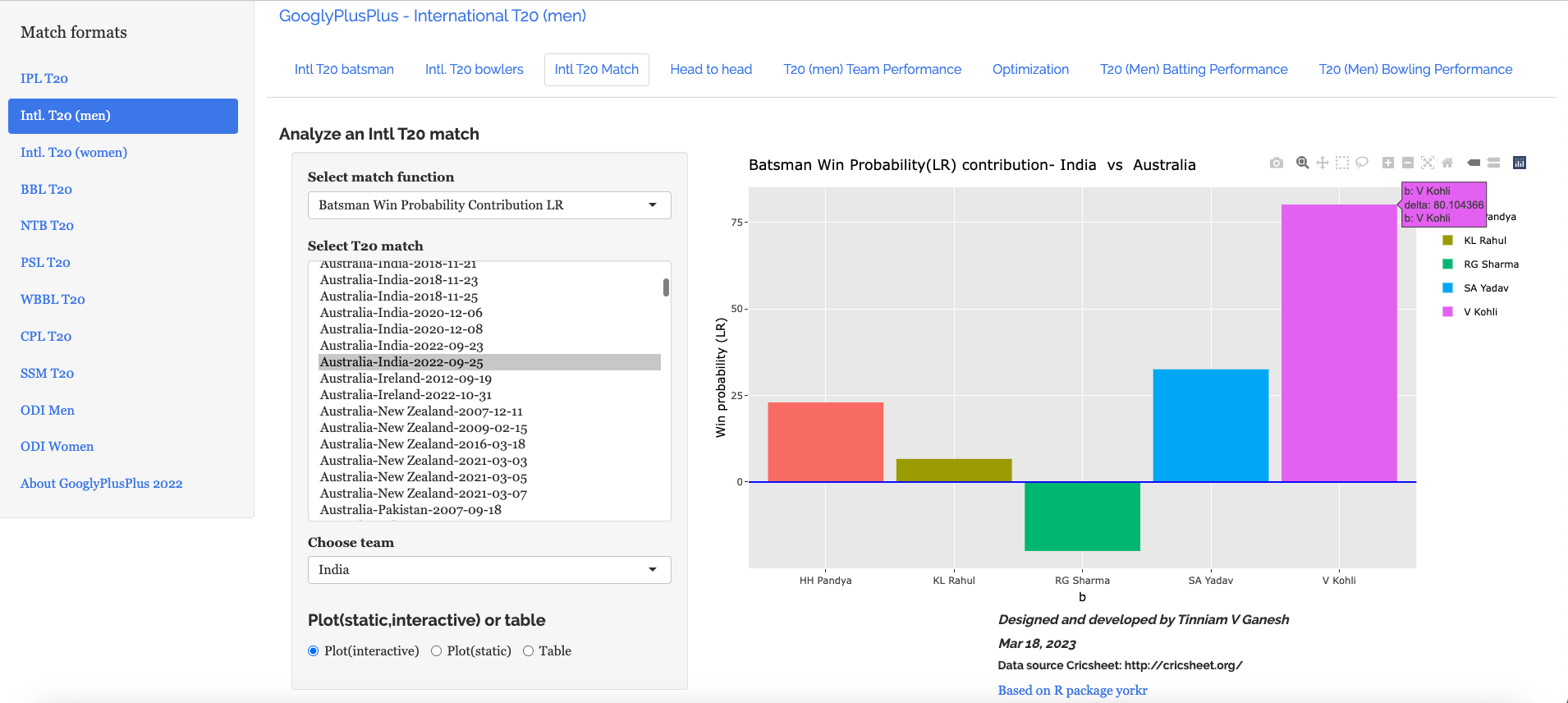
We see that Kohli, Suryakumar Yadav have good contribution to the Win Probability

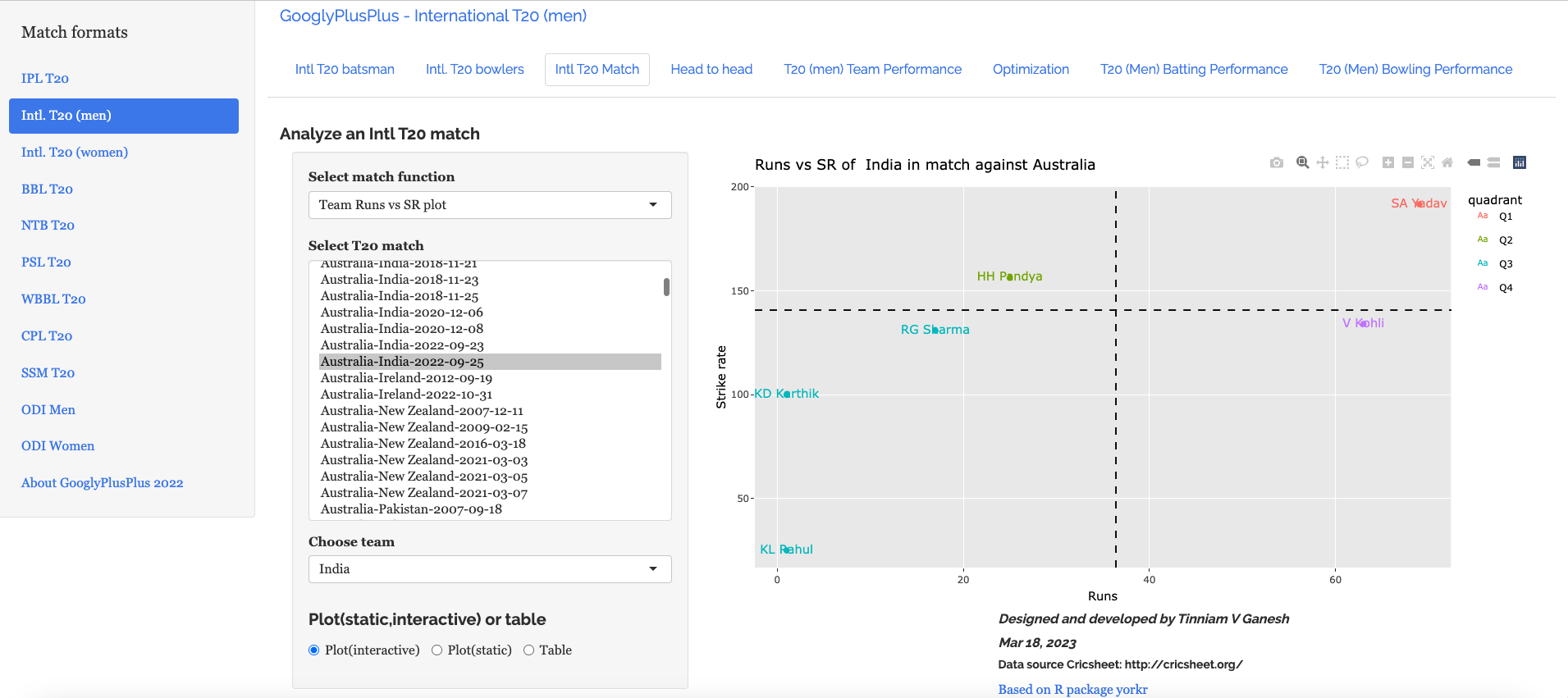
e) Plotting the Runs vs Strike Rate:India – Australia vs India – 25 Sep 2022

f) Batsman’s Win Probability Contribution- Australia vs India – 25 Sep 2022

Finally plotting the Batsman’s Win Probability Contribution

Interestingly, Kohli has a greater Win Probability Contribution than SKY, though SKY scored more runs at a better strike rate. As mentioned above, the Win Probability is context dependent and also depends on past performances of the player (batsman, bowler)

Finally let us look at

C) India vs England Intll T20 Women (11 July 2021)

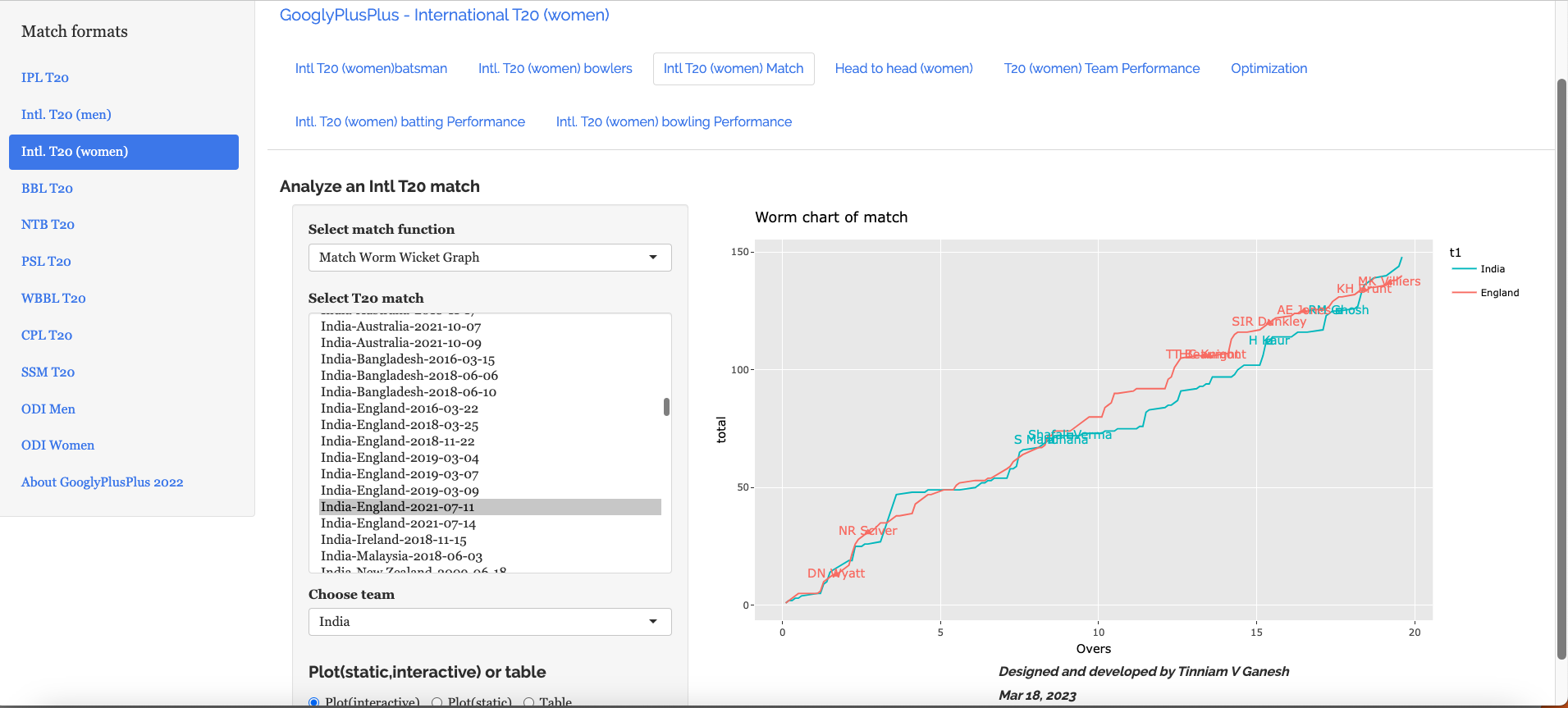
a) Worm wicket chart – India vs England Intl. T20 Women (11 July 2021)

India won this T20 match by 8 runs

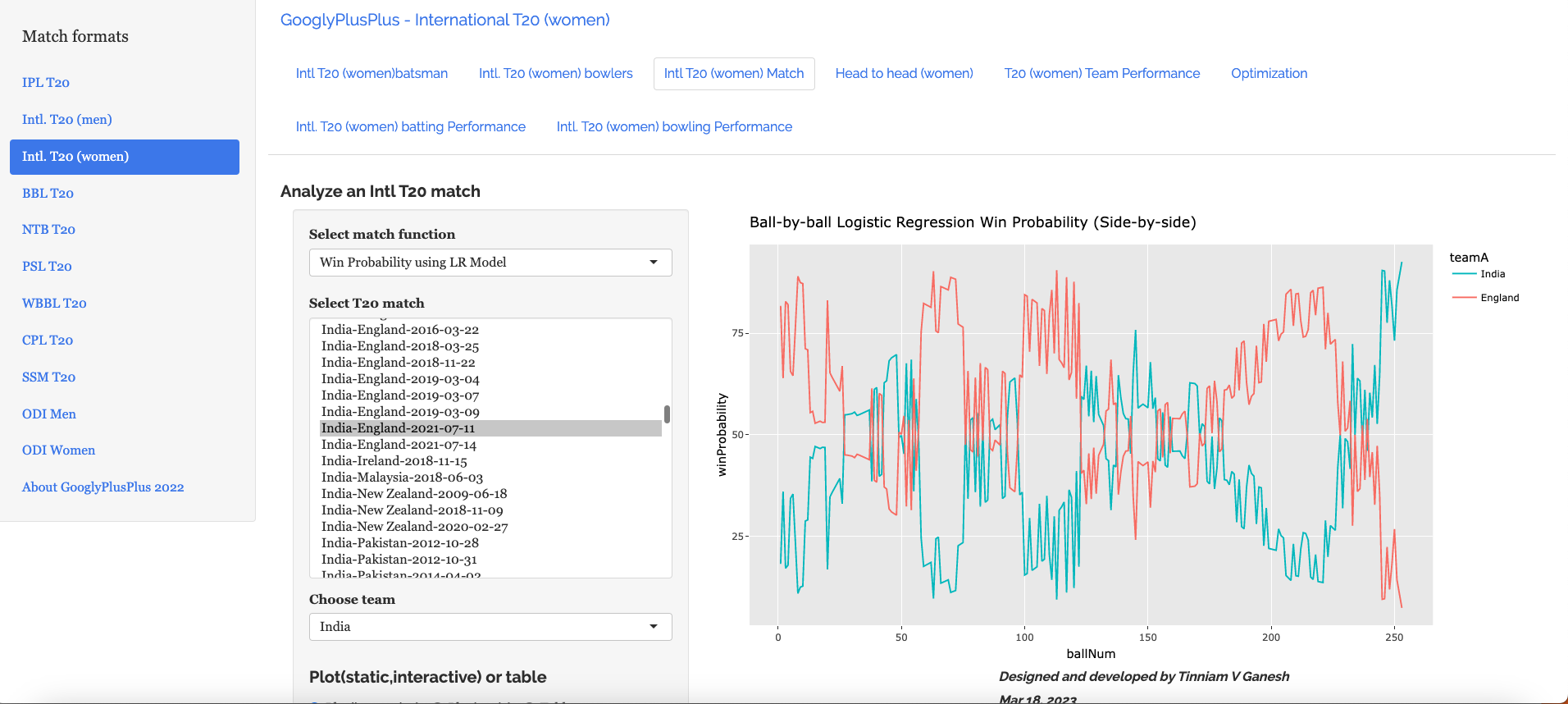
b) Win Probability using the Logistic Regression Model – India vs England Intl. T20 Women (11 July 2021)

c) Win Probability with the DL model – India vs England Intl. T20 Women (11 July 2021)

d) Bowler Win Probability Contribution with the LR model India vs England Intl. T20 Women (11 July 2021)

e) Bowler Win Contribution with the DL model India vs England Intl. T20 Women (11 July 2021)

Go ahead and try out the latest version of GooglyPlusPlus

Also see my other posts

  1. Deep Learning from first principles in Python, R and Octave – Part 8
  2. A method to crowd source pothole marking on (Indian) roads
  3. Big Data 7: yorkr waltzes with Apache NiFi
  4. Practical Machine Learning with R and Python – Part 6
  5. Introducing cricpy:A python package to analyze performances of cricketers
  6. Revisiting World Bank data analysis with WDI and gVisMotionChart
  7. Literacy in India – A deepR dive
  8. Cricketr learns new tricks : Performs fine-grained analysis of players
  9. Presentation on “Intelligent Networks, CAMEL protocol, services & applications”
  10. Adventures in LogParser, HTA and charts

To see all posts click Index of posts

T20 Win Probability using CTGANs, synthetic data

This should be my last post on computing T20 Win Probability. In this post I compute Win Probability using Augmented Data with the help of Conditional Tabular Generative Adversarial Networks (CTGANs).

A.Introduction

I started the computation of T20 match Win Probability in my earlier post

a) ‘Computing Win-Probability of T20 matches‘ where I used

  • vanilla Logistic Regression to get an accuracy of 0.67,
  • Random Forest with Tidy models gave me an accuracy of 0.737
  • Deep Learning with Keras also with 0.73.

This was done without player embeddings

b) Next I used player embeddings for batsmen and bowlers in my post Boosting Win Probability accuracy with player embeddings , and my accuracies improved significantly

  • glmnet : accuracy – 0.728 and roc_auc – 0.81
  • random forest : accuracy – 0.927 and roc_auc – 0.98
  • mlp-dnn :accuracy – 0.762 and roc_auc – 0.854

c) Third I tried using Deep Learning with Keras using player embeddings

  • DL network gave an accuracy of 0.8639

This was lightweight and could be easily deployed in my Shiny GooglyPlusPlus app as opposed to the Tidymodel’s Random Forest, which was bulky and slow.

d) Finally I decided to try and improve the accuracy of my Deep Learning Model using Synthetic data. Towards this end, my explorations led me to Conditional Tabular Generative Adversarial Networks (CTGANs). CTGAN are GAN networks that can be used with Tabular data as GAN models are not useful with tabular data. However, the best performance I got for

  • DL Keras Model + Synthetic data : accuracy =0.77

The poorer accuracy was because CTGAN requires enormous computing power (GPUs) and RAM. The free version of Colab, Kaggle kept crashing when I tried with even 0.1 % of my 1.2 million dataset size. Finally, I tried with just 0.05% and was able to generate synthetic data. Most likely, it is the small sample size and the smaller number of epochs could be the reason for the poor result. In any case, it was worth trying and this approach would possibly work with sufficient computing resources.

B.Generative Adversarial Networks (GANs)

Generative Adversarial Networks (GANs) was the brain child of Ian Goodfellow who demonstrated it in 2014. GANs are capable of generating synthetic text, tables, images, videos using available data. In Adversarial nets framework, the generative model is pitted against an adversary: a
discriminative model that learns to determine whether a sample is from the model distribution or the
data distribution.

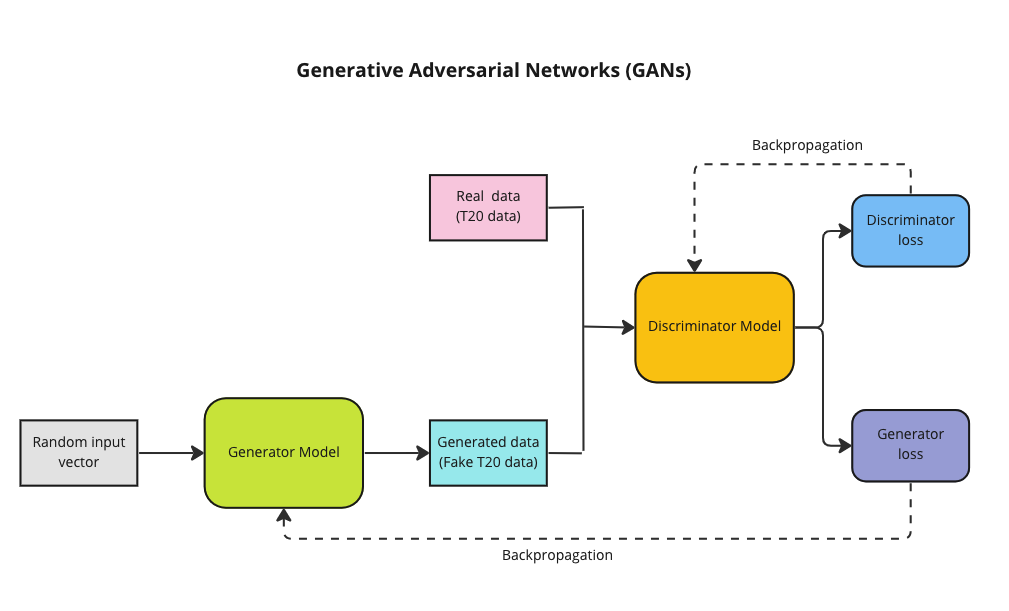
GANs have 2 Deep Neural Networks , the Generator and Discriminator which compete against other

  • The Generator (Counterfeiter) takes random noise as input and generates fake images, tables, text. The generator learns to generate plausible data. The generated instances become negative training examples for the discriminator.
  • The Discriminator (Police) which tries to distinguish between the real and fake images, text. The discriminator learns to distinguish the generator’s fake data from real data. The discriminator penalises the generator for producing implausible results.

A pictorial representation of the GAN model can be shown below

Theoretically best performance of GANs are supposed to happen when the network reaches the ‘Nash equilibrium‘, i.e. when the Generator produces near fake images and the Discriminator’s loss is f ~0.5 i.e. the discriminator is unable to distinguish between real and fake images.

Note: Though I have mentioned T20 data in the above GAN model, the T20 tabular data is actually used in CTGAN which is slightly different from the above. See Reference 2) below.

C. Conditional Tabular Generative Adversial Networks (CTGANs)

“Modeling the probability distribution of rows in tabular data and generating realistic synthetic data is a non-trivial task. Tabular data usually contains a mix of discrete and continuous columns. Continuous columns may have multiple modes whereas discrete columns are sometimes imbalanced making the modeling difficult.” CTGANs handle these challenges.

I came upon CTGAN after spending some time exploring GANs via blogs, videos etc. For building the model I use real T20 match data. However, CTGAN requires immense raw computing power and a lot of RAM. My initial attempts on Colab, my Mac (12 core, 32GB RAM), took forever before eventually crashing, I switched to Kaggle and used GPUs. Still I was only able to use only a miniscule part of my T20 dataset. My match data has 1.2 million rows, hoanything > 0.05% resulted in Kaggle crashing. Since I was able to use only a fraction, I executed the CTGAN model over several iterations, each iteration with a random 0.05% sample of the dataset. At the end of each iterations I also generate synthetic dataset. Over 12 iterations, I generate close 360K of ‘synthetic‘ T20 match data.

I then augment the 1.2 million rows of ‘real‘ T20 match data with the generated ‘synthetic T20 match data to run my Deep Learning model

D. Executing the CTGAN model

a. Read the real T20 match data

!pip install ctgan
import pandas as pd
import ctgan
from ctgan import CTGAN
from numpy.random import seed

# Read the T20 match data
df = pd.read_csv('/kaggle/input/cricket1/t20.csv')

# Randomly sample 0.05% of the dataset. Note larger datasets cause the algo to crash
train_dataset = df.sample(frac=0.05)

# Print the real T20 match data
print(train_dataset.head(10))
print(train_dataset.shape)

             batsmanIdx  bowlerIdx  ballNum  ballsRemaining  runs   runRate  \
363695         3333        432      134             119   153  1.285714   
1082839        3881       1180      218              30    93  3.100000   
595799         2366        683      187              65   120  1.846154   
737614         4490       1381      148              87   144  1.655172   
410202          934       1003       19             106    35  1.842105   
525627          921       1711      251               1     8  8.000000   
657669         4718       1602      130             115   145  1.260870   
666461         4309       1989       44              87    38  0.863636   
651229         3336        754       30              92    36  1.200000   
709892         3048        421       97              28   119  1.226804   

            numWickets  runsMomentum  perfIndex  isWinner  
363695            0      0.092437  18.333333         1  
1082839           5      0.200000   4.736842         0  
595799            4      0.107692   9.566667         0  
737614            1      0.114943   9.130435         1  
410202            0      0.103774  20.263158         0  
525627            8      3.000000   3.837209         0  
657669            0      0.095652  19.555556         0  
666461            0      0.126437   9.500000         0  
651229            0      0.119565  13.200000         0  
709892            3      0.285714   9.814433         1  
(59956, 10)

b. Run CTGAN model on the real T20 data

import pandas as pd
import ctgan
from ctgan import CTGAN
from numpy.random import seed
from pickle import TRUE

df = pd.read_csv('/kaggle/input/cricket1/t20.csv')

#Specify the categorical features. batsmanIdx & bowlerIdx are player embeddings
categorical_features = ['batsmanIdx','bowlerIdx']

# Create a empty dataframe for synthetic data
df1 = pd.DataFrame()

# Loop for 12 iterations. Minimize generator & discriminator loss
for i in range(12):
    print(i)
    train_dataset = df.sample(frac=0.05)
    seed(33)

    ctgan = CTGAN(epochs=20,verbose=True,generator_lr=.001,discriminator_lr=.001,batch_size=1000)
    ctgan.fit(train_dataset, categorical_features)

    # Generate synthetic data
    samples = ctgan.sample(30000)

   # Concatenate the synthetic data after each iteration
    df1 = pd.concat([df1,samples])
    print(samples.head())
    print(df1.shape)

# Output the synthetic data to file
df1.to_csv("output1.csv",index=False)

0
Epoch 1, Loss G:  8.3825,Loss D: -0.6159
Epoch 2, Loss G:  3.5117,Loss D: -0.3016
Epoch 3, Loss G:  2.1619,Loss D: -0.5713
Epoch 4, Loss G:  0.9847,Loss D:  0.1010
Epoch 5, Loss G:  0.6198,Loss D:  0.0789
Epoch 6, Loss G:  0.1710,Loss D:  0.0959
Epoch 7, Loss G:  0.3236,Loss D: -0.1554
Epoch 8, Loss G:  0.2317,Loss D: -0.0765
Epoch 9, Loss G: -0.0127,Loss D:  0.0275
Epoch 10, Loss G:  0.1477,Loss D: -0.0353
Epoch 11, Loss G:  0.0997,Loss D: -0.0129
Epoch 12, Loss G:  0.0066,Loss D: -0.0486
Epoch 13, Loss G:  0.0351,Loss D: -0.0805
Epoch 14, Loss G: -0.1399,Loss D: -0.0021
Epoch 15, Loss G: -0.1503,Loss D: -0.0518
Epoch 16, Loss G: -0.2306,Loss D: -0.0234
Epoch 17, Loss G: -0.2986,Loss D:  0.0469
Epoch 18, Loss G: -0.1941,Loss D: -0.0560
Epoch 19, Loss G: -0.3794,Loss D:  0.0000
Epoch 20, Loss G: -0.2763,Loss D:  0.0368
   batsmanIdx  bowlerIdx  ballNum  ballsRemaining  runs   runRate  numWickets  \
0         906        224        8              75    81  1.955153           4   
1        4159        433       17              31   126  1.799280           9   
2         229        351      192              66    82  1.608527           5   
3        1926        962       63               0   117  1.658105           0   
4         286        431      128               1    36  1.605079           0   

   runsMomentum  perfIndex  isWinner  
0      0.146670   6.937595         1  
1      0.160534  10.904346         1  
2      0.516010  11.698128         1  
3      0.380986  11.914613         0  
4      0.112255   5.392120         0  
(30000, 10)
1
Epoch 1, Loss G:  7.9977,Loss D: -0.3592
Epoch 2, Loss G:  3.7418,Loss D: -0.3371
Epoch 3, Loss G:  1.6685,Loss D: -0.3211
Epoch 4, Loss G:  1.0539,Loss D: -0.3495
Epoch 5, Loss G:  0.4664,Loss D: -0.0907
Epoch 6, Loss G:  0.4004,Loss D: -0.1208
Epoch 7, Loss G:  0.3250,Loss D: -0.1482
Epoch 8, Loss G:  0.1753,Loss D:  0.0169
Epoch 9, Loss G:  0.1382,Loss D:  0.0661
Epoch 10, Loss G:  0.1509,Loss D: -0.1023
Epoch 11, Loss G: -0.0235,Loss D:  0.0210
Epoch 12, Loss G: -0.1636,Loss D: -0.0124
Epoch 13, Loss G: -0.3370,Loss D: -0.0185
Epoch 14, Loss G: -0.3054,Loss D: -0.0085
Epoch 15, Loss G: -0.5142,Loss D:  0.0121
Epoch 16, Loss G: -0.3813,Loss D: -0.0921
Epoch 17, Loss G: -0.5838,Loss D:  0.0210
Epoch 18, Loss G: -0.4033,Loss D: -0.0181
Epoch 19, Loss G: -0.5711,Loss D:  0.0269
Epoch 20, Loss G: -0.4828,Loss D: -0.0830
   batsmanIdx  bowlerIdx  ballNum  ballsRemaining  runs   runRate  numWickets  \
0        2202        265      223              39    13  0.868927           0   
1        3641        856       35              59    26  2.236160           6   
2         676       2903      218              93    16  0.460693           1   
3        3482       3459       44             117   102  0.851471           8   
4        3046       3076       59               5    84  1.016824           2   

   runsMomentum  perfIndex  isWinner  
0      0.138586   4.733462         0  
1      0.124453   5.146831         1  
2      0.273168  10.106869         0  
3      0.129520   5.361127         0  
4      1.083525  25.677574         1  
(60000, 10)
...
...
11
Epoch 1, Loss G:  8.8362,Loss D: -0.7111
Epoch 2, Loss G:  4.1322,Loss D: -0.8468
Epoch 3, Loss G:  1.2782,Loss D:  0.1245
Epoch 4, Loss G:  1.1135,Loss D: -0.3588
Epoch 5, Loss G:  0.6033,Loss D: -0.1255
Epoch 6, Loss G:  0.6912,Loss D: -0.1906
Epoch 7, Loss G:  0.3340,Loss D: -0.1048
Epoch 8, Loss G:  0.3515,Loss D: -0.0730
Epoch 9, Loss G:  0.1702,Loss D:  0.0237
Epoch 10, Loss G:  0.1064,Loss D:  0.0632
Epoch 11, Loss G:  0.0884,Loss D: -0.0005
Epoch 12, Loss G:  0.0556,Loss D: -0.0607
Epoch 13, Loss G: -0.0917,Loss D: -0.0223
Epoch 14, Loss G: -0.1492,Loss D:  0.0258
Epoch 15, Loss G: -0.0986,Loss D: -0.0112
Epoch 16, Loss G: -0.1428,Loss D: -0.0060
Epoch 17, Loss G: -0.2225,Loss D: -0.0263
Epoch 18, Loss G: -0.2255,Loss D: -0.0328
Epoch 19, Loss G: -0.3482,Loss D:  0.0277
Epoch 20, Loss G: -0.2667,Loss D: -0.0721
   batsmanIdx  bowlerIdx  ballNum  ballsRemaining  runs   runRate  numWickets  \
0         367       1447      129              27    30  1.242120           2   
1        2481       1528      221               4    10  1.344024           2   
2        1034       3116      132              87   153  1.142750           3   
3        1201       2868      151              60   136  1.091638           1   
4        4327       3291      108              89    22  0.842775           2   

   runsMomentum  perfIndex  isWinner  
0      1.978739   6.393691         1  
1      0.539650   6.783990         0  
2      0.107156  12.154197         0  
3      3.193574  11.992059         0  
4      0.127507  12.210876         0  
(360000, 10)

E. Sample of the Synthetic data

synthetic_data = ctgan.sample(20000)
print(synthetic_data.head(100))

    batsmanIdx  bowlerIdx  ballNum  ballsRemaining  runs    runRate  \
0         1073       3059       72              72   149   2.230236   
1         3769       1443      106               7   137   0.881409   
2          448       3048      166               6   220   1.092504   
3         2969       1244      103              82   207  12.314862   
4          180       1372      125             111    14   1.310051   
..         ...        ...      ...             ...   ...        ...   
95        1521       1040      153               6   166   1.097363   
96        2366         62       25             114   119   0.910642   
97        3506       1736      100             118   140   1.640921   
98        3343       2347       47              54    50   0.696462   
99        1957       2888      136              27   153   1.315565   

    numWickets  runsMomentum  perfIndex  isWinner  
0            0      0.111707  17.466925         0  
1            1      0.130352  14.274113         0  
2            1      0.173541  11.076731         1  
3            1      0.218977   6.239951         0  
4            4      2.829380   9.183323         1  
..         ...           ...        ...       ...  
95           0      0.223437   7.011180         0  
96           1      0.451371  16.908120         1  
97           5      0.156936   9.217205         0  
98           6      0.124536   6.273091         0  
99           1      0.249329  14.221554         0  

[100 rows x 10 columns]

F. Evaluating the synthetic T20 match data

Here the quality of the synthetic data set is evaluated.

a) Statistical evaluation

  • Read the real T20 match data
  • Read the generated T20 synthetic match data
import pandas as pd

# Read the T20 match and synthetic match data
df = pd.read_csv('/kaggle/input/cricket1/t20.csv').  #1.2 million rows
synthetic=pd.read_csv('/kaggle/input/synthetic/synthetic.csv')   #300K

# Randomly sample 1000 rows, and generate stats
df1=df.sample(n=1000)
real=df1.describe()
realData_stats=real.transpose
print(realData_stats)

synthetic1=synthetic.sample(n=1000)
synthetic=synthetic1.describe()
syntheticData_stats=synthetic.transpose
syntheticData_stats

a) Stats of real T20 match data

<bound method DataFrame.transpose of         batsmanIdx    bowlerIdx      ballNum  ballsRemaining         runs  \
count  1000.000000  1000.000000  1000.000000     1000.000000  1000.000000   
mean   2323.940000  1776.481000   118.165000       59.236000    77.649000   
std    1329.703046  1011.470703    70.564291       35.312934    49.098763   
min       8.000000    13.000000     1.000000        1.000000    -2.000000   
25%    1134.750000   850.000000    58.000000       28.750000    39.000000   
50%    2265.000000  1781.500000   117.000000       59.000000    72.000000   
75%    3510.000000  2662.250000   178.000000       89.000000   111.000000   
max    4738.000000  3481.000000   265.000000      127.000000   246.000000   

           runRate   numWickets  runsMomentum    perfIndex     isWinner  
count  1000.000000  1000.000000   1000.000000  1000.000000  1000.000000  
mean      1.734979     2.614000      0.310568     9.580386     0.499000  
std       5.698104     2.267189      0.686171     4.530856     0.500249  
min      -2.000000     0.000000      0.071429     0.000000     0.000000  
25%       1.009063     1.000000      0.105769     6.666667     0.000000  
50%       1.272727     2.000000      0.141026     9.236842     0.000000  
75%       1.546891     4.000000      0.250000    12.146735     1.000000  
max     166.000000    10.000000     10.000000    30.800000     1.000000

b) Stats of Synthetic T20 match data

     
           batsmanIdx    bowlerIdx      ballNum  ballsRemaining         runs  \
count  1000.000000  1000.000000  1000.000000     1000.000000  1000.000000   
mean   2304.135000  1760.776000   116.081000       50.102000    74.357000   
std    1342.348684  1003.496003    72.019228       35.795236    48.103446   
min       2.000000    15.000000    -4.000000       -2.000000    -1.000000   
25%    1093.000000   881.000000    46.000000       18.000000    30.000000   
50%    2219.500000  1763.500000   116.000000       45.000000    75.000000   
75%    3496.500000  2644.750000   180.250000       77.000000   112.000000   
max    4718.000000  3481.000000   253.000000      124.000000   222.000000   

           runRate   numWickets  runsMomentum    perfIndex     isWinner  
count  1000.000000  1000.000000   1000.000000  1000.000000  1000.000000  
mean      1.637225     3.096000      0.336540     9.278073     0.507000  
std       1.691060     2.640408      0.502346     4.727677     0.500201  
min      -4.388339     0.000000      0.083351    -0.902991     0.000000  
25%       1.077789     1.000000      0.115770     5.731931     0.000000  
50%       1.369655     2.000000      0.163085     9.104328     1.000000  
75%       1.660477     5.000000      0.311586    12.619318     1.000000  
max      23.757001    10.000000      4.630908    29.829497     1.000000

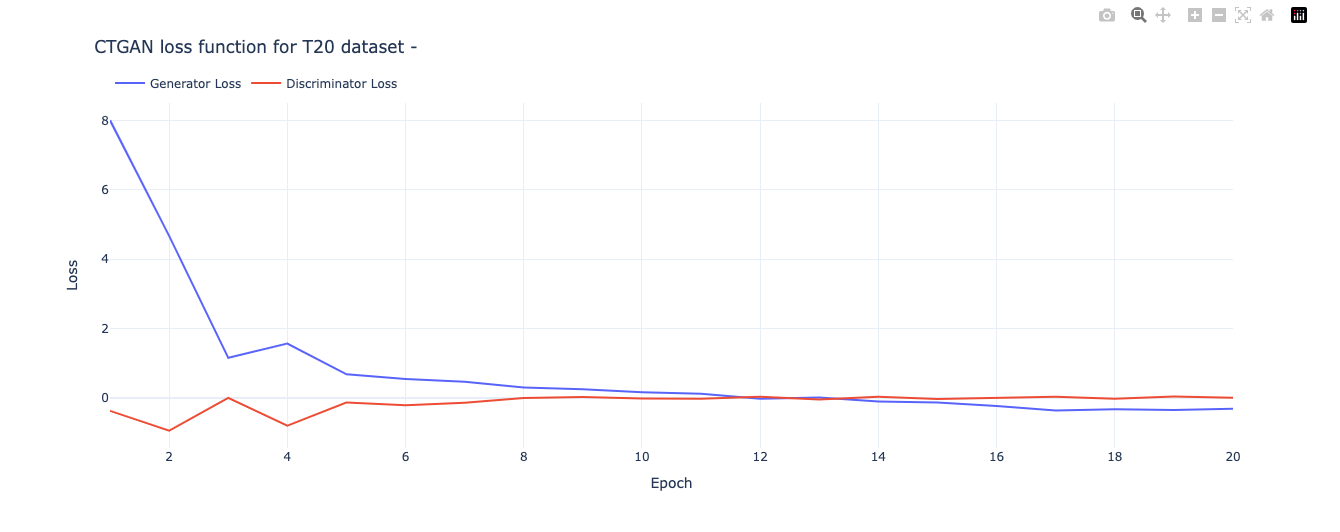
c) Plotting the Generator and Discriminator loss

import pandas as pd

# CTGAN prints out a new line for each epoch
epochs_output = str(output).split('\n')

# CTGAN separates the values with commas
raw_values = [line.split(',') for line in epochs_output]
loss_values = pd.DataFrame(raw_values)[:-1] # convert to df and delete last row (empty)

# Rename columns
loss_values.columns = ['Epoch', 'Generator Loss', 'Discriminator Loss']

# Extract the numbers from each column 
loss_values['Epoch'] = loss_values['Epoch'].str.extract('(\d+)').astype(int)
loss_values['Generator Loss'] = loss_values['Generator Loss'].str.extract('([-+]?\d*\.\d+|\d+)').astype(float)
loss_values['Discriminator Loss'] = loss_values['Discriminator Loss'].str.extract('([-+]?\d*\.\d+|\d+)').astype(float)

# the result is a row for each epoch that contains the generator and discriminator loss
loss_values.head()

	Epoch	Generator Loss	Discriminator Loss
0	1	8.0158	-0.3840
1	2	4.6748	-0.9589
2	3	1.1503	-0.0066
3	4	1.5593	-0.8148
4	5	0.6734	-0.1425
5	6	0.5342	-0.2202
6	7	0.4539	-0.1462
7	8	0.2907	-0.0155
8	9	0.2399	0.0172
9	10	0.1520	-0.0236
import plotly.graph_objects as go

# Plot loss function
fig = go.Figure(data=[go.Scatter(x=loss_values['Epoch'], y=loss_values['Generator Loss'], name='Generator Loss'),
                      go.Scatter(x=loss_values['Epoch'], y=loss_values['Discriminator Loss'], name='Discriminator Loss')])


# Update the layout for best viewing
fig.update_layout(template='plotly_white',
                    legend_orientation="h",
                    legend=dict(x=0, y=1.1))

title = 'CTGAN loss function for T20 dataset - ' 
fig.update_layout(title=title, xaxis_title='Epoch', yaxis_title='Loss')
fig.show()

G. Qualitative evaluation of Synthetic data

a) Quality of continuous columns in synthetic data

KSComplement -This metric computes the similarity of a real column vs. a synthetic column in terms of the column shapes.The KSComplement uses the Kolmogorov-Smirnov statistic. Closer to 1.0 is good and 0 is worst

from sdmetrics.single_column import KSComplement
numerical_columns=['ballNum','ballsRemaining','runs','runRate','numWickets','runsMomentum','perfIndex']
total_score = 0
for column_name in numerical_columns:
    column_score = KSComplement.compute(df[column_name], synthetic[column_name])
    total_score += column_score
    print('Column:', column_name, ', Score: ', column_score)

print('\nAverage: ', total_score/len(numerical_columns))

Column: ballNum , Score:  0.9502754283367316
Column: ballsRemaining , Score:  0.8770284103276166
Column: runs , Score:  0.9136464248633367
Column: runRate , Score:  0.9183841670732166
Column: numWickets , Score:  0.9016209114638712
Column: runsMomentum , Score:  0.8773491702213716
Column: perfIndex , Score:  0.9173808852778924

Average:  0.9079550567948624

b) Quality of categorical columns

This statistic measures the quality of generated categorical columns. 1 is best and 0 is worst

categorical_columns=['batsmanIdx','bowlerIdx']
from sdmetrics.single_column import TVComplement

total_score = 0
for column_name in categorical_columns:
    column_score = TVComplement.compute(df[column_name], synthetic[column_name])
    total_score += column_score
    print('Column:', column_name, ', Score: ', column_score)

print('\nAverage: ', total_score/len(categorical_columns))

Column: batsmanIdx , Score:  0.8436263499539245
Column: bowlerIdx , Score:  0.7356177407921669

Average:  0.7896220453730457

The performance is decent but not excellent. I was unable to execute more epochs as it it required larger than the memory allowed

c) Correlation similarity

This metric measures the correlation between a pair of numerical columns and computes the similarity between the real and synthetic data – it compares the trends of 2D distributions. Best 1.0 and 0.0 is worst

import itertools
from sdmetrics.column_pairs import CorrelationSimilarity

total_score = 0
total_pairs = 0
for pair in itertools.combinations(numerical_columns,2):
    col_A, col_B = pair
    score = CorrelationSimilarity.compute(df[[col_A, col_B]], synthetic[[col_A, col_B]])
    print('Columns:', pair, ' Score:', score)
    total_score += score
    total_pairs += 1

print('\nAverage: ', total_score/total_pairs)

Columns: ('ballNum', 'ballsRemaining')  Score: 0.7153942317384889
Columns: ('ballNum', 'runs')  Score: 0.8838043045134777
Columns: ('ballNum', 'runRate')  Score: 0.8710243133637056
Columns: ('ballNum', 'numWickets')  Score: 0.7978515509750435
Columns: ('ballNum', 'runsMomentum')  Score: 0.8956281260834316
Columns: ('ballNum', 'perfIndex')  Score: 0.9275145840528048
Columns: ('ballsRemaining', 'runs')  Score: 0.9566928975064546
Columns: ('ballsRemaining', 'runRate')  Score: 0.9127313819127167
Columns: ('ballsRemaining', 'numWickets')  Score: 0.6770737279315224
Columns: ('ballsRemaining', 'runsMomentum')  Score: 0.7939260278412358
Columns: ('ballsRemaining', 'perfIndex')  Score: 0.8694582252638351
Columns: ('runs', 'runRate')  Score: 0.999593795992159
Columns: ('runs', 'numWickets')  Score: 0.9510731832916608
Columns: ('runs', 'runsMomentum')  Score: 0.9956131422133428
Columns: ('runs', 'perfIndex')  Score: 0.9742931845536701
Columns: ('runRate', 'numWickets')  Score: 0.8859830711832263
Columns: ('runRate', 'runsMomentum')  Score: 0.9174744874779561
Columns: ('runRate', 'perfIndex')  Score: 0.9491100087911353
Columns: ('numWickets', 'runsMomentum')  Score: 0.8989709776329797
Columns: ('numWickets', 'perfIndex')  Score: 0.7178946968801441
Columns: ('runsMomentum', 'perfIndex')  Score: 0.9744441623018661

Average:  0.8840738134048025

d) Category coverage

This metric measures whether a synthetic column covers all the possible categories that are present in a real column. 1.0 is best , 0 is worst

from sdmetrics.single_column import CategoryCoverage

total_score = 0
for column_name in categorical_columns:
    column_score = CategoryCoverage.compute(df[column_name], synthetic[column_name])
    total_score += column_score
    print('Column:', column_name, ', Score: ', column_score)

print('\nAverage: ', total_score/len(categorical_columns))

Column: batsmanIdx , Score:  0.9533951919021509
Column: bowlerIdx , Score:  0.9913966160022942

Average:  0.9723959039522225

H. Augmenting the T20 match data set

In this final part I augment my T20 match data set with the generated synthetic T20 data set.

import pandas as pd
from numpy import savetxt
import tensorflow as tf
from tensorflow import keras
import pandas as pd
import numpy as np


from keras.layers import Input, Embedding, Flatten, Dense, Reshape, Concatenate, Dropout
from keras.models import Model
import matplotlib.pyplot as plt

# Read real and synthetic data
df = pd.read_csv('/kaggle/input/cricket1/t20.csv')
synthetic=pd.read_csv('/kaggle/input/synthetic/synthetic.csv')

# Augment the data. Concatenate real & synthetic data
df1=pd.concat([df,synthetic])

# Create training and test samples
print("Shape of dataframe=",df1.shape)
train_dataset = df1.sample(frac=0.8,random_state=0)
test_dataset = df1.drop(train_dataset.index)
train_dataset1 = train_dataset[['batsmanIdx','bowlerIdx','ballNum','ballsRemaining','runs','runRate','numWickets','runsMomentum','perfIndex']]
test_dataset1 = test_dataset[['batsmanIdx','bowlerIdx','ballNum','ballsRemaining','runs','runRate','numWickets','runsMomentum','perfIndex']]
train_dataset1
train_labels = train_dataset.pop('isWinner')
test_labels = test_dataset.pop('isWinner')
print(train_dataset1.shape)

a=train_dataset1.describe()
stats=a.transpose
print(a)

a) Create A Deep Learning Model in Keras

from numpy.random import seed
seed(33)
tf.random.set_seed(432)
# create input layers for each of the predictors
batsmanIdx_input = Input(shape=(1,), name='batsmanIdx')
bowlerIdx_input = Input(shape=(1,), name='bowlerIdx')
ballNum_input = Input(shape=(1,), name='ballNum')
ballsRemaining_input = Input(shape=(1,), name='ballsRemaining')
runs_input = Input(shape=(1,), name='runs')
runRate_input = Input(shape=(1,), name='runRate')
numWickets_input = Input(shape=(1,), name='numWickets')
runsMomentum_input = Input(shape=(1,), name='runsMomentum')
perfIndex_input = Input(shape=(1,), name='perfIndex')

no_of_unique_batman=len(df1["batsmanIdx"].unique()) 
print(no_of_unique_batman)
no_of_unique_bowler=len(df1["bowlerIdx"].unique()) 
print(no_of_unique_bowler)

embedding_size_bat = no_of_unique_batman ** (1/4)
print(embedding_size_bat)
embedding_size_bwl = no_of_unique_bowler ** (1/4)
print(embedding_size_bwl)

# create embedding layer for the categorical predictor
batsmanIdx_embedding = Embedding(input_dim=no_of_unique_batman+1, output_dim=16,input_length=1)(batsmanIdx_input)
print(batsmanIdx_embedding)
batsmanIdx_flatten = Flatten()(batsmanIdx_embedding)
print(batsmanIdx_flatten)
bowlerIdx_embedding = Embedding(input_dim=no_of_unique_bowler+1, output_dim=16,input_length=1)(bowlerIdx_input)
bowlerIdx_flatten = Flatten()(bowlerIdx_embedding)
print(bowlerIdx_flatten)
# concatenate all the predictors
x = keras.layers.concatenate([batsmanIdx_flatten,bowlerIdx_flatten, ballNum_input, ballsRemaining_input, runs_input, runRate_input, numWickets_input, runsMomentum_input, perfIndex_input])
print(x.shape)
# add hidden layers
x = Dense(96, activation='relu')(x)
x = Dropout(0.1)(x)
x = Dense(64, activation='relu')(x)
x = Dropout(0.1)(x)
x = Dense(32, activation='relu')(x)
x = Dropout(0.1)(x)
x = Dense(16, activation='relu')(x)
x = Dropout(0.1)(x)
x = Dense(8, activation='relu')(x)
x = Dropout(0.1)(x)
# add output layer
output = Dense(1, activation='sigmoid', name='output')(x)
print(output.shape)
# create model
model = Model(inputs=[batsmanIdx_input,bowlerIdx_input, ballNum_input, ballsRemaining_input, runs_input, runRate_input, numWickets_input, runsMomentum_input, perfIndex_input], outputs=output)
model.summary()
# compile model
#optimizer=keras.optimizers.Adam(learning_rate=.01, beta_1=0.1, beta_2=0.999, epsilon=None, decay=0.0, amsgrad=True)
#optimizer=keras.optimizers.RMSprop(learning_rate=0.001, rho=0.2, momentum=0.2, epsilon=1e-07)
#optimizer=keras.optimizers.SGD(learning_rate=.01,momentum=0.1) #- Works without dropout
#optimizer = tf.keras.optimizers.RMSprop(0.01)
#optimizer=keras.optimizers.SGD(learning_rate=.01,momentum=0.1)
#optimizer=keras.optimizers.RMSprop(learning_rate=.005, rho=0.1, momentum=0, epsilon=1e-07)

optimizer=keras.optimizers.Adam(learning_rate=.015, beta_1=0.9, beta_2=0.999, epsilon=1e-07, amsgrad=True)

model.compile(optimizer=optimizer, loss='binary_crossentropy', metrics=['accuracy'])

# train the model
history=model.fit([train_dataset1['batsmanIdx'],train_dataset1['bowlerIdx'],train_dataset1['ballNum'],train_dataset1['ballsRemaining'],train_dataset1['runs'],
           train_dataset1['runRate'],train_dataset1['numWickets'],train_dataset1['runsMomentum'],train_dataset1['perfIndex']], train_labels, epochs=20, batch_size=1024,
          validation_data = ([test_dataset1['batsmanIdx'],test_dataset1['bowlerIdx'],test_dataset1['ballNum'],test_dataset1['ballsRemaining'],test_dataset1['runs'],
           test_dataset1['runRate'],test_dataset1['numWickets'],test_dataset1['runsMomentum'],test_dataset1['perfIndex']],test_labels), verbose=1)

plt.plot(history.history["loss"])
plt.plot(history.history["val_loss"])
plt.title("model loss")
plt.ylabel("loss")
plt.xlabel("epoch")
plt.legend(["train", "test"], loc="upper left")
plt.show()

==================================================================================================
Total params: 144,497
Trainable params: 144,497
Non-trainable params: 0
__________________________________________________________________________________________________
Epoch 1/20
1219/1219 [==============================] - 15s 11ms/step - loss: 0.6285 - accuracy: 0.6372 - val_loss: 0.5164 - val_accuracy: 0.7606
Epoch 2/20
1219/1219 [==============================] - 14s 11ms/step - loss: 0.5594 - accuracy: 0.7121 - val_loss: 0.4920 - val_accuracy: 0.7663
Epoch 3/20
1219/1219 [==============================] - 14s 12ms/step - loss: 0.5338 - accuracy: 0.7244 - val_loss: 0.4541 - val_accuracy: 0.7878
Epoch 4/20
1219/1219 [==============================] - 14s 11ms/step - loss: 0.5176 - accuracy: 0.7317 - val_loss: 0.4226 - val_accuracy: 0.7933
Epoch 5/20
1219/1219 [==============================] - 13s 11ms/step - loss: 0.4966 - accuracy: 0.7420 - val_loss: 0.4547 - val_accuracy: 0.7
...
...
poch 18/20
1219/1219 [==============================] - 14s 11ms/step - loss: 0.4300 - accuracy: 0.7747 - val_loss: 0.3536 - val_accuracy: 0.8288
Epoch 19/20
1219/1219 [==============================] - 14s 12ms/step - loss: 0.4269 - accuracy: 0.7766 - val_loss: 0.3565 - val_accuracy: 0.8302
Epoch 20/20
1219/1219 [==============================] - 14s 11ms/step - loss: 0.4259 - accuracy: 0.7775 - val_loss: 0.3498 - val_accuracy: 0.831

As can be seen the accuracy with augmented dataset is around 0.77, while without it I was getting 0.867 with just the real data. This degradation is probably due to the folllowing reasons

  • Only a fraction of the dataset was used for training. This was not representative of the data distribution for CTGAN to correctly synthesise data
  • The number of epochs had to be kept low to prevent Kaggle/Colab from crashing

I. Conclusion

This post shows how we can generate synthetic T20 match data to augment real T20 match data. Assuming we have sufficient processing power we should be able to generate synthetic data for augmenting our data set. This should improve the accuracy of the Win Probabily Deep Learning model.

References

  1. Generative Adversarial Networks – Ian Goodfellow et al.
  2. Modeling Tabular data using Conditional GAN
  3. Introduction to GAN
  4. Ian Goodfellow: Generative Adversarial Networks (GANs) | Lex Fridman Podcast
  5. CTGAN
  6. Tabular Synthetic Data Generation using CTGAN
  7. CTGAN Model
  8. Interpreting the Progress of CTGAN
  9. CTGAN metrics

Also see

  1. Using embeddings, collaborative filtering with Deep Learning to analyse T20 players
  2. Using Reinforcement Learning to solve Gridworld
  3. Deep Learning from first principles in Python, R and Octave – Part 4
  4. Practical Machine Learning with R and Python – Part 5
  5. Cricketr adds team analytics to its repertoire!!!
  6. yorkpy takes a hat-trick, bowls out Intl. T20s, BBL and Natwest T20!!!
  7. Deconstructing Convolutional Neural Networks with Tensorflow and Keras
  8. My TEDx talk on the “Internet of Things”
  9. Introducing QCSimulator: A 5-qubit quantum computing simulator in R
  10. The Anomaly

To see all posts click Index of posts
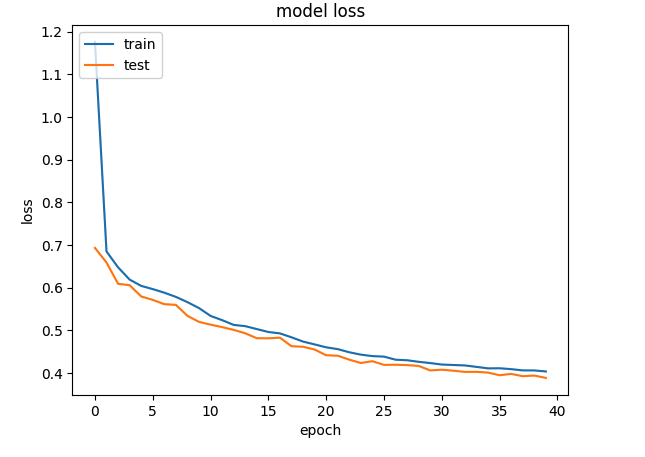
GooglyPlusPlus: Win Probability using Deep Learning and player embeddings

In my last post ‘GooglyPlusPlus now with Win Probability Analysis for all T20 matches‘ I had discussed the performance of my ML models, created with and without player embeddings, in computing the Win Probability of T20 matches. With batsman & bowler embeddings I got much better performance than without the embeddings

  • glmnet – Accuracy – 0.73
  • Random Forest (RF) – Accuracy – 0.92

While the Random Forest gave excellent accuracy, it was bulky and also took an unusually long time to predict the Win Probability of a single T20 match. The above 2 ML models were built using R’s Tidymodels. glmnet was fast, but I wanted to see if I could create a ML model that was better, lighter and faster. I had initially tried to use Tensorflow, Keras in Python but then abandoned it, since I did not know how to port the Deep Learning model to R and use in my app GooglyPlusPlus.

But later, since I was stuck with a bulky Random Forest model, I decided to again explore options for saving the Keras Deep Learning model and loading it in R. I found out that saving the model as .h5, we can load it in R and use it for predictions. Hence, I rebuilt a Deep Learning model using Keras, Python with player embeddings and I got excellent performance. The DL model was light and had an accuracy 0.8639 with an ROC_AUC of 0.964 which was great!

GooglyPlusPlus uses data from Cricsheet and is based on my R package yorkr

You can try out this latest version of GooglyPlusPlus at gpp2023-1

Here are the steps

A. Build a Keras Deep Learning model

a. Import necessary packages

import pandas as pd
import numpy as np
from zipfile import ZipFile
import tensorflow as tf
from tensorflow import keras
from tensorflow.keras import layers
from tensorflow.keras import regularizers
from pathlib import Path
import matplotlib.pyplot as plt

b, Upload the data of all 9 T20 leagues (BBL, CPL, IPL, T20 (men) , T20(women), NTB, CPL, SSM, WBB)

# Read all T20 leagues 
df1=pd.read_csv('t20.csv')
print("Shape of dataframe=",df1.shape)

# Create training and test data set
train_dataset = df1.sample(frac=0.8,random_state=0)
test_dataset = df1.drop(train_dataset.index)
train_dataset1 = train_dataset[['batsmanIdx','bowlerIdx','ballNum','ballsRemaining','runs','runRate','numWickets','runsMomentum','perfIndex']]
test_dataset1 = test_dataset[['batsmanIdx','bowlerIdx','ballNum','ballsRemaining','runs','runRate','numWickets','runsMomentum','perfIndex']]
train_dataset1

# Set the target data
train_labels = train_dataset.pop('isWinner')
test_labels = test_dataset.pop('isWinner')
train_dataset1

a=train_dataset1.describe()
stats=a.transpose
a

c. Create a Deep Learning ML model using batsman & bowler embeddings

import pandas as pd
import numpy as np
from keras.layers import Input, Embedding, Flatten, Dense
from keras.models import Model
from keras.layers import Input, Embedding, Flatten, Dense, Reshape, Concatenate, Dropout
from keras.models import Model

# Set seed
tf.random.set_seed(432)

# create input layers for each of the predictors
batsmanIdx_input = Input(shape=(1,), name='batsmanIdx')
bowlerIdx_input = Input(shape=(1,), name='bowlerIdx')
ballNum_input = Input(shape=(1,), name='ballNum')
ballsRemaining_input = Input(shape=(1,), name='ballsRemaining')
runs_input = Input(shape=(1,), name='runs')
runRate_input = Input(shape=(1,), name='runRate')
numWickets_input = Input(shape=(1,), name='numWickets')
runsMomentum_input = Input(shape=(1,), name='runsMomentum')
perfIndex_input = Input(shape=(1,), name='perfIndex')

# Set the embedding size as the 4th root of unique batsmen, bowlers
no_of_unique_batman=len(df1["batsmanIdx"].unique()) 
no_of_unique_bowler=len(df1["bowlerIdx"].unique()) 
embedding_size_bat = no_of_unique_batman ** (1/4)
embedding_size_bwl = no_of_unique_bowler ** (1/4)


# create embedding layer for the categorical predictor
batsmanIdx_embedding = Embedding(input_dim=no_of_unique_batman+1, output_dim=16,input_length=1)(batsmanIdx_input)
batsmanIdx_flatten = Flatten()(batsmanIdx_embedding)
bowlerIdx_embedding = Embedding(input_dim=no_of_unique_bowler+1, output_dim=16,input_length=1)(bowlerIdx_input)
bowlerIdx_flatten = Flatten()(bowlerIdx_embedding)

# concatenate all the predictors
x = keras.layers.concatenate([batsmanIdx_flatten,bowlerIdx_flatten, ballNum_input, ballsRemaining_input, runs_input, runRate_input, numWickets_input, runsMomentum_input, perfIndex_input])

# add hidden layers
# Use dropouts for regularisation
x = Dense(64, activation='relu')(x)
x = Dropout(0.1)(x)
x = Dense(32, activation='relu')(x)
x = Dropout(0.1)(x)
x = Dense(16, activation='relu')(x)
x = Dropout(0.1)(x)
x = Dense(8, activation='relu')(x)
x = Dropout(0.1)(x)

# add output layer
output = Dense(1, activation='sigmoid', name='output')(x)
print(output.shape)

# create a DL model
model = Model(inputs=[batsmanIdx_input,bowlerIdx_input, ballNum_input, ballsRemaining_input, runs_input, runRate_input, numWickets_input, runsMomentum_input, perfIndex_input], outputs=output)
model.summary()

# compile model
optimizer=keras.optimizers.Adam(learning_rate=.01, beta_1=0.9, beta_2=0.999, epsilon=1e-07, decay=0.0, amsgrad=True)

model.compile(optimizer=optimizer, loss='binary_crossentropy', metrics=['accuracy'])

# train the model
history=model.fit([train_dataset1['batsmanIdx'],train_dataset1['bowlerIdx'],train_dataset1['ballNum'],train_dataset1['ballsRemaining'],train_dataset1['runs'],
           train_dataset1['runRate'],train_dataset1['numWickets'],train_dataset1['runsMomentum'],train_dataset1['perfIndex']], train_labels, epochs=40, batch_size=1024,
          validation_data = ([test_dataset1['batsmanIdx'],test_dataset1['bowlerIdx'],test_dataset1['ballNum'],test_dataset1['ballsRemaining'],test_dataset1['runs'],
           test_dataset1['runRate'],test_dataset1['numWickets'],test_dataset1['runsMomentum'],test_dataset1['perfIndex']],test_labels), verbose=1)

plt.plot(history.history["loss"])
plt.plot(history.history["val_loss"])
plt.title("model loss")
plt.ylabel("loss")
plt.xlabel("epoch")
plt.legend(["train", "test"], loc="upper left")
plt.show()

Model: "model_5"
__________________________________________________________________________________________________
 Layer (type)                   Output Shape         Param #     Connected to                     
==================================================================================================
 batsmanIdx (InputLayer)        [(None, 1)]          0           []                               
                                                                                                  
 bowlerIdx (InputLayer)         [(None, 1)]          0           []                               
                                                                                                  
 embedding_10 (Embedding)       (None, 1, 16)        75888       ['batsmanIdx[0][0]']             
                                                                                                  
 embedding_11 (Embedding)       (None, 1, 16)        55808       ['bowlerIdx[0][0]']              
                                                                                                  
 flatten_10 (Flatten)           (None, 16)           0           ['embedding_10[0][0]']           
                                                                                                  
 flatten_11 (Flatten)           (None, 16)           0           ['embedding_11[0][0]']           
                                                                                                  
 ballNum (InputLayer)           [(None, 1)]          0           []                               
                                                                                                  
 ballsRemaining (InputLayer)    [(None, 1)]          0           []                               
                                                                                                  
 runs (InputLayer)              [(None, 1)]          0           []                               
                                                                                                  
 runRate (InputLayer)           [(None, 1)]          0           []                               
                                                                                                  
 numWickets (InputLayer)        [(None, 1)]          0           []                               
                                                                                                  
 runsMomentum (InputLayer)      [(None, 1)]          0           []                               
                                                                                                  
 perfIndex (InputLayer)         [(None, 1)]          0           []                               
                                                                                                  
 concatenate_5 (Concatenate)    (None, 39)           0           ['flatten_10[0][0]',             
                                                                  'flatten_11[0][0]',             
                                                                  'ballNum[0][0]',                
                                                                  'ballsRemaining[0][0]',         
                                                                  'runs[0][0]',                   
                                                                  'runRate[0][0]',                
                                                                  'numWickets[0][0]',             
                                                                  'runsMomentum[0][0]',           
                                                                  'perfIndex[0][0]']              
                                                                                                  
 dense_19 (Dense)               (None, 64)           2560        ['concatenate_5[0][0]']          
                                                                                                  
 dropout_19 (Dropout)           (None, 64)           0           ['dense_19[0][0]']               
                                                                                                  
 dense_20 (Dense)               (None, 32)           2080        ['dropout_19[0][0]']             
                                                                                                  
 dropout_20 (Dropout)           (None, 32)           0           ['dense_20[0][0]']               
                                                                                                  
 dense_21 (Dense)               (None, 16)           528         ['dropout_20[0][0]']             
                                                                                                  
 dropout_21 (Dropout)           (None, 16)           0           ['dense_21[0][0]']               
                                                                                                  
 dense_22 (Dense)               (None, 8)            136         ['dropout_21[0][0]']             
                                                                                                  
 dropout_22 (Dropout)           (None, 8)            0           ['dense_22[0][0]']               
                                                                                                  
 output (Dense)                 (None, 1)            9           ['dropout_22[0][0]']             
                                                                                                  
==================================================================================================
Total params: 137,009
Trainable params: 137,009
Non-trainable params: 0
__________________________________________________________________________________________________
Epoch 1/40
937/937 [==============================] - 11s 10ms/step - loss: 0.5683 - accuracy: 0.6968 - val_loss: 0.4480 - val_accuracy: 0.7708
Epoch 2/40
937/937 [==============================] - 9s 10ms/step - loss: 0.4477 - accuracy: 0.7721 - val_loss: 0.4305 - val_accuracy: 0.7833
Epoch 3/40
937/937 [==============================] - 9s 10ms/step - loss: 0.4229 - accuracy: 0.7832 - val_loss: 0.3984 - val_accuracy: 0.7936
...
...
937/937 [==============================] - 10s 10ms/step - loss: 0.2909 - accuracy: 0.8627 - val_loss: 0.2943 - val_accuracy: 0.8613
Epoch 38/40
937/937 [==============================] - 10s 10ms/step - loss: 0.2892 - accuracy: 0.8633 - val_loss: 0.2933 - val_accuracy: 0.8621
Epoch 39/40
937/937 [==============================] - 10s 10ms/step - loss: 0.2889 - accuracy: 0.8638 - val_loss: 0.2941 - val_accuracy: 0.8620
Epoch 40/40
937/937 [==============================] - 10s 11ms/step - loss: 0.2886 - accuracy: 0.8639 - val_loss: 0.2929 - val_accuracy: 0.8621

d. Compute and plot the ROC-AUC for the above model

from sklearn.metrics import roc_curve

# Select a random sample set
tf.random.set_seed(59)
train = df1.sample(frac=0.9,random_state=0)
test = df1.drop(train_dataset.index)
test_dataset1 = test[['batsmanIdx','bowlerIdx','ballNum','ballsRemaining','runs','runRate','numWickets','runsMomentum','perfIndex']]
test_labels = test.pop('isWinner')

# Compute the predicted values
y_pred_keras = model.predict([test_dataset1['batsmanIdx'],test_dataset1['bowlerIdx'],test_dataset1['ballNum'],test_dataset1['ballsRemaining'],test_dataset1['runs'],
           test_dataset1['runRate'],test_dataset1['numWickets'],test_dataset1['runsMomentum'],test_dataset1['perfIndex']]).ravel()

# Compute TPR & FPR
fpr_keras, tpr_keras, thresholds_keras = roc_curve(test_labels, y_pred_keras)

fpr_keras, tpr_keras, thresholds_keras = roc_curve(test_labels, y_pred_keras)
from sklearn.metrics import auc

# Plot the Area Under the Curve (AUC)
auc_keras = auc(fpr_keras, tpr_keras)
plt.figure(1)
plt.plot([0, 1], [0, 1], 'k--')
plt.plot(fpr_keras, tpr_keras, label='Keras (area = {:.3f})'.format(auc_keras))
plt.xlabel('False positive rate')
plt.ylabel('True positive rate')
plt.title('ROC curve')
plt.legend(loc='best')
plt.show()

The ROC_AUC for the Deep Learning Model is 0.946 as seen below

e. Save the Keras model for use in Python

from keras.models import Model
model.save("wpDL.h5")

f. Load the model in R using rhdf5 package for use in GooglyPlusPlus

library(rhdf5)
dl_model <- load_model_hdf5('wpDL.h5')

This was a huge success for me to be able to create the Deep Learning model in Python and use it in my Shiny app GooglyPlusPlus. The Deep Learning Keras model is light-weight and extremely fast.

The Deep Learning model has now been integrated into GooglyPlusPlus. Now you can check the Win Probability using both a) glmnet (Logistic Regression with lasso regularisation) b) Keras Deep Learning model with dropouts as regularisation

In addition I have created 2 features based on Win Probability (WP)

i) Win Probability (Side-by-side – Plot(interactive) : With this functionality the 1st and 2nd innings will be side-by-side. When the 1st innings is played by team 1, the Win Probability of team 2 = 100 – WP (team1). Similarly, when the 2nd innings is being played by team 2, the Win Probability of team1 = 100 – WP (team 2)

ii) Win Probability (Overlapping) – Plot (static): With this functionality the Win Probabilities of both team1(1st innings) & team 2 (2nd innings) are displayed overlapping, so that we can see how the probabilities vary ball-by-ball.

Note: Since the same UI is used for all match functions I had to re-use the Plot(interactive) and Plot(static) radio buttons for Win Probability (Side-by-side) and Win Probability(Overlapping) respectively

Here are screenshots using both ML models with both functionality for some random matches

B) ICC T20 Men World Cup – Netherland-South Africa- 2022-11-06

i) Match Worm wicket chart

ii) Win Probability with LR (Side-by-Side- Plot(interactive))

iii) Win Probability LR (Overlapping- Plot(static))

iv) Win Probability Deep Learning (Side-by-side – Plot(interactive)

In the 213th ball of the innings South Africa was slightly ahead of Netherlands. After that they crashed and burned!

v) Win Probability Deep Learning (Overlapping – Plot (static)

It can be seen that in the 94th ball of both innings South Africa was ahead of Netherlands before the eventual slump.

C) Intl. T20 (Women) India – New Zealand – 2020 – 02 – 27

Here is an interesting match between India and New Zealand T20 Women’s teams. NZ successfully chased the India’s total in a wildly swinging fortunes. See the charts below

i) Match Worm Wicket chart

ii) Win Probability with LR (Side-by-side – Plot (interactive)

iii) Win Probability with LR (Overlapping – Plot (static)

iv) Win Probability with DL model (Side-by-side – Plot (interactive))

v) Win Probability with DL model (Overlapping – Plot (static))

The above functionality in plotting the Win Probability using LR or DL with both options (Side-by-side or Overlapping) is available for all 9 T20 leagues currently supported by GooglyPlusPlus.

Go ahead and give gpp2023-1 a try!!!

Do also check out my other posts’

  1. Deep Learning from first principles in Python, R and Octave – Part 7
  2. Big Data 6: The T20 Dance of Apache NiFi and yorkpy
  3. Latency, throughput implications for the Cloud
  4. Design Principles of Scalable, Distributed Systems
  5. Cricpy adds team analytics to its arsenal!!
  6. Analyzing performances of cricketers using cricketr template
  7. Modeling a Car in Android
  8. Using Linear Programming (LP) for optimizing bowling change or batting lineup in T20 cricket
  9. Introducing QCSimulator: A 5-qubit quantum computing simulator in R
  10. Experiments with deblurring using OpenCV
  11. Using embeddings, collaborative filtering with Deep Learning to analyse T20 players

To see all posts click Index of posts
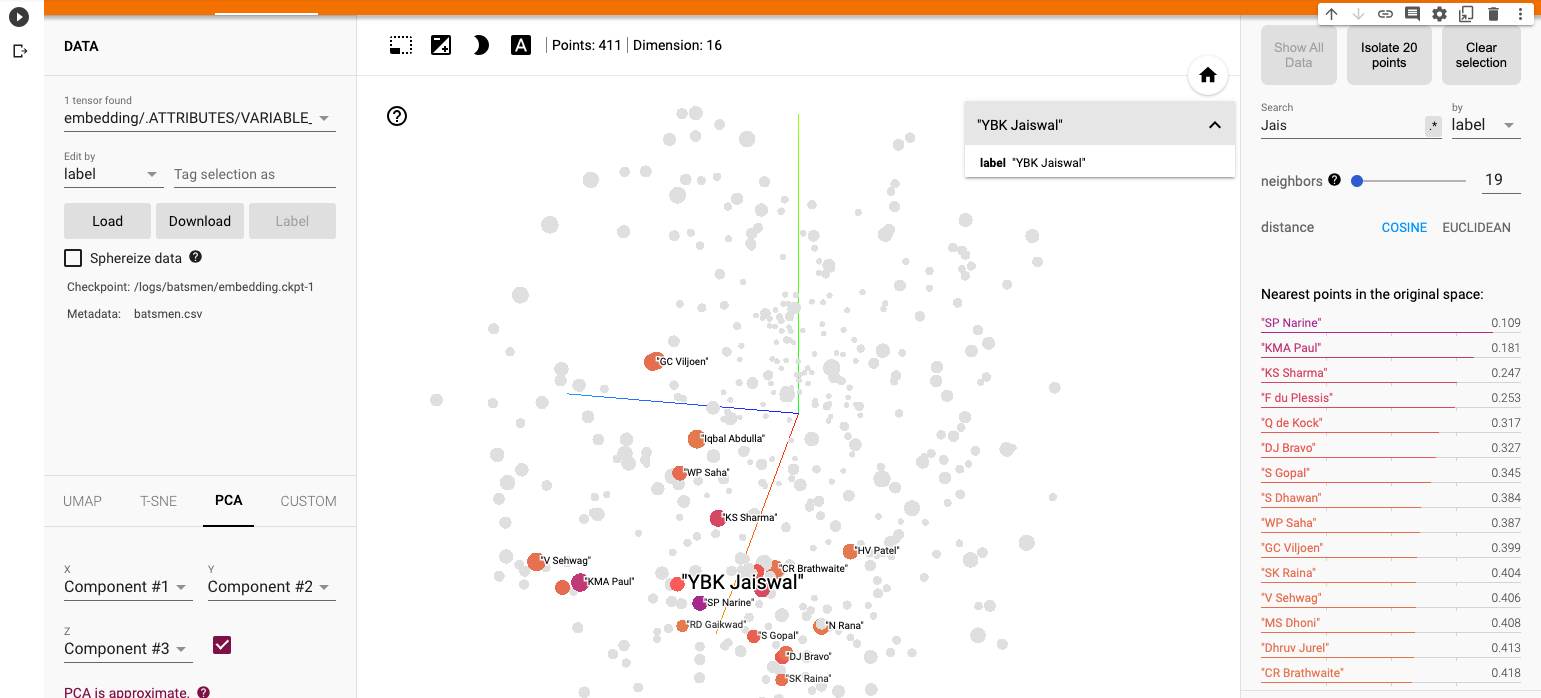
Using embeddings, collaborative filtering with Deep Learning to analyse T20 players

There is a school of thought which considers that total runs scored and strike rate for a batsman, or total wickets taken and economy rate for a bowler, do not tell the whole story. This is true to a fair extent. The runs scored or the wickets taken could have been against weaker teams and hence the runs, strike rate or the wickets and economy rate alone do not capture all the performance details of the batsman or bowler. A technique to determine the performance of batsmen against different bowlers and identify the batsman’s possible performance even against bowlers he/she has not yet faced could be done with collaborative filtering. Collaborative filtering, with embeddings can also be used to group players with similar characteristics. Similarly, we could also identify the performance of bowlers versus different batsmen. Hence we need to look at average runs, SR and total wickets, ER with the lens of batsmen, bowlers against similar opposition. This is where collaborative filtering is useful.

The table below shows the performance of all batsman against all bowlers in the table below. The row in the table below is the batsman and the column is the bowler, with the value in the cell is the total Runs scored by the batsman against the bowler in all matches. Note the values are 0 for batsmen who have not yet faced specific bowlers. The table is fairly sparse.

Table A

Similarly, we can compute the performance of all bowlers against all batsmen as in the table below. Here the row is the bowler, the column batsman and the value in the cell is the number of times the bowler got the batsman’s wicket. As before the data is sparsely populated

This problem of computing batsman’s performance against bowlers or vice versa, is identical to the user vs movie rating problem used in collaborative filtering. For e.g we could consider

This above problem depicted could be computed using collaborative filtering with embeddings. We could assign sequential numbers for the batsmen from 1 to M, and for the bowlers from 1 to N. The total runs scored could be represented only for the rows where there are values. One way to solve this problem in Machine Learning is to use One Hot Encoding (OHE), where we assign values for each row and each column and map the values of the table with values of the cell for each combination. But this would take a enormous computation time and memory. The solution to this is use vector embeddings. Here embeddings could be used for capturing the sparse tensors between the batsmen, bowlers, runs scored or vice versa between bowlers against batsmen and the wickets taken. We only need to consider the cells for which values exist. An embedding is a relatively low-dimensional space, into which you can translate high-dimensional vectors. An embedding captures some of the semantics of the input by placing semantically similar inputs close together in the embedding space.

a) To compute bowler performances and identify similarities between bowlers the following embedding in the Deep Learning Network was used

To compute batsmen similarities a similar Deep Learning network for bowler vs batsmen is used

I had earlier created another post Player Performance Estimation using AI Collaborative Filtering for batsman and bowler recommendation, using R package Recommender Lab. However, I was not too happy with the results I got with this R package. When I searched the net for material on using embeddings for collaborative filtering, most of material on the web on movie lens or word2vec are repetitive and have no new material. Finally, this short video lecture from Developer Google on Embeddings provided the most clarity.

I have created 4 Colab notebooks to identify player similarities (recommendations)

a) Batsman similarities IPL

b) Batsman similarities T20

c) Bowler similarities IPL

d) Bowler similarities T20

For creating the model I have used all the data for T20 and IPL from so that I get the best results. The data is from Cricsheet. I have also used Google’s Embeddings Projector to display batsman and bowler embedding to and to group similar players

All the Colab notebooks and the data associated with the code are available in Github. Feel free to download and execute them. See if you get better performance. I tried a wide variety of hyperparameters – learning rate, width and depth of nodes per layer, number of layers, gradient methods etc.

You can download all the code & data from Github at embeddings

A) Batsman Recommender IPL (BatsmanRecommenderIPLA.ipynb)

Steps for creating the model

a) Upload bowler vs batsmen with times wicket was taken for batsman. This will be a sparse matrix

b) Assign integer indices for bowlers, batsmen

c) Add additional input features balls, runs conceded and Economy rate

d) Minimise loss for wickets taken for the bowler using SGD

e) Display embeddings of similar batsmen using Tensorboard projector

a) Upload data

Upload data file
2. Remove rows where wickets = 0

from google.colab import files
import io
uploaded = files.upload()
df2 = pd.read_csv(io.BytesIO(uploaded['bowlerVsBatsmanIPLE.csv']))
print(df2.shape)
df2 = df2.loc[df2['wicketTaken']!= 0]
print(df2.shape)

uploaded = files.upload()
df6 = pd.read_csv(io.BytesIO(uploaded['bowlerVsBatsmanIPLAll.csv']))
df6


Out[14]:

bowler1batsman1ballsrunsConcededER
0A Ashish ReddyDJG Sammy100.000000
1A Ashish ReddyG Gambhir101710.200000
2A Ashish ReddyJEC Franklin200.000000
3A Ashish ReddyLRPL Taylor567.200000
4A Ashish ReddyMA Agarwal3714.000000
8550Z KhanVishnu Vinod4812.000000
8551Z KhanVS Malik3510.000000
8552Z KhanW Jaffer732.571429
8553Z KhanYK Pathan22359.545455
8554Z KhanYuvraj Singh12126.000000

b) Create integer dictionaries for batsmen & bowlers

bowlers = df3["bowler1"].unique().tolist()
bowlers
# Create dictionary of bowler to index
bowlers2index = {x: i for i, x in enumerate(bowlers)}
bowlers2index
#Create dictionary of index tp bowler
index2bowlers = {i: x for i, x in enumerate(bowlers)}
index2bowlers


batsmen = df3["batsman1"].unique().tolist()
batsmen
# Create dictionary of batsman to index
batsmen2index = {x: i for i, x in enumerate(batsmen)}
batsmen2index
# Create dictionary of index to batsman
index2batsmen = {i: x for i, x in enumerate(batsmen)}
index2batsmen

#Map bowler, batsman to respective indices
df3["bowler"] = df3["bowler1"].map(bowlers2index)
df3["batsman"] = df3["batsman1"].map(batsmen2index)
df3
num_bowlers =len(bowlers2index)
num_batsmen = len(batsmen2index)
df3["wicketTaken"] = df3["wicketTaken"].values.astype(np.float32)
df3
# min and max ratings will be used to normalize the ratings later
min_wicketTaken = min(df3["wicketTaken"])
max_wicketTaken = max(df3["wicketTaken"])

print(
    "Number of bowlers: {}, Number of batsmen: {}, Min wicketsTaken: {}, Max wicketsTaken: {}".format(
        num_bowlers, num_batsmen, min_wicketTaken, max_wicketTaken
    )
)

c) Concatenate additional features

df3
df6
df31=pd.concat([df3,df6],axis=1)
df31

d) Create a Tensorflow/Keras deep learning mode. Minimise using Mean Squared Error using Stochastic Gradient Descent. I used ‘dropouts’ to regularise the model to keep validation loss within limits

tf.random.set_seed(4)
vector_size=len(batsmen2index)

df4=df31[['bowler','batsman','wicketTaken','balls','runsConceded','ER']]
df4
train_dataset = df4.sample(frac=0.9,random_state=0)
test_dataset = df4.drop(train_dataset.index)

train_dataset1 = train_dataset[['bowler','batsman','balls','runsConceded','ER']]
test_dataset1 = test_dataset[['bowler','batsman','balls','runsConceded','ER']]
train_stats = train_dataset1.describe()
train_stats = train_stats.transpose()
#print(train_stats)

train_labels = train_dataset.pop('wicketTaken')
test_labels = test_dataset.pop('wicketTaken')

# Create a Deep Learning model with keras
model = tf.keras.Sequential([
    tf.keras.layers.Embedding(vector_size,16,input_length=5),
    tf.keras.layers.Flatten(),
    keras.layers.Dropout(.2),
    keras.layers.Dense(16),
 
    keras.layers.Dense(8,activation=tf.nn.relu),
    
    keras.layers.Dense(4,activation=tf.nn.relu),
    keras.layers.Dense(1)
  ])

# Print the model summary
#model.summary()
# Use the Adam optimizer with a learning rate of 0.01
#optimizer=keras.optimizers.Adam(learning_rate=.0009, beta_1=0.5, beta_2=0.999, epsilon=None, decay=0.0, amsgrad=True)
#optimizer=keras.optimizers.RMSprop(learning_rate=0.01, rho=0.2, momentum=0.2, epsilon=1e-07)
#optimizer=keras.optimizers.SGD(learning_rate=.009,momentum=0.1) - Works without dropout
optimizer=keras.optimizers.SGD(learning_rate=.01,momentum=0.1)

model.compile(loss='mean_squared_error',
                optimizer=optimizer,
                )

 # Setup the training parameters
#model.compile(loss='binary_crossentropy',optimizer='rmsprop',metrics=['accuracy'])
# Create a model
history=model.fit(
  train_dataset1, train_labels,batch_size=32,
  epochs=40, validation_data = (test_dataset1,test_labels), verbose=1)

e) Plot losses

f) Predict wickets that will be taken by bowlers against random batsmen


df5= df4[['bowler','batsman','balls','runsConceded','ER']]
test1 = df5.sample(n=10)
test1.shape
for i in range(test1.shape[0]):
      print('Bowler :', index2bowlers.get(test1.iloc[i,0]), ", Batsman : ",index2batsmen.get(test1.iloc[i,1]), '- Times wicket Prediction:',model.predict(test1.iloc[[i]]))
1/1 [==============================] - 0s 90ms/step
Bowler : Harbhajan Singh , Batsman :  AM Nayar - Times wicket Prediction: [[1.0114906]]
1/1 [==============================] - 0s 18ms/step
Bowler : T Natarajan , Batsman :  Arshdeep Singh - Times wicket Prediction: [[0.98656166]]
1/1 [==============================] - 0s 19ms/step
Bowler : KK Ahmed , Batsman :  A Mishra - Times wicket Prediction: [[1.0504484]]
1/1 [==============================] - 0s 24ms/step
Bowler : M Muralitharan , Batsman :  F du Plessis - Times wicket Prediction: [[1.0941994]]
1/1 [==============================] - 0s 25ms/step
Bowler : SK Warne , Batsman :  DR Smith - Times wicket Prediction: [[1.0679393]]
1/1 [==============================] - 0s 28ms/step
Bowler : Mohammad Nabi , Batsman :  Ishan Kishan - Times wicket Prediction: [[1.403399]]
1/1 [==============================] - 0s 32ms/step
Bowler : R Bhatia , Batsman :  DJ Thornely - Times wicket Prediction: [[0.89399755]]
1/1 [==============================] - 0s 26ms/step
Bowler : SP Narine , Batsman :  MC Henriques - Times wicket Prediction: [[1.1997008]]
1/1 [==============================] - 0s 19ms/step
Bowler : AS Rajpoot , Batsman :  K Gowtham - Times wicket Prediction: [[0.9911405]]
1/1 [==============================] - 0s 21ms/step
Bowler : K Rabada , Batsman :  P Simran Singh - Times wicket Prediction: [[1.0064855]]

g) The embedding can be visualised using Google’s Embedding Projector, which identifies other batsmen who have similar characteristics. Here Cosine Similarity is used for grouping similar batsmen of IPL

The closest neighbor for AB De Villiers in IPL is SK Raina, then Rohit Sharma as seen in the visualisation below

B. Bowler Recommender T20 (BowlerRecommenderT20M1A.ipynb)

Similar to how batsman was set up,

The steps are

a) Upload data for T20 Batsman vs Bowler with Total runs scored. This will be a sparse matrix

b) Create integer dictionaries for batsman & bowler

c) Add additional features like fours, sixes and strike rate

d) Minimise loss for wicket taken

e) Display embeddings of bowlers using Tensorboard Embeddings Projector

Minimizing the loss for wicket taken using SGD

tf.random.set_seed(4)
vector_size=len(batsman2index)

#Normalize target variable
df4=df31[['bowler','batsman','totalRuns','fours','sixes','ballsFaced']]
df4['normalizedRuns'] = (df4['totalRuns'] -df4['totalRuns'].mean())/df4['totalRuns'].std()
print(df4)
train_dataset = df4.sample(frac=0.8,random_state=0)
test_dataset = df4.drop(train_dataset.index)
train_dataset1 = train_dataset[['batsman','bowler','fours','sixes','ballsFaced']]
test_dataset1 = test_dataset[['batsman','bowler','fours','sixes','ballsFaced']]

train_labels = train_dataset.pop('normalizedRuns')
test_labels = test_dataset.pop('normalizedRuns')
train_labels
print(train_dataset1)

# Create a Deep Learning model with keras
model = tf.keras.Sequential([
    tf.keras.layers.Embedding(vector_size,16,input_length=5),
    tf.keras.layers.Flatten(),
    keras.layers.Dropout(.2),
    keras.layers.Dense(16),
 
    keras.layers.Dense(8,activation=tf.nn.relu),
    
    keras.layers.Dense(4,activation=tf.nn.relu),
    keras.layers.Dense(1)
  ])

# Print the model summary
#model.summary()
# Use the Adam optimizer with a learning rate of 0.01
#optimizer=keras.optimizers.Adam(learning_rate=.0009, beta_1=0.5, beta_2=0.999, epsilon=None, decay=0.0, amsgrad=True)
#optimizer=keras.optimizers.RMSprop(learning_rate=0.001, rho=0.2, momentum=0.2, epsilon=1e-07)
#optimizer=keras.optimizers.SGD(learning_rate=.009,momentum=0.1) - Works without dropout
optimizer=keras.optimizers.SGD(learning_rate=.01,momentum=0.1)

model.compile(loss='mean_squared_error',
                optimizer=optimizer,
                )

 # Setup the training parameters
#model.compile(loss='binary_crossentropy',optimizer='rmsprop',metrics=['accuracy'])
# Create a model
history=model.fit(
  train_dataset1, train_labels,batch_size=32,
  epochs=40, validation_data = (test_dataset1,test_labels), verbose=1)
model.predict(train_dataset1[1:10])
df5= df4[['batsman','bowler','fours','sixes','ballsFaced']]
test1 = df5.sample(n=10)
model.predict(test1)
#(model.predict(test1)* df4['totalRuns'].std()) + df4['totalRuns'].mean()
for i in range(test1.shape[0]):
        print('Batsman :', index2batsman.get(test1.iloc[i,0]), ", Bowler : ",index2bowler.get(test1.iloc[i,1]), '- Total runs Prediction:',(model.predict(test1.iloc[i])* df4['totalRuns'].std()) + df4['totalRuns'].mean())
1/1 [==============================] - 0s 396ms/step
1/1 [==============================] - 0s 112ms/step
1/1 [==============================] - 0s 183ms/step
Batsman : G Chohan , Bowler :  Khawar Ali - Total runs Prediction: [[1.8883028]]
1/1 [==============================] - 0s 56ms/step
Batsman : Umar Akmal , Bowler :  LJ Wright - Total runs Prediction: [[9.305391]]
1/1 [==============================] - 0s 68ms/step
Batsman : M Shumba , Bowler :  Simi Singh - Total runs Prediction: [[19.662743]]
1/1 [==============================] - 0s 30ms/step
Batsman : CH Gayle , Bowler :  RJW Topley - Total runs Prediction: [[16.854687]]
1/1 [==============================] - 0s 39ms/step
Batsman : BA King , Bowler :  Taskin Ahmed - Total runs Prediction: [[3.5154686]]
1/1 [==============================] - 0s 102ms/step
Batsman : KD Shah , Bowler :  Avesh Khan - Total runs Prediction: [[8.411661]]
1/1 [==============================] - 0s 38ms/step
Batsman : ST Jayasuriya , Bowler :  SCJ Broad - Total runs Prediction: [[5.867449]]
1/1 [==============================] - 0s 45ms/step
Batsman : AB de Villiers , Bowler :  Saeed Ajmal - Total runs Prediction: [[15.150892]]
1/1 [==============================] - 0s 46ms/step
Batsman : SV Samson , Bowler :  J Little - Total runs Prediction: [[10.44426]]
1/1 [==============================] - 0s 102ms/step
Batsman : Zawar Farid , Bowler :  GJ Delany - Total runs Prediction: [[1.9770675]]

Identifying similar bowlers using Embeddings Projector for T20

Bhuvaneshwar Kumar’s performance is closest to CR Woakes

Note: Incidentally the accuracy in the above model was not too good. I may work on this again later!

C) Bowler Embeddings IPL – Grouping similar bowlers of IPL with Embeddings Projector (BowlerRecommenderIPLA.ipynb)

D) Batting Embeddings T20 – Grouping similar batsmen of T20 (BatsmanRecommenderT20MA.ipynb)

The Tensorboard Pmbeddings projector is also interesting. There are multiple ways the data can be visualised namely UMAP, T-SNE, PCA(included). You could play with it.

As mentioned above the Colab notebooks and data are available at Github embeddings

The ability to identify batsmen & bowlers who would perform similarly against specific bowling attacks coupled with the average runs & strike rate should give a good measure of a player’s performance.

Take a look at some of my other posts

  1. Using Reinforcement Learning to solve Gridworld
  2. Deep Learning from first principles in Python, R and Octave – Part 4
  3. Big Data 7: yorkr waltzes with Apache NiFi
  4. Programming languages in layman’s language
  5. Pitching yorkpy…swinging away from the leg stump to IPL – Part 3
  6. Re-introducing cricketr! : An R package to analyze performances of cricketers
  7. The making of Total Control Android game
  8. Presentation on “Intelligent Networks, CAMEL protocol, services & applications”
  9. Exploring Quantum Gate operations with QCSimulator

To see all posts click Index of posts
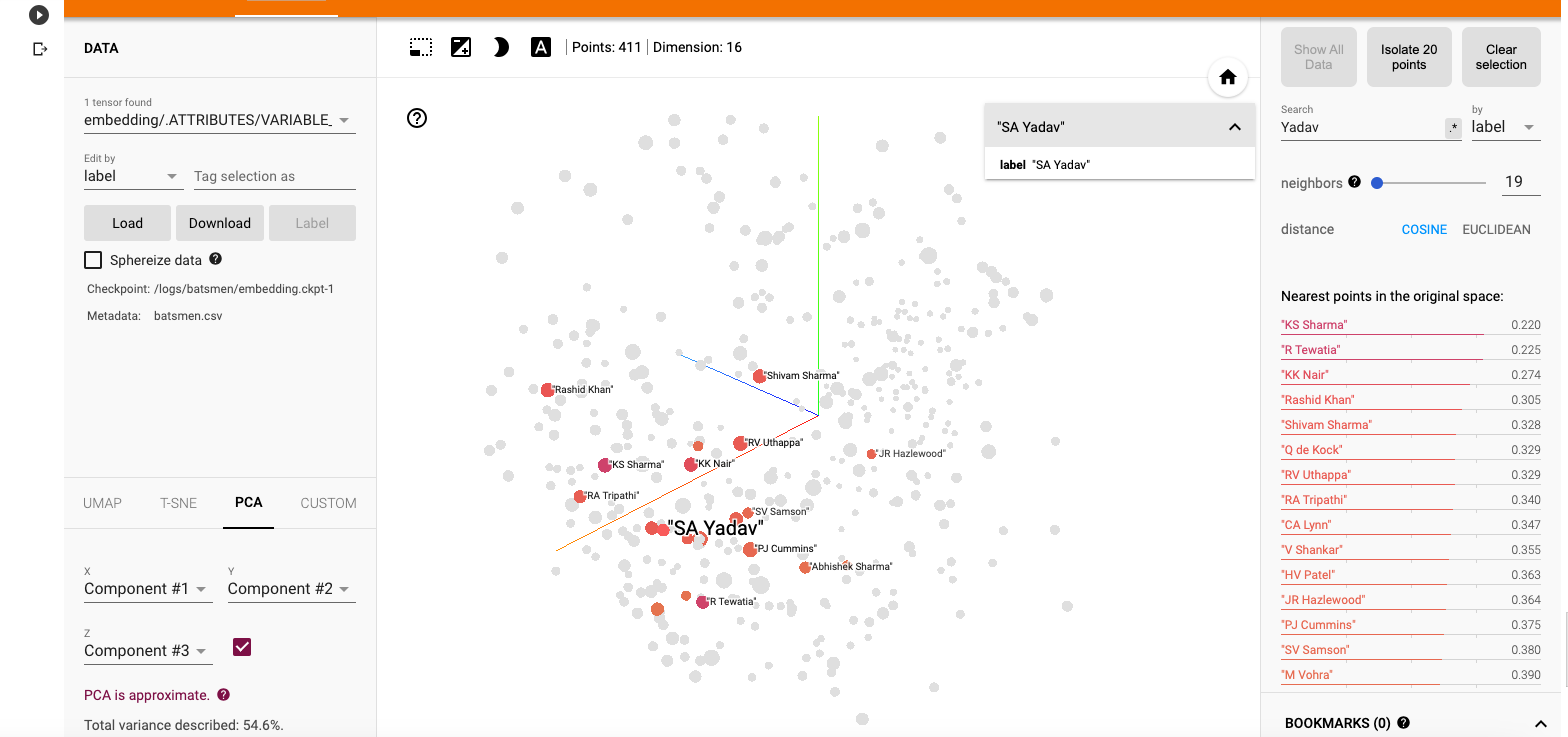
Deconstructing Convolutional Neural Networks with Tensorflow and Keras

I have been very fascinated by how Convolution Neural  Networks have been able to, so efficiently,  do image classification and image recognition CNN’s have been very successful in in both these tasks. A good paper that explores the workings of a CNN Visualizing and Understanding Convolutional Networks  by Matthew D Zeiler and Rob Fergus. They show how through a reverse process of convolution using a deconvnet.

In their paper they show how by passing the feature map through a deconvnet ,which does the reverse process of the convnet, they can reconstruct what input pattern originally caused a given activation in the feature map

In the paper they say “A deconvnet can be thought of as a convnet model that uses the same components (filtering, pooling) but in reverse, so instead of mapping pixels to features, it does the opposite. An input image is presented to the CNN and features  activation computed throughout the layers. To examine a given convnet activation, we set all other activations in the layer to zero and pass the feature maps as input to the attached deconvnet layer. Then we successively (i) unpool, (ii) rectify and (iii) filter to reconstruct the activity in the layer beneath that gave rise to the chosen activation. This is then repeated until input pixel space is reached.”

I started to scout the internet to see how I can implement this reverse process of Convolution to understand what really happens under the hood of a CNN.  There are a lot of good articles and blogs, but I found this post Applied Deep Learning – Part 4: Convolutional Neural Networks take the visualization of the CNN one step further.

This post takes VGG16 as the pre-trained network and then uses this network to display the intermediate visualizations.  While this post was very informative and also the visualizations of the various images were very clear, I wanted to simplify the problem for my own understanding.

Hence I decided to take the MNIST digit classification as my base problem. I created a simple 3 layer CNN which gives close to 99.1% accuracy and decided to see if I could do the visualization.

As mentioned in the above post, there are 3 major visualisations

  1. Feature activations at the layer
  2. Visualisation of the filters
  3. Visualisation of the class outputs

Feature Activation – This visualization the feature activation at the 3 different layers for a given input image. It can be seen that first layer  activates based on the edge of the image. Deeper layers activate in a more abstract way.

Visualization of the filters: This visualization shows what patterns the filters respond maximally to. This is implemented in Keras here

To do this the following is repeated in a loop

  • Choose a loss function that maximizes the value of a convnet filter activation
  • Do gradient ascent (maximization) in input space that increases the filter activation

Visualizing Class Outputs of the MNIST Convnet: This process is similar to determining the filter activation. Here the convnet is made to generate an image that represents the category maximally.

You can access the Google colab notebook here – Deconstructing Convolutional Neural Networks in Tensoflow and Keras

import numpy as np
import pandas as pd
import os
import tensorflow as tf
import matplotlib.pyplot as plt
from keras.layers import Dense, Dropout, Flatten
from keras.layers import Conv2D, MaxPooling2D, Input
from keras.models import Model
from sklearn.model_selection import train_test_split
from keras.utils import np_utils
Using TensorFlow backend.
In [0]:
mnist=tf.keras.datasets.mnist
# Set training and test data and labels
(training_images,training_labels),(test_images,test_labels)=mnist.load_data()
In [0]:
#Normalize training data
X =np.array(training_images).reshape(training_images.shape[0],28,28,1) 
# Normalize the images by dividing by 255.0
X = X/255.0
X.shape
# Use one hot encoding for the labels
Y = np_utils.to_categorical(training_labels, 10)
Y.shape
# Split training data into training and validation data in the ratio of 80:20
X_train, X_validation, y_train, y_validation = train_test_split(X,Y,test_size=0.20, random_state=42)
In [4]:
# Normalize test data
X_test =np.array(test_images).reshape(test_images.shape[0],28,28,1) 
X_test=X_test/255.0
#Use OHE for the test labels
Y_test = np_utils.to_categorical(test_labels, 10)
X_test.shape
Out[4]:
(10000, 28, 28, 1)

Display data

Display the training data and the corresponding labels

In [5]:
print(training_labels[0:10])
f, axes = plt.subplots(1, 10, sharey=True,figsize=(10,10))
for i,ax in enumerate(axes.flat):
    ax.axis('off')
    ax.imshow(X[i,:,:,0],cmap="gray")

Create a Convolutional Neural Network

The CNN consists of 3 layers

  • Conv2D of size 28 x 28 with 24 filters
  • Perform Max pooling
  • Conv2D of size 14 x 14 with 48 filters
  • Perform max pooling
  • Conv2d of size 7 x 7 with 64 filters
  • Flatten
  • Use Dense layer with 128 units
  • Perform 25% dropout
  • Perform categorical cross entropy with softmax activation function
In [0]:
num_classes=10
inputs = Input(shape=(28,28,1))
x = Conv2D(24,kernel_size=(3,3),padding='same',activation="relu")(inputs)
x = MaxPooling2D(pool_size=(2, 2))(x)
x = Conv2D(48, (3, 3), padding='same',activation='relu')(x)
x = MaxPooling2D(pool_size=(2, 2))(x)
x = Conv2D(64, (3, 3), padding='same',activation='relu')(x)
x = MaxPooling2D(pool_size=(2, 2))(x)
x = Flatten()(x)
x = Dense(128, activation='relu')(x)
x = Dropout(0.25)(x)
output = Dense(num_classes,activation="softmax")(x)

model = Model(inputs,output)

model.compile(loss='categorical_crossentropy', 
          optimizer='adam', 
          metrics=['accuracy'])

Summary of CNN

Display the summary of CNN

In [7]:
model.summary()
Model: "model_1"
_________________________________________________________________
Layer (type)                 Output Shape              Param #   
=================================================================
input_1 (InputLayer)         (None, 28, 28, 1)         0         
_________________________________________________________________
conv2d_1 (Conv2D)            (None, 28, 28, 24)        240       
_________________________________________________________________
max_pooling2d_1 (MaxPooling2 (None, 14, 14, 24)        0         
_________________________________________________________________
conv2d_2 (Conv2D)            (None, 14, 14, 48)        10416     
_________________________________________________________________
max_pooling2d_2 (MaxPooling2 (None, 7, 7, 48)          0         
_________________________________________________________________
conv2d_3 (Conv2D)            (None, 7, 7, 64)          27712     
_________________________________________________________________
max_pooling2d_3 (MaxPooling2 (None, 3, 3, 64)          0         
_________________________________________________________________
flatten_1 (Flatten)          (None, 576)               0         
_________________________________________________________________
dense_1 (Dense)              (None, 128)               73856     
_________________________________________________________________
dropout_1 (Dropout)          (None, 128)               0         
_________________________________________________________________
dense_2 (Dense)              (None, 10)                1290      
=================================================================
Total params: 113,514
Trainable params: 113,514
Non-trainable params: 0
_________________________________________________________________

Perform Gradient descent and validate with the validation data

In [8]:
epochs = 20
batch_size=256
history = model.fit(X_train,y_train,
         epochs=epochs,
         batch_size=batch_size,
         validation_data=(X_validation,y_validation))
————————————————
acc = history.history[ ‘accuracy’ ]
val_acc = history.history[ ‘val_accuracy’ ]
loss = history.history[ ‘loss’ ]
val_loss = history.history[‘val_loss’ ]
epochs = range(len(acc)) # Get number of epochs
#————————————————
# Plot training and validation accuracy per epoch
#————————————————
plt.plot ( epochs, acc,label=”training accuracy” )
plt.plot ( epochs, val_acc, label=’validation acuracy’ )
plt.title (‘Training and validation accuracy’)
plt.legend()
plt.figure()
#————————————————
# Plot training and validation loss per epoch
#————————————————
plt.plot ( epochs, loss , label=”training loss”)
plt.plot ( epochs, val_loss,label=”validation loss” )
plt.title (‘Training and validation loss’ )
plt.legend()
Test model on test data
f, axes = plt.subplots(1, 10, sharey=True,figsize=(10,10))
for i,ax in enumerate(axes.flat):
ax.axis(‘off’)
ax.imshow(X_test[i,:,:,0],cmap=”gray”)
l=[]
for i in range(10):
  x=X_test[i].reshape(1,28,28,1)
  y=model.predict(x)
  m = np.argmax(y, axis=1)
  print(m)
[7]
[2]
[1]
[0]
[4]
[1]
[4]
[9]
[5]
[9]

Generate the filter activations at the intermediate CNN layers

In [12]:
img = test_images[51].reshape(1,28,28,1)
fig = plt.figure(figsize=(5,5))
print(img.shape)
plt.imshow(img[0,:,:,0],cmap="gray")
plt.axis('off')

Display the activations at the intermediate layers

This displays the intermediate activations as the image passes through the filters and generates these feature maps

In [13]:
layer_names = ['conv2d_4', 'conv2d_5', 'conv2d_6']

layer_outputs = [layer.output for layer in model.layers if 'conv2d' in layer.name]
activation_model = Model(inputs=model.input,outputs=layer_outputs)
intermediate_activations = activation_model.predict(img)
images_per_row = 8
max_images = 8

for layer_name, layer_activation in zip(layer_names, intermediate_activations):
    print(layer_name,layer_activation.shape)
    n_features = layer_activation.shape[-1]
    print("features=",n_features)
    n_features = min(n_features, max_images)
    print(n_features)

    size = layer_activation.shape[1]
    print("size=",size)
    n_cols = n_features // images_per_row
    display_grid = np.zeros((size * n_cols, images_per_row * size))


    for col in range(n_cols):
      for row in range(images_per_row):
          channel_image = layer_activation[0,:, :, col * images_per_row + row]

          channel_image -= channel_image.mean()
          channel_image /= channel_image.std()
          channel_image *= 64
          channel_image += 128
          channel_image = np.clip(channel_image, 0, 255).astype('uint8')
          display_grid[col * size : (col + 1) * size,
                         row * size : (row + 1) * size] = channel_image
    scale = 2. / size
    plt.figure(figsize=(scale * display_grid.shape[1],
                        scale * display_grid.shape[0]))
    plt.axis('off')
    plt.title(layer_name)
    plt.grid(False)
    plt.imshow(display_grid, aspect='auto', cmap='viridis')
    
plt.show()

It can be seen that at the higher layers only abstract features of the input image are captured
# To fix the ImportError: cannot import name 'imresize' in the next cell. Run this cell. Then comment and restart and run all
#!pip install scipy==1.1.0

Visualize the pattern that the filters respond to maximally

  • Choose a loss function that maximizes the value of the CNN filter in a given layer
  • Start from a blank input image.
  • Do gradient ascent in input space. Modify input values so that the filter activates more
  • Repeat this in a loop.
In [14]:
from vis.visualization import visualize_activation, get_num_filters
from vis.utils import utils
from vis.input_modifiers import Jitter

max_filters = 24
selected_indices = []
vis_images = [[], [], [], [], []]
i = 0
selected_filters = [[0, 3, 11, 15, 16, 17, 18, 22], 
    [8, 21, 23, 25, 31, 32, 35, 41], 
    [2, 7, 11, 14, 19, 26, 35, 48]]

# Set the layers
layer_name = ['conv2d_4', 'conv2d_5', 'conv2d_6']
# Set the layer indices
layer_idx = [1,3,5]
for layer_name,layer_idx in zip(layer_name,layer_idx):


    # Visualize all filters in this layer.
    if selected_filters:
        filters = selected_filters[i]
    else:
        # Randomly select filters
        filters = sorted(np.random.permutation(get_num_filters(model.layers[layer_idx]))[:max_filters])
    selected_indices.append(filters)

    # Generate input image for each filter.
    # Loop through the selected filters in each layer and generate the activation of these filters
    for idx in filters:
        img = visualize_activation(model, layer_idx, filter_indices=idx, tv_weight=0., 
                                   input_modifiers=[Jitter(0.05)], max_iter=300) 
        vis_images[i].append(img)

    # Generate stitched image palette with 4 cols so we get 2 rows.
    stitched = utils.stitch_images(vis_images[i], cols=4)    
    plt.figure(figsize=(20, 30))
    plt.title(layer_name)
    plt.axis('off')
    stitched = stitched.reshape(1,61,127,1)
    plt.imshow(stitched[0,:,:,0])
    plt.show()
    i += 1
from vis.utils import utils
new_vis_images = [[], [], [], [], []]
i = 0
layer_name = ['conv2d_4', 'conv2d_5', 'conv2d_6']
layer_idx = [1,3,5]
for layer_name,layer_idx in zip(layer_name,layer_idx):
   
    # Generate input image for each filter.
    for j, idx in enumerate(selected_indices[i]):
        img = visualize_activation(model, layer_idx, filter_indices=idx, 
                                   seed_input=vis_images[i][j], input_modifiers=[Jitter(0.05)], max_iter=300) 
        #img = utils.draw_text(img, 'Filter {}'.format(idx))  
        new_vis_images[i].append(img)

    stitched = utils.stitch_images(new_vis_images[i], cols=4)   
    plt.figure(figsize=(20, 30))
    plt.title(layer_name)
    plt.axis('off')
    print(stitched.shape)
    stitched = stitched.reshape(1,61,127,1)
    plt.imshow(stitched[0,:,:,0])
    plt.show()
    i += 1

Visualizing Class Outputs

Here the CNN will generate the image that maximally represents the category. Each of the output represents one of the digits as can be seen below

In [16]:
from vis.utils import utils
from keras import activations
codes = '''
zero 0
one 1
two 2
three 3
four 4
five 5
six 6
seven 7
eight 8
nine 9
'''
layer_idx=10
initial = []
images = []
tuples = []
# Swap softmax with linear for better visualization
model.layers[layer_idx].activation = activations.linear
model = utils.apply_modifications(model)
for line in codes.split('\n'):
    if not line:
        continue
    name, idx = line.rsplit(' ', 1)
    idx = int(idx)
    img = visualize_activation(model, layer_idx, filter_indices=idx, 
                               tv_weight=0., max_iter=300, input_modifiers=[Jitter(0.05)])

    initial.append(img)
    tuples.append((name, idx))

i = 0
for name, idx in tuples:
    img = visualize_activation(model, layer_idx, filter_indices=idx,
                               seed_input = initial[i], max_iter=300, input_modifiers=[Jitter(0.05)])
    #img = utils.draw_text(img, name) # Unable to display text on gray scale image
    i += 1
    images.append(img)

stitched = utils.stitch_images(images, cols=4)
plt.figure(figsize=(20, 20))
plt.axis('off')
stitched = stitched.reshape(1,94,127,1)
plt.imshow(stitched[0,:,:,0])

plt.show()

In the grid below the class outputs show the MNIST digits to which output responds to maximally. We can see the ghostly outline
of digits 0 – 9. We can clearly see the outline if 0,1, 2,3,4,5 (yes, it is there!),6,7, 8 and 9. If you look at this from a little distance the digits are clearly visible. Isn’t that really cool!!


Conclusion:


It is really interesting to see the class outputs which show the image to which the class output responds to maximally. In the
post Applied Deep Learning – Part 4: Convolutional Neural Networks the class output show much more complicated images and is worth a look. It is really interesting to note that the model has adjusted the filter values and the weights of the fully connected network to maximally respond to the MNIST digits

References

1. Visualizing and Understanding Convolutional Networks
2. Applied Deep Learning – Part 4: Convolutional Neural Networks
3. Visualizing Intermediate Activations of a CNN trained on the MNIST Dataset
4. How convolutional neural networks see the world
5. Keras – Activation_maximization

Also see

1. Using Reinforcement Learning to solve Gridworld
2. Deep Learning from first principles in Python, R and Octave – Part 8
3. Cricketr learns new tricks : Performs fine-grained analysis of players
4. Video presentation on Machine Learning, Data Science, NLP and Big Data – Part 1
5. Big Data-2: Move into the big league:Graduate from R to SparkR
6. OpenCV: Fun with filters and convolution
7. Powershell GUI – Adding bells and whistles

To see all posts click Index of posts
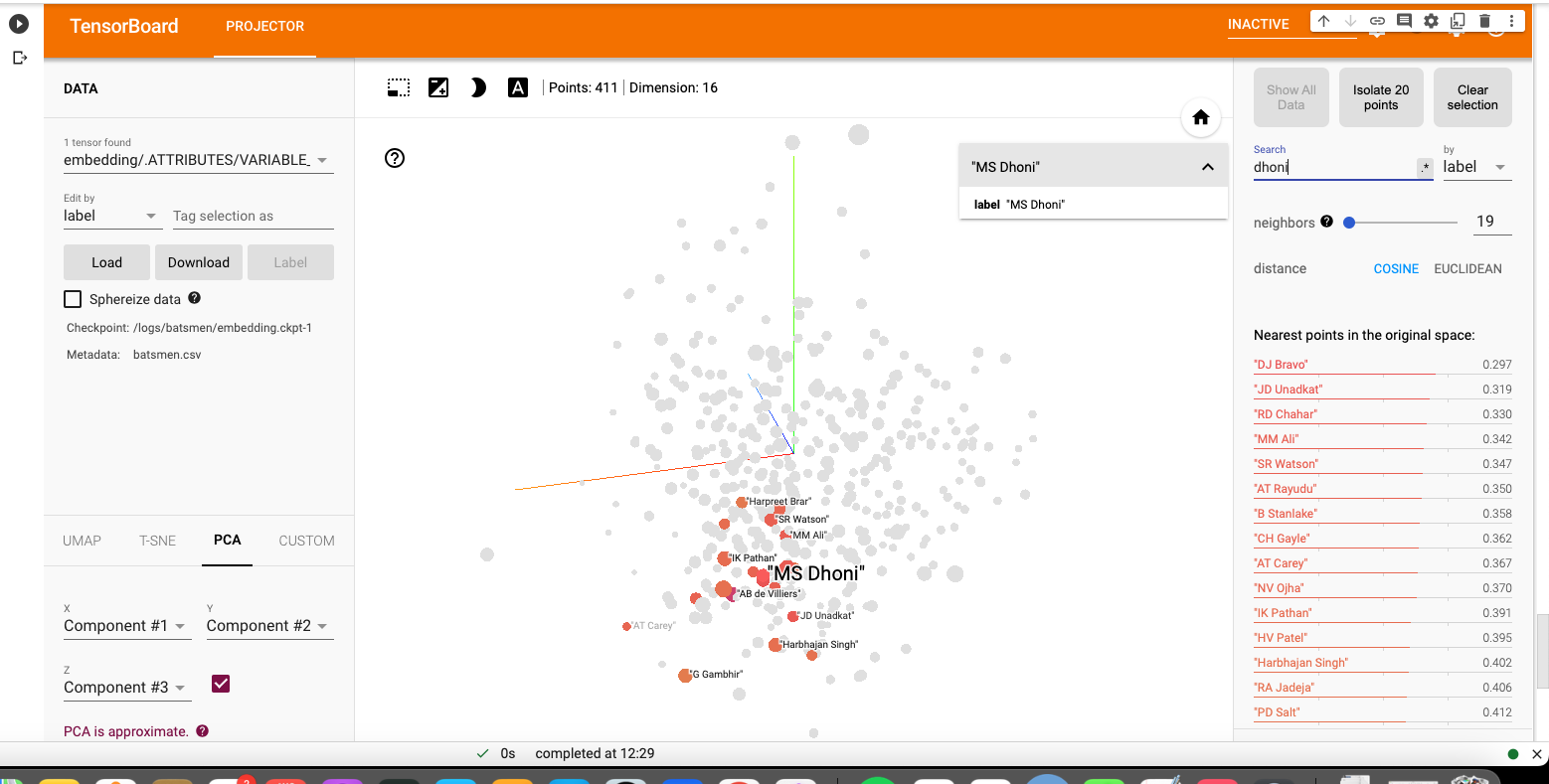
Understanding Neural Style Transfer with Tensorflow and Keras

Neural Style Transfer (NST)  is a fascinating area of Deep Learning and Convolutional Neural Networks. NST is an interesting technique, in which the style from an image, known as the ‘style image’ is transferred to another image ‘content image’ and we get a third a image which is a generated image which has the content of the original image and the style of another image.

NST can be used to reimagine how famous painters like Van Gogh, Claude Monet or a Picasso would have visualised a scenery or architecture. NST uses Convolutional Neural Networks (CNNs) to achieve this artistic style transfer from one image to another. NST was originally implemented by Gati et al., in their paper Neural Algorithm of Artistic Style. Convolutional Neural Networks have been very successful in image classification image recognition et cetera. CNN networks have also been have also generated very interesting pictures using Neural Style Transfer which will be shown in this post. An interesting aspect of CNN’s is that the first couple of layers in the CNN capture basic features of the image like edges and  pixel values. But as we go deeper into the CNN, the network captures higher level features of the input image.

To get started with Neural Style transfer  we will be using the VGG19 pre-trained network. The VGG19 CNN is a compact pre-trained your network which can be used for performing the NST. However, we could have also used Resnet or InceptionV3 networks for this purpose but these are very large networks. The idea of using a network trained on a different task and applying it to a new task is called transfer learning.

What needs to be done to transfer the style from one of the image to another image. This brings us to the question – What is ‘style’? What is it that distinguishes Van Gogh’s painting or Picasso’s cubist art. Convolutional Neural Networks capture basic features in the lower layers and much more complex features in the deeper layers.  Style can be computed by taking the correlation of the feature maps in a layer L. This is my interpretation of how style is captured.  Since style  is intrinsic to  the image, it  implies that the style feature would exist across all the filters in a layer. Hence, to pick up this style we would need to get the correlation of the filters across channels of a lawyer. This is computed mathematically, using the Gram matrix which calculates the correlation of the activation of a the filter by the style image and generated image

To transfer the style from one image to the content image we need to do two parallel operations while doing forward propagation
– Compute the content loss between the source image and the generated image
– Compute the style loss between the style image and the generated image
– Finally we need to compute the total loss

In order to get transfer the style from the ‘style’ image to the ‘content ‘image resulting in a  ‘generated’  image  the total loss has to be minimised. Therefore backward propagation with gradient descent  is done to minimise the total loss comprising of the content and style loss.

Initially we make the Generated Image ‘G’ the same as the source image ‘S’

The content loss at layer ‘l’

L_{content} = 1/2 \sum_{i}^{j} ( F^{l}_{i,j} - P^{l}_{i,j})^{2}

where F^{l}_{i,j} and P^{l}_{i,j} represent the activations at layer ‘l’ in a filter i, at position ‘j’. The intuition is that the activations will be same for similar source and generated image. We need to minimise the content loss so that the generated stylized image is as close to the original image as possible. An intermediate layer of VGG19 block5_conv2 is used

The Style layers that are are used are

style_layers = [‘block1_conv1’,
‘block2_conv1’,
‘block3_conv1’,
‘block4_conv1’,
‘block5_conv1’]
To compute the Style Loss the Gram matrix needs to be computed. The Gram Matrix is computed by unrolling the filters as shown below (source: Convolutional Neural Networks by Prof Andrew Ng, Coursera). The result is a matrix of size n_{c} x n_{c} where n_{c} is the number of channels
The above diagram shows the filters of height n_{H} and width n_{W} with n_{C} channels
The contribution of layer ‘l’ to style loss is given by
L^{'}_{style} = \frac{\sum_{i}^{j} (G^{2}_{i,j} - A^l{i,j})^2}{4N^{2}_{l}M^{2}_{l}}
where G_{i,j}  and A_{i,j} are the Gram matrices of the style and generated images respectively. By minimising the distance in the gram matrices of the style and generated image we can ensure that generated image is a stylized version of the original image similar to the style image
The total loss is given by
L_{total} = \alpha L_{content} + \beta L_{style}
Back propagation with gradient descent works to minimise the content loss between the source and generated image, while the style loss tries to minimise the discrepancies in the style of the style image and generated image. Running through forward and backpropagation through several epochs successfully transfers the style from the style image to the source image.
You can check the Notebook at Neural Style Transfer

Note: The code in this notebook is largely based on the Neural Style Transfer tutorial from Tensorflow, though I may have taken some changes from other blogs. I also made a few changes to the code in this tutorial, like removing the scaling factor, or the class definition (Personally, I belong to the old school (C language) and am not much in love with the ‘self.”..All references are included below

Note: Here is a interesting thought. Could we do a Neural Style Transfer in music? Imagine Carlos Santana playing ‘Hotel California’ or Brian May style in ‘Another brick in the wall’. While our first reaction would be that it may not sound good as we are used to style of these songs, we may be surprised by a possible style transfer. This is definitely music to the ears!


Here are few runs from this

A) Run 1

1. Neural Style Transfer – a) Content Image – My portrait.  b) Style Image – Wassily Kadinsky Oil on canvas, 1913, Vassily Kadinsky’s composition


2. Result of Neural Style Transfer


2) Run 2

a) Content Image – Portrait of my parents b) Style Image –  Vincent Van Gogh’s ,Starry Night Oil on canvas 1889


2. Result of Neural Style Transfer


Run 3

1.  Content Image – Caesar 2 (Masai Mara- 20 Jun 2018).  Style Image – The Great Wave at Kanagawa – Katsushika Hokosai, 1826-1833


Screenshot 2020-04-12 at 12.40.44 PM

2. Result of Neural Style Transfer

lkg


Run 4

1.   Content Image – Junagarh Fort , Rajasthan   Sep 2016              b) Style Image – Le Pont Japonais by Claude Monet, Oil on canvas, 1920


2. Result of Neural Style Transfer


Neural Style Transfer is a very ingenious idea which shows that we can segregate the style of a painting and transfer to another image.

References

1. A Neural Algorithm of Artistic Style, Leon A. Gatys, Alexander S. Ecker, Matthias Bethge
2. Neural style transfer
3. Neural Style Transfer: Creating Art with Deep Learning using tf.keras and eager execution
4. Convolutional Neural Network, DeepLearning.AI Specialization, Prof Andrew Ng
5. Intuitive Guide to Neural Style Transfer

See also

1. Big Data-5: kNiFi-ing through cricket data with yorkpy
2. Cricketr adds team analytics to its repertoire
3. Cricpy performs granular analysis of players
4. My book ‘Deep Learning from first principles:Second Edition’ now on Amazon
5. Programming Zen and now – Some essential tips-2
6. The Anomaly
7. Practical Machine Learning with R and Python – Part 5
8. Literacy in India – A deepR dive
9. “Is it an animal? Is it an insect?” in Android

To see all posts click Index of posts