Analyze cricket players and cricket teams with cricpy template

Introduction

This post shows how you can analyze batsmen, bowlers see Introducing cricpy:A python package to analyze performances of cricketers and cricket teams see Cricpy adds team analytics to its arsenal! in Test, ODI and T20s using cricpy templates, with data from ESPN Cricinfo.

The cricpy package

A. Analyzing batsmen and bowlers in Test, ODI and T20s

The data for a particular player can be obtained with the getPlayerData() function. To do you will need to go to ESPN CricInfo Player and type in the name of the player for e.g Rahul Dravid, Virat Kohli, Alastair Cook etc. This will bring up a page which have the profile number for the player e.g. for Rahul Dravid this would be http://www.espncricinfo.com/india/content/player/28114.html. Hence, Dravid’s profile is 28114. This can be used to get the data for Rahul Dravid as shown below

and select the player you want Please mindful of the ESPN Cricinfo Terms of Use

My posts on Cripy were

  1. Introducing cricpy:A python package to analyze performances of cricketers
  2. Cricpy takes a swing at the ODIs
  3. Cricpy takes guard for the Twenty20s

You can clone/download this cricpy template for your own analysis of players. This can be done using RStudio or IPython notebooks

The cricpy package is now available with pip install cricpy!!!

You can download the latest PDF version of the book  at  ‘Cricket analytics with cricketr and cricpy: Analytics harmony with R and Python-6th edition

1 Importing cricpy – Python

# Install the package
# Do a pip install cricpy
# Import cricpy
import cricpy.analytics as ca 
## C:\Users\Ganesh\ANACON~1\lib\site-packages\statsmodels\compat\pandas.py:56: FutureWarning: The pandas.core.datetools module is deprecated and will be removed in a future version. Please use the pandas.tseries module instead.
##   from pandas.core import datetools

2. Invoking functions with Python package cricpy

import cricpy.analytics as ca 
#ca.batsman4s("aplayer.csv","A Player")

3. Getting help from cricpy – Python

import cricpy.analytics as ca
#help(ca.getPlayerData)

The details below will introduce the different functions that are available in cricpy.

4. Get the player data for a player using the function getPlayerData()

Important Note This needs to be done only once for a player. This function stores the player’s data in the specified CSV file (for e.g. dravid.csv as above) which can then be reused for all other functions). Once we have the data for the players many analyses can be done. This post will use the stored CSV file obtained with a prior getPlayerData for all subsequent analyses

4a. For Test players

import cricpy.analytics as ca
#player1 =ca.getPlayerData(profileNo1,dir="..",file="player1.csv",type="batting",homeOrAway=[1,2], result=[1,2,4])
#player1 =ca.getPlayerData(profileNo2,dir="..",file="player2.csv",type="batting",homeOrAway=[1,2], result=[1,2,4])

4b. For ODI players

import cricpy.analytics as ca
#player1 =ca.getPlayerDataOD(profileNo1,dir="..",file="player1.csv",type="batting")
#player1 =ca.getPlayerDataOD(profileNo2,dir="..",file="player2.csv",type="batting"")

4c For T20 players

import cricpy.analytics as ca
#player1 =ca.getPlayerDataTT(profileNo1,dir="..",file="player1.csv",type="batting")
#player1 =ca.getPlayerDataTT(profileNo2,dir="..",file="player2.csv",type="batting"")

5 A Player’s performance – Basic Analyses

The 3 plots below provide the following for Rahul Dravid

  1. Frequency percentage of runs in each run range over the whole career
  2. Mean Strike Rate for runs scored in the given range
  3. A histogram of runs frequency percentages in runs ranges

import cricpy.analytics as ca
import matplotlib.pyplot as plt


#ca.batsmanRunsFreqPerf("aplayer.csv","A Player")
#ca.batsmanMeanStrikeRate("aplayer.csv","A Player")
#ca.batsmanRunsRanges("aplayer.csv","A Player") 

6. More analyses

This gives details on the batsmen’s 4s, 6s and dismissals

import cricpy.analytics as ca

#ca.batsman4s("aplayer.csv","A Player")
#ca.batsman6s("aplayer.csv","A Player") 
#ca.batsmanDismissals("aplayer.csv","A Player")

# The below function is for ODI and T20 only
#ca.batsmanScoringRateODTT("./kohli.csv","Virat Kohli")  

7. 3D scatter plot and prediction plane

The plots below show the 3D scatter plot of Runs versus Balls Faced and Minutes at crease. A linear regression plane is then fitted between Runs and Balls Faced + Minutes at crease

import cricpy.analytics as ca
#ca.battingPerf3d("aplayer.csv","A Player")

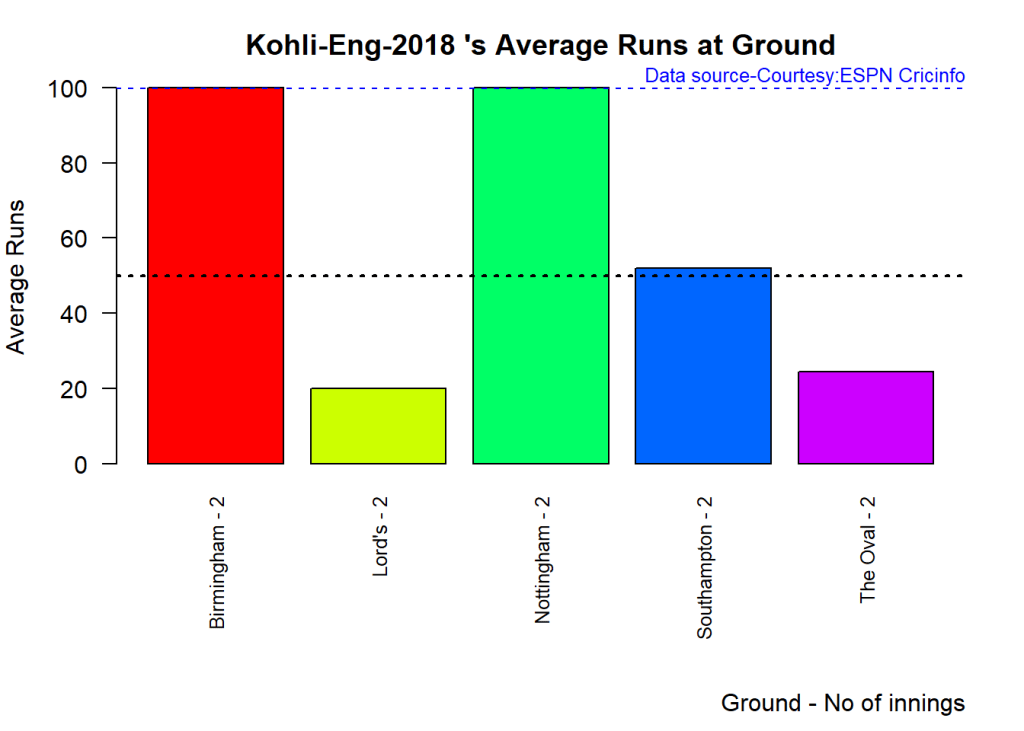
8. Average runs at different venues

The plot below gives the average runs scored at different grounds. The plot also the number of innings at each ground as a label at x-axis.

import cricpy.analytics as ca
#ca.batsmanAvgRunsGround("aplayer.csv","A Player")

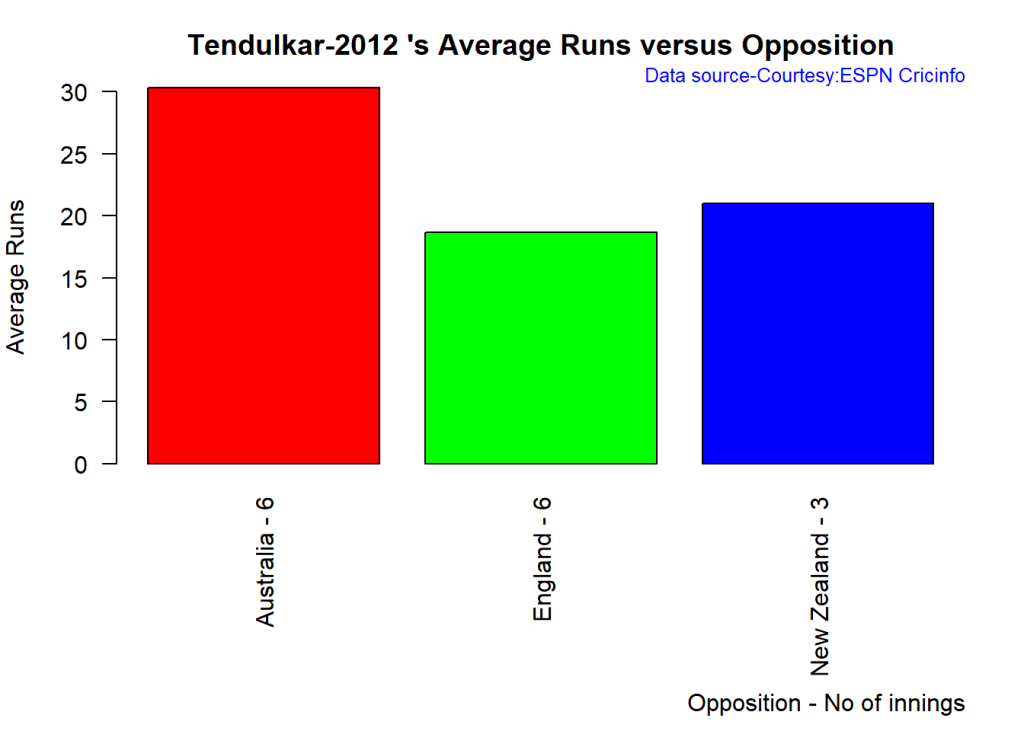
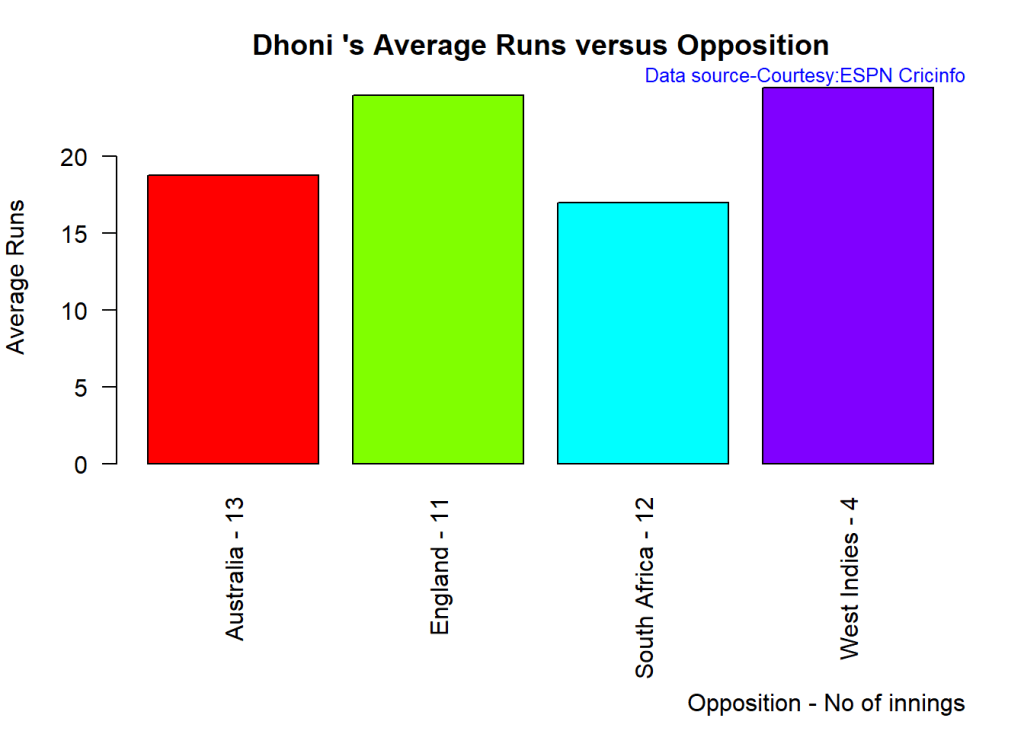
9. Average runs against different opposing teams

This plot computes the average runs scored against different countries.

import cricpy.analytics as ca

#ca.batsmanAvgRunsOpposition("aplayer.csv","A Player")

10. Highest Runs Likelihood

The plot below shows the Runs Likelihood for a batsman.

import cricpy.analytics as ca

#ca.batsmanRunsLikelihood("aplayer.csv","A Player")

11. A look at the Top 4 batsman

Choose any number of players

1.Player1 2.Player2 3.Player3 …

The following plots take a closer at their performances. The box plots show the median the 1st and 3rd quartile of the runs

12. Box Histogram Plot

This plot shows a combined boxplot of the Runs ranges and a histogram of the Runs Frequency

import cricpy.analytics as ca

#ca.batsmanPerfBoxHist("aplayer001.csv","A Player001")
#ca.batsmanPerfBoxHist("aplayer002.csv","A Player002")
#ca.batsmanPerfBoxHist("aplayer003.csv","A Player003")
#ca.batsmanPerfBoxHist("aplayer004.csv","A Player004")

13. get Player Data special

import cricpy.analytics as ca

#player1sp = ca.getPlayerDataSp(profile1,tdir=".",tfile="player1sp.csv",ttype="batting")
#player2sp = ca.getPlayerDataSp(profile2,tdir=".",tfile="player2sp.csv",ttype="batting")
#player3sp = ca.getPlayerDataSp(profile3,tdir=".",tfile="player3sp.csv",ttype="batting")
#player4sp = ca.getPlayerDataSp(profile4,tdir=".",tfile="player4sp.csv",ttype="batting")

14. Contribution to won and lost matches

Note:This can only be used for Test matches

import cricpy.analytics as ca

#ca.batsmanContributionWonLost("player1sp.csv","A Player001")
#ca.batsmanContributionWonLost("player2sp.csv","A Player002")
#ca.batsmanContributionWonLost("player3sp.csv","A Player003")
#ca.batsmanContributionWonLost("player4sp.csv","A Player004")

15. Performance at home and overseas

Note:This can only be used for Test matches This function also requires the use of getPlayerDataSp() as shown above

import cricpy.analytics as ca
#ca.batsmanPerfHomeAway("player1sp.csv","A Player001")
#ca.batsmanPerfHomeAway("player2sp.csv","A Player002")
#ca.batsmanPerfHomeAway("player3sp.csv","A Player003")
#ca.batsmanPerfHomeAway("player4sp.csv","A Player004")

16 Moving Average of runs in career

import cricpy.analytics as ca

#ca.batsmanMovingAverage("aplayer001.csv","A Player001")
#ca.batsmanMovingAverage("aplayer002.csv","A Player002")
#ca.batsmanMovingAverage("aplayer003.csv","A Player003")
#ca.batsmanMovingAverage("aplayer004.csv","A Player004")

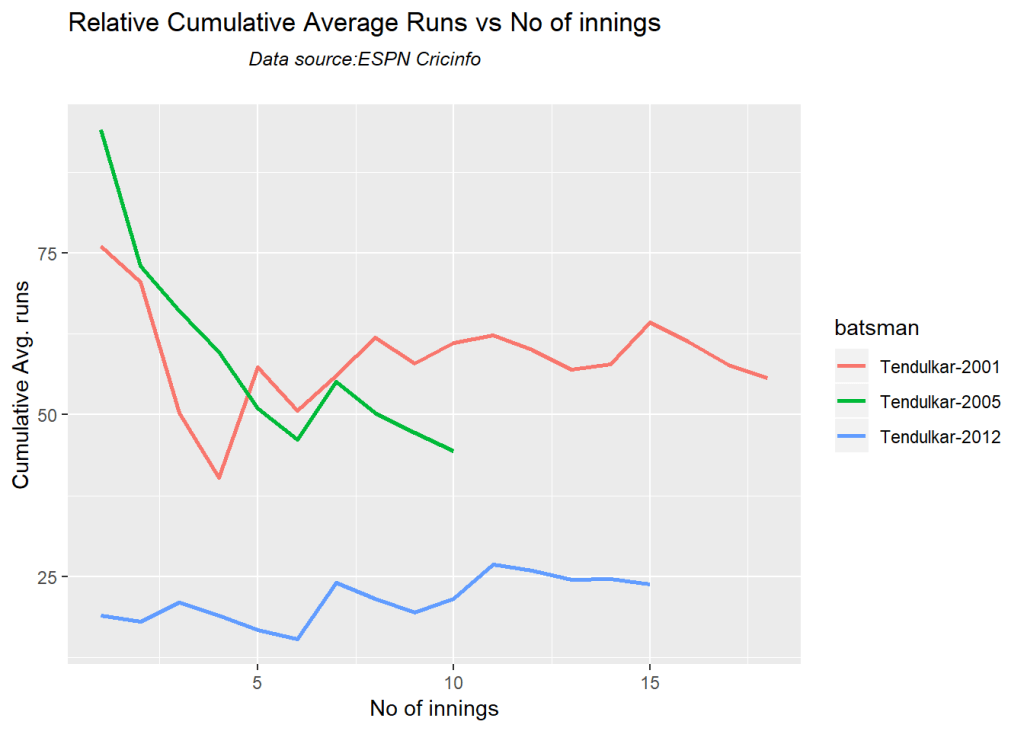
17 Cumulative Average runs of batsman in career

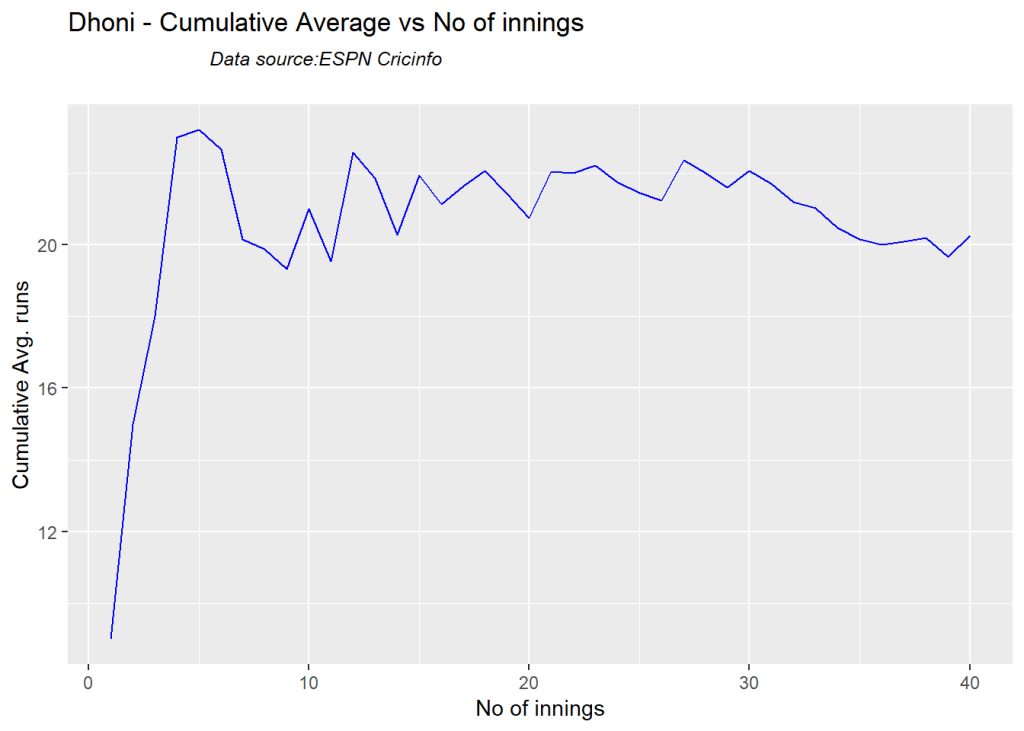
This function provides the cumulative average runs of the batsman over the career.

import cricpy.analytics as ca

#ca.batsmanCumulativeAverageRuns("aplayer001.csv","A Player001")
#ca.batsmanCumulativeAverageRuns("aplayer002.csv","A Player002")
#ca.batsmanCumulativeAverageRuns("aplayer003.csv","A Player003")
#ca.batsmanCumulativeAverageRuns("aplayer004.csv","A Player004")

18 Cumulative Average strike rate of batsman in career

.

import cricpy.analytics as ca
#ca.batsmanCumulativeStrikeRate("aplayer001.csv","A Player001")
#ca.batsmanCumulativeStrikeRate("aplayer002.csv","A Player002")
#ca.batsmanCumulativeStrikeRate("aplayer003.csv","A Player003")
#ca.batsmanCumulativeStrikeRate("aplayer004.csv","A Player004")

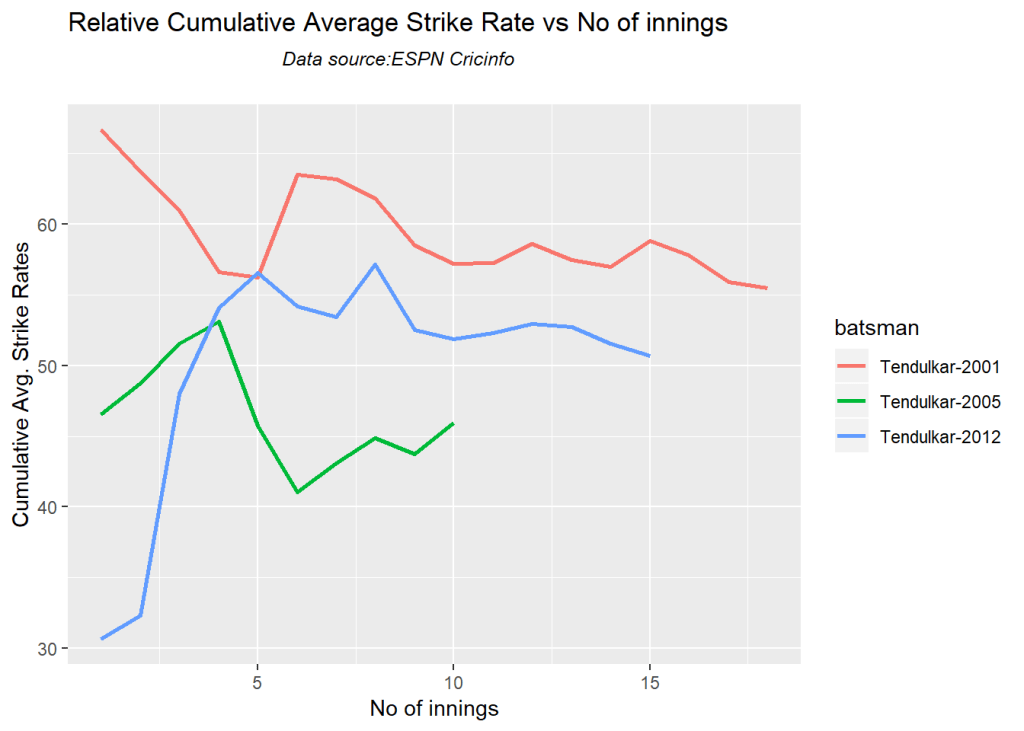
19 Future Runs forecast

import cricpy.analytics as ca

#ca.batsmanPerfForecast("aplayer001.csv","A Player001")

20 Relative Batsman Cumulative Average Runs

The plot below compares the Relative cumulative average runs of the batsman for each of the runs ranges of 10 and plots them.

import cricpy.analytics as ca

frames = ["aplayer1.csv","aplayer2.csv","aplayer3.csv","aplayer4.csv"]
names = ["A Player1","A Player2","A Player3","A Player4"]
#ca.relativeBatsmanCumulativeAvgRuns(frames,names)

21 Plot of 4s and 6s

import cricpy.analytics as ca

frames = ["aplayer1.csv","aplayer2.csv","aplayer3.csv","aplayer4.csv"]
names = ["A Player1","A Player2","A Player3","A Player4"]
#ca.batsman4s6s(frames,names)

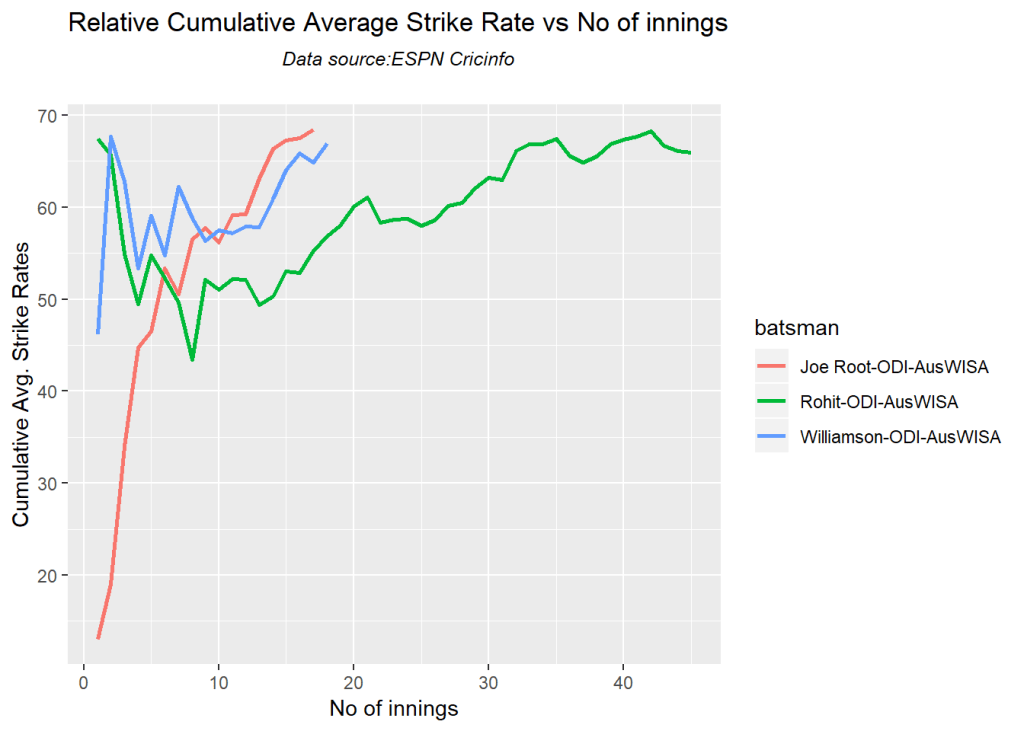
22. Relative Batsman Strike Rate

The plot below gives the relative Runs Frequency Percetages for each 10 run bucket. The plot below show

import cricpy.analytics as ca

frames = ["aplayer1.csv","aplayer2.csv","aplayer3.csv","aplayer4.csv"]
names = ["A Player1","A Player2","A Player3","A Player4"]
#ca.relativeBatsmanCumulativeStrikeRate(frames,names)

23. 3D plot of Runs vs Balls Faced and Minutes at Crease

The plot is a scatter plot of Runs vs Balls faced and Minutes at Crease. A prediction plane is fitted

import cricpy.analytics as ca
#ca.battingPerf3d("aplayer001.csv","A Player001")
#ca.battingPerf3d("aplayer002.csv","A Player002")
#ca.battingPerf3d("aplayer003.csv","A Player003")
#ca.battingPerf3d("aplayer004.csv","A Player004")

24. Predicting Runs given Balls Faced and Minutes at Crease

A multi-variate regression plane is fitted between Runs and Balls faced +Minutes at crease.

import cricpy.analytics as ca

import numpy as np
import pandas as pd

BF = np.linspace( 10, 400,15)
Mins = np.linspace( 30,600,15)
newDF= pd.DataFrame({'BF':BF,'Mins':Mins})

#aplayer = ca.batsmanRunsPredict("aplayer.csv",newDF,"A Player")
#print(aplayer)

The fitted model is then used to predict the runs that the batsmen will score for a given Balls faced and Minutes at crease.

25 Analysis of Top 3 wicket takers

Take any number of bowlers from either Test, ODI or T20

  1. Bowler1
  2. Bowler2
  3. Bowler3 …

26. Get the bowler’s data (Test)

This plot below computes the percentage frequency of number of wickets taken for e.g 1 wicket x%, 2 wickets y% etc and plots them as a continuous line

import cricpy.analytics as ca

#abowler1 =ca.getPlayerData(profileNo1,dir=".",file="abowler1.csv",type="bowling",homeOrAway=[1,2], result=[1,2,4])
#abowler2 =ca.getPlayerData(profileNo2,dir=".",file="abowler2.csv",type="bowling",homeOrAway=[1,2], result=[1,2,4])
#abowler3 =ca.getPlayerData(profile3,dir=".",file="abowler3.csv",type="bowling",homeOrAway=[1,2], result=[1,2,4])

26b For ODI bowlers

import cricpy.analytics as ca

#abowler1 =ca.getPlayerDataOD(profileNo1,dir=".",file="abowler1.csv",type="bowling")
#abowler2 =ca.getPlayerDataOD(profileNo2,dir=".",file="abowler2.csv",type="bowling")
#abowler3 =ca.getPlayerDataOD(profile3,dir=".",file="abowler3.csv",type="bowling")

26c For T20 bowlers

import cricpy.analytics as ca

#abowler1 =ca.getPlayerDataTT(profileNo1,dir=".",file="abowler1.csv",type="bowling")
#abowler2 =ca.getPlayerDataTT(profileNo2,dir=".",file="abowler2.csv",type="bowling")
#abowler3 =ca.getPlayerDataTT(profile3,dir=".",file="abowler3.csv",type="bowling")

27. Wicket Frequency Plot

This plot below plots the frequency of wickets taken for each of the bowlers

import cricpy.analytics as ca

#ca.bowlerWktsFreqPercent("abowler1.csv","A Bowler1")
#ca.bowlerWktsFreqPercent("abowler2.csv","A Bowler2")
#ca.bowlerWktsFreqPercent("abowler3.csv","A Bowler3")

28. Wickets Runs plot

The plot below create a box plot showing the 1st and 3rd quartile of runs conceded versus the number of wickets taken

import cricpy.analytics as ca

#ca.bowlerWktsRunsPlot("abowler1.csv","A Bowler1")
#ca.bowlerWktsRunsPlot("abowler2.csv","A Bowler2")
#ca.bowlerWktsRunsPlot("abowler3.csv","A Bowler3")

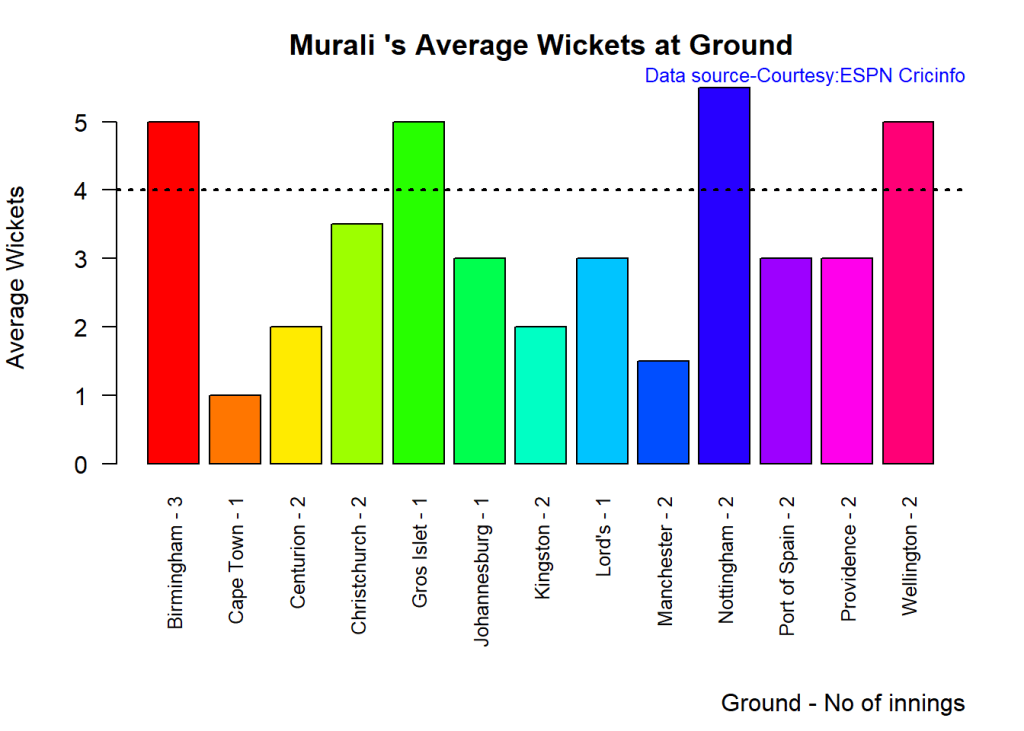
29 Average wickets at different venues

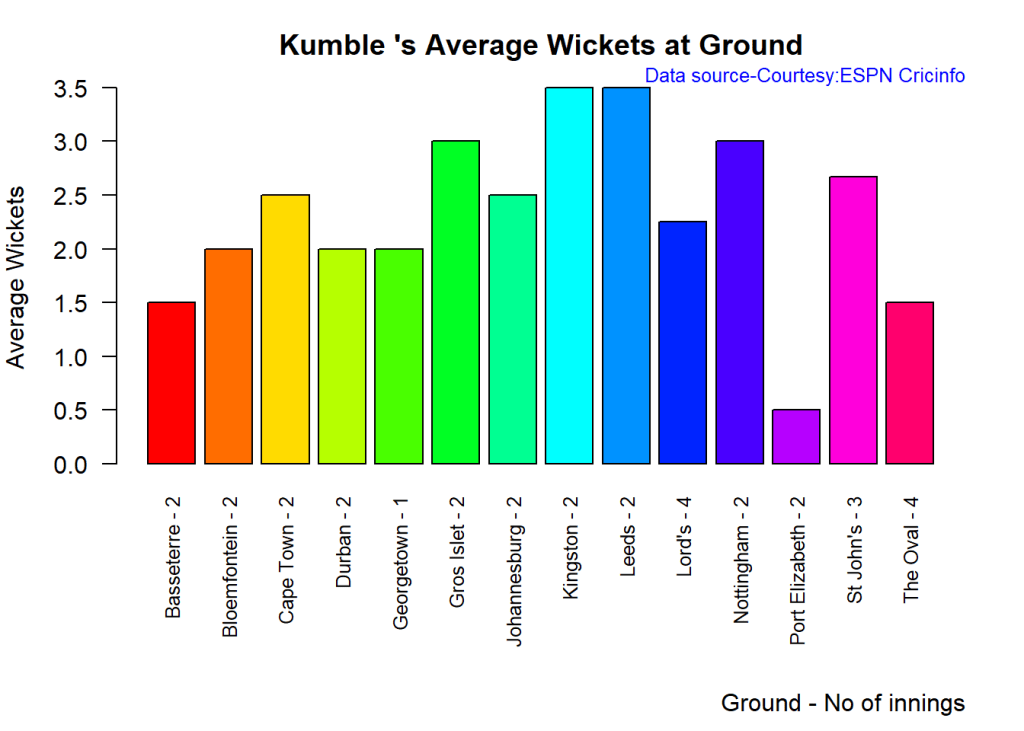
The plot gives the average wickets taken bat different venues.

import cricpy.analytics as ca

#ca.bowlerAvgWktsGround("abowler1.csv","A Bowler1")
#ca.bowlerAvgWktsGround("abowler2.csv","A Bowler2")
#ca.bowlerAvgWktsGround("abowler3.csv","A Bowler3")

30 Average wickets against different opposition

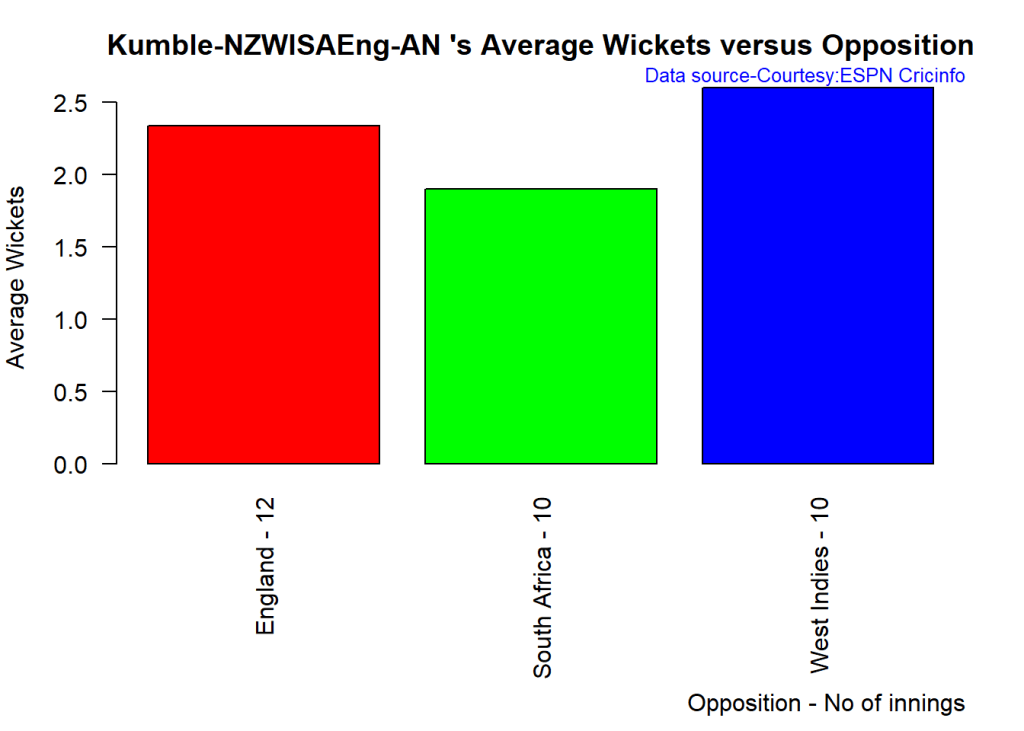
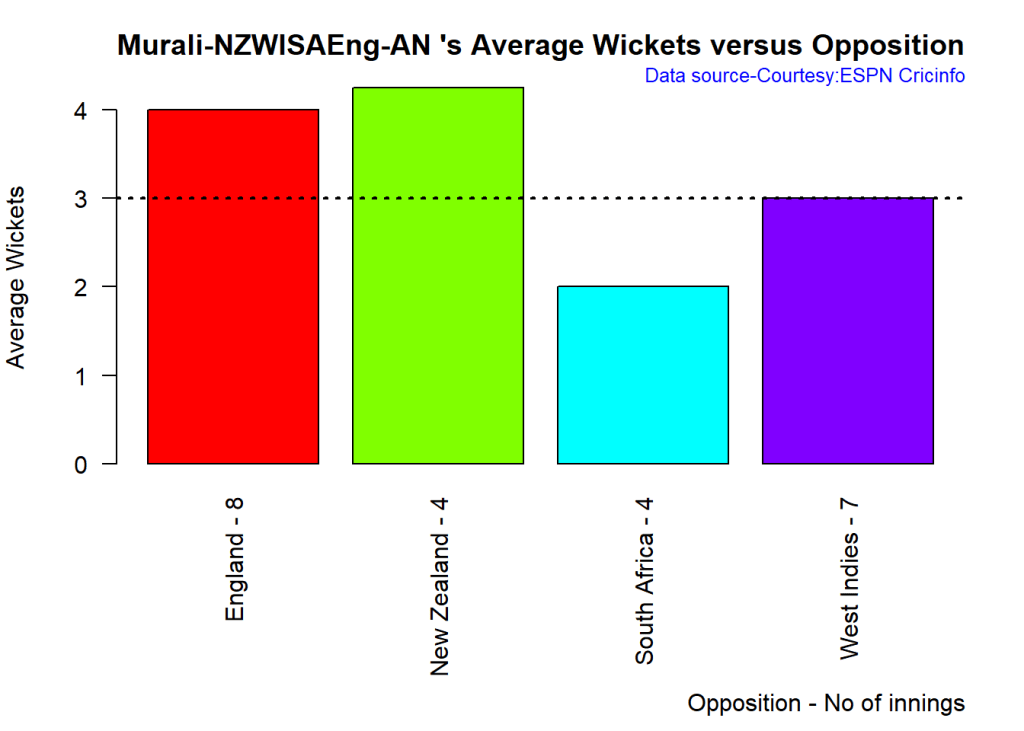
The plot gives the average wickets taken against different countries.

import cricpy.analytics as ca

#ca.bowlerAvgWktsOpposition("abowler1.csv","A Bowler1")
#ca.bowlerAvgWktsOpposition("abowler2.csv","A Bowler2")
#ca.bowlerAvgWktsOpposition("abowler3.csv","A Bowler3")

31 Wickets taken moving average

import cricpy.analytics as ca

#ca.bowlerMovingAverage("abowler1.csv","A Bowler1")
#ca.bowlerMovingAverage("abowler2.csv","A Bowler2")
#ca.bowlerMovingAverage("abowler3.csv","A Bowler3")

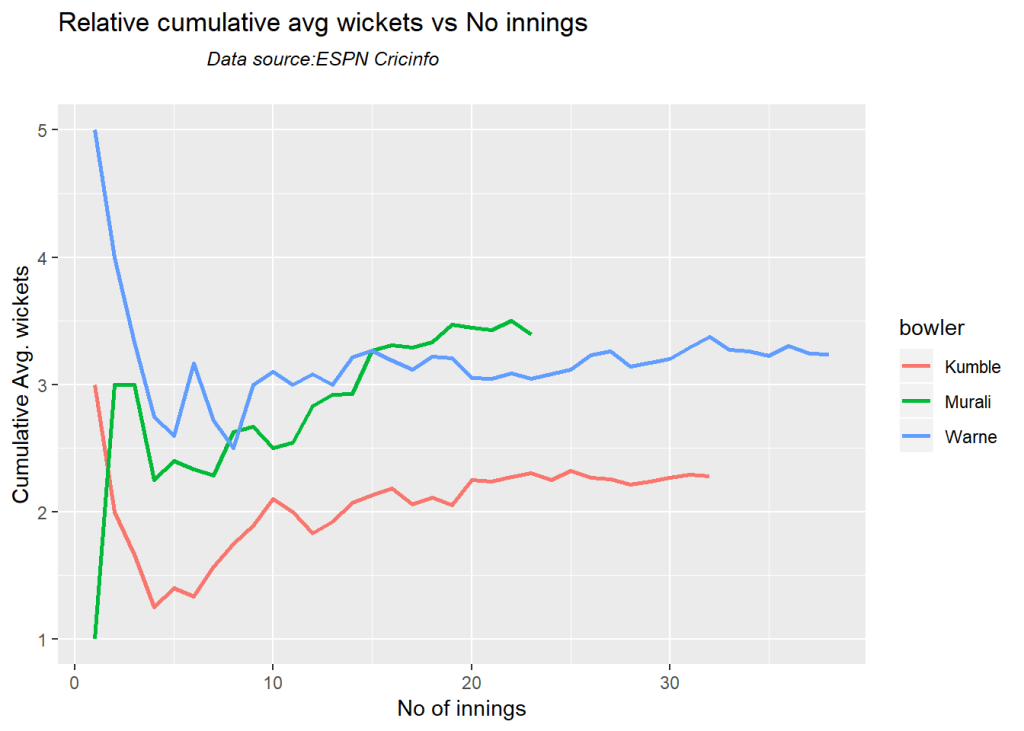
32 Cumulative average wickets taken

The plots below give the cumulative average wickets taken by the bowlers.

import cricpy.analytics as ca

#ca.bowlerCumulativeAvgWickets("abowler1.csv","A Bowler1")
#ca.bowlerCumulativeAvgWickets("abowler2.csv","A Bowler2")
#ca.bowlerCumulativeAvgWickets("abowler3.csv","A Bowler3")

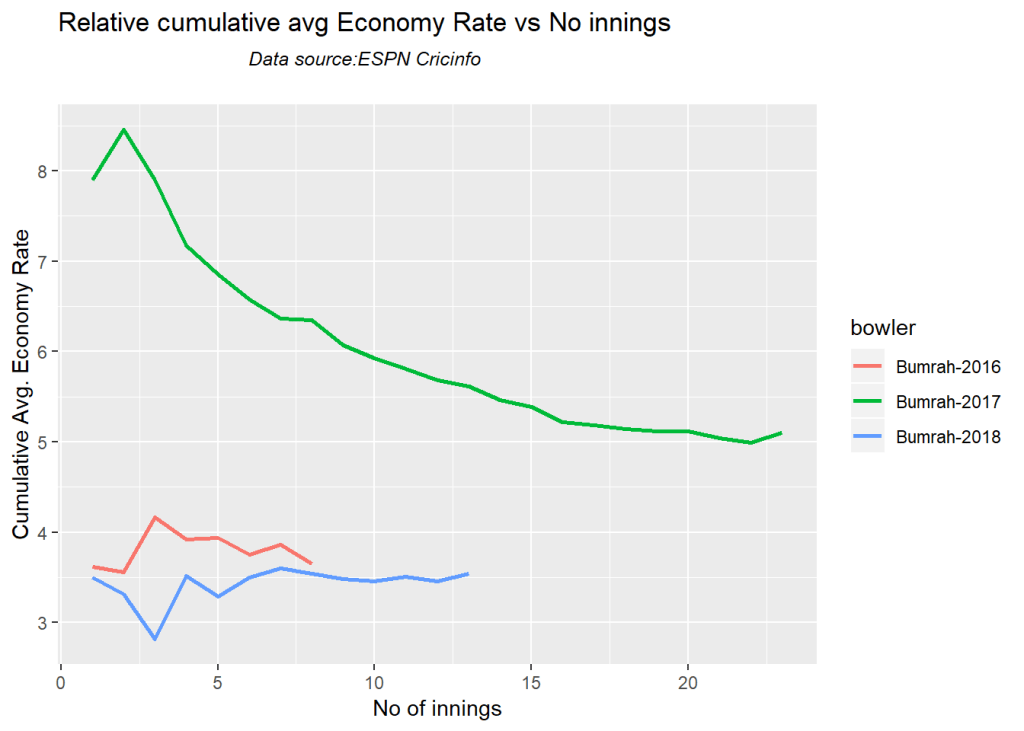
33 Cumulative average economy rate

The plots below give the cumulative average economy rate of the bowlers.

import cricpy.analytics as ca

#ca.bowlerCumulativeAvgEconRate("abowler1.csv","A Bowler1")
#ca.bowlerCumulativeAvgEconRate("abowler2.csv","A Bowler2")
#ca.bowlerCumulativeAvgEconRate("abowler3.csv","A Bowler3")

34 Future Wickets forecast

import cricpy.analytics as ca
#ca.bowlerPerfForecast("abowler1.csv","A bowler1")

35 Get player data special

import cricpy.analytics as ca

#abowler1sp =ca.getPlayerDataSp(profile1,tdir=".",tfile="abowler1sp.csv",ttype="bowling")
#abowler2sp =ca.getPlayerDataSp(profile2,tdir=".",tfile="abowler2sp.csv",ttype="bowling")
#abowler3sp =ca.getPlayerDataSp(profile3,tdir=".",tfile="abowler3sp.csv",ttype="bowling")

36 Contribution to matches won and lost

Note:This can be done only for Test cricketers

import cricpy.analytics as ca

#ca.bowlerContributionWonLost("abowler1sp.csv","A Bowler1")
#ca.bowlerContributionWonLost("abowler2sp.csv","A Bowler2")
#ca.bowlerContributionWonLost("abowler3sp.csv","A Bowler3")

37 Performance home and overseas

Note:This can be done only for Test cricketers

import cricpy.analytics as ca

#ca.bowlerPerfHomeAway("abowler1sp.csv","A Bowler1")
#ca.bowlerPerfHomeAway("abowler2sp.csv","A Bowler2")
#ca.bowlerPerfHomeAway("abowler3sp.csv","A Bowler3")

38 Relative cumulative average economy rate of bowlers

import cricpy.analytics as ca

frames = ["abowler1.csv","abowler2.csv","abowler3.csv"]
names = ["A Bowler1","A Bowler2","A Bowler3"]
#ca.relativeBowlerCumulativeAvgEconRate(frames,names)

39 Relative Economy Rate against wickets taken

import cricpy.analytics as ca

frames = ["abowler1.csv","abowler2.csv","abowler3.csv"]
names = ["A Bowler1","A Bowler2","A Bowler3"]
#ca.relativeBowlingER(frames,names)

40 Relative cumulative average wickets of bowlers in career

import cricpy.analytics as ca
frames = ["abowler1.csv","abowler2.csv","abowler3.csv"]
names = ["A Bowler1","A Bowler2","A Bowler3"]
#ca.relativeBowlerCumulativeAvgWickets(frames,names)

B. Analyzing cricket teams in Test, ODI and T20s

The following functions will get the team data for Tests, ODI and T20s

1a. Get Test team data

import cricpy.analytics as ca
#country1Test= ca.getTeamDataHomeAway(dir=".",teamView="bat",matchType="Test",file="country1Test.csv",save=True,teamName="Country1")
#country2Test= ca.getTeamDataHomeAway(dir=".",teamView="bat",matchType="Test",file="country2Test.csv",save=True,teamName="Country2")
#country3Test= ca.getTeamDataHomeAway(dir=".",teamView="bat",matchType="Test",file="country3Test.csv",save=True,teamName="Country3")

1b. Get ODI team data

import cricpy.analytics as ca
#team1ODI=  ca.getTeamDataHomeAway(dir=".",matchType="ODI",file="team1ODI.csv",save=True,teamName="team1")
#team2ODI=  ca.getTeamDataHomeAway(dir=".",matchType="ODI",file="team2ODI.csv",save=True,teamName="team2")
#team3ODI=  ca.getTeamDataHomeAway(dir=".",matchType="ODI",file="team3ODI.csv",save=True,teamName="team3")

1c. Get T20 team data

import cricpy.analytics as ca
#team1T20 = ca.getTeamDataHomeAway(matchType="T20",file="team1T20.csv",save=True,teamName="team1")
#team2T20 = ca.getTeamDataHomeAway(matchType="T20",file="team2T20.csv",save=True,teamName="team2")
#team3T20 = ca.getTeamDataHomeAway(matchType="T20",file="team3T20.csv",save=True,teamName="team3")

2a. Test – Analyzing test performances against opposition

import cricpy.analytics as ca
# Get the performance of Indian test team against all teams at all venues as a dataframe
#df = ca.teamWinLossStatusVsOpposition("country1Test.csv",teamName="Country1",opposition=["all"],homeOrAway=["all"],matchType="Test",plot=False)
#print(df.head())
# Plot the performance of Country1 Test team  against all teams at all venues
#ca.teamWinLossStatusVsOpposition("country1Test.csv",teamName="Country1",opposition=["all"],homeOrAway=["all"],matchType="Test",plot=True)
# Plot the performance of Country1 Test team  against specific teams at home/away venues
#ca.teamWinLossStatusVsOpposition("country1Test.csv",teamName="Country1",opposition=["Country2","Country3","Country4"],homeOrAway=["home","away","neutral"],matchType="Test",plot=True)

2b. Test – Analyzing test performances against opposition at different grounds

import cricpy.analytics as ca
# Get the performance of Indian test team against all teams at all venues as a dataframe
#df = ca.teamWinLossStatusAtGrounds("country1Test.csv",teamName="Country1",opposition=["all"],homeOrAway=["all"],matchType="Test",plot=False)
#df.head()
# Plot the performance of Country1 Test team  against all teams at all venues
#ca.teamWinLossStatusAtGrounds("country1Test.csv",teamName="Country1",opposition=["all"],homeOrAway=["all"],matchType="Test",plot=True)
# Plot the performance of Country1 Test team  against specific teams at home/away venues
#ca.teamWinLossStatusAtGrounds("country1Test.csv",teamName="Country1",opposition=["Country2","Country3","Country4"],homeOrAway=["home","away","neutral"],matchType="Test",plot=True)

2c. Test – Plot time lines of wins and losses

import cricpy.analytics as ca
#ca.plotTimelineofWinsLosses("country1Test.csv",team="Country1",opposition=["all"], #startDate="1970-01-01",endDate="2017-01-01")
#ca.plotTimelineofWinsLosses("country1Test.csv",team="Country1",opposition=["Country2","Count#ry3","Country4"], homeOrAway=["home",away","neutral"], startDate=<start Date> #,endDate=<endDate>)

3a. ODI – Analyzing test performances against opposition

import cricpy.analytics as ca
#df = ca.teamWinLossStatusVsOpposition("team1ODI.csv",teamName="Team1",opposition=["all"],homeOrAway=["all"],matchType="ODI",plot=False)
#print(df.head())
# Plot the performance of team1  in ODIs against Sri Lanka, India at all venues
#ca.teamWinLossStatusVsOpposition("team1ODI.csv",teamName="Team1",opposition=["all"],homeOrAway=[all"],matchType="ODI",plot=True)
# Plot the performance of Team1 ODI team  against specific teams at home/away venues
#ca.teamWinLossStatusVsOpposition("team1ODI.csv",teamName="Team1",opposition=["Team2","Team3","Team4"],homeOrAway="home","away","neutral"],matchType="ODI",plot=True)

3b. ODI – Analyzing test performances against opposition at different venues

import cricpy.analytics as ca
#df = ca.teamWinLossStatusAtGrounds("team1ODI.csv",teamName="Team1",opposition=["all"],homeOrAway=["all"],matchType="ODI",plot=False)
#print(df.head())
# Plot the performance of Team1s in ODIs specific ODI teams at all venues
#ca.teamWinLossStatusAtGrounds("team1ODI.csv",teamName="Team1",opposition=["all"],homeOrAway=[all"],matchType="ODI",plot=True)
# Plot the performance of Team1 against specific ODI teams at home/away venues
#ca.teamWinLossStatusAtGrounds("team1ODI.csv",teamName="Team1",opposition=["Team2","Team3","Team4"],homeOrAway=["home","away","neutral"],matchType="ODI",plot=True)

3c. ODI – Plot time lines of wins and losses

import cricpy.analytics as ca
#Plot the time line of wins/losses of Bangladesh ODI team between 2 dates all venues
#ca.plotTimelineofWinsLosses("team1ODI.csv",team="Team1",startDate=<start date> ,endDa#te=<end date>,matchType="ODI")
#Plot the time line of wins/losses against specific opposition between 2 dates
#ca.plotTimelineofWinsLosses("team1ODI.csv",team="Team1",opposition=["Team2","Team2"], homeOrAway=["home",away","neutral"], startDate=<start date>,endDate=<end date> ,matchType="ODI")

4a. T20 – Analyzing test performances against opposition

import cricpy.analytics as ca
#df = ca.teamWinLossStatusVsOpposition("teamT20.csv",teamName="Team1",opposition=["all"],homeOrAway=["all"],matchType="T20",plot=False)
#print(df.head())
# Plot the performance of Team1 in T20s  against  all opposition at all venues
#ca.teamWinLossStatusVsOpposition("teamT20.csv",teamName="Team1",opposition=["all"],homeOrAway=[all"],matchType="T20",plot=True)
# Plot the performance of T20 Test team  against specific teams at home/away venues
#ca.teamWinLossStatusVsOpposition("teamT20.csv",teamName="Team1",opposition=["Team2","Team3","Team4"],homeOrAway=["home","away","neutral"],matchType="T20",plot=True)

4b. T20 – Analyzing test performances against opposition at different venues

import cricpy.analytics as ca
#df = ca.teamWinLossStatusAtGrounds("teamT20.csv",teamName="Team1",opposition=["all"],homeOrAway=["all"],matchType="T20",plot=False)
#df.head()
# Plot the performance of Team1s in ODIs specific ODI teams at all venues
#ca.teamWinLossStatusAtGrounds("teamT20.csv",teamName="Team1",opposition=["all"],homeOrAway=["all"],matchType="T20",plot=True)
# Plot the performance of Team1 against specific ODI teams at home/away venues
#ca.teamWinLossStatusAtGrounds("teamT20.csv",teamName="Team1",opposition=["Team2","Team3","Team4"],homeOrAway=["home","away","neutral"],matchType="T20",plot=True)

4c. T20 – Plot time lines of wins and losses

import cricpy.analytics as ca
#Plot the time line of wins/losses of Bangladesh ODI team between 2 dates all venues
#ca.plotTimelineofWinsLosses("teamT20.csv",team="Team1",startDate=<start date> ,endDa#te=<end date>,matchType="T20")
#Plot the time line of wins/losses against specific opposition between 2 dates
#ca.plotTimelineofWinsLosses("teamT20.csv",team="Team1",opposition=c("Team2","Team2"), homeOrAway=c("home",away","neutral"), startDate=<start date>,endDate=<end date> ,matchType="T20")

Conclusion

Key Findings

Analysis of batsman

Analysis of bowlers

Analysis of teams

Have fun with cripy!!!

Analyzing cricketers’ and cricket team’s performances with cricketr template

This post includes a template which you can use for analyzing the performances of cricketers, both batsmen and bowlers in Test, ODI and Twenty 20 cricket. Additionally this template can also be used for analyzing performances of teams in Test, ODI and T20 matches using my R package cricketr. To see actual usage of functions related to players in the R package cricketr see Introducing cricketr! : An R package to analyze performances of cricketers and associated posts on cricket in Index of posts. For the analyses on team performances see https://gigadom.in/2019/06/21/cricpy-adds-team-analytics-to-its-repertoire/

The ‘cricketr’ package uses the statistics info available in ESPN Cricinfo Statsguru. The current version of this package supports all formats of the game including Test, ODI and Twenty20 versions.

You should be able to install the package from GitHub and use the many functions available in the package. Please mindful of the ESPN Cricinfo Terms of Use

Take a look at my short video tutorial on my R package cricketr on Youtube – R package cricketr – A short tutorial

Do check out my interactive Shiny app implementation using the cricketr package – Sixer – R package cricketr’s new Shiny avatar

You can download this RMarkdown file from Github at cricketr-template

You can download the latest PDF version of the book  at  ‘Cricket analytics with cricketr and cricpy: Analytics harmony with R and Python-6th edition

The cricketr package

The cricketr package has several functions that perform several different analyses on both batsman and bowlers. The package can also analyze performances of teams The package has function that plot percentage frequency runs or wickets, runs likelihood for a batsman, relative run/strike rates of batsman and relative performance/economy rate for bowlers are available. Other interesting functions include batting performance moving average, forecast and a function to check whether the batsmans in in-form or out-of-form.

In addition performances of teams against different oppositions at different venues can be computed and plotted. The timeline of wins & losses can be plotted.

A. Performances of batsmen and bowlers

The data for a particular player can be obtained with the getPlayerData() function. To do you will need to go to ESPN CricInfo Player and type in the name of the player for e.g Ricky Ponting, Sachin Tendulkar etc. This will bring up a page which have the profile number for the player e.g. for Sachin Tendulkar this would be http://www.espncricinfo.com/india/content/player/35320.html. Hence, Sachin’s profile is 35320. This can be used to get the data for Tendulkar as shown below

The cricketr package is now available from CRAN!!! You should be able to install as below

1. Install the cricketr package

if (!require("cricketr")){
    install.packages("cricketr",lib = "c:/test")
}
library(cricketr)

The cricketr package includes some pre-packaged sample (.csv) files. You can use these sample to test functions as shown below
# Retrieve the file path of a data file installed with cricketr
#pathToFile <- system.file("data", "tendulkar.csv", package = "cricketr")
#batsman4s(pathToFile, "Sachin Tendulkar")

# The general format is pkg-function(pathToFile,par1,...)
#batsman4s(<path-To-File>,"Sachin Tendulkar")

The pre-packaged files can be accessed as shown above. To get the data of any player use the function in Test, ODI and Twenty20 use the following

2. For Test cricket

#tendulkar <- getPlayerData(35320,dir="..",file="tendulkar.csv",type="batting",homeOrAway=c(1,2), result=c(1,2,4))

2a. For ODI cricket

#tendulkarOD <- getPlayerDataOD(35320,dir="..",file="tendulkarOD.csv",type="batting")

2b For Twenty 20 cricket

#tendulkarT20 <- getPlayerDataTT(35320,dir="..",file="tendulkarT20.csv",type="batting")

Important Note 1: This needs to be done only once for a player. This function stores the player’s data in a CSV file (for e.g. tendulkar.csv as above) which can then be reused for all other functions. Once we have the data for the players many analyses can be done. This post will use the stored CSV file obtained with a prior getPlayerData for all subsequent analyses

Important Note 2: The same set of functions can be used for Tests, ODI and T20s. I have mentioned wherever you may need special functions for ODI and T20 below

Sachin Tendulkar’s performance – Basic Analyses

The 3 plots below provide the following for Tendulkar

  1. Frequency percentage of runs in each run range over the whole career
  2. Mean Strike Rate for runs scored in the given range
  3. A histogram of runs frequency percentages in runs ranges For example

3. Basic analyses

par(mfrow=c(1,3))
par(mar=c(4,4,2,2))
#batsmanRunsFreqPerf("./tendulkar.csv","Tendulkar")
#batsmanMeanStrikeRate("./tendulkar.csv","Tendulkar")
#batsmanRunsRanges("./tendulkar.csv","Tendulkar")
dev.off()
## null device 
##           1
  1. Player 1
  2. Player 2
  3. Player 3
  4. Player 4

4. More analyses

par(mfrow=c(1,3))
par(mar=c(4,4,2,2))
#batsman4s("./player1.csv","Player1")
#batsman6s("./player1.csv","Player1")
#batsmanMeanStrikeRate("./player1.csv","Player1")

# For ODI and T20
#batsmanScoringRateODTT("./player1.csv","Player1")
dev.off()
## null device 
##           1
par(mfrow=c(1,3))
par(mar=c(4,4,2,2))
#batsman4s("./player2.csv","Player2")
#batsman6s("./player2.csv","Player2")
#batsmanMeanStrikeRate("./player2.csv","Player2")
# For ODI and T20
#batsmanScoringRateODTT("./player1.csv","Player1")
dev.off()
## null device 
##           1
par(mfrow=c(1,3))
par(mar=c(4,4,2,2))
#batsman4s("./player3.csv","Player3")
#batsman6s("./player3.csv","Player3")
#batsmanMeanStrikeRate("./player3.csv","Player3")
# For ODI and T20
#batsmanScoringRateODTT("./player1.csv","Player1")

dev.off()
## null device 
##           1
par(mfrow=c(1,3))
par(mar=c(4,4,2,2))
#batsman4s("./player4.csv","Player4")
#batsman6s("./player4.csv","Player4")
#batsmanMeanStrikeRate("./player4.csv","Player4")
# For ODI and T20
#batsmanScoringRateODTT("./player1.csv","Player1")
dev.off()
## null device 
##           1

Note: For mean strike rate in ODI and Twenty20 use the function batsmanScoringRateODTT()

5.Boxplot histogram plot

This plot shows a combined boxplot of the Runs ranges and a histogram of the Runs Frequency

#batsmanPerfBoxHist("./player1.csv","Player1")
#batsmanPerfBoxHist("./player2.csv","Player2")
#batsmanPerfBoxHist("./player3.csv","Player3")
#batsmanPerfBoxHist("./player4.csv","Player4")

6. Contribution to won and lost matches

For the 2 functions below you will have to use the getPlayerDataSp() function. I have commented this as I already have these files. This function can only be used for Test matches

#player1sp <- getPlayerDataSp(xxxx,tdir=".",tfile="player1sp.csv",ttype="batting")
#player2sp <- getPlayerDataSp(xxxx,tdir=".",tfile="player2sp.csv",ttype="batting")
#player3sp <- getPlayerDataSp(xxxx,tdir=".",tfile="player3sp.csv",ttype="batting")
#player4sp <- getPlayerDataSp(xxxx,tdir=".",tfile="player4sp.csv",ttype="batting")
par(mfrow=c(2,2))
par(mar=c(4,4,2,2))
#batsmanContributionWonLost("player1sp.csv","Player1")
#batsmanContributionWonLost("player2sp.csv","Player2")
#batsmanContributionWonLost("player3sp.csv","Player3")
#batsmanContributionWonLost("player4sp.csv","Player4")
dev.off()
## null device 
##           1

7, Performance at home and overseas

This function also requires the use of getPlayerDataSp() as shown above. This can only be used for Test matches

par(mfrow=c(2,2))
par(mar=c(4,4,2,2))
#batsmanPerfHomeAway("player1sp.csv","Player1")
#batsmanPerfHomeAway("player2sp.csv","Player2")
#batsmanPerfHomeAway("player3sp.csv","Player3")
#batsmanPerfHomeAway("player4sp.csv","Player4")
dev.off()
## null device 
##           1

8. Batsman average at different venues

par(mfrow=c(2,2))
par(mar=c(4,4,2,2))
#batsmanAvgRunsGround("./player1.csv","Player1")
#batsmanAvgRunsGround("./player2.csv","Player2")
#batsmanAvgRunsGround("./player3.csv","Ponting")
#batsmanAvgRunsGround("./player4.csv","Player4")
dev.off()
## null device 
##           1

9. Batsman average against different opposition

par(mfrow=c(2,2))
par(mar=c(4,4,2,2))
#batsmanAvgRunsOpposition("./player1.csv","Player1")
#batsmanAvgRunsOpposition("./player2.csv","Player2")
#batsmanAvgRunsOpposition("./player3.csv","Ponting")
#batsmanAvgRunsOpposition("./player4.csv","Player4")
dev.off()
## null device 
##           1

10. Runs Likelihood of batsman

par(mfrow=c(2,2))
par(mar=c(4,4,2,2))
#batsmanRunsLikelihood("./player1.csv","Player1")
#batsmanRunsLikelihood("./player2.csv","Player2")
#batsmanRunsLikelihood("./player3.csv","Ponting")
#batsmanRunsLikelihood("./player4.csv","Player4")
dev.off()
## null device 
##           1

11. Moving Average of runs in career

par(mfrow=c(2,2))
par(mar=c(4,4,2,2))
#batsmanMovingAverage("./player1.csv","Player1")
#batsmanMovingAverage("./player2.csv","Player2")
#batsmanMovingAverage("./player3.csv","Ponting")
#batsmanMovingAverage("./player4.csv","Player4")
dev.off()
## null device 
##           1

12. Cumulative Average runs of batsman in career

par(mfrow=c(2,2))
par(mar=c(4,4,2,2))
#batsmanCumulativeAverageRuns("./player1.csv","Player1")
#batsmanCumulativeAverageRuns("./player2.csv","Player2")
#batsmanCumulativeAverageRuns("./player3.csv","Ponting")
#batsmanCumulativeAverageRuns("./player4.csv","Player4")
dev.off()
## null device 
##           1

13. Cumulative Average strike rate of batsman in career

par(mfrow=c(2,2))
par(mar=c(4,4,2,2))
#batsmanCumulativeStrikeRate("./player1.csv","Player1")
#batsmanCumulativeStrikeRate("./player2.csv","Player2")
#batsmanCumulativeStrikeRate("./player3.csv","Ponting")
#batsmanCumulativeStrikeRate("./player4.csv","Player4")
dev.off()
## null device 
##           1

14. Future Runs forecast

Here are plots that forecast how the batsman will perform in future. In this case 90% of the career runs trend is uses as the training set. the remaining 10% is the test set.

A Holt-Winters forecating model is used to forecast future performance based on the 90% training set. The forecated runs trend is plotted. The test set is also plotted to see how close the forecast and the actual matches

Take a look at the runs forecasted for the batsman below.

par(mfrow=c(2,2))
par(mar=c(4,4,2,2))
#batsmanPerfForecast("./player1.csv","Player1")
#batsmanPerfForecast("./player2.csv","Player2")
#batsmanPerfForecast("./player3.csv","Player3")
#batsmanPerfForecast("./player4.csv","Player4")
dev.off()
## null device 
##           1

15. Relative Mean Strike Rate plot

The plot below compares the Mean Strike Rate of the batsman for each of the runs ranges of 10 and plots them. The plot indicate the following

frames <- list("./player1.csv","./player2.csv","player3.csv","player4.csv")
names <- list("Player1","Player2","Player3","Player4")
#relativeBatsmanSR(frames,names)

16. Relative Runs Frequency plot

The plot below gives the relative Runs Frequency Percetages for each 10 run bucket. The plot below show

frames <- list("./player1.csv","./player2.csv","player3.csv","player4.csv")
names <- list("Player1","Player2","Player3","Player4")
#relativeRunsFreqPerf(frames,names)

17. Relative cumulative average runs in career

frames <- list("./player1.csv","./player2.csv","player3.csv","player4.csv")
names <- list("Player1","Player2","Player3","Player4")
#relativeBatsmanCumulativeAvgRuns(frames,names)

18. Relative cumulative average strike rate in career

frames <- list("./player1.csv","./player2.csv","player3.csv","player4.csv")
names <- list("Player1","Player2","Player3","player4")
#relativeBatsmanCumulativeStrikeRate(frames,names)

19. Check Batsman In-Form or Out-of-Form

The below computation uses Null Hypothesis testing and p-value to determine if the batsman is in-form or out-of-form. For this 90% of the career runs is chosen as the population and the mean computed. The last 10% is chosen to be the sample set and the sample Mean and the sample Standard Deviation are caculated.

The Null Hypothesis (H0) assumes that the batsman continues to stay in-form where the sample mean is within 95% confidence interval of population mean The Alternative (Ha) assumes that the batsman is out of form the sample mean is beyond the 95% confidence interval of the population mean.

A significance value of 0.05 is chosen and p-value us computed If p-value >= .05 – Batsman In-Form If p-value < 0.05 – Batsman Out-of-Form

Note Ideally the p-value should be done for a population that follows the Normal Distribution. But the runs population is usually left skewed. So some correction may be needed. I will revisit this later

This is done for the Top 4 batsman

#checkBatsmanInForm("./player1.csv","Player1")
#checkBatsmanInForm("./player2.csv","Player2")
#checkBatsmanInForm("./player3.csv","Player3")
#checkBatsmanInForm("./player4.csv","Player4")

20. 3D plot of Runs vs Balls Faced and Minutes at Crease

The plot is a scatter plot of Runs vs Balls faced and Minutes at Crease. A prediction plane is fitted

par(mfrow=c(1,2))
par(mar=c(4,4,2,2))
#battingPerf3d("./player1.csv","Player1")
#battingPerf3d("./player2.csv","Player2")
par(mfrow=c(1,2))
par(mar=c(4,4,2,2))
#battingPerf3d("./player3.csv","Player3")
#battingPerf3d("./player4.csv","player4")
dev.off()
## null device 
##           1

21. Predicting Runs given Balls Faced and Minutes at Crease

A multi-variate regression plane is fitted between Runs and Balls faced +Minutes at crease.

BF <- seq( 10, 400,length=15)
Mins <- seq(30,600,length=15)
newDF <- data.frame(BF,Mins)
#Player1 <- batsmanRunsPredict("./player1.csv","Player1",newdataframe=newDF)
#Player2 <- batsmanRunsPredict("./player2.csv","Player2",newdataframe=newDF)
#ponting <- batsmanRunsPredict("./player3.csv","Player3",newdataframe=newDF)
#sangakkara <- batsmanRunsPredict("./player4.csv","Player4",newdataframe=newDF)
#batsmen <-cbind(round(Player1$Runs),round(Player2$Runs),round(Player3$Runs),round(Player4$Runs))
#colnames(batsmen) <- c("Player1","Player2","Player3","Player4")
#newDF <- data.frame(round(newDF$BF),round(newDF$Mins))
#colnames(newDF) <- c("BallsFaced","MinsAtCrease")
#predictedRuns <- cbind(newDF,batsmen)
#predictedRuns

Analysis of bowlers

  1. Bowler1
  2. Bowler2
  3. Bowler3
  4. Bowler4

player1 <- getPlayerData(xxxx,dir=“..”,file=“player1.csv”,type=“bowling”) Note For One day you will have to use getPlayerDataOD() and for Twenty20 it is getPlayerDataTT()

21. Wicket Frequency Plot

This plot below computes the percentage frequency of number of wickets taken for e.g 1 wicket x%, 2 wickets y% etc and plots them as a continuous line

par(mfrow=c(1,3))
par(mar=c(4,4,2,2))
#bowlerWktsFreqPercent("./bowler1.csv","Bowler1")
#bowlerWktsFreqPercent("./bowler2.csv","Bowler2")
#bowlerWktsFreqPercent("./bowler3.csv","Bowler3")
dev.off()
## null device 
##           1

22. Wickets Runs plot

par(mfrow=c(1,3))
par(mar=c(4,4,2,2))
#bowlerWktsRunsPlot("./bowler1.csv","Bowler1")
#bowlerWktsRunsPlot("./bowler2.csv","Bowler2")
#bowlerWktsRunsPlot("./bowler3.csv","Bowler3")
dev.off()
## null device 
##           1

23. Average wickets at different venues

#bowlerAvgWktsGround("./bowler3.csv","Bowler3")

24. Average wickets against different opposition

#bowlerAvgWktsOpposition("./bowler3.csv","Bowler3")

25. Wickets taken moving average

par(mfrow=c(1,3))
par(mar=c(4,4,2,2))
#bowlerMovingAverage("./bowler1.csv","Bowler1")
#bowlerMovingAverage("./bowler2.csv","Bowler2")
#bowlerMovingAverage("./bowler3.csv","Bowler3")

dev.off()
## null device 
##           1

26. Cumulative Wickets taken

par(mfrow=c(1,3))
par(mar=c(4,4,2,2))
#bowlerCumulativeAvgWickets("./bowler1.csv","Bowler1")
#bowlerCumulativeAvgWickets("./bowler2.csv","Bowler2")
#bowlerCumulativeAvgWickets("./bowler3.csv","Bowler3")
dev.off()
## null device 
##           1

27. Cumulative Economy rate

par(mfrow=c(1,3))
par(mar=c(4,4,2,2))
#bowlerCumulativeAvgEconRate("./bowler1.csv","Bowler1")
#bowlerCumulativeAvgEconRate("./bowler2.csv","Bowler2")
#bowlerCumulativeAvgEconRate("./bowler3.csv","Bowler3")
dev.off()
## null device 
##           1

28. Future Wickets forecast

Here are plots that forecast how the bowler will perform in future. In this case 90% of the career wickets trend is used as the training set. the remaining 10% is the test set.

A Holt-Winters forecating model is used to forecast future performance based on the 90% training set. The forecated wickets trend is plotted. The test set is also plotted to see how close the forecast and the actual matches

par(mfrow=c(1,3))
par(mar=c(4,4,2,2))
#bowlerPerfForecast("./bowler1.csv","Bowler1")
#bowlerPerfForecast("./bowler2.csv","Bowler2")
#bowlerPerfForecast("./bowler3.csv","Bowler3")
dev.off()
## null device 
##           1

29. Contribution to matches won and lost

As discussed above the next 2 charts require the use of getPlayerDataSp(). This can only be done for Test matches

#bowler1sp <- getPlayerDataSp(xxxx,tdir=".",tfile="bowler1sp.csv",ttype="bowling")
#bowler2sp <- getPlayerDataSp(xxxx,tdir=".",tfile="bowler2sp.csv",ttype="bowling")
#bowler3sp <- getPlayerDataSp(xxxx,tdir=".",tfile="bowler3sp.csv",ttype="bowling")
par(mfrow=c(1,3))
par(mar=c(4,4,2,2))
#bowlerContributionWonLost("bowler1sp","Bowler1")
#bowlerContributionWonLost("bowler2sp","Bowler2")
#bowlerContributionWonLost("bowler3sp","Bowler3")
dev.off()
## null device 
##           1

30. Performance home and overseas.

This can only be done for Test matches

par(mfrow=c(1,3))
par(mar=c(4,4,2,2))
#bowlerPerfHomeAway("bowler1sp","Bowler1")
#bowlerPerfHomeAway("bowler2sp","Bowler2")
#bowlerPerfHomeAway("bowler3sp","Bowler3")
dev.off()
## null device 
##           1

31 Relative Wickets Frequency Percentage

frames <- list("./bowler1.csv","./bowler3.csv","bowler2.csv")
names <- list("Bowler1","Bowler3","Bowler2")
#relativeBowlingPerf(frames,names)

32 Relative Economy Rate against wickets taken

frames <- list("./bowler1.csv","./bowler3.csv","bowler2.csv")
names <- list("Bowler1","Bowler3","Bowler2")
#relativeBowlingER(frames,names)

33 Relative cumulative average wickets of bowlers in career

frames <- list("./bowler1.csv","./bowler3.csv","bowler2.csv")
names <- list("Bowler1","Bowler3","Bowler2")
#relativeBowlerCumulativeAvgWickets(frames,names)

34 Relative cumulative average economy rate of bowlers

frames <- list("./bowler1.csv","./bowler3.csv","bowler2.csv")
names <- list("Bowler1","Bowler3","Bowler2")
#relativeBowlerCumulativeAvgEconRate(frames,names)

35 Check for bowler in-form/out-of-form

The below computation uses Null Hypothesis testing and p-value to determine if the bowler is in-form or out-of-form. For this 90% of the career wickets is chosen as the population and the mean computed. The last 10% is chosen to be the sample set and the sample Mean and the sample Standard Deviation are caculated.

The Null Hypothesis (H0) assumes that the bowler continues to stay in-form where the sample mean is within 95% confidence interval of population mean The Alternative (Ha) assumes that the bowler is out of form the sample mean is beyond the 95% confidence interval of the population mean.

A significance value of 0.05 is chosen and p-value us computed If p-value >= .05 – Batsman In-Form If p-value < 0.05 – Batsman Out-of-Form

Note Ideally the p-value should be done for a population that follows the Normal Distribution. But the runs population is usually left skewed. So some correction may be needed. I will revisit this later

Note: The check for the form status of the bowlers indicate

#checkBowlerInForm("./bowler1.csv","Bowler1")
#checkBowlerInForm("./bowler2.csv","Bowler2")
#checkBowlerInForm("./bowler3.csv","Bowler3")
dev.off()
## null device 
##           1

36. Performing granular analysis of batsmen and bowlers

To perform granular analysis of batsmen and bowlers do the following 2 steps

  1. Step 1: getPlayerDataHA – This function is a wrapper around getPlayerData(), getPlayerDataOD() and getPlayerDataTT(), and adds an extra column ‘homeOrAway’ which says whether the match was played at home/away/neutral venues. A CSV file is created with this new column.
  2. Step2:getPlayerDataOppnHA – This function allows you to slice & dice the data for batsmen and bowlers against specific oppositions, at home/away/neutral venues and between certain periods. This reduced subset of data can be used to perform analyses. A CSV file is created as an output based on the parameters of opposition, home or away and the interval of time

37. GetPlayerDataHA (Batsmen, Tests)

#This saves a file playerTestHA.csv
#df=getPlayerDataHA(<profileNo>,tfile="playerTestHA.csv",type="batting", matchType="Test")

#Use the generate file to create a subset of data
#df1=getPlayerDataOppnHA(infile="playerTestHA.csv",outfile="playerTestFile1.csv",
#                         startDate=<start Date>,endDate=<end Date>)

38. GetPlayerDataHA (Bowlers, Tests)

#This saves a file playerTestHA.csv
#df=getPlayerDataHA(<profileNo>,tfile="playerTestHA.csv",type="bowling", matchType="Test")

#Use the generate file to create a subset of data
#df1=getPlayerDataOppnHA(infile="playerTestHA.csv",outfile="playerTestFile1.csv",
#                         startDate=<start Date>,endDate=<end Date>)

39. GetPlayerDataHA (Batsmen, ODI)

#This saves a file playerTestHA.csv
#df=getPlayerDataHA(<profileNo>,tfile="playerODIHA.csv",type="batting", matchType="ODI")

#Use the generate file to create a subset of data
#df1=getPlayerDataOppnHA(infile="playerODIHA.csv",outfile="playerODIFile1.csv",
#                         startDate=<start Date>,endDate=<end Date>)

40. GetPlayerDataHA (Bowlers, ODI)

#This saves a file playerTestHA.csv
#df=getPlayerDataHA(<profileNo>,tfile="playerODIHA.csv",type="bowling", matchType="ODI")

#Use the generate file to create a subset of data
#df1=getPlayerDataOppnHA(infile="playerODIHA.csv",outfile="playerODIFile1.csv",
#                         startDate=<start Date>,endDate=<end Date>)

41. GetPlayerDataHA (Batsmen, T20)

#This saves a file playerTestHA.csv
#df=getPlayerDataHA(<profileNo>,tfile="playerT20HA.csv",type="batting", matchType="T20")

#Use the generate file to create a subset of data
#df1=getPlayerDataOppnHA(infile="playerT20HA.csv",outfile="playerT20File1.csv",
#                         startDate=<start Date>,endDate=<end Date>)

42. GetPlayerDataHA (Bowlers, T20)

#This saves a file playerTestHA.csv
#df=getPlayerDataHA(<profileNo>,tfile="playerT20HA.csv",type="bowling", matchType="T20")

#Use the generate file to create a subset of data
#df1=getPlayerDataOppnHA(infile="playerT20HA.csv",outfile="playerT20File1.csv",
#                         startDate=<start Date>,endDate=<end Date>)

Important Note Once you get the subset of data for batsmen and bowlers playerTestFile1.csv, playerODIFile1.csv or playerT20File1.csv , you can use any of the cricketr functions on the subset of data for a fine-grained analysis

B. Performances of teams

The following functions will get the team data for Tests, ODI and T20s

1a. Get Test team data

#country1Test= getTeamDataHomeAway(dir=".",teamView="bat",matchType="Test",file="country1Test.csv",save=True,teamName="Country1")
#country2Test= getTeamDataHomeAway(dir=".",teamView="bat",matchType="Test",file="country2Test.csv",save=True,teamName="Country2")
#country3Test= getTeamDataHomeAway(dir=".",teamView="bat",matchType="Test",file="country3Test.csv",save=True,teamName="Country3")

1b. Get ODI team data

#team1ODI=  getTeamDataHomeAway(dir=".",matchType="ODI",file="team1ODI.csv",save=True,teamName="team1")
#team2ODI=  getTeamDataHomeAway(dir=".",matchType="ODI",file="team2ODI.csv",save=True,teamName="team2")
#team3ODI=  getTeamDataHomeAway(dir=".",matchType="ODI",file="team3ODI.csv",save=True,teamName="team3")

1c. Get T20 team data

#team1T20 = getTeamDataHomeAway(matchType="T20",file="team1T20.csv",save=True,teamName="team1")
#team2T20 = getTeamDataHomeAway(matchType="T20",file="team2T20.csv",save=True,teamName="team2")
#team3T20 = getTeamDataHomeAway(matchType="T20",file="team3T20.csv",save=True,teamName="team3")

2a. Test – Analyzing test performances against opposition

# Get the performance of Indian test team against all teams at all venues as a dataframe
#df <- teamWinLossStatusVsOpposition("country1Test.csv",teamName="Country1",opposition=c("all"),homeOrAway=c("all"),matchType="Test",plot=FALSE)
#head(df)

# Plot the performance of Country1 Test team  against all teams at all venues
#teamWinLossStatusVsOpposition("country1Test.csv",teamName="Country1",opposition=c("all"),homeOrAway=c("all"),matchType="Test",plot=TRUE)

# Plot the performance of Country1 Test team  against specific teams at home/away venues
#teamWinLossStatusVsOpposition("country1Test.csv",teamName="Country1",opposition=c("Country2","Country3","Country4"),homeOrAway=c("home","away","neutral"),matchType="Test",plot=TRUE)

2b. Test – Analyzing test performances against opposition at different grounds

# Get the performance of Indian test team against all teams at all venues as a dataframe
#df <- teamWinLossStatusAtGrounds("country1Test.csv",teamName="Country1",opposition=c("all"),homeOrAway=c("all"),matchType="Test",plot=FALSE)
#head(df)

# Plot the performance of Country1 Test team  against all teams at all venues
#teamWinLossStatusAtGrounds("country1Test.csv",teamName="Country1",opposition=c("all"),homeOrAway=c("all"),matchType="Test",plot=TRUE)

# Plot the performance of Country1 Test team  against specific teams at home/away venues
#teamWinLossStatusAtGrounds("country1Test.csv",teamName="Country1",opposition=c("Country2","Country3","Country4"),homeOrAway=c("home","away","neutral"),matchType="Test",plot=TRUE)

2c. Test – Plot time lines of wins and losses

#plotTimelineofWinsLosses("country1Test.csv",team="Country1",opposition=c("all"), #startDate="1970-01-01",endDate="2017-01-01")
#plotTimelineofWinsLosses("country1Test.csv",team="Country1",opposition=c("Country2","Count#ry3","Country4"), homeOrAway=c("home",away","neutral"), startDate=<start Date> #,endDate=<endDate>)

3a. ODI – Analyzing test performances against opposition

#df <- teamWinLossStatusVsOpposition("team1ODI.csv",teamName="Team1",opposition=c("all"),homeOrAway=c("all"),matchType="ODI",plot=FALSE)
#head(df)

# Plot the performance of team1  in ODIs against Sri Lanka, India at all venues
#teamWinLossStatusVsOpposition("team1ODI.csv",teamName="Team1",opposition=c("all"),homeOrAway=c(all"),matchType="ODI",plot=TRUE)

# Plot the performance of Team1 ODI team  against specific teams at home/away venues
#teamWinLossStatusVsOpposition("team1ODI.csv",teamName="Team1",opposition=c("Team2","Team3","Team4"),homeOrAway=c("home","away","neutral"),matchType="ODI",plot=TRUE)

3b. ODI – Analyzing test performances against opposition at different venues

#df <- teamWinLossStatusAtGrounds("team1ODI.csv",teamName="Team1",opposition=c("all"),homeOrAway=c("all"),matchType="ODI",plot=FALSE)
#head(df)

# Plot the performance of Team1s in ODIs specific ODI teams at all venues
#teamWinLossStatusAtGrounds("team1ODI.csv",teamName="Team1",opposition=c("all"),homeOrAway=c(all"),matchType="ODI",plot=TRUE)

# Plot the performance of Team1 against specific ODI teams at home/away venues
#teamWinLossStatusAtGrounds("team1ODI.csv",teamName="Team1",opposition=c("Team2","Team3","Team4"),homeOrAway=c("home","away","neutral"),matchType="ODI",plot=TRUE)

3c. ODI – Plot time lines of wins and losses

#Plot the time line of wins/losses of Bangladesh ODI team between 2 dates all venues
#plotTimelineofWinsLosses("team1ODI.csv",team="Team1",startDate=<start date> ,endDa#te=<end date>,matchType="ODI")

#Plot the time line of wins/losses against specific opposition between 2 dates
#plotTimelineofWinsLosses("team1ODI.csv",team="Team1",opposition=c("Team2","Team2"), homeOrAway=c("home",away","neutral"), startDate=<start date>,endDate=<end date> ,matchType="ODI")

4a. T20 – Analyzing test performances against opposition

#df <- teamWinLossStatusVsOpposition("teamT20.csv",teamName="Team1",opposition=c("all"),homeOrAway=c("all"),matchType="T20",plot=FALSE)
#head(df)

# Plot the performance of Team1 in T20s  against  all opposition at all venues
#teamWinLossStatusVsOpposition("teamT20.csv",teamName="Team1",opposition=c("all"),homeOrAway=c(all"),matchType="T20",plot=TRUE)

# Plot the performance of T20 Test team  against specific teams at home/away venues
#teamWinLossStatusVsOpposition("teamT20.csv",teamName="Team1",opposition=c("Team2","Team3","Team4"),homeOrAway=c("home","away","neutral"),matchType="T20",plot=TRUE)

4b. T20 – Analyzing test performances against opposition at different venues

#df <- teamWinLossStatusAtGrounds("teamT20.csv",teamName="Team1",opposition=c("all"),homeOrAway=c("all"),matchType="T20",plot=FALSE)
#head(df)

# Plot the performance of Team1s in ODIs specific ODI teams at all venues
#teamWinLossStatusAtGrounds("teamT20.csv",teamName="Team1",opposition=c("all"),homeOrAway=c(all"),matchType="T20",plot=TRUE)

# Plot the performance of Team1 against specific ODI teams at home/away venues
#teamWinLossStatusAtGrounds("teamT20.csv",teamName="Team1",opposition=c("Team2","Team3","Team4"),homeOrAway=c("home","away","neutral"),matchType="T20",plot=TRUE)

4c. T20 – Plot time lines of wins and losses

#Plot the time line of wins/losses of Bangladesh ODI team between 2 dates all venues
#plotTimelineofWinsLosses("teamT20.csv",team="Team1",startDate=<start date> ,endDa#te=<end date>,matchType="T20")

#Plot the time line of wins/losses against specific opposition between 2 dates
#plotTimelineofWinsLosses("teamT20.csv",team="Team1",opposition=c("Team2","Team2"), homeOrAway=c("home",away","neutral"), startDate=<start date>,endDate=<end date> ,matchType="T20")

Key Findings

Analysis of batsman

Analysis of bowlers

Analysis of teams

Conclusion

Using the above template, analysis can be done for both batsmen and bowlers in Test, ODI and T20. Also analysis of any any team in Test, ODI and T20 against other specific opposition, at home/away and neutral venues can be performed.

Have fun with cricketr!!

Also see
1. Practical Machine Learning with R and Python – Part 5
2. Using Linear Programming (LP) for optimizing bowling change or batting lineup in T20 cricket
3. yorkr crashes the IPL party ! – Part 1
4. Deep Learning from first principles in Python, R and Octave – Part 6
5. Cricpy takes a swing at the ODIs
6. Bull in a china shop – Behind the scenes in Android
7. Eliminating the Performance Drag
To see all posts click Index of posts

Cricpy adds team analytics to its arsenal!!

I can’t sit still and see another man slaving and working. I want to get up and superintend, and walk round with my hands in my pockets, and tell him what to do. It is my energetic nature. I can’t help it.

It always does seem to me that I am doing more work than I should do. It is not that I object to the work, mind you; I like work: it fascinates me. I can sit and look at it for hours. I love to keep it by me: the idea of getting rid of it nearly breaks my heart.

Let your boat of life be light, packed with only what you need – a homely home and simple pleasures, one or two friends, worth the name, someone to love and someone to love you, a cat, a dog, and a pipe or two, enough to eat and enough to wear, and a little more than enough to drink; for thirst is a dangerous thing.

                Three Men in a boat by Jerome K Jerome
                

Introduction

Cricpy, the python avatar of my R package was born about a 9 months back see Introducing cricpy:A python package to analyze performances of cricketers. Cricpy, like its R twin, can analyze performance of batsmen & bowlers in Test, ODI and T20 formats. About a week and a half back, I added team analytics to my R package cricketr see Cricketr adds team analytics to its repertoire!!!. If cricketr has team analysis functions, then can cricpy be far behind? So, I have included the same 8 functions which can perform Team analytics into cricpy also. Team performance analysis can be done for Test, ODI and T20 matches.

This package uses the statistics info available in ESPN Cricinfo Statsguru. The current version of this package can handle all formats of the game including Test, ODI and Twenty20 cricket.

You should be able to install the package using pip install cricpy. Please be mindful of ESPN Cricinfo Terms of Use

You can download the latest PDF version of the book  at  ‘Cricket analytics with cricketr and cricpy: Analytics harmony with R and Python-6th edition

There are 5 functions which are used internally 1) getTeamData b) getTeamNumber c) getMatchType d) getTeamDataHomeAway e) cleanTeamData

and the external functions which a) teamWinLossStatusVsOpposition b) teamWinLossStatusAtGrounds c) plotTimelineofhttps://drive.google.com/file/d/1l4nQsRZ0C2FyPosigZmo0t-kC2xZZ_wl/view?usp=sharingWinsLosses

All the above functions are common to Test, ODI and T20 teams

The data for a particular Team can be obtained with the getTeamDataHomeAway() function from the package. This will return a dataframe of the team’s win/loss status at home and away venues over a period of time. This can be saved as a CSV file. Once this is done, you can use this CSV file for all subsequent analysis

This post has been published at Rpubs at teamAnalyticsCricpy You can download the PDF version of this post at teamAnalyticsCricpy

As before you can get the help for any of the cricpy functions as below

import cricpy.analytics as ca
help(ca.teamWinLossStatusAtGrounds)
## Help on function teamWinLossStatusAtGrounds in module cricpy.analytics:
## 
## teamWinLossStatusAtGrounds(file, teamName, opposition=['all'], homeOrAway=['all'], matchType='Test', plot=False)
##     Compute the wins/losses/draw/tied etc for a Team in Test, ODI or T20 at venues
##     
##     Description
##     
##     This function computes the won,lost,draw,tied or no result for a team against other teams in home/away or neutral venues and either returns a dataframe or plots it for grounds
##     
##     Usage
##     
##     teamWinLossStatusAtGrounds(file,teamName,opposition=["all"],homeOrAway=["all"],
##                   matchType="Test",plot=FALSE)
##     Arguments
##     
##     file        
##     The CSV file for which the plot is required
##     teamName    
##     The name of the team for which plot is required
##     opposition  
##     Opposition is a vector namely ["all")] or ["Australia", "India", "England"]
##     homeOrAway  
##     This parameter is a vector which is either ["all")] or a vector of venues ["home","away","neutral"]
##     matchType   
##     Match type - Test, ODI or T20
##     plot        
##     If plot=FALSE then a data frame is returned, If plot=TRUE then a plot is generated
##     Value
##     
##     None
##     
##     Note
##     
##     Maintainer: Tinniam V Ganesh tvganesh.85@gmail.com
##     
##     Author(s)
##     
##     Tinniam V Ganesh
##     
##     References
##     
##     http://www.espncricinfo.com/ci/content/stats/index.html
##     https://gigadom.in/
##     See Also
##     
##     teamWinLossStatusVsOpposition teamWinLossStatusAtGrounds plotTimelineofWinsLosses
##     
##     Examples
##     
##     ## Not run: 
##     #Get the team data for India for Tests
##     
##     df =getTeamDataHomeAway(teamName="India",file="indiaOD.csv",matchType="ODI")
##     ca.teamWinLossStatusAtGrounds("india.csv",teamName="India",opposition=c("Australia","England","India"),
##                               homeOrAway=c("home","away"),plot=TRUE)
##     
##     ## End(Not run)

1. Get team data

1a. Test

The teams in Test cricket are included below

  1. Afghanistan 2.Bangladesh 3. England 4. World 5. India 6. Ireland 7. New Zealand 8. Pakistan 9. South Africa 10.Sri Lanka 11. West Indies 12.Zimbabwe

You can use this for the teamName paramater. This will return a dataframe and also save the file as a CSV , if save=True

Note: – Since I have already got the data as CSV files I am not executing the lines below

import cricpy.analytics as ca
# Get the data for the teams. Save as CSV
#indiaTest= ca.getTeamDataHomeAway(dir=".",teamView="bat",matchType="Test",file="indiaTest.csv",save=True,teamName="India")
#ca.getTeamDataHomeAway(teamName="South Africa", matchType="Test", file="southafricaTest.csv", save=True)
#ca.getTeamDataHomeAway(teamName="West Indies", matchType="Test", file="westindiesTest.csv", save=True)
#newzealandTest = ca.getTeamDataHomeAway(matchType="Test",file="newzealandTest.csv",save=True,teamName="New Zealand")

1b. ODI

The ODI teams in the world are below. The data for these teams can be got by names as shown below

  1. Afghanistan 2. Africa XI 3. Asia XI 4.Australia 5.Bangladesh
  2. Bermuda 7. England 8. ICC World X1 9. India 11.Ireland 12. New Zealand 13. Pakistan       14. South Africa 15.Sri Lanka 17. West Indies 18. Zimbabwe 19 Canada    21. East Africa        22. Hong Kong 23.Ireland 24. Kenya 25. Namibia 26.Nepal 27.Netherlands 28. Oman 29.Papua New Guinea 30. Scotland 31 United Arab Emirates 32. United States of America
import cricpy.analytics as ca
#indiaODI=  ca.getTeamDataHomeAway(dir=".",matchType="ODI",file="indiaODI.csv",save=True,teamName="India")
#englandODI =  ca.getTeamDataHomeAway(matchType="ODI",file="englandODI.csv",save=True,teamName="England")
#westindiesODI = ca.getTeamDataHomeAway(matchType="ODI",file="westindiesODI.csv",save=True,teamName="West Indies")
#irelandODI <- ca.getTeamDataHomeAway(matchType="ODI",file="irelandODI.csv",save=True,teamName="Ireland")

1c T20

The T20 teams in the world are

  1. Afghanistan 2. Australia 3. Bahrain 4. Bangladesh 5. Belgium 6. Belize
  2. Bermuda 8.Botswana 9. Canada 11. Costa Rica 12. Germany 13. Ghana
  3. Guernsey 15. Hong Kong 16. ICC World X1 17.India 18. Ireland 19.Italy
  4. Jersey 21. Kenya 22.Kuwait 23.Maldives 24.Malta 25.Mexico 26.Namibia
    27.Nepal 28.Netherlands 29. New Zealand 30.Nigeria 31.Oman 32. Pakistan
    33.Panama 34.Papua New Guinea 35. Philippines 36.Qatar 37.Saudi Arabia
    38.Scotland 39.South Africa 40.Spain 41.Sri Lanka 42.Uganda 43.United Arab Emirates United States of America 44.Vanuatu 45.West Indies
import cricpy.analytics as ca
#southafricaT20 = ca.getTeamDataHomeAway(matchType="T20",file="southafricaT20.csv",save=True,teamName="South Africa")
#srilankaT20 = ca.getTeamDataHomeAway(matchType="T20",file="srilankaT20.csv",save=True,teamName="Sri Lanka")
#canadaT20 = ca.getTeamDataHomeAway(matchType="T20",file="canadaT20.csv",save=True,teamName="Canada")
#afghanistanT20 = ca.getTeamDataHomeAway(matchType="T20",file="afghanistanT20.csv",save=True,teamName="Afghanistan")

2 Analysis of Test matches

The functions below perform analysis of Test teams

2a. Wins vs Loss against opposition

This function performs analysis of Test teams against other teams at home/away or neutral venue. Note:- The opposition can be a list of opposition teams. Similarly homeOrAway can also be a list of home/away/neutral venues.

import cricpy.analytics as ca
# Get the performance of Indian test team against all teams at all venues as a dataframe
df =ca.teamWinLossStatusVsOpposition("indiaTest.csv",teamName="India",opposition=["all"], homeOrAway=["all"], matchType="Test", plot=False)
print(df)
## ha                   away  home
## Opposition   Result            
## Afghanistan  won      0.0   1.0
## Australia    draw    20.0  23.0
##              lost    58.0  26.0
##              tied     0.0   2.0
##              won     13.0  39.0
## Bangladesh   draw     3.0   0.0
##              won      9.0   2.0
## England      draw    35.0  48.0
##              lost    68.0  26.0
##              won     13.0  33.0
## New Zealand  draw    18.0  28.0
##              lost    16.0   4.0
##              won     10.0  28.0
## Pakistan     draw    29.0  34.0
##              lost    14.0  10.0
##              won      2.0  13.0
## South Africa draw    13.0   3.0
##              lost    20.0  10.0
##              won      6.0  15.0
## Sri Lanka    draw    11.0  14.0
##              lost    14.0   0.0
##              won     16.0  13.0
## West Indies  draw    39.0  35.0
##              lost    32.0  28.0
##              won     13.0  21.0
## Zimbabwe     draw     1.0   1.0
##              lost     4.0   0.0
##              won      5.0   6.0
# Plot the performance of Indian Test team  against all teams at all venues
ca.teamWinLossStatusVsOpposition("indiaTest.csv",teamName="India",opposition=["all"],homeOrAway=["all"],matchType="Test",plot=True)


# Get the performance of Australia against India, England and New Zealand at all venues in Tests
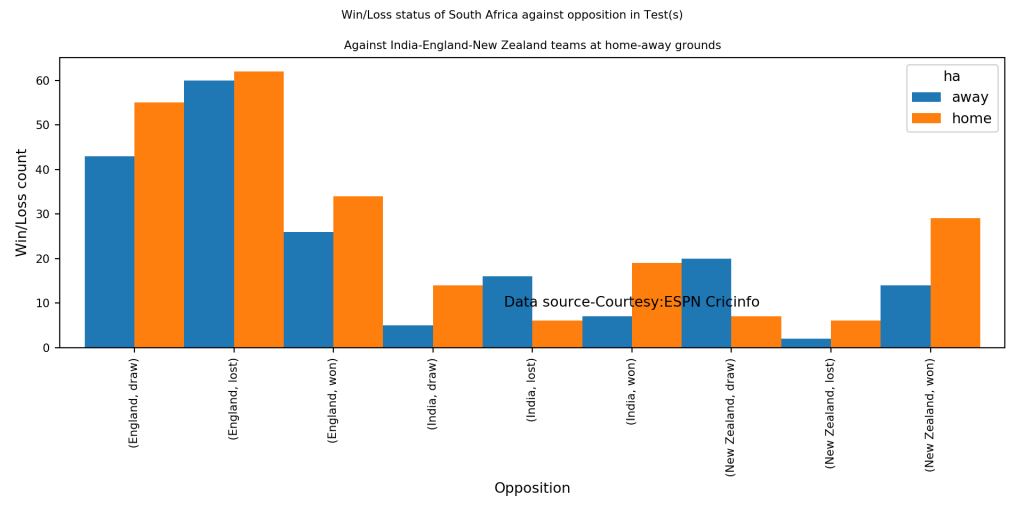
df =ca.teamWinLossStatusVsOpposition("southafricaTest.csv",teamName="South Africa",opposition=["India","England","New Zealand"],homeOrAway=["all"],matchType="Test",plot=False)
print(df)

#Plot the performance of Australia against England, India and New Zealand only at home (Australia) 
## ha                  away  home
## Opposition  Result            
## England     draw      43    55
##             lost      60    62
##             won       26    34
## India       draw       5    14
##             lost      16     6
##             won        7    19
## New Zealand draw      20     7
##             lost       2     6
##             won       14    29
ca.teamWinLossStatusVsOpposition("southafricaTest.csv",teamName="South Africa",opposition=["India","England","New Zealand"],homeOrAway=["home","away"],matchType="Test",plot=True)

2b Wins vs losses of Test teams against opposition at different venues

import cricpy.analytics as ca
# Get the  performance of Pakistan against India, West Indies, South Africa at all venues in Tests and show performances at the venues
df = ca.teamWinLossStatusAtGrounds("westindiesTest.csv",teamName="West Indies",opposition=["India","Sri Lanka","South Africa"],homeOrAway=["all"],matchType="Test",plot=False)
print(df)

# Plot the performance of New Zealand Test team against England, Sri Lanka and Bangladesh at all grounds playes 
## ha                         away  home
## Ground             Result            
## Ahmedabad          won      2.0   0.0
## Basseterre         draw     0.0   3.0
## Bengaluru          draw     2.0   0.0
##                    won      2.0   0.0
## Bridgetown         draw     0.0   6.0
##                    lost     0.0   6.0
##                    won      0.0  14.0
## Cape Town          draw     2.0   0.0
##                    lost     6.0   0.0
## Centurion          lost     6.0   0.0
## Chennai            draw     4.0   0.0
##                    lost     8.0   0.0
##                    won      3.0   0.0
## Colombo (PSS)      lost     2.0   0.0
## Colombo (RPS)      draw     2.0   0.0
## Colombo (SSC)      lost     4.0   0.0
## Delhi              draw     6.0   0.0
##                    lost     2.0   0.0
##                    won      3.0   0.0
## Durban             lost     6.0   0.0
## Galle              draw     1.0   0.0
##                    lost     4.0   0.0
## Georgetown         draw     0.0  10.0
## Gros Islet         draw     0.0   5.0
##                    lost     0.0   2.0
## Hyderabad (Deccan) lost     2.0   0.0
## Johannesburg       lost     4.0   0.0
## Kandy              lost     4.0   0.0
## Kanpur             draw     1.0   0.0
##                    won      3.0   0.0
## Kingston           draw     0.0   8.0
##                    lost     0.0   4.0
##                    won      0.0  15.0
## Kingstown          draw     0.0   2.0
## Kolkata            draw     7.0   0.0
##                    lost     6.0   0.0
##                    won      3.0   0.0
## Mohali             won      2.0   0.0
## Moratuwa           draw     1.0   0.0
## Mumbai             draw     7.0   0.0
##                    lost     6.0   0.0
##                    won      2.0   0.0
## Mumbai (BS)        draw     5.0   0.0
##                    won      2.0   0.0
## Nagpur             draw     2.0   0.0
## North Sound        lost     0.0   2.0
## Pallekele          draw     1.0   0.0
## Port Elizabeth     draw     1.0   0.0
##                    lost     2.0   0.0
##                    won      2.0   0.0
## Port of Spain      draw     0.0  12.0
##                    lost     0.0  12.0
##                    won      0.0  10.0
## Providence         lost     0.0   2.0
## Rajkot             lost     2.0   0.0
## Roseau             draw     0.0   2.0
## St John's          draw     0.0   6.0
##                    lost     0.0   2.0
##                    won      0.0   2.0
ca. teamWinLossStatusAtGrounds("newzealandTest.csv",teamName="New Zealand",opposition=["England","Sri Lanka","Bangladesh"],homeOrAway=["all"],matchType="Test",plot=True)

2c. Plot the time line of wins vs losses of Test teams against opposition at different venues during an interval

import cricpy.analytics as ca
# Plot the time line of wins/losses of India against Australia, West Indies, South Africa in away/neutral venues
#from 2000-01-01 to 2017-01-01
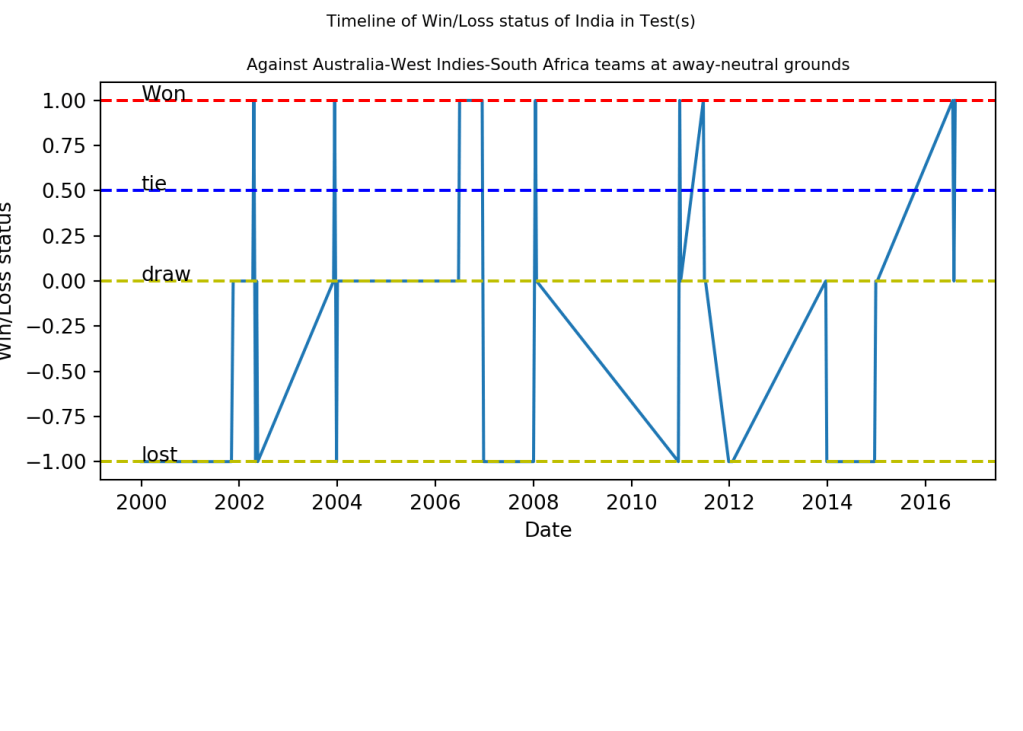
ca.plotTimelineofWinsLosses("indiaTest.csv",teamName="India",opposition=["Australia","West Indies","South Africa"],
                         homeOrAway=["away","neutral"], startDate="2000-01-01",endDate="2017-01-01")
#Plot the time line of wins/losses of Indian Test team from 1970 onwards

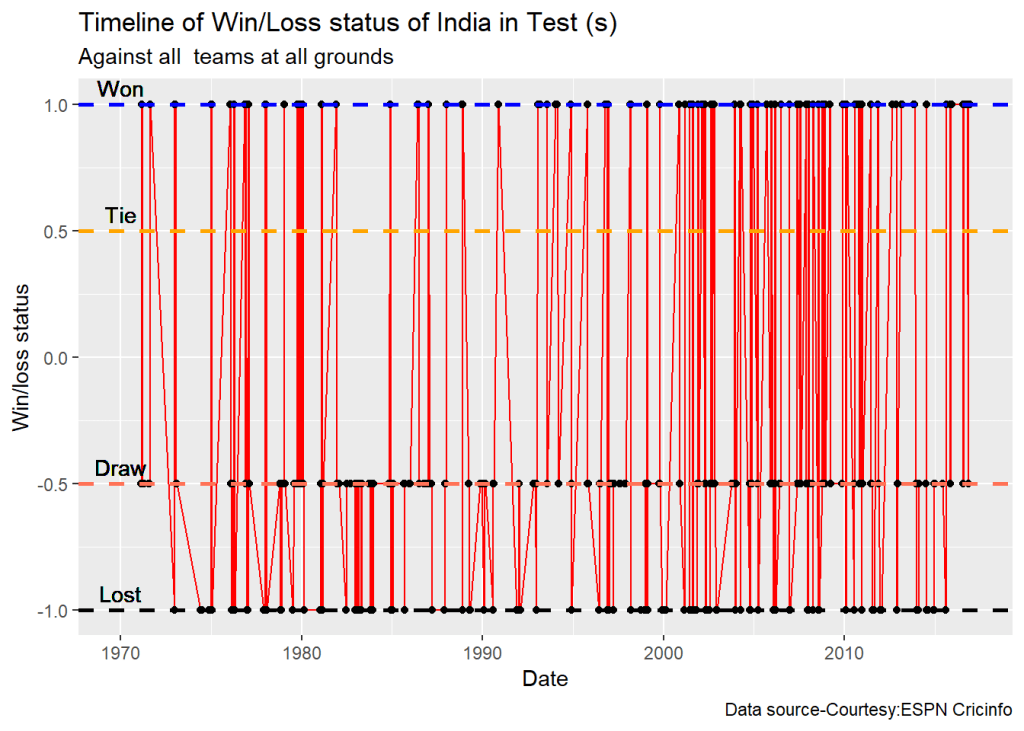
ca.plotTimelineofWinsLosses("indiaTest.csv",teamName="India",startDate="1970-01-01",endDate="2017-01-01")

3 ODI

The functions below perform analysis of ODI teams listed above

3a. Wins vs Loss against opposition ODI teams

This function performs analysis of ODI teams against other teams at home/away or neutral venue. Note:- The opposition can be a vector of opposition teams. Similarly homeOrAway can also be a vector of home/away/neutral venues.

import cricpy.analytics as ca
# Get the performance of West Indies in ODIs against all other ODI teams at all venues and retirn as a dataframe
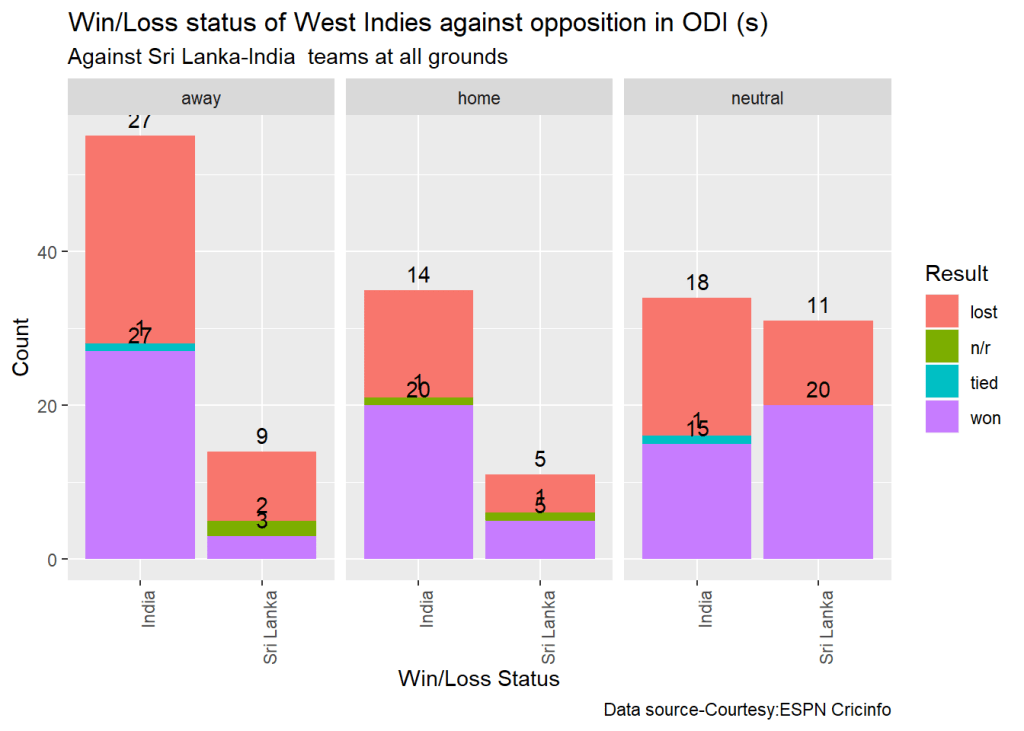
df = ca.teamWinLossStatusVsOpposition("westindiesODI.csv",teamName="West Indies",opposition=["all"],homeOrAway=["all"],matchType="ODI",plot=False)
print(df)

# Plot the performance of West Indies in ODIs against Sri Lanka, India at all venues
## ha                   away  home  neutral
## Opposition   Result                     
## Afghanistan  lost     0.0   1.0      2.0
##              won      0.0   1.0      0.0
## Australia    lost    41.0  25.0      8.0
##              n/r      3.0   0.0      0.0
##              tied     1.0   2.0      0.0
##              won     35.0  18.0      7.0
## Bangladesh   lost     6.0   5.0      3.0
##              n/r      1.0   0.0      1.0
##              won     10.0   8.0      3.0
## Bermuda      won      0.0   0.0      1.0
## Canada       won      2.0   1.0      1.0
## England      lost    22.0  17.0     12.0
##              n/r      0.0   3.0      0.0
##              won     15.0  23.0      6.0
## India        lost    27.0  14.0     18.0
##              n/r      0.0   1.0      0.0
##              tied     1.0   0.0      1.0
##              won     27.0  20.0     15.0
## Ireland      lost     0.0   0.0      1.0
##              won      2.0   3.0      2.0
## Kenya        lost     0.0   0.0      1.0
##              won      3.0   0.0      2.0
## Netherlands  won      0.0   0.0      2.0
## New Zealand  lost    19.0   5.0      3.0
##              n/r      2.0   0.0      2.0
##              won     10.0  15.0      5.0
## P.N.G.       won      0.0   0.0      1.0
## Pakistan     lost    11.0  15.0     34.0
##              tied     1.0   2.0      0.0
##              won     14.0  16.0     41.0
## Scotland     won      0.0   0.0      3.0
## South Africa lost    20.0  17.0      7.0
##              n/r      1.0   0.0      0.0
##              tied     0.0   0.0      1.0
##              won      5.0   7.0      3.0
## Sri Lanka    lost     9.0   5.0     11.0
##              n/r      2.0   1.0      0.0
##              won      3.0   5.0     20.0
## U.A.E.       won      0.0   0.0      2.0
## Zimbabwe     lost     4.0   1.0      5.0
##              n/r      0.0   1.0      0.0
##              tied     1.0   0.0      0.0
##              won      9.0  15.0     12.0
ca.teamWinLossStatusVsOpposition("westindiesODI.csv",teamName="West Indies",opposition=["Sri Lanka", "India"],homeOrAway=["all"],matchType="ODI",plot=True)


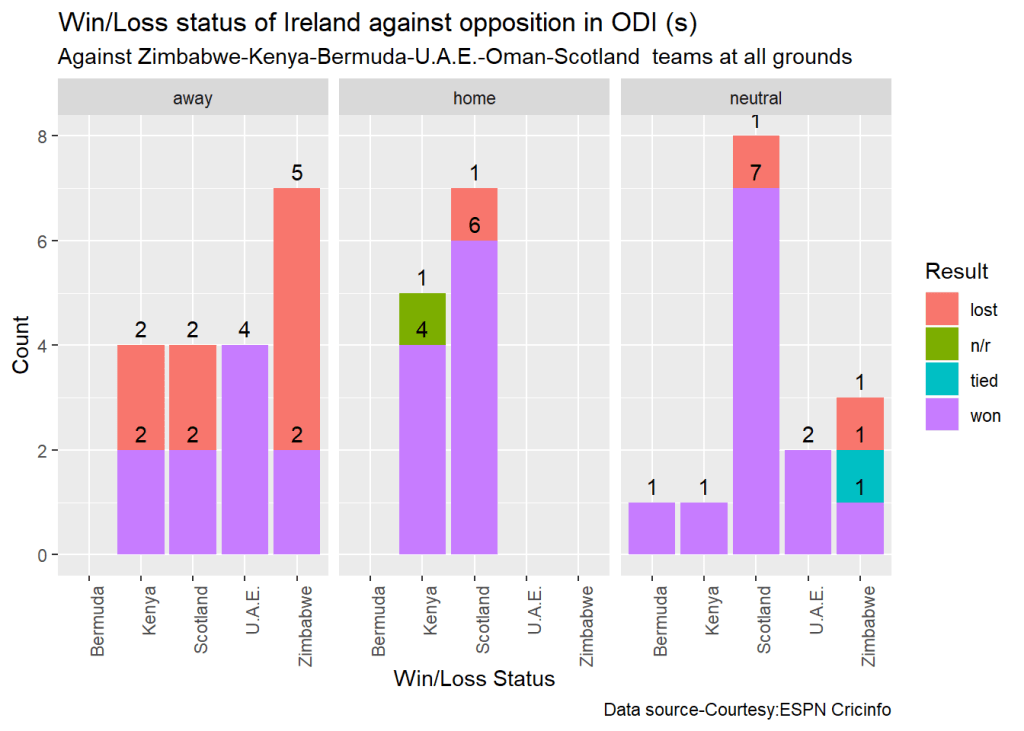
#Plot the performance of Ireland in ODIs against Zimbabwe, Kenya, bermuda, UAE, Oman and Scotland at all venues
ca.teamWinLossStatusVsOpposition("irelandODI.csv",teamName="Ireland",opposition=["Zimbabwe","Kenya","Bermuda","U.A.E.","Oman","Scotland"],homeOrAway=["all"],matchType="ODI",plot=True)

3b Wins vs losses of ODI teams against opposition at different venues

import cricpy.analytics as ca
# Plot the performance of England ODI team against Bangladesh, West Indies and Australia at all venues
ca.teamWinLossStatusAtGrounds("englandODI.csv",teamName="England",opposition=["West Indies"],homeOrAway=["all"],matchType="ODI",plot=True)


#Plot the performance of India against South Africa, West Indies and Australia at 'home' venues
ca.teamWinLossStatusAtGrounds("indiaODI.csv",teamName="India",opposition=["South Africa"],homeOrAway=["home"],matchType="ODI",plot=True)

3c. Plot the time line of wins vs losses of ODI teams against opposition at different venues during an interval


import cricpy.analytics as ca
#Plot the time line of wins/losses of Bangladesh ODI team between 2015 and 2019 against all other teams and at
# all venues
ca.plotTimelineofWinsLosses("bangladeshOD.csv",teamName="Bangladesh",startDate="2015-01-01",endDate="2019-01-01",matchType="ODI")


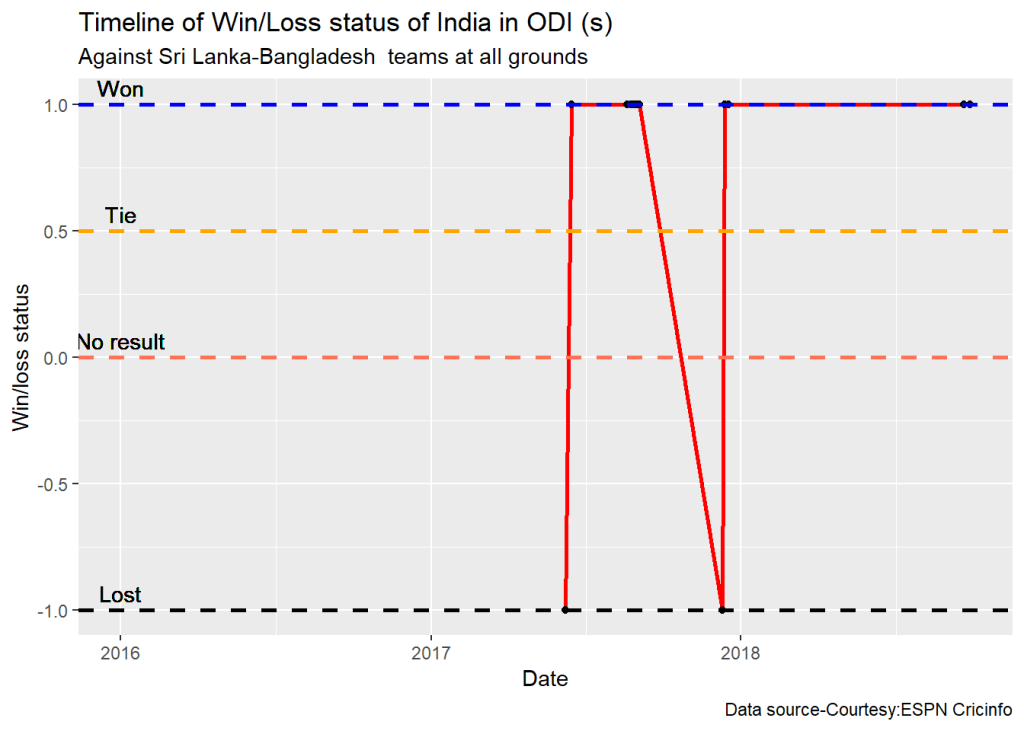
#Plot the time line of wins/losses of India ODI against Sri Lanka, Bangladesh from 2016 to 2019
ca.plotTimelineofWinsLosses("indiaODI.csv",teamName="India",opposition=["Sri Lanka","Bangladesh"],startDate="2016-01-01",endDate="2019-01-01",matchType="ODI")

4 Twenty 20

The functions below perform analysis of Twenty 20 teams listed above

4a. Wins vs Loss against opposition ODI teams

This function performs analysis of T20 teams against other T20 teams at home/away or neutral venue. Note:- The opposition can be a list of opposition teams. Similarly homeOrAway can also be a list of home/away/neutral venues.

import cricpy.analytics as ca
# Get the performance of South Africa T20 team against England, India and Sri Lanka at home grounds at England
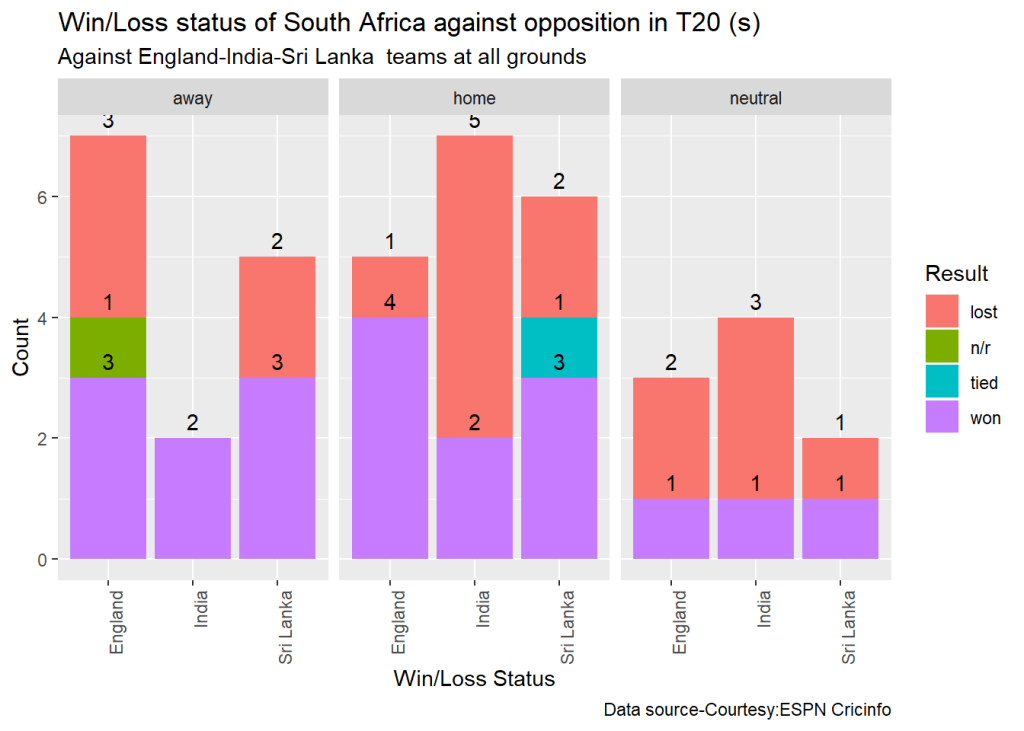
df = ca.teamWinLossStatusVsOpposition("southafricaT20.csv",teamName="South Africa",opposition=["England","India","Sri Lanka"], homeOrAway=["home"], matchType="T20", plot=False)
print(df)

#Plot the performance of South Africa T20 against England, India and Sri Lanka at all venues
## ha                 home
## Opposition Result      
## England    lost       1
##            won        4
## India      lost       5
##            won        2
## Sri Lanka  lost       2
##            tied       1
##            won        3
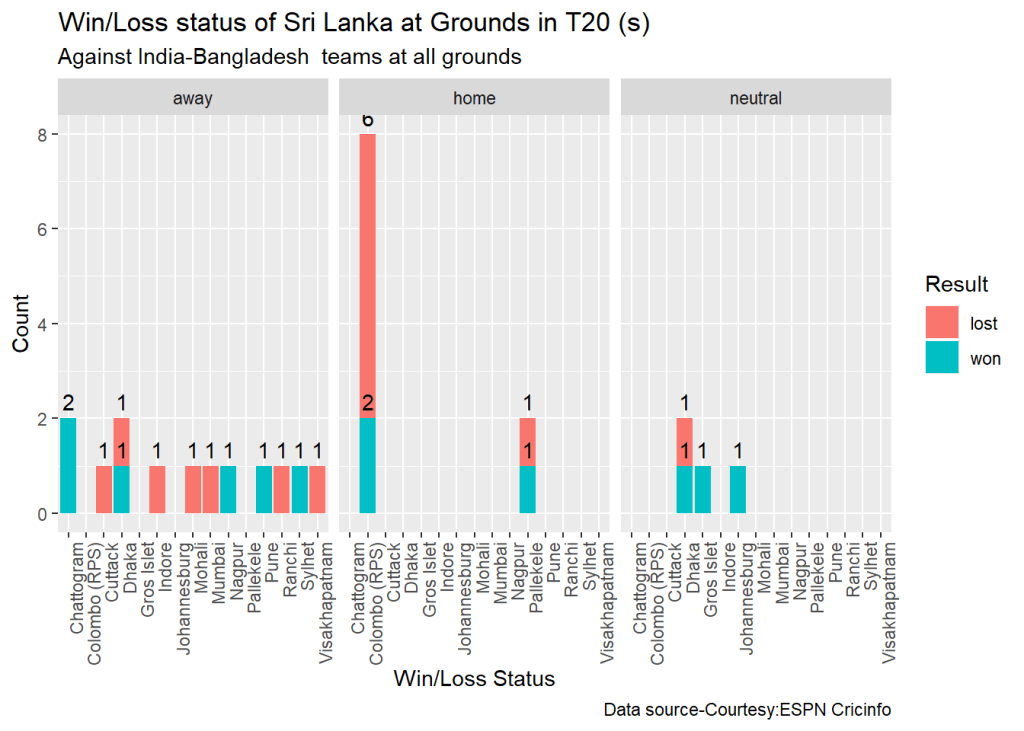
ca.teamWinLossStatusVsOpposition("southafricaT20.csv",teamName="South Africa", opposition=["England","India","Sri Lanka"],homeOrAway=["all"],matchType="T20",plot=True)


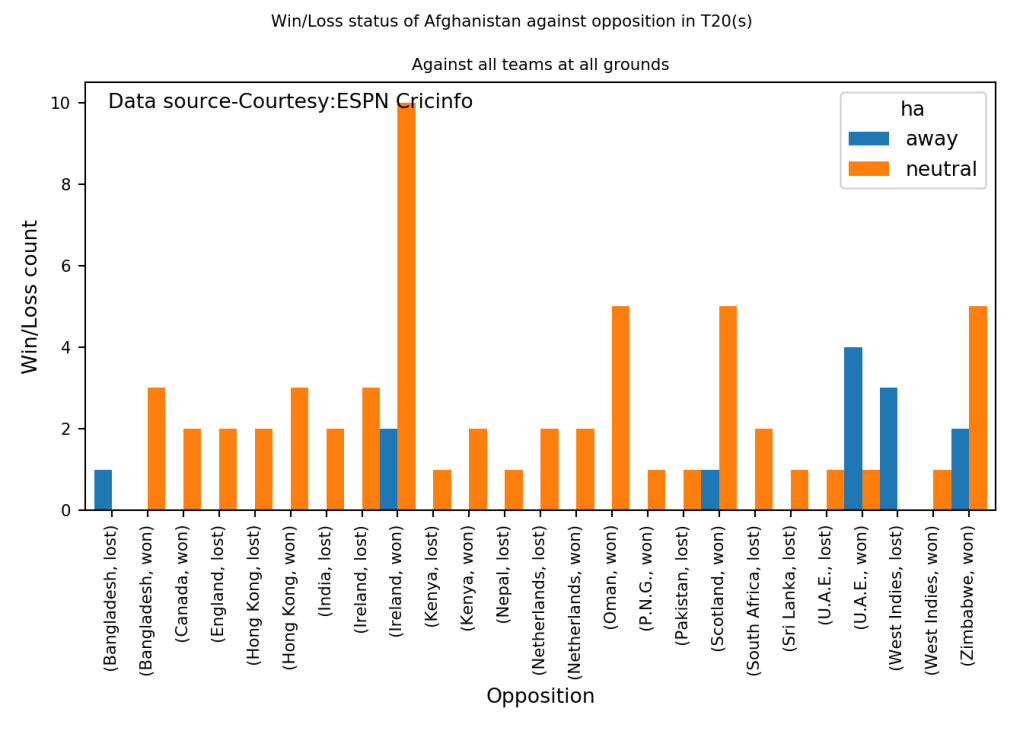
#Plot the performance of Afghanistan T20 teams against all oppositions
ca.teamWinLossStatusVsOpposition("afghanistanT20.csv",teamName="Afghanistan",opposition=["all"],homeOrAway=["all"],matchType="T20",plot=True)

4b Wins vs losses of T20 teams against opposition at different venues

# Compute the performance of Canada against all opposition at all venues and show by grounds. Return as dataframe
df =ca.teamWinLossStatusAtGrounds("canadaT20.csv",teamName="Canada",opposition=["all"],homeOrAway=["all"],matchType="T20",plot=False)
print(df)

# Plot the performance of Sri Lanka T20 team against India and Bangladesh in different venues at home/away and neutral
## ha                     home  neutral
## Ground         Result               
## Abu Dhabi      lost     0.0      1.0
## Belfast        lost     0.0      1.0
##                won      0.0      2.0
## Colombo (SSC)  lost     0.0      1.0
##                won      0.0      1.0
## Dubai (DSC)    lost     0.0      5.0
## ICCA Dubai     lost     0.0      2.0
##                won      0.0      1.0
## King City (NW) lost     3.0      0.0
##                tied     1.0      0.0
## Sharjah        lost     0.0      1.0
ca.teamWinLossStatusAtGrounds("srilankaT20.csv",teamName="Sri Lanka",opposition=["India", "Bangladesh"], homeOrAway=["all"], matchType="T20", plot=True)

4c. Plot the time line of wins vs losses of T20 teams against opposition at different venues during an interval

#Plot the time line of Sri Lanka T20 team agaibst all opposition
ca.plotTimelineofWinsLosses("srilankaT20.csv",teamName="Sri Lanka",opposition=["Australia", "Pakistan"], startDate="2013-01-01", endDate="2019-01-01",  matchType="T20")


# Plot the time line of South Africa T20 between 2010 and 2015 against West Indies and Pakistan
ca.plotTimelineofWinsLosses("southafricaT20.csv",teamName="South Africa",opposition=["West Indies", "Pakistan"], startDate="2010-01-01", endDate="2015-01-01",  matchType="T20")

Conclusion

With the above additional functions cricpy can now analyze batsmen, bowlers and teams in all formats of the game (Test, ODI and T20).

Have fun with cricpy!!!

You may also like

  1. My book ‘Deep Learning from first principles:Second Edition’ now on Amazon
  2. Practical Machine Learning with R and Python – Part 3
  3. Big Data-4: Webserver log analysis with RDDs, Pyspark, SparkR and SparklyR
  4. Revisiting World Bank data analysis with WDI and gVisMotionChart
  5. The Clash of the Titans in Test and ODI cricket
  6. Simulating the domino effect in Android using Box2D and AndEngine
  7. Presentation on Wireless Technologies – Part 1 8.De-blurring revisited with Wiener filter using OpenCV
  8. Cloud Computing – Design Considerations

To see all posts click Index of posts

Cricketr adds team analytics to its repertoire!!!

And she’s got brains enough for two, which is the exact quantity the girl who marries you will need.

“I’m not absolutely certain of the facts, but I rather fancy it’s Shakespeare who says that it’s always just when a fellow is feeling particularly braced with things in general that Fate sneaks up behind him with the bit of lead piping.”

“A melancholy-looking man, he had the appearance of one who has searched for the leak in life’s gas-pipe with a lighted candle.”

“It isn’t often that Aunt Dahlia lets her angry passions rise, but when she does, strong men climb trees and pull them up after them.”

“Some minds are like soup in a poor restaurant – better left unstirred.”

                                      P.G. Wodehouse

Introduction

My R package cricketr had its genesis about 4 years ago, sometime around June 2015. There were some minor updates afterwards and the package performed analytics on cricketers (Test, ODI and T20) based on data from ESPN Cricinfo see Re-introducing cricketr! : An R package to analyze performances of cricketers. Now, in the latest release of cricketr, I have included 8 functions which can perform Team analytics. Team analysis can be done for Test, ODI and T20 teams.

This package uses the statistics info available in ESPN Cricinfo Statsguru. The current version of this package can handle all formats of the game including Test, ODI and Twenty20 cricket for players (batsmen & bowlers) and also teams (Test, ODI and T20)

You should be able to install the package directly from CRAN. Please be mindful of ESPN Cricinfo Terms of Use

A total of 8 new functions which deal with team analytics has been included in the latest release.

There are 5 functions which are used internally 1) getTeamData b) getTeamNumber c) getMatchType d) getTeamDataHomeAway e) cleanTeamData

and the external functions which are
a) teamWinLossStatusVsOpposition
b) teamWinLossStatusAtGrounds
c) plotTimelineofWinsLosses

All the above functions are common to Test, ODI and T20 teams

The data for a particular Team can be obtained with the getTeamDataHomeAway() function from the package. This will return a dataframe of the team’s win/loss status at home and away venues over a period of time. This can be saved as a CSV file. Once this is done, you can use this CSV file for all subsequent analysis

As before you can get the help for any of the cricketr functions as below

#help(teamWinLossStatusVsOpposition)
Compute the wins/losses/draw/tied etc for a Team in Test, ODI or T20 against opposition
Description
This function computes the won,lost,draw,tied or no result for a team against other teams in home/away or neutral venues and either returns a dataframe or plots it against opposition
Usage
teamWinLossStatusVsOpposition(file,teamName,opposition=c("all"),homeOrAway=c("all"),
      matchType="Test",plot=FALSE)
Arguments
file	
The CSV file for which the plot is required
teamName	
The name of the team for which plot is required
opposition	
Opposition is a vector namely c("all") or c("Australia", "India", "England")
homeOrAway	
This parameter is a vector which is either c("all") or a vector of venues c("home","away","neutral")
matchType	
Match type - Test, ODI or T20
plot	
If plot=FALSE then a data frame is returned, If plot=TRUE then a plot is generated
Value
None
Note
Maintainer: Tinniam V Ganesh tvganesh.85@gmail.com
Author(s)
Tinniam V Ganesh
References

http://www.espncricinfo.com/ci/content/stats/index.html
https://gigadom.in/
See Also
teamWinLossStatusVsOpposition teamWinLossStatusAtGrounds plotTimelineofWinsLosses
Examples
## Not run: 
#Get the team data for India for Tests
df <- getTeamDataHomeAway(teamName="India",file="indiaOD.csv",matchType="ODI")
teamWinLossStatusAtGrounds("india.csv",teamName="India",opposition=c("Australia","England","India"),
                          homeOrAway=c("home","away"),plot=TRUE)
## End(Not run)

This post has been published at RPubs and is available at TeamAnalyticsWithCricketr

You can download PDF version of this post at TeamAnalyticsWithCricketr

You can download the latest PDF version of the book  at  ‘Cricket analytics with cricketr and cricpy: Analytics harmony with R and Python-6th edition

1. Get team data

1a. Test

The teams in Test cricket are included below

  1. Afghanistan 2.Bangladesh 3. England 4. World 5. India 6. Ireland 7. New Zealand 8. Pakistan 9. South Africa 10.Sri Lanka 11. West Indies 12.Zimbabwe

You can use this for the teamName paramater. This will return a dataframe and also save the file as a CSV , if save=TRUE

Note: – Since I have already got the data as CSV files I am not executing the lines below

# Get the data for the teams. Save as CSV
#indiaTest <-getTeamDataHomeAway(dir=".",teamView="bat",matchType="Test",file="indiaTest.csv",save=TRUE,teamName="India")
#australiaTest <- getTeamDataHomeAway(matchType="Test",file="australiaTest.csv",save=TRUE,teamName="Australia")
#pakistanTest <- getTeamDataHomeAway(matchType="Test",file="pakistanTest.csv",save=TRUE,teamName="Pakistan")
#newzealandTest <- getTeamDataHomeAway(matchType="Test",file="newzealandTest.csv",save=TRUE,teamName="New Zealand")

1b. ODI

The ODI teams in the world are below. The data for these teams can be got by names as shown below

  1. Afghanistan 2. Africa XI 3. Asia XI 4.Australia 5.Bangladesh
  2. Bermuda 7. England 8. ICC World X1 9. India 11.Ireland 12. New Zealand
  3. Pakistan 14. South Africa 15. Sri Lanka 17. West Indies 18. Zimbabwe
  4. Canada 21. East Africa 22. Hong Kong 23.Ireland 24. Kenya 25. Namibia
  5. Nepal 27.Netherlands 28. Oman 29.Papua New Guinea 30. Scotland
  6. United Arab Emirates 32. United States of America
#indiaODI <- getTeamDataHomeAway(matchType="ODI",file="indiaODI.csv",save=TRUE,teamName="India")
#englandODI <- getTeamDataHomeAway(matchType="ODI",file="englandODI.csv",save=TRUE,teamName="England")
#westindiesODI <- getTeamDataHomeAway(matchType="ODI",file="westindiesODI.csv",save=TRUE,teamName="West Indies")
#irelandODI <- getTeamDataHomeAway(matchType="ODI",file="irelandODI.csv",save=TRUE,teamName="Ireland")

1c T20

The T20 teams in the world are
1.Afghanistan 2. Australia 3. Bahrain 4. Bangladesh 5. Belgium 6. Belize
2.Bermuda 8.Botswana 9. Canada 11. Costa Rica 12. Germany 13. Ghana
14.Guernsey 15. Hong Kong 16. ICC World X1 17.India 18. Ireland 19.Italy
20.Jersey 21. Kenya 22.Kuwait 23.Maldives 24.Malta 25.Mexico 26.Namibia
27.Nepal 28.Netherlands 29. New Zealand 30.Nigeria 31.Oman 32. Pakistan
33.Panama 34.Papua New Guinea 35. Philippines 36.Qatar 37.Saudi Arabia
38.Scotland 39.South Africa 40.Spain 41.Sri Lanka 42.Uganda
43.United Arab Emirates United States of America 44.Vanuatu 45.West Indies

#southafricaT20 <- getTeamDataHomeAway(matchType="T20",file="southafricaT20.csv",save=TRUE,teamName="South Africa")
#srilankaT20 <- getTeamDataHomeAway(matchType="T20",file="srilankaT20.csv",save=TRUE,teamName="Sri Lanka")
#canadaT20 <- getTeamDataHomeAway(matchType="T20",file="canadaT20.csv",save=TRUE,teamName="Canada")
#afghanistanT20 <- getTeamDataHomeAway(matchType="T20",file="afghanistanT20.csv",save=TRUE,teamName="Afghanistan")

2 Analysis of Test matches

The functions below perform analysis of Test teams

2a. Wins vs Loss against opposition

This function performs analysis of Test teams against other teams at home/away or neutral venue. Note:- The opposition can be a vector of opposition teams. Similarly homeOrAway can also be a vector of home/away/neutral venues.

# Get the performance of Indian test team against all teams at all venues as a dataframe
df <- teamWinLossStatusVsOpposition("india.csv",teamName="India",opposition=c("all"),homeOrAway=c("all"),matchType="Test",plot=FALSE)
head(df)
## # A tibble: 6 x 4
## # Groups:   Opposition, Result [4]
##   Opposition  Result ha    count
##   <chr>       <chr>  <chr> <int>
## 1 Afghanistan won    home      1
## 2 Australia   draw   away     20
## 3 Australia   draw   home     23
## 4 Australia   lost   away     58
## 5 Australia   lost   home     26
## 6 Australia   tied   home      2
# Plot the performance of Indian Test team  against all teams at all venues
teamWinLossStatusVsOpposition("indiaTest.csv",teamName="India",opposition=c("all"),homeOrAway=c("all"),matchType="Test",plot=TRUE)

# Get the performance of Australia against India, England and New Zealand at all venues in Tests
df <-teamWinLossStatusVsOpposition("australiaTest.csv",teamName="Australia",opposition=c("India","England","New Zealand"),homeOrAway=c("all"),matchType="Test",plot=FALSE)

#Plot the performance of Australia against England, India and New Zealand only at home (Australia) 
teamWinLossStatusVsOpposition("australiaTest.csv",teamName="Australia",opposition=c("India","England","New Zealand"),homeOrAway=c("home"),matchType="Test",plot=TRUE)

If you are passionate about cricket, and love analyzing cricket performances, then check out my racy book on cricket ‘Cricket analytics with cricketr and cricpy – Analytics harmony with R & Python’! This book discusses and shows how to use my R package ‘cricketr’ and my Python package ‘cricpy’ to analyze batsmen and bowlers in all formats of the game (Test, ODI and T20). The paperback is available on Amazon at $21.99 and  the kindle version at $9.99/Rs 449/-. A must read for any cricket lover! Check it out!!

Untitled

2b Wins vs losses of Test teams against opposition at different venues

# Get the  performance of Pakistan against India, West Indies, South Africa at all venues in Tests and show performances at the venues
df <- teamWinLossStatusAtGrounds("pakistanTest.csv",teamName="Pakistan",opposition=c("India","West Indies","South Africa"),homeOrAway=c("all"),matchType="Test",plot=FALSE)
head(df)
## # A tibble: 6 x 4
## # Groups:   Ground, Result [6]
##   Ground     Result ha      count
##   <chr>      <chr>  <chr>   <int>
## 1 Abu Dhabi  draw   neutral     2
## 2 Abu Dhabi  won    neutral     4
## 3 Ahmedabad  draw   away        2
## 4 Bahawalpur draw   home        1
## 5 Basseterre won    away        2
## 6 Bengaluru  draw   away        5
# Plot the performance of New Zealand Test team against England, Sri Lanka and Bangladesh at all grounds playes 
teamWinLossStatusAtGrounds("newzealandTest.csv",teamName="New Zealand",opposition=c("England","Sri Lanka","Bangladesh"),homeOrAway=c("all"),matchType="Test",plot=TRUE)

2c. Plot the time line of wins vs losses of Test teams against opposition at different venues during an interval

# Plot the time line of wins/losses of India against Australia, West Indies, South Africa in away/neutral venues
#from 2000-01-01 to 2017-01-01
plotTimelineofWinsLosses("indiaTest.csv",team="India",opposition=c("Australia","West Indies","South Africa"),
                         homeOrAway=c("away","neutral"), startDate="2000-01-01",endDate="2017-01-01")

#Plot the time line of wins/losses of Indian Test team from 1970 onwards
plotTimelineofWinsLosses("indiaTest.csv",team="India",startDate="1970-01-01",endDate="2017-01-01")

3 ODI

The functions below perform analysis of ODI teams listed above

3a. Wins vs Loss against opposition ODI teams

This function performs analysis of ODI teams against other teams at home/away or neutral venue. Note:- The opposition can be a vector of opposition teams. Similarly homeOrAway can also be a vector of home/away/neutral venues.

# Get the performance of West Indies in ODIs against all other ODI teams at all venues and retirn as a dataframe
df <- teamWinLossStatusVsOpposition("westindiesODI.csv",teamName="West Indies",opposition=c("all"),homeOrAway=c("all"),matchType="ODI",plot=FALSE)
head(df)
## # A tibble: 6 x 4
## # Groups:   Opposition, Result [3]
##   Opposition  Result ha      count
##   <chr>       <chr>  <chr>   <int>
## 1 Afghanistan lost   home        1
## 2 Afghanistan lost   neutral     2
## 3 Afghanistan won    home        1
## 4 Australia   lost   away       41
## 5 Australia   lost   home       25
## 6 Australia   lost   neutral     8
# Plot the performance of West Indies in ODIs against Sri Lanka, India at all venues
teamWinLossStatusVsOpposition("westindiesODI.csv",teamName="West Indies",opposition=c("Sri Lanka", "India"),homeOrAway=c("all"),matchType="ODI",plot=TRUE)

#Plot the performance of Ireland in ODIs against Zimbabwe, Kenya, bermuda, UAE, Oman and Scotland at all venues
teamWinLossStatusVsOpposition("irelandODI.csv",teamName="Ireland",opposition=c("Zimbabwe","Kenya","Bermuda","U.A.E.","Oman","Scotland"),homeOrAway=c("all"),matchType="ODI",plot=TRUE)

3b Wins vs losses of ODI teams against opposition at different venues

# Plot the performance of England ODI team against Bangladesh, West Indies and Australia at all venues
teamWinLossStatusAtGrounds("englandODI.csv",teamName="England",opposition=c("Bangladesh","West Indies","Australia"),homeOrAway=c("all"),matchType="ODI",plot=TRUE)

#Plot the performance of India against South Africa, West Indies and Australia at 'home' venues
teamWinLossStatusAtGrounds("indiaODI.csv",teamName="India",opposition=c("South Africa","West Indies","Australia"),homeOrAway=c("home"),matchType="ODI",plot=TRUE)

3c. Plot the time line of wins vs losses of ODI teams against opposition at different venues during an interval

#Plot the time line of wins/losses of Bangladesh ODI team between 2015 and 2019 against all other teams and at
# all venues
plotTimelineofWinsLosses("bangladeshOD.csv",team="Bangladesh",startDate="2015-01-01",endDate="2019-01-01",matchType="ODI")

#Plot the time line of wins/losses of India ODI against Sri Lanka, Bangladesh from 2016 to 2019
plotTimelineofWinsLosses("indiaODI.csv",team="India",opposition=c("Sri Lanka","Bangladesh"),startDate="2016-01-01",endDate="2019-01-01",matchType="ODI")

4 Twenty 20

The functions below perform analysis of Twenty 20 teams listed above

4a. Wins vs Loss against opposition ODI teams

This function performs analysis of T20 teams against other T20 teams at home/away or neutral venue. Note:- The opposition can be a vector of opposition teams. Similarly homeOrAway can also be a vector of home/away/neutral venues.

# Get the performance of South Africa T20 team against England, India and Sri Lanka at home grounds at England
df <- teamWinLossStatusVsOpposition("southafricaT20.csv",teamName="South Africa",opposition=c("England","India","Sri Lanka"),homeOrAway=c("home"),matchType="T20",plot=FALSE)

#Plot the performance of South Africa T20 against England, India and Sri Lanka at all venues
teamWinLossStatusVsOpposition("southafricaT20.csv",teamName="South Africa",opposition=c("England","India","Sri Lanka"),homeOrAway=c("all"),matchType="T20",plot=TRUE)

#Plot the performance of Afghanistan T20 teams against all oppositions
teamWinLossStatusVsOpposition("afghanistanT20.csv",teamName="Afghanistan",opposition=c("all"),homeOrAway=c("all"),matchType="T20",plot=TRUE)

4b Wins vs losses of T20 teams against opposition at different venues

# Compute the performance of Canada against all opposition at all venues and show by grounds. Return as dataframe
df <-teamWinLossStatusAtGrounds("canadaT20.csv",teamName="Canada",opposition=c("all"),homeOrAway=c("all"),matchType="T20",plot=FALSE)
head(df)
## # A tibble: 6 x 4
## # Groups:   Ground, Result [6]
##   Ground        Result ha      count
##   <chr>         <chr>  <chr>   <int>
## 1 Abu Dhabi     lost   neutral     1
## 2 Belfast       lost   neutral     1
## 3 Belfast       won    neutral     2
## 4 Colombo (SSC) lost   neutral     1
## 5 Colombo (SSC) won    neutral     1
## 6 Dubai (DSC)   lost   neutral     5
# Plot the performance of Sri Lanka T20 team against India and Bangladesh in different venues at home/away and neutral
teamWinLossStatusAtGrounds("srilankaT20.csv",teamName="Sri Lanka",opposition=c("India", "Bangladesh"), homeOrAway=c("all"), matchType="T20", plot=TRUE)

4c. Plot the time line of wins vs losses of T20 teams against opposition at different venues during an interval

#Plot the time line of Sri Lanka T20 team agaibst all opposition
plotTimelineofWinsLosses("srilankaT20.csv",team="Sri Lanka",opposition=c("Australia", "Pakistan"), startDate="2013-01-01", endDate="2019-01-01",  matchType="T20")

# Plot the time line of South Africa T20 between 2010 and 2015 against West Indies and Pakistan
plotTimelineofWinsLosses("southafricaT20.csv",team="South Africa",opposition=c("West Indies", "Pakistan"), startDate="2010-01-01", endDate="2015-01-01",  matchType="T20")

Big Data-4: Webserver log analysis with RDDs, Pyspark, SparkR and SparklyR

“There’s something so paradoxical about pi. On the one hand, it represents order, as embodied by the shape of a circle, long held to be a symbol of perfection and eternity. On the other hand, pi is unruly, disheveled in appearance, its digits obeying no obvious rule, or at least none that we can perceive. Pi is elusive and mysterious, forever beyond reach. Its mix of order and disorder is what makes it so bewitching. ” 

From  Infinite Powers by Steven Strogatz

Anybody who wants to be “anybody” in Big Data must necessarily be able to work on both large structured and unstructured data.  Log analysis is critical in any enterprise which is usually unstructured. As I mentioned in my previous post Big Data: On RDDs, Dataframes,Hive QL with Pyspark and SparkR-Part 3 RDDs are typically used to handle unstructured data. Spark has the Dataframe abstraction over RDDs which performs better as it is optimized with the Catalyst optimization engine. Nevertheless, it is important to be able to process with RDDs.  This post is a continuation of my 3 earlier posts on Big Data namely

1. Big Data-1: Move into the big league:Graduate from Python to Pyspark
2. Big Data-2: Move into the big league:Graduate from R to SparkR
3. Big Data: On RDDs, Dataframes,Hive QL with Pyspark and SparkR-Part 3

This post uses publicly available Webserver logs from NASA. The logs are for the months Jul 95 and Aug 95 and are a good place to start unstructured text analysis/log analysis. I highly recommend parsing these publicly available logs with regular expressions. It is only when you do that the truth of Jamie Zawinski’s pearl of wisdom

“Some people, when confronted with a problem, think “I know, I’ll use regular expressions.” Now they have two problems.” – Jamie Zawinksi

hits home. I spent many hours struggling with regex!!

For this post for the RDD part,  I had to refer to Dr. Fisseha Berhane’s blog post Webserver Log Analysis and for the Pyspark part, to the Univ. of California Specialization which I had done 3 years back Big Data Analysis with Apache Spark. Once I had played around with the regex for RDDs and PySpark I managed to get SparkR and SparklyR versions to work.

The notebooks used in this post have been published and are available at

  1. logsAnalysiswithRDDs
  2. logsAnalysiswithPyspark
  3. logsAnalysiswithSparkRandSparklyR

You can also download all the notebooks from Github at WebServerLogsAnalysis

An essential and unavoidable aspect of Big Data processing is the need to process unstructured text.Web server logs are one such area which requires Big Data techniques to process massive amounts of logs. The Common Log Format also known as the NCSA Common log format, is a standardized text file format used by web servers when generating server log files. Because the format is standardized, the files can be readily analyzed.

A publicly available webserver logs is the NASA-HTTP Web server logs. This is good dataset with which we can play around to get familiar to handling web server logs. The logs can be accessed at NASA-HTTP

Description These two traces contain two month’s worth of all HTTP requests to the NASA Kennedy Space Center WWW server in Florida.

Format The logs are an ASCII file with one line per request, with the following columns:

-host making the request. A hostname when possible, otherwise the Internet address if the name could not be looked up.

-timestamp in the format “DAY MON DD HH:MM:SS YYYY”, where DAY is the day of the week, MON is the name of the month, DD is the day of the month, HH:MM:SS is the time of day using a 24-hour clock, and YYYY is the year. The timezone is -0400.

-request given in quotes.

-HTTP reply code.

-bytes in the reply.

1 Parse Web server logs with RDDs

1.1 Read NASA Web server logs

Read the logs files from NASA for the months Jul 95 and Aug 95

from pyspark import SparkContext, SparkConf
from pyspark.sql import SQLContext

conf = SparkConf().setAppName("Spark-Logs-Handling").setMaster("local[*]")
sc = SparkContext.getOrCreate(conf)

sqlcontext = SQLContext(sc)
rdd = sc.textFile("/FileStore/tables/NASA_access_log_*.gz")
rdd.count()
Out[1]: 3461613

1.2Check content

Check the logs to identify the parsing rules required for the logs

i=0
for line in rdd.sample(withReplacement = False, fraction = 0.00001, seed = 100).collect():
    i=i+1
    print(line)
    if i >5:
      break
ix-stp-fl2-19.ix.netcom.com – – [03/Aug/1995:23:03:09 -0400] “GET /images/faq.gif HTTP/1.0” 200 263
slip183-1.kw.jp.ibm.net – – [04/Aug/1995:18:42:17 -0400] “GET /shuttle/missions/sts-70/images/DSC-95EC-0001.gif HTTP/1.0” 200 107133
piweba4y.prodigy.com – – [05/Aug/1995:19:17:41 -0400] “GET /icons/menu.xbm HTTP/1.0” 200 527
ruperts.bt-sys.bt.co.uk – – [07/Aug/1995:04:44:10 -0400] “GET /shuttle/countdown/video/livevideo2.gif HTTP/1.0” 200 69067
dal06-04.ppp.iadfw.net – – [07/Aug/1995:21:10:19 -0400] “GET /images/NASA-logosmall.gif HTTP/1.0” 200 786
p15.ppp-1.directnet.com – – [10/Aug/1995:01:22:54 -0400] “GET /images/KSC-logosmall.gif HTTP/1.0” 200 1204

1.3 Write the parsing rule for each of the fields

  • host
  • timestamp
  • path
  • status
  • content_bytes

1.21 Get IP address/host name

This regex is at the start of the log and includes any non-white characted

import re
rslt=(rdd.map(lambda line: re.search('\S+',line)
   .group(0))
   .take(3)) # Get the IP address \host name
rslt
Out[3]: [‘in24.inetnebr.com’, ‘uplherc.upl.com’, ‘uplherc.upl.com’]

1.22 Get timestamp

Get the time stamp

rslt=(rdd.map(lambda line: re.search(‘(\S+ -\d{4})’,line)
    .groups())
    .take(3))  #Get the  date
rslt
[(‘[01/Aug/1995:00:00:01 -0400’,),
(‘[01/Aug/1995:00:00:07 -0400’,),
(‘[01/Aug/1995:00:00:08 -0400’,)]

1.23 HTTP request

Get the HTTP request sent to Web server \w+ {GET}

# Get the REST call with ” “
rslt=(rdd.map(lambda line: re.search('"\w+\s+([^\s]+)\s+HTTP.*"',line)
    .groups())
    .take(3)) # Get the REST call
rslt
[(‘/shuttle/missions/sts-68/news/sts-68-mcc-05.txt’,),
(‘/’,),
(‘/images/ksclogo-medium.gif’,)]

1.23Get HTTP response status

Get the HTTP response to the request

rslt=(rdd.map(lambda line: re.search('"\s(\d{3})',line)
    .groups())
    .take(3)) #Get the status
rslt
Out[6]: [(‘200’,), (‘304’,), (‘304’,)]

1.24 Get content size

Get the HTTP response in bytes

rslt=(rdd.map(lambda line: re.search(‘^.*\s(\d*)$’,line)
    .groups())
    .take(3)) # Get the content size
rslt
Out[7]: [(‘1839’,), (‘0’,), (‘0’,)]

1.24 Putting it all together

Now put all the individual pieces together into 1 big regular expression and assign to the groups

  1. Host 2. Timestamp 3. Path 4. Status 5. Content_size
rslt=(rdd.map(lambda line: re.search('^(\S+)((\s)(-))+\s(\[\S+ -\d{4}\])\s("\w+\s+([^\s]+)\s+HTTP.*")\s(\d{3}\s(\d*)$)',line)
    .groups())
    .take(3))
rslt
[(‘in24.inetnebr.com’,
‘ -‘,
‘ ‘,
‘-‘,
‘[01/Aug/1995:00:00:01 -0400]’,
‘”GET /shuttle/missions/sts-68/news/sts-68-mcc-05.txt HTTP/1.0″‘,
‘/shuttle/missions/sts-68/news/sts-68-mcc-05.txt’,
‘200 1839’,
‘1839’),
(‘uplherc.upl.com’,
‘ -‘,
‘ ‘,
‘-‘,
‘[01/Aug/1995:00:00:07 -0400]’,
‘”GET / HTTP/1.0″‘,
‘/’,
‘304 0’,
‘0’),
(‘uplherc.upl.com’,
‘ -‘,
‘ ‘,
‘-‘,
‘[01/Aug/1995:00:00:08 -0400]’,
‘”GET /images/ksclogo-medium.gif HTTP/1.0″‘,
‘/images/ksclogo-medium.gif’,
‘304 0’,
‘0’)]

1.25 Add a log parsing function

import re
def parse_log1(line):
    match = re.search('^(\S+)((\s)(-))+\s(\[\S+ -\d{4}\])\s("\w+\s+([^\s]+)\s+HTTP.*")\s(\d{3}\s(\d*)$)',line)
    if match is None:    
        return(line,0)
    else:
        return(line,1)

1.26 Check for parsing failure

Check how many lines successfully parsed with the parsing function

n_logs = rdd.count()
failed = rdd.map(lambda line: parse_log1(line)).filter(lambda line: line[1] == 0).count()
print('Out of a total of {} logs, {} failed to parse'.format(n_logs,failed))
# Get the failed records line[1] == 0
failed1=rdd.map(lambda line: parse_log1(line)).filter(lambda line: line[1]==0)
failed1.take(3)
Out of a total of 3461613 logs, 38768 failed to parse
Out[10]:
[(‘gw1.att.com – – [01/Aug/1995:00:03:53 -0400] “GET /shuttle/missions/sts-73/news HTTP/1.0” 302 -‘,
0),
(‘js002.cc.utsunomiya-u.ac.jp – – [01/Aug/1995:00:07:33 -0400] “GET /shuttle/resources/orbiters/discovery.gif HTTP/1.0” 404 -‘,
0),
(‘pipe1.nyc.pipeline.com – – [01/Aug/1995:00:12:37 -0400] “GET /history/apollo/apollo-13/apollo-13-patch-small.gif” 200 12859’,
0)]

1.26 The above rule is not enough to parse the logs

It can be seen that the single rule only parses part of the logs and we cannot group the regex separately. There is an error “AttributeError: ‘NoneType’ object has no attribute ‘group'” which shows up

#rdd.map(lambda line: re.search(‘^(\S+)((\s)(-))+\s(\[\S+ -\d{4}\])\s(“\w+\s+([^\s]+)\s+HTTP.*”)\s(\d{3}\s(\d*)$)’,line[0]).group()).take(4)

File “/databricks/spark/python/pyspark/util.py”, line 99, in wrapper
return f(*args, **kwargs)
File “<command-1348022240961444>”, line 1, in <lambda>
AttributeError: ‘NoneType’ object has no attribute ‘group’

at org.apache.spark.api.python.BasePythonRunner$ReaderIterator.handlePythonException(PythonRunner.scala:490)

1.27 Add rule for parsing failed records

One of the issues with the earlier rule is the content_size has “-” for some logs

import re
def parse_failed(line):
    match = re.search('^(\S+)((\s)(-))+\s(\[\S+ -\d{4}\])\s("\w+\s+([^\s]+)\s+HTTP.*")\s(\d{3}\s-$)',line)
    if match is None:        
        return(line,0)
    else:
        return(line,1)

1.28 Parse records which fail

Parse the records that fails with the new rule

failed2=rdd.map(lambda line: parse_failed(line)).filter(lambda line: line[1]==1)
failed2.take(5)
Out[13]:
[(‘gw1.att.com – – [01/Aug/1995:00:03:53 -0400] “GET /shuttle/missions/sts-73/news HTTP/1.0” 302 -‘,
1),
(‘js002.cc.utsunomiya-u.ac.jp – – [01/Aug/1995:00:07:33 -0400] “GET /shuttle/resources/orbiters/discovery.gif HTTP/1.0” 404 -‘,
1),
(‘tia1.eskimo.com – – [01/Aug/1995:00:28:41 -0400] “GET /pub/winvn/release.txt HTTP/1.0” 404 -‘,
1),
(‘itws.info.eng.niigata-u.ac.jp – – [01/Aug/1995:00:38:01 -0400] “GET /ksc.html/facts/about_ksc.html HTTP/1.0” 403 -‘,
1),
(‘grimnet23.idirect.com – – [01/Aug/1995:00:50:12 -0400] “GET /www/software/winvn/winvn.html HTTP/1.0” 404 -‘,
1)]

1.28 Add both rules

Add both rules for parsing the log.

Note it can be shown that even with both rules all the logs are not parse.Further rules may need to be added

import re
def parse_log2(line):
    # Parse logs with the rule below
    match = re.search('^(\S+)((\s)(-))+\s(\[\S+ -\d{4}\])\s("\w+\s+([^\s]+)\s+HTTP.*")\s(\d{3})\s(\d*)$',line)
    # If match failed then use the rule below
    if match is None:
        match = re.search('^(\S+)((\s)(-))+\s(\[\S+ -\d{4}\])\s("\w+\s+([^\s]+)\s+HTTP.*")\s(\d{3}\s-$)',line)
    if match is None:
        return (line, 0) # Return 0 for failure
    else:
        return (line, 1) # Return 1 for success

1.29 Group the different regex to groups for handling

def map2groups(line):
    match = re.search('^(\S+)((\s)(-))+\s(\[\S+ -\d{4}\])\s("\w+\s+([^\s]+)\s+HTTP.*")\s(\d{3})\s(\d*)$',line)
    if match is None:
        match = re.search('^(\S+)((\s)(-))+\s(\[\S+ -\d{4}\])\s("\w+\s+([^\s]+)\s+HTTP.*")\s(\d{3})\s(-)$',line)    
    return(match.groups())

1.30 Parse the logs and map the groups

parsed_rdd = rdd.map(lambda line: parse_log2(line)).filter(lambda line: line[1] == 1).map(lambda line : line[0])

parsed_rdd2 = parsed_rdd.map(lambda line: map2groups(line))

2. Parse Web server logs with Pyspark

2.1Read data into a Pyspark dataframe

import os
logs_file_path="/FileStore/tables/" + os.path.join('NASA_access_log_*.gz')
from pyspark.sql.functions import split, regexp_extract
base_df = sqlContext.read.text(logs_file_path)
#base_df.show(truncate=False)
from pyspark.sql.functions import split, regexp_extract
split_df = base_df.select(regexp_extract('value', r'^([^\s]+\s)', 1).alias('host'),
                          regexp_extract('value', r'^.*\[(\d\d\/\w{3}\/\d{4}:\d{2}:\d{2}:\d{2} -\d{4})]', 1).alias('timestamp'),
                          regexp_extract('value', r'^.*"\w+\s+([^\s]+)\s+HTTP.*"', 1).alias('path'),
                          regexp_extract('value', r'^.*"\s+([^\s]+)', 1).cast('integer').alias('status'),
                          regexp_extract('value', r'^.*\s+(\d+)$', 1).cast('integer').alias('content_size'))
split_df.show(5,truncate=False)
+———————+————————–+———————————————–+——+————+
|host |timestamp |path |status|content_size|
+———————+————————–+———————————————–+——+————+
|199.72.81.55 |01/Jul/1995:00:00:01 -0400|/history/apollo/ |200 |6245 |
|unicomp6.unicomp.net |01/Jul/1995:00:00:06 -0400|/shuttle/countdown/ |200 |3985 |
|199.120.110.21 |01/Jul/1995:00:00:09 -0400|/shuttle/missions/sts-73/mission-sts-73.html |200 |4085 |
|burger.letters.com |01/Jul/1995:00:00:11 -0400|/shuttle/countdown/liftoff.html |304 |0 |
|199.120.110.21 |01/Jul/1995:00:00:11 -0400|/shuttle/missions/sts-73/sts-73-patch-small.gif|200 |4179 |
+———————+————————–+———————————————–+——+————+
only showing top 5 rows

2.2 Check data

bad_rows_df = split_df.filter(split_df[‘host’].isNull() |
                              split_df['timestamp'].isNull() |
                              split_df['path'].isNull() |
                              split_df['status'].isNull() |
                             split_df['content_size'].isNull())
bad_rows_df.count()
Out[20]: 33905

2.3Check no of rows which do not have digits

We have already seen that the content_type field has ‘-‘ instead of digits in RDDs

#bad_content_size_df = base_df.filter(~ base_df[‘value’].rlike(r’\d+$’))
bad_content_size_df.count()
Out[21]: 33905

2.4 Add ‘*’ to identify bad rows

To identify the rows that are bad, concatenate ‘*’ to the content_size field where the field does not have digits. It can be seen that the content_size has ‘-‘ instead of a valid number

from pyspark.sql.functions import lit, concat
bad_content_size_df.select(concat(bad_content_size_df['value'], lit('*'))).show(4,truncate=False)
+—————————————————————————————————————————————————+
|concat(value, *) |
+—————————————————————————————————————————————————+
|dd15-062.compuserve.com – – [01/Jul/1995:00:01:12 -0400] “GET /news/sci.space.shuttle/archive/sci-space-shuttle-22-apr-1995-40.txt HTTP/1.0” 404 -*|
|dynip42.efn.org – – [01/Jul/1995:00:02:14 -0400] “GET /software HTTP/1.0” 302 -* |
|ix-or10-06.ix.netcom.com – – [01/Jul/1995:00:02:40 -0400] “GET /software/winvn HTTP/1.0” 302 -* |
|ix-or10-06.ix.netcom.com – – [01/Jul/1995:00:03:24 -0400] “GET /software HTTP/1.0” 302 -* |
+—————————————————————————————————————————————————+

2.5 Fill NAs with 0s

# Replace all null content_size values with 0.

cleaned_df = split_df.na.fill({‘content_size’: 0})

3. Webserver  logs parsing with SparkR

library(SparkR)
library(stringr)
file_location = "/FileStore/tables/NASA_access_log_Jul95.gz"
file_location = "/FileStore/tables/NASA_access_log_Aug95.gz"
# Load the SparkR library


# Initiate a SparkR session
sparkR.session()
sc <- sparkR.session()
sqlContext <- sparkRSQL.init(sc)
df <- read.text(sqlContext,"/FileStore/tables/NASA_access_log_Jul95.gz")

#df=SparkR::select(df, "value")
#head(SparkR::collect(df))
#m=regexp_extract(df$value,'\\\\S+',1)

a=df %>% 
  withColumn('host', regexp_extract(df$value, '^(\\S+)', 1)) %>%
  withColumn('timestamp', regexp_extract(df$value, "((\\S+ -\\d{4}))", 2)) %>%
  withColumn('path', regexp_extract(df$value, '(\\"\\w+\\s+([^\\s]+)\\s+HTTP.*")', 2))  %>%
  withColumn('status', regexp_extract(df$value, '(^.*"\\s+([^\\s]+))', 2)) %>%
  withColumn('content_size', regexp_extract(df$value, '(^.*\\s+(\\d+)$)', 2))
#b=a%>% select(host,timestamp,path,status,content_type)
head(SparkR::collect(a),10)

1 199.72.81.55 – – [01/Jul/1995:00:00:01 -0400] “GET /history/apollo/ HTTP/1.0” 200 6245
2 unicomp6.unicomp.net – – [01/Jul/1995:00:00:06 -0400] “GET /shuttle/countdown/ HTTP/1.0” 200 3985
3 199.120.110.21 – – [01/Jul/1995:00:00:09 -0400] “GET /shuttle/missions/sts-73/mission-sts-73.html HTTP/1.0” 200 4085
4 burger.letters.com – – [01/Jul/1995:00:00:11 -0400] “GET /shuttle/countdown/liftoff.html HTTP/1.0” 304 0
5 199.120.110.21 – – [01/Jul/1995:00:00:11 -0400] “GET /shuttle/missions/sts-73/sts-73-patch-small.gif HTTP/1.0” 200 4179
6 burger.letters.com – – [01/Jul/1995:00:00:12 -0400] “GET /images/NASA-logosmall.gif HTTP/1.0” 304 0
7 burger.letters.com – – [01/Jul/1995:00:00:12 -0400] “GET /shuttle/countdown/video/livevideo.gif HTTP/1.0” 200 0
8 205.212.115.106 – – [01/Jul/1995:00:00:12 -0400] “GET /shuttle/countdown/countdown.html HTTP/1.0” 200 3985
9 d104.aa.net – – [01/Jul/1995:00:00:13 -0400] “GET /shuttle/countdown/ HTTP/1.0” 200 3985
10 129.94.144.152 – – [01/Jul/1995:00:00:13 -0400] “GET / HTTP/1.0” 200 7074
host timestamp
1 199.72.81.55 [01/Jul/1995:00:00:01 -0400
2 unicomp6.unicomp.net [01/Jul/1995:00:00:06 -0400
3 199.120.110.21 [01/Jul/1995:00:00:09 -0400
4 burger.letters.com [01/Jul/1995:00:00:11 -0400
5 199.120.110.21 [01/Jul/1995:00:00:11 -0400
6 burger.letters.com [01/Jul/1995:00:00:12 -0400
7 burger.letters.com [01/Jul/1995:00:00:12 -0400
8 205.212.115.106 [01/Jul/1995:00:00:12 -0400
9 d104.aa.net [01/Jul/1995:00:00:13 -0400
10 129.94.144.152 [01/Jul/1995:00:00:13 -0400
path status content_size
1 /history/apollo/ 200 6245
2 /shuttle/countdown/ 200 3985
3 /shuttle/missions/sts-73/mission-sts-73.html 200 4085
4 /shuttle/countdown/liftoff.html 304 0
5 /shuttle/missions/sts-73/sts-73-patch-small.gif 200 4179
6 /images/NASA-logosmall.gif 304 0
7 /shuttle/countdown/video/livevideo.gif 200 0
8 /shuttle/countdown/countdown.html 200 3985
9 /shuttle/countdown/ 200 3985
10 / 200 7074

4 Webserver logs parsing with SparklyR

install.packages("sparklyr")
library(sparklyr)
library(dplyr)
library(stringr)
#sc <- spark_connect(master = "local", version = "2.1.0")
sc <- spark_connect(method = "databricks")
sdf <-spark_read_text(sc, name="df", path = "/FileStore/tables/NASA_access_log*.gz")
sdf
Installing package into ‘/databricks/spark/R/lib’
# Source: spark [?? x 1]
   line                                                                         
                                                                           
 1 "199.72.81.55 - - [01/Jul/1995:00:00:01 -0400] \"GET /history/apollo/ HTTP/1…
 2 "unicomp6.unicomp.net - - [01/Jul/1995:00:00:06 -0400] \"GET /shuttle/countd…
 3 "199.120.110.21 - - [01/Jul/1995:00:00:09 -0400] \"GET /shuttle/missions/sts…
 4 "burger.letters.com - - [01/Jul/1995:00:00:11 -0400] \"GET /shuttle/countdow…
 5 "199.120.110.21 - - [01/Jul/1995:00:00:11 -0400] \"GET /shuttle/missions/sts…
 6 "burger.letters.com - - [01/Jul/1995:00:00:12 -0400] \"GET /images/NASA-logo…
 7 "burger.letters.com - - [01/Jul/1995:00:00:12 -0400] \"GET /shuttle/countdow…
 8 "205.212.115.106 - - [01/Jul/1995:00:00:12 -0400] \"GET /shuttle/countdown/c…
 9 "d104.aa.net - - [01/Jul/1995:00:00:13 -0400] \"GET /shuttle/countdown/ HTTP…
10 "129.94.144.152 - - [01/Jul/1995:00:00:13 -0400] \"GET / HTTP/1.0\" 200 7074"
# … with more rows
#install.packages(“sparklyr”)
library(sparklyr)
library(dplyr)
library(stringr)
#sc <- spark_connect(master = "local", version = "2.1.0")
sc <- spark_connect(method = "databricks")
sdf <-spark_read_text(sc, name="df", path = "/FileStore/tables/NASA_access_log*.gz")
sdf <- sdf %>% mutate(host = regexp_extract(line, '^(\\\\S+)',1)) %>% 
               mutate(timestamp = regexp_extract(line, '((\\\\S+ -\\\\d{4}))',2)) %>%
               mutate(path = regexp_extract(line, '(\\\\"\\\\w+\\\\s+([^\\\\s]+)\\\\s+HTTP.*")',2)) %>%
               mutate(status = regexp_extract(line, '(^.*"\\\\s+([^\\\\s]+))',2)) %>%
               mutate(content_size = regexp_extract(line, '(^.*\\\\s+(\\\\d+)$)',2))

5 Hosts

5.1  RDD

5.11 Parse and map to hosts to groups

parsed_rdd = rdd.map(lambda line: parse_log2(line)).filter(lambda line: line[1] == 1).map(lambda line : line[0])
parsed_rdd2 = parsed_rdd.map(lambda line: map2groups(line))

# Create tuples of (host,1) and apply reduceByKey() and order by descending
rslt=(parsed_rdd2.map(lambda x😦x[0],1))
                 .reduceByKey(lambda a,b:a+b)
                 .takeOrdered(10, lambda x: -x[1]))
rslt
Out[18]:
[(‘piweba3y.prodigy.com’, 21988),
(‘piweba4y.prodigy.com’, 16437),
(‘piweba1y.prodigy.com’, 12825),
(‘edams.ksc.nasa.gov’, 11962),
(‘163.206.89.4’, 9697),
(‘news.ti.com’, 8161),
(‘www-d1.proxy.aol.com’, 8047),
(‘alyssa.prodigy.com’, 8037),
(‘siltb10.orl.mmc.com’, 7573),
(‘www-a2.proxy.aol.com’, 7516)]

5.12Plot counts of hosts

import seaborn as sns

import pandas as pd import matplotlib.pyplot as plt df=pd.DataFrame(rslt,columns=[‘host’,‘count’]) sns.barplot(x=‘host’,y=‘count’,data=df) plt.subplots_adjust(bottom=0.6, right=0.8, top=0.9) plt.xticks(rotation=“vertical”,fontsize=8) display()

5.2 PySpark

5.21 Compute counts of hosts

df= (cleaned_df
     .groupBy('host')
     .count()
     .orderBy('count',ascending=False))
df.show(5)
+——————–+—–+
| host|count|
+——————–+—–+
|piweba3y.prodigy….|21988|
|piweba4y.prodigy….|16437|
|piweba1y.prodigy….|12825|
| edams.ksc.nasa.gov |11964|
| 163.206.89.4 | 9697|
+——————–+—–+
only showing top 5 rows

5.22 Plot count of hosts

import matplotlib.pyplot as plt
import pandas as pd
import seaborn as sns
df1=df.toPandas()
df2 = df1.head(10)
df2.count()
sns.barplot(x='host',y='count',data=df2)
plt.subplots_adjust(bottom=0.5, right=0.8, top=0.9)
plt.xlabel("Hosts")
plt.ylabel('Count')
plt.xticks(rotation="vertical",fontsize=10)
display()

5.3 SparkR

5.31 Compute count of hosts

c <- SparkR::select(a,a$host)
df=SparkR::summarize(SparkR::groupBy(c, a$host), noHosts = count(a$host))
df1 =head(arrange(df,desc(df$noHosts)),10)
head(df1)
                  host noHosts
1 piweba3y.prodigy.com   17572
2 piweba4y.prodigy.com   11591
3 piweba1y.prodigy.com    9868
4   alyssa.prodigy.com    7852
5  siltb10.orl.mmc.com    7573
6 piweba2y.prodigy.com    5922

5.32 Plot count of hosts

library(ggplot2)
p <-ggplot(data=df1, aes(x=host, y=noHosts,fill=host)) +   geom_bar(stat="identity") + theme(axis.text.x = element_text(angle = 90, hjust = 1)) + xlab('Host') + ylab('Count')
p

5.4 SparklyR

5.41 Compute count of Hosts

df <- sdf %>% select(host,timestamp,path,status,content_size)
df1 <- df %>% select(host) %>% group_by(host) %>% summarise(noHosts=n()) %>% arrange(desc(noHosts))
df2 <-head(df1,10)

5.42 Plot count of hosts

library(ggplot2)

p <-ggplot(data=df2, aes(x=host, y=noHosts,fill=host)) + geom_bar(stat=identity”)+ theme(axis.text.x = element_text(angle = 90, hjust = 1)) + xlab(Host’) + ylab(Count’)

p

6 Paths

6.1 RDD

6.11 Parse and map to hosts to groups

parsed_rdd = rdd.map(lambda line: parse_log2(line)).filter(lambda line: line[1] == 1).map(lambda line : line[0])
parsed_rdd2 = parsed_rdd.map(lambda line: map2groups(line))
rslt=(parsed_rdd2.map(lambda x😦x[5],1))
                 .reduceByKey(lambda a,b:a+b)
                 .takeOrdered(10, lambda x: -x[1]))
rslt
[(‘”GET /images/NASA-logosmall.gif HTTP/1.0″‘, 207520),
(‘”GET /images/KSC-logosmall.gif HTTP/1.0″‘, 164487),
(‘”GET /images/MOSAIC-logosmall.gif HTTP/1.0″‘, 126933),
(‘”GET /images/USA-logosmall.gif HTTP/1.0″‘, 126108),
(‘”GET /images/WORLD-logosmall.gif HTTP/1.0″‘, 124972),
(‘”GET /images/ksclogo-medium.gif HTTP/1.0″‘, 120704),
(‘”GET /ksc.html HTTP/1.0″‘, 83209),
(‘”GET /images/launch-logo.gif HTTP/1.0″‘, 75839),
(‘”GET /history/apollo/images/apollo-logo1.gif HTTP/1.0″‘, 68759),
(‘”GET /shuttle/countdown/ HTTP/1.0″‘, 64467)]

6.12 Plot counts of HTTP Requests

import seaborn as sns

df=pd.DataFrame(rslt,columns=[‘path’,‘count’]) sns.barplot(x=‘path’,y=‘count’,data=df) plt.subplots_adjust(bottom=0.7, right=0.8, top=0.9) plt.xticks(rotation=“vertical”,fontsize=8)

display()

6.2 Pyspark

6.21 Compute count of HTTP Requests

df= (cleaned_df
     .groupBy('path')
     .count()
     .orderBy('count',ascending=False))
df.show(5)
Out[20]:
+——————–+——+
| path| count|
+——————–+——+
|/images/NASA-logo…|208362|
|/images/KSC-logos…|164813|
|/images/MOSAIC-lo…|127656|
|/images/USA-logos…|126820|
|/images/WORLD-log…|125676|
+——————–+——+
only showing top 5 rows

6.22 Plot count of HTTP Requests

import matplotlib.pyplot as plt

import pandas as pd import seaborn as sns df1=df.toPandas() df2 = df1.head(10) df2.count() sns.barplot(x=‘path’,y=‘count’,data=df2)

plt.subplots_adjust(bottom=0.7, right=0.8, top=0.9) plt.xlabel(“HTTP Requests”) plt.ylabel(‘Count’) plt.xticks(rotation=90,fontsize=8)

display()


6.3 SparkR

6.31Compute count of HTTP requests

library(SparkR)
c <- SparkR::select(a,a$path)
df=SparkR::summarize(SparkR::groupBy(c, a$path), numRequest = count(a$path))
df1=head(df)

3.14 Plot count of HTTP Requests

library(ggplot2)
p <-ggplot(data=df1, aes(x=path, y=numRequest,fill=path)) +   geom_bar(stat="identity") + theme(axis.text.x = element_text(angle = 90, hjust = 1))+ xlab('Path') + ylab('Count')
p

6.4 SparklyR

6.41 Compute count of paths

df <- sdf %>% select(host,timestamp,path,status,content_size)
df1 <- df %>% select(path) %>% group_by(path) %>% summarise(noPaths=n()) %>% arrange(desc(noPaths))
df2 <-head(df1,10)
df2
# Source: spark [?? x 2]
# Ordered by: desc(noPaths)
   path                                    noPaths
                                        
 1 /images/NASA-logosmall.gif               208362
 2 /images/KSC-logosmall.gif                164813
 3 /images/MOSAIC-logosmall.gif             127656
 4 /images/USA-logosmall.gif                126820
 5 /images/WORLD-logosmall.gif              125676
 6 /images/ksclogo-medium.gif               121286
 7 /ksc.html                                 83685
 8 /images/launch-logo.gif                   75960
 9 /history/apollo/images/apollo-logo1.gif   68858
10 /shuttle/countdown/                       64695

6.42 Plot count of Paths

library(ggplot2)
p <-ggplot(data=df2, aes(x=path, y=noPaths,fill=path)) +   geom_bar(stat="identity")+ theme(axis.text.x = element_text(angle = 90, hjust = 1)) + xlab('Path') + ylab('Count')
p

7.1 RDD

7.11 Compute count of HTTP Status

parsed_rdd = rdd.map(lambda line: parse_log2(line)).filter(lambda line: line[1] == 1).map(lambda line : line[0])

parsed_rdd2 = parsed_rdd.map(lambda line: map2groups(line))
rslt=(parsed_rdd2.map(lambda x😦x[7],1))
                 .reduceByKey(lambda a,b:a+b)
                 .takeOrdered(10, lambda x: -x[1]))
rslt
Out[22]:
[(‘200’, 3095682),
(‘304’, 266764),
(‘302’, 72970),
(‘404’, 20625),
(‘403’, 225),
(‘500’, 65),
(‘501’, 41)]

1.37 Plot counts of HTTP response status’

import seaborn as sns

df=pd.DataFrame(rslt,columns=[‘status’,‘count’]) sns.barplot(x=‘status’,y=‘count’,data=df) plt.subplots_adjust(bottom=0.4, right=0.8, top=0.9) plt.xticks(rotation=“vertical”,fontsize=8)

display()

7.2 Pyspark

7.21 Compute count of HTTP status

status_count=(cleaned_df
                .groupBy('status')
                .count()
                .orderBy('count',ascending=False))
status_count.show()
+——+——-+
|status| count|
+——+——-+
| 200|3100522|
| 304| 266773|
| 302| 73070|
| 404| 20901|
| 403| 225|
| 500| 65|
| 501| 41|
| 400| 15|
| null| 1|

7.22 Plot count of HTTP status

Plot the HTTP return status vs the counts

df1=status_count.toPandas()

df2 = df1.head(10) df2.count() sns.barplot(x=‘status’,y=‘count’,data=df2) plt.subplots_adjust(bottom=0.5, right=0.8, top=0.9) plt.xlabel(“HTTP Status”) plt.ylabel(‘Count’) plt.xticks(rotation=“vertical”,fontsize=10) display()

7.3 SparkR

7.31 Compute count of HTTP Response status

library(SparkR)
c <- SparkR::select(a,a$status)
df=SparkR::summarize(SparkR::groupBy(c, a$status), numStatus = count(a$status))
df1=head(df)

3.16 Plot count of HTTP Response status

library(ggplot2)
p <-ggplot(data=df1, aes(x=status, y=numStatus,fill=status)) +   geom_bar(stat="identity") + theme(axis.text.x = element_text(angle = 90, hjust = 1)) + xlab('Status') + ylab('Count')
p

7.4 SparklyR

7.41 Compute count of status

df <- sdf %>% select(host,timestamp,path,status,content_size)
df1 <- df %>% select(status) %>% group_by(status) %>% summarise(noStatus=n()) %>% arrange(desc(noStatus))
df2 <-head(df1,10)
df2
# Source: spark [?? x 2]
# Ordered by: desc(noStatus)
  status noStatus
       
1 200     3100522
2 304      266773
3 302       73070
4 404       20901
5 403         225
6 500          65
7 501          41
8 400          15
9 ""            1

7.42 Plot count of status

library(ggplot2)

p <-ggplot(data=df2, aes(x=status, y=noStatus,fill=status)) + geom_bar(stat=identity”)+ theme(axis.text.x = element_text(angle = 90, hjust = 1)) + xlab(Status’) + ylab(Count’) p

8.1 RDD

8.12 Compute count of content size

parsed_rdd = rdd.map(lambda line: parse_log2(line)).filter(lambda line: line[1] == 1).map(lambda line : line[0])
parsed_rdd2 = parsed_rdd.map(lambda line: map2groups(line))
rslt=(parsed_rdd2.map(lambda x😦x[8],1))
                 .reduceByKey(lambda a,b:a+b)
                 .takeOrdered(10, lambda x: -x[1]))
rslt
Out[24]:
[(‘0’, 280017),
(‘786’, 167281),
(‘1204’, 140505),
(‘363’, 111575),
(‘234’, 110824),
(‘669’, 110056),
(‘5866’, 107079),
(‘1713’, 66904),
(‘1173’, 63336),
(‘3635’, 55528)]

8.21 Plot content size

import seaborn as sns

df=pd.DataFrame(rslt,columns=[‘content_size’,‘count’]) sns.barplot(x=‘content_size’,y=‘count’,data=df) plt.subplots_adjust(bottom=0.4, right=0.8, top=0.9) plt.xticks(rotation=“vertical”,fontsize=8) display()

8.2 Pyspark

8.21 Compute count of content_size

size_counts=(cleaned_df
                .groupBy('content_size')
                .count()
                .orderBy('count',ascending=False))
size_counts.show(10)
+------------+------+
|content_size| count|
+------------+------+
|           0|313932|
|         786|167709|
|        1204|140668|
|         363|111835|
|         234|111086|
|         669|110313|
|        5866|107373|
|        1713| 66953|
|        1173| 63378|
|        3635| 55579|
+------------+------+
only showing top 10 rows

8.22 Plot counts of content size

Plot the path access versus the counts

df1=size_counts.toPandas()

df2 = df1.head(10) df2.count() sns.barplot(x=‘content_size’,y=‘count’,data=df2) plt.subplots_adjust(bottom=0.5, right=0.8, top=0.9) plt.xlabel(“content_size”) plt.ylabel(‘Count’) plt.xticks(rotation=“vertical”,fontsize=10) display()

8.3 SparkR

8.31 Compute count of content size

library(SparkR)
c <- SparkR::select(a,a$content_size)
df=SparkR::summarize(SparkR::groupBy(c, a$content_size), numContentSize = count(a$content_size))
df1=head(df)
df1
     content_size numContentSize
1        28426           1414
2        78382            293
3        60053              4
4        36067              2
5        13282            236
6        41785            174
8.32 Plot count of content sizes
library(ggplot2)

p <-ggplot(data=df1, aes(x=content_size, y=numContentSize,fill=content_size)) + geom_bar(stat=identity”) + theme(axis.text.x = element_text(angle = 90, hjust = 1)) + xlab(Content Size’) + ylab(Count’)

p

8.4 SparklyR

8.41Compute count of content_size

df <- sdf %>% select(host,timestamp,path,status,content_size)
df1 <- df %>% select(content_size) %>% group_by(content_size) %>% summarise(noContentSize=n()) %>% arrange(desc(noContentSize))
df2 <-head(df1,10)
df2
# Source: spark [?? x 2]
# Ordered by: desc(noContentSize)
   content_size noContentSize
                   
 1 0                   280027
 2 786                 167709
 3 1204                140668
 4 363                 111835
 5 234                 111086
 6 669                 110313
 7 5866                107373
 8 1713                 66953
 9 1173                 63378
10 3635                 55579

8.42 Plot count of content_size

library(ggplot2)
p <-ggplot(data=df2, aes(x=content_size, y=noContentSize,fill=content_size)) +   geom_bar(stat="identity")+ theme(axis.text.x = element_text(angle = 90, hjust = 1)) + xlab('Content size') + ylab('Count')
p

Conclusion: I spent many,many hours struggling with Regex and getting RDDs,Pyspark to work. Also had to spend a lot of time trying to work out the syntax for SparkR and SparklyR for parsing. After you parse the logs plotting and analysis is a piece of cake! This is definitely worth a try!

Watch this space!!

Also see
1. Practical Machine Learning with R and Python – Part 3
2. Deep Learning from first principles in Python, R and Octave – Part 5
3. My book ‘Cricket analytics with cricketr and cricpy’ is now on Amazon
4. Latency, throughput implications for the Cloud
5. Modeling a Car in Android
6. Architecting a cloud based IP Multimedia System (IMS)
7. Dabbling with Wiener filter using OpenCV

To see all posts click Index of posts

Revisiting World Bank data analysis with WDI and gVisMotionChart

Note: I had written a post about 3 years back on World Bank Data Analysis using World Development Indicators (WDI) & gVisMotionCharts. But the motion charts stopped working  some time ago. I have always been wanting to fix this and I now got to actually doing it. The issue was 2 of the WDI indicators had changed. After I fixed this I was able to host the generated motion chart using github.io pages. Please make sure that you enable flash player if you open the motion charts with Google Chrome. You may also have to enable flash if using Firefox, IE etc

Please check out the 2 motions charts with World Bank data

1. World Bank Chart 1
2. World Bank Chart 2

If you are using Chrome please enable (Allow)  ‘flash player’ by

a) Clicking on the lock sign in the URL as shown and if Flash is shown set it to ‘Allow’ and press ‘Reload’


b) Or click  the lock and then click on site settings and set Flash to ‘Allow’ as below and then press ‘Reload’

and then reload the page.


Introduction

Recently I was surfing the web, when I came across a real cool post New R package to access World Bank data, by Markus Gesmann on using googleVis and motion charts with World Bank Data. The post also introduced me to Hans Rosling, Professor of Sweden’s Karolinska Institute. Hans Rosling, the creator of the famous Gapminder chart, the “Heath and Wealth of Nations” displays global trends through animated charts (A must see!!!). As they say, in Hans Rosling’s hands, data dances and sings. Take a look at  his Ted talks for e.g. Hans Rosling:New insights on poverty. Prof Rosling developed the breakthrough software behind the visualizations, in the Gapminder. The free software, which can be loaded with any data – was purchased by Google in March 2007.

In this post, I recreate some of the Gapminder charts with the help of R packages WDI and googleVis. The WDI  package of  Vincent Arel-Bundock, provides a set of really useful functions to get to data based on the World Bank Data indicators.  googleVis provides motion charts with which you can animate the data.

You can clone/download the code from Github at worldBankAnalysis which is in the form of an Rmd file.

library(WDI)
library(ggplot2)
library(googleVis)
library(plyr)

1.Get the data from 1960 to 2019 for the following

  1. Population – SP.POP.TOTL
  2. GDP in US $ – NY.GDP.MKTP.CD
  3. Life Expectancy at birth (Years) – SP.DYN.LE00.IN
  4. GDP Per capita income – NY.GDP.PCAP.PP.CD
  5. Fertility rate (Births per woman) – SP.DYN.TFRT.IN
  6. Poverty headcount ratio – SI.POV.NAHC
# World population total
population = WDI(indicator='SP.POP.TOTL', country="all",start=1960, end=2019)
# GDP in US $
gdp= WDI(indicator='NY.GDP.MKTP.CD', country="all",start=1960, end=2019)
# Life expectancy at birth (Years)
lifeExpectancy= WDI(indicator='SP.DYN.LE00.IN', country="all",start=1960, end=2019)
# GDP Per capita
income = WDI(indicator='NY.GDP.PCAP.PP.CD', country="all",start=1960, end=2019)
# Fertility rate (births per woman)
fertility = WDI(indicator='SP.DYN.TFRT.IN', country="all",start=1960, end=2019)
# Poverty head count
poverty= WDI(indicator='SI.POV.NAHC', country="all",start=1960, end=2019)

2.Rename the columns

names(population)[3]="Total population"
names(lifeExpectancy)[3]="Life Expectancy (Years)"
names(gdp)[3]="GDP (US$)"
names(income)[3]="GDP per capita income"
names(fertility)[3]="Fertility (Births per woman)"
names(poverty)[3]="Poverty headcount ratio"

3.Join the data frames

Join the individual data frames to one large wide data frame with all the indicators for the countries
j1 <- join(population, gdp)

j2 <- join(j1,lifeExpectancy)

j3 <- join(j2,income)

j4 <- join(j3,poverty)

wbData <- join(j4,fertility)

4.Use WDI_data

Use WDI_data to get the list of indicators and the countries. Join the countries and region

#This returns  list of 2 matrixes
wdi_data =WDI_data
# The 1st matrix is the list is the set of all World Bank Indicators
indicators=wdi_data[[1]]
# The 2nd  matrix gives the set of countries and regions
countries=wdi_data[[2]]
df = as.data.frame(countries)
aa <- df$region != "Aggregates"
# Remove the aggregates
countries_df <- df[aa,]
# Subset from the development data only those corresponding to the countries
bb = subset(wbData, country %in% countries_df$country)
cc = join(bb,countries_df)
dd = complete.cases(cc)
developmentDF = cc[dd,]

5.Create and display the motion chart

gg<- gvisMotionChart(cc,
                                idvar = "country",
                                timevar = "year",
                                xvar = "GDP",
                                yvar = "Life Expectancy",
                                sizevar ="Population",
                                colorvar = "region")
plot(gg)
cat(gg$html$chart, file="chart1.html")

Note: Unfortunately it is not possible to embed the motion chart in WordPress. It is has to hosted on a server as a Webpage. After exploring several possibilities I came up with the following process to display the animation graph. The plot is saved as a html file using ‘cat’ as shown above. The WorldBank_chart1.html page is then hosted as a Github page (gh-page) on Github.

Here is the ggvisMotionChart

Do give  World Bank Motion Chart1  a spin.  Here is how the Motion Chart has to be used

untitled

You can select Life Expectancy, Population, Fertility etc by clicking the black arrows. The blue arrow shows the ‘play’ button to set animate the motion chart. You can also select the countries and change the size of the circles. Do give it a try. Here are some quick analysis by playing around with the motion charts with different parameters chosen

The set of charts below are screenshots captured by running the motion chart World Bank Motion Chart1

a. Life Expectancy vs Fertility chart

This chart is used by Hans Rosling in his Ted talk. The left chart shows low life expectancy and high fertility rate for several sub Saharan and East Asia Pacific countries in the early 1960’s. Today the fertility has dropped and the life expectancy has increased overall. However the sub Saharan countries still have a high fertility rate

pic1

b. Population vs GDP

The chart below shows that GDP of India and China have the same GDP from 1973-1994 with US and Japan well ahead.

pic2

From 1998- 2014 China really pulls away from India and Japan as seen below

pic3

c. Per capita income vs Life Expectancy

In the 1990’s the per capita income and life expectancy of the sub -saharan countries are low (42-50). Japan and US have a good life expectancy in 1990’s. In 2014 the per capita income of the sub-saharan countries are still low though the life expectancy has marginally improved.

pic4

d. Population vs Poverty headcount

pic5

In the early 1990’s China had a higher poverty head count ratio than India. By 2004 China had this all figured out and the poverty head count ratio drops significantly. This can also be seen in the chart below.

pop_pov3

In the chart above China shows a drastic reduction in poverty headcount ratio vs India. Strangely Zambia shows an increase in the poverty head count ratio.

6.Get the data for the 2nd set of indicators

  1. Total population  – SP.POP.TOTL
  2. GDP in US$ – NY.GDP.MKTP.CD
  3. Access to electricity (% population) – EG.ELC.ACCS.ZS
  4. Electricity consumption KWh per capita -EG.USE.ELEC.KH.PC
  5. CO2 emissions -EN.ATM.CO2E.KT
  6. Basic Sanitation Access – SH.STA.BASS.ZS
# World population
population = WDI(indicator='SP.POP.TOTL', country="all",start=1960, end=2016)
# GDP in US $
gdp= WDI(indicator='NY.GDP.MKTP.CD', country="all",start=1960, end=2016)
# Access to electricity (% population)
elecAccess= WDI(indicator='EG.ELC.ACCS.ZS', country="all",start=1960, end=2016)
# Electric power consumption Kwh per capita
elecConsumption= WDI(indicator='EG.USE.ELEC.KH.PC', country="all",start=1960, end=2016)
#CO2 emissions
co2Emissions= WDI(indicator='EN.ATM.CO2E.KT', country="all",start=1960, end=2016)
# Access to sanitation (% population)
sanitationAccess= WDI(indicator='SH.STA.ACSN', country="all",start=1960, end=2016)

7.Rename the columns

names(population)[3]="Total population"
names(gdp)[3]="GDP US($)"
names(elecAccess)[3]="Access to Electricity (% popn)"
names(elecConsumption)[3]="Electric power consumption (KWH per capita)"
names(co2Emissions)[3]="CO2 emisions"
names(sanitationAccess)[3]="Access to sanitation(% popn)"

8.Join the individual data frames

Join the individual data frames to one large wide data frame with all the indicators for the countries


j1 <- join(population, gdp)
j2 <- join(j1,elecAccess)
j3 <- join(j2,elecConsumption)
j4 <- join(j3,co2Emissions)
wbData1 <- join(j3,sanitationAccess)


9.Use WDI_data

Use WDI_data to get the list of indicators and the countries. Join the countries and region

#This returns  list of 2 matrixes
wdi_data =WDI_data
# The 1st matrix is the list is the set of all World Bank Indicators
indicators=wdi_data[[1]]
# The 2nd  matrix gives the set of countries and regions
countries=wdi_data[[2]]
df = as.data.frame(countries)
aa <- df$region != "Aggregates"
# Remove the aggregates
countries_df <- df[aa,]
# Subset from the development data only those corresponding to the countries
ee = subset(wbData1, country %in% countries_df$country)
ff = join(ee,countries_df)
## Joining by: iso2c, country

10.Create and display the motion chart

gg1<- gvisMotionChart(ff,
                                idvar = "country",
                                timevar = "year",
                                xvar = "GDP",
                                yvar = "Access to Electricity",
                                sizevar ="Population",
                                colorvar = "region")
plot(gg1)
cat(gg1$html$chart, file="chart2.html")

This is World Bank Motion Chart2  which has a different set of parameters like Access to Energy, CO2 emissions etc

The set of charts below are screenshots of the motion chart World Bank Motion Chart 2

a. Access to Electricity vs Population
pic6The above chart shows that in China 100% population have access to electricity. India has made decent progress from 50% in 1990 to 79% in 2012. However Pakistan seems to have been much better in providing access to electricity. Pakistan moved from 59% to close 98% access to electricity

b. Power consumption vs population

powercon

The above chart shows the Power consumption vs Population. China and India have proportionally much lower consumption that Norway, US, Canada

c. CO2 emissions vs Population

pic7

In 1963 the CO2 emissions were fairly low and about comparable for all countries. US, India have shown a steady increase while China shows a steep increase. Interestingly UK shows a drop in CO2 emissions

d.  Access to sanitation
san

India shows an improvement but it has a long way to go with only 40% of population with access to sanitation. China has made much better strides with 80% having access to sanitation in 2015. Strangely Nigeria shows a drop in sanitation by almost about 20% of population.

The code is available at Github at worldBankAnalysis

Conclusion: So there you have it. I have shown some screenshots of some sample parameters of the World indicators. Please try to play around with World Bank Motion Chart1 & World Bank Motion Chart 2  with your own set of parameters and countries.  You can also create your own motion chart from the 100s of WDI indicators avaialable at  World Bank Data indicator.

Also see
1. My book ‘Deep Learning from first principles:Second Edition’ now on Amazon
2.  Dabbling with Wiener filter using OpenCV
3. My book ‘Practical Machine Learning in R and Python: Third edition’ on Amazon
4. Design Principles of Scalable, Distributed Systems
5. Re-introducing cricketr! : An R package to analyze performances of cricketers
6. Natural language processing: What would Shakespeare say?
7. Brewing a potion with Bluemix, PostgreSQL, Node.js in the cloud
8. Simulating an Edge Shape in Android

To see all posts Index of posts

Big Data: On RDDs, Dataframes,Hive QL with Pyspark and SparkR-Part 3

Some people, when confronted with a problem, think “I know, I’ll use regular expressions.” Now they have two problems. – Jamie Zawinski

Some programmers, when confronted with a problem, think “I know, I’ll use floating point arithmetic.” Now they have 1.999999999997 problems. – @tomscott

Some people, when confronted with a problem, think “I know, I’ll use multithreading”. Nothhw tpe yawrve o oblems. – @d6

Some people, when confronted with a problem, think “I know, I’ll use versioning.” Now they have 2.1.0 problems. – @JaesCoyle

Some people, when faced with a problem, think, “I know, I’ll use binary.” Now they have 10 problems. – @nedbat

Introduction

The power of Spark, which operates on in-memory datasets, is the fact that it stores the data as collections using Resilient Distributed Datasets (RDDs), which are themselves distributed in partitions across clusters. RDDs, are a fast way of processing data, as the data is operated on parallel based on the map-reduce paradigm. RDDs can be be used when the operations are low level. RDDs, are typically used on unstructured data like logs or text. For structured and semi-structured data, Spark has a higher abstraction called Dataframes. Handling data through dataframes are extremely fast as they are Optimized using the Catalyst Optimization engine and the performance is orders of magnitude faster than RDDs. In addition Dataframes also use Tungsten which handle memory management and garbage collection more effectively.

The picture below shows the performance improvement achieved with Dataframes over RDDs

Benefits from Project Tungsten

Npte: The above data and graph is taken from the course Big Data Analysis with Apache Spark at edX, UC Berkeley
This post is a continuation of my 2 earlier posts
1. Big Data-1: Move into the big league:Graduate from Python to Pyspark
2. Big Data-2: Move into the big league:Graduate from R to SparkR

In this post I perform equivalent operations on a small dataset using RDDs, Dataframes in Pyspark & SparkR and HiveQL. As in some of my earlier posts, I have used the tendulkar.csv file for this post. The dataset is small and allows me to do most everything from data cleaning, data transformation and grouping etc.
You can clone fork the notebooks from github at Big Data:Part 3

The notebooks have also been published and can be accessed below

  1. Big Data-1: On RDDs, DataFrames and HiveQL with Pyspark
  2. Big Data-2:On RDDs, Dataframes and HiveQL with SparkR

1. RDD – Select all columns of tables

from pyspark import SparkContext 
rdd = sc.textFile( "/FileStore/tables/tendulkar.csv")
rdd.map(lambda line: (line.split(","))).take(5)
Out[90]: [[‘Runs’, ‘Mins’, ‘BF’, ‘4s’, ‘6s’, ‘SR’, ‘Pos’, ‘Dismissal’, ‘Inns’, ‘Opposition’, ‘Ground’, ‘Start Date’], [’15’, ’28’, ’24’, ‘2’, ‘0’, ‘62.5’, ‘6’, ‘bowled’, ‘2’, ‘v Pakistan’, ‘Karachi’, ’15-Nov-89′], [‘DNB’, ‘-‘, ‘-‘, ‘-‘, ‘-‘, ‘-‘, ‘-‘, ‘-‘, ‘4’, ‘v Pakistan’, ‘Karachi’, ’15-Nov-89′], [’59’, ‘254’, ‘172’, ‘4’, ‘0’, ‘34.3’, ‘6’, ‘lbw’, ‘1’, ‘v Pakistan’, ‘Faisalabad’, ’23-Nov-89′], [‘8′, ’24’, ’16’, ‘1’, ‘0’, ’50’, ‘6’, ‘run out’, ‘3’, ‘v Pakistan’, ‘Faisalabad’, ’23-Nov-89′]]

1b.RDD – Select columns 1 to 4

from pyspark import SparkContext 
rdd = sc.textFile( "/FileStore/tables/tendulkar.csv")
rdd.map(lambda line: (line.split(",")[0:4])).take(5)
Out[91]:
[[‘Runs’, ‘Mins’, ‘BF’, ‘4s’],
[’15’, ’28’, ’24’, ‘2’],
[‘DNB’, ‘-‘, ‘-‘, ‘-‘],
[’59’, ‘254’, ‘172’, ‘4’],
[‘8′, ’24’, ’16’, ‘1’]]

1c. RDD – Select specific columns 0, 10

from pyspark import SparkContext 
rdd = sc.textFile( "/FileStore/tables/tendulkar.csv")
df=rdd.map(lambda line: (line.split(",")))
df.map(lambda x: (x[10],x[0])).take(5)
Out[92]:
[(‘Ground’, ‘Runs’),
(‘Karachi’, ’15’),
(‘Karachi’, ‘DNB’),
(‘Faisalabad’, ’59’),
(‘Faisalabad’, ‘8’)]

2. Dataframe:Pyspark – Select all columns

from pyspark.sql import SparkSession
spark = SparkSession.builder.appName('Read CSV DF').getOrCreate()
tendulkar1 = spark.read.format('csv').option('header','true').load('/FileStore/tables/tendulkar.csv')
tendulkar1.show(5)
+—-+—-+—+—+—+—–+—+———+—-+———-+———-+———-+
|Runs|Mins| BF| 4s| 6s| SR|Pos|Dismissal|Inns|Opposition| Ground|Start Date|
+—-+—-+—+—+—+—–+—+———+—-+———-+———-+———-+
| 15| 28| 24| 2| 0| 62.5| 6| bowled| 2|v Pakistan| Karachi| 15-Nov-89|
| DNB| -| -| -| -| -| -| -| 4|v Pakistan| Karachi| 15-Nov-89|
| 59| 254|172| 4| 0| 34.3| 6| lbw| 1|v Pakistan|Faisalabad| 23-Nov-89|
| 8| 24| 16| 1| 0| 50| 6| run out| 3|v Pakistan|Faisalabad| 23-Nov-89|
| 41| 124| 90| 5| 0|45.55| 7| bowled| 1|v Pakistan| Lahore| 1-Dec-89|
+—-+—-+—+—+—+—–+—+———+—-+———-+———-+———-+
only showing top 5 rows

2a. Dataframe:Pyspark- Select specific columns

from pyspark.sql import SparkSession
spark = SparkSession.builder.appName('Read CSV DF').getOrCreate()
tendulkar1 = spark.read.format('csv').option('header','true').load('/FileStore/tables/tendulkar.csv')
tendulkar1.select("Runs","BF","Mins").show(5)
+—-+—+—-+
|Runs| BF|Mins|
+—-+—+—-+
| 15| 24| 28|
| DNB| -| -|
| 59|172| 254|
| 8| 16| 24|
| 41| 90| 124|
+—-+—+—-+

3. Dataframe:SparkR – Select all columns

# Load the SparkR library
library(SparkR)
# Initiate a SparkR session
sparkR.session()
tendulkar1 <- read.df("/FileStore/tables/tendulkar.csv", 
                header = "true", 
                delimiter = ",", 
                source = "csv", 
                inferSchema = "true", 
                na.strings = "")

# Check the dimensions of the dataframe
df=SparkR::select(tendulkar1,"*")
head(SparkR::collect(df))

  Runs Mins  BF 4s 6s    SR Pos Dismissal Inns Opposition     Ground Start Date
1   15   28  24  2  0  62.5   6    bowled    2 v Pakistan    Karachi  15-Nov-89
2  DNB    -   -  -  -     -   -         -    4 v Pakistan    Karachi  15-Nov-89
3   59  254 172  4  0  34.3   6       lbw    1 v Pakistan Faisalabad  23-Nov-89
4    8   24  16  1  0    50   6   run out    3 v Pakistan Faisalabad  23-Nov-89
5   41  124  90  5  0 45.55   7    bowled    1 v Pakistan     Lahore   1-Dec-89
6   35   74  51  5  0 68.62   6       lbw    1 v Pakistan    Sialkot   9-Dec-89

3a. Dataframe:SparkR- Select specific columns

# Load the SparkR library
library(SparkR)
# Initiate a SparkR session
sparkR.session()
tendulkar1 <- read.df("/FileStore/tables/tendulkar.csv", 
                header = "true", 
                delimiter = ",", 
                source = "csv", 
                inferSchema = "true", 
                na.strings = "")

# Check the dimensions of the dataframe
df=SparkR::select(tendulkar1, "Runs", "BF","Mins")
head(SparkR::collect(df))
Runs BF Mins
1 15 24 28
2 DNB – –
3 59 172 254
4 8 16 24
5 41 90 124
6 35 51 74

4. Hive QL – Select all columns

from pyspark.sql import SparkSession
spark = SparkSession.builder.appName('Read CSV DF').getOrCreate()
tendulkar1 = spark.read.format('csv').option('header','true').load('/FileStore/tables/tendulkar.csv')
tendulkar1.createOrReplaceTempView('tendulkar1_table')
spark.sql('select  * from tendulkar1_table limit 5').show(10, truncate = False)
+—-+—+—-++—-+—-+—+—+—+—–+—+———+—-+———-+———-+———-+
|Runs|Mins|BF |4s |6s |SR |Pos|Dismissal|Inns|Opposition|Ground |Start Date|
+—-+—-+—+—+—+—–+—+———+—-+———-+———-+———-+
|15 |28 |24 |2 |0 |62.5 |6 |bowled |2 |v Pakistan|Karachi |15-Nov-89 |
|DNB |- |- |- |- |- |- |- |4 |v Pakistan|Karachi |15-Nov-89 |
|59 |254 |172|4 |0 |34.3 |6 |lbw |1 |v Pakistan|Faisalabad|23-Nov-89 |
|8 |24 |16 |1 |0 |50 |6 |run out |3 |v Pakistan|Faisalabad|23-Nov-89 |
|41 |124 |90 |5 |0 |45.55|7 |bowled |1 |v Pakistan|Lahore |1-Dec-89 |
+—-+—-+—+—+—+—–+—+———+—-+———-+———-+———-+

4a. Hive QL – Select specific columns

from pyspark.sql import SparkSession
spark = SparkSession.builder.appName('Read CSV DF').getOrCreate()
tendulkar1 = spark.read.format('csv').option('header','true').load('/FileStore/tables/tendulkar.csv')
tendulkar1.createOrReplaceTempView('tendulkar1_table')
spark.sql('select  Runs, BF,Mins from tendulkar1_table limit 5').show(10, truncate = False)
+—-+—+—-+
|Runs|BF |Mins|
+—-+—+—-+
|15 |24 |28 |
|DNB |- |- |
|59 |172|254 |
|8 |16 |24 |
|41 |90 |124 |
+—-+—+—-+

5. RDD – Filter rows on specific condition

from pyspark import SparkContext
rdd = sc.textFile( "/FileStore/tables/tendulkar.csv")
df=(rdd.map(lambda line: line.split(",")[:])
      .filter(lambda x: x !="DNB")
      .filter(lambda x: x!= "TDNB")
      .filter(lambda x: x!="absent")
      .map(lambda x: [x[0].replace("*","")] + x[1:]))

df.take(5)

Out[97]:
[[‘Runs’,
‘Mins’,
‘BF’,
‘4s’,
‘6s’,
‘SR’,
‘Pos’,
‘Dismissal’,
‘Inns’,
‘Opposition’,
‘Ground’,
‘Start Date’],
[’15’,
’28’,
’24’,
‘2’,
‘0’,
‘62.5’,
‘6’,
‘bowled’,
‘2’,
‘v Pakistan’,
‘Karachi’,
’15-Nov-89′],
[‘DNB’,
‘-‘,
‘-‘,
‘-‘,
‘-‘,
‘-‘,
‘-‘,
‘-‘,
‘4’,
‘v Pakistan’,
‘Karachi’,
’15-Nov-89′],
[’59’,
‘254’,
‘172’,
‘4’,
‘0’,
‘34.3’,
‘6’,
‘lbw’,
‘1’,
‘v Pakistan’,
‘Faisalabad’,
’23-Nov-89′],
[‘8′,
’24’,
’16’,
‘1’,
‘0’,
’50’,
‘6’,
‘run out’,
‘3’,
‘v Pakistan’,
‘Faisalabad’,
’23-Nov-89′]]

5a. Dataframe:Pyspark – Filter rows on specific condition

from pyspark.sql import SparkSession
from pyspark.sql.functions import regexp_replace
spark = SparkSession.builder.appName('Read CSV DF').getOrCreate()
tendulkar1 = spark.read.format('csv').option('header','true').load('/FileStore/tables/tendulkar.csv')
tendulkar1= tendulkar1.where(tendulkar1['Runs'] != 'DNB')
tendulkar1= tendulkar1.where(tendulkar1['Runs'] != 'TDNB')
tendulkar1= tendulkar1.where(tendulkar1['Runs'] != 'absent')
tendulkar1 = tendulkar1.withColumn('Runs', regexp_replace('Runs', '[*]', ''))
tendulkar1.show(5)
+—-+—-+—+—+—+—–+—+———+—-+———-+———-+———-+
|Runs|Mins| BF| 4s| 6s| SR|Pos|Dismissal|Inns|Opposition| Ground|Start Date|
+—-+—-+—+—+—+—–+—+———+—-+———-+———-+———-+
| 15| 28| 24| 2| 0| 62.5| 6| bowled| 2|v Pakistan| Karachi| 15-Nov-89|
| 59| 254|172| 4| 0| 34.3| 6| lbw| 1|v Pakistan|Faisalabad| 23-Nov-89|
| 8| 24| 16| 1| 0| 50| 6| run out| 3|v Pakistan|Faisalabad| 23-Nov-89|
| 41| 124| 90| 5| 0|45.55| 7| bowled| 1|v Pakistan| Lahore| 1-Dec-89|
| 35| 74| 51| 5| 0|68.62| 6| lbw| 1|v Pakistan| Sialkot| 9-Dec-89|
+—-+—-+—+—+—+—–+—+———+—-+———-+———-+———-+
only showing top 5 rows

5b. Dataframe:SparkR – Filter rows on specific condition

sparkR.session()

tendulkar1 <- read.df("/FileStore/tables/tendulkar.csv", 
                header = "true", 
                delimiter = ",", 
                source = "csv", 
                inferSchema = "true", 
                na.strings = "")

print(dim(tendulkar1))
tendulkar1 <-SparkR::filter(tendulkar1,tendulkar1$Runs != "DNB")
print(dim(tendulkar1))
tendulkar1<-SparkR::filter(tendulkar1,tendulkar1$Runs != "TDNB")
print(dim(tendulkar1))
tendulkar1<-SparkR::filter(tendulkar1,tendulkar1$Runs != "absent")
print(dim(tendulkar1))

# Cast the string type Runs to double
withColumn(tendulkar1, "Runs", cast(tendulkar1$Runs, "double"))
head(SparkR::distinct(tendulkar1[,"Runs"]),20)
# Remove the "* indicating not out
tendulkar1$Runs=SparkR::regexp_replace(tendulkar1$Runs, "\\*", "")
df=SparkR::select(tendulkar1,"*")
head(SparkR::collect(df))

5c Hive QL – Filter rows on specific condition

from pyspark.sql import SparkSession
spark = SparkSession.builder.appName('Read CSV DF').getOrCreate()
tendulkar1 = spark.read.format('csv').option('header','true').load('/FileStore/tables/tendulkar.csv')
tendulkar1.createOrReplaceTempView('tendulkar1_table')
spark.sql('select  Runs, BF,Mins from tendulkar1_table where Runs NOT IN  ("DNB","TDNB","absent")').show(10, truncate = False)
+—-+—+—-+
|Runs|BF |Mins|
+—-+—+—-+
|15 |24 |28 |
|59 |172|254 |
|8 |16 |24 |
|41 |90 |124 |
|35 |51 |74 |
|57 |134|193 |
|0 |1 |1 |
|24 |44 |50 |
|88 |266|324 |
|5 |13 |15 |
+—-+—+—-+
only showing top 10 rows

6. RDD – Find rows where Runs > 50

from pyspark import SparkContext
rdd = sc.textFile( "/FileStore/tables/tendulkar.csv")
df=rdd.map(lambda line: (line.split(",")))
df=rdd.map(lambda line: line.split(",")[0:4]) \
   .filter(lambda x: x[0] not in ["DNB", "TDNB", "absent"])
df1=df.map(lambda x: [x[0].replace("*","")] + x[1:4])
header=df1.first()
df2=df1.filter(lambda x: x !=header)
df3=df2.map(lambda x: [float(x[0])] +x[1:4])
df3.filter(lambda x: x[0]>=50).take(10)
Out[101]: 
[[59.0, '254', '172', '4'],
 [57.0, '193', '134', '6'],
 [88.0, '324', '266', '5'],
 [68.0, '216', '136', '8'],
 [119.0, '225', '189', '17'],
 [148.0, '298', '213', '14'],
 [114.0, '228', '161', '16'],
 [111.0, '373', '270', '19'],
 [73.0, '272', '208', '8'],
 [50.0, '158', '118', '6']]

6a. Dataframe:Pyspark – Find rows where Runs >50

from pyspark.sql import SparkSession

from pyspark.sql.functions import regexp_replace
from pyspark.sql.types import IntegerType
spark = SparkSession.builder.appName('Read CSV DF').getOrCreate()
tendulkar1 = spark.read.format('csv').option('header','true').load('/FileStore/tables/tendulkar.csv')
tendulkar1= tendulkar1.where(tendulkar1['Runs'] != 'DNB')
tendulkar1= tendulkar1.where(tendulkar1['Runs'] != 'TDNB')
tendulkar1= tendulkar1.where(tendulkar1['Runs'] != 'absent')
tendulkar1 = tendulkar1.withColumn("Runs", tendulkar1["Runs"].cast(IntegerType()))
tendulkar1.filter(tendulkar1['Runs']>=50).show(10)
+—-+—-+—+—+—+—–+—+———+—-+————–+————+———-+
|Runs|Mins| BF| 4s| 6s| SR|Pos|Dismissal|Inns| Opposition| Ground|Start Date|
+—-+—-+—+—+—+—–+—+———+—-+————–+————+———-+
| 59| 254|172| 4| 0| 34.3| 6| lbw| 1| v Pakistan| Faisalabad| 23-Nov-89|
| 57| 193|134| 6| 0|42.53| 6| caught| 3| v Pakistan| Sialkot| 9-Dec-89|
| 88| 324|266| 5| 0|33.08| 6| caught| 1| v New Zealand| Napier| 9-Feb-90|
| 68| 216|136| 8| 0| 50| 6| caught| 2| v England| Manchester| 9-Aug-90|
| 114| 228|161| 16| 0| 70.8| 4| caught| 2| v Australia| Perth| 1-Feb-92|
| 111| 373|270| 19| 0|41.11| 4| caught| 2|v South Africa|Johannesburg| 26-Nov-92|
| 73| 272|208| 8| 1|35.09| 5| caught| 2|v South Africa| Cape Town| 2-Jan-93|
| 50| 158|118| 6| 0|42.37| 4| caught| 1| v England| Kolkata| 29-Jan-93|
| 165| 361|296| 24| 1|55.74| 4| caught| 1| v England| Chennai| 11-Feb-93|
| 78| 285|213| 10| 0|36.61| 4| lbw| 2| v England| Mumbai| 19-Feb-93|
+—-+—-+—+—+—+—–+—+———+—-+————–+————+———-+

6b. Dataframe:SparkR – Find rows where Runs >50

# Load the SparkR library
library(SparkR)
sparkR.session()

tendulkar1 <- read.df("/FileStore/tables/tendulkar.csv", 
                header = "true", 
                delimiter = ",", 
                source = "csv", 
                inferSchema = "true", 
                na.strings = "")

print(dim(tendulkar1))
tendulkar1 <-SparkR::filter(tendulkar1,tendulkar1$Runs != "DNB")
print(dim(tendulkar1))
tendulkar1<-SparkR::filter(tendulkar1,tendulkar1$Runs != "TDNB")
print(dim(tendulkar1))
tendulkar1<-SparkR::filter(tendulkar1,tendulkar1$Runs != "absent")
print(dim(tendulkar1))

# Cast the string type Runs to double
withColumn(tendulkar1, "Runs", cast(tendulkar1$Runs, "double"))
head(SparkR::distinct(tendulkar1[,"Runs"]),20)
# Remove the "* indicating not out
tendulkar1$Runs=SparkR::regexp_replace(tendulkar1$Runs, "\\*", "")
df=SparkR::select(tendulkar1,"*")
df=SparkR::filter(tendulkar1, tendulkar1$Runs > 50)
head(SparkR::collect(df))
  Runs Mins  BF 4s 6s    SR Pos Dismissal Inns    Opposition     Ground
1   59  254 172  4  0  34.3   6       lbw    1    v Pakistan Faisalabad
2   57  193 134  6  0 42.53   6    caught    3    v Pakistan    Sialkot
3   88  324 266  5  0 33.08   6    caught    1 v New Zealand     Napier
4   68  216 136  8  0    50   6    caught    2     v England Manchester
5  119  225 189 17  0 62.96   6   not out    4     v England Manchester
6  148  298 213 14  0 69.48   6   not out    2   v Australia     Sydney
  Start Date
1  23-Nov-89
2   9-Dec-89
3   9-Feb-90
4   9-Aug-90
5   9-Aug-90
6   2-Jan-92


7 RDD – groupByKey() and reduceByKey()

from pyspark import SparkContext
from pyspark.mllib.stat import Statistics
rdd = sc.textFile( "/FileStore/tables/tendulkar.csv")
df=rdd.map(lambda line: (line.split(",")))
df=rdd.map(lambda line: line.split(",")[0:]) \
   .filter(lambda x: x[0] not in ["DNB", "TDNB", "absent"])
df1=df.map(lambda x: [x[0].replace("*","")] + x[1:])
header=df1.first()
df2=df1.filter(lambda x: x !=header)
df3=df2.map(lambda x: [float(x[0])] +x[1:])
df4 = df3.map(lambda x: (x[10],x[0]))
df5=df4.reduceByKey(lambda a,b: a+b,1)
df4.groupByKey().mapValues(lambda x: sum(x) / len(x)).take(10)

[(‘Georgetown’, 81.0),
(‘Lahore’, 17.0),
(‘Adelaide’, 32.6),
(‘Colombo (SSC)’, 77.55555555555556),
(‘Nagpur’, 64.66666666666667),
(‘Auckland’, 5.0),
(‘Bloemfontein’, 85.0),
(‘Centurion’, 73.5),
(‘Faisalabad’, 27.0),
(‘Bridgetown’, 26.0)]

7a Dataframe:Pyspark – Compute mean, min and max

from pyspark.sql.functions import *
tendulkar1= (sqlContext
         .read.format("com.databricks.spark.csv")
         .options(delimiter=',', header='true', inferschema='true')
         .load("/FileStore/tables/tendulkar.csv"))
tendulkar1= tendulkar1.where(tendulkar1['Runs'] != 'DNB')
tendulkar1= tendulkar1.where(tendulkar1['Runs'] != 'TDNB')
tendulkar1 = tendulkar1.withColumn('Runs', regexp_replace('Runs', '[*]', ''))
tendulkar1.select('Runs').rdd.distinct().collect()

from pyspark.sql import functions as F
df=tendulkar1[['Runs','BF','Ground']].groupby(tendulkar1['Ground']).agg(F.mean(tendulkar1['Runs']),F.min(tendulkar1['Runs']),F.max(tendulkar1['Runs']))
df.show()
————-+—————–+———+———+
| Ground| avg(Runs)|min(Runs)|max(Runs)|
+————-+—————–+———+———+
| Bangalore| 54.3125| 0| 96|
| Adelaide| 32.6| 0| 61|
|Colombo (PSS)| 37.2| 14| 71|
| Christchurch| 12.0| 0| 24|
| Auckland| 5.0| 5| 5|
| Chennai| 60.625| 0| 81|
| Centurion| 73.5| 111| 36|
| Brisbane|7.666666666666667| 0| 7|
| Birmingham| 46.75| 1| 40|
| Ahmedabad| 40.125| 100| 8|
|Colombo (RPS)| 143.0| 143| 143|
| Chittagong| 57.8| 101| 36|
| Cape Town|69.85714285714286| 14| 9|
| Bridgetown| 26.0| 0| 92|
| Bulawayo| 55.0| 36| 74|
| Delhi|39.94736842105263| 0| 76|
| Chandigarh| 11.0| 11| 11|
| Bloemfontein| 85.0| 15| 155|
|Colombo (SSC)|77.55555555555556| 104| 8|
| Cuttack| 2.0| 2| 2|
+————-+—————–+———+———+
only showing top 20 rows

7b Dataframe:SparkR – Compute mean, min and max

sparkR.session()

tendulkar1 <- read.df("/FileStore/tables/tendulkar.csv", 
                header = "true", 
                delimiter = ",", 
                source = "csv", 
                inferSchema = "true", 
                na.strings = "")

print(dim(tendulkar1))
tendulkar1 <-SparkR::filter(tendulkar1,tendulkar1$Runs != "DNB")
print(dim(tendulkar1))
tendulkar1<-SparkR::filter(tendulkar1,tendulkar1$Runs != "TDNB")
print(dim(tendulkar1))
tendulkar1<-SparkR::filter(tendulkar1,tendulkar1$Runs != "absent")
print(dim(tendulkar1))

# Cast the string type Runs to double
withColumn(tendulkar1, "Runs", cast(tendulkar1$Runs, "double"))
head(SparkR::distinct(tendulkar1[,"Runs"]),20)
# Remove the "* indicating not out
tendulkar1$Runs=SparkR::regexp_replace(tendulkar1$Runs, "\\*", "")
head(SparkR::distinct(tendulkar1[,"Runs"]),20)
df=SparkR::summarize(SparkR::groupBy(tendulkar1, tendulkar1$Ground), mean = mean(tendulkar1$Runs), minRuns=min(tendulkar1$Runs),maxRuns=max(tendulkar1$Runs))
head(df,20)
          Ground       mean minRuns maxRuns
1      Bangalore  54.312500       0      96
2       Adelaide  32.600000       0      61
3  Colombo (PSS)  37.200000      14      71
4   Christchurch  12.000000       0      24
5       Auckland   5.000000       5       5
6        Chennai  60.625000       0      81
7      Centurion  73.500000     111      36
8       Brisbane   7.666667       0       7
9     Birmingham  46.750000       1      40
10     Ahmedabad  40.125000     100       8
11 Colombo (RPS) 143.000000     143     143
12    Chittagong  57.800000     101      36
13     Cape Town  69.857143      14       9
14    Bridgetown  26.000000       0      92
15      Bulawayo  55.000000      36      74
16         Delhi  39.947368       0      76
17    Chandigarh  11.000000      11      11
18  Bloemfontein  85.000000      15     155
19 Colombo (SSC)  77.555556     104       8
20       Cuttack   2.000000       2       2

Also see
1. My book ‘Practical Machine Learning in R and Python: Third edition’ on Amazon
2.My book ‘Deep Learning from first principles:Second Edition’ now on Amazon
3.The Clash of the Titans in Test and ODI cricket
4. Introducing QCSimulator: A 5-qubit quantum computing simulator in R
5.Latency, throughput implications for the Cloud
6. Simulating a Web Joint in Android
5. Pitching yorkpy … short of good length to IPL – Part 1

To see all posts click Index of Posts

Analyzing performances of cricketers using cricketr template

This post includes a template which you can use for analyzing the performances of cricketers, both batsmen and bowlers in Test, ODI and Twenty 20 cricket using my R package cricketr. To see actual usage of functions in the R package cricketr see Introducing cricketr! : An R package to analyze performances of cricketers.

This template can be downloaded from Github at cricketer-template

The ‘cricketr’ package uses the statistics info available in ESPN Cricinfo Statsguru. The current version of this package supports all formats of the game including Test, ODI and Twenty20 versions.

You should be able to install the package from GitHub and use the many functions available in the package. Please mindful of the ESPN Cricinfo Terms of Use

Take a look at my short video tutorial on my R package cricketr on Youtube – R package cricketr – A short tutorial

Do check out my interactive Shiny app implementation using the cricketr package – Sixer – R package cricketr’s new Shiny avatar

Important note 1: The latest release of ‘cricketr’ now includes the ability to analyze performances of teams now!!  See Cricketr adds team analytics to its repertoire!!!

Important note 2 : Cricketr can now do a more fine-grained analysis of players, see Cricketr learns new tricks : Performs fine-grained analysis of players

Important note 3: Do check out the python avatar of cricketr, ‘cricpy’ in my post ‘Introducing cricpy:A python package to analyze performances of cricketers

You can download the latest PDF version of the book  at  ‘Cricket analytics with cricketr and cricpy: Analytics harmony with R and Python-6th edition

The cricketr package

The cricketr package has several functions that perform several different analyses on both batsman and bowlers. The package has function that plot percentage frequency runs or wickets, runs likelihood for a batsman, relative run/strike rates of batsman and relative performance/economy rate for bowlers are available.

Other interesting functions include batting performance moving average, forecast and a function to check whether the batsmans in in-form or out-of-form.

The data for a particular player can be obtained with the getPlayerData() function. To do you will need to go to ESPN CricInfo Player and type in the name of the player for e.g Ricky Ponting, Sachin Tendulkar etc. This will bring up a page which have the profile number for the player e.g. for Sachin Tendulkar this would be http://www.espncricinfo.com/india/content/player/35320.html. Hence, Sachin’s profile is 35320. This can be used to get the data for Tendulkar as shown below

The cricketr package is now available from CRAN!!! You should be able to install directly with

1. Install the cricketr package

if (!require("cricketr")){
    install.packages("cricketr",lib = "c:/test")
}
library(cricketr)

The cricketr package includes some pre-packaged sample (.csv) files. You can use these sample to test functions as shown below

# Retrieve the file path of a data file installed with cricketr
#pathToFile <- system.file("data", "tendulkar.csv", package = "cricketr")
#batsman4s(pathToFile, "Sachin Tendulkar")

# The general format is pkg-function(pathToFile,par1,...)
#batsman4s(<path-To-File>,"Sachin Tendulkar")

“` The pre-packaged files can be accessed as shown above. To get the data of any player use the function in Test, ODI and Twenty20 use the following

2. For Test cricket

#tendulkar <- getPlayerData(35320,dir="..",file="tendulkar.csv",type="batting",homeOrAway=c(1,2), result=c(1,2,4))

2a. For ODI cricket

#tendulkarOD <- getPlayerDataOD(35320,dir="..",file="tendulkarOD.csv",type="batting")

2b For Twenty 20 cricket

#tendulkarT20 <- getPlayerDataTT(35320,dir="..",file="tendulkarT20.csv",type="batting")

Analysis of batsmen

Important Note This needs to be done only once for a player. This function stores the player’s data in a CSV file (for e.g. tendulkar.csv as above) which can then be reused for all other functions. Once we have the data for the players many analyses can be done. This post will use the stored CSV file obtained with a prior getPlayerData for all subsequent analyses

Sachin Tendulkar’s performance – Basic Analyses

The 3 plots below provide the following for Tendulkar

  1. Frequency percentage of runs in each run range over the whole career
  2. Mean Strike Rate for runs scored in the given range
  3. A histogram of runs frequency percentages in runs ranges For example

3. Basic analyses

par(mfrow=c(1,3))
par(mar=c(4,4,2,2))
#batsmanRunsFreqPerf("./tendulkar.csv","Tendulkar")
#batsmanMeanStrikeRate("./tendulkar.csv","Tendulkar")
#batsmanRunsRanges("./tendulkar.csv","Tendulkar")
dev.off()
## null device 
##           1
  1. Player 1
  2. Player 2
  3. Player 3
  4. Player 4

4. More analyses

par(mfrow=c(1,3))
par(mar=c(4,4,2,2))
#batsman4s("./player1.csv","Player1")
#batsman6s("./player1.csv","Player1")
#batsmanMeanStrikeRate("./player1.csv","Player1")

# For ODI and T20
#batsmanScoringRateODTT("./player1.csv","Player1")
dev.off()
## null device 
##           1
par(mfrow=c(1,3))
par(mar=c(4,4,2,2))
#batsman4s("./player2.csv","Player2")
#batsman6s("./player2.csv","Player2")
#batsmanMeanStrikeRate("./player2.csv","Player2")
# For ODI and T20
#batsmanScoringRateODTT("./player1.csv","Player1")
dev.off()
## null device 
##           1
par(mfrow=c(1,3))
par(mar=c(4,4,2,2))
#batsman4s("./player3.csv","Player3")
#batsman6s("./player3.csv","Player3")
#batsmanMeanStrikeRate("./player3.csv","Player3")
# For ODI and T20
#batsmanScoringRateODTT("./player1.csv","Player1")

dev.off()
## null device 
##           1
par(mfrow=c(1,3))
par(mar=c(4,4,2,2))
#batsman4s("./player4.csv","Player4")
#batsman6s("./player4.csv","Player4")
#batsmanMeanStrikeRate("./player4.csv","Player4")
# For ODI and T20
#batsmanScoringRateODTT("./player1.csv","Player1")
dev.off()
## null device 
##           1

Note: For mean strike rate in ODI and Twenty20 use the function batsmanScoringRateODTT()

5.Boxplot histogram plot

This plot shows a combined boxplot of the Runs ranges and a histogram of the Runs Frequency

#batsmanPerfBoxHist("./player1.csv","Player1")
#batsmanPerfBoxHist("./player2.csv","Player2")
#batsmanPerfBoxHist("./player3.csv","Player3")
#batsmanPerfBoxHist("./player4.csv","Player4")

6. Contribution to won and lost matches

For the 2 functions below you will have to use the getPlayerDataSp() function. I have commented this as I already have these files. This function can only be used for Test matches

#player1sp <- getPlayerDataSp(xxxx,tdir=".",tfile="player1sp.csv",ttype="batting")
#player2sp <- getPlayerDataSp(xxxx,tdir=".",tfile="player2sp.csv",ttype="batting")
#player3sp <- getPlayerDataSp(xxxx,tdir=".",tfile="player3sp.csv",ttype="batting")
#player4sp <- getPlayerDataSp(xxxx,tdir=".",tfile="player4sp.csv",ttype="batting")
par(mfrow=c(2,2))
par(mar=c(4,4,2,2))
#batsmanContributionWonLost("player1sp.csv","Player1")
#batsmanContributionWonLost("player2sp.csv","Player2")
#batsmanContributionWonLost("player3sp.csv","Player3")
#batsmanContributionWonLost("player4sp.csv","Player4")
dev.off()
## null device 
##           1

7, Performance at home and overseas

This function also requires the use of getPlayerDataSp() as shown above. This can only be used for Test matches

par(mfrow=c(2,2))
par(mar=c(4,4,2,2))
#batsmanPerfHomeAway("player1sp.csv","Player1")
#batsmanPerfHomeAway("player2sp.csv","Player2")
#batsmanPerfHomeAway("player3sp.csv","Player3")
#batsmanPerfHomeAway("player4sp.csv","Player4")
dev.off()
## null device 
##           1

8. Batsman average at different venues

par(mfrow=c(2,2))
par(mar=c(4,4,2,2))
#batsmanAvgRunsGround("./player1.csv","Player1")
#batsmanAvgRunsGround("./player2.csv","Player2")
#batsmanAvgRunsGround("./player3.csv","Ponting")
#batsmanAvgRunsGround("./player4.csv","Player4")
dev.off()
## null device 
##           1

9. Batsman average against different opposition

par(mfrow=c(2,2))
par(mar=c(4,4,2,2))
#batsmanAvgRunsOpposition("./player1.csv","Player1")
#batsmanAvgRunsOpposition("./player2.csv","Player2")
#batsmanAvgRunsOpposition("./player3.csv","Ponting")
#batsmanAvgRunsOpposition("./player4.csv","Player4")
dev.off()
## null device 
##           1

10. Runs Likelihood of batsman

par(mfrow=c(2,2))
par(mar=c(4,4,2,2))
#batsmanRunsLikelihood("./player1.csv","Player1")
#batsmanRunsLikelihood("./player2.csv","Player2")
#batsmanRunsLikelihood("./player3.csv","Ponting")
#batsmanRunsLikelihood("./player4.csv","Player4")
dev.off()
## null device 
##           1

11. Moving Average of runs in career

par(mfrow=c(2,2))
par(mar=c(4,4,2,2))
#batsmanMovingAverage("./player1.csv","Player1")
#batsmanMovingAverage("./player2.csv","Player2")
#batsmanMovingAverage("./player3.csv","Ponting")
#batsmanMovingAverage("./player4.csv","Player4")
dev.off()
## null device 
##           1

12. Cumulative Average runs of batsman in career

par(mfrow=c(2,2))
par(mar=c(4,4,2,2))
#batsmanCumulativeAverageRuns("./player1.csv","Player1")
#batsmanCumulativeAverageRuns("./player2.csv","Player2")
#batsmanCumulativeAverageRuns("./player3.csv","Ponting")
#batsmanCumulativeAverageRuns("./player4.csv","Player4")
dev.off()
## null device 
##           1

13. Cumulative Average strike rate of batsman in career

par(mfrow=c(2,2))
par(mar=c(4,4,2,2))
#batsmanCumulativeStrikeRate("./player1.csv","Player1")
#batsmanCumulativeStrikeRate("./player2.csv","Player2")
#batsmanCumulativeStrikeRate("./player3.csv","Ponting")
#batsmanCumulativeStrikeRate("./player4.csv","Player4")
dev.off()
## null device 
##           1

14. Future Runs forecast

Here are plots that forecast how the batsman will perform in future. In this case 90% of the career runs trend is uses as the training set. the remaining 10% is the test set.

A Holt-Winters forecating model is used to forecast future performance based on the 90% training set. The forecated runs trend is plotted. The test set is also plotted to see how close the forecast and the actual matches

Take a look at the runs forecasted for the batsman below.

par(mfrow=c(2,2))
par(mar=c(4,4,2,2))
#batsmanPerfForecast("./player1.csv","Player1")
#batsmanPerfForecast("./player2.csv","Player2")
#batsmanPerfForecast("./player3.csv","Player3")
#batsmanPerfForecast("./player4.csv","Player4")
dev.off()
## null device 
##           1

15. Relative Mean Strike Rate plot

The plot below compares the Mean Strike Rate of the batsman for each of the runs ranges of 10 and plots them. The plot indicate the following

frames <- list("./player1.csv","./player2.csv","player3.csv","player4.csv")
names <- list("Player1","Player2","Player3","Player4")
#relativeBatsmanSR(frames,names)

16. Relative Runs Frequency plot

The plot below gives the relative Runs Frequency Percetages for each 10 run bucket. The plot below show

frames <- list("./player1.csv","./player2.csv","player3.csv","player4.csv")
names <- list("Player1","Player2","Player3","Player4")
#relativeRunsFreqPerf(frames,names)

17. Relative cumulative average runs in career

frames <- list("./player1.csv","./player2.csv","player3.csv","player4.csv")
names <- list("Player1","Player2","Player3","Player4")
#relativeBatsmanCumulativeAvgRuns(frames,names)

18. Relative cumulative average strike rate in career

frames <- list("./player1.csv","./player2.csv","player3.csv","player4.csv")
names <- list("Player1","Player2","Player3","player4")
#relativeBatsmanCumulativeStrikeRate(frames,names)

19. Check Batsman In-Form or Out-of-Form

The below computation uses Null Hypothesis testing and p-value to determine if the batsman is in-form or out-of-form. For this 90% of the career runs is chosen as the population and the mean computed. The last 10% is chosen to be the sample set and the sample Mean and the sample Standard Deviation are caculated.

The Null Hypothesis (H0) assumes that the batsman continues to stay in-form where the sample mean is within 95% confidence interval of population mean The Alternative (Ha) assumes that the batsman is out of form the sample mean is beyond the 95% confidence interval of the population mean.

A significance value of 0.05 is chosen and p-value us computed If p-value >= .05 – Batsman In-Form If p-value < 0.05 – Batsman Out-of-Form

Note Ideally the p-value should be done for a population that follows the Normal Distribution. But the runs population is usually left skewed. So some correction may be needed. I will revisit this later

This is done for the Top 4 batsman

#checkBatsmanInForm("./player1.csv","Player1")
#checkBatsmanInForm("./player2.csv","Player2")
#checkBatsmanInForm("./player3.csv","Player3")
#checkBatsmanInForm("./player4.csv","Player4")

20. 3D plot of Runs vs Balls Faced and Minutes at Crease

The plot is a scatter plot of Runs vs Balls faced and Minutes at Crease. A prediction plane is fitted

par(mfrow=c(1,2))
par(mar=c(4,4,2,2))
#battingPerf3d("./player1.csv","Player1")
#battingPerf3d("./player2.csv","Player2")
par(mfrow=c(1,2))
par(mar=c(4,4,2,2))
#battingPerf3d("./player3.csv","Player3")
#battingPerf3d("./player4.csv","player4")
dev.off()
## null device 
##           1

21. Predicting Runs given Balls Faced and Minutes at Crease

A multi-variate regression plane is fitted between Runs and Balls faced +Minutes at crease.

BF <- seq( 10, 400,length=15)
Mins <- seq(30,600,length=15)
newDF <- data.frame(BF,Mins)
#Player1 <- batsmanRunsPredict("./player1.csv","Player1",newdataframe=newDF)
#Player2 <- batsmanRunsPredict("./player2.csv","Player2",newdataframe=newDF)
#ponting <- batsmanRunsPredict("./player3.csv","Player3",newdataframe=newDF)
#sangakkara <- batsmanRunsPredict("./player4.csv","Player4",newdataframe=newDF)
#batsmen <-cbind(round(Player1$Runs),round(Player2$Runs),round(Player3$Runs),round(Player4$Runs))
#colnames(batsmen) <- c("Player1","Player2","Player3","Player4")
#newDF <- data.frame(round(newDF$BF),round(newDF$Mins))
#colnames(newDF) <- c("BallsFaced","MinsAtCrease")
#predictedRuns <- cbind(newDF,batsmen)
#predictedRuns

Analysis of bowlers

  1. Bowler1
  2. Bowler2
  3. Bowler3
  4. Bowler4

player1 <- getPlayerData(xxxx,dir=“..”,file=“player1.csv”,type=“bowling”) Note For One day you will have to use getPlayerDataOD() and for Twenty20 it is getPlayerDataTT()

21. Wicket Frequency Plot

This plot below computes the percentage frequency of number of wickets taken for e.g 1 wicket x%, 2 wickets y% etc and plots them as a continuous line

par(mfrow=c(1,3))
par(mar=c(4,4,2,2))
#bowlerWktsFreqPercent("./bowler1.csv","Bowler1")
#bowlerWktsFreqPercent("./bowler2.csv","Bowler2")
#bowlerWktsFreqPercent("./bowler3.csv","Bowler3")
dev.off()
## null device 
##           1

22. Wickets Runs plot

par(mfrow=c(1,3))
par(mar=c(4,4,2,2))
#bowlerWktsRunsPlot("./bowler1.csv","Bowler1")
#bowlerWktsRunsPlot("./bowler2.csv","Bowler2")
#bowlerWktsRunsPlot("./bowler3.csv","Bowler3")
dev.off()
## null device 
##           1

23. Average wickets at different venues

#bowlerAvgWktsGround("./bowler3.csv","Bowler3")

24. Average wickets against different opposition

#bowlerAvgWktsOpposition("./bowler3.csv","Bowler3")

25. Wickets taken moving average

par(mfrow=c(1,3))
par(mar=c(4,4,2,2))
#bowlerMovingAverage("./bowler1.csv","Bowler1")
#bowlerMovingAverage("./bowler2.csv","Bowler2")
#bowlerMovingAverage("./bowler3.csv","Bowler3")

dev.off()
## null device 
##           1

26. Cumulative Wickets taken

par(mfrow=c(1,3))
par(mar=c(4,4,2,2))
#bowlerCumulativeAvgWickets("./bowler1.csv","Bowler1")
#bowlerCumulativeAvgWickets("./bowler2.csv","Bowler2")
#bowlerCumulativeAvgWickets("./bowler3.csv","Bowler3")
dev.off()
## null device 
##           1

27. Cumulative Economy rate

par(mfrow=c(1,3))
par(mar=c(4,4,2,2))
#bowlerCumulativeAvgEconRate("./bowler1.csv","Bowler1")
#bowlerCumulativeAvgEconRate("./bowler2.csv","Bowler2")
#bowlerCumulativeAvgEconRate("./bowler3.csv","Bowler3")
dev.off()
## null device 
##           1

28. Future Wickets forecast

Here are plots that forecast how the bowler will perform in future. In this case 90% of the career wickets trend is used as the training set. the remaining 10% is the test set.

A Holt-Winters forecating model is used to forecast future performance based on the 90% training set. The forecated wickets trend is plotted. The test set is also plotted to see how close the forecast and the actual matches

par(mfrow=c(1,3))
par(mar=c(4,4,2,2))
#bowlerPerfForecast("./bowler1.csv","Bowler1")
#bowlerPerfForecast("./bowler2.csv","Bowler2")
#bowlerPerfForecast("./bowler3.csv","Bowler3")
dev.off()
## null device 
##           1

29. Contribution to matches won and lost

As discussed above the next 2 charts require the use of getPlayerDataSp(). This can only be done for Test matches

#bowler1sp <- getPlayerDataSp(xxxx,tdir=".",tfile="bowler1sp.csv",ttype="bowling")
#bowler2sp <- getPlayerDataSp(xxxx,tdir=".",tfile="bowler2sp.csv",ttype="bowling")
#bowler3sp <- getPlayerDataSp(xxxx,tdir=".",tfile="bowler3sp.csv",ttype="bowling")
par(mfrow=c(1,3))
par(mar=c(4,4,2,2))
#bowlerContributionWonLost("bowler1sp","Bowler1")
#bowlerContributionWonLost("bowler2sp","Bowler2")
#bowlerContributionWonLost("bowler3sp","Bowler3")
dev.off()
## null device 
##           1

30. Performance home and overseas.

This can only be done for Test matches

par(mfrow=c(1,3))
par(mar=c(4,4,2,2))
#bowlerPerfHomeAway("bowler1sp","Bowler1")
#bowlerPerfHomeAway("bowler2sp","Bowler2")
#bowlerPerfHomeAway("bowler3sp","Bowler3")
dev.off()
## null device 
##           1

31 Relative Wickets Frequency Percentage

frames <- list("./bowler1.csv","./bowler3.csv","bowler2.csv")
names <- list("Bowler1","Bowler3","Bowler2")
#relativeBowlingPerf(frames,names)

32 Relative Economy Rate against wickets taken

frames <- list("./bowler1.csv","./bowler3.csv","bowler2.csv")
names <- list("Bowler1","Bowler3","Bowler2")
#relativeBowlingER(frames,names)

33 Relative cumulative average wickets of bowlers in career

frames <- list("./bowler1.csv","./bowler3.csv","bowler2.csv")
names <- list("Bowler1","Bowler3","Bowler2")
#relativeBowlerCumulativeAvgWickets(frames,names)

34 Relative cumulative average economy rate of bowlers

frames <- list("./bowler1.csv","./bowler3.csv","bowler2.csv")
names <- list("Bowler1","Bowler3","Bowler2")
#relativeBowlerCumulativeAvgEconRate(frames,names)

35 Check for bowler in-form/out-of-form

The below computation uses Null Hypothesis testing and p-value to determine if the bowler is in-form or out-of-form. For this 90% of the career wickets is chosen as the population and the mean computed. The last 10% is chosen to be the sample set and the sample Mean and the sample Standard Deviation are caculated.

The Null Hypothesis (H0) assumes that the bowler continues to stay in-form where the sample mean is within 95% confidence interval of population mean The Alternative (Ha) assumes that the bowler is out of form the sample mean is beyond the 95% confidence interval of the population mean.

A significance value of 0.05 is chosen and p-value us computed If p-value >= .05 – Batsman In-Form If p-value < 0.05 – Batsman Out-of-Form

Note Ideally the p-value should be done for a population that follows the Normal Distribution. But the runs population is usually left skewed. So some correction may be needed. I will revisit this later

Note: The check for the form status of the bowlers indicate

#checkBowlerInForm("./bowler1.csv","Bowler1")
#checkBowlerInForm("./bowler2.csv","Bowler2")
#checkBowlerInForm("./bowler3.csv","Bowler3")
dev.off()
## null device 
##           1

The Clash of the Titans in Test and ODI cricket

Who looks outside, dreams; who looks inside, awakes.
Show me a sane man and I will cure him for you.

            Carl Jung 


We’re made of star stuff. We are a way for the cosmos to know itself.
If you want to make an apple pie from scratch, you must first create the universe.

            Carl Sagan

Introduction

The biggest nag in the collective psyche of cricketing fraternity these days, is whether Virat Kohli has surpassed Sachin Tendulkar. This question has been troubling cricket lovers the world over and particularly in India, for quite a while. This nagging question has only grown stronger with Kohli’s 41st ODI century and with Michael Vaughan bestowing the GOAT title to Virat Kohli for ODI cricket. Hence, I decided to do my bit in addressing this, by doing analysis of Kohli’s and Tendulkar’s performance in ODI cricket. I also wanted to address the the best among the cricketing idols of India in Test cricket, namely Sunil Gavaskar, Sachin Tendulkar and Virat Kohli. Hence this post has 2 parts

  1. Analysis of Tendulkar, Gavaskar and Kohli in Test cricket
  2. Analysis of Tendulkar and Kohli in ODIs

In this post, I analyze the performances of these titans in Test and ODI cricket using my R package cricketr. While some may feel that comparisons are not possible as these batsmen are from different eras. To some extent this is true. I would give some leeway to Gavaskar as he had to bat in a pre-helmet era. But with Tendulkar and Kohli a fair and objective comparison is possible. There were pre-eminient bowlers in the times of Tendulkar as there are now.

From the analysis below, it can be seen that Tendulkar is ahead  of everybody else in Test cricket. However it must be noted that Tendulkar’s performance deteriorated towards the end of his career. Such was not the case with Gavaskar. Kohli has some catching up to do and he still has a lot of Test cricket in him.

In ODI Kohli can be seen to pulling ahead of Tendulkar in several aspects.

My R package cricketr can be installed directly from CRAN and you can use it analyze cricketers.

This package uses the statistics info available in ESPN Cricinfo Statsguru. The current version of this package supports all formats of the game including Test, ODI and Twenty20 versions.

You should be able to install the package from GitHub and use the many functions available in the package. Please mindful of the ESPN Cricinfo Terms of Use

Important note 1: The latest release of ‘cricketr’ now includes the ability to analyze performances of teams now!!  See Cricketr adds team analytics to its repertoire!!!

Important note 2 : Cricketr can now do a more fine-grained analysis of players, see Cricketr learns new tricks : Performs fine-grained analysis of players

Important note 3: Do check out the python avatar of cricketr, ‘cricpy’ in my post ‘Introducing cricpy:A python package to analyze performances of cricketers

Take a look at my short video tutorial on my R package cricketr on Youtube – R package cricketr – A short tutorial

Do check out my interactive Shiny app implementation using the cricketr package – Sixer – R package cricketr’s new Shiny avatar

Note 1: If you would like to do a similar analysis for a different set of batsman and bowlers, you can clone/download my skeleton cricketr templatefrom Github (which is the R Markdown file I have used for the analysis below).

Note 2: I sprinkle the charts with my observations. Feel free to look at them more closely and come to your conclusions.

If you are passionate about cricket, and love analyzing cricket performances, then check out my racy book on cricket ‘Cricket analytics with cricketr and cricpy – Analytics harmony with R & Python’! This book discusses and shows how to use my R package ‘cricketr’ and my Python package ‘cricpy’ to analyze batsmen and bowlers in all formats of the game (Test, ODI and T20). The paperback is available on Amazon at $21.99 and  the kindle version at $9.99/Rs 449/-. A must read for any cricket lover! Check it out!!

Untitled

Important note: Do check out the python avatar of cricketr, ‘cricpy’ in my post Introducing cricpy:A python package to analyze performances of cricketers

1 Load the cricketr package

if (!require("cricketr")){
    install.packages("cricketr",lib = "c:/test")
}
library(cricketr)

A Test cricket  – Analysis of Gavaskar, Tendulkar and Kohli

2. Get player data

tendulkar <- getPlayerData(35320,dir=".",file="tendulkar.csv",type="batting")
kohli <- getPlayerData(253802,dir=".",file="kohli.csv",type="batting")
gavaskar <- getPlayerData(28794,dir=".",file="gavaskar.csv",type="batting")

3a. Basic analyses for Tendulkar

par(mfrow=c(1,3))
par(mar=c(4,4,2,2))
batsmanRunsFreqPerf("./tendulkar.csv","Tendulkar")
batsmanMeanStrikeRate("./tendulkar.csv","Tendulkar")
batsmanRunsRanges("./tendulkar.csv","Tendulkar")
dev.off()

3b Basic analyses for Kohli

par(mfrow=c(1,3))
par(mar=c(4,4,2,2))
batsmanRunsFreqPerf("./kohli.csv","Kohli")
batsmanMeanStrikeRate("./kohli.csv","Kohli")
batsmanRunsRanges("./kohli.csv","Kohli")
dev.off()

3c Basic analyses for Gavaskar

par(mfrow=c(1,3))
par(mar=c(4,4,2,2))
batsmanRunsFreqPerf("./gavaskar.csv","Gavaskar")
batsmanMeanStrikeRate("./gavaskar.csv","Gavaskar")
batsmanRunsRanges("./gavaskar.csv","Gavaskar")
dev.off()

4a.More analyses for Tendulkar

It can be seen that Tendulkar and Gavaskar has been bowled more often than Kohli. Also Kohli does not have as many sixes in Test cricket as Tendulkar and Gavaskar

par(mfrow=c(1,3))
par(mar=c(4,4,2,2))
batsman4s("./tendulkar.csv","Tendulkar")
batsman6s("./tendulkar.csv","Tendulkar")
batsmanDismissals("./tendulkar.csv","Tendulkar")
dev.off()

4b. More analyses for Kohli

par(mfrow=c(1,3))
par(mar=c(4,4,2,2))
batsman4s("./kohli.csv","Kohli")
batsman6s("./kohli.csv","Kohli")
batsmanDismissals("./kohli.csv","Kohli")
dev.off()

4c More analyses for Gavaskar

par(mfrow=c(1,3))
par(mar=c(4,4,2,2))
batsman4s("./gavaskar.csv","Gavaskar")
batsman6s("./gavaskar.csv","Gavaskar")
batsmanDismissals("./gavaskar.csv","Gavaskar")
dev.off()

5 Performance of batsmen on different grounds

par(mar=c(4,4,2,2))
batsmanAvgRunsGround("./tendulkar.csv","Tendulkar")
batsmanAvgRunsGround("./kohli.csv","Kohli")
batsmanAvgRunsGround("./gavaskar.csv","Gavaskar")

a

#dev.off()

6. Performance if batsmen against different Opposition

  1. Tendulkar averages 50 against the following countries – Australia, Bangladesh, England, Sri Lanka, West Indies and Zimbabwe
  2. Kohli average almost 50 against all the nations he has played – Australia, Bangladesh, England, New Zealand, Sri Lanka and West Indies
  3. Gavaskar averages 50 against Australia, Pakistan, West Indies, Sri Lanka
par(mar=c(4,4,2,2))
batsmanAvgRunsOpposition("./tendulkar.csv","Tendulkar")
batsmanAvgRunsOpposition("./kohli.csv","Kohli")
batsmanAvgRunsOpposition("./gavaskar.csv","Gavaskar")

7. Get player data special

This is required for the next 2 function calls

tendulkarsp <- getPlayerDataSp(35320,tdir=".",tfile="tendulkarsp.csv",ttype="batting")
kohlisp <- getPlayerDataSp(253802,tdir=".",tfile="kohlisp.csv",ttype="batting")
gavaskarsp <- getPlayerDataSp(28794,tdir=".",tfile="gavaskarsp.csv",ttype="batting")

#dev.off()

8 Get contribution of batsmen in matches won and lost

Kohli contribution has had an equal contribution in won and lost matches. Tendulkar’s runs seem to have not helped in winning as much as only 50% of matches he has played have been won

par(mfrow=c(2,2))
par(mar=c(4,4,2,2))

batsmanContributionWonLost("tendulkarsp.csv","Tendulkar")
batsmanContributionWonLost("./kohlisp.csv","Kohli")
batsmanContributionWonLost("./gavaskarsp.csv","Gavaskar")
  

a

9 Performance of batsmen at home and overseas

The boxplots show that Kohli performs better overseas than at home. The 3rd quartile is higher, though the median seems to lower overseas. For Tendulkar the performance is similar both ways. Gavaskar’s median runs scored overseas is higher.

par(mfrow=c(2,2))
par(mar=c(4,4,2,2))


batsmanPerfHomeAway("tendulkarsp.csv","Tendulkar")
batsmanPerfHomeAway("./kohlisp.csv","Kohli")
batsmanPerfHomeAway("./gavaskarsp.csv","Gavaskar")

10. Moving average of runs

Gavaskar’s moving average was very good at the time of his retirement. Kohli seems to be going very strong. Tendulkar’s performance shows signs of deterioration around the time of his retirement.

par(mfrow=c(2,2))
par(mar=c(4,4,2,2))

batsmanMovingAverage("./tendulkar.csv","Tendulkar")
batsmanMovingAverage("./kohli.csv","Kohli")
batsmanMovingAverage("./gavaskar.csv","Gavaskar")

#dev.off()

11 Boxplot and histogram of runs

Kohli has a marginally higher average (50.69) than Tendulkar (48.65) while Gavaskar 46. The median runs are same for Tendulkar and Kohli at 32

par(mfrow=c(2,2))
par(mar=c(4,4,2,2))
batsmanPerfBoxHist("./tendulkar.csv","Sachin Tendulkar")
batsmanPerfBoxHist("./kohli.csv","Kohli")
batsmanPerfBoxHist("./gavaskar.csv","Gavaskar")

12 Cumulative average Runs for batsmen

Looking at the cumulative average runs we can see a gradual drop in the cumulative average for Tendulkar while Kohli and Gavaskar’s performance seems to be getting better

par(mfrow=c(2,2))
par(mar=c(4,4,2,2))
batsmanCumulativeAverageRuns("./tendulkar.csv","Tendulkar")
batsmanCumulativeAverageRuns("./kohli.csv","Kohli")
batsmanCumulativeAverageRuns("./gavaskar.csv","Gavaskar")

13. Cumulative average strike rate of batsmen

Tendulkar’s strike rate is better than Kohli and Gavaskar

par(mfrow=c(2,2))
par(mar=c(4,4,2,2))
batsmanCumulativeStrikeRate("./tendulkar.csv","Tendulkar")
batsmanCumulativeStrikeRate("./kohli.csv","Kohli")
batsmanCumulativeStrikeRate("./gavaskar.csv","Gavaskar")

14 Performance forecast of batsmen

The forecasted performance for Kohli and Gavaskar is higher than that of Tendulkar

par(mfrow=c(2,2))
par(mar=c(4,4,2,2))
batsmanPerfForecast("./tendulkar.csv","Sachin Tendulkar")
batsmanPerfForecast("./kohli.csv","Kohli")
batsmanPerfForecast("./gavaskar.csv","Gavaskar")

#dev.off()

15. Relative strike rate of batsmen

par(mar=c(4,4,2,2))

frames <- list("./tendulkar.csv","./kohli.csv","gavaskar.csv")
names <- list("Tendulkar","Kohli","Gavaskar")
relativeBatsmanSR(frames,names)
#dev.off()

16. Relative Runs frequency of batsmen

par(mar=c(4,4,2,2))
frames <- list("./tendulkar.csv","./kohli.csv","gavaskar.csv")
names <- list("Tendulkar","Kohli","Gavaskar")
relativeRunsFreqPerf(frames,names)
#dev.off()

17. Relative cumulative average runs of batsmen

Tendulkar leads the way here, but it can be seem Kohli catching up.

par(mar=c(4,4,2,2))
frames <- list("./tendulkar.csv","./kohli.csv","gavaskar.csv")
names <- list("Tendulkar","Kohli","Gavaskar")
relativeBatsmanCumulativeAvgRuns(frames,names)
#dev.off()

18. Relative cumulative average strike rate

Tendulkar has better strike rate than the other two.

par(mar=c(4,4,2,2))
frames <- list("./tendulkar.csv","./kohli.csv","gavaskar.csv")
names <- list("Tendulkar","Kohli","Gavaskar")
relativeBatsmanCumulativeStrikeRate(frames,names)
#dev.off()

19. Check batsman in form

As in the moving average and performance forecast and cumulative average runs, Kohli and Gavaskar are in-form while Tendulkar was out-of-form towards the end.

checkBatsmanInForm("./tendulkar.csv","Sachin Tendulkar")
## [1] "**************************** Form status of Sachin Tendulkar ****************************
\n\n Population size: 294  Mean of population: 50.48 \n Sample size: 33  Mean of sample: 32.42 SD of 
sample: 29.8 \n\n Null hypothesis H0 : Sachin Tendulkar 's sample average is within 95% confidence interval 
of population average\n Alternative hypothesis Ha : Sachin Tendulkar 's sample average is below 
the 95% confidence interval of population average\n\n 
Sachin Tendulkar 's Form Status: Out-of-Form because the p value: 0.000713  is less than alpha=  0.05 \n *******************************************************************************************\n\n"
checkBatsmanInForm("./kohli.csv","Kohli")
## [1] "**************************** Form status of Kohli ****************************\n\n Population size: 117
  Mean of population: 50.35 \n Sample size: 13  Mean of sample: 53.77 SD of sample: 46.15 \n\n Null 
hypothesis H0 : Kohli 's sample average is within 95% confidence interval of population average\n 
Alternative hypothesis Ha : Kohli 's sample average is below the 95% confidence interval of population
 average\n\n Kohli 's Form Status: In-Form because the p value: 0.603244  is greater than alpha=  0.05 \n *******************************************************************************************\n\n"
checkBatsmanInForm("./gavaskar.csv","Gavaskar")
## [1] "**************************** Form status of Gavaskar ****************************\n\n 
Population size: 125  Mean of population: 44.67 \n Sample size: 14  Mean of sample: 57.86 SD of sample:
 58.55 \n\n Null hypothesis H0 : Gavaskar 's sample average is within 95% confidence interval of population
 average\n Alternative hypothesis Ha : Gavaskar 's sample average is below the 95% confidence interval of 
population average\n\n Gavaskar 's Form Status: In-Form because the p value: 0.793276  is greater 
than alpha=  0.05 \n *******************************************************************************************\n\n"
#dev.off()

20. Performance 3D

A 3D regression plane is fitted between the the Balls faced, Minutes at crease and Runs scored

par(mfrow=c(2,2))
par(mar=c(4,4,2,2))
battingPerf3d("./tendulkar.csv","Sachin Tendulkar")
battingPerf3d("./kohli.csv","Kohli")
battingPerf3d("./gavaskar.csv","Gavaskar")
#dev.off()

20. Runs likelihood

This functions computes the K-Means and determines the runs the batsmen are likely to score.

par(mar=c(4,4,2,2))
batsmanRunsLikelihood("./tendulkar.csv","Tendulkar")
## Summary of  Tendulkar 's runs scoring likelihood
## **************************************************
## 
## There is a 16.51 % likelihood that Tendulkar  will make  139 Runs in  251 balls over 353  Minutes 
## There is a 25.08 % likelihood that Tendulkar  will make  66 Runs in  122 balls over  167  Minutes 
## There is a 58.41 % likelihood that Tendulkar  will make  16 Runs in  31 balls over 44  Minutes
batsmanRunsLikelihood("./kohli.csv","Kohli")
## Summary of  Kohli 's runs scoring likelihood
## **************************************************
## 
## There is a 20 % likelihood that Kohli  will make  143 Runs in  232 balls over 330  Minutes 
## There is a 33.85 % likelihood that Kohli  will make  51 Runs in  92 balls over  127  Minutes 
## There is a 46.15 % likelihood that Kohli  will make  11 Runs in  24 balls over 31  Minutes
batsmanRunsLikelihood("./gavaskar.csv","Gavaskar")
## Summary of  Gavaskar 's runs scoring likelihood
## **************************************************
## 
## There is a 33.81 % likelihood that Gavaskar  will make  69 Runs in  159 balls over 214  Minutes 
## There is a 8.63 % likelihood that Gavaskar  will make  172 Runs in  364 balls over  506  Minutes 
## There is a 57.55 % likelihood that Gavaskar  will make  13 Runs in  35 balls over 48  Minutes

21. Predict runs for a random combination of Balls faced and runs scored

BF <- seq( 10, 400,length=15)
Mins <- seq(30,600,length=15)
newDF <- data.frame(BF,Mins)
tendulkar <- batsmanRunsPredict("./tendulkar.csv","Tendulkar",newdataframe=newDF)
kohli <- batsmanRunsPredict("./kohli.csv","Kohli",newdataframe=newDF)
gavaskar <- batsmanRunsPredict("./gavaskar.csv","Gavaskar",newdataframe=newDF)
batsmen <-cbind(round(tendulkar$Runs),round(kohli$Runs),round(gavaskar$Runs))
colnames(batsmen) <- c("Tendulkar","Kohli","Gavaskar")
newDF <- data.frame(round(newDF$BF),round(newDF$Mins))
colnames(newDF) <- c("BallsFaced","MinsAtCrease")
predictedRuns <- cbind(newDF,batsmen)
predictedRuns
##    BallsFaced MinsAtCrease Tendulkar Kohli Gavaskar
## 1          10           30         7     6        4
## 2          38           71        23    24       17
## 3          66          111        39    42       30
## 4          94          152        54    60       43
## 5         121          193        70    78       56
## 6         149          234        86    96       69
## 7         177          274       102   114       82
## 8         205          315       118   132       95
## 9         233          356       134   150      108
## 10        261          396       150   168      121
## 11        289          437       165   186      134
## 12        316          478       181   204      147
## 13        344          519       197   222      160
## 14        372          559       213   240      173
## 15        400          600       229   258      186
#dev.off()

Key findings

  1. Kohli has a marginally higher average than Tendulkar
  2. Tendulkar has the best strike rate of all the 3.
  3. The cumulative average runs and the performance forecast for Kohli and Gavaskar show an improving trend, while Tendulkar’s numbers deteriorate towards the end of his career
  4. Kohli is fast catching up Tendulkar on cumulative average runs vs innings in career.

B ODI Cricket – Analysis of Tendulkar and Kohli

The functions below get the ODI data for Tendulkar and Kohli as CSV files so that the analyses can be done

22 Get player data for ODIs

tendulkarOD <- getPlayerDataOD(35320,dir=".",file="tendulkarOD.csv",type="batting")
kohliOD <- getPlayerDataOD(253802,dir=".",file="kohliOD.csv",type="batting")

#dev.off()

23a Basic performance of Tendulkar in ODI

par(mfrow=c(3,2))
par(mar=c(4,4,2,2))
batsmanRunsFreqPerf("./tendulkarOD.csv","Tendulkar")
batsmanRunsRanges("./tendulkarOD.csv","Tendulkar")
batsman4s("./tendulkarOD.csv","Tendulkar")
batsman6s("./tendulkarOD.csv","Tendulkar")
batsmanScoringRateODTT("./tendulkarOD.csv","Tendulkar")
#dev.off()

23b. Basic performance of Kohli in ODI

par(mfrow=c(3,2))
par(mar=c(4,4,2,2))
batsmanRunsFreqPerf("./kohliOD.csv","Kohli")
batsmanRunsRanges("./kohliOD.csv","Kohli")
batsman4s("./kohliOD.csv","Kohli")
batsman6s("./kohliOD.csv","Kohli")
batsmanScoringRateODTT("./kohliOD.csv","Kohli")
#dev.off()

24. Performance forecast in ODIs

Kohli’s forecasted runs are much higher than Tendulkar’s in ODIs

par(mar=c(4,4,2,2))
batsmanPerfForecast("./tendulkarOD.csv","Tendulkar")
batsmanPerfForecast("./kohliOD.csv","Kohli")

25. Batting performance

A 3D regression plane is fitted between Balls faced, Minutes at crease and Runs scored.

par(mar=c(4,4,2,2))
battingPerf3d("./tendulkarOD.csv","Tendulkar")
battingPerf3d("./kohliOD.csv","Kohli")

26. Predicting runs scored for the ODI batsmen

Kohli will score runs than Tendulkar for the same minutes at crease and balls faced.

BF <- seq( 10, 200,length=10)
Mins <- seq(30,220,length=10)
newDF <- data.frame(BF,Mins)
tendulkarDF <- batsmanRunsPredict("./tendulkarOD.csv","Tendulkar",newdataframe=newDF)
kohliDF <- batsmanRunsPredict("./kohliOD.csv","Kohli",newdataframe=newDF)
batsmen <-cbind(round(tendulkarDF$Runs),round(kohliDF$Runs))
colnames(batsmen) <- c("Tendulkar","Kohli")
newDF <- data.frame(round(newDF$BF),round(newDF$Mins))
colnames(newDF) <- c("BallsFaced","MinsAtCrease")
predictedRuns <- cbind(newDF,batsmen)
predictedRuns
##    BallsFaced MinsAtCrease Tendulkar Kohli
## 1          10           30         7     8
## 2          31           51        26    28
## 3          52           72        45    48
## 4          73           93        64    68
## 5          94          114        83    88
## 6         116          136       102   108
## 7         137          157       121   128
## 8         158          178       140   149
## 9         179          199       159   169
## 10        200          220       178   189

27. Runs likelihood for the ODI batsmen

Tendulkar has clusters around 13, 53 and 111 runs while Kohli has clusters around 13, 63,116. So it more likely that Kohli will tend to score higher

par(mar=c(4,4,2,2))
batsmanRunsLikelihood("./tendulkarOD.csv","Tendulkar")
## Summary of  Tendulkar 's runs scoring likelihood
## **************************************************
## 
## There is a 18.09 % likelihood that Tendulkar  will make  111 Runs in  118 balls over 172  Minutes 
## There is a 28.39 % likelihood that Tendulkar  will make  53 Runs in  63 balls over  95  Minutes 
## There is a 53.52 % likelihood that Tendulkar  will make  13 Runs in  18 balls over 27  Minutes
batsmanRunsLikelihood("./kohliOD.csv","Kohli")
## Summary of  Kohli 's runs scoring likelihood
## **************************************************
## 
## There is a 31.41 % likelihood that Kohli  will make  63 Runs in  69 balls over 97  Minutes 
## There is a 49.74 % likelihood that Kohli  will make  13 Runs in  18 balls over  24  Minutes 
## There is a 18.85 % likelihood that Kohli  will make  116 Runs in  113 balls over 163  Minutes

28. Runs in different venues for the ODI batsmen

par(mar=c(4,4,2,2))
batsmanAvgRunsGround("./tendulkarOD.csv","Tendulkar")
batsmanAvgRunsGround("./kohliOD.csv","Kohli")

28. Runs against different opposition for the ODI batsmen

Tendulkar’s has 50+ average against Bermuda, Kenya and Namibia. While Kohli has a 50+ average against New Zealand, West Indies, South Africa, Zimbabwe and Bangladesh

par(mar=c(4,4,2,2))
batsmanAvgRunsOpposition("./tendulkarOD.csv","Tendulkar")
batsmanAvgRunsOpposition("./kohliOD.csv","Kohli")

29. Moving average of runs for the ODI batsmen

Tendulkar’s moving average shows an improvement (50+) towards the end of his career, but Kohli shows a marked increase 60+ currently

par(mar=c(4,4,2,2))
batsmanMovingAverage("./tendulkarOD.csv","Tendulkar")
batsmanMovingAverage("./kohliOD.csv","Kohli")

30. Cumulative average runs of ODI batsmen

Tendulkar plateaus at 40+ while Kohli’s cumulative average runs goes up and up!!!

par(mar=c(4,4,2,2))
batsmanCumulativeAverageRuns("./tendulkarOD.csv","Tendulkar")
batsmanCumulativeAverageRuns("./kohliOD.csv","Kohli")

31 Cumulative strike rate of ODI batsmen

par(mar=c(4,4,2,2))
batsmanCumulativeStrikeRate("./tendulkarOD.csv","Tendulkar")
batsmanCumulativeStrikeRate("./kohliOD.csv","Kohli")

32. Relative batsmen strike rate

par(mar=c(4,4,2,2))

frames <- list("./tendulkarOD.csv","./kohliOD.csv")
names <- list("Tendulkar","Kohli")
relativeBatsmanSRODTT(frames,names)
#dev.off()

33. Relative Run Frequency percentages

par(mar=c(4,4,2,2))

frames <- list("./tendulkarOD.csv","./kohliOD.csv")
names <- list("Tendulkar","Kohli")
relativeRunsFreqPerfODTT(frames,names)
#dev.off()

34. Relative cumulative average runs of ODI batsmen

Kohli breaks away from Tendulkar in cumulative average runs after 100 innings

par(mar=c(4,4,2,2))

frames <- list("./tendulkarOD.csv","./kohliOD.csv")
names <- list("Tendulkar","Kohli")
relativeBatsmanCumulativeAvgRuns(frames,names)
#dev.off()

35. Relative cumulative strike rate of ODI batsmen

This seems to be tussle with Kohli having an edge till about 40 innings and then from 40+ to 180 innings Tendulkar leads. Kohli just seems to be edging forward.

par(mar=c(4,4,2,2))

frames <- list("./tendulkarOD.csv","./kohliOD.csv")
names <- list("Tendulkar","Kohli")
relativeBatsmanCumulativeStrikeRate(frames,names)
#dev.off()

36. Batsmen 4s and 6s

par(mar=c(4,4,2,2))

frames <- list("./tendulkarOD.csv","./kohliOD.csv")
names <- list("Tendulkar","Kohli")
batsman4s6s(frames,names)
##                Tendulkar Kohli
## Runs(1s,2s,3s)     66.29 69.67
## 4s                 29.65 25.90
## 6s                  4.06  4.43
#dev.off()

37. Check ODI batsmen form

par(mar=c(4,4,2,2))

checkBatsmanInForm("./tendulkar.csv","Tendulkar")
## [1] "**************************** Form status of Tendulkar ********
********************\n\n Population size: 294  Mean of population: 50.48 \n
 Sample size: 33  Mean of sample: 32.42 SD of sample: 29.8 \n\n 
Null hypothesis H0 : Tendulkar 's sample average is within 95% confidence
 interval of population average\n Alternative hypothesis 
Ha : Tendulkar 's sample average is below the 95% confidence interval 
of population average\n\n Tendulkar 's Form Status: Out-of-Form because the p value: 0.000713  is less than alpha=  0.05 \n *******************************************************************************************\n\n"
checkBatsmanInForm("./kohli.csv","Kohli")
## [1] "**************************** Form status of Kohli ***********
*****************\n\n Population size: 117  Mean of population: 50.35 \n
 Sample size: 13  Mean of sample: 53.77 SD of sample: 46.15 \n\n 
Null hypothesis H0 : Kohli 's sample average is within 95% confidence 
interval of population average\n Alternative hypothesis 
Ha : Kohli 's sample average is below the 95% confidence interval 
of population average\n\n Kohli 's Form Status: In-Form because 
the p value: 0.603244  is greater than alpha=  0.05 \n *******************************************************************************************\n\n"
#dev.off()

Key Findings

  1. Kohli has a better performance against oppositions like West Indies, South Africa and New Zealand
  2. Kohli breaks away from Tendulkar in cumulative average runs
  3. Tendulkar has been leading the strike rate rate but Kohli in recent times seems to be breaking loose.

Check out some other players with my R package cricketr

Important note: Do check out my other posts using cricketr at cricketr-posts

Also see

  1. My book ‘Practical Machine Learning in R and Python: Third edition’ on Amazon
  2. A primer on Qubits, Quantum gates and Quantum Operations
  3. De-blurring revisited with Wiener filter using OpenCV
  4. Deep Learning from first principles in Python, R and Octave – Part 4
  5. The Many Faces of Latency
  6. Fun simulation of a Chain in Android
  7. Presentation on Wireless Technologies – Part 1
  8. yorkr crashes the IPL party ! – Part 1

To see all posts click Index of posts

yorkpy takes a hat-trick, bowls out Intl. T20s, BBL and Natwest T20!!!

“Dear, dear! How queer everything is to-day! And yesterday things went on just as usual. I wonder if I’ve been changed in the night? Let me think: was I the same when I got up this morning? I almost think I can remember feeling a little different. But if I’m not the same, the next question is ’Who in the world am I? Ah, that’s the great puzzle!”

             Alice's adventures  in Wonderland, Lewis Carroll

1. Introduction

In this post, yorkpy clean bowls the following T20 formats namely International T20s, Big Bash League and Natwest T20 Blast. I take yorkpy on a spin through these T20 leagues. In the post below,I choose a random set of about 10-12 of the overall 63 functions that yorkpy has, and execute them for each of the different T20 leagues – Intl T20s, BBL and Natwest T20s. yorkpy, is the python avatar of my R package yorkr, see Introducing cricket package yorkr: Part 1- Beaten by sheer pace!

There were a couple of new functions that needed to be added for each of the T20 leagues – Intl T20, BBL and Natwest T20 to take into account the different teams in each of these leagues. Further some bugs were also ironed out in tje latest version of yorkpy. yorkpy uses data from Cricsheet . The match data is in the form of YAML files. yorkpy converts these YAML files to dataframes. YAML files are very detailed and include a ball-by-ball account of the match.

– You can clone/fork the latest code for yorkpy from github yorkpy
– This post has also been published in RPubs at yorkpy takes a hat-trick
– You can download the PDF version of this post at yorkpy takes a hat-trick

The data for IPL, Intl. T20, BBL and Natwest T20 have already been converted into pandas dataframes and saved as CSVs. You can download the converted files from Github at [allYorkpyT20Data])(https://github.com/tvganesh/allYorkpyT20Data)

yorkpy has the following 4 main classes of functions

A.Functions analyzing individual T20 match (Class 1)

This was demonstrated in Pitching yorkpy . short of good length to IPL – Part 1 The functions deal with individual T20 matches. The functions are

  1. convertYaml2PandasDataframeT20()
  2. convertAllYaml2PandasDataframesT20()
  3. teamBattingScorecardMatch()
  4. teamBatsmenPartnershipMatch()
  5. teamBatsmenVsBowlersMatch()
  6. teamBowlingScorecardMatch()
  7. teamBowlingWicketKindMatch()
  8. teamBowlingWicketRunsMatch()
  9. teamBowlingWicketMatch()
  10. teamBowlersVsBatsmenMatch()
  11. matchWormChart()

B. Functions that analyze all matches between 2 T20 teams (Class 2

Pitching yorkpy.on the middle and outside off-stump to IPL – Part 2 included functions that analyze head-to-head confrontation between any 2 T20 teams The functions are

  1. getAllMatchesBetweenTeams()
  2. saveAllMatchesBetween2IPLTeams()
  3. getAllMatchesBetweenTeams()
  4. saveAllMatchesBetween2IPLTeams()
  5. teamBatsmenPartnershiOppnAllMatches()
  6. teamBatsmenPartnershipOppnAllMatchesChart()
  7. teamBatsmenVsBowlersOppnAllMatches()
  8. teamBattingScorecardOppnAllMatches()
  9. teamBowlingScorecardOppnAllMatches()
  10. teamBowlingWicketKindOppositionAllMatches()
  11. teamBowlersVsBatsmenOppnAllMatches()
  12. plotWinLossBetweenTeams()
  13. plotWinsByRunOrWickets() 23.plotWinsbyTossDecision()

C. Functions that analyze the performance of a T20 team against all other teams (Class 3)

The post Pitching yorkpy.swinging away from the leg stump to IPL – Part 3 is based on Class C set of functions shown below

  1. getAllMatchesAllOpposition()
  2. saveAllMatchesAllOppositionIPLT20(dir1)
  3. getAllMatchesAllOpposition()
  4. saveAllMatchesAllOppositionIPLT20()
  5. teamBatsmenPartnershiAllOppnAllMatches()
  6. teamBatsmenPartnershipAllOppnAllMatchesChart()
  7. teamBatsmenVsBowlersAllOppnAllMatches()
  8. teamBattingScorecardAllOppnAllMatches()
  9. teamBowlingScorecardAllOppnAllMatches()
  10. teamBowlingWicketKindAllOppnAllMatches()
  11. teamBowlersVsBatsmenAllOppnAllMatches()
  12. plotWinLossByTeamAllOpposition()
  13. plotWinsByRunOrWicketsAllOpposition()
  14. plotWinsbyTossDecisionAllOpposition()

D. Functions that analyze performances of T20 batsmen and bowlers (Class 4)

These set of functions analyze individual batsmen and bowlers and have been used in Pitching yorkpy . in the block hole – Part 4 The functions are

  1. getTeamBattingDetails()
  2. getBatsmanDetails()
  3. batsmanRunsVsDeliveries()
  4. batsmanFoursSixes()
  5. batsmanDismissals()
  6. batsmanRunsVsStrikeRate()
  7. batsmanMovingAverage()
  8. batsmanCumulativeAverageRuns()
  9. batsmanCumulativeStrikeRate()
  10. batsmanRunsAgainstOpposition()
  11. batsmanRunsVenue
  12. getTeamBowlingDetails()
  13. getBowlerWicketDetails()
  14. bowlerMeanEconomyRate()
  15. bowlerMeanRunsConceded()
  16. bowlerMovingAverage()
  17. bowlerCumulativeAvgWickets()
  18. bowlerCumulativeAvgEconRate()
  19. bowlerWicketPlot()
  20. bowlerWicketsAgainstOpposition()
  21. bowlerWicketsVenue()

Additional new functions were added to handle Intl T20s, Big Bash League and Natwest T20 Blast, since the teams are different. They are

59. saveAllMatchesBetween2IntlT20s()
60. saveAllMatchesAllOppositionIntlT20()
61. saveAllMatchesBetween2BBLTeams()
62 saveAllMatchesAllOppositionBBLT20()
63. saveAllMatchesBetween2NWBTeams()
64. saveAllMatchesAllOppositionNWBT20()

All other functions can be used as is! You can get the help of any function in yorkpy using

import yorkpy.analytics as yka
help(yka.teamBatsmenPartnershiOppnAllMatches)
## Help on function teamBatsmenPartnershiOppnAllMatches in module yorkpy.analytics:
## 
## teamBatsmenPartnershiOppnAllMatches(matches, theTeam, report='summary', top=5)
##     Team batting partnership against a opposition all IPL matches
##     
##     Description
##     
##     This function computes the performance of batsmen against all bowlers of an oppositions in 
##     all matches. This function returns a dataframe
##     
##     Usage
##     
##     teamBatsmenPartnershiOppnAllMatches(matches,theTeam,report="summary")
##     Arguments
##     
##     matches     
##     All the matches of the team against the oppositions
##     theTeam     
##     The team for which the the batting partnerships are sought
##     report      
##     If the report="summary" then the list of top batsmen with the highest partnerships 
##     is displayed. If report="detailed" then the detailed break up of partnership is returned 
##     as a dataframe
##     top
##     The number of players to be displayed from the top
##     Value
##     
##     partnerships The data frame of the partnerships
##     
##     Note
##     
##     Maintainer: Tinniam V Ganesh tvganesh.85@gmail.com
##     
##     Author(s)
##     
##     Tinniam V Ganesh
##     
##     References
##     
##     http://cricsheet.org/
##     https://gigadom.wordpress.com/
##     
##     
##     See Also
##     
##     teamBatsmenVsBowlersOppnAllMatchesPlot
##     teamBatsmenPartnershipOppnAllMatchesChart

As I mentioned above I will be randomly choosing a set of 12 functions from Class 1,2,3,4 for each of the T20 leagues (Intl T20, BBL and NWB T20) for analysis

2. International T20s

The following functions were added for handling Intl. T20s

  1. saveAllMatchesBetween2IntlT20s()
  2. saveAllMatchesAllOppositionIntlT20()

To handle the countries in Intl. T20s below

Afghanistan, Australia, Bangladesh, Bermuda, Canada, England,Hong Kong,India, Ireland, Kenya, Nepal, Netherlands, “New Zealand, Oman,Pakistan,Scotland,South Africa, Sri Lanka, United Arab Emirates,West Indies, Zimbabwe

import os
#os.chdir('C:\\software\\cricket-package\\yorkpyT20\\t20s')
#import yorkpy.analytics as yka
#1.  Convert all YAML files to dataframes and CSV
#yka.convertAllYaml2PandasDataframesT20(".", "..\\data1")
#dir1='C:\\software\\cricket-package\\yorkpyT20\\IntlT20-Matches'
#2. Save all matches between 2 T20 teams
#yka.saveAllMatchesBetween2IntlT20s(dir1)
#3. Save all matches between a T20 team and all other teams
#dir1='C:\\software\\cricket-package\\yorkpyT20\\IntlT20-Matches'
#yka.saveAllMatchesAllOppositionIntlT20(dir1)
#4. Get batting details
#dir1='C:\\software\\cricket-package\\yorkpyT20\\IntlT20-Matches
#yka.getTeamBattingDetails("Afghanistan",dir=dir1, save=True)
#yka.getTeamBattingDetails("Australia",dir=dir1,save=True)
#yka.getTeamBattingDetails("Bangladesh",dir=dir1,save=True)
#...
#5. Get bowling details
#dir1='C:\\software\\cricket-package\\yorkpyT20\\IntlT20-Matches
#yka.getTeamBowlingDetails("Afghanistan",dir=dir1, save=True)
#yka.getTeamBowlingDetails("Australia",dir=dir1,save=True)
#yka.getTeamBowlingDetails("Bangladesh",dir=dir1,save=True)
# ...

Once the data is converted you can use the yorkpy functions. The data has been converted for Intl T20 and is available at Github at IntlT20

To use the yorkpy functions for a new league we need to initial convert the YAML files into appropriate format for processing by yorkpy functions

This will create the necessary files which are are used in the functions below

2.2 2.1 Intl. T20 – Team score card  (Class 1)

import os
import pandas as pd
import yorkpy.analytics as yka
dir1="C:\\software\\cricket-package\\yorkpyT20\\IntlT20-Matches"
path=os.path.join(dir1,".\\India-New Zealand-2007-09-16.csv")
ind_nz=pd.read_csv(path)
scorecard,extras=yka.teamBattingScorecardMatch(ind_nz,"India")
print(scorecard)
##             batsman  runs  balls  4s  6s          SR
## 0         G Gambhir    51     34   5   2  150.000000
## 1          V Sehwag    40     18   6   2  222.222222
## 2        RV Uthappa     0      2   0   0    0.000000
## 3          MS Dhoni    24     20   2   0  120.000000
## 4      Yuvraj Singh     5      7   0   0   71.428571
## 5        KD Karthik    17     12   3   0  141.666667
## 6         IK Pathan    11     10   2   0  110.000000
## 7        AB Agarkar     1      2   0   0   50.000000
## 8   Harbhajan Singh     7      6   1   0  116.666667
## 9       S Sreesanth    19     10   4   0  190.000000
## 10         RP Singh     1      1   0   0  100.000000
print(extras)
##    total  wides  noballs  legbyes  byes  penalty  extras
## 0    370      6        0        8     0        0      14

2.2 Intl. T20 -Team batsmen partnership (Class 1)

import os
import pandas as pd
import yorkpy.analytics as yka
dir1="C:\\software\\cricket-package\\yorkpyT20\\IntlT20-Matches"
path=os.path.join(dir1,".\\South Africa-Australia-2009-03-27.csv")
sa_aus=pd.read_csv(path)
yka.teamBatsmenPartnershipMatch(sa_aus,'Australia','New Zealand',plot=True)

2.3 Intl. T20 -Team bowling scorecard match (Class 1)

import os
import pandas as pd
import yorkpy.analytics as yka
dir1="C:\\software\\cricket-package\\yorkpyT20\\IntlT20-Matches"
path=os.path.join(dir1,".\\Sri Lanka-West Indies-2012-09-28.csv")
sl_wi=pd.read_csv(path)
a=yka.teamBowlingScorecardMatch(sl_wi,'Sri Lanka')
print(a)
##          bowler  overs  runs  maidens  wicket  econrate
## 0    A Mohammed      2    13        0       0       6.5
## 1  SA Campbelle      1     8        0       1       8.0
## 2     SC Selman      1     3        0       0       3.0
## 3      SF Daley      2     5        0       1       2.5
## 4     SR Taylor      2     4        0       1       2.0
## 5     TD Smartt      2    17        0       0       8.5

2.4 Intl. T20 -Match Worm chart (Class 1)

import os
import pandas as pd
import yorkpy.analytics as yka
dir1="C:\\software\\cricket-package\\yorkpyT20\\IntlT20-Matches"
path=os.path.join(dir1,".\\England-India-2012-09-29.csv")
eng_ind=pd.read_csv(path)
yka.matchWormChart(eng_ind,"England", "India")

path=os.path.join(dir1,".\\Bangladesh-Ireland-2015-12-05.csv")
ban_ire=pd.read_csv(path)
yka.matchWormChart(ban_ire,"Bangladesh", "Ireland")

2.5 Intl. T20 -Team Batting partnerships all matches 2 teams (Class 2)

import os
import pandas as pd
import yorkpy.analytics as yka
dir1="C:\\software\\cricket-package\\yorkpyT20\\IntlT20-allMatchesBetween2Teams"
path=os.path.join(dir1,"India-England-allMatches.csv")
dc_mi_matches = pd.read_csv(path)
theTeam='India'
m=yka.teamBatsmenPartnershiOppnAllMatches(dc_mi_matches,theTeam,report="detailed", top=4)
print(m)
##      batsman  totalPartnershipRuns    non_striker  partnershipRuns
## 0   SK Raina                   265      G Gambhir                2
## 1   SK Raina                   265       KL Rahul               40
## 2   SK Raina                   265      MK Tiwary               24
## 3   SK Raina                   265       MS Dhoni              124
## 4   SK Raina                   265        P Kumar                0
## 5   SK Raina                   265      PP Chawla                4
## 6   SK Raina                   265       R Ashwin                1
## 7   SK Raina                   265      RG Sharma               16
## 8   SK Raina                   265        V Kohli               47
## 9   SK Raina                   265   Yuvraj Singh                7
## 10  MS Dhoni                   264       A Mishra                1
## 11  MS Dhoni                   264      AT Rayudu               18
## 12  MS Dhoni                   264      HH Pandya                8
## 13  MS Dhoni                   264      IK Pathan                2
## 14  MS Dhoni                   264      JJ Bumrah                2
## 15  MS Dhoni                   264      MK Pandey                3
## 16  MS Dhoni                   264  Parvez Rasool               21
## 17  MS Dhoni                   264       R Ashwin               11
## 18  MS Dhoni                   264      RA Jadeja               11
## 19  MS Dhoni                   264      RG Sharma                9
## 20  MS Dhoni                   264        RR Pant                6
## 21  MS Dhoni                   264     RV Uthappa                5
## 22  MS Dhoni                   264       SK Raina               98
## 23  MS Dhoni                   264      YK Pathan               36
## 24  MS Dhoni                   264   Yuvraj Singh               33
## 25   V Kohli                   236      AM Rahane                3
## 26   V Kohli                   236      G Gambhir               78
## 27   V Kohli                   236       KL Rahul               46
## 28   V Kohli                   236      RG Sharma                2
## 29   V Kohli                   236     RV Uthappa                4
## 30   V Kohli                   236       S Dhawan               45
## 31   V Kohli                   236       SK Raina               48
## 32   V Kohli                   236   Yuvraj Singh               10
## 33     M Raj                   176       A Sharma                2
## 34     M Raj                   176         H Kaur               18
## 35     M Raj                   176      J Goswami                6
## 36     M Raj                   176        KV Jain                5
## 37     M Raj                   176       L Kumari                5
## 38     M Raj                   176    N Niranjana                3
## 39     M Raj                   176       N Tanwar               17
## 40     M Raj                   176        PG Raut               41
## 41     M Raj                   176     R Malhotra                5
## 42     M Raj                   176     S Mandhana                8
## 43     M Raj                   176         S Naik               10
## 44     M Raj                   176       S Pandey               19
## 45     M Raj                   176       SK Naidu               37

2.6 Intl. T20 -Team Batsmen vs Bowlers all matches 2 teams (Class 2)

import os
import pandas as pd
import yorkpy.analytics as yka
dir1="C:\\software\\cricket-package\\yorkpyT20\\IntlT20-allMatchesBetween2Teams"
path=os.path.join(dir1,"Ireland-Netherlands-allMatches.csv")
ire_nl_matches = pd.read_csv(path)
yka.teamBatsmenVsBowlersOppnAllMatches(ire_nl_matches,'Ireland',"Netherlands",plot=True,top=3,runsScored=10)

2.7 Intl. T20 -Team Bowling scorecard all matches 2 teams (Class 2)

import os
import pandas as pd
import yorkpy.analytics as yka
dir1="C:\\software\\cricket-package\\yorkpyT20\\IntlT20-allMatchesBetween2Teams"
path=os.path.join(dir1,"Bangladesh-Nepal-allMatches.csv")
bang_nep_matches = pd.read_csv(path)
scorecard=yka.teamBowlingScorecardOppnAllMatches(bang_nep_matches,'Bangladesh',"Nepal")
print(scorecard)
##         bowler  overs  runs  maidens  wicket   econrate
## 0      B Regmi      3    14        0       1   4.666667
## 3   SP Gauchan      4    40        0       1  10.000000
## 1   JK Mukhiya      2    16        0       0   8.000000
## 2     P Khadka      3    23        0       0   7.666667
## 4    Sagar Pun      1    16        0       0  16.000000
## 5  Sompal Kami      2    21        0       0  10.500000

2.8 Intl. T20 -Team Batsmen vs Bowlers all Oppositions (Class 3)

import os
import pandas as pd
import yorkpy.analytics as yka
dir1="C:\\software\\cricket-package\\yorkpyT20\\\IntlT20-allMatchesAllOpposition\\"
path=os.path.join(dir1,"Australia-allMatchesAllOpposition.csv")
aus_matches = pd.read_csv(path)
yka.teamBatsmenVsBowlersAllOppnAllMatches(aus_matches,"Australia",plot=True,top=3,runsScored=40)

2.9 Intl. T20 -Wins vs Losses of a team against all other teams (Class 3)

import os
import pandas as pd
import yorkpy.analytics as yka
dir1="C:\\software\\cricket-package\\yorkpyT20\\\IntlT20-allMatchesAllOpposition\\"
path=os.path.join(dir1,"South Africa-allMatchesAllOpposition.csv")
sa_matches = pd.read_csv(path)
team1='South Africa'
yka.plotWinLossByTeamAllOpposition(sa_matches,team1,plot="detailed")

2.10 Intl. T20 -Batsmen analysis (Class 4)

import os
import pandas as pd
import yorkpy.analytics as yka
dir1="C:\\software\\cricket-package\\yorkpyT20\\\IntlT20-BattingBowlingDetails\\"
# Rohit Sharma
name="RG Sharma"
team='India'
df=yka.getBatsmanDetails(team,name,dir=dir1)
yka.batsmanCumulativeAverageRuns(df,name)

# MJ Guptill
name="MJ Guptill"
team='New Zealand'
df=yka.getBatsmanDetails(team,name,dir=dir1)
yka.batsmanCumulativeStrikeRate(df,name)

2.11 Intl. T20 -Bowler analysis (Class 4)

import os
import pandas as pd
import yorkpy.analytics as yka
dir1="C:\\software\\cricket-package\\yorkpyT20\\\IntlT20-BattingBowlingDetails\\"
# Shakib Al Hasan
name="Shakib Al Hasan"
team='Bangladesh'
df=yka.getBowlerWicketDetails(team,name,dir=dir1)
yka.bowlerMeanEconomyRate(df,name)

# Rashid Khan
name="SL Malinga"
team='Sri Lanka'
df=yka.getBowlerWicketDetails(team,name,dir=dir1)
yka.bowlerWicketsAgainstOpposition(df,name)

3. Big Bash League

The following functions for added to handle BBL teams

  1. saveAllMatchesBetween2BBLTeams()
  2. saveAllMatchesAllOppositionBBLT20

The BBL teams are included are Adelaide Strikers, Brisbane Heat, Hobart Hurricanes, Melbourne Renegades, Perth Scorchers, Sydney Sixers, Sydney Thunder

To use the yorkpy functions first the YAML files have to be converted into pandas dataframe and then saved as CSV as shown below

import os
import yorkpy.analytics as yka
os.chdir('C:\\software\\cricket-package\\yorkpyBBL\\bbl')
#1. Convert all YAML files to dataframes and save as CSV
#yka.convertAllYaml2PandasDataframesT20(".", "..\\BBLT20-Matches")
#2. Save all matches between 2 BBL teams
dir1='C:\\software\\cricket-package\\yorkpyBBL\\BBLT20-Matches'
#yka.saveAllMatchesBetween2BBLTeams(dir1)
#3. Save T20 matches between a BBL team and all other teams
dir1='C:\\software\\cricket-package\\yorkpyBBL\\BBLT20-Matches'
#yka.saveAllMatchesAllOppositionBBLT20(dir1)
#4. Get the batting details
dir1='C:\\software\\cricket-package\\yorkpyBBL\\BBLT20-Matches'
#yka.getTeamBattingDetails("Adelaide Strikers",dir=dir1, save=True)
#yka.getTeamBattingDetails("Brisbane Heat",dir=dir1,save=True)
#yka.getTeamBattingDetails("Hobart Hurricanes",dir=dir1,save=True)
#...
# Get the bowling details
dir1='C:\\software\\cricket-package\\yorkpyBBL\\BBLT20-Matches'
#yka.getTeamBowlingDetails("Adelaide Strikers",dir=dir1, save=True)
#yka.getTeamBowlingDetails("Brisbane Heat",dir=dir1,save=True)
#yka.getTeamBowlingDetails("Hobart Hurricanes",dir=dir1,save=True)
#...

The functions below perform analysis on the generated files from above. The YAML files have already been converted and are available at Github at BBL

3.1 Big Bash League – Team score card (Class 1)

import os
import pandas as pd
import yorkpy.analytics as yka
dir1="C:\\software\\cricket-package\\yorkpyBBL\\BBLT20-Matches"
path=os.path.join(dir1,".\\Adelaide Strikers-Brisbane Heat-2012-12-13.csv")
as_bh=pd.read_csv(path)
scorecard,extras=yka.teamBattingScorecardMatch(as_bh,"Brisbane Heat")
print(scorecard)
##          batsman  runs  balls  4s  6s          SR
## 0  LA Pomersbach    65     42   8   2  154.761905
## 1       JR Hopes     1      2   0   0   50.000000
## 2       JA Burns    37     31   2   2  119.354839
## 3   DT Christian    12     15   0   0   80.000000
## 4    NLTC Perera    12      4   0   2  300.000000
## 5        CA Lynn    19     18   1   1  105.555556
## 6    BCJ Cutting    13      5   0   2  260.000000
## 7     PJ Forrest    12      8   0   1  150.000000
## 8     CD Hartley     5      2   1   0  250.000000
print(extras)
##    total  wides  noballs  legbyes  byes  penalty  extras
## 0    371     10        2        5     0        0      17

3.2 Big Bash League -Team batsmen vs Bowlers (Class 1)

import os
import pandas as pd
import yorkpy.analytics as yka
dir1="C:\\software\\cricket-package\\yorkpyBBL\\BBLT20-Matches"
path=os.path.join(dir1,".\\Hobart Hurricanes-Melbourne Renegades-2012-01-18.csv")
hh_mr=pd.read_csv(path)
yka.teamBatsmenVsBowlersMatch(hh_mr,'Hobart Hurricanes','Melbourne Renegades',plot=True)

3.3 Big Bash League -Team bowling scorecard match (Class 1)

import os
import pandas as pd
import yorkpy.analytics as yka
dir1="C:\\software\\cricket-package\\yorkpyBBL\\BBLT20-Matches"
path=os.path.join(dir1,".\\Melbourne Stars-Sydney Thunder-2016-01-24.csv")
ms_st=pd.read_csv(path)
a=yka.teamBowlingScorecardMatch(ms_st,'Sydney Thunder')
print(a)
##           bowler  overs  runs  maidens  wicket   econrate
## 0        A Zampa      4    32        0       2   8.000000
## 1  BW Hilfenhaus      2    21        0       0  10.500000
## 2      DJ Hussey      1     9        0       1   9.000000
## 3     DJ Worrall      3    42        0       0  14.000000
## 4      EP Gulbis      2    19        0       0   9.500000
## 5        MA Beer      3    25        0       1   8.333333
## 6     MP Stoinis      4    30        0       3   7.500000

3.4 Big Bash League – Match Worm chart (Class 1)

import os
import pandas as pd
import yorkpy.analytics as yka
dir1="C:\\software\\cricket-package\\yorkpyBBL\\BBLT20-Matches"
path=os.path.join(dir1,".\\Sydney Sixers-Melbourne Stars-2011-12-27.csv")
ss_ms=pd.read_csv(path)
yka.matchWormChart(ss_ms,"Melbourne Stars", "Sydney Sixers")

path=os.path.join(dir1,".\\Hobart Hurricanes-Brisbane Heat-2015-01-02.csv")
hh_bh=pd.read_csv(path)
yka.matchWormChart(hh_bh,"Hobart Hurricanes", "Brisbane Heat")

3.5 Big Bash League -Team Batting partnerships all matches 2 teams (Class 2)

import os
import pandas as pd
import yorkpy.analytics as yka
dir1="C:\\software\\cricket-package\\yorkpyBBL\\BBLT20-allMatchesBetween2Teams"
path=os.path.join(dir1,"Brisbane Heat-Adelaide Strikers-allMatches.csv")
bh_as_matches = pd.read_csv(path)
yka.teamBatsmenPartnershipOppnAllMatchesChart(bh_as_matches,"Brisbane Heat","Adelaide Strikers",plot=True, top=4, partnershipRuns=20)

3.6 Big Bash League -Team Bowling wicket kind all matches 2 teams (Class 2)

import os
import pandas as pd
import yorkpy.analytics as yka
dir1="C:\\software\\cricket-package\\yorkpyBBL\\BBLT20-allMatchesBetween2Teams"
path=os.path.join(dir1,"Sydney Sixers-Perth Scorchers-allMatches.csv")
ss_ps_matches = pd.read_csv(path)
yka.teamBowlingWicketKindOppositionAllMatches(ss_ps_matches,'Perth Scorchers','Sydney Sixers',plot=True,top=5,wickets=1)

3.7 Big Bash League -Team Bowling scorecard all teams (Class 3)

import os
import pandas as pd
import yorkpy.analytics as yka
dir1="C:\\software\\cricket-package\\yorkpyBBL\\BBLT20-allMatchesAllOpposition"
path=os.path.join(dir1,"Hobart Hurricanes-allMatchesAllOpposition.csv")
hh_matches = pd.read_csv(path)
scorecard=yka.teamBowlingScorecardAllOppnAllMatches(hh_matches,"Hobart Hurricanes")
print(scorecard)
##              bowler  overs  runs  maidens  wicket   econrate
## 16            B Lee     20   132        0       9   6.600000
## 30         CJ McKay     13   110        0       9   8.461538
## 88    NJ Rimmington     16   103        1       9   6.437500
## 67      JW Hastings     15    88        0       8   5.866667
## 63      JP Faulkner     15   146        0       7   9.733333
## 27        CJ Gannon     17   147        1       7   8.647059
## 93          NM Lyon      8    51        0       7   6.375000
## 20      BCJ Cutting     27   226        0       7   8.370370
## 48          GB Hogg     22   167        0       7   7.590909
## 107       SM Boland     12    96        0       7   8.000000
## 15       B Laughlin     13    99        0       7   7.615385
## 87      MT Steketee     15   134        0       5   8.933333
## 121    Yasir Arafat      9    48        0       4   5.333333
## 96       PJ Cummins      8    83        0       4  10.375000
## 46      Fawad Ahmed     11    64        0       4   5.818182
## 76          MA Beer     12    63        0       4   5.250000
## 108     SNJ O'Keefe     15   104        0       4   6.933333
## 75   M Muralitharan      7    31        0       4   4.428571
## 10           AJ Tye     16   127        0       4   7.937500
## 52          J Botha     13    94        0       4   7.230769
## 56     JL Pattinson      7    71        0       4  10.142857
## 62   JP Behrendorff     16   119        0       4   7.437500
## 3           AC Agar     12    87        0       4   7.250000
## 24     BM Edmondson      4    40        0       4  10.000000
## 37        DJ Hussey      8    47        0       3   5.875000
## 49       GJ Maxwell      8    65        0       3   8.125000
## 84       MN Samuels      4    22        0       3   5.500000
## 81         MG Neser      5    54        0       3  10.800000
## 44     DT Christian      9   114        0       3  12.666667
## 50        GS Sandhu      7    51        0       3   7.285714
## ..              ...    ...   ...      ...     ...        ...
## 43        DP Nannes      8    58        0       1   7.250000
## 51         IA Moran      4    25        0       1   6.250000
## 55         JK Lalor     10    82        0       1   8.200000
## 54        JH Kallis      3    18        0       1   6.000000
## 73   LR Butterworth      4    25        0       1   6.250000
## 4      AC McDermott      2    28        0       1  14.000000
## 70         LA Doran      4    38        0       1   9.500000
## 69    KW Richardson      6    44        0       1   7.333333
## 119     WD Sheridan      2     6        0       0   3.000000
## 2       AB McDonald      1    15        0       0  15.000000
## 115      TD Andrews      3    23        0       0   7.666667
## 11          AK Heal      4    33        0       0   8.250000
## 7        AD Russell      4    40        0       0  10.000000
## 8          AJ Finch      2    15        0       0   7.500000
## 9         AJ Turner      3    28        0       0   9.333333
## 60        JM Mennie      1    20        0       0  20.000000
## 18        BA Stokes      1     9        0       0   9.000000
## 26         CH Gayle      1    16        0       0  16.000000
## 28         CJ Green      4    44        0       0  11.000000
## 95   PD Collingwood      2    20        0       0  10.000000
## 31       CJ Simmons      4    21        0       0   5.250000
## 59       JM Holland      3    34        0       0  11.333333
## 36         DJ Bravo      6    64        0       0  10.666667
## 38     DJ Pattinson      2    16        0       0   8.000000
## 41       DJ Worrall      8    90        0       0  11.250000
## 72      LN O'Connor      6    56        0       0   9.333333
## 71        LJ Wright      3    27        0       0   9.000000
## 68       KA Pollard      1     7        0       0   7.000000
## 58       JM Herrick      4    23        0       0   5.750000
## 92       NM Hauritz      5    42        0       0   8.400000
## 
## [122 rows x 6 columns]

3.8 Big Bash League -Plot wins vs losses against all teams(Class 3)

import os
import pandas as pd
import yorkpy.analytics as yka
dir1="C:\\software\\cricket-package\\yorkpyBBL\\BBLT20-allMatchesAllOpposition"
path=os.path.join(dir1,"Sydney Sixers-allMatchesAllOpposition.csv")
ss_matches = pd.read_csv(path)
yka.plotWinLossByTeamAllOpposition(ss_matches,'Sydney Sixers')

3.9 Big Bash League -Wins vs losses by toss decision (Class 3)

import os
import pandas as pd
import yorkpy.analytics as yka
dir1="C:\\software\\cricket-package\\yorkpyBBL\\BBLT20-allMatchesAllOpposition"
path=os.path.join(dir1,"Adelaide Strikers-allMatchesAllOpposition.csv")
as_matches = pd.read_csv(path)
yka.plotWinsByRunOrWicketsAllOpposition(as_matches,'Adelaide Strikers')

3.10 Big Bash League -Batsmen Analysis (Class 4)

import os
import pandas as pd
import yorkpy.analytics as yka
dir1="C:\\software\\cricket-package\\yorkpyBBL\\BBLT20-BattingBowlingDetails"
# CA Lynn
name="CA Lynn"
team='Brisbane Heat'
df=yka.getBatsmanDetails(team,name,dir=dir1)
yka.batsmanRunsVsStrikeRate(df,name)

# UT Khawaja
name="UT Khawaja"
team='Sydney Thunder'
df=yka.getBatsmanDetails(team,name,dir=dir1)
yka.batsmanRunsAgainstOpposition(df,name)

3.11Big Bash League – Bowler analysis (Class 4)

import os
import pandas as pd
import yorkpy.analytics as yka
dir1="C:\\software\\cricket-package\\yorkpyBBL\\BBLT20-BattingBowlingDetails"
# CJ McKay
name="CJ McKay"
team='Sydney Thunder'
df=yka.getBowlerWicketDetails(team,name,dir=dir1)
yka.bowlerCumulativeAvgWickets(df,name)

# AU Rashid
name="AU Rashid"
team='Adelaide Strikers'
df=yka.getBowlerWicketDetails(team,name,dir=dir1)
yka.bowlerCumulativeAvgEconRate(df,name)

4. Natwest T20 Blast

The following functions for added to handle Natwest T20 teams

  1. saveAllMatchesBetween2NWBTeams()
  2. saveAllMatchesAllOppositionNWBT20

The Natwest teams are
Derbyshire, Durham, Essex, Glamorgan, Gloucestershire, Hampshire, Kent,Lancashire, Leicestershire, Middlesex,Northamptonshire, Nottinghamshire, Somerset, Surrey, Sussex, Warwickshire, Worcestershire,Yorkshire

In order to perform analysis with yorkpy, the YAML data has to be converted to pandas dataframe and saves as CSV as shown

#import os
#import yorkpy.analytics as yka
#os.chdir('C:\\software\\cricket-package\\yorkpyNWB\\nwb')
#1. Convert YAML to dataframes and save as CSV
#yka.convertAllYaml2PandasDataframesT20(".", "..\\NWBT20-Matches")
#2. Save all matches between 2 NWBT20 teams
#dir1='C:\\software\\cricket-package\\yorkpyNWB\\NWBT20-Matches'
#yka.saveAllMatchesBetween2NWBTeams(dir1)
#3. Save all matches between a NWB T20 team and all other teams
#dir1='C:\\software\\cricket-package\\yorkpyNWB\\NWBT20-Matches'
#yka.saveAllMatchesAllOppositionNWBT20(dir1)
#4. Compute the batting details
dir1='C:\\software\\cricket-package\\yorkpyNWB\\NWBT20-Matches'
#yka.getTeamBattingDetails("Derbyshire",dir=dir1, save=True)
#yka.getTeamBattingDetails("Durham",dir=dir1,save=True)
#yka.getTeamBattingDetails("Essex",dir=dir1,save=True)
#..
#5. Compute bowling details
dir1='C:\\software\\cricket-package\\yorkpyNWB\\NWBT20-Matches'
#yka.getTeamBowlingDetails("Derbyshire",dir=dir1, save=True)
#yka.getTeamBowlingDetails("Durham",dir=dir1,save=True)
#yka.getTeamBowlingDetails("Essex",dir=dir1,save=True)
#...

Once the data is converted all yorkpy functions can be used. This has already been done and is available at github NWB

4.1 Natwest T20 Blast – Team score card (Class 1)

import os
import pandas as pd
import yorkpy.analytics as yka
dir1="C:\\software\\cricket-package\\\yorkpyNWB\\NWBT20-Matches"
path=os.path.join(dir1,".\\Durham-Yorkshire-2016-08-20.csv")
d_y=pd.read_csv(path)
scorecard,extras=yka.teamBattingScorecardMatch(d_y,"Durham")
print(scorecard)
##           batsman  runs  balls  4s  6s          SR
## 0     MD Stoneman    25     20   4   0  125.000000
## 1     KK Jennings    11     13   1   0   84.615385
## 2       BA Stokes    56     37   4   3  151.351351
## 3   MJ Richardson    29     23   4   1  126.086957
## 4     JTA Burnham    17     15   1   1  113.333333
## 5      RD Pringle    10      9   1   0  111.111111
## 6  PD Collingwood     2      3   0   0   66.666667
## 7        U Arshad     1      1   0   0  100.000000
print(extras)
##    total  wides  noballs  legbyes  byes  penalty  extras
## 0    305      2        0        5     0        0       7

4.2 Natwest T20 Blast -Team batsmen vs Bowlers (Class 1)

import os
import pandas as pd
import yorkpy.analytics as yka
dir1="C:\\software\\cricket-package\\\yorkpyNWB\\NWBT20-Matches"
path=os.path.join(dir1,".\\Derbyshire-Lancashire-2016-07-13.csv")
d_l=pd.read_csv(path)
yka.teamBatsmenVsBowlersMatch(d_l,'Lancashire','Derbyshire',plot=True)

4.3 Natwest T20 Blast -Team bowling scorecard match (Class 1)

import os
import pandas as pd
import yorkpy.analytics as yka
dir1="C:\\software\\cricket-package\\\yorkpyNWB\\NWBT20-Matches"
path=os.path.join(dir1,".\\Essex-Surrey-2016-05-20.csv")
e_s=pd.read_csv(path)
a=yka.teamBowlingScorecardMatch(e_s,'Essex')
print(a)
##           bowler  overs  runs  maidens  wicket   econrate
## 0  Azhar Mahmood      3    38        0       4  12.666667
## 1       GJ Batty      4    33        0       1   8.250000
## 2       JE Burke      1    18        0       0  18.000000
## 3     MW Pillans      3    28        0       0   9.333333
## 4      SM Curran      4    23        0       2   5.750000
## 5      TK Curran      4    21        0       3   5.250000

4.4 Natwest T20 Blast -Match Worm chart (Class 1)

import os
import pandas as pd
import yorkpy.analytics as yka
dir1="C:\\software\\cricket-package\\\yorkpyNWB\\NWBT20-Matches"
path=os.path.join(dir1,".\\Gloucestershire-Glamorgan-2016-06-10.csv")
ss_ms=pd.read_csv(path)
yka.matchWormChart(ss_ms,"Gloucestershire", "Glamorgan")

path=os.path.join(dir1,".\\Leicestershire-Northamptonshire-2016-05-20.csv")
hh_bh=pd.read_csv(path)
yka.matchWormChart(hh_bh,"Northamptonshire", "Leicestershire")

4.5 Natwest T20 Blast -Team Batting partnerships all matches 2 teams (Class 2)

import os
import pandas as pd
import yorkpy.analytics as yka
dir1="C:\\software\\cricket-package\\yorkpyNWB\\NWBT20-allMatchesBetween2Teams"
path=os.path.join(dir1,"Hampshire-Sussex-allMatches.csv")
h_s_matches = pd.read_csv(path)
yka.teamBatsmenPartnershipOppnAllMatchesChart(h_s_matches,"Hampshire","Sussex",plot=True, top=4, partnershipRuns=10)

4.6 Natwest T20 Blast -Team Bowling wicket kind all matches 2 teams (Class 2)

import os
import pandas as pd
import yorkpy.analytics as yka
dir1="C:\\software\\cricket-package\\yorkpyNWB\\NWBT20-allMatchesBetween2Teams"
path=os.path.join(dir1,"Kent-Somerset-allMatches.csv")
k_s_matches = pd.read_csv(path)
yka.teamBowlersVsBatsmenOppnAllMatches(k_s_matches,'Kent','Somerset',plot=True,
top=5,runsConceded=10)

4.7 Natwest T20 Blast -Team Bowling scorecard all teams (Class 3)

import os
import pandas as pd
import yorkpy.analytics as yka
dir1="C:\\software\\cricket-package\\yorkpyNWB\\NWBT20-allMatchesAllOpposition"
path=os.path.join(dir1,"Middlesex-allMatchesAllOpposition.csv")
m_matches = pd.read_csv(path)
scorecard=yka.teamBowlingScorecardAllOppnAllMatches(m_matches,"Middlesex")
print(scorecard)
##               bowler  overs  runs  maidens  wicket   econrate
## 1             AJ Tye      8    75        0       6   9.375000
## 5         BAC Howell      8    41        0       5   5.125000
## 26         GR Napier      7    65        0       5   9.285714
## 15        DI Stevens      4    31        0       4   7.750000
## 19       DW Lawrence      6    37        0       4   6.166667
## 32       JW Dernbach      4    33        0       3   8.250000
## 7          BTJ Wheal      4    43        0       3  10.750000
## 18         DR Briggs      4    24        0       3   6.000000
## 50     RK Kleinveldt      4    24        0       3   6.000000
## 46         R McLaren      7    59        0       3   8.428571
## 47         R Rampaul      3    21        0       3   7.000000
## 34         L Gregory      6    51        0       2   8.500000
## 33   KMDN Kulasekara      2    24        0       2  12.000000
## 40          MG Hogan      3    17        0       2   5.666667
## 43        MTC Waller      4    31        0       2   7.750000
## 49        RJ Gleeson      4    20        0       2   5.000000
## 48  RE van der Merwe      5    24        0       2   4.800000
## 51  RN ten Doeschate      4    32        0       2   8.000000
## 53        S Prasanna      4    20        0       2   5.000000
## 56           SW Tait      3    17        0       2   5.666667
## 57     Shahid Afridi      8    55        0       2   6.875000
## 59  T van der Gugten      3    13        1       2   4.333333
## 64          TS Mills      3    34        0       2  11.333333
## 65          WAT Beer      4    23        0       2   5.750000
## 31          JH Davey      4    28        0       2   7.000000
## 68         ZS Ansari      3    16        0       2   5.333333
## 25         GM Andrew      3    19        0       2   6.333333
## 23          GJ Batty      6    55        0       2   9.166667
## 16          DJ Bravo      3    27        0       2   9.000000
## 41          MR Quinn      6    65        0       1  10.833333
## ..               ...    ...   ...      ...     ...        ...
## 24     GL van Buuren      7    49        0       1   7.000000
## 37           MD Hunn      3    35        0       1  11.666667
## 36        LC Norwell      6    62        0       1  10.333333
## 29       JC Tredwell      4    35        0       1   8.750000
## 35         LA Dawson      6    53        0       1   8.833333
## 62           TL Best      4    51        0       0  12.750000
## 58         T Westley      2    12        0       0   6.000000
## 4         Azharullah      3    24        0       0   8.000000
## 60     TD Groenewald      1    21        0       0  21.000000
## 61         TK Curran      4    35        0       0   8.750000
## 38         MD Taylor      3    30        0       0  10.000000
## 30        JG Myburgh      1     5        0       0   5.000000
## 8          C Overton      2    18        0       0   9.000000
## 2        Ashar Zaidi      1     5        0       0   5.000000
## 66          WR Smith      2    25        0       0  12.500000
## 28         J Overton      2    24        0       0  12.000000
## 6          BJ Taylor      1     6        0       0   6.000000
## 22          GG White      4    31        0       0   7.750000
## 55          SP Crook      1     9        0       0   9.000000
## 39        ME Claydon      4    40        0       0  10.000000
## 52         RS Bopara      4    32        0       0   8.000000
## 10           CD Nash      2    19        0       0   9.500000
## 11         CH Morris      4    36        0       0   9.000000
## 12         DA Cosker      3    32        0       0  10.666667
## 13      DA Griffiths      4    39        0       0   9.750000
## 45          PD Trego      1    11        0       0  11.000000
## 44   PA van Meekeren      2    19        0       0   9.500000
## 42          MS Crane      2    25        0       0  12.500000
## 20        FK Cowdrey      1    19        0       0  19.000000
## 14        DD Masters      2    16        0       0   8.000000
## 
## [69 rows x 6 columns]

4.8 Natwest T20 Blast -Plot wins vs losses against all teams(Class 3)

import os
import pandas as pd
import yorkpy.analytics as yka
dir1="C:\\software\\cricket-package\\yorkpyNWB\\NWBT20-allMatchesAllOpposition"
path=os.path.join(dir1,"Warwickshire-allMatchesAllOpposition.csv")
w_matches = pd.read_csv(path)
yka.plotWinLossByTeamAllOpposition(w_matches,'Warwickshire')

4.9 Natwest T20 Blast -Batsmen Analysis (Class 4)

import os
import pandas as pd
import yorkpy.analytics as yka
dir1="C:\\software\\cricket-package\\yorkpyNWB\\NWBT20-BattingBowlingDetails"
# M Klinger
name="M Klinger"
team='Gloucestershire'
df=yka.getBatsmanDetails(team,name,dir=dir1)
yka.batsmanRunsAgainstOpposition(df,name)

# CA Ingram
name="CA Ingram"
team='Glamorgan'
df=yka.getBatsmanDetails(team,name,dir=dir1)
yka.batsmanCumulativeStrikeRate(df,name)

4.11 Natwest T20 Blast -Bowler analysis (Class 4)

import os
import pandas as pd
import yorkpy.analytics as yka
dir1="C:\\software\\cricket-package\\yorkpyNWB\\NWBT20-BattingBowlingDetails"
# BAC Howell
name="BAC Howell"
team='Gloucestershire'
df=yka.getBowlerWicketDetails(team,name,dir=dir1)
yka.bowlerCumulativeAvgEconRate(df,name)

# GR Napier
name="GR Napier"
team='Essex'
df=yka.getBowlerWicketDetails(team,name,dir=dir1)
yka.bowlerWicketsVenue(df,name)

Note: yorkpy will work for all T20 leagues which are in YAML format as specified in Cricsheet.

You can clone/fork the latest code for yorkpy from github yorkpy

The data for IPL, Intl. T20, BBL and Natwest T20 have already been converted into pandas dataframes and saved as CSVs. You can download the converted files from Github at [allYorkpyT20Data])(https://github.com/tvganesh/allYorkpyT20Data)

Conclusion This post shows the kind of detailed analysis that can be performed with yorkpy. In fact with all the converted data it should be possible to also train a Machine Learning model, which I will probably keep for another day. You could go ahead and use the data in other innovative ways. Do keep me posted if you do!!

Important note: Do check out my other posts using yorkpy at yorkpy-posts
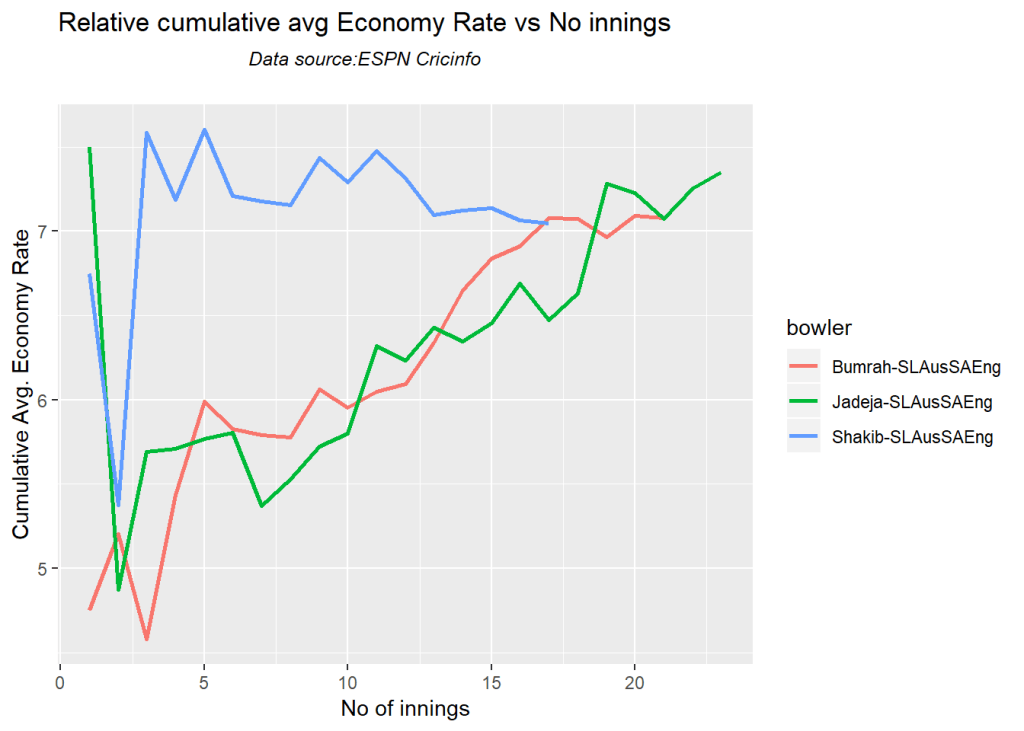
Have fun with yorkpy!!

See also
1. Take 4+: Presentations on ‘Elements of Neural Networks and Deep Learning’ – Parts 1-8
2. My book ‘Practical Machine Learning in R and Python: Third edition’ on Amazon
3. Hand detection through Haartraining: A hands-on approach
4.My book ‘Deep Learning from first principles:Second Edition’ now on Amazon
5. Introducing QCSimulator: A 5-qubit quantum computing simulator in R
6. The 3rd paperback & kindle editions of my books on Cricket, now on Amazon

To see all posts click Index of posts