Analyzing T20 matches with yorkpy templates

1. Introduction

In this post I create yorkpy templates for end-to-end analysis of any T20 matches that are available on Cricsheet as yaml format. These templates can be used to analyze Intl. T20, IPL, BBL and Natwest T20. In fact they can be used for any T20 games which have been saved in the yaml format as specified by Cricsheet Cricheet.

Noteyorkpy is the clone of my R package yorkr see yorkr pads up for the Twenty20s: Part 1- Analyzing team”s match performance

With these templates you can convert all T20 match data which is in yaml format to Pandas dataframes and save them as CSV. Note The data for Intl T20, IPL, BBL and Natwest T20 have already been converted and are available at allYorkpyData. This templates is also available at Github at yorkpyTemplate. The template includes the following steps

  1. Template for conversion and setup
  2. Analysis of Any T20 match
  3. Analysis of a T20 team in all matches against another T20 team
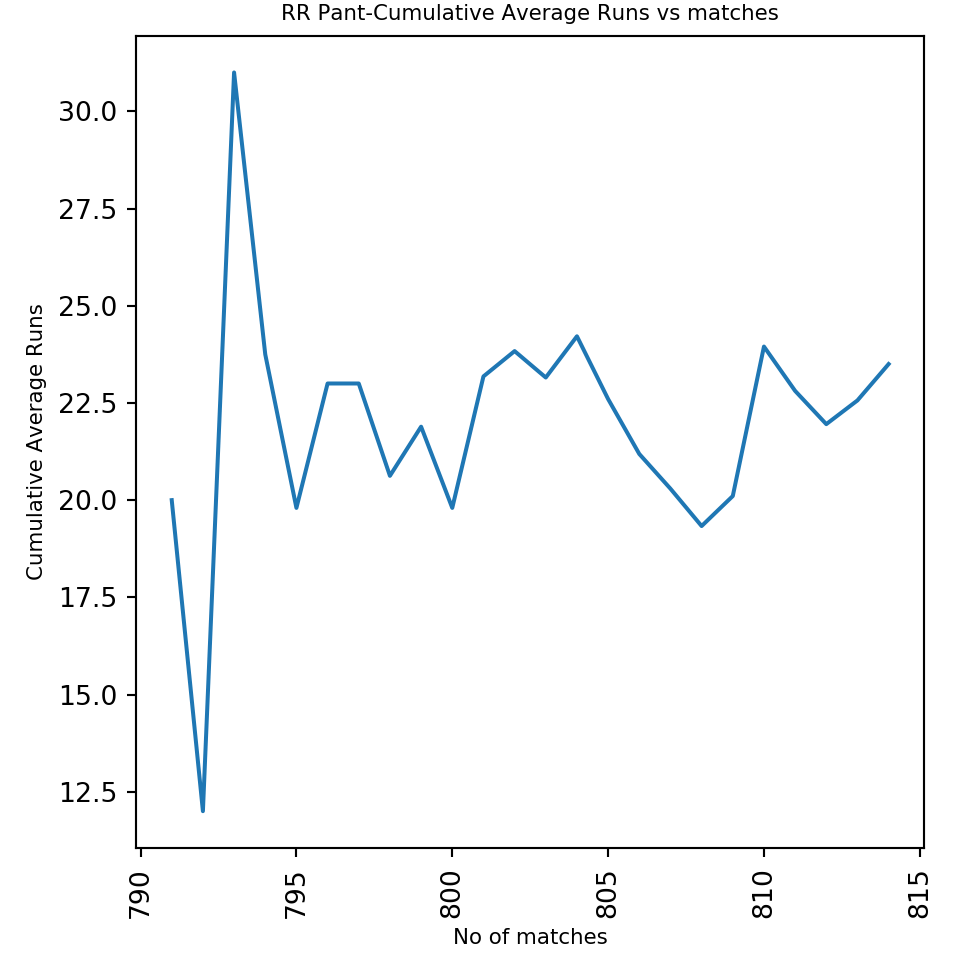
  4. Analysis of a T20 team in all matches against all other teams
  5. Analysis of T20 batsmen and bowlers

You can recreate the files as more matches are added to Cricsheet site in IPL 2017 and future seasons. This post contains all the steps needed for detailed analysis of IPL matches, teams and IPL player. This will also be my reference in future if I decide to analyze IPL in future!

Install yorkpy with pip install yorkpy

Data conversion of the yaml files have to be done before any analysis of T20 batsmen, bowlers, any T20 match matches between any 2 T20 team or analysis of a teams performance against all other team can be done

The first step is To convert the YAML files that are available for the different T20 leagues namely Intl. T20, IPL, BBL, Natwest T20 which are available in yaml format in Cricsheet. For initial data setup we need to use slighly different functions for each of the T20 leagues since the teams are different. The function to convert yaml to Pandas dataframe and save as CSV is common for all leagues

A. For International T20

import yorkpy.analytics as yka
# COnvert yaml to pandas and save as CSV
#yka.convertAllYaml2PandasDataframesT20(".", "..\\data1")

# Save all matches between any 2 Intl T20 countries
#yka.saveAllMatchesBetween2IntlT20s(dir1)

#Save all matches between an Intl.T20 country and all other countries
#yka.saveAllMatchesAllOppositionIntlT20(dir1)

# Get batting details for a country
#yka.getTeamBattingDetails(<country>,dir=dir1, save=True)

#Get bowling details
#yka.getTeamBowlingDetails(<country>,dir=dir1, save=True)

B. For Indian Premier League (IPL)

import yorkpy.analytics as yka
# COnvert yaml to pandas and save as CSV
#yka.convertAllYaml2PandasDataframesT20(".", "..\\data1")

# Save all matches between any 2 IPL teams
#yka.saveAllMatchesBetween2IPLTeams(dir1)

#Save all matches between an IPL team and all other teams
#yka.saveAllMatchesAllOppositionIPLT20(dir1)

# Get batting details for an IPL team
#yka.getTeamBattingDetails(<team1>,dir=dir1, save=True)

#Get bowling details for an IPL team
#yka.getTeamBowlingDetails(<team1>>,dir=dir1, save=True)

C. For Big Bash League (BBL)

import yorkpy.analytics as yka
# COnvert yaml to pandas and save as CSV
#yka.convertAllYaml2PandasDataframesT20(".", "..\\data1")

# Save all matches between any 2 BBL teams
#yka.saveAllMatchesBetween2BBLTeams(dir1)

#Save all matches between an BBL team and all other teams
#yka.saveAllMatchesAllOppositionBBLT20(dir1)

# Get batting details for an BBL team
#yka.getTeamBattingDetails(<team1>,dir=dir1, save=True)

#Get bowling details for an BBL team
#yka.getTeamBowlingDetails(<team1>>,dir=dir1, save=True)

D For Natwest T20

import yorkpy.analytics as yka
# COnvert yaml to pandas and save as CSV
#yka.convertAllYaml2PandasDataframesT20(".", "..\\data1")

# Save all matches between any 2 NWB teams
#yka.saveAllMatchesBetween2NWBTeams(dir1)

#Save all matches between an NWB team and all other teams
#yka.saveAllMatchesAllOppositionNWBT20(dir1)

# Get batting details for an NWB team
#yka.getTeamBattingDetails(<team1>,dir=dir1, save=True)

#Get bowling details for an NWB team
#yka.getTeamBowlingDetails(<team1>>,dir=dir1, save=True)

Once the conversion has been done and the data has been setup we can use any of the yorkpy functions for the the 4 leagues (Intl. T20, IPL, BBL or Natwest T20) There are four classes of functions. These functions can be used for any of the

  1. Class 1 – Functions that analyze a single T20 match
  2. Class 2 – Functions that analyze the performance of a T20 team in all matches against another T20 team
  3. Class 3 – Functions that analyze the performance of a T20 team against all other teams
  4. Class 4 – Functions that analyze individual T20 batsmen or bowler

2. Class 1 functions

These functions analyze a single T20 match (Intl T20, BBL, IPL or Natwest T20) To see actual usage of Class 1 function see Pitching yorkpy … short of good length to IPL – Part 1

import yorkpy.analytics as yka
# Get scorecard
#scorecard,extras=yka.teamBattingScorecardMatch(<team1>,"Name of Team")

#Get partnership
#match=pd.read_csv("<match.csv>")
#yka.teamBatsmenPartnershipMatch(match,<team1>,<team2>,plot=True/False)

#Batsmen vs bowler
#match=pd.read_csv("<match.csv>")
#yka.teamBatsmenVsBowlersMatch(match,<team1>,<team2>,plot=True/False)

#Bowling scorecard
#match=pd.read_csv("<match.csv>")
#a=yka.teamBowlingScorecardMatch(match,<team1>)

#Wicket Kind
#match=pd.read_csv("<match.csv>")
#yka.teamBowlingWicketKindMatch((match,<team1>,<team2>)

#Wicket Match
#match=pd.read_csv("<match.csv>")
#yka.teamBowlingWicketMatch(match,<team1>,<team2>,plot=True/False)

#Bowler vs Batsman
#match=pd.read_csv("<match.csv>")
#yka.teamBowlersVsBatsmenMatch(match,<team1>,<team2>)

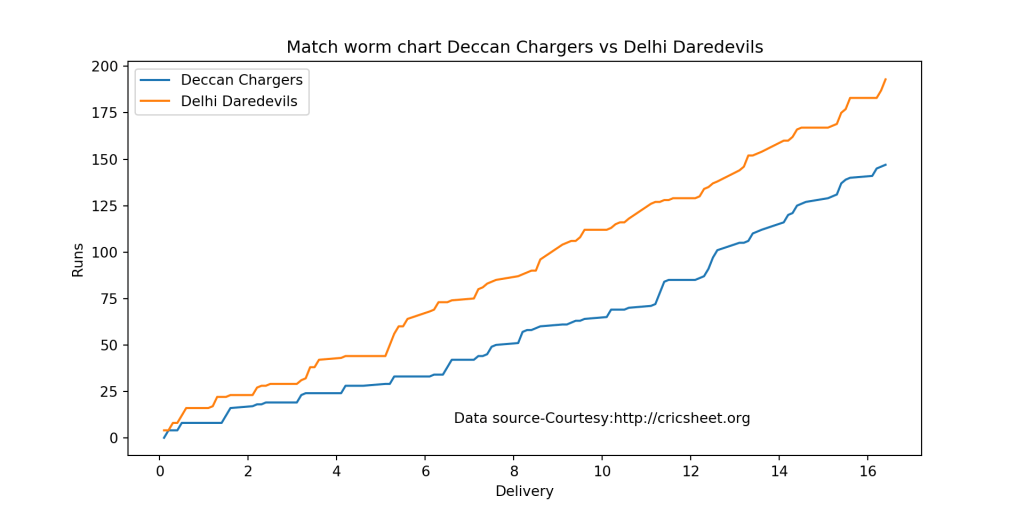
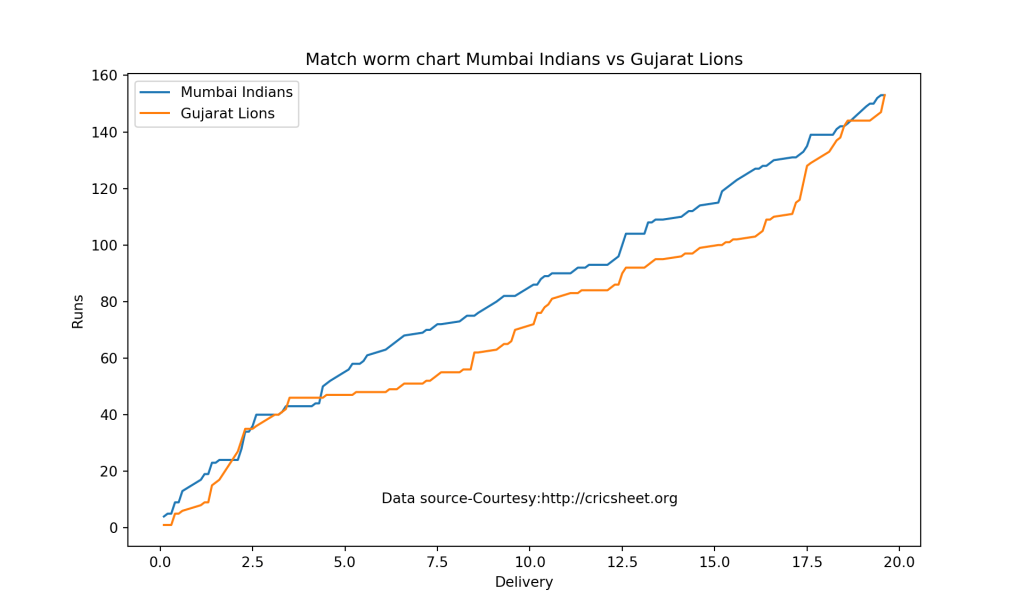
#Match worm chart
#match=pd.read_csv("<match.csv>")
#yka.matchWormChart(match,<team1>,<team2>,)

3. Class 2 functions

These set of functions analyze the performance a T20 team for e.g. Intl T20, BBL or Natwest T20 in all matches against another T20 team (country or IPL, BBL or Natwest T20 team. To see usages of Class 2 functions see Pitching yorkpy…on the middle and outside off-stump to IPL – Part 2

import yorkpy.analytics as yka

# Batting partnerships - Table
#team1_team2_matches = pd.read_csv(<matches_between_2_teams.csv)
#m=yka.teamBatsmenPartnershiOppnAllMatches(team1_team2_matches,<team1/team2>,report="summary/detailed", top=<n>)

# Batting partnerships - Plot
#team1_team2_matches = pd.read_csv(<matches_between_2_teams.csv)
#yka.teamBatsmenPartnershipOppnAllMatchesChart(team1_team2_matches,<team1>,<team2> plot=<True/False>, top=<N>, partnershipRuns=<M>)

#Batsmen vs Bowlers
#team1_team2_matches = pd.read_csv(<matches_between_2_teams.csv)
#yka.teamBatsmenVsBowlersOppnAllMatches(team1_team2_matches,<team1>,<team2> plot=<True/False>, top=<N>,runsScored=<M>)

# Batting scorecard
#team1_team2_matches = pd.read_csv(<matches_between_2_teams.csv)
#scorecard=yka.teamBattingScorecardOppnAllMatches(team1_team2_matches,<team1>,<team2>)

#Bowling scorecard
#team1_team2_matches = pd.read_csv(<matches_between_2_teams.csv)
#scorecard=yka.teamBowlingScorecardOppnAllMatches(team1_team2_matches,<team1>,<team2>)

#Bowling wicket kind
#team1_team2_matches = pd.read_csv(<matches_between_2_teams.csv)
#yka.teamBowlingWicketKindOppositionAllMatches(team1_team2_matches,<team1>,<team2>,plot=<True/False>,top=<N>,wickets=<M>)

#Bowler vs batsman
#team1_team2_matches = pd.read_csv(<matches_between_2_teams.csv)
#yka.teamBowlersVsBatsmenOppnAllMatches(team1_team2_matches,<team1>,<team2>,plot=<True/False>,top=<N>,runsConceded=<M>)

# Wins vs losses
#team1_team2_matches = pd.read_csv(<matches_between_2_teams.csv)
#yka.plotWinLossBetweenTeams(team1_team2_matches,<team1>,<team2>)

#Wins by win type
#team1_team2_matches = pd.read_csv(<matches_between_2_teams.csv)
#yka.plotWinsByRunOrWickets(team1_team2_matches,<team1>)

#Wins by toss decision
#team1_team2_matches = pd.read_csv(<matches_between_2_teams.csv)
#yka.plotWinsbyTossDecision(team1_team2_matches,<team1>,tossDecision=<field/bat>)

4. Class 3 functions

This set of functions deals with analyzing the performance of a T20 team (Intl. T20, IPL, BBL or Natwest T20) in all matches against all other teams. To see usages of Class 3 functions see Pitching yorkpy…swinging away from the leg stump to IPL – Part 3. After the data is save all matches between all oppositions we can use this data

import yorkpy.analytics as yka
#Batsman partnerships
#allmatches = pd.read_csv("<allmatchesForteam")
#m=yka.teamBatsmenPartnershiAllOppnAllMatches(allmatches,<team1>,report=<"summary"/"detailed", top=<N>,partnershipRuns=<M>)

#Batsmen vs Bowlers
#allmatches = pd.read_csv("<allmatchesForteam")
#yka.teamBatsmenVsBowlersAllOppnAllMatches(allmatches,<team1>,plot=<True/False>,top=N>,runsScored=<M>)

#Batting scorecard
#allmatches = pd.read_csv("<allmatchesForteam")
#scorecard=yka.teamBattingScorecardAllOppnAllMatches(allmatches,<team1>)

#Bowling scorecard
#allmatches = pd.read_csv("<allmatchesForteam")
#scorecard=yka.teamBowlingScorecardAllOppnAllMatches(allmatches,<team1>)

#Bowling wicket kind
#allmatches = pd.read_csv("<allmatchesForteam")
#yka.teamBowlingWicketKindAllOppnAllMatches(allmatches,<team1>,plot=<True/False>,top=<N>,wickets=<M>)

# Bowler vs Batsmen
#allmatches = pd.read_csv("<allmatchesForteam")
#yka.teamBowlersVsBatsmenAllOppnAllMatches(allmatches,<team1>,plot=<True/False>,top=<N>,runsConceded=<M>)

# Wins vs losses
#allmatches = pd.read_csv("<allmatchesForteam")
#yka.plotWinLossByTeamAllOpposition(allmatches,<team1>,plot=<"summary"/"detailed">)

# Wins by win type
#allmatches = pd.read_csv("<allmatchesForteam")
#yka.plotWinsByRunOrWicketsAllOpposition(allmatches,<team1>)

# Wins by toss decision
#allmatches = pd.read_csv("<allmatchesForteam")
#yka.plotWinsbyTossDecisionAllOpposition(allmatches,<team1>,tossDecision='bat'/'field',plot='summary'/'detailed')

5. Class 4 functions

This set of functions are used for analyzing individual batsman/bowler. From the converted xxx-BattingDetails.csv and xxx-BowlingDetails.csv we can get the batsman and bowler details as shown below. Subsequenly we can perform analyses of the individual batsman and bowler. To see actual usages of Class 4 functions see Pitching yorkpy … in the block hole – Part 4

import yorkpy.analytics as yka

#Batsman analyses
#Get batsman Dataframe
#batsmanDF=yka.getBatsmanDetails(<team1>,<batsman>,dir=dir1)

#Batsman Runs vs Deliveries
#yka.batsmanRunsVsDeliveries(batsmanDF,<batsmanName>)

#Batsman fours and sixes
#yka.batsmanFoursSixes(batsmanDF,<batsmanName>)


#Batsman dismissals
#yka.batsmanDismissals(batsmanDF,<batsmanName>)

#Batsman Runs vs Strike Rate
#yka.batsmanRunsVsStrikeRate(batsmanDF,<batsmanName>)

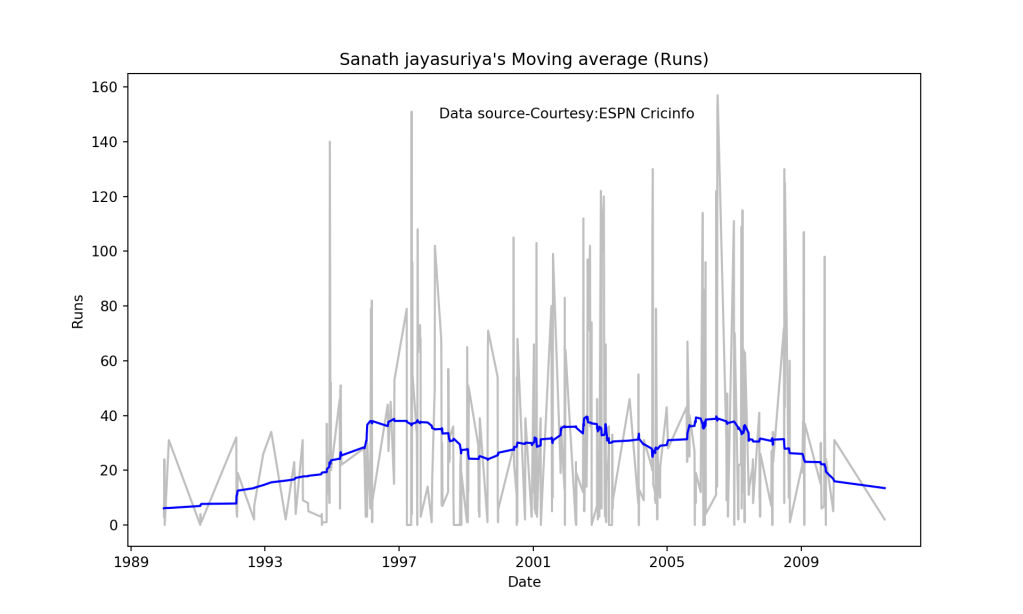
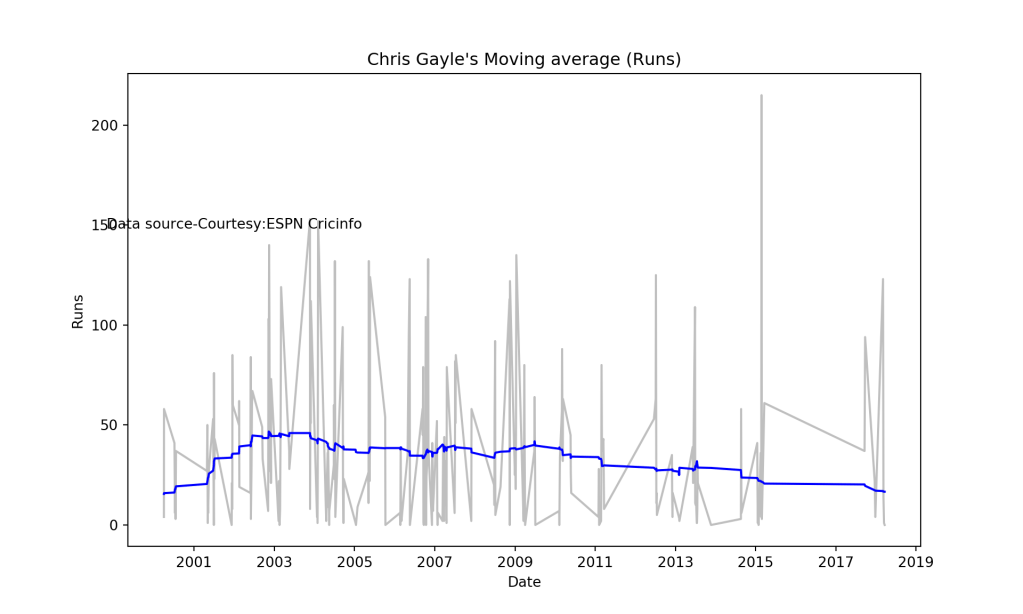
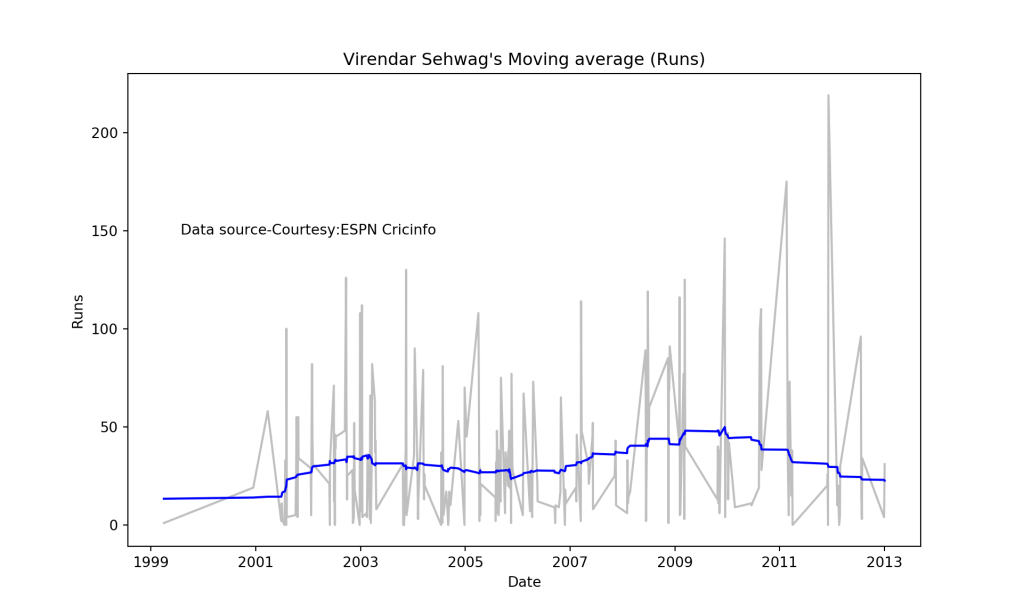
#Batsman Moving average
#yka.batsmanMovingAverage(batsmanDF,<batsmanName>)


#Batsman Cumulative average
#yka.batsmanCumulativeAverageRuns(batsmanDF,<batsmanName>)

#Batsman Cumulative Strike rate
#yka.batsmanCumulativeStrikeRate(batsmanDF,<batsmanName>)

#Batsman Runs against opposition
#yka.batsmanRunsAgainstOpposition(batsmanDF,<batsmanName>)

#Batsman Runs against opposition
#yka.batsmanRunsVenue(batsmanDF,<batsmanName>)


#Bowler analyses
#Get bowler dataframe
#bowlerDF=yka.getBowlerWicketDetails(<team1>,<bowler>dir=dir1)

#Mean economy rate
#yka.bowlerMeanEconomyRate(bowlerDF,<bowlerName>)


#Mean Economy rate
#yka.bowlerMeanEconomyRate(bowlerDF,<bowlerName>)

#Mean Runs conceded
#yka.bowlerMeanRunsConceded(bowlerDF,<bowlerName>)

#Moving average of wickets
#yka.bowlerMovingAverage((bowlerDF,<bowlerName>)

# Cumulative average of wickets
#yka.bowlerCumulativeAvgWickets(bowlerDF,<bowlerName>)

# Cumulative economy rate
#yka.bowlerCumulativeAvgEconRate(bowlerDF,<bowlerName>)

# Wicket plot
#yka.bowlerWicketPlot(df,name)

# Wicket against opposition
#yka.bowlerWicketsAgainstOpposition(bowlerDF,<bowlerName>)

# Wickets at venue
#yka.bowlerWicketsVenue(bowlerDF,<bowlerName>)

Important note: Do check out my other posts using yorkpy at yorkpy-posts

Conclusion

With the above templates detailed analyis can be done on

  • A T20 match
  • Performance of a team in all matches against another team
  • Performance of a team in all matches against all other teams
  • Individual batting and bowling performances

See also

  1. Deep Learning from first principles in Python, R and Octave – Part 5
  2. My travels through the realms of Data Science, Machine Learning, Deep Learning and (AI)
  3. Practical Machine Learning with R and Python – Part 4
  4. Take 4+: Presentations on ‘Elements of Neural Networks and Deep Learning’ – Parts 1-8
  5. A method to crowd source pothole marking on (Indian) roads

To see all posts click Index of posts

yorkpy takes a hat-trick, bowls out Intl. T20s, BBL and Natwest T20!!!

“Dear, dear! How queer everything is to-day! And yesterday things went on just as usual. I wonder if I’ve been changed in the night? Let me think: was I the same when I got up this morning? I almost think I can remember feeling a little different. But if I’m not the same, the next question is ’Who in the world am I? Ah, that’s the great puzzle!”

             Alice's adventures  in Wonderland, Lewis Carroll

1. Introduction

In this post, yorkpy clean bowls the following T20 formats namely International T20s, Big Bash League and Natwest T20 Blast. I take yorkpy on a spin through these T20 leagues. In the post below,I choose a random set of about 10-12 of the overall 63 functions that yorkpy has, and execute them for each of the different T20 leagues – Intl T20s, BBL and Natwest T20s. yorkpy, is the python avatar of my R package yorkr, see Introducing cricket package yorkr: Part 1- Beaten by sheer pace!

There were a couple of new functions that needed to be added for each of the T20 leagues – Intl T20, BBL and Natwest T20 to take into account the different teams in each of these leagues. Further some bugs were also ironed out in tje latest version of yorkpy. yorkpy uses data from Cricsheet . The match data is in the form of YAML files. yorkpy converts these YAML files to dataframes. YAML files are very detailed and include a ball-by-ball account of the match.

– You can clone/fork the latest code for yorkpy from github yorkpy
– This post has also been published in RPubs at yorkpy takes a hat-trick
– You can download the PDF version of this post at yorkpy takes a hat-trick

The data for IPL, Intl. T20, BBL and Natwest T20 have already been converted into pandas dataframes and saved as CSVs. You can download the converted files from Github at [allYorkpyT20Data])(https://github.com/tvganesh/allYorkpyT20Data)

yorkpy has the following 4 main classes of functions

A.Functions analyzing individual T20 match (Class 1)

This was demonstrated in Pitching yorkpy . short of good length to IPL – Part 1 The functions deal with individual T20 matches. The functions are

  1. convertYaml2PandasDataframeT20()
  2. convertAllYaml2PandasDataframesT20()
  3. teamBattingScorecardMatch()
  4. teamBatsmenPartnershipMatch()
  5. teamBatsmenVsBowlersMatch()
  6. teamBowlingScorecardMatch()
  7. teamBowlingWicketKindMatch()
  8. teamBowlingWicketRunsMatch()
  9. teamBowlingWicketMatch()
  10. teamBowlersVsBatsmenMatch()
  11. matchWormChart()

B. Functions that analyze all matches between 2 T20 teams (Class 2

Pitching yorkpy.on the middle and outside off-stump to IPL – Part 2 included functions that analyze head-to-head confrontation between any 2 T20 teams The functions are

  1. getAllMatchesBetweenTeams()
  2. saveAllMatchesBetween2IPLTeams()
  3. getAllMatchesBetweenTeams()
  4. saveAllMatchesBetween2IPLTeams()
  5. teamBatsmenPartnershiOppnAllMatches()
  6. teamBatsmenPartnershipOppnAllMatchesChart()
  7. teamBatsmenVsBowlersOppnAllMatches()
  8. teamBattingScorecardOppnAllMatches()
  9. teamBowlingScorecardOppnAllMatches()
  10. teamBowlingWicketKindOppositionAllMatches()
  11. teamBowlersVsBatsmenOppnAllMatches()
  12. plotWinLossBetweenTeams()
  13. plotWinsByRunOrWickets() 23.plotWinsbyTossDecision()

C. Functions that analyze the performance of a T20 team against all other teams (Class 3)

The post Pitching yorkpy.swinging away from the leg stump to IPL – Part 3 is based on Class C set of functions shown below

  1. getAllMatchesAllOpposition()
  2. saveAllMatchesAllOppositionIPLT20(dir1)
  3. getAllMatchesAllOpposition()
  4. saveAllMatchesAllOppositionIPLT20()
  5. teamBatsmenPartnershiAllOppnAllMatches()
  6. teamBatsmenPartnershipAllOppnAllMatchesChart()
  7. teamBatsmenVsBowlersAllOppnAllMatches()
  8. teamBattingScorecardAllOppnAllMatches()
  9. teamBowlingScorecardAllOppnAllMatches()
  10. teamBowlingWicketKindAllOppnAllMatches()
  11. teamBowlersVsBatsmenAllOppnAllMatches()
  12. plotWinLossByTeamAllOpposition()
  13. plotWinsByRunOrWicketsAllOpposition()
  14. plotWinsbyTossDecisionAllOpposition()

D. Functions that analyze performances of T20 batsmen and bowlers (Class 4)

These set of functions analyze individual batsmen and bowlers and have been used in Pitching yorkpy . in the block hole – Part 4 The functions are

  1. getTeamBattingDetails()
  2. getBatsmanDetails()
  3. batsmanRunsVsDeliveries()
  4. batsmanFoursSixes()
  5. batsmanDismissals()
  6. batsmanRunsVsStrikeRate()
  7. batsmanMovingAverage()
  8. batsmanCumulativeAverageRuns()
  9. batsmanCumulativeStrikeRate()
  10. batsmanRunsAgainstOpposition()
  11. batsmanRunsVenue
  12. getTeamBowlingDetails()
  13. getBowlerWicketDetails()
  14. bowlerMeanEconomyRate()
  15. bowlerMeanRunsConceded()
  16. bowlerMovingAverage()
  17. bowlerCumulativeAvgWickets()
  18. bowlerCumulativeAvgEconRate()
  19. bowlerWicketPlot()
  20. bowlerWicketsAgainstOpposition()
  21. bowlerWicketsVenue()

Additional new functions were added to handle Intl T20s, Big Bash League and Natwest T20 Blast, since the teams are different. They are

59. saveAllMatchesBetween2IntlT20s()
60. saveAllMatchesAllOppositionIntlT20()
61. saveAllMatchesBetween2BBLTeams()
62 saveAllMatchesAllOppositionBBLT20()
63. saveAllMatchesBetween2NWBTeams()
64. saveAllMatchesAllOppositionNWBT20()

All other functions can be used as is! You can get the help of any function in yorkpy using

import yorkpy.analytics as yka
help(yka.teamBatsmenPartnershiOppnAllMatches)
## Help on function teamBatsmenPartnershiOppnAllMatches in module yorkpy.analytics:
## 
## teamBatsmenPartnershiOppnAllMatches(matches, theTeam, report='summary', top=5)
##     Team batting partnership against a opposition all IPL matches
##     
##     Description
##     
##     This function computes the performance of batsmen against all bowlers of an oppositions in 
##     all matches. This function returns a dataframe
##     
##     Usage
##     
##     teamBatsmenPartnershiOppnAllMatches(matches,theTeam,report="summary")
##     Arguments
##     
##     matches     
##     All the matches of the team against the oppositions
##     theTeam     
##     The team for which the the batting partnerships are sought
##     report      
##     If the report="summary" then the list of top batsmen with the highest partnerships 
##     is displayed. If report="detailed" then the detailed break up of partnership is returned 
##     as a dataframe
##     top
##     The number of players to be displayed from the top
##     Value
##     
##     partnerships The data frame of the partnerships
##     
##     Note
##     
##     Maintainer: Tinniam V Ganesh tvganesh.85@gmail.com
##     
##     Author(s)
##     
##     Tinniam V Ganesh
##     
##     References
##     
##     http://cricsheet.org/
##     https://gigadom.wordpress.com/
##     
##     
##     See Also
##     
##     teamBatsmenVsBowlersOppnAllMatchesPlot
##     teamBatsmenPartnershipOppnAllMatchesChart

As I mentioned above I will be randomly choosing a set of 12 functions from Class 1,2,3,4 for each of the T20 leagues (Intl T20, BBL and NWB T20) for analysis

2. International T20s

The following functions were added for handling Intl. T20s

  1. saveAllMatchesBetween2IntlT20s()
  2. saveAllMatchesAllOppositionIntlT20()

To handle the countries in Intl. T20s below

Afghanistan, Australia, Bangladesh, Bermuda, Canada, England,Hong Kong,India, Ireland, Kenya, Nepal, Netherlands, “New Zealand, Oman,Pakistan,Scotland,South Africa, Sri Lanka, United Arab Emirates,West Indies, Zimbabwe

import os
#os.chdir('C:\\software\\cricket-package\\yorkpyT20\\t20s')
#import yorkpy.analytics as yka
#1.  Convert all YAML files to dataframes and CSV
#yka.convertAllYaml2PandasDataframesT20(".", "..\\data1")
#dir1='C:\\software\\cricket-package\\yorkpyT20\\IntlT20-Matches'
#2. Save all matches between 2 T20 teams
#yka.saveAllMatchesBetween2IntlT20s(dir1)
#3. Save all matches between a T20 team and all other teams
#dir1='C:\\software\\cricket-package\\yorkpyT20\\IntlT20-Matches'
#yka.saveAllMatchesAllOppositionIntlT20(dir1)
#4. Get batting details
#dir1='C:\\software\\cricket-package\\yorkpyT20\\IntlT20-Matches
#yka.getTeamBattingDetails("Afghanistan",dir=dir1, save=True)
#yka.getTeamBattingDetails("Australia",dir=dir1,save=True)
#yka.getTeamBattingDetails("Bangladesh",dir=dir1,save=True)
#...
#5. Get bowling details
#dir1='C:\\software\\cricket-package\\yorkpyT20\\IntlT20-Matches
#yka.getTeamBowlingDetails("Afghanistan",dir=dir1, save=True)
#yka.getTeamBowlingDetails("Australia",dir=dir1,save=True)
#yka.getTeamBowlingDetails("Bangladesh",dir=dir1,save=True)
# ...

Once the data is converted you can use the yorkpy functions. The data has been converted for Intl T20 and is available at Github at IntlT20

To use the yorkpy functions for a new league we need to initial convert the YAML files into appropriate format for processing by yorkpy functions

This will create the necessary files which are are used in the functions below

2.2 2.1 Intl. T20 – Team score card  (Class 1)

import os
import pandas as pd
import yorkpy.analytics as yka
dir1="C:\\software\\cricket-package\\yorkpyT20\\IntlT20-Matches"
path=os.path.join(dir1,".\\India-New Zealand-2007-09-16.csv")
ind_nz=pd.read_csv(path)
scorecard,extras=yka.teamBattingScorecardMatch(ind_nz,"India")
print(scorecard)
##             batsman  runs  balls  4s  6s          SR
## 0         G Gambhir    51     34   5   2  150.000000
## 1          V Sehwag    40     18   6   2  222.222222
## 2        RV Uthappa     0      2   0   0    0.000000
## 3          MS Dhoni    24     20   2   0  120.000000
## 4      Yuvraj Singh     5      7   0   0   71.428571
## 5        KD Karthik    17     12   3   0  141.666667
## 6         IK Pathan    11     10   2   0  110.000000
## 7        AB Agarkar     1      2   0   0   50.000000
## 8   Harbhajan Singh     7      6   1   0  116.666667
## 9       S Sreesanth    19     10   4   0  190.000000
## 10         RP Singh     1      1   0   0  100.000000
print(extras)
##    total  wides  noballs  legbyes  byes  penalty  extras
## 0    370      6        0        8     0        0      14

2.2 Intl. T20 -Team batsmen partnership (Class 1)

import os
import pandas as pd
import yorkpy.analytics as yka
dir1="C:\\software\\cricket-package\\yorkpyT20\\IntlT20-Matches"
path=os.path.join(dir1,".\\South Africa-Australia-2009-03-27.csv")
sa_aus=pd.read_csv(path)
yka.teamBatsmenPartnershipMatch(sa_aus,'Australia','New Zealand',plot=True)

2.3 Intl. T20 -Team bowling scorecard match (Class 1)

import os
import pandas as pd
import yorkpy.analytics as yka
dir1="C:\\software\\cricket-package\\yorkpyT20\\IntlT20-Matches"
path=os.path.join(dir1,".\\Sri Lanka-West Indies-2012-09-28.csv")
sl_wi=pd.read_csv(path)
a=yka.teamBowlingScorecardMatch(sl_wi,'Sri Lanka')
print(a)
##          bowler  overs  runs  maidens  wicket  econrate
## 0    A Mohammed      2    13        0       0       6.5
## 1  SA Campbelle      1     8        0       1       8.0
## 2     SC Selman      1     3        0       0       3.0
## 3      SF Daley      2     5        0       1       2.5
## 4     SR Taylor      2     4        0       1       2.0
## 5     TD Smartt      2    17        0       0       8.5

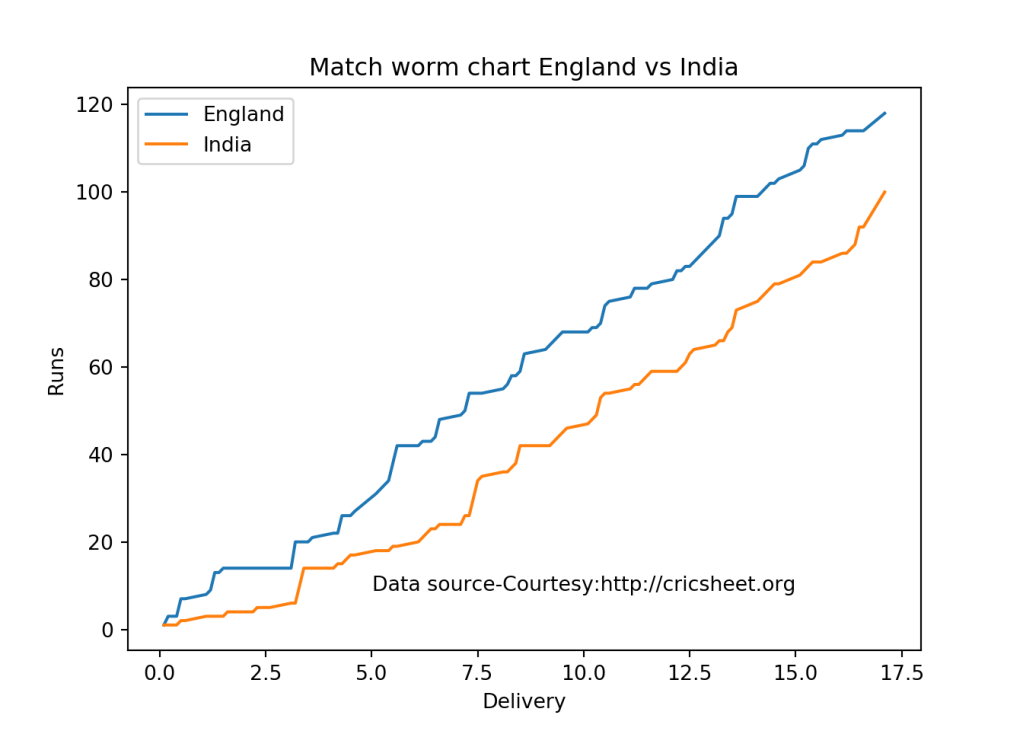
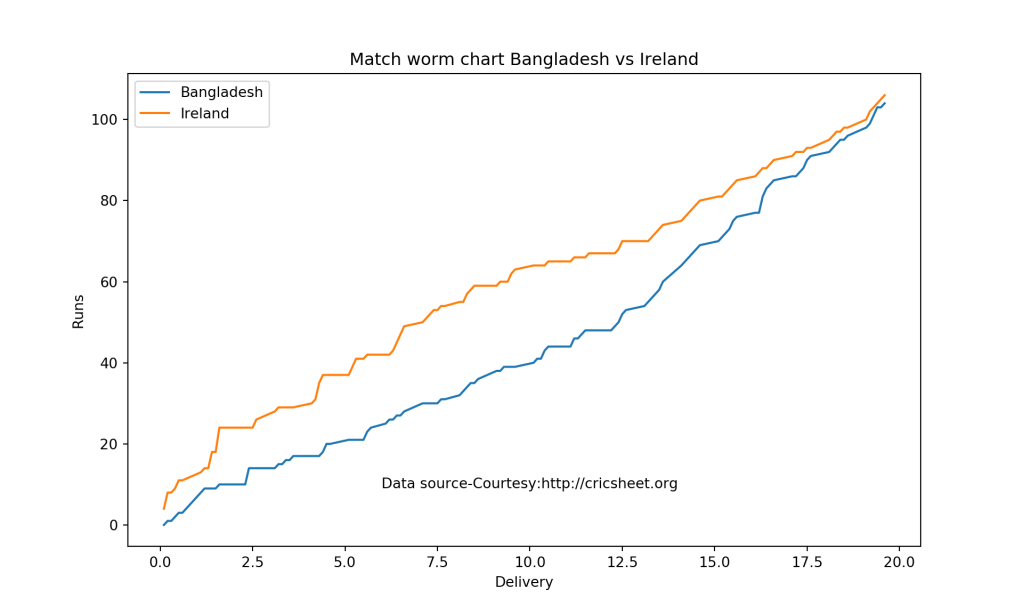
2.4 Intl. T20 -Match Worm chart (Class 1)

import os
import pandas as pd
import yorkpy.analytics as yka
dir1="C:\\software\\cricket-package\\yorkpyT20\\IntlT20-Matches"
path=os.path.join(dir1,".\\England-India-2012-09-29.csv")
eng_ind=pd.read_csv(path)
yka.matchWormChart(eng_ind,"England", "India")

path=os.path.join(dir1,".\\Bangladesh-Ireland-2015-12-05.csv")
ban_ire=pd.read_csv(path)
yka.matchWormChart(ban_ire,"Bangladesh", "Ireland")

2.5 Intl. T20 -Team Batting partnerships all matches 2 teams (Class 2)

import os
import pandas as pd
import yorkpy.analytics as yka
dir1="C:\\software\\cricket-package\\yorkpyT20\\IntlT20-allMatchesBetween2Teams"
path=os.path.join(dir1,"India-England-allMatches.csv")
dc_mi_matches = pd.read_csv(path)
theTeam='India'
m=yka.teamBatsmenPartnershiOppnAllMatches(dc_mi_matches,theTeam,report="detailed", top=4)
print(m)
##      batsman  totalPartnershipRuns    non_striker  partnershipRuns
## 0   SK Raina                   265      G Gambhir                2
## 1   SK Raina                   265       KL Rahul               40
## 2   SK Raina                   265      MK Tiwary               24
## 3   SK Raina                   265       MS Dhoni              124
## 4   SK Raina                   265        P Kumar                0
## 5   SK Raina                   265      PP Chawla                4
## 6   SK Raina                   265       R Ashwin                1
## 7   SK Raina                   265      RG Sharma               16
## 8   SK Raina                   265        V Kohli               47
## 9   SK Raina                   265   Yuvraj Singh                7
## 10  MS Dhoni                   264       A Mishra                1
## 11  MS Dhoni                   264      AT Rayudu               18
## 12  MS Dhoni                   264      HH Pandya                8
## 13  MS Dhoni                   264      IK Pathan                2
## 14  MS Dhoni                   264      JJ Bumrah                2
## 15  MS Dhoni                   264      MK Pandey                3
## 16  MS Dhoni                   264  Parvez Rasool               21
## 17  MS Dhoni                   264       R Ashwin               11
## 18  MS Dhoni                   264      RA Jadeja               11
## 19  MS Dhoni                   264      RG Sharma                9
## 20  MS Dhoni                   264        RR Pant                6
## 21  MS Dhoni                   264     RV Uthappa                5
## 22  MS Dhoni                   264       SK Raina               98
## 23  MS Dhoni                   264      YK Pathan               36
## 24  MS Dhoni                   264   Yuvraj Singh               33
## 25   V Kohli                   236      AM Rahane                3
## 26   V Kohli                   236      G Gambhir               78
## 27   V Kohli                   236       KL Rahul               46
## 28   V Kohli                   236      RG Sharma                2
## 29   V Kohli                   236     RV Uthappa                4
## 30   V Kohli                   236       S Dhawan               45
## 31   V Kohli                   236       SK Raina               48
## 32   V Kohli                   236   Yuvraj Singh               10
## 33     M Raj                   176       A Sharma                2
## 34     M Raj                   176         H Kaur               18
## 35     M Raj                   176      J Goswami                6
## 36     M Raj                   176        KV Jain                5
## 37     M Raj                   176       L Kumari                5
## 38     M Raj                   176    N Niranjana                3
## 39     M Raj                   176       N Tanwar               17
## 40     M Raj                   176        PG Raut               41
## 41     M Raj                   176     R Malhotra                5
## 42     M Raj                   176     S Mandhana                8
## 43     M Raj                   176         S Naik               10
## 44     M Raj                   176       S Pandey               19
## 45     M Raj                   176       SK Naidu               37

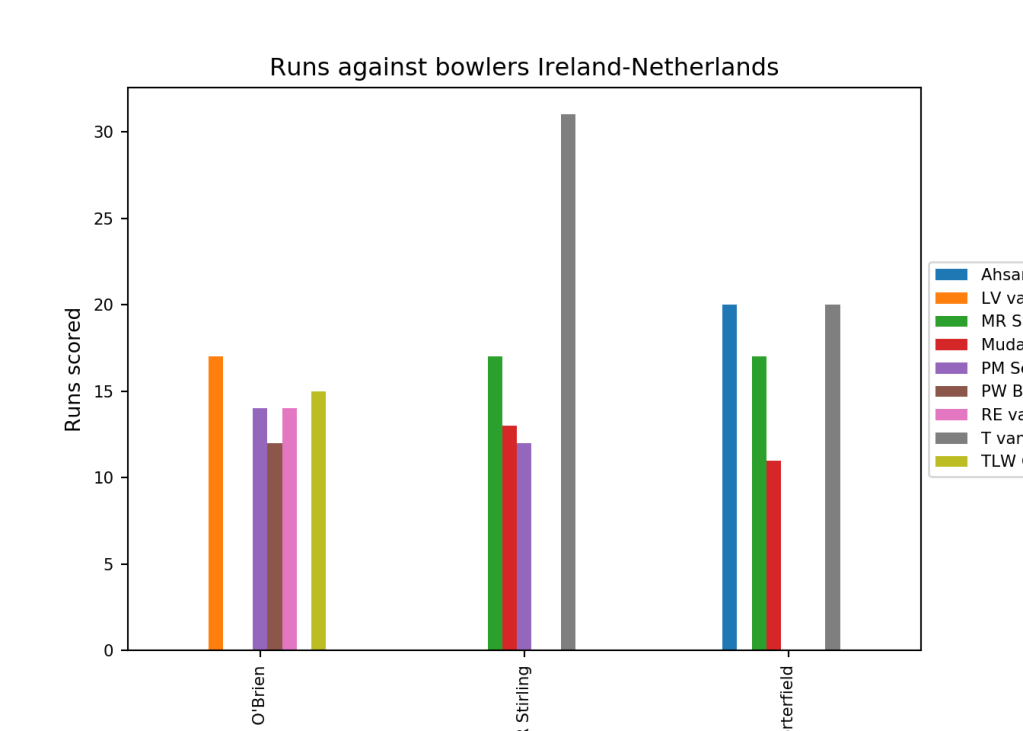
2.6 Intl. T20 -Team Batsmen vs Bowlers all matches 2 teams (Class 2)

import os
import pandas as pd
import yorkpy.analytics as yka
dir1="C:\\software\\cricket-package\\yorkpyT20\\IntlT20-allMatchesBetween2Teams"
path=os.path.join(dir1,"Ireland-Netherlands-allMatches.csv")
ire_nl_matches = pd.read_csv(path)
yka.teamBatsmenVsBowlersOppnAllMatches(ire_nl_matches,'Ireland',"Netherlands",plot=True,top=3,runsScored=10)

2.7 Intl. T20 -Team Bowling scorecard all matches 2 teams (Class 2)

import os
import pandas as pd
import yorkpy.analytics as yka
dir1="C:\\software\\cricket-package\\yorkpyT20\\IntlT20-allMatchesBetween2Teams"
path=os.path.join(dir1,"Bangladesh-Nepal-allMatches.csv")
bang_nep_matches = pd.read_csv(path)
scorecard=yka.teamBowlingScorecardOppnAllMatches(bang_nep_matches,'Bangladesh',"Nepal")
print(scorecard)
##         bowler  overs  runs  maidens  wicket   econrate
## 0      B Regmi      3    14        0       1   4.666667
## 3   SP Gauchan      4    40        0       1  10.000000
## 1   JK Mukhiya      2    16        0       0   8.000000
## 2     P Khadka      3    23        0       0   7.666667
## 4    Sagar Pun      1    16        0       0  16.000000
## 5  Sompal Kami      2    21        0       0  10.500000

2.8 Intl. T20 -Team Batsmen vs Bowlers all Oppositions (Class 3)

import os
import pandas as pd
import yorkpy.analytics as yka
dir1="C:\\software\\cricket-package\\yorkpyT20\\\IntlT20-allMatchesAllOpposition\\"
path=os.path.join(dir1,"Australia-allMatchesAllOpposition.csv")
aus_matches = pd.read_csv(path)
yka.teamBatsmenVsBowlersAllOppnAllMatches(aus_matches,"Australia",plot=True,top=3,runsScored=40)

2.9 Intl. T20 -Wins vs Losses of a team against all other teams (Class 3)

import os
import pandas as pd
import yorkpy.analytics as yka
dir1="C:\\software\\cricket-package\\yorkpyT20\\\IntlT20-allMatchesAllOpposition\\"
path=os.path.join(dir1,"South Africa-allMatchesAllOpposition.csv")
sa_matches = pd.read_csv(path)
team1='South Africa'
yka.plotWinLossByTeamAllOpposition(sa_matches,team1,plot="detailed")

2.10 Intl. T20 -Batsmen analysis (Class 4)

import os
import pandas as pd
import yorkpy.analytics as yka
dir1="C:\\software\\cricket-package\\yorkpyT20\\\IntlT20-BattingBowlingDetails\\"
# Rohit Sharma
name="RG Sharma"
team='India'
df=yka.getBatsmanDetails(team,name,dir=dir1)
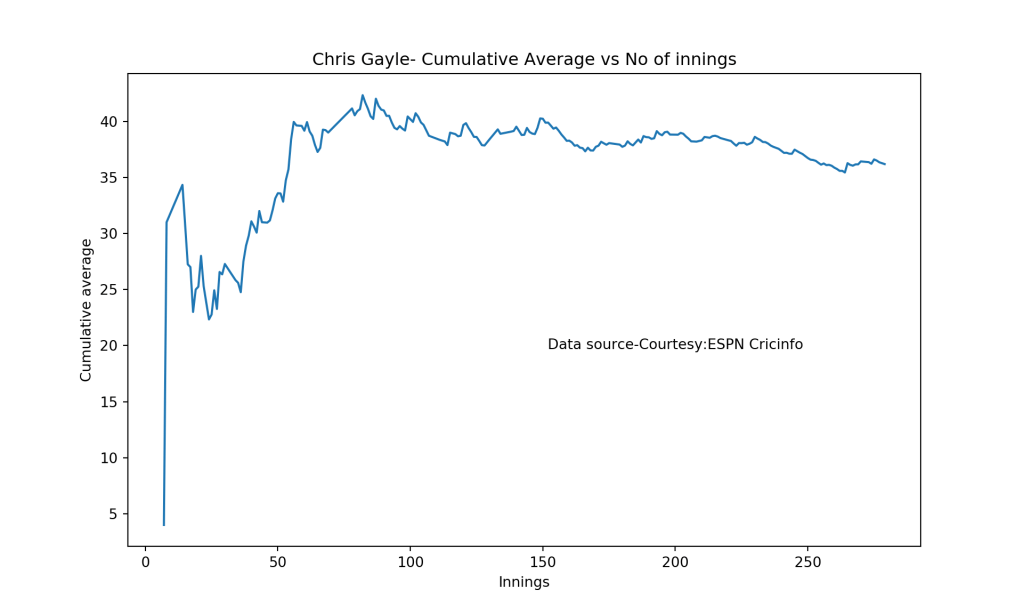
yka.batsmanCumulativeAverageRuns(df,name)

# MJ Guptill
name="MJ Guptill"
team='New Zealand'
df=yka.getBatsmanDetails(team,name,dir=dir1)
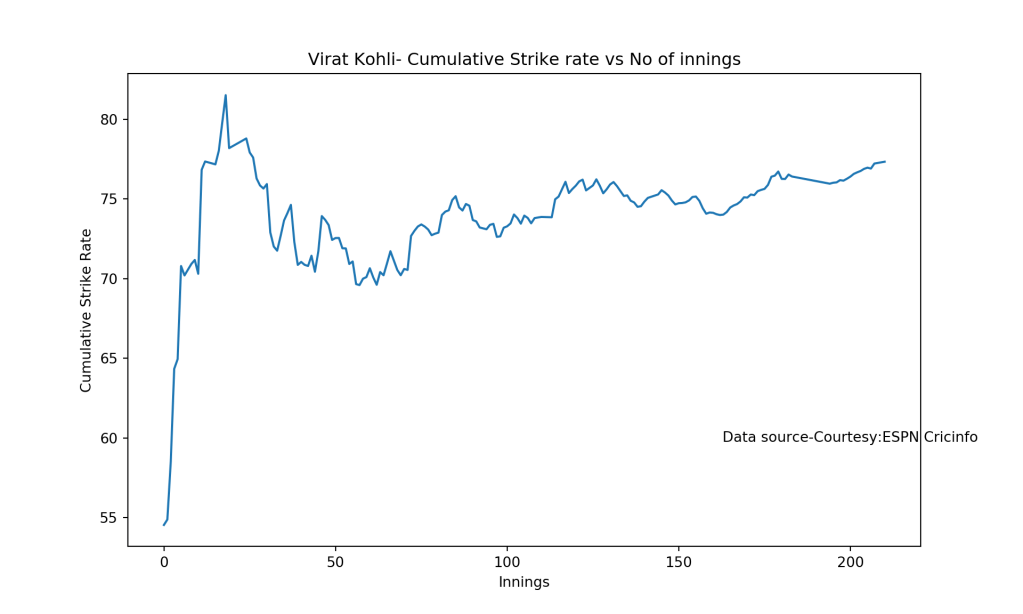
yka.batsmanCumulativeStrikeRate(df,name)

2.11 Intl. T20 -Bowler analysis (Class 4)

import os
import pandas as pd
import yorkpy.analytics as yka
dir1="C:\\software\\cricket-package\\yorkpyT20\\\IntlT20-BattingBowlingDetails\\"
# Shakib Al Hasan
name="Shakib Al Hasan"
team='Bangladesh'
df=yka.getBowlerWicketDetails(team,name,dir=dir1)
yka.bowlerMeanEconomyRate(df,name)

# Rashid Khan
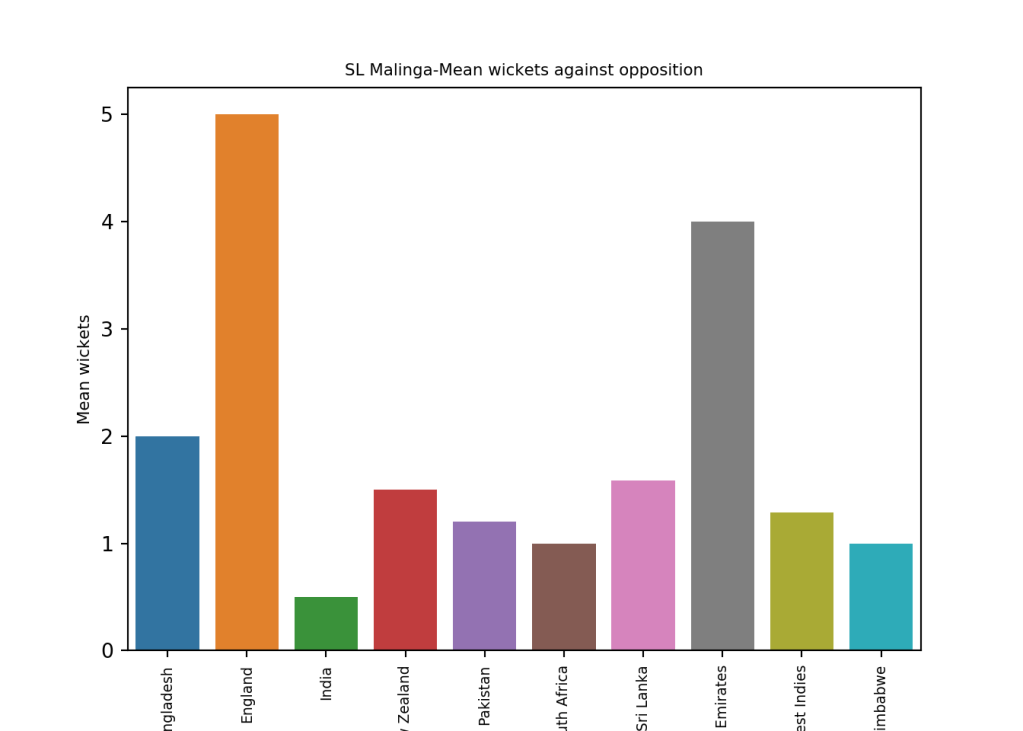
name="SL Malinga"
team='Sri Lanka'
df=yka.getBowlerWicketDetails(team,name,dir=dir1)
yka.bowlerWicketsAgainstOpposition(df,name)

3. Big Bash League

The following functions for added to handle BBL teams

  1. saveAllMatchesBetween2BBLTeams()
  2. saveAllMatchesAllOppositionBBLT20

The BBL teams are included are Adelaide Strikers, Brisbane Heat, Hobart Hurricanes, Melbourne Renegades, Perth Scorchers, Sydney Sixers, Sydney Thunder

To use the yorkpy functions first the YAML files have to be converted into pandas dataframe and then saved as CSV as shown below

import os
import yorkpy.analytics as yka
os.chdir('C:\\software\\cricket-package\\yorkpyBBL\\bbl')
#1. Convert all YAML files to dataframes and save as CSV
#yka.convertAllYaml2PandasDataframesT20(".", "..\\BBLT20-Matches")
#2. Save all matches between 2 BBL teams
dir1='C:\\software\\cricket-package\\yorkpyBBL\\BBLT20-Matches'
#yka.saveAllMatchesBetween2BBLTeams(dir1)
#3. Save T20 matches between a BBL team and all other teams
dir1='C:\\software\\cricket-package\\yorkpyBBL\\BBLT20-Matches'
#yka.saveAllMatchesAllOppositionBBLT20(dir1)
#4. Get the batting details
dir1='C:\\software\\cricket-package\\yorkpyBBL\\BBLT20-Matches'
#yka.getTeamBattingDetails("Adelaide Strikers",dir=dir1, save=True)
#yka.getTeamBattingDetails("Brisbane Heat",dir=dir1,save=True)
#yka.getTeamBattingDetails("Hobart Hurricanes",dir=dir1,save=True)
#...
# Get the bowling details
dir1='C:\\software\\cricket-package\\yorkpyBBL\\BBLT20-Matches'
#yka.getTeamBowlingDetails("Adelaide Strikers",dir=dir1, save=True)
#yka.getTeamBowlingDetails("Brisbane Heat",dir=dir1,save=True)
#yka.getTeamBowlingDetails("Hobart Hurricanes",dir=dir1,save=True)
#...

The functions below perform analysis on the generated files from above. The YAML files have already been converted and are available at Github at BBL

3.1 Big Bash League – Team score card (Class 1)

import os
import pandas as pd
import yorkpy.analytics as yka
dir1="C:\\software\\cricket-package\\yorkpyBBL\\BBLT20-Matches"
path=os.path.join(dir1,".\\Adelaide Strikers-Brisbane Heat-2012-12-13.csv")
as_bh=pd.read_csv(path)
scorecard,extras=yka.teamBattingScorecardMatch(as_bh,"Brisbane Heat")
print(scorecard)
##          batsman  runs  balls  4s  6s          SR
## 0  LA Pomersbach    65     42   8   2  154.761905
## 1       JR Hopes     1      2   0   0   50.000000
## 2       JA Burns    37     31   2   2  119.354839
## 3   DT Christian    12     15   0   0   80.000000
## 4    NLTC Perera    12      4   0   2  300.000000
## 5        CA Lynn    19     18   1   1  105.555556
## 6    BCJ Cutting    13      5   0   2  260.000000
## 7     PJ Forrest    12      8   0   1  150.000000
## 8     CD Hartley     5      2   1   0  250.000000
print(extras)
##    total  wides  noballs  legbyes  byes  penalty  extras
## 0    371     10        2        5     0        0      17

3.2 Big Bash League -Team batsmen vs Bowlers (Class 1)

import os
import pandas as pd
import yorkpy.analytics as yka
dir1="C:\\software\\cricket-package\\yorkpyBBL\\BBLT20-Matches"
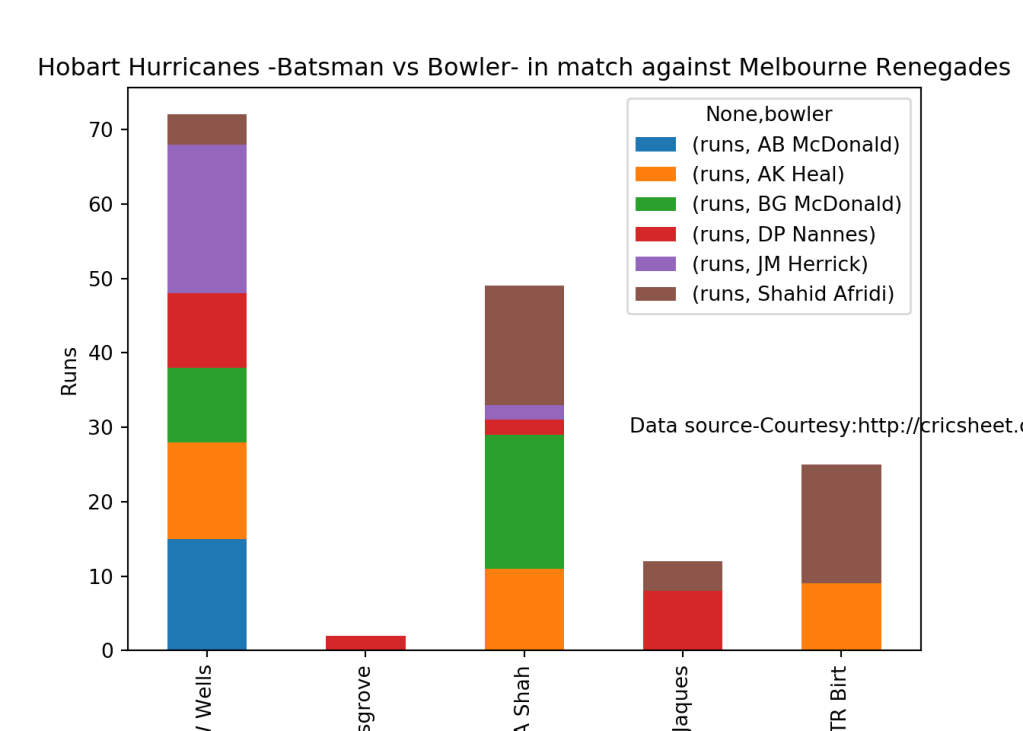
path=os.path.join(dir1,".\\Hobart Hurricanes-Melbourne Renegades-2012-01-18.csv")
hh_mr=pd.read_csv(path)
yka.teamBatsmenVsBowlersMatch(hh_mr,'Hobart Hurricanes','Melbourne Renegades',plot=True)

3.3 Big Bash League -Team bowling scorecard match (Class 1)

import os
import pandas as pd
import yorkpy.analytics as yka
dir1="C:\\software\\cricket-package\\yorkpyBBL\\BBLT20-Matches"
path=os.path.join(dir1,".\\Melbourne Stars-Sydney Thunder-2016-01-24.csv")
ms_st=pd.read_csv(path)
a=yka.teamBowlingScorecardMatch(ms_st,'Sydney Thunder')
print(a)
##           bowler  overs  runs  maidens  wicket   econrate
## 0        A Zampa      4    32        0       2   8.000000
## 1  BW Hilfenhaus      2    21        0       0  10.500000
## 2      DJ Hussey      1     9        0       1   9.000000
## 3     DJ Worrall      3    42        0       0  14.000000
## 4      EP Gulbis      2    19        0       0   9.500000
## 5        MA Beer      3    25        0       1   8.333333
## 6     MP Stoinis      4    30        0       3   7.500000

3.4 Big Bash League – Match Worm chart (Class 1)

import os
import pandas as pd
import yorkpy.analytics as yka
dir1="C:\\software\\cricket-package\\yorkpyBBL\\BBLT20-Matches"
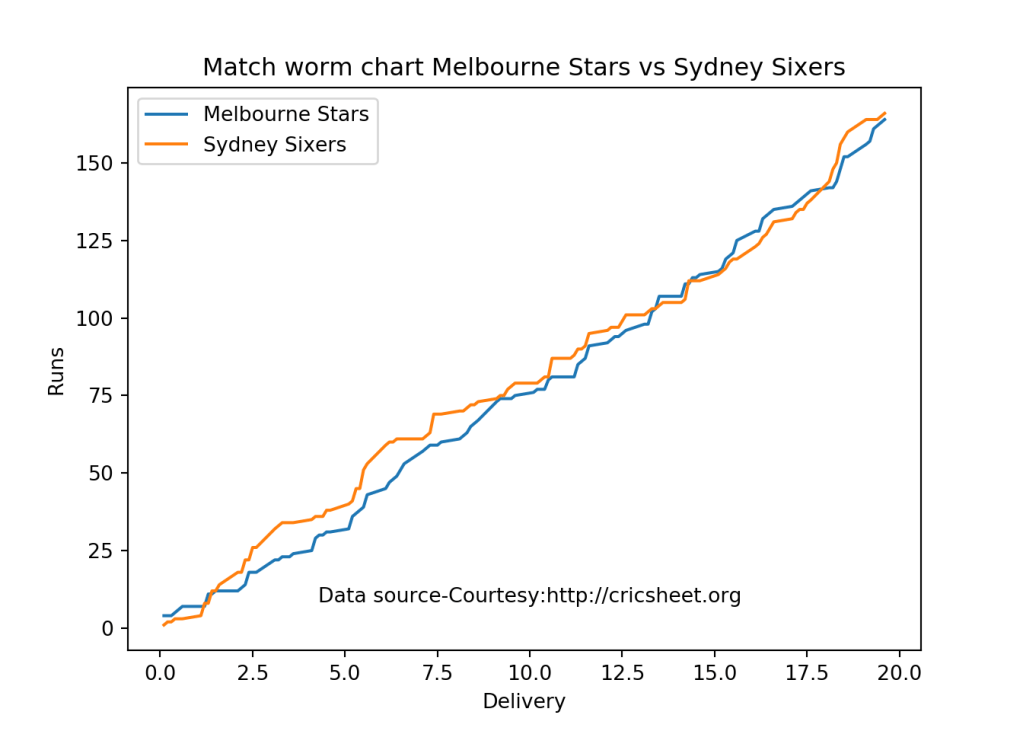
path=os.path.join(dir1,".\\Sydney Sixers-Melbourne Stars-2011-12-27.csv")
ss_ms=pd.read_csv(path)
yka.matchWormChart(ss_ms,"Melbourne Stars", "Sydney Sixers")

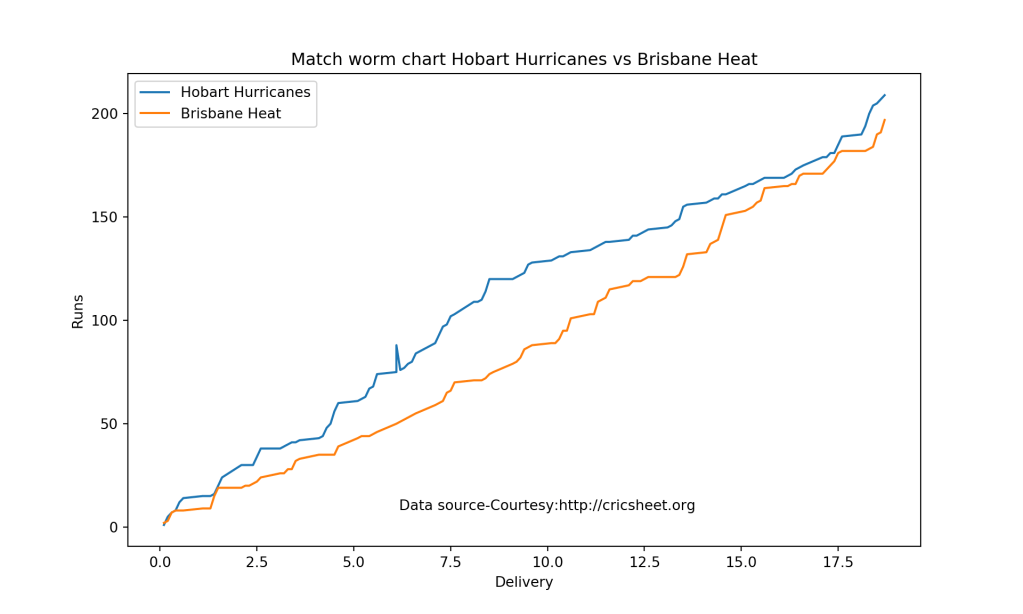
path=os.path.join(dir1,".\\Hobart Hurricanes-Brisbane Heat-2015-01-02.csv")
hh_bh=pd.read_csv(path)
yka.matchWormChart(hh_bh,"Hobart Hurricanes", "Brisbane Heat")

3.5 Big Bash League -Team Batting partnerships all matches 2 teams (Class 2)

import os
import pandas as pd
import yorkpy.analytics as yka
dir1="C:\\software\\cricket-package\\yorkpyBBL\\BBLT20-allMatchesBetween2Teams"
path=os.path.join(dir1,"Brisbane Heat-Adelaide Strikers-allMatches.csv")
bh_as_matches = pd.read_csv(path)
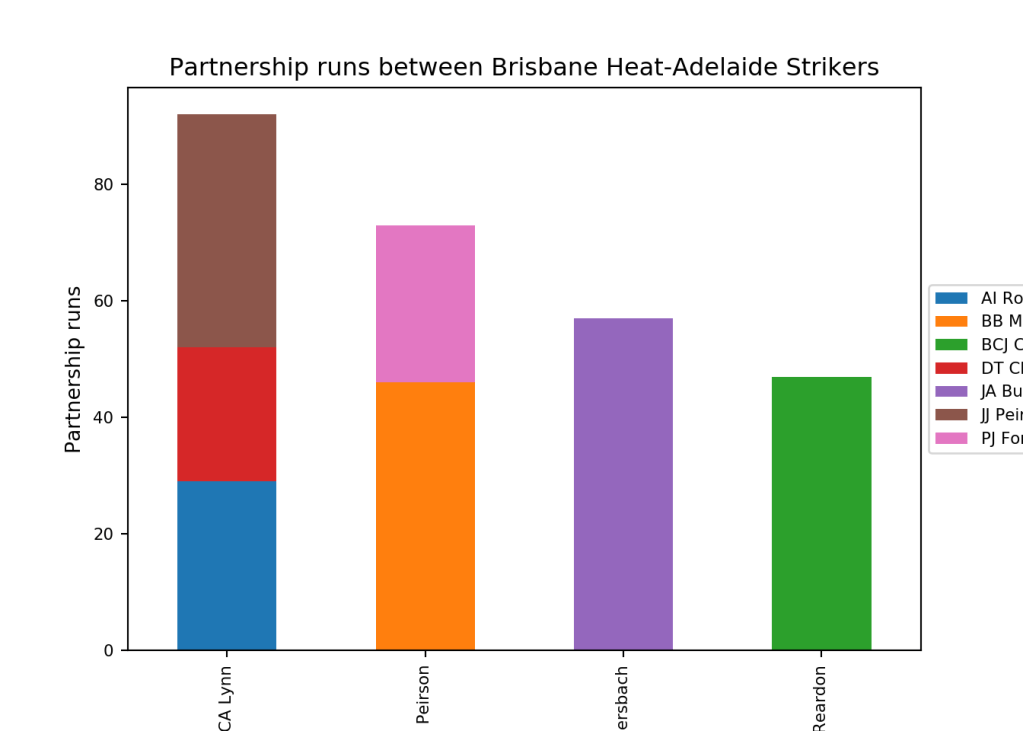
yka.teamBatsmenPartnershipOppnAllMatchesChart(bh_as_matches,"Brisbane Heat","Adelaide Strikers",plot=True, top=4, partnershipRuns=20)

3.6 Big Bash League -Team Bowling wicket kind all matches 2 teams (Class 2)

import os
import pandas as pd
import yorkpy.analytics as yka
dir1="C:\\software\\cricket-package\\yorkpyBBL\\BBLT20-allMatchesBetween2Teams"
path=os.path.join(dir1,"Sydney Sixers-Perth Scorchers-allMatches.csv")
ss_ps_matches = pd.read_csv(path)
yka.teamBowlingWicketKindOppositionAllMatches(ss_ps_matches,'Perth Scorchers','Sydney Sixers',plot=True,top=5,wickets=1)

3.7 Big Bash League -Team Bowling scorecard all teams (Class 3)

import os
import pandas as pd
import yorkpy.analytics as yka
dir1="C:\\software\\cricket-package\\yorkpyBBL\\BBLT20-allMatchesAllOpposition"
path=os.path.join(dir1,"Hobart Hurricanes-allMatchesAllOpposition.csv")
hh_matches = pd.read_csv(path)
scorecard=yka.teamBowlingScorecardAllOppnAllMatches(hh_matches,"Hobart Hurricanes")
print(scorecard)
##              bowler  overs  runs  maidens  wicket   econrate
## 16            B Lee     20   132        0       9   6.600000
## 30         CJ McKay     13   110        0       9   8.461538
## 88    NJ Rimmington     16   103        1       9   6.437500
## 67      JW Hastings     15    88        0       8   5.866667
## 63      JP Faulkner     15   146        0       7   9.733333
## 27        CJ Gannon     17   147        1       7   8.647059
## 93          NM Lyon      8    51        0       7   6.375000
## 20      BCJ Cutting     27   226        0       7   8.370370
## 48          GB Hogg     22   167        0       7   7.590909
## 107       SM Boland     12    96        0       7   8.000000
## 15       B Laughlin     13    99        0       7   7.615385
## 87      MT Steketee     15   134        0       5   8.933333
## 121    Yasir Arafat      9    48        0       4   5.333333
## 96       PJ Cummins      8    83        0       4  10.375000
## 46      Fawad Ahmed     11    64        0       4   5.818182
## 76          MA Beer     12    63        0       4   5.250000
## 108     SNJ O'Keefe     15   104        0       4   6.933333
## 75   M Muralitharan      7    31        0       4   4.428571
## 10           AJ Tye     16   127        0       4   7.937500
## 52          J Botha     13    94        0       4   7.230769
## 56     JL Pattinson      7    71        0       4  10.142857
## 62   JP Behrendorff     16   119        0       4   7.437500
## 3           AC Agar     12    87        0       4   7.250000
## 24     BM Edmondson      4    40        0       4  10.000000
## 37        DJ Hussey      8    47        0       3   5.875000
## 49       GJ Maxwell      8    65        0       3   8.125000
## 84       MN Samuels      4    22        0       3   5.500000
## 81         MG Neser      5    54        0       3  10.800000
## 44     DT Christian      9   114        0       3  12.666667
## 50        GS Sandhu      7    51        0       3   7.285714
## ..              ...    ...   ...      ...     ...        ...
## 43        DP Nannes      8    58        0       1   7.250000
## 51         IA Moran      4    25        0       1   6.250000
## 55         JK Lalor     10    82        0       1   8.200000
## 54        JH Kallis      3    18        0       1   6.000000
## 73   LR Butterworth      4    25        0       1   6.250000
## 4      AC McDermott      2    28        0       1  14.000000
## 70         LA Doran      4    38        0       1   9.500000
## 69    KW Richardson      6    44        0       1   7.333333
## 119     WD Sheridan      2     6        0       0   3.000000
## 2       AB McDonald      1    15        0       0  15.000000
## 115      TD Andrews      3    23        0       0   7.666667
## 11          AK Heal      4    33        0       0   8.250000
## 7        AD Russell      4    40        0       0  10.000000
## 8          AJ Finch      2    15        0       0   7.500000
## 9         AJ Turner      3    28        0       0   9.333333
## 60        JM Mennie      1    20        0       0  20.000000
## 18        BA Stokes      1     9        0       0   9.000000
## 26         CH Gayle      1    16        0       0  16.000000
## 28         CJ Green      4    44        0       0  11.000000
## 95   PD Collingwood      2    20        0       0  10.000000
## 31       CJ Simmons      4    21        0       0   5.250000
## 59       JM Holland      3    34        0       0  11.333333
## 36         DJ Bravo      6    64        0       0  10.666667
## 38     DJ Pattinson      2    16        0       0   8.000000
## 41       DJ Worrall      8    90        0       0  11.250000
## 72      LN O'Connor      6    56        0       0   9.333333
## 71        LJ Wright      3    27        0       0   9.000000
## 68       KA Pollard      1     7        0       0   7.000000
## 58       JM Herrick      4    23        0       0   5.750000
## 92       NM Hauritz      5    42        0       0   8.400000
## 
## [122 rows x 6 columns]

3.8 Big Bash League -Plot wins vs losses against all teams(Class 3)

import os
import pandas as pd
import yorkpy.analytics as yka
dir1="C:\\software\\cricket-package\\yorkpyBBL\\BBLT20-allMatchesAllOpposition"
path=os.path.join(dir1,"Sydney Sixers-allMatchesAllOpposition.csv")
ss_matches = pd.read_csv(path)
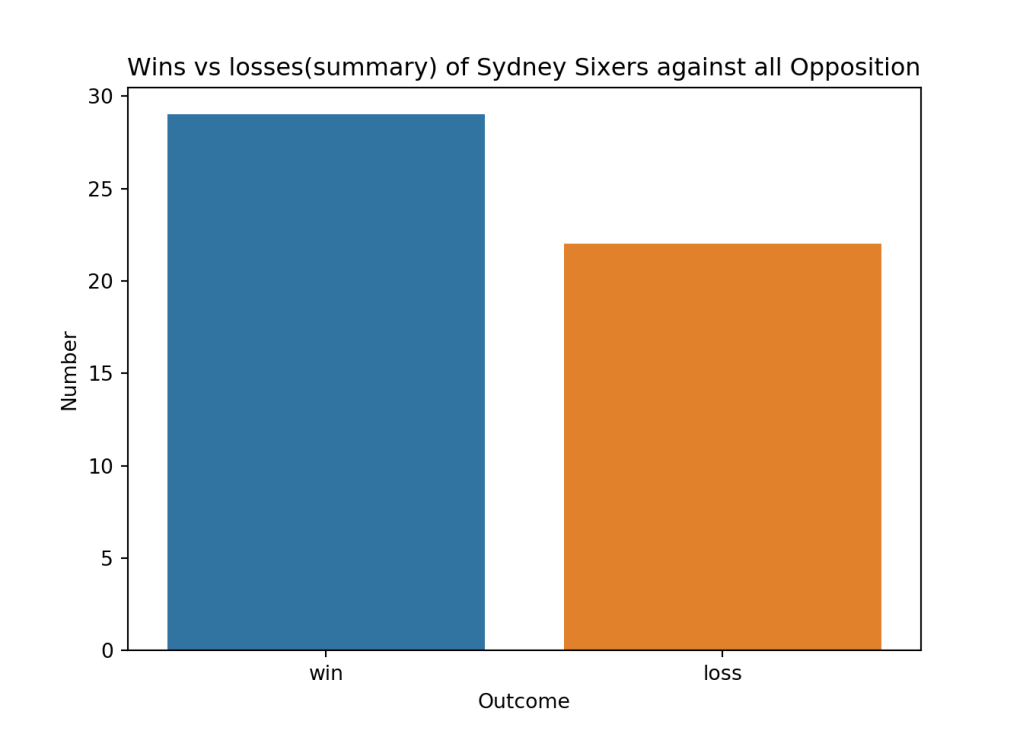
yka.plotWinLossByTeamAllOpposition(ss_matches,'Sydney Sixers')

3.9 Big Bash League -Wins vs losses by toss decision (Class 3)

import os
import pandas as pd
import yorkpy.analytics as yka
dir1="C:\\software\\cricket-package\\yorkpyBBL\\BBLT20-allMatchesAllOpposition"
path=os.path.join(dir1,"Adelaide Strikers-allMatchesAllOpposition.csv")
as_matches = pd.read_csv(path)
yka.plotWinsByRunOrWicketsAllOpposition(as_matches,'Adelaide Strikers')

3.10 Big Bash League -Batsmen Analysis (Class 4)

import os
import pandas as pd
import yorkpy.analytics as yka
dir1="C:\\software\\cricket-package\\yorkpyBBL\\BBLT20-BattingBowlingDetails"
# CA Lynn
name="CA Lynn"
team='Brisbane Heat'
df=yka.getBatsmanDetails(team,name,dir=dir1)
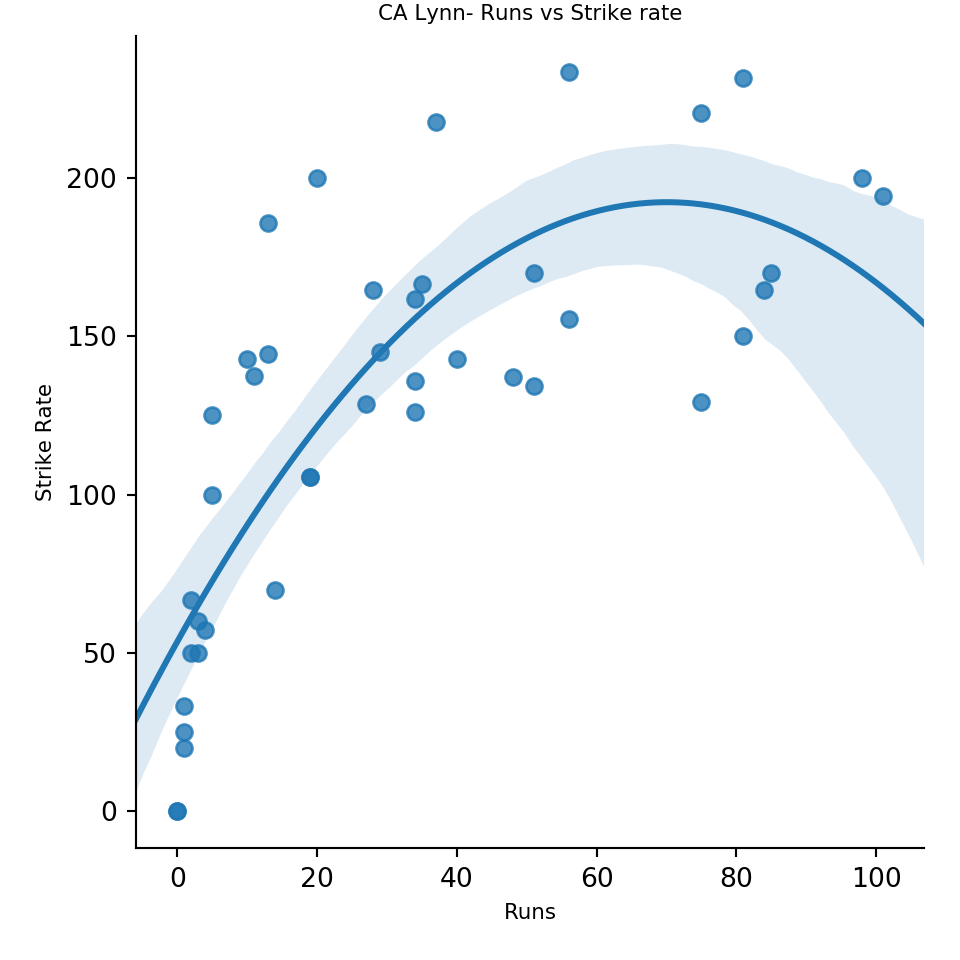
yka.batsmanRunsVsStrikeRate(df,name)

# UT Khawaja
name="UT Khawaja"
team='Sydney Thunder'
df=yka.getBatsmanDetails(team,name,dir=dir1)
yka.batsmanRunsAgainstOpposition(df,name)

3.11Big Bash League – Bowler analysis (Class 4)

import os
import pandas as pd
import yorkpy.analytics as yka
dir1="C:\\software\\cricket-package\\yorkpyBBL\\BBLT20-BattingBowlingDetails"
# CJ McKay
name="CJ McKay"
team='Sydney Thunder'
df=yka.getBowlerWicketDetails(team,name,dir=dir1)
yka.bowlerCumulativeAvgWickets(df,name)

# AU Rashid
name="AU Rashid"
team='Adelaide Strikers'
df=yka.getBowlerWicketDetails(team,name,dir=dir1)
yka.bowlerCumulativeAvgEconRate(df,name)

4. Natwest T20 Blast

The following functions for added to handle Natwest T20 teams

  1. saveAllMatchesBetween2NWBTeams()
  2. saveAllMatchesAllOppositionNWBT20

The Natwest teams are
Derbyshire, Durham, Essex, Glamorgan, Gloucestershire, Hampshire, Kent,Lancashire, Leicestershire, Middlesex,Northamptonshire, Nottinghamshire, Somerset, Surrey, Sussex, Warwickshire, Worcestershire,Yorkshire

In order to perform analysis with yorkpy, the YAML data has to be converted to pandas dataframe and saves as CSV as shown

#import os
#import yorkpy.analytics as yka
#os.chdir('C:\\software\\cricket-package\\yorkpyNWB\\nwb')
#1. Convert YAML to dataframes and save as CSV
#yka.convertAllYaml2PandasDataframesT20(".", "..\\NWBT20-Matches")
#2. Save all matches between 2 NWBT20 teams
#dir1='C:\\software\\cricket-package\\yorkpyNWB\\NWBT20-Matches'
#yka.saveAllMatchesBetween2NWBTeams(dir1)
#3. Save all matches between a NWB T20 team and all other teams
#dir1='C:\\software\\cricket-package\\yorkpyNWB\\NWBT20-Matches'
#yka.saveAllMatchesAllOppositionNWBT20(dir1)
#4. Compute the batting details
dir1='C:\\software\\cricket-package\\yorkpyNWB\\NWBT20-Matches'
#yka.getTeamBattingDetails("Derbyshire",dir=dir1, save=True)
#yka.getTeamBattingDetails("Durham",dir=dir1,save=True)
#yka.getTeamBattingDetails("Essex",dir=dir1,save=True)
#..
#5. Compute bowling details
dir1='C:\\software\\cricket-package\\yorkpyNWB\\NWBT20-Matches'
#yka.getTeamBowlingDetails("Derbyshire",dir=dir1, save=True)
#yka.getTeamBowlingDetails("Durham",dir=dir1,save=True)
#yka.getTeamBowlingDetails("Essex",dir=dir1,save=True)
#...

Once the data is converted all yorkpy functions can be used. This has already been done and is available at github NWB

4.1 Natwest T20 Blast – Team score card (Class 1)

import os
import pandas as pd
import yorkpy.analytics as yka
dir1="C:\\software\\cricket-package\\\yorkpyNWB\\NWBT20-Matches"
path=os.path.join(dir1,".\\Durham-Yorkshire-2016-08-20.csv")
d_y=pd.read_csv(path)
scorecard,extras=yka.teamBattingScorecardMatch(d_y,"Durham")
print(scorecard)
##           batsman  runs  balls  4s  6s          SR
## 0     MD Stoneman    25     20   4   0  125.000000
## 1     KK Jennings    11     13   1   0   84.615385
## 2       BA Stokes    56     37   4   3  151.351351
## 3   MJ Richardson    29     23   4   1  126.086957
## 4     JTA Burnham    17     15   1   1  113.333333
## 5      RD Pringle    10      9   1   0  111.111111
## 6  PD Collingwood     2      3   0   0   66.666667
## 7        U Arshad     1      1   0   0  100.000000
print(extras)
##    total  wides  noballs  legbyes  byes  penalty  extras
## 0    305      2        0        5     0        0       7

4.2 Natwest T20 Blast -Team batsmen vs Bowlers (Class 1)

import os
import pandas as pd
import yorkpy.analytics as yka
dir1="C:\\software\\cricket-package\\\yorkpyNWB\\NWBT20-Matches"
path=os.path.join(dir1,".\\Derbyshire-Lancashire-2016-07-13.csv")
d_l=pd.read_csv(path)
yka.teamBatsmenVsBowlersMatch(d_l,'Lancashire','Derbyshire',plot=True)

4.3 Natwest T20 Blast -Team bowling scorecard match (Class 1)

import os
import pandas as pd
import yorkpy.analytics as yka
dir1="C:\\software\\cricket-package\\\yorkpyNWB\\NWBT20-Matches"
path=os.path.join(dir1,".\\Essex-Surrey-2016-05-20.csv")
e_s=pd.read_csv(path)
a=yka.teamBowlingScorecardMatch(e_s,'Essex')
print(a)
##           bowler  overs  runs  maidens  wicket   econrate
## 0  Azhar Mahmood      3    38        0       4  12.666667
## 1       GJ Batty      4    33        0       1   8.250000
## 2       JE Burke      1    18        0       0  18.000000
## 3     MW Pillans      3    28        0       0   9.333333
## 4      SM Curran      4    23        0       2   5.750000
## 5      TK Curran      4    21        0       3   5.250000

4.4 Natwest T20 Blast -Match Worm chart (Class 1)

import os
import pandas as pd
import yorkpy.analytics as yka
dir1="C:\\software\\cricket-package\\\yorkpyNWB\\NWBT20-Matches"
path=os.path.join(dir1,".\\Gloucestershire-Glamorgan-2016-06-10.csv")
ss_ms=pd.read_csv(path)
yka.matchWormChart(ss_ms,"Gloucestershire", "Glamorgan")

path=os.path.join(dir1,".\\Leicestershire-Northamptonshire-2016-05-20.csv")
hh_bh=pd.read_csv(path)
yka.matchWormChart(hh_bh,"Northamptonshire", "Leicestershire")

4.5 Natwest T20 Blast -Team Batting partnerships all matches 2 teams (Class 2)

import os
import pandas as pd
import yorkpy.analytics as yka
dir1="C:\\software\\cricket-package\\yorkpyNWB\\NWBT20-allMatchesBetween2Teams"
path=os.path.join(dir1,"Hampshire-Sussex-allMatches.csv")
h_s_matches = pd.read_csv(path)
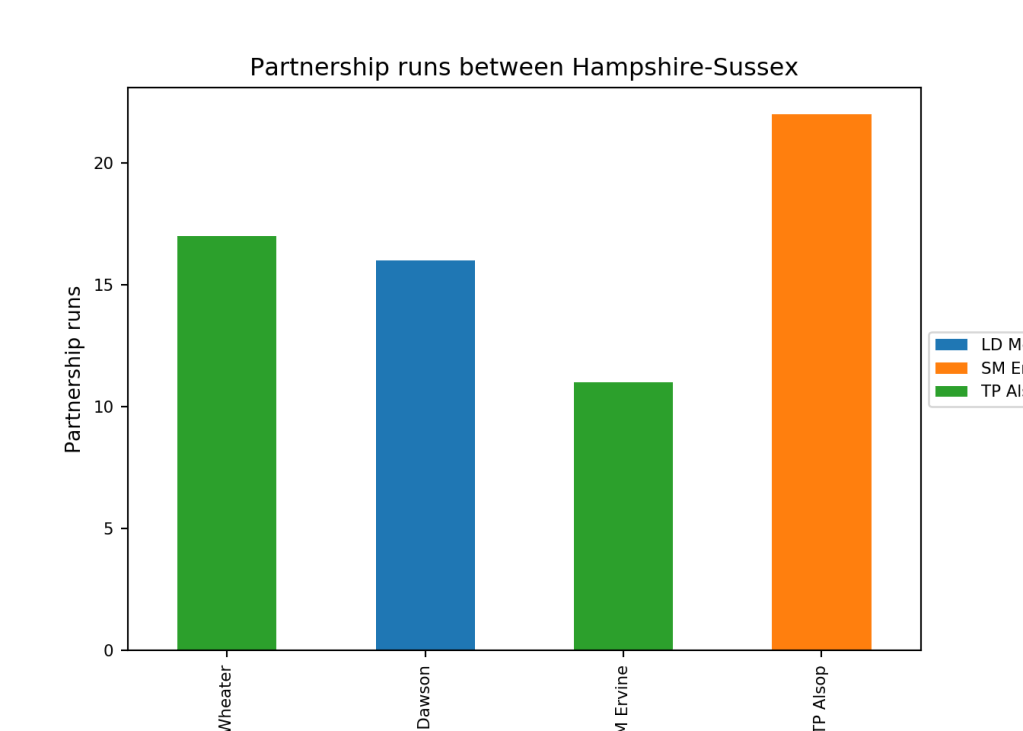
yka.teamBatsmenPartnershipOppnAllMatchesChart(h_s_matches,"Hampshire","Sussex",plot=True, top=4, partnershipRuns=10)

4.6 Natwest T20 Blast -Team Bowling wicket kind all matches 2 teams (Class 2)

import os
import pandas as pd
import yorkpy.analytics as yka
dir1="C:\\software\\cricket-package\\yorkpyNWB\\NWBT20-allMatchesBetween2Teams"
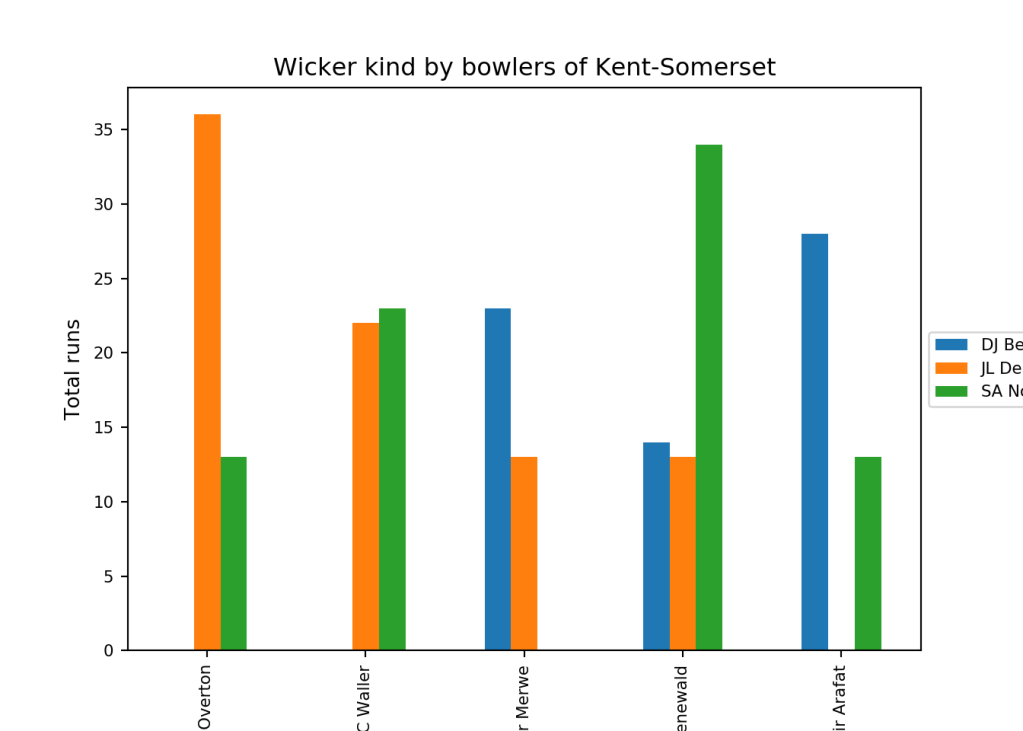
path=os.path.join(dir1,"Kent-Somerset-allMatches.csv")
k_s_matches = pd.read_csv(path)
yka.teamBowlersVsBatsmenOppnAllMatches(k_s_matches,'Kent','Somerset',plot=True,
top=5,runsConceded=10)

4.7 Natwest T20 Blast -Team Bowling scorecard all teams (Class 3)

import os
import pandas as pd
import yorkpy.analytics as yka
dir1="C:\\software\\cricket-package\\yorkpyNWB\\NWBT20-allMatchesAllOpposition"
path=os.path.join(dir1,"Middlesex-allMatchesAllOpposition.csv")
m_matches = pd.read_csv(path)
scorecard=yka.teamBowlingScorecardAllOppnAllMatches(m_matches,"Middlesex")
print(scorecard)
##               bowler  overs  runs  maidens  wicket   econrate
## 1             AJ Tye      8    75        0       6   9.375000
## 5         BAC Howell      8    41        0       5   5.125000
## 26         GR Napier      7    65        0       5   9.285714
## 15        DI Stevens      4    31        0       4   7.750000
## 19       DW Lawrence      6    37        0       4   6.166667
## 32       JW Dernbach      4    33        0       3   8.250000
## 7          BTJ Wheal      4    43        0       3  10.750000
## 18         DR Briggs      4    24        0       3   6.000000
## 50     RK Kleinveldt      4    24        0       3   6.000000
## 46         R McLaren      7    59        0       3   8.428571
## 47         R Rampaul      3    21        0       3   7.000000
## 34         L Gregory      6    51        0       2   8.500000
## 33   KMDN Kulasekara      2    24        0       2  12.000000
## 40          MG Hogan      3    17        0       2   5.666667
## 43        MTC Waller      4    31        0       2   7.750000
## 49        RJ Gleeson      4    20        0       2   5.000000
## 48  RE van der Merwe      5    24        0       2   4.800000
## 51  RN ten Doeschate      4    32        0       2   8.000000
## 53        S Prasanna      4    20        0       2   5.000000
## 56           SW Tait      3    17        0       2   5.666667
## 57     Shahid Afridi      8    55        0       2   6.875000
## 59  T van der Gugten      3    13        1       2   4.333333
## 64          TS Mills      3    34        0       2  11.333333
## 65          WAT Beer      4    23        0       2   5.750000
## 31          JH Davey      4    28        0       2   7.000000
## 68         ZS Ansari      3    16        0       2   5.333333
## 25         GM Andrew      3    19        0       2   6.333333
## 23          GJ Batty      6    55        0       2   9.166667
## 16          DJ Bravo      3    27        0       2   9.000000
## 41          MR Quinn      6    65        0       1  10.833333
## ..               ...    ...   ...      ...     ...        ...
## 24     GL van Buuren      7    49        0       1   7.000000
## 37           MD Hunn      3    35        0       1  11.666667
## 36        LC Norwell      6    62        0       1  10.333333
## 29       JC Tredwell      4    35        0       1   8.750000
## 35         LA Dawson      6    53        0       1   8.833333
## 62           TL Best      4    51        0       0  12.750000
## 58         T Westley      2    12        0       0   6.000000
## 4         Azharullah      3    24        0       0   8.000000
## 60     TD Groenewald      1    21        0       0  21.000000
## 61         TK Curran      4    35        0       0   8.750000
## 38         MD Taylor      3    30        0       0  10.000000
## 30        JG Myburgh      1     5        0       0   5.000000
## 8          C Overton      2    18        0       0   9.000000
## 2        Ashar Zaidi      1     5        0       0   5.000000
## 66          WR Smith      2    25        0       0  12.500000
## 28         J Overton      2    24        0       0  12.000000
## 6          BJ Taylor      1     6        0       0   6.000000
## 22          GG White      4    31        0       0   7.750000
## 55          SP Crook      1     9        0       0   9.000000
## 39        ME Claydon      4    40        0       0  10.000000
## 52         RS Bopara      4    32        0       0   8.000000
## 10           CD Nash      2    19        0       0   9.500000
## 11         CH Morris      4    36        0       0   9.000000
## 12         DA Cosker      3    32        0       0  10.666667
## 13      DA Griffiths      4    39        0       0   9.750000
## 45          PD Trego      1    11        0       0  11.000000
## 44   PA van Meekeren      2    19        0       0   9.500000
## 42          MS Crane      2    25        0       0  12.500000
## 20        FK Cowdrey      1    19        0       0  19.000000
## 14        DD Masters      2    16        0       0   8.000000
## 
## [69 rows x 6 columns]

4.8 Natwest T20 Blast -Plot wins vs losses against all teams(Class 3)

import os
import pandas as pd
import yorkpy.analytics as yka
dir1="C:\\software\\cricket-package\\yorkpyNWB\\NWBT20-allMatchesAllOpposition"
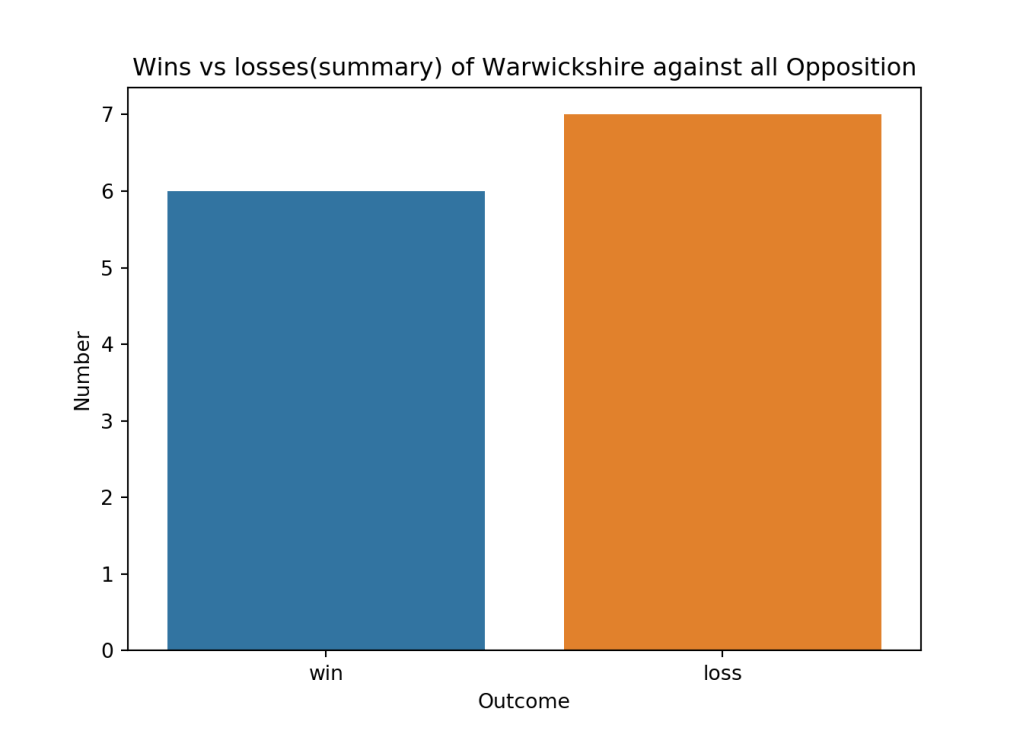
path=os.path.join(dir1,"Warwickshire-allMatchesAllOpposition.csv")
w_matches = pd.read_csv(path)
yka.plotWinLossByTeamAllOpposition(w_matches,'Warwickshire')

4.9 Natwest T20 Blast -Batsmen Analysis (Class 4)

import os
import pandas as pd
import yorkpy.analytics as yka
dir1="C:\\software\\cricket-package\\yorkpyNWB\\NWBT20-BattingBowlingDetails"
# M Klinger
name="M Klinger"
team='Gloucestershire'
df=yka.getBatsmanDetails(team,name,dir=dir1)
yka.batsmanRunsAgainstOpposition(df,name)

# CA Ingram
name="CA Ingram"
team='Glamorgan'
df=yka.getBatsmanDetails(team,name,dir=dir1)
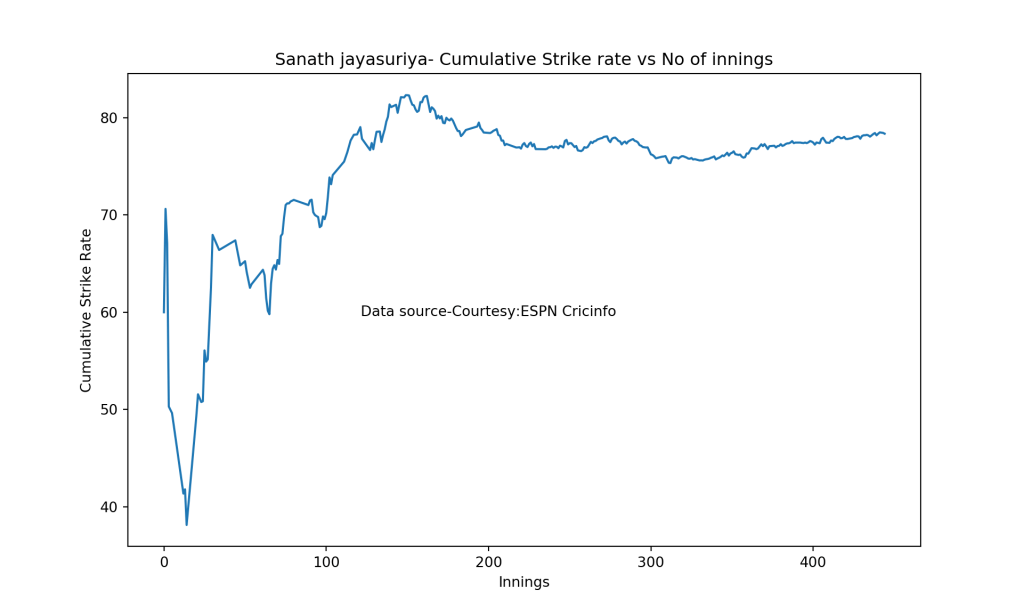
yka.batsmanCumulativeStrikeRate(df,name)

4.11 Natwest T20 Blast -Bowler analysis (Class 4)

import os
import pandas as pd
import yorkpy.analytics as yka
dir1="C:\\software\\cricket-package\\yorkpyNWB\\NWBT20-BattingBowlingDetails"
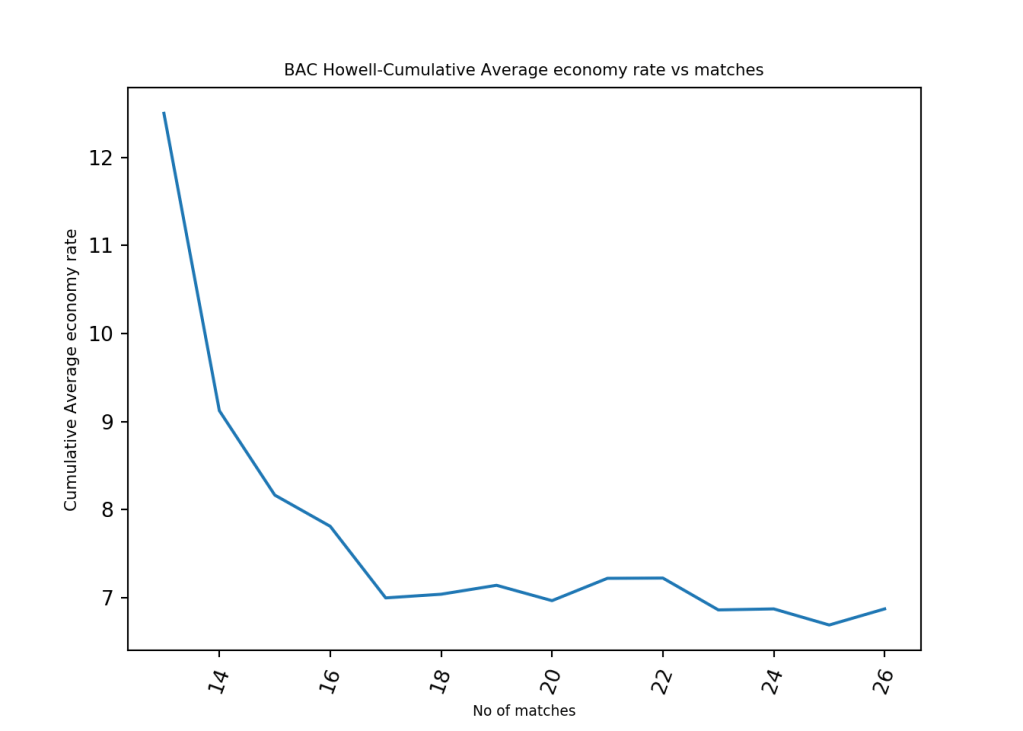
# BAC Howell
name="BAC Howell"
team='Gloucestershire'
df=yka.getBowlerWicketDetails(team,name,dir=dir1)
yka.bowlerCumulativeAvgEconRate(df,name)

# GR Napier
name="GR Napier"
team='Essex'
df=yka.getBowlerWicketDetails(team,name,dir=dir1)
yka.bowlerWicketsVenue(df,name)

Note: yorkpy will work for all T20 leagues which are in YAML format as specified in Cricsheet.

You can clone/fork the latest code for yorkpy from github yorkpy

The data for IPL, Intl. T20, BBL and Natwest T20 have already been converted into pandas dataframes and saved as CSVs. You can download the converted files from Github at [allYorkpyT20Data])(https://github.com/tvganesh/allYorkpyT20Data)

Conclusion This post shows the kind of detailed analysis that can be performed with yorkpy. In fact with all the converted data it should be possible to also train a Machine Learning model, which I will probably keep for another day. You could go ahead and use the data in other innovative ways. Do keep me posted if you do!!

Important note: Do check out my other posts using yorkpy at yorkpy-posts

Have fun with yorkpy!!

See also
1. Take 4+: Presentations on ‘Elements of Neural Networks and Deep Learning’ – Parts 1-8
2. My book ‘Practical Machine Learning in R and Python: Third edition’ on Amazon
3. Hand detection through Haartraining: A hands-on approach
4.My book ‘Deep Learning from first principles:Second Edition’ now on Amazon
5. Introducing QCSimulator: A 5-qubit quantum computing simulator in R
6. The 3rd paperback & kindle editions of my books on Cricket, now on Amazon

To see all posts click Index of posts

Pitching yorkpy … in the block hole – Part 4

A good programmer is someone who always looks both ways before crossing a one-way street.  Doug Linder

There are two ways to write error-free programs; only the third one works. Alan J. Perlis

In order to understand recursion, one must first understand recursion. Anonymous

This is the fourth and final part of my Python package yorkpy. In this part yorkpy, the python avatar of my R package yorkr see Introducing cricket package yorkr: Part 1- Beaten by sheer pace!, develops wings and is prepared for take-off. The yorkpy package uses data from Cricsheet

You can clone/download the code at Github yorkpy
This post has been published to RPubs at yorkpy-Part4
You can download this post as PDF at IPLT20-yorkpy-part4
You can download all the data used in this post and the previous post at yorkpyData

This post is a continuation of the earlier posts on yorkpy

1. Pitching yorkpy . short of good length to IPL – Part 1 In this part I included functions that convert the yaml data of IPL matches into Pandas dataframe which are then saved as CSV. This part can perform analysis of individual IPL matches. Note The converted data is available at yorkpyData
2. Pitching yorkpy.on the middle and outside off-stump to IPL – Part 2 This part included functions to create a large data frame for head-to-head confrontation between any 2IPL teams says CSK-MI, DD-KKR etc, which can be saved as CSV. Analysis is then performed on these team-2-team confrontations. Note The converted data is available at yorkpyData
3. Pitching yorkpy.swinging away from the leg stump to IPL – Part 3 The 3rd part includes the performance of any IPL team against all other IPL teams. The data can also be saved as CSV.Note The converted data is available at yorkpyData

Note: If you would like to do a similar analysis for a different set of batsman and bowlers, you can clone/download my skeleton yorkpy-template from Github (which is the R Markdown file I have used for the analysis below).

This 4th and final part includes analysis of batting and bowling performances of any IPL player. The batting and bowling details for all teams have already been converted and are available at IPLT20-Batting-BowlingDetails

This part includes the following new functions

Batsman functions

  1. batsmanRunsVsDeliveries
  2. batsmanFoursSixes
  3. batsmanDismissals
  4. batsmanRunsVsStrikeRate
  5. batsmanMovingAverage
  6. batsmanCumulativeAverageRuns
  7. batsmanCumulativeStrikeRate
  8. batsmanRunsAgainstOpposition
  9. batsmanRunsVenue

Bowler functions

  1. bowlerMeanEconomyRate
  2. bowlerMeanRunsConceded
  3. bowlerMovingAverage
  4. bowlerCumulativeAvgWickets
  5. bowlerCumulativeAvgEconRate
  6. bowlerWicketPlot
  7. bowlerWicketsAgainstOpposition
  8. bowlerWicketsVenue

A. Batsman functions

1. Get IPL Team Batting details

The function below gets the overall IPL team batting details based on the CSV files that were saved for IPL T20 matches. This is currently also available in Github at yorkpyData. The batting details of the IPL team in each match is created and a huge data frame is created by combining the batting details from each match. This can be saved as a csv file with name as for e.g. Delhi Daredevils-BattingDetails.csv.

dir1= "C:\\software\\cricket-package\\yorkpyIPLData\\data3"
#csk_details = yka.getTeamBattingDetails("Chennai Super Kings",dir=dir1, save=True)
#dd_details = yka.getTeamBattingDetails("Delhi Daredevils",dir=dir1,save=True)
#kkr_details = yka.getTeamBattingDetails("Kolkata Knight Riders",dir=dir1,save=True)

2. Get IPL batsman details

This function is used to get the individual IPL T20 batting record for a the specified batsman of the team as in the functions below.

For the batsmen functions below I have chosen Rishabh Pant, Kane Williamson and Ambati Rayudu for the analysis as they top the batting lists. You can choose any IPL batsmen for the analysis

import pandas as pd
import os
import yorkpy.analytics as yka
dir1= "C:\\software\\cricket-package\\yorkpyIPLData\\data3"
# 1. Rishabh Pant
name="RR Pant"
team='Delhi Daredevils'
rpant=yka.getBatsmanDetails(team,name,dir=dir1)

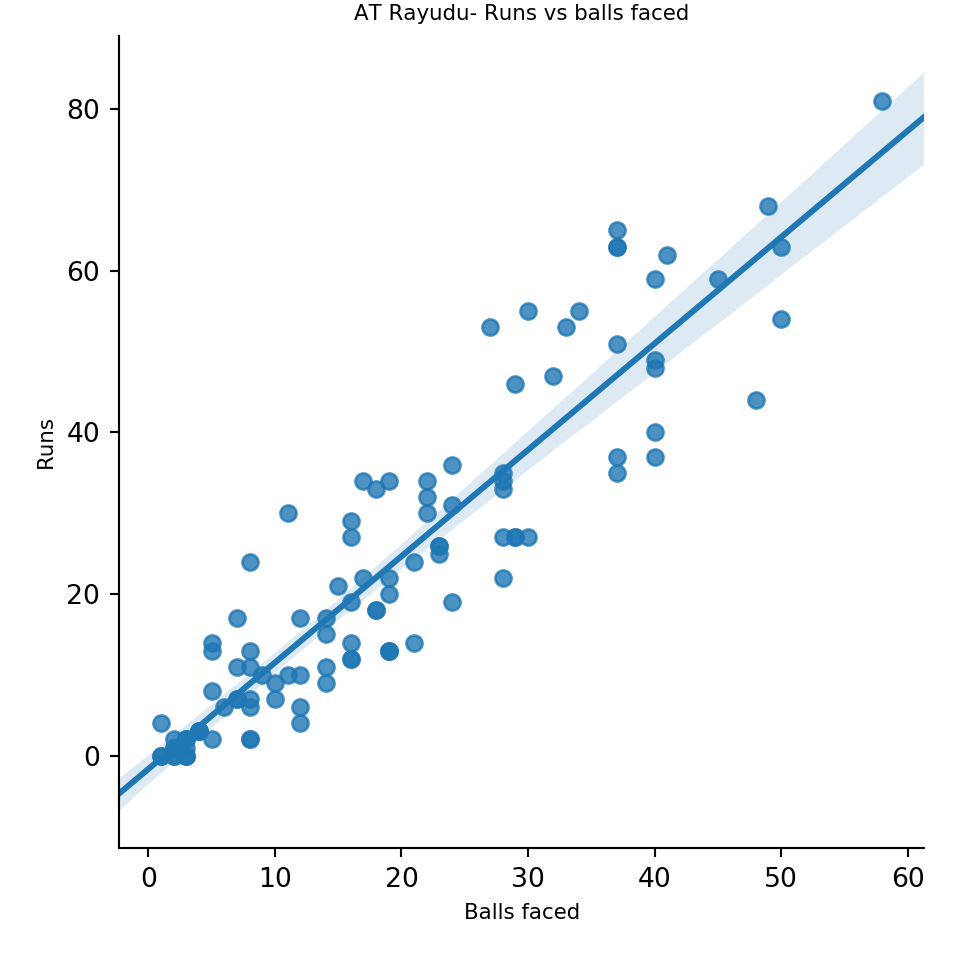
3 Batsman Runs vs Deliveries (in IPL matches)

This functions plots the runs vs deliveries faced for batsman

import pandas as pd
import os
import yorkpy.analytics as yka
dir1= "C:\\software\\cricket-package\\yorkpyIPLData\\data3"
# 1. Rishabh Pant
name="RR Pant"
team='Delhi Daredevils'
df=yka.getBatsmanDetails(team,name,dir=dir1)
yka.batsmanRunsVsDeliveries(df,name)

# 2. Kane Williamson
dir1= "C:\\software\\cricket-package\\yorkpyIPLData\\data3"
name="KS Williamson"
team='Sunrisers Hyderabad'
df=yka.getBatsmanDetails(team,name,dir=dir1)
yka.batsmanRunsVsDeliveries(df,name)

#3. Ambati Rayudu
name="AT Rayudu"
team='Mumbai Indians'
df=yka.getBatsmanDetails(team,name,dir=dir1)
yka.batsmanRunsVsDeliveries(df,name)

4. Batsman fours and sixes (in IPL matches)

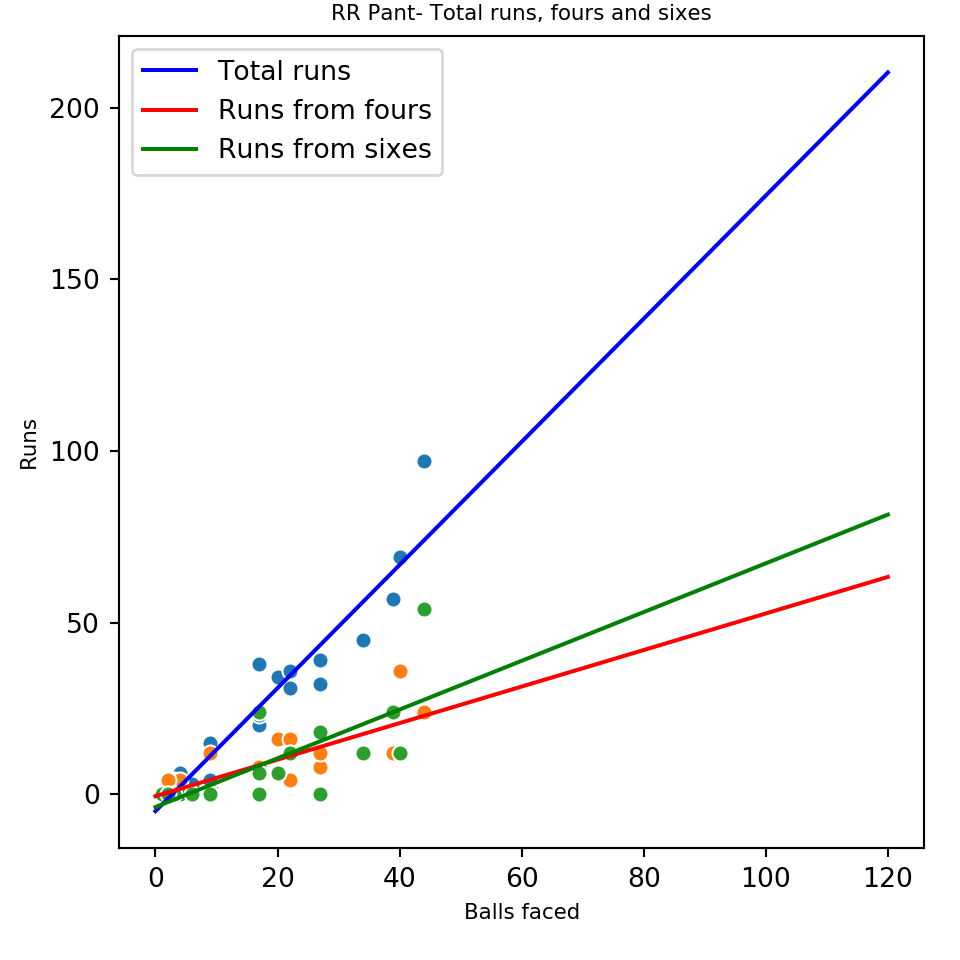
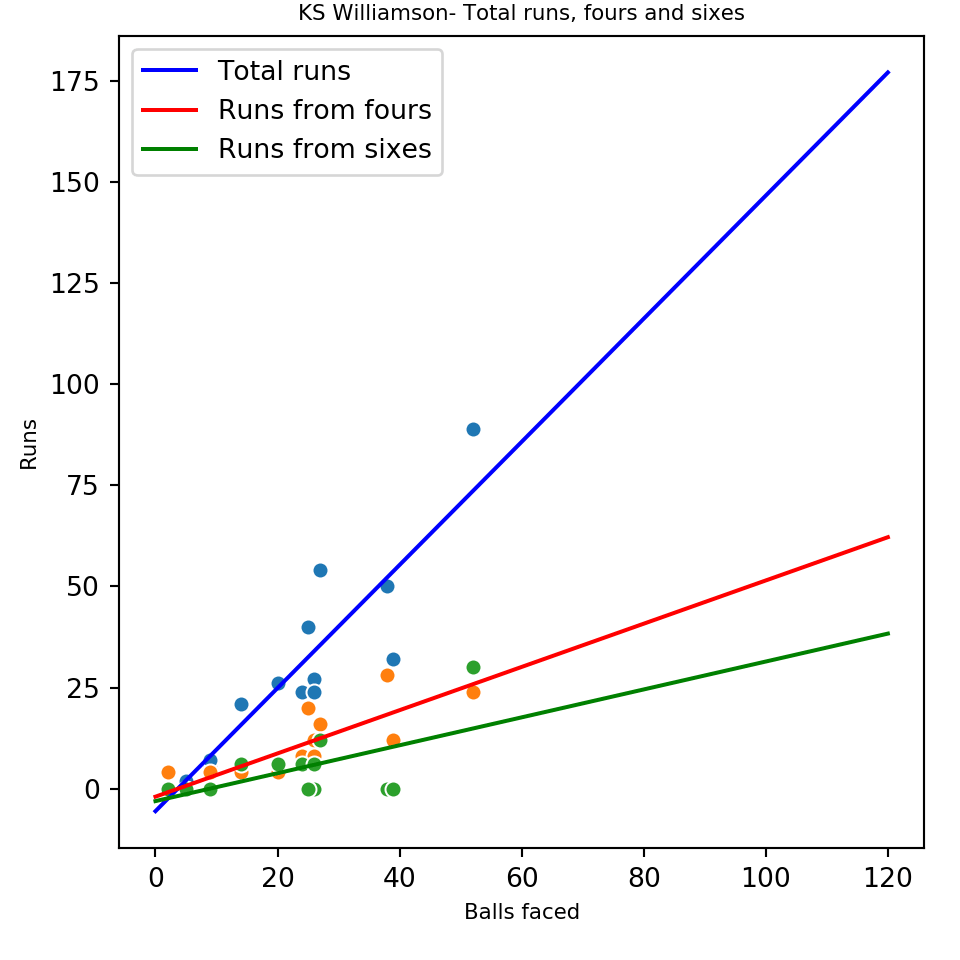
This plots the fours, sixes and the total runs for a batsman

import pandas as pd
import os
import yorkpy.analytics as yka
dir1= "C:\\software\\cricket-package\\yorkpyIPLData\\data3"
# 1. Rishabh Pant
name="RR Pant"
team='Delhi Daredevils'
df=yka.getBatsmanDetails(team,name,dir=dir1)
yka.batsmanFoursSixes(df,name)


# 2. Kane Williamson
dir1= "C:\\software\\cricket-package\\yorkpyIPLData\\data3"
name="KS Williamson"
team='Sunrisers Hyderabad'
df=yka.getBatsmanDetails(team,name,dir=dir1)
yka.batsmanFoursSixes(df,name)

#3. Ambati Rayudu
name="AT Rayudu"
team='Mumbai Indians'
df=yka.getBatsmanDetails(team,name,dir=dir1)
yka.batsmanFoursSixes(df,name)

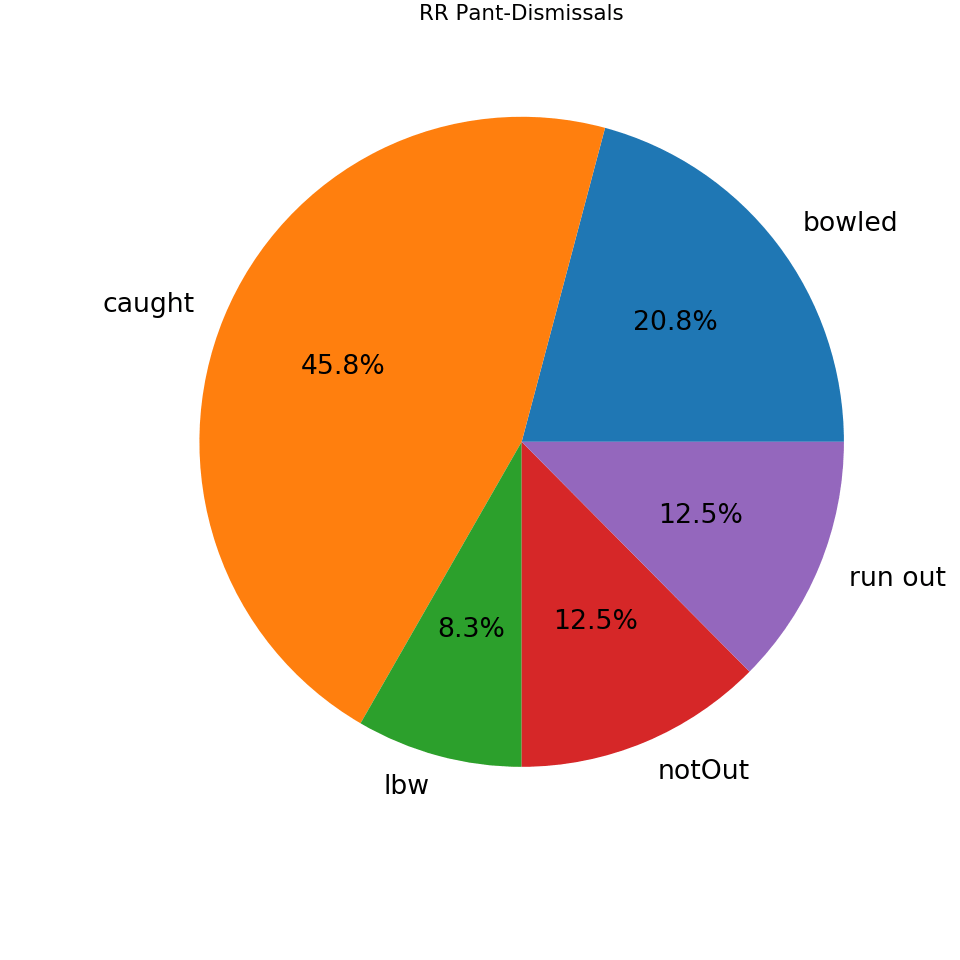
5. Batsman dismissals (in IPL matches)

import pandas as pd
import os
import yorkpy.analytics as yka
dir1= "C:\\software\\cricket-package\\yorkpyIPLData\\data3"
# 1. Rishabh Pant
name="RR Pant"
team='Delhi Daredevils'
df=yka.getBatsmanDetails(team,name,dir=dir1)
yka.batsmanDismissals(df,name)

# 2. Kane Williamson
dir1= "C:\\software\\cricket-package\\yorkpyIPLData\\data3"
name="KS Williamson"
team='Sunrisers Hyderabad'
df=yka.getBatsmanDetails(team,name,dir=dir1)
yka.batsmanDismissals(df,name)

#3. Ambati Rayudu
name="AT Rayudu"
team='Mumbai Indians'
df=yka.getBatsmanDetails(team,name,dir=dir1)
yka.batsmanDismissals(df,name)

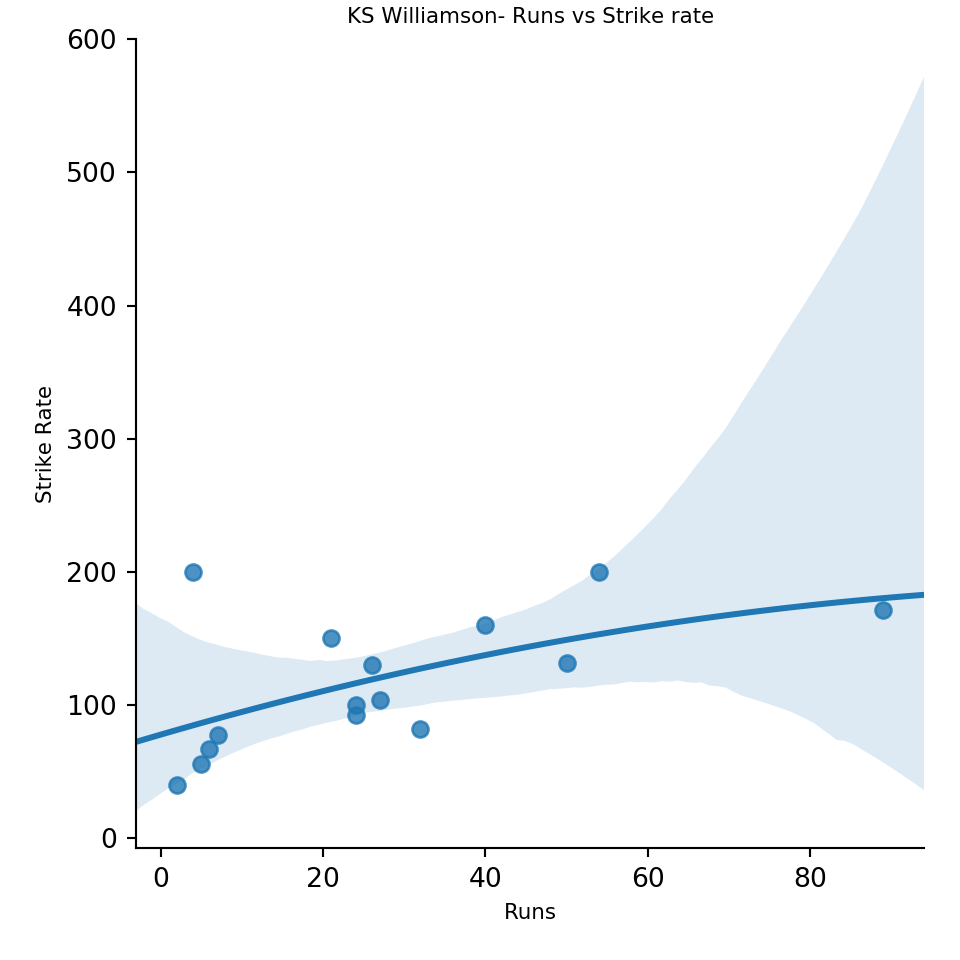
6. Batsman Runs vs Strike Rate (in IPL matches)

The plots below give the Runs vs Strike rate for batsmen

import pandas as pd
import os
import yorkpy.analytics as yka
dir1= "C:\\software\\cricket-package\\yorkpyIPLData\\data3"
# 1. Rishabh Pant
name="RR Pant"
team='Delhi Daredevils'
df=yka.getBatsmanDetails(team,name,dir=dir1)
yka.batsmanRunsVsStrikeRate(df,name)

# 2. Kane Williamson
dir1= "C:\\software\\cricket-package\\yorkpyIPLData\\data3"
name="KS Williamson"
team='Sunrisers Hyderabad'
df=yka.getBatsmanDetails(team,name,dir=dir1)
yka.batsmanRunsVsStrikeRate(df,name)

#3. Ambati Rayudu
name="AT Rayudu"
team='Mumbai Indians'
df=yka.getBatsmanDetails(team,name,dir=dir1)
yka.batsmanRunsVsStrikeRate(df,name)

7. Batsman Moving average of runs (in IPL matches)

The plots below compute and plot the moving average of batsmen

import pandas as pd
import os
import yorkpy.analytics as yka
dir1= "C:\\software\\cricket-package\\yorkpyIPLData\\data3"
# 1. Rishabh Pant
name="RR Pant"
team='Delhi Daredevils'
df=yka.getBatsmanDetails(team,name,dir=dir1)
yka.batsmanMovingAverage(df,name)

# 2. Kane Williamson
dir1= "C:\\software\\cricket-package\\yorkpyIPLData\\data3"
name="KS Williamson"
team='Sunrisers Hyderabad'
df=yka.getBatsmanDetails(team,name,dir=dir1)
yka.batsmanMovingAverage(df,name)

#3. Ambati Rayudu
name="AT Rayudu"
team='Mumbai Indians'
df=yka.getBatsmanDetails(team,name,dir=dir1)
yka.batsmanMovingAverage(df,name)

8. Batsman Cumulative average of runs (in IPL matches)

The functions below plot the cumulative average of the batsmen

import pandas as pd
import os
import yorkpy.analytics as yka
dir1= "C:\\software\\cricket-package\\yorkpyIPLData\\data3"
# 1. Rishabh Pant
name="RR Pant"
team='Delhi Daredevils'
df=yka.getBatsmanDetails(team,name,dir=dir1)
yka.batsmanCumulativeAverageRuns(df,name)

# 2. Kane Williamson
dir1= "C:\\software\\cricket-package\\yorkpyIPLData\\data3"
name="KS Williamson"
team='Sunrisers Hyderabad'
df=yka.getBatsmanDetails(team,name,dir=dir1)
yka.batsmanCumulativeAverageRuns(df,name)

#3. Ambati Rayudu
name="AT Rayudu"
team='Mumbai Indians'
df=yka.getBatsmanDetails(team,name,dir=dir1)
yka.batsmanCumulativeAverageRuns(df,name)

9. Batsman Cumulative Strike Rate (in IPL matches)

The functions below plot the cumulative strike rate of the batsmen

import pandas as pd
import os
import yorkpy.analytics as yka
dir1= "C:\\software\\cricket-package\\yorkpyIPLData\\data3"
# 1. Rishabh Pant
name="RR Pant"
team='Delhi Daredevils'
df=yka.getBatsmanDetails(team,name,dir=dir1)
yka.batsmanCumulativeStrikeRate(df,name)

# 2. Kane Williamson
dir1= "C:\\software\\cricket-package\\yorkpyIPLData\\data3"
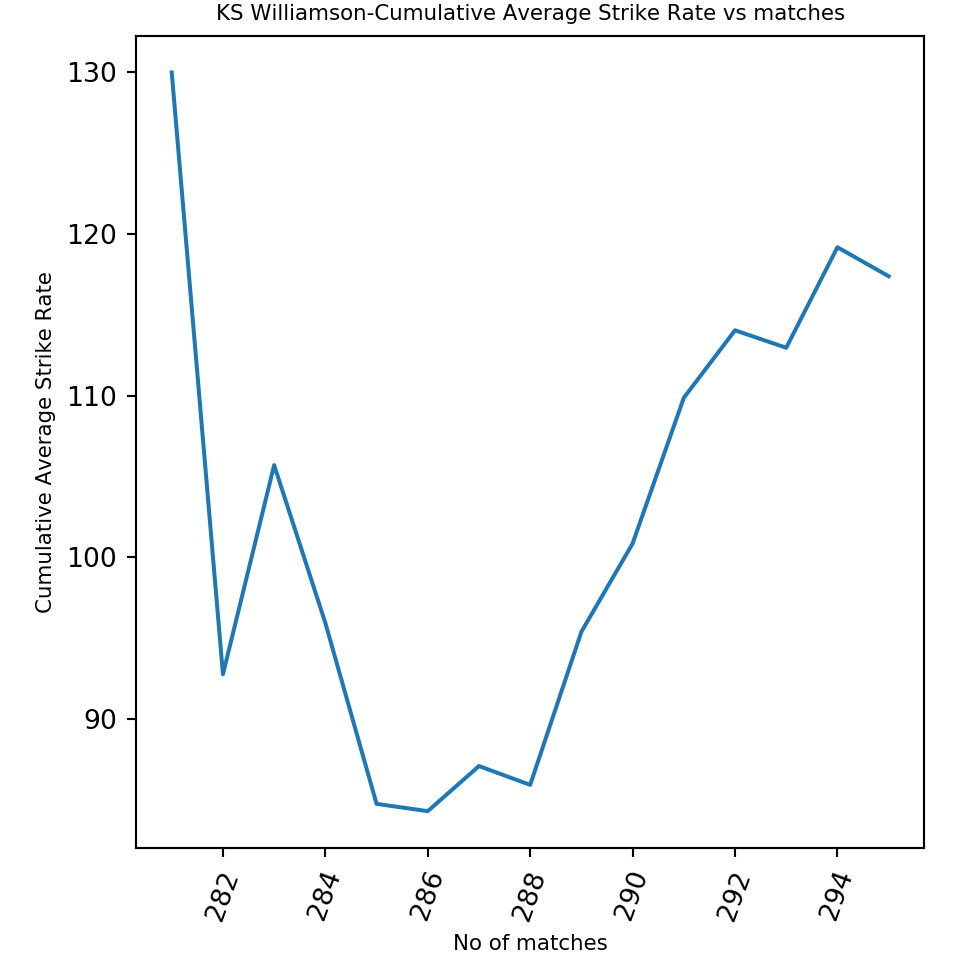
name="KS Williamson"
team='Sunrisers Hyderabad'
df=yka.getBatsmanDetails(team,name,dir=dir1)
yka.batsmanCumulativeStrikeRate(df,name)

#3. Ambati Rayudu
name="AT Rayudu"
team='Mumbai Indians'
df=yka.getBatsmanDetails(team,name,dir=dir1)
yka.batsmanCumulativeStrikeRate(df,name)

10. Batsman performance against opposition (in IPL matches)

The plots below show how the batsmen performed against other IPL teams

import pandas as pd
import os
import yorkpy.analytics as yka
dir1= "C:\\software\\cricket-package\\yorkpyIPLData\\data3"
# 1. Rishabh Pant
name="RR Pant"
team='Delhi Daredevils'
df=yka.getBatsmanDetails(team,name,dir=dir1)
yka.batsmanRunsAgainstOpposition(df,name)

# 2. Kane Williamson
dir1= "C:\\software\\cricket-package\\yorkpyIPLData\\data3"
name="KS Williamson"
team='Sunrisers Hyderabad'
df=yka.getBatsmanDetails(team,name,dir=dir1)
yka.batsmanRunsAgainstOpposition(df,name)

#3. Ambati Rayudu
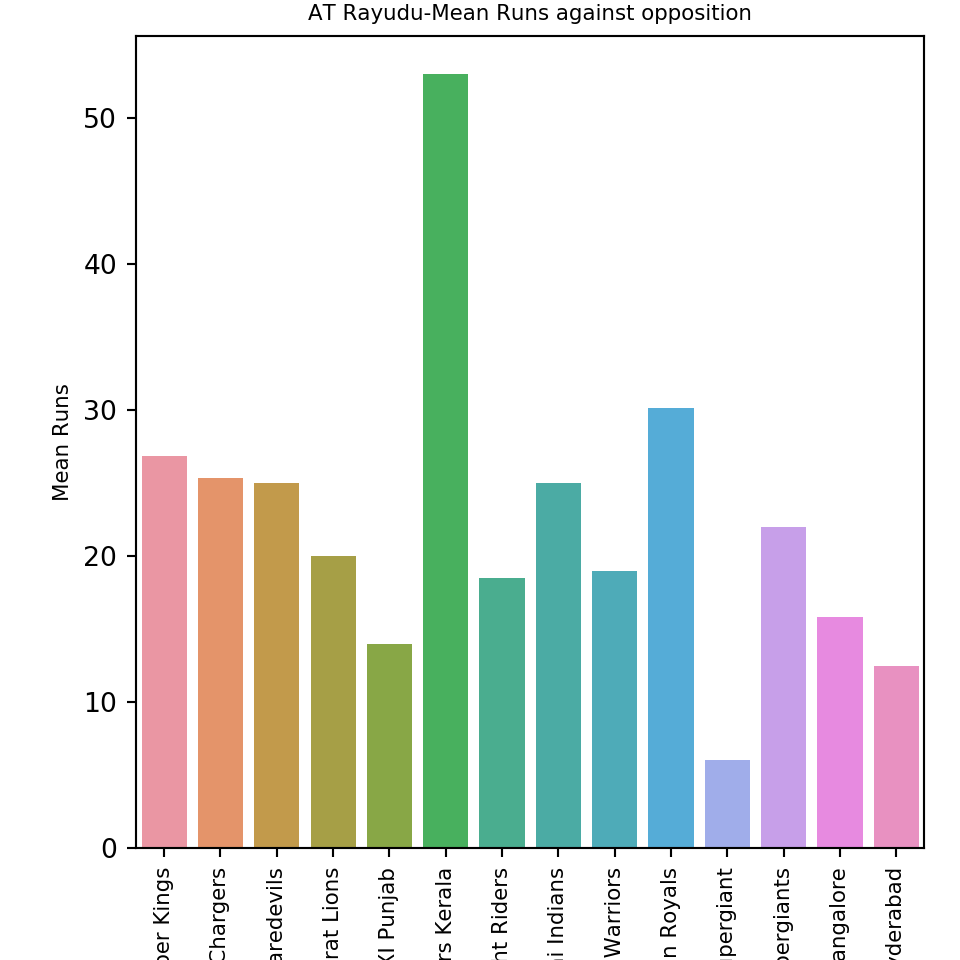
name="AT Rayudu"
team='Mumbai Indians'
df=yka.getBatsmanDetails(team,name,dir=dir1)
yka.batsmanRunsAgainstOpposition(df,name)

11. Batsman performance at different venues (in IPL matches)

The plots below show how the batsmen performed at different venues

import pandas as pd
import os
import yorkpy.analytics as yka
dir1= "C:\\software\\cricket-package\\yorkpyIPLData\\data3"
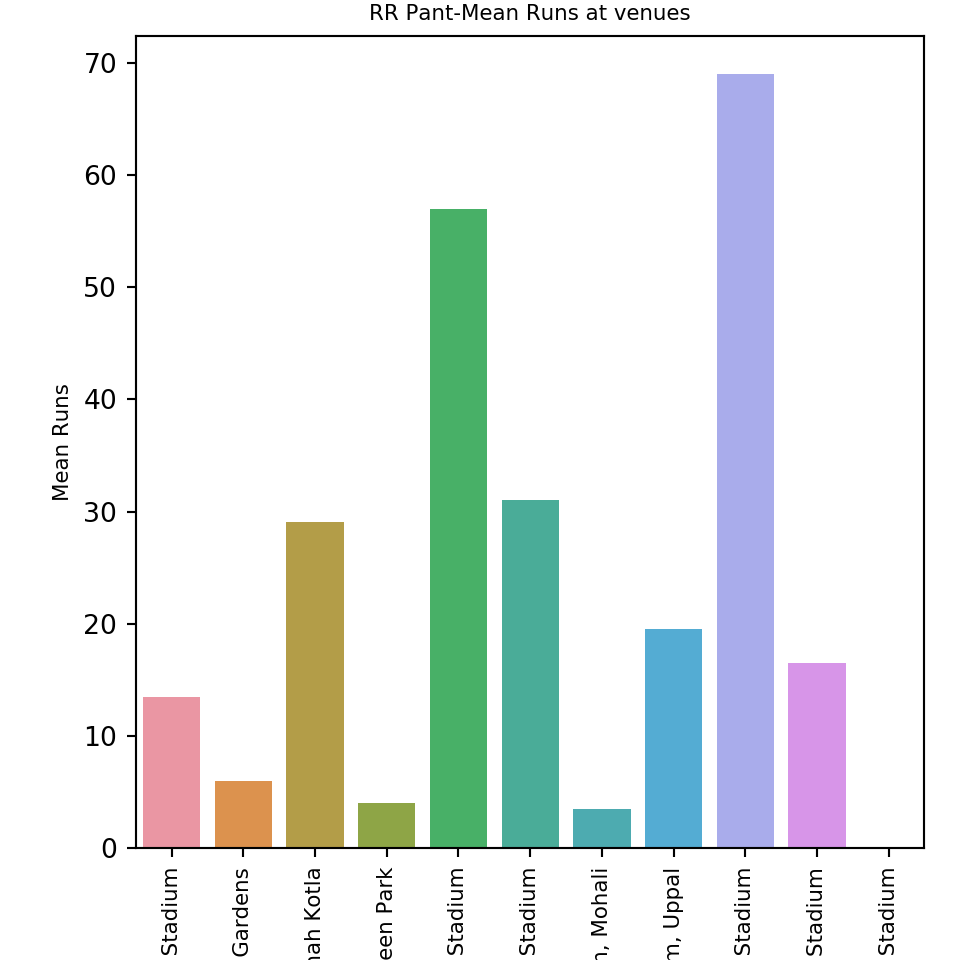
# 1. Rishabh Pant
name="RR Pant"
team='Delhi Daredevils'
df=yka.getBatsmanDetails(team,name,dir=dir1)
yka.batsmanRunsVenue(df,name)

# 2. Kane Williamson
dir1= "C:\\software\\cricket-package\\yorkpyIPLData\\data3"
name="KS Williamson"
team='Sunrisers Hyderabad'
df=yka.getBatsmanDetails(team,name,dir=dir1)
yka.batsmanRunsVenue(df,name)

#3. Ambati Rayudu
name="AT Rayudu"
team='Mumbai Indians'
df=yka.getBatsmanDetails(team,name,dir=dir1)
yka.batsmanRunsVenue(df,name)

B. Bowler functions

12. Get bowling details in IPL matches

The function below gets the overall team IPL T20 bowling details based on the RData file available in IPL T20 matches. This is currently also available in Github at yorkpyData. The IPL T20 bowling details of the IPL team in each match is created, and a huge data frame is created by stacking the individual dataframes. This can be saved as a CSV file for e.g. Chennai Super Kings-BowlingDetails.csv

dir1= "C:\\software\\cricket-package\\yorkpyIPLData\\data3"
#kkr_bowling = yka.getTeamBowlingDetails("Kolkata Knight Riders",dir=dir1,save=True)
#csk_bowling = yka.getTeamBowlingDetails("Chennai Super Kings",dir=dir1,save=True)
#kxip_bowling = yka.getTeamBowlingDetails("Kings XI Punjab",dir=dir1,save=True)

13. Get bowling details of the individual IPL bowlers

This function is used to get the individual bowling record for a specified bowler of the country as in the functions below.

The plots below deal with bowler’s performance. For this analysis I have chosen Amit Mishra, Piyush Chawla and Bhuvaneshwar Kumar for the analysis. You can chose any other IPL bowler

import pandas as pd
import os
import yorkpy.analytics as yka
dir1= "C:\\software\\cricket-package\\yorkpyIPLData\\data3"
# 1. Amit Mishra
name="A Mishra"
team='Delhi Daredevils'
#df=yka.getBowlerWicketDetails(team,name,dir=dir1)

14. Bowler Economy Rate (in IPL matches)

The plots below show the economy rate of the selected bowlers

import pandas as pd
import os
import yorkpy.analytics as yka
dir1= "C:\\software\\cricket-package\\yorkpyIPLData\\data3"
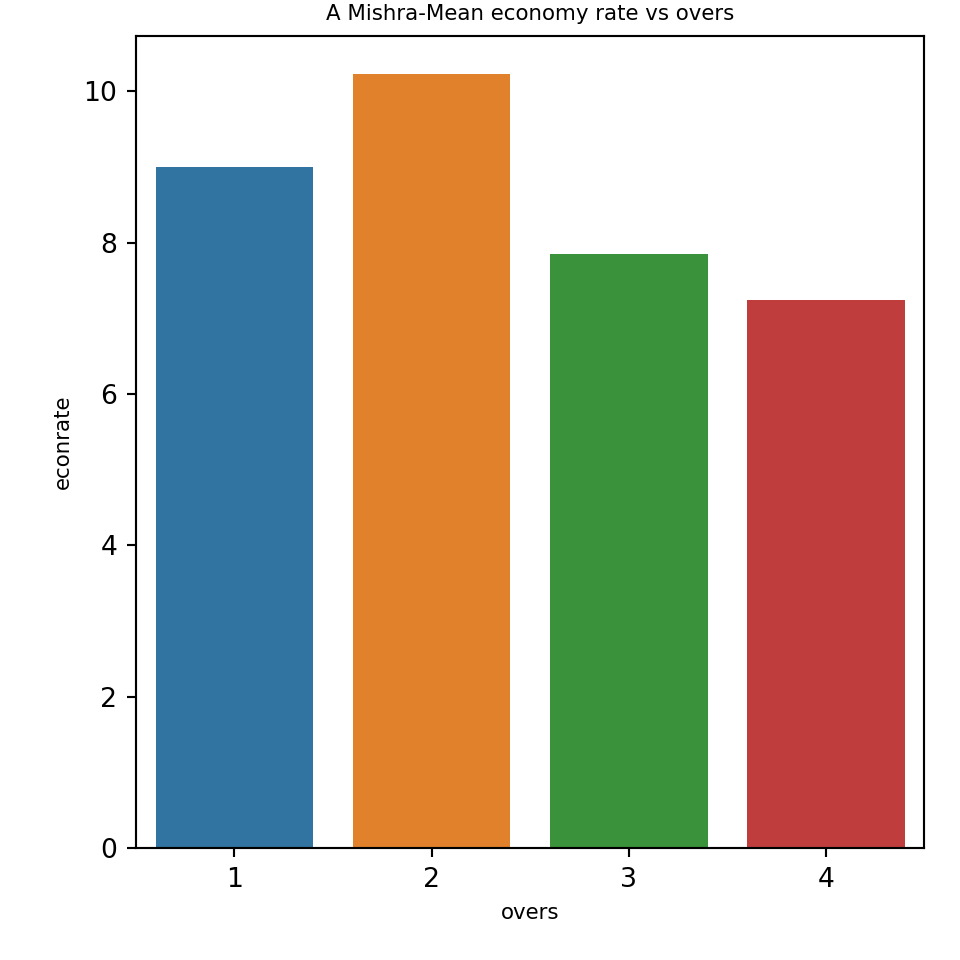
# 1. Amit Mishra
name="A Mishra"
team='Delhi Daredevils'
df=yka.getBowlerWicketDetails(team,name,dir=dir1)
yka.bowlerMeanEconomyRate(df,name)

# 2. Piyush Chawla
dir1= "C:\\software\\cricket-package\\yorkpyIPLData\\data3"
name="PP Chawla"
team='Kolkata Knight Riders'
df=yka.getBowlerWicketDetails(team,name,dir=dir1)
yka.bowlerMeanEconomyRate(df,name)

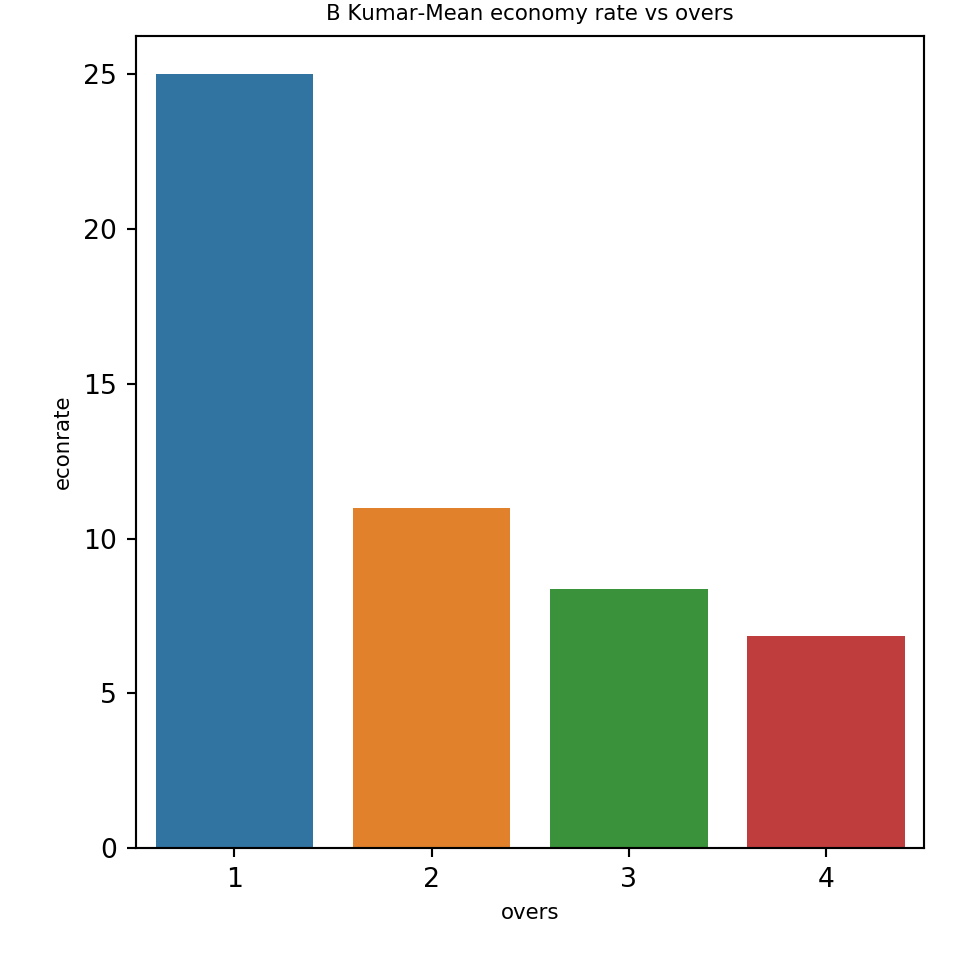
#3. Bhuvneshwar Kumar
name="B Kumar"
team='Sunrisers Hyderabad'
df=yka.getBowlerWicketDetails(team,name,dir=dir1)
yka.bowlerMeanEconomyRate(df,name)

15. Bowler Mean Runs conceded (in IPL matches)

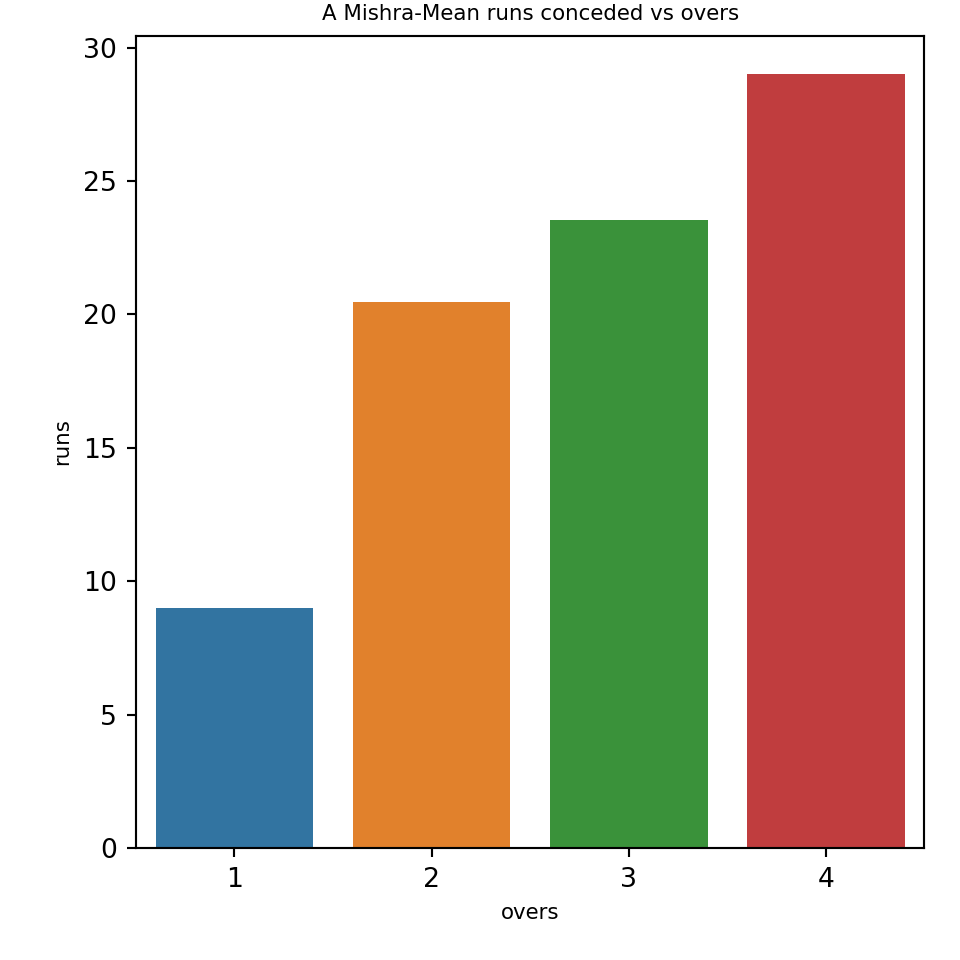
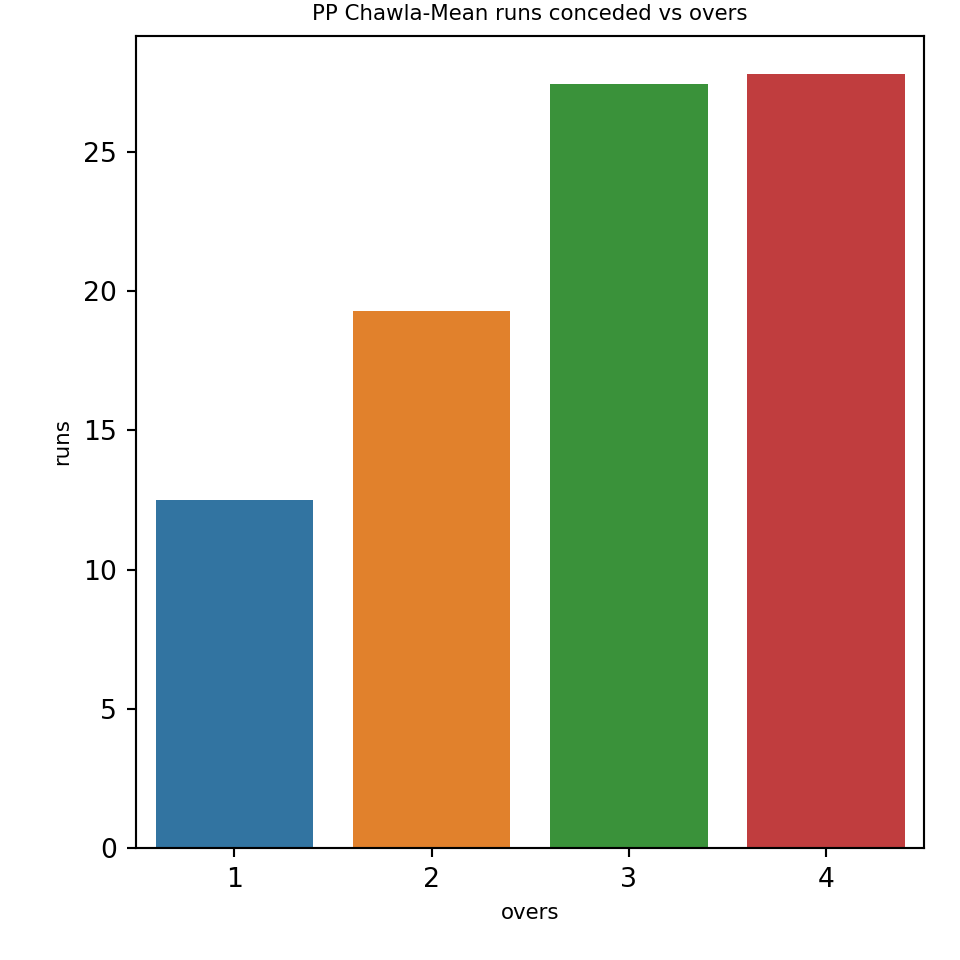
The plots below show the mean runs conceded by the selected bowlers

import pandas as pd
import os
import yorkpy.analytics as yka
dir1= "C:\\software\\cricket-package\\yorkpyIPLData\\data3"
# 1. Amit Mishra
name="A Mishra"
team='Delhi Daredevils'
df=yka.getBowlerWicketDetails(team,name,dir=dir1)
yka.bowlerMeanRunsConceded(df,name)

# 2. Piyush Chawla
dir1= "C:\\software\\cricket-package\\yorkpyIPLData\\data3"
name="PP Chawla"
team='Kolkata Knight Riders'
df=yka.getBowlerWicketDetails(team,name,dir=dir1)
yka.bowlerMeanRunsConceded(df,name)

#3. Bhuvneshwar Kumar
name="B Kumar"
team='Sunrisers Hyderabad'
df=yka.getBowlerWicketDetails(team,name,dir=dir1)
yka.bowlerMeanRunsConceded(df,name)

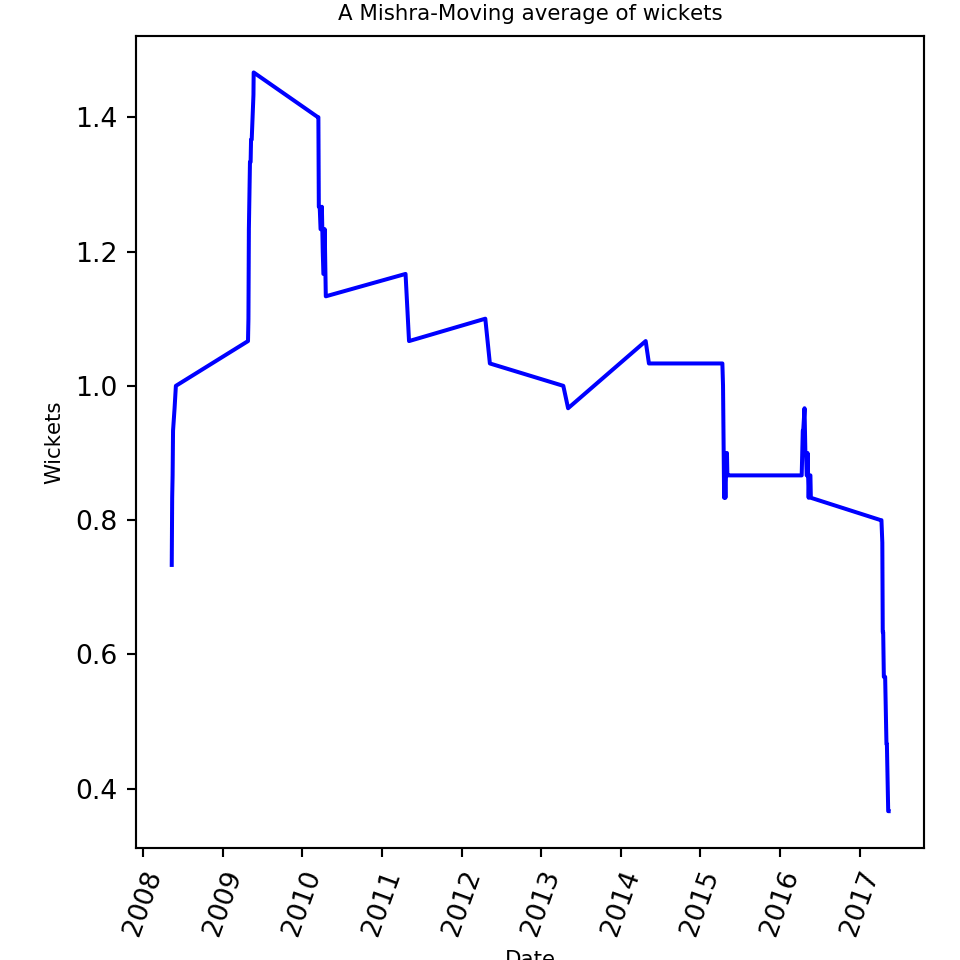
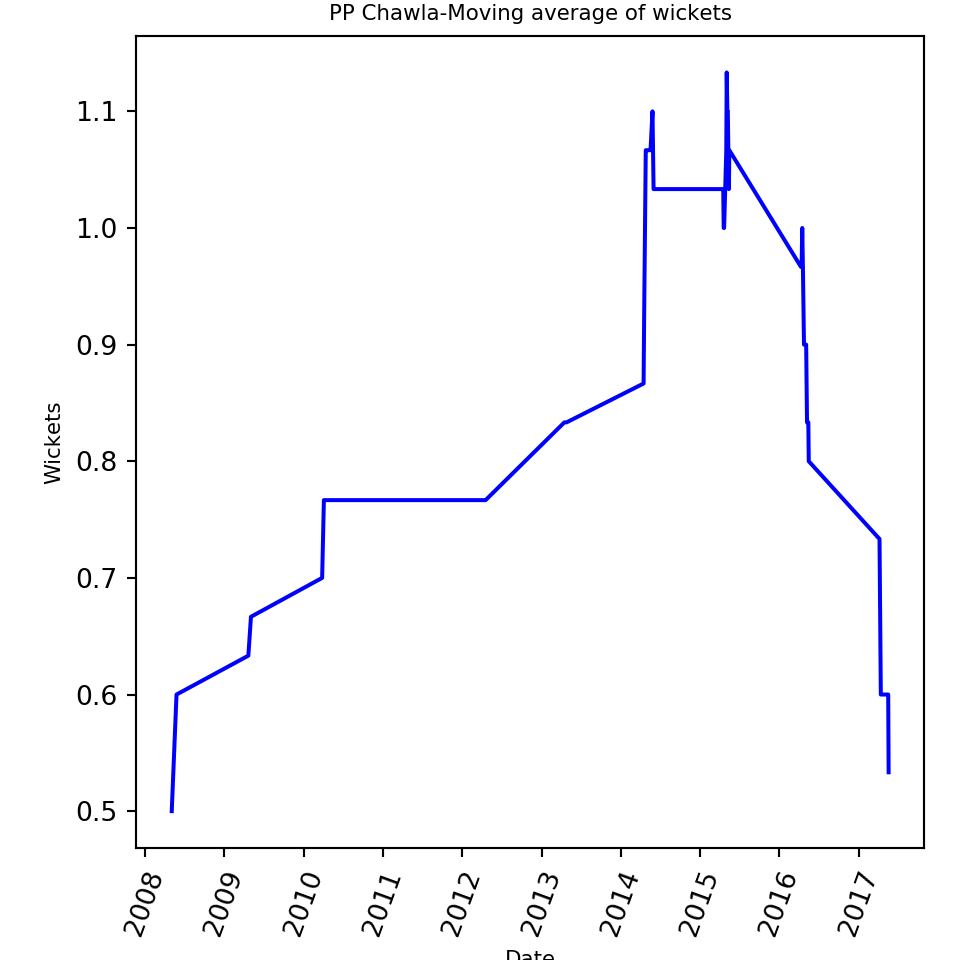
16. Moving average of wickets for bowler (in IPL matches)

The moving average of the bowlers are plotted below

import pandas as pd
import os
import yorkpy.analytics as yka
dir1= "C:\\software\\cricket-package\\yorkpyIPLData\\data3"
# 1. Amit Mishra
name="A Mishra"
team='Delhi Daredevils'
df=yka.getBowlerWicketDetails(team,name,dir=dir1)
yka.bowlerMovingAverage(df,name)

# 2. Piyush Chawla
dir1= "C:\\software\\cricket-package\\yorkpyIPLData\\data3"
name="PP Chawla"
team='Kolkata Knight Riders'
df=yka.getBowlerWicketDetails(team,name,dir=dir1)
yka.bowlerMovingAverage(df,name)

#3. Bhuvneshwar Kumar
name="B Kumar"
team='Sunrisers Hyderabad'
df=yka.getBowlerWicketDetails(team,name,dir=dir1)
yka.bowlerMovingAverage(df,name)

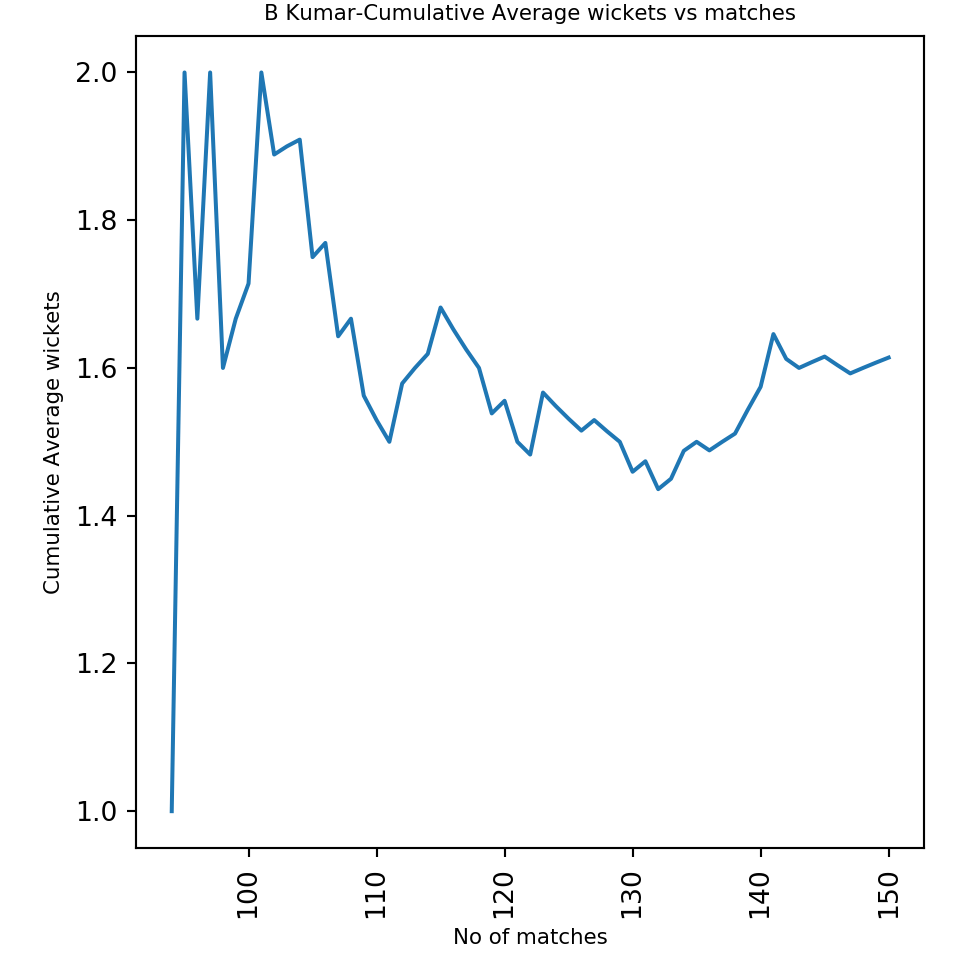
17. Cumulative average wickets for bowler (in IPL matches)

The cumulative average wickets for each bowler is computed and plotted

import pandas as pd
import os
import yorkpy.analytics as yka
dir1= "C:\\software\\cricket-package\\yorkpyIPLData\\data3"
# 1. Amit Mishra
name="A Mishra"
team='Delhi Daredevils'
df=yka.getBowlerWicketDetails(team,name,dir=dir1)
yka.bowlerCumulativeAvgWickets(df,name)

# 2. Piyush Chawla
dir1= "C:\\software\\cricket-package\\yorkpyIPLData\\data3"
name="PP Chawla"
team='Kolkata Knight Riders'
df=yka.getBowlerWicketDetails(team,name,dir=dir1)
yka.bowlerCumulativeAvgWickets(df,name)

#3. Bhuvneshwar Kumar
name="B Kumar"
team='Sunrisers Hyderabad'
df=yka.getBowlerWicketDetails(team,name,dir=dir1)
yka.bowlerCumulativeAvgWickets(df,name)

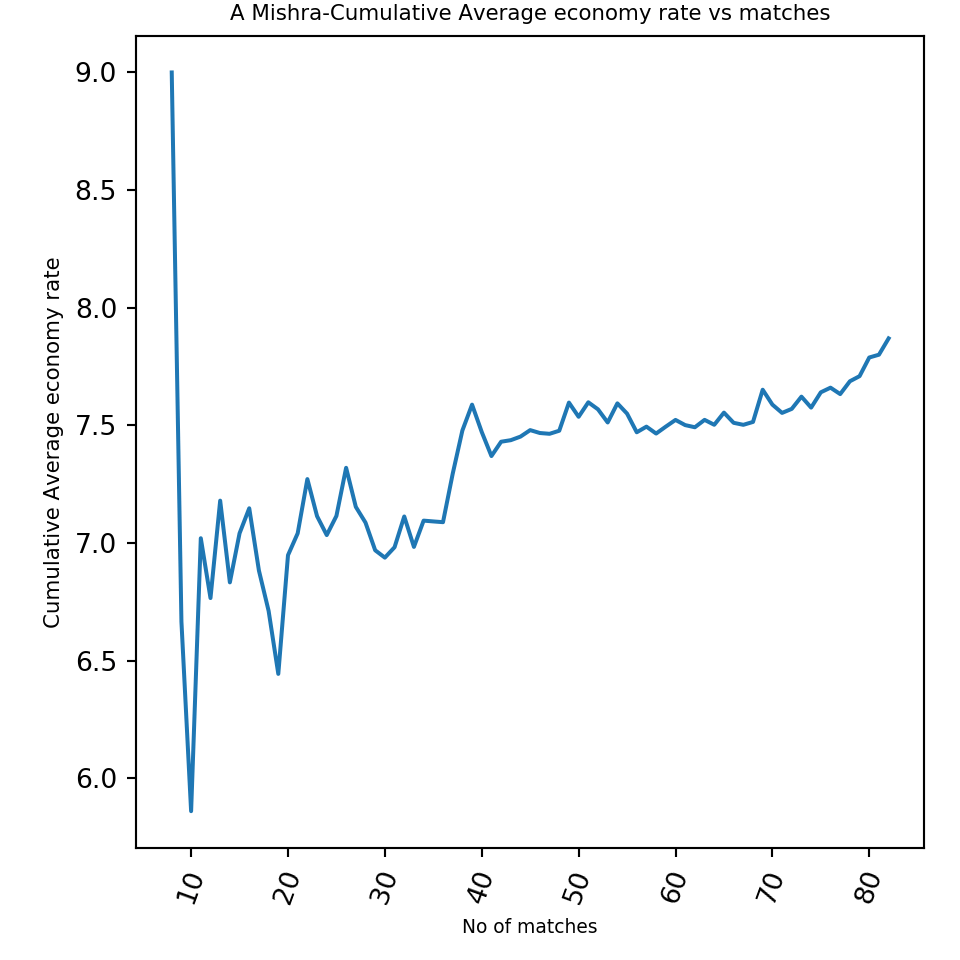
18. Cumulative average economy rate for bowler (in IPL matches)

The plots below give the cumulative average economy rate for each bowler

import pandas as pd
import os
import yorkpy.analytics as yka
dir1= "C:\\software\\cricket-package\\yorkpyIPLData\\data3"
# 1. Amit Mishra
name="A Mishra"
team='Delhi Daredevils'
df=yka.getBowlerWicketDetails(team,name,dir=dir1)
yka.bowlerCumulativeAvgEconRate(df,name)

# 2. Piyush Chawla
dir1= "C:\\software\\cricket-package\\yorkpyIPLData\\data3"
name="PP Chawla"
team='Kolkata Knight Riders'
df=yka.getBowlerWicketDetails(team,name,dir=dir1)
yka.bowlerCumulativeAvgEconRate(df,name)

#3. Bhuvneshwar Kumar
name="B Kumar"
team='Sunrisers Hyderabad'
df=yka.getBowlerWicketDetails(team,name,dir=dir1)
yka.bowlerCumulativeAvgEconRate(df,name)

19. Bowler wicket plot (in IPL matches)

The plots below give the over vs wickets for bowlers

import pandas as pd
import os
import yorkpy.analytics as yka
dir1= "C:\\software\\cricket-package\\yorkpyIPLData\\data3"
# 1. Amit Mishra
name="A Mishra"
team='Delhi Daredevils'
df=yka.getBowlerWicketDetails(team,name,dir=dir1)
yka.bowlerWicketPlot(df,name)

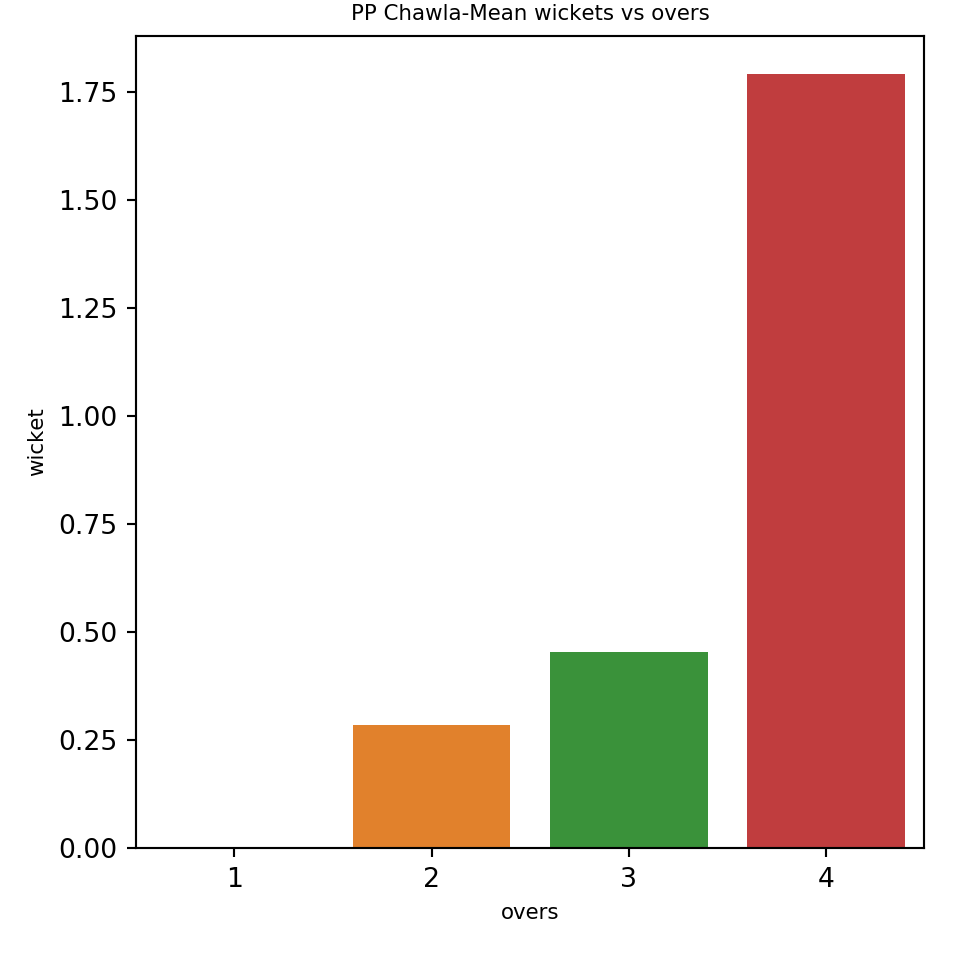
# 2. Piyush Chawla
dir1= "C:\\software\\cricket-package\\yorkpyIPLData\\data3"
name="PP Chawla"
team='Kolkata Knight Riders'
df=yka.getBowlerWicketDetails(team,name,dir=dir1)
yka.bowlerWicketPlot(df,name)

#3. Bhuvneshwar Kumar
name="B Kumar"
team='Sunrisers Hyderabad'
df=yka.getBowlerWicketDetails(team,name,dir=dir1)
yka.bowlerWicketPlot(df,name)

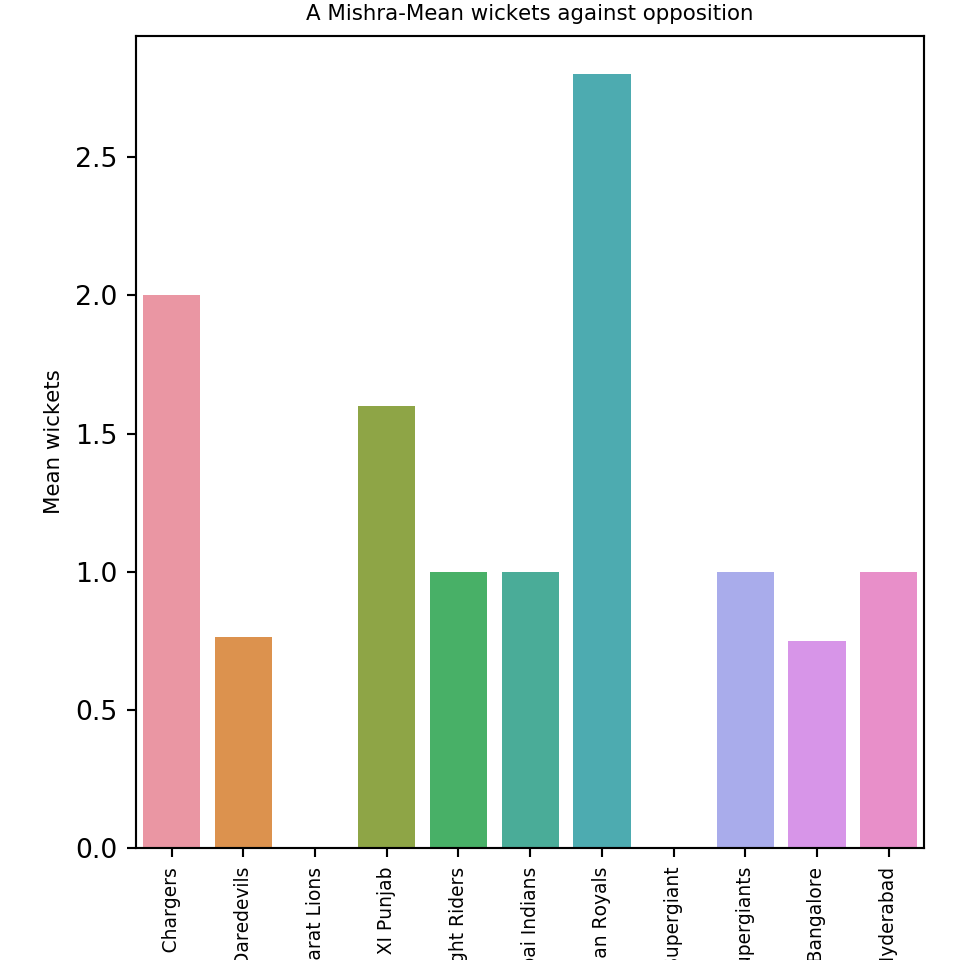
20. Bowler wicket against opposition (in IPL matches)

The performance of the bowlers against different IPL teams is shown below

import pandas as pd
import os
import yorkpy.analytics as yka
dir1= "C:\\software\\cricket-package\\yorkpyIPLData\\data3"
# 1. Amit Mishra
name="A Mishra"
team='Delhi Daredevils'
df=yka.getBowlerWicketDetails(team,name,dir=dir1)
yka.bowlerWicketsAgainstOpposition(df,name)

# 2. Piyush Chawla
dir1= "C:\\software\\cricket-package\\yorkpyIPLData\\data3"
name="PP Chawla"
team='Kolkata Knight Riders'
df=yka.getBowlerWicketDetails(team,name,dir=dir1)
yka.bowlerWicketsAgainstOpposition(df,name)

#3. Bhuvneshwar Kumar
name="B Kumar"
team='Sunrisers Hyderabad'
df=yka.getBowlerWicketDetails(team,name,dir=dir1)
yka.bowlerWicketsAgainstOpposition(df,name)

21. Bowler wicket in different venues (in IPL matches)

The plots below show how the bowlers perform at different venues

import pandas as pd
import os
import yorkpy.analytics as yka
dir1= "C:\\software\\cricket-package\\yorkpyIPLData\\data3"
# 1. Amit Mishra
name="A Mishra"
team='Delhi Daredevils'
df=yka.getBowlerWicketDetails(team,name,dir=dir1)
yka.bowlerWicketsVenue(df,name)

# 2. Piyush Chawla
dir1= "C:\\software\\cricket-package\\yorkpyIPLData\\data3"
name="PP Chawla"
team='Kolkata Knight Riders'
df=yka.getBowlerWicketDetails(team,name,dir=dir1)
yka.bowlerWicketsVenue(df,name)

#3. Bhuvneshwar Kumar
name="B Kumar"
team='Sunrisers Hyderabad'
df=yka.getBowlerWicketDetails(team,name,dir=dir1)
yka.bowlerWicketsVenue(df,name)

Note:You can clone/download the code at Github yorkpy

Important note: Do check out my other posts using yorkpy at yorkpy-posts

Conclusion: This concludes the python package yorkpy. Go ahead and give yorkpy a spin!

Also see
1. Take 4+: Presentations on ‘Elements of Neural Networks and Deep Learning’ – Parts 1-8
2. My book ‘Practical Machine Learning in R and Python: Third edition’ on Amazon
3. Hand detection through Haartraining: A hands-on approach
4.My book ‘Deep Learning from first principles:Second Edition’ now on Amazon
5. Big Data-1: Move into the big league:Graduate from Python to Pyspark
6. Cricpy takes a swing at the ODIs

To see all posts click Index of posts

My book ‘Practical Machine Learning in R and Python: Third edition’ on Amazon

Are you wondering whether to get into the ‘R’ bus or ‘Python’ bus?
My suggestion is to you is “Why not get into the ‘R and Python’ train?”

The third edition of my book ‘Practical Machine Learning with R and Python – Machine Learning in stereo’ is now available in both paperback ($12.99) and kindle ($8.99/Rs449) versions.  In the third edition all code sections have been re-formatted to use the fixed width font ‘Consolas’. This neatly organizes output which have columns like confusion matrix, dataframes etc to be columnar, making the code more readable.  There is a science to formatting too!! which improves the look and feel. It is little wonder that Steve Jobs had a keen passion for calligraphy! Additionally some typos have been fixed.


In this book I implement some of the most common, but important Machine Learning algorithms in R and equivalent Python code.
1. Practical machine with R and Python: Third Edition – Machine Learning in Stereo(Paperback-$12.99)
2. Practical machine with R and Python Third Edition – Machine Learning in Stereo(Kindle- $8.99/Rs449)

This book is ideal both for beginners and the experts in R and/or Python. Those starting their journey into datascience and ML will find the first 3 chapters useful, as they touch upon the most important programming constructs in R and Python and also deal with equivalent statements in R and Python. Those who are expert in either of the languages, R or Python, will find the equivalent code ideal for brushing up on the other language. And finally,those who are proficient in both languages, can use the R and Python implementations to internalize the ML algorithms better.

Here is a look at the topics covered

Table of Contents
Preface …………………………………………………………………………….4
Introduction ………………………………………………………………………6
1. Essential R ………………………………………………………………… 8
2. Essential Python for Datascience ……………………………………………57
3. R vs Python …………………………………………………………………81
4. Regression of a continuous variable ……………………………………….101
5. Classification and Cross Validation ………………………………………..121
6. Regression techniques and regularization ………………………………….146
7. SVMs, Decision Trees and Validation curves ………………………………191
8. Splines, GAMs, Random Forests and Boosting ……………………………222
9. PCA, K-Means and Hierarchical Clustering ………………………………258
References ……………………………………………………………………..269

Pick up your copy today!!
Hope you have a great time learning as I did while implementing these algorithms!

Pitching yorkpy … short of good length to IPL – Part 1

I fear not the man who has practiced 10,000 kicks once, but I fear the man who has practiced one kick 10,000 times.
Bruce Lee

I’ve missed more than 9000 shots in my career. I’ve lost almost 300 games. 26 times, I’ve been trusted to take the game winning shot and missed. I’ve failed over and over and over again in my life. And that is why I succeed.
Michael Jordan

Man, it doesn’t matter where you come in to bat, the score is still zero
Viv Richards

Introduction

“If cricketr is to cricpy, then yorkr is to _____?”. Yes, you guessed it right, it is yorkpy. In this post, I introduce my 2nd python package, yorkpy, which is a python clone of my R package yorkr. This package is based on data from Cricsheet. yorkpy currently handles IPL T20 matches.

When I created cricpy, the python avatar, of my R package cricketr, see Introducing cricpy:A python package to analyze performances of cricketers, I had decided that I should avoid doing a python avatar of my R package yorkr (see Introducing cricket package yorkr: Part 1- Beaten by sheer pace!) , as it was more involved, and required the parsing of match data available as yaml files.

Just out of curiosity, I tried the python package ‘yaml’ to read the match data, and lo and behold, I was sucked into the developing the package and so, yorkpy was born. Of course, it goes without saying that, usually when I am in the thick of developing something, I occasionally wonder, why I am doing it, for whom and for what purpose? Maybe it is the joy of ideation, the problem-solving,  the programmer’s high, for sharing my ideas etc. Anyway, whatever be the reason, I hope you enjoy this post and also find yorkpy useful.

You can clone/download the code at Github yorkpy
This post has been published to RPubs at yorkpy-Part1
You can download this post as PDF at IPLT20-yorkpy-part1

Note: If you would like to do a similar analysis for a different set of batsman and bowlers, you can clone/download my skeleton yorkpy-template from Github (which is the R Markdown file I have used for the analysis below).

The IPL T20 functions in yorkpy are

2. Install the package using ‘pip install’

import pandas as pd
import yorkpy.analytics as yka
#pip install yorkpy

3. Load a yaml file from Cricsheet

There are 2 functions that can be to convert the IPL Twenty20 yaml files to pandas dataframeare

  1. convertYaml2PandasDataframeT20
  2. convertAllYaml2PandasDataframesT20

Note 1: While I have already converted the IPL T20 files, you will need to use these functions for future IPL matches

4. Convert and save IPL T20 yaml file to pandas dataframe

This function will convert a IPL T20 IPL yaml file, in the format as specified in Cricsheet to pandas dataframe. This will be saved as as CSV file in the target directory. The name of the file wil have the following format team1-team2-date.csv. The IPL T20 zip file can be downloaded from Indian Premier League matches.  An example of how a yaml file can be converted to a dataframe and saved is shown below.

import pandas as pd
import yorkpy.analytics as yka
#convertYaml2PandasDataframe(".\\1082593.yaml","..\ipl", ..\\data")

5. Convert and save all IPL T20 yaml files to dataframes

This function will convert all IPL T20 yaml files from a source directory to dataframes, and save it in the target directory, with the names as mentioned above. Since I have already done this, I will not be executing this again. You can download the zip of all the converted RData files from Github at yorkpyData

import pandas as pd
import yorkpy.analytics as yka
#convertAllYaml2PandasDataframes("..\\ipl", "..\\data")

You can download the the zip of the files and use it directly in the functions as follows.For the analysis below I chosen a set of random IPL matches

The randomly selected IPL T20 matches are

  • Chennai Super Kings vs Kings Xi Punjab, 2014-05-30
  • Deccan Chargers vs Delhi Daredevils, 2012-05-10
  • Gujarat Lions vs Mumbai Indians, 2017-04-29
  • Kolkata Knight Riders vs Rajasthan Royals, 2010-04-17
  • Rising Pune Supergiants vs Royal Challengers Bangalore, 2017-04-29

6. Team batting scorecard

The function below computes the batting score card of a team in an IPL match. The scorecard gives the balls faced, the runs scored, 4s, 6s and strike rate. The example below is based on the CSK KXIP match on 30 May 2014.

You can check against the actual scores in this match Chennai Super Kings-Kings XI Punjab-2014-05-30

import pandas as pd
import yorkpy.analytics as yka
csk_kxip=pd.read_csv(".\\Chennai Super Kings-Kings XI Punjab-2014-05-30.csv")
scorecard,extras=yka.teamBattingScorecardMatch(csk_kxip,"Chennai Super Kings")
print(scorecard)
##         batsman  runs  balls  4s  6s          SR
## 0      DR Smith     7     12   0   0   58.333333
## 1  F du Plessis     0      1   0   0    0.000000
## 2      SK Raina    87     26  12   6  334.615385
## 3   BB McCullum    11     16   0   0   68.750000
## 4     RA Jadeja    27     22   2   1  122.727273
## 5     DJ Hussey     1      3   0   0   33.333333
## 6      MS Dhoni    42     34   3   3  123.529412
## 7      R Ashwin    10     11   0   0   90.909091
## 8     MM Sharma     1      3   0   0   33.333333
print(extras)
##    total  wides  noballs  legbyes  byes  penalty  extras
## 0    428     14        3        5     5        0      27
print("\n\n")
scorecard1,extras1=yka.teamBattingScorecardMatch(csk_kxip,"Kings XI Punjab")
print(scorecard1)
##       batsman  runs  balls  4s  6s          SR
## 0    V Sehwag   122     62  12   8  196.774194
## 1     M Vohra    34     33   1   2  103.030303
## 2  GJ Maxwell    13      8   1   1  162.500000
## 3   DA Miller    38     19   5   1  200.000000
## 4   GJ Bailey     1      2   0   0   50.000000
## 5     WP Saha     6      4   0   1  150.000000
## 6  MG Johnson     1      1   0   0  100.000000
print(extras1)
##    total  wides  noballs  legbyes  byes  penalty  extras
## 0    428     14        3        5     5        0      27

Let’s take another random match between Gujarat Lions and Mumbai Indian on 29 Apr 2017 Gujarat Lions-Mumbai Indians-2017-04-29

import pandas as pd
gl_mi=pd.read_csv(".\\Gujarat Lions-Mumbai Indians-2017-04-29.csv")
import yorkpy.analytics as yka
scorecard,extras=yka.teamBattingScorecardMatch(gl_mi,"Gujarat Lions")
print(scorecard)
##          batsman  runs  balls  4s  6s          SR
## 0   Ishan Kishan    48     38   6   2  126.315789
## 1    BB McCullum     6      4   1   0  150.000000
## 2       SK Raina     1      3   0   0   33.333333
## 3       AJ Finch     0      3   0   0    0.000000
## 4     KD Karthik     2      9   0   0   22.222222
## 5      RA Jadeja    28     22   2   1  127.272727
## 6    JP Faulkner    21     29   2   0   72.413793
## 7      IK Pathan     2      3   0   0   66.666667
## 8         AJ Tye    25     12   2   2  208.333333
## 9   Basil Thampi     2      4   0   0   50.000000
## 10    Ankit Soni     7      2   0   1  350.000000
print(extras)
##    total  wides  noballs  legbyes  byes  penalty  extras
## 0    306      8        3        1     0        0      12
print("\n\n")
scorecard1,extras1=yka.teamBattingScorecardMatch(gl_mi,"Mumbai Indians")
print(scorecard1)
##             batsman  runs  balls  4s  6s          SR
## 0          PA Patel    70     45   9   1  155.555556
## 1        JC Buttler     9      7   2   0  128.571429
## 2            N Rana    19     16   1   1  118.750000
## 3         RG Sharma     5     13   0   0   38.461538
## 4        KA Pollard    15     11   2   0  136.363636
## 5         KH Pandya    29     20   2   1  145.000000
## 6         HH Pandya     4      5   0   0   80.000000
## 7   Harbhajan Singh     0      1   0   0    0.000000
## 8    MJ McClenaghan     1      1   0   0  100.000000
## 9         JJ Bumrah     0      1   0   0    0.000000
## 10       SL Malinga     0      1   0   0    0.000000
print(extras1)
##    total  wides  noballs  legbyes  byes  penalty  extras
## 0    306      8        3        1     0        0      12

7. Plot the team batting partnerships

The functions below plot the team batting partnership in the match. It shows what the partnership were in the mtach

Note: Many of the plots include an additional parameters plot which is either True or False. The default value is plot=True. When plot=True the plot will be displayed. When plot=False the data frame will be returned to the user. The user can use this to create an interactive chart using one of the packages like rcharts, ggvis,googleVis or plotly.

import pandas as pd
import yorkpy.analytics as yka
dc_dd=pd.read_csv(".\\Deccan Chargers-Delhi Daredevils-2012-05-10.csv")
yka.teamBatsmenPartnershipMatch(dc_dd,'Deccan Chargers','Delhi Daredevils')

yka.teamBatsmenPartnershipMatch(dc_dd,'Delhi Daredevils','Deccan Chargers',plot=True)
# Print partnerships as a dataframe

rps_rcb=pd.read_csv(".\\Rising Pune Supergiant-Royal Challengers Bangalore-2017-04-29.csv")
m=yka.teamBatsmenPartnershipMatch(rps_rcb,'Royal Challengers Bangalore','Rising Pune Supergiant',plot=False)
print(m)
##            batsman     non_striker  runs
## 0   AB de Villiers         V Kohli     3
## 1         AF Milne         V Kohli     5
## 2        KM Jadhav         V Kohli     7
## 3           P Negi         V Kohli     3
## 4        S Aravind         V Kohli     0
## 5        S Aravind       YS Chahal     8
## 6         S Badree         V Kohli     2
## 7        STR Binny         V Kohli     1
## 8      Sachin Baby         V Kohli     2
## 9          TM Head         V Kohli     2
## 10         V Kohli  AB de Villiers    17
## 11         V Kohli        AF Milne     5
## 12         V Kohli       KM Jadhav     4
## 13         V Kohli          P Negi     9
## 14         V Kohli       S Aravind     2
## 15         V Kohli        S Badree     8
## 16         V Kohli     Sachin Baby     1
## 17         V Kohli         TM Head     9
## 18       YS Chahal       S Aravind     4

8. Batsmen vs Bowler

The function below computes and plots the performances of the batsmen vs the bowlers. As before the plot parameter can be set to True or False. By default it is plot=True

import pandas as pd
import yorkpy.analytics as yka
gl_mi=pd.read_csv(".\\Gujarat Lions-Mumbai Indians-2017-04-29.csv")
yka.teamBatsmenVsBowlersMatch(gl_mi,"Gujarat Lions","Mumbai Indians", plot=True)
# Print 

csk_kxip=pd.read_csv(".\\Chennai Super Kings-Kings XI Punjab-2014-05-30.csv")
m=yka.teamBatsmenVsBowlersMatch(csk_kxip,'Chennai Super Kings','Kings XI Punjab',plot=False)
print(m)
##          batsman           bowler  runs
## 0    BB McCullum         AR Patel     4
## 1    BB McCullum       GJ Maxwell     1
## 2    BB McCullum  Karanveer Singh     6
## 3      DJ Hussey          P Awana     1
## 4       DR Smith       MG Johnson     7
## 5       DR Smith          P Awana     0
## 6       DR Smith   Sandeep Sharma     0
## 7   F du Plessis       MG Johnson     0
## 8      MM Sharma         AR Patel     0
## 9      MM Sharma       MG Johnson     0
## 10     MM Sharma          P Awana     1
## 11      MS Dhoni         AR Patel    12
## 12      MS Dhoni  Karanveer Singh     2
## 13      MS Dhoni       MG Johnson    11
## 14      MS Dhoni          P Awana    15
## 15      MS Dhoni   Sandeep Sharma     2
## 16      R Ashwin         AR Patel     1
## 17      R Ashwin  Karanveer Singh     4
## 18      R Ashwin       MG Johnson     1
## 19      R Ashwin          P Awana     1
## 20      R Ashwin   Sandeep Sharma     3
## 21     RA Jadeja         AR Patel     5
## 22     RA Jadeja       GJ Maxwell     3
## 23     RA Jadeja  Karanveer Singh    19
## 24     RA Jadeja          P Awana     0
## 25      SK Raina       MG Johnson    21
## 26      SK Raina          P Awana    40
## 27      SK Raina   Sandeep Sharma    26

9. Bowling Scorecard

This function provides the bowling performance, the number of overs bowled, maidens, runs conceded. wickets taken and economy rate for the IPL match

import pandas as pd
import yorkpy.analytics as yka
dc_dd=pd.read_csv(".\\Deccan Chargers-Delhi Daredevils-2012-05-10.csv")
a=yka.teamBowlingScorecardMatch(dc_dd,'Deccan Chargers')
print(a)
##        bowler  overs  runs  maidens  wicket  econrate
## 0  AD Russell      4    39        0       0      9.75
## 1   IK Pathan      4    46        0       1     11.50
## 2    M Morkel      4    32        0       1      8.00
## 3    S Nadeem      4    39        0       0      9.75
## 4    VR Aaron      4    30        0       2      7.50
rps_rcb=pd.read_csv(".\\Rising Pune Supergiant-Royal Challengers Bangalore-2017-04-29.csv")
b=yka.teamBowlingScorecardMatch(rps_rcb,'Royal Challengers Bangalore')
print(b)
##               bowler  overs  runs  maidens  wicket  econrate
## 0          DL Chahar      2    18        0       0      9.00
## 1       DT Christian      4    25        0       1      6.25
## 2        Imran Tahir      4    18        0       3      4.50
## 3         JD Unadkat      4    19        0       1      4.75
## 4        LH Ferguson      4     7        1       3      1.75
## 5  Washington Sundar      2     7        0       1      3.50

10. Wicket Kind

The plots below provide the kind of wicket taken by the bowler (caught, bowled, lbw etc.) for the IPL match

import pandas as pd
import yorkpy.analytics as yka
kkr_rr=pd.read_csv(".\\Kolkata Knight Riders-Rajasthan Royals-2010-04-17.csv")
yka.teamBowlingWicketKindMatch(kkr_rr,'Kolkata Knight Riders','Rajasthan Royals')

csk_kxip=pd.read_csv(".\\Chennai Super Kings-Kings XI Punjab-2014-05-30.csv")
m = yka.teamBowlingWicketKindMatch(csk_kxip,'Chennai Super Kings','Kings-Kings XI Punjab',plot=False)
print(m)
##             bowler     kind  player_out
## 0         AR Patel  run out           1
## 1         AR Patel  stumped           1
## 2  Karanveer Singh  run out           1
## 3       MG Johnson   caught           1
## 4          P Awana   caught           2
## 5   Sandeep Sharma   bowled           1

11. Wicket vs Runs conceded

The plots below provide the wickets taken and the runs conceded by the bowler in the IPL T20 match

import pandas as pd
import yorkpy.analytics as yka
dc_dd=pd.read_csv(".\\Deccan Chargers-Delhi Daredevils-2012-05-10.csv")
yka.teamBowlingWicketMatch(dc_dd,"Deccan Chargers", "Delhi Daredevils",plot=True)

print("\n\n")
rps_rcb=pd.read_csv(".\\Rising Pune Supergiant-Royal Challengers Bangalore-2017-04-29.csv")
a=yka.teamBowlingWicketMatch(rps_rcb,"Royal Challengers Bangalore", "Rising Pune Supergiant",plot=False)
print(a)
##               bowler      player_out  kind
## 0       DT Christian         V Kohli     1
## 1        Imran Tahir        AF Milne     1
## 2        Imran Tahir          P Negi     1
## 3        Imran Tahir        S Badree     1
## 4         JD Unadkat         TM Head     1
## 5        LH Ferguson  AB de Villiers     1
## 6        LH Ferguson       KM Jadhav     1
## 7        LH Ferguson       STR Binny     1
## 8  Washington Sundar     Sachin Baby     1

12. Bowler Vs Batsmen

The functions compute and display how the different bowlers of the IPL team performed against the batting opposition.

import pandas as pd
import yorkpy.analytics as yka
csk_kxip=pd.read_csv(".\\Chennai Super Kings-Kings XI Punjab-2014-05-30.csv")
yka.teamBowlersVsBatsmenMatch(csk_kxip,"Chennai Super Kings","Kings XI Punjab")

print("\n\n")
kkr_rr=pd.read_csv(".\\Kolkata Knight Riders-Rajasthan Royals-2010-04-17.csv")
m =yka.teamBowlersVsBatsmenMatch(kkr_rr,"Rajasthan Royals","Kolkata Knight Riders",plot=False)
print(m)
##        batsman      bowler  runs
## 0     AC Voges    AB Dinda     1
## 1     AC Voges  JD Unadkat     1
## 2     AC Voges   LR Shukla     1
## 3     AC Voges    M Kartik     5
## 4     AJ Finch    AB Dinda     3
## 5     AJ Finch  JD Unadkat     3
## 6     AJ Finch   LR Shukla    13
## 7     AJ Finch    M Kartik     2
## 8     AJ Finch     SE Bond     0
## 9      AS Raut    AB Dinda     1
## 10     AS Raut  JD Unadkat     1
## 11    FY Fazal    AB Dinda     1
## 12    FY Fazal   LR Shukla     3
## 13    FY Fazal    M Kartik     3
## 14    FY Fazal     SE Bond     6
## 15     NV Ojha    AB Dinda    10
## 16     NV Ojha  JD Unadkat     5
## 17     NV Ojha   LR Shukla     0
## 18     NV Ojha    M Kartik     1
## 19     NV Ojha     SE Bond     2
## 20     P Dogra  JD Unadkat     2
## 21     P Dogra   LR Shukla     5
## 22     P Dogra    M Kartik     1
## 23     P Dogra     SE Bond     0
## 24  SK Trivedi    AB Dinda     4
## 25    SK Warne    AB Dinda     2
## 26    SK Warne    M Kartik     1
## 27    SK Warne     SE Bond     0
## 28   SR Watson    AB Dinda     2
## 29   SR Watson  JD Unadkat    13
## 30   SR Watson   LR Shukla     1
## 31   SR Watson    M Kartik    18
## 32   SR Watson     SE Bond    10
## 33   YK Pathan  JD Unadkat     1
## 34   YK Pathan   LR Shukla     7

13. Match worm chart

The plots below provide the match worm graph for the IPL Twenty 20 matches

import pandas as pd
import yorkpy.analytics as yka
dc_dd=pd.read_csv(".\\Deccan Chargers-Delhi Daredevils-2012-05-10.csv")
yka.matchWormChart(dc_dd,"Deccan Chargers", "Delhi Daredevils")

gl_mi=pd.read_csv(".\\Gujarat Lions-Mumbai Indians-2017-04-29.csv")
yka.matchWormChart(gl_mi,"Mumbai Indians","Gujarat Lions")

Feel free to clone/download the code from Github yorkpy

Conclusion

This post included all functions between 2 IPL teams from the package yorkpy for IPL Twenty20 matches. As mentioned above the yaml match files have been already converted to dataframes and are available for download from Github at yorkpyData

After having used Python and R for analytics, Machine Learning and Deep Learning, I have now realized that neither language is superior or inferior. Both have, some good packages and some that are not so well suited.

To be continued. Watch this space!

Important note: Do check out my other posts using yorkpy at yorkpy-posts

You may also like
1.My book ‘Deep Learning from first principles:Second Edition’ now on Amazon
2.My book ‘Practical Machine Learning in R and Python: Second edition’ on Amazon
2. Cricpy takes a swing at the ODIs
3. Introducing cricket package yorkr: Part 1- Beaten by sheer pace!
4. Big Data-1: Move into the big league:Graduate from Python to Pyspark
5. Simulating an Edge Shape in Android

To see all posts click Index of posts

My book ‘Deep Learning from first principles:Second Edition’ now on Amazon

The second edition of my book ‘Deep Learning from first principles:Second Edition- In vectorized Python, R and Octave’, is now available on Amazon, in both paperback ($18.99)  and kindle ($9.99/Rs449/-)  versions. Since this book is almost 70% code, all functions, and code snippets have been formatted to use the fixed-width font ‘Lucida Console’. In addition line numbers have been added to all code snippets. This makes the code more organized and much more readable. I have also fixed typos in the book

Untitled

You can download the PDF version of this book from Github at https://github.com/tvganesh/DeepLearningBook-2ndEd

The book includes the following chapters

Table of Contents
Preface 4
Introduction 6
1. Logistic Regression as a Neural Network 8
2. Implementing a simple Neural Network 23
3. Building a L- Layer Deep Learning Network 48
4. Deep Learning network with the Softmax 85
5. MNIST classification with Softmax 103
6. Initialization, regularization in Deep Learning 121
7. Gradient Descent Optimization techniques 167
8. Gradient Check in Deep Learning 197
1. Appendix A 214
2. Appendix 1 – Logistic Regression as a Neural Network 220
3. Appendix 2 - Implementing a simple Neural Network 227
4. Appendix 3 - Building a L- Layer Deep Learning Network 240
5. Appendix 4 - Deep Learning network with the Softmax 259
6. Appendix 5 - MNIST classification with Softmax 269
7. Appendix 6 - Initialization, regularization in Deep Learning 302
8. Appendix 7 - Gradient Descent Optimization techniques 344
9. Appendix 8 – Gradient Check 405
References 475

Also see
1. My book ‘Practical Machine Learning in R and Python: Second edition’ on Amazon
2. The 3rd paperback & kindle editions of my books on Cricket, now on Amazon
3. De-blurring revisited with Wiener filter using OpenCV
4. TWS-4: Gossip protocol: Epidemics and rumors to the rescue
5. A Cloud medley with IBM Bluemix, Cloudant DB and Node.js
6. Practical Machine Learning with R and Python – Part 6
7. GooglyPlus: yorkr analyzes IPL players, teams, matches with plots and tables
8. Fun simulation of a Chain in Android

To see posts click Index of Posts

Cricpy takes a swing at the ODIs

No computer has ever been designed that is ever aware of what it’s doing; but most of the time, we aren’t either.” Marvin Minksy

“The competent programmer is fully aware of the limited size of his own skull. He therefore approaches his task with full humility, and avoids clever tricks like the plague” Edgser Djikstra

Introduction

In this post, cricpy, the Python avatar of my R package cricketr, learns some new tricks to be able to handle ODI matches. To know more about my R package cricketr see Re-introducing cricketr! : An R package to analyze performances of cricketers

Cricpy uses the statistics info available in ESPN Cricinfo Statsguru. The current version of this package supports only Test cricket

You should be able to install the package using pip install cricpy and use the many functions available in the package. Please mindful of the ESPN Cricinfo Terms of Use

Cricpy can now analyze performances of teams in Test, ODI and T20 cricket see Cricpy adds team analytics to its arsenal!!

This post is also hosted on Rpubs at Int

To know how to use cricpy see Introducing cricpy:A python package to analyze performances of cricketers. To the original version of cricpy, I have added 3 new functions for ODI. The earlier functions work for Test and ODI.

This post is also hosted on Rpubs at Cricpy takes a swing at the ODIs. You can also down the pdf version of this post at cricpy-odi.pdf

You can fork/clone the package at Github cricpy

Note: If you would like to do a similar analysis for a different set of batsman and bowlers, you can clone/download my skeleton cricpy-template from Github (which is the R Markdown file I have used for the analysis below). You will only need to make appropriate changes for the players you are interested in. The functions can be executed in RStudio or in a IPython notebook.

If you are passionate about cricket, and love analyzing cricket performances, then check out my racy book on cricket ‘Cricket analytics with cricketr and cricpy – Analytics harmony with R & Python’! This book discusses and shows how to use my R package ‘cricketr’ and my Python package ‘cricpy’ to analyze batsmen and bowlers in all formats of the game (Test, ODI and T20). The paperback is available on Amazon at $21.99 and  the kindle version at $9.99/Rs 449/-. A must read for any cricket lover! Check it out!!

You can download the latest PDF version of the book  at  ‘Cricket analytics with cricketr and cricpy: Analytics harmony with R and Python-6th edition

Untitled

The cricpy package

The data for a particular player in ODI can be obtained with the getPlayerDataOD() function. To do you will need to go to ESPN CricInfo Player and type in the name of the player for e.g Virat Kohli, Virendar Sehwag, Chris Gayle etc. This will bring up a page which have the profile number for the player e.g. for Virat Kohli this would be http://www.espncricinfo.com/india/content/player/253802.html. Hence, Kohli’s profile is 253802. This can be used to get the data for Virat Kohlis shown below

The cricpy package is a clone of my R package cricketr. The signature of all the python functions are identical with that of its clone ‘cricketr’, with only the necessary variations between Python and R. It may be useful to look at my post R vs Python: Different similarities and similar differences. In fact if you are familar with one of the lanuguages you can look up the package in the other and you will notice the parallel constructs.

You can fork/clone the package at Github cricpy

Note: The charts are self-explanatory and I have not added much of my owy interpretation to it. Do look at the plots closely and check out the performances for yourself.

1 Importing cricpy – Python

# Install the package
# Do a pip install cricpy
# Import cricpy
import cricpy.analytics as ca 

2. Invoking functions with Python package crlcpy

import cricpy.analytics as ca 
ca.batsman4s("./kohli.csv","Virat Kohli")

3. Getting help from cricpy – Python

import cricpy.analytics as ca 
help(ca.getPlayerDataOD)
## Help on function getPlayerDataOD in module cricpy.analytics:
## 
## getPlayerDataOD(profile, opposition='', host='', dir='./data', file='player001.csv', type='batting', homeOrAway=[1, 2, 3], result=[1, 2, 3, 5], create=True)
##     Get the One day player data from ESPN Cricinfo based on specific inputs and store in a file in a given directory
##     
##     Description
##     
##     Get the player data given the profile of the batsman. The allowed inputs are home,away or both and won,lost or draw of matches. The data is stored in a .csv file in a directory specified. This function also returns a data frame of the player
##     
##     Usage
##     
##     getPlayerDataOD(profile, opposition="",host="",dir = "../", file = "player001.csv", 
##     type = "batting", homeOrAway = c(1, 2, 3), result = c(1, 2, 3,5))
##     Arguments
##     
##     profile     
##     This is the profile number of the player to get data. This can be obtained from http://www.espncricinfo.com/ci/content/player/index.html. Type the name of the player and click search. This will display the details of the player. Make a note of the profile ID. For e.g For Virender Sehwag this turns out to be http://www.espncricinfo.com/india/content/player/35263.html. Hence the profile for Sehwag is 35263
##     opposition      The numerical value of the opposition country e.g.Australia,India, England etc. The values are Australia:2,Bangladesh:25,Bermuda:12, England:1,Hong Kong:19,India:6,Ireland:29, Netherlands:15,New Zealand:5,Pakistan:7,Scotland:30,South Africa:3,Sri Lanka:8,United Arab Emirates:27, West Indies:4, Zimbabwe:9; Africa XI:405 Note: If no value is entered for opposition then all teams are considered
##     host            The numerical value of the host country e.g.Australia,India, England etc. The values are Australia:2,Bangladesh:25,England:1,India:6,Ireland:29,Malaysia:16,New Zealand:5,Pakistan:7, Scotland:30,South Africa:3,Sri Lanka:8,United Arab Emirates:27,West Indies:4, Zimbabwe:9 Note: If no value is entered for host then all host countries are considered
##     dir 
##     Name of the directory to store the player data into. If not specified the data is stored in a default directory "../data". Default="../data"
##     file        
##     Name of the file to store the data into for e.g. tendulkar.csv. This can be used for subsequent functions. Default="player001.csv"
##     type        
##     type of data required. This can be "batting" or "bowling"
##     homeOrAway  
##     This is vector with either or all 1,2, 3. 1 is for home 2 is for away, 3 is for neutral venue
##     result      
##     This is a vector that can take values 1,2,3,5. 1 - won match 2- lost match 3-tied 5- no result
##     Details
##     
##     More details can be found in my short video tutorial in Youtube https://www.youtube.com/watch?v=q9uMPFVsXsI
##     
##     Value
##     
##     Returns the player's dataframe
##     
##     Note
##     
##     Maintainer: Tinniam V Ganesh <tvganesh.85@gmail.com>
##     
##     Author(s)
##     
##     Tinniam V Ganesh
##     
##     References
##     
##     http://www.espncricinfo.com/ci/content/stats/index.html
##     https://gigadom.wordpress.com/
##     
##     See Also
##     
##     getPlayerDataSp getPlayerData
##     
##     Examples
##     
##     
##     ## Not run: 
##     # Both home and away. Result = won,lost and drawn
##     sehwag =getPlayerDataOD(35263,dir="../cricketr/data", file="sehwag1.csv",
##     type="batting", homeOrAway=[1,2],result=[1,2,3,4])
##     
##     # Only away. Get data only for won and lost innings
##     sehwag = getPlayerDataOD(35263,dir="../cricketr/data", file="sehwag2.csv",
##     type="batting",homeOrAway=[2],result=[1,2])
##     
##     # Get bowling data and store in file for future
##     malinga = getPlayerData(49758,dir="../cricketr/data",file="malinga1.csv",
##     type="bowling")
##     
##     # Get Dhoni's ODI record in Australia against Australua
##     dhoni = getPlayerDataOD(28081,opposition = 2,host=2,dir=".",
##     file="dhoniVsAusinAusOD",type="batting")
##     
##     ## End(Not run)

The details below will introduce the different functions that are available in cricpy.

4. Get the ODI player data for a player using the function getPlayerDataOD()

Important Note This needs to be done only once for a player. This function stores the player’s data in the specified CSV file (for e.g. kohli.csv as above) which can then be reused for all other functions). Once we have the data for the players many analyses can be done. This post will use the stored CSV file obtained with a prior getPlayerDataOD for all subsequent analyses

import cricpy.analytics as ca
#sehwag=ca.getPlayerDataOD(35263,dir=".",file="sehwag.csv",type="batting")
#kohli=ca.getPlayerDataOD(253802,dir=".",file="kohli.csv",type="batting")
#jayasuriya=ca.getPlayerDataOD(49209,dir=".",file="jayasuriya.csv",type="batting")
#gayle=ca.getPlayerDataOD(51880,dir=".",file="gayle.csv",type="batting")

Included below are some of the functions that can be used for ODI batsmen and bowlers. For this I have chosen, Virat Kohli, ‘the run machine’ who is on-track for breaking many of the Test & ODI records

5 Virat Kohli’s performance – Basic Analyses

The 3 plots below provide the following for Virat Kohli

  1. Frequency percentage of runs in each run range over the whole career
  2. Mean Strike Rate for runs scored in the given range
  3. A histogram of runs frequency percentages in runs ranges
import cricpy.analytics as ca
import matplotlib.pyplot as plt
ca.batsmanRunsFreqPerf("./kohli.csv","Virat Kohli")

ca.batsmanMeanStrikeRate("./kohli.csv","Virat Kohli")

ca.batsmanRunsRanges("./kohli.csv","Virat Kohli")

6. More analyses

import cricpy.analytics as ca
ca.batsman4s("./kohli.csv","Virat Kohli")

ca.batsman6s("./kohli.csv","Virat Kohli")

ca.batsmanDismissals("./kohli.csv","Virat Kohli")

ca.batsmanScoringRateODTT("./kohli.csv","Virat Kohli")


7. 3D scatter plot and prediction plane

The plots below show the 3D scatter plot of Kohli’s Runs versus Balls Faced and Minutes at crease. A linear regression plane is then fitted between Runs and Balls Faced + Minutes at crease

import cricpy.analytics as ca
ca.battingPerf3d("./kohli.csv","Virat Kohli")

Average runs at different venues

The plot below gives the average runs scored by Kohli at different grounds. The plot also the number of innings at each ground as a label at x-axis.

import cricpy.analytics as ca
ca.batsmanAvgRunsGround("./kohli.csv","Virat Kohli")

9. Average runs against different opposing teams

This plot computes the average runs scored by Kohli against different countries.

import cricpy.analytics as ca
ca.batsmanAvgRunsOpposition("./kohli.csv","Virat Kohli")

10 . Highest Runs Likelihood

The plot below shows the Runs Likelihood for a batsman. For this the performance of Kohli is plotted as a 3D scatter plot with Runs versus Balls Faced + Minutes at crease. K-Means. The centroids of 3 clusters are computed and plotted. In this plot Kohli’s highest tendencies are computed and plotted using K-Means

import cricpy.analytics as ca
ca.batsmanRunsLikelihood("./kohli.csv","Virat Kohli")

A look at the Top 4 batsman – Kohli, Jayasuriya, Sehwag and Gayle

The following batsmen have been very prolific in ODI cricket and will be used for the analyses

  1. Virat Kohli: Runs – 10232, Average:59.83 ,Strike rate-92.88
  2. Sanath Jayasuriya : Runs – 13430, Average:32.36 ,Strike rate-91.2
  3. Virendar Sehwag :Runs – 8273, Average:35.05 ,Strike rate-104.33
  4. Chris Gayle : Runs – 9727, Average:37.12 ,Strike rate-85.82

The following plots take a closer at their performances. The box plots show the median the 1st and 3rd quartile of the runs

12. Box Histogram Plot

This plot shows a combined boxplot of the Runs ranges and a histogram of the Runs Frequency

import cricpy.analytics as ca
ca.batsmanPerfBoxHist("./kohli.csv","Virat Kohli")

ca.batsmanPerfBoxHist("./jayasuriya.csv","Sanath jayasuriya")

ca.batsmanPerfBoxHist("./gayle.csv","Chris Gayle")

ca.batsmanPerfBoxHist("./sehwag.csv","Virendar Sehwag")

13 Moving Average of runs in career

Take a look at the Moving Average across the career of the Top 4 (ignore the dip at the end of all plots. Need to check why this is so!). Kohli’s performance has been steadily improving over the years, so has Sehwag. Gayle seems to be on the way down

import cricpy.analytics as ca
ca.batsmanMovingAverage("./kohli.csv","Virat Kohli")

ca.batsmanMovingAverage("./jayasuriya.csv","Sanath jayasuriya")

ca.batsmanMovingAverage("./gayle.csv","Chris Gayle")

ca.batsmanMovingAverage("./sehwag.csv","Virendar Sehwag")

14 Cumulative Average runs of batsman in career

This function provides the cumulative average runs of the batsman over the career. Kohli seems to be getting better with time and reaches a cumulative average of 45+. Sehwag improves with time and reaches around 35+. Chris Gayle drops from 42 to 35

import cricpy.analytics as ca
ca.batsmanCumulativeAverageRuns("./kohli.csv","Virat Kohli")

ca.batsmanCumulativeAverageRuns("./jayasuriya.csv","Sanath jayasuriya")

ca.batsmanCumulativeAverageRuns("./gayle.csv","Chris Gayle")

ca.batsmanCumulativeAverageRuns("./sehwag.csv","Virendar Sehwag")

15 Cumulative Average strike rate of batsman in career

Sehwag has the best strike rate of almost 90. Kohli and Jayasuriya have a cumulative strike rate of 75.

import cricpy.analytics as ca
ca.batsmanCumulativeStrikeRate("./kohli.csv","Virat Kohli")

ca.batsmanCumulativeStrikeRate("./jayasuriya.csv","Sanath jayasuriya")

ca.batsmanCumulativeStrikeRate("./gayle.csv","Chris Gayle")

ca.batsmanCumulativeStrikeRate("./sehwag.csv","Virendar Sehwag")

16 Relative Batsman Cumulative Average Runs

The plot below compares the Relative cumulative average runs of the batsman . It can be seen that Virat Kohli towers above all others in the runs. He is followed by Chris Gayle and then Sehwag

import cricpy.analytics as ca
frames = ["./sehwag.csv","./gayle.csv","./jayasuriya.csv","./kohli.csv"]
names = ["Sehwag","Gayle","Jayasuriya","Kohli"]
ca.relativeBatsmanCumulativeAvgRuns(frames,names)

Relative Batsman Strike Rate

The plot below gives the relative Runs Frequency Percentages for each 10 run bucket. The plot below show Sehwag has the best strike rate, followed by Jayasuriya

import cricpy.analytics as ca
frames = ["./sehwag.csv","./gayle.csv","./jayasuriya.csv","./kohli.csv"]
names = ["Sehwag","Gayle","Jayasuriya","Kohli"]
ca.relativeBatsmanCumulativeStrikeRate(frames,names)

18. 3D plot of Runs vs Balls Faced and Minutes at Crease

The plot is a scatter plot of Runs vs Balls faced and Minutes at Crease. A 3D prediction plane is fitted

import cricpy.analytics as ca
ca.battingPerf3d("./kohli.csv","Virat Kohli")

ca.battingPerf3d("./jayasuriya.csv","Sanath jayasuriya")

ca.battingPerf3d("./gayle.csv","Chris Gayle")

ca.battingPerf3d("./sehwag.csv","Virendar Sehwag")

3D plot of Runs vs Balls Faced and Minutes at Crease

From the plot below it can be seen that Sehwag has more runs by way of 4s than 1’s,2’s or 3s. Gayle and Jayasuriya have large number of 6s

import cricpy.analytics as ca
frames = ["./sehwag.csv","./kohli.csv","./gayle.csv","./jayasuriya.csv"]
names = ["Sehwag","Kohli","Gayle","Jayasuriya"]
ca.batsman4s6s(frames,names)

20. Predicting Runs given Balls Faced and Minutes at Crease

A multi-variate regression plane is fitted between Runs and Balls faced +Minutes at crease.

import cricpy.analytics as ca
import numpy as np
import pandas as pd
BF = np.linspace( 10, 400,15)
Mins = np.linspace( 30,600,15)
newDF= pd.DataFrame({'BF':BF,'Mins':Mins})
kohli= ca.batsmanRunsPredict("./kohli.csv",newDF,"Kohli")
print(kohli)
##             BF        Mins        Runs
## 0    10.000000   30.000000    6.807407
## 1    37.857143   70.714286   36.034833
## 2    65.714286  111.428571   65.262259
## 3    93.571429  152.142857   94.489686
## 4   121.428571  192.857143  123.717112
## 5   149.285714  233.571429  152.944538
## 6   177.142857  274.285714  182.171965
## 7   205.000000  315.000000  211.399391
## 8   232.857143  355.714286  240.626817
## 9   260.714286  396.428571  269.854244
## 10  288.571429  437.142857  299.081670
## 11  316.428571  477.857143  328.309096
## 12  344.285714  518.571429  357.536523
## 13  372.142857  559.285714  386.763949
## 14  400.000000  600.000000  415.991375

The fitted model is then used to predict the runs that the batsmen will score for a given Balls faced and Minutes at crease.

21 Analysis of Top Bowlers

The following 4 bowlers have had an excellent career and will be used for the analysis

  1. Muthiah Muralitharan:Wickets: 534, Average = 23.08, Economy Rate – 3.93
  2. Wasim Akram : Wickets: 502, Average = 23.52, Economy Rate – 3.89
  3. Shaun Pollock: Wickets: 393, Average = 24.50, Economy Rate – 3.67
  4. Javagal Srinath : Wickets:315, Average – 28.08, Economy Rate – 4.44

How do Muralitharan, Akram, Pollock and Srinath compare with one another with respect to wickets taken and the Economy Rate. The next set of plots compute and plot precisely these analyses.

22. Get the bowler’s data

This plot below computes the percentage frequency of number of wickets taken for e.g 1 wicket x%, 2 wickets y% etc and plots them as a continuous line

import cricpy.analytics as ca
#akram=ca.getPlayerDataOD(43547,dir=".",file="akram.csv",type="bowling")
#murali=ca.getPlayerDataOD(49636,dir=".",file="murali.csv",type="bowling")
#pollock=ca.getPlayerDataOD(46774,dir=".",file="pollock.csv",type="bowling")
#srinath=ca.getPlayerDataOD(34105,dir=".",file="srinath.csv",type="bowling")

23. Wicket Frequency Plot

This plot below plots the frequency of wickets taken for each of the bowlers

import cricpy.analytics as ca
ca.bowlerWktsFreqPercent("./murali.csv","M Muralitharan")

ca.bowlerWktsFreqPercent("./akram.csv","Wasim Akram")

ca.bowlerWktsFreqPercent("./pollock.csv","Shaun Pollock")

ca.bowlerWktsFreqPercent("./srinath.csv","J Srinath")

24. Wickets Runs plot

The plot below create a box plot showing the 1st and 3rd quartile of runs conceded versus the number of wickets taken. Murali’s median runs for wickets ia around 40 while Akram, Pollock and Srinath it is around 32+ runs. The spread around the median is larger for these 3 bowlers in comparison to Murali

import cricpy.analytics as ca
ca.bowlerWktsRunsPlot("./murali.csv","M Muralitharan")

ca.bowlerWktsRunsPlot("./akram.csv","Wasim Akram")

ca.bowlerWktsRunsPlot("./pollock.csv","Shaun Pollock")

ca.bowlerWktsRunsPlot("./srinath.csv","J Srinath")

25 Average wickets at different venues

The plot gives the average wickets taken by Muralitharan at different venues. McGrath best performances are at Centurion, Lord’s and Port of Spain averaging about 4 wickets. Kapil Dev’s does good at Kingston and Wellington. Anderson averages 4 wickets at Dunedin and Nagpur

import cricpy.analytics as ca
ca.bowlerAvgWktsGround("./murali.csv","M Muralitharan")

ca.bowlerAvgWktsGround("./akram.csv","Wasim Akram")

ca.bowlerAvgWktsGround("./pollock.csv","Shaun Pollock")

ca.bowlerAvgWktsGround("./srinath.csv","J Srinath")

26 Average wickets against different opposition

The plot gives the average wickets taken by Muralitharan against different countries. The x-axis also includes the number of innings against each team

import cricpy.analytics as ca
ca.bowlerAvgWktsOpposition("./murali.csv","M Muralitharan")

ca.bowlerAvgWktsOpposition("./akram.csv","Wasim Akram")

ca.bowlerAvgWktsOpposition("./pollock.csv","Shaun Pollock")

ca.bowlerAvgWktsOpposition("./srinath.csv","J Srinath")

27 Wickets taken moving average

From the plot below it can be see James Anderson has had a solid performance over the years averaging about wickets

import cricpy.analytics as ca
ca.bowlerMovingAverage("./murali.csv","M Muralitharan")

ca.bowlerMovingAverage("./akram.csv","Wasim Akram")

ca.bowlerMovingAverage("./pollock.csv","Shaun Pollock")

ca.bowlerMovingAverage("./srinath.csv","J Srinath")

28 Cumulative average wickets taken

The plots below give the cumulative average wickets taken by the bowlers. Muralitharan has consistently taken wickets at an average of 1.6 wickets per game. Shaun Pollock has an average of 1.5

import cricpy.analytics as ca
ca.bowlerCumulativeAvgWickets("./murali.csv","M Muralitharan")

ca.bowlerCumulativeAvgWickets("./akram.csv","Wasim Akram")

ca.bowlerCumulativeAvgWickets("./pollock.csv","Shaun Pollock")

ca.bowlerCumulativeAvgWickets("./srinath.csv","J Srinath")

29 Cumulative average economy rate

The plots below give the cumulative average economy rate of the bowlers. Pollock is the most economical, followed by Akram and then Murali

import cricpy.analytics as ca
ca.bowlerCumulativeAvgEconRate("./murali.csv","M Muralitharan")

ca.bowlerCumulativeAvgEconRate("./akram.csv","Wasim Akram")

ca.bowlerCumulativeAvgEconRate("./pollock.csv","Shaun Pollock")

ca.bowlerCumulativeAvgEconRate("./srinath.csv","J Srinath")

30 Relative cumulative average economy rate of bowlers

The Relative cumulative economy rate shows that Pollock is the most economical of the 4 bowlers. He is followed by Akram and then Murali

import cricpy.analytics as ca
frames = ["./srinath.csv","./akram.csv","./murali.csv","pollock.csv"]
names = ["J Srinath","Wasim Akram","M Muralitharan", "S Pollock"]
ca.relativeBowlerCumulativeAvgEconRate(frames,names)

31 Relative Economy Rate against wickets taken

Pollock is most economical vs number of wickets taken. Murali has the best figures for 4 wickets taken.

import cricpy.analytics as ca
frames = ["./srinath.csv","./akram.csv","./murali.csv","pollock.csv"]
names = ["J Srinath","Wasim Akram","M Muralitharan", "S Pollock"]
ca.relativeBowlingER(frames,names)

32 Relative cumulative average wickets of bowlers in career

The plot below shows that McGrath has the best overall cumulative average wickets. While the bowlers are neck to neck around 130 innings, you can see Muralitharan is most consistent and leads the pack after 150 innings in the number of wickets taken.

import cricpy.analytics as ca
frames = ["./srinath.csv","./akram.csv","./murali.csv","pollock.csv"]
names = ["J Srinath","Wasim Akram","M Muralitharan", "S Pollock"]
ca.relativeBowlerCumulativeAvgWickets(frames,names)

33. Key Findings

The plots above capture some of the capabilities and features of my cricpy package. Feel free to install the package and try it out. Please do keep in mind ESPN Cricinfo’s Terms of Use.

Here are the main findings from the analysis above

Analysis of Top 4 batsman

The analysis of the Top 4 test batsman Tendulkar, Kallis, Ponting and Sangakkara show the folliwing

  1. Kohli is a mean run machine and has been consistently piling on runs. Clearly records will lay shattered in days to come for Kohli
  2. Virendar Sehwag has the best strike rate of the 4, followed by Jayasuriya and then Kohli
  3. Shaun Pollock is the most economical of the bowlers followed by Wasim Akram
  4. Muralitharan is the most consistent wicket of the lot.

Important note: Do check out my other posts using cricpy at cricpy-posts

Also see
1. Architecting a cloud based IP Multimedia System (IMS)
2. Exploring Quantum Gate operations with QCSimulator
3. Dabbling with Wiener filter using OpenCV
4. Deep Learning from first principles in Python, R and Octave – Part 5
5. Big Data-2: Move into the big league:Graduate from R to SparkR
6. Singularity
7. Practical Machine Learning with R and Python – Part 4
8. Literacy in India – A deepR dive
9. Modeling a Car in Android

To see all posts click Index of Posts

Introducing cricpy:A python package to analyze performances of cricketers

Full many a gem of purest ray serene,
The dark unfathomed caves of ocean bear;
Full many a flower is born to blush unseen,
And waste its sweetness on the desert air.

            Thomas Gray, An Elegy Written In A Country Churchyard
            

Introduction

It is finally here! cricpy, the python avatar , of my R package cricketr is now ready to rock-n-roll! My R package cricketr had its genesis about 3 and some years ago and went through a couple of enhancements. During this time I have always thought about creating an equivalent python package like cricketr. Now I have finally done it.

So here it is. My python package ‘cricpy!!!’

This package uses the statistics info available in ESPN Cricinfo Statsguru. The current version of this package supports only Test cricket

You should be able to install the package using pip install cricpy and use the many functions available in the package. Please mindful of the ESPN Cricinfo Terms of Use

Note 1: Cricpy can now analyze performances of teams in Test, ODI and T20 cricket see Cricpy adds team analytics to its arsenal!!

Note 2: Cricpy can also do granular analysis of players click Cricpy performs granular analysis of players

This post is also hosted on Rpubs at Introducing cricpy. You can also download the pdf version of this post at cricpy.pdf

Do check out my post on R package cricketr at Re-introducing cricketr! : An R package to analyze performances of cricketers

If you are passionate about cricket, and love analyzing cricket performances, then check out my racy book on cricket ‘Cricket analytics with cricketr and cricpy – Analytics harmony with R & Python’! This book discusses and shows how to use my R package ‘cricketr’ and my Python package ‘cricpy’ to analyze batsmen and bowlers in all formats of the game (Test, ODI and T20). The paperback is available on Amazon at $21.99 and  the kindle version at $9.99/Rs 449/-. A must read for any cricket lover! Check it out!!

You can download the latest PDF version of the book  at  ‘Cricket analytics with cricketr and cricpy: Analytics harmony with R and Python-6th edition

Untitled

This package uses the statistics info available in ESPN Cricinfo Statsguru.

Note: If you would like to do a similar analysis for a different set of batsman and bowlers, you can clone/download my skeleton cricpy-template from Github (which is the R Markdown file I have used for the analysis below). You will only need to make appropriate changes for the players you are interested in. The functions can be executed in RStudio or in a IPython notebook.

The cricpy package

The cricpy package has several functions that perform several different analyses on both batsman and bowlers. The package has functions that plot percentage frequency runs or wickets, runs likelihood for a batsman, relative run/strike rates of batsman and relative performance/economy rate for bowlers are available.

Other interesting functions include batting performance moving average, forecasting, performance of a player against different oppositions, contribution to wins and losses etc.

The data for a particular player can be obtained with the getPlayerData() function. To do this you will need to go to ESPN CricInfo Player and type in the name of the player for e.g Rahul Dravid, Virat Kohli, Alastair Cook etc. This will bring up a page which have the profile number for the player e.g. for Rahul Dravid this would be http://www.espncricinfo.com/india/content/player/28114.html. Hence, Dravid’s profile is 28114. This can be used to get the data for Rahul Dravid as shown below

The cricpy package is almost a clone of my R package cricketr. The signature of all the python functions are identical with that of its R avatar namely  ‘cricketr’, with only the necessary variations between Python and R. It may be useful to look at my post R vs Python: Different similarities and similar differences. In fact if you are familiar with one of the languages you can look up the package in the other and you will notice the parallel constructs.

You can fork/clone the cricpy package at Github cricpy

The following 2 examples show the similarity between cricketr and cricpy packages

1a.Importing cricketr – R

Importing cricketr in R

#install.packages("cricketr")
library(cricketr)

2a. Importing cricpy – Python

# Install the package
# Do a pip install cricpy
# Import cricpy
import cricpy
# You could either do
#1.  
import cricpy.analytics as ca 
#ca.batsman4s("../dravid.csv","Rahul Dravid")
# Or
#2.
from cricpy.analytics import *
#batsman4s("../dravid.csv","Rahul Dravid")

I would recommend using option 1 namely ca.batsman4s() as I may add an advanced analytics module in the future to cricpy.

2 Invoking functions

You can seen how the 2 calls are identical for both the R package cricketr and the Python package cricpy

2a. Invoking functions with R package ‘cricketr’

library(cricketr)
batsman4s("../dravid.csv","Rahul Dravid")

2b. Invoking functions with Python package ‘cricpy’

import cricpy.analytics as ca 
ca.batsman4s("../dravid.csv","Rahul Dravid")

3a. Getting help from cricketr – R

#help("getPlayerData")

3b. Getting help from cricpy – Python

help(ca.getPlayerData)
## Help on function getPlayerData in module cricpy.analytics:
## 
## getPlayerData(profile, opposition='', host='', dir='./data', file='player001.csv', type='batting', homeOrAway=[1, 2], result=[1, 2, 4], create=True)
##     Get the player data from ESPN Cricinfo based on specific inputs and store in a file in a given directory
##     
##     Description
##     
##     Get the player data given the profile of the batsman. The allowed inputs are home,away or both and won,lost or draw of matches. The data is stored in a .csv file in a directory specified. This function also returns a data frame of the player
##     
##     Usage
##     
##     getPlayerData(profile,opposition="",host="",dir="./data",file="player001.csv",
##     type="batting", homeOrAway=c(1,2),result=c(1,2,4))
##     Arguments
##     
##     profile     
##     This is the profile number of the player to get data. This can be obtained from http://www.espncricinfo.com/ci/content/player/index.html. Type the name of the player and click search. This will display the details of the player. Make a note of the profile ID. For e.g For Sachin Tendulkar this turns out to be http://www.espncricinfo.com/india/content/player/35320.html. Hence the profile for Sachin is 35320
##     opposition  
##     The numerical value of the opposition country e.g.Australia,India, England etc. The values are Australia:2,Bangladesh:25,England:1,India:6,New Zealand:5,Pakistan:7,South Africa:3,Sri Lanka:8, West Indies:4, Zimbabwe:9
##     host        
##     The numerical value of the host country e.g.Australia,India, England etc. The values are Australia:2,Bangladesh:25,England:1,India:6,New Zealand:5,Pakistan:7,South Africa:3,Sri Lanka:8, West Indies:4, Zimbabwe:9
##     dir 
##     Name of the directory to store the player data into. If not specified the data is stored in a default directory "./data". Default="./data"
##     file        
##     Name of the file to store the data into for e.g. tendulkar.csv. This can be used for subsequent functions. Default="player001.csv"
##     type        
##     type of data required. This can be "batting" or "bowling"
##     homeOrAway  
##     This is a list with either 1,2 or both. 1 is for home 2 is for away
##     result      
##     This is a list that can take values 1,2,4. 1 - won match 2- lost match 4- draw
##     Details
##     
##     More details can be found in my short video tutorial in Youtube https://www.youtube.com/watch?v=q9uMPFVsXsI
##     
##     Value
##     
##     Returns the player's dataframe
##     
##     Note
##     
##     Maintainer: Tinniam V Ganesh 
##     
##     Author(s)
##     
##     Tinniam V Ganesh
##     
##     References
##     
##     http://www.espncricinfo.com/ci/content/stats/index.html
##     https://gigadom.wordpress.com/
##     
##     See Also
##     
##     getPlayerDataSp
##     
##     Examples
##     
##     ## Not run: 
##     # Both home and away. Result = won,lost and drawn
##     tendulkar = getPlayerData(35320,dir=".", file="tendulkar1.csv",
##     type="batting", homeOrAway=[1,2],result=[1,2,4])
##     
##     # Only away. Get data only for won and lost innings
##     tendulkar = getPlayerData(35320,dir=".", file="tendulkar2.csv",
##     type="batting",homeOrAway=[2],result=[1,2])
##     
##     # Get bowling data and store in file for future
##     kumble = getPlayerData(30176,dir=".",file="kumble1.csv",
##     type="bowling",homeOrAway=[1],result=[1,2])
##     
##     #Get the Tendulkar's Performance against Australia in Australia
##     tendulkar = getPlayerData(35320, opposition = 2,host=2,dir=".", 
##     file="tendulkarVsAusInAus.csv",type="batting")

The details below will introduce the different functions that are available in cricpy.

3. Get the player data for a player using the function getPlayerData()

Important Note This needs to be done only once for a player. This function stores the player’s data in the specified CSV file (for e.g. dravid.csv as above) which can then be reused for all other functions). Once we have the data for the players many analyses can be done. This post will use the stored CSV file obtained with a prior getPlayerData for all subsequent analyses

import cricpy.analytics as ca
#dravid =ca.getPlayerData(28114,dir="..",file="dravid.csv",type="batting",homeOrAway=[1,2], result=[1,2,4])
#acook =ca.getPlayerData(11728,dir="..",file="acook.csv",type="batting",homeOrAway=[1,2], result=[1,2,4])
import cricpy.analytics as ca
#lara =ca.getPlayerData(52337,dir="..",file="lara.csv",type="batting",homeOrAway=[1,2], result=[1,2,4])253802
#kohli =ca.getPlayerData(253802,dir="..",file="kohli.csv",type="batting",homeOrAway=[1,2], result=[1,2,4])

4 Rahul Dravid’s performance – Basic Analyses

The 3 plots below provide the following for Rahul Dravid

  1. Frequency percentage of runs in each run range over the whole career
  2. Mean Strike Rate for runs scored in the given range
  3. A histogram of runs frequency percentages in runs ranges
import cricpy.analytics as ca
import matplotlib.pyplot as plt
ca.batsmanRunsFreqPerf("../dravid.csv","Rahul Dravid")


ca.batsmanMeanStrikeRate("../dravid.csv","Rahul Dravid")


ca.batsmanRunsRanges("../dravid.csv","Rahul Dravid") 

5. More analyses

import cricpy.analytics as ca
ca.batsman4s("../dravid.csv","Rahul Dravid")


ca.batsman6s("../dravid.csv","Rahul Dravid") 


ca.batsmanDismissals("../dravid.csv","Rahul Dravid")

6. 3D scatter plot and prediction plane

The plots below show the 3D scatter plot of Dravid Runs versus Balls Faced and Minutes at crease. A linear regression plane is then fitted between Runs and Balls Faced + Minutes at crease

import cricpy.analytics as ca
ca.battingPerf3d("../dravid.csv","Rahul Dravid")

7. Average runs at different venues

The plot below gives the average runs scored by Dravid at different grounds. The plot also the number of innings at each ground as a label at x-axis. It can be seen Dravid did great in Rawalpindi, Leeds, Georgetown overseas and , Mohali and Bangalore at home

import cricpy.analytics as ca
ca.batsmanAvgRunsGround("../dravid.csv","Rahul Dravid")

8. Average runs against different opposing teams

This plot computes the average runs scored by Dravid against different countries. Dravid has an average of 50+ in England, New Zealand, West Indies and Zimbabwe.

import cricpy.analytics as ca
ca.batsmanAvgRunsOpposition("../dravid.csv","Rahul Dravid")

9 . Highest Runs Likelihood

The plot below shows the Runs Likelihood for a batsman. For this the performance of Sachin is plotted as a 3D scatter plot with Runs versus Balls Faced + Minutes at crease. K-Means. The centroids of 3 clusters are computed and plotted. In this plot Dravid’s  highest tendencies are computed and plotted using K-Means

import cricpy.analytics as ca
ca.batsmanRunsLikelihood("../dravid.csv","Rahul Dravid")

10. A look at the Top 4 batsman – Rahul Dravid, Alastair Cook, Brian Lara and Virat Kohli

The following batsmen have been very prolific in test cricket and will be used for teh analyses

  1. Rahul Dravid :Average:52.31,100’s – 36, 50’s – 63
  2. Alastair Cook : Average: 45.35, 100’s – 33, 50’s – 57
  3. Brian Lara : Average: 52.88, 100’s – 34 , 50’s – 48
  4. Virat Kohli: Average: 54.57 ,100’s – 24 , 50’s – 19

The following plots take a closer at their performances. The box plots show the median the 1st and 3rd quartile of the runs

11. Box Histogram Plot

This plot shows a combined boxplot of the Runs ranges and a histogram of the Runs Frequency

import cricpy.analytics as ca
ca.batsmanPerfBoxHist("../dravid.csv","Rahul Dravid")


ca.batsmanPerfBoxHist("../acook.csv","Alastair Cook")


ca.batsmanPerfBoxHist("../lara.csv","Brian Lara")


ca.batsmanPerfBoxHist("../kohli.csv","Virat Kohli")


12. Contribution to won and lost matches

The plot below shows the contribution of Dravid, Cook, Lara and Kohli in matches won and lost. It can be seen that in matches where India has won Dravid and Kohli have scored more and must have been instrumental in the win

For the 2 functions below you will have to use the getPlayerDataSp() function as shown below. I have commented this as I already have these files

import cricpy.analytics as ca
#dravidsp = ca.getPlayerDataSp(28114,tdir=".",tfile="dravidsp.csv",ttype="batting")
#acooksp = ca.getPlayerDataSp(11728,tdir=".",tfile="acooksp.csv",ttype="batting")
#larasp = ca.getPlayerDataSp(52337,tdir=".",tfile="larasp.csv",ttype="batting")
#kohlisp = ca.getPlayerDataSp(253802,tdir=".",tfile="kohlisp.csv",ttype="batting")
import cricpy.analytics as ca
ca.batsmanContributionWonLost("../dravidsp.csv","Rahul Dravid")

ca.batsmanContributionWonLost("../acooksp.csv","Alastair Cook")

ca.batsmanContributionWonLost("../larasp.csv","Brian Lara")

ca.batsmanContributionWonLost("../kohlisp.csv","Virat Kohli")


13. Performance at home and overseas

From the plot below it can be seen

Dravid has a higher median overseas than at home.Cook, Lara and Kohli have a lower median of runs overseas than at home.

This function also requires the use of getPlayerDataSp() as shown above

import cricpy.analytics as ca
ca.batsmanPerfHomeAway("../dravidsp.csv","Rahul Dravid")

ca.batsmanPerfHomeAway("../acooksp.csv","Alastair Cook")

ca.batsmanPerfHomeAway("../larasp.csv","Brian Lara")

ca.batsmanPerfHomeAway("../kohlisp.csv","Virat Kohli")

14 Moving Average of runs in career

Take a look at the Moving Average across the career of the Top 4 (ignore the dip at the end of all plots. Need to check why this is so!). Lara’s performance seems to have been quite good before his retirement(wonder why retired so early!). Kohli’s performance has been steadily improving over the years

import cricpy.analytics as ca
ca.batsmanMovingAverage("../dravid.csv","Rahul Dravid")

ca.batsmanMovingAverage("../acook.csv","Alastair Cook")

ca.batsmanMovingAverage("../lara.csv","Brian Lara")

ca.batsmanMovingAverage("../kohli.csv","Virat Kohli")

15 Cumulative Average runs of batsman in career

This function provides the cumulative average runs of the batsman over the career. Dravid averages around 48, Cook around 44, Lara around 50 and Kohli shows a steady improvement in his cumulative average. Kohli seems to be getting better with time.

import cricpy.analytics as ca
ca.batsmanCumulativeAverageRuns("../dravid.csv","Rahul Dravid")

ca.batsmanCumulativeAverageRuns("../acook.csv","Alastair Cook")

ca.batsmanCumulativeAverageRuns("../lara.csv","Brian Lara")

ca.batsmanCumulativeAverageRuns("../kohli.csv","Virat Kohli")

16 Cumulative Average strike rate of batsman in career

Lara has a terrific strike rate of 52+. Cook has a better strike rate over Dravid. Kohli’s strike rate has improved over the years.

import cricpy.analytics as ca
ca.batsmanCumulativeStrikeRate("../dravid.csv","Rahul Dravid")

ca.batsmanCumulativeStrikeRate("../acook.csv","Alastair Cook")

ca.batsmanCumulativeStrikeRate("../lara.csv","Brian Lara")

ca.batsmanCumulativeStrikeRate("../kohli.csv","Virat Kohli")


17 Future Runs forecast

Here are plots that forecast how the batsman will perform in future. Currently ARIMA has been used for the forecast. (To do:  Perform Holt-Winters forecast!)

import cricpy.analytics as ca
ca.batsmanPerfForecast("../dravid.csv","Rahul Dravid")
##                              ARIMA Model Results                              
## ==============================================================================
## Dep. Variable:                 D.runs   No. Observations:                  284
## Model:                 ARIMA(5, 1, 0)   Log Likelihood               -1522.837
## Method:                       css-mle   S.D. of innovations             51.488
## Date:                Sun, 28 Oct 2018   AIC                           3059.673
## Time:                        09:47:39   BIC                           3085.216
## Sample:                    07-04-1996   HQIC                          3069.914
##                          - 01-24-2012                                         
## ================================================================================
##                    coef    std err          z      P>|z|      [0.025      0.975]
## --------------------------------------------------------------------------------
## const           -0.1336      0.884     -0.151      0.880      -1.867       1.599
## ar.L1.D.runs    -0.7729      0.058    -13.322      0.000      -0.887      -0.659
## ar.L2.D.runs    -0.6234      0.071     -8.753      0.000      -0.763      -0.484
## ar.L3.D.runs    -0.5199      0.074     -7.038      0.000      -0.665      -0.375
## ar.L4.D.runs    -0.3490      0.071     -4.927      0.000      -0.488      -0.210
## ar.L5.D.runs    -0.2116      0.058     -3.665      0.000      -0.325      -0.098
##                                     Roots                                    
## =============================================================================
##                  Real           Imaginary           Modulus         Frequency
## -----------------------------------------------------------------------------
## AR.1            0.5789           -1.1743j            1.3093           -0.1771
## AR.2            0.5789           +1.1743j            1.3093            0.1771
## AR.3           -1.3617           -0.0000j            1.3617           -0.5000
## AR.4           -0.7227           -1.2257j            1.4230           -0.3348
## AR.5           -0.7227           +1.2257j            1.4230            0.3348
## -----------------------------------------------------------------------------
##                 0
## count  284.000000
## mean    -0.306769
## std     51.632947
## min   -106.653589
## 25%    -33.835148
## 50%     -8.954253
## 75%     21.024763
## max    223.152901
## 
## C:\Users\Ganesh\ANACON~1\lib\site-packages\statsmodels\tsa\kalmanf\kalmanfilter.py:646: FutureWarning: Conversion of the second argument of issubdtype from `float` to `np.floating` is deprecated. In future, it will be treated as `np.float64 == np.dtype(float).type`.
##   if issubdtype(paramsdtype, float):
## C:\Users\Ganesh\ANACON~1\lib\site-packages\statsmodels\tsa\kalmanf\kalmanfilter.py:650: FutureWarning: Conversion of the second argument of issubdtype from `complex` to `np.complexfloating` is deprecated. In future, it will be treated as `np.complex128 == np.dtype(complex).type`.
##   elif issubdtype(paramsdtype, complex):
## C:\Users\Ganesh\ANACON~1\lib\site-packages\statsmodels\tsa\kalmanf\kalmanfilter.py:577: FutureWarning: Conversion of the second argument of issubdtype from `float` to `np.floating` is deprecated. In future, it will be treated as `np.float64 == np.dtype(float).type`.
##   if issubdtype(paramsdtype, float):

18 Relative Batsman Cumulative Average Runs

The plot below compares the Relative cumulative average runs of the batsman for each of the runs ranges of 10 and plots them. The plot indicate the following Range 30 – 100 innings – Lara leads followed by Dravid Range 100+ innings – Kohli races ahead of the rest

import cricpy.analytics as ca
frames = ["../dravid.csv","../acook.csv","../lara.csv","../kohli.csv"]
names = ["Dravid","A Cook","Brian Lara","V Kohli"]
ca.relativeBatsmanCumulativeAvgRuns(frames,names)

19. Relative Batsman Strike Rate

The plot below gives the relative Runs Frequency Percetages for each 10 run bucket. The plot below show

Brian Lara towers over the Dravid, Cook and Kohli. However you will notice that Kohli’s strike rate is going up

import cricpy.analytics as ca
frames = ["../dravid.csv","../acook.csv","../lara.csv","../kohli.csv"]
names = ["Dravid","A Cook","Brian Lara","V Kohli"]
ca.relativeBatsmanCumulativeStrikeRate(frames,names)

20. 3D plot of Runs vs Balls Faced and Minutes at Crease

The plot is a scatter plot of Runs vs Balls faced and Minutes at Crease. A prediction plane is fitted

import cricpy.analytics as ca
ca.battingPerf3d("../dravid.csv","Rahul Dravid")

ca.battingPerf3d("../acook.csv","Alastair Cook")

ca.battingPerf3d("../lara.csv","Brian Lara")

ca.battingPerf3d("../kohli.csv","Virat Kohli")

21. Predicting Runs given Balls Faced and Minutes at Crease

A multi-variate regression plane is fitted between Runs and Balls faced +Minutes at crease.

import cricpy.analytics as ca
import numpy as np
import pandas as pd
BF = np.linspace( 10, 400,15)
Mins = np.linspace( 30,600,15)
newDF= pd.DataFrame({'BF':BF,'Mins':Mins})
dravid = ca.batsmanRunsPredict("../dravid.csv",newDF,"Dravid")
print(dravid)
##             BF        Mins        Runs
## 0    10.000000   30.000000    0.519667
## 1    37.857143   70.714286   13.821794
## 2    65.714286  111.428571   27.123920
## 3    93.571429  152.142857   40.426046
## 4   121.428571  192.857143   53.728173
## 5   149.285714  233.571429   67.030299
## 6   177.142857  274.285714   80.332425
## 7   205.000000  315.000000   93.634552
## 8   232.857143  355.714286  106.936678
## 9   260.714286  396.428571  120.238805
## 10  288.571429  437.142857  133.540931
## 11  316.428571  477.857143  146.843057
## 12  344.285714  518.571429  160.145184
## 13  372.142857  559.285714  173.447310
## 14  400.000000  600.000000  186.749436

The fitted model is then used to predict the runs that the batsmen will score for a given Balls faced and Minutes at crease.

22 Analysis of Top 3 wicket takers

The following 3 bowlers have had an excellent career and will be used for the analysis

  1. Glenn McGrath:Wickets: 563, Average = 21.64, Economy Rate – 2.49
  2. Kapil Dev : Wickets: 434, Average = 29.64, Economy Rate – 2.78
  3. James Anderson: Wickets: 564, Average = 28.64, Economy Rate – 2.88

How do Glenn McGrath, Kapil Dev and James Anderson compare with one another with respect to wickets taken and the Economy Rate. The next set of plots compute and plot precisely these analyses.

23. Get the bowler’s data

This plot below computes the percentage frequency of number of wickets taken for e.g 1 wicket x%, 2 wickets y% etc and plots them as a continuous line

import cricpy.analytics as ca
#mcgrath =ca.getPlayerData(6565,dir=".",file="mcgrath.csv",type="bowling",homeOrAway=[1,2], result=[1,2,4])
#kapil =ca.getPlayerData(30028,dir=".",file="kapil.csv",type="bowling",homeOrAway=[1,2], result=[1,2,4])
#anderson =ca.getPlayerData(8608,dir=".",file="anderson.csv",type="bowling",homeOrAway=[1,2], result=[1,2,4])

24. Wicket Frequency Plot

This plot below plots the frequency of wickets taken for each of the bowlers

import cricpy.analytics as ca
ca.bowlerWktsFreqPercent("../mcgrath.csv","Glenn McGrath")

ca.bowlerWktsFreqPercent("../kapil.csv","Kapil Dev")

ca.bowlerWktsFreqPercent("../anderson.csv","James Anderson")

25. Wickets Runs plot

The plot below create a box plot showing the 1st and 3rd quartile of runs conceded versus the number of wickets taken

import cricpy.analytics as ca
ca.bowlerWktsRunsPlot("../mcgrath.csv","Glenn McGrath")

ca.bowlerWktsRunsPlot("../kapil.csv","Kapil Dev")

ca.bowlerWktsRunsPlot("../anderson.csv","James Anderson")

26 Average wickets at different venues

The plot gives the average wickets taken by Muralitharan at different venues. McGrath best performances are at Centurion, Lord’s and Port of Spain averaging about 4 wickets. Kapil Dev’s does good at Kingston and Wellington. Anderson averages 4 wickets at Dunedin and Nagpur

import cricpy.analytics as ca
ca.bowlerAvgWktsGround("../mcgrath.csv","Glenn McGrath")

ca.bowlerAvgWktsGround("../kapil.csv","Kapil Dev")

ca.bowlerAvgWktsGround("../anderson.csv","James Anderson")

27 Average wickets against different opposition

The plot gives the average wickets taken by Muralitharan against different countries. The x-axis also includes the number of innings against each team

import cricpy.analytics as ca
ca.bowlerAvgWktsOpposition("../mcgrath.csv","Glenn McGrath")

ca.bowlerAvgWktsOpposition("../kapil.csv","Kapil Dev")

ca.bowlerAvgWktsOpposition("../anderson.csv","James Anderson")

28 Wickets taken moving average

From the plot below it can be see James Anderson has had a solid performance over the years averaging about wickets

import cricpy.analytics as ca
ca.bowlerMovingAverage("../mcgrath.csv","Glenn McGrath")

ca.bowlerMovingAverage("../kapil.csv","Kapil Dev")

ca.bowlerMovingAverage("../anderson.csv","James Anderson")

29 Cumulative average wickets taken

The plots below give the cumulative average wickets taken by the bowlers. mcGrath plateaus around 2.4 wickets, Kapil Dev’s performance deteriorates over the years. Anderson holds on rock steady around 2 wickets

import cricpy.analytics as ca
ca.bowlerCumulativeAvgWickets("../mcgrath.csv","Glenn McGrath")

ca.bowlerCumulativeAvgWickets("../kapil.csv","Kapil Dev")

ca.bowlerCumulativeAvgWickets("../anderson.csv","James Anderson")

30 Cumulative average economy rate

The plots below give the cumulative average economy rate of the bowlers. McGrath’s was very expensive early in his career conceding about 2.8 runs per over which drops to around 2.5 runs towards the end. Kapil Dev’s economy rate drops from 3.6 to 2.8. Anderson is probably more expensive than the other 2.

import cricpy.analytics as ca
ca.bowlerCumulativeAvgEconRate("../mcgrath.csv","Glenn McGrath")

ca.bowlerCumulativeAvgEconRate("../kapil.csv","Kapil Dev")

ca.bowlerCumulativeAvgEconRate("../anderson.csv","James Anderson")

31 Future Wickets forecast

import cricpy.analytics as ca
ca.bowlerPerfForecast("../mcgrath.csv","Glenn McGrath")
##                              ARIMA Model Results                              
## ==============================================================================
## Dep. Variable:              D.Wickets   No. Observations:                  236
## Model:                 ARIMA(5, 1, 0)   Log Likelihood                -480.815
## Method:                       css-mle   S.D. of innovations              1.851
## Date:                Sun, 28 Oct 2018   AIC                            975.630
## Time:                        09:28:32   BIC                            999.877
## Sample:                    11-12-1993   HQIC                           985.404
##                          - 01-02-2007                                         
## ===================================================================================
##                       coef    std err          z      P>|z|      [0.025      0.975]
## -----------------------------------------------------------------------------------
## const               0.0037      0.033      0.113      0.910      -0.061       0.068
## ar.L1.D.Wickets    -0.9432      0.064    -14.708      0.000      -1.069      -0.818
## ar.L2.D.Wickets    -0.7254      0.086     -8.469      0.000      -0.893      -0.558
## ar.L3.D.Wickets    -0.4827      0.093     -5.217      0.000      -0.664      -0.301
## ar.L4.D.Wickets    -0.3690      0.085     -4.324      0.000      -0.536      -0.202
## ar.L5.D.Wickets    -0.1709      0.064     -2.678      0.008      -0.296      -0.046
##                                     Roots                                    
## =============================================================================
##                  Real           Imaginary           Modulus         Frequency
## -----------------------------------------------------------------------------
## AR.1            0.5630           -1.2761j            1.3948           -0.1839
## AR.2            0.5630           +1.2761j            1.3948            0.1839
## AR.3           -0.8433           -1.0820j            1.3718           -0.3554
## AR.4           -0.8433           +1.0820j            1.3718            0.3554
## AR.5           -1.5981           -0.0000j            1.5981           -0.5000
## -----------------------------------------------------------------------------
##                 0
## count  236.000000
## mean    -0.005142
## std      1.856961
## min     -3.457002
## 25%     -1.433391
## 50%     -0.080237
## 75%      1.446149
## max      5.840050

32 Get player data special

As discussed above the next 2 charts require the use of getPlayerDataSp()

import cricpy.analytics as ca
#mcgrathsp =ca.getPlayerDataSp(6565,tdir=".",tfile="mcgrathsp.csv",ttype="bowling")
#kapilsp =ca.getPlayerDataSp(30028,tdir=".",tfile="kapilsp.csv",ttype="bowling")
#andersonsp =ca.getPlayerDataSp(8608,tdir=".",tfile="andersonsp.csv",ttype="bowling")

33 Contribution to matches won and lost

The plot below is extremely interesting Glenn McGrath has been more instrumental in Australia winning than Kapil and Anderson as seems to have taken more wickets when Australia won.

import cricpy.analytics as ca
ca.bowlerContributionWonLost("../mcgrathsp.csv","Glenn McGrath")

ca.bowlerContributionWonLost("../kapilsp.csv","Kapil Dev")

ca.bowlerContributionWonLost("../andersonsp.csv","James Anderson")

34 Performance home and overseas

McGrath and Kapil Dev have performed better overseas than at home. Anderson has performed about the same home and overseas

import cricpy.analytics as ca
ca.bowlerPerfHomeAway("../mcgrathsp.csv","Glenn McGrath")

ca.bowlerPerfHomeAway("../kapilsp.csv","Kapil Dev")

ca.bowlerPerfHomeAway("../andersonsp.csv","James Anderson")

35 Relative cumulative average economy rate of bowlers

The Relative cumulative economy rate shows that McGrath has the best economy rate followed by Kapil Dev and then Anderson.

import cricpy.analytics as ca
frames = ["../mcgrath.csv","../kapil.csv","../anderson.csv"]
names = ["Glenn McGrath","Kapil Dev","James Anderson"]
ca.relativeBowlerCumulativeAvgEconRate(frames,names)

36 Relative Economy Rate against wickets taken

McGrath has been economical regardless of the number of wickets taken. Kapil Dev has been slightly more expensive when he takes more wickets

import cricpy.analytics as ca
frames = ["../mcgrath.csv","../kapil.csv","../anderson.csv"]
names = ["Glenn McGrath","Kapil Dev","James Anderson"]
ca.relativeBowlingER(frames,names)

37 Relative cumulative average wickets of bowlers in career

The plot below shows that McGrath has the best overall cumulative average wickets. Kapil’s leads Anderson till about 150 innings after which Anderson takes over

import cricpy.analytics as ca
frames = ["../mcgrath.csv","../kapil.csv","../anderson.csv"]
names = ["Glenn McGrath","Kapil Dev","James Anderson"]
ca.relativeBowlerCumulativeAvgWickets(frames,names)

Key Findings

The plots above capture some of the capabilities and features of my cricpy package. Feel free to install the package and try it out. Please do keep in mind ESPN Cricinfo’s Terms of Use.

Here are the main findings from the analysis above

Key insights

1. Brian Lara is head and shoulders above the rest in the overall strike rate
2. Kohli performance has been steadily improving over the years and with the way he is going he will shatter all records.
3. Kohli and Dravid have scored more in matches where India has won than the other two.
4. Dravid has performed very well overseas
5. The cumulative average runs has Kohli just edging out the other 3. Kohli is probably midway in his career but considering that his moving average is improving strongly, we can expect great things of him with the way he is going.
6. McGrath has had some great performances overseas
7. Mcgrath has the best economy rate and has contributed significantly to Australia’s wins.
8.In the cumulative average wickets race McGrath leads the pack. Kapil leads Anderson till about 150 matches after which Anderson takes over.

The code for cricpy can be accessed at Github at cricpy

Do let me know if you run into issues.

Conclusion

I have long wanted to make a python equivalent of cricketr and I have been able to make it. cricpy is still work in progress. I have add the necessary functions for ODI and Twenty20.  Go ahead give ‘cricpy’ a spin!!

Stay tuned!

Important note: Do check out my other posts using cricpy at cricpy-posts

Practical Machine Learning with R and Python – Part 5

This is the 5th and probably penultimate part of my series on ‘Practical Machine Learning with R and Python’. The earlier parts of this series included

1. Practical Machine Learning with R and Python – Part 1 In this initial post, I touch upon univariate, multivariate, polynomial regression and KNN regression in R and Python
2.Practical Machine Learning with R and Python – Part 2 In this post, I discuss Logistic Regression, KNN classification and cross validation error for both LOOCV and K-Fold in both R and Python
3.Practical Machine Learning with R and Python – Part 3 This post covered ‘feature selection’ in Machine Learning. Specifically I touch best fit, forward fit, backward fit, ridge(L2 regularization) & lasso (L1 regularization). The post includes equivalent code in R and Python.
4.Practical Machine Learning with R and Python – Part 4 In this part I discussed SVMs, Decision Trees, validation, precision recall, and roc curves

This post ‘Practical Machine Learning with R and Python – Part 5’ discusses regression with B-splines, natural splines, smoothing splines, generalized additive models (GAMS), bagging, random forest and boosting

As with my previous posts in this series, this post is largely based on the following 2 MOOC courses

1. Statistical Learning, Prof Trevor Hastie & Prof Robert Tibesherani, Online Stanford
2. Applied Machine Learning in Python Prof Kevyn-Collin Thomson, University Of Michigan, Coursera

You can download this R Markdown file and associated data files from Github at MachineLearning-RandPython-Part5

Note: Please listen to my video presentations Machine Learning in youtube
1. Machine Learning in plain English-Part 1
2. Machine Learning in plain English-Part 2
3. Machine Learning in plain English-Part 3

Check out my compact and minimal book  “Practical Machine Learning with R and Python:Third edition- Machine Learning in stereo”  available in Amazon in paperback($12.99) and kindle($8.99) versions. My book includes implementations of key ML algorithms and associated measures and metrics. The book is ideal for anybody who is familiar with the concepts and would like a quick reference to the different ML algorithms that can be applied to problems and how to select the best model. Pick your copy today!!
 

For this part I have used the data sets from UCI Machine Learning repository(Communities and Crime and Auto MPG)

1. Splines

When performing regression (continuous or logistic) between a target variable and a feature (or a set of features), a single polynomial for the entire range of the data set usually does not perform a good fit.Rather we would need to provide we could fit
regression curves for different section of the data set.

There are several techniques which do this for e.g. piecewise-constant functions, piecewise-linear functions, piecewise-quadratic/cubic/4th order polynomial functions etc. One such set of functions are the cubic splines which fit cubic polynomials to successive sections of the dataset. The points where the cubic splines join, are called ‘knots’.

Since each section has a different cubic spline, there could be discontinuities (or breaks) at these knots. To prevent these discontinuities ‘natural splines’ and ‘smoothing splines’ ensure that the seperate cubic functions have 2nd order continuity at these knots with the adjacent splines. 2nd order continuity implies that the value, 1st order derivative and 2nd order derivative at these knots are equal.

A cubic spline with knots \alpha_{k} , k=1,2,3,..K is a piece-wise cubic polynomial with continuous derivative up to order 2 at each knot. We can write y_{i} = \beta_{0} +\beta_{1}b_{1}(x_{i}) +\beta_{2}b_{2}(x_{i}) + .. + \beta_{K+3}b_{K+3}(x_{i}) + \epsilon_{i}.

For each (x{i},y{i}), b_{i} are called ‘basis’ functions, where  b_{1}(x_{i})=x_{i}b_{2}(x_{i})=x_{i}^2, b_{3}(x_{i})=x_{i}^3, b_{k+3}(x_{i})=(x_{i} -\alpha_{k})^3 where k=1,2,3… K The 1st and 2nd derivatives of cubic splines are continuous at the knots. Hence splines provide a smooth continuous fit to the data by fitting different splines to different sections of the data

1.1a Fit a 4th degree polynomial – R code

In the code below a non-linear function (a 4th order polynomial) is used to fit the data. Usually when we fit a single polynomial to the entire data set the tails of the fit tend to vary a lot particularly if there are fewer points at the ends. Splines help in reducing this variation at the extremities

library(dplyr)
library(ggplot2)
source('RFunctions-1.R')
# Read the data
df=read.csv("auto_mpg.csv",stringsAsFactors = FALSE) # Data from UCI
df1 <- as.data.frame(sapply(df,as.numeric))
#Select specific columns
df2 <- df1 %>% dplyr::select(cylinder,displacement, horsepower,weight, acceleration, year,mpg)
auto <- df2[complete.cases(df2),]
# Fit a 4th degree polynomial
fit=lm(mpg~poly(horsepower,4),data=auto)
#Display a summary of fit
summary(fit)
## 
## Call:
## lm(formula = mpg ~ poly(horsepower, 4), data = auto)
## 
## Residuals:
##      Min       1Q   Median       3Q      Max 
## -14.8820  -2.5802  -0.1682   2.2100  16.1434 
## 
## Coefficients:
##                       Estimate Std. Error t value Pr(>|t|)    
## (Intercept)            23.4459     0.2209 106.161   <2e-16 ***
## poly(horsepower, 4)1 -120.1377     4.3727 -27.475   <2e-16 ***
## poly(horsepower, 4)2   44.0895     4.3727  10.083   <2e-16 ***
## poly(horsepower, 4)3   -3.9488     4.3727  -0.903    0.367    
## poly(horsepower, 4)4   -5.1878     4.3727  -1.186    0.236    
## ---
## Signif. codes:  0 '***' 0.001 '**' 0.01 '*' 0.05 '.' 0.1 ' ' 1
## 
## Residual standard error: 4.373 on 387 degrees of freedom
## Multiple R-squared:  0.6893, Adjusted R-squared:  0.6861 
## F-statistic: 214.7 on 4 and 387 DF,  p-value: < 2.2e-16
#Get the range of horsepower
hp <- range(auto$horsepower)
#Create a sequence to be used for plotting
hpGrid <- seq(hp[1],hp[2],by=10)
#Predict for these values of horsepower. Set Standard error as TRUE
pred=predict(fit,newdata=list(horsepower=hpGrid),se=TRUE)
#Compute bands on either side that is 2xSE
seBands=cbind(pred$fit+2*pred$se.fit,pred$fit-2*pred$se.fit)
#Plot the fit with Standard Error bands
plot(auto$horsepower,auto$mpg,xlim=hp,cex=.5,col="black",xlab="Horsepower",
     ylab="MPG", main="Polynomial of degree 4")
lines(hpGrid,pred$fit,lwd=2,col="blue")
matlines(hpGrid,seBands,lwd=2,col="blue",lty=3)

fig1-1

1.1b Fit a 4th degree polynomial – Python code

import numpy as np
import pandas as pd
import os
import matplotlib.pyplot as plt
from sklearn.model_selection import train_test_split
from sklearn.preprocessing import PolynomialFeatures
from sklearn.linear_model import LinearRegression
#Read the auto data
autoDF =pd.read_csv("auto_mpg.csv",encoding="ISO-8859-1")
# Select columns
autoDF1=autoDF[['mpg','cylinder','displacement','horsepower','weight','acceleration','year']]
# Convert all columns to numeric
autoDF2 = autoDF1.apply(pd.to_numeric, errors='coerce')

#Drop NAs
autoDF3=autoDF2.dropna()
autoDF3.shape
X=autoDF3[['horsepower']]
y=autoDF3['mpg']
#Create a polynomial of degree 4
poly = PolynomialFeatures(degree=4)
X_poly = poly.fit_transform(X)

# Fit a polynomial regression line
linreg = LinearRegression().fit(X_poly, y)
# Create a range of values
hpGrid = np.arange(np.min(X),np.max(X),10)
hp=hpGrid.reshape(-1,1)
# Transform to 4th degree
poly = PolynomialFeatures(degree=4)
hp_poly = poly.fit_transform(hp)

#Create a scatter plot
plt.scatter(X,y)
# Fit the prediction
ypred=linreg.predict(hp_poly)
plt.title("Poylnomial of degree 4")
fig2=plt.xlabel("Horsepower")
fig2=plt.ylabel("MPG")
# Draw the regression curve
plt.plot(hp,ypred,c="red")
plt.savefig('fig1.png', bbox_inches='tight')

fig1

1.1c Fit a B-Spline – R Code

In the code below a B- Spline is fit to data. The B-spline requires the manual selection of knots

#Splines
library(splines)
# Fit a B-spline to the data. Select knots at 60,75,100,150
fit=lm(mpg~bs(horsepower,df=6,knots=c(60,75,100,150)),data=auto)
# Use the fitted regresion to predict
pred=predict(fit,newdata=list(horsepower=hpGrid),se=T)
# Create a scatter plot
plot(auto$horsepower,auto$mpg,xlim=hp,cex=.5,col="black",xlab="Horsepower",
     ylab="MPG", main="B-Spline with 4 knots")
#Draw lines with 2 Standard Errors on either side
lines(hpGrid,pred$fit,lwd=2)
lines(hpGrid,pred$fit+2*pred$se,lty="dashed")
lines(hpGrid,pred$fit-2*pred$se,lty="dashed")
abline(v=c(60,75,100,150),lty=2,col="darkgreen")

fig2-1

1.1d Fit a Natural Spline – R Code

Here a ‘Natural Spline’ is used to fit .The Natural Spline extrapolates beyond the boundary knots and the ends of the function are much more constrained than a regular spline or a global polynomoial where the ends can wag a lot more. Natural splines do not require the explicit selection of knots

# There is no need to select the knots here. There is a smoothing parameter which
# can be specified by the degrees of freedom 'df' parameter. The natural spline

fit2=lm(mpg~ns(horsepower,df=4),data=auto)
pred=predict(fit2,newdata=list(horsepower=hpGrid),se=T)
plot(auto$horsepower,auto$mpg,xlim=hp,cex=.5,col="black",xlab="Horsepower",
     ylab="MPG", main="Natural Splines")
lines(hpGrid,pred$fit,lwd=2)
lines(hpGrid,pred$fit+2*pred$se,lty="dashed")
lines(hpGrid,pred$fit-2*pred$se,lty="dashed")

fig3-1

1.1.e Fit a Smoothing Spline – R code

Here a smoothing spline is used. Smoothing splines also do not require the explicit setting of knots. We can change the ‘degrees of freedom(df)’ paramater to get the best fit

# Smoothing spline has a smoothing parameter, the degrees of freedom
# This is too wiggly
plot(auto$horsepower,auto$mpg,xlim=hp,cex=.5,col="black",xlab="Horsepower",
     ylab="MPG", main="Smoothing Splines")

# Here df is set to 16. This has a lot of variance
fit=smooth.spline(auto$horsepower,auto$mpg,df=16)
lines(fit,col="red",lwd=2)

# We can use Cross Validation to allow the spline to pick the value of this smpopothing paramter. We do not need to set the degrees of freedom 'df'
fit=smooth.spline(auto$horsepower,auto$mpg,cv=TRUE)
lines(fit,col="blue",lwd=2)

fig4-1

1.1e Splines – Python

There isn’t as much treatment of splines in Python and SKLearn. I did find the LSQUnivariate, UnivariateSpline spline. The LSQUnivariate spline requires the explcit setting of knots

import numpy as np
import pandas as pd
import os
import matplotlib.pyplot as plt
from scipy.interpolate import LSQUnivariateSpline
autoDF =pd.read_csv("auto_mpg.csv",encoding="ISO-8859-1")
autoDF.shape
autoDF.columns
autoDF1=autoDF[['mpg','cylinder','displacement','horsepower','weight','acceleration','year']]
autoDF2 = autoDF1.apply(pd.to_numeric, errors='coerce')
auto=autoDF2.dropna()
auto=auto[['horsepower','mpg']].sort_values('horsepower')

# Set the knots manually
knots=[65,75,100,150]
# Create an array for X & y
X=np.array(auto['horsepower'])
y=np.array(auto['mpg'])
# Fit a LSQunivariate spline
s = LSQUnivariateSpline(X,y,knots)

#Plot the spline
xs = np.linspace(40,230,1000)
ys = s(xs)
plt.scatter(X, y)
plt.plot(xs, ys)
plt.savefig('fig2.png', bbox_inches='tight')
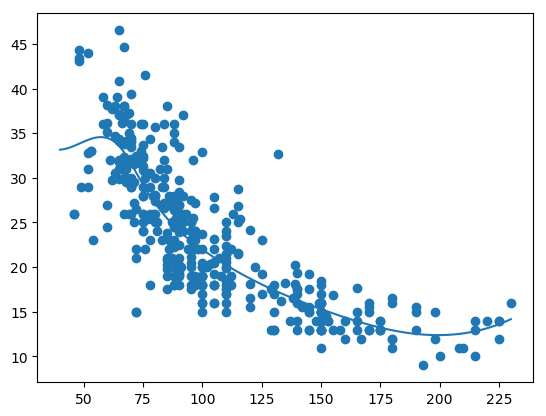
fig2

1.2 Generalized Additiive models (GAMs)

Generalized Additive Models (GAMs) is a really powerful ML tool.

y_{i} = \beta_{0} + f_{1}(x_{i1}) + f_{2}(x_{i2}) + .. +f_{p}(x_{ip}) + \epsilon_{i}

In GAMs we use a different functions for each of the variables. GAMs give a much better fit since we can choose any function for the different sections

1.2a Generalized Additive Models (GAMs) – R Code

The plot below show the smooth spline that is fit for each of the features horsepower, cylinder, displacement, year and acceleration. We can use any function for example loess, 4rd order polynomial etc.

library(gam)
# Fit a smoothing spline for horsepower, cyliner, displacement and acceleration
gam=gam(mpg~s(horsepower,4)+s(cylinder,5)+s(displacement,4)+s(year,4)+s(acceleration,5),data=auto)
# Display the summary of the fit. This give the significance of each of the paramwetr
# Also an ANOVA is given for each combination of the features
summary(gam)
## 
## Call: gam(formula = mpg ~ s(horsepower, 4) + s(cylinder, 5) + s(displacement, 
##     4) + s(year, 4) + s(acceleration, 5), data = auto)
## Deviance Residuals:
##     Min      1Q  Median      3Q     Max 
## -8.3190 -1.4436 -0.0261  1.2279 12.0873 
## 
## (Dispersion Parameter for gaussian family taken to be 6.9943)
## 
##     Null Deviance: 23818.99 on 391 degrees of freedom
## Residual Deviance: 2587.881 on 370 degrees of freedom
## AIC: 1898.282 
## 
## Number of Local Scoring Iterations: 3 
## 
## Anova for Parametric Effects
##                     Df  Sum Sq Mean Sq  F value    Pr(>F)    
## s(horsepower, 4)     1 15632.8 15632.8 2235.085 < 2.2e-16 ***
## s(cylinder, 5)       1   508.2   508.2   72.666 3.958e-16 ***
## s(displacement, 4)   1   374.3   374.3   53.514 1.606e-12 ***
## s(year, 4)           1  2263.2  2263.2  323.583 < 2.2e-16 ***
## s(acceleration, 5)   1   372.4   372.4   53.246 1.809e-12 ***
## Residuals          370  2587.9     7.0                       
## ---
## Signif. codes:  0 '***' 0.001 '**' 0.01 '*' 0.05 '.' 0.1 ' ' 1
## 
## Anova for Nonparametric Effects
##                    Npar Df Npar F     Pr(F)    
## (Intercept)                                    
## s(horsepower, 4)         3 13.825 1.453e-08 ***
## s(cylinder, 5)           3 17.668 9.712e-11 ***
## s(displacement, 4)       3 44.573 < 2.2e-16 ***
## s(year, 4)               3 23.364 7.183e-14 ***
## s(acceleration, 5)       4  3.848  0.004453 ** 
## ---
## Signif. codes:  0 '***' 0.001 '**' 0.01 '*' 0.05 '.' 0.1 ' ' 1
par(mfrow=c(2,3))
plot(gam,se=TRUE)

fig5-1

1.2b Generalized Additive Models (GAMs) – Python Code

I did not find the equivalent of GAMs in SKlearn in Python. There was an early prototype (2012) in Github. Looks like it is still work in progress or has probably been abandoned.

1.3 Tree based Machine Learning Models

Tree based Machine Learning are all based on the ‘bootstrapping’ technique. In bootstrapping given a sample of size N, we create datasets of size N by sampling this original dataset with replacement. Machine Learning models are built on the different bootstrapped samples and then averaged.

Decision Trees as seen above have the tendency to overfit. There are several techniques that help to avoid this namely a) Bagging b) Random Forests c) Boosting

Bagging, Random Forest and Gradient Boosting

Bagging: Bagging, or Bootstrap Aggregation decreases the variance of predictions, by creating separate Decisiion Tree based ML models on the different samples and then averaging these ML models

Random Forests: Bagging is a greedy algorithm and tries to produce splits based on all variables which try to minimize the error. However the different ML models have a high correlation. Random Forests remove this shortcoming, by using a variable and random set of features to split on. Hence the features chosen and the resulting trees are uncorrelated. When these ML models are averaged the performance is much better.

Boosting: Gradient Boosted Decision Trees also use an ensemble of trees but they don’t build Machine Learning models with random set of features at each step. Rather small and simple trees are built. Successive trees try to minimize the error from the earlier trees.

Out of Bag (OOB) Error: In Random Forest and Gradient Boosting for each bootstrap sample taken from the dataset, there will be samples left out. These are known as Out of Bag samples.Classification accuracy carried out on these OOB samples is known as OOB error

1.31a Decision Trees – R Code

The code below creates a Decision tree with the cancer training data. The summary of the fit is output. Based on the ML model, the predict function is used on test data and a confusion matrix is output.

# Read the cancer data
library(tree)
library(caret)
library(e1071)
cancer <- read.csv("cancer.csv",stringsAsFactors = FALSE)
cancer <- cancer[,2:32]
cancer$target <- as.factor(cancer$target)
train_idx <- trainTestSplit(cancer,trainPercent=75,seed=5)
train <- cancer[train_idx, ]
test <- cancer[-train_idx, ]

# Create Decision Tree
cancerStatus=tree(target~.,train)
summary(cancerStatus)
## 
## Classification tree:
## tree(formula = target ~ ., data = train)
## Variables actually used in tree construction:
## [1] "worst.perimeter"      "worst.concave.points" "area.error"          
## [4] "worst.texture"        "mean.texture"         "mean.concave.points" 
## Number of terminal nodes:  9 
## Residual mean deviance:  0.1218 = 50.8 / 417 
## Misclassification error rate: 0.02347 = 10 / 426
pred <- predict(cancerStatus,newdata=test,type="class")
confusionMatrix(pred,test$target)
## Confusion Matrix and Statistics
## 
##           Reference
## Prediction  0  1
##          0 49  7
##          1  8 78
##                                           
##                Accuracy : 0.8944          
##                  95% CI : (0.8318, 0.9397)
##     No Information Rate : 0.5986          
##     P-Value [Acc > NIR] : 4.641e-15       
##                                           
##                   Kappa : 0.7795          
##  Mcnemar's Test P-Value : 1               
##                                           
##             Sensitivity : 0.8596          
##             Specificity : 0.9176          
##          Pos Pred Value : 0.8750          
##          Neg Pred Value : 0.9070          
##              Prevalence : 0.4014          
##          Detection Rate : 0.3451          
##    Detection Prevalence : 0.3944          
##       Balanced Accuracy : 0.8886          
##                                           
##        'Positive' Class : 0               
## 
# Plot decision tree with labels
plot(cancerStatus)
text(cancerStatus,pretty=0)

fig6-1

1.31b Decision Trees – Cross Validation – R Code

We can also perform a Cross Validation on the data to identify the Decision Tree which will give the minimum deviance.

library(tree)
cancer <- read.csv("cancer.csv",stringsAsFactors = FALSE)
cancer <- cancer[,2:32]
cancer$target <- as.factor(cancer$target)
train_idx <- trainTestSplit(cancer,trainPercent=75,seed=5)
train <- cancer[train_idx, ]
test <- cancer[-train_idx, ]

# Create Decision Tree
cancerStatus=tree(target~.,train)

# Execute 10 fold cross validation
cvCancer=cv.tree(cancerStatus)
plot(cvCancer)

fig7-1

# Plot the 
plot(cvCancer$size,cvCancer$dev,type='b')
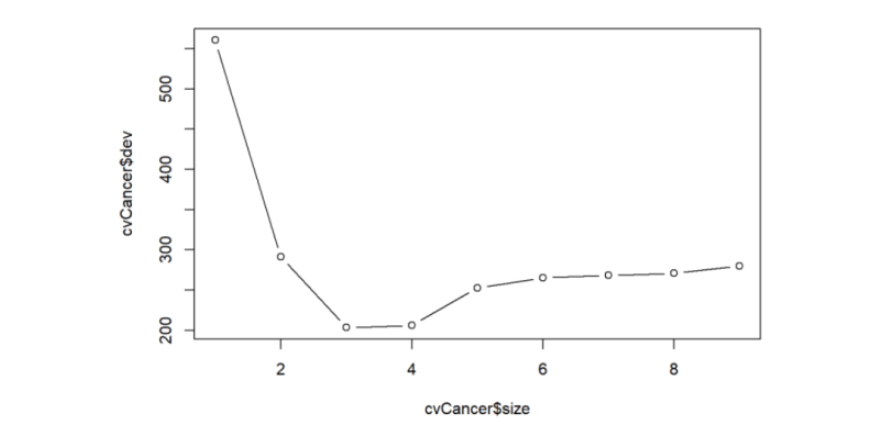
fig1

prunedCancer=prune.tree(cancerStatus,best=4)
plot(prunedCancer)
text(prunedCancer,pretty=0)

fig2

pred <- predict(prunedCancer,newdata=test,type="class")
confusionMatrix(pred,test$target)
## Confusion Matrix and Statistics
## 
##           Reference
## Prediction  0  1
##          0 50  7
##          1  7 78
##                                          
##                Accuracy : 0.9014         
##                  95% CI : (0.8401, 0.945)
##     No Information Rate : 0.5986         
##     P-Value [Acc > NIR] : 7.988e-16      
##                                          
##                   Kappa : 0.7948         
##  Mcnemar's Test P-Value : 1              
##                                          
##             Sensitivity : 0.8772         
##             Specificity : 0.9176         
##          Pos Pred Value : 0.8772         
##          Neg Pred Value : 0.9176         
##              Prevalence : 0.4014         
##          Detection Rate : 0.3521         
##    Detection Prevalence : 0.4014         
##       Balanced Accuracy : 0.8974         
##                                          
##        'Positive' Class : 0              
## 

1.31c Decision Trees – Python Code

Below is the Python code for creating Decision Trees. The accuracy, precision, recall and F1 score is computed on the test data set.

import numpy as np
import pandas as pd
import os
import matplotlib.pyplot as plt
from sklearn.metrics import confusion_matrix
from sklearn import tree
from sklearn.datasets import load_breast_cancer
from sklearn.model_selection import train_test_split
from sklearn.tree import DecisionTreeClassifier
from sklearn.datasets import make_classification, make_blobs
from sklearn.metrics import accuracy_score, precision_score, recall_score, f1_score
import graphviz 

cancer = load_breast_cancer()
(X_cancer, y_cancer) = load_breast_cancer(return_X_y = True)

X_train, X_test, y_train, y_test = train_test_split(X_cancer, y_cancer,
                                                   random_state = 0)
clf = DecisionTreeClassifier().fit(X_train, y_train)

print('Accuracy of Decision Tree classifier on training set: {:.2f}'
     .format(clf.score(X_train, y_train)))
print('Accuracy of Decision Tree classifier on test set: {:.2f}'
     .format(clf.score(X_test, y_test)))

y_predicted=clf.predict(X_test)
confusion = confusion_matrix(y_test, y_predicted)
print('Accuracy: {:.2f}'.format(accuracy_score(y_test, y_predicted)))
print('Precision: {:.2f}'.format(precision_score(y_test, y_predicted)))
print('Recall: {:.2f}'.format(recall_score(y_test, y_predicted)))
print('F1: {:.2f}'.format(f1_score(y_test, y_predicted)))

# Plot the Decision Tree
clf = DecisionTreeClassifier(max_depth=2).fit(X_train, y_train)
dot_data = tree.export_graphviz(clf, out_file=None, 
                         feature_names=cancer.feature_names,  
                         class_names=cancer.target_names,  
                         filled=True, rounded=True,  
                         special_characters=True)  
graph = graphviz.Source(dot_data)  
graph
## Accuracy of Decision Tree classifier on training set: 1.00
## Accuracy of Decision Tree classifier on test set: 0.87
## Accuracy: 0.87
## Precision: 0.97
## Recall: 0.82
## F1: 0.89

tree

1.31d Decision Trees – Cross Validation – Python Code

In the code below 5-fold cross validation is performed for different depths of the tree and the accuracy is computed. The accuracy on the test set seems to plateau when the depth is 8. But it is seen to increase again from 10 to 12. More analysis needs to be done here


import numpy as np
import pandas as pd
import os
import matplotlib.pyplot as plt
from sklearn.datasets import load_breast_cancer
from sklearn.tree import DecisionTreeClassifier
(X_cancer, y_cancer) = load_breast_cancer(return_X_y = True)
from sklearn.cross_validation import train_test_split, KFold
def computeCVAccuracy(X,y,folds):
    accuracy=[]
    foldAcc=[]
    depth=[1,2,3,4,5,6,7,8,9,10,11,12]
    nK=len(X)/float(folds)
    xval_err=0
    for i in depth: 
        kf = KFold(len(X),n_folds=folds)
        for train_index, test_index in kf:
            X_train, X_test = X.iloc[train_index], X.iloc[test_index]
            y_train, y_test = y.iloc[train_index], y.iloc[test_index]  
            clf = DecisionTreeClassifier(max_depth = i).fit(X_train, y_train)
            score=clf.score(X_test, y_test)
            accuracy.append(score)     
            
        foldAcc.append(np.mean(accuracy))  
        
    return(foldAcc)
    
    
cvAccuracy=computeCVAccuracy(pd.DataFrame(X_cancer),pd.DataFrame(y_cancer),folds=10)

df1=pd.DataFrame(cvAccuracy)
df1.columns=['cvAccuracy']
df=df1.reindex([1,2,3,4,5,6,7,8,9,10,11,12])
df.plot()
plt.title("Decision Tree - 10-fold Cross Validation Accuracy vs Depth of tree")
plt.xlabel("Depth of tree")
plt.ylabel("Accuracy")
plt.savefig('fig3.png', bbox_inches='tight')


fig3


1.4a Random Forest – R code

A Random Forest is fit using the Boston data. The summary shows that 4 variables were randomly chosen at each split and the resulting ML model explains 88.72% of the test data. Also the variable importance is plotted. It can be seen that ‘rooms’ and ‘status’ are the most influential features in the model

library(randomForest)
df=read.csv("Boston.csv",stringsAsFactors = FALSE) # Data from MASS - SL

# Select specific columns
Boston <- df %>% dplyr::select("crimeRate","zone","indus","charles","nox","rooms","age",                          "distances","highways","tax","teacherRatio","color",
                               "status","medianValue")

# Fit a Random Forest on the Boston training data
rfBoston=randomForest(medianValue~.,data=Boston)
# Display the summatu of the fit. It can be seen that the MSE is 10.88 
# and the percentage variance explained is 86.14%. About 4 variables were tried at each # #split for a maximum tree of 500.
# The MSE and percent variance is on Out of Bag trees
rfBoston
## 
## Call:
##  randomForest(formula = medianValue ~ ., data = Boston) 
##                Type of random forest: regression
##                      Number of trees: 500
## No. of variables tried at each split: 4
## 
##           Mean of squared residuals: 9.521672
##                     % Var explained: 88.72
#List and plot the variable importances
importance(rfBoston)
##              IncNodePurity
## crimeRate        2602.1550
## zone              258.8057
## indus            2599.6635
## charles           240.2879
## nox              2748.8485
## rooms           12011.6178
## age              1083.3242
## distances        2432.8962
## highways          393.5599
## tax              1348.6987
## teacherRatio     2841.5151
## color             731.4387
## status          12735.4046
varImpPlot(rfBoston)

fig8-1

1.4b Random Forest-OOB and Cross Validation Error – R code

The figure below shows the OOB error and the Cross Validation error vs the ‘mtry’. Here mtry indicates the number of random features that are chosen at each split. The lowest test error occurs when mtry = 8

library(randomForest)
df=read.csv("Boston.csv",stringsAsFactors = FALSE) # Data from MASS - SL

# Select specific columns
Boston <- df %>% dplyr::select("crimeRate","zone","indus","charles","nox","rooms","age",                          "distances","highways","tax","teacherRatio","color",
                               "status","medianValue")
# Split as training and tst sets
train_idx <- trainTestSplit(Boston,trainPercent=75,seed=5)
train <- Boston[train_idx, ]
test <- Boston[-train_idx, ]

#Initialize OOD and testError
oobError <- NULL
testError <- NULL
# In the code below the number of variables to consider at each split is increased
# from 1 - 13(max features) and the OOB error and the MSE is computed
for(i in 1:13){
    fitRF=randomForest(medianValue~.,data=train,mtry=i,ntree=400)
    oobError[i] <-fitRF$mse[400]
    pred <- predict(fitRF,newdata=test)
    testError[i] <- mean((pred-test$medianValue)^2)
}

# We can see the OOB and Test Error. It can be seen that the Random Forest performs
# best with the lowers MSE at mtry=6
matplot(1:13,cbind(testError,oobError),pch=19,col=c("red","blue"),
        type="b",xlab="mtry(no of varaibles at each split)", ylab="Mean Squared Error",
        main="Random Forest - OOB and Test Error")
legend("topright",legend=c("OOB","Test"),pch=19,col=c("red","blue"))

fig9-1

1.4c Random Forest – Python code

The python code for Random Forest Regression is shown below. The training and test score is computed. The variable importance shows that ‘rooms’ and ‘status’ are the most influential of the variables

import numpy as np
import pandas as pd
import os
import matplotlib.pyplot as plt
from sklearn.model_selection import train_test_split
from sklearn.ensemble import RandomForestRegressor
df = pd.read_csv("Boston.csv",encoding = "ISO-8859-1")

X=df[['crimeRate','zone', 'indus','charles','nox','rooms', 'age','distances','highways','tax',
       'teacherRatio','color','status']]
y=df['medianValue']

X_train, X_test, y_train, y_test = train_test_split(X, y, random_state = 0)

regr = RandomForestRegressor(max_depth=4, random_state=0)
regr.fit(X_train, y_train)

print('R-squared score (training): {:.3f}'
     .format(regr.score(X_train, y_train)))
print('R-squared score (test): {:.3f}'
     .format(regr.score(X_test, y_test)))

feature_names=['crimeRate','zone', 'indus','charles','nox','rooms', 'age','distances','highways','tax',
       'teacherRatio','color','status']
print(regr.feature_importances_)
plt.figure(figsize=(10,6),dpi=80)
c_features=X_train.shape[1]
plt.barh(np.arange(c_features),regr.feature_importances_)
plt.xlabel("Feature importance")
plt.ylabel("Feature name")

plt.yticks(np.arange(c_features), feature_names)
plt.tight_layout()

plt.savefig('fig4.png', bbox_inches='tight')
## R-squared score (training): 0.917
## R-squared score (test): 0.734
## [ 0.03437382  0.          0.00580335  0.          0.00731004  0.36461548
##   0.00638577  0.03432173  0.0041244   0.01732328  0.01074148  0.0012638
##   0.51373683]
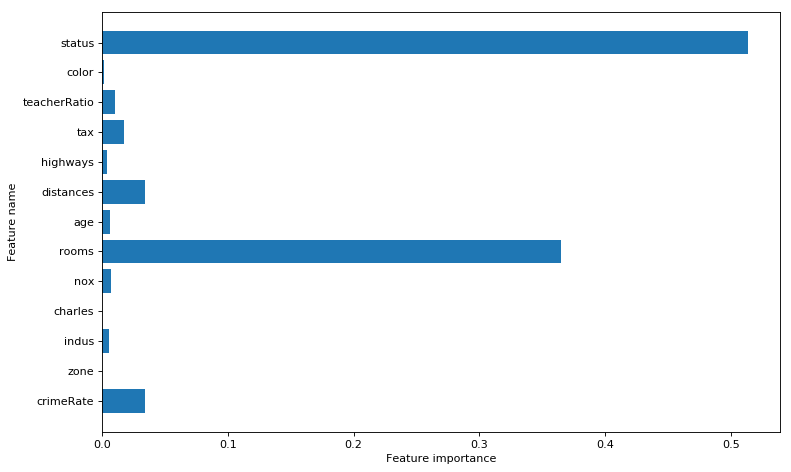
fig4

1.4d Random Forest – Cross Validation and OOB Error – Python code

As with R the ‘max_features’ determines the random number of features the random forest will use at each split. The plot shows that when max_features=8 the MSE is lowest

import numpy as np
import pandas as pd
import os
import matplotlib.pyplot as plt
from sklearn.model_selection import train_test_split
from sklearn.ensemble import RandomForestRegressor
from sklearn.model_selection import cross_val_score
df = pd.read_csv("Boston.csv",encoding = "ISO-8859-1")

X=df[['crimeRate','zone', 'indus','charles','nox','rooms', 'age','distances','highways','tax',
       'teacherRatio','color','status']]
y=df['medianValue']

cvError=[]
oobError=[]
oobMSE=[]
for i in range(1,13):
    regr = RandomForestRegressor(max_depth=4, n_estimators=400,max_features=i,oob_score=True,random_state=0)
    mse= np.mean(cross_val_score(regr, X, y, cv=5,scoring = 'neg_mean_squared_error'))
    # Since this is neg_mean_squared_error I have inverted the sign to get MSE
    cvError.append(-mse)
    # Fit on all data to compute OOB error
    regr.fit(X, y)
    # Record the OOB error for each `max_features=i` setting
    oob = 1 - regr.oob_score_
    oobError.append(oob)
    # Get the Out of Bag prediction
    oobPred=regr.oob_prediction_ 
    # Compute the Mean Squared Error between OOB Prediction and target
    mseOOB=np.mean(np.square(oobPred-y))
    oobMSE.append(mseOOB)

# Plot the CV Error and OOB Error
# Set max_features
maxFeatures=np.arange(1,13) 
cvError=pd.DataFrame(cvError,index=maxFeatures)
oobMSE=pd.DataFrame(oobMSE,index=maxFeatures)
#Plot
fig8=df.plot()
fig8=plt.title('Random forest - CV Error and OOB Error vs max_features')
fig8.figure.savefig('fig8.png', bbox_inches='tight')

#Plot the OOB Error vs max_features
plt.plot(range(1,13),oobError)
fig2=plt.title("Random Forest - OOB Error vs max_features (variable no of features)")
fig2=plt.xlabel("max_features (variable no of features)")
fig2=plt.ylabel("OOB Error")
fig2.figure.savefig('fig7.png', bbox_inches='tight')
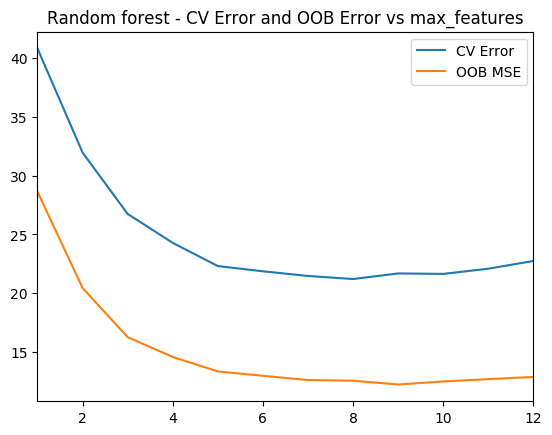
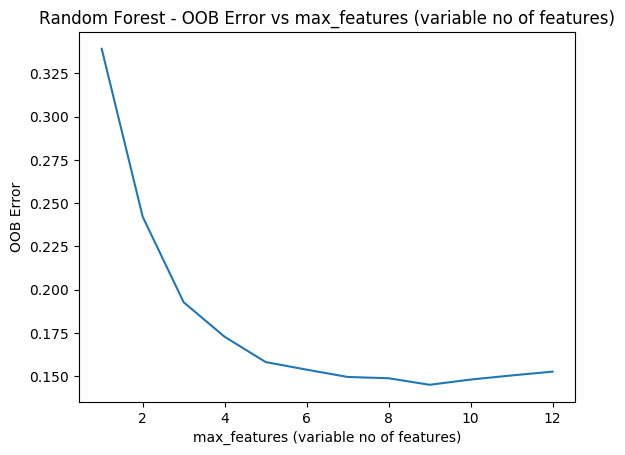
fig8 fig7

1.5a Boosting – R code

Here a Gradient Boosted ML Model is built with a n.trees=5000, with a learning rate of 0.01 and depth of 4. The feature importance plot also shows that rooms and status are the 2 most important features. The MSE vs the number of trees plateaus around 2000 trees

library(gbm)
# Perform gradient boosting on the Boston data set. The distribution is gaussian since we
# doing MSE. The interaction depth specifies the number of splits
boostBoston=gbm(medianValue~.,data=train,distribution="gaussian",n.trees=5000,
                shrinkage=0.01,interaction.depth=4)
#The summary gives the variable importance. The 2 most significant variables are
# number of rooms and lower status
summary(boostBoston)

##                       var    rel.inf
## rooms               rooms 42.2267200
## status             status 27.3024671
## distances       distances  7.9447972
## crimeRate       crimeRate  5.0238827
## nox                   nox  4.0616548
## teacherRatio teacherRatio  3.1991999
## age                   age  2.7909772
## color               color  2.3436295
## tax                   tax  2.1386213
## charles           charles  1.3799109
## highways         highways  0.7644026
## indus               indus  0.7236082
## zone                 zone  0.1001287
# The plots below show how each variable relates to the median value of the home. As
# the number of roomd increase the median value increases and with increase in lower status
# the median value decreases
par(mfrow=c(1,2))
#Plot the relation between the top 2 features and the target
plot(boostBoston,i="rooms")
plot(boostBoston,i="status")

fig10-2

# Create a sequence of trees between 100-5000 incremented by 50
nTrees=seq(100,5000,by=50)
# Predict the values for the test data
pred <- predict(boostBoston,newdata=test,n.trees=nTrees)
# Compute the mean for each of the MSE for each of the number of trees 
boostError <- apply((pred-test$medianValue)^2,2,mean)
#Plot the MSE vs the number of trees
plot(nTrees,boostError,pch=19,col="blue",ylab="Mean Squared Error",
     main="Boosting Test Error")

fig10-3

1.5b Cross Validation Boosting – R code

Included below is a cross validation error vs the learning rate. The lowest error is when learning rate = 0.09

cvError <- NULL
s <- c(.001,0.01,0.03,0.05,0.07,0.09,0.1)
for(i in seq_along(s)){
    cvBoost=gbm(medianValue~.,data=train,distribution="gaussian",n.trees=5000,
                shrinkage=s[i],interaction.depth=4,cv.folds=5)
    cvError[i] <- mean(cvBoost$cv.error)
}

# Create a data frame for plotting
a <- rbind(s,cvError)
b <- as.data.frame(t(a))
# It can be seen that a shrinkage parameter of 0,05 gives the lowes CV Error
ggplot(b,aes(s,cvError)) + geom_point() + geom_line(color="blue") + 
    xlab("Shrinkage") + ylab("Cross Validation Error") +
    ggtitle("Gradient boosted trees - Cross Validation error vs Shrinkage")

fig11-1

1.5c Boosting – Python code

A gradient boost ML model in Python is created below. The Rsquared score is computed on the training and test data.

import numpy as np
import pandas as pd
import os
import matplotlib.pyplot as plt
from sklearn.model_selection import train_test_split
from sklearn.ensemble import GradientBoostingRegressor
df = pd.read_csv("Boston.csv",encoding = "ISO-8859-1")

X=df[['crimeRate','zone', 'indus','charles','nox','rooms', 'age','distances','highways','tax',
       'teacherRatio','color','status']]
y=df['medianValue']

X_train, X_test, y_train, y_test = train_test_split(X, y, random_state = 0)

regr = GradientBoostingRegressor()
regr.fit(X_train, y_train)

print('R-squared score (training): {:.3f}'
     .format(regr.score(X_train, y_train)))
print('R-squared score (test): {:.3f}'
     .format(regr.score(X_test, y_test)))
## R-squared score (training): 0.983
## R-squared score (test): 0.821

1.5c Cross Validation Boosting – Python code

the cross validation error is computed as the learning rate is varied. The minimum CV eror occurs when lr = 0.04

import numpy as np
import pandas as pd
import os
import matplotlib.pyplot as plt
from sklearn.model_selection import train_test_split
from sklearn.ensemble import RandomForestRegressor
from sklearn.ensemble import GradientBoostingRegressor
from sklearn.model_selection import cross_val_score
df = pd.read_csv("Boston.csv",encoding = "ISO-8859-1")

X=df[['crimeRate','zone', 'indus','charles','nox','rooms', 'age','distances','highways','tax',
       'teacherRatio','color','status']]
y=df['medianValue']

cvError=[]
learning_rate =[.001,0.01,0.03,0.05,0.07,0.09,0.1]
for lr in learning_rate:
    regr = GradientBoostingRegressor(max_depth=4, n_estimators=400,learning_rate  =lr,random_state=0)
    mse= np.mean(cross_val_score(regr, X, y, cv=10,scoring = 'neg_mean_squared_error'))
    # Since this is neg_mean_squared_error I have inverted the sign to get MSE
    cvError.append(-mse)
learning_rate =[.001,0.01,0.03,0.05,0.07,0.09,0.1]
plt.plot(learning_rate,cvError)
plt.title("Gradient Boosting - 5-fold CV- Mean Squared Error vs max_features (variable no of features)")
plt.xlabel("max_features (variable no of features)")
plt.ylabel("Mean Squared Error")
plt.savefig('fig6.png', bbox_inches='tight')
fig6

Conclusion This post covered Splines and Tree based ML models like Bagging, Random Forest and Boosting. Stay tuned for further updates.

You may also like

  1. Re-introducing cricketr! : An R package to analyze performances of cricketer
  2. Designing a Social Web Portal
  3. My travels through the realms of Data Science, Machine Learning, Deep Learning and (AI)
  4. My TEDx talk on the “Internet of Things”
  5. Singularity
  6. A closer look at “Robot Horse on a Trot” in Android

To see all posts see Index of posts

Practical Machine Learning with R and Python – Part 4

This is the 4th installment of my ‘Practical Machine Learning with R and Python’ series. In this part I discuss classification with Support Vector Machines (SVMs), using both a Linear and a Radial basis kernel, and Decision Trees. Further, a closer look is taken at some of the metrics associated with binary classification, namely accuracy vs precision and recall. I also touch upon Validation curves, Precision-Recall, ROC curves and AUC with equivalent code in R and Python

This post is a continuation of my 3 earlier posts on Practical Machine Learning in R and Python
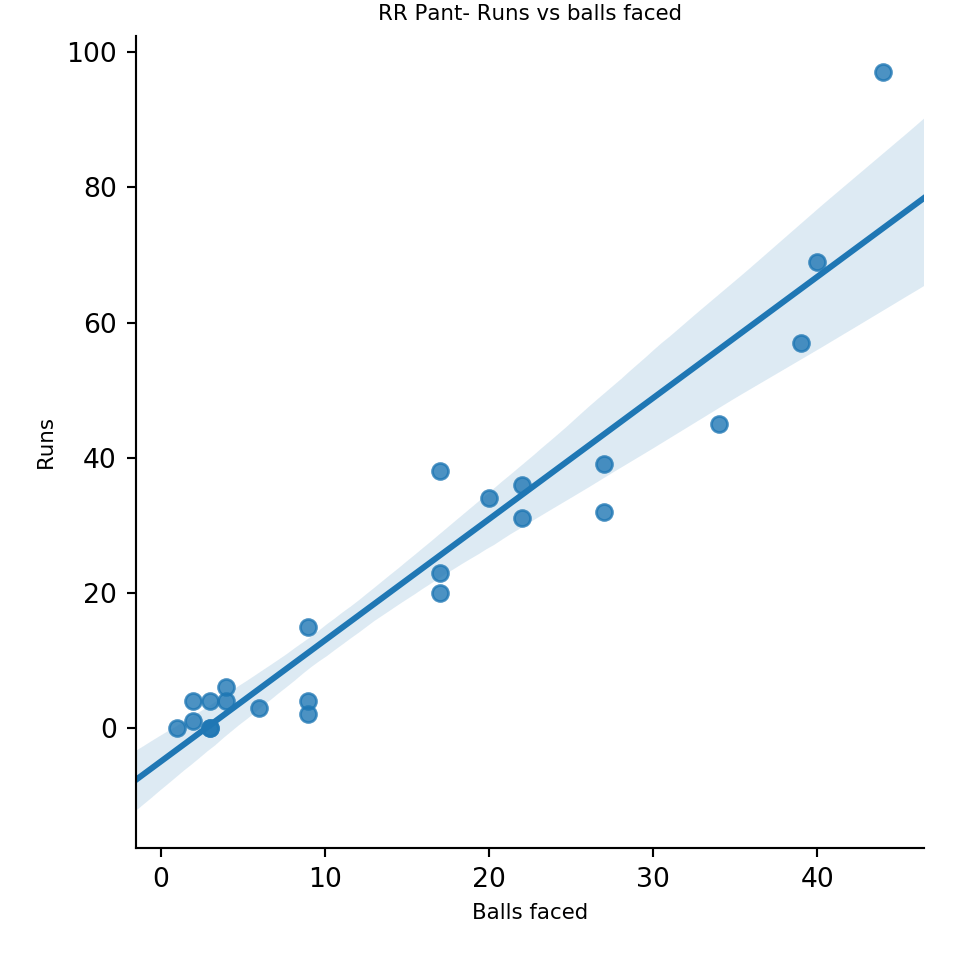
1. Practical Machine Learning with R and Python – Part 1
2. Practical Machine Learning with R and Python – Part 2
3. Practical Machine Learning with R and Python – Part 3

The RMarkdown file with the code and the associated data files can be downloaded from Github at MachineLearning-RandPython-Part4

Note: Please listen to my video presentations Machine Learning in youtube
1. Machine Learning in plain English-Part 1
2. Machine Learning in plain English-Part 2
3. Machine Learning in plain English-Part 3

Check out my compact and minimal book  “Practical Machine Learning with R and Python:Third edition- Machine Learning in stereo”  available in Amazon in paperback($12.99) and kindle($8.99) versions. My book includes implementations of key ML algorithms and associated measures and metrics. The book is ideal for anybody who is familiar with the concepts and would like a quick reference to the different ML algorithms that can be applied to problems and how to select the best model. Pick your copy today!!


Support Vector Machines (SVM) are another useful Machine Learning model that can be used for both regression and classification problems. SVMs used in classification, compute the hyperplane, that separates the 2 classes with the maximum margin. To do this the features may be transformed into a larger multi-dimensional feature space. SVMs can be used with different kernels namely linear, polynomial or radial basis to determine the best fitting model for a given classification problem.

In the 2nd part of this series Practical Machine Learning with R and Python – Part 2, I had mentioned the various metrics that are used in classification ML problems namely Accuracy, Precision, Recall and F1 score. Accuracy gives the fraction of data that were correctly classified as belonging to the +ve or -ve class. However ‘accuracy’ in itself is not a good enough measure because it does not take into account the fraction of the data that were incorrectly classified. This issue becomes even more critical in different domains. For e.g a surgeon who would like to detect cancer, would like to err on the side of caution, and classify even a possibly non-cancerous patient as possibly having cancer, rather than mis-classifying a malignancy as benign. Here we would like to increase recall or sensitivity which is  given by Recall= TP/(TP+FN) or we try reduce mis-classification by either increasing the (true positives) TP or reducing (false negatives) FN

On the other hand, search algorithms would like to increase precision which tries to reduce the number of irrelevant results in the search result. Precision= TP/(TP+FP). In other words we do not want ‘false positives’ or irrelevant results to come in the search results and there is a need to reduce the false positives.

When we try to increase ‘precision’, we do so at the cost of ‘recall’, and vice-versa. I found this diagram and explanation in Wikipedia very useful Source: Wikipedia

“Consider a brain surgeon tasked with removing a cancerous tumor from a patient’s brain. The surgeon needs to remove all of the tumor cells since any remaining cancer cells will regenerate the tumor. Conversely, the surgeon must not remove healthy brain cells since that would leave the patient with impaired brain function. The surgeon may be more liberal in the area of the brain she removes to ensure she has extracted all the cancer cells. This decision increases recall but reduces precision. On the other hand, the surgeon may be more conservative in the brain she removes to ensure she extracts only cancer cells. This decision increases precision but reduces recall. That is to say, greater recall increases the chances of removing healthy cells (negative outcome) and increases the chances of removing all cancer cells (positive outcome). Greater precision decreases the chances of removing healthy cells (positive outcome) but also decreases the chances of removing all cancer cells (negative outcome).”

1.1a. Linear SVM – R code

In R code below I use SVM with linear kernel

source('RFunctions-1.R')
library(dplyr)
library(e1071)
library(caret)
library(reshape2)
library(ggplot2)
# Read data. Data from SKLearn
cancer <- read.csv("cancer.csv")
cancer$target <- as.factor(cancer$target)

# Split into training and test sets
train_idx <- trainTestSplit(cancer,trainPercent=75,seed=5)
train <- cancer[train_idx, ]
test <- cancer[-train_idx, ]

# Fit a linear basis kernel. DO not scale the data
svmfit=svm(target~., data=train, kernel="linear",scale=FALSE)
ypred=predict(svmfit,test)
#Print a confusion matrix
confusionMatrix(ypred,test$target)
## Confusion Matrix and Statistics
## 
##           Reference
## Prediction  0  1
##          0 54  3
##          1  3 82
##                                           
##                Accuracy : 0.9577          
##                  95% CI : (0.9103, 0.9843)
##     No Information Rate : 0.5986          
##     P-Value [Acc > NIR] : <2e-16          
##                                           
##                   Kappa : 0.9121          
##  Mcnemar's Test P-Value : 1               
##                                           
##             Sensitivity : 0.9474          
##             Specificity : 0.9647          
##          Pos Pred Value : 0.9474          
##          Neg Pred Value : 0.9647          
##              Prevalence : 0.4014          
##          Detection Rate : 0.3803          
##    Detection Prevalence : 0.4014          
##       Balanced Accuracy : 0.9560          
##                                           
##        'Positive' Class : 0               
## 

1.1b Linear SVM – Python code

The code below creates a SVM with linear basis in Python and also dumps the corresponding classification metrics

import numpy as np
import pandas as pd
import os
import matplotlib.pyplot as plt
from sklearn.model_selection import train_test_split
from sklearn.svm import LinearSVC

from sklearn.datasets import make_classification, make_blobs

from sklearn.metrics import confusion_matrix
from matplotlib.colors import ListedColormap
from sklearn.datasets import load_breast_cancer
# Load the cancer data
(X_cancer, y_cancer) = load_breast_cancer(return_X_y = True)
X_train, X_test, y_train, y_test = train_test_split(X_cancer, y_cancer,
                                                   random_state = 0)
clf = LinearSVC().fit(X_train, y_train)
print('Breast cancer dataset')
print('Accuracy of Linear SVC classifier on training set: {:.2f}'
     .format(clf.score(X_train, y_train)))
print('Accuracy of Linear SVC classifier on test set: {:.2f}'
     .format(clf.score(X_test, y_test)))
## Breast cancer dataset
## Accuracy of Linear SVC classifier on training set: 0.92
## Accuracy of Linear SVC classifier on test set: 0.94

1.2 Dummy classifier

Often when we perform classification tasks using any ML model namely logistic regression, SVM, neural networks etc. it is very useful to determine how well the ML model performs agains at dummy classifier. A dummy classifier uses some simple computation like frequency of majority class, instead of fitting and ML model. It is essential that our ML model does much better that the dummy classifier. This problem is even more important in imbalanced classes where we have only about 10% of +ve samples. If any ML model we create has a accuracy of about 0.90 then it is evident that our classifier is not doing any better than a dummy classsfier which can just take a majority count of this imbalanced class and also come up with 0.90. We need to be able to do better than that.

In the examples below (1.3a & 1.3b) it can be seen that SVMs with ‘radial basis’ kernel with unnormalized data, for both R and Python, do not perform any better than the dummy classifier.

1.2a Dummy classifier – R code

R does not seem to have an explicit dummy classifier. I created a simple dummy classifier that predicts the majority class. SKlearn in Python also includes other strategies like uniform, stratified etc. but this should be possible to create in R also.

# Create a simple dummy classifier that computes the ratio of the majority class to the totla
DummyClassifierAccuracy <- function(train,test,type="majority"){
  if(type=="majority"){
      count <- sum(train$target==1)/dim(train)[1]
  }
  count
}


cancer <- read.csv("cancer.csv")
cancer$target <- as.factor(cancer$target)

# Create training and test sets
train_idx <- trainTestSplit(cancer,trainPercent=75,seed=5)
train <- cancer[train_idx, ]
test <- cancer[-train_idx, ]

#Dummy classifier majority class
acc=DummyClassifierAccuracy(train,test)
sprintf("Accuracy is %f",acc)
## [1] "Accuracy is 0.638498"

1.2b Dummy classifier – Python code

This dummy classifier uses the majority class.

import numpy as np
import pandas as pd
import os
import matplotlib.pyplot as plt
from sklearn.datasets import load_breast_cancer
from sklearn.model_selection import train_test_split
from sklearn.dummy import DummyClassifier
from sklearn.metrics import confusion_matrix
(X_cancer, y_cancer) = load_breast_cancer(return_X_y = True)
X_train, X_test, y_train, y_test = train_test_split(X_cancer, y_cancer,
                                                   random_state = 0)

# Negative class (0) is most frequent
dummy_majority = DummyClassifier(strategy = 'most_frequent').fit(X_train, y_train)
y_dummy_predictions = dummy_majority.predict(X_test)

print('Dummy classifier accuracy on test set: {:.2f}'
     .format(dummy_majority.score(X_test, y_test)))
## Dummy classifier accuracy on test set: 0.63

1.3a – Radial SVM (un-normalized) – R code

SVMs perform better when the data is normalized or scaled. The 2 examples below show that SVM with radial basis kernel does not perform any better than the dummy classifier

library(dplyr)
library(e1071)
library(caret)
library(reshape2)
library(ggplot2)

# Radial SVM unnormalized
train_idx <- trainTestSplit(cancer,trainPercent=75,seed=5)
train <- cancer[train_idx, ]
test <- cancer[-train_idx, ]
# Unnormalized data
svmfit=svm(target~., data=train, kernel="radial",cost=10,scale=FALSE)
ypred=predict(svmfit,test)
confusionMatrix(ypred,test$target)
## Confusion Matrix and Statistics
## 
##           Reference
## Prediction  0  1
##          0  0  0
##          1 57 85
##                                           
##                Accuracy : 0.5986          
##                  95% CI : (0.5131, 0.6799)
##     No Information Rate : 0.5986          
##     P-Value [Acc > NIR] : 0.5363          
##                                           
##                   Kappa : 0               
##  Mcnemar's Test P-Value : 1.195e-13       
##                                           
##             Sensitivity : 0.0000          
##             Specificity : 1.0000          
##          Pos Pred Value :    NaN          
##          Neg Pred Value : 0.5986          
##              Prevalence : 0.4014          
##          Detection Rate : 0.0000          
##    Detection Prevalence : 0.0000          
##       Balanced Accuracy : 0.5000          
##                                           
##        'Positive' Class : 0               
## 

1.4b – Radial SVM (un-normalized) – Python code

import numpy as np
import pandas as pd
import os
import matplotlib.pyplot as plt
from sklearn.datasets import load_breast_cancer
from sklearn.model_selection import train_test_split
from sklearn.svm import SVC

# Load the cancer data
(X_cancer, y_cancer) = load_breast_cancer(return_X_y = True)
X_train, X_test, y_train, y_test = train_test_split(X_cancer, y_cancer,
                                                   random_state = 0)


clf = SVC(C=10).fit(X_train, y_train)
print('Breast cancer dataset (unnormalized features)')
print('Accuracy of RBF-kernel SVC on training set: {:.2f}'
     .format(clf.score(X_train, y_train)))
print('Accuracy of RBF-kernel SVC on test set: {:.2f}'
     .format(clf.score(X_test, y_test)))
## Breast cancer dataset (unnormalized features)
## Accuracy of RBF-kernel SVC on training set: 1.00
## Accuracy of RBF-kernel SVC on test set: 0.63

1.5a – Radial SVM (Normalized) -R Code

The data is scaled (normalized ) before using the SVM model. The SVM model has 2 paramaters a) C – Large C (less regularization), more regularization b) gamma – Small gamma has larger decision boundary with more misclassfication, and larger gamma has tighter decision boundary

The R code below computes the accuracy as the regularization paramater is changed

trainingAccuracy <- NULL
testAccuracy <- NULL
C1 <- c(.01,.1, 1, 10, 20)
for(i in  C1){
  
    svmfit=svm(target~., data=train, kernel="radial",cost=i,scale=TRUE)
    ypredTrain <-predict(svmfit,train)
    ypredTest=predict(svmfit,test)
    a <-confusionMatrix(ypredTrain,train$target)
    b <-confusionMatrix(ypredTest,test$target)
    trainingAccuracy <-c(trainingAccuracy,a$overall[1])
    testAccuracy <-c(testAccuracy,b$overall[1])
    
}
print(trainingAccuracy)
##  Accuracy  Accuracy  Accuracy  Accuracy  Accuracy 
## 0.6384977 0.9671362 0.9906103 0.9976526 1.0000000
print(testAccuracy)
##  Accuracy  Accuracy  Accuracy  Accuracy  Accuracy 
## 0.5985915 0.9507042 0.9647887 0.9507042 0.9507042
a <-rbind(C1,as.numeric(trainingAccuracy),as.numeric(testAccuracy))
b <- data.frame(t(a))
names(b) <- c("C1","trainingAccuracy","testAccuracy")
df <- melt(b,id="C1")
ggplot(df) + geom_line(aes(x=C1, y=value, colour=variable),size=2) +
    xlab("C (SVC regularization)value") + ylab("Accuracy") +
    ggtitle("Training and test accuracy vs C(regularization)")

1.5b – Radial SVM (normalized) – Python

The Radial basis kernel is used on normalized data for a range of ‘C’ values and the result is plotted.

import numpy as np
import pandas as pd
import os
import matplotlib.pyplot as plt
from sklearn.datasets import load_breast_cancer
from sklearn.model_selection import train_test_split
from sklearn.svm import SVC
from sklearn.preprocessing import MinMaxScaler
scaler = MinMaxScaler()

# Load the cancer data
(X_cancer, y_cancer) = load_breast_cancer(return_X_y = True)
X_train, X_test, y_train, y_test = train_test_split(X_cancer, y_cancer,
                                                   random_state = 0)
X_train_scaled = scaler.fit_transform(X_train)
X_test_scaled = scaler.transform(X_test)
   
print('Breast cancer dataset (normalized with MinMax scaling)')
trainingAccuracy=[]
testAccuracy=[]
for C1 in [.01,.1, 1, 10, 20]:
    clf = SVC(C=C1).fit(X_train_scaled, y_train)
    acctrain=clf.score(X_train_scaled, y_train)
    accTest=clf.score(X_test_scaled, y_test)
    trainingAccuracy.append(acctrain)
    testAccuracy.append(accTest)
    
# Create a dataframe
C1=[.01,.1, 1, 10, 20]   
trainingAccuracy=pd.DataFrame(trainingAccuracy,index=C1)
testAccuracy=pd.DataFrame(testAccuracy,index=C1)

# Plot training and test R squared as a function of alpha
df=pd.concat([trainingAccuracy,testAccuracy],axis=1)
df.columns=['trainingAccuracy','trainingAccuracy']

fig1=df.plot()
fig1=plt.title('Training and test accuracy vs C (SVC)')
fig1.figure.savefig('fig1.png', bbox_inches='tight')
## Breast cancer dataset (normalized with MinMax scaling)

Output image: 

1.6a Validation curve – R code

Sklearn includes code creating validation curves by varying paramaters and computing and plotting accuracy as gamma or C or changd. I did not find this R but I think this is a useful function and so I have created the R equivalent of this.

# The R equivalent of np.logspace
seqLogSpace <- function(start,stop,len){
  a=seq(log10(10^start),log10(10^stop),length=len)
  10^a
}

# Read the data. This is taken the SKlearn cancer data
cancer <- read.csv("cancer.csv")
cancer$target <- as.factor(cancer$target)

set.seed(6)

# Create the range of C1 in log space
param_range = seqLogSpace(-3,2,20)
# Initialize the overall training and test accuracy to NULL
overallTrainAccuracy <- NULL
overallTestAccuracy <- NULL

# Loop over the parameter range of Gamma
for(i in param_range){
    # Set no of folds
    noFolds=5
    # Create the rows which fall into different folds from 1..noFolds
    folds = sample(1:noFolds, nrow(cancer), replace=TRUE) 
    # Initialize the training and test accuracy of folds to 0
    trainingAccuracy <- 0
    testAccuracy <- 0
    
    # Loop through the folds
    for(j in 1:noFolds){
        # The training is all rows for which the row is != j (k-1 folds -> training)
        train <- cancer[folds!=j,]
        # The rows which have j as the index become the test set
        test <- cancer[folds==j,]
        # Create a SVM model for this
        svmfit=svm(target~., data=train, kernel="radial",gamma=i,scale=TRUE)
  
        # Add up all the fold accuracy for training and test separately  
        ypredTrain <-predict(svmfit,train)
        ypredTest=predict(svmfit,test)
        
        # Create confusion matrix 
        a <-confusionMatrix(ypredTrain,train$target)
        b <-confusionMatrix(ypredTest,test$target)
        # Get the accuracy
        trainingAccuracy <-trainingAccuracy + a$overall[1]
        testAccuracy <-testAccuracy+b$overall[1]

    }
    # Compute the average of accuracy for K folds for number of features 'i'
    overallTrainAccuracy=c(overallTrainAccuracy,trainingAccuracy/noFolds)
    overallTestAccuracy=c(overallTestAccuracy,testAccuracy/noFolds)
}
#Create a dataframe
a <- rbind(param_range,as.numeric(overallTrainAccuracy),
               as.numeric(overallTestAccuracy))
b <- data.frame(t(a))
names(b) <- c("C1","trainingAccuracy","testAccuracy")
df <- melt(b,id="C1")
#Plot in log axis
ggplot(df) + geom_line(aes(x=C1, y=value, colour=variable),size=2) +
      xlab("C (SVC regularization)value") + ylab("Accuracy") +
      ggtitle("Training and test accuracy vs C(regularization)") + scale_x_log10()

1.6b Validation curve – Python

Compute and plot the validation curve as gamma is varied.

import numpy as np
import pandas as pd
import os
import matplotlib.pyplot as plt
from sklearn.datasets import load_breast_cancer
from sklearn.model_selection import train_test_split
from sklearn.preprocessing import MinMaxScaler
from sklearn.svm import SVC
from sklearn.model_selection import validation_curve


# Load the cancer data
(X_cancer, y_cancer) = load_breast_cancer(return_X_y = True)
scaler = MinMaxScaler()
X_scaled = scaler.fit_transform(X_cancer)

# Create a gamma values from 10^-3 to 10^2 with 20 equally spaced intervals
param_range = np.logspace(-3, 2, 20)
# Compute the validation curve
train_scores, test_scores = validation_curve(SVC(), X_scaled, y_cancer,
                                            param_name='gamma',
                                            param_range=param_range, cv=10)
                                            
#Plot the figure                                           
fig2=plt.figure()

#Compute the mean
train_scores_mean = np.mean(train_scores, axis=1)
train_scores_std = np.std(train_scores, axis=1)
test_scores_mean = np.mean(test_scores, axis=1)
test_scores_std = np.std(test_scores, axis=1)

fig2=plt.title('Validation Curve with SVM')
fig2=plt.xlabel('$\gamma$ (gamma)')
fig2=plt.ylabel('Score')
fig2=plt.ylim(0.0, 1.1)
lw = 2

fig2=plt.semilogx(param_range, train_scores_mean, label='Training score',
            color='darkorange', lw=lw)

fig2=plt.fill_between(param_range, train_scores_mean - train_scores_std,
                train_scores_mean + train_scores_std, alpha=0.2,
                color='darkorange', lw=lw)

fig2=plt.semilogx(param_range, test_scores_mean, label='Cross-validation score',
            color='navy', lw=lw)

fig2=plt.fill_between(param_range, test_scores_mean - test_scores_std,
                test_scores_mean + test_scores_std, alpha=0.2,
                color='navy', lw=lw)
fig2.figure.savefig('fig2.png', bbox_inches='tight')

Output image: 

1.7a Validation Curve (Preventing data leakage) – Python code

In this course Applied Machine Learning in Python, the Professor states that when we apply the same data transformation to a entire dataset, it will cause a data leakage. “The proper way to do cross-validation when you need to scale the data is not to scale the entire dataset with a single transform, since this will indirectly leak information into the training data about the whole dataset, including the test data (see the lecture on data leakage later in the course). Instead, scaling/normalizing must be computed and applied for each cross-validation fold separately”

So I apply separate scaling to the training and testing folds and plot. In the lecture the Prof states that this can be done using pipelines.

import numpy as np
import pandas as pd
import os
import matplotlib.pyplot as plt
from sklearn.datasets import load_breast_cancer
from sklearn.cross_validation import  KFold
from sklearn.preprocessing import MinMaxScaler
from sklearn.svm import SVC

# Read the data
(X_cancer, y_cancer) = load_breast_cancer(return_X_y = True)
# Set the parameter range
param_range = np.logspace(-3, 2, 20)

# Set number of folds
folds=5
#Initialize
overallTrainAccuracy=[]
overallTestAccuracy=[]

# Loop over the paramater range
for c in  param_range:
    trainingAccuracy=0
    testAccuracy=0
    kf = KFold(len(X_cancer),n_folds=folds)
    # Partition into training and test folds
    for train_index, test_index in kf:
            # Partition the data acccording the fold indices generated
            X_train, X_test = X_cancer[train_index], X_cancer[test_index]
            y_train, y_test = y_cancer[train_index], y_cancer[test_index]  

            
            # Scale the X_train and X_test 
            scaler = MinMaxScaler()
            X_train_scaled = scaler.fit_transform(X_train)
            X_test_scaled = scaler.transform(X_test)
            # Fit a SVC model for each C
            clf = SVC(C=c).fit(X_train_scaled, y_train)
            #Compute the training and test score
            acctrain=clf.score(X_train_scaled, y_train)
            accTest=clf.score(X_test_scaled, y_test)
            trainingAccuracy += np.sum(acctrain)
            testAccuracy += np.sum(accTest)
    # Compute the mean training and testing accuracy
    overallTrainAccuracy.append(trainingAccuracy/folds)
    overallTestAccuracy.append(testAccuracy/folds)
        

overallTrainAccuracy=pd.DataFrame(overallTrainAccuracy,index=param_range)
overallTestAccuracy=pd.DataFrame(overallTestAccuracy,index=param_range)

# Plot training and test R squared as a function of alpha
df=pd.concat([overallTrainAccuracy,overallTestAccuracy],axis=1)
df.columns=['trainingAccuracy','testAccuracy']


fig3=plt.title('Validation Curve with SVM')
fig3=plt.xlabel('$\gamma$ (gamma)')
fig3=plt.ylabel('Score')
fig3=plt.ylim(0.5, 1.1)
lw = 2

fig3=plt.semilogx(param_range, overallTrainAccuracy, label='Training score',
            color='darkorange', lw=lw)

fig3=plt.semilogx(param_range, overallTestAccuracy, label='Cross-validation score',
            color='navy', lw=lw)

fig3=plt.legend(loc='best')
fig3.figure.savefig('fig3.png', bbox_inches='tight')

Output image: 

1.8 a Decision trees – R code

Decision trees in R can be plotted using RPart package

library(rpart)
library(rpart.plot)
rpart = NULL
# Create a decision tree
m <-rpart(Species~.,data=iris)
#Plot
rpart.plot(m,extra=2,main="Decision Tree - IRIS")


1.8 b Decision trees – Python code

from sklearn.datasets import load_iris
from sklearn.tree import DecisionTreeClassifier
from sklearn import tree
from sklearn.model_selection import train_test_split
import graphviz 

iris = load_iris()
X_train, X_test, y_train, y_test = train_test_split(iris.data, iris.target, random_state = 3)
clf = DecisionTreeClassifier().fit(X_train, y_train)

print('Accuracy of Decision Tree classifier on training set: {:.2f}'
     .format(clf.score(X_train, y_train)))
print('Accuracy of Decision Tree classifier on test set: {:.2f}'
     .format(clf.score(X_test, y_test)))

dot_data = tree.export_graphviz(clf, out_file=None, 
                         feature_names=iris.feature_names,  
                         class_names=iris.target_names,  
                         filled=True, rounded=True,  
                         special_characters=True)  
graph = graphviz.Source(dot_data)  
graph
## Accuracy of Decision Tree classifier on training set: 1.00
## Accuracy of Decision Tree classifier on test set: 0.97

1.9a Feature importance – R code

I found the following code which had a snippet for feature importance. Sklean has a nice method for this. For some reason the results in R and Python are different. Any thoughts?

set.seed(3)
# load the library
library(mlbench)
library(caret)
# load the dataset
cancer <- read.csv("cancer.csv")
cancer$target <- as.factor(cancer$target)
# Split as data
data <- cancer[,1:31]
target <- cancer[,32]

# Train the model
model <- train(data, target, method="rf", preProcess="scale", trControl=trainControl(method = "cv"))
# Compute variable importance
importance <- varImp(model)
# summarize importance
print(importance)
# plot importance
plot(importance)

1.9b Feature importance – Python code

import numpy as np
import pandas as pd
import os
import matplotlib.pyplot as plt
from sklearn.tree import DecisionTreeClassifier
from sklearn.model_selection import train_test_split
from sklearn.datasets import load_breast_cancer
import numpy as np
# Read the data
cancer= load_breast_cancer()
(X_cancer, y_cancer) = load_breast_cancer(return_X_y = True)
X_train, X_test, y_train, y_test = train_test_split(X_cancer, y_cancer, random_state = 0)
# Use the DecisionTreClassifier
clf = DecisionTreeClassifier(max_depth = 4, min_samples_leaf = 8,
                            random_state = 0).fit(X_train, y_train)

c_features=len(cancer.feature_names)
print('Breast cancer dataset: decision tree')
print('Accuracy of DT classifier on training set: {:.2f}'
     .format(clf.score(X_train, y_train)))
print('Accuracy of DT classifier on test set: {:.2f}'
     .format(clf.score(X_test, y_test)))

# Plot the feature importances
fig4=plt.figure(figsize=(10,6),dpi=80)

fig4=plt.barh(range(c_features), clf.feature_importances_)
fig4=plt.xlabel("Feature importance")
fig4=plt.ylabel("Feature name")
fig4=plt.yticks(np.arange(c_features), cancer.feature_names)
fig4=plt.tight_layout()
plt.savefig('fig4.png', bbox_inches='tight')
## Breast cancer dataset: decision tree
## Accuracy of DT classifier on training set: 0.96
## Accuracy of DT classifier on test set: 0.94

Output image: 

1.10a Precision-Recall, ROC curves & AUC- R code

I tried several R packages for plotting the Precision and Recall and AUC curve. PRROC seems to work well. The Precision-Recall curves show the tradeoff between precision and recall. The higher the precision, the lower the recall and vice versa.AUC curves that hug the top left corner indicate a high sensitivity,specificity and an excellent accuracy.

source("RFunctions-1.R")
library(dplyr)
library(caret)
library(e1071)
library(PRROC)
# Read the data (this data is from sklearn!)
d <- read.csv("digits.csv")
digits <- d[2:66]
digits$X64 <- as.factor(digits$X64)

# Split as training and test sets
train_idx <- trainTestSplit(digits,trainPercent=75,seed=5)
train <- digits[train_idx, ]
test <- digits[-train_idx, ]

# Fit a SVM model with linear basis kernel with probabilities
svmfit=svm(X64~., data=train, kernel="linear",scale=FALSE,probability=TRUE)
ypred=predict(svmfit,test,probability=TRUE)
head(attr(ypred,"probabilities"))
##               0            1
## 6  7.395947e-01 2.604053e-01
## 8  9.999998e-01 1.842555e-07
## 12 1.655178e-05 9.999834e-01
## 13 9.649997e-01 3.500032e-02
## 15 9.994849e-01 5.150612e-04
## 16 9.999987e-01 1.280700e-06
# Store the probability of 0s and 1s
m0<-attr(ypred,"probabilities")[,1]
m1<-attr(ypred,"probabilities")[,2]

# Create a dataframe of scores
scores <- data.frame(m1,test$X64)

# Class 0 is data points of +ve class (in this case, digit 1) and -ve class (digit 0)
#Compute Precision Recall
pr <- pr.curve(scores.class0=scores[scores$test.X64=="1",]$m1,
               scores.class1=scores[scores$test.X64=="0",]$m1,
               curve=T)

# Plot precision-recall curve
plot(pr)

#Plot the ROC curve
roc<-roc.curve(m0, m1,curve=TRUE)
plot(roc)

1.10b Precision-Recall, ROC curves & AUC- Python code

For Python Logistic Regression is used to plot Precision Recall, ROC curve and compute AUC

import numpy as np
import pandas as pd
import matplotlib.pyplot as plt
from sklearn.model_selection import train_test_split
from sklearn.linear_model import LogisticRegression
from sklearn.datasets import load_digits
from sklearn.metrics import precision_recall_curve
from sklearn.metrics import roc_curve, auc
#Load the digits
dataset = load_digits()
X, y = dataset.data, dataset.target
#Create 2 classes -i) Digit 1 (from digit 1) ii) Digit 0 (from all other digits)
# Make a copy of the target
z= y.copy()
# Replace all non 1's as 0
z[z != 1] = 0

X_train, X_test, y_train, y_test = train_test_split(X, z, random_state=0)
# Fit a LR model
lr = LogisticRegression().fit(X_train, y_train)

#Compute the decision scores
y_scores_lr = lr.fit(X_train, y_train).decision_function(X_test)
y_score_list = list(zip(y_test[0:20], y_scores_lr[0:20]))

#Show the decision_function scores for first 20 instances
y_score_list

precision, recall, thresholds = precision_recall_curve(y_test, y_scores_lr)
closest_zero = np.argmin(np.abs(thresholds))
closest_zero_p = precision[closest_zero]
closest_zero_r = recall[closest_zero]
#Plot
plt.figure()
plt.xlim([0.0, 1.01])
plt.ylim([0.0, 1.01])
plt.plot(precision, recall, label='Precision-Recall Curve')
plt.plot(closest_zero_p, closest_zero_r, 'o', markersize = 12, fillstyle = 'none', c='r', mew=3)
plt.xlabel('Precision', fontsize=16)
plt.ylabel('Recall', fontsize=16)
plt.axes().set_aspect('equal')
plt.savefig('fig5.png', bbox_inches='tight')

#Compute and plot the ROC
y_score_lr = lr.fit(X_train, y_train).decision_function(X_test)
fpr_lr, tpr_lr, _ = roc_curve(y_test, y_score_lr)
roc_auc_lr = auc(fpr_lr, tpr_lr)

plt.figure()
plt.xlim([-0.01, 1.00])
plt.ylim([-0.01, 1.01])
plt.plot(fpr_lr, tpr_lr, lw=3, label='LogRegr ROC curve (area = {:0.2f})'.format(roc_auc_lr))
plt.xlabel('False Positive Rate', fontsize=16)
plt.ylabel('True Positive Rate', fontsize=16)
plt.title('ROC curve (1-of-10 digits classifier)', fontsize=16)
plt.legend(loc='lower right', fontsize=13)
plt.plot([0, 1], [0, 1], color='navy', lw=3, linestyle='--')
plt.axes()
plt.savefig('fig6.png', bbox_inches='tight')

output

output

1.10c Precision-Recall, ROC curves & AUC- Python code

In the code below classification probabilities are used to compute and plot precision-recall, roc and AUC

import numpy as np
import pandas as pd
import matplotlib.pyplot as plt
from sklearn.model_selection import train_test_split
from sklearn.datasets import load_digits
from sklearn.svm import LinearSVC
from sklearn.calibration import CalibratedClassifierCV

dataset = load_digits()
X, y = dataset.data, dataset.target
# Make a copy of the target
z= y.copy()
# Replace all non 1's as 0
z[z != 1] = 0


X_train, X_test, y_train, y_test = train_test_split(X, z, random_state=0)
svm = LinearSVC()
# Need to use CalibratedClassifierSVC to redict probabilities for lInearSVC
clf = CalibratedClassifierCV(svm) 
clf.fit(X_train, y_train)
y_proba_lr = clf.predict_proba(X_test)
from sklearn.metrics import precision_recall_curve

precision, recall, thresholds = precision_recall_curve(y_test, y_proba_lr[:,1])
closest_zero = np.argmin(np.abs(thresholds))
closest_zero_p = precision[closest_zero]
closest_zero_r = recall[closest_zero]
#plt.figure(figsize=(15,15),dpi=80)
plt.figure()
plt.xlim([0.0, 1.01])
plt.ylim([0.0, 1.01])
plt.plot(precision, recall, label='Precision-Recall Curve')
plt.plot(closest_zero_p, closest_zero_r, 'o', markersize = 12, fillstyle = 'none', c='r', mew=3)
plt.xlabel('Precision', fontsize=16)
plt.ylabel('Recall', fontsize=16)
plt.axes().set_aspect('equal')
plt.savefig('fig7.png', bbox_inches='tight')

output

Note: As with other posts in this series on ‘Practical Machine Learning with R and Python’,   this post is based on these 2 MOOC courses
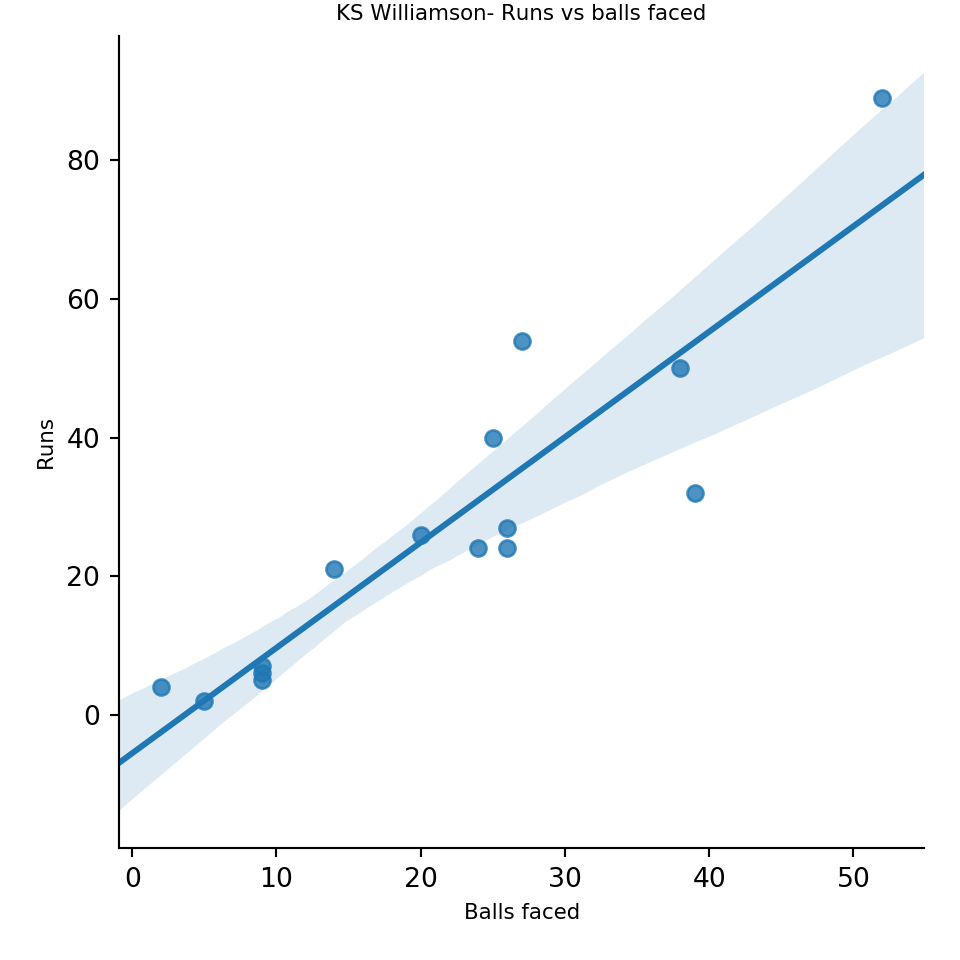
1. Statistical Learning, Prof Trevor Hastie & Prof Robert Tibesherani, Online Stanford
2. Applied Machine Learning in Python Prof Kevyn-Collin Thomson, University Of Michigan, Coursera

Conclusion

This 4th part looked at SVMs with linear and radial basis, decision trees, precision-recall tradeoff, ROC curves and AUC.

Stick around for further updates. I’ll be back!
Comments, suggestions and correction are welcome.

Also see
1. A primer on Qubits, Quantum gates and Quantum Operations
2. Dabbling with Wiener filter using OpenCV
3. The mind of a programmer
4. Sea shells on the seashore
5. yorkr pads up for the Twenty20s: Part 1- Analyzing team”s match performance

To see all posts see Index of posts