The common alphabet of programming languages

                                                                   a                                                                                    

                                    “All animals are equal, but some animals are more equal than other.”                                     “Four legs good, two legs bad.”

from Animal Farm by George Orwell

Note: This post is largely intended for those who are embarking on their journey into the world of programming. The article below highlights a set of constructs that recur in many imperative, dynamic and object-oriented languages.  While these constructs cannot be applied directly to functional programming languages like Lisp,Haskell or Clojure, it may help. To some extent the programming language domain has been intentionally oversimplified to show that languages are not as daunting as they seem. Clearly there are a  lot more subtle and complex differences among languages. Hope you have fun programming!

Introduction: Anybody who is about to venture into the deep waters of programming will be bewildered and awed by the almost limitless number of programming languages and the associated paradigms on which they are based on. It is easy to feel apprehensive of programming, when faced with this  this array of languages, not to mention the seemingly quirky syntax of each language.  Many opinions abound, about what is the best programming language. In my opinion each language is best suited for a particular class of problems and is usually clunky if used outside of this. As an aside here is an interesting link provided by reader AKS to Rosetta Code, which is stated to be a a programming chrestomathy (present solutions to the same task in as many different languages as possible, to demonstrate how languages are similar and different, and to aid a person with a grounding in one approach to a problem in learning another. Rosetta Code currently has 772 tasks, 165 draft tasks, and is aware of 582 languages)

You are likely to hear  “All programming languages are equal, but some languages are more equal than others” from seasoned programmers who have their own pet language. There may also be others who swear that “procedural languages good, object oriented languages bad” or maybe “object oriented languages good, aspect oriented languages bad”. Unity in diversity Regardless of the language this post discusses a thread that is common to all programming languages. In fact any programming language can be expressed as

Lx = C + Sx

Where Lx is any programming language ‘x’. All programming languages have a set of core, common constructs which I have denoted as ‘C’ and a set of Specialized constructs, unique to each language ‘x’ which I have denoted as Sx. I would like to look at these constructs that are common to most programming languages like C,C++,Perl, Python, Ruby, C#, R, Octave etc. In my opinion knowing these core, common constructs and a few of the more specialized constructs should allow you to get started off in the language of your choice. You can pick up the more unique constructs as you go along.   Here are the common constructs (C mentioned above) that you must familiarize yourself with when embarking on a new language

  1. Reading user input and printing to screen
  2. Reading and writing from a file
  3. Conditional statement if-then-else if-else
  4. Loops – For, while, repeat, do while etc.

Knowing these constructs and some of the basic concepts unique to each language for e.g.
– Structure, Pointers in C,
– Classes, inheritance in C++
– Subsetting in Octave, R
– car, cdr in Lisp will enable you to get started off in your chosen language.
I show the examples of these core constructs in many languages. Note the similarity between these constructs
1. C
Read from and write to console

scanf(x,”%d); printf(“The value of x is %d”, x);
Read from and write to file
fread(buffer, strlen(c)+1, 1, fp);
fwrite(c, strlen(c) + 1, 1, fp);

Conditional
if(x > 5) {
printf(“x is greater than 5”);
}
else if (x < 5)
{ printf(“x is less than 5”);
}
else{ printf(“x is equal to 5”);
}

Loops I will only consider for loops, though one could use while, repeat etC.
for(i =0; i <100; i++)
{ money = money++)
}

2. C++
Read from and write to console
cin >> age;
Cout << “The value is “ << value

Read from and write to a file // open a file in read mode.
ifstream infile;
infile.open("afile.dat");
cout << "Reading from the file" <<
endl;
infile >> data;
ofstream outfile;
outfile.open("afile.dat");
// write inputted data into the file.
outfile << data <<
endl;

Conditional same as C
if(x > 5) {
printf(“x is greater than 5”);
}

else if (x < 5) {
printf(“x is less than 5”);
}
else{ printf(“x is equal to 5”);
}

Loops
for(i =0; i <100; i++)
{ money = money++)

}

2. C++ Read from and write to console
cin >> age;
Cout << “The value is “ << value
Read from and write to a file // open a file in read mode.
ifstream infile;
infile.open("afile.dat");
cout << "Reading from the file" << endl;
infile >> data; ofstream outfile;
outfile.open("afile.dat");
// write inputted data into the file.
outfile << data << endl;
Conditional same as C
if(x > 5) {
printf(“x is greater than 5”);
}
else if (x < 5) {
printf(“x is less than 5”);
}
else{ printf(“x is equal to 5”);
}
Loops
for(i =0; i <100; i++){
money = money++)
}
3. Java
Reading from  and writing to standard input
Console c = System.console();
int val = c.readLine("Enter a value: ");
System.out.println("Value is "+ val);
Reading and writing from file
try {
in = new FileInputStream("input.txt");
out = new FileOutputStream("output.txt");
int c;
while ((c = in.read()) != -1) {
out.write(c); } } ...
Conditional (same as C)
if(x > 5) {
printf(“x is greater than 5”);
}
else if (x < 5) {
printf(“x is less than 5”);
}
else{ printf(“x is equal to 5”); }
Loops (same as C)
for(i =0; i <100; i++){
money = money++)
}

4. Perl Read from console
#!/usr/bin/perl
$userinput =  ;
chomp ($userinput);
Write to console
print "User typed $userinput\n";
Reading and write to a file
open(IN,"infile") || die "cannot open input file";
open(OUT,"outfile") || die "cannot open output file";
while() {
print OUT $_;
# echo line read
}
close(IN);
close(OUT)
Conditional
if( $a  ==  20 ){
# if condition is true then print the following
printf "a has a value which is 20\n";
}
elsif( $a ==  30 ){
# if condition is true then print the following
printf "a has a value which is 30\n";
}else{
# if none of the above conditions is true
printf "a has a value which is $a\n";
}
Loops
for (my $i=0; $i <= 9; $i++) {
print "$i\n";
}

5. Lisp
The syntax for Lisp will be different from the others as it is a functional language. You need to familiarize yourself with these constructs to move ahead
Read and write to console
To read from standard input use
(let ((temp 0))
(print ‘(Enter temp))
(setf temp (read))
(print (append ‘(the temp is) (list temp))))
Read from and write to file
(with-open-file (stream “C:\\acl82express\\lisp\\count.cl”)
(do ((line (read-line stream nil) (read-line stream nil)))
(with-open-file (stream “C:\\acl82express\\lisp\\test.txt” :direction :output :if-exists :supersede)
(write-line “test” stream) nil)
Conditional
$ (cond ((< x 5)
(setf x (+ x 8))
(setf y (* 2 y)))
((= x 10) (setf x (* x 2)))
(t (setf x 8)))
Loops
$  (setf x 5)
$ (let ((i 0))
(loop (setf y (* x i))
(when (> i 10) (return))
(print i) (prin1 y) (incf i )))

6. Python
Reading and writing from console
var = raw_input("Please enter something: ")
print “You entered: ”  value
Reading and writing from files
f = open(filename, 'r')
a = f.readline().strip()
target = open(filename, 'w')
target.write(line1)
Conditionals
if x > 5:
print "x is greater than 5”
elif
x < 5:
print "x is less than 5"
else:
print "x is equal to 5"
Loops
for i in range(0, 6):
print "Value is :" % i 7.

R
x=5
paste('The value of x is =',x)
Reading and writing to a file
infile = read.csv(“file”)
write(x, file = "data", sep = " ")
Conditional
if(x > 5){
print(“x is greater than 5”) 
}else if(x < 5){
print(“x is less than 5”) 
}else {
print(“x is equal to 5”)
}
Loops
for (i in 1:10) print(i)

Conclusion
As can be seen the core constructs are very similar in different languages save for some minor variations. It is generally useful to get started with just knowing these constructs and few other important other features  of the language that you are trying to learn. It is possible to code most programs with these Core constructs and a few of the Specialized constructs in the language. These Core constructs are the glue that hold your code together.

You can learn more compact and more powerful features of the language as you go along The above core constructs are like the letters of the programming language alphabet. You need to construct words by stringing together these constructs and form sensible sentences which will be your program. Good luck with your adventure in your next new programming language!!!

Also see
1.Programming languages in layman’s language
2. The mind of the programmer
3. How to program – Some essential tips
4. Programming Zen and now – Some essential tips -2 

You may also like
1. A crime map of India in R: Crimes against women
2.  What’s up Watson? Using IBM Watson’s QAAPI with Bluemix, NodeExpress – Part 1
3.  Bend it like Bluemix, MongoDB with autoscaling – Part 2
4. Informed choices through Machine Learning : Analyzing Kohli, Tendulkar and Dravid
5. Thinking Web Scale (TWS-3): Map-Reduce – Bring compute to data
6. Deblurring with OpenCV:Weiner filter reloaded

Mirror, mirror … the best batsman of them all?

“Full many a gem of purest serene
The dark oceans of cave bear.”
Thomas Gray – Elegy in country churchyard

In this post I do a fine grained analysis of the batting performances of cricketing icons from India and also from the international scene to determine how they stack up against each other.  I perform 2 separate analyses 1) Between Indian legends (Sunil Gavaskar, Sachin Tendulkar & Rahul Dravid) and another 2) Between contemporary cricketing stars (Brian Lara, Sachin Tendulkar, Ricky Ponting and A B De Villiers)

In the world and more so in India, Tendulkar is probably placed on a higher pedestal than all other cricketers. I was curious to know how much of this adulation is justified. In “Zen and the art of motorcycle maintenance” Robert Pirsig mentions that while we cannot define Quality (in a book, music or painting) we usually know it when we see it. So do the people see an ineffable quality in Tendulkar or are they intuiting his greatness based on overall averages?

In this context, we need to keep in mind the warning that Daniel Kahnemann highlights in his book, ‘Thinking fast and slow’. Kahnemann suggests that we should regard “statistical intuition with proper suspicion and replace impression formation by computation wherever possible”. This is because our minds usually detects patterns and associations  even when none actually exist.

So this analysis tries to look deeper into these aspects by performing a detailed statistical analysis.

The data for all the batsman has been taken from ESPN Cricinfo. The data is then cleaned to remove ‘DNB’ (did not bat), ‘TDNB’ (Team did not bat) etc before generating the graphs.

The code, data and the plots can be cloned,forked from Github at the following link bestBatsman. You should be able to use the code as-is for any other batsman you choose to.

Feel free to agree, disagree, dispute or argue with my analysis.

If you are passionate about cricket, and love analyzing cricket performances, then check out my 2 racy books on cricket! In my books, I perform detailed yet compact analysis of performances of both batsmen, bowlers besides evaluating team & match performances in Tests , ODIs, T20s & IPL. You can buy my books on cricket from Amazon at $12.99 for the paperback and $4.99/$6.99 respectively for the kindle versions. The books can be accessed at Cricket analytics with cricketr  and Beaten by sheer pace-Cricket analytics with yorkr  A must read for any cricket lover! Check it out!!

1


Important note: Do check out the python avatar of cricketr, ‘cricpy’ in my post ‘Introducing cricpy:A python package to analyze performances of cricketers

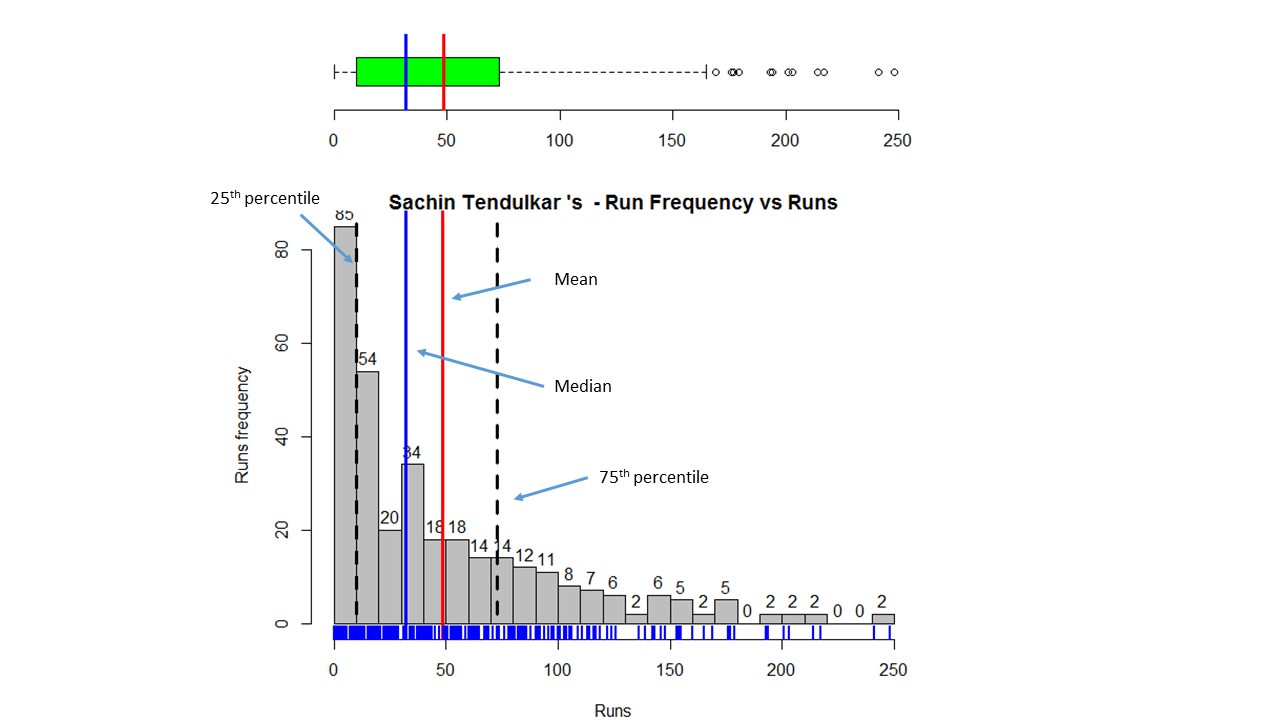
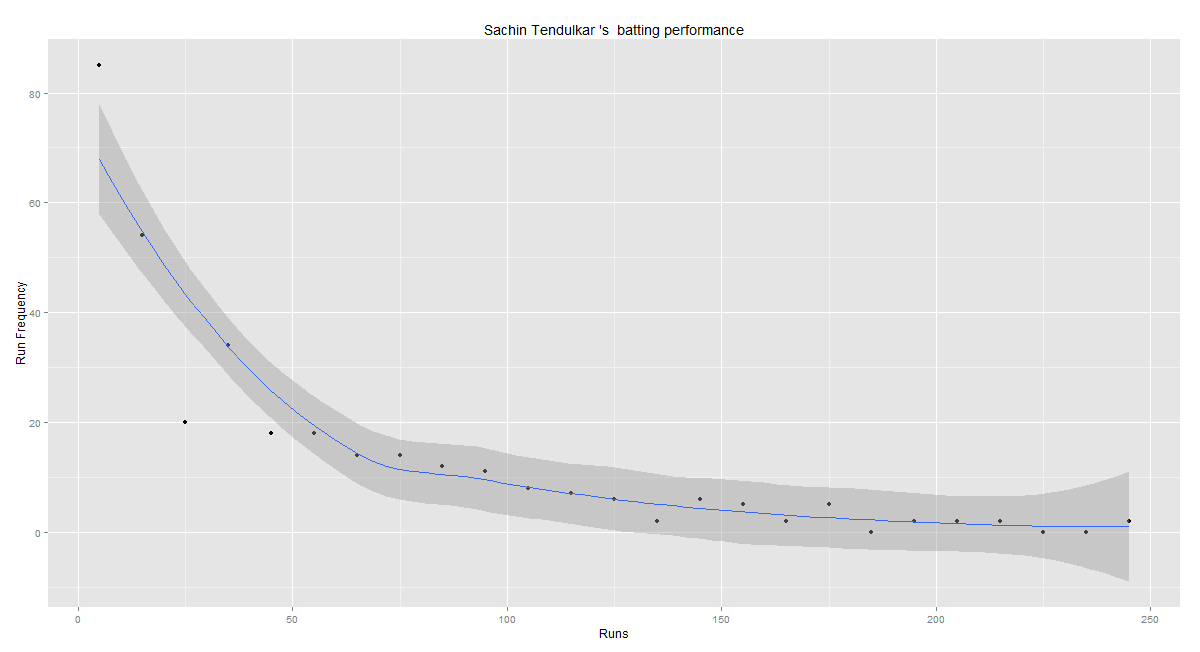
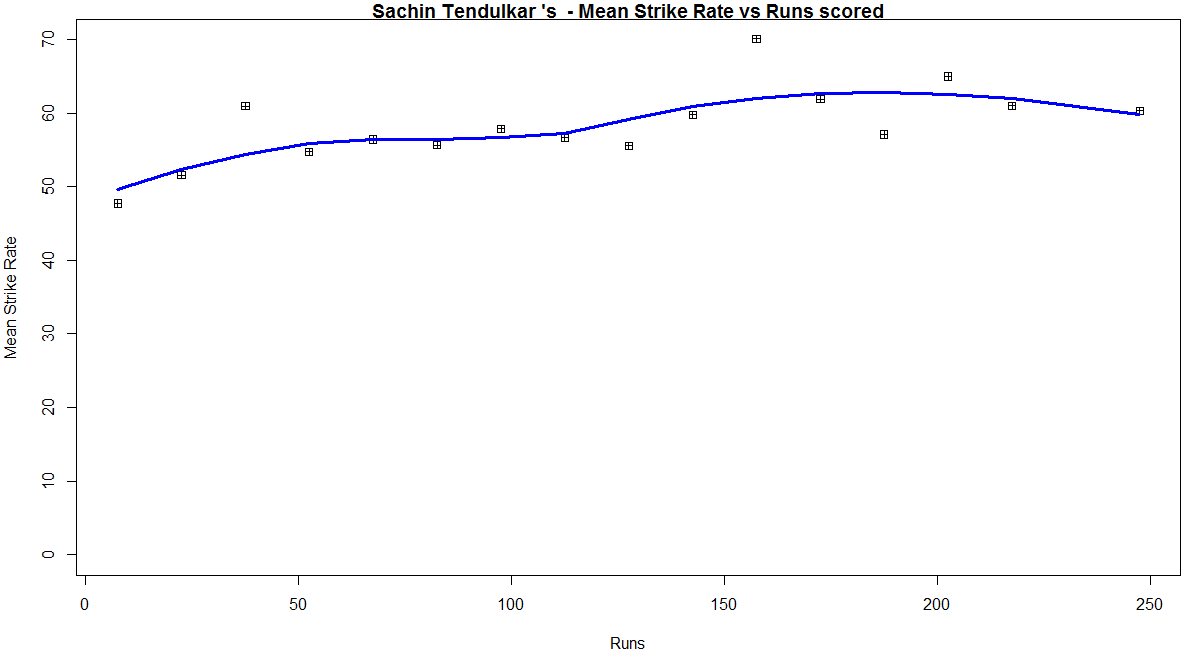
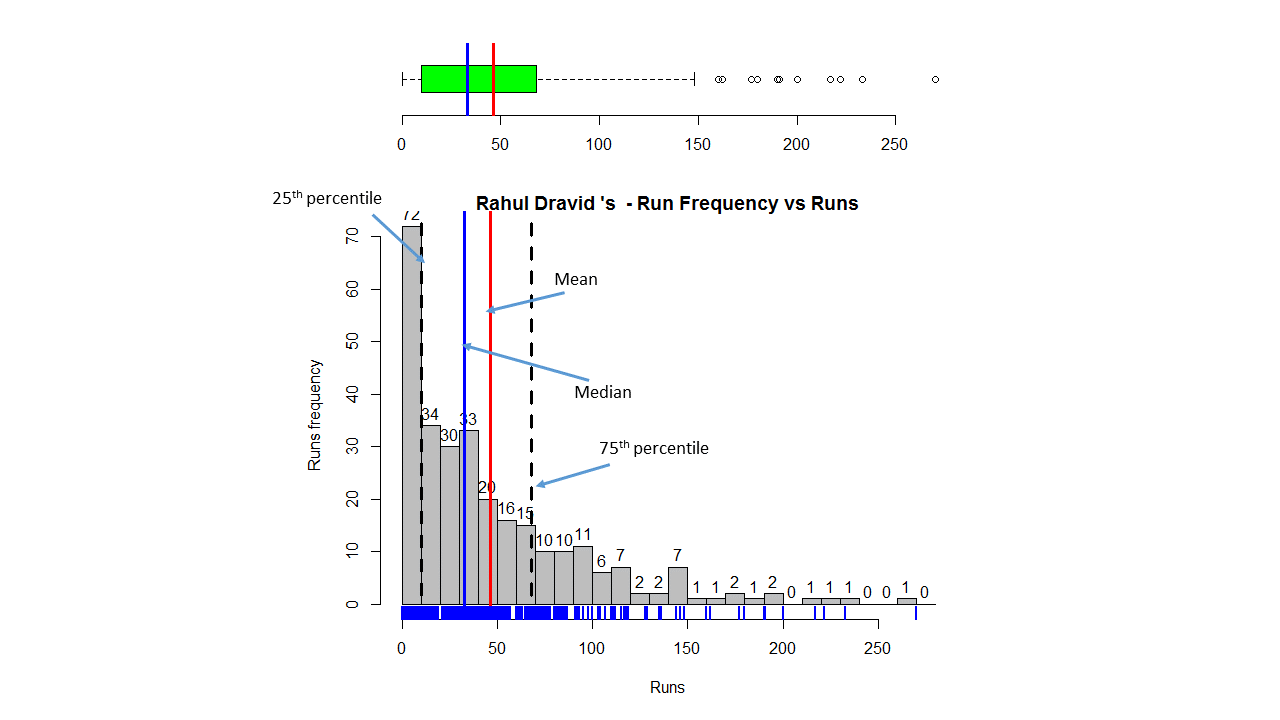
The batting performances of the each of the cricketers is described in 3 plots a) Combined boxplot & histogram b) Runs frequency vs Runs plot c) Mean Strike Rate vs Runs plot

A) Batting performance of Sachin Tendulkar

a) Combined Boxplot and histogram of runs scored
srt-boxhist1

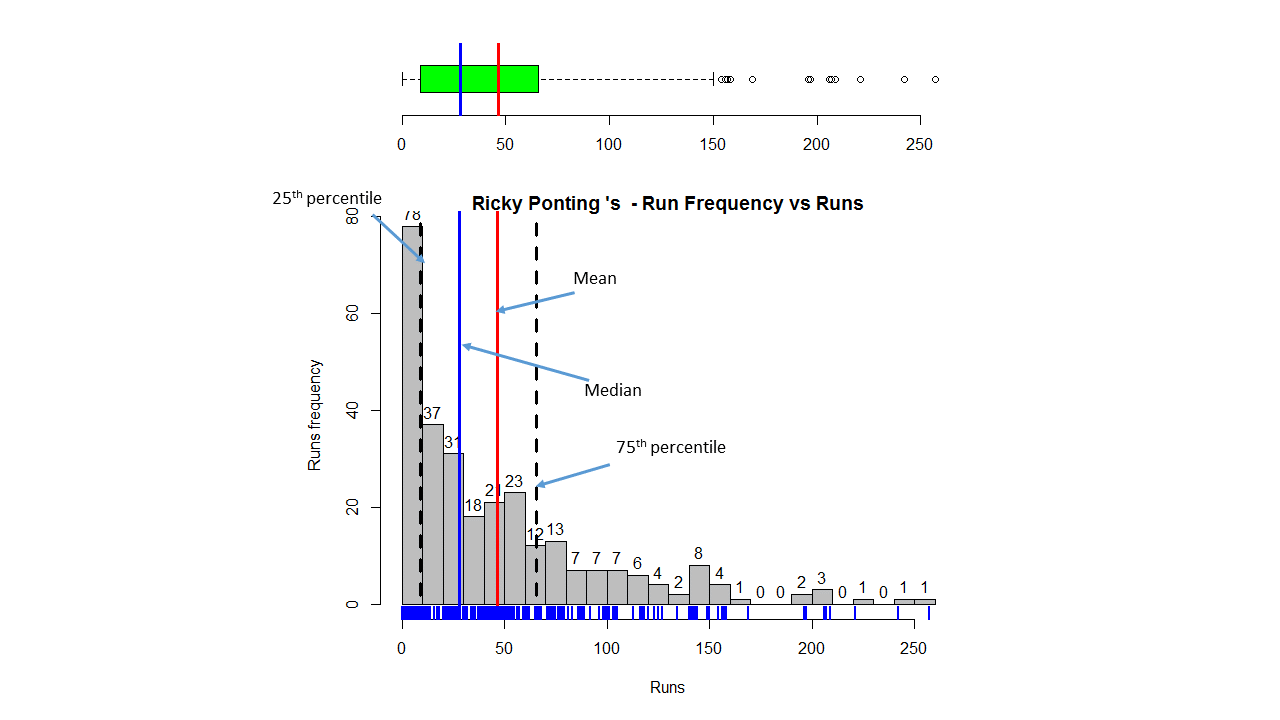
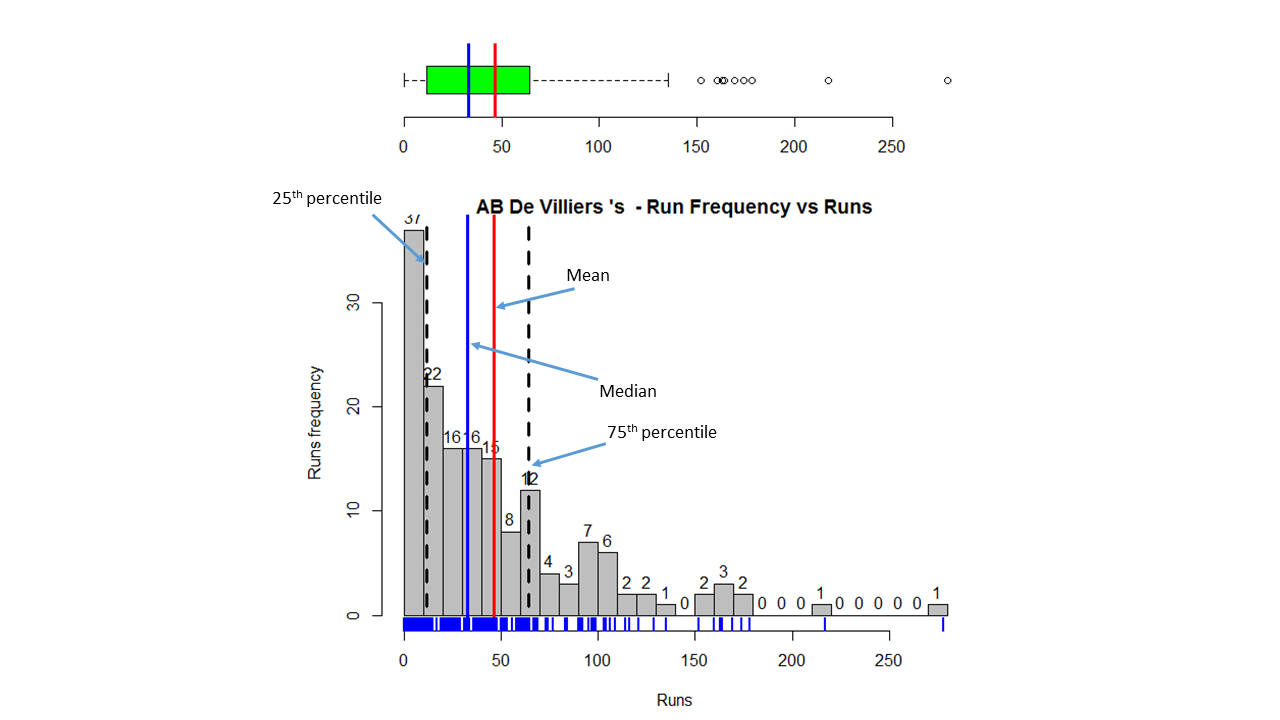
The above graph is combined boxplot and a histogram. The boxplot at the top shows the 1st quantile (25th percentile) which is the left side of the green rectangle, the 3rd quantile( 75% percentile) right side of the green rectangle and the mean and the median. These values are also shown in the histogram below. The histogram gives the frequency of Runs scored in the given range for e.g (0-10, 11-20, 21-30 etc) for Tendulkar

b) Batting performance – Runs frequency vs Runs
srt-perf

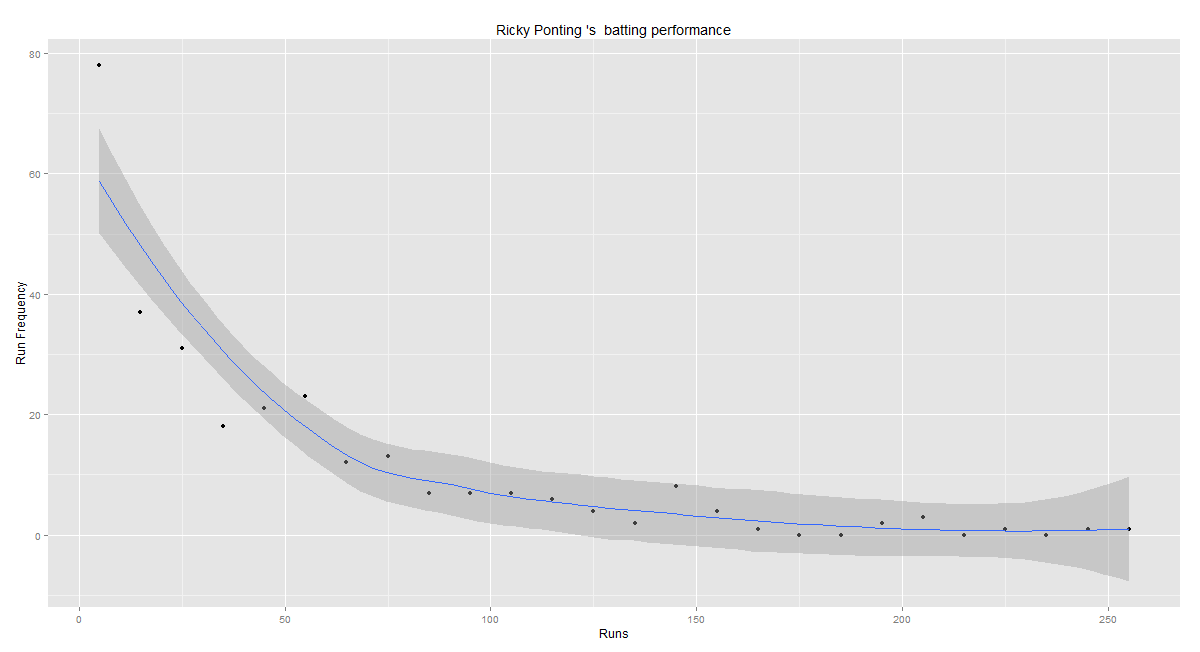
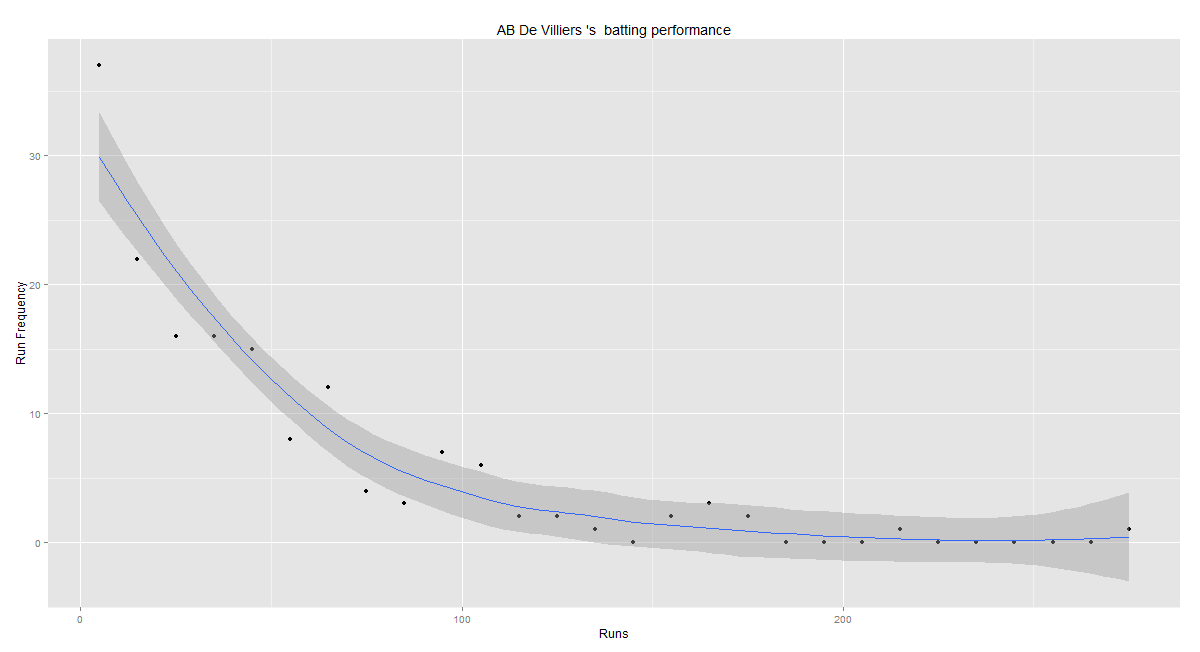
The graph above plots the  best fitting curve for Runs scored in the frequency ranges.

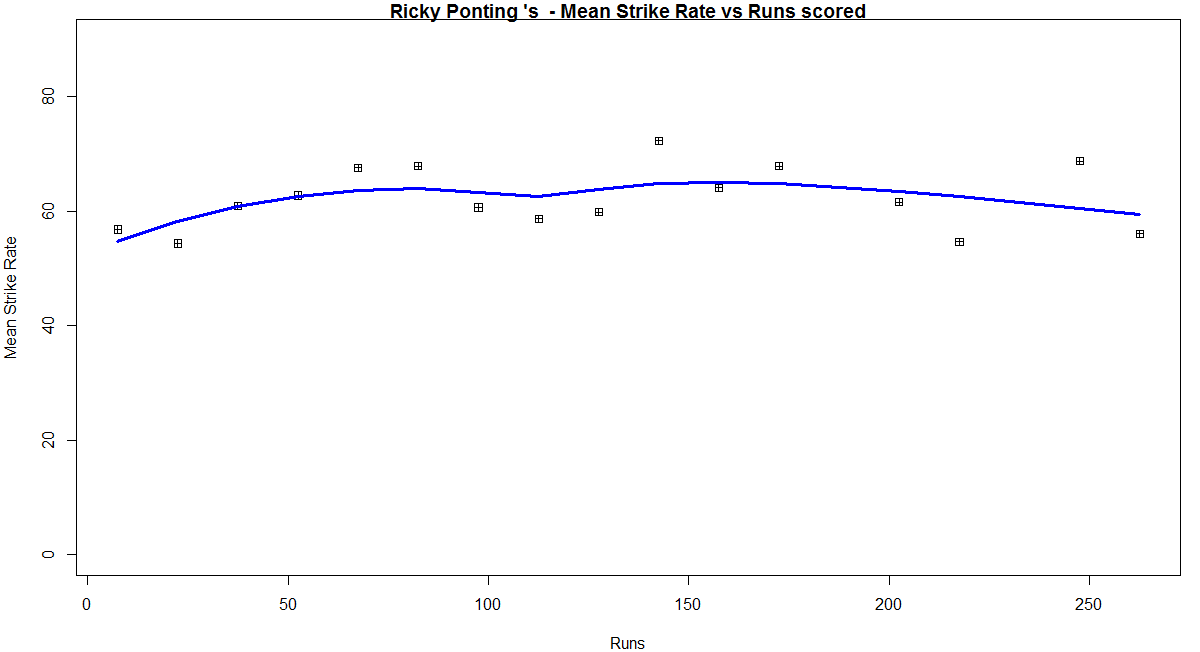
c) Mean Strike Rate vs Runs
srt-sr

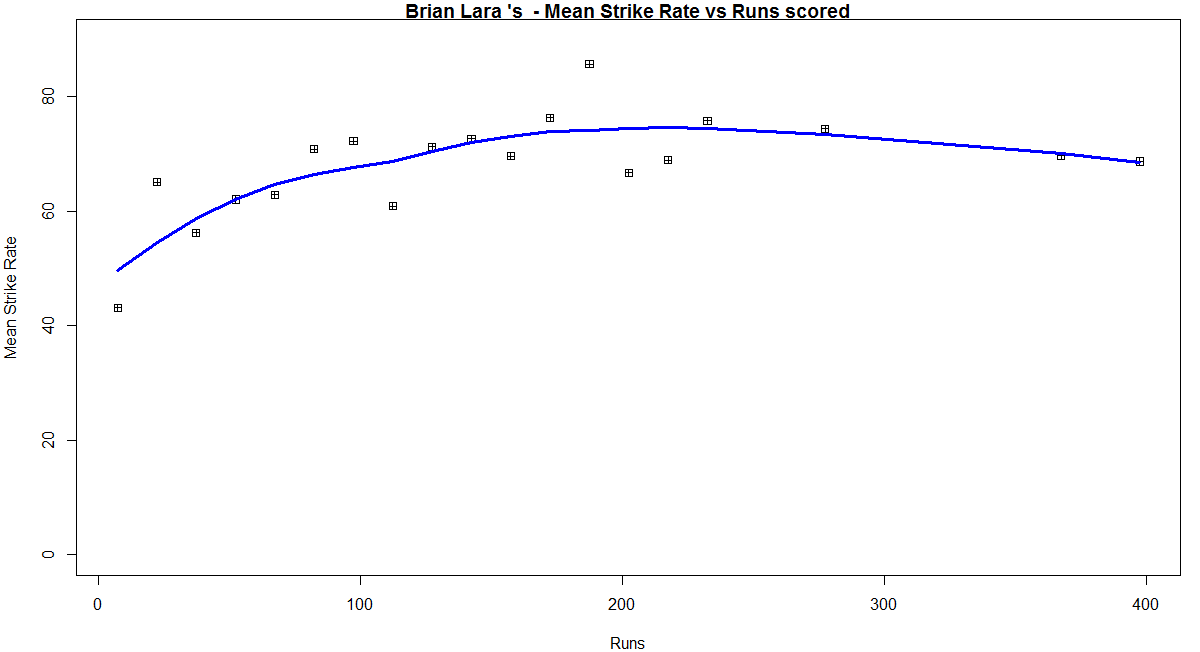
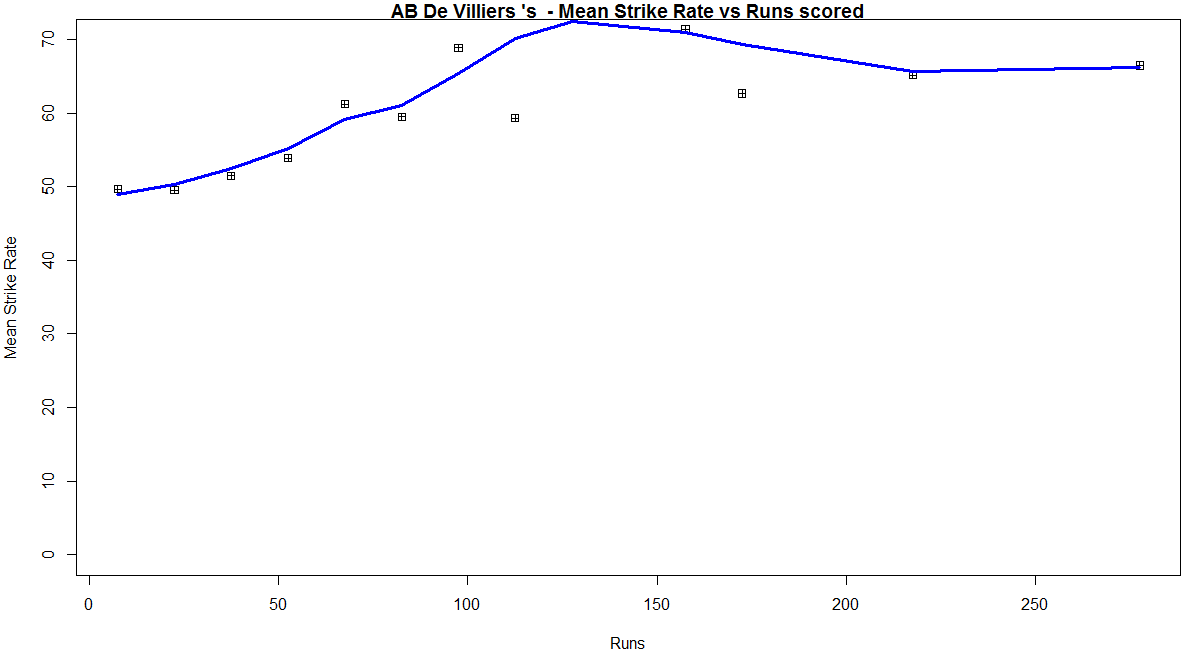
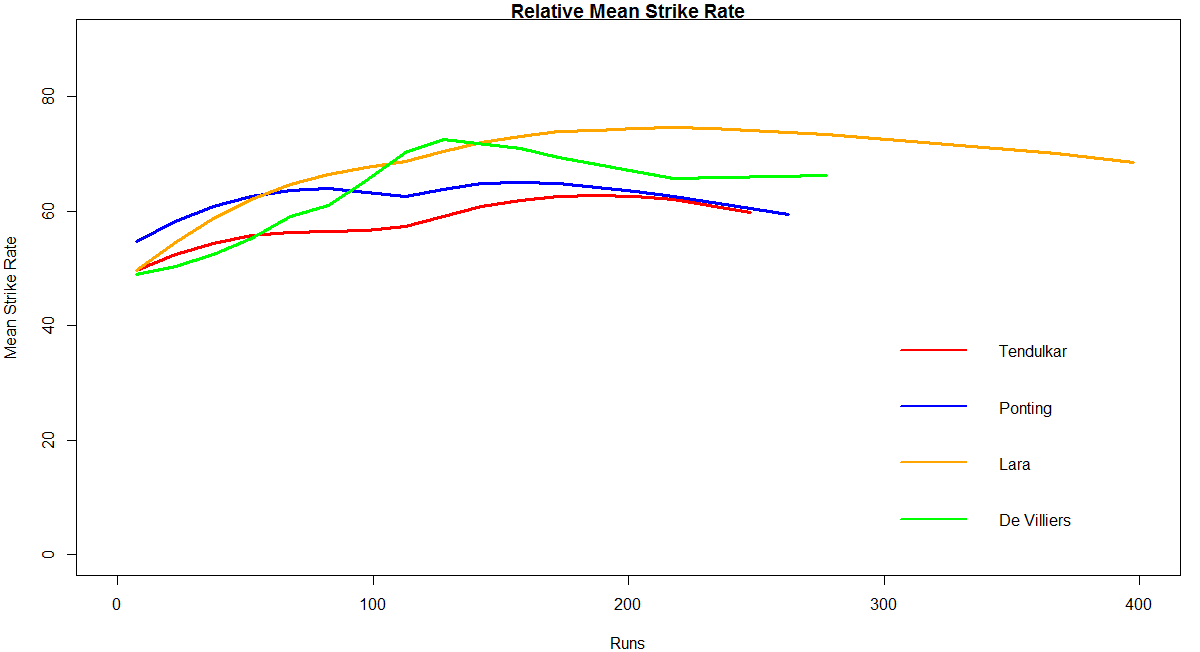
This plot computes the Mean Strike Rate for each interval for e.g if between the ranges 11-21 the Strike Rates were 40.5, 48.5, 32.7, 56.8 then the average of these values is computed for the range 11-21 = (40.5 + 48.5 + 32.7 + 56.8)/4. This is done for all ranges and the Mean Strike Rate in each range is plotted and the loess curve is fitted for this data.

B) Batting performance of Rahul Dravid
a) Combined Boxplot and histogram of runs scored
dravid-boxhist1

The mean, median, the 25th and 75 th percentiles for the runs scored by Rahul Dravid are shown above

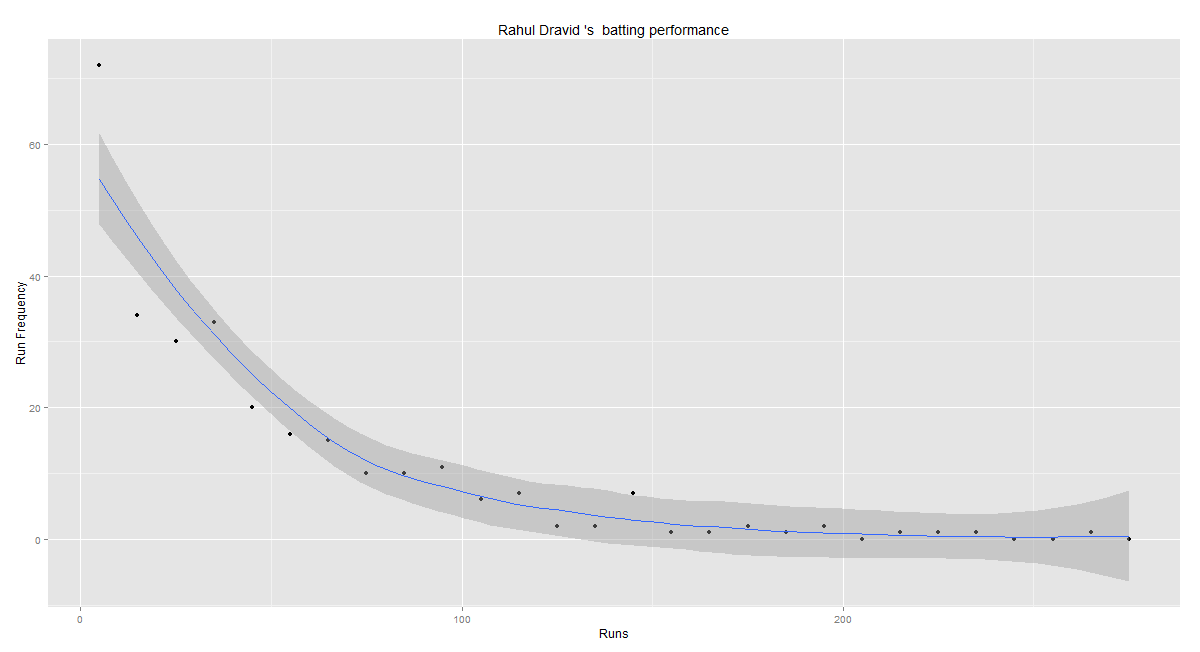
b) Batting performance – Runs frequency vs Runs
dravid-perf

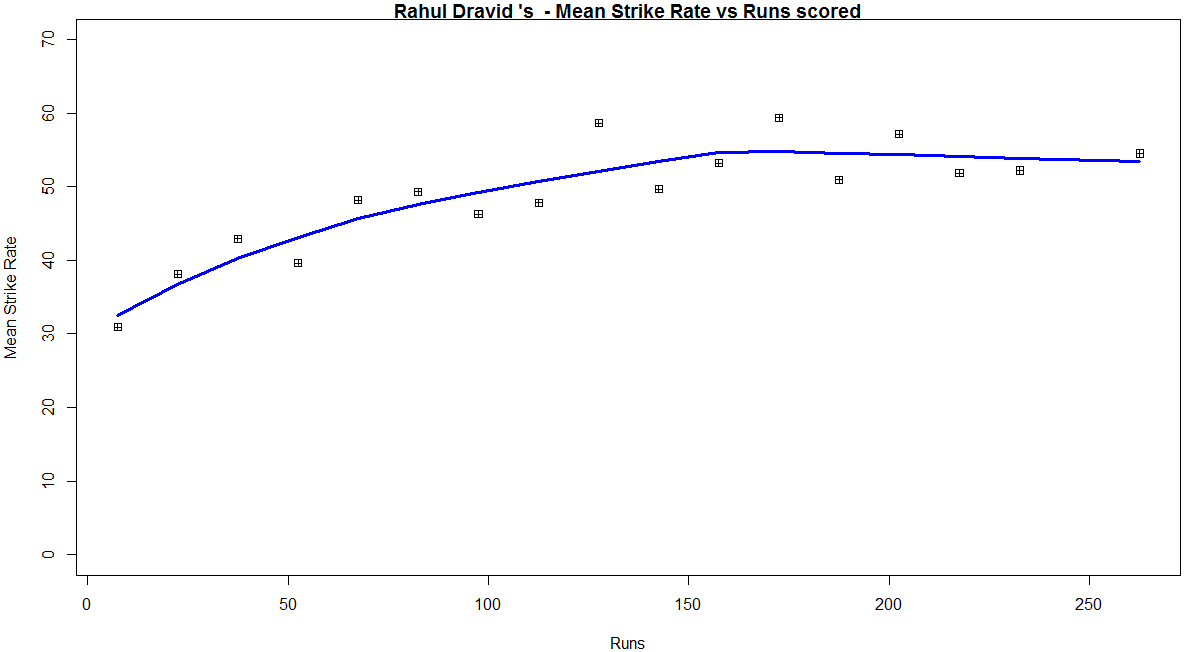
c) Mean Strike Rate vs Runs
dravid-sr

C) Batting performance of Sunil Gavaskar
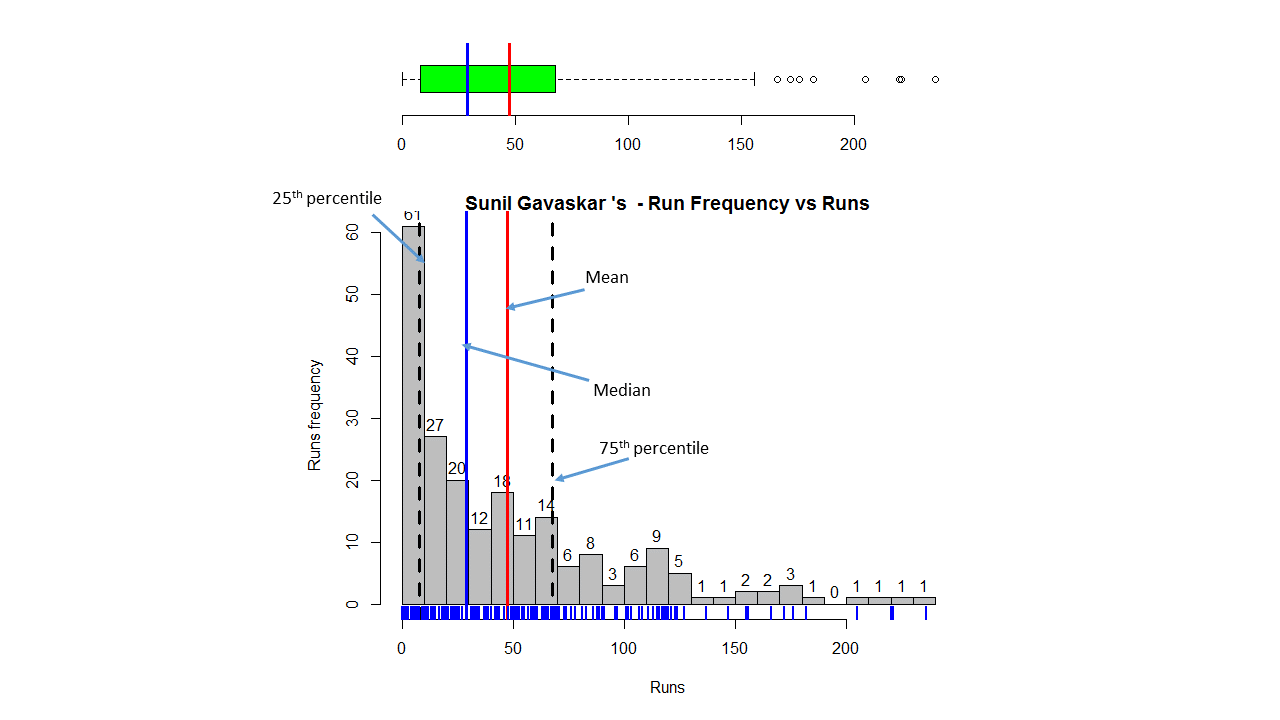
a) Combined Boxplot and histogram of runs scored
gavaskar-boxhist1

The mean, median, the 25th and 75 th percentiles for the runs scored by Sunil Gavaskar are shown above
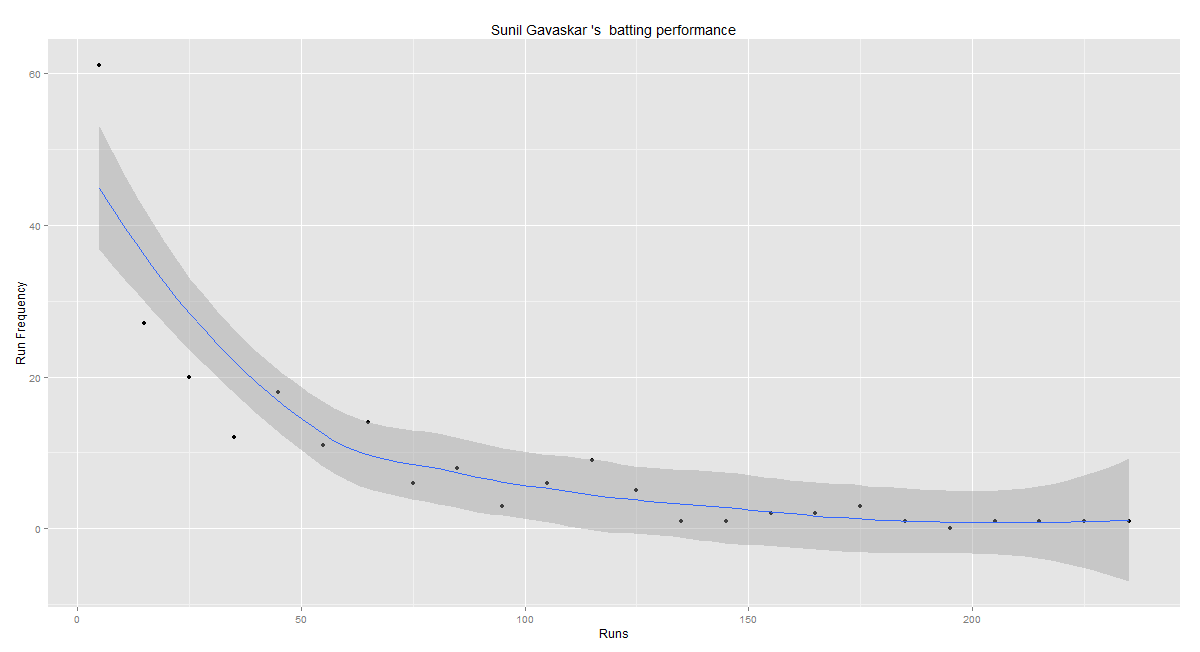
b) Batting performance – Runs frequency vs Runs
gavaskar-perf

c) Mean Strike Rate vs Runs
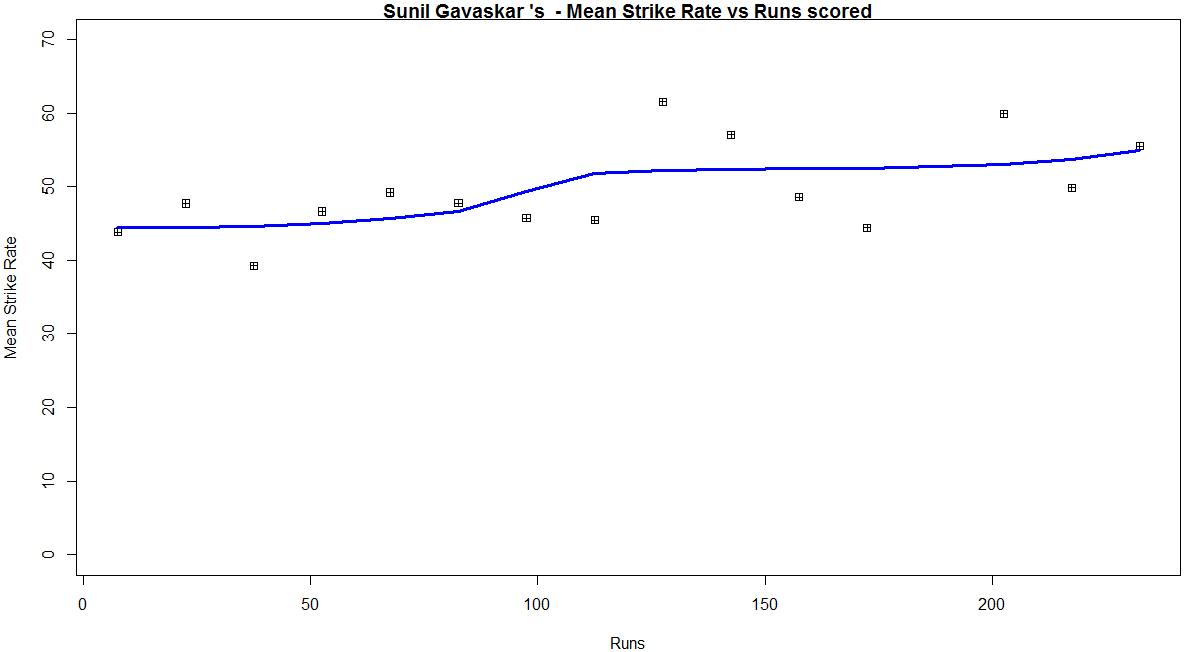
gavaskar-sr
D) Relative performances of Tendulkar, Dravid and Gavaskar
relative-perf1

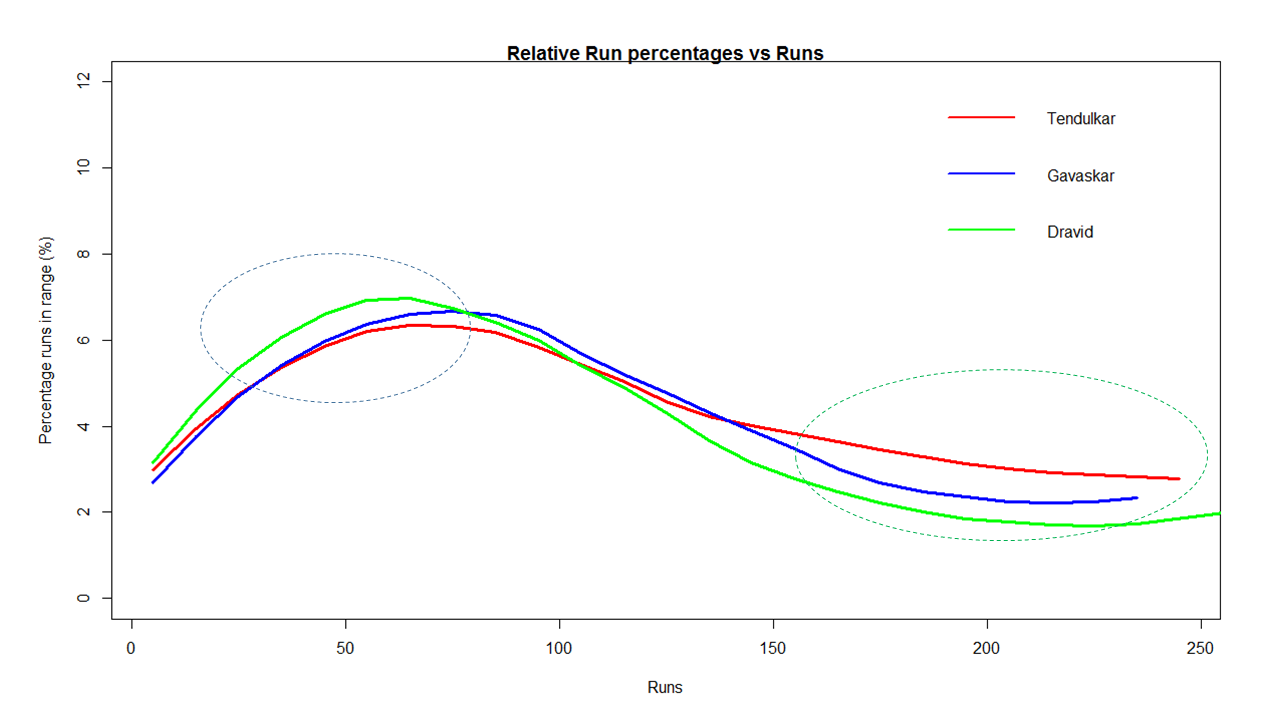
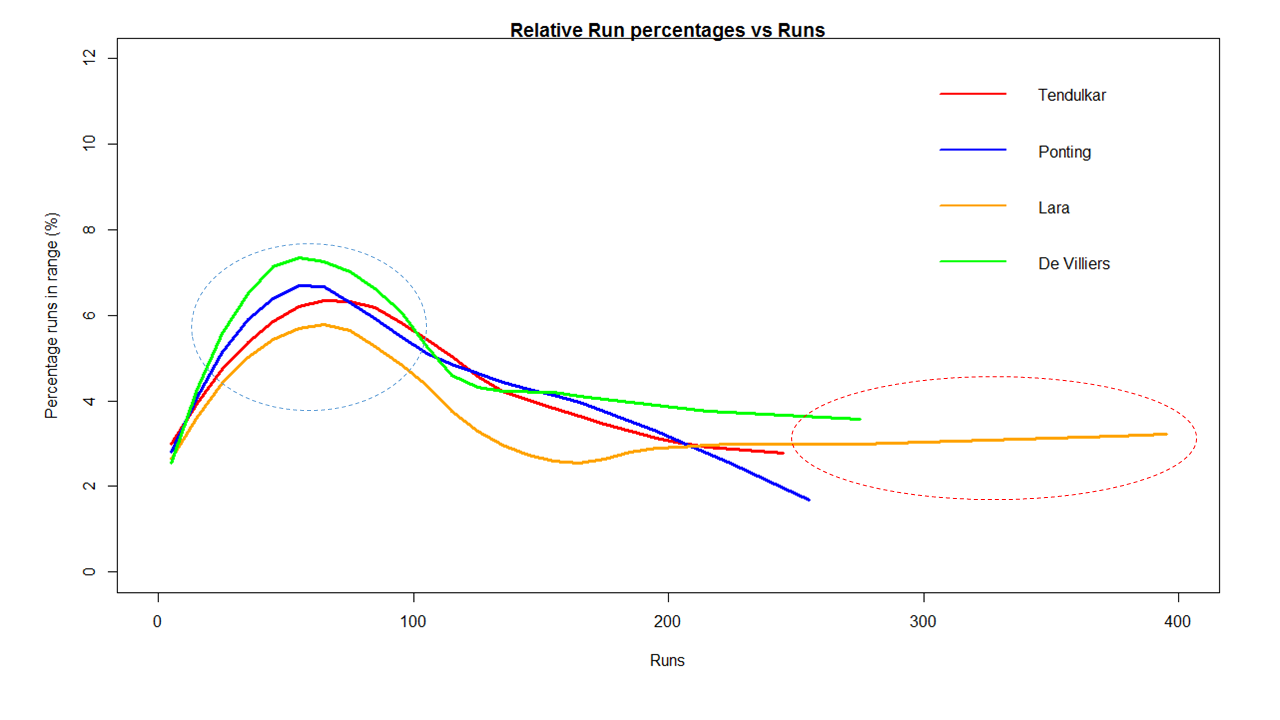
The above plot computes the percentage of the total career runs scored in a given range for each of the batsman.
For e.g if Dravid scored the runs 23, 22, 28, 21, 25 in the range 21-30 then the
Range 21 – 20 => percentageRuns = ( 23 + 22 + 28 + 21 + 25)/ Total runs in career * 100
The above plot shows that Rahul Dravid’s has a higher contribution in the range 20-70 while Tendulkar has a larger percentahe in the range 150-230

E) Relative Strike Rates of Tendulkar, Dravid and Gavaskar
relative-SR

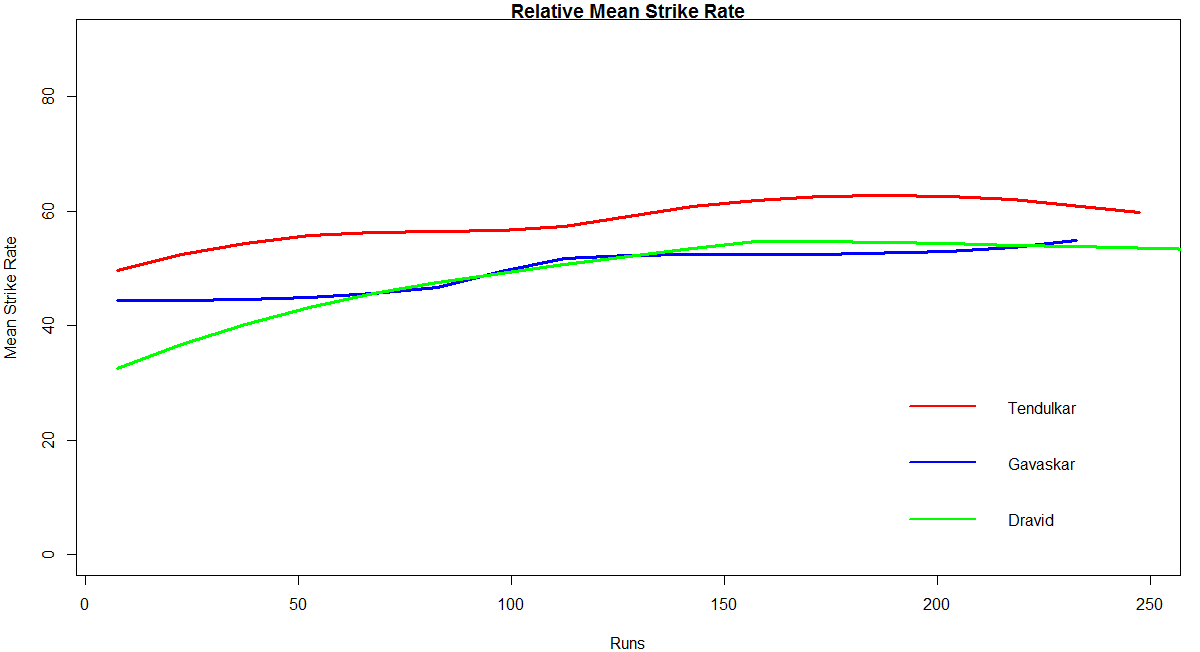
With respect to the Mean Strike Rate Tendulkar is clearly superior to both Gavaskar & Dravid

F) Analysis of Tendulkar, Dravid and Gavaskar
rel-perf1

The above table captures the the career details of each of the batsman
The following points can be noted
1) The ‘number of innings’ is the data you get after removing rows with DNB, TDNB etc
2) Tendulkar has the higher average 48.39 > Gavaskar (47.3) > Dravid (46.46)
3) The skew of  Dravid (1.67) is greater which implies that there the runs scored are more skewed to right (greater runs) in comparison to mean

G) Batting performance of Brian Lara
a) Combined Boxplot and histogram of runs scored
lara-boxhist1
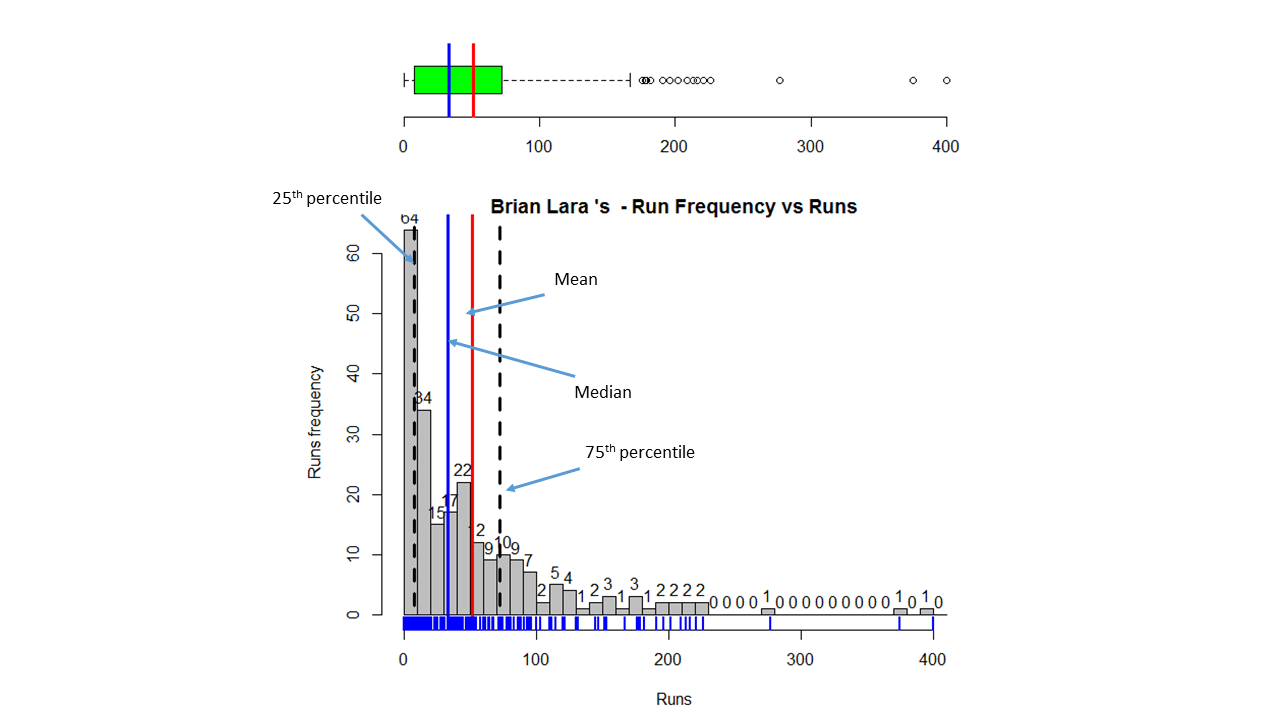
The mean, median, 1st and 3rd quartile are shown above

b) Batting performance – Runs frequency vs Runs
lara-perf

c) Mean Strike Rate vs Runs
lara-sr

H) Batting performance of Ricky Ponting
a) Combined Boxplot and histogram of runs scored
ponting-boxhist1

b) Batting performance – Runs frequency vs Runs
ponting-perf

c) Mean Strike Rate vs Runs
ponting-SR

I) Batting performance of AB De Villiers
a) Combined Boxplot and histogram of runs scored
devilliers-boxhist1

b) Batting performance – Runs frequency vs Runs
devillier-perf

c) Mean Strike Rate vs Runs
devilliers-SR

J) Relative performances of Tendulkar, Lara, Ponting and De Villiers
relative-perf-intl1

Clearly De Villiers is ahead in the percentage Runs scores in the range 30-80. Tendulkar is better in the range between 80-120. Lara’s career has a long tail.

K) Relative Strike Rates of Tendulkar, Lara, Ponting and De Villiers
relative-SR-intl

The Mean Strike Rate of Lara is ahead of the lot, followed by De Villiers, Ponting and then Tendulkar
L) Analysis of Tendulkar, Lara, Ponting and De Villiers
rel-perf-intl1
The following can be observed from the above table
1) Brian Lara has the highest average (51.52) > Sachin Tendulkar (48.39 > Ricky Ponting (46.61) > AB De Villiers (46.55)
2) Brian Lara also the highest skew which means that the data is more skewed to the right of the mean than the others

You can clone the code rom Github at the following link bestBatsman. You should be able to use the code as-is for any other batsman you choose to.

Also see
1. Informed choices through Machine Learning : Analyzing Kohli, Tendulkar and Dravid
2. Informed choices through Machine Learning-2: Pitting together Kumble, Kapil, Chandra
3. Analyzing cricket’s batting legends – Through the mirage with R
4. Masters of spin – Unraveling the web with R

You may also like
1. A peek into literacy in India:Statistical learning with R
2. A crime map of India in R: Crimes against women
3.  What’s up Watson? Using IBM Watson’s QAAPI with Bluemix, NodeExpress – Part 1
4.  Bend it like Bluemix, MongoDB with autoscaling – Part 2

Masters of Spin: Unraveling the web with R

Here is a look at some of the masters of spin bowling in cricket. Specifically this post analyzes 3 giants of spin bowling in recent times, namely Shane Warne of Australia, Muthiah Muralitharan of Sri Lanka and our very own Anil Kumble of India.  As to “who is the best leggie” has been a hot topic in cricket in recent years.  As in my earlier post “Analyzing cricket’s batting legends: Through the mirage with R”, I was not interested in gross statistics like most wickets taken.

In this post I try to analyze how each bowler has performed over his entire test career. All bowlers have bowled around ~240 innings. All  other things being equal, it does take a sense to look a little deeper into what their performance numbers reveal about them. As in my earlier posts the data has been taken from ESPN CricInfo’s Statguru

If you are passionate about cricket, and love analyzing cricket performances, then check out my 2 racy books on cricket! In my books, I perform detailed yet compact analysis of performances of both batsmen, bowlers besides evaluating team & match performances in Tests , ODIs, T20s & IPL. You can buy my books on cricket from Amazon at $12.99 for the paperback and $4.99/$6.99 respectively for the kindle versions. The books can be accessed at Cricket analytics with cricketr  and Beaten by sheer pace-Cricket analytics with yorkr  A must read for any cricket lover! Check it out!!

1

acks), and $4.99/Rs 320 and $6.99/Rs448 respectively

Important note: Do check out the python avatar of cricketr, ‘cricpy’ in my post ‘Introducing cricpy:A python package to analyze performances of cricketers

I have chosen these 3 spinners for the following reasons

Shane Warne : Clearly a deadly spinner who can turn the ball at absurd angles
Muthiah Muralitharan : While controversy dogged Muralitharan he was virtually unplayable on many cricketing venues
Anil Kumble: A master spinner whose chess like strategy usually outwitted the best of batsmen.

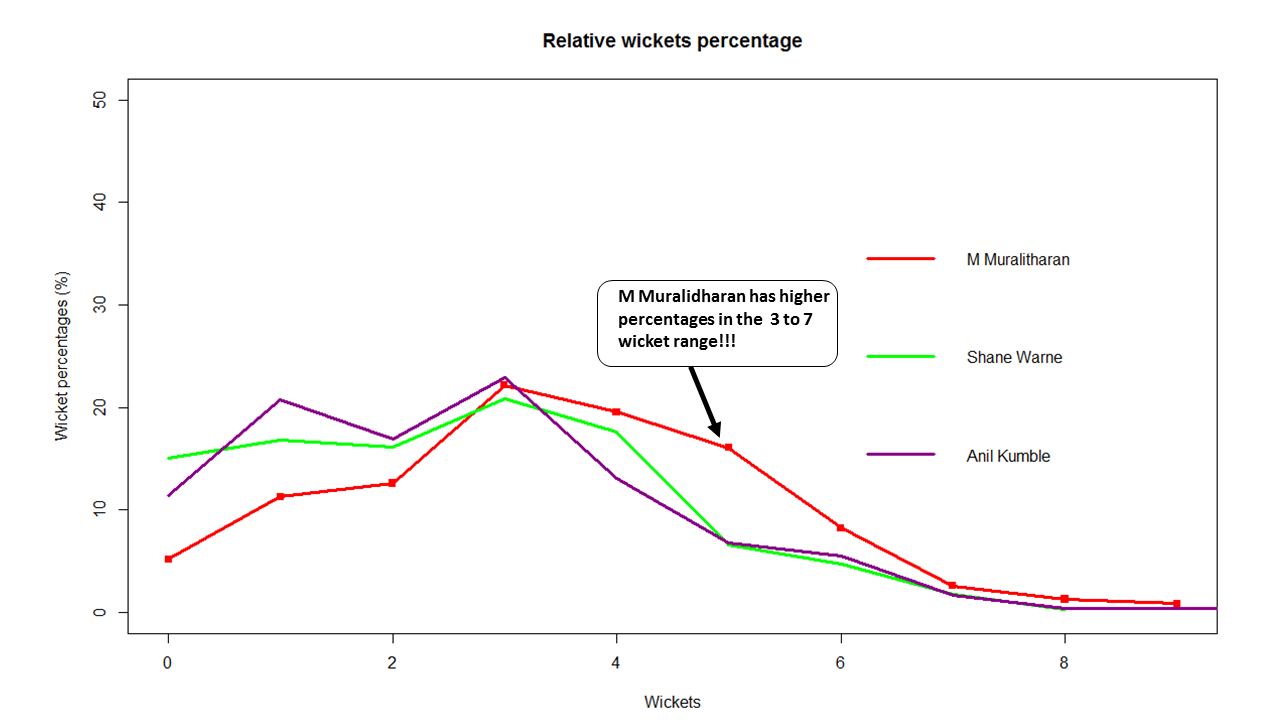
The King of Spin according to my analysis below is clearly Muthiah Muralitharan. This is clearly shown in the final charts where the performances of bowlers are plotted on a single graph. Muralitharan is clearly a much more lethal bowler and has a higher strike rate. In addition Muralitharan has the lowest mean economy rate amongst the 3 for wickets in the range 3 to 7.  Feel free to add your own thoughts, comments and dissent.

The code for this implementation is available at GitHub at mastersOfSpin. Feel free to clone,fork or hack the code to your own needs. You should be able to use the code as-is on other bowlers with little or no modification

So here goes

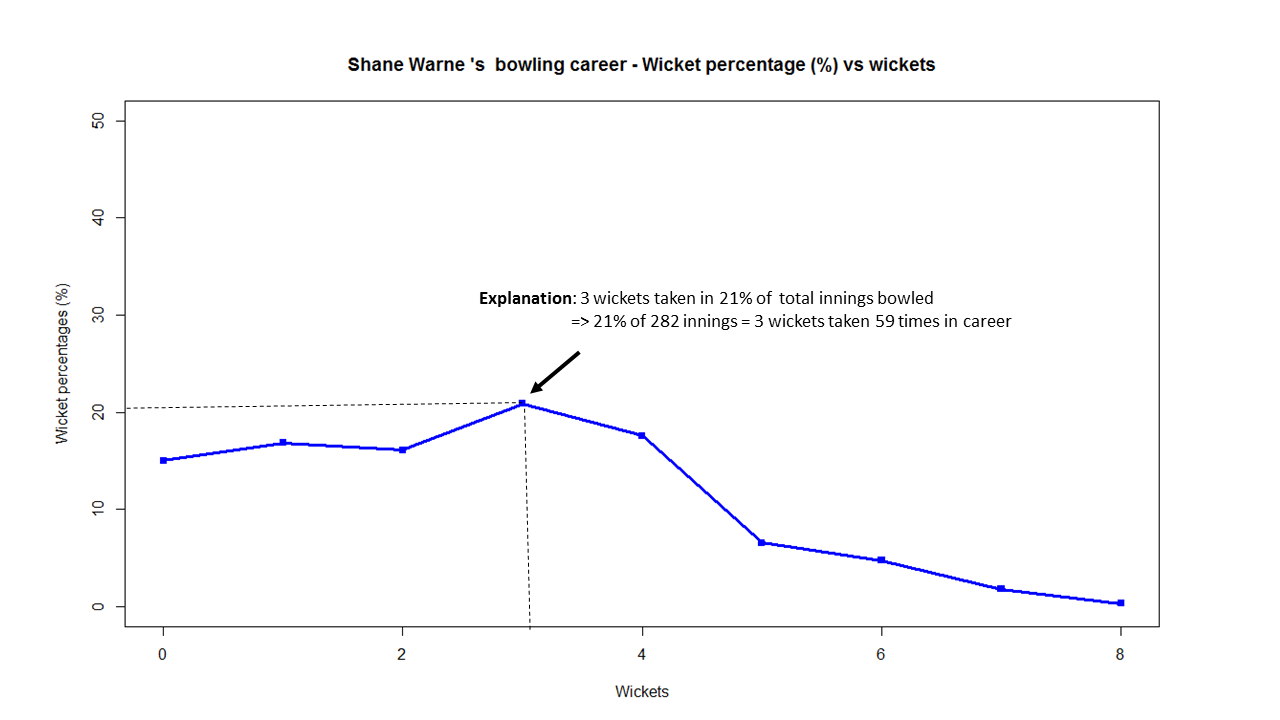
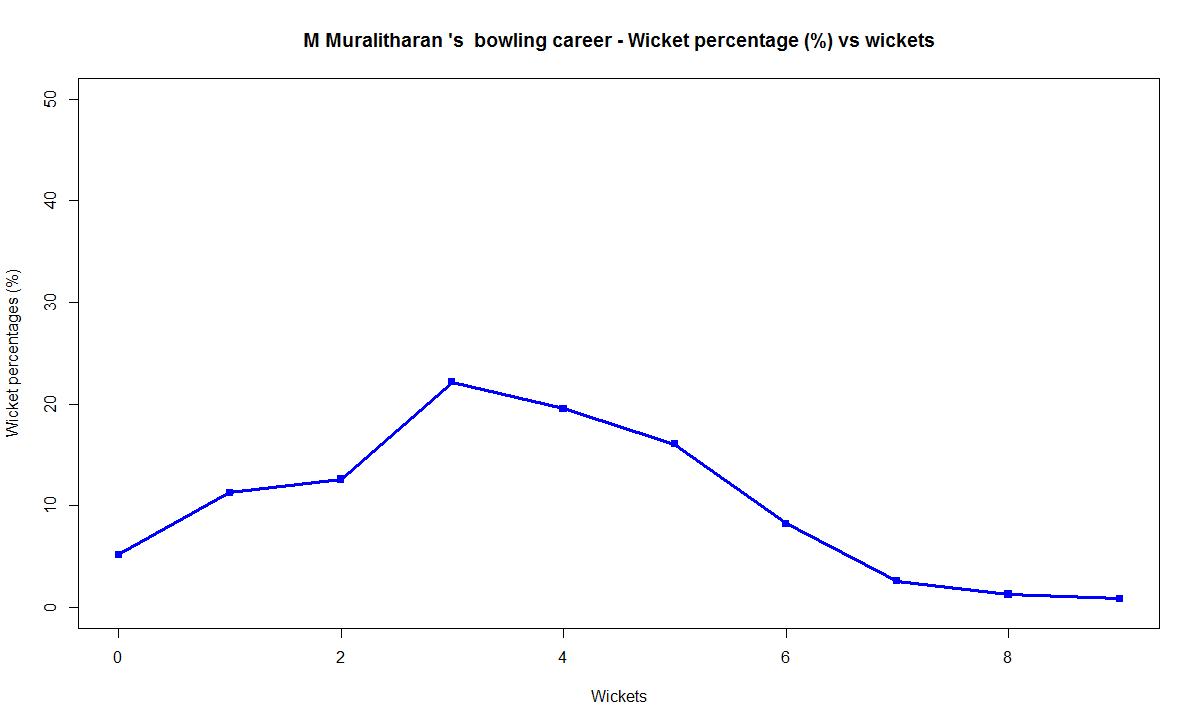
Wickets frequency percentage vs Wickets plot
For this plot I determine how frequently the bowler takes ‘n’ wickets in his career and calculate the percentage over his entire career.  In other words this is done as follows in R

# Create a table of Wickets vs the frequency of the wickts
colnames(wktsDF) # Calculate wickets percentage
wktsDF$freqPercent

and plot this as a graph.

This is shown for Warne below
1) Shane Warne –  Wickets Frequency percentage vs Wickets plot

warne-wkts-1

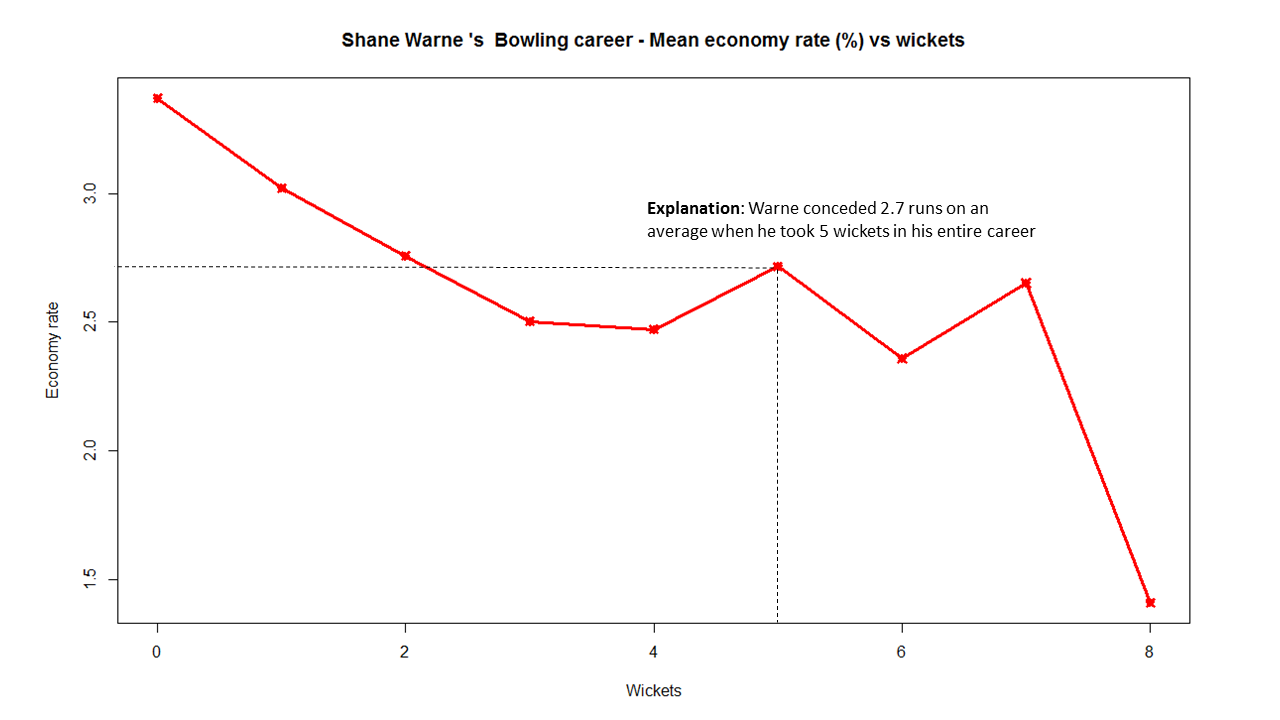
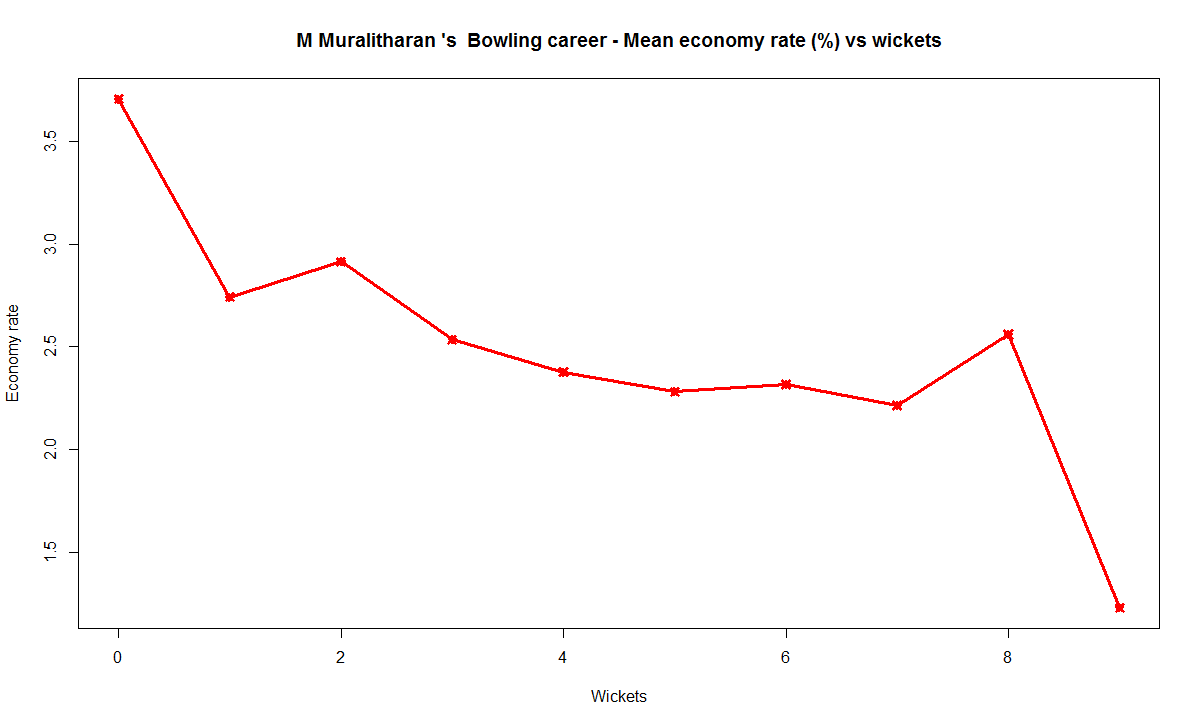
Wickets – Mean Economy rate chart
This chart plots the mean economy rate for ‘n’ wickets for the bowler. As an example to do this for 3 wickets for Shane Warne, a list is created of economy rates when Warne has taken  3 wickets in his entire career. The average of this list is then computed and stored against Warne’s 3 wickets. This is done for all wickets taken in Warne’s career. The R snippet for this implementation is shown below

econRate for (i in 0: max(as.numeric(as.character(bowler$Wkts)))) {
# Create a vector of Economy rate  for number of wickets 'i'
a b # Compute the mean economy rate by using lapply on the list
econRate[i+1] print(econRate[i])
}

Shane Warne –  Wickets vs Mean Economy rate
This plot for Shane Warne is shown below

warne-er-1

The plots for M Muralithan and Anil Kumble are included below

2) M Muralitharan – Wickets Frequency percentage vs Wickets plot
murali-wkts

M Muralitharan – Wickets vs Mean Economy rate

murali-er

3) Anil Kumble – Wickets Frequency percentage vs Wickets plot
kumble-wkts

Anil Kumble – Wickets vs Mean Economy rate
kumble-er

Finally the relative performance of the bowlers is generated by creating a single chart where the wicket frequencies and the mean economy rate vs wickets is plotted.

This is shown below

Relative wicket percentages
relative-wkts-pct-1

Relative mean economy rate
relative-er-1

As can be seen in the above 2 charts M Muralidharan not only has a higher strike rate as far as wickets in 3 to 7 range, he also has a much lower mean economy rate

You can clone/fork the R code from GitHub at mastersOfSpin

Conclusion: The performance of Muthiah Muralitharan is clearly superior to both Shane Warne and Kumble. In my opinion the king of spin is M Muralitharan, followed by Shane Warne and finally Anil Kumble

Feel free to dispute my claims. Comments, suggestions are more than welcome

Also see

1. Informed choices through Machine Learning : Analyzing Kohli, Tendulkar and Dravid
2. Informed choices through Machine Learning-2: Pitting together Kumble, Kapil, Chandra
3. Analyzing cricket’s batting legends – Through the mirage with R

You may also like
1. A peek into literacy in India:Statistical learning with R
2. A crime map of India in R: Crimes against women
3.  What’s up Watson? Using IBM Watson’s QAAPI with Bluemix, NodeExpress – Part 1
4.  Bend it like Bluemix, MongoDB with autoscaling – Part 2

Analyzing cricket’s batting legends – Through the mirage with R

In this post I do a deep dive into the records of the all-time batting legends of cricket to identify interesting information about their achievements. In my opinion, the usual currency for batsman’s performance like most number of centuries or highest batting average are too gross in their significance. I wanted something finer where we can pin-point specific strengths of different  players

This post will answer the following questions.
– How many times has a batsman scored runs in a specific range say 20-40 or 80-100 and so on?
– How do different batsmen compare against each other?
– Which of the batsmen stayed well beyond their sell-by date?
– Which of the batsmen retired too soon?
– What is the propensity for a batsman to get caught, bowled run out etc?

For this analysis I have chosen the batsmen below for the following reasons
Sir Don Bradman : With a  batting average of 99.94 Bradman was an obvious choice
Sunil Gavaskar is one of India’s batting icons who amassed 774 runs in his debut against the formidable West Indies in West Indies
Brian Lara : A West Indian batting hero who has double, triple and quadruple centuries under his belt
Sachin Tendulkar: A prolific run getter, India’s idol, who holds the record for most test centuries by any batsman (51 centuries)
Ricky Ponting:A dangerous batsman against any bowling attack and who can demolish any bowler on his day
Rahul Dravid: He was India’s most dependable batsman who could weather any storm in a match single-handedly
AB De Villiers : The destructive South African batsman who can pulverize any attack when he gets going

The analysis has been performed on these batsmen on various parameters. Clearly different batsmen have shone in different batting aspects. The analysis focuses on each of these to see how the different players stack up against each other.

The data for the above batsmen has been taken from ESPN Cricinfo. Only the batting statistics of the above batsmen in Test cricket has been taken. The implementation for this analysis has been done using the R language.  The R implementation, datasets and the plots can be accessed at GitHub at analyze-batting-legends. Feel free to fork or clone the code. You should be able to use the code with minor modifications on other players. Also go ahead make your own modifications and hack away!

If you are passionate about cricket, and love analyzing cricket performances, then check out my 2 racy books on cricket! In my books, I perform detailed yet compact analysis of performances of both batsmen, bowlers besides evaluating team & match performances in Tests , ODIs, T20s & IPL. You can buy my books on cricket from Amazon at $12.99 for the paperback and $4.99/$6.99 respectively for the kindle versions. The books can be accessed at Cricket analytics with cricketr  and Beaten by sheer pace-Cricket analytics with yorkr  A must read for any cricket lover! Check it out!!

1

Important note: Do check out the python avatar of cricketr, ‘cricpy’ in my post ‘Introducing cricpy:A python package to analyze performances of cricketers

Key insights from my analysis below
a) Sir Don Bradman’s unmatchable record of 99.94 test average with several centuries, double and triple centuries makes him the gold standard of test batting as seen in the ‘All-time best batsman below’
b) Sunil Gavaskar is the king of batting in India, followed by Rahul Dravid and finally Sachin Tendulkar. See the charts below for details
c) Sunil Gavaskar and Rahul Dravid had at least 2 more years of good test cricket in them. Their retirement was premature. This is based on the individual batsmen’s career graph (moving average below)
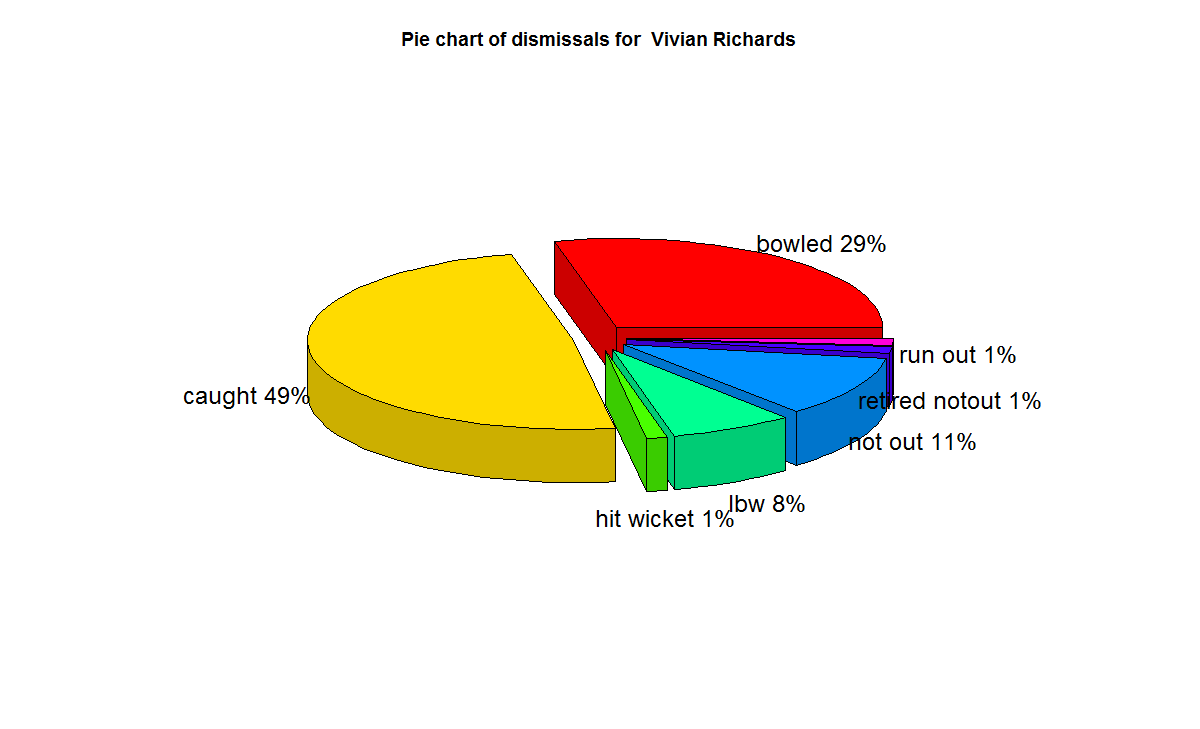
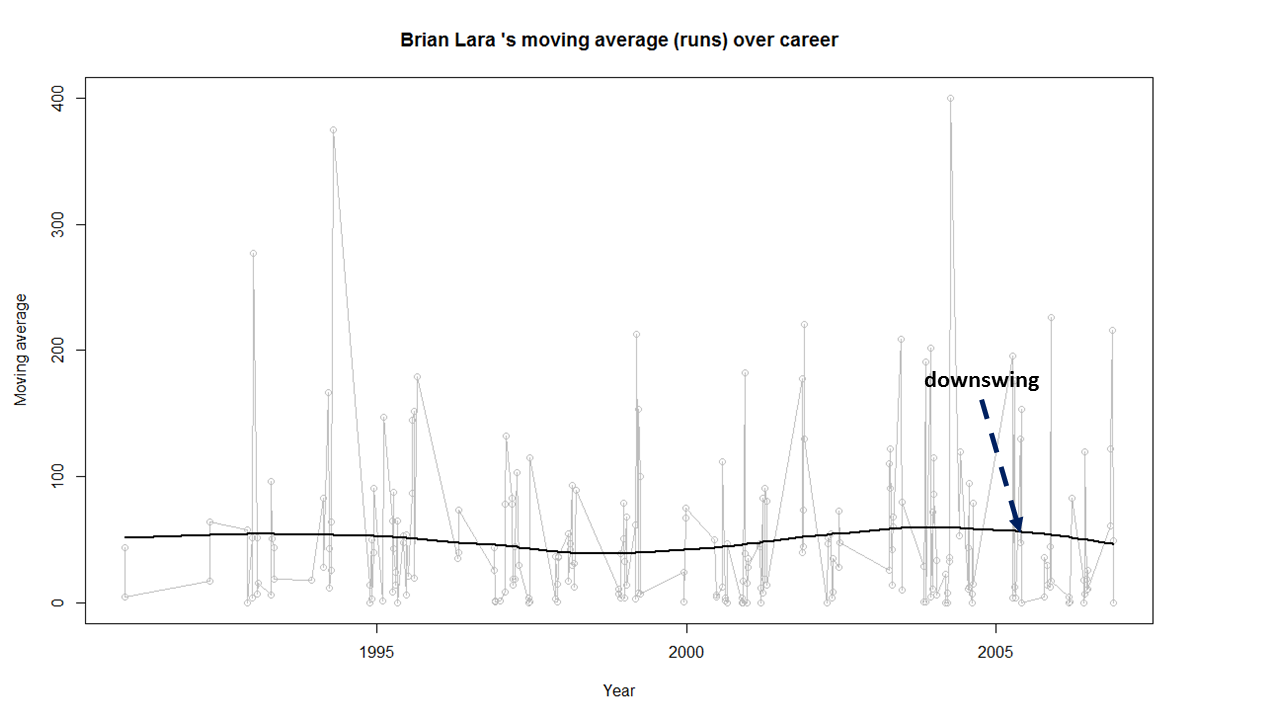
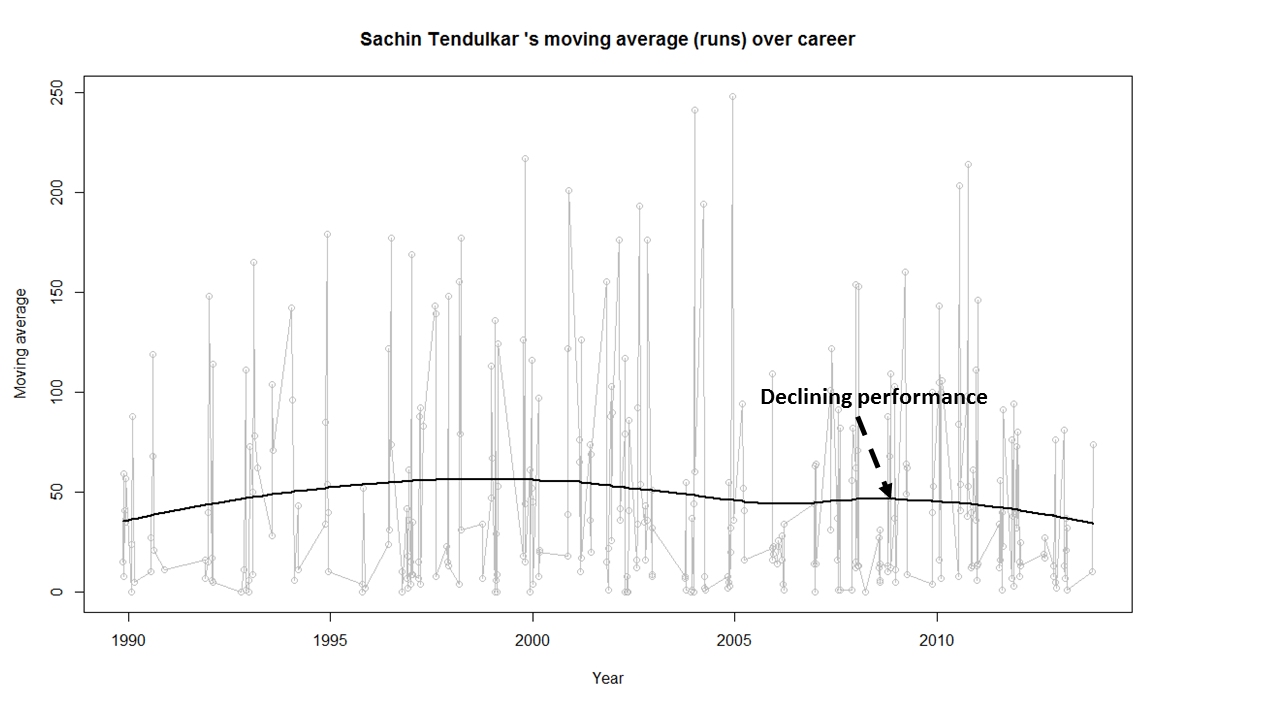
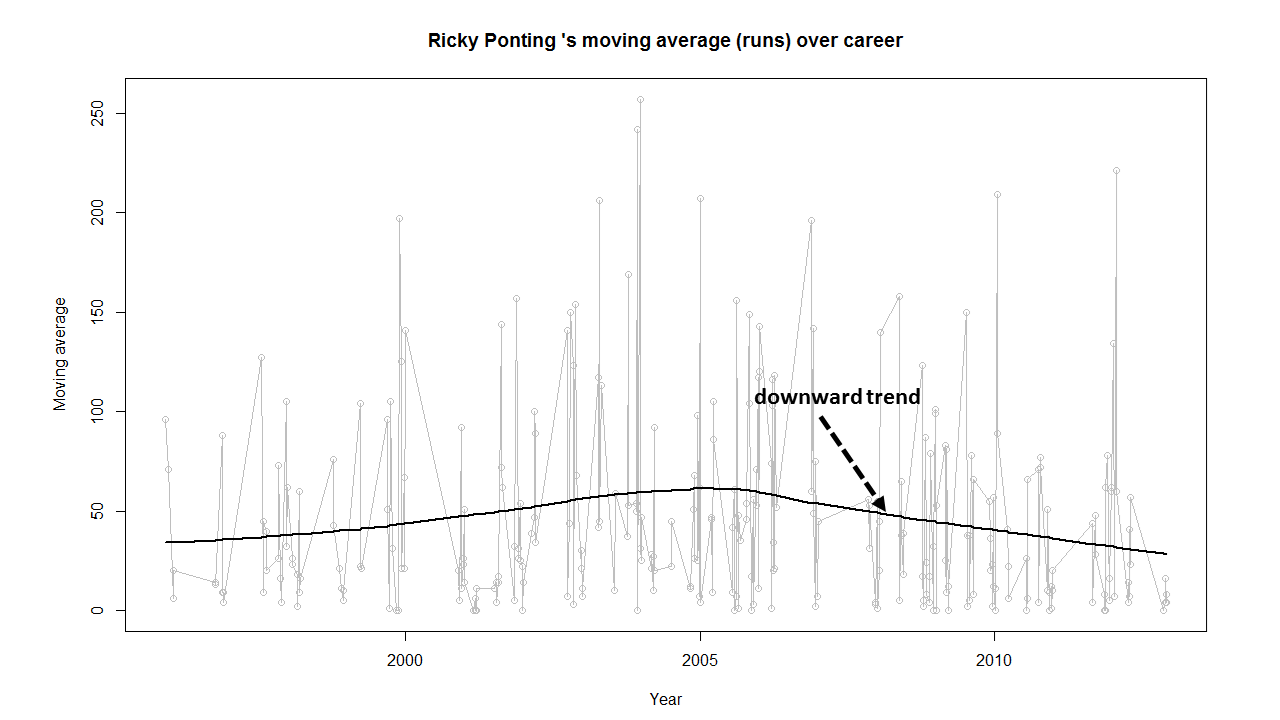
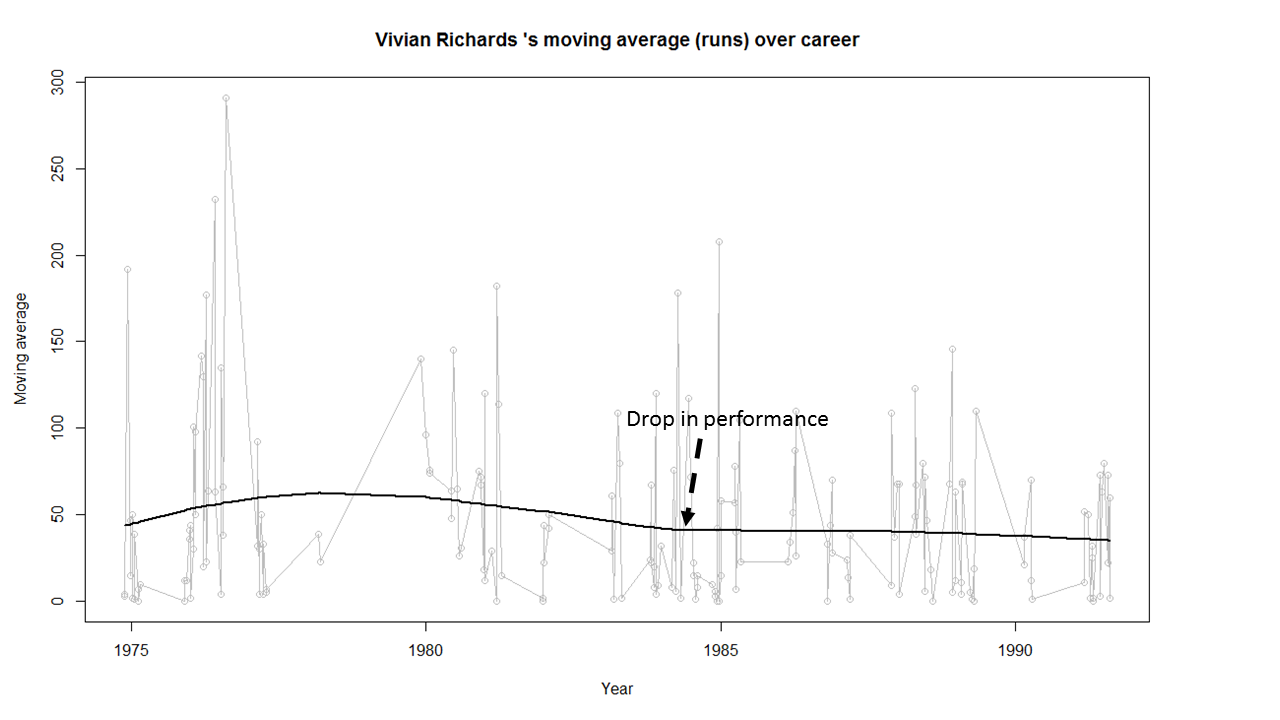
d) Brian Lara, Sachin Tendulkar, Ricky Ponting, Vivian Richards retired at a time when their batting was clearly declining. The writing on the wall was clear and they had to go (see moving average below)
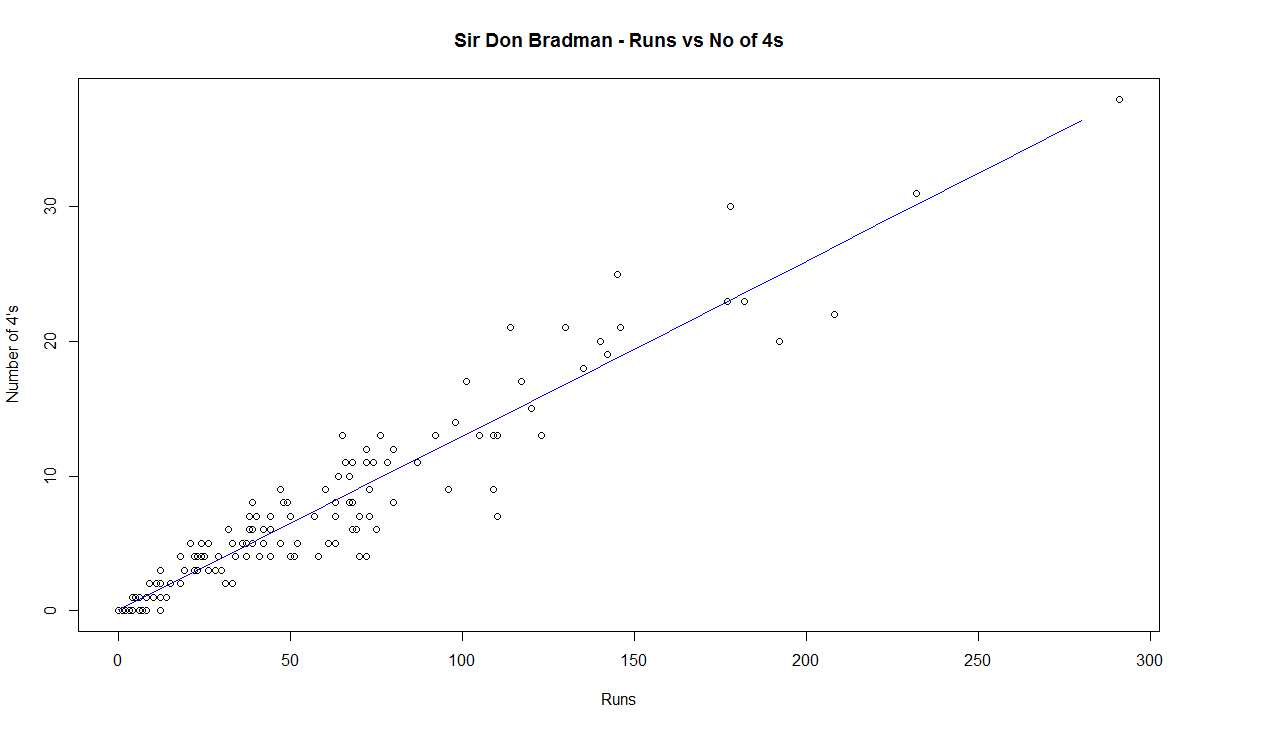
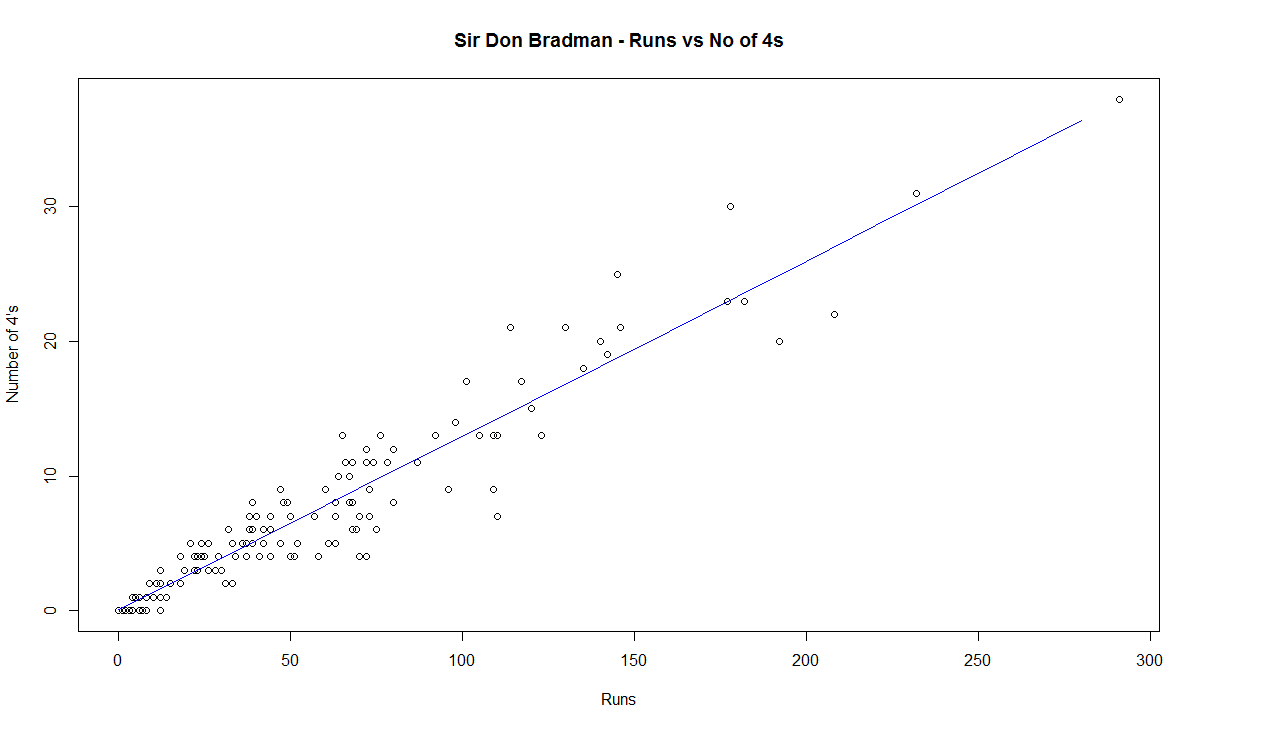
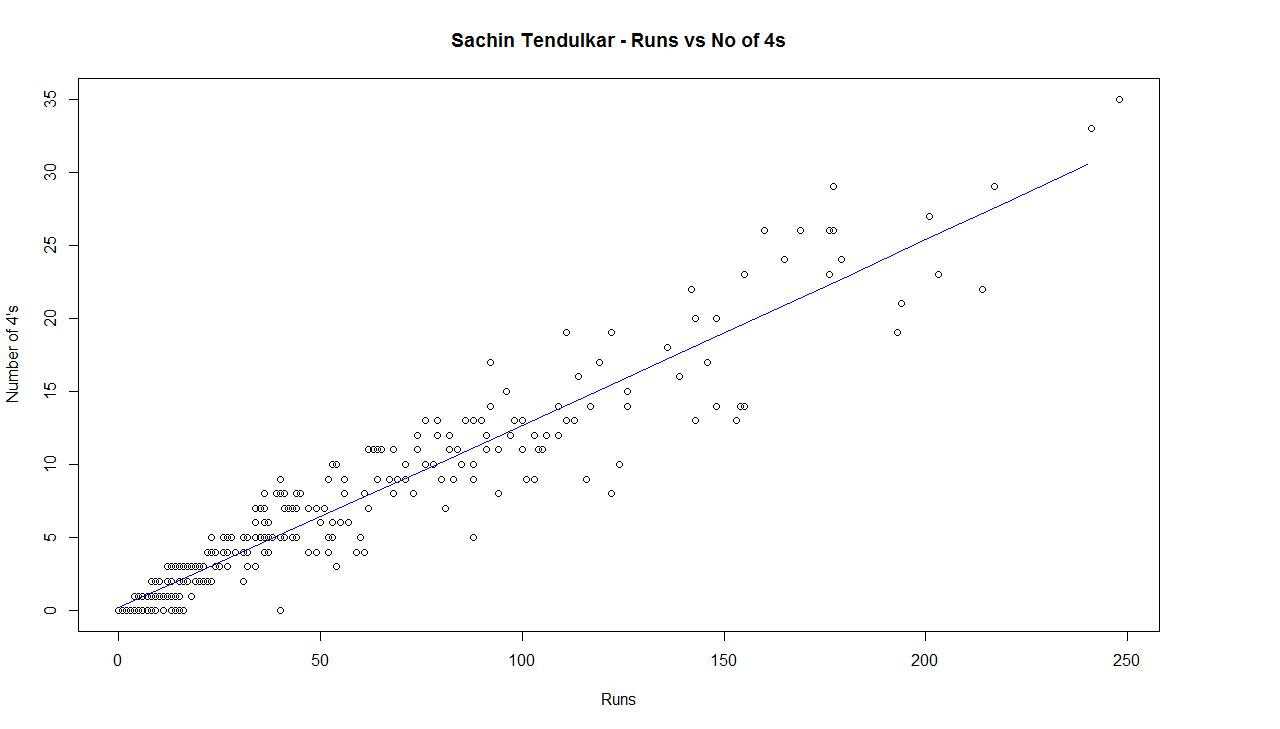
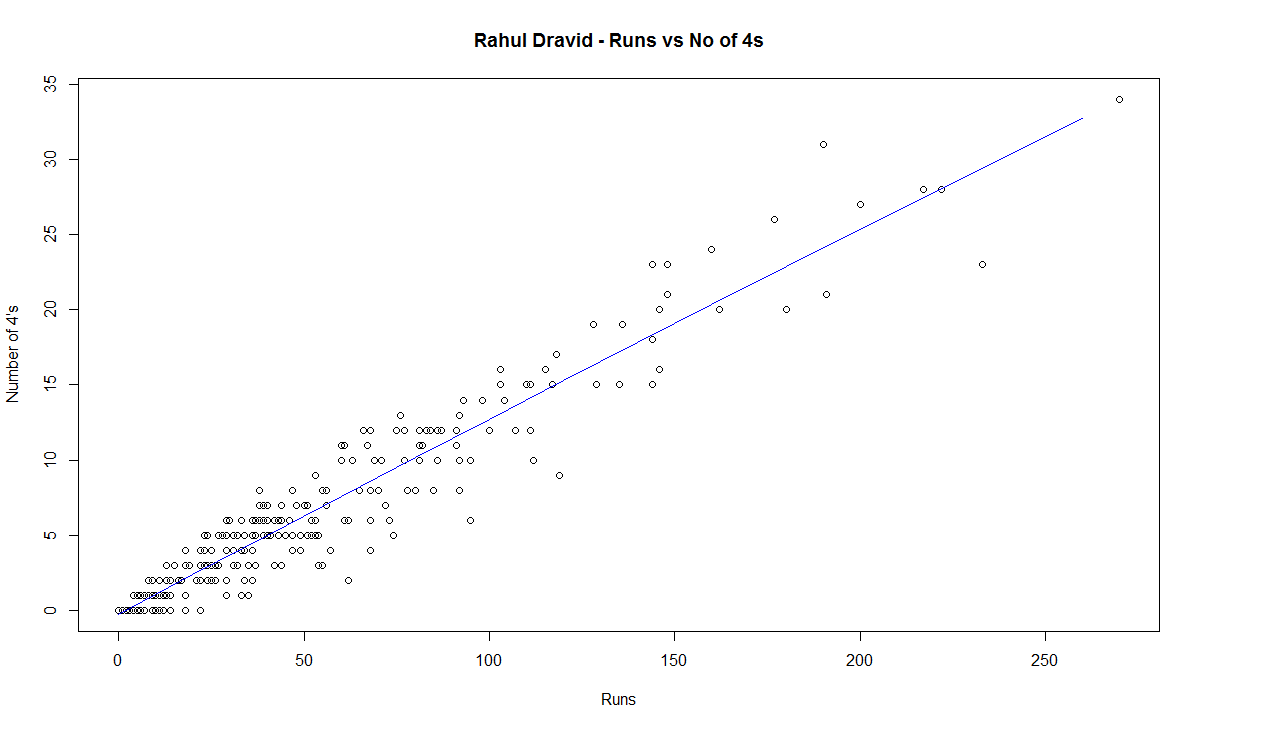
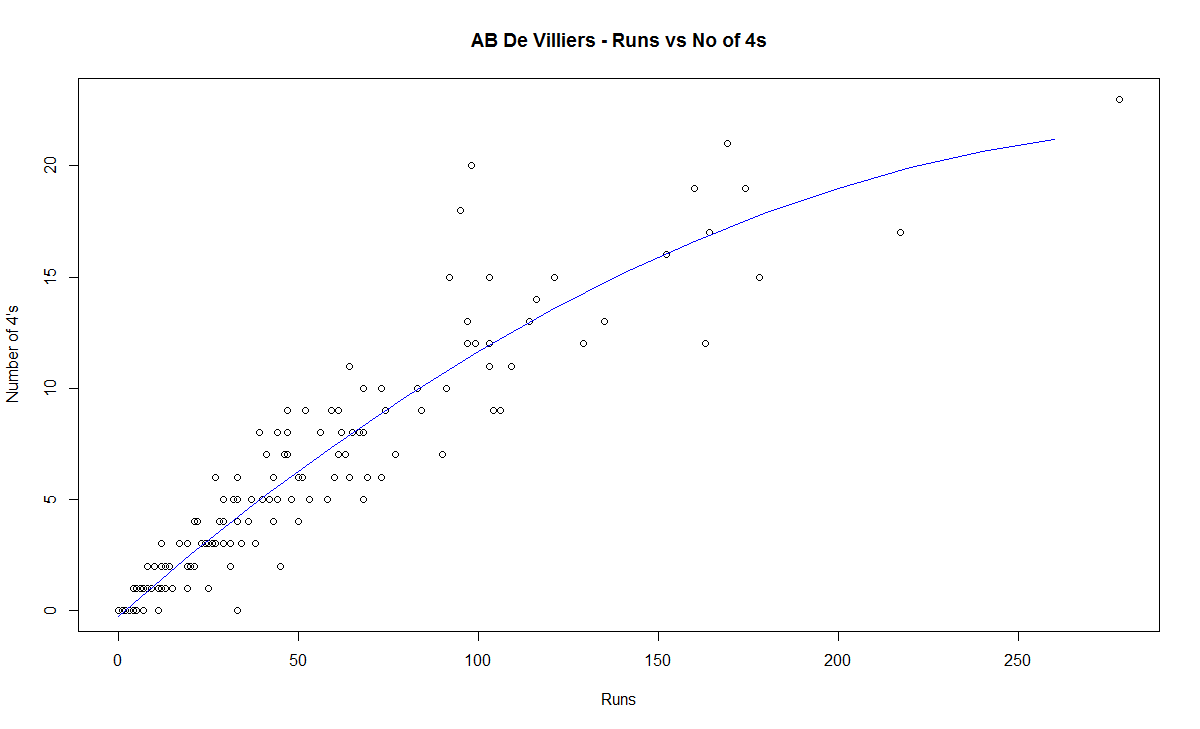
e) The biggest hitter of 4’s was Vivian Richards. In the 2nd place is Brian Lara. Tendulkar & Dravid follow behind. Dravid is a surprise as he has the image of a defender.
e) While Sir Don Bradman made huge scores, the number of 4’s in his innings was significantly less. This could be because the ground in those days did not carry the ball far enough
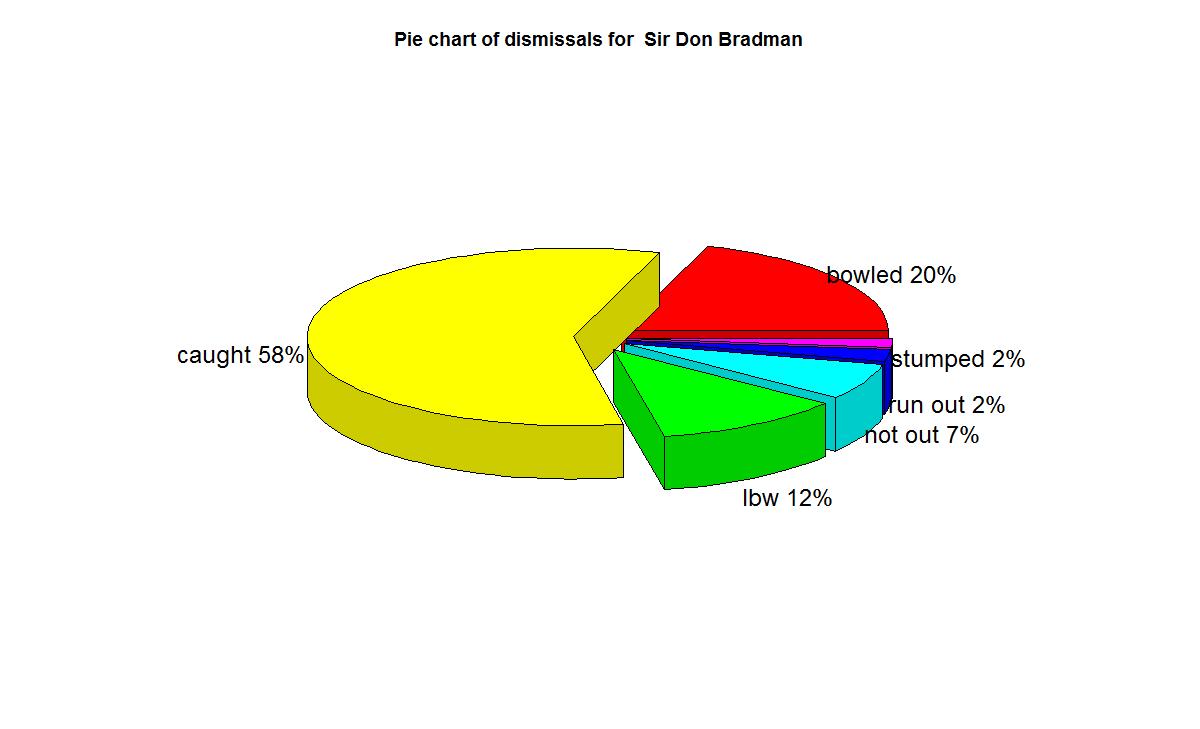
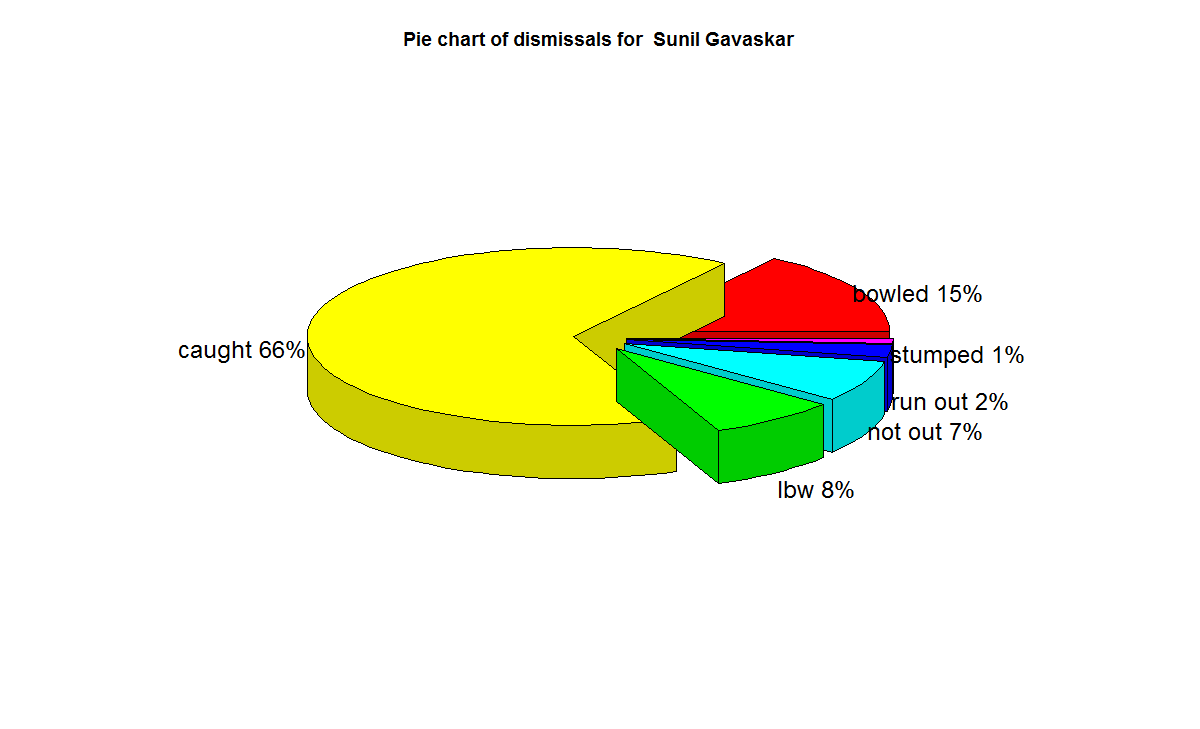
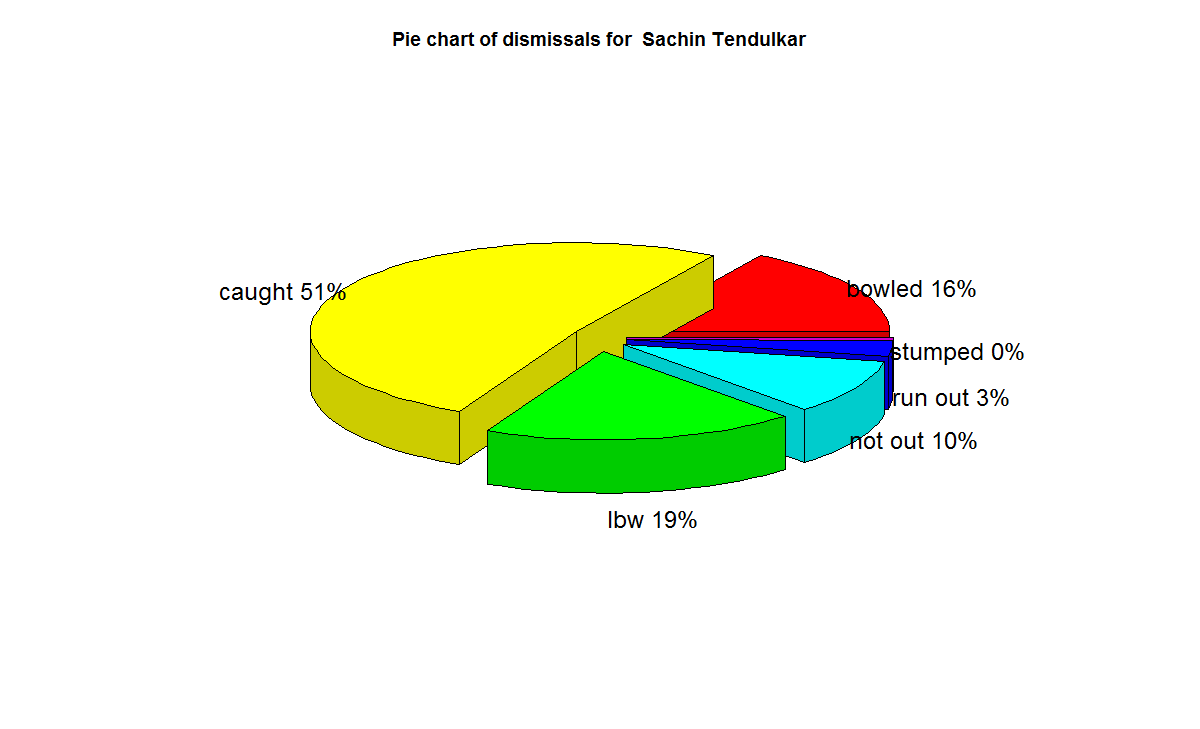
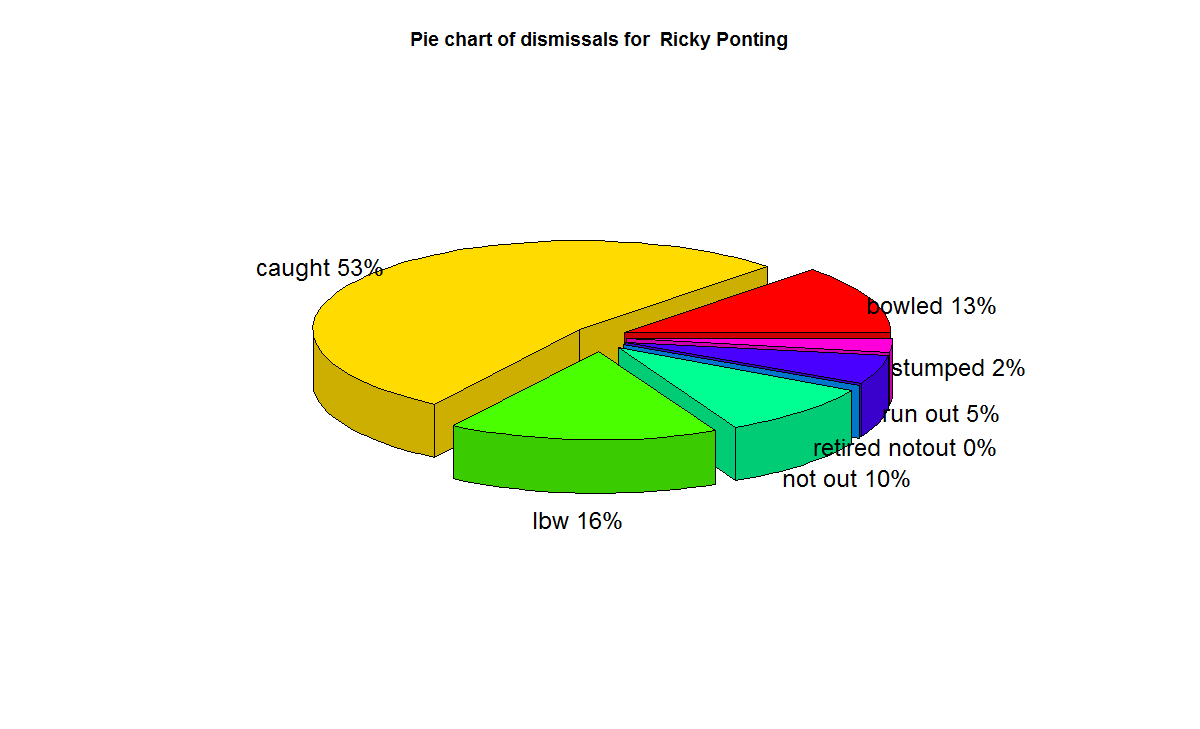
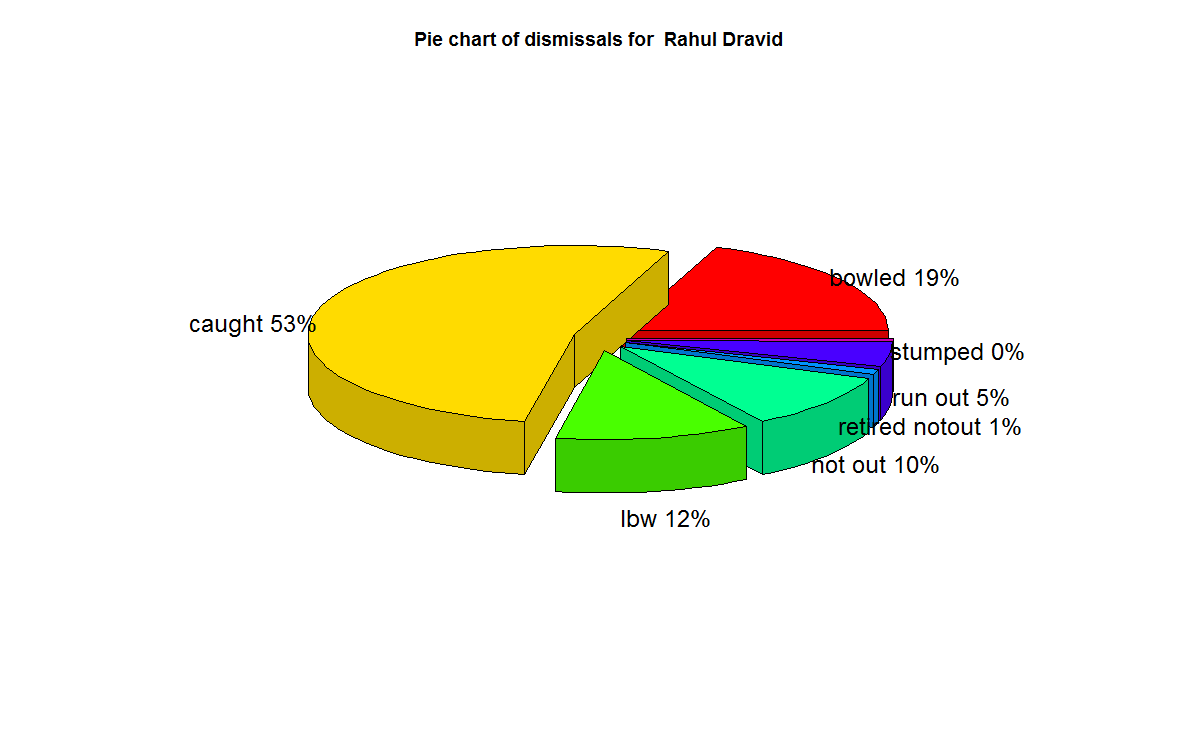
f) With respect to dismissals  Richards was able to keep his wicket intact (11%) of the times , followed by Ponting  Tendulkar, De Villiers, Dravid (10%) who carried the bat, and Gavaskar & Bradman (7%)

A) Runs frequency table and charts
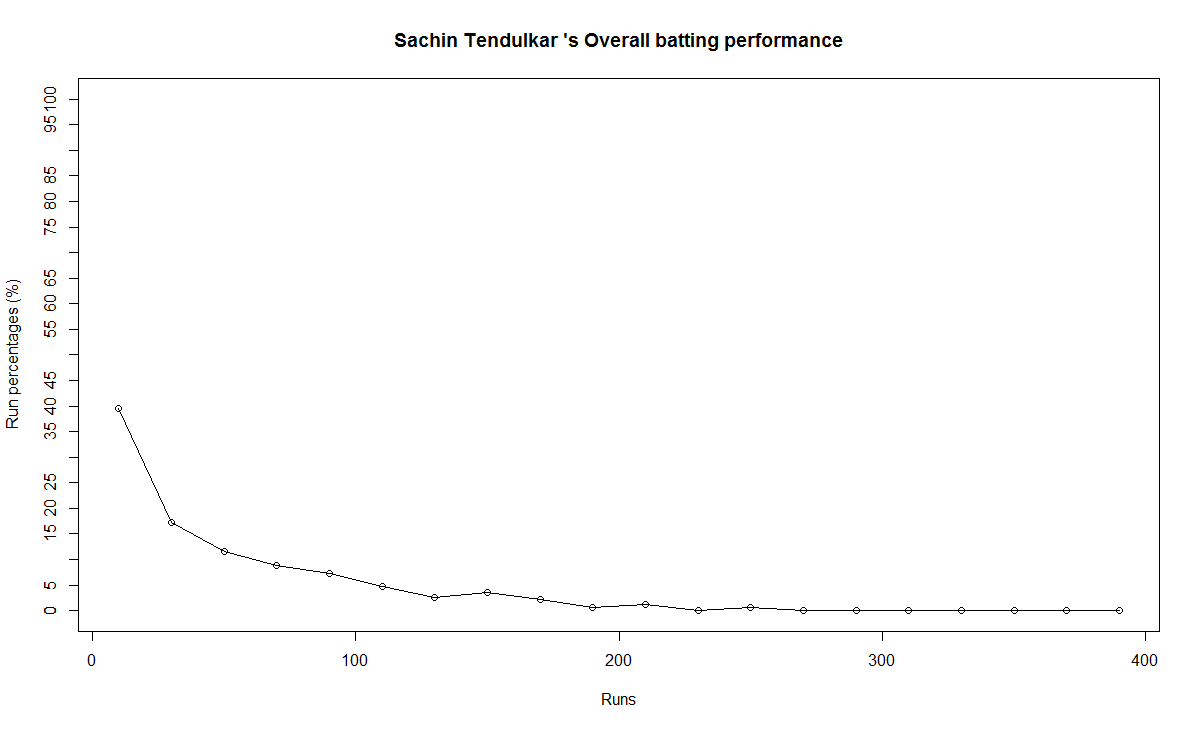
These plots normalize the batting performance of different batsman, since the number of innings played ranges from 89 (Bradman) to 348 (Tendulkar), by calculating the percentage frequency the batsman scores runs in a particular range.   For e.g. Sunil Gavaskar made scores between 60-80 10% of his total innings

This is shown in a tabular form below

runs-frequency
The individual charts for each of the players are shwon belowThe top performers after  removing ranges 0-20 & 20-40 are
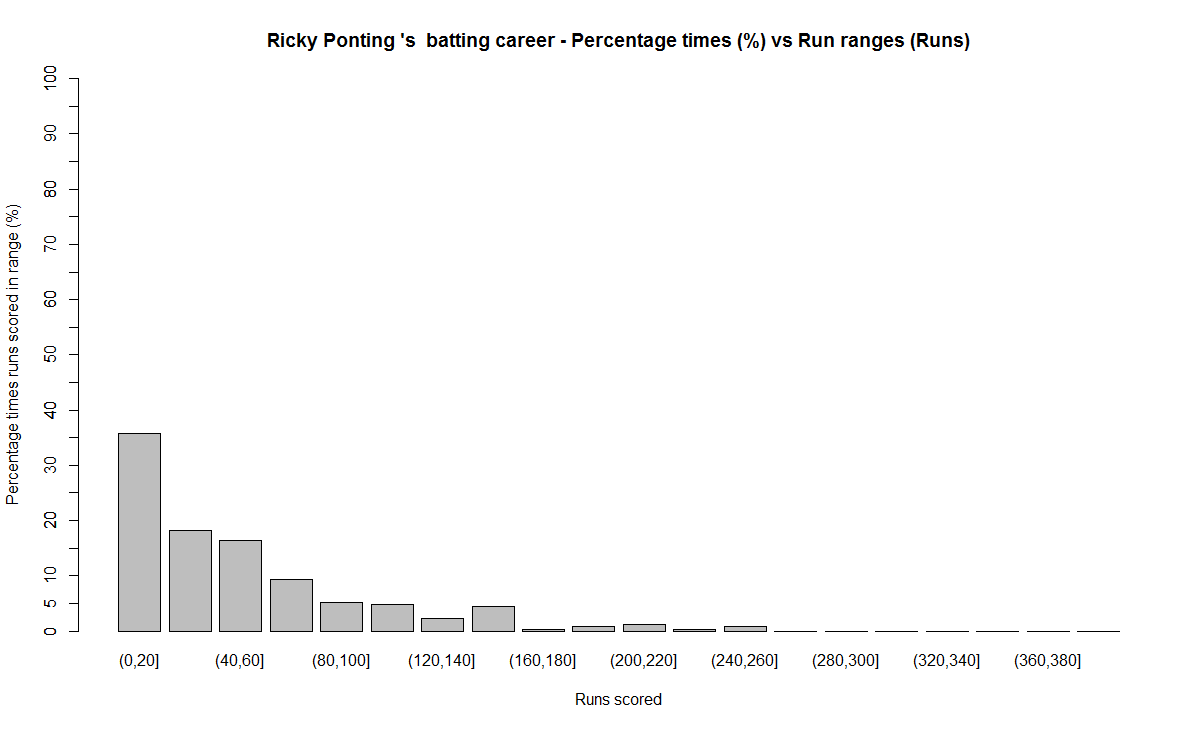
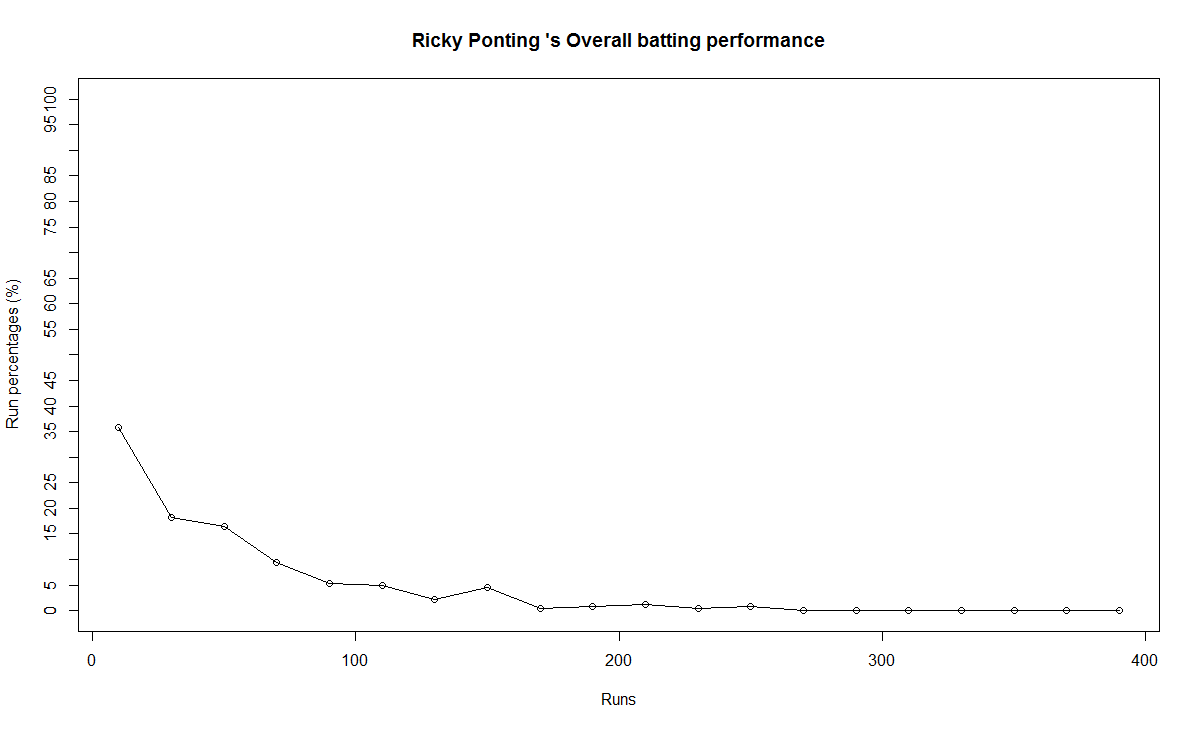
Between 40-60 runs – 1) Ricky Ponting (16.4%) 2) Brian lara (15.8%) 3) AB De Villiers (14.6%)
Between 60-80 runs – 1) Vivian Richards (18%) 2) AB De Villiers (10.2%) 3) Sunil Gavaskar (10%)
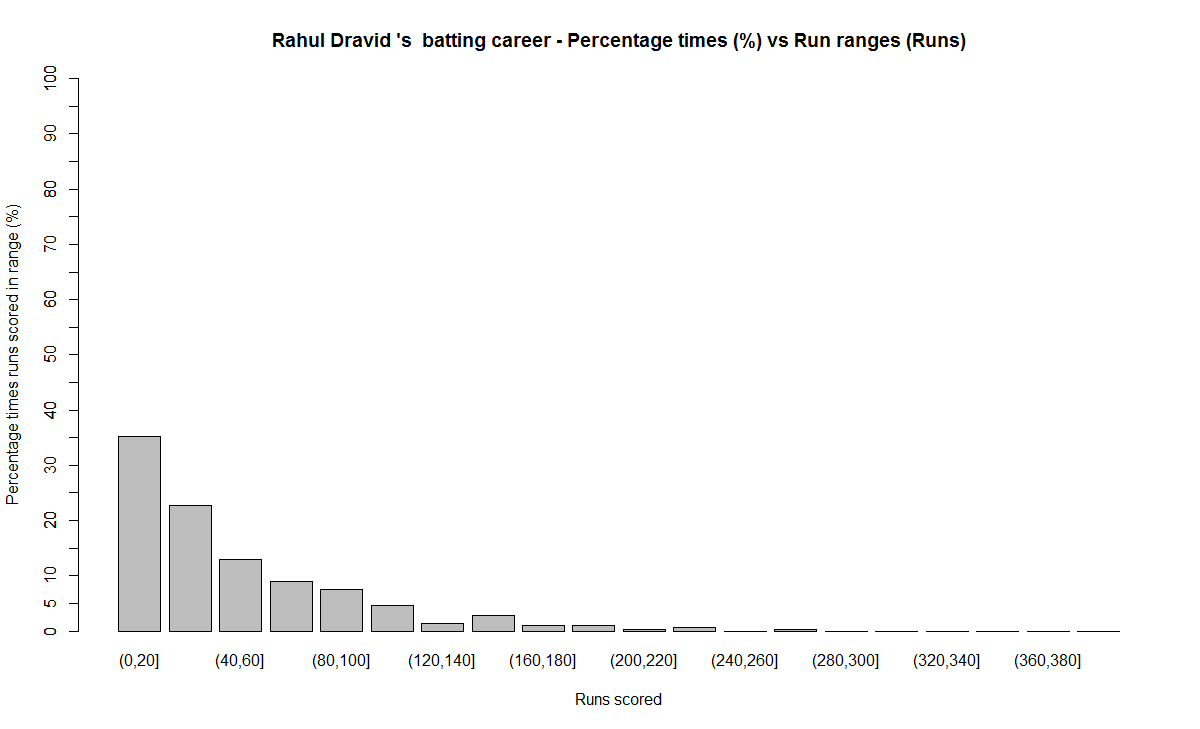
Between 80-100 runs – 1) Rahul Dravid (7.6%) 2) Brian Lara (7.4%) 3) AB De Villiers (6.4%)
Between 100 -120 runs – 1) Sunil Gavaskar (7.5%) 2) Sir Don Bradman (6.8%) 3) Vivian Richards (5.8%)
Between 120-140 runs – 1) Sir Don Bradman (6.8%) 2) Sachin Tendulkar (2.5%) 3) Vivian Richards (2.3%)

The percentage frequency for Brian Lara is included below
1) Brian Lara
lara-run-freq

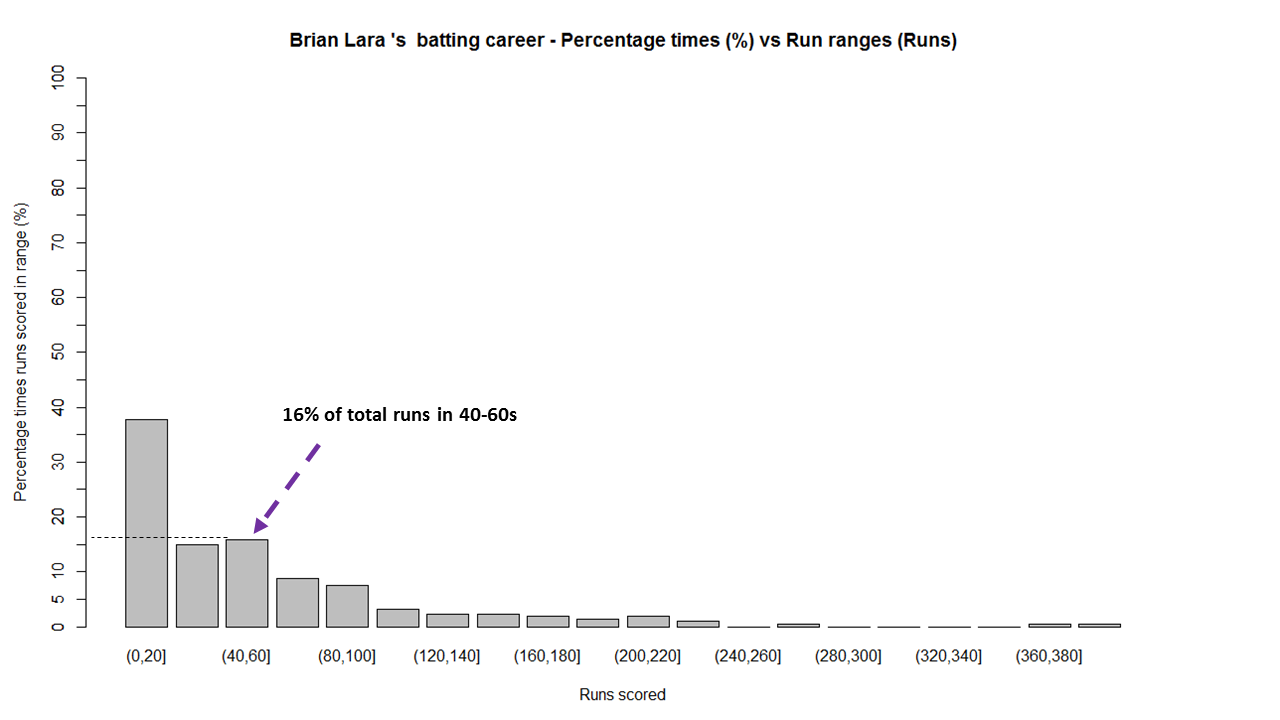
The above chart shows out of the total number of innings played by Brian Lara he scored runs in the range (40-60) 16% percent of the time. The chart also shows that Lara scored between 0-20, 40%  while also scoring in the ranges 360-380 & 380-400 around 1%.
The same chart is displayed as continuous graph below
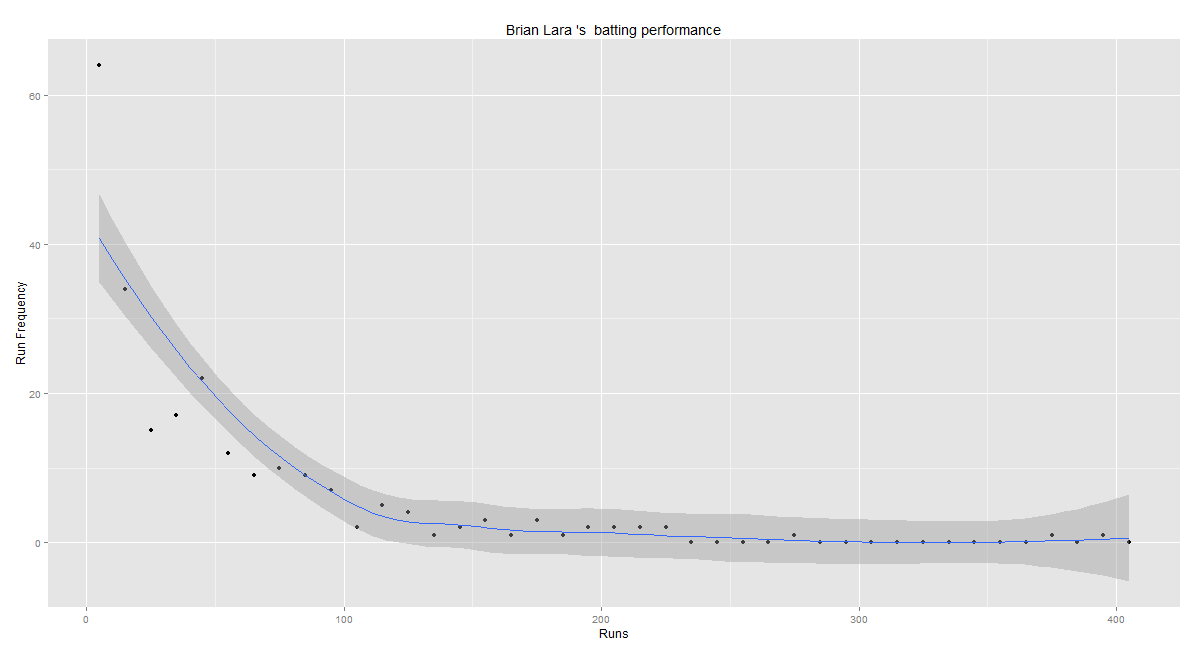
lara-run-perf

The run frequency charts for other batsman are
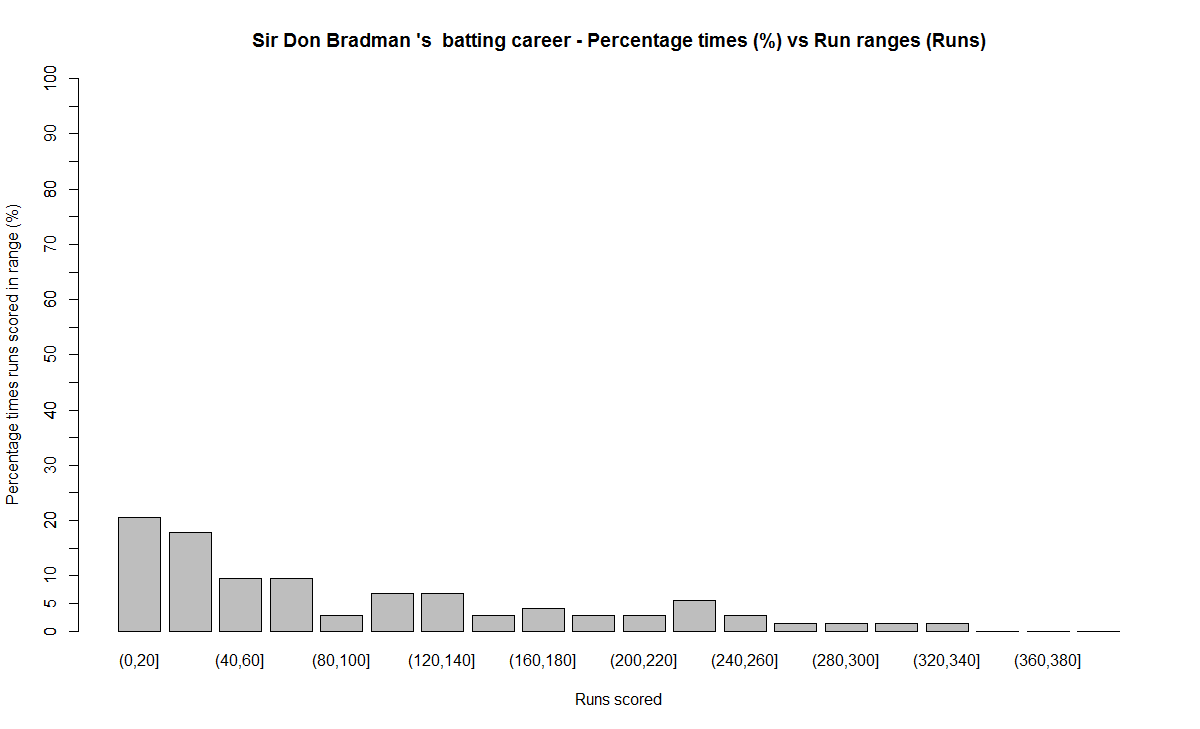
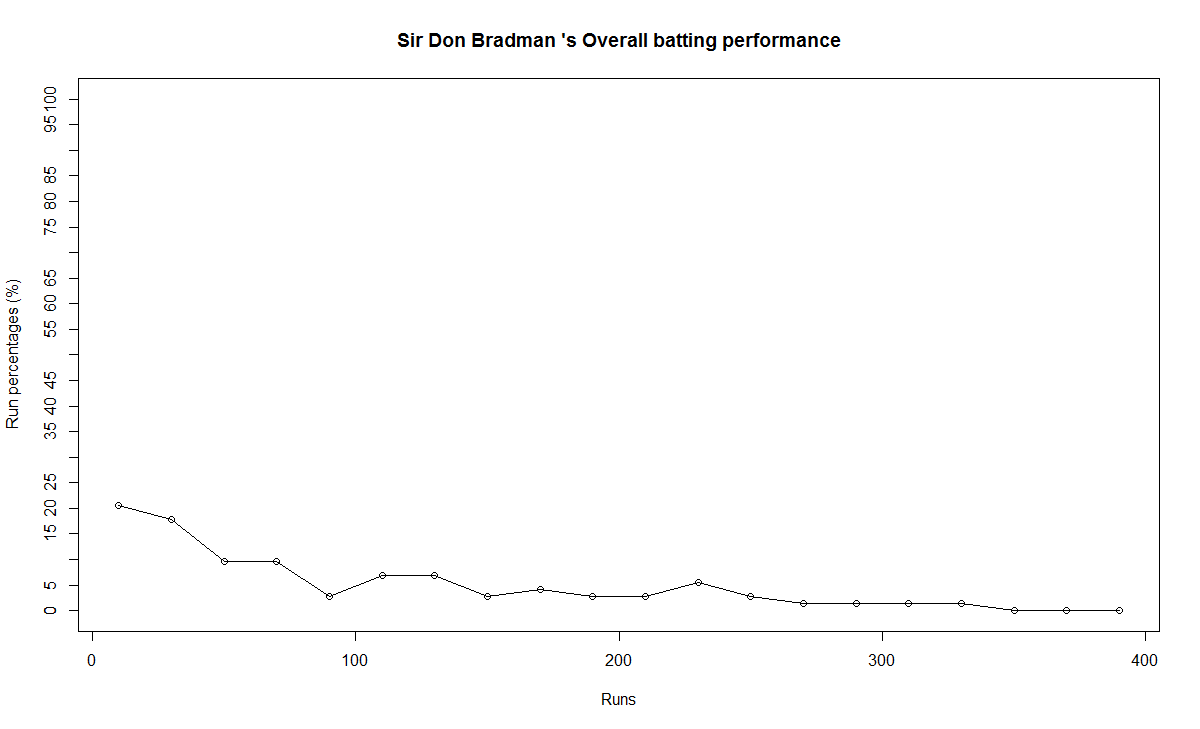
2) Sir Don Bradman
a) Run frequency
bradman-freq
Note: Notice the significant contributions by Sir Don Bradman in the ranges 120-140,140-160,220-240,all the way up to 340
b) Performance
bradman-perf
3) Sunil Gavaskar
a) Runs frequency chart
gavaskar-freq
b) Performance chart
gavaskar-perf
4) Sachin Tendulkar
a) Runs frequency chart
tendulkar-freq
b) Performance chart
tendulkar-perf
5) Ricky Ponting
a) Runs frequency
ponting-freq
b) Performance
ponting-perf
6) Rahul Dravid
a) Runs frequency chart
dravid-freq
b) Performance chart
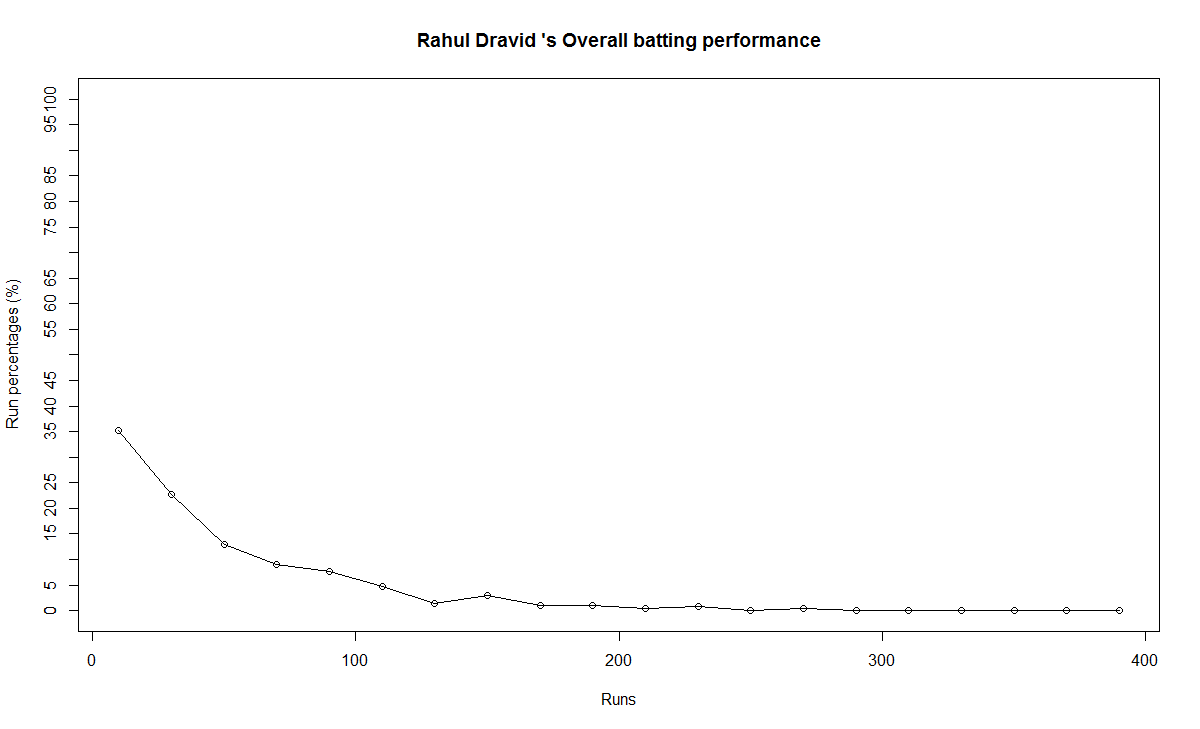
dravid-perf
7) Vivian Richards
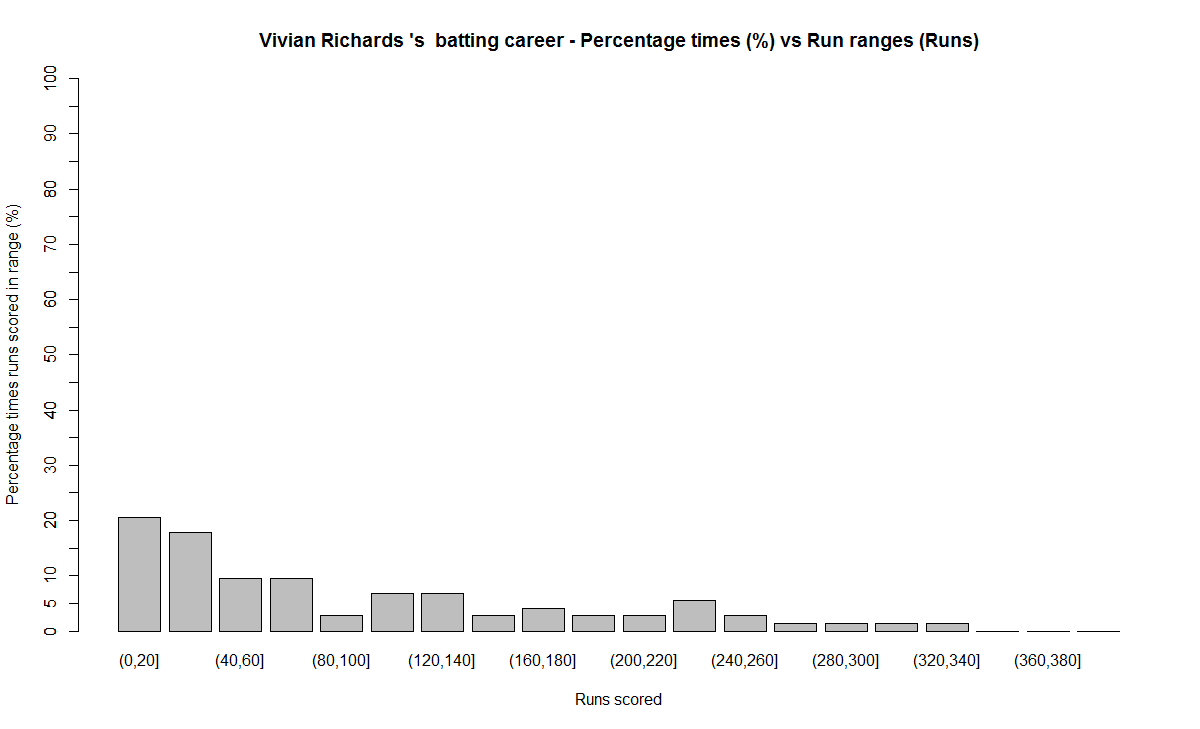
a) Runs frequency chart
richards-freq
b) Performance chart
richards-perf
8) AB De Villiers
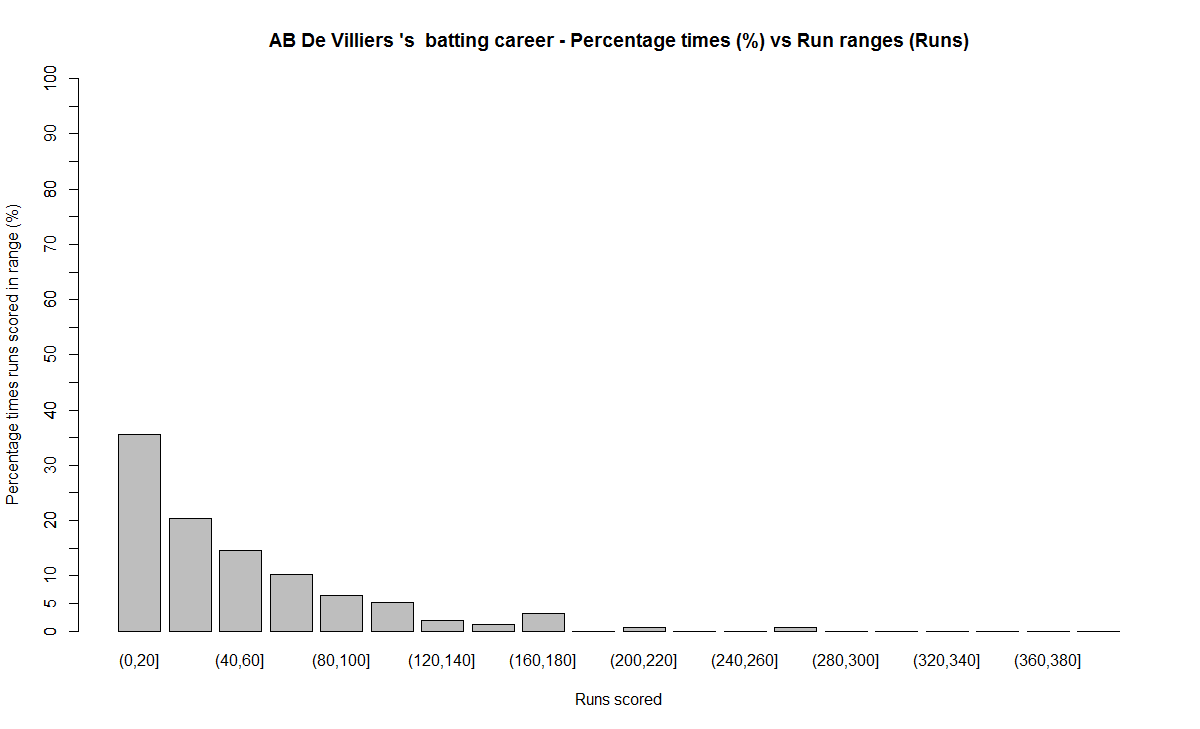
a) Runs frequency chart
villiers-freq
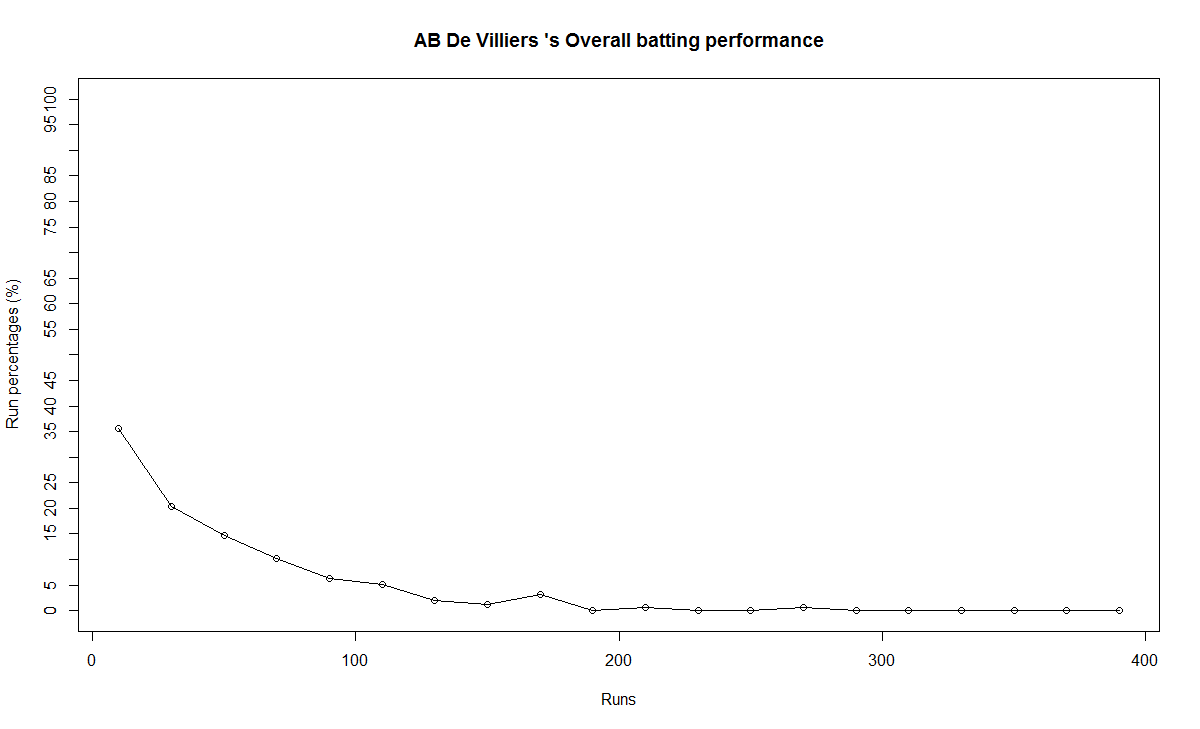
b)  Performance chart
villier-perf

 B) Relative performance of the players
In this section I try to measure the relative performance of the players by superimposing the performance graphs obtained above.  You may say that “comparisons are odious!”. But equally odious are myths that are based on gross facts like highest runs, average or most number of centuries.
a) All-time best batsman
(Sir Don Bradman, Sunil Gavaskar, Vivian Richards, Sachin Tendulkar, Ricky Ponting, Brian Lara, Rahul Dravid, AB De Villiers)
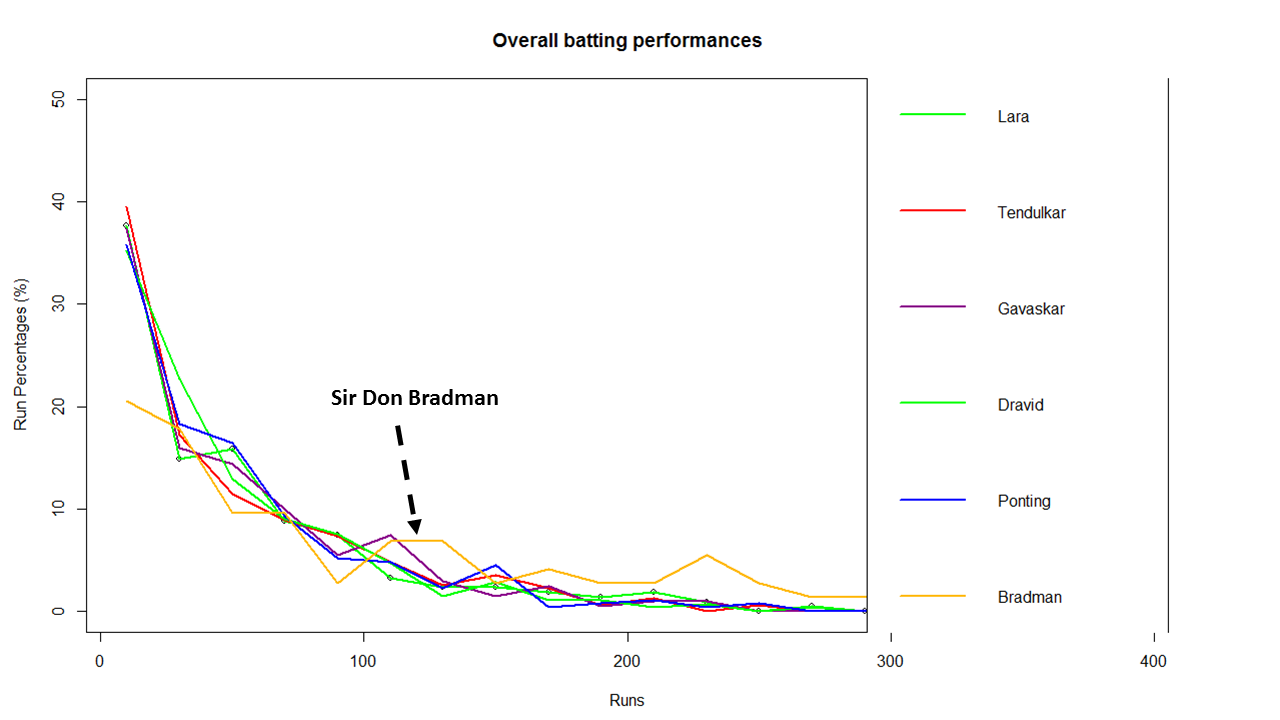
overall-batting-perf
From the above chart it is clear that Sir Don Bradman is the ‘gold’ standard in batting. He is well above others for run ranges above 100 – 350
b) Best Indian batsman (Sunil Gavaskar, Sachin Tendulkar, Rahul Dravid)
srt-sg-dravid-perf
The above chart shows that Gavaskar is ahead of the other two for key ranges between 100 – 130 with almost 8% contribution of total runs. This followed by Dravid who is ahead of Tendulkar in the range 80-120. According to me the all time best Indian batsman is 1) Sunil Gavaskar 2) Rahul Dravid 3) Sachin Tendulkar

c) Best batsman -( Brian Lara, Ricky Ponting, Sachin Tendulkar, AB De Villiers)
This chart was prepared since this comparison was often made in recent times

rel

This chart shows the following ranking 1) AB De Villiers 2) Sachin Tendulkar 3) Brian Lara/Ricky Ponting
C) Chart of 4’s

fours-batsman
This chart is plotted with a 2nd order curve of the number of  4’s versus the total runs in the innings
1) Brian Lara
bradman-4s
2) Sir Don Bradman
bradman-4s
3) Sunil Gavaskar
gavaskar-4s
4) Sachin Tendulkar
tendulkar-4s
5) Ricky Ponting
ponting-4s
6) Rahul Dravid
dravid-4s
7) Vivian Richards
richards-4s
8) AB De Villiers
villiers-4s
D) Proclivity for type of dismissal
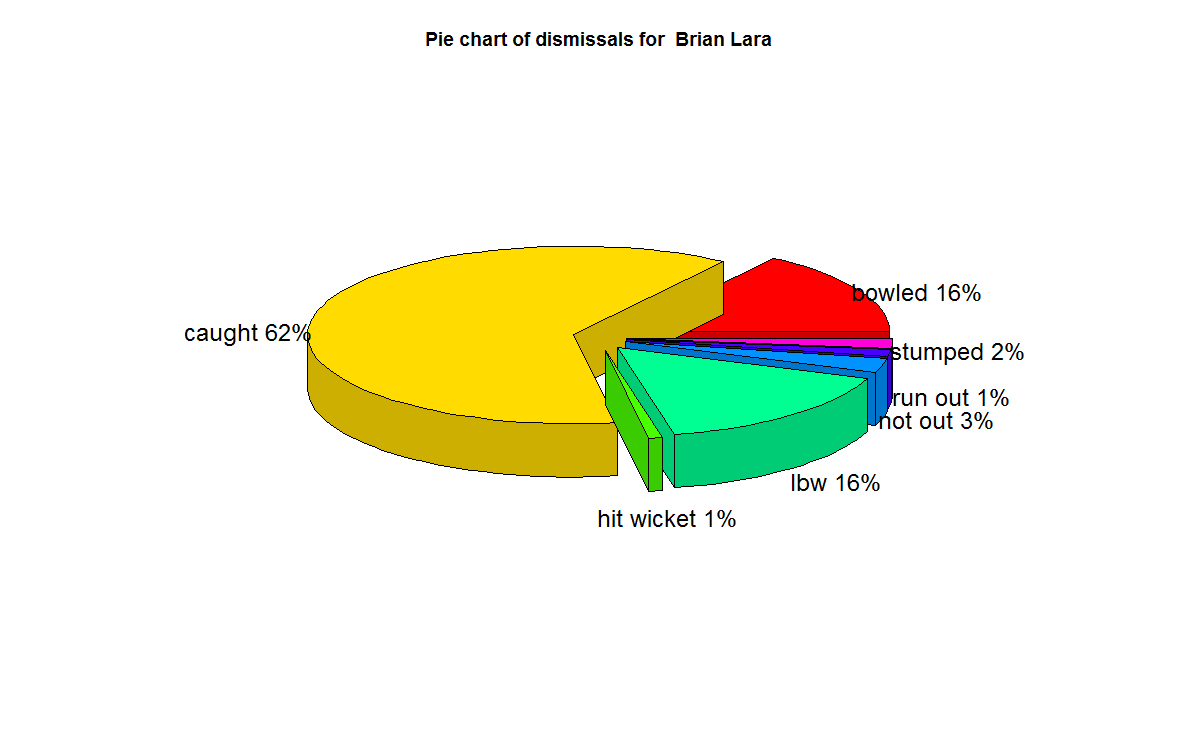
The below charts show how often the batsman was out bowled, caught, run out etc
1) Brian Lara
lara-dismissals
2) Sir Don Bradman
bradman-dismissals
3) Sunil  Gavaskar
gavaskar-dismissals
4) Sachin Tendulkar
tendulkar-dismissals
5) Ricky Ponting
ponting-dismissals
6) Rahul Dravid
dravid-dismissals
7) Vivian Richard
richards-dismissals
8) AB De Villiers
villiers-dismissals
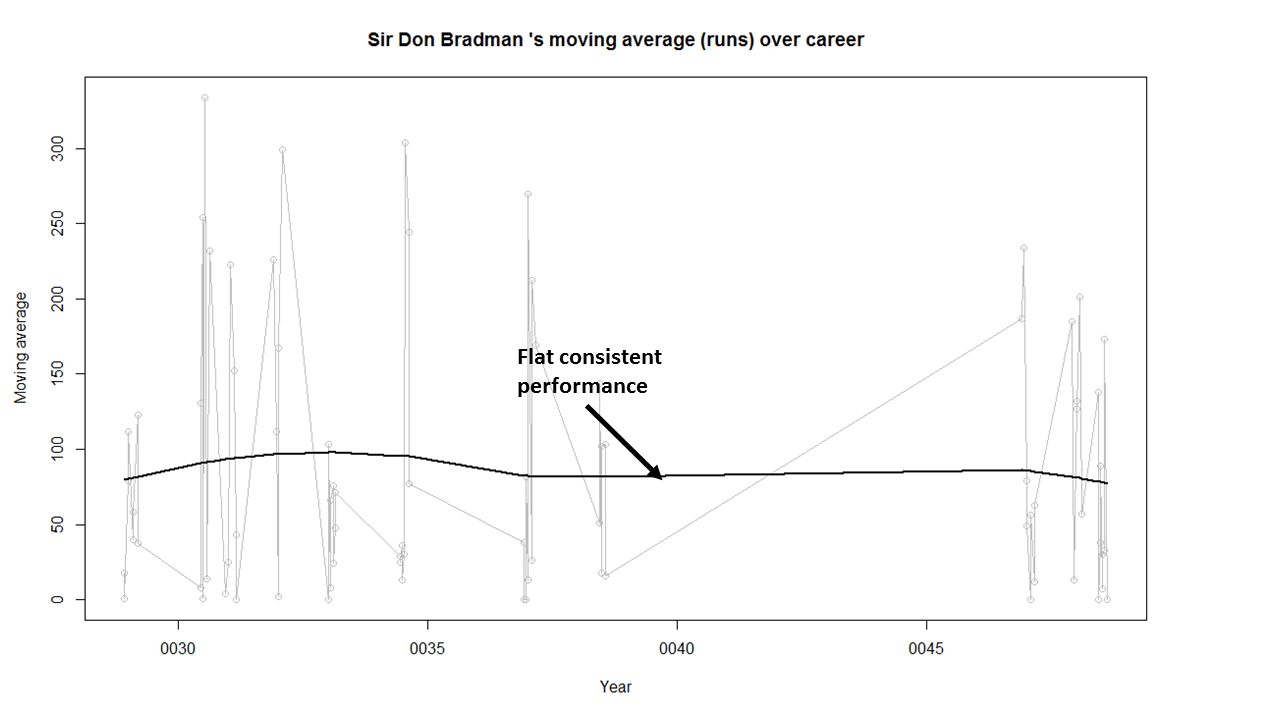
E) Moving Average
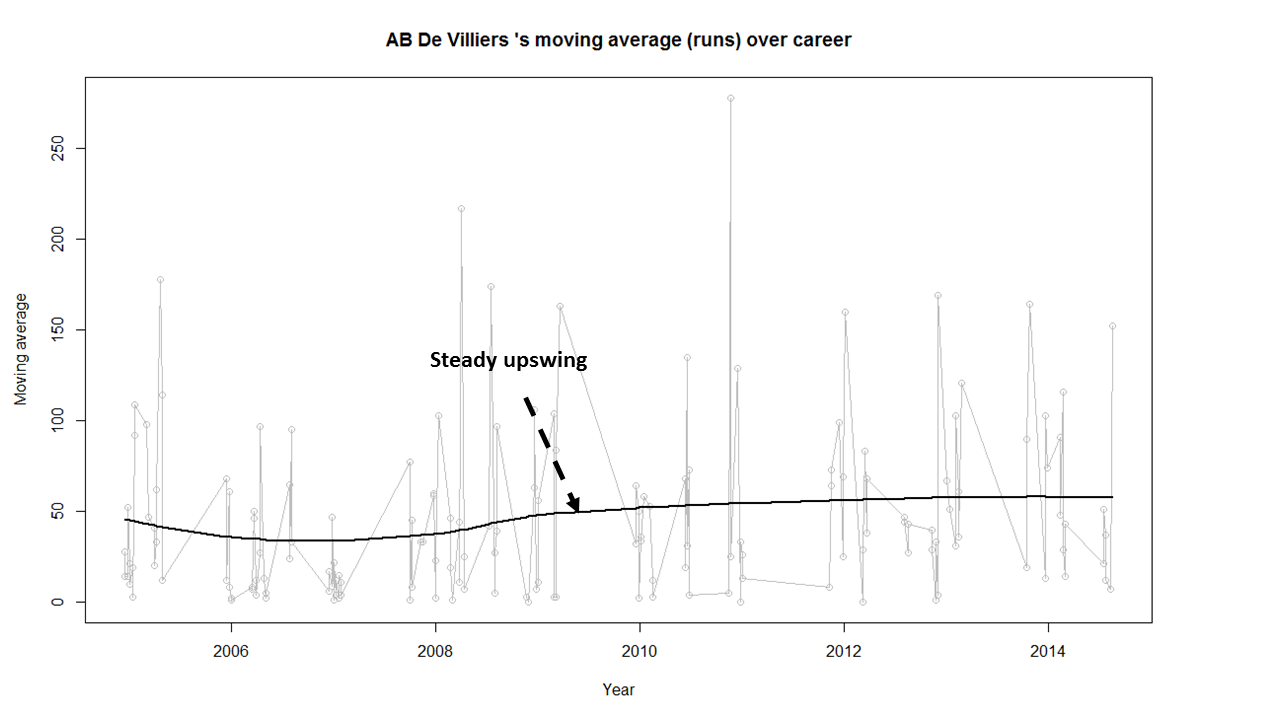
The plots below provide the performance of the batsman as a time series (chronological) and is displayed as the continuous gray lines. A moving average is computed using ‘loess regression’ and is shown as the dark line. This dark line represents the players performance improvement or decline. The moving average plots are shown below
1) Brian Lara
lara-ma
2) Sir Don Bradman
bradman-ma
Sir Don Bradman’s moving average shows a remarkably consistent performance over the years. He probably could have a continued for a couple more years
3)Sunil Gavaskar

2

Gavaskar moving average does show a good improvement from a dip around 1983. Gavaskar retired bowing to public pressure on a mistaken belief that he was under performing. Gavaskar could have a continued for a couple of more years
4) Sachin Tendulkar

1

Tendulkar’s performance is clearly on the decline from 2011.  He could have announced his retirement at least 2 years prior
5) Ricky Ponting
ponting-ma
Ponting peak performance was around 2005 and does go steeply downward from then on. Ponting could have also retired around 2012
6) Rahul Dravid

1

Dravid seems to have recovered very effectively from his poor for around 2009. His overall performance shows steady improvement. Dravid’s announcement appeared impulsive. Dravid had another 2 good years of test cricket in him
7) Vivian Richards
richards-ma
Richard’s performance seems to have dropped around 1984 and seems to remain that way.
8) AB De Villiers
villiers-ma
AB De Villiers moving average shows a steady upward swing from 2009 onwards. De Villiers has at least 3-4 years of great test cricket ahead of him.

Finally as mentioned above the dataset, the R implementation and all the charts are available at GitHub at analyze-batting-legends. Feel free to fork and clone the code. The code should work for other batsman as-is. Also go ahead and make any modifications for obtaining further insights.

Conclusion: The batting legends have been analyzed from various angles namely i)  What is the frequency of runs scored in a particular range ii) How each batsman compares with others for relative runs in a specified range iii) How does the batsman get out?  iv) What were the peak and lean period of the batsman and whether they recovered or slumped from these periods.  While the batsman themselves have played in different time periods I think in an overall sense the performance under the conditions of the time will be similar.
Anyway feel free to let me know your thoughts. If you see other patterns in the data also do drop in your comment.

You may also like
1. Informed choices through Machine Learning : Analyzing Kohli, Tendulkar and Dravid
2. Informed choices through Machine Learning-2: Pitting together Kumble, Kapil,

Also see
– A crime map of India in R – Crimes against women
– What’s up Watson? Using IBM Watson’s QAAPI with Bluemix, NodeExpress – Part 1
– Bend it like Bluemix, MongoDB with autoscaling – Part 1

R incantations for the uninitiated

Here are some basic R incantations that will get you started with R

A) Scalars & Vectors:
Chant 1 – Now repeat after me, with your right hand forward at shoulder height “In R there are no scalars. There are only vectors of length 1”.
Just kidding:-)

To create an integer variable x with a value 5 we write
x <- 5 or
x = 5

While the former notation may seem odd, it is actually more logical considering that the RHS is assigned to LHS. Anyway both seem to work
Vectors can be created as follows
a <- c( 2:10)
b <- c("This", "is", 'R","language")

B) Sequences:
There are several ways of creating sequences of numbers which you intend to use for your computation
<- seq(5:25) # Sequence from 5 to 25

Other ways to create sequences
Increment by 2
> seq(5, 25, by=2)
[1]  5  7  9 11 13 15 17 19 21 23 25

>seq(5,25,length=18) # Create sequence from 5 to 25 with a total length of 18
[1]  5.000000  6.176471  7.352941  8.529412  9.705882 10.882353 12.058824 13.235294
[9] 14.411765 15.588235 16.764706 17.941176 19.117647 20.294118 21.470588 22.647059
[17] 23.823529 25.000000

C) Conditions and loops
An if-else if-else construct goes like this
if(condition) {
do something
} else if (condition) {
do something
} else {
do something
}

Note: Make sure the statements appear as above with the else if and else appearing on the same line as the closing braces, otherwise R complains about ‘unexpected else’ in else statement

D) Loops
I would like to mention 2 ways of doing ‘for’ loops  in R.
a) for (i in 1:10) {
statement
}

> a <- seq(5,25,length=10)
> a
[1]  5.000000  7.222222  9.444444 11.666667 13.888889 16.111111 18.333333
[8] 20.555556 22.777778 25.000000

b) Sequence along the vector sequence. Note: This is useful as we don’t have to know  the length of the vector/sequence
for (i in seq_along(a)){
+   print(a[i])
+ }

[1] 5
[1] 7.222222
[1] 9.444444
[1] 11.66667

There are others ways of looping with ‘while’ and ‘repeat’ which I have not included in this post.

R makes manipulation of matrices and data frames really easy. All the elements in a matrix are numeric while data frames can have different types for each of the element

E) Matrix
> rnorm(12,5,2)
[1] 2.699961 3.160208 5.087478 3.969129 3.317840 4.551565 2.585758 2.397780
[9] 5.297535 6.574757 7.468268 2.440835

a) Create a vector of 12 random numbers with a mean of 5 and SD of 2
> a <-rnorm(12,5,2)
b) Convert the vector to a matrix with 4 rows and 3 columns
> mat <- matrix(a,4,3)
> mat[,1]     [,2]     [,3]
[1,] 5.197010 3.839281 9.022818
[2,] 4.053590 5.321399 5.587495
[3,] 4.225763 4.873768 6.648151
[4,] 4.709784 4.129093 2.575523

c) Subset rows 1 & 2 from the matrix
> mat[1:2,]
[,1]     [,2]     [,3]
[1,] 5.19701 3.839281 9.022818
[2,] 4.05359 5.321399 5.587495

d) Subset matrix a rows 1& 2 and with columns 2 & 3
> mat[1:2,2:3]
[,1]     [,2]
[1,] 3.839281 9.022818
[2,] 5.321399 5.587495

e) Subset matrix a for all row elements for the column 3
> mat[,3]
[1] 9.022818 5.587495 6.648151 2.575523

e) Add row names and column names for the matrix as follows
> names <- c(“tim”,”pat”,”joe”,”jim”)
> v <- data.frame(names,mat)
> v
names       X1       X2       X3
1   tim 5.197010 3.839281 9.022818
2   pat 4.053590 5.321399 5.587495
3   joe 4.225763 4.873768 6.648151
4   jim 4.709784 4.129093 2.575523

> colnames(v) <- c("names","a","b","c")
> v
names        a        b        c
1   tim 5.197010 3.839281 9.022818
2   pat 4.053590 5.321399 5.587495
3   joe 4.225763 4.873768 6.648151
4   jim 4.709784 4.129093 2.575523

F) Data Frames
In R data frames are the most important method to manipulate large amounts of data. One can read data in .csv format into data frame using
df <- read.csv(“mydata.csv”)
To get a feel of data frames it is useful to play around with the numerous data sets that are available with the installation of R
To check the available dataframes do
>data()
AirPassengers                    Monthly Airline Passenger Numbers 1949-1960
BJsales                          Sales Data with Leading Indicator
BJsales.lead (BJsales)           Sales Data with Leading Indicator
BOD                              Biochemical Oxygen Demand
CO2                              Carbon Dioxide Uptake in Grass Plants
ChickWeight                      Weight versus age of chicks on different diets
...

I will be using the mtcars data frame. Here are some of the most important commands on data frames
a) load data from mtcars
data(mtcars)
b) > head(mtcars,3) # Display the top 3 rows of the data frame
mpg cyl disp  hp drat    wt  qsec vs am gear carb
Mazda RX4     21.0   6  160 110 3.90 2.620 16.46  0  1    4    4
Mazda RX4 Wag 21.0   6  160 110 3.90 2.875 17.02  0  1    4    4
Datsun 710    22.8   4  108  93 3.85 2.320 18.61  1  1    4    1

c) > tail(mtcars,4) # Display the boittom 4 rows of the data frame
mpg cyl disp  hp drat   wt qsec vs am gear carb
Ford Pantera L 15.8   8  351 264 4.22 3.17 14.5  0  1    5    4
Ferrari Dino   19.7   6  145 175 3.62 2.77 15.5  0  1    5    6
Maserati Bora  15.0   8  301 335 3.54 3.57 14.6  0  1    5    8
Volvo 142E     21.4   4  121 109 4.11 2.78 18.6  1  1    4    2

d) > names(mtcars)  # Display the names of the columns of the data frame
[1] "mpg"  "cyl"  "disp" "hp"   "drat" "wt"   "qsec" "vs"   "am"   "gear" "carb"

e) > summary(mtcars) # Display the summary of the data frame
mpg             cyl             disp             hp             drat             wt
Min.   :10.40   Min.   :4.000   Min.   : 71.1   Min.   : 52.0   Min.   :2.760   Min.   :1.513
1st Qu.:15.43   1st Qu.:4.000   1st Qu.:120.8   1st Qu.: 96.5   1st Qu.:3.080   1st Qu.:2.581
Median :19.20   Median :6.000   Median :196.3   Median :123.0   Median :3.695   Median :3.325
Mean   :20.09   Mean   :6.188   Mean   :230.7   Mean   :146.7   Mean   :3.597   Mean   :3.217
3rd Qu.:22.80   3rd Qu.:8.000   3rd Qu.:326.0   3rd Qu.:180.0   3rd Qu.:3.920   3rd Qu.:3.610
Max.   :33.90   Max.   :8.000   Max.   :472.0   Max.   :335.0   Max.   :4.930   Max.   :5.424
qsec             vs               am              gear            carb
Min.   :14.50   Min.   :0.0000   Min.   :0.0000   Min.   :3.000   Min.   :1.000
1st Qu.:16.89   1st Qu.:0.0000   1st Qu.:0.0000   1st Qu.:3.000   1st Qu.:2.000
Median :17.71   Median :0.0000   Median :0.0000   Median :4.000   Median :2.000
Mean   :17.85   Mean   :0.4375   Mean   :0.4062   Mean   :3.688   Mean   :2.812
3rd Qu.:18.90   3rd Qu.:1.0000   3rd Qu.:1.0000   3rd Qu.:4.000   3rd Qu.:4.000
Max.   :22.90   Max.   :1.0000   Max.   :1.0000   Max.   :5.000   Max.   :8.000

f) > str(mtcars) # Generate a concise description of the data frame - values in each column, factors
'data.frame':   32 obs. of  11 variables:
$ mpg : num  21 21 22.8 21.4 18.7 18.1 14.3 24.4 22.8 19.2 ...
$ cyl : num  6 6 4 6 8 6 8 4 4 6 ...
$ disp: num  160 160 108 258 360 ...
$ hp  : num  110 110 93 110 175 105 245 62 95 123 ...
$ drat: num  3.9 3.9 3.85 3.08 3.15 2.76 3.21 3.69 3.92 3.92 ...
$ wt  : num  2.62 2.88 2.32 3.21 3.44 ...
$ qsec: num  16.5 17 18.6 19.4 17 ...
$ vs  : num  0 0 1 1 0 1 0 1 1 1 ...
$ am  : num  1 1 1 0 0 0 0 0 0 0 ...
$ gear: num  4 4 4 3 3 3 3 4 4 4 ...
$ carb: num  4 4 1 1 2 1 4 2 2 4 ...

g) > mtcars[mtcars$mpg == 10.4,] #Select all rows in mtcars where the mpg column has a value 10.4
mpg cyl disp  hp drat    wt  qsec vs am gear carb
Cadillac Fleetwood  10.4   8  472 205 2.93 5.250 17.98  0  0    3    4
Lincoln Continental 10.4   8  460 215 3.00 5.424 17.82  0  0    3    4

h) > mtcars[(mtcars$mpg >20) & (mtcars$mpg <24),] # Select all rows in mtcars where the mpg > 20 and mpg < 24
mpg cyl  disp  hp drat    wt  qsec vs am gear carb
Mazda RX4      21.0   6 160.0 110 3.90 2.620 16.46  0  1    4    4
Mazda RX4 Wag  21.0   6 160.0 110 3.90 2.875 17.02  0  1    4    4
Datsun 710     22.8   4 108.0  93 3.85 2.320 18.61  1  1    4    1
Hornet 4 Drive 21.4   6 258.0 110 3.08 3.215 19.44  1  0    3    1
Merc 230       22.8   4 140.8  95 3.92 3.150 22.90  1  0    4    2
Toyota Corona  21.5   4 120.1  97 3.70 2.465 20.01  1  0    3    1
Volvo 142E     21.4   4 121.0 109 4.11 2.780 18.60  1  1    4    2

i) > myset <- mtcars[(mtcars$cyl == 6) | (mtcars$cyl == 4),] # Get all calls which are either 4 or 6 cylinder
> myset
mpg cyl  disp  hp drat    wt  qsec vs am gear carb
Mazda RX4      21.0   6 160.0 110 3.90 2.620 16.46  0  1    4    4
Mazda RX4 Wag  21.0   6 160.0 110 3.90 2.875 17.02  0  1    4    4
Datsun 710     22.8   4 108.0  93 3.85 2.320 18.61  1  1    4    1
Hornet 4 Drive 21.4   6 258.0 110 3.08 3.215 19.44  1  0    3    1
Valiant        18.1   6 225.0 105 2.76 3.460 20.22  1  0    3    1
Merc 240D      24.4   4 146.7  62 3.69 3.190 20.00  1  0    4    2…

j) > mean(myset$mpg) # Determine the mean of the set created above
[1] 23.97222

k) > table(mtcars$cyl) #Create a table of cars which have 4,6, or 8 cylinders

4  6  8
11  7 14

G) lapply,sapply,tapply
I use the iris data set for these commands
a) > data(iris) #Load iris data set

b) > names(iris)  #Show the column names of the data set
[1] "Sepal.Length" "Sepal.Width"  "Petal.Length" "Petal.Width"  "Species"
c) > lapply(iris,class) #Show the class of all the columns in iris
$Sepal.Length
[1] "numeric"
$Sepal.Width
[1] "numeric"
$Petal.Length
[1] "numeric"
$Petal.Width
[1] "numeric"
$Species
[1] "factor"

d) > sapply(iris,class) # Display a summary of the class of the iris data set
Sepal.Length  Sepal.Width Petal.Length  Petal.Width      Species
"numeric"    "numeric"    "numeric"    "numeric"     "factor"

e) tapply: Instead of getting the mean for each of the species as below we can use tapply
> a <-iris[iris$Species == "setosa",]
> mean(a$Sepal.Length)
[1] 5.006
> b <-iris[iris$Species == "versicolor",]
> mean(b$Sepal.Length)
[1] 5.936
> c <-iris[iris$Species == "virginica",]
> mean(c$Sepal.Length)
[1] 6.588

> tapply(iris$Sepal.Length,iris$Species,mean)
setosa versicolor  virginica
5.006      5.936      6.588

Hopefully this highly condensed version of R will set you on a R-oll.

You may like
– A peek into literacy in India:Statistical learning with R
– A crime map of India in R: Crimes against women
– Analyzing cricket’s batting legends – Through the mirage with R

A crime map of India in R – Crimes against women

In this post I take a look at the gory crime scene across India to determine which states are the heavy weights in crimes. Who is the undisputed champion of rapes in a year? Which state excels in cruelty by husbands and the relatives to wives? Which state leads in dowry deaths? To get the answers to these questions I perform analysis of the state-wise crime data against women with the data  from Open Government Data (OGD) Platform India. The dataset  for this analysis was taken for the Crime against Women from OGD.

(Do see my post Revisiting crimes against women in India which includes an interactive Shiny app)

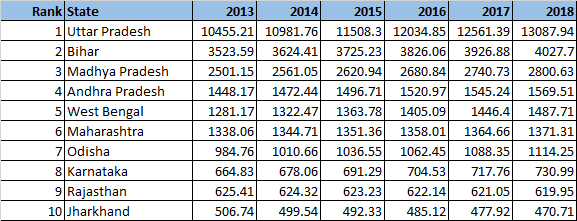
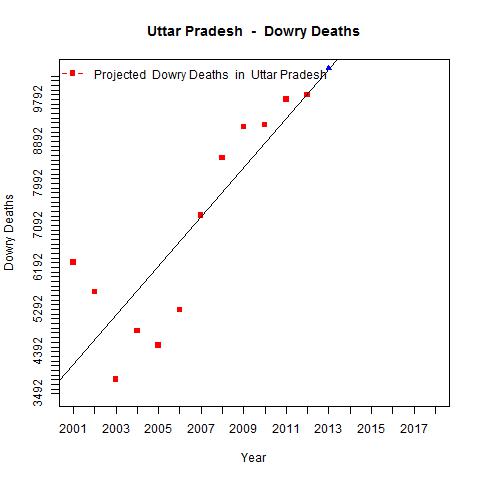
The data in OGD is available for crimes against women in different states under different ‘crime heads’ like rape, dowry deaths, kidnapping & abduction etc. The data is available for years from 2001 to 2012. This data is plotted as a scatter plot and a linear regression line is then fit on the available data. Based on this linear model,  the projected incidence of crimes likes rapes, dowry deaths, abduction & kidnapping is performed for each of the states. This is then used to build a table of  different crime heads for all the states predicting the number of crimes till the year 2018. Fortunately, R  crunches through the data sets quite easily. The overall projections of crimes against as women is shown below based on the linear regression for each of these states

Projections over the next couple of years
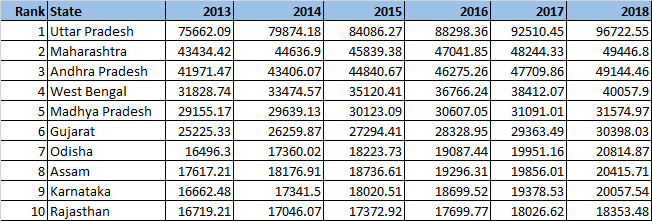
The tables below are based on the projected incidence of crimes under various categories assuming that these states maintain their torrid crime rate. A cursory look at the tables below clearly indicate the Uttar Pradesh is the undisputed heavy weight champion in 4 of 5 categories shown. Maharashtra and Andhra Pradesh take 2nd and 3rd ranks in the total crimes against women and are significant contenders in other categories too.

A) Projected rapes in India
The top 3 heavy weights in projected rapes over the next 5 years are 1) Madhya Pradesh  2) Uttar Pradesh 3) Maharashtra

rapes

Full table: Rape.csv
B) Projected Dowry deaths in India 
dowrydeaths

Full table: Dowry Deaths.csv
C) Kidnapping & Abduction
kidnapping

Full table: Kidnapping&Abduction.csv
D) Cruelty by husband & relatives
cruelty

Full table: Cruelty by husbands_relatives.csv
E) Total crimes against women

total

Full table: Total crimes.csv
Here is a visualization of ‘Total crimes against women’  created as a choropleth map

1The implementation for this analysis was done using the  R language.  The R code, dataset, output and the crime charts can be accessed at GitHub at crime-against-women

Directory structure
– R code
dataset used
output
statewise-crime-charts

The analysis has been completely parametrized. A quick look at the implementation is shown  below. A function state crime was created as given below

statecrime.R
This function (statecrime.R)  does the following
a) Creates a scatter plot for the state for the crime head
b) Computes a best linear regression fir and draws this line
c) Uses the model parameters (coefficients) to compute the projected crime in the years to come
d) Writes the projected values to a text file
c) Creates a directory with the name of the state if it does not exist and stores the jpeg of the plot there.

statecrime <- function(indiacrime, row, state,crime) {
year <- c(2001:2012)
# Make seperate folders for each state
if(!file.exists(state)) {
dir.create(state)
}
setwd(state)
crimeplot <- paste(crime,".jpg")
jpeg(crimeplot)

# Plot the details of the crime
plot(year,thecrime ,pch= 15, col="red", xlab = "Year", ylab= crime, main = atitle,
,xlim=c(2001,2018),ylim=c(ymin,ymax), axes=FALSE)

A linear regression line is fit using ‘lm’

# Fit a linear regression model
lmfit <-lm(thecrime~year)
# Draw the lmfit line
abline(lmfit)

The model parameters are then used to draw the line and also project for the next 5 years from 2013 to 2018

nyears <-c(2013:2018)
nthecrime <- rep(0,length(nyears))
# Projected crime incidents from 2013 to 2018 using a linear regression model
for (i in seq_along(nyears)) {
nthecrime[i] <- lmfit$coefficients[2] * nyears[i] + lmfit$coefficients[1]
}

The projected data for each state is appended into an appropriate file which is then used to display the tables at the top of this post

# Write the projected crime rate in a file
nthecrime <- round(nthecrime,2)
nthecrime <- c(state, nthecrime, "\n")
print(nthecrime)
#write(nthecrime,file=fileconn, ncolumns=9, append=TRUE,sep="\t")
filename <- paste(crime,".txt")
# Write the output in the ./output directory
setwd("./output")
cat(nthecrime, file=filename, sep=",",append=TRUE)

The above function is then repeatedly called for each state for the different crime heads. (Note: It is possible to check the read both the states and crime heads with R and perform the computation repeatedly. However, I have done this the manual way!)

crimereport.R
# 1. Andhra Pradesh
i <- 1
statecrime(indiacrime, i, "Andhra Pradesh","Rape")
i <- i+38
statecrime(indiacrime, i, "Andhra Pradesh","Kidnapping& Abduction")
i <- i+38
statecrime(indiacrime, i, "Andhra Pradesh","Dowry Deaths")
i <- i+38
statecrime(indiacrime, i, "Andhra Pradesh","Assault on Women")
i <- i+38
statecrime(indiacrime, i, "Andhra Pradesh","Insult to modesty")
i <- i+38
statecrime(indiacrime, i, "Andhra Pradesh","Cruelty by husband_relatives")
i <- i+38
statecrime(indiacrime, i, "Andhra Pradesh","Imporation of girls from foreign country")
i <- i+38
statecrime(indiacrime, i, "Andhra Pradesh","Immoral traffic act")
i <- i+38
statecrime(indiacrime, i, "Andhra Pradesh","Dowry prohibition act")
i <- i+38
statecrime(indiacrime, i, "Andhra Pradesh","Indecent representation of Women Act")
i <- i+38
statecrime(indiacrime, i, "Andhra Pradesh","Commission of Sati Act")
i <- i+38
statecrime(indiacrime, i, "Andhra Pradesh","Total crimes against women")
...
...

and so on for all the states

Charts for different crimes against women

1) Uttar Pradesh

The plots for  Uttar Pradesh  are shown below

Rapes in UP

Rape

Dowry deaths in UP

Dowry Deaths

Cruelty by husband/relative

Cruelty by husband_relatives

Total crimes against women in Uttar Pradesh

Total crimes against women

You can find more charts in GitHub by clicking Uttar Pradesh

2) Maharashtra : Some of the charts for Maharashtra

Rape

Rape

Kidnapping & Abduction

Kidnapping& Abduction

Total crimes against women in Maharashtra

Total crimes against women

More crime charts  for Maharashtra

Crime charts can be accessed for the following states from GitHub ( in alphabetical order)

3) Andhra Pradesh
4) Arunachal Pradesh
5) Assam
6) Bihar
7) Chattisgarh
8) Delhi (Added as an exception based on its notoriety)
9) Goa
10) Gujarat
11) Haryana
12) Himachal Pradesh
13) Jammu & Kashmir
14) Jharkhand
15) Karnataka
16) Kerala
17) Madhya Pradesh
18) Manipur
19) Meghalaya
20) Mizoram
21) Nagaland
22) Odisha
23) Punjab
24) Rajasthan
25) Sikkim
26) Tamil Nadu
27) Tripura
28) Uttarkhand
29) West Bengal

The code, dataset and the charts can be cloned/forked from GitHub at crime-against-women

Let me know if you find any interesting patterns in the data.
Thoughts, comments welcome!


See also
My book ‘Practical Machine Learning with R and Python’ on Amazon
A peek into literacy in India: Statiscal learning with R

You may also like
– Analyzing cricket’s batting legends – Through the mirage with R
– What’s up Watson? Using IBM Watson’s QAAPI with Bluemix, NodeExpress – Part 1
– Bend it like Bluemix, MongoDB with autoscaling – Part 1

A peek into literacy in India: Statistical Learning with R

In this post I take a peek into the literacy landscape across India as a whole using R language.  The dataset from Open Government Data (OGD) platform India was used for this purpose. This data is based on the 2011 census. The XL sheets for the states were downloaded for data for each state. The Union Territories were not included in the analysis.
A thin slice of the data from each data set was taken from the data for each individual state (Note: This could also have been done from the consolidated india.xls XL sheet which I came to know of, much later).

I calculate the following for age group

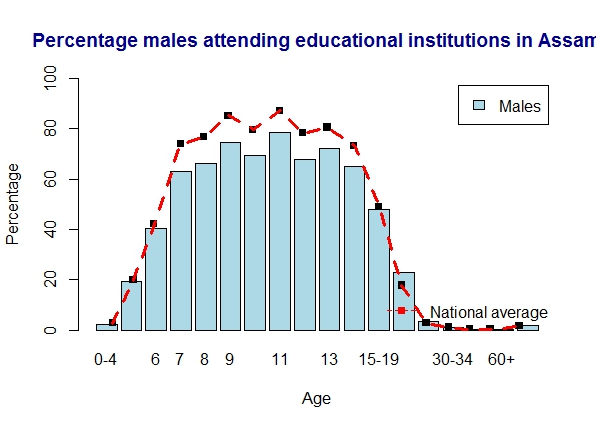
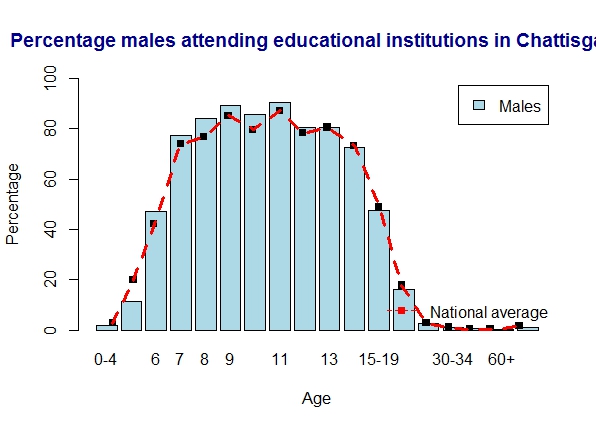
Males (%) attending education institutions = (Males attending educational institutions * 100)/ Total males
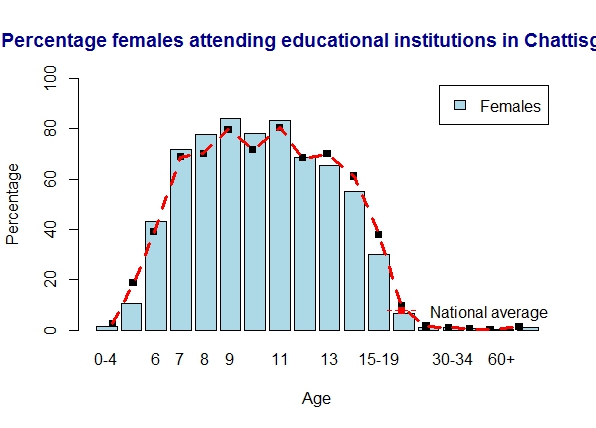
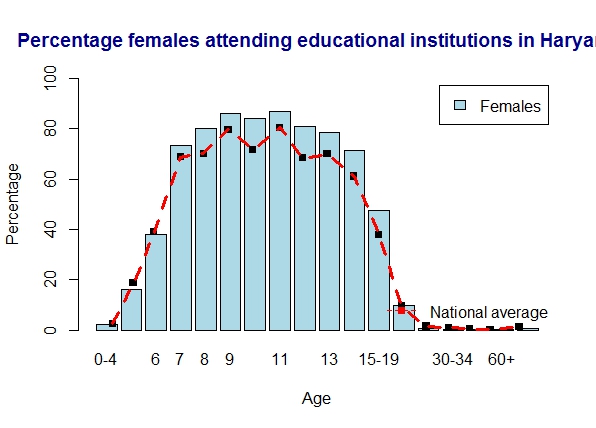
Females (%) attending education institutions = (Females attending educational institutions * 100)/ Total Females

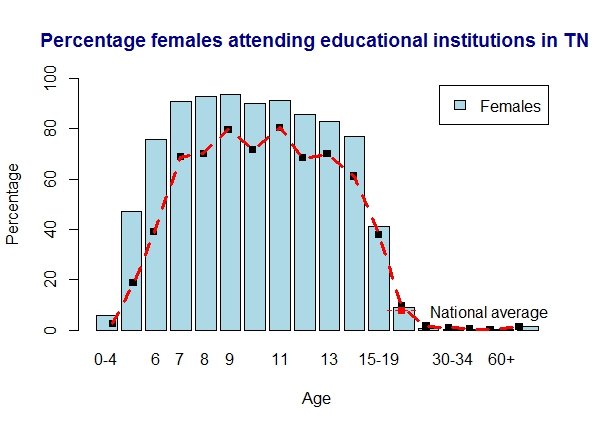
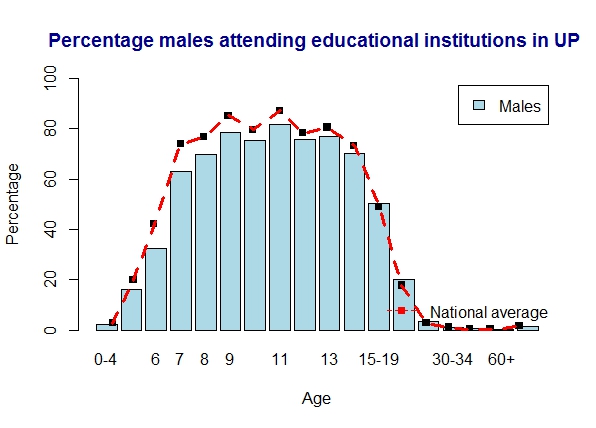
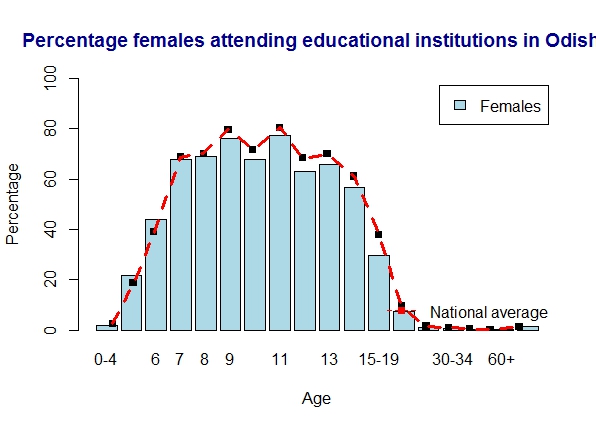
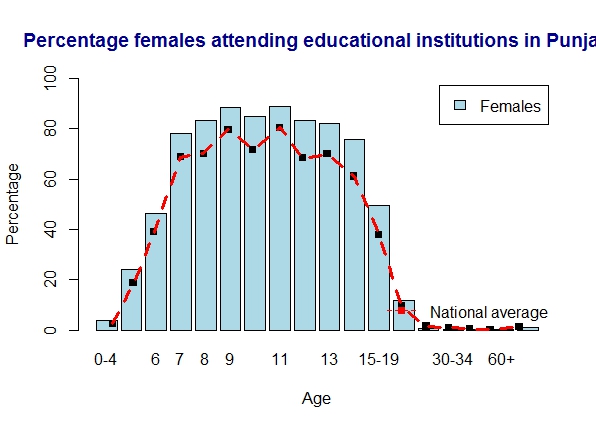
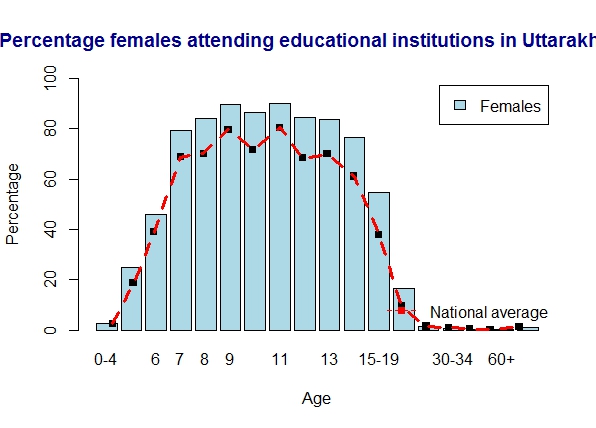
This is then plotted as a bar chart with the age distribution. I then overlay the national average for each state over the barchart to check whether the literacy in the state is above or below the national average. The implementation in R is included below

The code and data can be forked/cloned from GitHub at india-literacy

The results based on the analysis is given below.

  1. Kerala is clearly the top ranker with the literacy rates for both males and females well above the average
  2. The states with above average literacy are – Kerala, Himachal Pradesh, Uttarakhand, Tamil Nadu, Haryana, Himachal Pradesh, Karnataka, Maharashtra, Punjab, Uttarakhand
  3. The states with just about average literacy – Karnataka, Andhra Pradesh, Chattisgarh, Gujarat, Madhya Pradesh, Odisha, West Bengal
  4. The states with below average literacy – Uttar Pradesh, Bihar, Jharkhand, Arunachal Pradesh, Assam, Jammu and Kashmir, Jharkhand, Rajasthan


A brief implementation of the basic code in R is shown bwelow

# Read the Arunachal Pradhesh literacy related data
arunachal = read.csv("arunachal.csv")
# Create as a matrix
arunachalmat = as.matrix(arunachal)
arunachalTotal = arunachalmat[2:19,7:28]
# Take transpose as this is necessary for plotting bar charts
arunachalmat = t(arunachalTotal)
# Set the scipen option to format the y axis (otherwise prints as e^05 etc.)
getOption("scipen")
opt <- options("scipen" = 20)
getOption("scipen")
#Create a vector of total Males & Females
arunachalTotalM = arunachalmat[3,]
arunachalTotalF = arunachalmat[4,]
#Create a vector of males & females attending education institution
arunachalM = arunachalmat[6,]
arunachalF = arunachalmat[7,]
#Calculate percent of males attending education of total
arunachalpercentM = round(as.numeric(arunachalM) *100/as.numeric(arunachalTotalM),1)
barplot(arunachalpercentM,names.arg=arunachalmat[1,],main ="Percentage males attending educational institutions in Arunachal Pradesh",
xlab = "Age", ylab= "Percentage",ylim = c(0,100), col ="lightblue", legend= c("Males"))
points(age,indiapercentM,pch=15)
lines(age,indiapercentM,col="red",pch=20,lty=2,lwd=3)
legend( x="bottomright",
legend=c("National average"),
col=c("red"), bty="n" , lwd=1, lty=c(2),
pch=c(15) )
#Calculate percent of females attending education of total
arunachalpercentF = round(as.numeric(arunachalF) *100/as.numeric(arunachalTotalF),1)
barplot(arunachalpercentF,names.arg=arunachalmat[1,],main ="Percentage females attending educational institutions in Arunachal Pradesh ",
xlab = "Age", ylab= "Percentage", ylim = c(0,100), col ="lightblue", legend= c("Females"))
points(age,indiapercentF,pch=15)
lines(age,indiapercentF,col="red",pch=20,lty=2,lwd=3)
legend( x="bottomright",
legend=c("National average"),
col=c("red"), bty="n" , lwd=1, lty=c(2),
pch=c(15) )

A) Overall plot for India

a) India – Males

india-males

b) India – females

india-females

The plots for each individual state is given below

1) Literacy in Tamil Nadu

Tamil Nadu is slightly over the national average. The women seem to do marginally better than the males

a) Tamil Nadu – males

tn-males

b) Tamil Nadu – females

tn-females

2) Literacy in Uttar Pradesh

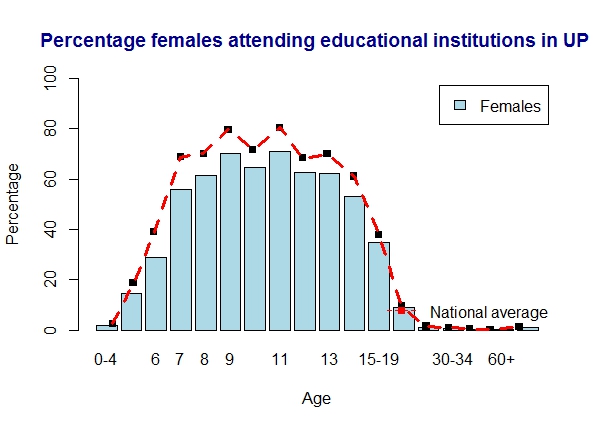
UP is slightly below the national average. Women are comparatively below men here

a) Uttar Pradesh – males

UP-males

b) Uttar Pradesh – females

UP-females

3) Literacy in Bihar

Bihar is well below the national average for both men and women

a) Bihar – males

bihar-males

b) Bihar – females

bihar-females

4. Literacy in Kerala

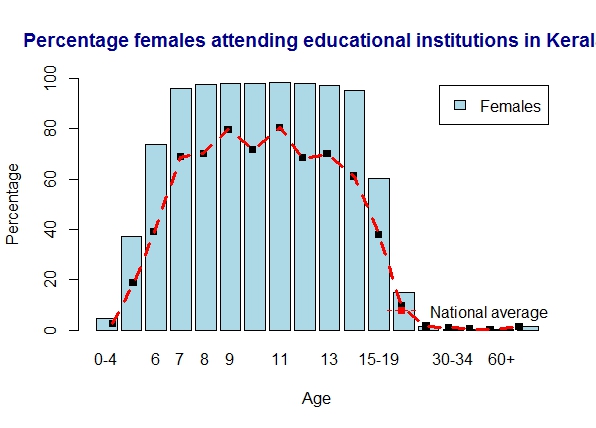
Kerala is the winner all the way in literacy with almost 100% literacy across all age groups

a) Kerala – males


kerala-females

b) Kerala -females

kerala-females


5. Literacy in Andhra Pradesh

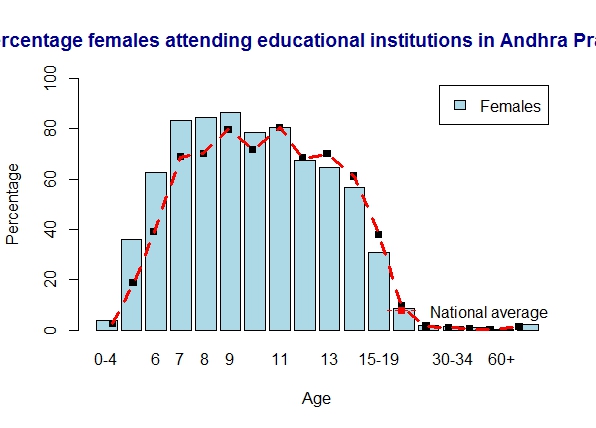
AP just meets the national average for literacy.

a) Andhra Pradesh – males

andhra-males

b) Andhra Pradesh – females

andhra-females

6. Literacy in Arunachal Pradesh

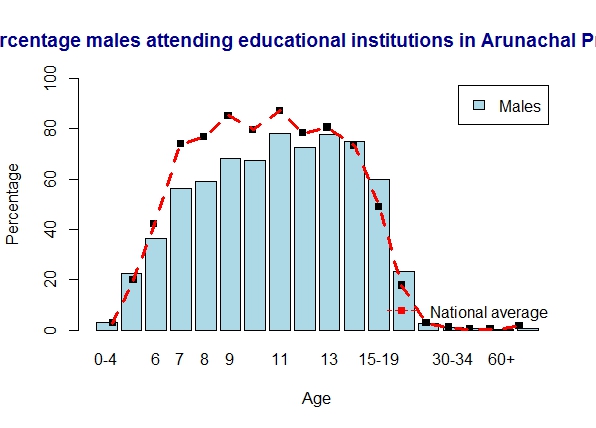
Arunachal Pradesh is below average for most of the age groups

a) Arunachal Pradesh – males

arunachal-males

b) Arunachal Pradesh – females

arunachal-females

7. Literacy in  Assam

Assam is below national average

a) Assam – males

assam-males

b) Assam – females

assam-females


8. Literacy in Chattisgarh

Chattisgarh is on par with the national average for both men and women

a) Chattisgarh – males

chattisgarh-males

b) Chattisgarh – females

chattisgarh-females


9. Literacy in Gujarat

Gujarat is just about average

a) Gujarat – males

gujarat-males

b) Gujarat – females

gujarat-females

10. Literacy in Haryana

Haryana is slightly above average

a) Haryana – males

haryana-males

b) Haryana – females

haryana-females11.  Literacy in Himachal Pradesh

Himachal Pradesh is cool and above average.

a) Himachal Pradesh – males

himachal-males


b) Himachal Pradesh – females

himachal-females

12. Literacy in Jammu and Kashmir

J & K is marginally below average

a) Jammu and Kashmir – males

jk-males

b) Jammu and Kashmir – females

jk-females


13. Literacy in Jharkhand

Jharkhand is some ways below average

a) Jharkhand – males

jharkand-males

b) Jharkhand – females

jharkand-feamles

14. Literacy in Karnataka

Karnataka is on average for men. Womem seem to do better than men here

a) Karnataka – males

karnataka-males

b) Karnataka – females

karnataka-females

15. Literacy in Madhya Pradesh

Madhya Pradesh meets the national average

a) Madhya Pradesh – males

mp-males

b) Madhya Pradesh – females

mp-females

16. Literacy in Maharashtra

Maharashtra is front-runner in literacy

a) Maharashtra – females

maharashtra

b) Maharastra – females

maharashtra-feamles


17. Literacy in Odisha

Odisha meets national average

a) Odisha – males

odisha-males

b) Odisha – females

odisha-females


18. Literacy in  Punjab

Punjab is marginally above average with women doing even better

a) Punjab – males

punjab-males

b) Punjab – females

punjab-females19. Literacy in Rajasthan

Rajasthan is average for males and below average for females

a) Rajasthan – males

rajashthan-males

b) Rajasthan – females

rajasthan-females20. Literacy in Uttarakhand

Uttarakhand rocks and is above average

a) Uttarakhand – males

uttarkhan-males

b) Uttarakhand – females

uttarkhand-females

21. Literacy in West Bengal

West Bengal just about meets the national average.

a) West Bengal – males

wb-males


b) West Bengal – females

wb-females

The code can be cloned/forked from GitHub  india-literacy. I have done my analysis on the overall data. The data is further sub-divided across districts in each state and further into urban and rural. Many different ways of analysing are possible. One method is shown here

Conclusion

  1. Kerala is clearly head and shoulders above all states when it comes to literacy
  2. Many states are above average. They are Kerala, Himachal Pradesh, Uttarakhand, Tamil Nadu, Haryana, Himachal Pradesh, Karnataka, Maharashtra, Punjab, Uttarakhand
  3. States with average literacy are – Karnataka, Andhra Pradesh, Chattisgarh, Gujarat, Madhya Pradesh, Odisha, West Bengal
  4. States which fall below the national average are – Uttar Pradesh, Bihar, Jharkhand, Arunachal Pradesh, Assam, Jammu and Kashmir, Jharkhand, Rajasthan

See also
– A crime map of India in R: Crimes against women
– What’s up Watson? Using IBM Watson’s QAAPI with Bluemix, NodeExpress – Part 1
– Bend it like Bluemix, MongoDB with autoscaling – Part 1

Statistical learning with R: A look at literacy in Tamil Nadu

In this post I make my first foray into data mining using the R language. As a start, I picked up the data from the Open Government Data (OGD Platform of India from the Ministry of Human Resources. There are many data sets under Education. To get started I picked the data set on Tamil Nadu which deals with the population attending educational institutions by age, sex and institution type. Similar data is available for all states.

I wanted to start off on a small scale, primarily to checkout some of the features of the R language. R is clearly the language of choice for processing large amounts of data. R has close to 4000+ packages that can do various things like statistical, regression analysis etc. However I found this is no easy task. There are a zillion ways in which you can take cross-sections of a large dataset. Some of them will provide useful insights while others will lead you nowhere.

Also see my post Literacy in India – A deepR dive!

Data science, which is predicted to be the technology of the future based on with the mountains of data being generated daily, will in my opinion, will be more of an art and less of a science. There will be wizards who will be able to spot remarkable truths in the mundane data while others will not be that successful.

Anyway back to my attempt to divine intelligence in the Tamil Nadu(TN)  literacy data. The data downloaded was an Excel sheet with 1767 rows and 28 columns. The first 60 rows deal with the overall statistics of literacy in Tamil Nadu state as a whole. Further below are the statistics on the individual districts of Tamil nadu.
Each of this is further divided into urban and rural parts. The data covers persons from the age of 4 upto the age of 60 and whether they attended school, college, vocational institute etc. To make my initial attempt manageable I have just focused on the data for Tamil Nadu state as a whole including the breakup of the urban and rural data.
My analysis is included below. The code and the dataset for this implementation is in R language and can be cloned from GitHub at tamilnadu-literacy-analysis

Analysis of Tamil Nadu (total)
The total population of Tamil Nadu based on an age breakup is shown below

1) Total population Tamil Nadu 
tntotal

2) Males  & Females attending education institutions in TN

tneduThere are marginally more males attending educational institutions. Also the number of persons attending educational institutions seems to drop from 11 years of age. There is a spike around 20-24 years and people go to school and college at this age. See pie chart 8) below

3) Percentage of males attending educational institution of the total males

percenteduM

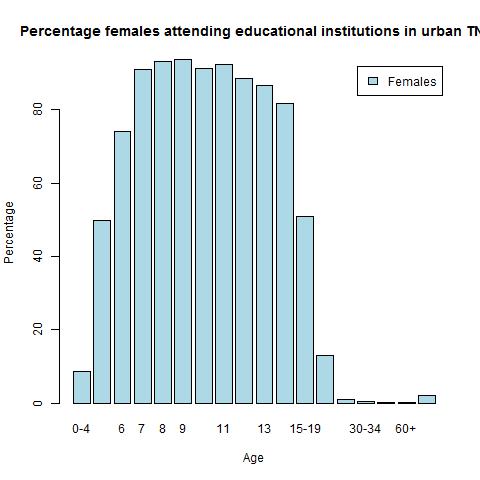
4) Percentage females attending educational institutions in TN 

percenteduF

There is a very similar trend between males and females. The attendance peaks between 9 – 11 years of age and then falls to roughly 50% around 15-19 years and rapidly falls off

5) Boys and girls attending school in TN

tnschool

For some reason there is a marked increase for boys and girls around 20-24. Possibly people repeat classes around this age

6) Persons attending college in TN

tncollege

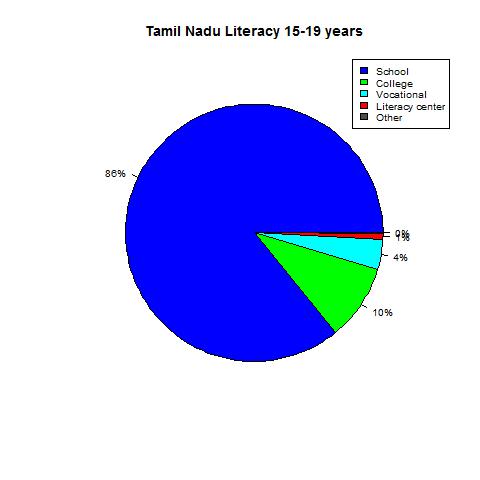
7) Educational institutions attended by persons between 15- 19 years

tnschool-1

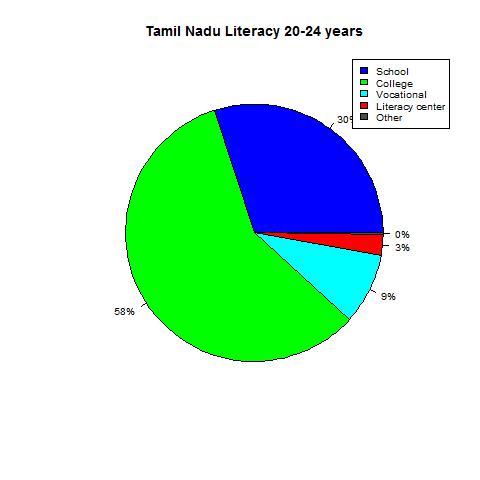
8) Educational institutions attended by persons between 20-24 tnschool-2

As can be seen there is a large percentage (30%)  of people in the 20-24 age group who are in school. This is probably the reason for the spike in “Boys and girls attending school in TN” see 2) for the 20-24 years of age

Education in rural Tamil Nadu

1) Total rural population Tamil Nadu 

ruraltotal

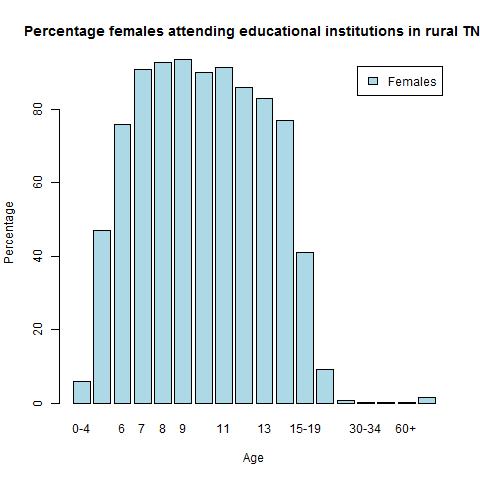
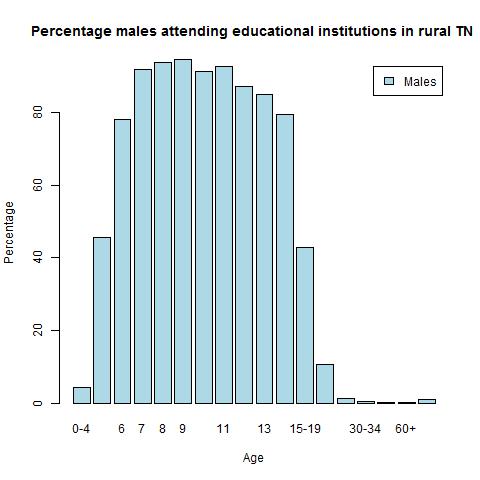
2) Males  & Females attending education institutions in  rural TNruraledu3) Percentage of rural males attending educational institution

percentruralM

4) Percentage females attending educational institutions in rural TN of total females

percentruralF

The persons attending education drops rapidly to 40% between 15-19 years of age for both males and females

5) Boys and girls attending school in rural TN

ruralschool

6) Persons attending college in rural TN

ruralcollege

7) Educational institutions attended by persons between 15- 19 years in rural TN

rural-1

8) Educational institutions attended by persons between 20-24 in rural TN

rural-2

As can be seen there is a large percentage (39%)  of rural people in the 20-24 age group who are in school

Education in urban Tamil Nadu

1) Total population in urban Tamil Nadu 

urbantotal

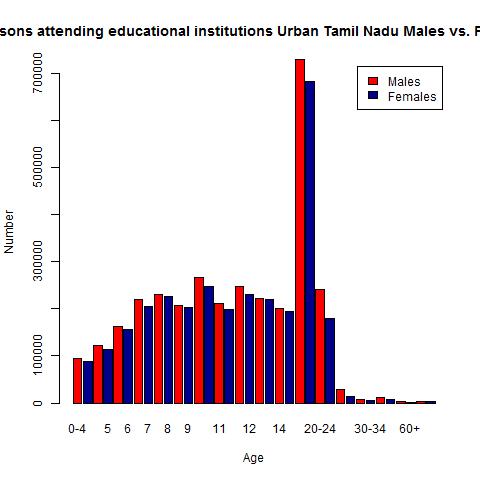
2) Males  & Females attending education institutions in urban TNurbanedu3) Percentage of males attending educational institution of the total males in urban TNpercentruralM4) Percentage females attending educational institutions in urban TN

percenturbanF

5) Boys and girls attending school in urban TN

urbanschool

6) Persons attending college in urban TN

urbancollege

7) Educational institutions attended by persons between 15- 19 years in urban TN

urban-1

8) Educational institutions attended by persons between 20-24 in urban TN

urban-2

As can be seen there is a large percentage (25%) of rural people in the 20-24 age group who are in school

The R implementation and the Tamil Nadu dataset can be cloned from my repository in GitHub at tamilnadu-literacy-analysis 

The above analysis is just one of a million possible ways the data can be analyzed and visually represented. I hope to hone my skill as progress along in similar analysis.

Hasta la vista! I’ll be back.

Watch this space!

Divining Twitterverse with R

In this post I continue my journey into Twitterverse with R and capture the tweet frequency for the hashtags #NaMo, #AAP and #RaGa over the last 7 days.  This seemed the most appropriate thing to do given that the 16th Indian General Election 2014 is just around the corner. The handshake that has to be established with Twitter is the same as mentioned in my last post “To R is human …”

Here is a great blog post on measuring tweet frequencies – Getting Genetics done by Stephen Turner.

Once the initial handshake is done the following has to be done. It appears that searchTwitter can only search tweets within the last 7 days and that too for a maximum of 1500 tweets.

This is done as follows for the hashtag #NaMo.  The dates variable creates 7 date strings. The for loop performs a searchTwitter everyday for the last 7 days

#Search the last 7 days for the hashtag #NaMo everyday

dates <- paste(“2014-03-“,10:17,sep=””) # need to go to 18th to catch tweets from 17th

for (i in 2:length(dates)) {

print(paste(dates[i-1], dates[i]))

tweets <- c(tweets, searchTwitter(“#Namo”, since=dates[i-1], until=dates[i], n=1500))

}

The tweets are then converted to dataframes for processing

# Create a dataframe from the tweets

tweets <- twListToDF(tweets)

tweets <- unique(tweets)

Finally the tweets are plotted using ggplot

#Plot the frequency of tweets in 2 hour windows

minutes <- 120

ggplot(data=tweets, aes(x=created)) +

geom_bar(aes(fill=..count..), binwidth=60*minutes) +

scale_x_datetime(“Date”) +

scale_y_continuous(“Frequency”) +

opts(title=”#NaMo Tweet Frequency March 11-17″, legend.position=’none’)

ggsave(file=’NaMo-frequency.png’, width=7, height=7, dpi=100)

The plot for #NaMo is shown below

namo

The same is performed for

#AAP

AAP

And for #RaGa

RaGa

While the number of tweets for #NaMo is very high, #RaGa seems to occur in lower number but consistently everyday

Of course we can check the tweets whether is sentiment is positive or negative for the hashtags. Thats for another day though.

The code can be cloned at Rtweet-frequency

Find me on Google+

To R is human …

“To R is human, to dabble in it fun” one could say. In this post I try to be a little of Nate Silver looking at Twiiterverse. Since the Indian general election 2014 is around the corner for constituting the 16th Lok Sabha in India I wanted to play around a little bit. Anyway here goes.

To get started on Twitter, with R we first need to establish a handshake between Twitter and R. We need to authenticate our R application with Twitter to enable us to mine the tweets in Twitterverse.. The steps are fairly straightforward. The R app you create has to authenticated and authorized with Twitter.

The first step is to create an app at Twitter at http://dev.twitter.com.. Login to your twitter account. Click the drop down at your photo and choose “My applications”. Then click “Create new application”. Now do the following
– Enter a unique name for your application
– Enter a description
– For the ‘Website’ enter any valid URL
– Leave the Callback URL blank
– Accept the conditions

bb
Leave this in your browser. The handshake between your R application and Twitter needs to be established as follows

#install the necessary packages
install.packages("ROAuth")
install.packages("twitteR")
install.packages("wordcloud")
install.packages("tm")

library("ROAuth")
library("twitteR")
library("wordcloud")
library("tm")
library(RCurl)

# Set SSL certs globally
options(RCurlOptions = list(cainfo = system.file("CurlSSL", "cacert.pem", package = "RCurl")))

require(twitteR)
reqURL <- "https://api.twitter.com/oauth/request_token"
accessURL <- "https://api.twitter.com/oauth/access_token"
authURL <- "https://api.twitter.com/oauth/authorize"

Now go to your browser. In the created Twitter application, choose the API Keys tab. Copy and paste the API key and API secret in the next 2 lines

apiKey <- "Your API key here"
apiSecret <- "Your API secret here"
twitCred twitCred$handshake(cainfo = system.file("CurlSSL", "cacert.pem", package = "RCurl"))

When you enter this you should see the following
To enable the connection, please direct your web browser to:
https://api.twitter.com/oauth/authorize?oauth_token=WnTGL4eHsiNJRFRiW1UU3GoYSvVZiYDBbO3WAsZO

Copy and paste the link given in a new tab in your browser. Copy the 7 digit PIN and paste it in the space below
When complete, record the PIN given to you and provide it here: 7377963

registerTwitterOAuth(twitCred)

This should complete the authorization. Now you are good to go.

Here is a short example of performing Text Mining with the help of package “tm”.

I wanted to create a word cloud around the hashtag #NaMo

So here is the code. We need to create a Corpus

#Search Twitter for the hashtag #NaMo

#Search Twitter for the hashtag #NaMo
r_stats<- searchTwitter("#NaMo",n=500, cainfo="cacert.pem")


# Save text
r_stats_text <- sapply(r_stats, function(x) x$getText())
# Create a corpus
r_stats_text_corpus <- Corpus(VectorSource(r_stats_text))
# Clean up the text
r_stats_text_corpus <- tm_map(r_stats_text_corpus, tolower)
r_stats_text_corpus <- tm_map(r_stats_text_corpus, removePunctuation)
r_stats_text_corpus <- tm_map(r_stats_text_corpus, function(x)removeWords(x,stopwords()))

# Now create a word cloud
wordcloud(r_stats_text_corpus)

modi

This will create a Wordcloud of the words most used with the hashtag, in this case #NaMo

You can clone the code at Rwordcloud

Watch this space. Hasta la vista. I’ll be back!

Find me on Google+