Singularity

Pete Mettle felt drowsy. He had been working for days on his new inference algorithm. Pete had been in the field of Artificial Intelligence (AI) for close to 3 decades and had established himself as the father of “semantics”. He was particularly renowned for his 3 principles of Artificial Intelligence. He had postulated the Principles of Learning as

The Principle of Knowledge Acquisition: This principle laid out the guidelines for knowledge acquisition by an algorithm. It clearly laid out the rules of what was knowledge and what was not. It could clearly delineate between the wheat and chaff from any textbook or research article.

The Principle of Knowledge Assimilation: This law gave the process for organizing the acquired knowledge in facts, rules and underlying principles. Knowledge assimilation involved storing the individual rules, the relation between the rules and provided the basis for drawing conclusions from them

The Principle of Knowledge Application: This principle according to Pete was the most important. It showed how all knowledge acquired and assimilated could be used to draw inferences andconclusions. In fact it also showed how knowledge could be extrapolated to make safe conclusions.

Zengine The above 3 principles of Pete were hailed as a major landmark in AI. Pete started to work on an inference engine known as “Zengine” based on his above 3 principles. Pete was almost finished fine tuning his algorithm. Pete wanted to test his Zengine on the World Wide Web. The World Wide Web had grown into gigantic proportions. A report in May 2025 issue of Wall Street Journal mentioned that the total data that was held in the internet had crossed 400 zettabytes and that the daily data stored on the web was close to 20 terabytes. It was a well known fact that there an enormous amount of information on the web on a wide variety of topics. Wikis, blogs, articles, ideas, social networks and so on there was a lot of information on almost every conceivable topic under the sun.

Pete was given special permission by the governments of the world to run his Zengine on the internet. It was Pete’s theory that it would take the Zengine close to at least a year to process the information on the web and make any reasonable inferences from them. Accompanied by world wide publicity Zengine started its work of trying to assimilate the information on the World Wide Web. The Zengine was programmed to periodically give a status update of its progress to Pete.

A few months passed. Zengine kept giving updates on the number of sites, periodicals, blogs it had condensed into its knowledge database. After about 10 months Pete received a mail. It read “Markets will crash on March 2026. Petrol prices will sky rocket – Zengine. Pete was surprised at the forecast. So he invoked the API to check on what basis the claim had been made. To his surprise and amazement he found that a lot events happening in the world had been used to make that claim which clearly seemed to point in that direction. A couple of months down the line there was another terse statement “Rebellion very likely in Mogadishu in Dec 2027”. – Zengine.The Zengine also came with corollaries to Fermat’s last theorem. It was becoming clear to Pete and everybody that the Zengine was indeed becoming smarter by the day..It became apparent to everybody when Zengine would become more powerful than human beings.

Celestial events: Around this time peculiar events were observed all over the world. There were a lot of celestial events that were happening. Phenomenon like the aurora borealis became common place. On Dec 12, 2026 there was an unusual amount of electrical activity in the sky. Everywhere there were streaks of lightning. By evening time slivers of lightning hit the earth in several parts of the world. In fact if anybody had viewed the earth from outer space then it would have a resembled a “nebula sphere” with lightning streaks racing towards the earth in all directions. This seemed to happen for many days. Simultaneously the Zengine was getting more and more powerful. In fact it had learnt to spawn of multiple processes to get information and return to it.

Time-space discontinuity: People everywhere were petrified of this strange phenomenon. On the one hand there was the fear of the takeover of the web by the Zengine and on the other was this increased celestial activity. Finally on the morning of Jan 2028 there was a powerful crack followed by a sonic boom and everywhere people had a moment of discontinuity. In the briefest of moments there was a natural time-space discontinuity and mankind had progressed to the next stage in evolution.

The unconscious, sub conscious and the conscious all became a single faculty of super consciousness. It has always been known from the time of Plato that man knows everything there is to know. According to Platonic doctrine of Recollection, human beings are born with a soul possessing all knowledge, and learning is just discovering or recollecting what the soul already knows. Similarly according to Hindu philosophy, behind the individual consciousness of the Atman, is the reality known as the Brahman which is universal consciousness attained in a deep state of mysticism through self-inquiry.

However this evolution by some strange quirk of coincidence seemed to coincide with the development of the world’s first truly learning machine. In this super conscious state a learning machine was not something to be feared but something which could be used to benefit mankind. Just like cranes can lift and earthmovers perform tasks that are beyond our physical capacity so also a learning machine was a useful invention that could be used to harness the knowledge from mankind’s storehouse – the World Wide Web.

Find me on Google+

Design Principles of Scalable, Distributed Systems

Designing scalable, distributed systems involves a completely different set of principles and paradigms when compared to regular monolithic client-server systems. Typical large distributed systems of Google, Facebook or Amazon are made up of commodity servers.  These servers are expected to fail, have disk crashes, run into network issues or be struck by any natural disasters.

Rather than assuming that failures and disasters will be the exception these systems are designed assuming the worst will happen.  The principles and protocols assume that failures are the rule rather than the exception. Designing distributed systems to accommodate failures is the key to a  good design of distributed scalable systems. A key consideration of distributed system is the need to maintain consistency, availability and reliability. This of course is limited by the CAP Theorem postulated by Eric Brewer which states that a system can only provide any two of “consistency, availability and partition tolerance” fully,

Some key techniques in distributed systems

Vector Clocks: An obvious issue in distributed systems with hundreds of servers is that each server will have its own clock running at a slightly different rate. It is difficult to get a view of a global time considering that each system has slightly different clock speeds. How does one determine causality in such a distributed system? The solution to this problem is provided by Vector Clocks devised by Leslie Lamport. Vector Clocks provide a way of determining the causal ordering of events.  Each system maintains an array of timestamps based on its own internal clock which it keeps incrementing. When a system needs to send an event to another system it sends the message with the timestamp generated from its internal array.  When the receiving system receives the message at a timestamp that is less than the sender’s timestamp it increments its own timestamp by 1 and continues to increments its internal array through its own internal clock. In the figure the event sent from System 1 to System 2  is assumed to be fine since the timestamp of the sender “2”  < “15. However when System 3 sends an event with timestamp 40 to System 2 which received it timestamp 35, to ensure a causal ordering where System 2 knows that it received the event after it was sent from System the vector clock is incremented by 1 i.e 40 + 1 = 41 and System 2 increments at it did before, This ensures that partial ordering of events is maintained across systems.

Vector clocks have been used in Amazon’s e-retail website to reconcile updates.  The use of vector clocks to manage consistency has been mentioned in Amazon’s Dynamo Architecture

Distributed Hash Table (DHT): The Distributed Hash Table uses a 128 bit hash mechanism to distribute keys over several nodes that can be conceptually assumed to reside on the circumference of a circle. The hash of the largest key coincides with the hash of the smallest key. There are several algorithms that are used to distribute the keys over this conceptual circle. One such algorithm is the Chord System. These algorithms try to get to the exact node in the smallest number of hops by storing a small amount of local data at each node. The Chord System maintains a finger table that allows it to get to the destination node in O (log n) number of hops. Other algorithms try to get to the desired node in O (1) number of hops.  Databases like Cassandra, Big Table, and Amazon use a consistent hashing technique. Cassandra spreads the keys of records over distributed servers by using a 128 bit hash key.

Quorum Protocol:  Since systems are essentially limited to choosing two of the three parameters of consistency, availability and partition tolerance, tradeoffs are made based on cost, performance and user experience. Google’s BigTable chooses consistency over availability while Amazon’s Dynamo chooses ‘availability over consistency”. While the CAP theorem maintains that only 2 of the 3 parameters of consistency, availability and partition tolerance are possible it does not mean that Google’s system does not support some minimum availability or the Dynamo does not support consistency. In fact Amazon’s Dynamo provides for “eventual consistency” by which data become consistent after a period of time.

Since failures are inevitable and a number of servers will fail at any instant of time writes are replicated across many servers. Since data is replicated across servers a write is considered “successful” if the data can be replicated in N/2 +1 servers. When the acknowledgement comes from N/2+1 server the write is considered successful. Similarly a quorum of reads from >N/2 servers is considered successful. Typical designs have W+R > N as their design criterion where N is the total number of servers in the system. This ensures that one can read their writes in a consistent way.  Amazon’s Dynamo uses the sloppy quorum technique where data is replicated on N healthy nodes as opposed to N nodes obtained through consistent hashing.

Gossip Protocol: This is the most preferred protocol to allow the servers in the distributed system to become aware of server crashes or new servers joining into the system, Membership changes and failure detection are performed by propagating the changes to a set of randomly chosen neighbors, who in turn propagate to another set of neighbors. This ensures that after a certain period of time the view becomes consistent.

Hinted Handoff and Merkle trees: To handle server failures replicas are sometimes sent to a healthy node if the node to which it was destined was temporarily down. For e.g.  data destined for Node A is delivered to Node D which maintains a hint in its metadata that the data is to be eventually handed off to  Node A when it is healthy.  Merkle trees are used to synchronize replicas amongst nodes. Merkle trees minimize the amount of data that needs to be transferred for synchronization.

These are some of the main design principles that are used while designing scalable, distributed systems. A related  post is “Designing a scalable architecture for the cloud

Find me on Google+

Spectrum: The Big Crunch is Coming

Published in The Hindu “Scarce spectrum impacts mobile broadband

Published in Voice & Data: Spectrum: The Big Crunch is Coming

The ubiquity of the mobile phone and its ability to access the internet has been nothing short of miraculous. Mobile broadband has had such a powerful impact in recent times that it was described as the “Mobile Miracle” by the ITU-T.

A report by the Broadband Commission (set up by ITU-T and UNESCO) says that mobile users grew from 740 mn in 2000 to 5 bn in 2010, of which 1.8 bn were mobile broadband users. And this report says that for a 10% increase in mobile penetration, there is an increase of 1.38% in the GDP of the region.

Powerful smartphones, extremely fast networks, content-rich applications, and increasing user awareness, have together resulted in a virtual explosion of mobile broadband data usage. This explosion has begun to ring warning bells the world over. For it is predicted that with the existing spectrum availability, the world will run out of spectrum capacity by the middle of this decade.

The reasons behind this are fairly obvious. The growth in mobile data traffic has been exponential. According to a report by Ericsson, mobile data is expected to double annually till 2015. Mobile broadband will see a billion subscribers this year (2011), and possibly touch 5 bn by 2015.

According to IDATE, a consulting firm, the total mobile data will exceed 127 exabytes (an exabyte is 1018 bytes, or 1 mn terabytes) by 2020, an increase of over 33% from 2010.

There are 2 key drivers behind this phenomenal growth in mobile data. One is the explosion of devices-smartphones, tablet PCs, e-readers, laptops with wireless access. All these devices deliver high-speed content and web browsing on the move. The second is video. Over 30% of overall mobile data traffic is video streaming, which is extremely bandwidth hungry. The rest of the traffic is web browsing, file downloads, and email.

The growth has been fuelled by advances in wireless technology, as it evolved from EDGE, HSPA to LTE. There’s high growth of HSPA networks in the US, Canada and Latin America. And there will be over 25 operators with commercial deployments of LTE by 2015. EDGE, HSPA, and LTE have been enabling the delivery of extremely high-speed data to and from the internet and between devices.
However the ability to squeeze more and more bits per hertz of spectrum comes with additional costs and increased complexity. And despite all the advances, there is a technological limit to the bandwidth possible in the existing spectrum. This upper bound is determined by Shannon’s theorem, which provides the theoretical limits to the capacity of a channel for sending or receiving data.

Given the current usage trends, coupled with the theoretical limits of available spectrum, the world will run out of available spectrum for the growing army of mobile users. The current spectrum availability cannot support the surge in mobile data traffic indefinitely, and demand for wireless capacity will outstrip spectrum availability by the middle of this decade.

According a report published by the International Telecommunication Union–Radio (ITU-R), the spectrum requirement for regions in the world will be between 500 MHz and 1 GHz by 2020. The demand for spectrum bandwidth, based on average mobile broadband spectrum usage, clearly indicates that this demand will exceed the supply of spectral capacity by the middle of 2014.
Mobile Spectrum is a scarce resource and the governments of all the nations must work to optimize the usage of this resource. The ITU-R allocates spectrum frequencies for the use of various countries. In this context, the NGMN alliance (a global alliance of operators) states that “a timely and globally aligned spectrum allocation policy will play a key role in the development of a viable ecosystem on a national, regional and global scale, whose benefits will last well beyond the next decade”. Hence, there is a need for global harmonization in spectrum allocation, to prevent fragmentation, and to promote innovation for the next generation of networks.

The issue of spectrum scarcity is the real problem which must be addressed immediately by all nations going forward, given the fact that it typically takes some 6 years for spectrum to be operational, from the time it is allocated.

Find me on Google+

Designing a Scalable Architecture for the Cloud

The promise of the cloud is the unlimited computing power and storage capacities coupled with the pay-per-use policy. This makes the cloud particularly irresistible for hosting web applications and applications whose demand vary periodically. In order to take full advantage of the cloud the application must be designed for optimum performance. Though the cloud provides resources on-demand a badly designed application can hog resources and prove to be extremely expensive in the long run.

One of the first requirements for deploying applications on the cloud is that it should be scalable. Scalability denotes the ability to handle increasing traffic simply by adding more computing resources of the same kind rather than adding resources with greater horse power. This is also referred to scaling horizontally.

Assuming that the application has been sufficiently profiled and tuned for high performance there are certain key considerations that need to be taken into account while deploying on the cloud – public or private.  Some of them are being able to scale on demand, providing for high availability, resiliency and having sufficient safeguards against failures.

Given these requirements a scalable design for the Cloud can be viewed as being made up of the following 5 tiers of layers

The DNS tier – In this tier the user domain is hosted on a DNS service like Ultra DNS or Route 53. These DNS services distribute the DNS lookups geographically. This results in connecting to a DNS Server that is geographically closer to the user thus speeding the DNS lookup times. Moreover since the DNS lookups are distributed geographically it also builds geographic resiliency as far as DNS lookups are concerned

Load Balancer-Auto Scaling Tier – This tier is responsible for balancing the incoming traffic among compute instances in the cloud. The load balancing may be made on a simple round-robin technique or may be based on the actual CPU utilization of the individual instances. Typically at this layer we should also have an auto-scaling policy which will add more instances if the traffic to the application increases above a threshold or terminate instances when the traffic falls below a specific threshold.

Compute-Instance Tier – This layer hosts the actual application in individual compute instances on the cloud. It is assumed that the application has been tuned for maximum performance. The choice of small, medium or large CPU should be based on the traffic handling capacity of the instance type versus the cost/hr of the instance.

Cache Tier – This is an important layer in the cloud application where there are multiple instances. The cache tier provides a distributed cache for all the instances. With a distributed caching system like memcached it is possible to share global data between instances. The memcached application uses a consistent-hashing technique to distribute data among a set of participating servers. The consistent hashing method allow for handling of server crashes and new servers joining into the cache layer.

Database Tier – The Database tier is one of the most critical layers of the application. At a minimum the database should be configured in an active-standby mode. Ideally it is always better to have the active and standby in different availability zones to better handle disasters in a particular zone. Another consideration is have separate read replicas that handle reads to database while the primary database handles the write operations

Besides the above considerations it is always good to host the web application in different availability zone thus safeguarding against disasters in a particular region.

Working with Amazon’s EBS, ELB and Route 53

Here are some key learning’s  to get going on Amazon’s Elastic Block Storage (EBS), Elastic Load Balancer (ELB) and Route 53 which Amazon’s DNS  service

Amazon’s EBS: Amazon’s Elastic Block Storage provided persistent storage for your applications. It is extremely useful when migrating from a small/medium instance to a large/extra large instance. The EBS is akin to a hard disk. The steps that are needed to migrate are

– Create an EBS volume from your snapshot of your small/medium instance

– Launch a large instance

– Attach your EBS volume to your large instance (for e.g. /dev/sda2)

– Open a ssh window to your large instance

– Create a test directory (/home/ec2-user/test)

– Mount your volume (mount /dev/sda2 /home/ec2-user/test)

– Copy all your files and directories to their appropriate location

– Unmount the mounted volume (umount /dev/sda2)

– Now you have all the files from your medium instance

– Detach the volume

Amazon’s ELB: The key thing about the Amazon’s ELB is the fact that the ELB created (my-load-balancer-nnnn-abc.amazon.com) actually maps to a set of IP addresses internally. Amazon suggests CNAMEing a subdomain to point to the ELB for better performance. Also an important thing to understand about Amazon’s ELB is that it performs significantly better if user requests come from different IPs rather from a single machine. So a performance tool that simulates users from multiple IPs will give a better throughput. The alternative is run the performance tool from multiple machines

Amazon’s Route 53: Route 53 is Amazon’s DNS service.  Route 53 distributes your domains to multiple geographical zones enabling quicker DNS lookup. To use Route 53 you need to

– create a hosted zone for your domain (for e.g http://www.mydomain.com) in Route 53

– migrate all your A, MX, CNAME resource records from your current registered domain to Route 53.

Since Route 53 is distributed it will speed name lookups. Currently updates to Route 53 are through dnscurl.pl a Perl script. However there are good GUI tools that make the job very simple.

This should get you started on the EBS, ELB and Route 53. Do also take a look at my post “Managing multi-region deployments“.

Find me on Google+

The Many Faces of Latency

Nothing is more damaging to a website than poor response times. Latency is probably the most serious issue that website application developers have to contend with. Whether it is retail application or a e-ticketing application poor response times play havoc on user experience. Latency has many faces each contributing in a little way to the overall response times of the application. This article looks at some of the key culprits that contribute to a website latency

Link Latencies: This is one of major contributors. The link speeds from the host computer to the website plays a major role. For those applications that are hosted on the public cloud it makes sense to deploy in multiple availability zones dispersed geographically. This will ensure that people across the globe get to the website from a cloud deployment closest to them. Besides, with the recent Amazon EC2 outage it definitely makes sense to be able to deploy across availability zones promoting geographical resiliency in the application. Dispersing the applications geographically helps in connecting the user with the least number of intervening hops thus reducing the response times.

DNS latencies: This is another area which needs to be focused on. DNS lookup can be fairly expensive. Hence it makes sense to speed DNS lookups by using some DNS services that provide additional name servers across geographical regions. There are many such DNS services that speed DNS lookups by propagating DNS lookup across geographies. Some examples are Amazon’s Route 53, UltraDNS etc.

Load Balancer Latencies: Typical cloud deployments will multiple instances usually be behind a load balancer. Depending on what algorithm the load balancer adopts for balancing the incoming traffic it is definitely going to contribute to the latency. Amazon’s Elastic Load Balancer is usually a set of participating IPs.

Application Latencies: When the load balancer sends the request to the Web application the logic in processing the request is a key contributor. This latency is within the control of the developer so it makes sense to bring this down to the absolute minimum.

Web page Rendering Latencies: A poorly designed web page can also result in large latencies. A webpage that needs to download a lot of items prior to being able to render it will definitely affect the user’s experience. Hence it is necessary to design an efficient web page that renders quickly. A standard technique to deliver content to a website is to use a Content Delivery Network (CDN) to deliver content. CDNs typically distribute content across multiple servers dispersed geographically. The content server selected for content delivery is based on user proximity based on the fewest number of hops. Major players in CDNS are Akamai, Edgecast andAmazon’s Cloudfront.

These are the many aspects that contribute to overall latencies. Focus should being trying to optimize in all areas while deploying a web application either in a hosted network or the public cloud.

Find me on Google+

Latency, throughput implications for the Cloud

The key considerations for any website are latency and throughput. These two parameters are extremely important to web designers as the response time of the web site and the ability to handle large amounts of traffic are directly related to the user experience and the loyalty of returning users.

What are these two parameters and why are they significant? Before looking at latency we need to understand what the response time of the web application is. Ideally this could be defined as the time between the receipt of the HTTP request and the emitting of the corresponding response. Unfortunately any web site hosted on the World Wide Web adds a lot more delay than the response time. This delay comes as the latency of the web site and is primarily due to the propagation and transmission delays on the internet. There are many contributors to this latency starting from the DNS lookup, to the link bandwidth etc.

Throughput on the other hand represents the maximum simultaneous queries or transactions per second that the web application is capable of handling. This is usually measured as transactions-per-second (tps) or queries-per-second (qps).

A good way to understand response time and throughput is to use a oft used example, of a retail store handling customers.  Assuming that there are 5 counter clerks who take 1 minute to check out a customer  we can readily see that as the number of customers to the store increases the throughput increases from 1 customer/minute to a maximum of 5 customers/minute.  Since the cashiers are able to process in 1 minute the response time for the customer is 1 minute/customer. Assuming a 6th customer enters and needs to checkout he/she will have to wait, for e.g.1 minute, if the 5 counter clerks are busy processing 5 other clients,. Hence the response time for the customer will be 1 minute (waiting) + 1 minute (servicing) = 2 minute. The response time increases from 1 minute to 2 minute.  If further clients are ready to check out the length of the wait in the queue will increase and hence the response time. Clearly the throughput cannot increase beyond 5 customers/minute while the response time will increase non-linearly as the clients enter the store faster than they can checked out by the counter clerks.

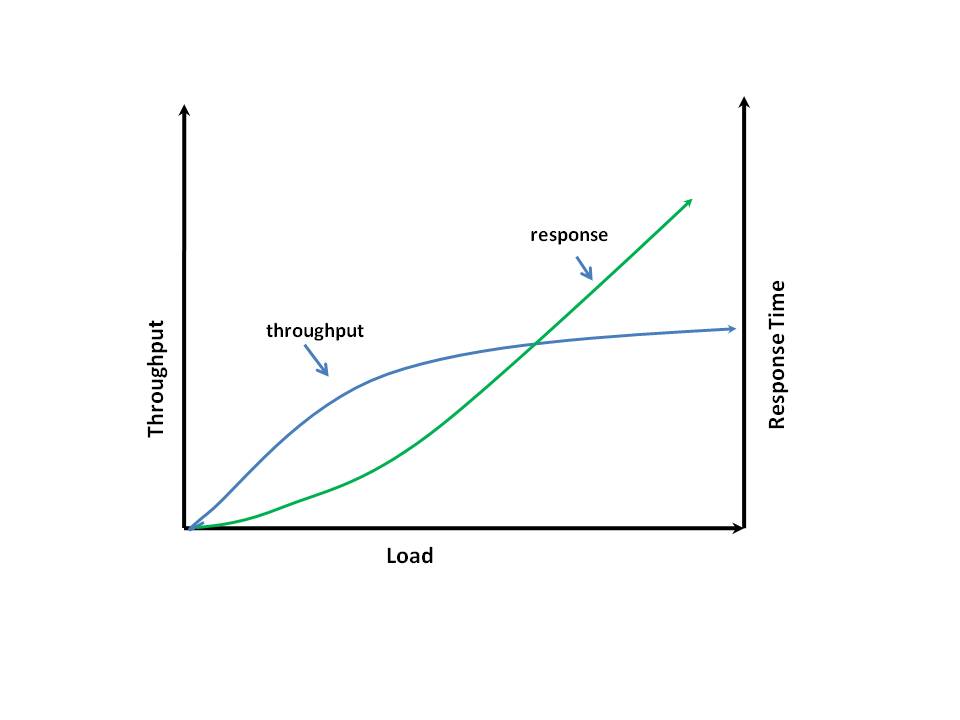
This is precisely the behavior of web applications. When the traffic to a web site is increased the throughput increases linearly and finally reaches a throughput “plateau”. After this point as the load is increased the throughput remains saturated at this level.  While on the other hand the response time is low at low traffic  it starts to increase non-linearly with increasing load and continues to increase as it maxes out  system resources like the CPU and memory.

When deploying applications on the cloud the latency and throughput are key considerations which are needed to determine the kind of computing resources that  are needed in  the cloud.  Assuming the web application has been optimized and performance tuned for optimum performance what needs to be done is run load testing of the application on the cloud using different CPU instances. For example assume that application is load tested on a small CPU instance.  We need to get the response times and throughput plots with increasing loads. Similarly we now need to deploy the web application on a medium instance and plot response times and the throughput plateaus on the medium instances.

Now the choice as to whether to go for a small CPU instance or medium CPU instance can be calculated as follows. Assuming that the requirements of the web application is to have a response time of ‘t’ seconds then we determine the corresponding traffic handling capacity , for the small CPU instance, say ‘c’ and for the medium CPU instance, let’s assume ‘C’. If the web site has to handle to total traffic of T then we determine the number of instances needed in each case. For the

small CPU instance it will be n= (T/c) + 1

and for

the medium CPU instance it will be N =( T/C)+1.

Now we compute the relative costs of the small and medium CPU instances and identify which is more economical. For example if r1 is the cost per hour of the small CPU instance and R1 is the cost of the medium CPU instance we choose

The small CPU instance if r1 *n < R1 *N (per hour)

While on the other hand if R1 *N < r1 *n then we will choose the medium instance.

Hence the determination of which CPU instance and the configuration of the web application on the cloud will depend on appropriate performance tuning and proper load testing on the cloud. Do also ready my other posts on latency namely ‘The Many faces of latency” and “The Anatomy of Latency“.

Also see latency and throughput in action in the following series of posts

– Bend it like Bluemix, MongoDB with autoscaling – Part 1

– Bend it like Bluemix, MongoDB with autoscaling – Part 2

– Bend it like Bluemix, MongoDB with autoscaling – Part 3

Find me on Google+

Cloud Computing – Show me the money!

Published in Telecom Lead – Cloud Computing – Show me the money!

A lot has been said about the merits of cloud computing and how it is going to be the technological choice of most enterprises in the not so distant future. But the key question that is bound to keep cropping up in the higher echelons of the enterprise is whether the cloud makes good business sense. While most know that cloud computing adopts a pay-per-use model similar to regular utilities like electricity and water and does away with upfront infrastructure costs to the organization the nagging question to most senior management people is whether cloud computing is prudent choice in the long term.

This is not an easy question to answer and depends on a multitude of factors. The alternative to cloud computing is to have an in-house infrastructure of servers, hardware and software, software licenses, broadband links, firewalls etc. All these will form the Capital Expenditure (CAPEX) for the organization. In addition to these expenses will be the Operational Expenditures (OPEX) of real estate to house the equipment, power supply systems, cooling systems, maintenance personnel, annual maintenance contracts (AMC) etc which will be recurring expenses for the organization.

Cloud Computing does away completely with procurement of hardware, software, databases, licenses etc and an enterprise should be able to host their application in a couple of hours provided they know ahead of time the resources their application will need.

Hence as can be seen while the upfront costs and the running costs of maintaining a data center will be high in comparison to the zero upfront costs of the deploying on the cloud the steeper operational costs of the cloud will eventually catch up with the in-house infrastructure.

Depending on how well the application is designed the point at which the cumulative running costs of the cloud breaks even with in-house data center can be made to occur a couple of years down the line after the application is deployed.  Assuming that the break even happens in 3 years the advantage of cloud deployment is that the enterprise does not have to worry about equipment obsolescence, upgrading of software etc not to mention the depreciation of the equipment costs.

Moreover cloud technology is extremely useful to enterprises which are planning to deploy application in which there is difficulty in forecasting the type of traffic that will be hit their application. Where the traffic may be intermittent, bursty or seasonal then a cloud makes perfect business sense since can it scale up or scale down depending on the traffic.

Some typical applications which are prime candidates for the cloud are CRM software, office tools, testing tools, online retail stores, webmail etc.

One possible worry of the enterprise will be the security concerns while deploying to the public cloud. In such situations the organization can take a hybrid strategy where their sensitive data are hosted in in-house data centers and their main application is hosted on a public cloud.

Hence in most situation cloud deployments do have a definite edge for certain key application of the enterprise.

Find me on Google+

A Roundup of Web Technologies

The internet and the World Wide Web are woven into our daily lives so intricately that life without them is  unimaginable. We use the web for our daily news, to finding directions(maps), socializing(Facebook), sending/receiving emails, and buying e-tickets and books over e-retail stores on the net. With a click, a drag and drop or by just moving the mouse over a web page we see results instantaneously. But what are the technologies that power the Web outside of the routers and hubs of the data communication world?

Actually if one peeks into the technologies that power Web 2.0 one would be amazed at the bewildering array of technological choices that one is confronted with. My curiosity was whetted when I found that there were so many possibilities that go behind different websites from Gmail, http://www.amazon.com. Twitter, Facebook or maps.yahoo.com.

This article tries to give a bird’s eye view of the different technologies at the different layers. In many ways this article will be more of name dropping of the technologies rather than doing any real justice to each individual piece. I am merely presenting the different technologies as an interested spectator rather than as a web expert.

Presentation Layer: This is the layer which presents the web page to user. In the presentation layer most of the pages are made of elements of from HTML,CSS, PHP, Javascript, AJAX. These are diferent scripting mechanisms to display or take input from the user. Subsequently there arose the need for technologies called Rich Internet Application (RIA) to provide a much more superior user experience. These technologies are used to display video content and animations. Hence, we have Flash, Flex to more sophisticated technologies like Liferay, Primefaces, Myfaces and Java Server Faces (JSF) to the current HTML5. These technologies allow for drag-and-drop functionality, incorporating videos and animations in the web pages making the user experience similar to what he experiences on the desktop.

Enterprise Layer: At this layer the user input is processed and the client makes necessary requests to the back end server to get the appropriate results. This layer also there is a virtual explosion of technologies that make this possible. In this layer from the earlier C++, Java programs the movement was towards Enterprise Java Beans (EJB) invoked through servlets or Java Server Pages. To make the life of the web developer easier (?) there are several web frameworks that automate some of the common tasks of the developer. Some of them are Django with Python, Ruby on Rails (RoR), Groovy Grails, Perl-Catalyst, Python-Flask and so on. Each web framework has it pros and cons and has different learning curves. While Python developers thrive on “there is only one way to do a thing”, die-hard Ruby developers believe in the “do not repeat yourself (DRY)” philosophy. So the technology choice will be a matter of taste combined with deadlines for the project.

Persistence Layer: At the persistence layer there is Hibernate which converts a relational model to an object model and vice-versa making it easy to manipulate the rows and columns of tables. Usually this layer is coupled with Spring frameworks. Another competing technology is Struts framework.

Database Layer: While Hibernate can be used as a persistence layer it is also possible to access the database through ODBC, JDBC etc.

Exchange of Data: In the earlier days sending and receiving data or invoking remote procedure calls were through CORBA or RPC (Remote Procedure Calls). Subsequently other methods have been implemented for data exchange between servers. They are XML, JSON (Javascript Object Notation),SOAP (Simple Object Access Protocol) to the more current REST (Representational State Transfer)

Hence there are plethora of choices to make prior in the design of web sites complete with back end processing. The choices that are made will depend on the look and feel of the web site coupled with the ease of implementation of the site given the project deadlines.

Find me on Google+

The Anatomy of Latency

Latency is a measure of the time delay experienced in a system. In data communications, latency would be measured as the round-trip delay between sending a packet and receiving response from the destination. In the world of web applications latency is the response time of a web site. In web applications latency is dependent on both the round trip time on the communication link and also the processing time of the application, Hence we could say that

latency = 2 * round trip time  + Processing time

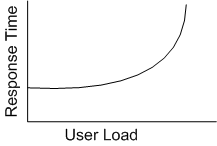
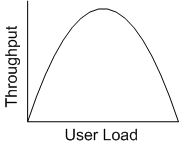
The round trip time is probably less susceptible to increasing traffic than the processing time taken for handling the increased loads. The processing time of the application is particularly pernicious in that it susceptible to changing traffic. This article tries to analyze why the latency or response times of web applications typically increase with increasing traffic. While the latency increases exponentially as the traffic increases the throughput increases to a point and then finally starts to drop substantially.  The ideal situation for all internet applications is to have the ability to scale horizontally allowing the application to handle increasing traffic by simply adding more commodity servers to the application while maintaining the response times to acceptable limits. However in the real world this never happens.

The price of Latency

Latency hurts business. Amazon found out that every 100 ms of latency cost them 1% of sales.  Similarly Google realized that a 0.5 second increase in search results dropped the search traffic by 20%. Latency really matters.    Reactions to bad response times in web sites range from minor annoyance to complete frustration and loss of users and business.

The cause of processing latency

One of the fundamental requirements of scalable systems is that they should be loosely coupled. The application needs to have a modular architecture with well defined interfaces with the other modules.  Ideally, applications which have been designed with fairly efficient processing times of the order of O(logn) or O(nlogn)  will be immune to changing loads but will be impacted by changes in number of data elements  So the algorithms adopted by the applications themselves do not contribute the increasing response times for increase traffic. So finally what really is the performance bottleneck for increasing latencies and decreasing throughput for increased loads?

Contention- the culprit

One of the culprits behind the deteriorating response is the thread locking and resource contention. Assuming that application has been designed with Reader-Writer locks or message queue based synchronization mechanism then the time spent in waiting for resources to become free, while traffic increases, will result in the degraded performance.

Let us assume that the application is read-heavy, write-light and has implemented Reader-Writer synchronization mechanism. Further let us assume that a write-thread locks a resource for 250 ms.  At low loads we could have 4 such threads each locking the resource for 250 ms for a total span of 1s.  Hence in 1s there can be a maximum of 4 threads each of which has executed a write lock for 250 ms for a total of 1s. In this interval all reader threads will be forced to wait. When the traffic load is low the number of reader threads waiting for the lock to be released will be low and will not have much impact but as the traffic increases the number of threads that are waiting for the lock to be released will be increase. Since a write lock takes a finite amount of time to complete processing we cannot go over the 4 write threads in 1 second with the given CPU speed.

However as the traffic further increases the number of waiting threads not only increases but also consume CPU and memory. Now this adversely impacts the writer threads which find that they have lesser CPU cycles and less memory and hence take longer times to complete. This downward cycle worsens and hence results in an increase in the response time and a worsening throughput in the application.

The solution to this problem is not easy. We need to revisit the areas where the application blocks waiting for something. Locking besides causing threads to wait also adds the overhead of getting scheduled prior to being able to execute again. We need to minimize the time a thread holds a resource before allowing others threads access to it.

Find me on Google+