My 3 video presentations on “Essential R”

In this post I include my  3 video presentations on the topic “Essential R”. In these 3 presentations I cover the entire landscape of R. I cover the following

  • R Language – The essentials
  • Key R Packages (dplyr, lubridate, ggplot2, etc.)
  • How to create R Markdown and share reports
  • A look at Shiny apps
  • How to create a simple R package

You can download the relevant slide deck and practice code at Essential R

Essential R – Part 1
This video cover basic R data types – character, numeric, vectors, matrices, lists and data frames. It also touches on how to subset these data types

Essential R – Part 2
This video continues on how to subset dataframes (the most important data type) and some important packages. It also presents one of the most important job of a Data Scientist – that of cleaning and shaping the data. This is done with an example unclean data frame. It also  touches on some  key operations of dplyr like select, filter, arrange, summarise and mutate. Other packages like lubridate, quantmod are also included. This presentation also shows how to use base plot and ggplot2

Essential R – Part 3
This final session covers R Markdown , and  touches on some of the key markdown elements. There is a brief overview of a simple Shiny app. Finally this presentation also shows the key steps to create an R package

These 3 R sessions cover most of the basic R topics that we tend to use in a our day-to-day R way of life. With this you should be able to hit the ground running!

Hope you enjoy these video presentation and also hope you have an even greater time with R!

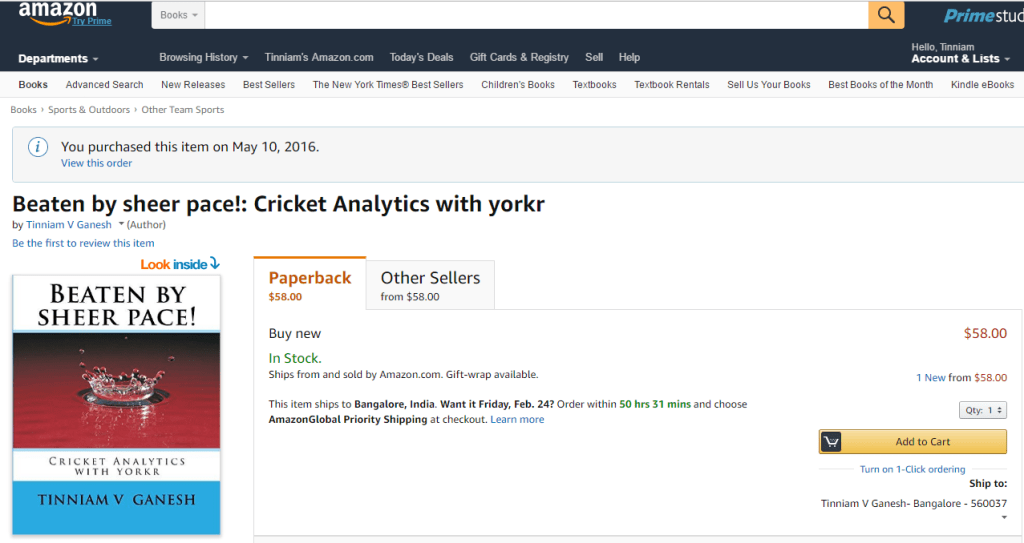
Check out my 2 books on cricket, a) Cricket analytics with cricketr b) Beaten by sheer pace – Cricket analytics with yorkr, now available in both paperback & kindle versions on Amazon!!! Pick up your copies today!

Also see
1. Introducing QCSimulator: A 5-qubit quantum computing simulator in R
2. Computer Vision: Ramblings on derivatives, histograms and contours
3. Designing a Social Web Portal
4. Revisiting Whats up, Watson – Using Watson’s Question and Answer with Bluemix – Part 2
5. Re-introducing cricketr! : An R package to analyze performances of cricketers

To see all my posts click – Index of posts

cricketr flexes new muscles: The final analysis

Twas brillig, and the slithy toves
Did gyre and gimble in the wabe:
All mimsy were the borogoves,
And the mome raths outgrabe.

       Jabberwocky by Lewis Carroll
                   

No analysis of cricket is complete, without determining how players would perform in the host country. Playing Test cricket on foreign pitches, in the host country, is a ‘real test’ for both batsmen and bowlers. Players, who can perform consistently both on domestic and foreign pitches are the genuinely ‘class’ players. Player performance on foreign pitches lets us differentiate the paper tigers, and home ground bullies among batsmen. Similarly, spinners who perform well, only on rank turners in home ground or pace bowlers who can only swing and generate bounce on specially prepared pitches are neither  genuine spinners nor  real pace bowlers.

So this post, helps in identifying those with real strengths, and those who play good only when the conditions are in favor, in home grounds. This post brings a certain level of finality to the analysis of players with my R package ‘cricketr’

Besides, I also meant ‘final analysis’ in the literal sense, as I intend to take a long break from cricket analysis/analytics and focus on some other domains like Neural Networks, Deep Learning and Spark.

If you are passionate about cricket, and love analyzing cricket performances, then check out my racy book on cricket ‘Cricket analytics with cricketr and cricpy – Analytics harmony with R & Python’! This book discusses and shows how to use my R package ‘cricketr’ and my Python package ‘cricpy’ to analyze batsmen and bowlers in all formats of the game (Test, ODI and T20). The paperback is available on Amazon at $21.99 and  the kindle version at $9.99/Rs 449/-. A must read for any cricket lover! Check it out!!

You can download the latest PDF version of the book  at  ‘Cricket analytics with cricketr and cricpy: Analytics harmony with R and Python-6th edition

Untitled

As already mentioned, my R package ‘cricketr’ uses the statistics info available in ESPN Cricinfo Statsguru. You should be able to install the package from CRAN and use many of the functions available in the package. Please be mindful of ESPN Cricinfo Terms of Use

Important note 1: The latest release of ‘cricketr’ now includes the ability to analyze performances of teams now!!  See Cricketr adds team analytics to its repertoire!!!

Important note 2 : Cricketr can now do a more fine-grained analysis of players, see Cricketr learns new tricks : Performs fine-grained analysis of players

Important note 3: Do check out the python avatar of cricketr, ‘cricpy’ in my post ‘Introducing cricpy:A python package to analyze performances of cricketers

(Note: This page is also hosted at RPubs as cricketrFinalAnalysis. You can download the PDF file at cricketrFinalAnalysis.

Important note: Do check out my other posts using cricketr at cricketr-posts

For getting data of a player against a particular country for the match played in the host country, I just had to add 2 extra parameters to the getPlayerData() function. The cricketr package has been updated with the changed functions for getPlayerData() – Tests, getPlayerDataOD() – ODI and getPlayerDataTT() for the Twenty20s. The updated functions will be available in cricketr Version -0.0.14

The data for the following players have already been obtained with the new, changed getPlayerData() function and have been saved as *.csv files. I will be re-using these files, instead of getting them all over again. Hence the getPlayerData() lines have been commented below

library(cricketr)

1. Performance of a batsman against a host ountry in the host country

For e.g We can the get the data for Sachin Tendulkar for matches played against Australia and in Australia Here opposition=2 and host =2 indicate that the opposition is Australia and the host country is also Australia

#tendulkarAus=getPlayerData(35320,opposition=2,host=2,file="tendulkarVsAusInAus.csv",type="batting")

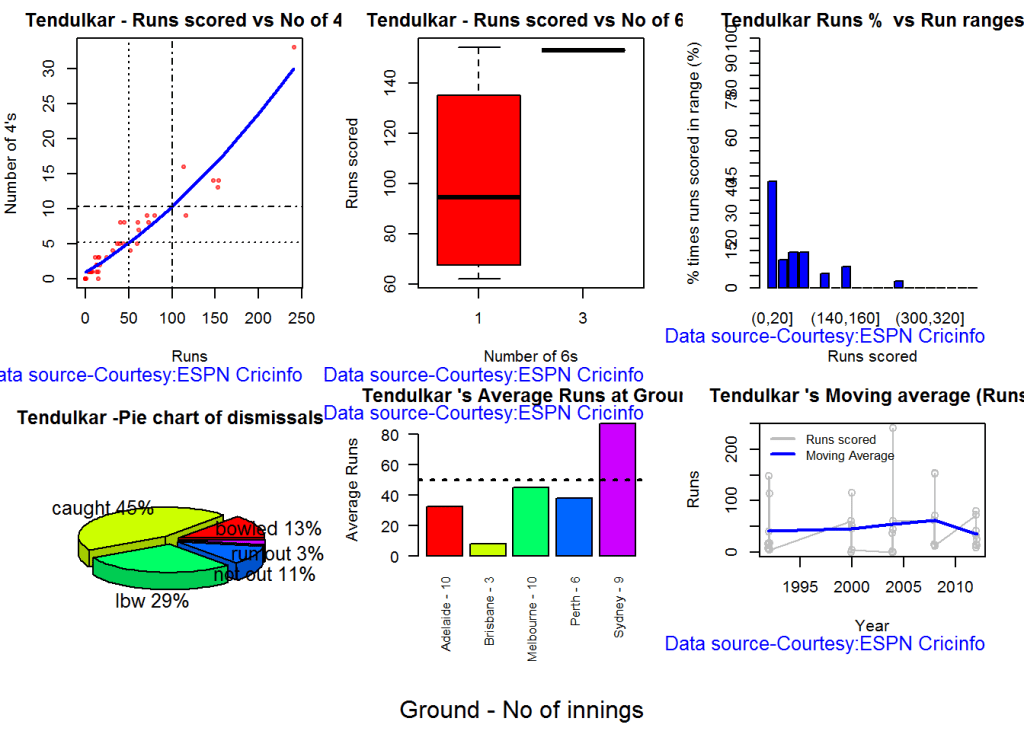
All cricketr functions can be used with this data frame, as before. All the charts show the performance of Tendulkar in Australia against Australia.

par(mfrow=c(2,3))
par(mar=c(4,4,2,2))
batsman4s("./data/tendulkarVsAusInAus.csv","Tendulkar")
batsman6s("./data/tendulkarVsAusInAus.csv","Tendulkar")
batsmanRunsRanges("./data/tendulkarVsAusInAus.csv","Tendulkar")
batsmanDismissals("./data/tendulkarVsAusInAus.csv","Tendulkar")
batsmanAvgRunsGround("./data/tendulkarVsAusInAus.csv","Tendulkar")
batsmanMovingAverage("./data/tendulkarVsAusInAus.csv","Tendulkar")

dev.off()
## null device 
##           1

2. Relative performances of international batsmen against England in England

While we can analyze the performance of a player against an opposition in some host country, I wanted to compare the relative performances of players, to see how players from different nations play in a host country which is not their home ground.

The following lines gets player’s data of matches played in England and against England.The Oval, Lord’s are famous for generating some dangerous swing and bounce. I chose the following players

  1. Sir Don Bradman (Australia)
  2. Steve Waugh (Australia)
  3. Rahul Dravid (India)
  4. Vivian Richards (West Indies)
  5. Sachin Tendulkar (India)
#tendulkarEng=getPlayerData(35320,opposition=1,host=1,file="tendulkarVsEngInEng.csv",type="batting")
#bradmanEng=getPlayerData(4188,opposition=1,host=1,file="bradmanVsEngInEng.csv",type="batting")
#srwaughEng=getPlayerData(8192,opposition=1,host=1,file="srwaughVsEngInEng.csv",type="batting")
#dravidEng=getPlayerData(28114,opposition=1,host=1,file="dravidVsEngInEng.csv",type="batting")
#vrichardEng=getPlayerData(52812,opposition=1,host=1,file="vrichardsEngInEng.csv",type="batting")
frames <- list("./data/tendulkarVsEngInEng.csv","./data/bradmanVsEngInEng.csv","./data/srwaughVsEngInEng.csv",
               "./data/dravidVsEngInEng.csv","./data/vrichardsEngInEng.csv")
names <- list("S Tendulkar","D Bradman","SR Waugh","R Dravid","Viv Richards")

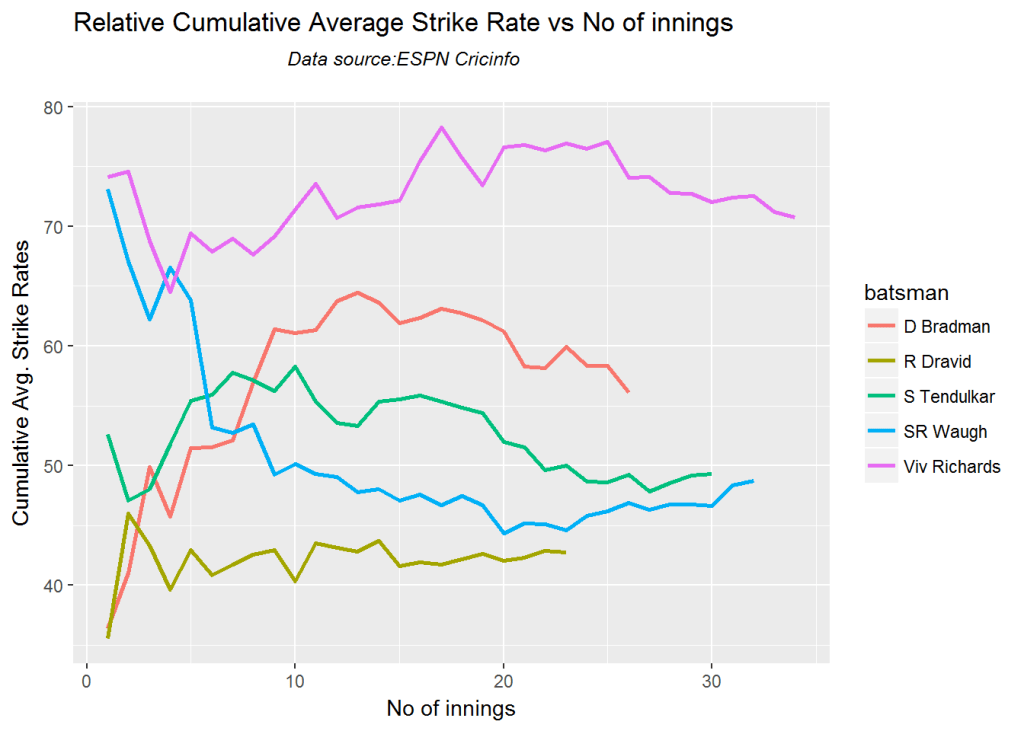
The Lords and the Oval in England are some of the best pitches in the world. Scoring on these pitches and weather conditions, where there is both swing and bounce really requires excellent batting skills. It can be easily seen that Don Bradman stands heads and shoulders over everybody else, averaging close a cumulative average of 100+. He is followed by Viv Richards, who averages around ~60. Interestingly in English conditions, Rahul Dravid edges out Sachin Tendulkar.

relativeBatsmanCumulativeAvgRuns(frames,names)

# The other 2 plots on relative strike rate and cumulative average strike rate,
shows Viv Richards really  blasts the bowling. Viv Richards has a strike rate 
of 70, while Bradman 62+, followed by Tendulkar.
relativeBatsmanSR(frames,names)

relativeBatsmanCumulativeStrikeRate(frames,names)

3. Relative performances of international batsmen against Australia in Australia

The following players from these countries were chosen

  1. Sachin Tendulkar (India)
  2. Viv Richard (West Indies)
  3. David Gower (England)
  4. Jacques Kallis (South Africa)
  5. Alastair Cook (Emgland)
frames <- list("./data/tendulkarVsAusInAus.csv","./data/vrichardsVAusInAus.csv","./data/dgowerVsAusInAus.csv",
               "./data/kallisVsAusInAus.csv","./data/ancookVsWIInWI.csv")
names <- list("S Tendulkar","Viv Richards","David Gower","J Kallis","AN Cook")

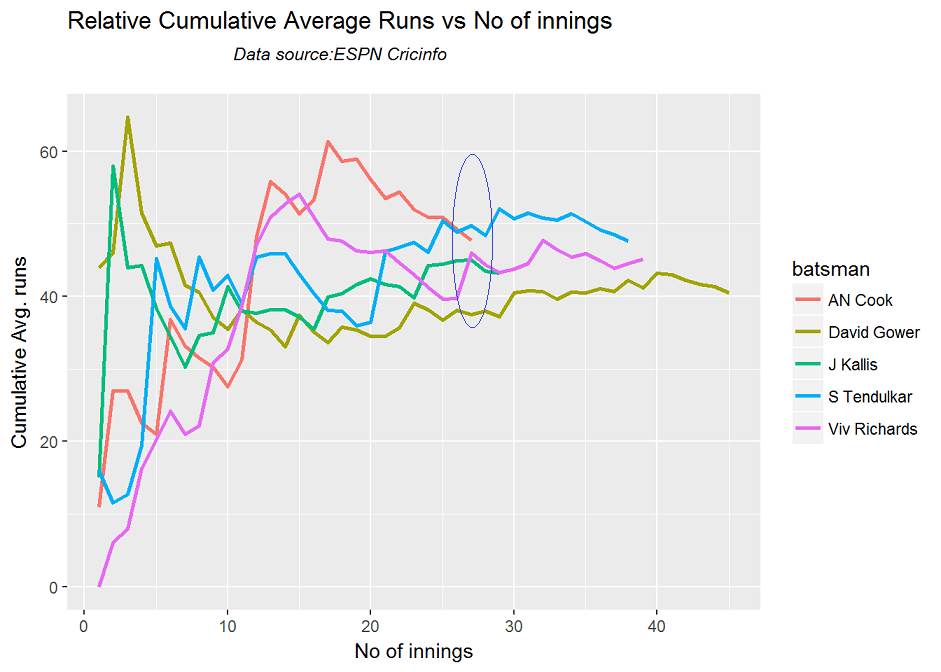
Alastair Cook of England has fantastic cumulative average of 55+ on the pitches of Australia. There is a dip towards the end, but we cannot predict whether it would have continued. AN Cook is followed by Tendulkar who has a steady average of 50+ runs, after which there is Viv Richards.

relativeBatsmanCumulativeAvgRuns(frames,names)

#With respect to cumulative or relative strike rate Viv Richards is a class apart.He seems to really
#tear into bowlers. David Gower has an excellent strike rate and is followed by Tendulkar
relativeBatsmanSR(frames,names)

relativeBatsmanCumulativeStrikeRate(frames,names)

4. Relative performances of international batsmen against India in India

While England & Australia are famous for bouncy tracks with swing, Indian pitches are renowed for being extraordinary turners. Also India has always thrown up world class spinners, from the spin quartet of BS Chandraskehar, Bishen Singh Bedi, EAS Prasanna, S Venkatraghavan, to the times of dangerous Anil Kumble, and now to the more recent Ravichander Ashwon and Harbhajan Singh.

A batsmen who can score runs in India against Indian spinners has to be really adept in handling all kinds of spin.

While Clive Lloyd & Alvin Kallicharan had the best performance against India, they have not been included as ESPN Cricinfo had many of the columns missing.

So I chose the following international players for the analysis against India

  1. Hashim Amla (South Africa)
  2. Alastair Cook (England)
  3. Matthew Hayden (Australia)
  4. Viv Richards (West Indies)
frames <- list("./data/amlaVsIndInInd.csv","./data/ancookVsIndInInd.csv","./data/mhaydenVsIndInInd.csv",
               "./data/vrichardsVsIndInInd.csv")
names <- list("H Amla","AN Cook","M Hayden","Viv Riachards")

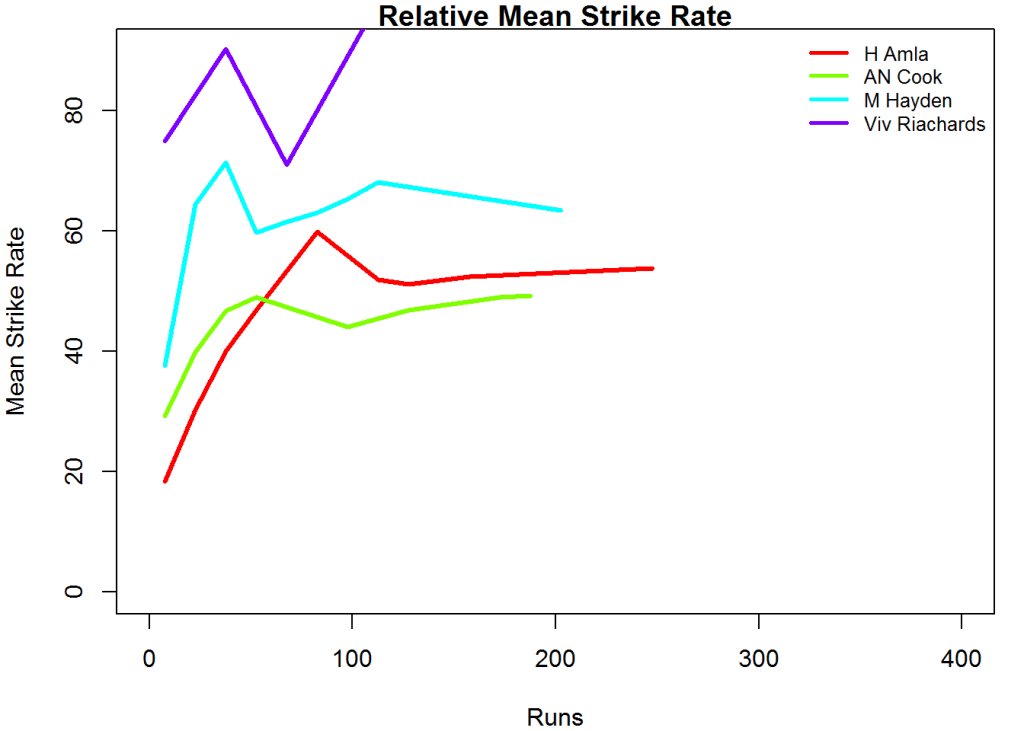
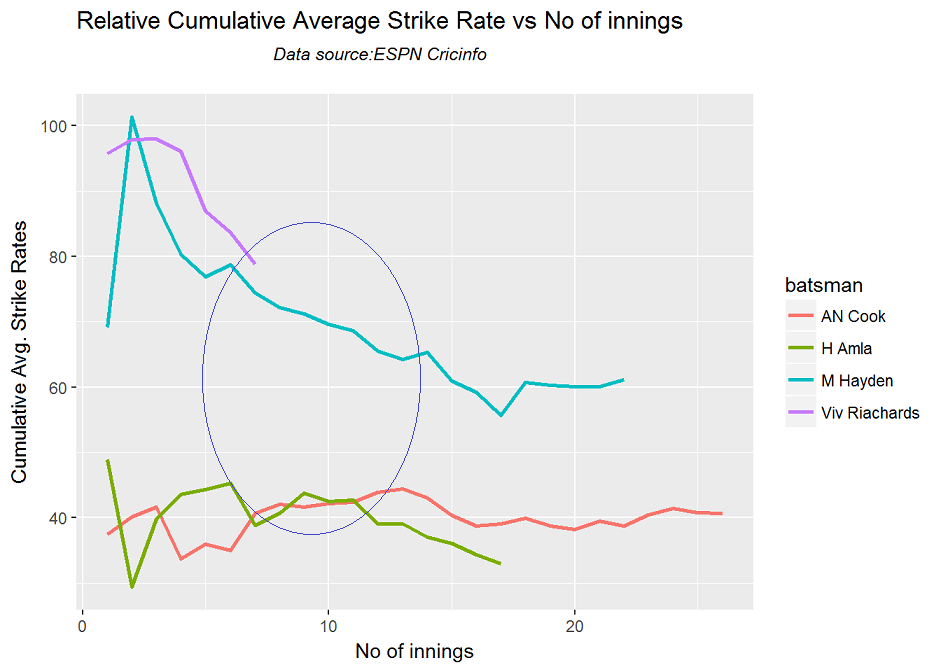
Excluding Clive Lloyd & Alvin Kallicharan the next best performer against India is Hashim Amla,followed by Alastair Cook, Viv Richards.

relativeBatsmanCumulativeAvgRuns(frames,names)

#With respect to strike rate, there is no contest when Viv Richards is around. He is clearly the best 
#striker of the ball regardless of whether it is the pacy wickets of 
#Australia/England or the spinning tracks of the subcontinent. After 
#Viv Richards, Hayden and Alastair Cook have good cumulative strike rates
#in India
relativeBatsmanSR(frames,names)

relativeBatsmanCumulativeStrikeRate(frames,names)

5. All time greats of Indian batting

I couldn’t resist checking out how the top Indian batsmen perform when playing in host countries So here is a look at how the top Indian batsmen perform against different host countries

6. Top Indian batsmen against Australia in Australia

The following Indian batsmen were chosen

  1. Sunil Gavaskar
  2. Sachin Tendulkar
  3. Virat Kohli
  4. Virendar Sehwag
  5. VVS Laxman
frames <- list("./data/tendulkarVsAusInAus.csv","./data/gavaskarVsAusInAus.csv","./data/kohliVsAusInAus.csv",
               "./data/sehwagVsAusInAus.csv","./data/vvslaxmanVsAusInAus.csv")
names <- list("S Tendulkar","S Gavaskar","V Kohli","V Sehwag","VVS Laxman")

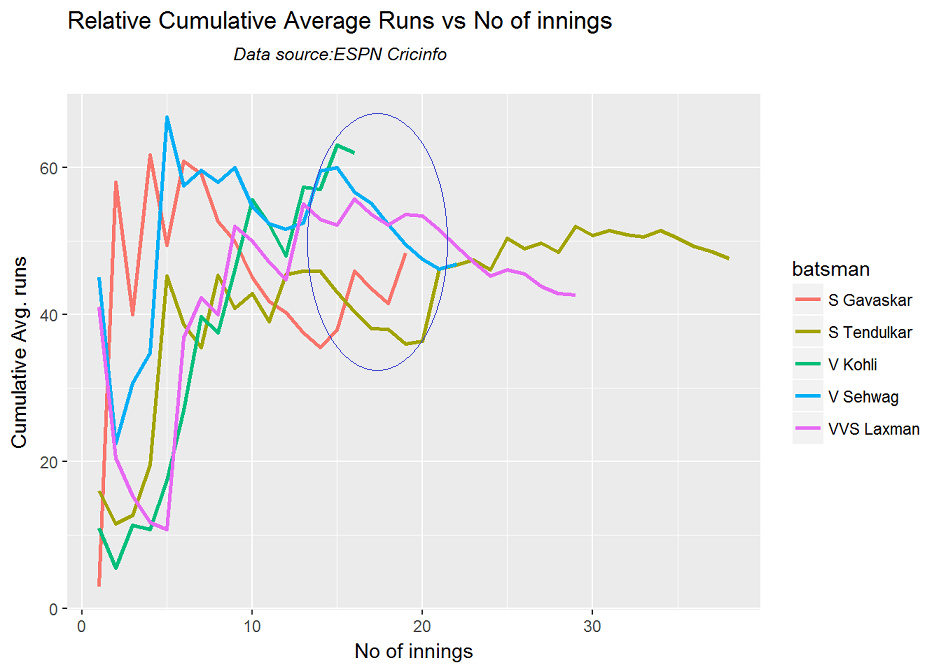
Virat Kohli has the best overall performance against Australia, with a current cumulative average of 60+ runs for the total number of innings played by him (15). With 15 matches the 2nd best is Virendar Sehwag, followed by VVS Laxman. Tendulkar maintains a cumulative average of 48+ runs for an excess of 30+ innings.

relativeBatsmanCumulativeAvgRuns(frames,names)

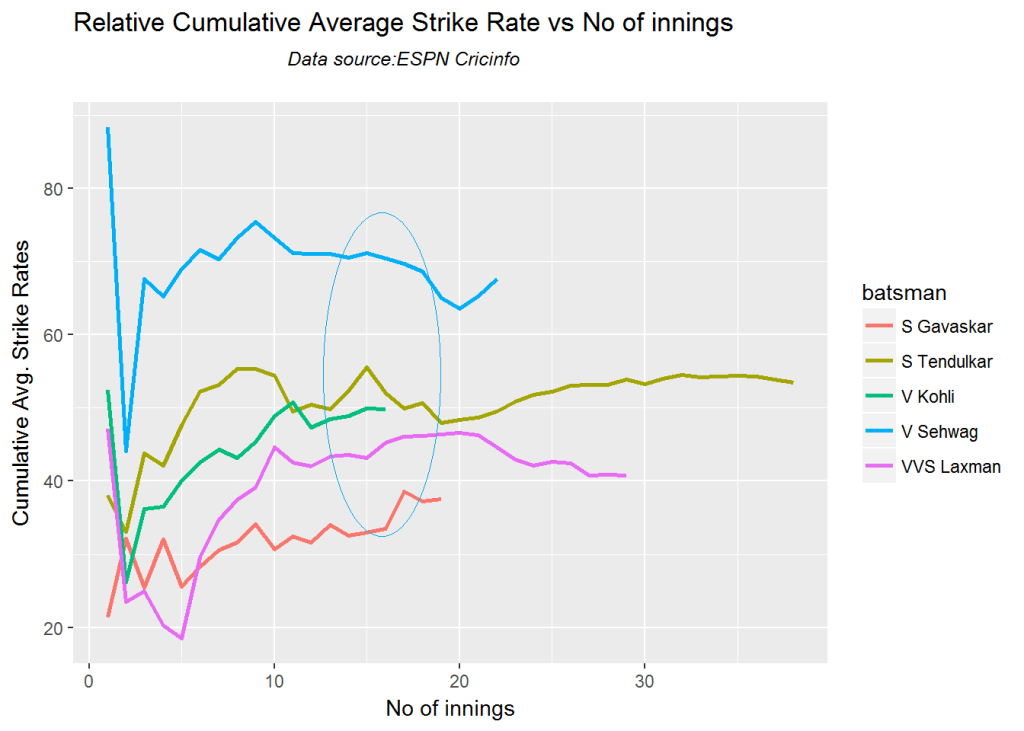
# Sehwag leads the strike rate against host Australia, followed by 
# Tendulkar in Australia and then Kohli
relativeBatsmanSR(frames,names)

relativeBatsmanCumulativeStrikeRate(frames,names)

7. Top Indian batsmen against England in England

The top Indian batmen’s performances against England are shown below

  1. Rahul Dravid
  2. Dilip Vengsarkar
  3. Rahul Dravid
  4. Sourav Ganguly
  5. Virat Kohli
frames <- list("./data/tendulkarVsEngInEng.csv","./data/dravidVsEngInEng.csv","./data/vengsarkarVsEngInEng.csv",
               "./data/gangulyVsEngInEng.csv","./data/gavaskarVsEngInEng.csv","./data/kohliVsEngInEng.csv")
names <- list("S Tendulkar","R Dravid","D Vengsarkar","S Ganguly","S Gavaskar","V Kohli")

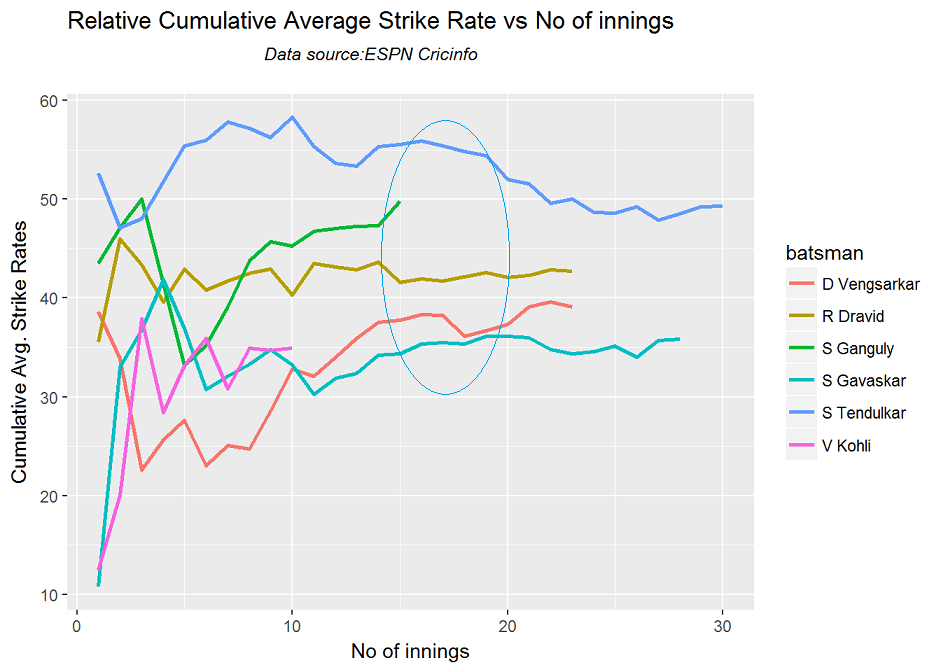
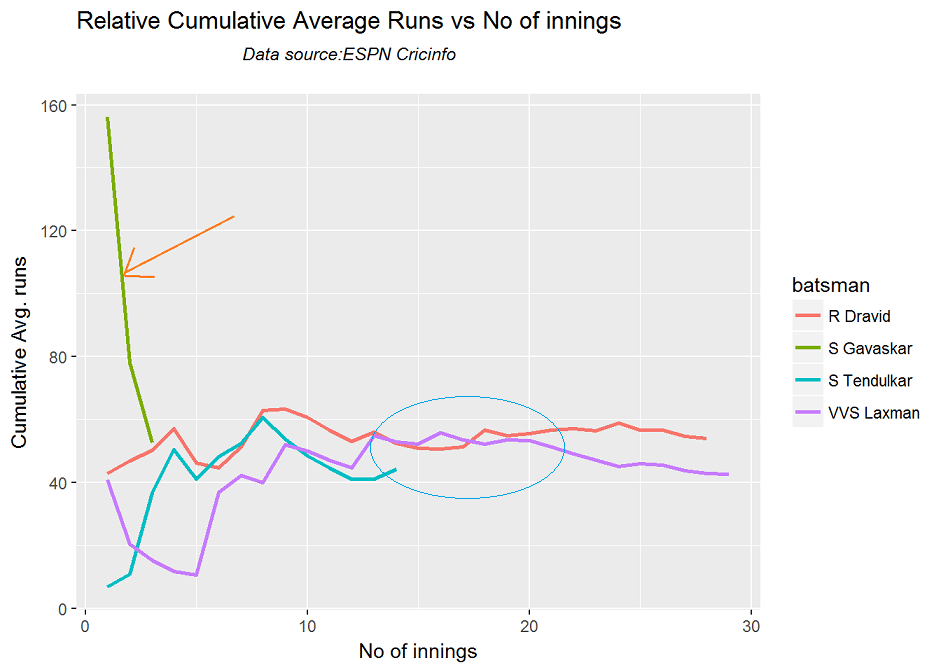
Rahul Dravid has the best performance against England and edges out Tendulkar. He is followed by Tendulkar and then Sourav Ganguly. Note:Incidentally Virat Kohli’s performance against England in England so far has been extremely poor and he averages around 13-15 runs per innings. However he has a long way to go and I hope he catches up. In any case it will be an uphill climb for Kohli in England.

relativeBatsmanCumulativeAvgRuns(frames,names)

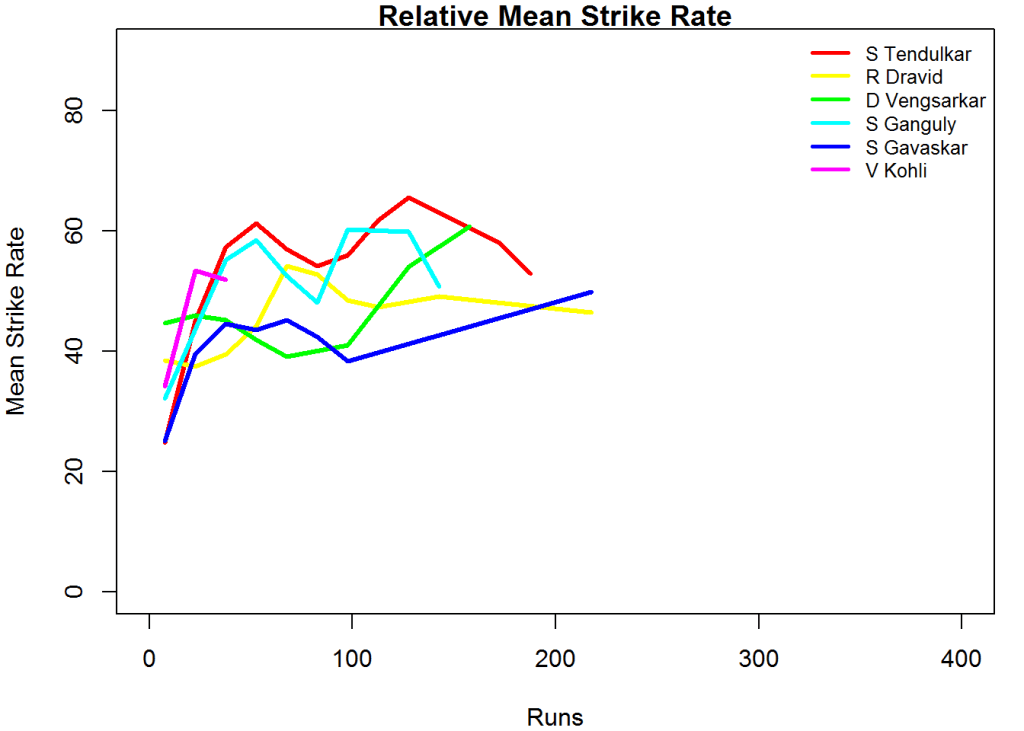
#Tendulkar, Ganguly and Dravid have the best strike rate and in that order.
relativeBatsmanSR(frames,names)

relativeBatsmanCumulativeStrikeRate(frames,names)

8. Top Indian batsmen against West Indies in West Indies

frames <- list("./data/tendulkarVsWInWI.csv","./data/dravidVsWInWI.csv","./data/vvslaxmanVsWIInWI.csv",
               "./data/gavaskarVsWIInWI.csv")
names <- list("S Tendulkar","R Dravid","VVS Laxman","S Gavaskar")

Against the West Indies Sunil Gavaskar is heads and shoulders above the rest. Gavaskar has a very impressive cumulative average against West Indies

relativeBatsmanCumulativeAvgRuns(frames,names)

# VVS Laxman followed by  Tendulkar & then Dravid have a very 
# good strike rate against the West Indies
relativeBatsmanCumulativeStrikeRate(frames,names)

9. World’s best spinners on tracks suited for pace & bounce

In this part I compare the performances of the top 3 spinners in recent years and check out how they perform on surfaces that are known for pace, and bounce. I have taken the following 3 spinners

  1. Anil Kumble (India)
  2. M Muralitharan (Sri Lanka)
  3. Shane Warne (Australia)
#kumbleEng=getPlayerData(30176  ,opposition=3,host=3,file="kumbleVsEngInEng.csv",type="bowling")
#muraliEng=getPlayerData(49636  ,opposition=3,host=3,file="muraliVsEngInEng.csv",type="bowling")
#warneEng=getPlayerData(8166  ,opposition=3,host=3,file="warneVsEngInEng.csv",type="bowling")

10. Top international spinners against England in England

frames <- list("./data/kumbleVsEngInEng.csv","./data/muraliVsEngInEng.csv","./data/warneVsEngInEng.csv")
names <- list("Anil KUmble","M Muralitharan","Shane Warne")

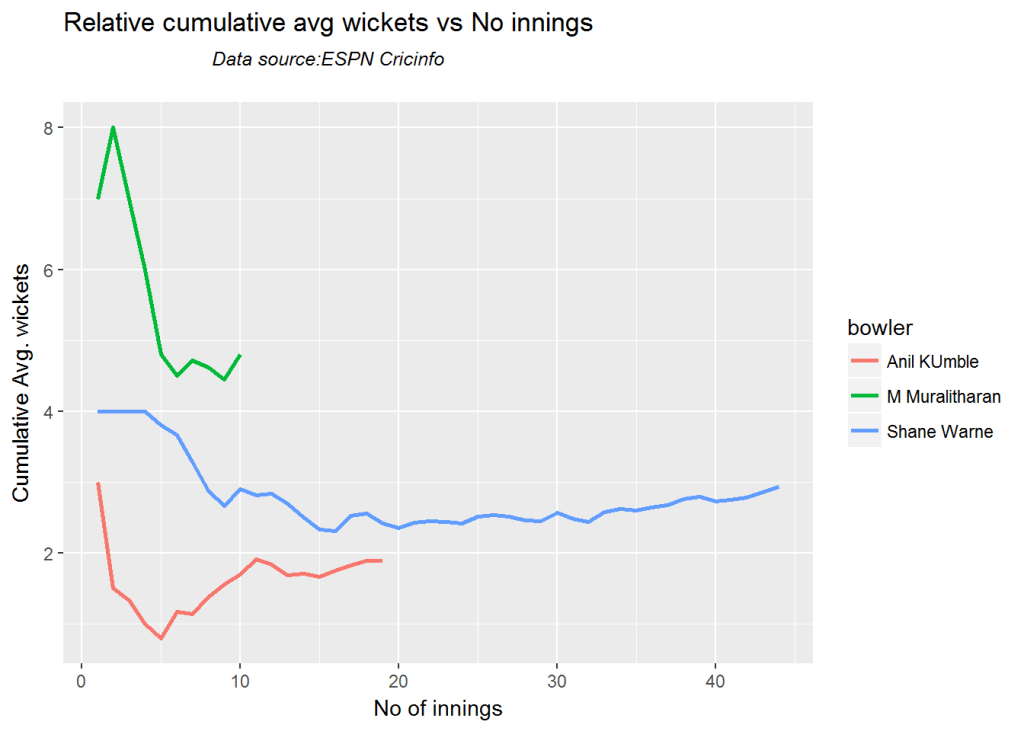
Against England and in England, Muralitharan shines with a cumulative average of nearly 5 wickets per match with a peak of almost 8 wickets. Shane Warne has a steady average at 5 wickets and then Anil Kumble.

relativeBowlerCumulativeAvgWickets(frames,names)

# The order relative cumulative Economy rate, Warne has the best figures,followed by Anil Kumble. Muralitharan
# is much more expensive.
relativeBowlerCumulativeAvgEconRate(frames,names)

11. Top international spinners against South Africa in South Africa

frames <- list("./data/kumbleVsSAInSA.csv","./data/muraliVsSAInSA.csv","./data/warneVsSAInSA.csv")
names <- list("Anil Kumble","M Muralitharan","Shane Warne")

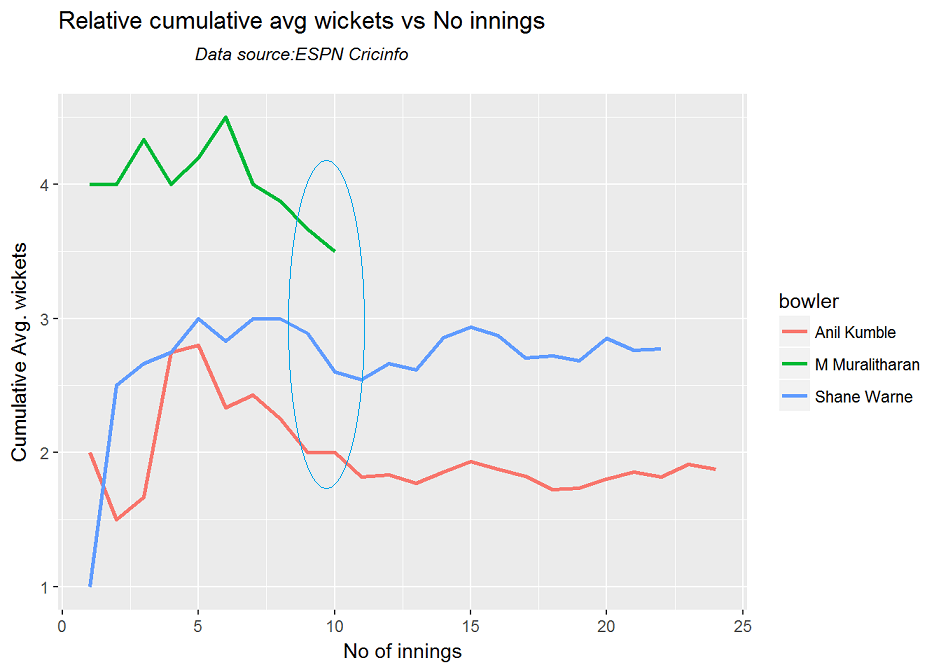
In South Africa too, Muralitharan has the best wicket taking performance averaging about 4 wickets. Warne averages around 3 wickets and Kumble around 2 wickets

relativeBowlerCumulativeAvgWickets(frames,names)

# Muralitharan is expensive in South Africa too, while Kumble and Warne go neck-to-neck in the economy rate.
# Kumble edges out Warne and has a better cumulative average economy rate
relativeBowlerCumulativeAvgEconRate(frames,names)

11. Top international pacers against India in India

As a final analysis I check how the world’s pacers perform in India against India. India pitches are supposed to be flat devoid of bounce, while being terrific turners. Hence Indian pitches are more suited to spin bowling than pace bowling. This is changing these days.

The best performers against India in India are mostly the deadly pacemen of yesteryears

For this I have chosen the following bowlers

  1. Courtney Walsh (West Indies)
  2. Andy Roberts (West Indies)
  3. Malcolm Marshall
  4. Glenn McGrath
#cawalshInd=getPlayerData(53216  ,opposition=6,host=6,file="cawalshVsIndInInd.csv",type="bowling")
#arobertsInd=getPlayerData(52817  ,opposition=6,host=6,file="arobertsIndInInd.csv",type="bowling")
#mmarshallInd=getPlayerData(52419  ,opposition=6,host=6,file="mmarshallVsIndInInd.csv",type="bowling")
#gmccgrathInd=getPlayerData(6565  ,opposition=6,host=6,file="mccgrathVsIndInInd.csv",type="bowling")
frames <- list("./data/cawalshVsIndInInd.csv","./data/arobertsIndInInd.csv","./data/mmarshallVsIndInInd.csv",
               "./data/mccgrathVsIndInInd.csv")
names <- list("C Walsh","A Roberts","M Marshall","G McGrath")

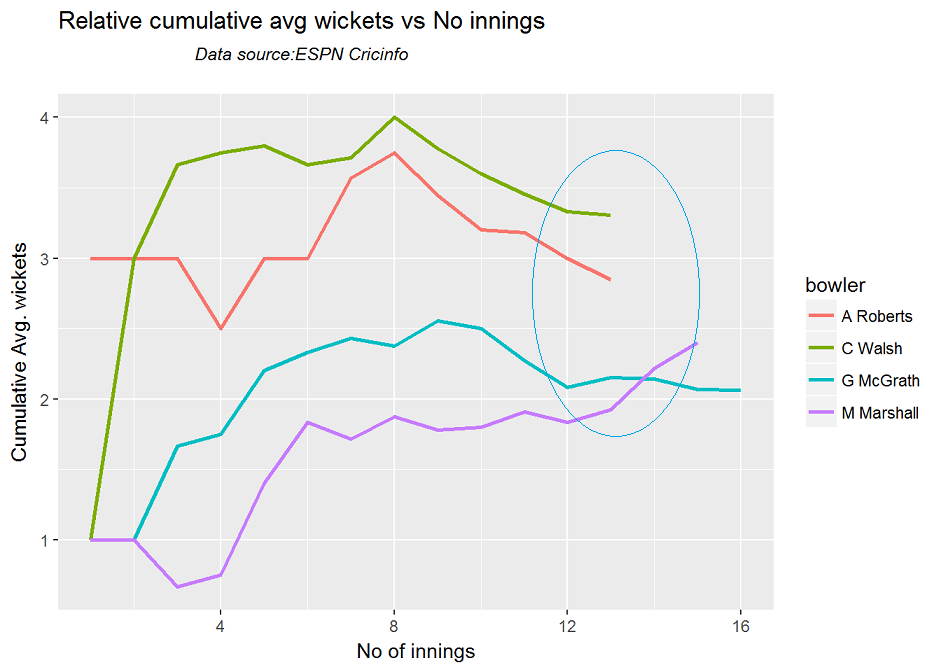
Courtney Walsh has the best performance, followed by Andy Roberts followed by Andy Roberts and then Malcom Marshall who tips ahead of Glenn McGrath

relativeBowlerCumulativeAvgWickets(frames,names)

#On the other hand McGrath has the best economy rate, followed by A Roberts and then Courtney Walsh
relativeBowlerCumulativeAvgEconRate(frames,names)

12. ODI performance of a player against a specific country in the host country

This gets the data for MS Dhoni in ODI matches against Australia and in Australia

#dhoniAusODI=getPlayerDataOD(28081,opposition=2,host=2,file="dhoniVsAusInAusODI.csv",type="batting")

13. Twenty 20 performance of a player against a specific country in the host country

#dhoniAusTT=getPlayerDataOD(28081,opposition=2,host=2,file="dhoniVsAusInAusTT.csv",type="batting")

All the ODI and Twenty20 functions of cricketr can be used on the above dataframes of MS Dhoni.

Some key observations

Here are some key observations

  1. At the top of the batting spectrum is Don Bradman with a very impressive average 100-120 in matches played in England and Australia. Unfortunately there weren’t matches he played in other countries and different pitches. 2.Viv Richard has the best cumulative strike rate overall.
  2. Muralitharan strikes more often than Kumble or Warne even in pitches at ENgland, South Africa and West Indies. However Muralitharan is also the most expensive
  3. Warne and Kumble have a much better economy rate than Muralitharan.
  4. Sunil Gavaskar has an extremely impressive performance in West Indies.
  5. Rahul Dravid performs much better than Tendulkar in both England and West Indies.
  6. Virat Kohli has the best performance against Australia so far and hope he maintains his stellar performance followed by Sehwag. However Kohli’s performance in England has been very poor
  7. West Indies batsmen and bowlers seem to thrive on Indian pitches, with Clive Lloyd and Alvin Kalicharan at the top of the list.

You may like my Shiny apps on cricket

  1. Inswinger- Analyzing International. T20s
  2. GooglyPlus – An app for analyzing IPL
  3. Sixer – App based on R package cricketr

Also see

  1. Exploring Quantum Gate operations with QCSimulator
  2. Neural Networks: The mechanics of backpropagation
  3. Re-introducing cricketr! : An R package to analyze performances of cricketers
  4. yorkr crashes the IPL party ! – Part 1
  5. cricketr and yorkr books – Paperback now in Amazon
  6.  Hand detection through Haartraining: A hands-on approach

To see all my posts see Index of posts

Analysis of IPL T20 matches with yorkr templates

Introduction

In this post I create RMarkdown templates for end-to-end analysis of IPL T20 matches, that are available on Cricsheet based on my R package yorkr.  With these templates you can convert all IPL data which is in yaml format to R dataframes. Further I create data and the necessary templates for analyzing IPL matches, teams and players. All of these can be accessed at yorkrIPLTemplate.

If you are passionate about cricket, and love analyzing cricket performances, then check out my 2 racy books on cricket! In my books, I perform detailed yet compact analysis of performances of both batsmen, bowlers besides evaluating team & match performances in Tests , ODIs, T20s & IPL. You can buy my books on cricket from Amazon at $12.99 for the paperback and $4.99/$6.99 respectively for the kindle versions. The books can be accessed at Cricket analytics with cricketr  and Beaten by sheer pace-Cricket analytics with yorkr  A must read for any cricket lover! Check it out!!
1

9/Rs 320 and $6.99/Rs448 respectively

The templates are

  1. Template for conversion and setup – IPLT20Template.Rmd
  2. Any IPL match – IPLMatchtemplate.Rmd
  3. IPL matches between 2 nations – IPLMatches2TeamTemplate.Rmd
  4. A IPL nations performance against all other IPL nations – IPLAllMatchesAllOppnTemplate.Rmd
  5. Analysis of IPL batsmen and bowlers of all IPL nations – IPLBatsmanBowlerTemplate.Rmd

Besides the templates the repository also includes the converted data for all IPL matches I downloaded from Cricsheet in Dec 2016. So this data is complete till the 2016 IPL season. You can recreate the files as more matches are added to Cricsheet site in IPL 2017 and future seasons. This post contains all the steps needed for detailed analysis of IPL matches, teams and IPL player. This will also be my reference in future if I decide to analyze IPL in future!

See my earlier posts where I analyze IPL T20
1. yorkr crashes the IPL party ! – Part 1
2. yorkr crashes the IPL party! – Part 2
3. yorkr crashes the IPL party! – Part 3!
4. yorkr crashes the IPL party! – Part 4

There will be 5 folders at the root

  1. IPLdata – Match files as yaml from Cricsheet
  2. IPLMatches – Yaml match files converted to dataframes
  3. IPLMatchesBetween2Teams – All Matches between any 2 IPL teams
  4. allMatchesAllOpposition – An IPL teams’s performance against all other teams
  5. BattingBowlingDetails – Batting and bowling details of all IPL teams
library(yorkr)
library(dplyr)

The first few steps take care of the data setup. This needs to be done before any of the analysis of IPL batsmen, bowlers, any IPL match, matches between any 2 IPL countries or analysis of a teams performance against all other countries

There will be 5 folders at the root

  1. data
  2. IPLMatches
  3. IPLMatchesBetween2Teams
  4. allMatchesAllOpposition
  5. BattingBowlingDetails

The source YAML files will be in IPLData folder

1.Create directory of IPLMatches

Some files may give conversions errors. You could try to debug the problem or just remove it from the IPLdata folder. At most 2-4 file will have conversion problems and I usally remove then from the files to be converted.

Also take a look at my GooglyPlus shiny app which was created after performing the same conversion on the Dec 16 data .

convertAllYaml2RDataframesT20("data","IPLMatches")

2.Save all matches between all combinations of IPL nations

This function will create the set of all matches between each IPL team against every other IPL team. This uses the data that was created in IPLMatches, with the convertAllYaml2RDataframesIPL() function.

setwd("./IPLMatchesBetween2Teams")
saveAllMatchesBetween2IPLTeams(dir= ,odir= )

3.Save all matches against all opposition

This will create a consolidated dataframe of all matches played by every IPL playing nation against all other nattions. This also uses the data that was created in IPLMatches, with the convertAllYaml2RDataframesIPL() function.

setwd("../allMatchesAllOpposition")
saveAllMatchesAllOppositionIPLT20(dir= ,odir= )

4. Create batting and bowling details for each IPL team

These are the current IPL playing teams. You can add to this vector as newer IPL teams start playing IPL. You will get to know all IPL teams by also look at the directory created above namely allMatchesAllOpposition. This also uses the data that was created in IPLMatches, with the convertAllYaml2RDataframesIPL() function.

setwd("../BattingBowlingDetails")
ipl_teams <- list("Chennai Super Kings","Deccan Chargers", "Delhi Daredevils","Kings XI Punjab", 
              "Kochi Tuskers Kerala","Kolkata Knight Riders","Mumbai Indians","Pune Warriors",
              "Rajasthan Royals","Royal Challengers Bangalore","Sunrisers Hyderabad","Gujarat Lions",
                 "Rising Pune Supergiants")

for(i in seq_along(ipl_teams)){
    print(ipl_teams[i])
    val <- paste(ipl_teams[i],"-details",sep="")
    val <- getTeamBattingDetails(ipl_teams[i],dir="../IPLMatches", save=TRUE)

}

for(i in seq_along(ipl_teams)){
    print(ipl_teams[i])
    val <- paste(ipl_teams[i],"-details",sep="")
    val <- getTeamBowlingDetails(ipl_teams[i],dir="../IPLMatches", save=TRUE)

}

5. Get the list of batsmen for a particular IPL team

The following code is needed for analyzing individual IPL batsmen. In IPL a player could have played in multiple IPL teams.

getBatsmen <- function(df){
    bmen <- df %>% distinct(batsman) 
    bmen <- as.character(bmen$batsman)
    batsmen <- sort(bmen)
}
load("Chennai Super Kings-BattingDetails.RData")
csk_details <- battingDetails
load("Deccan Chargers-BattingDetails.RData")
dc_details <- battingDetails
load("Delhi Daredevils-BattingDetails.RData")
dd_details <- battingDetails
load("Kings XI Punjab-BattingDetails.RData")
kxip_details <- battingDetails
load("Kochi Tuskers Kerala-BattingDetails.RData")
ktk_details <- battingDetails
load("Kolkata Knight Riders-BattingDetails.RData")
kkr_details <- battingDetails
load("Mumbai Indians-BattingDetails.RData")
mi_details <- battingDetails
load("Pune Warriors-BattingDetails.RData")
pw_details <- battingDetails
load("Rajasthan Royals-BattingDetails.RData")
rr_details <- battingDetails
load("Royal Challengers Bangalore-BattingDetails.RData")
rcb_details <- battingDetails
load("Sunrisers Hyderabad-BattingDetails.RData")
sh_details <- battingDetails
load("Gujarat Lions-BattingDetails.RData")
gl_details <- battingDetails
load("Rising Pune Supergiants-BattingDetails.RData")
rps_details <- battingDetails

#Get the batsmen for each IPL team
csk_batsmen <- getBatsmen(csk_details)
dc_batsmen <- getBatsmen(dc_details)
dd_batsmen <- getBatsmen(dd_details)
kxip_batsmen <- getBatsmen(kxip_details)
ktk_batsmen <- getBatsmen(ktk_details)
kkr_batsmen <- getBatsmen(kkr_details)
mi_batsmen <- getBatsmen(mi_details)
pw_batsmen <- getBatsmen(pw_details)
rr_batsmen <- getBatsmen(rr_details)
rcb_batsmen <- getBatsmen(rcb_details)
sh_batsmen <- getBatsmen(sh_details)
gl_batsmen <- getBatsmen(gl_details)
rps_batsmen <- getBatsmen(rps_details)

# Save the dataframes
save(csk_batsmen,file="csk.RData")
save(dc_batsmen, file="dc.RData")
save(dd_batsmen, file="dd.RData")
save(kxip_batsmen, file="kxip.RData")
save(ktk_batsmen, file="ktk.RData")
save(kkr_batsmen, file="kkr.RData")
save(mi_batsmen , file="mi.RData")
save(pw_batsmen, file="pw.RData")
save(rr_batsmen, file="rr.RData")
save(rcb_batsmen, file="rcb.RData")
save(sh_batsmen, file="sh.RData")
save(gl_batsmen, file="gl.RData")
save(rps_batsmen, file="rps.RData")

6. Get the list of bowlers for a particular IPL team

The method below can get the list of bowler names for any IPL team.The following code is needed for analyzing individual IPL bowlers. In IPL a player could have played in multiple IPL teams.

getBowlers <- function(df){
    bwlr <- df %>% distinct(bowler) 
    bwlr <- as.character(bwlr$bowler)
    bowler <- sort(bwlr)
}

load("Chennai Super Kings-BowlingDetails.RData")
csk_details <- bowlingDetails
load("Deccan Chargers-BowlingDetails.RData")
dc_details <- bowlingDetails
load("Delhi Daredevils-BowlingDetails.RData")
dd_details <- bowlingDetails
load("Kings XI Punjab-BowlingDetails.RData")
kxip_details <- bowlingDetails
load("Kochi Tuskers Kerala-BowlingDetails.RData")
ktk_details <- bowlingDetails
load("Kolkata Knight Riders-BowlingDetails.RData")
kkr_details <- bowlingDetails
load("Mumbai Indians-BowlingDetails.RData")
mi_details <- bowlingDetails
load("Pune Warriors-BowlingDetails.RData")
pw_details <- bowlingDetails
load("Rajasthan Royals-BowlingDetails.RData")
rr_details <- bowlingDetails
load("Royal Challengers Bangalore-BowlingDetails.RData")
rcb_details <- bowlingDetails
load("Sunrisers Hyderabad-BowlingDetails.RData")
sh_details <- bowlingDetails
load("Gujarat Lions-BowlingDetails.RData")
gl_details <- bowlingDetails
load("Rising Pune Supergiants-BowlingDetails.RData")
rps_details <- bowlingDetails

# Get the bowlers for each team
csk_bowlers <- getBowlers(csk_details)
dc_bowlers <- getBowlers(dc_details)
dd_bowlers <- getBowlers(dd_details)
kxip_bowlers <- getBowlers(kxip_details)
ktk_bowlers <- getBowlers(ktk_details)
kkr_bowlers <- getBowlers(kkr_details)
mi_bowlers <- getBowlers(mi_details)
pw_bowlers <- getBowlers(pw_details)
rr_bowlers <- getBowlers(rr_details)
rcb_bowlers <- getBowlers(rcb_details)
sh_bowlers <- getBowlers(sh_details)
gl_bowlers <- getBowlers(gl_details)
rps_bowlers <- getBowlers(rps_details)

#Save the dataframes
save(csk_bowlers,file="csk1.RData")
save(dc_bowlers, file="dc1.RData")
save(dd_bowlers, file="dd1.RData")
save(kxip_bowlers, file="kxip1.RData")
save(ktk_bowlers, file="ktk1.RData")
save(kkr_bowlers, file="kkr1.RData")
save(mi_bowlers , file="mi1.RData")
save(pw_bowlers, file="pw1.RData")
save(rr_bowlers, file="rr1.RData")
save(rcb_bowlers, file="rcb1.RData")
save(sh_bowlers, file="sh1.RData")
save(gl_bowlers, file="gl1.RData")
save(rps_bowlers, file="rps1.RData")

Now we are all set

A)  IPL T20 Match Analysis

1 IPL Match Analysis

Load any match data from the ./IPLMatches folder for e.g. Chennai Super Kings-Deccan Chargers-2008-05-06.RData

setwd("./IPLMatches")
load("Chennai Super Kings-Deccan Chargers-2008-05-06.RData")
csk_dc<- overs
#The steps are
load("IPLTeam1-IPLTeam2-Date.Rdata")
IPLTeam1_IPLTeam2 <- overs

All analysis for this match can be done now

2. Scorecard

teamBattingScorecardMatch(IPLTeam1_IPLTeam2,"IPLTeam1")
teamBattingScorecardMatch(IPLTeam1_IPLTeam2,"IPLTeam2")

3.Batting Partnerships

teamBatsmenPartnershipMatch(IPLTeam1_IPLTeam2,"IPLTeam1","IPLTeam2")
teamBatsmenPartnershipMatch(IPLTeam1_IPLTeam2,"IPLTeam2","IPLTeam1")

4. Batsmen vs Bowler Plot

teamBatsmenVsBowlersMatch(IPLTeam1_IPLTeam2,"IPLTeam1","IPLTeam2",plot=TRUE)
teamBatsmenVsBowlersMatch(IPLTeam1_IPLTeam2,"IPLTeam1","IPLTeam2",plot=FALSE)

5. Team bowling scorecard

teamBowlingScorecardMatch(IPLTeam1_IPLTeam2,"IPLTeam1")
teamBowlingScorecardMatch(IPLTeam1_IPLTeam2,"IPLTeam2")

6. Team bowling Wicket kind match

teamBowlingWicketKindMatch(IPLTeam1_IPLTeam2,"IPLTeam1","IPLTeam2")
m <-teamBowlingWicketKindMatch(IPLTeam1_IPLTeam2,"IPLTeam1","IPLTeam2",plot=FALSE)
m

7. Team Bowling Wicket Runs Match

teamBowlingWicketRunsMatch(IPLTeam1_IPLTeam2,"IPLTeam1","IPLTeam2")
m <-teamBowlingWicketRunsMatch(IPLTeam1_IPLTeam2,"IPLTeam1","IPLTeam2",plot=FALSE)
m

8. Team Bowling Wicket Match

m <-teamBowlingWicketMatch(IPLTeam1_IPLTeam2,"IPLTeam1","IPLTeam2",plot=FALSE)
m
teamBowlingWicketMatch(IPLTeam1_IPLTeam2,"IPLTeam1","IPLTeam2")

9. Team Bowler vs Batsmen

teamBowlersVsBatsmenMatch(IPLTeam1_IPLTeam2,"IPLTeam1","IPLTeam2")
m <- teamBowlersVsBatsmenMatch(IPLTeam1_IPLTeam2,"IPLTeam1","IPLTeam2",plot=FALSE)
m

10. Match Worm chart

matchWormGraph(IPLTeam1_IPLTeam2,"IPLTeam1","IPLTeam2")

B)  IPL  Matches between 2  IPL teams

1 IPL Match Analysis

Load any match data from the ./IPLMatches folder for e.g. Chennai Super Kings-Deccan Chargers-2008-05-06.RData

setwd("./IPLMatches")
load("Chennai Super Kings-Deccan Chargers-2008-05-06.RData")
csk_dc<- overs
#The steps are
load("IPLTeam1-IPLTeam2-Date.Rdata")
IPLTeam1_IPLTeam2 <- overs

All analysis for this match can be done now

2. Scorecard

teamBattingScorecardMatch(IPLTeam1_IPLTeam2,"IPLTeam1")
teamBattingScorecardMatch(IPLTeam1_IPLTeam2,"IPLTeam2")

3.Batting Partnerships

teamBatsmenPartnershipMatch(IPLTeam1_IPLTeam2,"IPLTeam1","IPLTeam2")
teamBatsmenPartnershipMatch(IPLTeam1_IPLTeam2,"IPLTeam2","IPLTeam1")

4. Batsmen vs Bowler Plot

teamBatsmenVsBowlersMatch(IPLTeam1_IPLTeam2,"IPLTeam1","IPLTeam2",plot=TRUE)
teamBatsmenVsBowlersMatch(IPLTeam1_IPLTeam2,"IPLTeam1","IPLTeam2",plot=FALSE)

5. Team bowling scorecard

teamBowlingScorecardMatch(IPLTeam1_IPLTeam2,"IPLTeam1")
teamBowlingScorecardMatch(IPLTeam1_IPLTeam2,"IPLTeam2")

6. Team bowling Wicket kind match

teamBowlingWicketKindMatch(IPLTeam1_IPLTeam2,"IPLTeam1","IPLTeam2")
m <-teamBowlingWicketKindMatch(IPLTeam1_IPLTeam2,"IPLTeam1","IPLTeam2",plot=FALSE)
m

7. Team Bowling Wicket Runs Match

teamBowlingWicketRunsMatch(IPLTeam1_IPLTeam2,"IPLTeam1","IPLTeam2")
m <-teamBowlingWicketRunsMatch(IPLTeam1_IPLTeam2,"IPLTeam1","IPLTeam2",plot=FALSE)
m

8. Team Bowling Wicket Match

m <-teamBowlingWicketMatch(IPLTeam1_IPLTeam2,"IPLTeam1","IPLTeam2",plot=FALSE)
m
teamBowlingWicketMatch(IPLTeam1_IPLTeam2,"IPLTeam1","IPLTeam2")

9. Team Bowler vs Batsmen

teamBowlersVsBatsmenMatch(IPLTeam1_IPLTeam2,"IPLTeam1","IPLTeam2")
m <- teamBowlersVsBatsmenMatch(IPLTeam1_IPLTeam2,"IPLTeam1","IPLTeam2",plot=FALSE)
m

10. Match Worm chart

matchWormGraph(IPLTeam1_IPLTeam2,"IPLTeam1","IPLTeam2")

C)  IPL Matches for a team against all other teams

1. IPL Matches for a team against all other teams

Load the data between for a IPL team against all other countries ./allMatchesAllOpposition for e.g all matches of Kolkata Knight Riders

load("allMatchesAllOpposition-Kolkata Knight Riders.RData")
kkr_matches <- matches
IPLTeam="IPLTeam1"
allMatches <- paste("allMatchesAllOposition-",IPLTeam,".RData",sep="")
load(allMatches)
IPLTeam1AllMatches <- matches

2. Team’s batting scorecard all Matches

m <-teamBattingScorecardAllOppnAllMatches(IPLTeam1AllMatches,theTeam="IPLTeam1")
m

3. Batting scorecard of opposing team

m <-teamBattingScorecardAllOppnAllMatches(matches=IPLTeam1AllMatches,theTeam="IPLTeam2")

4. Team batting partnerships

m <- teamBatsmenPartnershipAllOppnAllMatches(IPLTeam1AllMatches,theTeam="IPLTeam1")
m
m <- teamBatsmenPartnershipAllOppnAllMatches(IPLTeam1AllMatches,theTeam='IPLTeam1',report="detailed")
head(m,30)
m <- teamBatsmenPartnershipAllOppnAllMatches(IPLTeam1AllMatches,theTeam='IPLTeam1',report="summary")
m

5. Team batting partnerships plot

teamBatsmenPartnershipAllOppnAllMatchesPlot(IPLTeam1AllMatches,"IPLTeam1",main="IPLTeam1")
teamBatsmenPartnershipAllOppnAllMatchesPlot(IPLTeam1AllMatches,"IPLTeam1",main="IPLTeam2")

6, Team batsmen vs bowlers report

m <-teamBatsmenVsBowlersAllOppnAllMatchesRept(IPLTeam1AllMatches,"IPLTeam1",rank=0)
m
m <-teamBatsmenVsBowlersAllOppnAllMatchesRept(IPLTeam1AllMatches,"IPLTeam1",rank=1,dispRows=30)
m
m <-teamBatsmenVsBowlersAllOppnAllMatchesRept(matches=IPLTeam1AllMatches,theTeam="IPLTeam2",rank=1,dispRows=25)
m

7. Team batsmen vs bowler plot

d <- teamBatsmenVsBowlersAllOppnAllMatchesRept(IPLTeam1AllMatches,"IPLTeam1",rank=1,dispRows=50)
d
teamBatsmenVsBowlersAllOppnAllMatchesPlot(d)
d <- teamBatsmenVsBowlersAllOppnAllMatchesRept(IPLTeam1AllMatches,"IPLTeam1",rank=2,dispRows=50)
teamBatsmenVsBowlersAllOppnAllMatchesPlot(d)

8. Team bowling scorecard

teamBowlingScorecardAllOppnAllMatchesMain(matches=IPLTeam1AllMatches,theTeam="IPLTeam1")
teamBowlingScorecardAllOppnAllMatches(IPLTeam1AllMatches,'IPLTeam2')

9. Team bowler vs batsmen

teamBowlersVsBatsmenAllOppnAllMatchesMain(IPLTeam1AllMatches,theTeam="IPLTeam1",rank=0)
teamBowlersVsBatsmenAllOppnAllMatchesMain(IPLTeam1AllMatches,theTeam="IPLTeam1",rank=2)
teamBowlersVsBatsmenAllOppnAllMatchesRept(matches=IPLTeam1AllMatches,theTeam="IPLTeam1",rank=0)

10. Team Bowler vs bastmen

df <- teamBowlersVsBatsmenAllOppnAllMatchesRept(IPLTeam1AllMatches,theTeam="IPLTeam1",rank=1)
teamBowlersVsBatsmenAllOppnAllMatchesPlot(df,"IPLTeam1","IPLTeam1")

11. Team bowler wicket kind

teamBowlingWicketKindAllOppnAllMatches(IPLTeam1AllMatches,t1="IPLTeam1",t2="All")
teamBowlingWicketKindAllOppnAllMatches(IPLTeam1AllMatches,t1="IPLTeam1",t2="IPLTeam2")

12.

teamBowlingWicketRunsAllOppnAllMatches(IPLTeam1AllMatches,t1="IPLTeam1",t2="All",plot=TRUE)
teamBowlingWicketRunsAllOppnAllMatches(IPLTeam1AllMatches,t1="IPLTeam1",t2="IPLTeam2",plot=TRUE)

1 IPL Batsman setup functions

Get the batsman’s details for a batsman

setwd("../BattingBowlingDetails")
# IPL Team names
IPLTeamNames <- list("Chennai Super Kings","Deccan Chargers", "Delhi Daredevils","Kings Xi Punjab", 
                  "Kochi Tuskers Kerala","Kolkata Knight Riders","Mumbai Indians","Pune Warriors",
                  "Rajasthan Royals","Royal Challengers Bangalore","Sunrisers Hyderabad","Gujarat Lions",
                  "Rising Pune Supergiants")           


# Check and get the team indices of IPL teams in which the batsman has played
getTeamIndex <- function(batsman){
    setwd("./BattingBowlingDetails")
    load("csk.RData")
    load("dc.RData")
    load("dd.RData")
    load("kxip.RData")
    load("ktk.RData")
    load("kkr.RData")
    load("mi.RData")
    load("pw.RData")
    load("rr.RData")
    load("rcb.RData")
    load("sh.RData")
    load("gl.RData")
    load("rps.RData")
    setwd("..")
    getwd()
    print(ls())
    teams_batsmen = list(csk_batsmen,dc_batsmen,dd_batsmen,kxip_batsmen,ktk_batsmen,kkr_batsmen,mi_batsmen,
                         pw_batsmen,rr_batsmen,rcb_batsmen,sh_batsmen,gl_batsmen,rps_batsmen)
    b <- NULL
    for (i in 1:length(teams_batsmen)){
        a <- which(teams_batsmen[[i]] == batsman)

        if(length(a) != 0)
            b <- c(b,i)
    }
    b
}

# Get the list of the IPL team names from the indices passed
getTeams <- function(x){

    l <- NULL
    # Get the teams passed in as indexes
    for (i in seq_along(x)){

        l <- c(l, IPLTeamNames[[x[i]]]) 

    }
    l
}

# Create a consolidated data frame with all teams the IPL batsman has played for
getIPLBatsmanDF <- function(teamNames){
    batsmanDF <- NULL
   # Create a consolidated Data frame of batsman for all IPL teams played
    for (i in seq_along(teamNames)){
       df <- getBatsmanDetails(team=teamNames[i],name=IPLBatsman,dir="./BattingBowlingDetails")
       batsmanDF <- rbind(batsmanDF,df) 

    }
    batsmanDF
}

2. Create a consolidated IPL batsman data frame

# Since an IPL batsman coculd have played in multiple teams we need to determine these teams and
# create a consolidated data frame for the analysis
# For example to check MS Dhoni we need to do the following

IPLBatsman = "MS Dhoni"
#Check and get the team indices of IPL teams in which the batsman has played
i <- getTeamIndex(IPLBatsman)

# Get the team names in which the IPL batsman has played
teamNames <- getTeams(i)
    # Check if file exists in the directory. This check is necessary when moving between matchType


############## Create a consolidated IPL batsman dataframe for analysis
batsmanDF <- getIPLBatsmanDF(teamNames)

3. Runs vs deliveries

# For e.g. batsmanName="MS Dhoni""
#batsmanRunsVsDeliveries(batsmanDF, "MS Dhoni")
batsmanRunsVsDeliveries(batsmanDF,"batsmanName")

4. Batsman 4s & 6s

batsman46 <- select(batsmanDF,batsman,ballsPlayed,fours,sixes,runs)
p1 <- batsmanFoursSixes(batsman46,"batsmanName")

5. Batsman dismissals

batsmanDismissals(batsmanDF,"batsmanName")

6. Runs vs Strike rate

batsmanRunsVsStrikeRate(batsmanDF,"batsmanName")

7. Batsman Moving Average

batsmanMovingAverage(batsmanDF,"batsmanName")

8. Batsman cumulative average

batsmanCumulativeAverageRuns(batsmanDF,"batsmanName")

9. Batsman cumulative strike rate

batsmanCumulativeStrikeRate(batsmanDF,"batsmanName")

10. Batsman runs against oppositions

batsmanRunsAgainstOpposition(batsmanDF,"batsmanName")

11. Batsman runs vs venue

batsmanRunsVenue(batsmanDF,"batsmanName")

12. Batsman runs predict

batsmanRunsPredict(batsmanDF,"batsmanName")

13.Bowler set up functions

setwd("../BattingBowlingDetails")
# IPL Team names
IPLTeamNames <- list("Chennai Super Kings","Deccan Chargers", "Delhi Daredevils","Kings Xi Punjab", 
                  "Kochi Tuskers Kerala","Kolkata Knight Riders","Mumbai Indians","Pune Warriors",
                  "Rajasthan Royals","Royal Challengers Bangalore","Sunrisers Hyderabad","Gujarat Lions",
                  "Rising Pune Supergiants")    


# Get the team indices of IPL teams for which the bowler as played
getTeamIndex_bowler <- function(bowler){
    # Load IPL Bowlers
    setwd("./data")
    load("csk1.RData")
    load("dc1.RData")
    load("dd1.RData")
    load("kxip1.RData")
    load("ktk1.RData")
    load("kkr1.RData")
    load("mi1.RData")
    load("pw1.RData")
    load("rr1.RData")
    load("rcb1.RData")
    load("sh1.RData")
    load("gl1.RData")
    load("rps1.RData")
    setwd("..")
    teams_bowlers = list(csk_bowlers,dc_bowlers,dd_bowlers,kxip_bowlers,ktk_bowlers,kkr_bowlers,mi_bowlers,
                         pw_bowlers,rr_bowlers,rcb_bowlers,sh_bowlers,gl_bowlers,rps_bowlers)
    b <- NULL
    for (i in 1:length(teams_bowlers)){
        a <- which(teams_bowlers[[i]] == bowler)
        if(length(a) != 0){
            b <- c(b,i)
        }
    }
    b
}


# Get the list of the IPL team names from the indices passed
getTeams <- function(x){

    l <- NULL
    # Get the teams passed in as indexes
    for (i in seq_along(x)){

        l <- c(l, IPLTeamNames[[x[i]]]) 

    }
    l
}

# Get the team names
teamNames <- getTeams(i)

getIPLBowlerDF <- function(teamNames){
    bowlerDF <- NULL

    # Create a consolidated Data frame of batsman for all IPL teams played
    for (i in seq_along(teamNames)){
          df <- getBowlerWicketDetails(team=teamNames[i],name=IPLBowler,dir="./BattingBowlingDetails")
          bowlerDF <- rbind(bowlerDF,df) 

    }
    bowlerDF
}

14. Get the consolidated data frame for an IPL bowler

# Since an IPL bowler could have played in multiple teams we need to determine these teams and
# create a consolidated data frame for the analysis
# For example to check R Ashwin we need to do the following

IPLBowler = "R Ashwin"
#Check and get the team indices of IPL teams in which the batsman has played
i <- getTeamIndex(IPLBowler)

# Get the team names in which the IPL batsman has played
teamNames <- getTeams(i)
    # Check if file exists in the directory. This check is necessary when moving between matchType


############## Create a consolidated IPL batsman dataframe for analysis
bowlerDF <- getIPLBowlerDF(teamNames)

15. Bowler Mean Economy rate

# For e.g. to get the details of R Ashwin do
#bowlerMeanEconomyRate(bowlerDF,"R Ashwin")
bowlerMeanEconomyRate(bowlerDF,"bowlerName")

16. Bowler mean runs conceded

bowlerMeanRunsConceded(bowlerDF,"bowlerName")

17. Bowler Moving Average

bowlerMovingAverage(bowlerDF,"bowlerName")

18. Bowler cumulative average wickets

bowlerCumulativeAvgWickets(bowlerDF,"bowlerName")

19. Bowler cumulative Economy Rate (ER)

bowlerCumulativeAvgEconRate(bowlerDF,"bowlerName")

20. Bowler wicket plot

bowlerWicketPlot(bowlerDF,"bowlerName")

21. Bowler wicket against opposition

bowlerWicketsAgainstOpposition(bowlerDF,"bowlerName")

22. Bowler wicket at cricket grounds

bowlerWicketsVenue(bowlerDF,"bowlerName")

23. Predict number of deliveries to wickets

setwd("./IPLMatches")
bowlerDF1 <- getDeliveryWickets(team="IPLTeam1",dir=".",name="bowlerName",save=FALSE)
bowlerWktsPredict(bowlerDF1,"bowlerName")

You may like
1. Using Linear Programming (LP) for optimizing bowling change or batting lineup in T20 cricket
2. Neural Networks: The mechanics of backpropagation
3. More book, more cricket! 2nd edition of my books now on Amazon
4. Spicing up a IBM Bluemix cloud app with MongoDB and NodeExpress
5. Introducing cricket package yorkr:Part 4-In the block hole!

Analysis of International T20 matches with yorkr templates

Introduction

In this post I create yorkr templates for International T20 matches that are available on Cricsheet. With these templates you can convert all T20 data which is in yaml format to R dataframes. Further I create data and the necessary templates for analyzing. All of these templates can be accessed from Github at yorkrT20Template. The templates are

  1. Template for conversion and setup – T20Template.Rmd
  2. Any T20 match – T20Matchtemplate.Rmd
  3. T20 matches between 2 nations – T20Matches2TeamTemplate.Rmd
  4. A T20 nations performance against all other T20 nations – T20AllMatchesAllOppnTemplate.Rmd
  5. Analysis of T20 batsmen and bowlers of all T20 nations – T20BatsmanBowlerTemplate.Rmd

Besides the templates the repository also includes the converted data for all T20 matches I downloaded from Cricsheet in Dec 2016, You can recreate the files as more matches are added to Cricsheet site. This post contains all the steps needed for T20 analysis, as more matches are played around the World and more data is added to Cricsheet. This will also be my reference in future if I decide to analyze T20 in future!

If you are passionate about cricket, and love analyzing cricket performances, then check out my 2 racy books on cricket! In my books, I perform detailed yet compact analysis of performances of both batsmen, bowlers besides evaluating team & match performances in Tests , ODIs, T20s & IPL. You can buy my books on cricket from Amazon at $12.99 for the paperback and $4.99/$6.99 respectively for the kindle versions. The books can be accessed at Cricket analytics with cricketr  and Beaten by sheer pace-Cricket analytics with yorkr  A must read for any cricket lover! Check it out!!

1


Feel free to download/clone these templates  from Github yorkrT20Template and perform your own analysis

There will be 5 folders at the root

  1. T20data – Match files as yaml from Cricsheet
  2. T20Matches – Yaml match files converted to dataframes
  3. T20MatchesBetween2Teams – All Matches between any 2 T20 teams
  4. allMatchesAllOpposition – A T20 countries match data against all other teams
  5. BattingBowlingDetails – Batting and bowling details of all countries
library(yorkr)
library(dplyr)

The first few steps take care of the data setup. This needs to be done before any of the analysis of T20 batsmen, bowlers, any T20 match, matches between any 2 T20 countries or analysis of a teams performance against all other countries

There will be 5 folders at the root

  1. T20data
  2. T20Matches
  3. T20MatchesBetween2Teams
  4. allMatchesAllOpposition
  5. BattingBowlingDetails

The source YAML files will be in T20Data folder

1.Create directory T20Matches

Some files may give conversions errors. You could try to debug the problem or just remove it from the T20data folder. At most 2-4 file will have conversion problems and I usally remove then from the files to be converted.

Also take a look at my Inswinger shiny app which was created after performing the same conversion on the Dec 16 data .

convertAllYaml2RDataframesT20("T20Data","T20Matches")

2.Save all matches between all combinations of T20 nations

This function will create the set of all matches between every T20 country against every other T20 country. This uses the data that was created in T20Matches, with the convertAllYaml2RDataframesT20() function.

setwd("./T20MatchesBetween2Teams")
saveAllMatchesBetweenTeams(dir=".",odir=".")

3.Save all matches against all opposition

This will create a consolidated dataframe of all matches played by every T20 playing nation against all other nattions. This also uses the data that was created in T20Matches, with the convertAllYaml2RDataframesT20() function.

setwd("../allMatchesAllOpposition")
saveAllMatchesAllOpposition(dir=".",odir=".")

4. Create batting and bowling details for each T20 country

These are the current T20 playing nations. You can add to this vector as more countries start playing T20. You will get to know all T20 nations by also look at the directory created above namely allMatchesAllOpposition. his also uses the data that was created in T20Matches, with the convertAllYaml2RDataframesT20() function.

setwd("../BattingBowlingDetails")
teams <-c("Australia","India","Pakistan","West Indies", 'Sri Lanka',
          "England", "Bangladesh","Netherlands","Scotland", "Afghanistan",
          "Zimbabwe","Ireland","New Zealand","South Africa","Canada",
          "Bermuda","Kenya","Hong Kong","Nepal","Oman","Papua New Guinea",
          "United Arab Emirates")

for(i in seq_along(teams)){
    print(teams[i])
    val <- paste(teams[i],"-details",sep="")
    val <- getTeamBattingDetails(teams[i],dir="../T20Matches", save=TRUE)

}

for(i in seq_along(teams)){
    print(teams[i])
    val <- paste(teams[i],"-details",sep="")
    val <- getTeamBowlingDetails(teams[i],dir="../T20Matches", save=TRUE)

}

5. Get the list of batsmen for a particular country

For e.g. if you wanted to get the batsmen of Canada you would do the following. By replacing Canada for any other country you can get the batsmen of that country. These batsmen names can then be used in the batsmen analysis

country="Canada"
teamData <- paste(country,"-BattingDetails.RData",sep="")
load(teamData)
countryDF <- battingDetails
bmen <- countryDF %>% distinct(batsman) 
bmen <- as.character(bmen$batsman)
batsmen <- sort(bmen)
batsmen

6. Get the list of bowlers for a particular country

The method below can get the list of bowler names for any T20 nation. These names can then be used in the bowler analysis below

country="Netherlands"
teamData <- paste(country,"-BowlingDetails.RData",sep="")
load(teamData)
countryDF <- bowlingDetails
bwlr <- countryDF %>% distinct(bowler) 
bwlr <- as.character(bwlr$bowler)
bowler <- sort(bwlr)
bowler

Now we are all set

A)  International T20 Match Analysis

Load any match data from the ./T20Matches folder for e.g. Afganistan-England-2016-03-23.RData

setwd("./T20Matches")
load("Afghanistan-England-2016-03-23.RData")
afg_eng<- overs
#The steps are
load("Country1-Country2-Date.Rdata")
country1_country2 <- overs

All analysis for this match can be done now

2. Scorecard

teamBattingScorecardMatch(country1_country2,"Country1")
teamBattingScorecardMatch(country1_country2,"Country2")

3.Batting Partnerships

teamBatsmenPartnershipMatch(country1_country2,"Country1","Country2")
teamBatsmenPartnershipMatch(country1_country2,"Country2","Country1")

4. Batsmen vs Bowler Plot

teamBatsmenVsBowlersMatch(country1_country2,"Country1","Country2",plot=TRUE)
teamBatsmenVsBowlersMatch(country1_country2,"Country1","Country2",plot=FALSE)

5. Team bowling scorecard

teamBowlingScorecardMatch(country1_country2,"Country1")
teamBowlingScorecardMatch(country1_country2,"Country2")

6. Team bowling Wicket kind match

teamBowlingWicketKindMatch(country1_country2,"Country1","Country2")
m <-teamBowlingWicketKindMatch(country1_country2,"Country1","Country2",plot=FALSE)
m

7. Team Bowling Wicket Runs Match

teamBowlingWicketRunsMatch(country1_country2,"Country1","Country2")
m <-teamBowlingWicketRunsMatch(country1_country2,"Country1","Country2",plot=FALSE)
m

8. Team Bowling Wicket Match

m <-teamBowlingWicketMatch(country1_country2,"Country1","Country2",plot=FALSE)
m
teamBowlingWicketMatch(country1_country2,"Country1","Country2")

9. Team Bowler vs Batsmen

teamBowlersVsBatsmenMatch(country1_country2,"Country1","Country2")
m <- teamBowlersVsBatsmenMatch(country1_country2,"Country1","Country2",plot=FALSE)
m

10. Match Worm chart

matchWormGraph(country1_country2,"Country1","Country2")

B)  International T20 Matches between 2 teams

Load match data between any 2 teams from ./T20MatchesBetween2Teams for e.g.Australia-India-allMatches

setwd("./T20MatchesBetween2Teams")
load("Australia-India-allMatches.RData")
aus_ind_matches <- matches
#Replace below with your own countries
country1<-"England"
country2 <- "South Africa"
country1VsCountry2 <- paste(country1,"-",country2,"-allMatches.RData",sep="")
load(country1VsCountry2)
country1_country2_matches <- matches

2.Batsmen partnerships

m<- teamBatsmenPartnershiOppnAllMatches(country1_country2_matches,"country1",report="summary")
m
m<- teamBatsmenPartnershiOppnAllMatches(country1_country2_matches,"country2",report="summary")
m
m<- teamBatsmenPartnershiOppnAllMatches(country1_country2_matches,"country1",report="detailed")
m
teamBatsmenPartnershipOppnAllMatchesChart(country1_country2_matches,"country1","country2")

3. Team batsmen vs bowlers

teamBatsmenVsBowlersOppnAllMatches(country1_country2_matches,"country1","country2")

4. Bowling scorecard

a <-teamBattingScorecardOppnAllMatches(country1_country2_matches,main="country1",opposition="country2")
a

5. Team bowling performance

teamBowlingPerfOppnAllMatches(country1_country2_matches,main="country1",opposition="country2")

6. Team bowler wickets

teamBowlersWicketsOppnAllMatches(country1_country2_matches,main="country1",opposition="country2")
m <-teamBowlersWicketsOppnAllMatches(country1_country2_matches,main="country1",opposition="country2",plot=FALSE)
teamBowlersWicketsOppnAllMatches(country1_country2_matches,"country1","country2",top=3)
m

7. Team bowler vs batsmen

teamBowlersVsBatsmenOppnAllMatches(country1_country2_matches,"country1","country2",top=5)

8. Team bowler wicket kind

teamBowlersWicketKindOppnAllMatches(country1_country2_matches,"country1","country2",plot=TRUE)
m <- teamBowlersWicketKindOppnAllMatches(country1_country2_matches,"country1","country2",plot=FALSE)
m[1:30,]

9. Team bowler wicket runs

teamBowlersWicketRunsOppnAllMatches(country1_country2_matches,"country1","country2")

10. Plot wins and losses

setwd("./T20Matches")
plotWinLossBetweenTeams("country1","country2")

C)  International T20 Matches for a team against all other teams

Load the data between for a T20 team against all other countries ./allMatchesAllOpposition for e.g all matches of India

load("allMatchesAllOpposition-India.RData")
india_matches <- matches
country="country1"
allMatches <- paste("allMatchesAllOposition-",country,".RData",sep="")
load(allMatches)
country1AllMatches <- matches

2. Team’s batting scorecard all Matches

m <-teamBattingScorecardAllOppnAllMatches(country1AllMatches,theTeam="country1")
m

3. Batting scorecard of opposing team

m <-teamBattingScorecardAllOppnAllMatches(matches=country1AllMatches,theTeam="country2")

4. Team batting partnerships

m <- teamBatsmenPartnershipAllOppnAllMatches(country1AllMatches,theTeam="country1")
m
m <- teamBatsmenPartnershipAllOppnAllMatches(country1AllMatches,theTeam='country1',report="detailed")
head(m,30)
m <- teamBatsmenPartnershipAllOppnAllMatches(country1AllMatches,theTeam='country1',report="summary")
m

5. Team batting partnerships plot

teamBatsmenPartnershipAllOppnAllMatchesPlot(country1AllMatches,"country1",main="country1")
teamBatsmenPartnershipAllOppnAllMatchesPlot(country1AllMatches,"country1",main="country2")

6, Team batsmen vs bowlers report

m <-teamBatsmenVsBowlersAllOppnAllMatchesRept(country1AllMatches,"country1",rank=0)
m
m <-teamBatsmenVsBowlersAllOppnAllMatchesRept(country1AllMatches,"country1",rank=1,dispRows=30)
m
m <-teamBatsmenVsBowlersAllOppnAllMatchesRept(matches=country1AllMatches,theTeam="country2",rank=1,dispRows=25)
m

7. Team batsmen vs bowler plot

d <- teamBatsmenVsBowlersAllOppnAllMatchesRept(country1AllMatches,"country1",rank=1,dispRows=50)
d
teamBatsmenVsBowlersAllOppnAllMatchesPlot(d)
d <- teamBatsmenVsBowlersAllOppnAllMatchesRept(country1AllMatches,"country1",rank=2,dispRows=50)
teamBatsmenVsBowlersAllOppnAllMatchesPlot(d)

8. Team bowling scorecard

teamBowlingScorecardAllOppnAllMatchesMain(matches=country1AllMatches,theTeam="country1")
teamBowlingScorecardAllOppnAllMatches(country1AllMatches,'country2')

9. Team bowler vs batsmen

teamBowlersVsBatsmenAllOppnAllMatchesMain(country1AllMatches,theTeam="country1",rank=0)
teamBowlersVsBatsmenAllOppnAllMatchesMain(country1AllMatches,theTeam="country1",rank=2)
teamBowlersVsBatsmenAllOppnAllMatchesRept(matches=country1AllMatches,theTeam="country1",rank=0)

10. Team Bowler vs bastmen

df <- teamBowlersVsBatsmenAllOppnAllMatchesRept(country1AllMatches,theTeam="country1",rank=1)
teamBowlersVsBatsmenAllOppnAllMatchesPlot(df,"country1","country1")

11. Team bowler wicket kind

teamBowlingWicketKindAllOppnAllMatches(country1AllMatches,t1="country1",t2="All")
teamBowlingWicketKindAllOppnAllMatches(country1AllMatches,t1="country1",t2="country2")

12.

teamBowlingWicketRunsAllOppnAllMatches(country1AllMatches,t1="country1",t2="All",plot=TRUE)
teamBowlingWicketRunsAllOppnAllMatches(country1AllMatches,t1="country1",t2="country2",plot=TRUE)

D) Batsman functions

Get the batsman’s details for a batsman

setwd("../BattingBowlingDetails")
kohli <- getBatsmanDetails(team="India",name="Kohli",dir=".")
batsmanDF <- getBatsmanDetails(team="country1",name="batsmanName",dir=".")

2. Runs vs deliveries

batsmanRunsVsDeliveries(batsmanDF,"batsmanName")

3. Batsman 4s & 6s

batsman46 <- select(batsmanDF,batsman,ballsPlayed,fours,sixes,runs)
p1 <- batsmanFoursSixes(batsman46,"batsmanName")

4. Batsman dismissals

batsmanDismissals(batsmanDF,"batsmanName")

5. Runs vs Strike rate

batsmanRunsVsStrikeRate(batsmanDF,"batsmanName")

6. Batsman Moving Average

batsmanMovingAverage(batsmanDF,"batsmanName")

7. Batsman cumulative average

batsmanCumulativeAverageRuns(batsmanDF,"batsmanName")

8. Batsman cumulative strike rate

batsmanCumulativeStrikeRate(batsmanDF,"batsmanName")

9. Batsman runs against oppositions

batsmanRunsAgainstOpposition(batsmanDF,"batsmanName")

10. Batsman runs vs venue

batsmanRunsVenue(batsmanDF,"batsmanName")

11. Batsman runs predict

batsmanRunsPredict(batsmanDF,"batsmanName")

12. Bowler functions

For example to get Ravicahnder Ashwin’s bowling details

setwd("../BattingBowlingDetails")
ashwin <- getBowlerWicketDetails(team="India",name="Ashwin",dir=".")
bowlerDF <- getBatsmanDetails(team="country1",name="bowlerName",dir=".")

13. Bowler Mean Economy rate

bowlerMeanEconomyRate(bowlerDF,"bowlerName")

14. Bowler mean runs conceded

bowlerMeanRunsConceded(bowlerDF,"bowlerName")

15. Bowler Moving Average

bowlerMovingAverage(bowlerDF,"bowlerName")

16. Bowler cumulative average wickets

bowlerCumulativeAvgWickets(bowlerDF,"bowlerName")

17. Bowler cumulative Economy Rate (ER)

bowlerCumulativeAvgEconRate(bowlerDF,"bowlerName")

18. Bowler wicket plot

bowlerWicketPlot(bowlerDF,"bowlerName")

19. Bowler wicket against opposition

bowlerWicketsAgainstOpposition(bowlerDF,"bowlerName")

20. Bowler wicket at cricket grounds

bowlerWicketsVenue(bowlerDF,"bowlerName")

21. Predict number of deliveries to wickets

setwd("./T20Matches")
bowlerDF1 <- getDeliveryWickets(team="country1",dir=".",name="bowlerName",save=FALSE)
bowlerWktsPredict(bowlerDF1,"bowlerName")

cricketr and yorkr books – Paperback now in Amazon

My books
– Cricket Analytics with cricketr
– Beaten by sheer pace!: Cricket analytics with yorkr
are now available on Amazon in both Paperback and Kindle versions

The cricketr and yorkr packages are written in R, and both are available in CRAN. The books contain details on how to use these R packages to analyze performance of cricketers.

cricketr is based on data from ESPN Cricinfo Statsguru, and can analyze Test, ODI and T20 batsmen & bowlers. yorkr is based on data from Cricsheet, and can analyze ODI, T20 and IPL. yorkr can analyze batsmen, bowlers, matches and teams.

Cricket Analytics with cricketr
You can access the paperback at Cricket analytics with cricketr
untitled1

Beaten by sheer pace! Cricket Analytics with yorkr
You can buy the paperback from Amazon at Beaten by sheer pace: Cricket analytics with yorkr
untitled

Order your copy today! Hope you have a great time reading!

You can download the latest PDF version of the book  at  ‘Cricket analytics with cricketr and cricpy: Analytics harmony with R and Python-6th edition

Inswinger: yorkr swings into International T20s

In this post I introduce ‘Inswinger’ an interactive Shiny app to analyze International T20 players, matches and teams. This app was a natural consequence to my earlier Shiny app ‘GooglyPlus’. Most of the structure for this app remained the same, I only had to work with a different dataset, so to speak.

The Googly Shiny app is based on my R package ‘yorkr’ which is now available in CRAN. The R package and hence this Shiny app is based on data from Cricsheet. Inswinger is based on the latest data dump from Cricsheet (Dec 2016) and includes all International T20 till then. There are a lot of new Internationation teams like Oman, Hong Kong, UAE, etc. In total there are 22 different International T20 teams in my Inswinger app.

The countries are a) Afghanistan b) Australia c) Bangladesh d) Bermuda e) Canada f) England g) Hong Kong h) India i) Ireland j) Kenya k) Nepal l) Netherlands m) New Zealand n) Oman o) Pakistan p) Papua New Guinea q) Scotland r) South Africa s) Sri Lanka t) United Arab Emirates u) West Indies v) Zimbabwe

If you are passionate about cricket, and love analyzing cricket performances, then check out my 2 racy books on cricket! In my books, I perform detailed yet compact analysis of performances of both batsmen, bowlers besides evaluating team & match performances in Tests , ODIs, T20s & IPL. You can buy my books on cricket from Amazon at $12.99 for the paperback and $4.99/$6.99 respectively for the kindle versions. The books can be accessed at Cricket analytics with cricketr  and Beaten by sheer pace-Cricket analytics with yorkr  A must read for any cricket lover! Check it out!!

1


My R package ‘yorkr’,  on which both these Shiny apps are based, has the ability to output either a dataframe or plot, depending on a parameter plot=TRUE or FALSE. Hence in the Inswinger Shiny app results can be displayed both as table or a plot depending on the choice of function.

Inswinger can do detailed analyses of a) Individual T20 batsman b) Individual T20 bowler c) Any T20 match d) Head to head confrontation between 2 T20 teams e) All matches of a T20 team against all other teams.

The Shiny app can be accessed at Inswinger

The code for Inswinger is available at Github. Feel free to clone/download/fork  the code from Inswinger

Based on the 5 detailed analysis domains there are 5 tabs
A) T20 Batsman: This tab can be used to perform analysis of all T20 batsman. If a batsman has played in more than 1 team, then the overall performance is considered. There are 10 functions for the T20 Batsman. They are shown below
– Batsman Runs vs. Deliveries
– Batsman’s Fours & Sixes
– Dismissals of batsman
– Batsman’s Runs vs Strike Rate
– Batsman’s Moving Average
– Batsman’s Cumulative Average Run
– Batsman’s Cumulative Strike Rate
– Batsman’s Runs against Opposition
– Batsman’s Runs at Venue
– Predict Runs of batsman

B) T20 Bowler: This tab can be used to analyze individual T20 bowlers. The functions handle T20 bowlers who have played in more than 1 T20 team.
– Mean Economy Rate of bowler
– Mean runs conceded by bowler
– Bowler’s Moving Average
– Bowler’s Cumulative Avg. Wickets
– Bowler’s Cumulative Avg. Economy Rate
– Bowler’s Wicket Plot
– Bowler’s Wickets against opposition
– Bowler’s Wickets at Venues
– Bowler’s wickets prediction

C) T20 match: This tab can be used for analyzing individual T20 matches. The available functions are
– Match Batting Scorecard – Table
– Batting Partnerships – Plot, Table
– Batsmen vs Bowlers – Plot, Table
– Match Bowling Scorecard   – Table
– Bowling Wicket Kind – Plot, Table
– Bowling Wicket Runs – Plot, Table
– Bowling Wicket Match – Plot, Table
– Bowler vs Batsmen – Plot, Table
– Match Worm Graph – Plot

D) Head to head: This tab can be used for analyzing head-to-head confrontations, between any 2 T20 teams for e.g. all matches between India vs Australia or West Indies vs Sri Lanka . The available functions are
-Team Batsmen Batting Partnerships All Matches – Plot, Table {Summary and Detailed}
-Team Batting Scorecard All Matches – Table
-Team Batsmen vs Bowlers all Matches – Plot, Table
-Team Wickets Opposition All Matches – Plot, Table
-Team Bowling Scorecard All Matches – Table
-Team Bowler vs Batsmen All Matches – Plot, Table
-Team Bowlers Wicket Kind All Matches – Plot, Table
-Team Bowler Wicket Runs All Matches – Plot, Table
– Win Loss All Matches – Plot

E) T20 team’s overall performance: this tab can be used analyze the overall performance of any T20 team. For this analysis all matches played by this team is considered. The available functions are
-Team Batsmen Partnerships Overall – Plot, Table {Summary and Detailed)}
-Team Batting Scorecard Overall –Table
-Team Batsmen vs Bowlers Overall – Plot, Table
-Team Bowler vs Batsmen Overall – Plot, Table
-Team Bowling Scorecard Overall – Table
-Team Bowler Wicket Kind Overall – Plot, Table

Below I include a random set of charts that are generated in each of the 5 tabs
A. IPL Batsman
a. Shakib-al-Hassan (Bangladesh) :  Runs vs Deliveries
untitled

b. Virat Kohli (India) – Cumulative Average
untitled

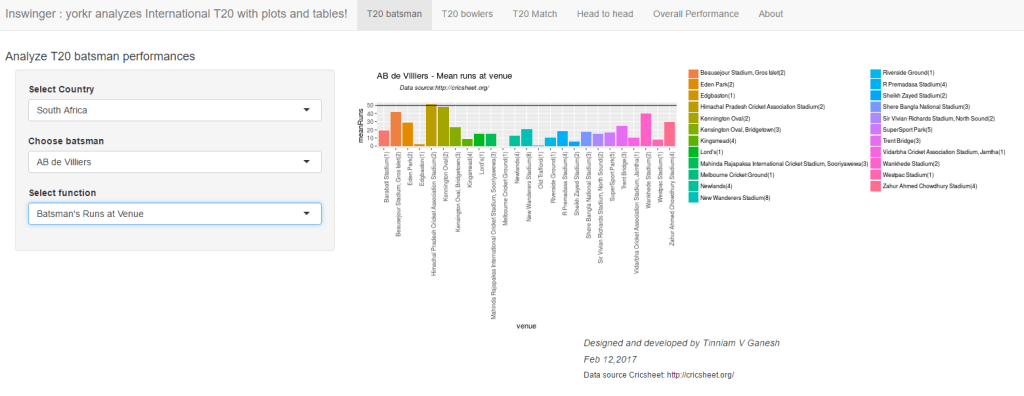
c.  AB Devilliers (South Africa) – Runs at venues
untitled

d. Glenn Maxwell (Australia)  – Predict runs vs deliveries faces
untitled

B. IPL Bowler
a. TG Southee (New Zealand) – Mean Economy Rate vs overs
untitled

b) DJ Bravo – Moving Average of wickets
untitled

c) AC Evans (Scotland) – Bowler Wickets Against Opposition
untitled

C.T20 Match
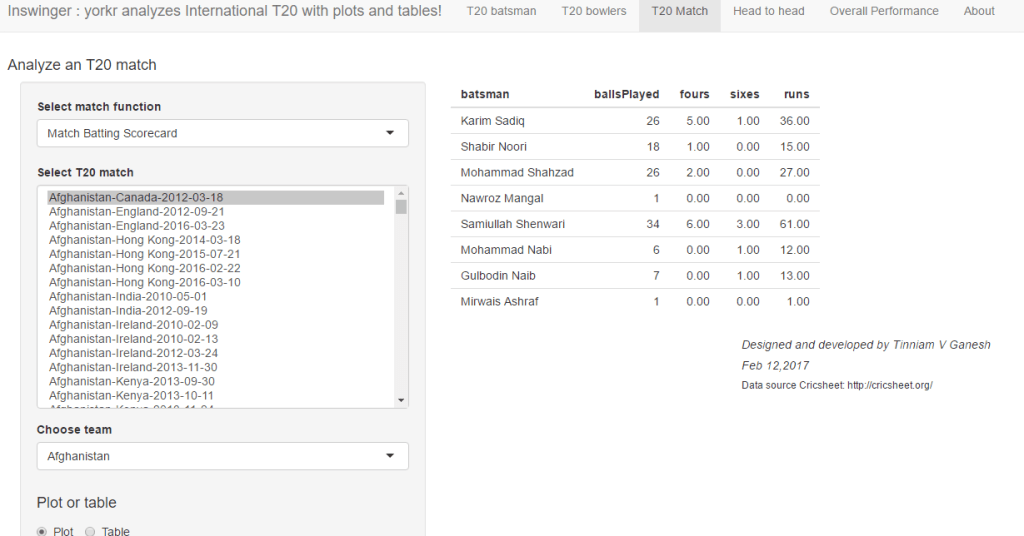
a. Match Score (Afghanistan vs Canada, 2012-03-18)
untitled

b)  Match batting partnerships (Plot) Hong Kong vs Oman (2015-11-21), Hong Kong
Hong Kong Partnerships
untitled

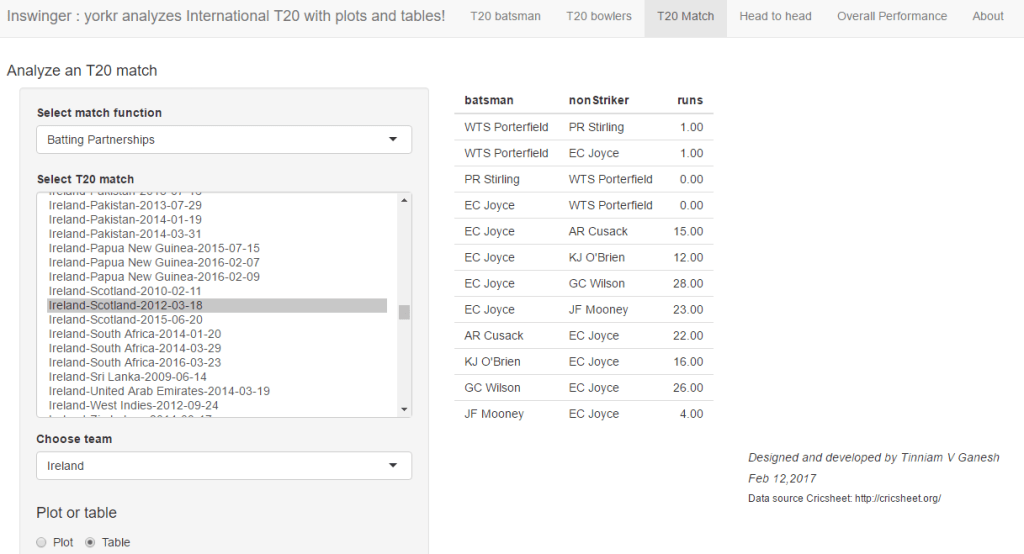
c) Match batting partnerships (Table) – Ireland vs Scotland(2012-03-18, Ireland)
Batting partnership can also be displayed as a table
untitled

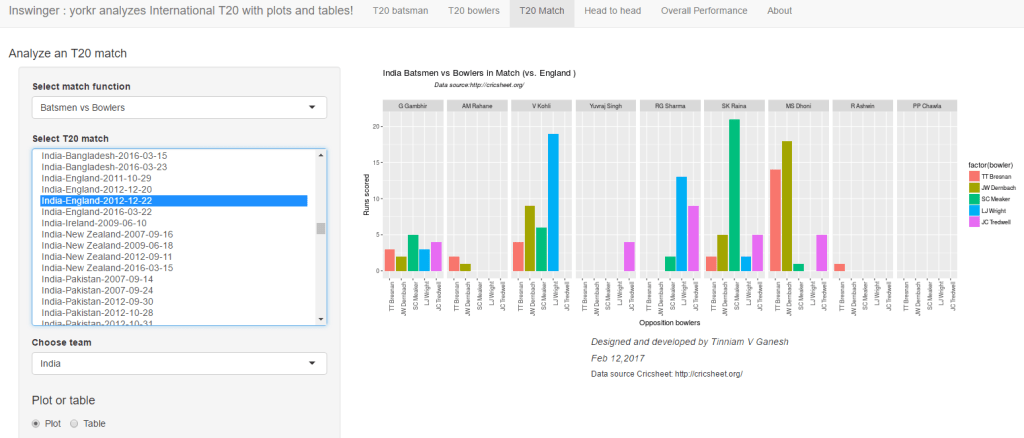
d) Batsmen vs Bowlers (Plot) – India vs England (2012-12-22)
untitled

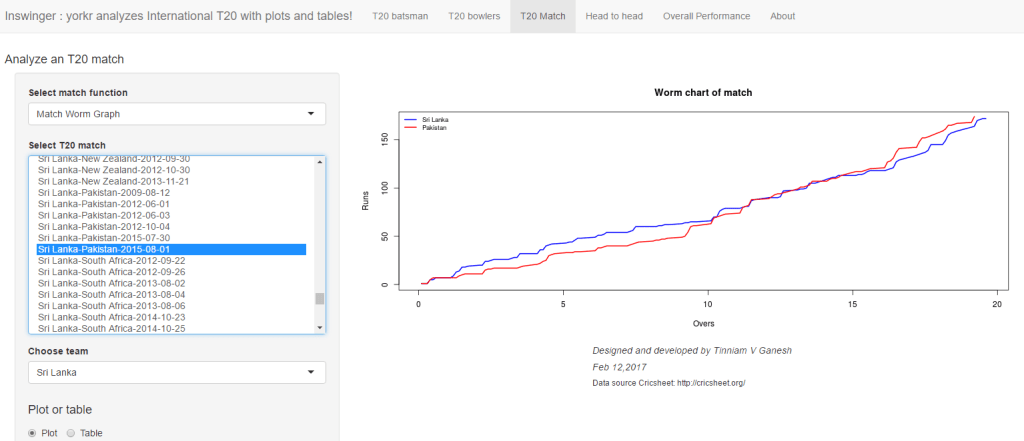
e) Match Worm Chart – Sri Lanka vs Pakistan (2015-08-01)
untitled

D.Head to head
a) Team Batsmen Partnership (Plot) – India vs Australia (all matches)
Virat Kohli has the highest total runs in partnerships against Australia
untitled

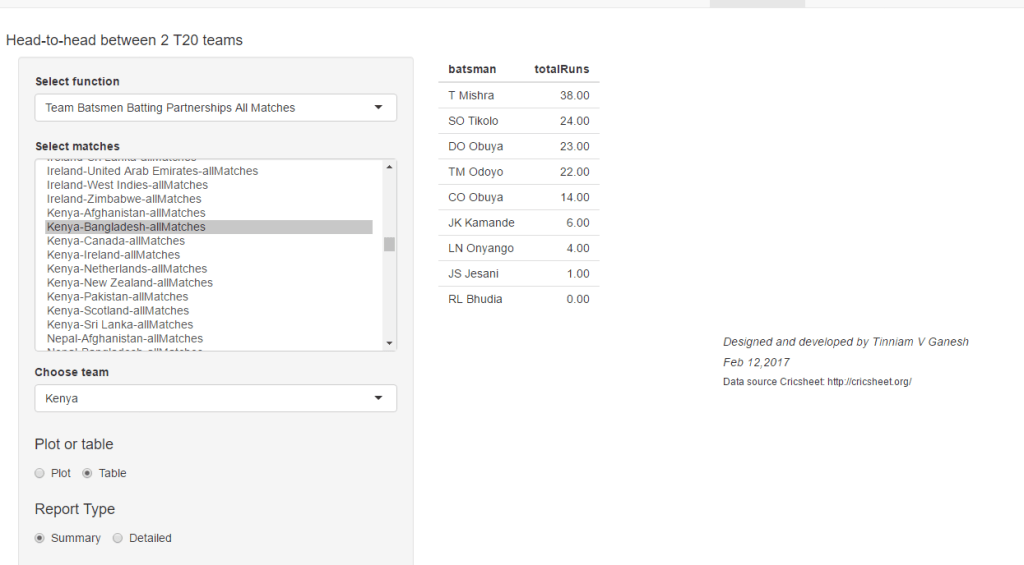
b)  Team Batsmen Partnership (Summary – Table) – Kenya vs Bangladesh
untitled

c) Team Bowling Scorecard (Table only) India vs South Africa all Matches
untitled

d) Wins- Losses New Zealand vs West Indies all Matches
untitled

C) Overall performances
a) Batting Scorecard All Matches  (Table only) – England’s overall batting performance
Eoin Morgan, Kevin Pieterson  & SJ Taylor have the best performance
untitled

b) Batsman vs Bowlers all Matches (Plot)
India’s best performing batsman (Rank=1) is Virat Kohli
untitled

c)  Batsman vs Bowlers all Matches (Table)
The plot above for Virat Kohli can also be displayed as a table. Kohli has score most runs DJ Bravo, SR Watson & Shahid Afridi
untitled

The Inswinger Shiny app can be accessed at Inswinger. Give it a swing!

The code for Inswinger is available at Github. Feel free to clone/download/fork  the code from Inswinger

Also see my other Shiny apps
1.GooglyPlus
2.What would Shakespeare say?
3.Sixer
4.Revisiting crimes against women in India

You may also like
1. Neural Networks: The mechanics of backpropagation
A primer on Qubits, Quantum gates and Quantum Operation
2. Re-working the Lucy Richardson algorithm in OpenCV
3.Design Principles of Scalable, Distributed Systems
4.Spicing up a IBM Bluemix cloud app with MongoDB and NodeExpress
5.Programming languages in layman’s language
7.Re-introducing cricketr! : An R package to analyze performances of cricketers

To see all posts take at a look at Index of Posts

GooglyPlus: yorkr analyzes IPL players, teams, matches with plots and tables

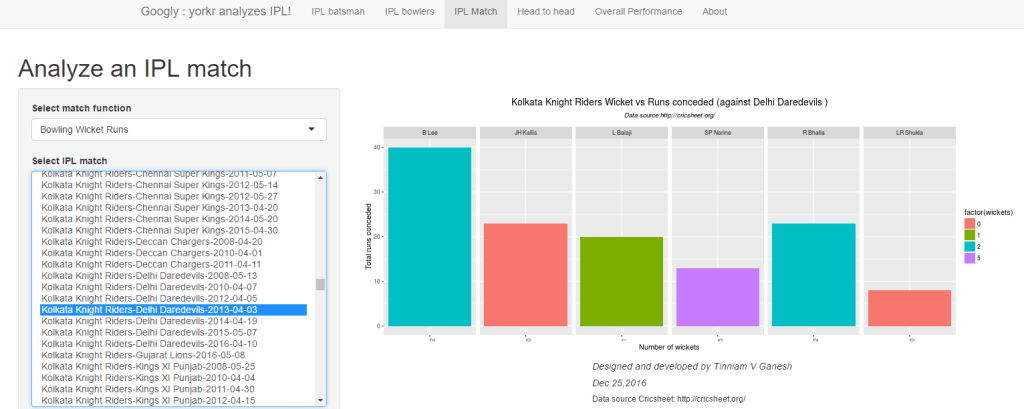
In this post I introduce my new Shiny app,“GooglyPlus”, which is a  more evolved version of my earlier Shiny app “Googly”. My R package ‘yorkr’,  on which both these Shiny apps are based, has the ability to output either a dataframe or plot, depending on a parameter plot=TRUE or FALSE. My initial version of the app only included plots, and did not exercise the yorkr package fully. Moreover, I am certain, there may be a set of cricket aficionados who would prefer, numbers to charts. Hence I have created this enhanced version of the Googly app and appropriately renamed it as GooglyPlus. GooglyPlus is based on the yorkr package which uses data from Cricsheet. The app is based on IPL data from  all IPL matches from 2008 up to 2016. Feel free to clone/fork or download the code from Github at GooglyPlus.

If you are passionate about cricket, and love analyzing cricket performances, then check out my 2 racy books on cricket! In my books, I perform detailed yet compact analysis of performances of both batsmen, bowlers besides evaluating team & match performances in Tests , ODIs, T20s & IPL. You can buy my books on cricket from Amazon at $12.99 for the paperback and $4.99/$6.99 respectively for the kindle versions. The books can be accessed at Cricket analytics with cricketr  and Beaten by sheer pace-Cricket analytics with yorkr  A must read for any cricket lover! Check it out!!

1


Click  GooglyPlus to access the Shiny app!

The changes for GooglyPlus over the earlier Googly app is only in the following 3 tab panels

  • IPL match
  • Head to head
  • Overall Performance

The analysis of IPL batsman and IPL bowler tabs are unchanged. These charts are as they were before.

The changes are only in  tabs i) IPL match ii) Head to head and  iii) Overall Performance. New functionality has been added and existing functions now have the dual option of either displaying a plot or a table.

The changes are

A) IPL Match
The following additions/enhancements have been done

-Match Batting Scorecard – Table
-Batting Partnerships – Plot, Table (New)
-Batsmen vs Bowlers – Plot, Table(New)
-Match Bowling Scorecard   – Table (New)
-Bowling Wicket Kind – Plot, Table (New)
-Bowling Wicket Runs – Plot, Table (New)
-Bowling Wicket Match – Plot, Table (New)
-Bowler vs Batsmen – Plot, Table (New)
-Match Worm Graph – Plot

B) Head to head
The following functions have been added/enhanced

-Team Batsmen Batting Partnerships All Matches – Plot, Table {Summary (New) and Detailed (New)}
-Team Batting Scorecard All Matches – Table (New)
-Team Batsmen vs Bowlers all Matches – Plot, Table (New)
-Team Wickets Opposition All Matches – Plot, Table (New)
-Team Bowling Scorecard All Matches – Table (New)
-Team Bowler vs Batsmen All Matches – Plot, Table (New)
-Team Bowlers Wicket Kind All Matches – Plot, Table (New)
-Team Bowler Wicket Runs All Matches – Plot, Table (New)
-Win Loss All Matches – Plot

C) Overall Performance
The following additions/enhancements have been done in this tab

-Team Batsmen Partnerships Overall – Plot, Table {Summary (New) and Detailed (New)}
-Team Batting Scorecard Overall –Table (New)
-Team Batsmen vs Bowlers Overall – Plot, Table (New)
-Team Bowler vs Batsmen Overall – Plot, Table (New)
-Team Bowling Scorecard Overall – Table (New)
-Team Bowler Wicket Kind Overall – Plot, Table (New)

Included below are some random charts and tables. Feel free to explore the Shiny app further

1) IPL Match
a) Match Batting Scorecard (Table only)
This is the batting score card for the Chennai Super Kings & Deccan Chargers 2011-05-11

untitled

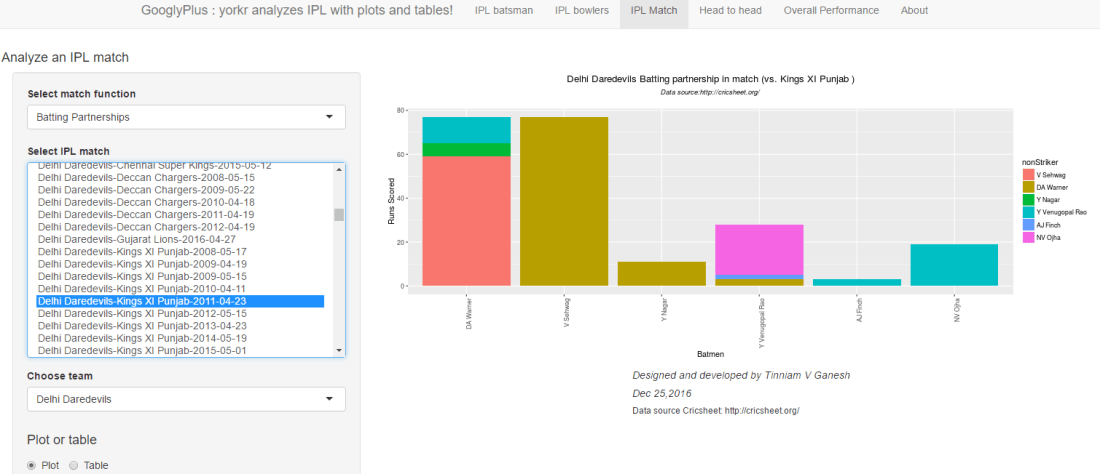
b)  Match batting partnerships (Plot)
Delhi Daredevils vs Kings XI Punjab – 2011-04-23

untitled

c) Match batting partnerships (Table)
The same batting partnership  Delhi Daredevils vs Kings XI Punjab – 2011-04-23 as a table

untitled

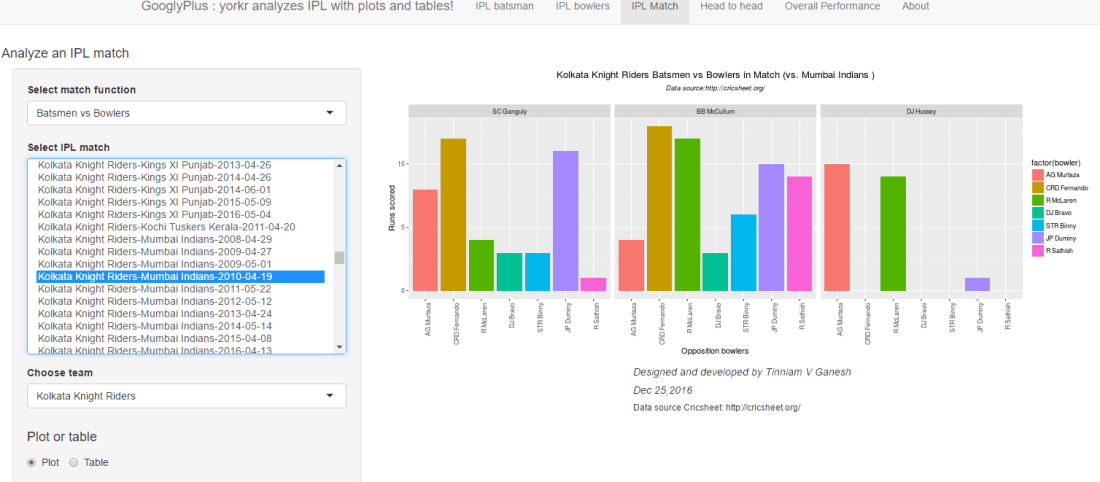
d) Batsmen vs Bowlers (Plot)
Kolkata Knight Riders vs Mumbai Indians 2010-04-19

Untitled.png

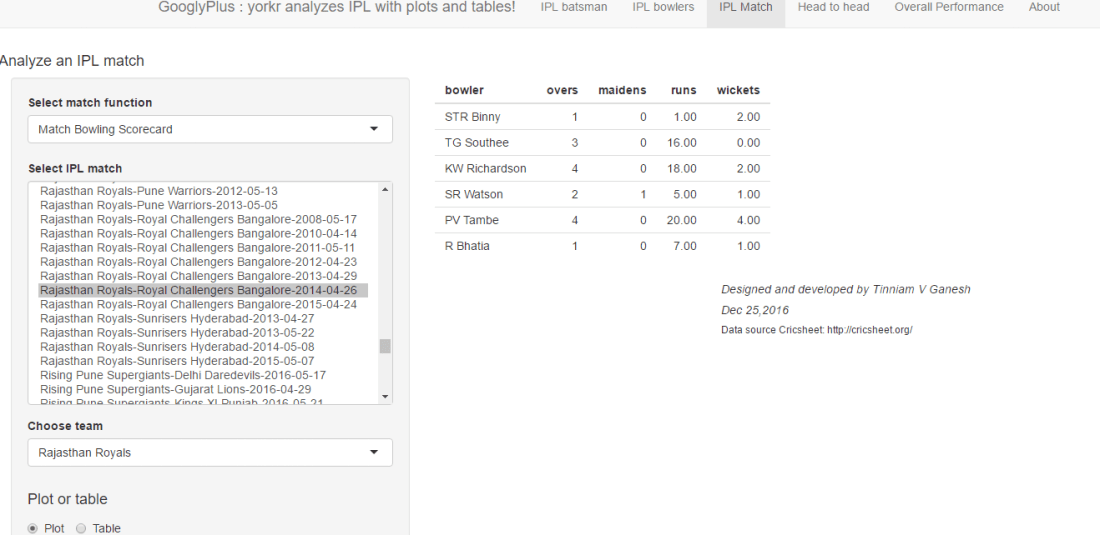
e)  Match Bowling Scorecard (Table only)
untitled

B) Head to head

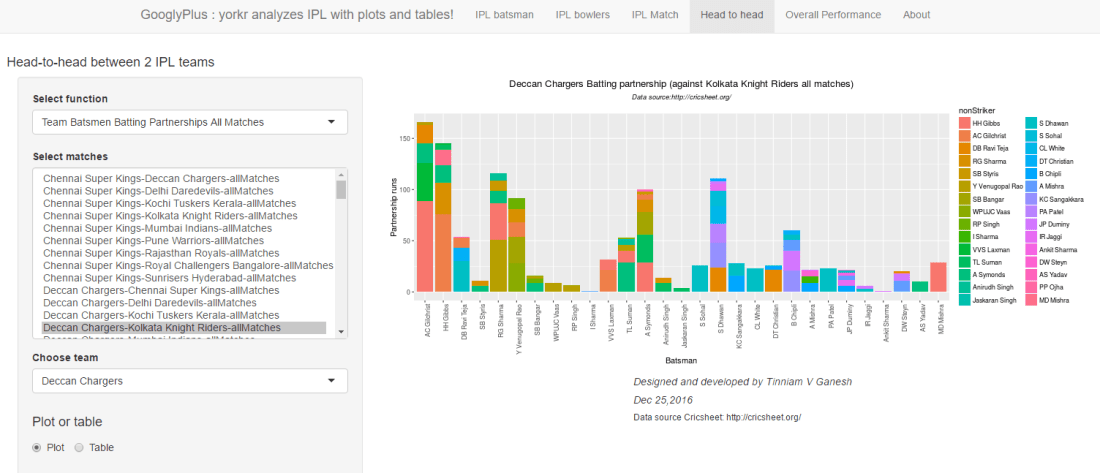
a) Team Batsmen Partnership (Plot)
Deccan Chargers vs Kolkata Knight Riders all matches

untitled

b)  Team Batsmen Partnership (Summary – Table)
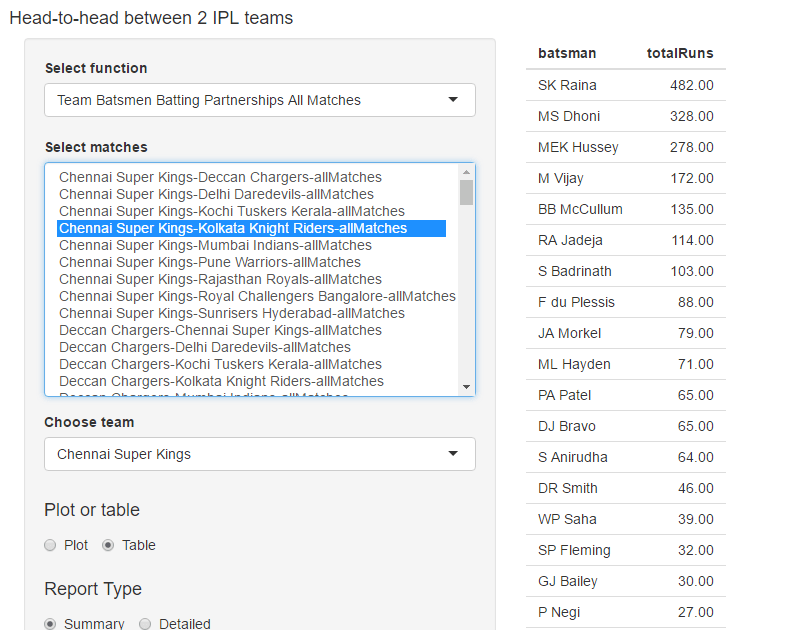
In the following tables it can be seen that MS Dhoni has performed better that SK Raina  CSK against DD matches, whereas SK Raina performs better than Dhoni in CSK vs  KKR matches

i) Chennai Super Kings vs Delhi Daredevils (Summary – Table)

untitled

ii) Chennai Super Kings vs Kolkata Knight Riders (Summary – Table)
untitled

iii) Rising Pune Supergiants vs Gujarat Lions (Detailed – Table)
This table provides the detailed partnership for RPS vs GL all matches

untitled

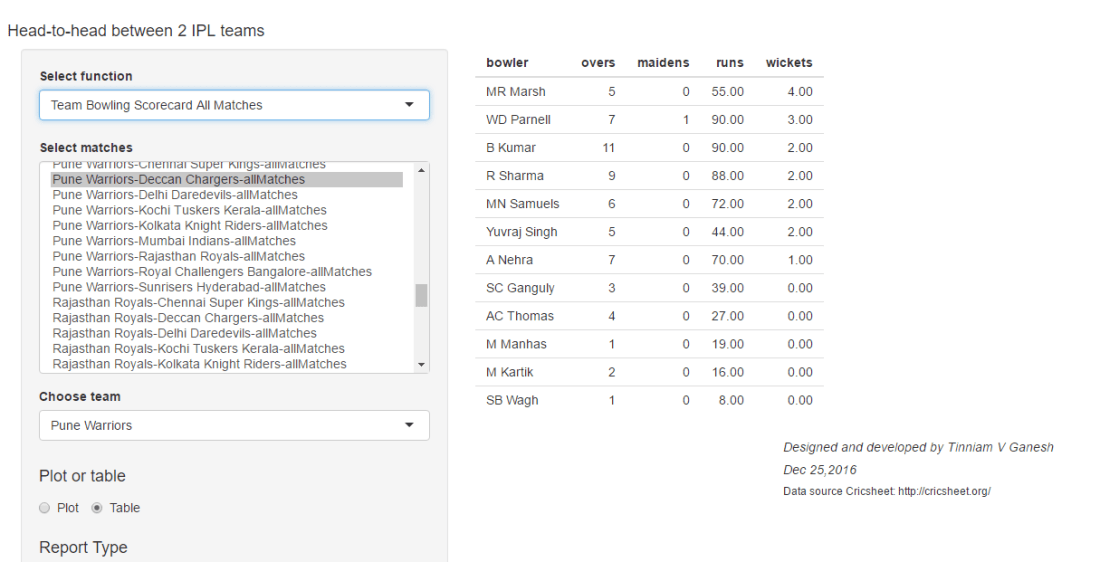
c) Team Bowling Scorecard (Table only)
This table gives the bowling scorecard of Pune Warriors vs Deccan Chargers in all matches

untitled

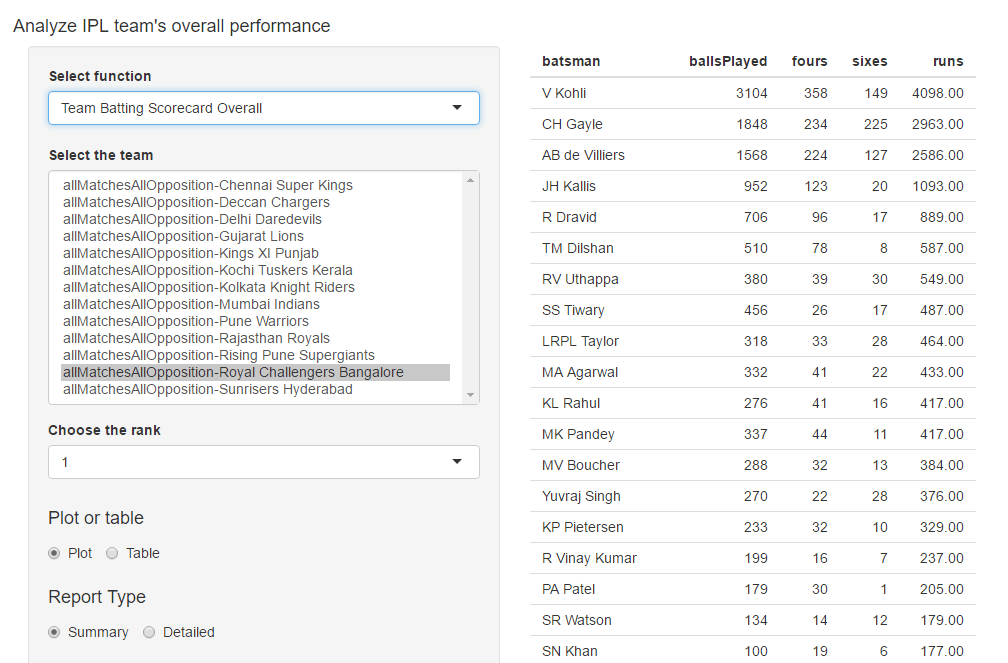
C) Overall performances
a) Batting Scorecard All Matches  (Table only)

This is the batting scorecard of Royal Challengers Bangalore. The top 3 batsmen are V Kohli, C Gayle and AB Devilliers in that order

untitled

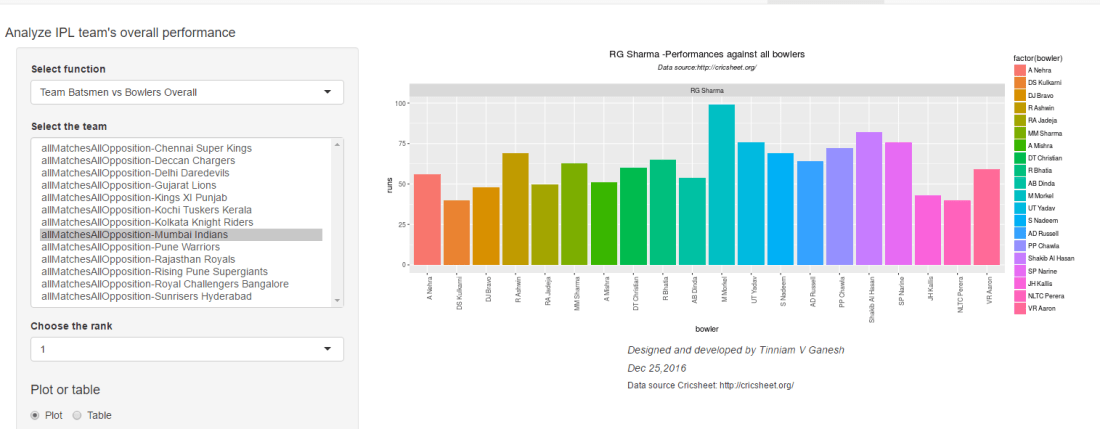
b) Batsman vs Bowlers all Matches (Plot)
This gives the performance of Mumbai Indian’s batsman of Rank=1, which is Rohit Sharma, against bowlers of all other teams

untitled

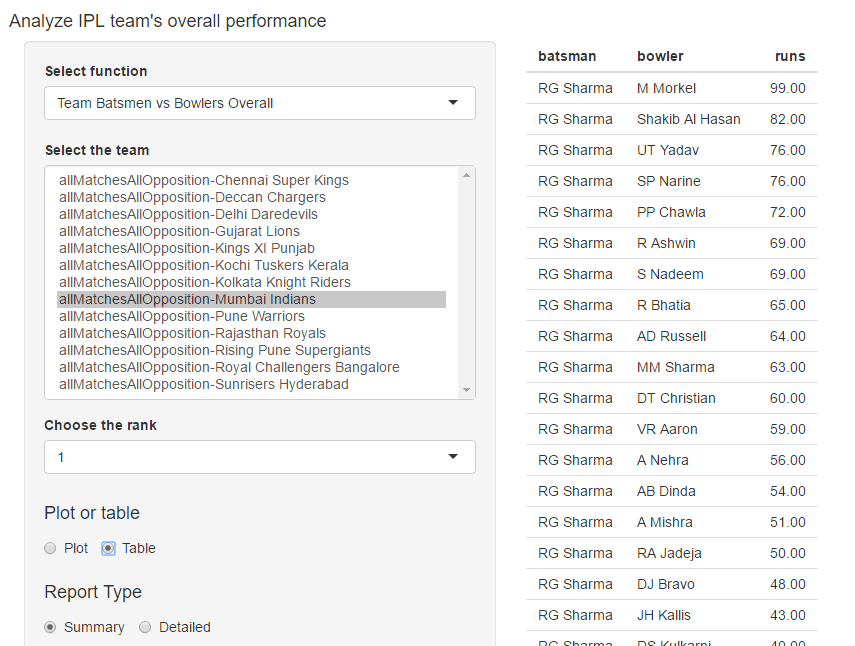
c)  Batsman vs Bowlers all Matches (Table)
The above plot as a table. It can be seen that Rohit Sharma has scored maximum runs against M Morkel, then Shakib Al Hasan and then UT Yadav.

untitled

d) Bowling scorecard (Table only)
The table below gives the bowling scorecard of CSK. R Ashwin leads with a tally of 98 wickets followed by DJ Bravo who has 88 wickets and then JA Morkel who has 83 wickets in all matches against all teams

Untitled.png

This is just a random selection of functions. Do play around with the app and checkout how the different IPL batsmen, bowlers and teams stack against each other. Do read my earlier post Googly: An interactive app for analyzing IPL players, matches and teams using R package yorkr  for more details about the app and other functions available.

Click GooglyPlus to access the Shiny app!

You can clone/fork/download the code from Github at GooglyPlus

Hope you have fun playing around with the Shiny app!

Note: In the tabs, for some of the functions, not all controls  are required. It is possible to enable the controls selectively but this has not been done in this current version. I may make the changes some time in the future.

Take a look at my other Shiny apps
a.Revisiting crimes against women in India
b. Natural language processing: What would Shakespeare say?

Check out some of my other posts
1. Analyzing World Bank data with WDI, googleVis Motion Charts
2. Video presentation on Machine Learning, Data Science, NLP and Big Data – Part 1
3. Singularity
4. Design principles of scalable, distributed systems
5. Simulating an Edge shape in Android
6. Dabbling with Wiener filter in OpenCV

To see all posts click Index of Posts

Googly: An interactive app for analyzing IPL players, matches and teams using R package yorkr

Presenting ‘Googly’, a cool Shiny app that I developed over the last couple of days. This interactive Shiny app was on my mind for quite some time, and I finally got down to implementing it. The Googly Shiny app is based on my R package ‘yorkr’ which is now available in CRAN. The R package and hence this Shiny app is based on data from Cricsheet.

If you are passionate about cricket, and love analyzing cricket performances, then check out my 2 racy books on cricket! In my books, I perform detailed yet compact analysis of performances of both batsmen, bowlers besides evaluating team & match performances in Tests , ODIs, T20s & IPL. You can buy my books on cricket from Amazon at $12.99 for the paperback and $4.99/$6.99 respectively for the kindle versions. The books can be accessed at Cricket analytics with cricketr  and Beaten by sheer pace-Cricket analytics with yorkr  A must read for any cricket lover! Check it out!!

1

Googly is based on R package yorkr, and uses the data of all IPL matches from 2008 up to 2016, available on Cricsheet.

Googly can do detailed analyses of a) Individual IPL batsman b) Individual IPL bowler c) Any IPL match d) Head to head confrontation between 2 IPL teams e) All matches of an IPL team against all other teams.

With respect to the individual IPL batsman and bowler performance, I was in a bit of a ‘bind’ literally (pun unintended), as any IPL player could have played in more than 1 IPL team. Fortunately ‘rbind’ came to my rescue. I just get all the batsman’s/bowler’s performance in each IPL team, and then consolidate it into a single large dataframe to do the analyses of.

The Shiny app can be accessed at Googly

The code for Googly is available at Github. Feel free to clone/download/fork  the code from Googly

Check out my 2 books on cricket, a) Cricket analytics with cricketr b) Beaten by sheer pace – Cricket analytics with yorkr, now available in both paperback & kindle versions on Amazon!!! Pick up your copies today!

Also see my post GooglyPlus: yorkr analyzes IPL players, teams, matches with plots and tables

Based on the 5 detailed analysis domains there are 5 tabs

IPL Batsman: This tab can be used to perform analysis of all IPL batsman. If a batsman has played in more than 1 team, then the overall performance is considered. There are 10 functions for the IPL Batsman. They are shown below

  1. Batsman Runs vs. Deliveries
  2. Batsman’s Fours & Sixes
  3. Dismissals of batsman
  4. Batsman’s Runs vs Strike Rate
  5. Batsman’s Moving Average
  6. Batsman’s Cumulative Average Run
  7. Batsman’s Cumulative Strike Rate
  8. Batsman’s Runs against Opposition
  9. Batsman’s Runs at Venue
  10. Predict Runs of batsman

IPL Bowler: This tab can be used to analyze individual IPL bowlers. The functions handle IPL bowlers who have played in more than 1 IPL team.

  1. Mean Economy Rate of bowler
  2. Mean runs conceded by bowler
  3. Bowler’s Moving Average
  4. Bowler’s Cumulative Avg. Wickets
  5. Bowler’s Cumulative Avg. Economy Rate
  6. Bowler’s Wicket Plot
  7. Bowler’s Wickets against opposition
  8. Bowler’s Wickets at Venues
  9. Bowler’s wickets prediction

IPL match: This tab can be used for analyzing individual IPL matches. The available functions are

  1. Batting Partnerships
  2. Batsmen vs Bowlers
  3. Bowling Wicket Kind
  4. Bowling Wicket Runs
  5. Bowling Wicket Match
  6. Bowler vs Batsmen
  7. Match Worm Graph

Head to head : This tab can be used for analyzing head-to-head confrontations, between any 2 IPL teams for e.g. all matches between Chennai Super Kings vs. Deccan Chargers or Kolkata Knight Riders vs. Delhi Daredevils. The available functions are

  1. Team Batsmen Batting Partnerships All Matches
  2. Team Batsmen vs Bowlers all Matches
  3. Team Wickets Opposition All Matches
  4. Team Bowler vs Batsmen All Matches
  5. Team Bowlers Wicket Kind All Matches
  6. Team Bowler Wicket Runs All Matches
  7. Win Loss All Matches

Overall performance : this tab can be used analyze the overall performance of any IPL team. For this analysis all matches played by this team is considered. The available functions are

  1. Team Batsmen Partnerships Overall
  2. Team Batsmen vs Bowlers Overall
  3. Team Bowler vs Batsmen Overall
  4. Team Bowler Wicket Kind Overall

Below I include a random set of charts that are generated in each of the 5 tabs

A. IPL Batsman
a. A Symonds : Runs vs Deliveries
untitled

b. AB Devilliers – Cumulative Strike Rate
untitled

c.  Gautam Gambhir – Runs at venues
untitled

d. CH Gayle – Predict runs 
untitled

B. IPL Bowler
a. Ashish Nehra – Cumulative Average Wickets
untitled

b.  DJ Bravo – Moving Average of wickets
untitled

c. R Ashwin – Mean Economy rate vs Overs
untitled

C.IPL Match
a. Chennai Super Kings vs Deccan Chargers   (2008 -05-06) – Batsmen Partnerships

Note: You can choose either team in the match from the drop down ‘Choose team’

untitled

b. Kolkata Knight Riders vs Delhi Daredevils (2013-04-02) – Bowling wicket runs
untitled

c. Mumbai Indians vs Kings XI Punjab (2010-03-30) – Match worm graph
untitled

D. Head to head confrontation
a. Rising Pune Supergiants vs Mumbai Indians in all matches – Team batsmen partnerships

Note: You can choose the partnership of either team in the drop down ‘Choose team’
untitled

b.  Gujarat Lions – Royal Challengers Bangalore all matches – Bowlers performance against batsmen
untitled

E. Overall Performance
a.  Royal Challengers Bangalore overall performance – Batsman Partnership (Rank=1)
This is Virat Kohli for RCB. Try out other ranks
untitled

b.  Rajashthan Royals overall Performance – Bowler vs batsman (Rank =2)
This is Vinay Kumar.
untitled

The Shiny app Googly can be accessed at Googly. Feel free to clone/fork the code from Github at Googly

For details on my R package yorkr, please see my blog Giga thoughts. There are more than 15 posts detailing the functions and their usage.

Do bowl a Googly!!!

You may like my other Shiny apps

Also see my other posts

  1. Introducing QCSimulator: A 5-qubit quantum computing simulator in R
  2. Deblurring with OpenCV: Weiner filter reloaded
  3. Rock N’ Roll with Bluemix, Cloudant & NodeExpress
  4. Introducing cricket package yorkr: Part 1- Beaten by sheer pace!
  5. Fun simulation of a Chain in Android
  6. Beaten by sheer pace! Cricket analytics with yorkr in paperback and Kindle versions
  7. Introducing cricketr! : An R package to analyze performances of cricketers
  8. Cricket analytics with cricketr!!!

For more posts see Index of posts

Analyzing World Bank data with WDI, googleVis Motion Charts

Recently I was surfing the web, when I came across a real cool post New R package to access World Bank data, by Markus Gesmann on using googleVis and motion charts with World Bank Data. The post also introduced me to Hans Rosling, Professor of Sweden’s Karolinska Institute. Hans Rosling, the creator of the famous Gapminder chart, the “Heath and Wealth of Nations” displays global trends through animated charts (A must see!!!). As they say, in Hans Rosling’s hands, data dances and sings. Take a look at some of his Ted talks for e.g. Hans Rosling:New insights on poverty. Prof Rosling developed the breakthrough software behind the visualizations, in the Gapminder. The free software, which can be loaded with any data – was purchased by Google in March 2007.

In this post, I recreate some of the Gapminder charts with the help of R packages WDI and googleVis. The WDI  package of  Vincent Arel-Bundock, provides a set of really useful functions to get to data based on the World Bank Data indicators.  googleVis provides motion charts with which you can animate the data.. Incidentally Datacamp has a very nice, short course on googleVis “Having fun with googleVis

See an updated version of this post Revisiting World Bank data analysis with WDI and gVisMotionChart

You can clone/download the code from Github at worldBankAnalysis which is in the form of an Rmd file.

library(WDI)
library(ggplot2)
library(googleVis)
library(plyr)

1.Get the data from 1960 to 2016 for the following

  1. Population – SP.POP.TOTL
  2. GDP in US $ – NY.GDP.MKTP.CD
  3. Life Expectancy at birth (Years) – SP.DYN.LE00.IN
  4. GDP Per capita income – NY.GDP.PCAP.PP.CD
  5. Fertility rate (Births per woman) – SP.DYN.TFRT.IN
  6. Poverty headcount ratio – SI.POV.2DAY
# World population total
population = WDI(indicator='SP.POP.TOTL', country="all",start=1960, end=2016)
# GDP in US $
gdp= WDI(indicator='NY.GDP.MKTP.CD', country="all",start=1960, end=2016)
# Life expectancy at birth (Years)
lifeExpectancy= WDI(indicator='SP.DYN.LE00.IN', country="all",start=1960, end=2016)
# GDP Per capita
income = WDI(indicator='NY.GDP.PCAP.PP.CD', country="all",start=1960, end=2016)
# Fertility rate (births per woman)
fertility = WDI(indicator='SP.DYN.TFRT.IN', country="all",start=1960, end=2016)
# Poverty head count
poverty= WDI(indicator='SI.POV.2DAY', country="all",start=1960, end=2016)

2.Rename the columns

names(population)[3]="Total population"
names(lifeExpectancy)[3]="Life Expectancy (Years)"
names(gdp)[3]="GDP (US$)"
names(income)[3]="GDP per capita income"
names(fertility)[3]="Fertility (Births per woman)"
names(poverty)[3]="Poverty headcount ratio"

3.Join the data frames

Join the individual data frames to one large wide data frame with all the indicators for the countries


j1 <- join(population, gdp)
j2 <- join(j1,lifeExpectancy)
j3 <- join(j2,income)
j4 <- join(j3,poverty)
wbData <- join(j4,fertility)

4.Use WDI_data

Use WDI_data to get the list of indicators and the countries. Join the countries and region

#This returns  list of 2 matrixes
wdi_data =WDI_data
# The 1st matrix is the list is the set of all World Bank Indicators
indicators=wdi_data[[1]]
# The 2nd  matrix gives the set of countries and regions
countries=wdi_data[[2]]
df = as.data.frame(countries)
aa <- df$region != "Aggregates"
# Remove the aggregates
countries_df <- df[aa,]
# Subset from the development data only those corresponding to the countries
bb = subset(wbData, country %in% countries_df$country)
cc = join(bb,countries_df)
dd = complete.cases(cc)
developmentDF = cc[dd,]

5.Create and display the motion chart

gg<- gvisMotionChart(cc,
                                idvar = "country",
                                timevar = "year",
                                xvar = "GDP",
                                yvar = "Life Expectancy",
                                sizevar ="Population",
                                colorvar = "region")
plot(gg)
cat(gg$html$chart, file="chart1.html")

Note: Unfortunately it is not possible to embed the motion chart in WordPress. It is has to hosted on a server as a Webpage. After exploring several possibilities I came up with the following process to display the animation graph. The plot is saved as a html file using ‘cat’ as shown above. The chart1.html page is then hosted as a Github page (gh-page) on Github.

Here is the ggvisMotionChart

Do give  World Bank Motion Chart1  a spin.  Here is how the Motion Chart has to be used

untitled

You can select Life Expectancy, Population, Fertility etc by clicking the black arrows. The blue arrow shows the ‘play’ button to set animate the motion chart. You can also select the countries and change the size of the circles. Do give it a try. Here are some quick analysis by playing around with the motion charts with different parameters chosen

The set of charts below are screenshots captured by running the motion chart World Bank Motion Chart1

a. Life Expectancy vs Fertility chart

This chart is used by Hans Rosling in his Ted talk. The left chart shows low life expectancy and high fertility rate for several sub Saharan and East Asia Pacific countries in the early 1960’s. Today the fertility has dropped and the life expectancy has increased overall. However the sub Saharan countries still have a high fertility rate

pic1

b. Population vs GDP

The chart below shows that GDP of India and China have the same GDP from 1973-1994 with US and Japan well ahead.

pic2

From 1998- 2014 China really pulls away from India and Japan as seen below

pic3

c. Per capita income vs Life Expectancy

In the 1990’s the per capita income and life expectancy of the sub -saharan countries are low (42-50). Japan and US have a good life expectancy in 1990’s. In 2014 the per capita income of the sub-saharan countries are still low though the life expectancy has marginally improved.

pic4

d. Population vs Poverty headcount

pic5

In the early 1990’s China had a higher poverty head count ratio than India. By 2004 China had this all figured out and the poverty head count ratio drops significantly. This can also be seen in the chart below.

pop_pov3

In the chart above China shows a drastic reduction in poverty headcount ratio vs India. Strangely Zambia shows an increase in the poverty head count ratio.

6.Get the data for the 2nd set of indicators

  1. Total population  – SP.POP.TOTL
  2. GDP in US$ – NY.GDP.MKTP.CD
  3. Access to electricity (% population) – EG.ELC.ACCS.ZS
  4. Electricity consumption KWh per capita -EG.USE.ELEC.KH.PC
  5. CO2 emissions -EN.ATM.CO2E.KT
  6. Sanitation Access – SH.STA.ACSN
# World population
population = WDI(indicator='SP.POP.TOTL', country="all",start=1960, end=2016)
# GDP in US $
gdp= WDI(indicator='NY.GDP.MKTP.CD', country="all",start=1960, end=2016)
# Access to electricity (% population)
elecAccess= WDI(indicator='EG.ELC.ACCS.ZS', country="all",start=1960, end=2016)
# Electric power consumption Kwh per capita
elecConsumption= WDI(indicator='EG.USE.ELEC.KH.PC', country="all",start=1960, end=2016)
#CO2 emissions
co2Emissions= WDI(indicator='EN.ATM.CO2E.KT', country="all",start=1960, end=2016)
# Access to sanitation (% population)
sanitationAccess= WDI(indicator='SH.STA.ACSN', country="all",start=1960, end=2016)

7.Rename the columns

names(population)[3]="Total population"
names(gdp)[3]="GDP US($)"
names(elecAccess)[3]="Access to Electricity (% popn)"
names(elecConsumption)[3]="Electric power consumption (KWH per capita)"
names(co2Emissions)[3]="CO2 emisions"
names(sanitationAccess)[3]="Access to sanitation(% popn)"

8.Join the individual data frames

Join the individual data frames to one large wide data frame with all the indicators for the countries


j1 <- join(population, gdp)
j2 <- join(j1,elecAccess)
j3 <- join(j2,elecConsumption)
j4 <- join(j3,co2Emissions)
wbData1 <- join(j3,sanitationAccess)


9.Use WDI_data

Use WDI_data to get the list of indicators and the countries. Join the countries and region

#This returns  list of 2 matrixes
wdi_data =WDI_data
# The 1st matrix is the list is the set of all World Bank Indicators
indicators=wdi_data[[1]]
# The 2nd  matrix gives the set of countries and regions
countries=wdi_data[[2]]
df = as.data.frame(countries)
aa <- df$region != "Aggregates"
# Remove the aggregates
countries_df <- df[aa,]
# Subset from the development data only those corresponding to the countries
ee = subset(wbData1, country %in% countries_df$country)
ff = join(ee,countries_df)
## Joining by: iso2c, country

10.Create and display the motion chart

gg1<- gvisMotionChart(ff,
                                idvar = "country",
                                timevar = "year",
                                xvar = "GDP",
                                yvar = "Access to Electricity",
                                sizevar ="Population",
                                colorvar = "region")
plot(gg1)
cat(gg1$html$chart, file="chart2.html")

This is World Bank Motion Chart2  which has a different set of parameters like Access to Energy, CO2 emissions etc

The set of charts below are screenshots of the motion chart World Bank Motion Chart 2

a. Access to Electricity vs Population
pic6The above chart shows that in China 100% population have access to electricity. India has made decent progress from 50% in 1990 to 79% in 2012. However Pakistan seems to have been much better in providing access to electricity. Pakistan moved from 59% to close 98% access to electricity

b. Power consumption vs population

powercon

The above chart shows the Power consumption vs Population. China and India have proportionally much lower consumption that Norway, US, Canada

c. CO2 emissions vs Population

pic7

In 1963 the CO2 emissions were fairly low and about comparable for all countries. US, India have shown a steady increase while China shows a steep increase. Interestingly UK shows a drop in CO2 emissions

d.  Access to sanitation
san

India shows an improvement but it has a long way to go with only 40% of population with access to sanitation. China has made much better strides with 80% having access to sanitation in 2015. Strangely Nigeria shows a drop in sanitation by almost about 20% of population.

The code is available at Github at worldBankAnalysys

Conclusion: So there you have it. I have shown some screenshots of some sample parameters of the World indicators. Please try to play around with World Bank Motion Chart1 & World Bank Motion Chart 2  with your own set of parameters and countries.  You can also create your own motion chart from the 100s of WDI indicators avaialable at  World Bank Data indicator.

Finally, I  would really like to thank Prof Hans Rosling, googleVis and  WDI (Vincent  Arel-Bundock) for making this visualization possible!
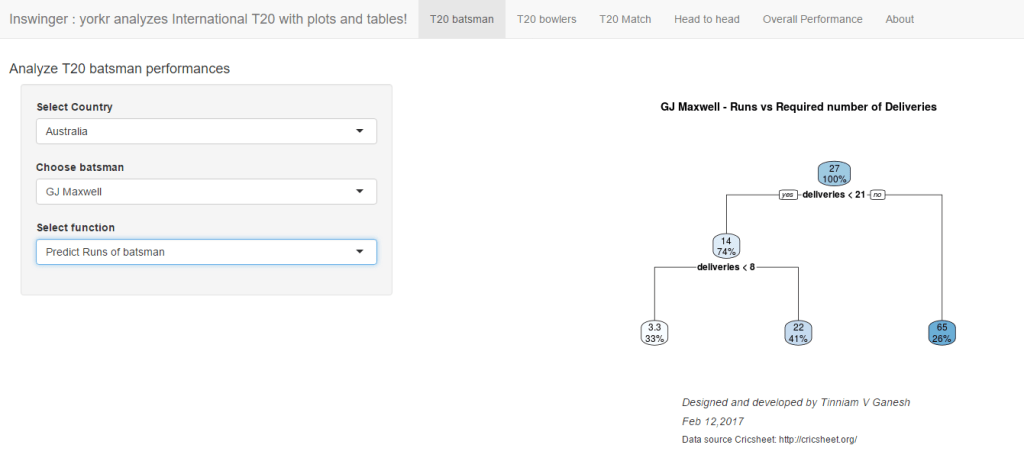
Also see
1.  Introducing QCSimulator: A 5-qubit quantum computing simulator in R
2. Dabbling with Wiener filter using OpenCV
3. Designing a Social Web Portal
4. Design Principles of Scalable, Distributed Systems
5. Re-introducing cricketr! : An R package to analyze performances of cricketers
6. Natural language processing: What would Shakespeare say?

To see all posts Index of posts

cricketr sizes up legendary All-rounders of yesteryear

Introduction

This is a post I have been wanting to write for several months, but had to put it off for one reason or another. In this post I use my R package cricketr to analyze the performance of All-rounder greats namely Kapil Dev, Ian Botham, Imran Khan and Richard Hadlee. All these players had talent that was natural and raw. They were good strikers of the ball and extremely lethal with their bowling. The ODI data for these players have been taken from ESPN Cricinfo.

Please be mindful of the ESPN Cricinfo Terms of Use

If you are passionate about cricket, and love analyzing cricket performances, then check out my racy book on cricket ‘Cricket analytics with cricketr and cricpy – Analytics harmony with R & Python’! This book discusses and shows how to use my R package ‘cricketr’ and my Python package ‘cricpy’ to analyze batsmen and bowlers in all formats of the game (Test, ODI and T20). The paperback is available on Amazon at $21.99 and  the kindle version at $9.99/Rs 449/-. A must read for any cricket lover! Check it out!!

You can download the latest PDF version of the book  at  ‘Cricket analytics with cricketr and cricpy: Analytics harmony with R and Python-6th edition

Untitled

You can also read this post at Rpubs as cricketr-AR. Dowload this report as a PDF file from cricketr-AR

Important note 1: The latest release of ‘cricketr’ now includes the ability to analyze performances of teams now!!  See Cricketr adds team analytics to its repertoire!!!

Important note 2 : Cricketr can now do a more fine-grained analysis of players, see Cricketr learns new tricks : Performs fine-grained analysis of players

Important note 3: Do check out the python avatar of cricketr, ‘cricpy’ in my post ‘Introducing cricpy:A python package to analyze performances of cricketers

Note: If you would like to do a similar analysis for a different set of batsman and bowlers, you can clone/download my skeleton cricketr template from Github (which is the R Markdown file I have used for the analysis below). You will only need to make appropriate changes for the players you are interested in. Just a familiarity with R and R Markdown only is needed.

Important note: Do check out my other posts using cricketr at cricketr-posts

All Rounders

  1. Kapil Dev (Ind)
  2. Ian Botham (Eng)
  3. Imran Khan (Pak)
  4. Richard Hadlee (NZ)

I have sprinkled the plots with a few of my comments. Feel free to draw your conclusions! The analysis is included below

if (!require("cricketr")){ 
    install.packages("cricketr",) 
} 

library(cricketr)

The data for any particular ODI player can be obtained with the getPlayerDataOD() function. To do you will need to go to ESPN CricInfo Playerand type in the name of the player for e.g Kapil Dev, etc. This will bring up a page which have the profile number for the player e.g. for Kapil Dev this would be http://www.espncricinfo.com/india/content/player/30028.html. Hence, Kapils’s profile is 30028. This can be used to get the data for Kapil Dev’s data as shown below. I have already executed the below 4 commands and I will use the files to run further commands

#kapil1 
#botham11 
#imran1 
#hadlee1 

Analyses of batting performances of the All Rounders

The following plots gives the analysis of the 4 ODI batsmen

  1. Kapil Dev (Ind) – Innings – 225, Runs = 3783, Average=23.79, Strike Rate= 95.07
  2. Ian Botham (Eng) – Innings – 116, Runs= 2113, Average=23.21, Strike Rate= 79.10
  3. Imran Khan (Pak) – Innings – 175, Runs= 3709, Average=33.41, Strike Rate= 72.65
  4. Richard Hadlee (NZ) – Innings – 115, Runs= 1751, Average=21.61, Strike Rate= 75.50

Plot of 4s, 6s and the scoring rate in ODIs

The 3 charts below give the number of

  1. 4s vs Runs scored
  2. 6s vs Runs scored
  3. Balls faced vs Runs scored

A regression line is fitted in each of these plots for each of the ODI batsmen

A. Kapil Dev
It can be seen that Kapil scores four 4’s when he scores 50. Also after facing 50 deliveries he scores around 43

par(mfrow=c(1,3))
par(mar=c(4,4,2,2))
batsman4s("./kapil1.csv","Kapil")
batsman6s("./kapil1.csv","Kapil")
batsmanScoringRateODTT("./kapil1.csv","Kapil")

kapil-4s6ssr-1

dev.off()
## null device 
##           1

B. Ian Botham
Botham scores around 39 runs after 50 deliveries

par(mfrow=c(1,3))
par(mar=c(4,4,2,2))
batsman4s("./botham1.csv","Botham")
batsman6s("./botham1.csv","Botham")
batsmanScoringRateODTT("./botham1.csv","Botham")

botham-4s6sr-1

dev.off()
## null device 
##           1

C. Imran Khan
Imran scores around 36 runs for 50 deliveries

par(mfrow=c(1,3))
par(mar=c(4,4,2,2))
batsman4s("./imran1.csv","Imran")
batsman6s("./imran1.csv","Imran")
batsmanScoringRateODTT("./imran1.csv","Imran")

imran-4s6ssr-1

dev.off()
## null device 
##           1

D. Richard Hadlee
Hadlee also scores around 30 runs facing 50 deliveries

par(mfrow=c(1,3))
par(mar=c(4,4,2,2))
batsman4s("./hadlee1.csv","Hadlee")
batsman6s("./hadlee1.csv","Hadlee")
batsmanScoringRateODTT("./hadlee1.csv","Hadlee")

hadlee-4s6sout-1

dev.off()
## null device 
##           1

Cumulative Average runs of batsman in career

Kapils cumulative avrerage runs drops towards the last 15 innings wheres Botham had a good run towards the end of his career. Imran performance as a batsman really peaks towards the end with a cumulative average of almost 25 runs. Hadlee has a stead performance

par(mfrow=c(2,2))
par(mar=c(4,4,2,2))
batsmanCumulativeAverageRuns("./kapil1.csv","Kapil")

kbih-car-1

batsmanCumulativeAverageRuns("./botham1.csv","Botham")

kbih-car-2

batsmanCumulativeAverageRuns("./imran1.csv","Imran")

kbih-car-3

batsmanCumulativeAverageRuns("./hadlee1.csv","Hadlee")

kbih-car-4

dev.off()
## null device 
##           1

Cumulative Average strike rate of batsman in career

Kapil’s strike rate is superlative touching the 90’s steadily. Botham’s strike drops dramatically towards the latter part of his career. Imran average at a steady 75 and Hadlee averages around 85.

par(mfrow=c(2,2))
par(mar=c(4,4,2,2))
batsmanCumulativeStrikeRate("./kapil1.csv","Kapil")

kbih-casr-1

batsmanCumulativeStrikeRate("./botham1.csv","Botham")

kbih-casr-2

batsmanCumulativeStrikeRate("./imran1.csv","Imran")

kbih-casr-3

batsmanCumulativeStrikeRate("./hadlee1.csv","Hadlee")

kbih-casr-4

dev.off()
## null device 
##           1

Relative Mean Strike Rate

Kapil tops the strike rate among all the all-rounders. This is really a revelation to me. This can also be seen in the original data in Kapil’s strike rate is at a whopping 95.07 in comparison to Botham, Inran and Hadlee who are at 79.1,72.65 and 75.50 respectively

par(mar=c(4,4,2,2))
frames <- list("./kapil1.csv","./botham1.csv","imran1.csv","hadlee1.csv")
names <- list("Kapil","Botham","Imran","Hadlee")
relativeBatsmanSRODTT(frames,names)

plot-1-1

Relative Runs Frequency Percentage

This plot shows that Imran has a much better average runs scored over the other all rounders followed by Kapil

frames <- list("./kapil1.csv","./botham1.csv","imran1.csv","hadlee1.csv")
names <- list("Kapil","Botham","Imran","Hadlee")
relativeRunsFreqPerfODTT(frames,names)

plot-2-1

Relative cumulative average runs in career

It can be seen clearly that Imran Khan leads the pack in cumulative average runs followed by Kapil Dev and then Botham

frames <- list("./kapil1.csv","./botham1.csv","imran1.csv","hadlee1.csv")
names <- list("Kapil","Botham","Imran","Hadlee")
relativeBatsmanCumulativeAvgRuns(frames,names)

kbih-relcar-1

Relative cumulative average strike rate in career

In the cumulative strike rate Hadlee and Kapil run a close race.

frames <- list("./kapil1.csv","./botham1.csv","imran1.csv","hadlee1.csv")
names <- list("Kapil","Botham","Imran","Hadlee")
relativeBatsmanCumulativeStrikeRate(frames,names)

kbih-relcsr-1

Percent 4’s,6’s in total runs scored

The plot below shows the contrib

frames <- list("./kapil1.csv","./botham1.csv","imran1.csv","hadlee1.csv")
names <- list("Kapil","Botham","Imran","Hadlee")
runs4s6s <-batsman4s6s(frames,names)

plot-46s-1

print(runs4s6s)
##                Kapil Botham Imran Hadlee
## Runs(1s,2s,3s) 72.08  66.53 77.53  73.27
## 4s             21.98  25.78 17.61  21.08
## 6s              5.94   7.68  4.86   5.65

Runs forecast

The forecast for the batsman is shown below.

par(mfrow=c(2,2))
par(mar=c(4,4,2,2))
batsmanPerfForecast("./kapil1.csv","Kapil")
batsmanPerfForecast("./botham1.csv","Botham")
batsmanPerfForecast("./imran1.csv","Imran")
batsmanPerfForecast("./hadlee1.csv","Hadlee")

plot-fcst-1

dev.off()
## null device 
##           1

3D plot of Runs vs Balls Faced and Minutes at Crease

The plot is a scatter plot of Runs vs Balls faced and Minutes at Crease. A prediction plane is fitted

par(mfrow=c(1,2))
par(mar=c(4,4,2,2))
battingPerf3d("./kapil1.csv","Kapil")
battingPerf3d("./botham1.csv","Botham")

plot-3-1

dev.off()
## null device 
##           1
par(mfrow=c(1,2))
par(mar=c(4,4,2,2))
battingPerf3d("./imran1.csv","Imran")
battingPerf3d("./hadlee1.csv","Hadlee")

plot-4-1

dev.off()
## null device 
##           1

Predicting Runs given Balls Faced and Minutes at Crease

A multi-variate regression plane is fitted between Runs and Balls faced +Minutes at crease.

BF <- seq( 10, 200,length=10)
Mins <- seq(30,220,length=10)
newDF <- data.frame(BF,Mins)

kapil <- batsmanRunsPredict("./kapil1.csv","Kapil",newdataframe=newDF)
botham <- batsmanRunsPredict("./botham1.csv","Botham",newdataframe=newDF)
imran <- batsmanRunsPredict("./imran1.csv","Imran",newdataframe=newDF)
hadlee <- batsmanRunsPredict("./hadlee1.csv","Hadlee",newdataframe=newDF)

The fitted model is then used to predict the runs that the batsmen will score for a hypotheticial Balls faced and Minutes at crease. It can be seen that Kapil is the best bet for a balls faced and minutes at crease followed by Botham.

batsmen <-cbind(round(kapil$Runs),round(botham$Runs),round(imran$Runs),round(hadlee$Runs))
colnames(batsmen) <- c("Kapil","Botham","Imran","Hadlee")
newDF <- data.frame(round(newDF$BF),round(newDF$Mins))
colnames(newDF) <- c("BallsFaced","MinsAtCrease")
predictedRuns <- cbind(newDF,batsmen)
predictedRuns
##    BallsFaced MinsAtCrease Kapil Botham Imran Hadlee
## 1          10           30    16      6    10     15
## 2          31           51    33     22    22     28
## 3          52           72    49     38    33     42
## 4          73           93    65     54    45     56
## 5          94          114    81     70    56     70
## 6         116          136    97     86    67     84
## 7         137          157   113    102    79     97
## 8         158          178   130    117    90    111
## 9         179          199   146    133   102    125
## 10        200          220   162    149   113    139

Highest runs likelihood

The plots below the runs likelihood of batsman. This uses K-Means . A. Kapil Dev

batsmanRunsLikelihood("./kapil1.csv","Kapil")

kapil11-1

## Summary of  Kapil 's runs scoring likelihood
## **************************************************
## 
## There is a 34.57 % likelihood that Kapil  will make  22 Runs in  24 balls over 34  Minutes 
## There is a 17.28 % likelihood that Kapil  will make  46 Runs in  46 balls over  65  Minutes 
## There is a 48.15 % likelihood that Kapil  will make  5 Runs in  7 balls over 9  Minutes

B. Ian Botham

batsmanRunsLikelihood("./botham1.csv","Botham")

devilliers-1

## Summary of  Botham 's runs scoring likelihood
## **************************************************
## 
## There is a 47.95 % likelihood that Botham  will make  9 Runs in  12 balls over 15  Minutes 
## There is a 39.73 % likelihood that Botham  will make  23 Runs in  32 balls over  44  Minutes 
## There is a 12.33 % likelihood that Botham  will make  59 Runs in  74 balls over 101  Minutes

C. Imran Khan

batsmanRunsLikelihood("./imran1.csv","Imran")

gaylecache-true-1

## Summary of  Imran 's runs scoring likelihood
## **************************************************
## 
## There is a 23.33 % likelihood that Imran  will make  36 Runs in  54 balls over 74  Minutes 
## There is a 60 % likelihood that Imran  will make  14 Runs in  18 balls over  23  Minutes 
## There is a 16.67 % likelihood that Imran  will make  53 Runs in  90 balls over 115  Minutes

D. Richard Hadlee

batsmanRunsLikelihood("./hadlee1.csv","Hadlee")

maxwell-1

## Summary of  Hadlee 's runs scoring likelihood
## **************************************************
## 
## There is a 6.1 % likelihood that Hadlee  will make  64 Runs in  79 balls over 90  Minutes 
## There is a 42.68 % likelihood that Hadlee  will make  25 Runs in  33 balls over  44  Minutes 
## There is a 51.22 % likelihood that Hadlee  will make  9 Runs in  11 balls over 15  Minutes

Average runs at ground and against opposition

A. Kapil Dev

par(mfrow=c(1,2))
par(mar=c(4,4,2,2))
batsmanAvgRunsGround("./kapil1.csv","Kapil")
batsmanAvgRunsOpposition("./kapil1.csv","Kapil")

avgrg-1-1

dev.off()
## null device 
##           1

B. Ian Botham

par(mfrow=c(1,2))
par(mar=c(4,4,2,2))
batsmanAvgRunsGround("./botham1.csv","Botham")
batsmanAvgRunsOpposition("./botham1.csv","Botham")

avgrg-2-1

dev.off()
## null device 
##           1

C. Imran Khan

par(mfrow=c(1,2))
par(mar=c(4,4,2,2))
batsmanAvgRunsGround("./imran1.csv","Imran")
batsmanAvgRunsOpposition("./imran1.csv","Imran")

avgrg-3-1

dev.off()
## null device 
##           1

D. Richard Hadlee

par(mfrow=c(1,2))
par(mar=c(4,4,2,2))
batsmanAvgRunsGround("./hadlee1.csv","Hadlee")
batsmanAvgRunsOpposition("./hadlee1.csv","Hadlee")

avgrg-4-1

dev.off()
## null device 
##           1

Moving Average of runs over career

The moving average for the 4 batsmen indicate the following

Kapil’s performance drops significantly while there is a slump in Botham’s performance. On the other hand Imran and Hadlee’s performance were on the upswing.

par(mfrow=c(2,2))
par(mar=c(4,4,2,2))
batsmanMovingAverage("./kapil1.csv","Kapil")
batsmanMovingAverage("./botham1.csv","Botham")
batsmanMovingAverage("./imran1.csv","Imran")
batsmanMovingAverage("./hadlee1.csv","Hadlee")

sdgm-ma-1

dev.off()
## null device 
##           1

Check batsmen in-form, out-of-form

[1] “**************************** Form status of Kapil ****************************\n\n
Population size: 72
Mean of population: 19.38 \n
Sample size: 9 Mean of sample: 6.78 SD of sample: 6.14 \n\n
Null hypothesis H0 : Kapil ‘s sample average is within 95% confidence interval of population average\n
Alternative hypothesis Ha : Kapil ‘s sample average is below the 95% confidence interval of population average\n\n
Kapil ‘s Form Status: Out-of-Form because the p value: 8.4e-05 is less than alpha= 0.05

“**************************** Form status of Botham ****************************\n\n
Population size: 65
Mean of population: 21.29 \n
Sample size: 8 Mean of sample: 15.38 SD of sample: 13.19 \n\n
Null hypothesis H0 : Botham ‘s sample average is within 95% confidence interval of population average\n
Alternative hypothesis Ha : Botham ‘s sample average is below the 95% confidence interval of population average\n\n
Botham ‘s Form Status: In-Form because the p value: 0.120342 is greater than alpha= 0.05 \n

“**************************** Form status of Imran ****************************\n\n
Population size: 54
Mean of population: 24.94 \n
Sample size: 6 Mean of sample: 30.83 SD of sample: 25.4 \n\n
Null hypothesis H0 : Imran ‘s sample average is within 95% confidence interval of population average\n
Alternative hypothesis Ha : Imran ‘s sample average is below the 95% confidence interval of population average\n\n
Imran ‘s Form Status: In-Form because the p value: 0.704683 is greater than alpha= 0.05 \n

“**************************** Form status of Hadlee ****************************\n\n
Population size: 73
Mean of population: 18 \n
Sample size: 9 Mean of sample: 27 SD of sample: 24.27 \n\n
Null hypothesis H0 : Hadlee ‘s sample average is within 95% confidence interval of population average\n
Alternative hypothesis Ha : Hadlee ‘s sample average is below the 95% confidence interval of population average\n\n
Hadlee ‘s Form Status: In-Form because the p value: 0.85262 is greater than alpha= 0.05 \n *******************************************************************************************\n\n”

Analyses of bowling performances of the All Rounders

The following plots gives the analysis of the 4 ODI batsmen

  1. Kapil Dev (Ind) – Innings – 225, Wickets = 253, Average=27.45, Economy Rate= 3.71
  2. Ian Botham (Eng) – Innings – 116, Wickets = 145, Average=28.54, Economy Rate= 3.96
  3. Imran Khan (Pak) – Innings – 175, Wickets = 182, Average=26.61, Economy Rate= 3.89
  4. Richard Hadlee (NZ) – Innings – 115, Wickets = 158, Average=21.56, Economy Rate= 3.30

Botham has the highest number of innings and wickets followed closely by Mitchell. Imran and Hadlee have relatively fewer innings.

To get the bowler’s data use

#kapil2 
#botham2 
#imran2 
#hadlee2 

“`

Wicket Frequency percentage

This plot gives the percentage of wickets for each wickets (1,2,3…etc).

par(mfrow=c(1,4))
par(mar=c(4,4,2,2))
bowlerWktsFreqPercent("./kapil2.csv","Kapil")
bowlerWktsFreqPercent("./botham2.csv","Botham")
bowlerWktsFreqPercent("./imran2.csv","Imran")
bowlerWktsFreqPercent("./hadlee2.csv","Hadlee")

relbowlfp-1

dev.off()
## null device 
##           1

Wickets Runs plot

The plot below gives a boxplot of the runs ranges for each of the wickets taken by the bowlers.

par(mfrow=c(1,4))
par(mar=c(4,4,2,2))

bowlerWktsRunsPlot("./kapil2.csv","Kapil")
bowlerWktsRunsPlot("./botham2.csv","Botham")
bowlerWktsRunsPlot("./imran2.csv","Imran")
bowlerWktsRunsPlot("./hadlee2.csv","Hadlee")

wktsrun-1

dev.off()
## null device 
##           1

Cumulative average wicket plot

Botham has the best cumulative average wicket touching almost 1.6 wickets followed by Hadlee

par(mfrow=c(1,3))
par(mar=c(4,4,2,2))
bowlerCumulativeAvgWickets("./kapil2.csv","Kapil")

kwm-bowlcaw-1

bowlerCumulativeAvgWickets("./botham2.csv","Botham")

kwm-bowlcaw-2

bowlerCumulativeAvgWickets("./imran2.csv","Imran")

kwm-bowlcaw-3

bowlerCumulativeAvgWickets("./hadlee2.csv","Hadlee")

kwm-bowlcaw-4

dev.off()
## null device 
##           1
par(mfrow=c(1,3))
par(mar=c(4,4,2,2))
bowlerCumulativeAvgEconRate("./kapil2.csv","Kapil")

kwm-bowlcer-1

bowlerCumulativeAvgEconRate("./botham2.csv","Botham")

kwm-bowlcer-2

bowlerCumulativeAvgEconRate("./imran2.csv","Imran")

kwm-bowlcer-3

bowlerCumulativeAvgEconRate("./hadlee2.csv","Hadlee")

kwm-bowlcer-4

dev.off()
## null device 
##           1

Average wickets in different grounds and opposition

A. Kapil Dev

par(mfrow=c(1,2))
par(mar=c(4,4,2,2))
bowlerAvgWktsGround("./kapil2.csv","Kapil")
bowlerAvgWktsOpposition("./kapil2.csv","Kapil")

gr-1-1

dev.off()
## null device 
##           1

B. Ian Botham

par(mfrow=c(1,2))
par(mar=c(4,4,2,2))
bowlerAvgWktsGround("./botham2.csv","Botham")
bowlerAvgWktsOpposition("./botham2.csv","Botham")

gr-2-1

dev.off()
## null device 
##           1

C. Imran Khan

par(mfrow=c(1,2))
par(mar=c(4,4,2,2))
bowlerAvgWktsGround("./imran2.csv","Imran")
bowlerAvgWktsOpposition("./imran2.csv","Imran")

gr-3-1

dev.off()
## null device 
##           1

D. Richard Hadlee

par(mfrow=c(1,2))
par(mar=c(4,4,2,2))
bowlerAvgWktsGround("./hadlee2.csv","Hadlee")
bowlerAvgWktsOpposition("./hadlee2.csv","Hadlee")

gr-4-1

dev.off()
## null device 
##           1

Relative bowling performance

It can be seen that Botham is the most effective wicket taker of the lot

frames <- list("./kapil2.csv","./botham2.csv","imran2.csv","hadlee2.csv")
names <- list("Kapil","Botham","Imran","Hadlee")
relativeBowlingPerf(frames,names)

relbowlperf-1

Relative Economy Rate against wickets taken

Hadlee has the best overall economy rate followed by Kapil Dev

frames <- list("./kapil2.csv","./botham2.csv","imran2.csv","hadlee2.csv")
names <- list("Kapil","Botham","Imran","Hadlee")
relativeBowlingERODTT(frames,names)

relbowler-1

Relative cumulative average wickets of bowlers in career

This plot confirms the wicket taking ability of Botham followed by Hadlee

frames <- list("./kapil2.csv","./botham2.csv","imran2.csv","hadlee2.csv")
names <- list("Kapil","Botham","Imran","Hadlee")
relativeBowlerCumulativeAvgWickets(frames,names)

rbcaw-1

Relative cumulative average economy rate of bowlers

frames <- list("./kapil2.csv","./botham2.csv","imran2.csv","hadlee2.csv")
names <- list("Kapil","Botham","Imran","Hadlee")
relativeBowlerCumulativeAvgEconRate(frames,names)

rbcer-1

Moving average of wickets over career

This plot shows that Hadlee has the best economy rate followed by Kapil

par(mfrow=c(2,2))
par(mar=c(4,4,2,2))
bowlerMovingAverage("./kapil2.csv","Kapil")
bowlerMovingAverage("./botham2.csv","Botham")
bowlerMovingAverage("./imran2.csv","Imran")
bowlerMovingAverage("./hadlee2.csv","Hadlee")

jmss-bowlma-1

dev.off()
## null device 
##           1

Wickets forecast

par(mfrow=c(2,2))
par(mar=c(4,4,2,2))
bowlerPerfForecast("./kapil2.csv","Kapil")
bowlerPerfForecast("./botham2.csv","Botham")
bowlerPerfForecast("./imran2.csv","Imran")
bowlerPerfForecast("./hadlee2.csv","Hadlee")

jjmss-pfcst-1

dev.off()
## null device 
##           1

Check bowler in-form, out-of-form

“**************************** Form status of Kapil ****************************\n\n
Population size: 198
Mean of population: 1.2 \n Sample size: 23 Mean of sample: 0.65 SD of sample: 0.83 \n\n
Null hypothesis H0 : Kapil ‘s sample average is within 95% confidence interval \n of population average\n
Alternative hypothesis Ha : Kapil ‘s sample average is below the 95% confidence\n interval of population average\n\n
Kapil ‘s Form Status: Out-of-Form because the p value: 0.002097 is less than alpha= 0.05 \n

“**************************** Form status of Botham ****************************\n\n
Population size: 166
Mean of population: 1.58 \n Sample size: 19 Mean of sample: 1.47 SD of sample: 1.12 \n\n
Null hypothesis H0 : Botham ‘s sample average is within 95% confidence interval \n of population average\n
Alternative hypothesis Ha : Botham ‘s sample average is below the 95% confidence\n interval of population average\n\n
Botham ‘s Form Status: In-Form because the p value: 0.336694 is greater than alpha= 0.05 \n

“**************************** Form status of Imran ****************************\n\n
Population size: 137
Mean of population: 1.23 \n Sample size: 16 Mean of sample: 0.81 SD of sample: 0.91 \n\n
Null hypothesis H0 : Imran ‘s sample average is within 95% confidence interval \n of population average\n
Alternative hypothesis Ha : Imran ‘s sample average is below the 95% confidence\n interval of population average\n\n
Imran ‘s Form Status: Out-of-Form because the p value: 0.041727 is less than alpha= 0.05 \n

“**************************** Form status of Hadlee ****************************\n\n
Population size: 100
Mean of population: 1.38 \n Sample size: 12 Mean of sample: 1.67 SD of sample: 1.37 \n\n
Null hypothesis H0 : Hadlee ‘s sample average is within 95% confidence interval \n of population average\n
Alternative hypothesis Ha : Hadlee ‘s sample average is below the 95% confidence\n interval of population average\n\n
Hadlee ‘s Form Status: In-Form because the p value: 0.761265 is greater than alpha= 0.05 \n *******************************************************************************************\n\n”

Key findings

Here are some key conclusions ODI batsmen

  1. Kapil Dev’s strike rate stands high above the other 3
  2. Imran Khan has the best cumulative average runs followed by Kapil
  3. Botham is the most effective wicket taker followed by Hadlee
  4. Hadlee is the most economical bowler and is followed by Kapil Dev
  5. For a hypothetical Balls Faced and Minutes at creases Kapil will score the most runs followed by Botham
  6. The moving average of indicates that the best is yet to come for Imran and Hadlee. Kapil and Botham were on the decline

Also see my other posts in R

  1. A primer on Qubits, Quantum gates abd Quantum operations
  2. Deblurring with OpenCV:Weiner filter reloaded
  3. Designing a Social Web Portal
  4. A crime map of India in R – Crimes against women
  5. Bend it like Bluemix, MongoDB with autoscaling – Part 2
  6. Mirror, mirror . the best batsman of them all?

For a full list of posts see Index of posts