Computing IPL player similarity using Embeddings, Deep Learning

In this post, I revisit the visualisation of IPL batsman and bowler similarities using Google’s Embedding Projector. I had previously done this using multivariate regression in my earlier post ‘Using embeddings, collaborative filtering with Deep Learning to analyse T20 players.’ However, I was not too satisfied with the result since I was not getting the required accuracy.

This post uses the win-loss status of IPL matches from 2014 onwards upto 2023 in Logistic Regression with Deep Learning. A 16-dimensional embedding layer is added for the batsman and the bowler for ball-by-ball data. Since I have used a reduced size data set (from 2014) I get a slightly reduced accuracy, but still I think this is a well-formulated problem.

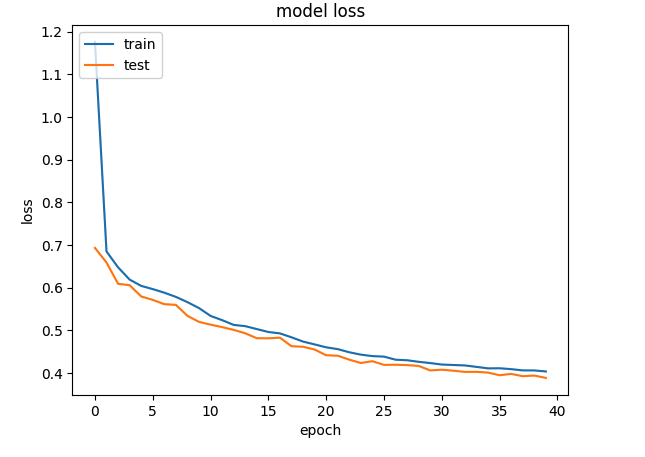
A Deep Learning network performs gradient descent based using Adam optimisation to arrive at an accuracy of 0.8047. The weights of the learnt Deep Learning network in ‘layer 0’ is used for displaying the batsman and bowler similarities.

Similarity measures – Cosine similarity

A cosine similarity is a value that is bound by a constrained range of 0 and 1. The closer the value is to 0 means that the two vectors are orthogonal or perpendicular to each other. When the value is closer to one, it means the angle is smaller and the batsman and bowler are similar.

a) Data set

For the data set only IPL T20 matches from Jan 2014 upto the present (May 2023) was taken. A Deep Learning model using Logistic Regression with batsman and bowler embedding is used to minimise the error. An accuracy of 0.8047 is obtained. In my earlier post ‘GooglyPlusPlus: Win Probability using Deep Learning and player embeddings‘ I had used data from all T20 leagues (~1.2 million rows) and got an accuracy of 0.8647

b) Import the data

import pandas as pd
import numpy as np
from zipfile import ZipFile
import tensorflow as tf
from tensorflow import keras
from tensorflow.keras import layers
from tensorflow.keras import regularizers
from pathlib import Path
import matplotlib.pyplot as plt

import pandas as pd
import numpy as np
from zipfile import ZipFile
import tensorflow as tf
from tensorflow import keras
from tensorflow.keras import layers
from tensorflow.keras import regularizers

df1=pd.read_csv('ipl2014_23.csv')
print("Shape of dataframe=",df1.shape)

train_dataset = df1.sample(frac=0.8,random_state=0)
test_dataset = df1.drop(train_dataset.index)
train_dataset1 = train_dataset[['batsmanIdx','bowlerIdx','ballNum','ballsRemaining','runs','runRate','numWickets','runsMomentum','perfIndex']]
test_dataset1 = test_dataset[['batsmanIdx','bowlerIdx','ballNum','ballsRemaining','runs','runRate','numWickets','runsMomentum','perfIndex']]
train_dataset1
train_labels = train_dataset.pop('isWinner')
test_labels = test_dataset.pop('isWinner')
train_dataset1

a=train_dataset1.describe()
stats=a.transpose

Shape of dataframe= (138896, 10)
batsmanIdx	bowlerIdx	ballNum	ballsRemaining	runs	runRate	numWickets	runsMomentum	perfIndex
count	111117.000000	111117.000000	111117.000000	111117.000000	111117.000000	111117.000000	111117.000000	111117.000000	111117.000000
mean	218.672939	169.204145	120.372067	60.749822	86.881701	1.636353	2.423167	0.296061	10.578927
std	118.405729	96.934754	69.991408	35.298794	51.643164	2.672564	2.085956	0.620872	4.436981
min	1.000000	1.000000	1.000000	1.000000	-5.000000	-5.000000	0.000000	0.057143	0.000000
25%	111.000000	89.000000	60.000000	30.000000	45.000000	1.160000	1.000000	0.106383	7.733333
50%	220.000000	170.000000	119.000000	60.000000	85.000000	1.375000	2.000000	0.142857	10.329545
75%	325.000000	249.000000	180.000000	91.000000	126.000000	1.640000	4.000000	0.240000	13.108696
max	411.000000	332.000000	262.000000	135.000000	258.000000	251.000000	10.000000	11.000000	66.000000

c) Create a Deep Learning ML model using batsman & bowler embeddings

import pandas as pd
import numpy as np
from keras.layers import Input, Embedding, Flatten, Dense
from keras.models import Model
from keras.layers import Input, Embedding, Flatten, Dense, Reshape, Concatenate, Dropout
from keras.models import Model

tf.random.set_seed(432)
# create input layers for each of the predictors
batsmanIdx_input = Input(shape=(1,), name='batsmanIdx')
bowlerIdx_input = Input(shape=(1,), name='bowlerIdx')
ballNum_input = Input(shape=(1,), name='ballNum')
ballsRemaining_input = Input(shape=(1,), name='ballsRemaining')
runs_input = Input(shape=(1,), name='runs')
runRate_input = Input(shape=(1,), name='runRate')
numWickets_input = Input(shape=(1,), name='numWickets')
runsMomentum_input = Input(shape=(1,), name='runsMomentum')
perfIndex_input = Input(shape=(1,), name='perfIndex')

# Set the embedding size
no_of_unique_batman=len(df1["batsmanIdx"].unique())
print(no_of_unique_batman)
no_of_unique_bowler=len(df1["bowlerIdx"].unique())
print(no_of_unique_bowler)
embedding_size_bat = no_of_unique_batman ** (1/4)
embedding_size_bwl = no_of_unique_bowler ** (1/4)


# create embedding layer for the categorical predictor
batsmanIdx_embedding = Embedding(input_dim=no_of_unique_batman+1, output_dim=16,input_length=1)(batsmanIdx_input)
batsmanIdx_flatten = Flatten()(batsmanIdx_embedding)
bowlerIdx_embedding = Embedding(input_dim=no_of_unique_bowler+1, output_dim=16,input_length=1)(bowlerIdx_input)
bowlerIdx_flatten = Flatten()(bowlerIdx_embedding)

# concatenate all the predictors
x = keras.layers.concatenate([batsmanIdx_flatten,bowlerIdx_flatten, ballNum_input, ballsRemaining_input, runs_input, runRate_input, numWickets_input, runsMomentum_input, perfIndex_input])

# add hidden layers
#x = Dense(64, activation='relu')(x)
#x = Dropout(0.1)(x)
x = Dense(32, activation='relu')(x)
x = Dropout(0.1)(x)
x = Dense(16, activation='relu')(x)
x = Dropout(0.1)(x)
x = Dense(8, activation='relu')(x)
x = Dropout(0.1)(x)
# add output layer
output = Dense(1, activation='sigmoid', name='output')(x)
print(output.shape)
# create model
model = Model(inputs=[batsmanIdx_input,bowlerIdx_input, ballNum_input, ballsRemaining_input, runs_input, runRate_input, numWickets_input, runsMomentum_input, perfIndex_input], outputs=output)
model.summary()

# compile model
optimizer=keras.optimizers.Adam(learning_rate=.01, beta_1=0.9, beta_2=0.999, epsilon=1e-07, amsgrad=True)

model.compile(optimizer=optimizer, loss='binary_crossentropy', metrics=['accuracy'])

# train the model
history=model.fit([train_dataset1['batsmanIdx'],train_dataset1['bowlerIdx'],train_dataset1['ballNum'],train_dataset1['ballsRemaining'],train_dataset1['runs'],
           train_dataset1['runRate'],train_dataset1['numWickets'],train_dataset1['runsMomentum'],train_dataset1['perfIndex']], train_labels, epochs=40, batch_size=1024,
          validation_data = ([test_dataset1['batsmanIdx'],test_dataset1['bowlerIdx'],test_dataset1['ballNum'],test_dataset1['ballsRemaining'],test_dataset1['runs'],
           test_dataset1['runRate'],test_dataset1['numWickets'],test_dataset1['runsMomentum'],test_dataset1['perfIndex']],test_labels), verbose=1)

plt.plot(history.history["loss"])
plt.plot(history.history["val_loss"])
plt.title("model loss")
plt.ylabel("loss")
plt.xlabel("epoch")
plt.legend(["train", "test"], loc="upper left")
plt.show()
d) Project embeddings with Google’s Embedding projector

try:
  # %tensorflow_version only exists in Colab.
  %tensorflow_version 2.x
except Exception:
  pass

%load_ext tensorboard
import os
import tensorflow as tf
import tensorflow_datasets as tfds
from tensorboard.plugins import projector

%pwd
# Set up a logs directory, so Tensorboard knows where to look for files.
log_dir='/logs/batsmen/'
if not os.path.exists(log_dir):
    os.makedirs(log_dir)

df3=pd.read_csv('batsmen.csv')
batsmen = df3["batsman"].unique().tolist()
batsmen
# Create dictionary of batsman to index
batsmen2index = {x: i for i, x in enumerate(batsmen)}
batsmen2index
# Create dictionary of index to batsman
index2batsmen = {i: x for i, x in enumerate(batsmen)}
index2batsmen


# Save Labels separately on a line-by-line manner.
with open(os.path.join(log_dir, 'metadata.tsv'), "w") as f:
  for batsmanIdx in range(1, 411):
       # Get the name of batsman associated at the current index
        batsman = index2batsmen.get([batsmanIdx][0])

        f.write("{}\n".format(batsman))

# Save the weights we want to analyze as a variable. Note that the first
# value represents any unknown word, which is not in the metadata, here
# we will remove this value.
weights = tf.Variable(model.get_weights()[0][1:])
print(weights)
print(type(weights))
print(len(model.get_weights()[0]))
# Create a checkpoint from embedding, the filename and key are the
# name of the tensor.
checkpoint = tf.train.Checkpoint(embedding=weights)
checkpoint.save(os.path.join(log_dir, "embedding.ckpt"))

# Set up config.
config = projector.ProjectorConfig()
embedding = config.embeddings.add()
# The name of the tensor will be suffixed by `/.ATTRIBUTES/VARIABLE_VALUE`.
embedding.tensor_name = "embedding/.ATTRIBUTES/VARIABLE_VALUE"
embedding.metadata_path = 'metadata.tsv'
projector.visualize_embeddings(log_dir, config)
# Now run tensorboard against on log data we just saved.

%reload_ext tensorboard
%tensorboard --logdir /logs/batsmen/

e) Here are similarity measures for some batsmen

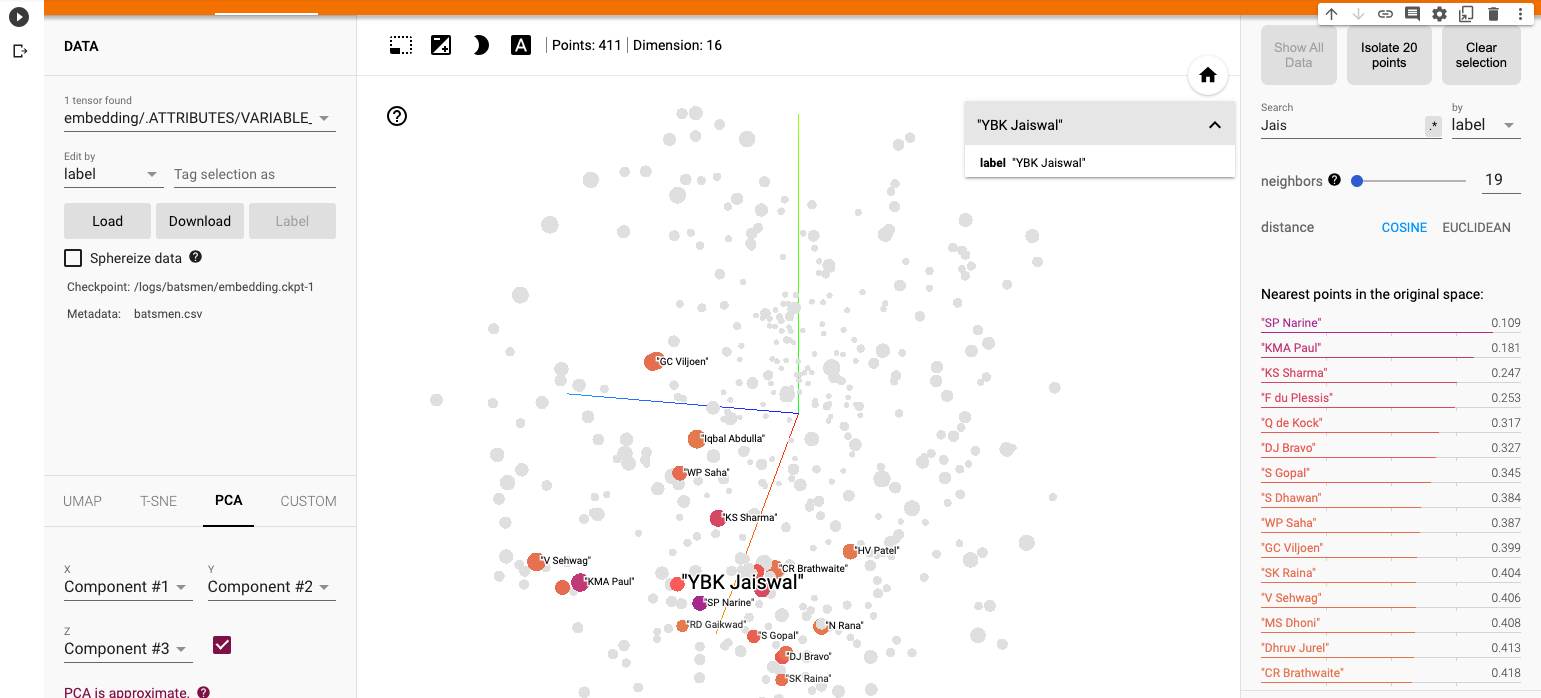
I) Principal Component Analysis (PCA) : In the charts and video animation below, the 16-dimensional embedding vector of batsmen and bowler is reduced to 3 principal components in a lower dimension for visualisation and analysis as shown below

a) Yashasvi Jaiswal (similar players

i) PCA – Chart

Yashasvi Jaiswal style of attack is similar to Faf Du Plessis, Quentim De Kock, Bravo etc. In the below chart the ange between Jaiswal and SP Narine is 0.109, and Faf du Plessis is 0.253. These represent the angle in radians. The smaller the angle the more similar the performance style of the players and cos 0=1 or the players are similar.
ii) PCA animation video for Yashasvi Jaiswal

b) Suryakumar Yadav (SKY)

i) PCA -Chart

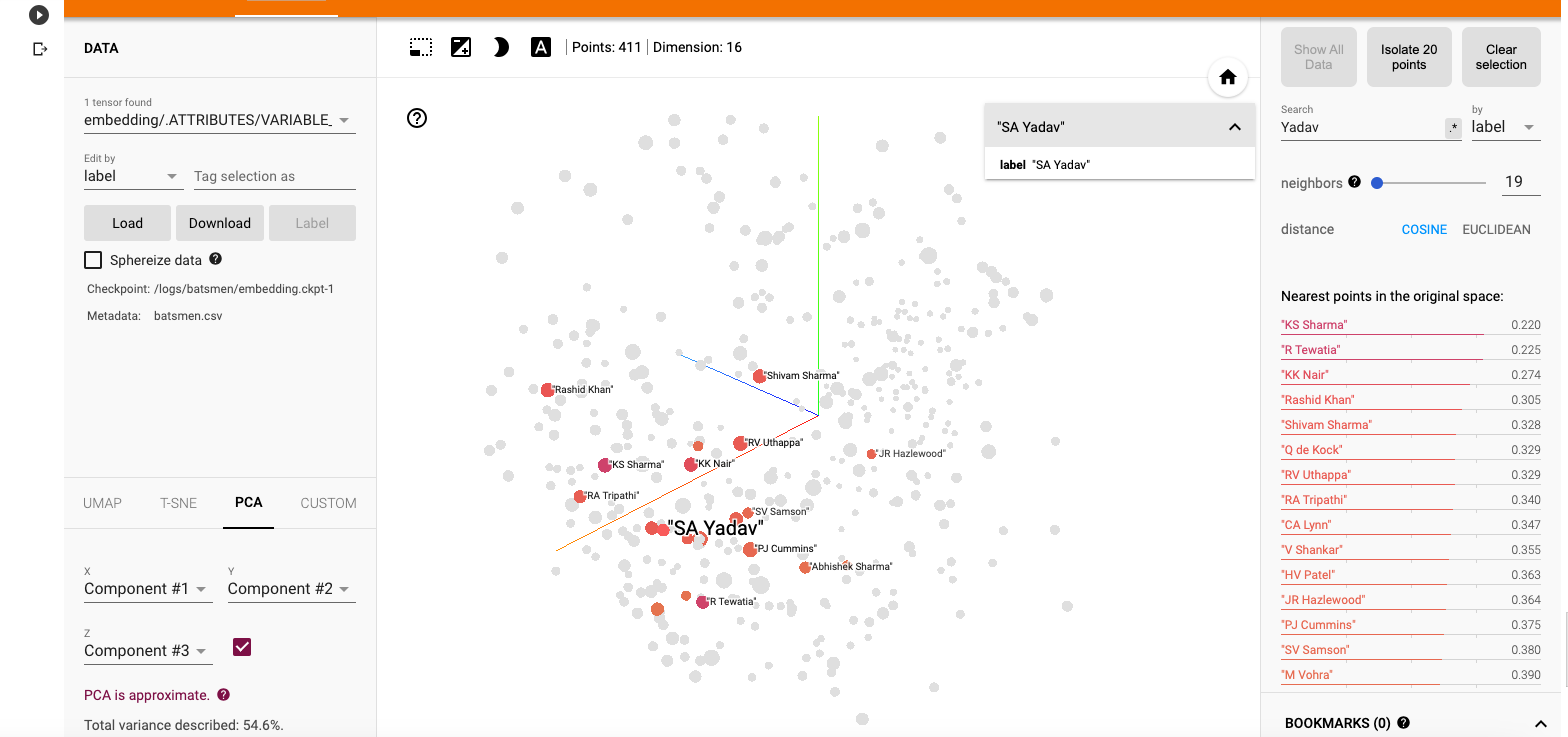
The closest neighbours for SKY is RV Uthappa, Rahul Tripathi, Q de Kock, Samson, Rashid Khan
ii) PCA – Animation video for Suryakumar Yadav

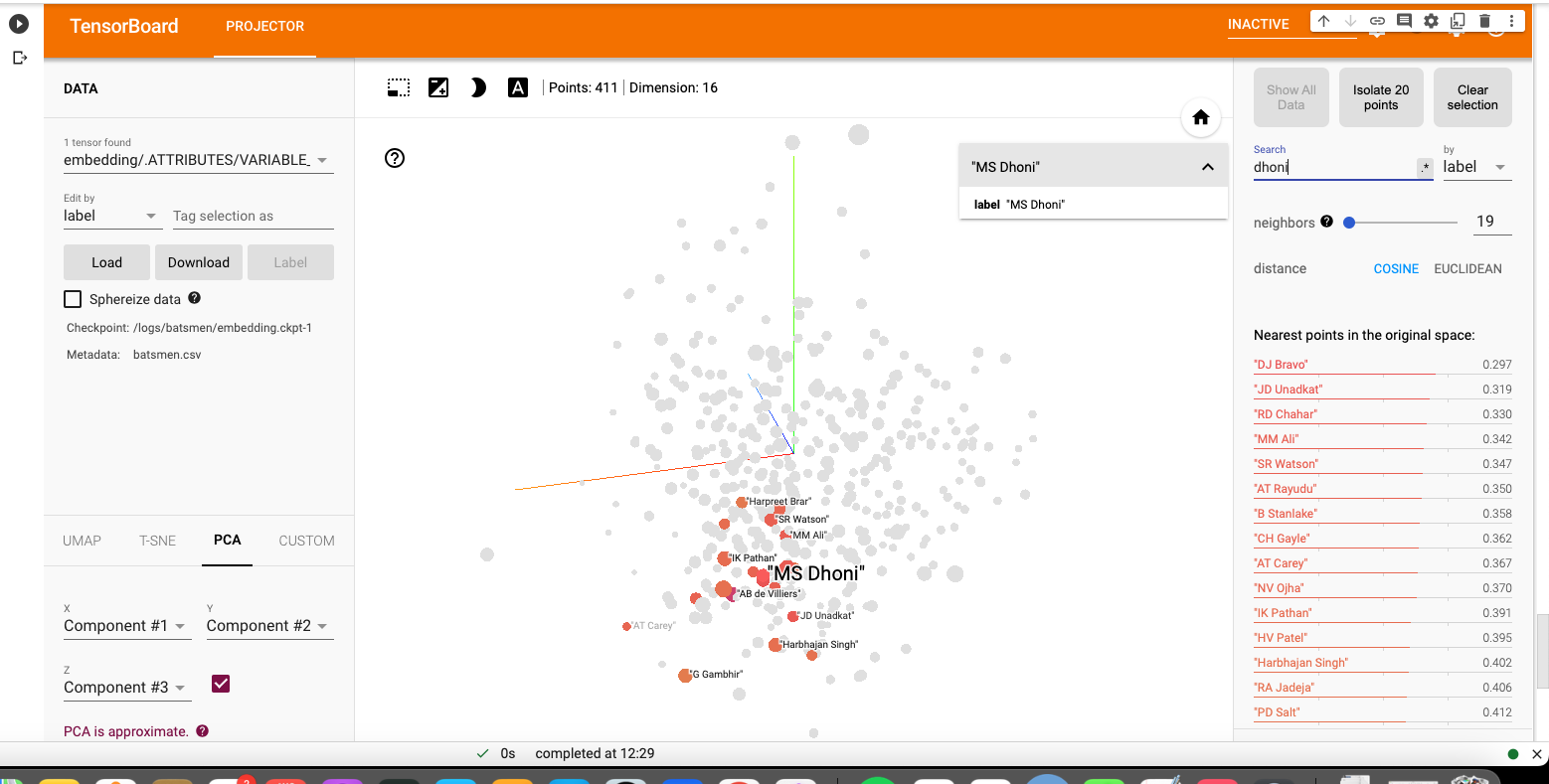
c) M S Dhoni

i) PCA – Chart

Dhoni rubs shoulders with Bravo, AB De Villiers, Shane Watson, Chris Gayle, Rayadu, Gautam Gambhir
ii) PCA – Animation video for M S Dhoni

f) PCA Analysis for bowlers

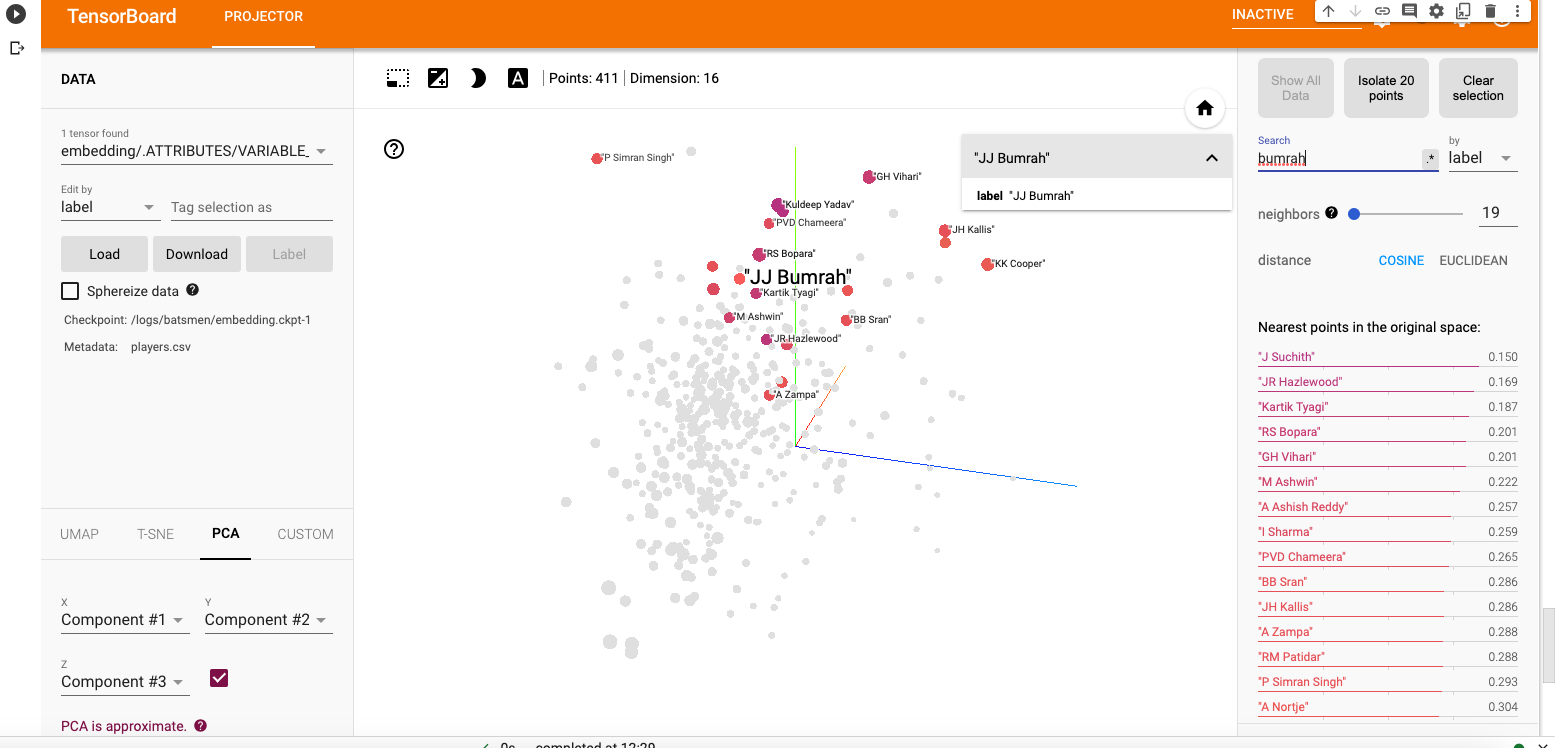
a) Jasprit Bumrah

i) PCA – Chart

Bumrah bowling performance is similar to Josh Hazzlewood, Chameera, Kuldeep Yadav, Nortje, Adam Zampa etc.
ii) PCA Animation video for Jasprit Bumrah

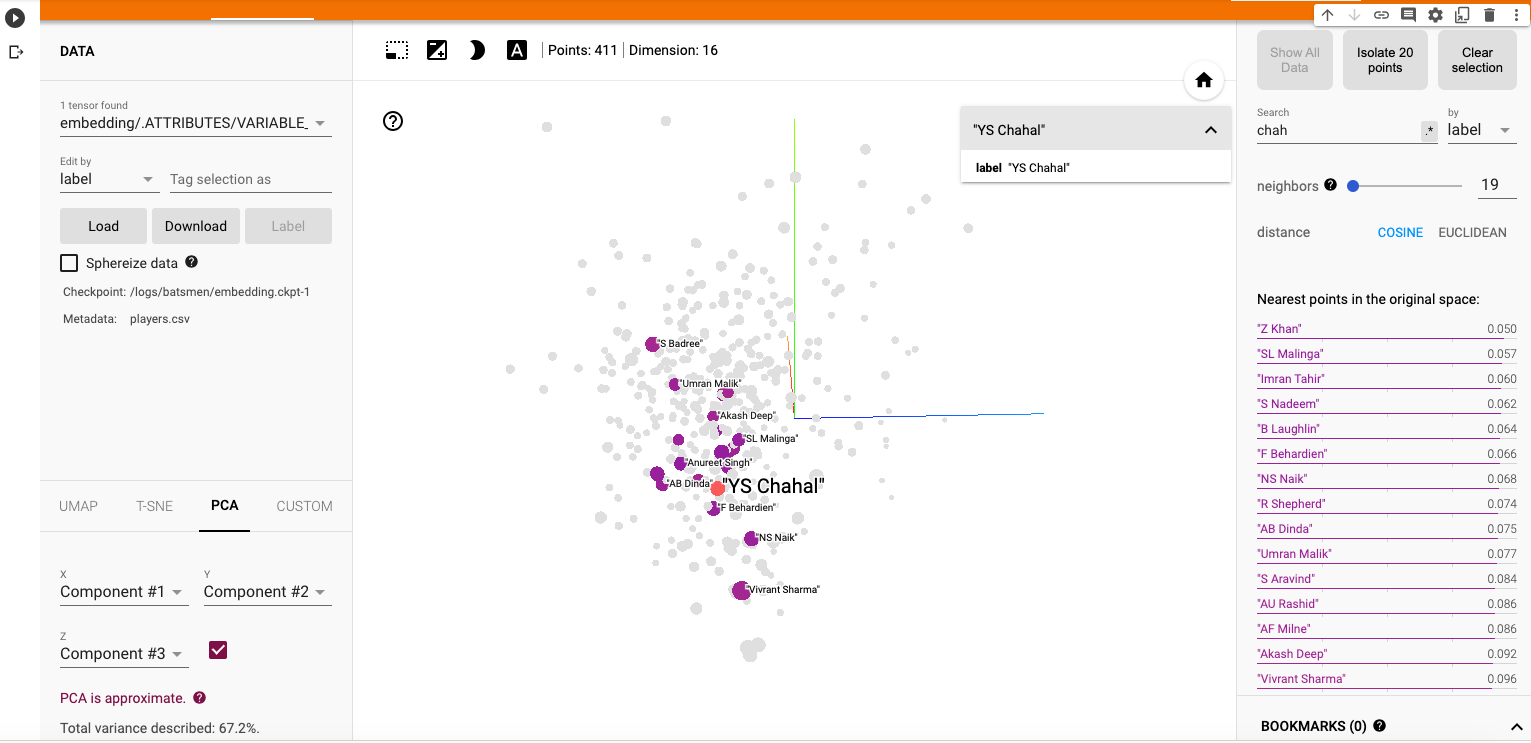
b) Yuzhvendra Chahal

i) PCA – Chart

Chahal’s performance has a strong similarity to Malinga, Zaheer Khan, Imran Tahir, R Sheperd, Adil Rashid
ii) PCA Animation video for YS Chahal

f) Other similarity measures ( t-SNE & UMAP)

There are 2 other similarity visualisations in Google’s Embedding Projector namely

i) t-SNE (t-distributed Stochastic Neighbor Embedding) – t-SNE tries to find a faithful representation of the data distribution in higher dimensional space to a lower dimensional space. t-SNE differs from PCA by preserving only or local similarities whereas PCA is maintains preserving large pairwise distances.

a) t-SNE Animation video

ii) UMAP – Uniform Manifold Approximation and Projection

UMAP learns the manifold structure of the high dimensional data and finds a low dimensional embedding that preserves the essential topological structure of that manifold.

ii) UMAP – Animation video

The Embedding projector thus helps in identifying players based on how they perform against bowlers, and probably picks up a lot of features like strike rate and performance in different stages of the game.

Hope you enjoyed the post!

Also see

  1. Exploring Quantum Gate operations with QCSimulator
  2. De-blurring revisited with Wiener filter using OpenCV
  3. Using Reinforcement Learning to solve Gridworld
  4. Deep Learning from first principles in Python, R and Octave – Part 4
  5. Big Data 6: The T20 Dance of Apache NiFi and yorkpy
  6. Latency, throughput implications for the Cloud
  7. Programming languages in layman’s language
  8. Practical Machine Learning with R and Python – Part 6
  9. Using Linear Programming (LP) for optimizing bowling change or batting lineup in T20 cricket
  10. A closer look at “Robot Horse on a Trot” in Android

To see all posts click Index of posts

IPL 2023:GooglyPlusPlus now with by AI/ML models, near real-time analytics!

It is carnival time again as IPL 2023 is underway!! The new GooglyPlusPlus now includes AI/ML models for computing ball-by-ball Win Probability of matches and each individual player’s Win Probability Contribution (WPC). GooglyPlusPlus uses 2 ML models

  • Deep Learning (Tensorflow) – accuracy : 0.8584
  • Logistic Regression (glmnet-tidymodels) : 0.728

Besides, as before, GooglyPlusPlus will also include the usual near real-time analytics with the Shiny app being automatically updated with the previous day’s match data.

Note: The Win Probability Computation can also be done on a live feed of streaming data. Since, I don’t have access to live feeds, the app will show how Win Probability changed during the course of completed matches. For more details on Win Probability and Win Probability Contribution see my posts

GooglyPlusPlus has been also updated with all the latest T20 league’s match data. It includes data from BBL 2022, NTB 2022, CPL 2022, PSL 2023, ICC T20 2022 and now IPL 2023.

GooglyPlusPlus has the following functionality

  • Batsman tab: For detailed analysis of batsmen
  • Bowler tab: For detailed analysis of bowlers
  • Match tab: Analysis of individual matches, plot of Runs vs SR, Wickets vs ER in power play, middle and death overs, Win Probability Analysis of teams and Win Probability Contribution of players
  • Head-to-head tab: Detailed analysis of team-vs-team batting/bowling scorecard, batting, bowling performances, performances in power play, middle and death overs
  • Team performance tab: Analysis of team-vs-all other teams with batting /bowling scorecard, batting, bowling performances, performances in power play, middle and death overs
  • Optimisation tab: Allows one to pit batsmen vs bowlers and vice-versa. This tab also uses integer programming to optimise batting and bowling lineup
  • Batting analysis tab: Ranks batsmen using Runs or SR. Also plots performances of batsmen in power play, middle and death overs and plots them in a 4×4 grid
  • Bowling analysis tab: Ranks bowlers based on Wickets or ER. Also plots performances of bowlers in power play, middle and death overs and plots them in a 4×4 grid

Also note all these tabs and features are available for all T20 formats namely IPL, Intl. T20 (men, women), BBL, NTB, PSL, CPL, SSM.

Important note: It is possible, that at times, the Win Probability (Deep Learning) for some recent IPL matches will give an error. This is because I need to rebuild the models on a daily basis as the matches use player embeddings and there are new players. While I will definitely rebuild the models on weekends and whenever I find time, you may have to bear with this error occasionally.

Note: All charts are interactive, which means that you can hover, zoom-in, zoom-out, pan etc on the charts

The latest avatar of GooglyPlusPlus2023 is based on my R package yorkr with data from Cricsheet.

Check out the latest version of GooglyPlusPlus

Follow me on twitter for daily highlights @tvganesh_85

GooglyPlusPlus can analyse players, matches, teams, rank, compute win probability and much more.

Included below are some random analyses of IPL 2023 matches so far

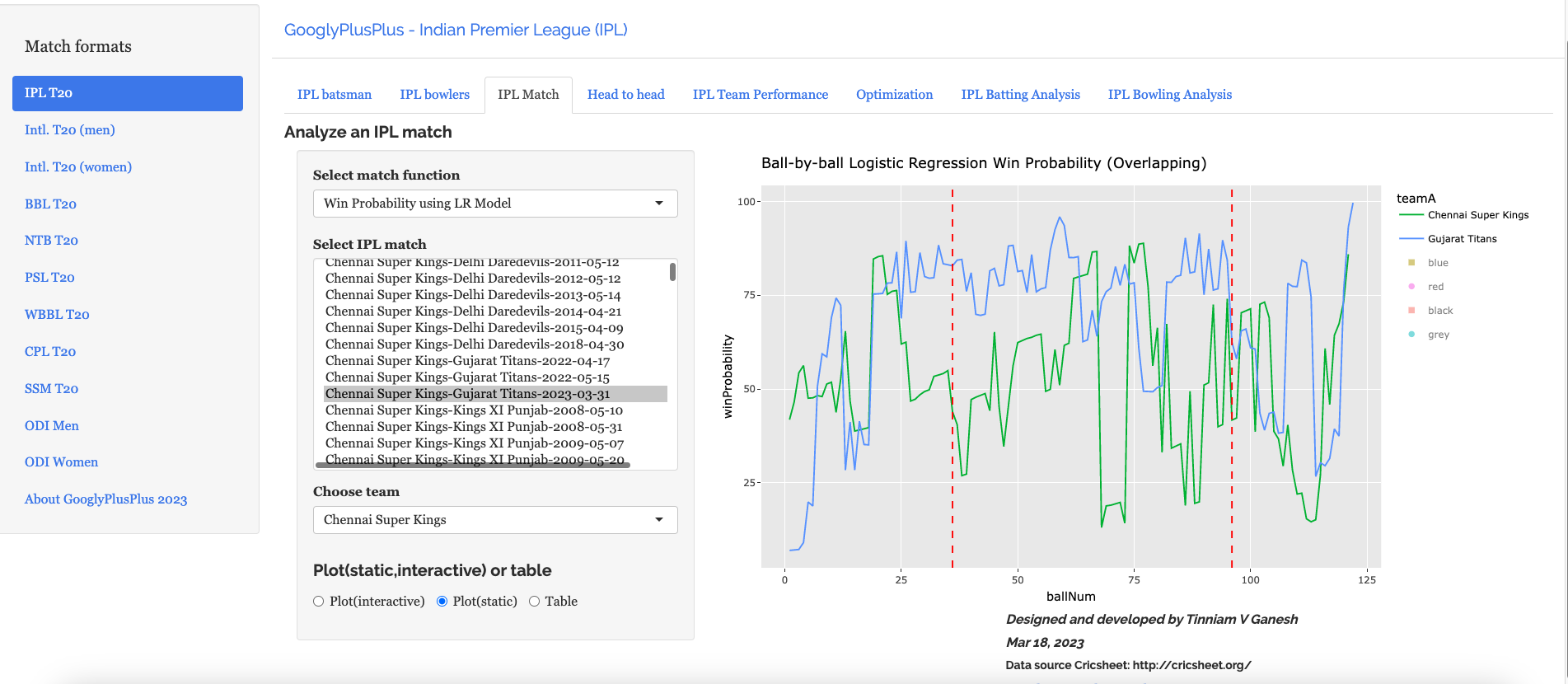
A) Chennai Super Kings vs Gujarat Titans – 31 Mar 2023

GT won by 5 wickets ( 4 balls remaining)

a) Worm Wicket Chart

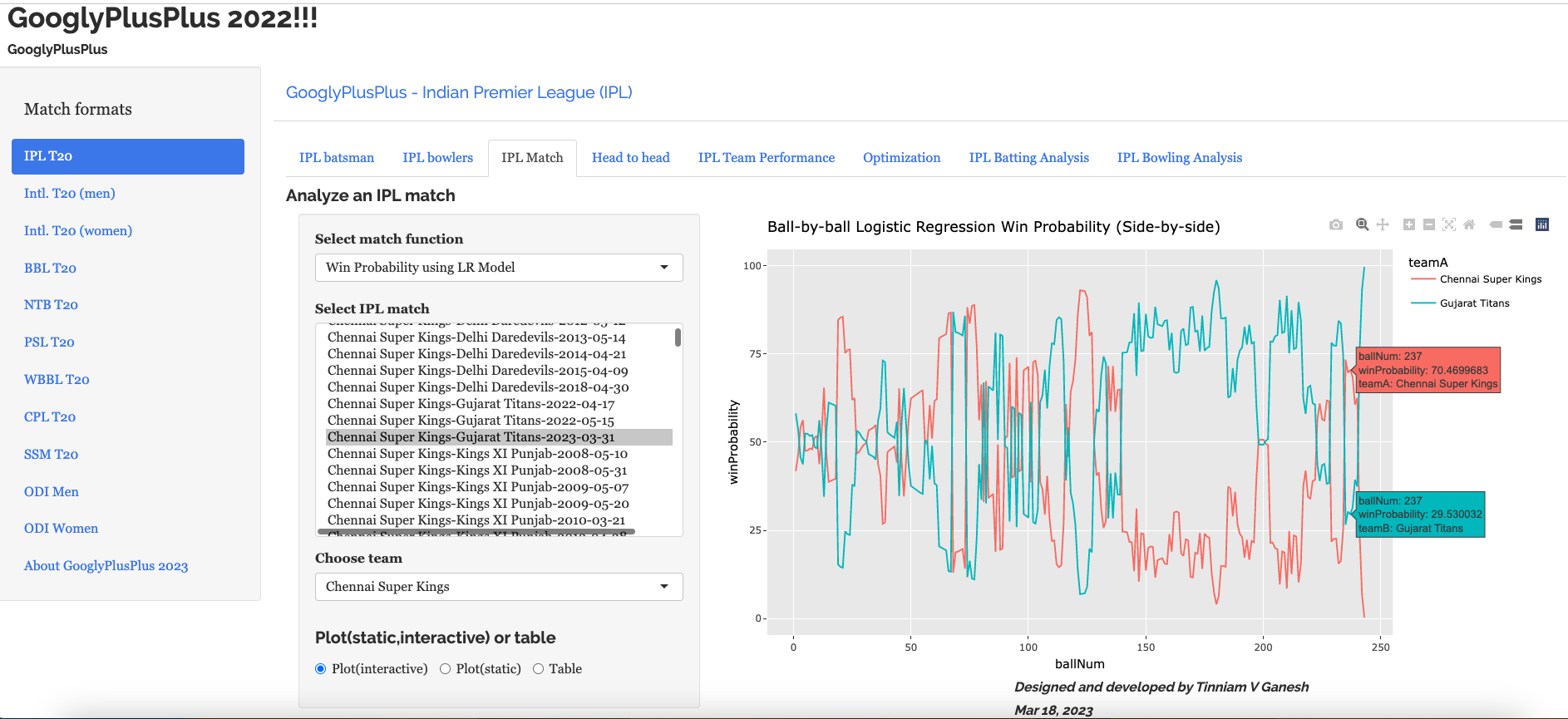
b) Ball-by-ball Win Probability (Logistic Regression) (side-by-side)

This model shows that CSK had the upper hand in the 2nd last over, before it changed to GT. More details on Win Probability and Win Probability Contribution in the posts given by the links above.

c) b) Ball-by-ball Win Probability (Logistic Regression) (overlapping)

Here the ball-by-ball win probability is overlapped. CSK and GT both had nearly the same probability of winning in the 2nd last over before GT edges CSK out

B) Punjab Kings vs Rajasthan Royals – 05 Apr 2023

This was a another closely fought match. PBKS won by 5 runs

a) Worm wicket chart

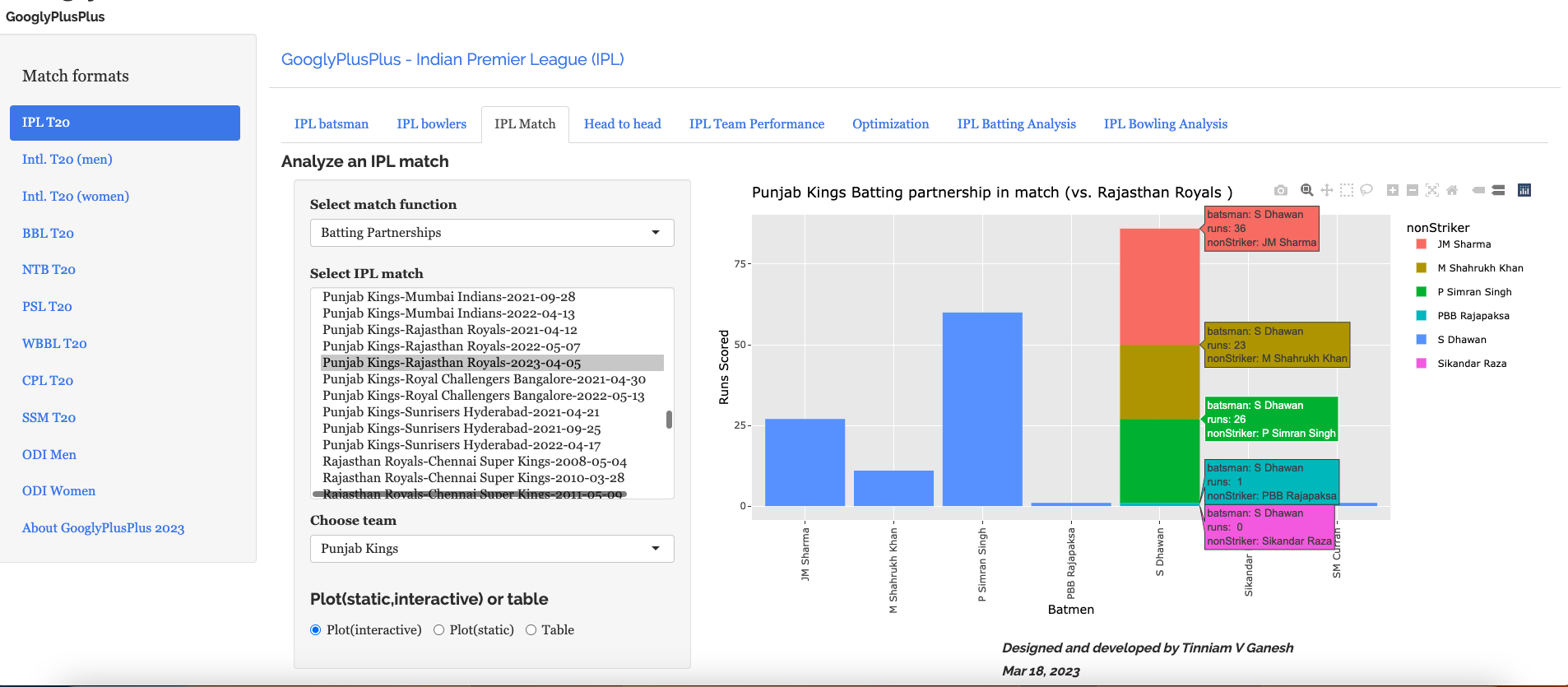
b) Batting partnerships

Shikhar Dhawan scored 86 runs

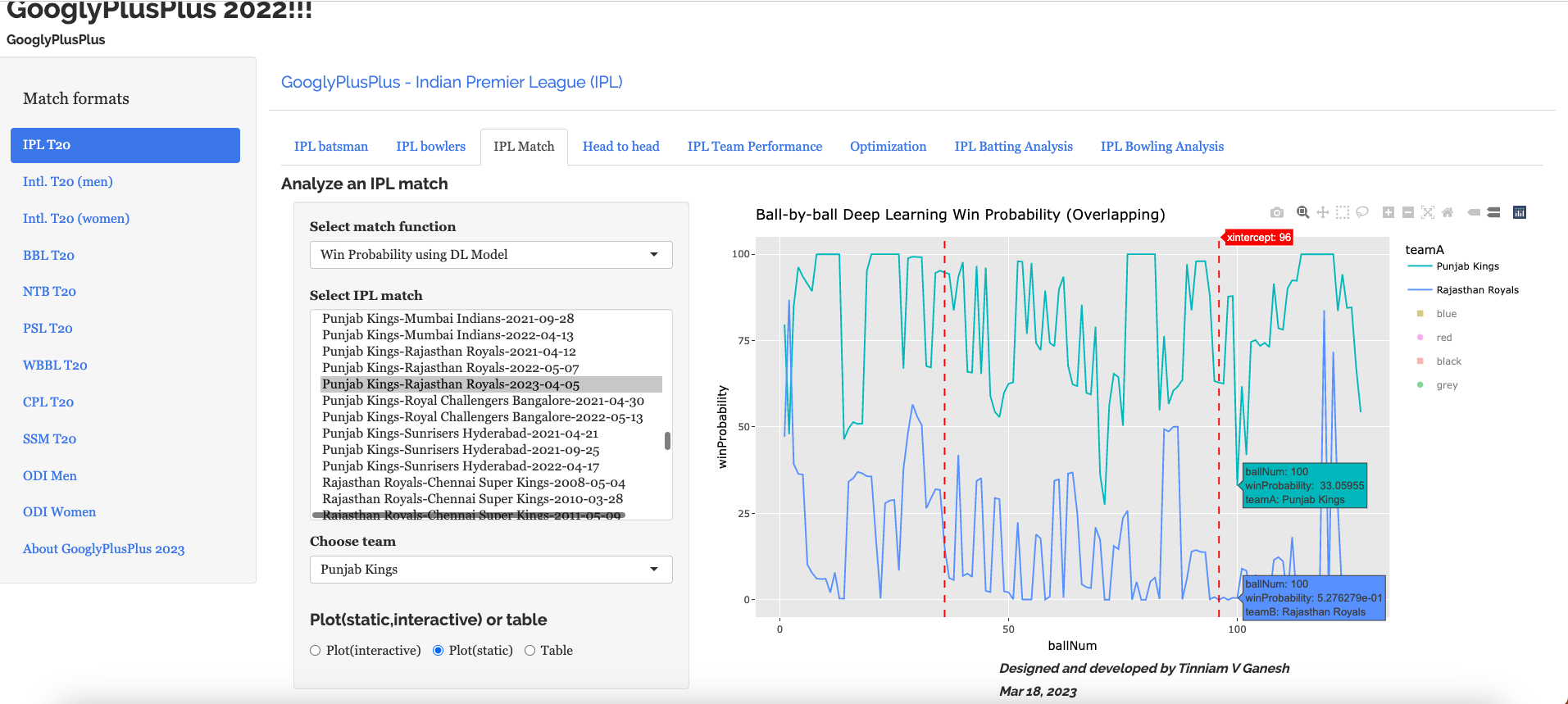
c) Ball-by-ball Win Probability using Deep Learning (overlapping)

PBKS was generally ahead in the win probability race

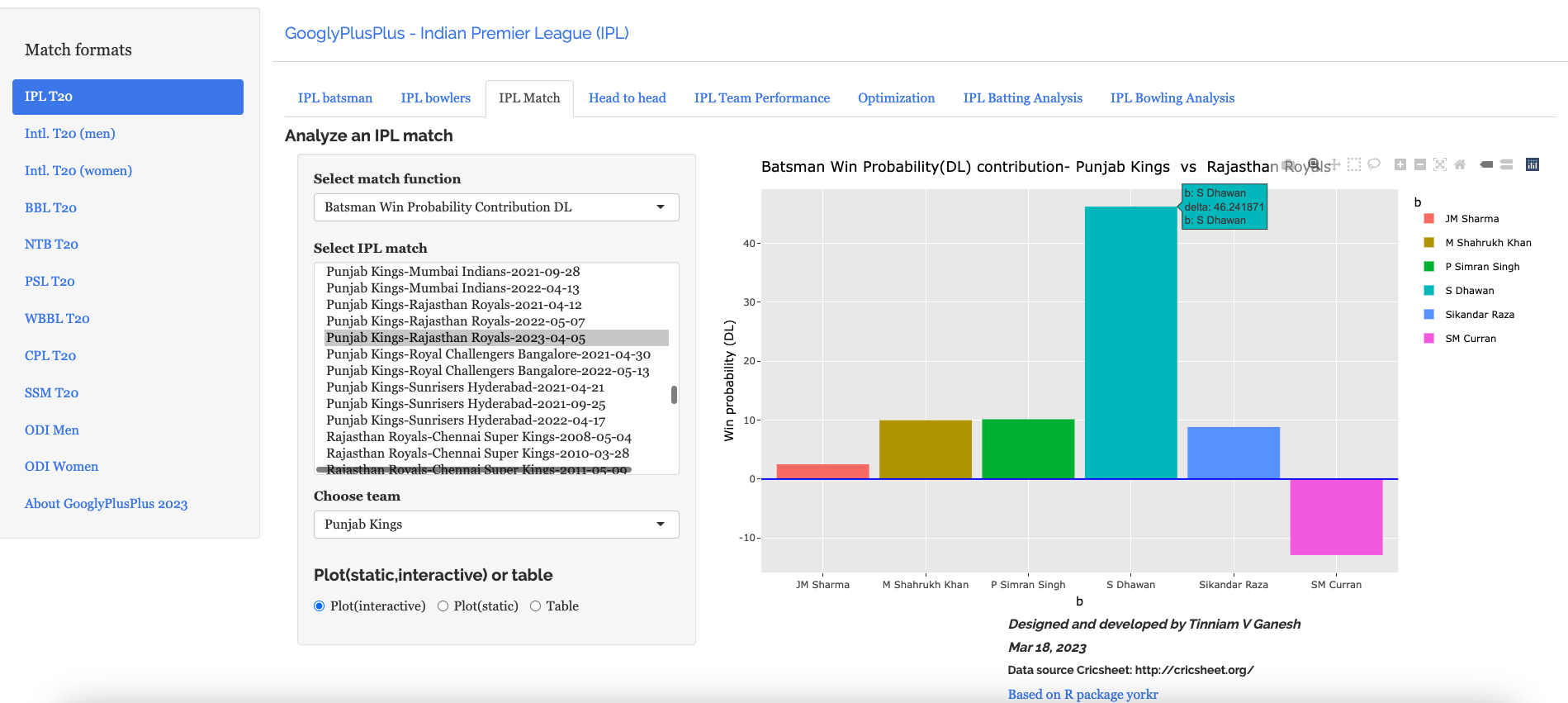
d) Batsman Win Probability Contribution

This plot shows how the different batsmen contributed to the Win Probability. We can see that Shikhar Dhawan has a highest win probability. He played a very sensible innings. Also it appears that there is no difference between Prabhsimran Singh and others, though he score 60 runs. This computation is based on when they come to bat and how the win probability changes when they get dismissed, as seen in the 2nd chart

C) Delhi Capitals vs Gujarat Titans – 4 Apr 2023

GT won by 6 wickets (11 balls remaining)

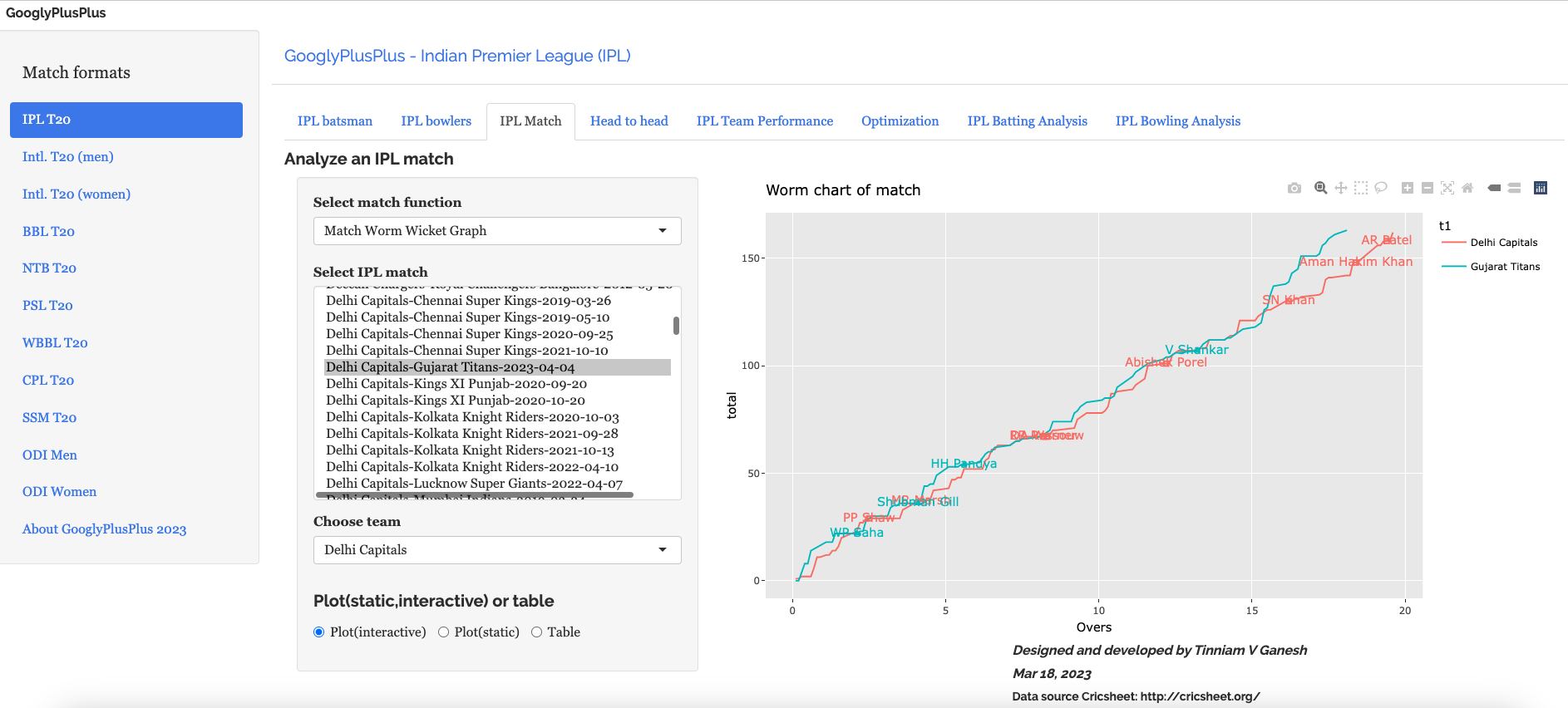
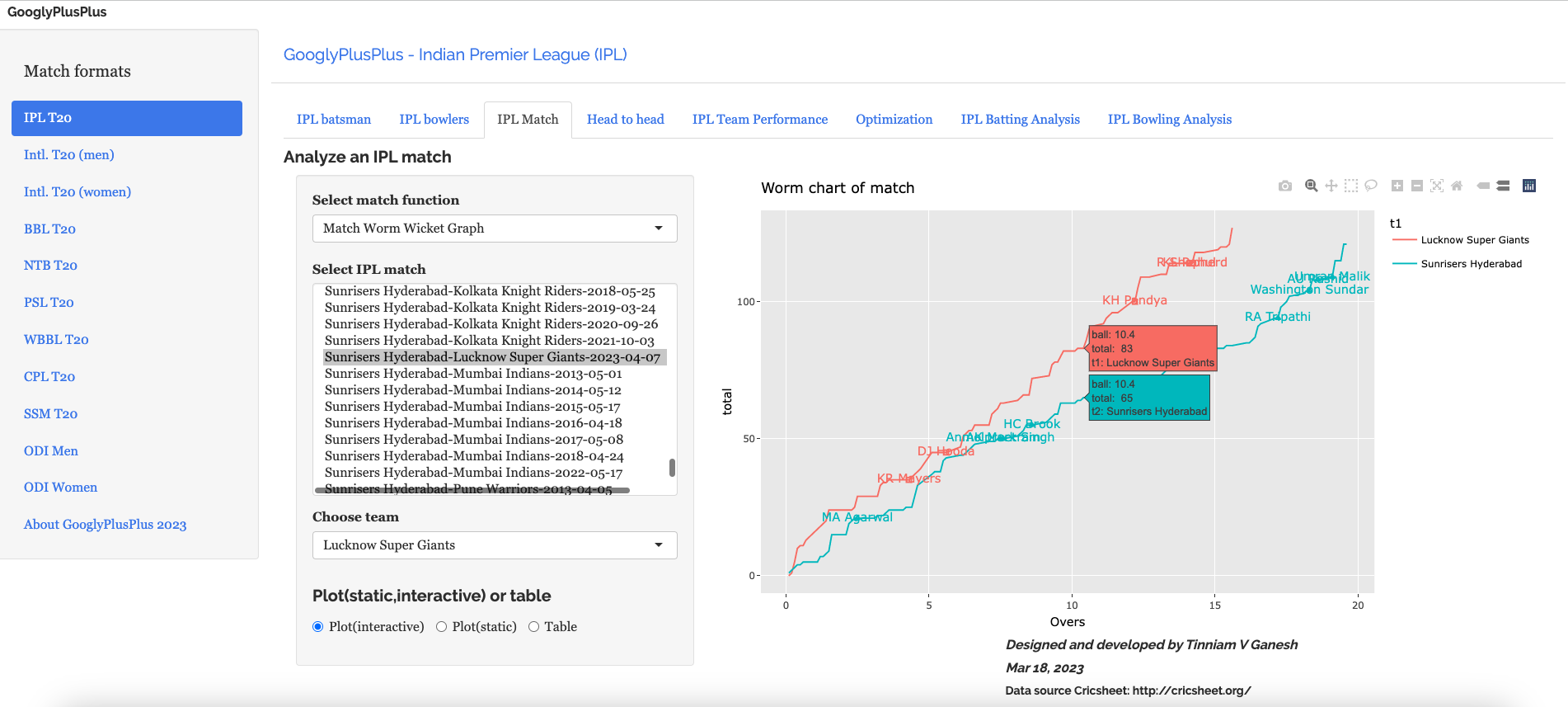
a) Worm wicket chart

b) Runs scored across 20 overs

c) Runs vs SR plot

d) Batting scorecard (Gujarat Titans)

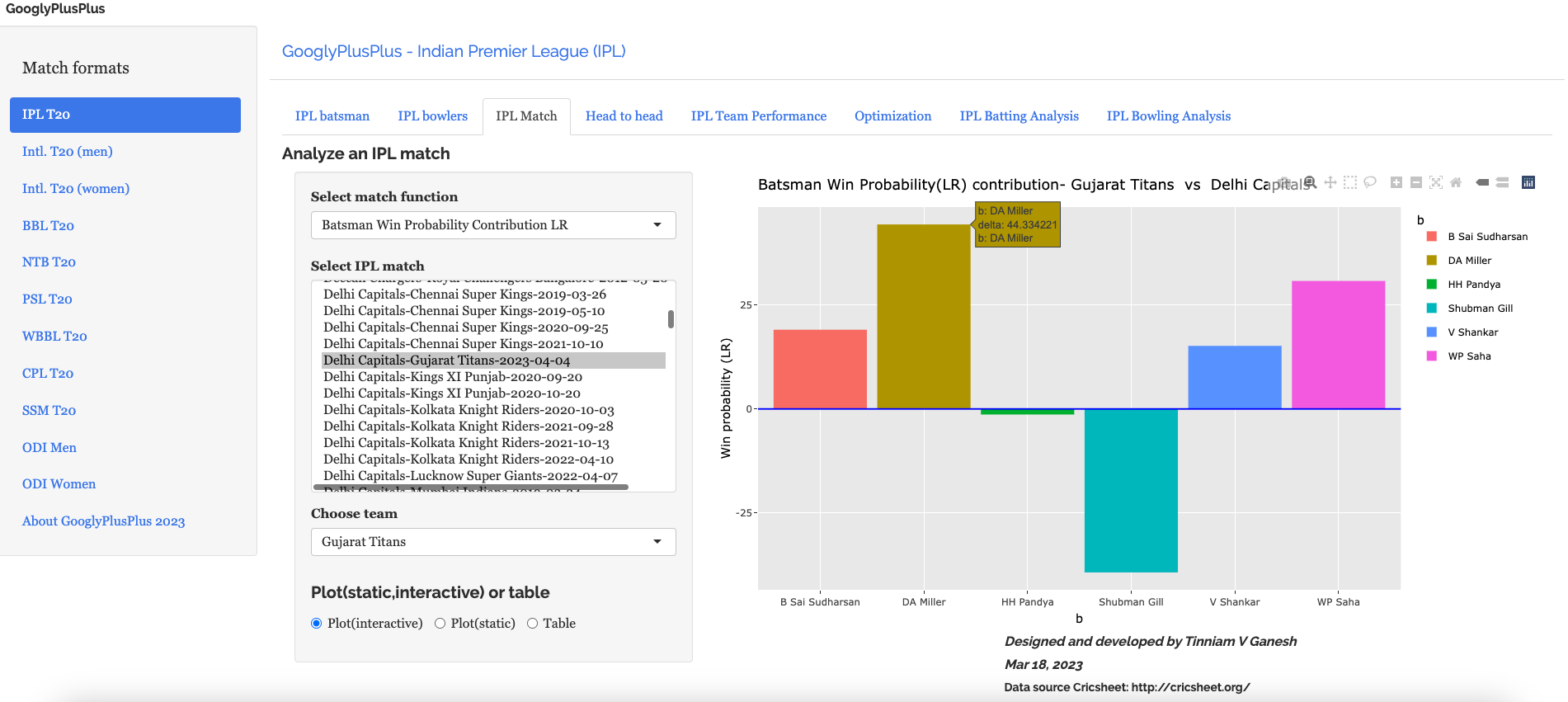
e) Batsman Win Probability Contribution (Gujarat Titans)

Miller has a higher percentage in the Win Contribution than Sai Sudershan who held the innings together.Strange are the ways of the ML models!!

D) Sunrisers Hyderabad vs Lucknow Supergiants ( 7 Apr 2023)

LSG won by 5 wickets (24 balls left). SRH were bamboozled by the pitch while LSG was able to cruise along

a) Worm wicket chart

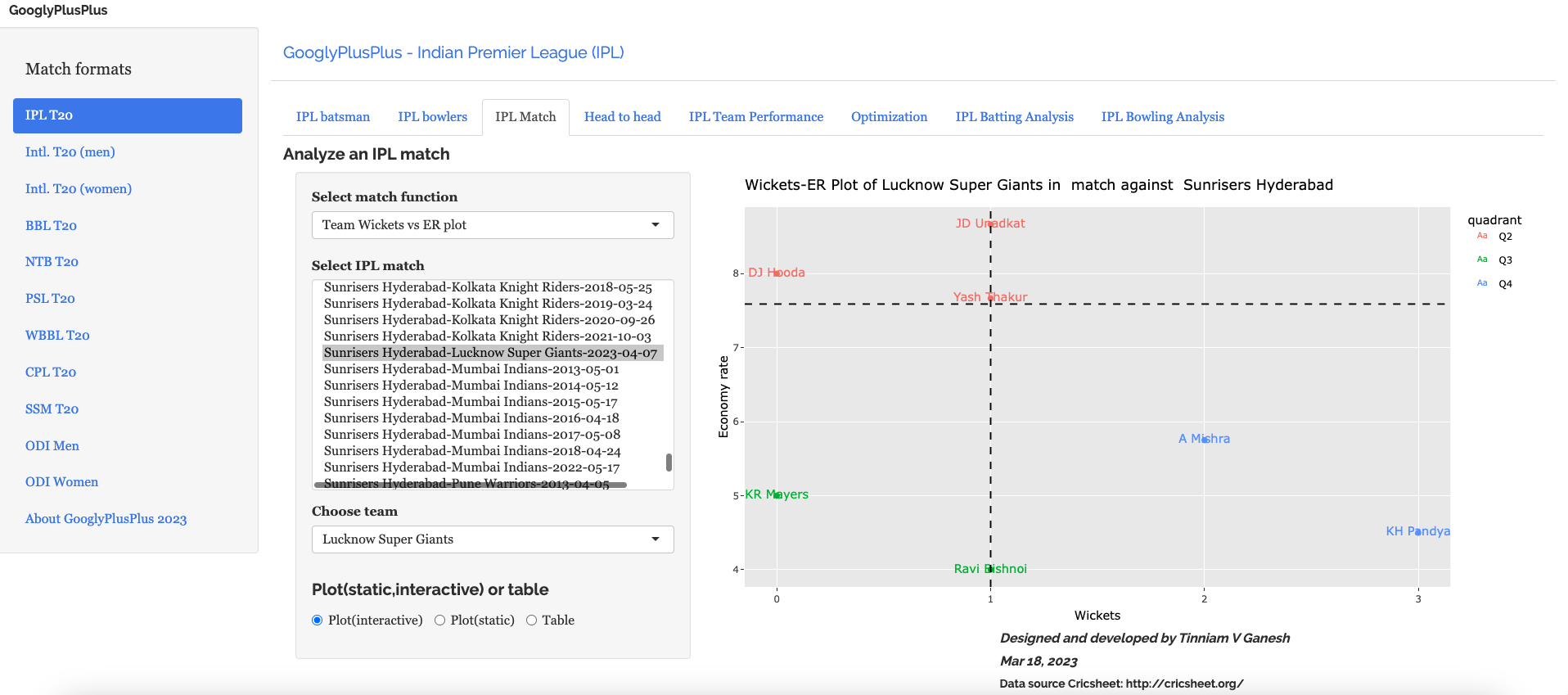
b) Wickets vs ER plot

c) Wickets across 20 overs

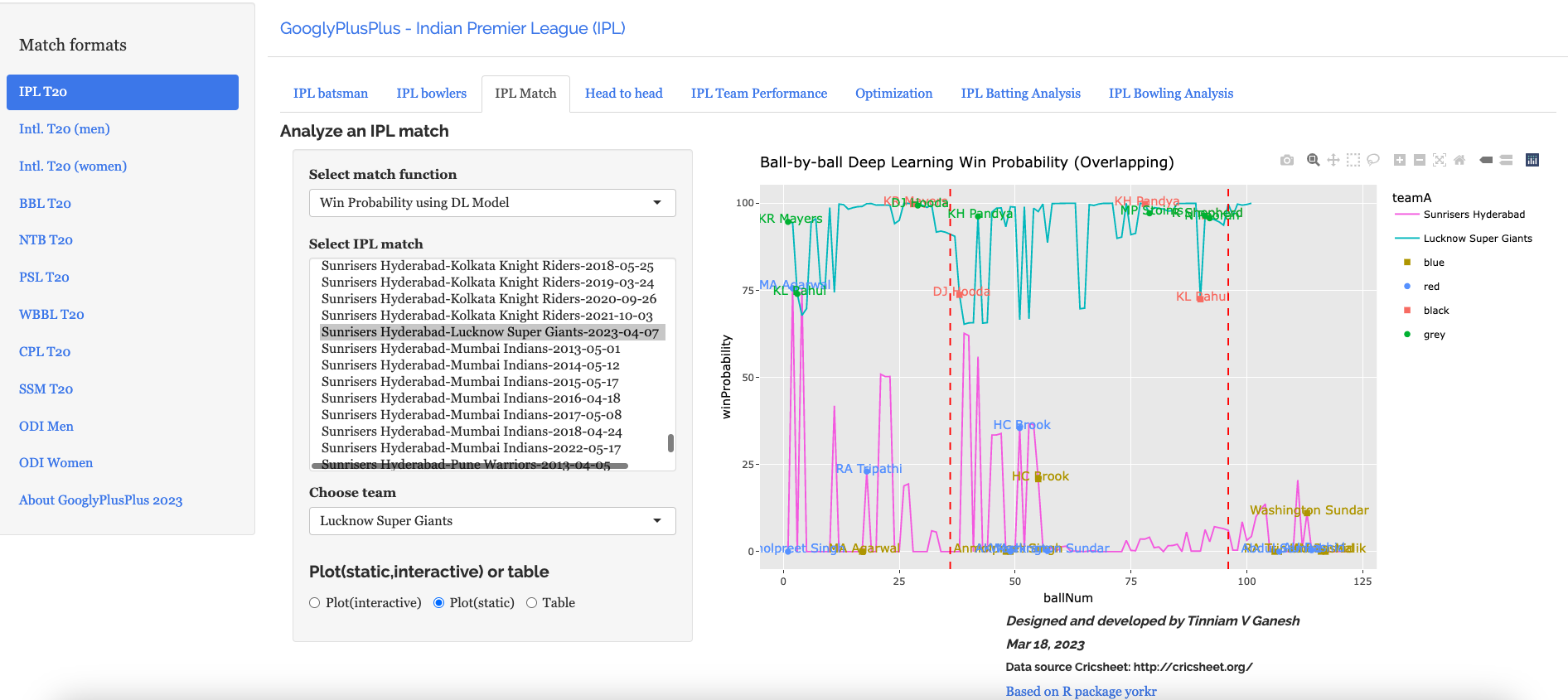
d) Ball-by-ball win probability using Deep Learning (overlapping)

e) Bowler Win Probability Contribution (LSG)

Bishnoi has a higher win probability contribution than Krunal, though he just took 1 wicket to Krunal’s 3 wickets. This is based on how the Win Probability changed at that point in the game.

The above set of plots are just a random sample.

Note: There are 8 tabs each for 9 T20 leagues (BBL, CPL, T20 (men), T20 (women), IPL, PSL, NTB, SSM, WBB). So there are a lot more detailed charts/analses.

Do take GooglyPlusPlus for a test drive!!!

Follow me on twitter @tvganesh_85 for daily highlights of previous day matches

Take a look at some of my other posts

  1. Using Reinforcement Learning to solve Gridworld
  2. Deep Learning from first principles in Python, R and Octave – Part 6
  3. Big Data-4: Webserver log analysis with RDDs, Pyspark, SparkR and SparklyR
  4. Experiments with deblurring using OpenCV
  5. Singularity
  6. Practical Machine Learning with R and Python – Part 6
  7. Pitching yorkpy … short of good length to IPL – Part 1
  8. Analyzing performances of cricketers using cricketr template
  9. Cricpy takes guard for the Twenty20s
  10. Simulating an Edge Shape in Android

To see all posts click Index of posts

GooglyPlusPlus: Computing T20 player’s Win Probability Contribution

In this post, I compute each batsman’s or bowler’s Win Probability Contribution (WPC) in a T20 match. This metric captures by how much the player (batsman or bowler) changed/impacted the Win Probability of the T20 match. For this computation I use my machine learning models, I had created earlier, which predicts the ball-by-ball win probability as the T20 match progresses through the 2 innings of the match.

In the picture snippet below, you can see how the win probability changes ball-by-ball for each batsman for a T20 match between CSK vs LSG- 31 Mar 2022

In my previous posts I had created several Machine Learning models. In order to compute the player’s Win Probability contribution in this post, I have used the following ML models

The batsman’s or bowler’s win probability contribution changes ball-by=ball. The player’s contribution is calculated as the difference in win probability when the batsman faces the 1st ball in his innings and the last ball either when is out or the innings comes to an end. If the difference is +ve the the player has had a positive impact, and likewise for negative contribution. Similarly, for a bowler, it is the win probability when he/she comes into bowl till, the last delivery he/she bowls

Note: The Win Probability Contribution does not have any relation to the how much runs or at what strike rate the batsman scored the runs. Rather the model computes different win probability for each player, based on his/her embedding, the ball in the innings and six other feature vectors like runs, run rate, runsMomentum etc. These values change for every ball as seen in the table above. Also, this is not continuous. The 2 ML models determine the Win Probability for a specific player, ball and the context in the match.

This metric is similar to Win Probability Added (WPA) used in Sabermetrics for baseball. Here is the definition of WPA from Fangraphs “Win Probability Added (WPA) captures the change in Win Expectancy from one plate appearance to the next and credits or debits the player based on how much their action increased their team’s odds of winning.” This article in Fangraphs explains in detail how this computation is done.

In this post I have added 4 new function to my R package yorkr.

  • batsmanWinProbLR – batsman’s win probability contribution based on glmnet (Logistic Regression)
  • bowlerWinProbLR – bowler’s win probability contribution based on glmnet (Logistic Regression)
  • batsmanWinProbDL – batsman’s win probability contribution based on Deep Learning Model
  • bowlerWinProbDL – bowlerWinProbLR – bowler’s win probability contribution based on Deep Learning

Hence there are 4 additional features in GooglyPlusPlus based on the above 4 functions. In addition I have also updated

-winProbLR (overLap) function to include the names of batsman when they come to bat and when they get out or the innings comes to an end, based on Logistic Regression

-winProbDL(overLap) function to include the names of batsman when they come to bat and when they get out based on Deep Learning

Hence there are 6 new features in this version of GooglyPlusPlus.

Note: All these new 6 features are available for all 9 formats of T20 in GooglyPlusPlus namely

a) IPL b) BBL c) NTB d) PSL e) Intl, T20 (men) f) Intl. T20 (women) g) WBB h) CSL i) SSM

Check out the latest version of GooglyPlusPlus at gpp2023-2

Note: The data for GooglyPlusPlus comes from Cricsheet and the Shiny app is based on my R package yorkr

A) Chennai SuperKings vs Delhi Capitals – 04 Oct 2021

To understand Win Probability Contribution better let us look at Chennai Super Kings vs Delhi Capitals match on 04 Oct 2021

This was closely fought match with fortunes swinging wildly. If we take a look at the Worm wicket chart of this match

a) Worm Wicket chartCSK vs DC – 04 Oct 2021

Delhi Capitals finally win the match

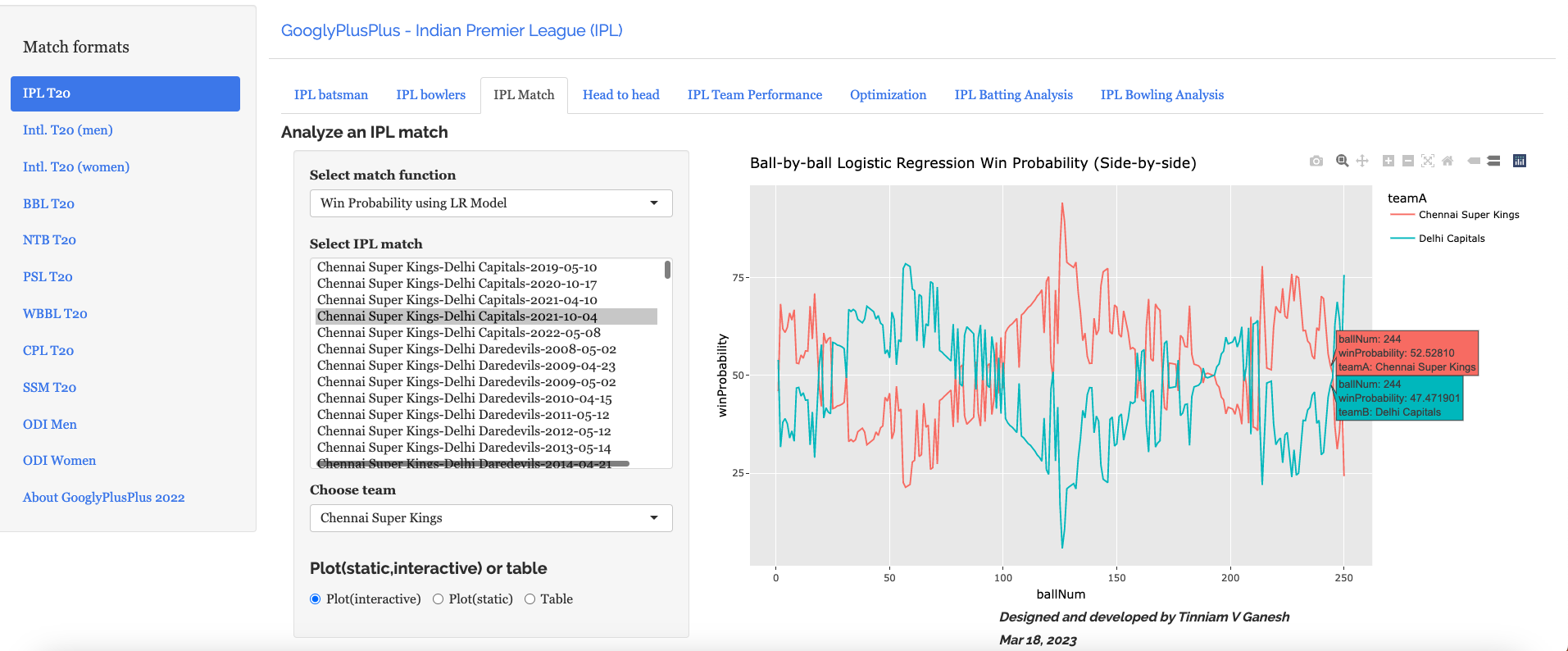
b) Win Probability Logistic Regression (side-by-side) – CSK vs DC – 4 Oct 2021

Plotting how win probability changes over the course of the match using Logistic Regression Model

In this match Delhi Capitals won. The batting scorecard of Delhi Capitals

c) Batting Scorecard of Delhi Capitals – CSK vs DC – 4 Oct 2021

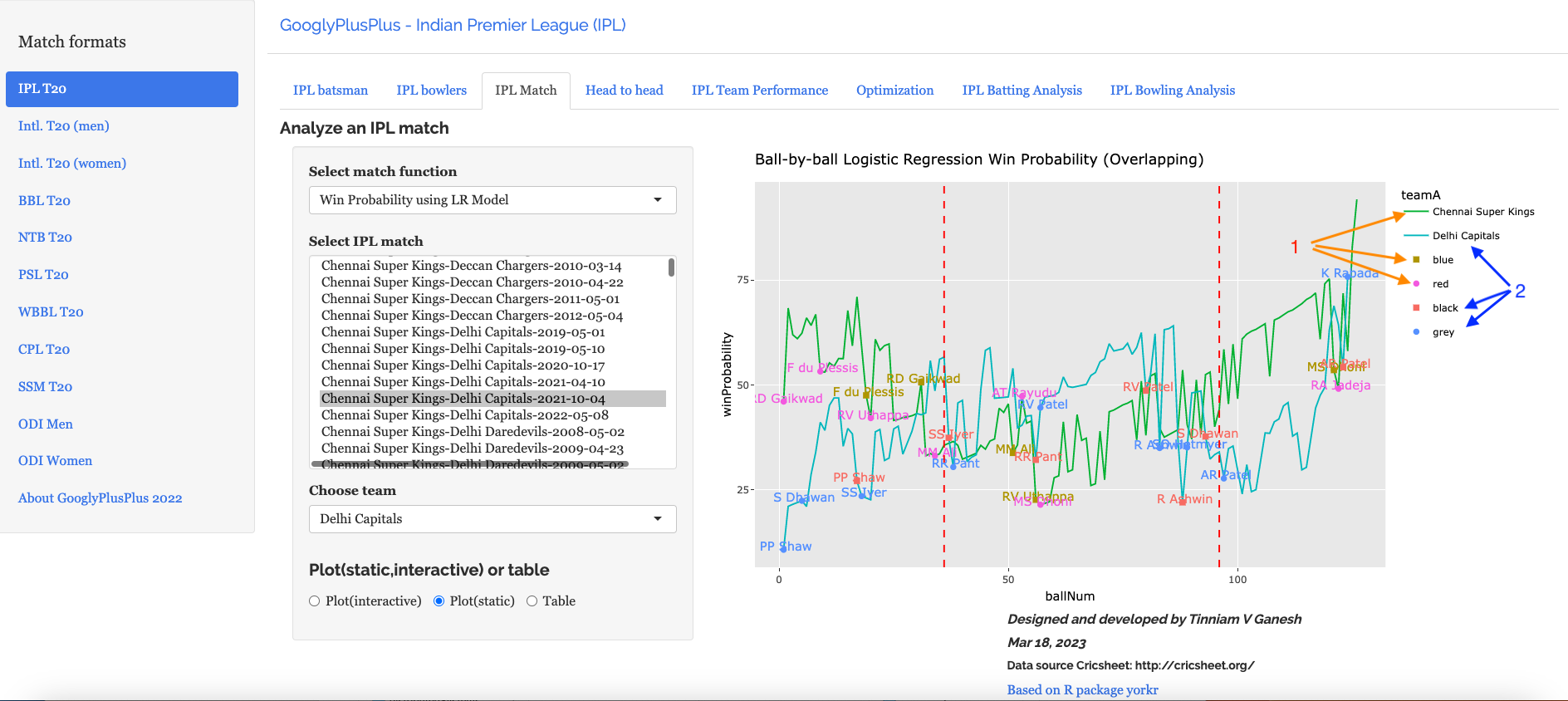
d) Win Probability Logistic Regression (Overlapping) – CSK vs DC – 4 Oct 2021

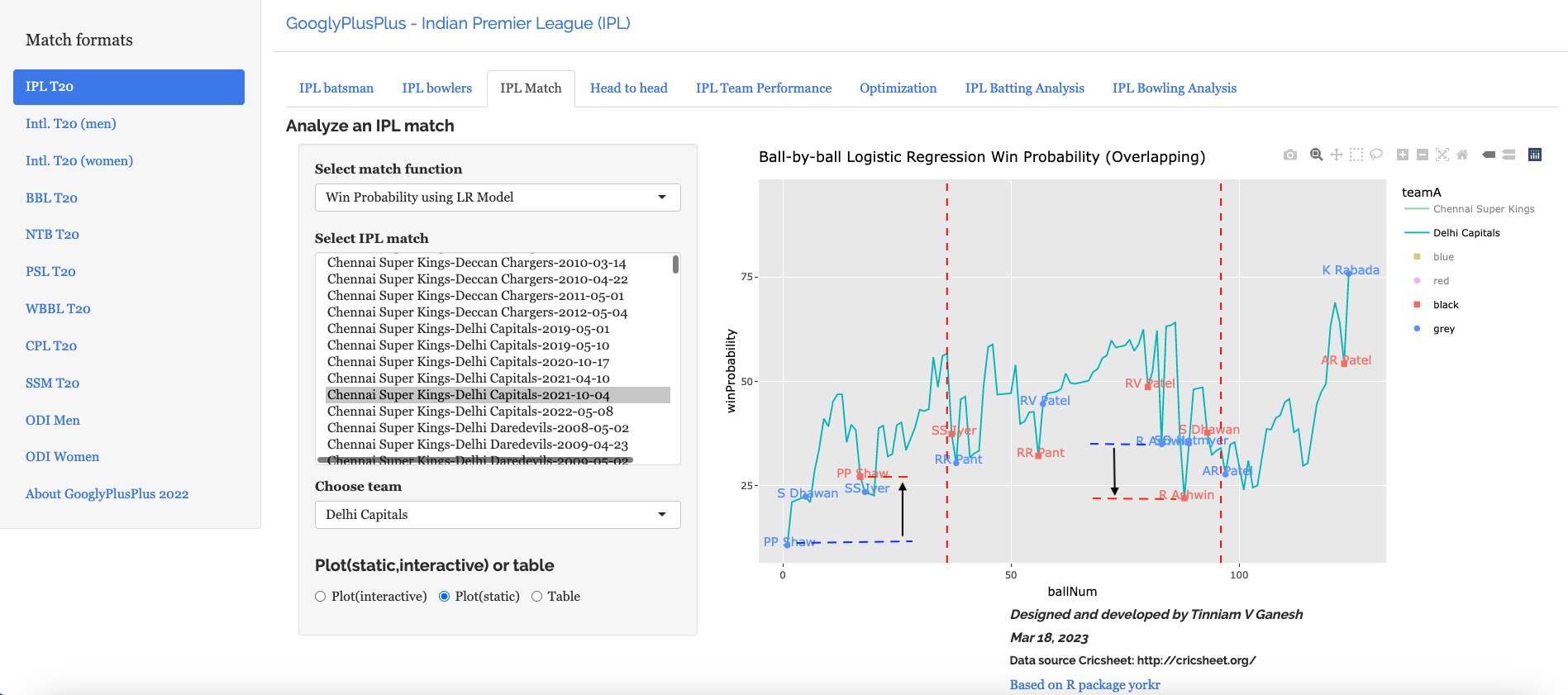
The Win Probability LR (overlapping) shows the probability function of both teams superimposed over one another. The plot includes when a batsman came into to play and when he got out. This is for both teams. This looks a little noisy, but there is a way to selectively display the change in Win Probability for each team. This can be done , by clicking the 3 arrows (orange or blue) from top to bottom. First double-click the team CSK or DC, then click the next 2 items (blue,red or black,grey) Sorry the legends don’t match the colors! 😦

Below we can see how the win probability changed for Delhi Capitals during their innings, as batsmen came into to play. See below

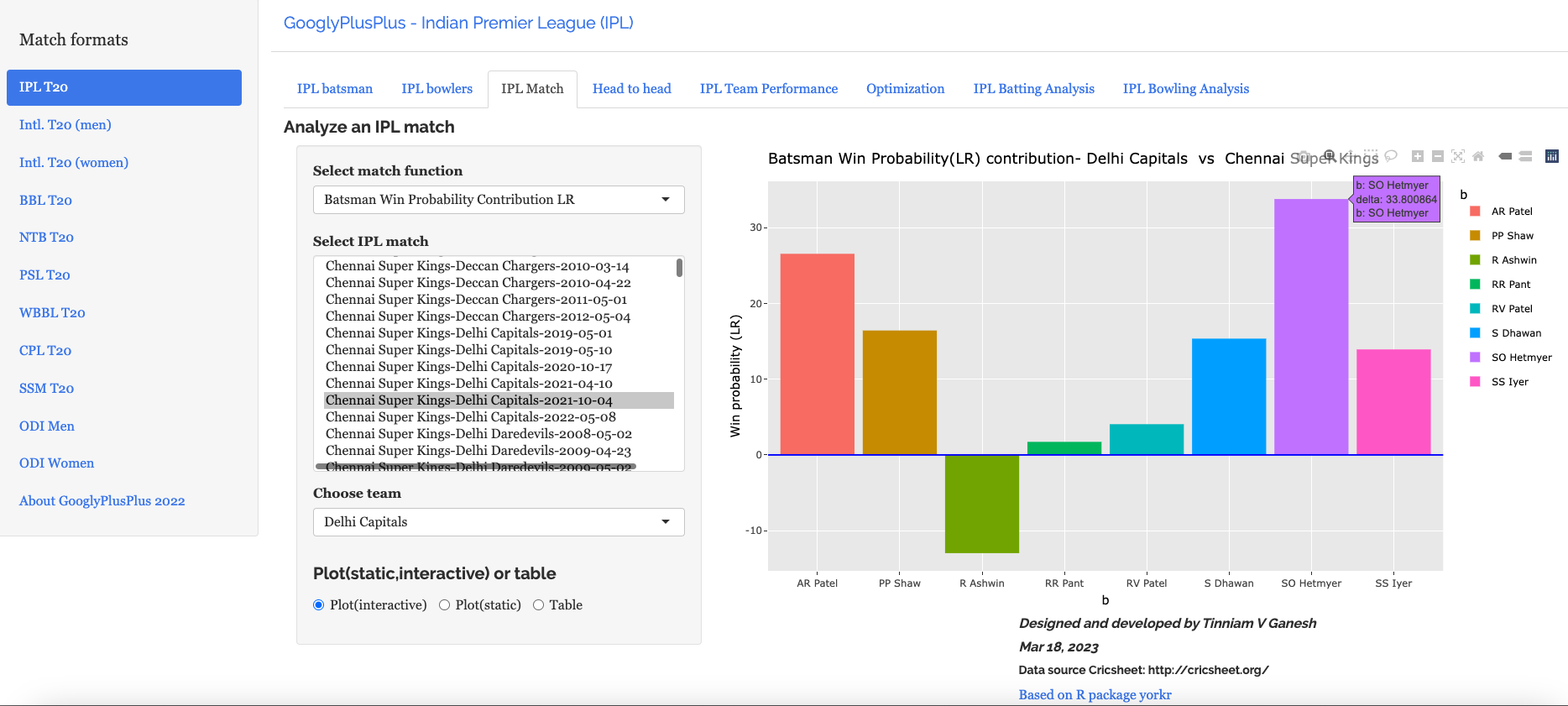
e) Batsman Win Probability contribution:DC – CSK vs DC – 4 Oct 2021

Computing the individual batsman’s Win Contribution and plotting we have. Hetmeyer has a higher Win Probability contribution than Shikhar Dhawan depsite scoring fewer runs

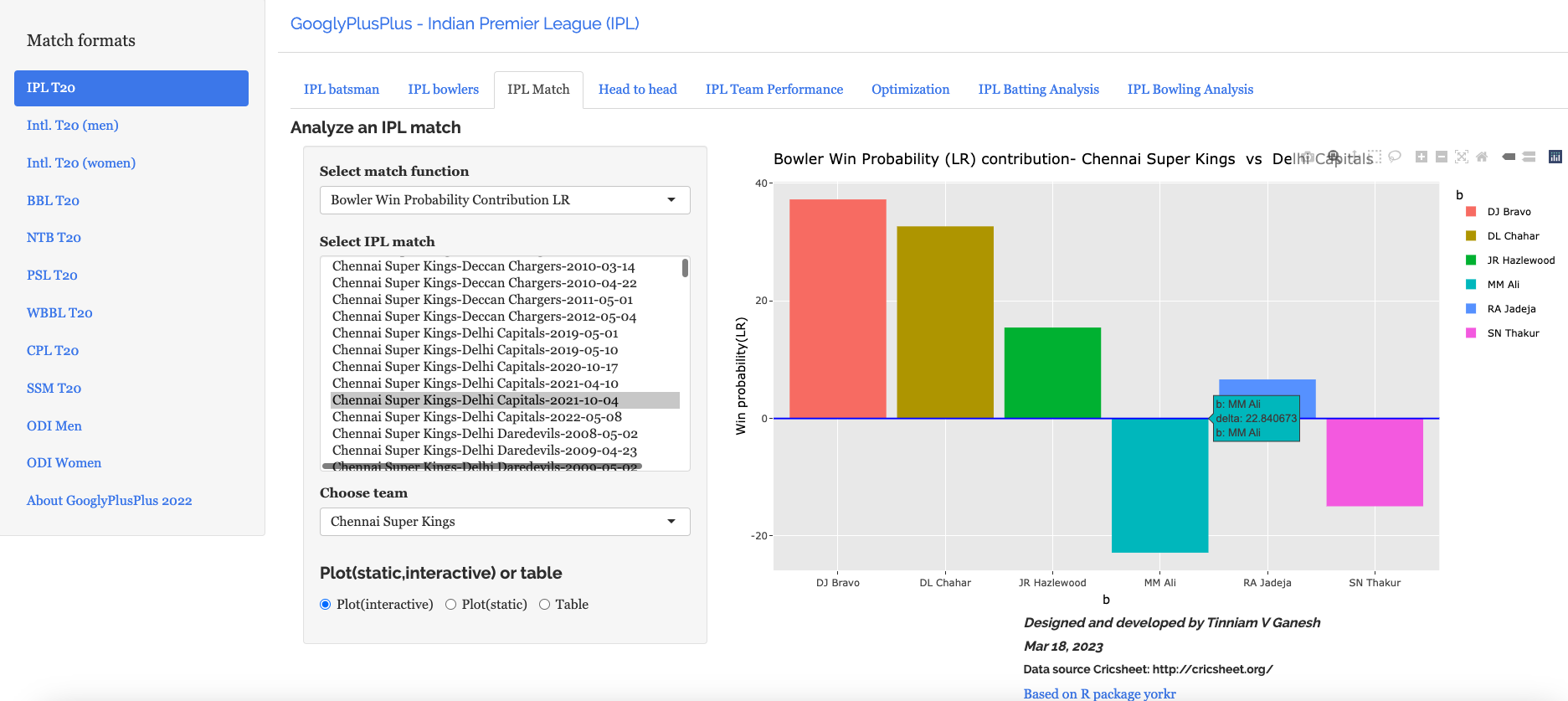
f) Bowler’s Win Probability contribution :CSK – CSK vs DC – 4 Oct 2021

We can also check the Win Probability of the bowlers. So for e.g the CSK bowlers and which bowlers had the most impact. Moeen Ali has the least impact in this match

B) Intl. T20 (men) Australia vs India – 25 Sep 2022

a) Worm wicket chart – Australia vs India – 25 Sep 2022

This was another close match in which India won with the penultimate ball

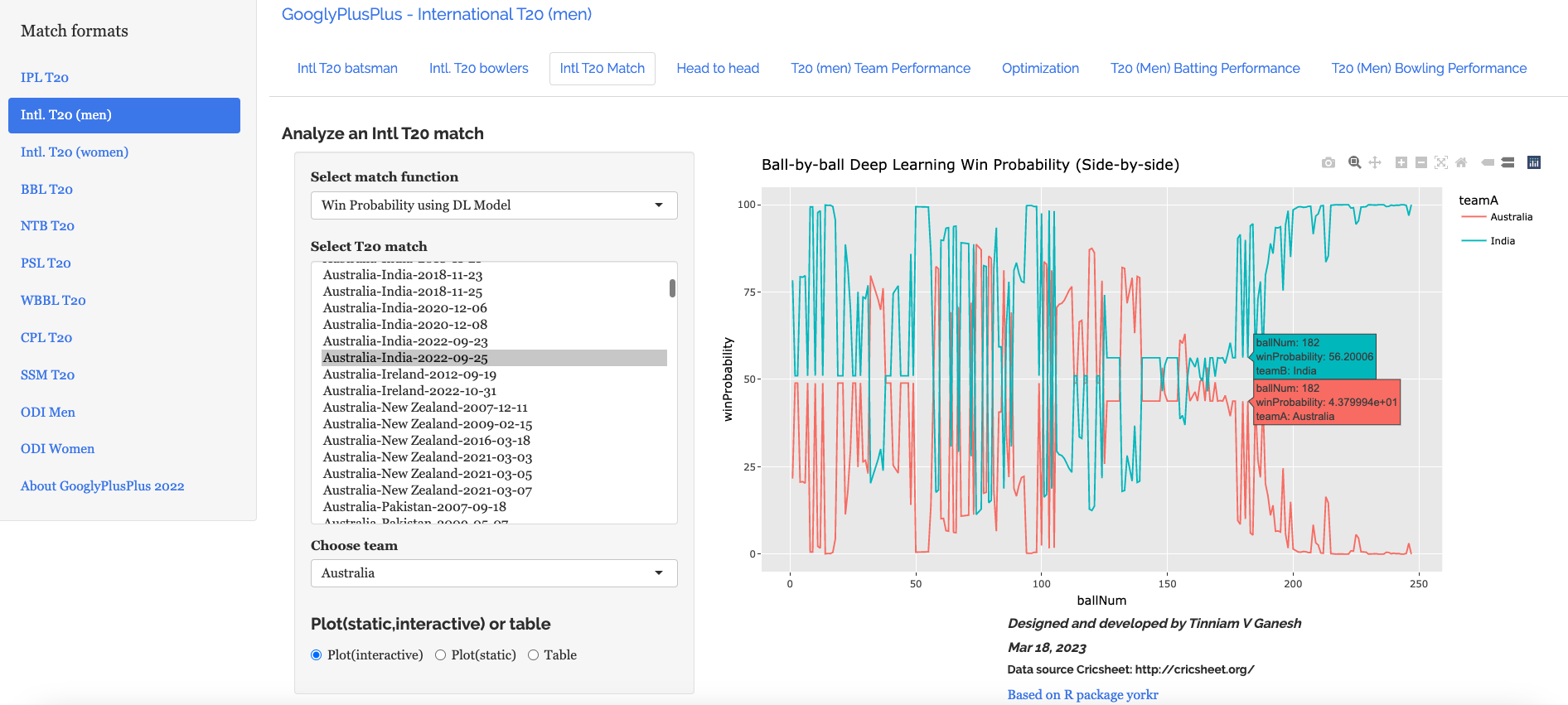
b) Win Probability based on Deep Learning model (side-by-side) – Australia vs India – 25 Sep 2022

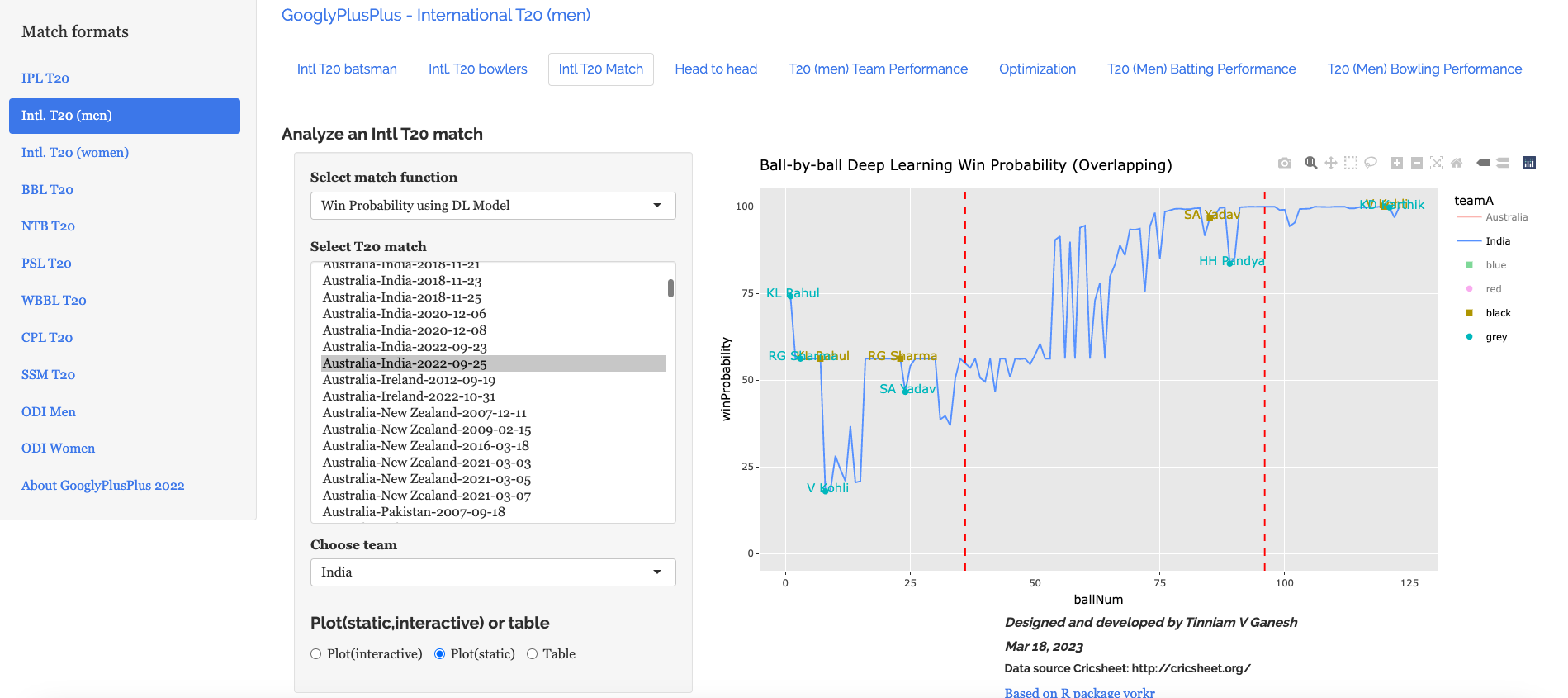
c) Win Probability based on Deep Learning model (overlapping) – Australia vs India – 25 Sep 2022

The plot below shows how the Win Probability of the teams varied across the 20 overs. The 2 Win Probability distributions are superimposed over each other

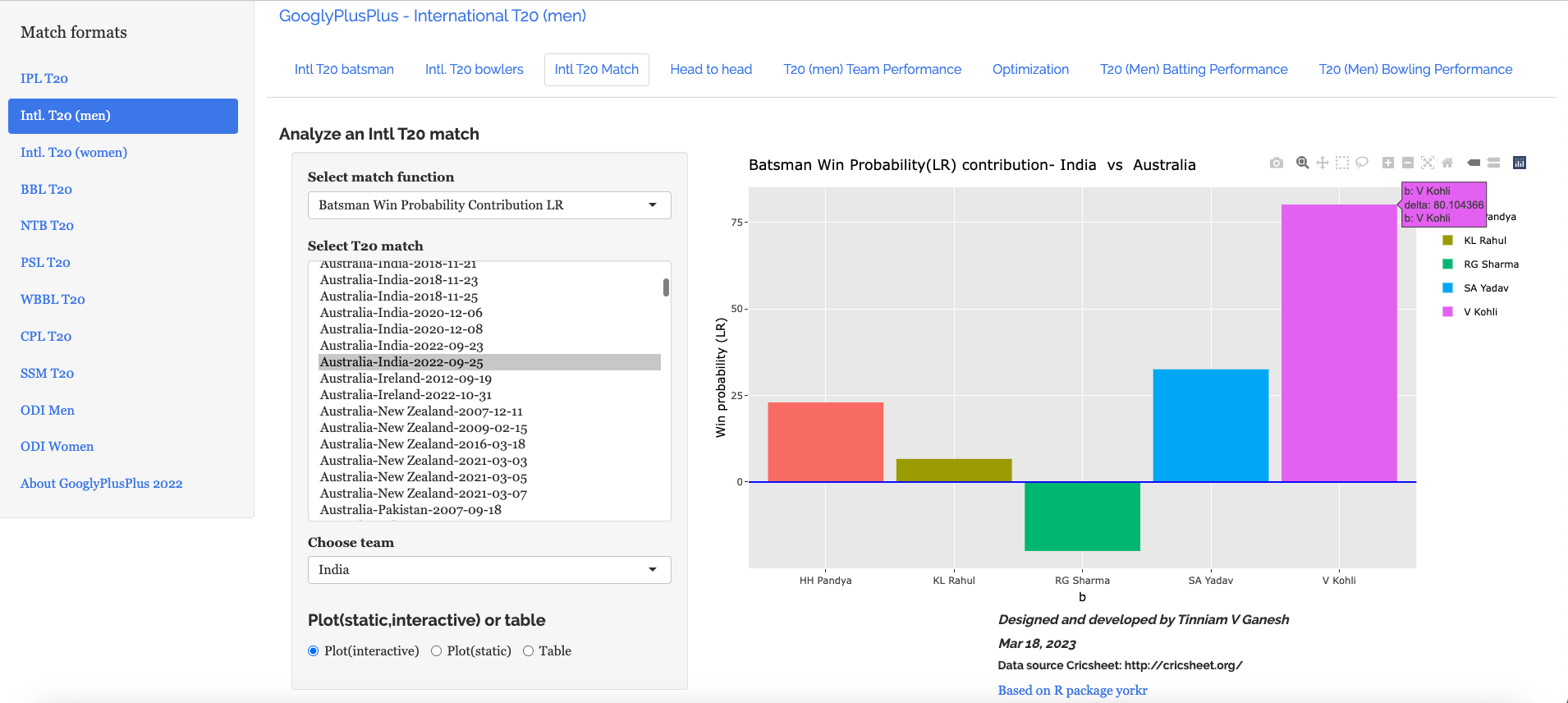
d) Batsman Win Probability Contribution : IndiaAustralia vs India – 25 Sep 2022

Selectively choosing the India Win Probability plot by double-clicking legend ‘India’ on the right , followed by single click of black, grey legend we have

We see that Kohli, Suryakumar Yadav have good contribution to the Win Probability

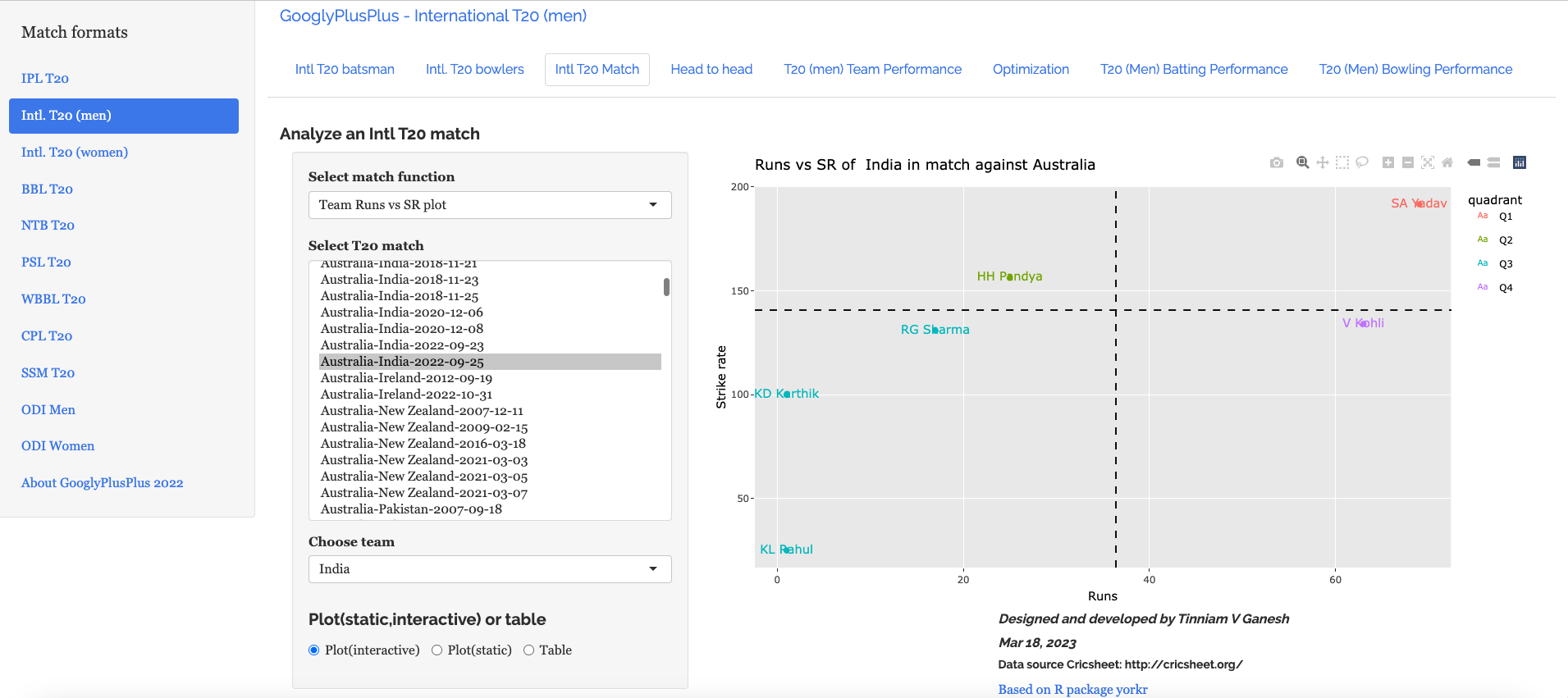
e) Plotting the Runs vs Strike Rate:India – Australia vs India – 25 Sep 2022

f) Batsman’s Win Probability Contribution- Australia vs India – 25 Sep 2022

Finally plotting the Batsman’s Win Probability Contribution

Interestingly, Kohli has a greater Win Probability Contribution than SKY, though SKY scored more runs at a better strike rate. As mentioned above, the Win Probability is context dependent and also depends on past performances of the player (batsman, bowler)

Finally let us look at

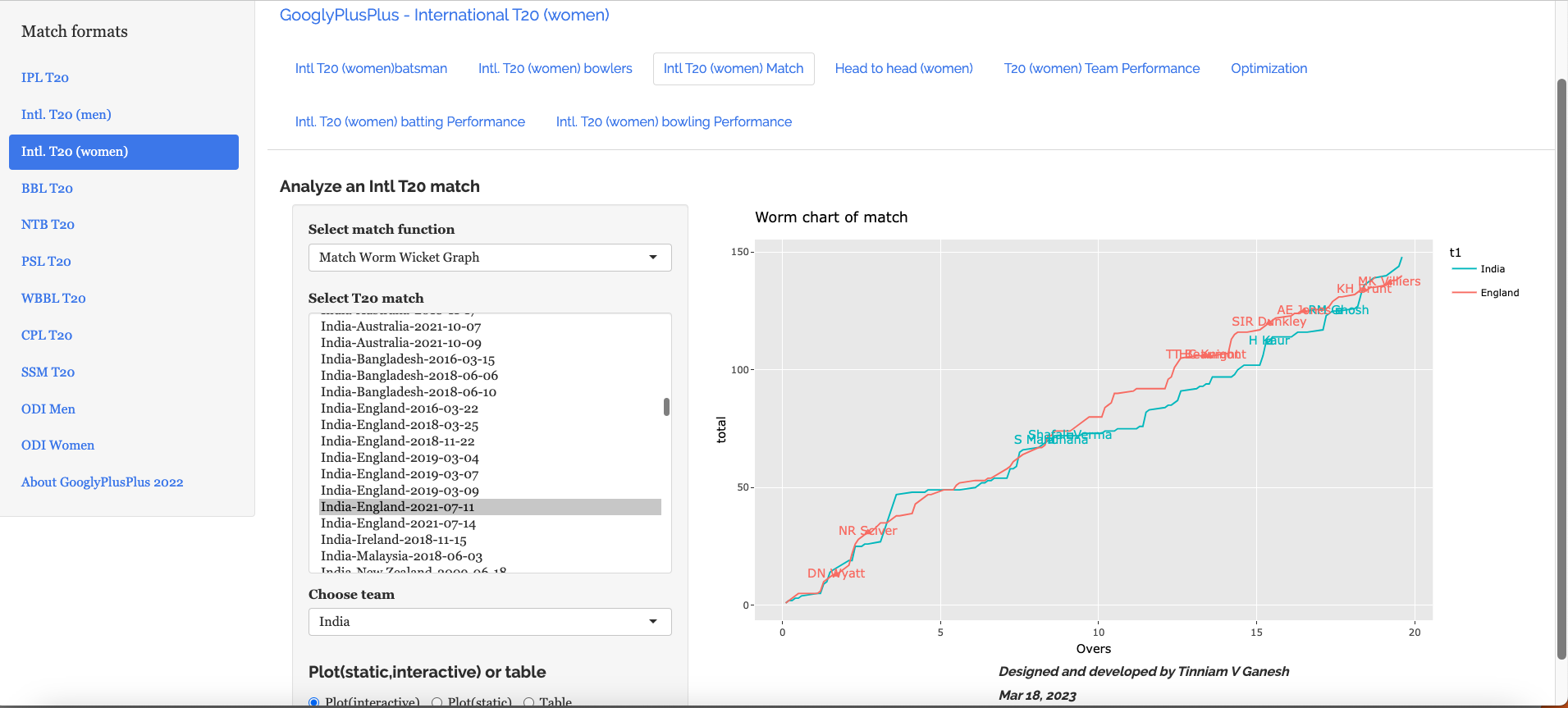
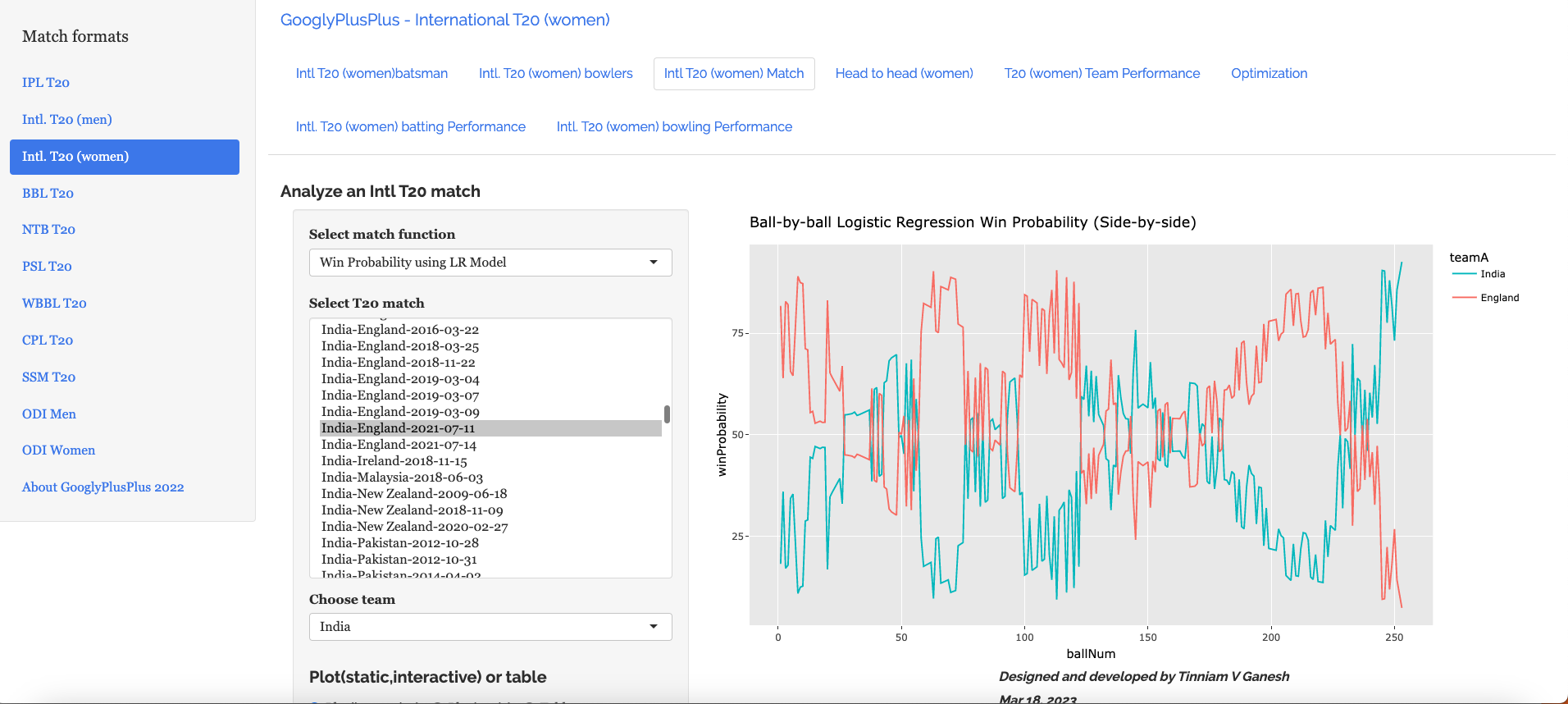
C) India vs England Intll T20 Women (11 July 2021)

a) Worm wicket chart – India vs England Intl. T20 Women (11 July 2021)

India won this T20 match by 8 runs

b) Win Probability using the Logistic Regression Model – India vs England Intl. T20 Women (11 July 2021)

c) Win Probability with the DL model – India vs England Intl. T20 Women (11 July 2021)

d) Bowler Win Probability Contribution with the LR model India vs England Intl. T20 Women (11 July 2021)

e) Bowler Win Contribution with the DL model India vs England Intl. T20 Women (11 July 2021)

Go ahead and try out the latest version of GooglyPlusPlus

Also see my other posts

  1. Deep Learning from first principles in Python, R and Octave – Part 8
  2. A method to crowd source pothole marking on (Indian) roads
  3. Big Data 7: yorkr waltzes with Apache NiFi
  4. Practical Machine Learning with R and Python – Part 6
  5. Introducing cricpy:A python package to analyze performances of cricketers
  6. Revisiting World Bank data analysis with WDI and gVisMotionChart
  7. Literacy in India – A deepR dive
  8. Cricketr learns new tricks : Performs fine-grained analysis of players
  9. Presentation on “Intelligent Networks, CAMEL protocol, services & applications”
  10. Adventures in LogParser, HTA and charts

To see all posts click Index of posts
GooglyPlusPlus: Win Probability using Deep Learning and player embeddings

In my last post ‘GooglyPlusPlus now with Win Probability Analysis for all T20 matches‘ I had discussed the performance of my ML models, created with and without player embeddings, in computing the Win Probability of T20 matches. With batsman & bowler embeddings I got much better performance than without the embeddings

  • glmnet – Accuracy – 0.73
  • Random Forest (RF) – Accuracy – 0.92

While the Random Forest gave excellent accuracy, it was bulky and also took an unusually long time to predict the Win Probability of a single T20 match. The above 2 ML models were built using R’s Tidymodels. glmnet was fast, but I wanted to see if I could create a ML model that was better, lighter and faster. I had initially tried to use Tensorflow, Keras in Python but then abandoned it, since I did not know how to port the Deep Learning model to R and use in my app GooglyPlusPlus.

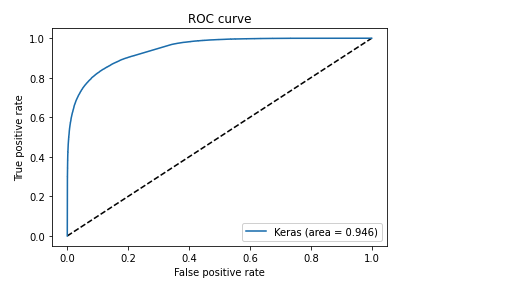
But later, since I was stuck with a bulky Random Forest model, I decided to again explore options for saving the Keras Deep Learning model and loading it in R. I found out that saving the model as .h5, we can load it in R and use it for predictions. Hence, I rebuilt a Deep Learning model using Keras, Python with player embeddings and I got excellent performance. The DL model was light and had an accuracy 0.8639 with an ROC_AUC of 0.964 which was great!

GooglyPlusPlus uses data from Cricsheet and is based on my R package yorkr

You can try out this latest version of GooglyPlusPlus at gpp2023-1

Here are the steps

A. Build a Keras Deep Learning model

a. Import necessary packages

import pandas as pd
import numpy as np
from zipfile import ZipFile
import tensorflow as tf
from tensorflow import keras
from tensorflow.keras import layers
from tensorflow.keras import regularizers
from pathlib import Path
import matplotlib.pyplot as plt

b, Upload the data of all 9 T20 leagues (BBL, CPL, IPL, T20 (men) , T20(women), NTB, CPL, SSM, WBB)

# Read all T20 leagues 
df1=pd.read_csv('t20.csv')
print("Shape of dataframe=",df1.shape)

# Create training and test data set
train_dataset = df1.sample(frac=0.8,random_state=0)
test_dataset = df1.drop(train_dataset.index)
train_dataset1 = train_dataset[['batsmanIdx','bowlerIdx','ballNum','ballsRemaining','runs','runRate','numWickets','runsMomentum','perfIndex']]
test_dataset1 = test_dataset[['batsmanIdx','bowlerIdx','ballNum','ballsRemaining','runs','runRate','numWickets','runsMomentum','perfIndex']]
train_dataset1

# Set the target data
train_labels = train_dataset.pop('isWinner')
test_labels = test_dataset.pop('isWinner')
train_dataset1

a=train_dataset1.describe()
stats=a.transpose
a

c. Create a Deep Learning ML model using batsman & bowler embeddings

import pandas as pd
import numpy as np
from keras.layers import Input, Embedding, Flatten, Dense
from keras.models import Model
from keras.layers import Input, Embedding, Flatten, Dense, Reshape, Concatenate, Dropout
from keras.models import Model

# Set seed
tf.random.set_seed(432)

# create input layers for each of the predictors
batsmanIdx_input = Input(shape=(1,), name='batsmanIdx')
bowlerIdx_input = Input(shape=(1,), name='bowlerIdx')
ballNum_input = Input(shape=(1,), name='ballNum')
ballsRemaining_input = Input(shape=(1,), name='ballsRemaining')
runs_input = Input(shape=(1,), name='runs')
runRate_input = Input(shape=(1,), name='runRate')
numWickets_input = Input(shape=(1,), name='numWickets')
runsMomentum_input = Input(shape=(1,), name='runsMomentum')
perfIndex_input = Input(shape=(1,), name='perfIndex')

# Set the embedding size as the 4th root of unique batsmen, bowlers
no_of_unique_batman=len(df1["batsmanIdx"].unique()) 
no_of_unique_bowler=len(df1["bowlerIdx"].unique()) 
embedding_size_bat = no_of_unique_batman ** (1/4)
embedding_size_bwl = no_of_unique_bowler ** (1/4)


# create embedding layer for the categorical predictor
batsmanIdx_embedding = Embedding(input_dim=no_of_unique_batman+1, output_dim=16,input_length=1)(batsmanIdx_input)
batsmanIdx_flatten = Flatten()(batsmanIdx_embedding)
bowlerIdx_embedding = Embedding(input_dim=no_of_unique_bowler+1, output_dim=16,input_length=1)(bowlerIdx_input)
bowlerIdx_flatten = Flatten()(bowlerIdx_embedding)

# concatenate all the predictors
x = keras.layers.concatenate([batsmanIdx_flatten,bowlerIdx_flatten, ballNum_input, ballsRemaining_input, runs_input, runRate_input, numWickets_input, runsMomentum_input, perfIndex_input])

# add hidden layers
# Use dropouts for regularisation
x = Dense(64, activation='relu')(x)
x = Dropout(0.1)(x)
x = Dense(32, activation='relu')(x)
x = Dropout(0.1)(x)
x = Dense(16, activation='relu')(x)
x = Dropout(0.1)(x)
x = Dense(8, activation='relu')(x)
x = Dropout(0.1)(x)

# add output layer
output = Dense(1, activation='sigmoid', name='output')(x)
print(output.shape)

# create a DL model
model = Model(inputs=[batsmanIdx_input,bowlerIdx_input, ballNum_input, ballsRemaining_input, runs_input, runRate_input, numWickets_input, runsMomentum_input, perfIndex_input], outputs=output)
model.summary()

# compile model
optimizer=keras.optimizers.Adam(learning_rate=.01, beta_1=0.9, beta_2=0.999, epsilon=1e-07, decay=0.0, amsgrad=True)

model.compile(optimizer=optimizer, loss='binary_crossentropy', metrics=['accuracy'])

# train the model
history=model.fit([train_dataset1['batsmanIdx'],train_dataset1['bowlerIdx'],train_dataset1['ballNum'],train_dataset1['ballsRemaining'],train_dataset1['runs'],
           train_dataset1['runRate'],train_dataset1['numWickets'],train_dataset1['runsMomentum'],train_dataset1['perfIndex']], train_labels, epochs=40, batch_size=1024,
          validation_data = ([test_dataset1['batsmanIdx'],test_dataset1['bowlerIdx'],test_dataset1['ballNum'],test_dataset1['ballsRemaining'],test_dataset1['runs'],
           test_dataset1['runRate'],test_dataset1['numWickets'],test_dataset1['runsMomentum'],test_dataset1['perfIndex']],test_labels), verbose=1)

plt.plot(history.history["loss"])
plt.plot(history.history["val_loss"])
plt.title("model loss")
plt.ylabel("loss")
plt.xlabel("epoch")
plt.legend(["train", "test"], loc="upper left")
plt.show()

Model: "model_5"
__________________________________________________________________________________________________
 Layer (type)                   Output Shape         Param #     Connected to                     
==================================================================================================
 batsmanIdx (InputLayer)        [(None, 1)]          0           []                               
                                                                                                  
 bowlerIdx (InputLayer)         [(None, 1)]          0           []                               
                                                                                                  
 embedding_10 (Embedding)       (None, 1, 16)        75888       ['batsmanIdx[0][0]']             
                                                                                                  
 embedding_11 (Embedding)       (None, 1, 16)        55808       ['bowlerIdx[0][0]']              
                                                                                                  
 flatten_10 (Flatten)           (None, 16)           0           ['embedding_10[0][0]']           
                                                                                                  
 flatten_11 (Flatten)           (None, 16)           0           ['embedding_11[0][0]']           
                                                                                                  
 ballNum (InputLayer)           [(None, 1)]          0           []                               
                                                                                                  
 ballsRemaining (InputLayer)    [(None, 1)]          0           []                               
                                                                                                  
 runs (InputLayer)              [(None, 1)]          0           []                               
                                                                                                  
 runRate (InputLayer)           [(None, 1)]          0           []                               
                                                                                                  
 numWickets (InputLayer)        [(None, 1)]          0           []                               
                                                                                                  
 runsMomentum (InputLayer)      [(None, 1)]          0           []                               
                                                                                                  
 perfIndex (InputLayer)         [(None, 1)]          0           []                               
                                                                                                  
 concatenate_5 (Concatenate)    (None, 39)           0           ['flatten_10[0][0]',             
                                                                  'flatten_11[0][0]',             
                                                                  'ballNum[0][0]',                
                                                                  'ballsRemaining[0][0]',         
                                                                  'runs[0][0]',                   
                                                                  'runRate[0][0]',                
                                                                  'numWickets[0][0]',             
                                                                  'runsMomentum[0][0]',           
                                                                  'perfIndex[0][0]']              
                                                                                                  
 dense_19 (Dense)               (None, 64)           2560        ['concatenate_5[0][0]']          
                                                                                                  
 dropout_19 (Dropout)           (None, 64)           0           ['dense_19[0][0]']               
                                                                                                  
 dense_20 (Dense)               (None, 32)           2080        ['dropout_19[0][0]']             
                                                                                                  
 dropout_20 (Dropout)           (None, 32)           0           ['dense_20[0][0]']               
                                                                                                  
 dense_21 (Dense)               (None, 16)           528         ['dropout_20[0][0]']             
                                                                                                  
 dropout_21 (Dropout)           (None, 16)           0           ['dense_21[0][0]']               
                                                                                                  
 dense_22 (Dense)               (None, 8)            136         ['dropout_21[0][0]']             
                                                                                                  
 dropout_22 (Dropout)           (None, 8)            0           ['dense_22[0][0]']               
                                                                                                  
 output (Dense)                 (None, 1)            9           ['dropout_22[0][0]']             
                                                                                                  
==================================================================================================
Total params: 137,009
Trainable params: 137,009
Non-trainable params: 0
__________________________________________________________________________________________________
Epoch 1/40
937/937 [==============================] - 11s 10ms/step - loss: 0.5683 - accuracy: 0.6968 - val_loss: 0.4480 - val_accuracy: 0.7708
Epoch 2/40
937/937 [==============================] - 9s 10ms/step - loss: 0.4477 - accuracy: 0.7721 - val_loss: 0.4305 - val_accuracy: 0.7833
Epoch 3/40
937/937 [==============================] - 9s 10ms/step - loss: 0.4229 - accuracy: 0.7832 - val_loss: 0.3984 - val_accuracy: 0.7936
...
...
937/937 [==============================] - 10s 10ms/step - loss: 0.2909 - accuracy: 0.8627 - val_loss: 0.2943 - val_accuracy: 0.8613
Epoch 38/40
937/937 [==============================] - 10s 10ms/step - loss: 0.2892 - accuracy: 0.8633 - val_loss: 0.2933 - val_accuracy: 0.8621
Epoch 39/40
937/937 [==============================] - 10s 10ms/step - loss: 0.2889 - accuracy: 0.8638 - val_loss: 0.2941 - val_accuracy: 0.8620
Epoch 40/40
937/937 [==============================] - 10s 11ms/step - loss: 0.2886 - accuracy: 0.8639 - val_loss: 0.2929 - val_accuracy: 0.8621

d. Compute and plot the ROC-AUC for the above model

from sklearn.metrics import roc_curve

# Select a random sample set
tf.random.set_seed(59)
train = df1.sample(frac=0.9,random_state=0)
test = df1.drop(train_dataset.index)
test_dataset1 = test[['batsmanIdx','bowlerIdx','ballNum','ballsRemaining','runs','runRate','numWickets','runsMomentum','perfIndex']]
test_labels = test.pop('isWinner')

# Compute the predicted values
y_pred_keras = model.predict([test_dataset1['batsmanIdx'],test_dataset1['bowlerIdx'],test_dataset1['ballNum'],test_dataset1['ballsRemaining'],test_dataset1['runs'],
           test_dataset1['runRate'],test_dataset1['numWickets'],test_dataset1['runsMomentum'],test_dataset1['perfIndex']]).ravel()

# Compute TPR & FPR
fpr_keras, tpr_keras, thresholds_keras = roc_curve(test_labels, y_pred_keras)

fpr_keras, tpr_keras, thresholds_keras = roc_curve(test_labels, y_pred_keras)
from sklearn.metrics import auc

# Plot the Area Under the Curve (AUC)
auc_keras = auc(fpr_keras, tpr_keras)
plt.figure(1)
plt.plot([0, 1], [0, 1], 'k--')
plt.plot(fpr_keras, tpr_keras, label='Keras (area = {:.3f})'.format(auc_keras))
plt.xlabel('False positive rate')
plt.ylabel('True positive rate')
plt.title('ROC curve')
plt.legend(loc='best')
plt.show()

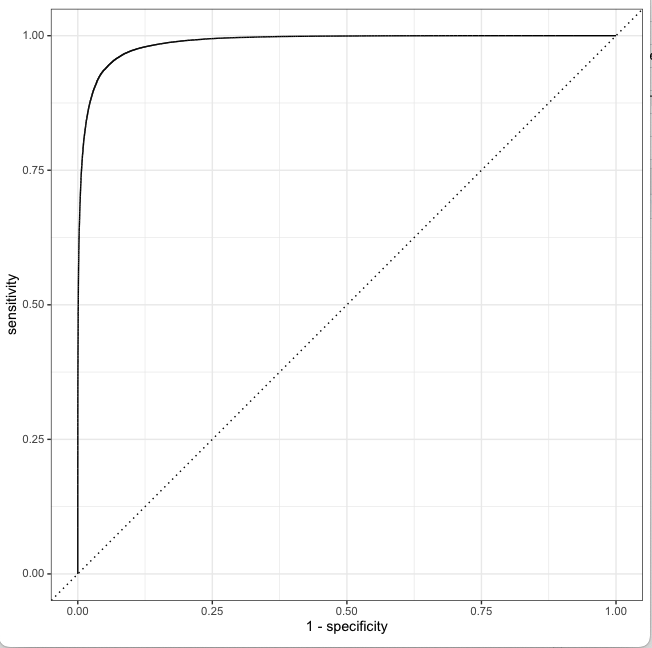
The ROC_AUC for the Deep Learning Model is 0.946 as seen below

e. Save the Keras model for use in Python

from keras.models import Model
model.save("wpDL.h5")

f. Load the model in R using rhdf5 package for use in GooglyPlusPlus

library(rhdf5)
dl_model <- load_model_hdf5('wpDL.h5')

This was a huge success for me to be able to create the Deep Learning model in Python and use it in my Shiny app GooglyPlusPlus. The Deep Learning Keras model is light-weight and extremely fast.

The Deep Learning model has now been integrated into GooglyPlusPlus. Now you can check the Win Probability using both a) glmnet (Logistic Regression with lasso regularisation) b) Keras Deep Learning model with dropouts as regularisation

In addition I have created 2 features based on Win Probability (WP)

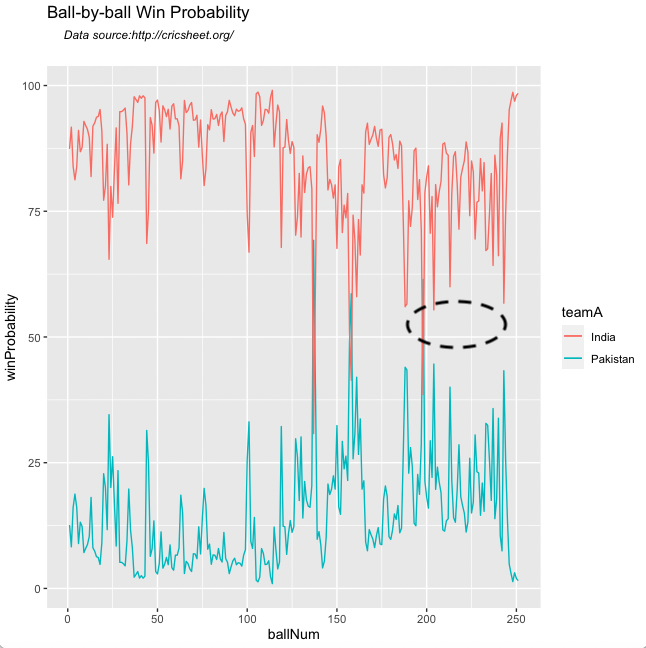
i) Win Probability (Side-by-side – Plot(interactive) : With this functionality the 1st and 2nd innings will be side-by-side. When the 1st innings is played by team 1, the Win Probability of team 2 = 100 – WP (team1). Similarly, when the 2nd innings is being played by team 2, the Win Probability of team1 = 100 – WP (team 2)

ii) Win Probability (Overlapping) – Plot (static): With this functionality the Win Probabilities of both team1(1st innings) & team 2 (2nd innings) are displayed overlapping, so that we can see how the probabilities vary ball-by-ball.

Note: Since the same UI is used for all match functions I had to re-use the Plot(interactive) and Plot(static) radio buttons for Win Probability (Side-by-side) and Win Probability(Overlapping) respectively

Here are screenshots using both ML models with both functionality for some random matches

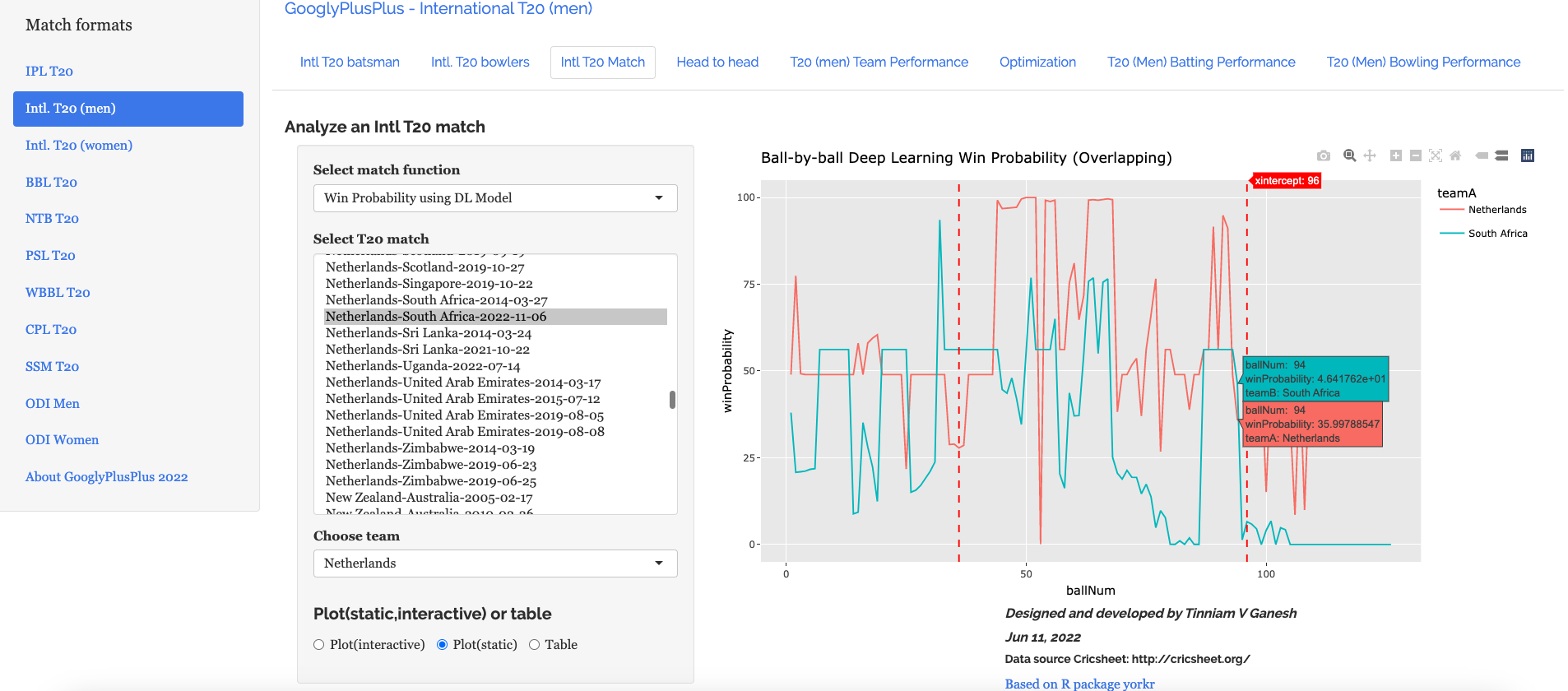
B) ICC T20 Men World Cup – Netherland-South Africa- 2022-11-06

i) Match Worm wicket chart

ii) Win Probability with LR (Side-by-Side- Plot(interactive))

iii) Win Probability LR (Overlapping- Plot(static))

iv) Win Probability Deep Learning (Side-by-side – Plot(interactive)

In the 213th ball of the innings South Africa was slightly ahead of Netherlands. After that they crashed and burned!

v) Win Probability Deep Learning (Overlapping – Plot (static)

It can be seen that in the 94th ball of both innings South Africa was ahead of Netherlands before the eventual slump.

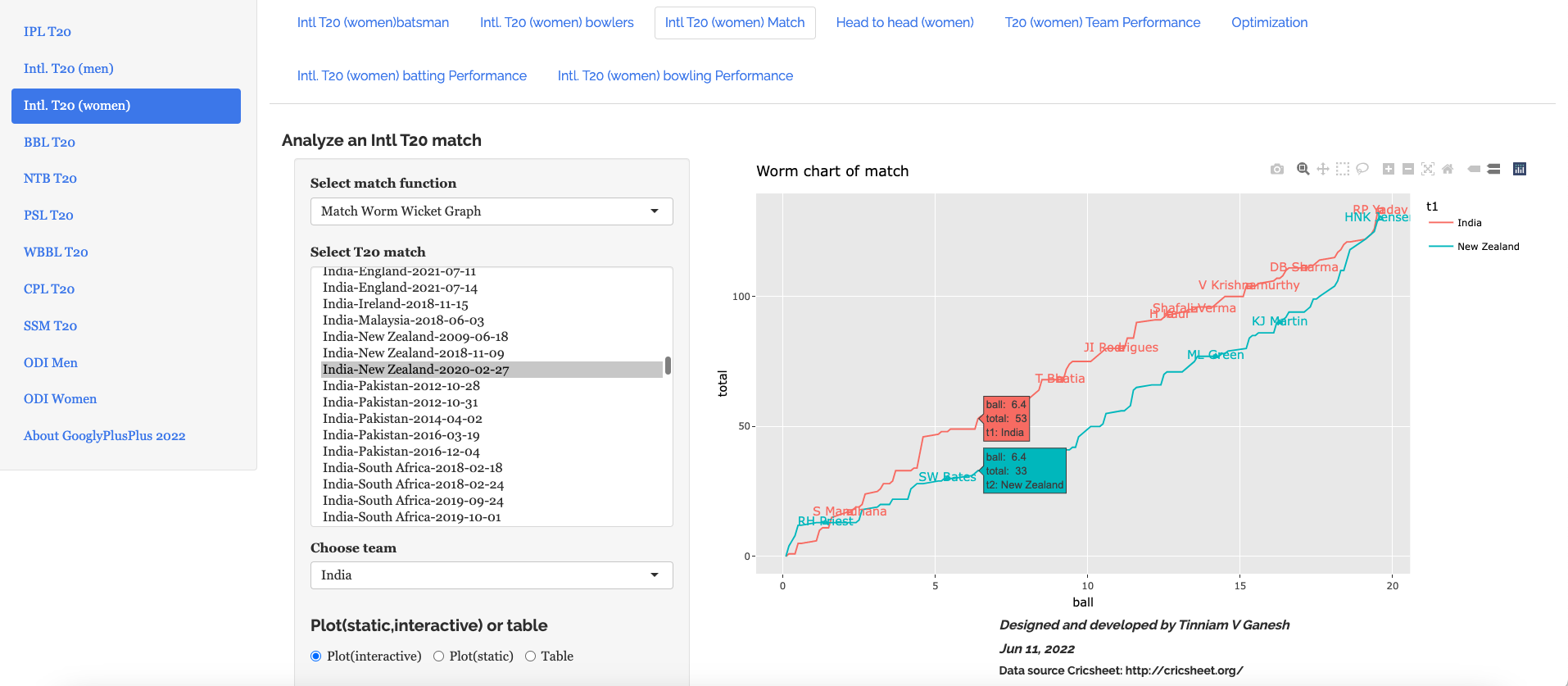
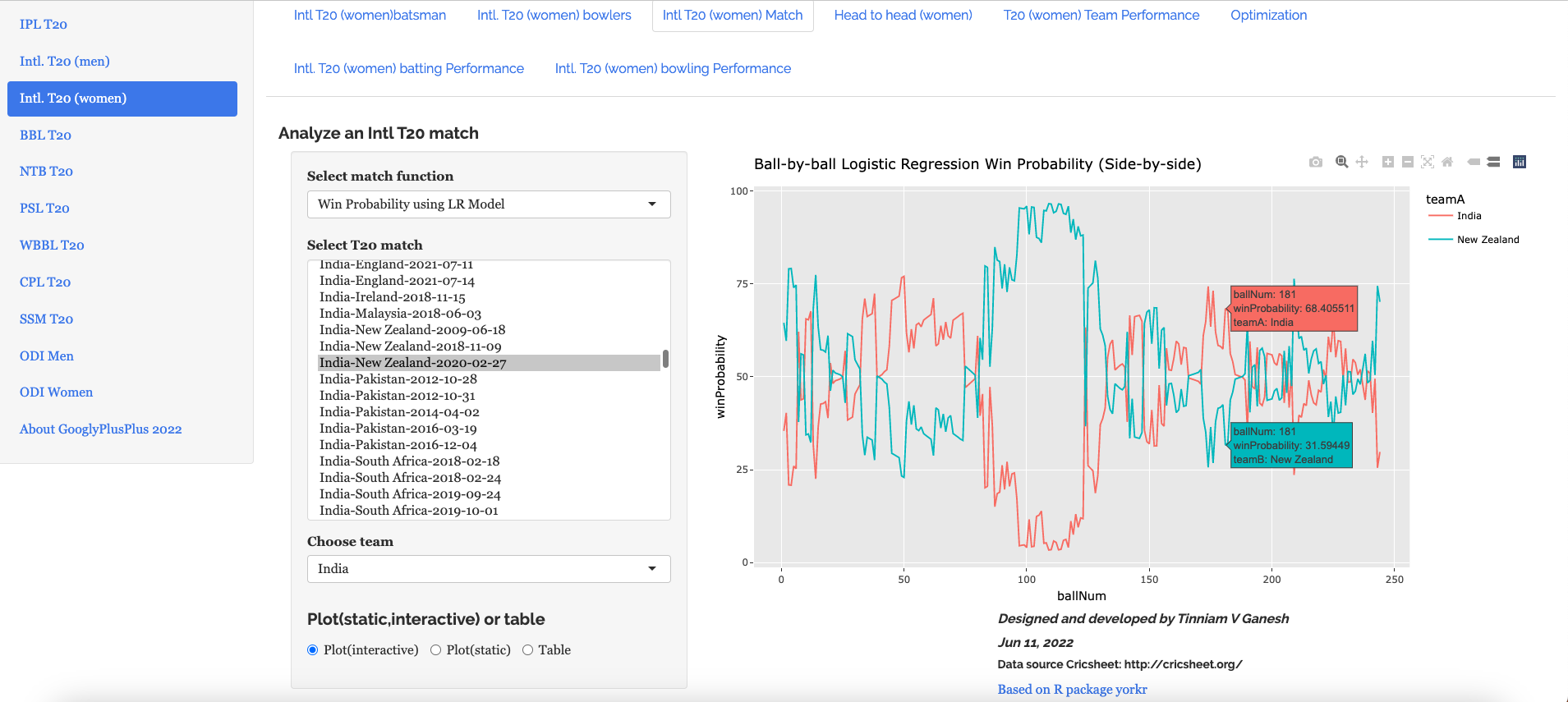
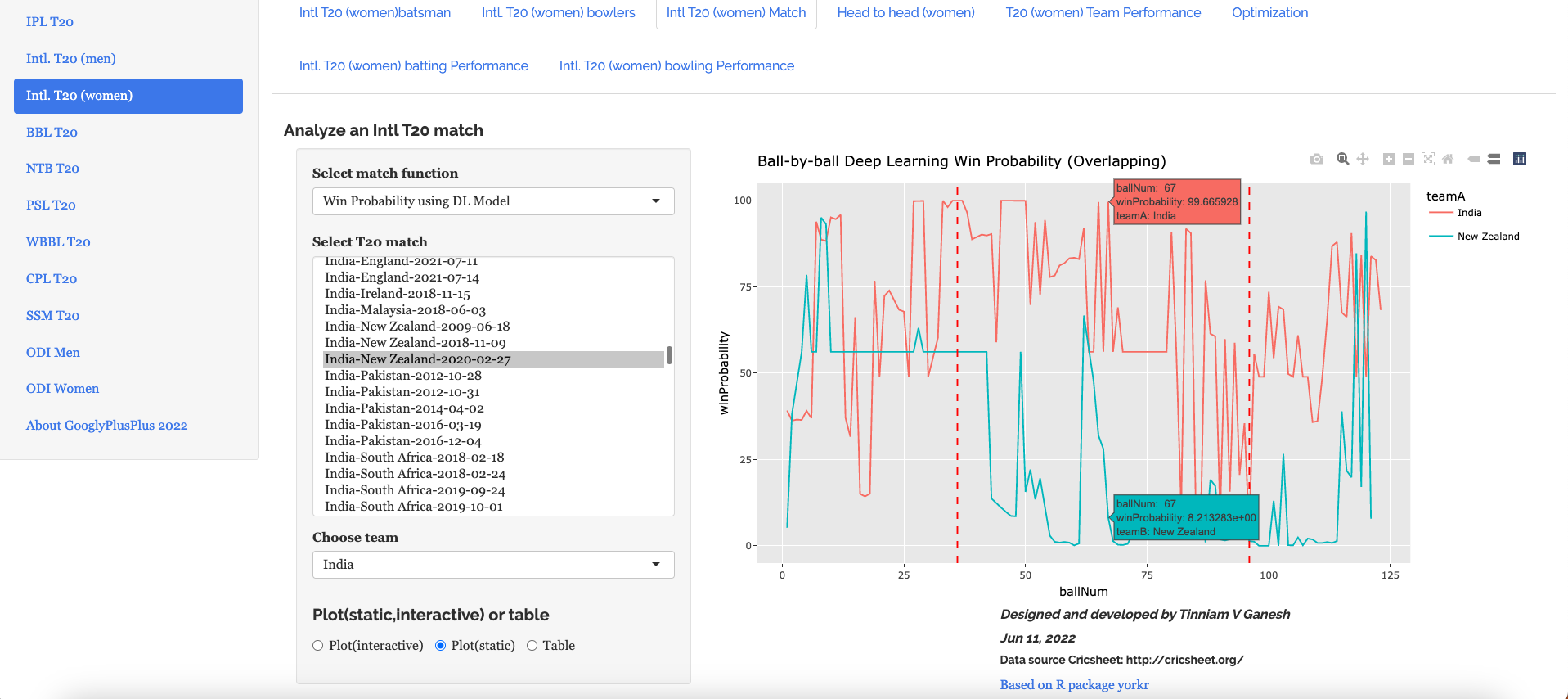
C) Intl. T20 (Women) India – New Zealand – 2020 – 02 – 27

Here is an interesting match between India and New Zealand T20 Women’s teams. NZ successfully chased the India’s total in a wildly swinging fortunes. See the charts below

i) Match Worm Wicket chart

ii) Win Probability with LR (Side-by-side – Plot (interactive)

iii) Win Probability with LR (Overlapping – Plot (static)

iv) Win Probability with DL model (Side-by-side – Plot (interactive))

v) Win Probability with DL model (Overlapping – Plot (static))

The above functionality in plotting the Win Probability using LR or DL with both options (Side-by-side or Overlapping) is available for all 9 T20 leagues currently supported by GooglyPlusPlus.

Go ahead and give gpp2023-1 a try!!!

Do also check out my other posts’

  1. Deep Learning from first principles in Python, R and Octave – Part 7
  2. Big Data 6: The T20 Dance of Apache NiFi and yorkpy
  3. Latency, throughput implications for the Cloud
  4. Design Principles of Scalable, Distributed Systems
  5. Cricpy adds team analytics to its arsenal!!
  6. Analyzing performances of cricketers using cricketr template
  7. Modeling a Car in Android
  8. Using Linear Programming (LP) for optimizing bowling change or batting lineup in T20 cricket
  9. Introducing QCSimulator: A 5-qubit quantum computing simulator in R
  10. Experiments with deblurring using OpenCV
  11. Using embeddings, collaborative filtering with Deep Learning to analyse T20 players

To see all posts click Index of posts
Boosting Win Probability accuracy with player embeddings

In my previous post Computing Win Probability of T20 matches I had discussed various approaches on computing Win Probability of T20 matches. I had created ML models with glmnet and random forest using TidyModels. This was what I had achieved

  • glmnet : accuracy – 0.67 and sensitivity/specificity – 0.68/0.65
  • random forest : accuracy – 0.737 and roc_auc- 0.834
  • DL model with Keras in Python : accuracy – 0.73

I wanted to see if the performance of the models could be further improved. I got a suggestion from a AI/DL whizkid, who is close to me, to include embeddings for batsmen and bowlers. He felt that win percentage is influenced by which batsman faces which bowler.

So, I started to explore this idea. Embeddings can be used to convert categorical variables to a vector of continuous floating point numbers.Fortunately R’s Tidymodels, has a convenient functionality to create embeddings. By including embeddings for batsman, bowler the performance of my ML models improved vastly. Now the performance is

  • glmnet : accuracy – 0.728 and roc_auc – 0.81
  • random forest : accuracy – 0.927 and roc_auc – 0.98
  • mlp-dnn :accuracy – 0.762 and roc_auc – 0.854

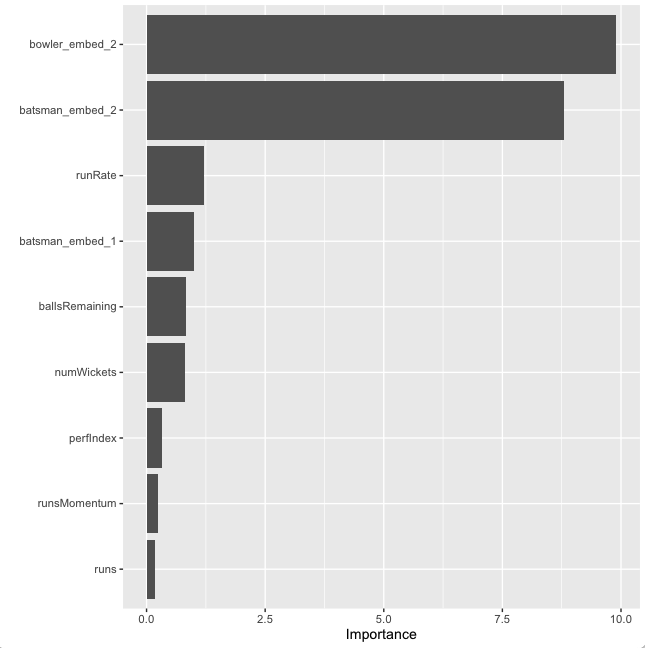
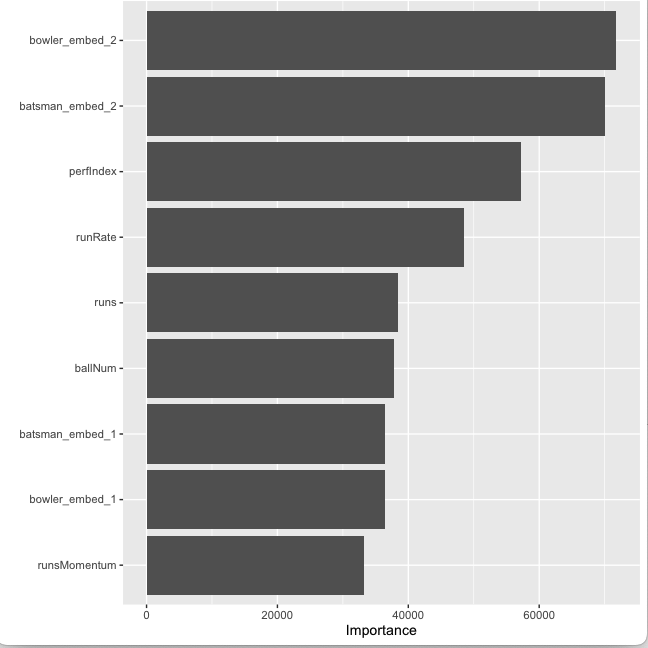
As can be seem there is almost a 20% increase in accuracy with random forests with embeddings over the model without embeddings. Moreover, the feature importance which is plotted below shows that the bowler and batsman embeddings have a significant influence on the Win Probability

Note: The data for this analysis is taken from Cricsheet and has been processed with my R package yorkr.

A. Win Probability using GLM with penalty and player embeddings

Here Generalised Linear Model (GLMNET) for Logistic Regression is used. In the GLMNET the regularisation path is computed for the lasso or elastic net penalty at a grid of values for the regularisation parameter lambda. glmnet is extremely fast and gave an accuracy of 0.72 for an roc_auc of 0.81 with batsman, bowler embeddings. This was good improvement over my earlier implementation with glmnet without the batsman & bowler embeddings which had a

  1. Read the data

a) Read the data from 9 T20 leagues (BBL, CPL, IPL, NTB, PSL, SSM, T20 Men, T20 Women, WBB) and create a single data frame of ball-by-ball data. Display the data frame

library(dplyr)
library(caret)
library(e1071)
library(ggplot2)
library(tidymodels)  
library(embed)

# Helper packages
library(readr)       # for importing data
library(vip) 

df1=read.csv("output3/matchesBBL3.csv")
df2=read.csv("output3/matchesCPL3.csv")
df3=read.csv("output3/matchesIPL3.csv")
df4=read.csv("output3/matchesNTB3.csv")
df5=read.csv("output3/matchesPSL3.csv")
df6=read.csv("output3/matchesSSM3.csv")
df7=read.csv("output3/matchesT20M3.csv")
df8=read.csv("output3/matchesT20W3.csv")
df9=read.csv("output3/matchesWBB3.csv")

#Bind all dataframes together
df=rbind(df1,df2,df3,df4,df5,df6,df7,df8,df9)
glimpse(df)
Rows: 1,199,115
Columns: 10
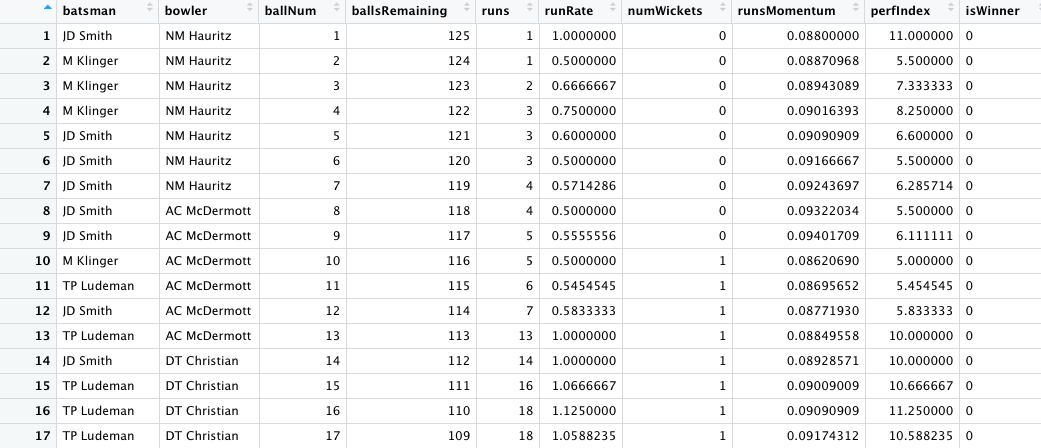
$ batsman        <chr> "JD Smith", "M Klinger", "M Klinger", "M Klinger", "JD …
$ bowler         <chr> "NM Hauritz", "NM Hauritz", "NM Hauritz", "NM Hauritz",…

$ ballNum        <int> 1, 2, 3, 4, 5, 6, 7, 8, 9, 10, 11, 12, 13, 14, 15, 16, …
$ ballsRemaining <int> 125, 124, 123, 122, 121, 120, 119, 118, 117, 116, 115, …
$ runs           <int> 1, 1, 2, 3, 3, 3, 4, 4, 5, 5, 6, 7, 13, 14, 16, 18, 18,…

$ runRate        <dbl> 1.0000000, 0.5000000, 0.6666667, 0.7500000, 0.6000000, …
$ numWickets     <int> 0, 0, 0, 0, 0, 0, 0, 0, 0, 1, 1, 1, 1, 1, 1, 1, 1, 1, 1…
$ runsMomentum   <dbl> 0.08800000, 0.08870968, 0.08943089, 0.09016393, 0.09090…
$ perfIndex      <dbl> 11.000000, 5.500000, 7.333333, 8.250000, 6.600000, 5.50…
$ isWinner       <int> 0, 0, 0, 0, 0, 0, 0, 0, 0, 0, 0, 0, 0, 0, 0, 0, 0, 0, 0…


df %>% 
  count(isWinner) %>% 
  mutate(prop = n/sum(n))
  isWinner      n      prop
1        
0 614237 0.5122419
2        
1 584878 0.4877581

2) Create training.validation and test sets

b) Split to training, validation and test sets. The dataset is initially split into training and test in the ratio 80%:20%. The training data is again split into training and validation in the ratio 80:20

set.seed(123)
splits      <- initial_split(df,prop = 0.80)
splits
<Training/Testing/Total>
<959292/239823/1199115>
df_other <- training(splits)
df_test  <- testing(splits)

set.seed(234)
val_set <- validation_split(df_other,prop = 0.80)
val_set
# A tibble: 1 × 2
  splits                  
id        
  <list>                  <chr>     
1 <split [767433/191859]> validation

3) Create pre-processing recipe

a) Normalise the following predictors

  • ballNum
  • ballsRemaining
  • runs
  • runRate
  • numWickets
  • runsMomentum
  • perfIndex

b) Create floating point embeddings for

  • batsman
  • bowler

4) Create a Logistic Regression Workflow by adding the GLM model and the recipe

5) Create grid of elastic penalty values for regularisation

6) Train all 30 models

7) Plot the ROC of the model against the penalty

# Use all 12 cores
cores <- parallel::detectCores()
cores
# Create a Logistic Regression model with penalty
lr_mod <- 
  logistic_reg(penalty = tune(), mixture = 1) %>% 
  set_engine("glmnet",num.threads = cores)

# Create pre-processing recipe
lr_recipe <- 
  recipe(isWinner ~ ., data = df_other) %>%
  step_embed(batsman,bowler, outcome = vars(isWinner)) %>%  step_normalize(ballNum,ballsRemaining,runs,runRate,numWickets,runsMomentum,perfIndex) 

# Set the workflow by adding the GLM model with the recipe
lr_workflow <- 
  workflow() %>% 
  add_model(lr_mod) %>% 
  add_recipe(lr_recipe)

# Create a grid for the elastic net penalty
lr_reg_grid <- tibble(penalty = 10^seq(-4, -1, length.out = 30))
lr_reg_grid %>% top_n(-5) 
# A tibble: 5 × 1
   penalty
     
<dbl>
1 0.0001  
2 0.000127
3 0.000161
4 0.000204
5 0.000259

lr_reg_grid %>% top_n(5)  # highest penalty values
# A tibble: 5 × 1
  penalty
    <dbl>
1  0.0386
2  0.0489
3  0.0621
4  0.0788
5  0.1

# Train 30 penalized models
lr_res <- 
  lr_workflow %>% 
  tune_grid(val_set,
            grid = lr_reg_grid,
            control = control_grid(save_pred = TRUE),
            metrics = metric_set(accuracy,roc_auc))

# Plot the penalty versus ROC
lr_plot <- 
  lr_res %>% 
  collect_metrics() %>% 
  ggplot(aes(x = penalty, y = mean)) + 
  geom_point() + 
  geom_line() + 
  ylab("Area under the ROC Curve") +
  scale_x_log10(labels = scales::label_number())

lr_plot

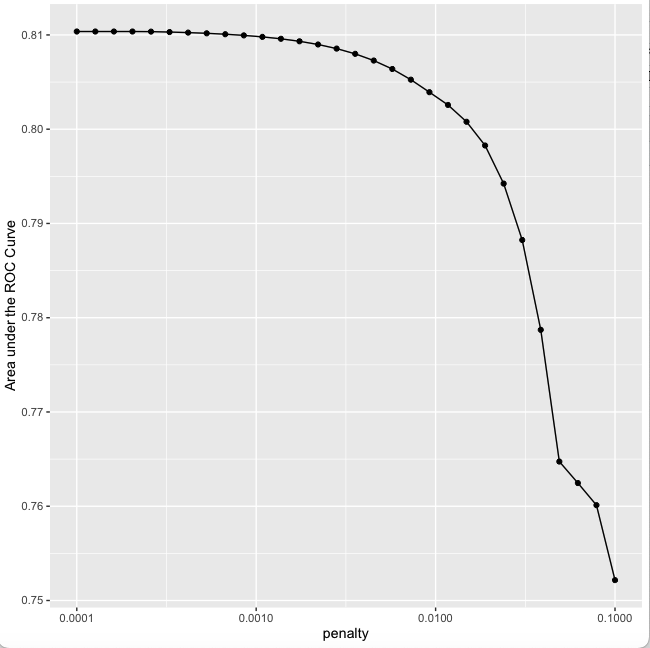
The Penalty vs ROC plot is shown below

8) Display the ROC_AUC of the top models with the penalty

9) Select the model with the best ROC_AUC and the associated penalty. It can be seen the best mean ROC_AUC is 0.81 and the associated penalty is 0.000530

top_models <-
  lr_res %>% 
  show_best("roc_auc", n = 15) %>% 
  arrange(penalty) 
top_models

# A tibble: 15 × 7
    penalty .metric .estimator  mean     n std_err .config              
      <dbl> <chr>   <chr>      <dbl> <int>   <dbl> <chr>                
 1 0.0001   roc_auc binary     0.810     1      NA Preprocessor1_Model01
 2 0.000127 roc_auc binary     0.810     1      NA Preprocessor1_Model02
 3 0.000161 roc_auc binary     0.810     1      NA Preprocessor1_Model03
 4 0.000204 roc_auc binary     0.810     1      NA Preprocessor1_Model04
 5 0.000259 roc_auc binary     0.810     1      NA Preprocessor1_Model05
 6 0.000329 roc_auc binary     0.810     1      NA Preprocessor1_Model06
 7 0.000418 roc_auc binary     0.810     1      NA Preprocessor1_Model07
 8 0.000530 roc_auc binary     0.810     1      NA Preprocessor1_Model08
 9 0.000672 roc_auc binary     0.810     1      NA Preprocessor1_Model09
10 0.000853 roc_auc binary     0.810     1      NA Preprocessor1_Model10
11 0.00108  roc_auc binary     0.810     1      NA Preprocessor1_Model11
12 0.00137  roc_auc binary     0.810     1      NA Preprocessor1_Model12
13 0.00174  roc_auc binary     0.809     1      NA Preprocessor1_Model13
14 0.00221  roc_auc binary     0.809     1      NA Preprocessor1_Model14
15 0.00281  roc_auc binary     0.809     1      NA Preprocessor1_Model15

#Picking the best model and the corresponding penalty
lr_best <- 
  lr_res %>% 
  collect_metrics() %>% 
  arrange(penalty) %>% 
  slice(8)
lr_best
# A tibble: 1 × 7
   
   penalty .metric .estimator  mean     n std_err .config              
     <dbl> <chr>   <chr>      <dbl> <int>   <dbl> <chr>                

1 0.000530 roc_auc binary     0.810     1      NA Preprocessor1_Model08

# Collect predictions and generate the AUC curve
lr_auc <- 
  lr_res %>% 
  collect_predictions(parameters = lr_best) %>% 
  roc_curve(isWinner, .pred_0) %>% 
  mutate(model = "Logistic Regression")

autoplot(lr_auc)

7) Plot the Area under the Curve (AUC).

10) Build the final model with the best LR parameters value as found in lr_best

a) The best performance was for a penalty of 0.000530

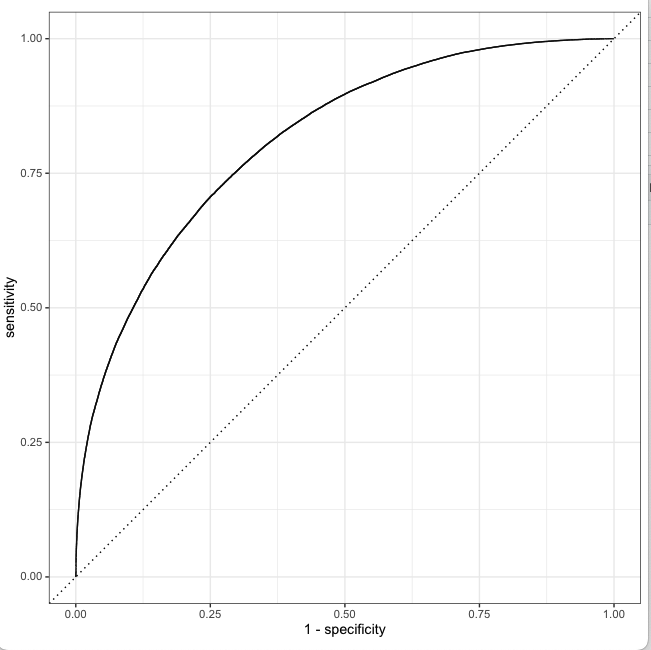
b) The accuracy achieved is 0.72. Clearly using the embeddings for batsman, bowlers improves on the performance of the GLM model without the embeddings. The accuracy achieved was 0.72 whereas previously it was 0.67 see (Computing Win Probability of T20 Matches)

c) Create a fit with the best parameters

d) The accuracy is 72.8% and the ROC_AUC is 0.813

# Create a model with the penalty for best ROC_AUC
last_lr_mod <- 
  logistic_reg(penalty = 0.000530, mixture = 1) %>% 
  set_engine("glmnet",num.threads = cores,importance = "impurity")

#Update the workflow with this model
last_lr_workflow <- 
  lr_workflow %>% 
  update_model(last_lr_mod)

#Create a fit
set.seed(345)
last_lr_fit <- 
  last_lr_workflow %>% 
  last_fit(splits)

#Generate accuracy, roc_auc
last_lr_fit %>% 
  collect_metrics()
# A tibble: 2 × 4
  .metric  .estimator .estimate .config             
  
<chr>    <chr>          <dbl> <chr>               
1 accuracy binary         0.728 Preprocessor1_Model1

2 roc_auc  binary         0.813 Preprocessor1_Model1

11) Plot the feature importance

It can be seen that bowler and batsman embeddings are the most significant for the prediction followed by runRate.

runRate –

  • runRate in 1st innings
  • requiredRunRate in 2nd innings

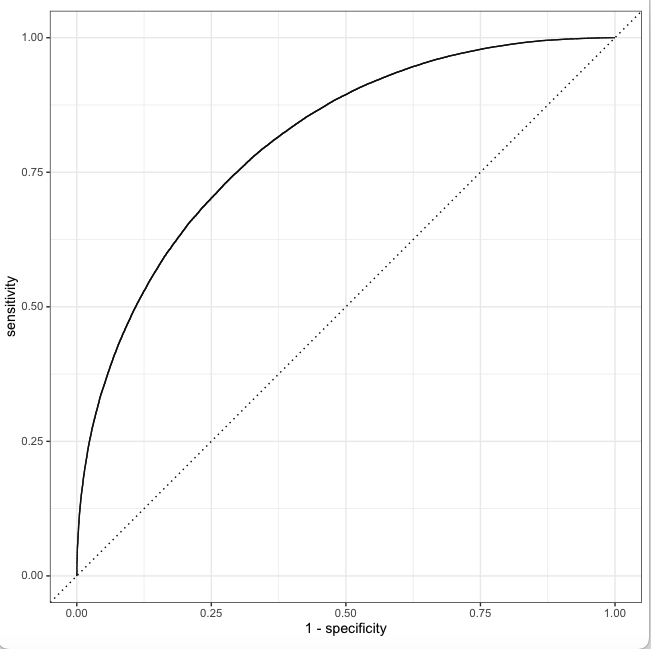
12) Plot the ROC characteristics

last_lr_fit %>% 
  collect_predictions() %>% 
  roc_curve(isWinner, .pred_0) %>% 
  autoplot()

13) Generate a confusion matrix

14) Create a final Generalised Linear Model for Logistic Regression with the penalty of 0.000530

15) Save the model

# generate predictions from the test set
test_predictions <- last_lr_fit %>% collect_predictions()
test_predictions

# generate a confusion matrix
test_predictions %>% 
  conf_mat(truth = isWinner, estimate = .pred_class)

Truth
Prediction     0     1
         
0                  90105 32658
         
1                  32572 84488

final_lr_model <- fit(last_lr_workflow, df_other)

final_lr_model

obj_size(final_lr_model)
146.51 MB


butcher::weigh(final_lr_model)
A tibble: 305 × 2
object                                  size
<chr>                                  <dbl>
  1 pre.actions.recipe.recipe.steps.terms1  57.9
2 pre.actions.recipe.recipe.steps.terms2  57.9
3 pre.actions.recipe.recipe.steps.terms3  57.9


cleaned_lm <- butcher::axe_env(final_lr_model, verbose = TRUE)
#✔ Memory released: "1.04 kB"
#✔ Memory released: "1.62 kB"

saveRDS(cleaned_lm, "cleanedLR.rds")
  

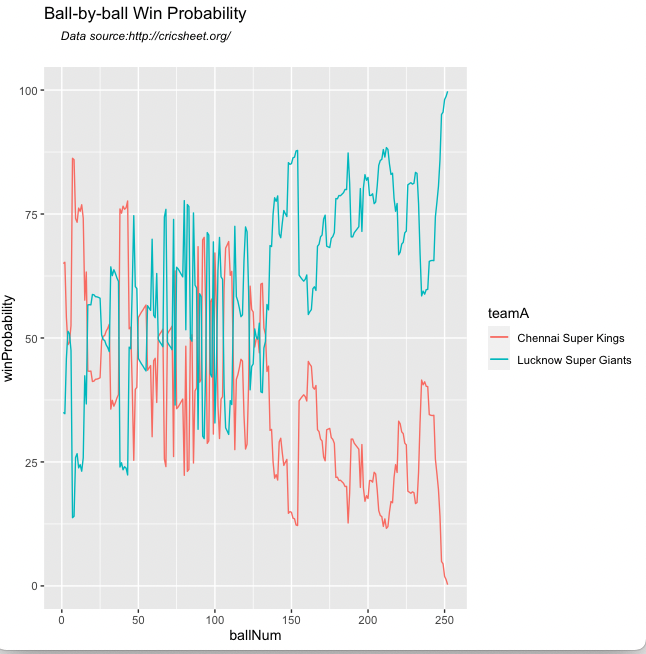
16) Compute Ball-by-ball Win Probability

  • Chennai Super Kings-Lucknow Super Giants-2022-03-31

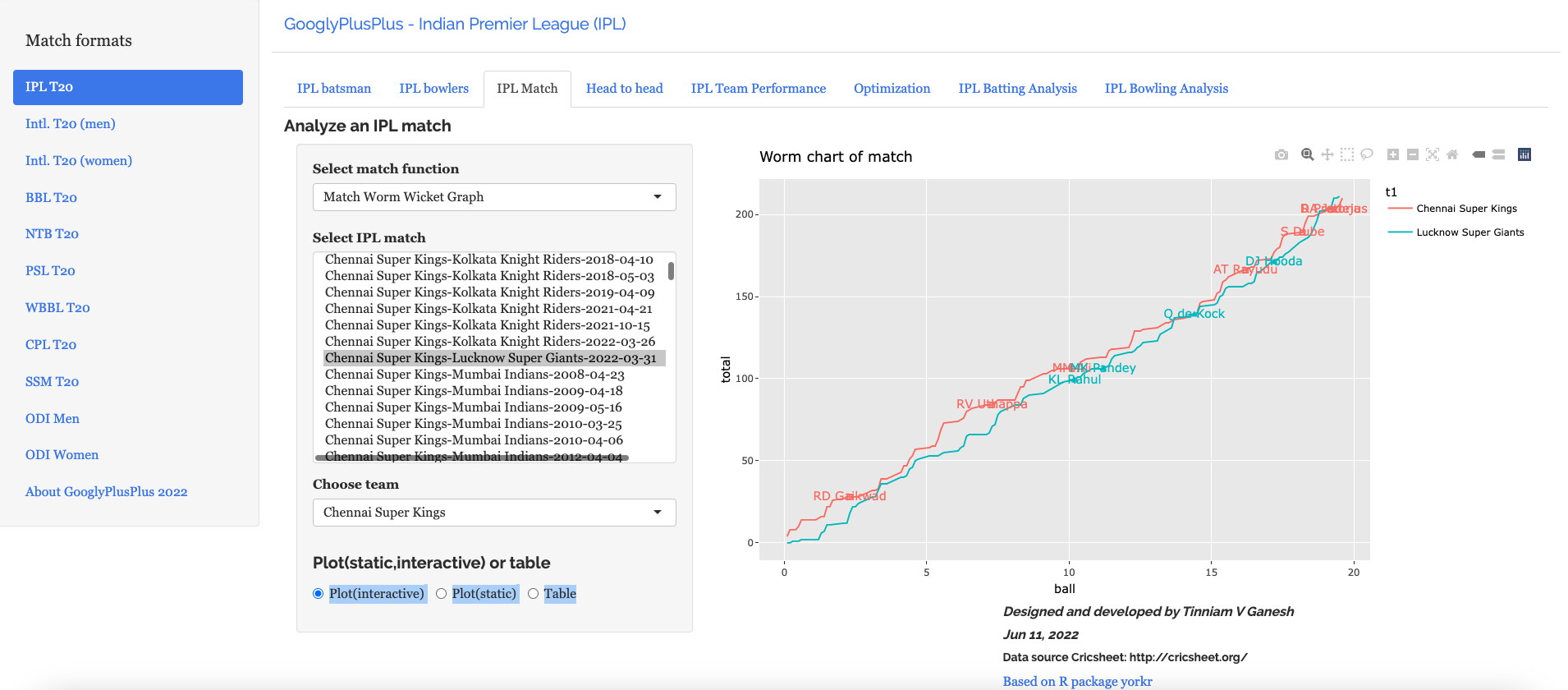
16a) The corresponding Worm-wicket graph for this match is as below

  • Chennai Super Kings-Lucknow Super Giants-2022-03-31

B) Win Probability using Random Forest with player embeddings

In the 2nd approach I use Random Forest with batsman and bowler embeddings. The performance of the model with embeddings is quantum jump from the earlier performance without embeddings. However, the random forest is also computationally intensive.

1) Read the data

a) Read the data from 9 T20 leagues (BBL, CPL, IPL, NTB, PSL, SSM, T20 Men, T20 Women, WBB) and create a single data frame of ball-by-ball data. Display the data frame

2) Create training.validation and test sets

b) Split to training, validation and test sets. The dataset is initially split into training and test in the ratio 80%:20%. The training data is again split into training and validation in the ratio 80:20

library(dplyr)
library(caret)
library(e1071)
library(ggplot2)
library(tidymodels)  
library(tidymodels)  
library(embed)

# Helper packages
library(readr)       # for importing data
library(vip) 
library(ranger)

# Read all the 9 T20 leagues
df1=read.csv("output3/matchesBBL3.csv")
df2=read.csv("output3/matchesCPL3.csv")
df3=read.csv("output3/matchesIPL3.csv")
df4=read.csv("output3/matchesNTB3.csv")
df5=read.csv("output3/matchesPSL3.csv")
df6=read.csv("output3/matchesSSM3.csv")
df7=read.csv("output3/matchesT20M3.csv")
df8=read.csv("output3/matchesT20W3.csv")
df9=read.csv("output3/matchesWBB3.csv")

# Bind into a single dataframe
df=rbind(df1,df2,df3,df4,df5,df6,df7,df8,df9)

set.seed(123)
df$isWinner = as.factor(df$isWinner)

#Split data into training, validation and test sets
splits      <- initial_split(df,prop = 0.80)
df_other <- training(splits)
df_test  <- testing(splits)
set.seed(234)
val_set <- validation_split(df_other, prop = 0.80)
val_set

2) Create a Random Forest model tuning for number of predictor nodes at each decision node (mtry) and minimum number of predictor nodes (min_n)

3) Use the ranger engine and set up for classification

4) Set up the recipe and include batsman and bowler embeddings

5) Create a workflow and add the recipe and the random forest model with the tuning parameters

# Use all 12 cores parallely
cores <- parallel::detectCores()
cores
[1] 12

# Create the random forest model with mtry and min as tuning parameters
rf_mod <- 
  rand_forest(mtry = tune(), min_n = tune(), trees = 1000) %>% 
  set_engine("ranger", num.threads = cores) %>% 
  set_mode("classification")

# Setup the recipe with batsman and bowler embeddings
rf_recipe <- 
  recipe(isWinner ~ ., data = df_other) %>% 
  step_embed(batsman,bowler, outcome = vars(isWinner)) 

# Create the random forest workflow
rf_workflow <- 
  workflow() %>% 
  add_model(rf_mod) %>% 
  add_recipe(rf_recipe)

rf_mod
# show what will be tuned
extract_parameter_set_dials(rf_mod)

set.seed(345)
# specify which values meant to tune

# Build the model
rf_res <- 
  rf_workflow %>% 
  tune_grid(val_set,
            grid = 10,
            control = control_grid(save_pred = TRUE),
            metrics = metric_set(accuracy,roc_auc))

# Pick the best  roc_auc and the associated tuning parameters
rf_res %>% 
  show_best(metric = "roc_auc")
# A tibble: 5 × 8
   mtry min_n .metric .estimator  mean     n std_err .config              
  <int> <int> <chr>   <chr>      <dbl> <int>   <dbl> <chr>                
1     4     4 roc_auc binary     0.980     1      NA Preprocessor1_Model08
2     9     8 roc_auc binary     0.979     1      NA Preprocessor1_Model03

3     8    16 roc_auc binary     0.974     1      NA Preprocessor1_Model10
4     7    22 roc_auc binary     0.969     1      NA Preprocessor1_Model09

5     5    19 roc_auc binary     0.969     1      NA Preprocessor1_Model06

rf_res %>% 
  show_best(metric = "accuracy")
# A tibble: 5 × 8
   
mtry min_n .metric  .estimator  mean     n std_err .config              
  <int> <int> <chr>    <chr>      <dbl> <int>   <dbl> <chr>                
1  4     4 accuracy binary    0.927     1      NA Preprocessor1_Model08

2  9     8 accuracy binary    0.926     1      NA Preprocessor1_Model03
3  8    16 accuracy binary    0.915     1      NA Preprocessor1_Model10
4  7    22 accuracy binary    0.906     1      NA Preprocessor1_Model09

5  5    19 accuracy binary    0.904     1      NA Preprocessor1_Model0

6) Select all models with the best roc_auc. It can be seen that the best roc_auc is 0.980 for mtry=4 and min_n=4

7) Get the model with the highest accuracy. The highest accuracy achieved is 0.927 or 92.7. This accuracy is also for mtry=4 and min_n=4

# Pick the best  roc_auc and the associated tuning parameters
rf_res %>% 
  show_best(metric = "roc_auc")
# A tibble: 5 × 8
   mtry min_n .metric .estimator  mean     n std_err .config              
  <int> <int> <chr>   <chr>      <dbl> <int>   <dbl> <chr>                
1     4     4 roc_auc binary     0.980     1      NA Preprocessor1_Model08
2     9     8 roc_auc binary     0.979     1      NA Preprocessor1_Model03

3     8    16 roc_auc binary     0.974     1      NA Preprocessor1_Model10
4     7    22 roc_auc binary     0.969     1      NA Preprocessor1_Model09

5     5    19 roc_auc binary     0.969     1      NA Preprocessor1_Model06

# Display the accuracy of the models in descending order and the parameters
rf_res %>% 
  show_best(metric = "accuracy")
# A tibble: 5 × 8
   
mtry min_n .metric  .estimator  mean     n std_err .config              
  <int> <int> <chr>    <chr>      <dbl> <int>   <dbl> <chr>                
1  4     4 accuracy binary    0.927     1      NA Preprocessor1_Model08

2  9     8 accuracy binary    0.926     1      NA Preprocessor1_Model03
3  8    16 accuracy binary    0.915     1      NA Preprocessor1_Model10
4  7    22 accuracy binary    0.906     1      NA Preprocessor1_Model09

5  5    19 accuracy binary    0.904     1      NA Preprocessor1_Model0

8) Select the model with the best parameters for accuracy mtry=4 and min_n=4. For this the accuracy is 0.927. For this configuration the roc_auc is also the best at 0.980

9) Plot the Area Under the Curve (AUC). It can be seen that this model performs really well and it hugs the top left.

# Pick the best model
rf_best <- 
  rf_res %>% 
  select_best(metric = "accuracy")

# The best model has mtry=4 and min=4
rf_best
     mtry min_n .config              
  <int> <int> <chr>                
1     4     4      Preprocessor1_Model08

#Plot AUC
rf_auc <- 
  rf_res %>% 
  collect_predictions(parameters = rf_best) %>% 
  roc_curve(isWinner, .pred_0) %>% 
  mutate(model = "Random Forest")

autoplot(rf_auc)

10) Create the final model with the best parameters

11) Execute the final fit

12) Plot feature importance, The bowler and batsman embedding followed by perfIndex and runRate are features that contribute the most to the Win Probability

last_rf_mod <- 
  rand_forest(mtry = 4, min_n = 4, trees = 1000) %>% 
  set_engine("ranger", num.threads = cores, importance = "impurity") %>% 
  set_mode("classification")

# the last workflow
last_rf_workflow <- 
  rf_workflow %>% 
  update_model(last_rf_mod)

set.seed(345)
last_rf_fit <- 
  last_rf_workflow %>% 
  last_fit(splits)

last_rf_fit %>% 
  collect_metrics()

  .metric  .estimator .estimate .config             
  <chr>    <chr>          <dbl> <chr>               

1 accuracy binary         0.944 Preprocessor1_Model1
2 roc_auc  binary         0.988 Preprocessor1_Model1

last_rf_fit %>% 
  extract_fit_parsnip() %>% 
  vip(num_features = 9)

13) Plot the ROC curve for the best fit

# Plot the ROC for the final model
last_rf_fit %>% 
  collect_predictions() %>% 
  roc_curve(isWinner, .pred_0) %>% 
  autoplot()

14) Create a confusion matrix

We can see that the number of false positives and false negatives is very low

15) Create the final fit with the Random Forest Model

# generate predictions from the test set
test_predictions <- last_rf_fit %>% collect_predictions()
test_predictions

   id               .pred_0 .pred_1  .row .pred_class isWinner .config          
   <chr>              <dbl>   <dbl> <int> <fct>       <fct>    <chr>            
 1 train/test split   0.838  0.162      1 0           0       Preprocessor1_Mo…
 2 
train/test split   0.463  0.537     11 1           0        Preprocessor1_Mo…
 3 
train/test split   0.846  0.154     14 0           0        Preprocessor1_Mo…
 4 
train/test split   0.839  0.161     22 0           0        Preprocessor1_Mo…
 5 
train/test split   0.846  0.154     36 0           0        Preprocessor1_Mo…
 6 
train/test split   0.848  0.152     37 0           0        Preprocessor1_Mo…
 7 
train/test split   0.731  0.269     39 0           0        Preprocessor1_Mo…
 8 
train/test split   0.972  0.0281    40 0           0        Preprocessor1_Mo…
 9 
train/test split   0.655  0.345     42 0           0        Preprocessor1_Mo…
10 
train/test split   0.662  0.338     43 0           0        Preprocessor1_Mo…

# generate a confusion matrix
test_predictions %>% 
  conf_mat(truth = isWinner, estimate = .pred_class)

          Truth
Prediction      0      1
         
          0 116576   7096
         
          1   6391 109760

# Create the final model
final_model <- fit(last_rf_workflow, df_other)

16) Computing Win Probability with Random Forest Model for match

  • Pakistan-India-2022-10-23

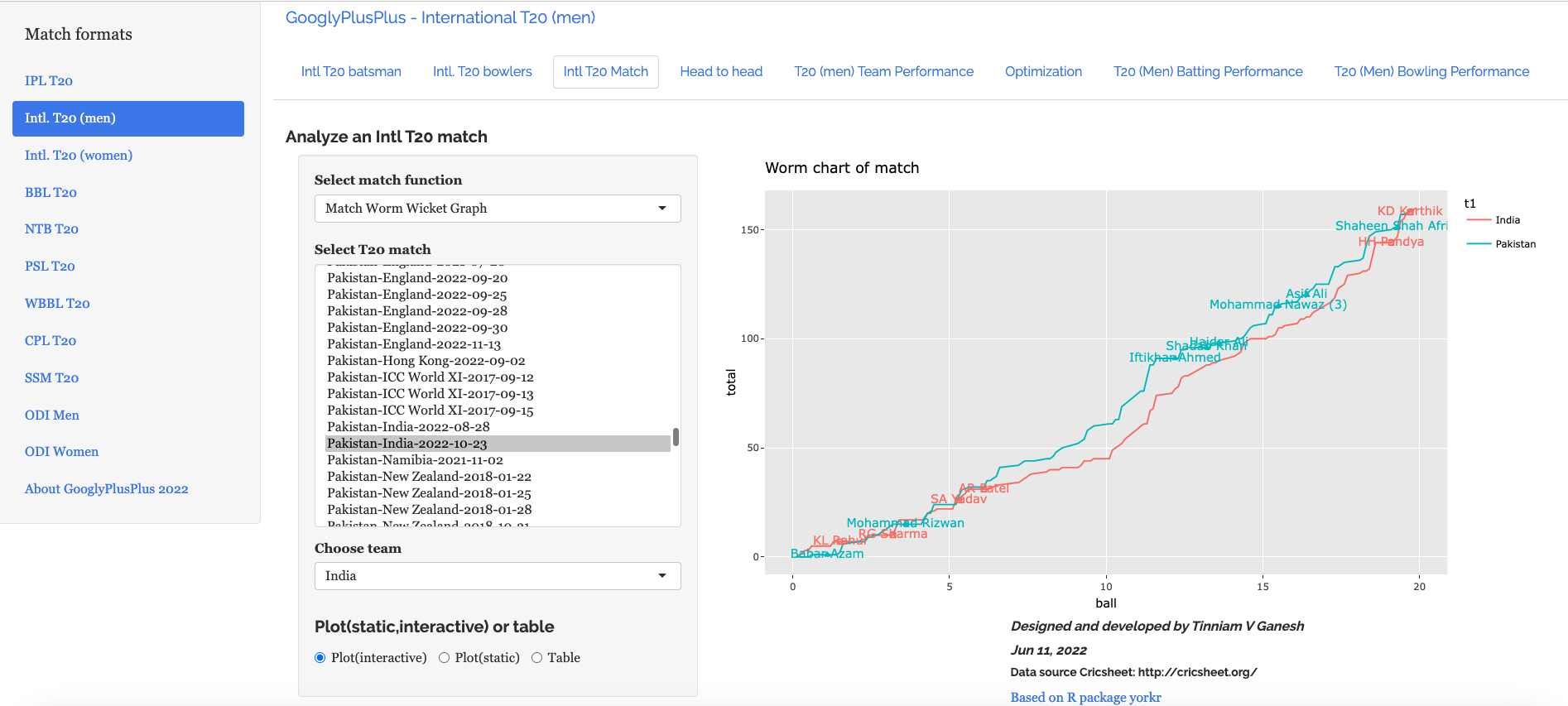
17) Worm -wicket graph of match

  • Pakistan-India-2022-10-23

C) Win Probability using MLP – Deep Neural Network (DNN) with player embeddings

In this approach the MLP package of Tidymodels was used. Multi-layer perceptron (MLP) with Deep Neural Network (DNN) was used to compute the Win Probability using player embeddings. An accuracy of 0.76 was obtained

1) Read the data

a) Read the data from 9 T20 leagues (BBL, CPL, IPL, NTB, PSL, SSM, T20 Men, T20 Women, WBB) and create a single data frame of ball-by-ball data. Display the data frame

2) Create training.validation and test sets

b) Split to training, validation and test sets. The dataset is initially split into training and test in the ratio 80%:20%. The training data is again split into training and validation in the ratio 80:20

library(dplyr)
library(caret)
library(e1071)
library(ggplot2)
library(tidymodels)    
library(embed)

# Helper packages
library(readr)       # for importing data
library(vip) 
library(ranger)

df1=read.csv("output3/matchesBBL3.csv")
df2=read.csv("output3/matchesCPL3.csv")
df3=read.csv("output3/matchesIPL3.csv")
df4=read.csv("output3/matchesNTB3.csv")
df5=read.csv("output3/matchesPSL3.csv")
df6=read.csv("output3/matchesSSM3.csv")
df7=read.csv("output3/matchesT20M3.csv")
df8=read.csv("output3/matchesT20W3.csv")
df9=read.csv("output3/matchesWBB3.csv")

df=rbind(df1,df2,df3,df4,df5,df6,df7,df8,df9)


set.seed(123)
df$isWinner = as.factor(df$isWinner)
splits      <- initial_split(df,prop = 0.80)
df_other <- training(splits)
df_test  <- testing(splits)
set.seed(234)
val_set <- validation_split(df_other, 
                            prop = 0.80)
val_set

3) Create a Deep Neural Network recipe

  • Normalize parameters
  • Add embeddings for batsman, bowler

4) Set the MLP-DNN hyperparameters

  • epochs=100
  • hidden units =5
  • dropout regularization =0.1

5) Fit on Training data

cores <- parallel::detectCores()
cores

nn_recipe <- 
  recipe(isWinner ~ ., data = df_other) %>% 
step_normalize(ballNum,ballsRemaining,runs,runRate,numWickets,runsMomentum,perfIndex) %>%
  step_embed(batsman,bowler, outcome = vars(isWinner)) %>%
  prep(training = df_other, retain = TRUE) 

# For validation:
test_normalized <- bake(nn_recipe, new_data = df_test)

set.seed(57974)
# Set the hyper parameters for DNN
# Use Keras
# Fit on training data
nnet_fit <-
  mlp(epochs = 100, hidden_units = 5, dropout = 0.1) %>%
  set_mode("classification") %>% 
  # Also set engine-specific `verbose` argument to prevent logging the results: 
  set_engine("keras", verbose = 0) %>%
  fit(isWinner ~ ., data = bake(nn_recipe, new_data = df_other))

nnet_fit
parsnip model object
Model:"sequential"

____________________________________________________________________________

Layer (type)                                           Output Shape                                    Param #            
============================================================================
dense (Dense)                                           (None, 5)                                          60                 
____________________________________________________________________________

dense_1 (Dense)                                         (None, 5)                                          30                 
____________________________________________________________________________
dropout (Dropout)                                       (None, 5)                                          0                  
____________________________________________________________________________
dense_2 (Dense)                                         (None, 2)                                          12                 
============================================================================
Total params: 102
Trainable params: 102
Non-trainable params: 0

6) Test on Test data

  • Check ROC_AUC. It is 0.854
  • Check accuracy. The MLP-DNN gives a decent performance with an acuracy of 0.76
  • Compute the Confusion Matrix
# Validate on test data
val_results <- 
  df_test %>%
  bind_cols(
    predict(nnet_fit, new_data = test_normalized),
    predict(nnet_fit, new_data = test_normalized, type = "prob")
  )
val_results 

# Check roc_auc
val_results %>% roc_auc(truth = isWinner, .pred_0)
  .metric .estimator .estimate
  
   <chr>   <chr>          <dbl>
1 roc_auc binary         0.854

# Check accuracy
val_results %>% accuracy(truth = isWinner, .pred_class)
  .metric  .estimator .estimate
  <chr>    <chr>          <dbl>
1 accuracy binary         0.762

# Display confusion matrix
val_results %>% conf_mat(truth = isWinner, .pred_class)
          Truth
Prediction     
           0     1        
       0 97419 31564       
       1 25548 85292

Conclusion

  1. Of the 3 ML models, glmnet, random forest and Multi-layer Perceptron DNN, random forest had the best performance
  2. Random Forest ML model with batsman, bowler embeddings was able to achieve an accuracy of 92.4% and a ROC_AUC of 0.98 with very low false positives, negatives. This was a quantum jump from my earlier random forest model without embeddings which had an accuracy of 73.7% and an ROC_AUC of 0.834
  3. The glmnet and NN models are fairly light weight. Random Forest is computationally very intensive.

Check out my other posts

  1. Using Reinforcement Learning to solve Gridworld
  2. Deep Learning from first principles in Python, R and Octave – Part 8
  3. Introducing QCSimulator: A 5-qubit quantum computing simulator in R
  4. Big Data-5: kNiFi-ing through cricket data with yorkpy
  5. Singularity
  6. Practical Machine Learning with R and Python – Part 6
  7. GooglyPlusPlus2022 optimizes batting/bowling lineup
  8. Fun simulation of a Chain in Android
  9. Introducing cricpy:A python package to analyze performances of cricketers
  10. Programming languages in layman’s language

To see all posts click Index of posts

My presentations on ‘Elements of Neural Networks & Deep Learning’ -Parts 4,5

This is the next set of presentations on “Elements of Neural Networks and Deep Learning”.  In the 4th presentation I discuss and derive the generalized equations for a multi-unit, multi-layer Deep Learning network.  The 5th presentation derives the equations for a Deep Learning network when performing multi-class classification along with the derivations for cross-entropy loss. The corresponding implementations are available in vectorized R, Python and Octave are available in my book ‘Deep Learning from first principles:Second edition- In vectorized Python, R and Octave

Important note: Do check out my later version of these videos at Take 4+: Presentations on ‘Elements of Neural Networks and Deep Learning’ – Parts 1-8 . These have more content and also include some corrections. Check it out!

1. Elements of Neural Network and Deep Learning – Part 4
This presentation is a continuation of my 3rd presentation in which I derived the equations for a simple 3 layer Neural Network with 1 hidden layer. In this video presentation, I discuss step-by-step the derivations for a L-Layer, multi-unit Deep Learning Network, with any activation function g(z)


The implementations of L-Layer, multi-unit Deep Learning Network in vectorized R, Python and Octave are available in my post Deep Learning from first principles in Python, R and Octave – Part 3

2. Elements of Neural Network and Deep Learning – Part 5
This presentation discusses multi-class classification using the Softmax function. The detailed derivation for the Jacobian of the Softmax is discussed, and subsequently the derivative of cross-entropy loss is also discussed in detail. Finally the final set of equations for a Neural Network with multi-class classification is derived.


The corresponding implementations in vectorized R, Python and Octave are available in the following posts
a. Deep Learning from first principles in Python, R and Octave – Part 4
b. Deep Learning from first principles in Python, R and Octave – Part 5

To be continued. Watch this space!

Checkout my book ‘Deep Learning from first principles: Second Edition – In vectorized Python, R and Octave’. My book starts with the implementation of a simple 2-layer Neural Network and works its way to a generic L-Layer Deep Learning Network, with all the bells and whistles. The derivations have been discussed in detail. The code has been extensively commented and included in its entirety in the Appendix sections. My book is available on Amazon as paperback ($18.99) and in kindle version($9.99/Rs449).

Also see
1. My book ‘Practical Machine Learning in R and Python: Third edition’ on Amazon
2. Big Data-2: Move into the big league:Graduate from R to SparkR
3. Introducing QCSimulator: A 5-qubit quantum computing simulator in R
4. My TEDx talk on the “Internet of Things
5. Rock N’ Roll with Bluemix, Cloudant & NodeExpress
6. GooglyPlus: yorkr analyzes IPL players, teams, matches with plots and tables
7. Literacy in India – A deepR dive
8. Fun simulation of a Chain in Android

To see all posts click Index of Posts
My book ‘Practical Machine Learning in R and Python: Third edition’ on Amazon

Are you wondering whether to get into the ‘R’ bus or ‘Python’ bus?
My suggestion is to you is “Why not get into the ‘R and Python’ train?”

The third edition of my book ‘Practical Machine Learning with R and Python – Machine Learning in stereo’ is now available in both paperback ($12.99) and kindle ($8.99/Rs449) versions.  In the third edition all code sections have been re-formatted to use the fixed width font ‘Consolas’. This neatly organizes output which have columns like confusion matrix, dataframes etc to be columnar, making the code more readable.  There is a science to formatting too!! which improves the look and feel. It is little wonder that Steve Jobs had a keen passion for calligraphy! Additionally some typos have been fixed.


In this book I implement some of the most common, but important Machine Learning algorithms in R and equivalent Python code.
1. Practical machine with R and Python: Third Edition – Machine Learning in Stereo(Paperback-$12.99)
2. Practical machine with R and Python Third Edition – Machine Learning in Stereo(Kindle- $8.99/Rs449)

This book is ideal both for beginners and the experts in R and/or Python. Those starting their journey into datascience and ML will find the first 3 chapters useful, as they touch upon the most important programming constructs in R and Python and also deal with equivalent statements in R and Python. Those who are expert in either of the languages, R or Python, will find the equivalent code ideal for brushing up on the other language. And finally,those who are proficient in both languages, can use the R and Python implementations to internalize the ML algorithms better.

Here is a look at the topics covered

Table of Contents
Preface …………………………………………………………………………….4
Introduction ………………………………………………………………………6
1. Essential R ………………………………………………………………… 8
2. Essential Python for Datascience ……………………………………………57
3. R vs Python …………………………………………………………………81
4. Regression of a continuous variable ……………………………………….101
5. Classification and Cross Validation ………………………………………..121
6. Regression techniques and regularization ………………………………….146
7. SVMs, Decision Trees and Validation curves ………………………………191
8. Splines, GAMs, Random Forests and Boosting ……………………………222
9. PCA, K-Means and Hierarchical Clustering ………………………………258
References ……………………………………………………………………..269

Pick up your copy today!!
Hope you have a great time learning as I did while implementing these algorithms!

My book ‘Deep Learning from first principles:Second Edition’ now on Amazon

The second edition of my book ‘Deep Learning from first principles:Second Edition- In vectorized Python, R and Octave’, is now available on Amazon, in both paperback ($18.99)  and kindle ($9.99/Rs449/-)  versions. Since this book is almost 70% code, all functions, and code snippets have been formatted to use the fixed-width font ‘Lucida Console’. In addition line numbers have been added to all code snippets. This makes the code more organized and much more readable. I have also fixed typos in the book

Untitled

You can download the PDF version of this book from Github at https://github.com/tvganesh/DeepLearningBook-2ndEd

The book includes the following chapters

Table of Contents
Preface 4
Introduction 6
1. Logistic Regression as a Neural Network 8
2. Implementing a simple Neural Network 23
3. Building a L- Layer Deep Learning Network 48
4. Deep Learning network with the Softmax 85
5. MNIST classification with Softmax 103
6. Initialization, regularization in Deep Learning 121
7. Gradient Descent Optimization techniques 167
8. Gradient Check in Deep Learning 197
1. Appendix A 214
2. Appendix 1 – Logistic Regression as a Neural Network 220
3. Appendix 2 - Implementing a simple Neural Network 227
4. Appendix 3 - Building a L- Layer Deep Learning Network 240
5. Appendix 4 - Deep Learning network with the Softmax 259
6. Appendix 5 - MNIST classification with Softmax 269
7. Appendix 6 - Initialization, regularization in Deep Learning 302
8. Appendix 7 - Gradient Descent Optimization techniques 344
9. Appendix 8 – Gradient Check 405
References 475

Also see
1. My book ‘Practical Machine Learning in R and Python: Second edition’ on Amazon
2. The 3rd paperback & kindle editions of my books on Cricket, now on Amazon
3. De-blurring revisited with Wiener filter using OpenCV
4. TWS-4: Gossip protocol: Epidemics and rumors to the rescue
5. A Cloud medley with IBM Bluemix, Cloudant DB and Node.js
6. Practical Machine Learning with R and Python – Part 6
7. GooglyPlus: yorkr analyzes IPL players, teams, matches with plots and tables
8. Fun simulation of a Chain in Android

To see posts click Index of Posts

My book ‘Practical Machine Learning in R and Python: Second edition’ on Amazon

Note: The 3rd edition of this book is now available My book ‘Practical Machine Learning in R and Python: Third edition’ on Amazon

The third edition of my book ‘Practical Machine Learning with R and Python – Machine Learning in stereo’ is now available in both paperback ($12.99) and kindle ($9.99/Rs449) versions.  This second edition includes more content,  extensive comments and formatting for better readability.

In this book I implement some of the most common, but important Machine Learning algorithms in R and equivalent Python code.
1. Practical machine with R and Python: Third Edition – Machine Learning in Stereo(Paperback-$12.99)
2. Practical machine with R and Third Edition – Machine Learning in Stereo(Kindle- $9.99/Rs449)

This book is ideal both for beginners and the experts in R and/or Python. Those starting their journey into datascience and ML will find the first 3 chapters useful, as they touch upon the most important programming constructs in R and Python and also deal with equivalent statements in R and Python. Those who are expert in either of the languages, R or Python, will find the equivalent code ideal for brushing up on the other language. And finally,those who are proficient in both languages, can use the R and Python implementations to internalize the ML algorithms better.

Here is a look at the topics covered

Table of Contents
Preface …………………………………………………………………………….4
Introduction ………………………………………………………………………6
1. Essential R ………………………………………………………………… 8
2. Essential Python for Datascience ……………………………………………57
3. R vs Python …………………………………………………………………81
4. Regression of a continuous variable ……………………………………….101
5. Classification and Cross Validation ………………………………………..121
6. Regression techniques and regularization ………………………………….146
7. SVMs, Decision Trees and Validation curves ………………………………191
8. Splines, GAMs, Random Forests and Boosting ……………………………222
9. PCA, K-Means and Hierarchical Clustering ………………………………258
References ……………………………………………………………………..269

Pick up your copy today!!
Hope you have a great time learning as I did while implementing these algorithms!

My book “Deep Learning from first principles” now on Amazon

Note: The 2nd edition of this book is now available on Amazon

My 4th book(self-published), “Deep Learning from first principles – In vectorized Python, R and Octave” (557 pages), is now available on Amazon in both paperback ($18.99) and kindle ($9.99/Rs449). The book starts with the most primitive 2-layer Neural Network and works  its way to a generic L-layer Deep Learning Network, with all the bells and whistles.  The book includes detailed derivations and vectorized implementations in Python, R and Octave.  The code has been extensively  commented and has been included in the Appendix section.

Pick up your copy today!!!

You can download the PDF version of this book from Github at https://github.com/tvganesh/DeepLearningBook-2ndEd

My other books
1. Practical Machine Learning with R and Python
2. Beaten by sheer pace – Cricket analytics with yorkr
3. Cricket analytics with cricketr